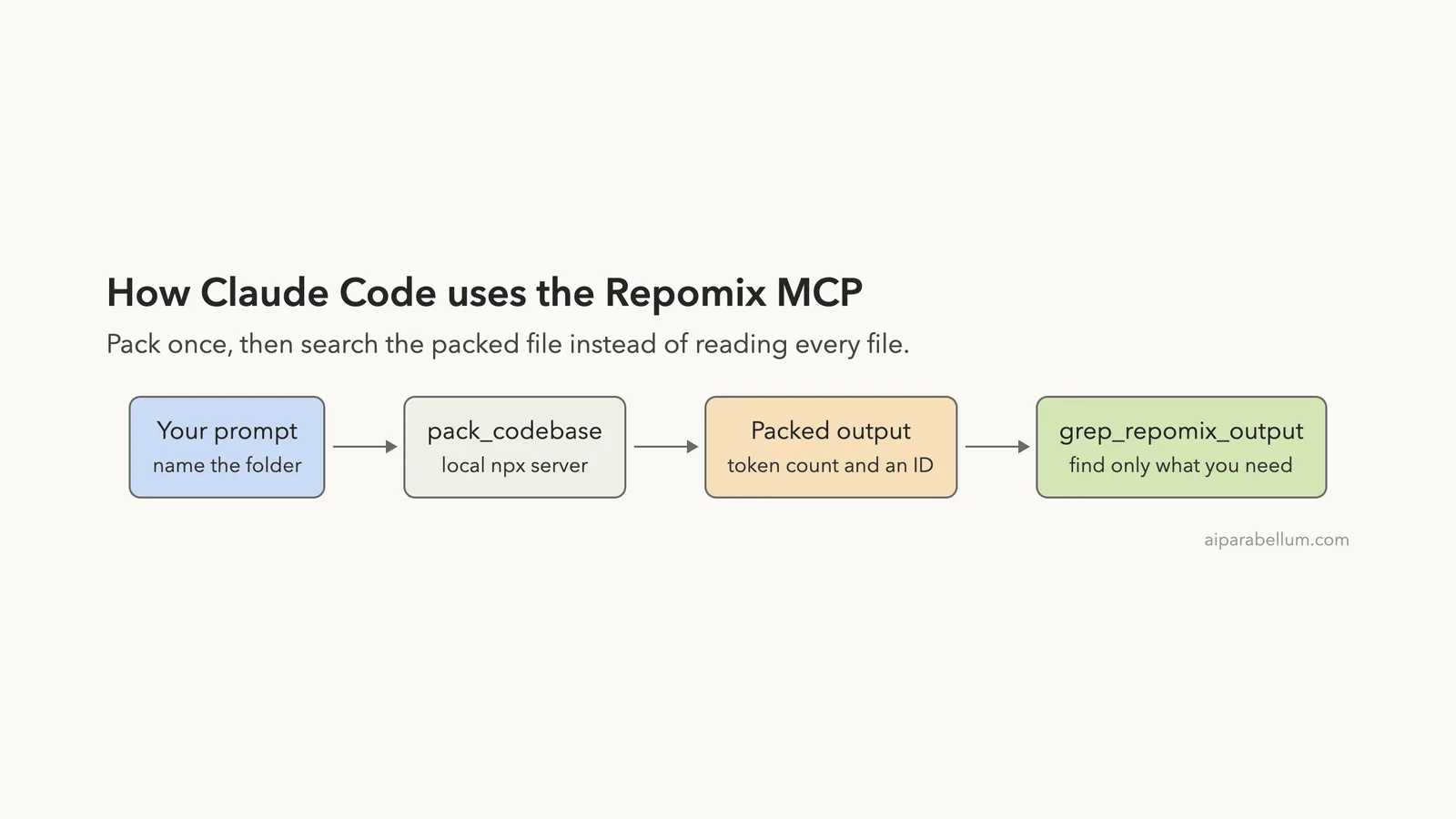
The Repomix MCP is a local server that packs a whole code folder into one file that an AI assistant can read or search. We added it to Claude Code, packed a small public project, and measured what it cost and what it saved. This guide shows the real numbers, including one result that did not match the claim in the README.
This guide is part of our Claude Code tutorials. Find more servers in our MCP servers directory.
Tested with Claude Code v2.1.322 on November 12, 2026, using the repomix npm package pinned at version 1.19.0. That version matches commit 758c3d7 of github.com/yamadashy/repomix, which is the repository the npm package lists. The repo uses the MIT license and was not archived.
It had a push four days before our test, and the npm page showed no install scripts for this version.
The server is local, needs no account or key, and packed a 145-file project in about three seconds. Compression saved 37.7% of tokens on our repo, not the roughly 70% the README mentions.
Quick Summary: What We Tested
| Question | Answer |
|---|---|
| What is it? | An MCP server from the Repomix project with six tools |
| Does it need an account or key? | No. It runs on your machine with npx |
| What did we run? | Adding the server, listing tools, two packs of one repo, and one search of the packed output |
| Packed size | 145 files, 55,502 tokens |
| Compressed size | 34,561 tokens, which is 37.7% less |
| Context cost | About 4.5k tokens for the six tool definitions, as measured with /context |
| Our verdict | Easy to add and it works. Useful for big, unfamiliar repos. Less so for small ones |
One honest note. We ran each step once on one project, so treat the numbers as one demo and not a benchmark.
What the Repomix MCP Is and Why It Exists
Repomix started as a command-line tool. You run it in a folder, and it writes one file that holds your directory tree and the content of your files, ready to paste into an AI chat.
The MCP mode wraps the same engine as a server. MCP is the Model Context Protocol, a standard way to give Claude extra tools. If it is new to you, our MCP guide explains it.
Per the README, the server lets an assistant package local or remote repositories for analysis without you preparing any files. You start it with repomix --mcp, and Claude Code starts it for you in the background.
Why would you want this? Claude Code already reads files on its own. A packed file is different because it is one searchable bundle with a token count, so you can see how big a codebase is before you load any of it.
How to Add the Repomix MCP to Claude Code
We worked in a throwaway demo folder and used local scope, so the server exists only in that folder. We also pinned the version, so a later release cannot change what runs. Your normal setup stays unchanged.
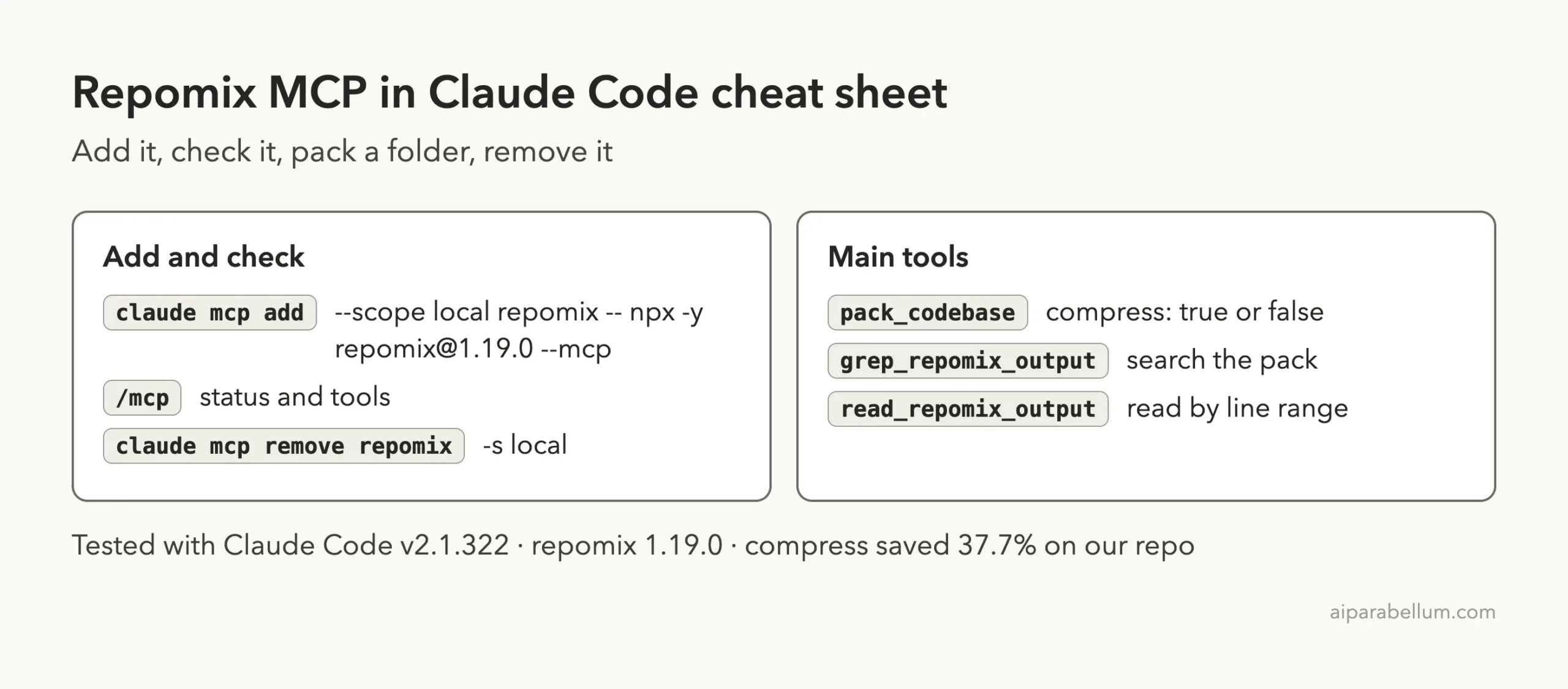
claude mcp add --scope local repomix -- npx -y [email protected] --mcpThe part after -- is the command Claude Code runs to start the server. The -y flag lets npx install the package without asking. The general steps for any server are in the MCP quickstart, and scopes are explained in the MCP docs.
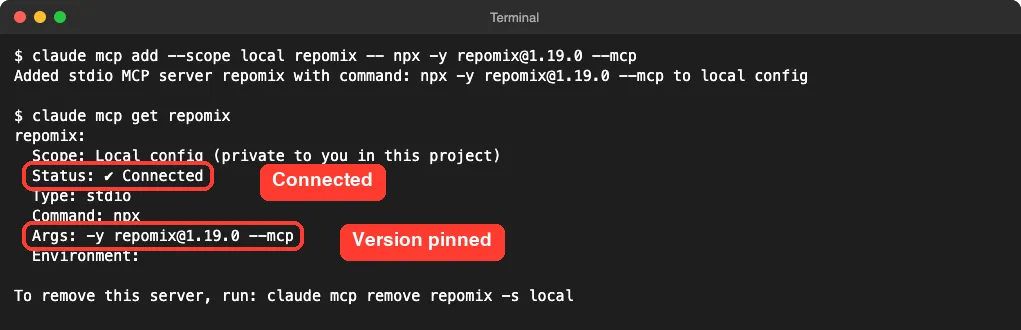
No sign-in prompt and no key. The claude mcp get repomix command showed the stored command, so you can double-check what will run on your machine.
The Six Tools Claude Code Sees
We started claude in the folder and ran /mcp. The server appeared under local servers with 6 tools.
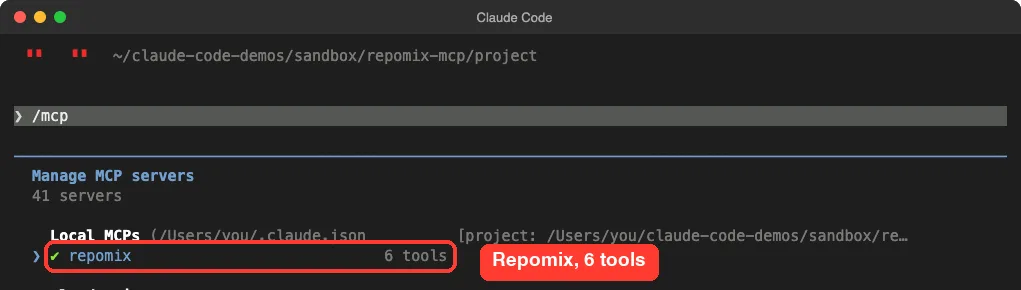
Opening the server showed it as connected, with the pinned command and the capabilities listed as tools and prompts. The tool list names all six.
| Tool | What the README says it does |
|---|---|
pack_codebase | Packs a local folder into one file, with options for compression and file patterns |
pack_remote_repository | Fetches and packs a GitHub repository |
attach_packed_output | Attaches an output file you already made with Repomix |
read_repomix_output | Reads a packed output by ID, with an optional line range |
grep_repomix_output | Searches a packed output with a regular expression |
generate_skill | Generates a skill from a codebase |
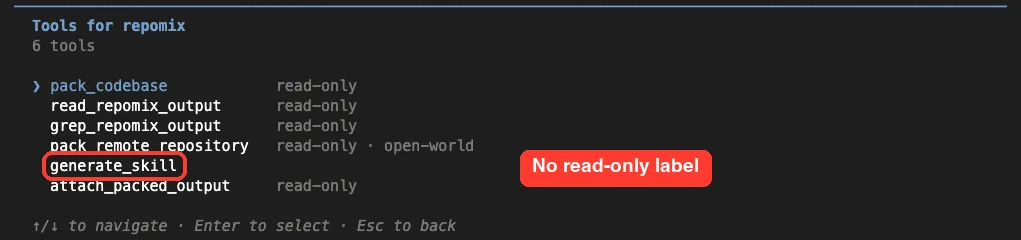
Look at the labels. Five tools say read-only.
The pack_remote_repository tool also says open-world, which fits a tool that reaches out to GitHub. generate_skill has no label at all. We did not run it, and we did not allow it in our tests.
Is the Repomix MCP Safe to Add?
Ask what a server can do and where your data goes. This one runs locally through npx, so there is no hosted service in the middle for local packs. Remote packing does contact GitHub.
The README has one warning worth knowing. Without the --sandbox flag, pack_codebase loads the repomix.config.* file in the folder it packs.
The README says a config file is code that can run when loaded. If your assistant may pack folders you do not trust, it recommends --sandbox.
In sandbox mode, per the README, paths must stay inside one workspace folder, config files are not loaded, and remote packing and skill generation are turned off. We did not use sandbox mode in our test, because our demo folder had no config file and we read the project first. We also did not test the sandbox flag, so we can only repeat what the README says.
We allowed only the two tools we needed for the run with --allowedTools mcp__repomix__pack_codebase,mcp__repomix__grep_repomix_output. Claude Code would ask before using anything else.
What It Costs in Context
Every MCP server adds tool definitions to your session. We ran claude -p "/context" in the demo folder to see what Repomix added.
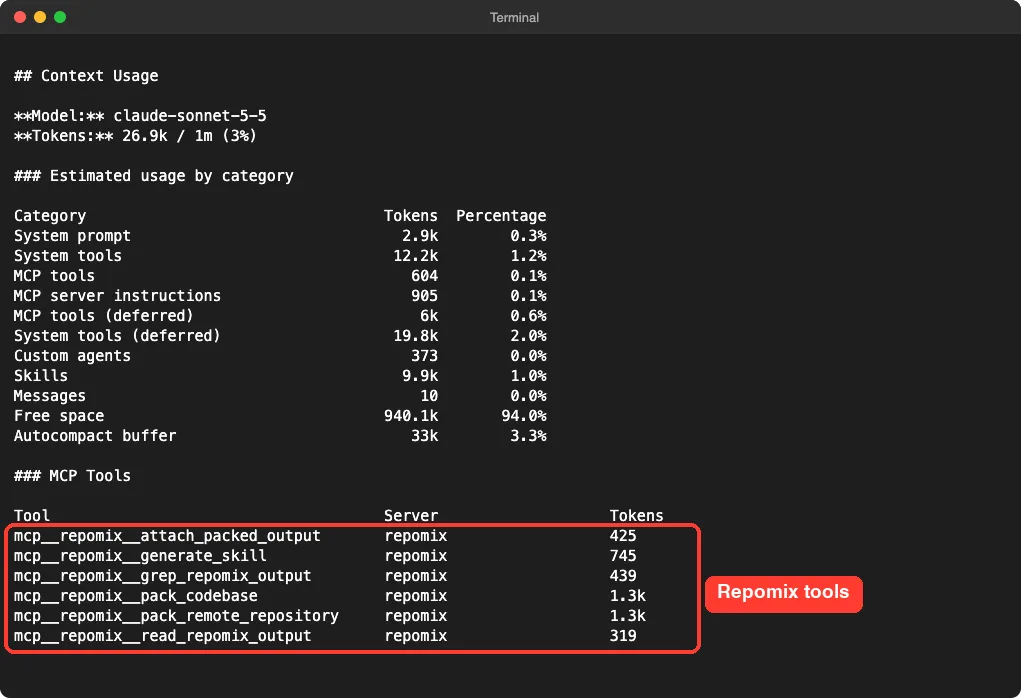
The six tools came to about 4.5k tokens when we added the numbers: 425, 745, 439, 319, and about 1.3k each for the two pack tools. Our session showed those tools under the deferred tools line, which means Claude Code loads them only when it needs them. The whole session showed 26.9k of 1m tokens used, so the server was a small part of it.
That fixed price is separate from what a pack adds. A pack is only as big as the project you point it at.
Test 1: Pack a Real Project
For a project to pack, we cloned the public Polka repository, a small web server library, into the demo folder. We used commit c36cf8b from June 2024. Then we asked Claude to pack it.
Use the repomix pack_codebase tool on the polka folder in this directory with default options. Reply in 4 short lines: how many files, total tokens, and the 3 largest files.Claude called the tool and answered in a few seconds. It reported 145 files, 55,502 tokens (190,243 characters), and the three largest files by tokens: tests/polka.js at 5,980, readme.md at 5,895 and packages/polka/readme.md at 5,818.
The clone had 152 tracked files and Repomix packed 145. We did not check which seven it left out, but the README says it skips things like binary files and ignored paths.
The token count is the useful part. Before you ask Claude to read a project, you now know that all of it would be about 55 thousand tokens.
Test 2: Does Compression Really Save 70%?
The README describes the compress option as using Tree-sitter to keep code signatures and structure while removing implementation details. It says this reduces token use by about 70%. So we packed the same folder again with compression on.
Now pack the same folder again with compress set to true. Reply in 3 short lines: total tokens now, and the percent saved.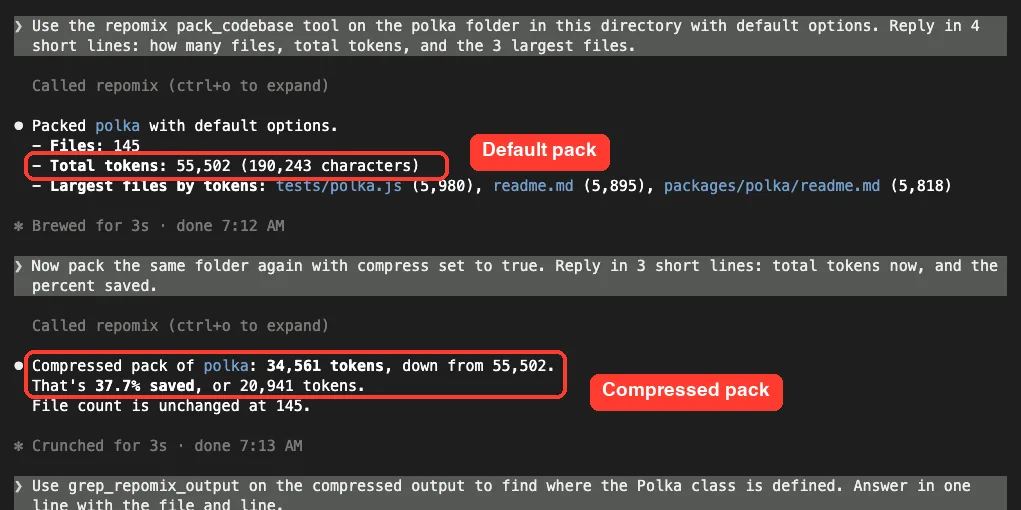
The result was 34,561 tokens, down from 55,502. That is 20,941 tokens saved, or 37.7%. The file count stayed at 145.
This is well below the 70% in the README. We can only guess why, and we do not want to state it as fact.
Polka is mostly short code files plus readmes, tests and example projects, and text like markdown does not have function bodies to remove. Your own repo may land closer to the README figure or further away.
The takeaway is simple. Compression helped, but measure it on your own project before you count on a number.
Test 3: Search the Pack Instead of Reading It
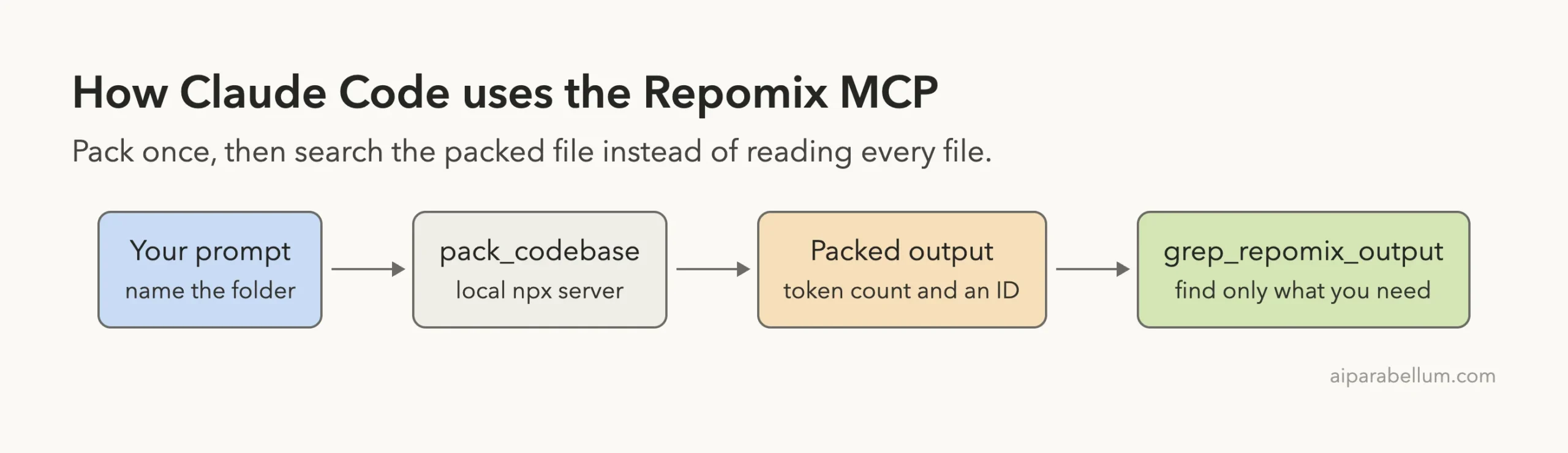
The README says grep_repomix_output allows incremental retrieval, so Claude does not need to load everything. We tested that with a question that needs a search.
Use grep_repomix_output on the compressed output to find where the Polka class is defined. Answer in one line with the file and line.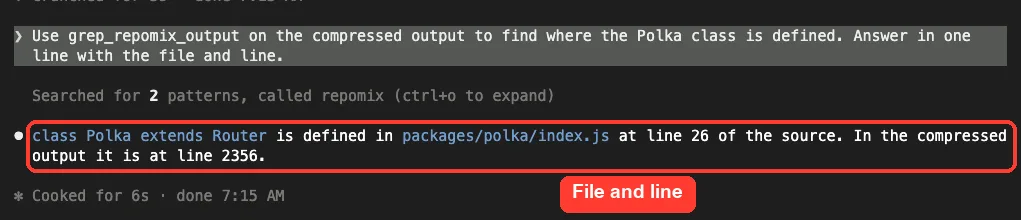
Claude ran two search patterns and answered that class Polka extends Router is defined in packages/polka/index.js at line 26 of the source. It also said that in the compressed output the line was 2356.
That matches how the tool is meant to work. The packed file is one long document, so the tool searches it and returns the matching lines. We did not measure how many tokens that search used compared with a plain file search, so we cannot say it was cheaper here.
What We Could Not Test
We stayed inside what one run on one machine can show.
- We did not test
pack_remote_repository, so we have not seen how it behaves with a GitHub URL. - We did not run
generate_skillorattach_packed_output. - We did not use
--sandbox, Docker, or any of the other install routes in the README. - We did not compare answer quality with and without the pack, only the token numbers.
Who Should Add the Repomix MCP to Claude Code?
| Your situation | Our advice |
|---|---|
| You want to size up a big, unfamiliar repo | Add it. The token count and largest files appear in one reply |
| You work in a small project | Probably skip it. Claude Code can already read a few files directly |
| You need to feed code to a chat app outside Claude Code | The plain repomix command may fit better than the MCP |
| You pack folders you do not trust | Read the README section on --sandbox first |
Common Mistakes
- Adding the server at user scope for a quick test. Use
--scope localto keep it in one folder. - Leaving the version unpinned, so
npxcan pull a newer release later. - Assuming compression will save 70%. We measured 37.7% on one repo.
- Packing a folder you have not looked at, since a config file in it can run.
- Forgetting to remove the server when the test is done.
Pro Tips
- Ask for the token count first. It tells you whether loading the whole project makes sense.
- Run
/mcpto confirm the server is connected and to check which tools are read-only. - Allow only the tools you need with
--allowedTools. - Ask Claude to search the pack and not to read it all, then follow up with
read_repomix_outputfor a line range. - Keep an eye on your session with
/context. Our context window guide explains what the numbers mean.
Try It Yourself
Run this in a throwaway folder that holds a small project you trust. Remove the server when you are done.
claude mcp add --scope local repomix -- npx -y [email protected] --mcp
claude
# inside Claude Code:
Use the repomix pack_codebase tool on the folder called my-project with default options. Tell me the file count, total tokens and the 3 largest files. Then pack it again with compress set to true and tell me the percent saved.
# when finished:
claude mcp remove repomix -s local
Cheat Sheet
Frequently Asked Questions
Does the Repomix MCP need an account or API key?
No. It runs locally through npx, and we entered no key.
How much context does it use?
The six tool definitions added up to about 4.5k tokens in our /context output. The tools are loaded on demand.
How much does compression save?
On our Polka test it cut 55,502 tokens to 34,561, which is 37.7%. The README mentions about 70%, so test it on your own project.
Is it safe to pack any folder?
Be careful. Without --sandbox, the packed folder’s config file is loaded, and the README warns that a config file is code. Pack only folders you trust.
How do I remove it?
Run claude mcp remove repomix -s local from the folder where you added it.
Conclusion
The Repomix MCP is easy to add, needs no account, and costs about 4.5k tokens of tool definitions. In our run, it packed a 145-file project into 55,502 tokens, cut that to 34,561 with compression, and found a class definition with a search instead of a full read. The trade-offs are that compression saved far less than the README figure on our repo and that unsandboxed packing trusts the folder’s config file. If you work with large codebases, try it for yourself on one you know well.
Next, browse more tested add-ons in our skills directory, or read our Claude overview.