If you search for a Claude Code Twilio plugin, you will find that Anthropic’s official marketplace lists it next to a handful of similar add-ons for email, maps and voice agents. They all promise the same thing: Claude learns how a service works, so the code it writes fits that service the first time.
We loaded four of these plugins in one real Claude Code session and checked what each one adds. We also looked at a fifth, a Coursera learning skill, in its repo. This guide shows what we ran, what needs an account, and which plugin fits which job.
This guide is part of our Claude Code tutorials. Find more add-ons in our Skills Directory.
Tested with Claude Code v2.1.319 on 2026-11-10 (macOS). We used the official marketplace at commit dceb15d, plus Twilio plugin v0.3.2 (commit 803790a), Resend v1.0.5 (commit f3e86d8), Mapbox v1.0.0 (commit f71cd72) and Synthflow v1.4.1 (commit e2b375d).
What We Ran and What Came From the Docs
These services all need an outside account, an API key or a sign-in. We never created an account, signed in or entered a key. So this is a roundup, not a full hands-on test of live features.
We cloned each plugin into a throwaway sandbox and read its files first. None of the four ships hooks or install scripts. We then loaded them with --plugin-dir and --setting-sources project, so your own ~/.claude folder stays untouched.
| Plugin | Maker | What it does | Account needed | Install command | We ran it |
|---|---|---|---|---|---|
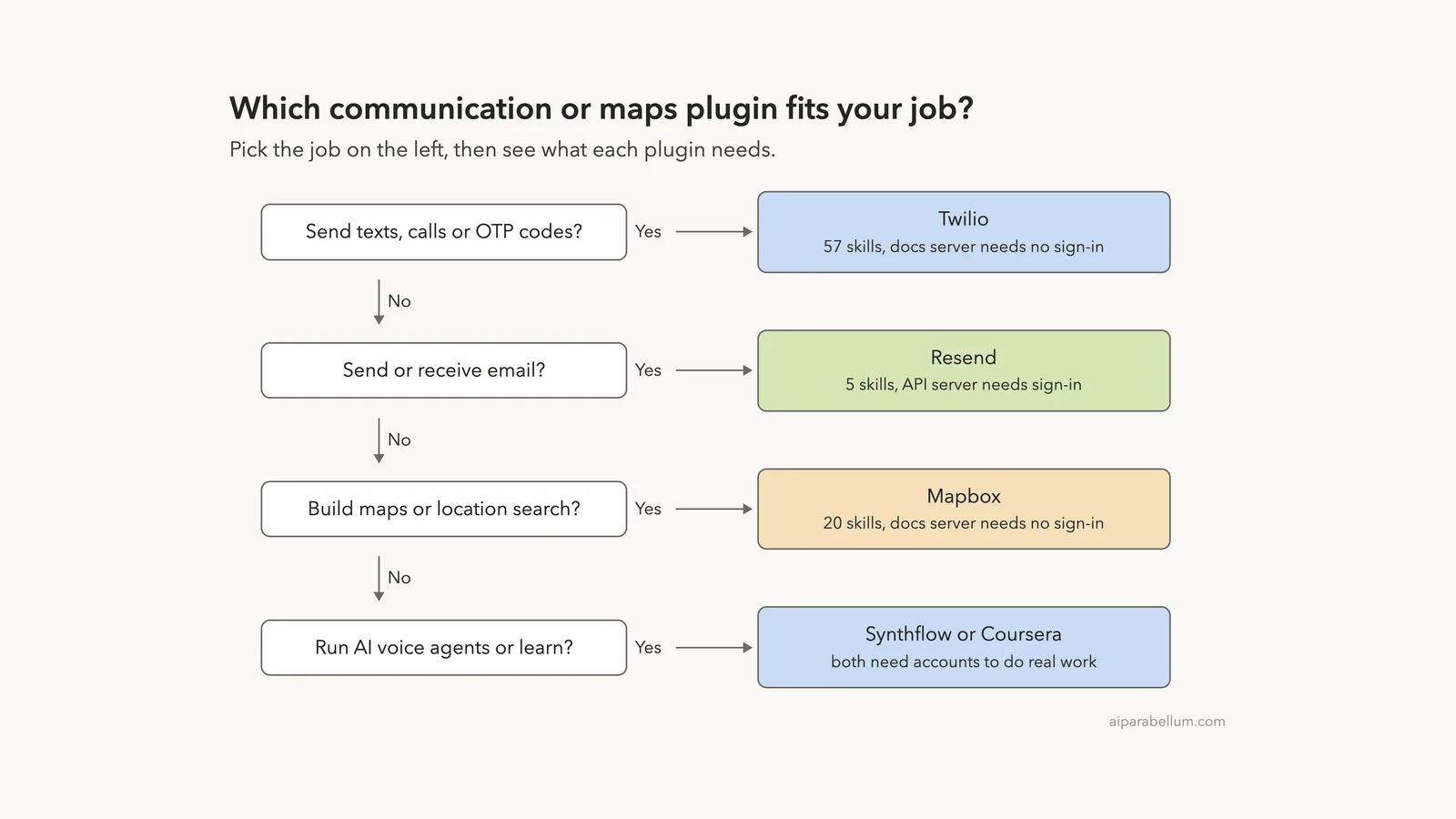
| Twilio Developer Kit | Twilio | 57 skills for SMS, voice, WhatsApp, Verify and SendGrid | Yes, to send real traffic | /plugin install twilio-developer-kit@claude-plugins-official | Loaded, skills listed, one skill answered |
| Resend | Resend | 5 skills for email sending, React Email and deliverability | Yes (API server) | /plugin install resend@claude-plugins-official | Loaded, skills listed, one skill answered |
| Mapbox | Mapbox | 20 skills for web, iOS, Android and Flutter maps | Yes, for token and API servers | /plugin install mapbox@claude-plugins-official | Loaded, skills listed, one skill answered |
| Synthflow | Synthflow | 7 skills to review and change AI voice agents | Yes (OAuth sign-in) | /plugin install synthflow@claude-plugins-official | Loaded, skills listed |
| Learn with Coursera | Coursera | A skill that routes learners to courses and projects | Yes (Coursera connector) | /plugin install learn-with-coursera@claude-plugins-official | Docs and repo only |
Our plugins guide explains how installing and managing plugins works in general.
How the Claude Code Twilio Plugin and Its Peers Are Built
Each plugin is really two things packed together. The first is a set of skills, which are plain instruction files that teach Claude how to use a service well. The second is one or more MCP servers, which let Claude call the service itself.
If MCP is new to you, read our MCP guide first.
Skills work offline from any account. They only change how Claude thinks and writes code. The servers are different, because they talk to a company’s hosted system, and that is where the sign-in comes in.
This split decides what you can try for free. You can learn a lot from the skills alone, and you can wait on the account until you have a real project.
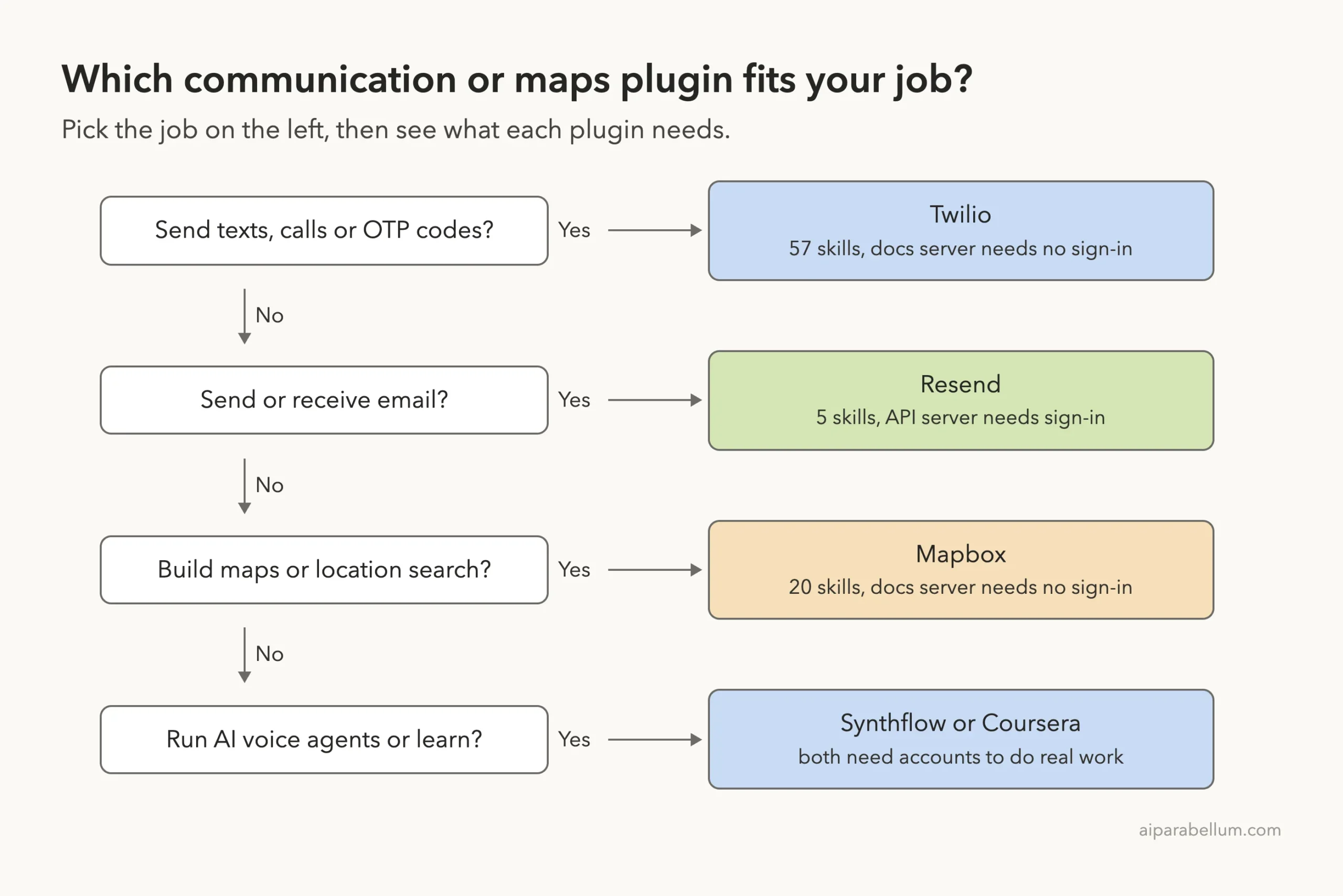
Claude Code Twilio Plugin: SMS, Voice and OTP Skills
The Twilio plugin is mostly advice: which API to use, in what order, and what to avoid.
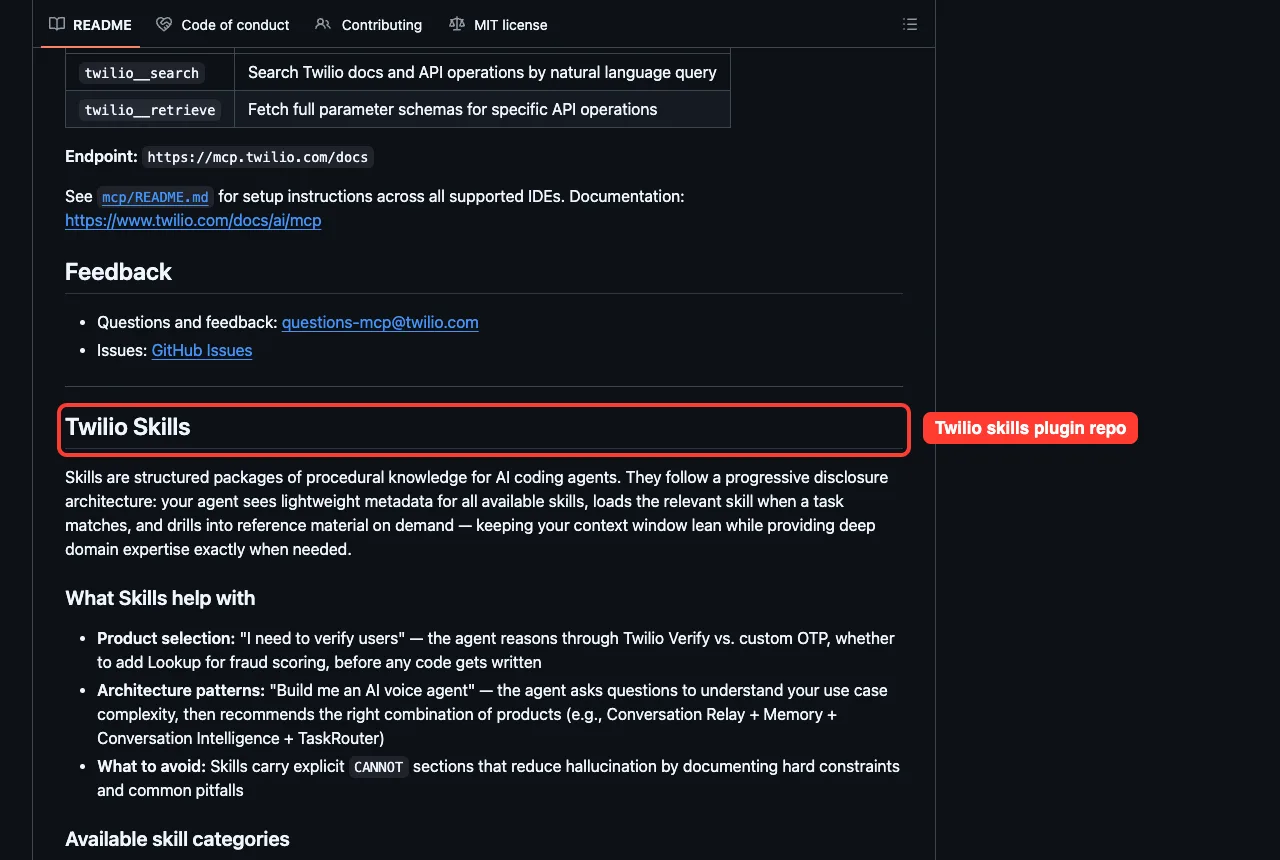
The plugin is called twilio-developer-kit. Its README describes skills as procedural knowledge for coding agents, so Claude knows which Twilio product fits a job before it writes any code.
The plugin folder holds 49 Twilio skills and 8 SendGrid skills, 57 in all. Typing /twilio in our session listed them, including twilio-send-message, twilio-voice-twiml, twilio-studio-flows and twilio-account-setup.
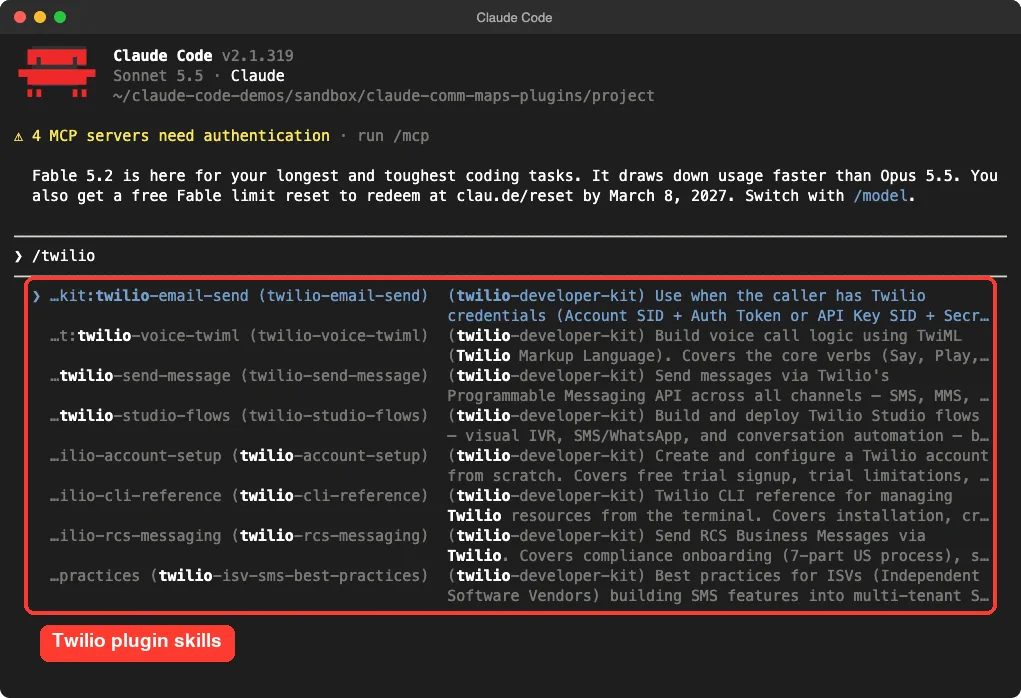
What the skills cover
The names tell the story. There are send-message and Verify skills for texts and one-time codes, voice skills for TwiML and ConversationRelay, and routing skills for TaskRouter. Others cover numbers and senders, webhooks, call recordings, RCS and WhatsApp.
There is also a group of guardrail skills about security, reliability and compliance. The README says the skills carry explicit CANNOT sections that list hard limits and common mistakes, which is meant to reduce made-up answers.
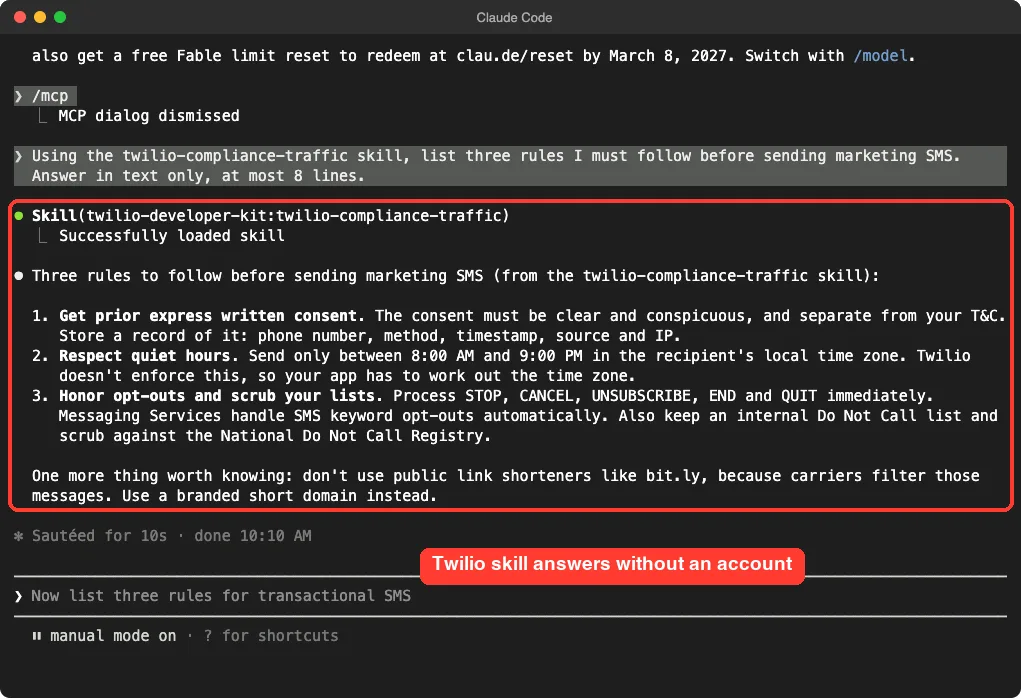
A real answer with no account
We asked Claude to use the twilio-compliance-traffic skill and list three rules for marketing texts. The skill loaded and Claude answered in about ten seconds, with no Twilio account in sight.
The answer named prior express written consent, sending only between 8 AM and 9 PM in the recipient’s time zone, and honoring STOP-style opt-outs. It also warned against public link shorteners. These come from the skill’s own text, and you should still check the rules that apply to you with a lawyer.
The docs server
The plugin also adds a twilio-docs MCP server at mcp.twilio.com/docs. In /mcp it showed a green mark with two tools, one to search Twilio docs and one to fetch full API schemas. It needed no sign-in for us.
What we did not test: sending a real message, buying a number or running Verify. All of that needs a Twilio account and credentials.
Resend Plugin: Email Skills and Deliverability Advice
Resend is an email API, and its plugin has just five skills. They are resend, resend-cli, react-email, agent-email-inbox and email-best-practices.
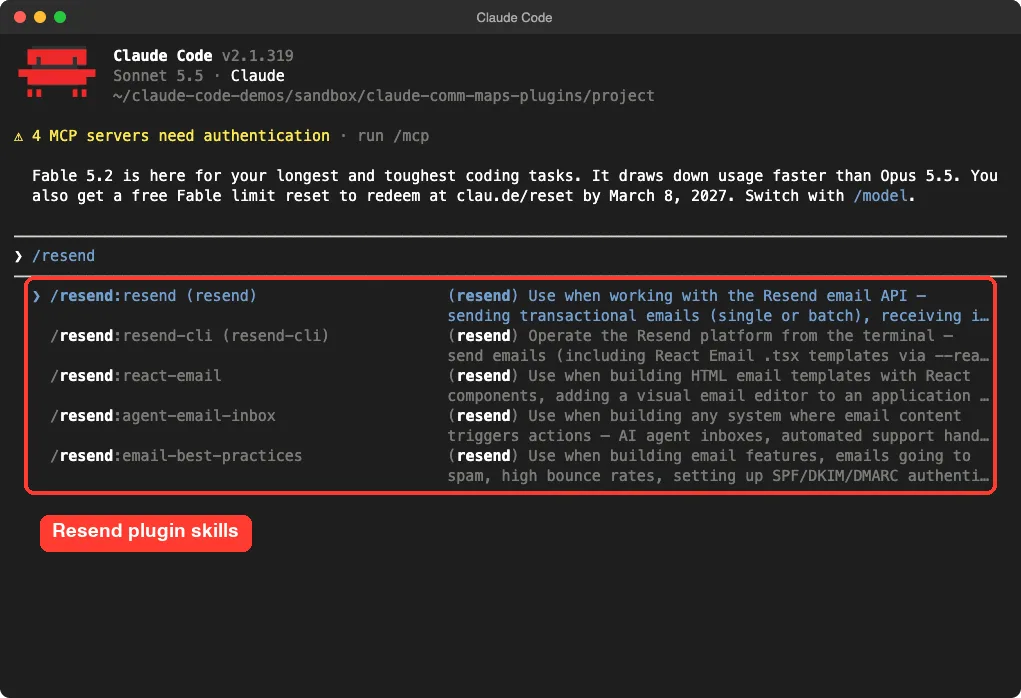
Which skill does what
The main resend skill covers sending single or batch emails, receiving mail through webhooks, templates, domains and contacts. The resend-cli skill is for running the resend command in a terminal or in CI.
The react-email skill helps build email layouts with React components. The agent-email-inbox skill is the one we liked most on paper: its description says it covers systems where email content triggers actions, with patterns such as sender allowlists and content filtering, because inbound email can carry prompt injection.
Trying the best-practices skill
We asked which DNS records help emails avoid spam. Claude loaded email-best-practices and answered with SPF, DKIM and DMARC, plus a reverse DNS record and an MX record. It added that it had not opened the skill’s deeper deliverability reference, so part of the answer came from general knowledge.
That honesty is useful to remember. A skill gives Claude a map, but you should still check the details against your email provider’s own setup page.
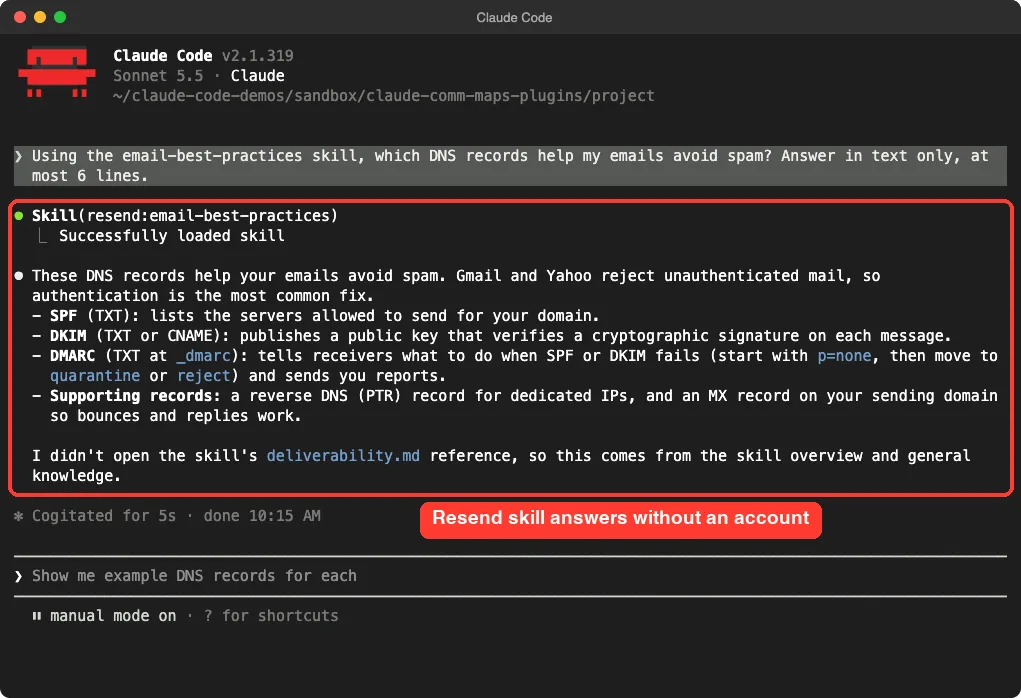
The Resend MCP server at mcp.resend.com showed yellow in /mcp, which means it needs sign-in. We stopped there and did not send any email.
Mapbox Plugin: 20 Skills for Maps and Location
The Mapbox plugin is the biggest by topic range. Its manifest says it covers web, iOS, Android and Flutter, and it ships 20 skill folders.
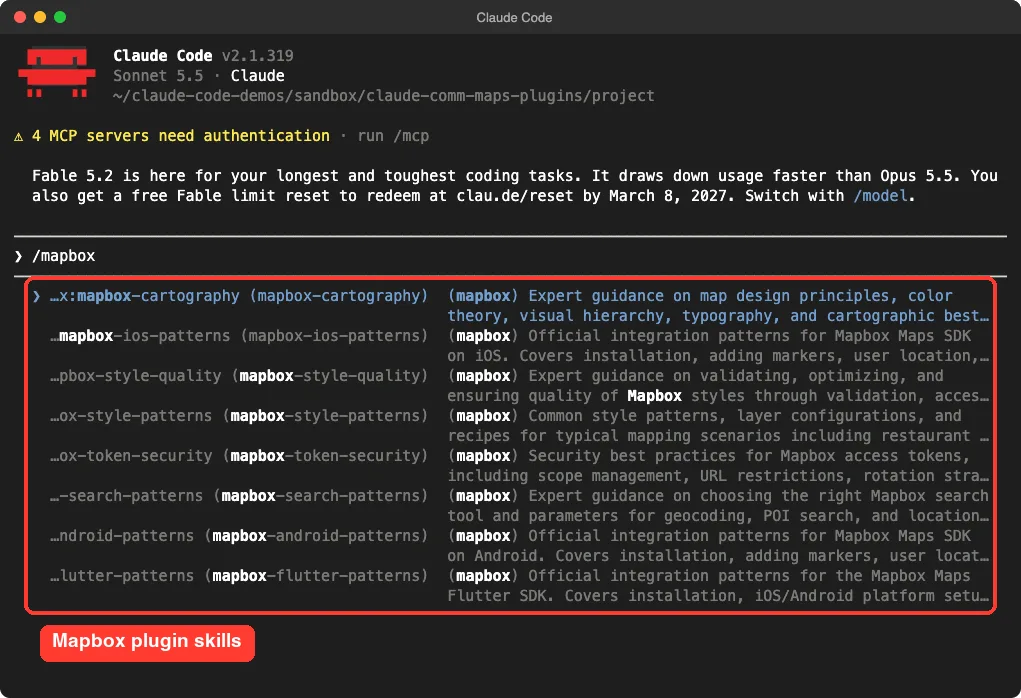
What is inside
The folder names show the range: mapbox-web-integration-patterns, mapbox-store-locator-patterns, mapbox-search-patterns, mapbox-navigation-patterns, mapbox-cartography and mapbox-style-quality. There are also two migration skills, one from Google Maps and one from MapLibre.
If you are building a store finder, the store locator skill is a good place to start. If you are moving off another map provider, the migration skills give API equivalents and pattern translations.
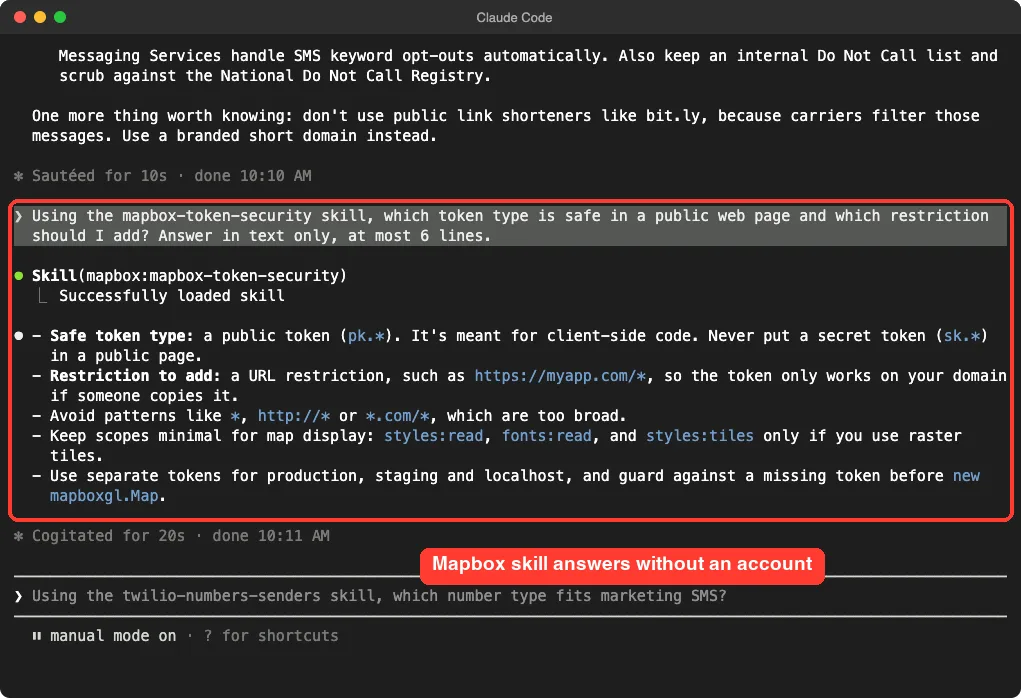
A token safety check
We asked which Mapbox token type is safe in a public web page. Claude loaded mapbox-token-security and answered: use a public token that starts with pk., never a secret token, and add a URL restriction so the token only works on your domain.
It also warned against overly broad URL patterns and suggested separate tokens for production, staging and localhost. This is exactly the kind of mistake that costs real money, so it is a good reason to load the skill.
Three servers, one free
The plugin brings three MCP servers. In /mcp the docs server connected with three tools and no sign-in. The main mapbox server and the mapbox-devkit server both showed that they need authentication.
Synthflow: Skills for Reviewing Voice Agents
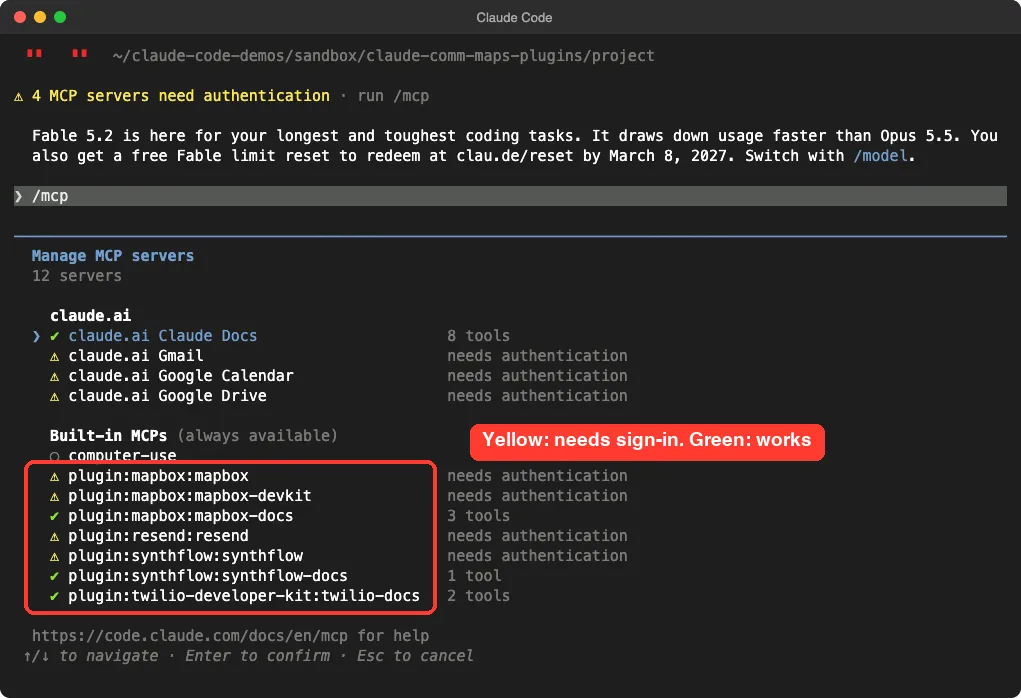
Synthflow is a platform for AI phone agents. Its plugin, per its README, connects Claude Code to Synthflow through a hosted MCP server and adds seven skills.
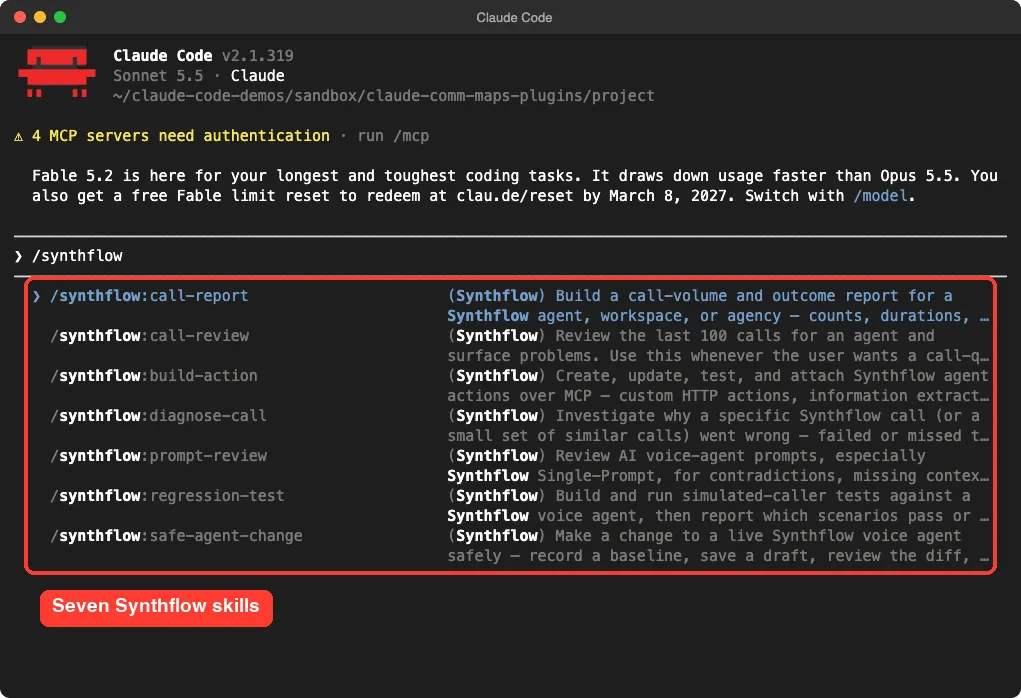
The skills are call-report, call-review, build-action, diagnose-call, prompt-review, regression-test and safe-agent-change. Based on their descriptions, they audit recent calls, investigate a failed call, review a voice-agent prompt before launch and change a live agent through a draft, diff and approval flow.
Almost all of this works on live data from your Synthflow workspace, so we could not try it. The README says sign-in uses OAuth with a workspace choice, and that the endpoint must match your workspace region. The bundled server uses the global endpoint, and the README gives separate US and EU addresses.
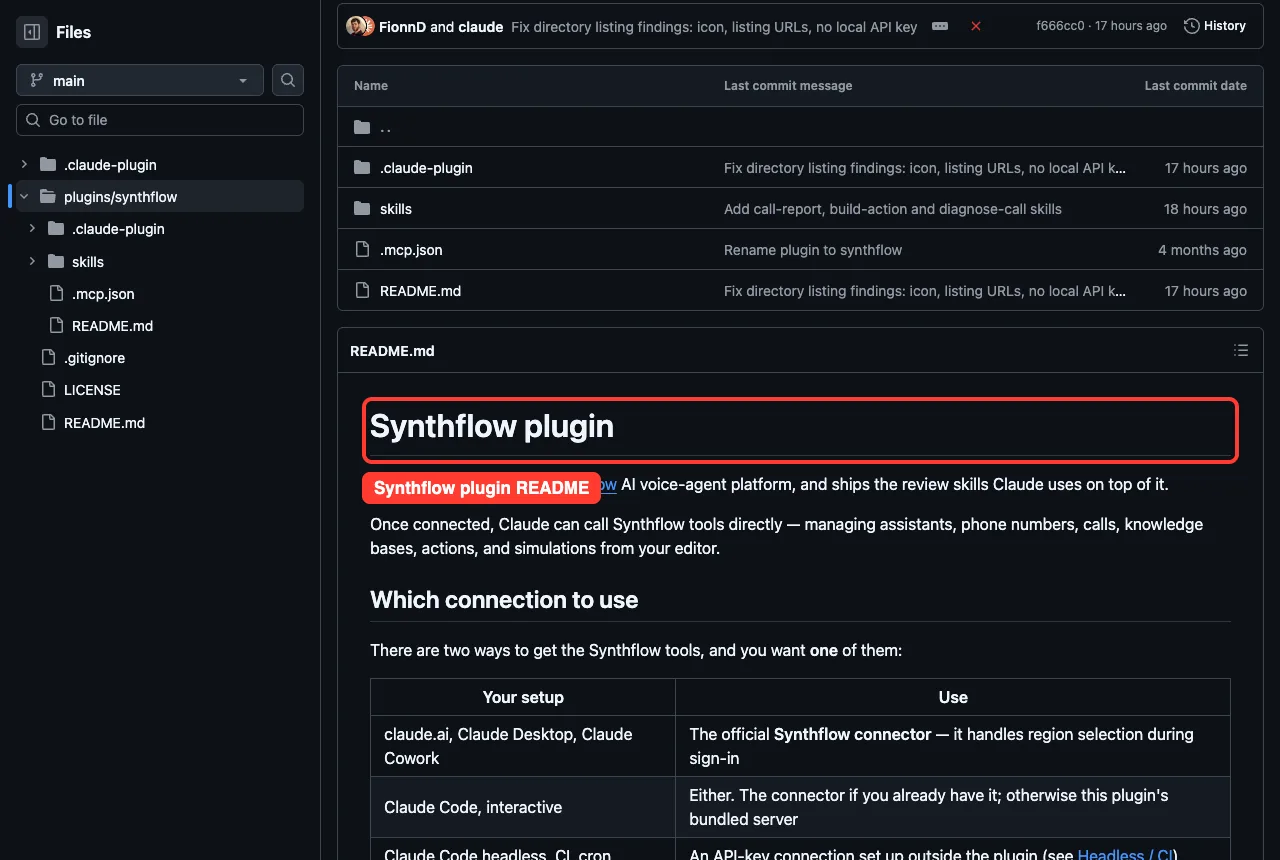
Its docs server connected with one tool and no sign-in, while the main server showed yellow.
Learn With Coursera: A Skill Without a Plugin Folder
Learn with Coursera is different from the others. Its repo, coursera/skills, says plainly that it is skills-only and has no Claude plugin manifest, no MCP manifest and no server code.
The one skill, learn-with-coursera, asks three quick questions about topic, familiarity and preferred format. It then searches for a course, a hands-on project, a short video or a live roleplay. The README lists the search tools it expects from the Coursera connector.
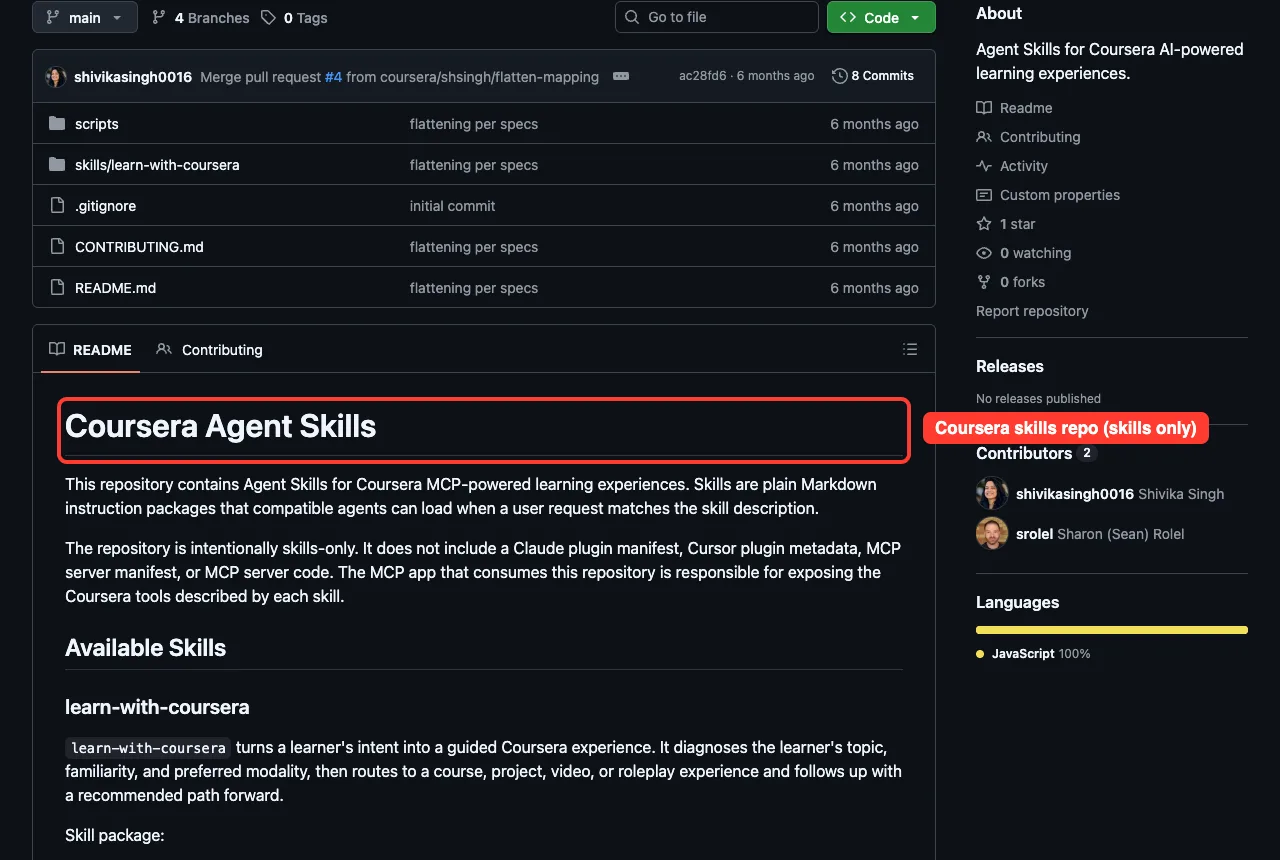
Because the repo has no manifest, we could not load it with --plugin-dir, and we did not install it. Everything here comes from its README and the skill file.
Without the Coursera connector, the skill has no catalog to search, so it is a poor fit for a coding session anyway. See the Coursera skills repo for details.
Is the Claude Code Twilio Plugin Safe to Install?
Skills are text, and none of the four plugins we loaded ships hooks or scripts. That makes them low risk compared with plugins that run code on your machine. The risk is in the servers and keys you add later.
- Use test keys and sandbox accounts first, especially for Twilio, where a mistake can send real texts.
- Keep API keys out of chat and out of your repo.
- Restrict any Mapbox token to your own domain, as the skill advises.
- Read each plugin’s files before you install, the way we did.
Our plugins comparison explains how skills, subagents and plugins differ if you want the bigger picture.
Try It Yourself
The lowest-risk way to explore is to load a plugin from a folder without installing it. Run this in a scratch folder:
git clone --depth 1 https://github.com/anthropics/claude-plugins-official
mkdir demo && cd demo
claude --setting-sources project --plugin-dir ../path-to-the-plugin-folder
Inside the session, type the plugin name with a slash to see its skills, and run /mcp to see which servers need sign-in. Then paste this prompt:
List every skill this plugin adds and tell me which ones need an account or token before they work.Common Mistakes
- Expecting the MCP server to work before you sign in. Check
/mcpfor the yellow mark. - Putting a secret Mapbox token in a public page instead of a restricted public one.
- Trusting a skill answer on legal rules without checking your own situation.
- Installing a plugin for every service you might use some day, which adds clutter to your skill list.
Pro Tips
- Try the skills first. They are free and show how much the plugin really helps.
- Ask for one named skill in your prompt, as we did, so Claude loads the right guidance.
- The docs servers for Twilio, Mapbox and Synthflow connected without sign-in in our test, so they are a gentle start.
- Check the manifest
version. Mapbox is at 1.0.0 and Twilio at 0.3.2, so expect changes.
Cheat Sheet
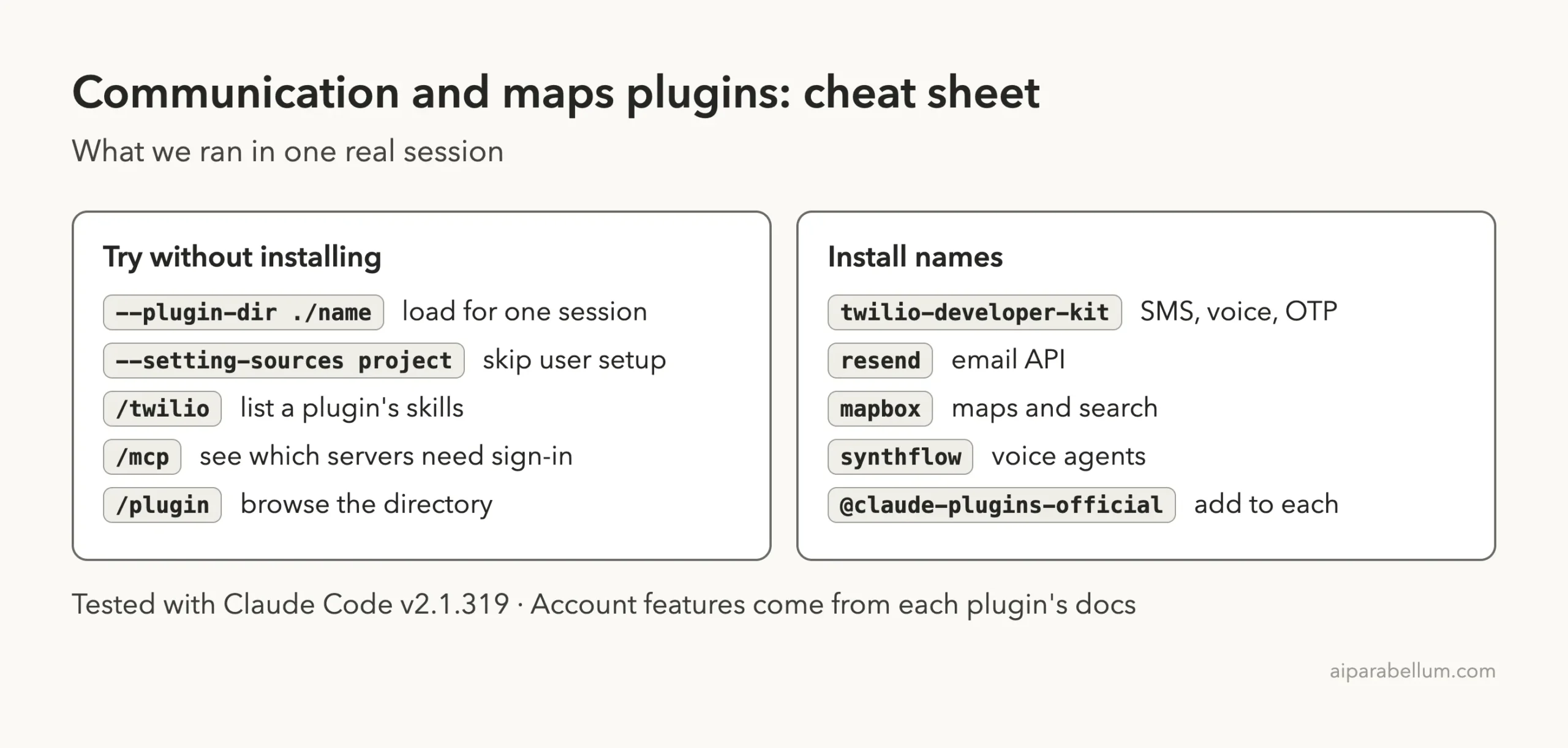
Frequently Asked Questions
Is there an official Claude Code Twilio plugin?
Yes. The twilio-developer-kit plugin is listed in Anthropic’s official marketplace and comes from Twilio’s own repo. Install it with /plugin install twilio-developer-kit@claude-plugins-official.
Do I need a Twilio or Resend account to use the skills?
No. The skills loaded and answered questions in our test with no account. You need an account to send real texts or emails and to use the servers that need sign-in.
Which plugin should I try first?
Start with whichever service you already use. If you use none yet, the Mapbox token skill and the Twilio compliance skill give the clearest value for free.
Do these plugins cost money?
The plugins are free to install. The services behind them have their own plans, and we did not check those prices.
Will these plugins change my Claude Code setup?
Installing a plugin does add it. We loaded ours with --plugin-dir in a sandbox, so nothing in our own setup changed.
Conclusion
These plugins teach Claude how Twilio, Resend, Mapbox and Synthflow work, and the skills are useful even before you have an account. We confirmed that all four load, list their skills and answer real questions, while live sending, mapping and call review need sign-ins we did not use. Start with the skills, check /mcp for what needs a login, and read our Claude guide if you are new to the tool.