Out of the box, Claude Code finds code the way you would with a search box: it greps for text. A Claude Code LSP plugin changes that by plugging a real language server into the session, so Claude can ask your project exactly where a function is defined, what type it returns and who calls it. In this guide you will see how the 12 official plugins work, which server each one needs, and what happened when we ran two of them for real.
This guide is part of our Claude Code tutorials. Find more add-ons in our Skills Directory.
Tested with Claude Code v2.1.319 on 2026-11-09 (macOS), using the official plugins from claude-plugins-official at commit 0412be7.
A plugin only points Claude at a language server. Install the server first, then check the tool lines to see it answered.
Quick Summary
| Question | Short answer |
|---|---|
| What is an LSP plugin? | A tiny config file that tells Claude Code which language server to start for which file types |
| Does the plugin include the server? | No. You install the server yourself and it must be on your PATH |
| How many official ones are there? | 12 for Anthropic (TypeScript, Python, Go, Rust, C and C++, C#, Java, Kotlin, Lua, PHP, Ruby, Swift) plus a Liquid one from Shopify |
| What did we run? | C and C++ with clangd, and TypeScript with typescript-language-server |
| Biggest gotcha we hit? | The server must find a compatible setup in your project, or Claude quietly falls back to grep |
What an LSP Plugin Does in Claude Code
LSP stands for Language Server Protocol. It is the same technology that powers go-to-definition and error squiggles in editors like VS Code. A language server reads your project, understands the language rules, and answers precise questions.
Claude Code has a built-in LSP tool. When a language server is running, Claude can use operations such as hover, findReferences and incomingCalls instead of guessing from text. In our runs we saw all three show up in the session.
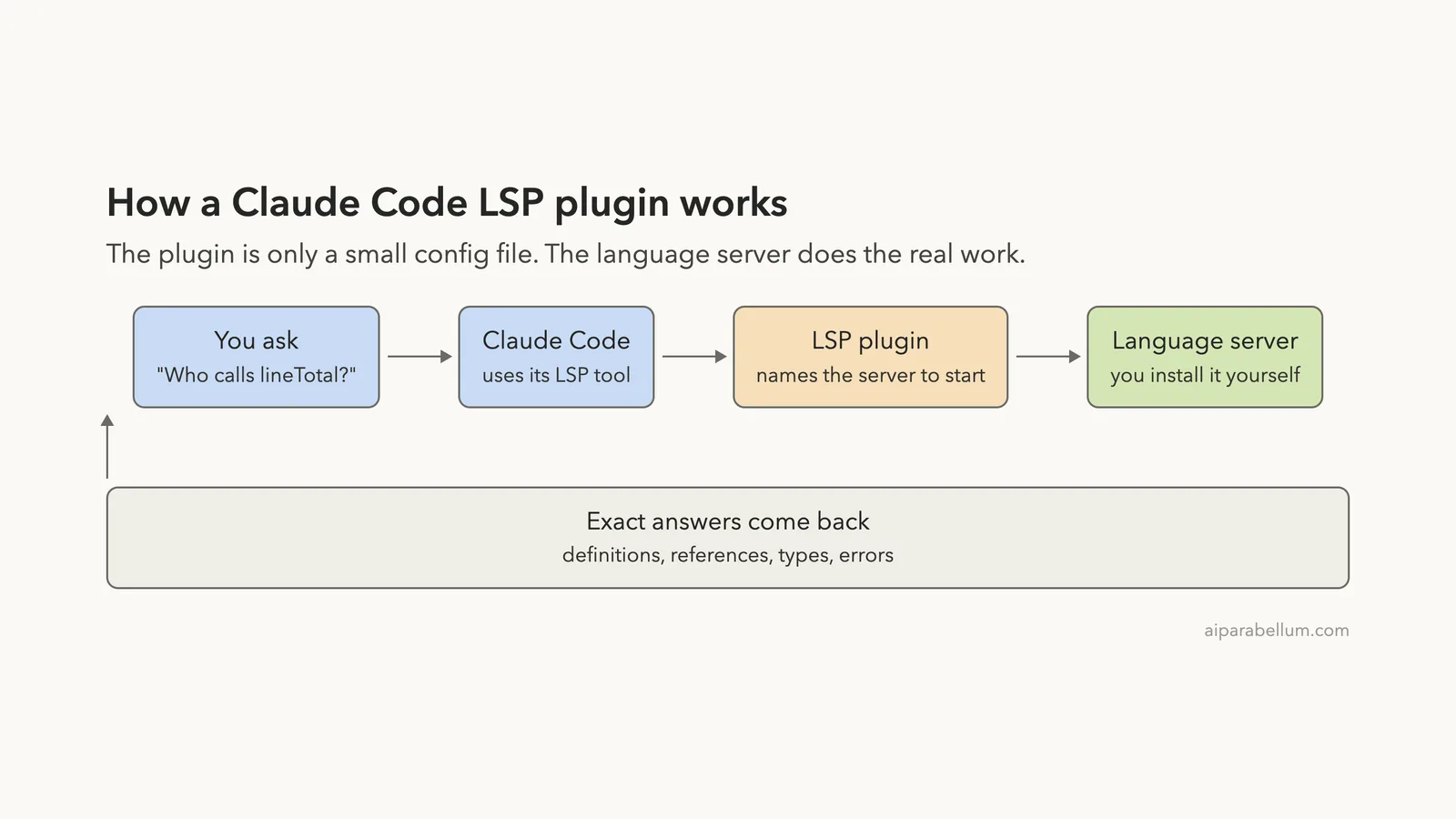
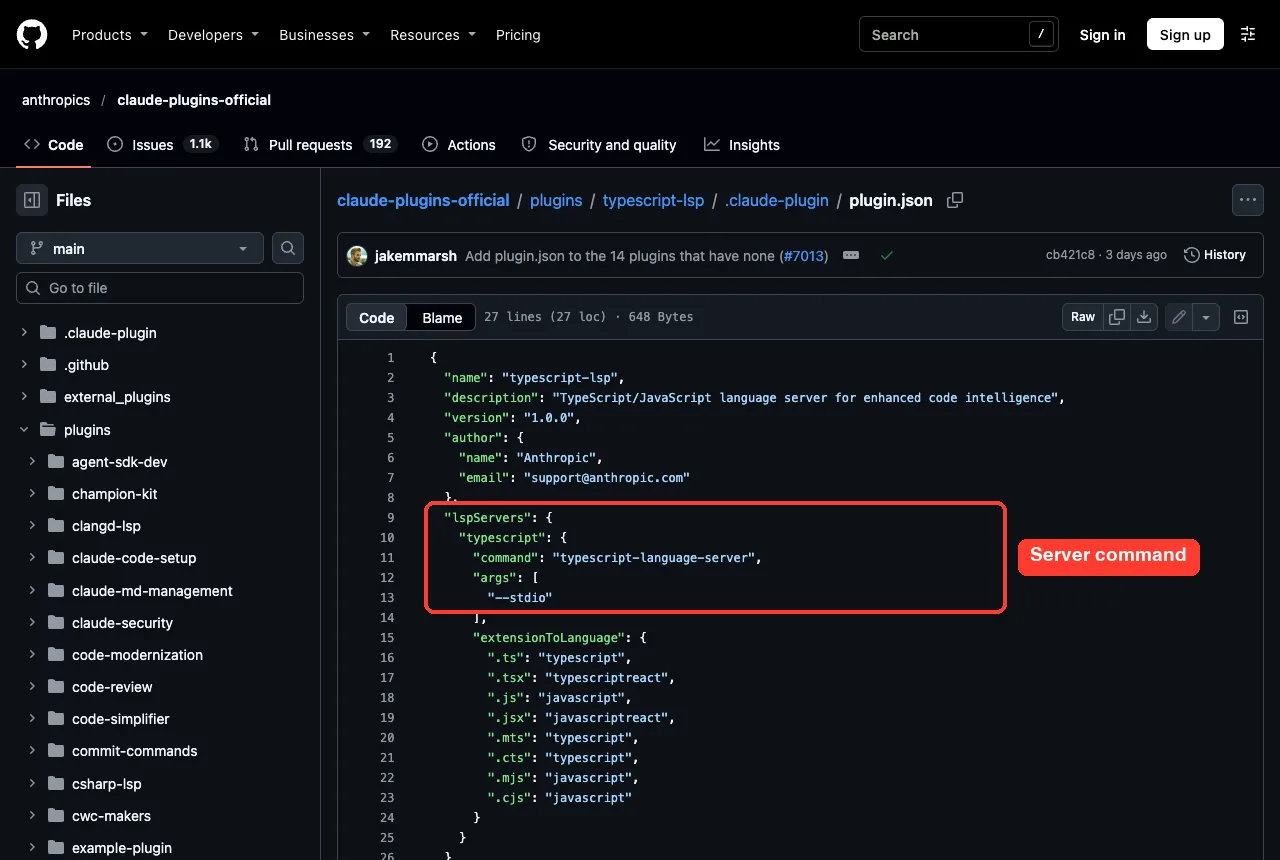
The plugin itself is small. If you open the plugin folder you will find a license, a README and one .claude-plugin/plugin.json file. That file has an lspServers section with the command to run and a list of file extensions.
Why the server is not included
The plugin only launches a program that already exists on your machine. For TypeScript that command is typescript-language-server --stdio. If the command is not on your PATH, the plugin has nothing to start.
This is the number one reason people say an LSP plugin “does nothing”. Install the server first, then the plugin.
How It Works Step by Step
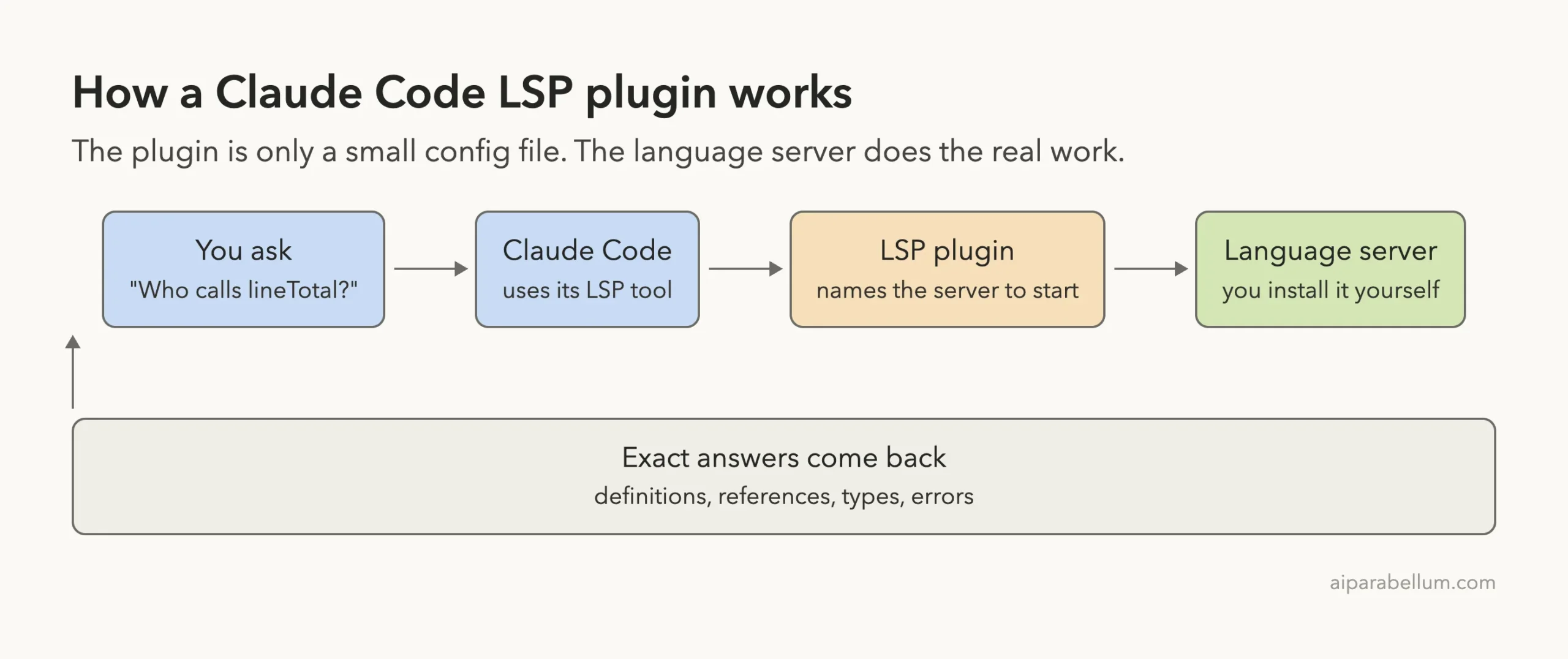
You ask a question about your code. Claude Code decides to use its LSP tool, the plugin tells it which server handles that file type, and the server answers with real data from your project.
The answers are things like the definition of a symbol, every reference to it, its type, or the errors a compiler would report. Claude then explains the result in plain English.
The 12 Official Claude Code LSP Plugins
All of these come from Anthropic’s official plugin marketplace and use the same install pattern: /plugin install NAME@claude-plugins-official. The table below lists the command each plugin runs and the file types it covers, taken from each plugin’s manifest and README as of 2026-11-09.
| Plugin | Language | Server command it runs | File types | Install the server (from its README) |
|---|---|---|---|---|
typescript-lsp | TypeScript and JavaScript | typescript-language-server --stdio | .ts, .tsx, .js, .jsx, .mts, .cts, .mjs, .cjs | npm install -g typescript-language-server typescript |
pyright-lsp | Python | pyright-langserver --stdio | .py, .pyi | npm install -g pyright |
gopls-lsp | Go | gopls | .go | go install golang.org/x/tools/gopls@latest |
rust-analyzer-lsp | Rust | rust-analyzer | .rs | rustup component add rust-analyzer |
clangd-lsp | C and C++ | clangd --background-index | .c, .h, .cpp, .cc, .cxx, .hpp, .hxx | brew install llvm |
csharp-lsp | C# | csharp-ls | .cs | dotnet tool install --global csharp-ls |
jdtls-lsp | Java | jdtls | .java | brew install jdtls |
kotlin-lsp | Kotlin | kotlin-lsp --stdio | .kt, .kts | brew install JetBrains/utils/kotlin-lsp |
lua-lsp | Lua | lua-language-server | .lua | brew install lua-language-server |
php-lsp | PHP | intelephense --stdio | .php | npm install -g intelephense |
ruby-lsp | Ruby | ruby-lsp | .rb, .rake, .gemspec, .ru, .erb | gem install ruby-lsp |
swift-lsp | Swift | sourcekit-lsp | .swift | brew install swift |
Two of them, jdtls-lsp and kotlin-lsp, set a longer startup timeout of 120 seconds in their manifests. Java and Kotlin servers are heavy, so expect a slower first answer.
A thirteenth one: Liquid for Shopify themes
Shopify maintains its own plugin, liquid-lsp, for Liquid templates. It runs shopify theme language-server, so you need the Shopify CLI installed first (npm install -g @shopify/cli). Its repository is Shopify/liquid-skills, and we looked at it at commit ae3e4cc from 2026-03-18.
It maps .liquid and .json files.
Install a Claude Code LSP Plugin
Here is the normal route for TypeScript. The other languages work the same way with their own names.
- Install the language server so it is on your
PATH. - Start Claude Code in your project.
- Run the plugin install command.
- Reload plugins or restart Claude Code.
npm install -g typescript-language-server typescript
claude
/plugin install typescript-lsp@claude-plugins-official
/reload-plugins
Anthropic’s plugin discovery guide explains install scopes and what /reload-plugins does.
Anthropic also publishes Claude as the assistant behind all of this. If you want to understand every plugin file, the plugins reference documents the lspServers settings. For a wider tour of add-ons, see our guide to Claude Code plugins.
How we loaded them for testing
To keep a real setup untouched, we did not install into a normal profile. We cloned the official plugin repository into a throwaway folder and loaded each plugin with claude --plugin-dir and --setting-sources project. The plugin files are the same ones you get from the marketplace, so the behavior you see below is what the plugin does.
Test 1: C and C++ With clangd
The Mac we used already ships clangd, so we could try clangd-lsp without installing anything. We made a tiny C project with shapes.h, shapes.c, main.c and report.c. Two files call rect_area.
The prompt was: use the language server to find every place that calls rect_area. Claude called the LSP tool right away.
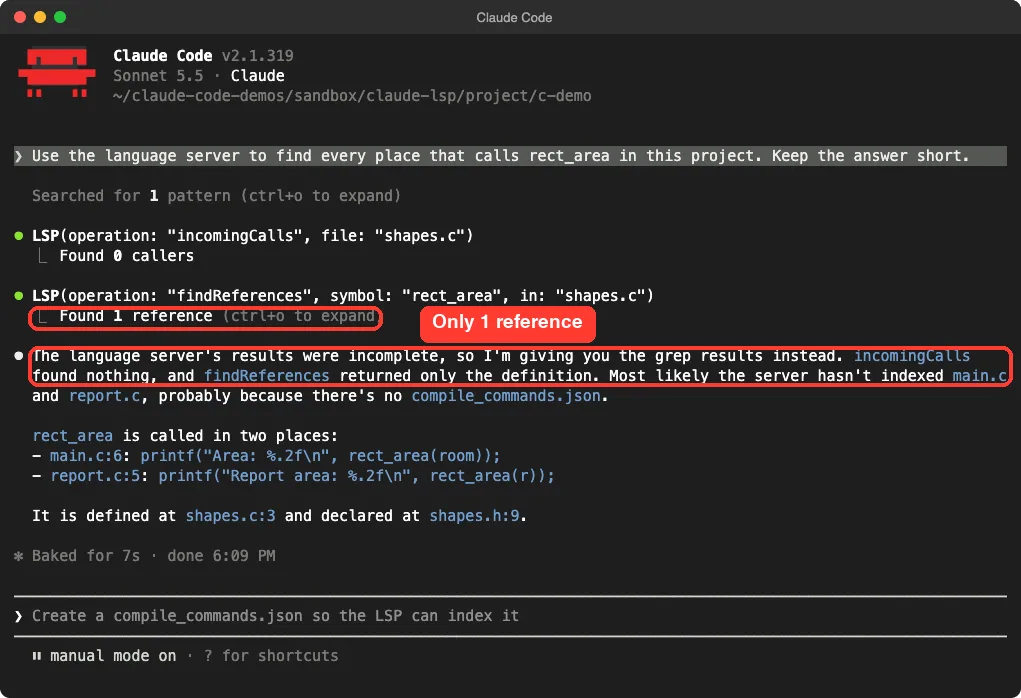
This is a good lesson. The server returned just one reference, the definition, because clangd did not know how to compile the other files. Claude noticed the result looked wrong, said so, and gave the correct answer from a text search.
The fix: a compile_commands.json
C tools need to know your compiler flags. We added a small compile_commands.json that lists the three .c files, and ran the same prompt again.
[
 {"directory": "/path/to/c-demo", "file": "shapes.c", "arguments": ["clang", "-I.", "-c", "shapes.c"]},
 {"directory": "/path/to/c-demo", "file": "main.c",   "arguments": ["clang", "-I.", "-c", "main.c"]},
 {"directory": "/path/to/c-demo", "file": "report.c", "arguments": ["clang", "-I.", "-c", "report.c"]}
]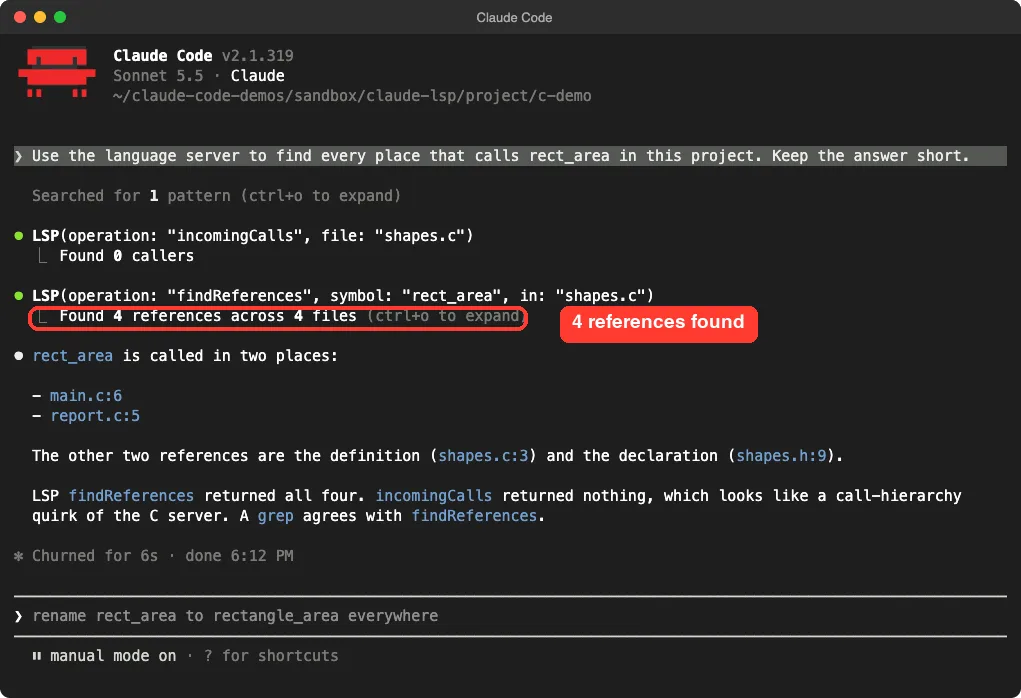
compile_commands.json: the server returned all 4 references on its ownThis time findReferences returned 4 references across 4 files: the definition, the declaration, and the two calls.
One more detail from this run: incomingCalls returned nothing even after the fix. Claude called it a quirk of the C server and confirmed the result with a text search. We saw that once, so treat it as one observation and not a rule.
Test 2: TypeScript With typescript-language-server
Next we made a small TypeScript project with cart.ts, checkout.ts and receipt.ts. We installed typescript and typescript-language-server inside the demo project only, then put that folder’s node_modules/.bin on the PATH for the session.
The prompt: show me the type of lineTotal and list every file that calls it.
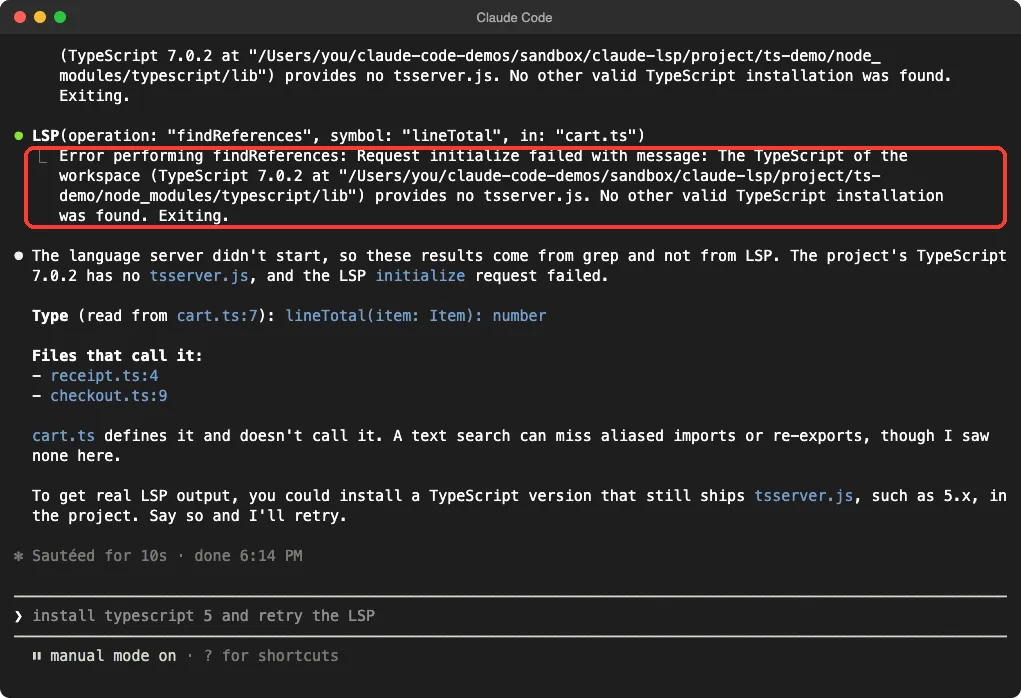
tsserver.jsOur first attempt failed. The newest TypeScript that npm gave us was version 7.0.2, and the error said it provides no tsserver.js, so the language server exited. Claude read the error, explained it, answered from grep, and suggested installing a TypeScript version that still ships that file.
We installed typescript@5 in the demo project (it resolved to 5.9.3) and ran the same prompt again.
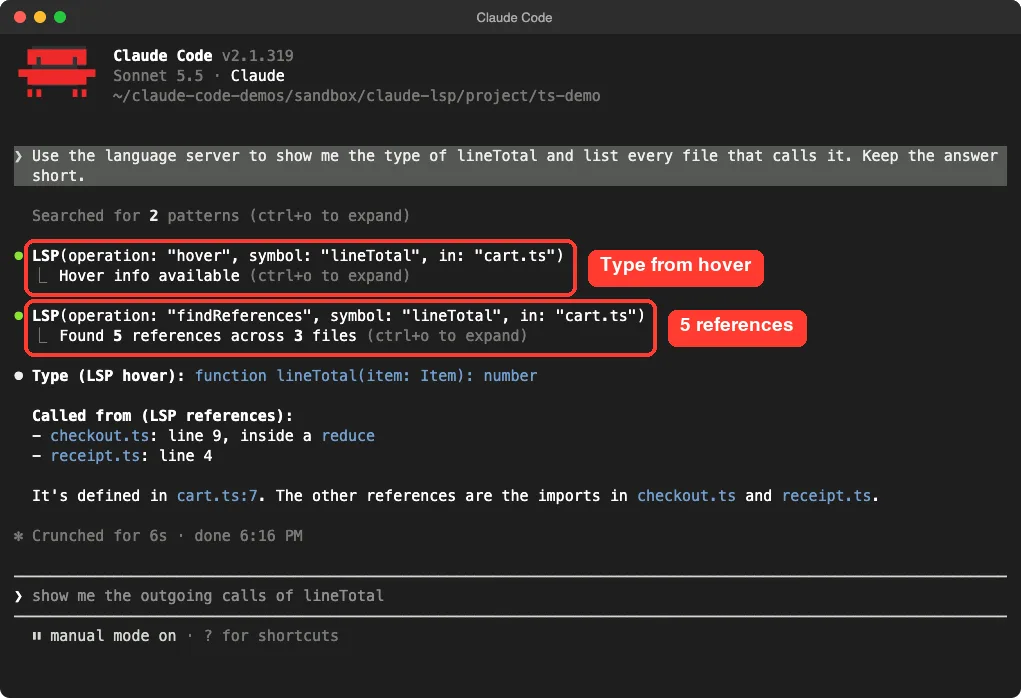
hover gave the type and findReferences found 5 references across 3 filesNow Claude used hover to get the type, function lineTotal(item: Item): number, and findReferences to find 5 references across 3 files. It listed the call inside a reduce in checkout.ts and the call in receipt.ts.
The lesson: your project’s TypeScript version matters, because the server looks for it in your workspace. If you see an initialize error, check the version first. We only tested this on our small demo, so a different setup may behave differently.
What We Did Not Run
We ran C with clangd and TypeScript with typescript-language-server. The other ten plugins in the table, including Python, Go, Rust, Java and Liquid, we did not run. Their commands and file types come from each plugin’s manifest and README, and we make no claim about how they behave on your projects.
Real Examples of What to Ask
You do not need special syntax. Mention the language server and describe the goal. Here are prompts that map to the operations we saw.
- Find all references: “Use the language server to find everything that uses
lineTotal.” - Check a type: “Use the language server to show me the return type of
cartTotal.” - Trace callers: “Use the language server to list the callers of
rect_area.”
If you work with a JavaScript codebase moving to types, pair this with our walkthrough on how to convert JavaScript projects. If you use an editor, our guide to IDE integration covers the editor side of the same idea.
Try It Yourself
Practice on a small project in a throwaway folder. Pick the language you use most, install its server from the table, and add the plugin.
Use the language server to find every place my main function is called,
and show me the type of one function in this project. Keep the answer short.
If the language server returns nothing, tell me why.
That last sentence is useful. It makes Claude report a server problem instead of quietly hiding it behind a text search.
Common Mistakes
- Installing the plugin but not the server. The plugin only starts a command; the command must exist on your
PATH. - Forgetting to reload. Run
/reload-pluginsor restart after installing. - Skipping project setup. C and C++ projects need a
compile_commands.jsonsoclangdcan see every file. - Using a TypeScript version without
tsserver.js. We hit this with 7.0.2; version 5.9.3 worked. - Trusting a fallback answer. Claude may answer from grep when the server fails. Read the tool lines in the terminal.
Pro Tips
- Say “language server” in your prompt so Claude knows to use the LSP tool.
- Watch the tool lines. A line like
Found 4 references across 4 filestells you the server answered. - Expect a slow first answer for Java and Kotlin; their manifests allow up to 120 seconds to start.
- Compare against a text search once when you set up a new language. If both agree, the server is healthy.
Cheat Sheet
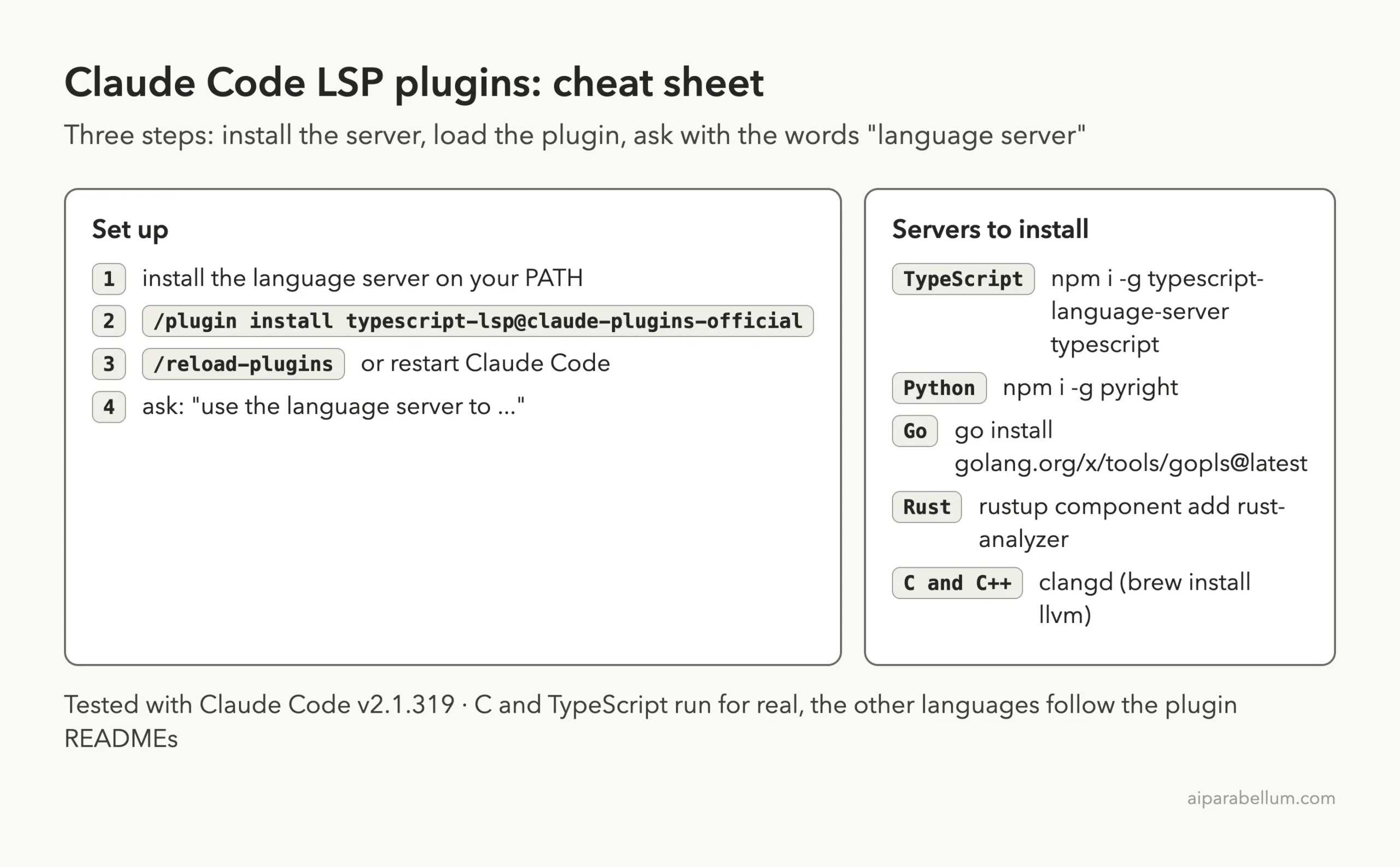
Frequently Asked Questions
Do I need an LSP plugin to use Claude Code?
No. Claude Code works without one and falls back to searching text. A plugin adds exact answers such as references and types.
Does the plugin install the language server for me?
No. In our check, each plugin only holds a config file. Install the server with the command in its README, and make sure it is on your PATH.
Why did Claude answer but not use the language server?
The server may have failed to start or returned a partial result. In both of our first attempts, Claude said so and used grep instead. Read the LSP lines in the terminal to see what happened.
Can I use more than one LSP plugin at once?
Each plugin covers its own file types, so a project with several languages can use several plugins. We only tested one at a time.
Is there a plugin for my language if it is not on the list?
Not in the official set we checked. The official docs document the lspServers setting, which is how these plugins are built.
Conclusion
Claude Code LSP plugins are tiny but useful: they point Claude at a real language server so it can answer with definitions, types and references instead of text matches. The catch is that you install and configure the server yourself, and our two tests each needed one fix (a compile_commands.json for C and TypeScript 5 for TypeScript) before the server answered fully. Start with the language you use every day, watch the tool lines, and you will know quickly whether the plugin is helping.