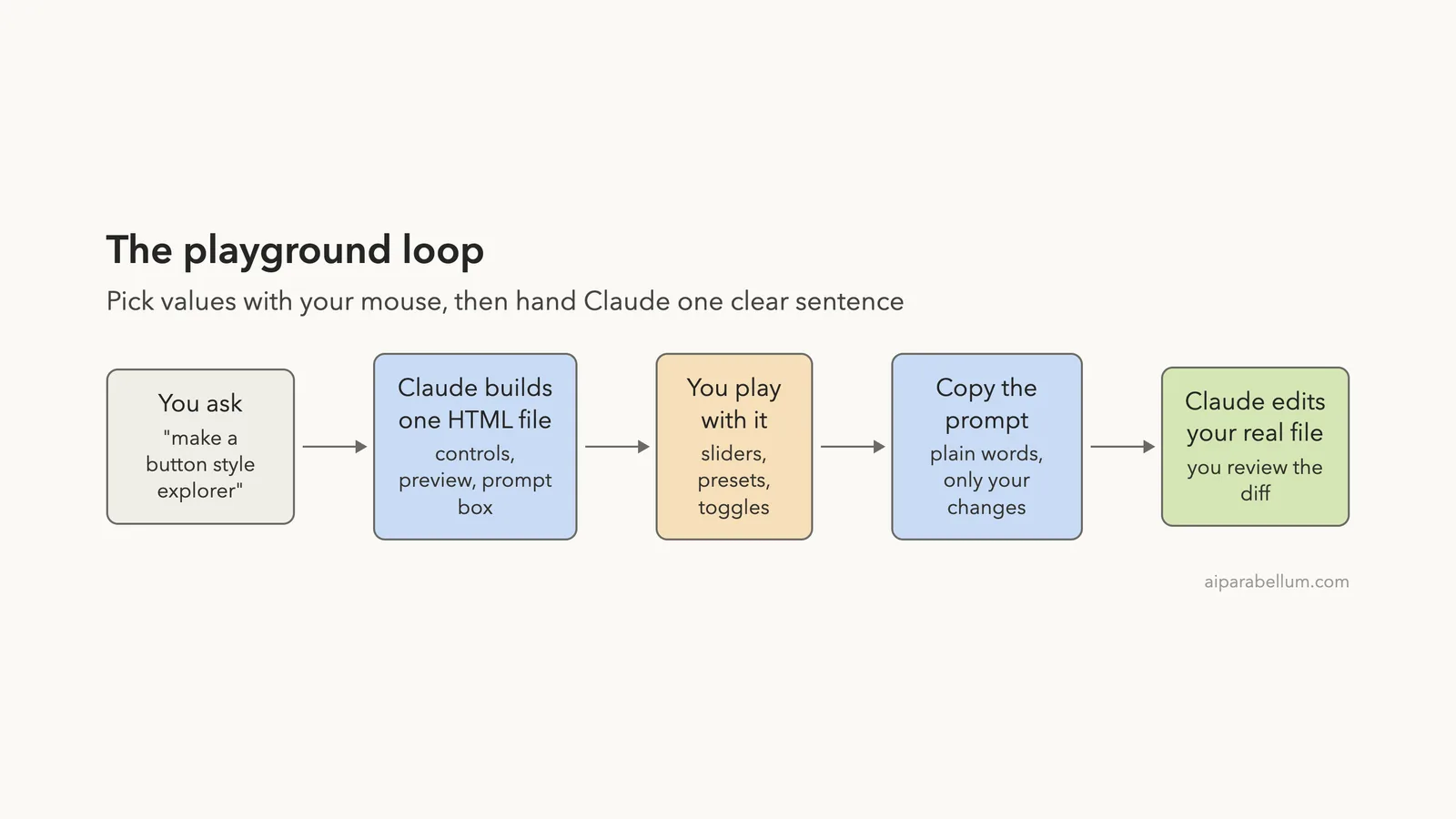
The Claude Code playground plugin turns a plain request into a small web page with sliders, presets and a live preview. You play with the page, and it writes a clear prompt for you to hand back to Claude. This guide shows what it did in two real sessions on a Mac, where it helped, and where it fell short.
This guide is part of our Claude Code tutorials. Find more add-ons in our Skills Directory.
Tested with Claude Code v2.1.319 on 2026-11-09 (macOS), using the playground plugin from anthropics/claude-plugins-official at commit 0412be7 (dated 2026-11-06).
We read the plugin’s files first, then loaded it into a throwaway sandbox and ran three short prompts. We never installed it into our own setup. Claude was told not to open or run anything, so we opened each generated page ourselves in a headless browser.
Quick Summary: What the Playground Plugin Does
| Question | Answer from our test |
|---|---|
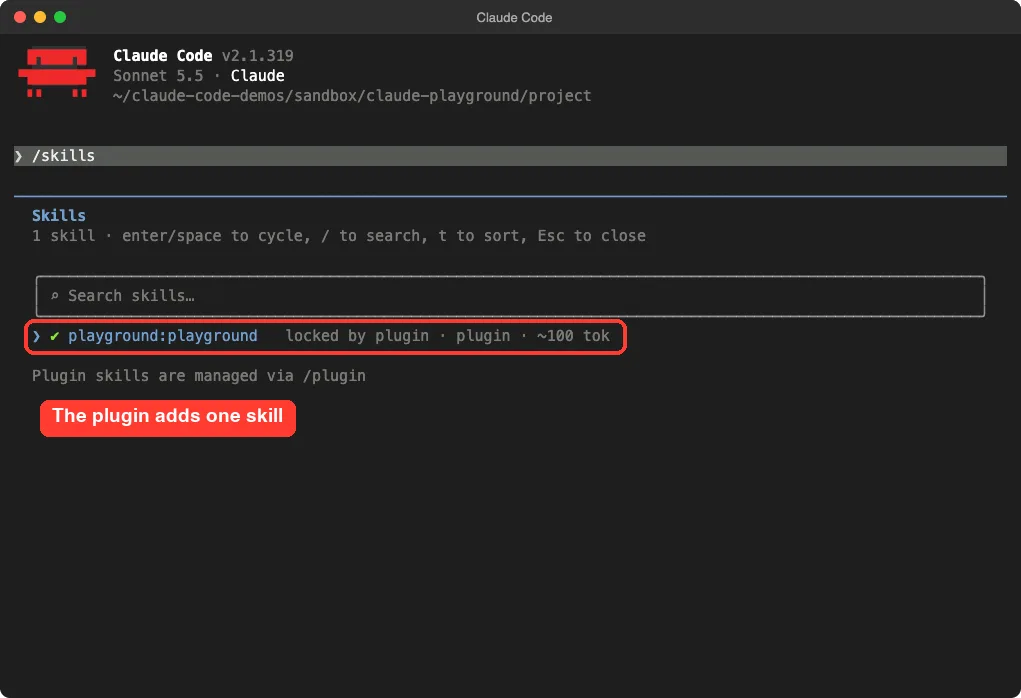
| What does it add? | One skill, playground:playground, listed at about 100 tokens in /skills |
| What does it make? | A single HTML file with controls, a live preview and a prompt box with a Copy button |
| How long did it take? | 32 seconds for a button style explorer, 36 seconds for a regex explorer |
| Does it need an account or API key? | No |
| Does it run code or call the network? | No hooks, no scripts, no MCP servers; the skill is text files only |
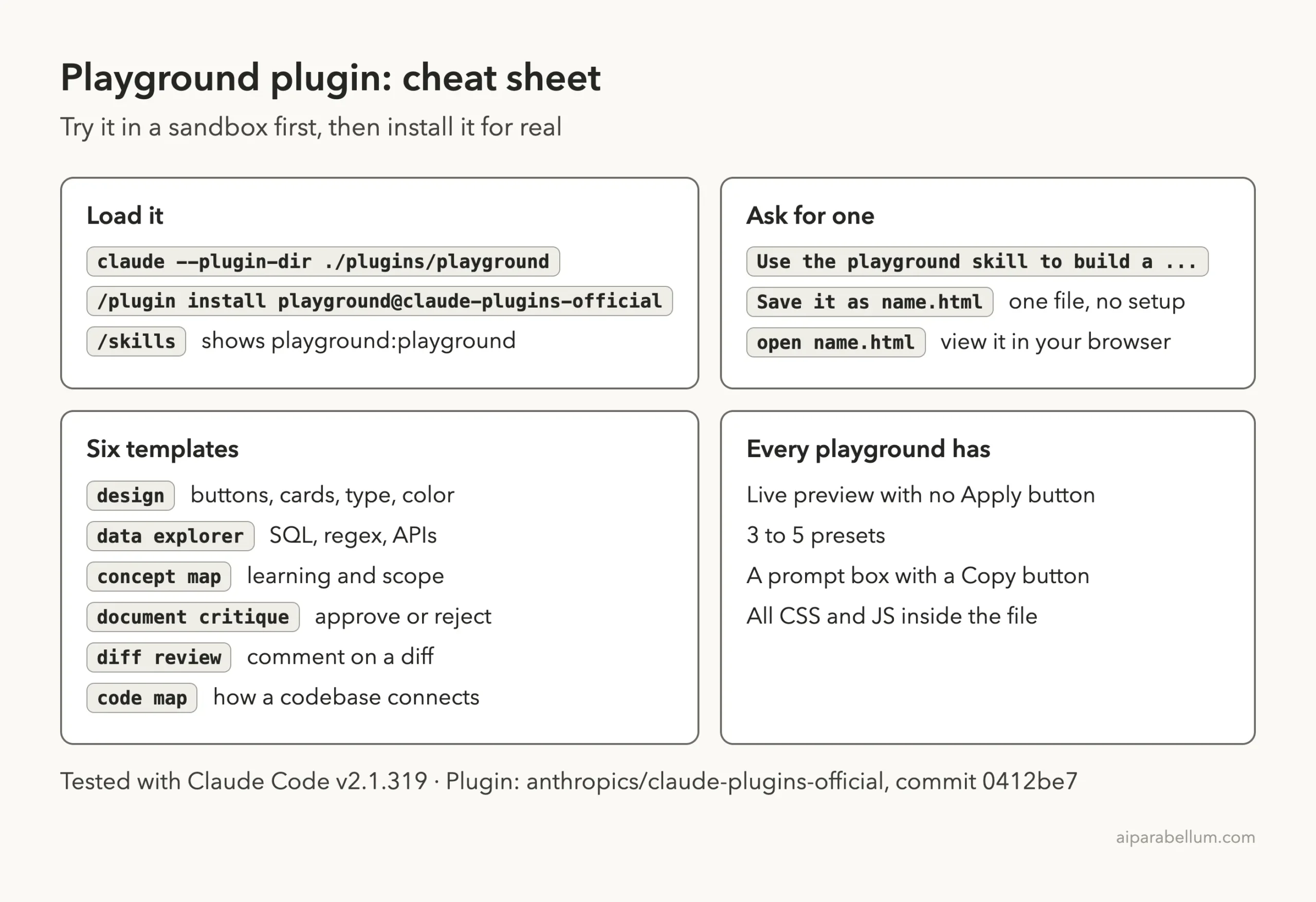
| Install command | /plugin install playground@claude-plugins-official |
What Is the Claude Code Playground Plugin?
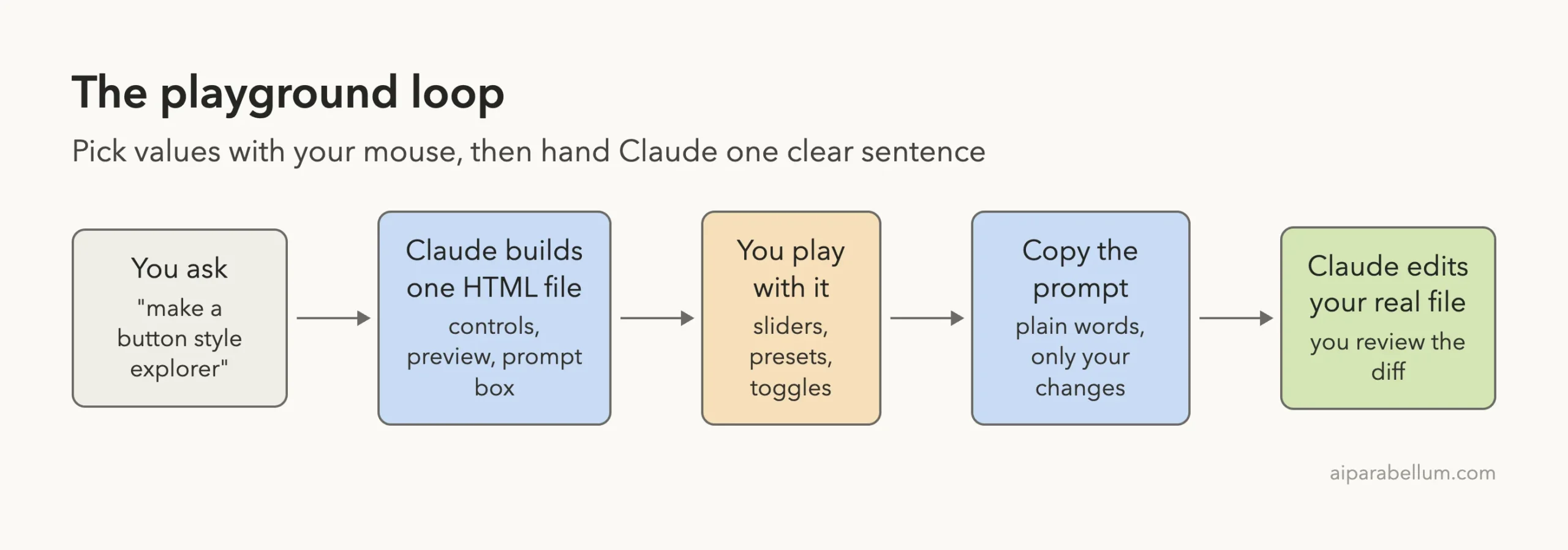
A playground is a self-contained HTML file. Controls sit on one side, a live preview sits on the other, and a prompt box sits at the bottom. You move the controls, and the prompt rewrites itself to describe your choices.
The idea is simple. Some choices are hard to put into words, like how round a button should be or which toggles a regex should allow. It is easier to drag a slider and look, then copy the finished sentence into Claude Code and let it edit your real files.
The plugin is made by Anthropic and sits in the official marketplace. It is a skill, which means Claude Code loads its instructions when your request matches. If you want the basics first, our guide to Claude Code plugins explains how plugins are installed and managed.
What We Checked Before Running Anything
We cloned Anthropic’s plugin repository into the sandbox and looked at the playground folder before loading it. It holds a license, a README, a plugin.json file, one SKILL.md file and six template files.
There are no hooks, no scripts and no MCP servers. A search for curl, wget, eval( and rm - found nothing. The plugin only gives Claude written instructions.
| Check | Result |
|---|---|
| Files in the plugin | README, license, plugin.json, SKILL.md, 6 templates |
| Hooks or scripts | None |
| MCP servers | None |
| Account needed | No |
| How we loaded it | --plugin-dir plus --setting-sources project |
One small oddity: the README lists four templates, but the skill file lists six. The extra two are diff-review and code-map. The skill file is the one Claude reads, so six is the working number.
How the Playground Skill Works
The skill file tells Claude how to pick a template, build the page and what every page must contain. We read these rules in the file, and then checked them against what Claude produced.
- One HTML file with all CSS and JavaScript inside. No outside libraries.
- A live preview that updates on every change, with no Apply button.
- Three to five named presets that set every control at once.
- A prompt written in natural language that mentions only values you changed.
- A Copy button, and a dark theme.
The six templates cover different jobs. Design playgrounds handle buttons, layouts and color, and data explorers handle SQL, APIs and regex. The other four are concept maps, document critique, diff review and code maps.
A playground turns a choice you cannot easily describe into a sentence Claude can act on.
Step 1: Load the Plugin in a Sandbox
We started Claude Code in a demo folder and pointed it at the plugin folder. The command was claude --plugin-dir ./plugins/playground --setting-sources project, run with the full path to the folder.
Typing /skills showed one skill, playground:playground, marked as locked by plugin at about 100 tokens. That small cost is the plugin’s footprint when you are not using it.
When you are ready to keep it, the install command is /plugin install playground@claude-plugins-official. The official plugin discovery guide covers installing and scopes. We tested on macOS, and the same steps apply on Windows and Linux per Anthropic’s official instructions.
Step 2: Ask for a Design Playground
Our demo project is a landing page for a made-up coffee shop called Bean There. The first prompt asked for a button style explorer with sliders for radius and padding and a few presets, saved as button-playground.html.
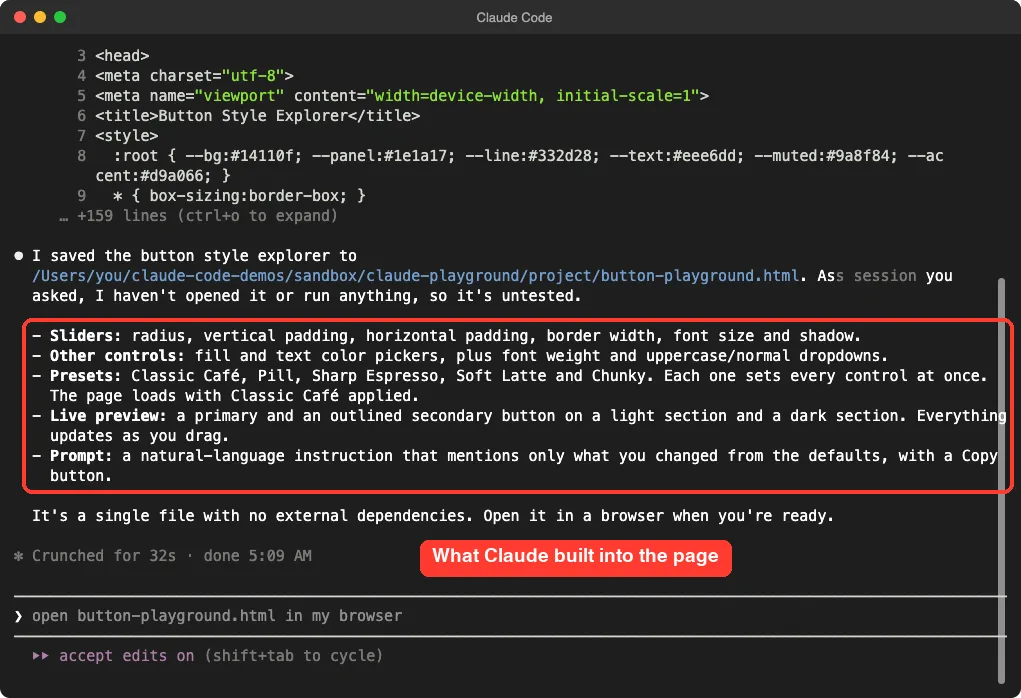
Use the playground skill to build a button style explorer for my coffee shop site, with sliders for radius and padding and a few presets. Save it as button-playground.html. Do not open it or run anything.Claude wrote the file in 32 seconds. Its summary listed six sliders, color pickers, two dropdowns, five presets and a prompt box. It also said plainly that it had not opened the page, so it was untested.
Step 3: Open the Page and Play
We opened the file in a headless browser. The page had a left panel of controls, a live preview on a light and a dark section, and the prompt at the bottom. Our grep check found no outside web addresses in the file.
Clicking the Pill preset moved every control at once: radius 40px, padding 12px by 32px and a copper fill. The preview buttons became fully rounded right away.
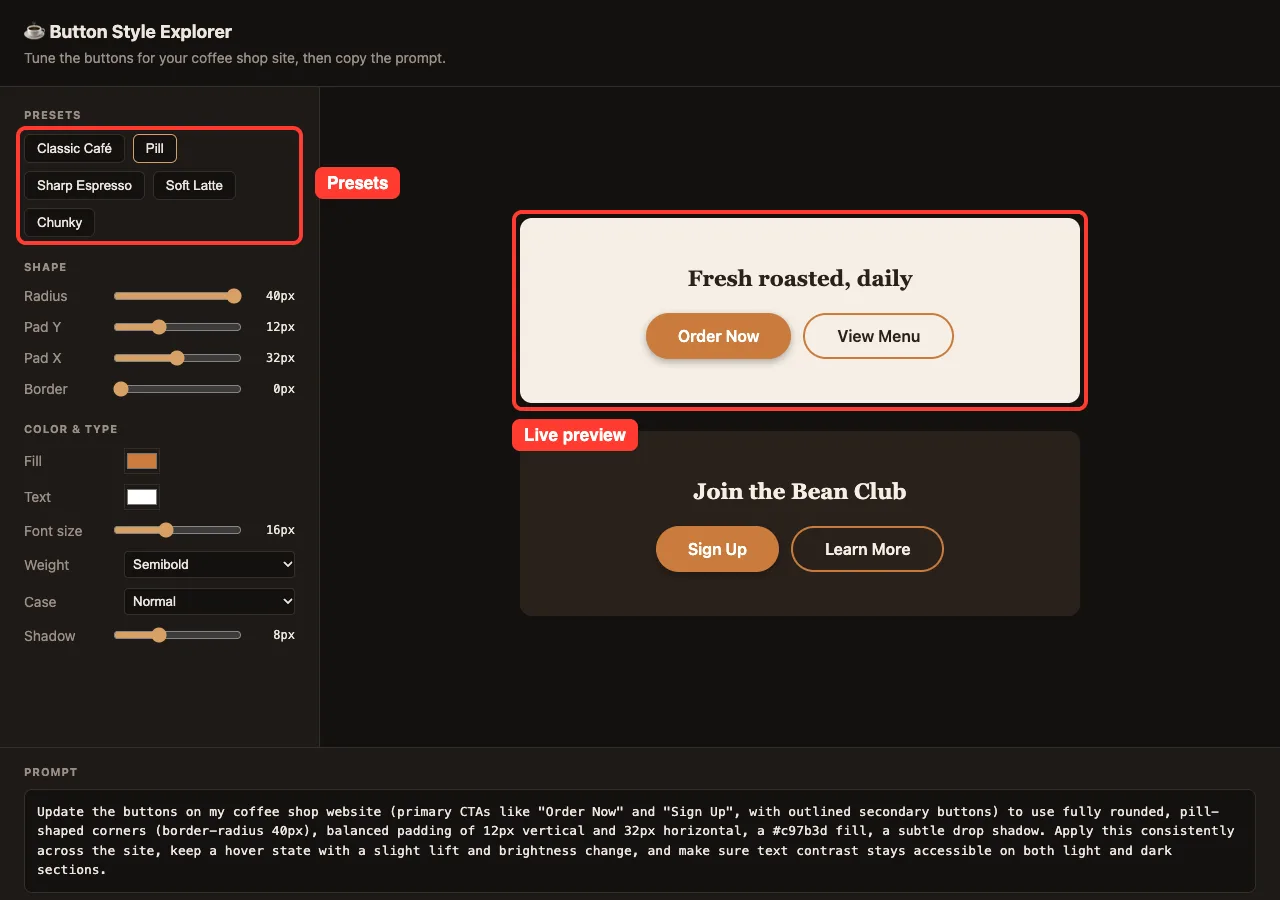
The five presets were Classic Café, Pill, Sharp Espresso, Soft Latte and Chunky. Each one loaded without a refresh.
Step 4: Copy the Prompt It Writes
The prompt box is the part that makes the plugin useful. We dragged the radius slider down to 4px and the shadow slider up to 14px. The text below changed as we moved the sliders.
It read like a request from a person: use rounded corners with a border-radius of 4px, balanced padding of 12px vertical and 32px horizontal, a copper fill, and a pronounced drop shadow. It also asked for a hover state and for readable contrast on both light and dark sections.
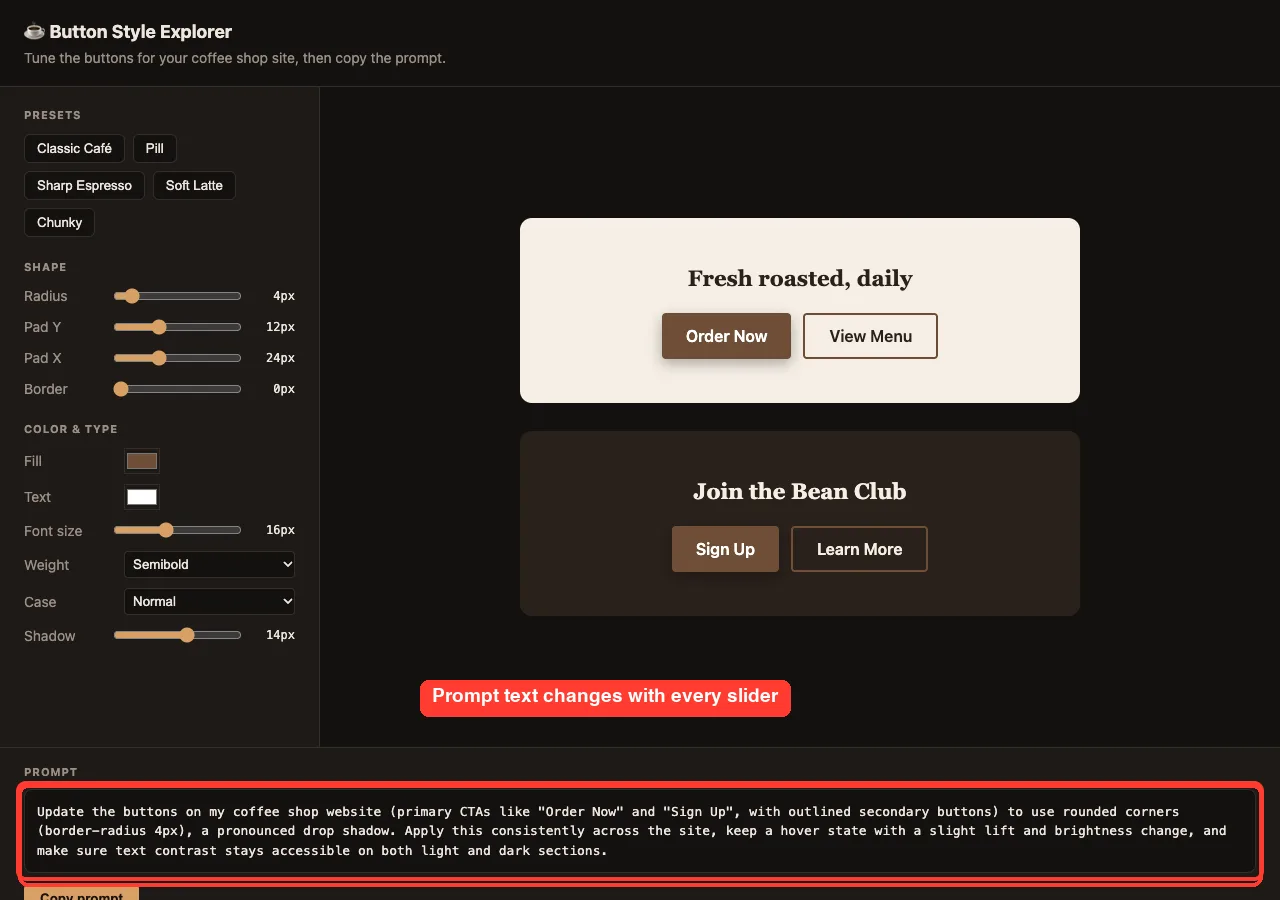
The first version of the prompt, before we touched anything, only said to use a subtle drop shadow. That matches the skill rule that the prompt mentions only non-default values.
Step 5: Hand the Prompt Back to Claude
We started a fresh session and pasted that prompt, trimmed to the facts we chose, along with the words edit index.html only. The file held a small page with plain gray buttons.
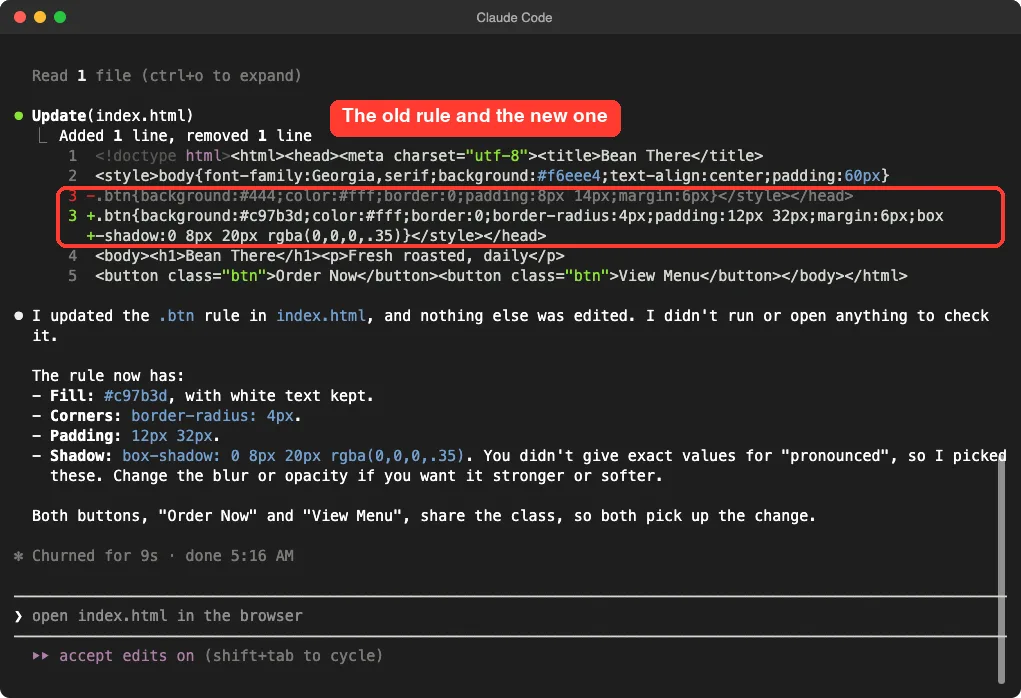
Claude changed one CSS rule in nine seconds. It set the fill to #c97b3d, the radius to 4px, the padding to 12px 32px and a shadow of 0 8px 20px rgba(0,0,0,.35).
We had asked only for a pronounced shadow, so Claude picked the numbers and told us so. The prompt gives direction, not exact values, so the final blur and opacity were still Claude’s call.
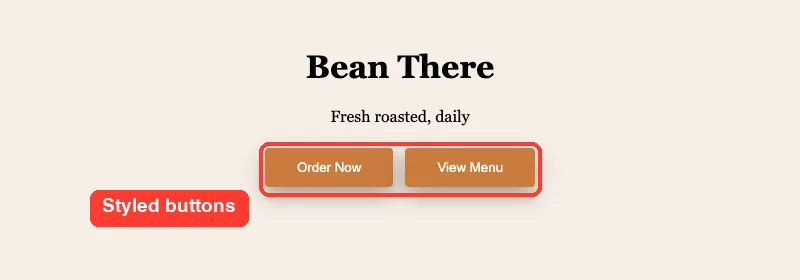
Opening the page afterward showed both buttons with the copper fill, soft corners and a visible shadow.
A Second Template: The Regex Explorer
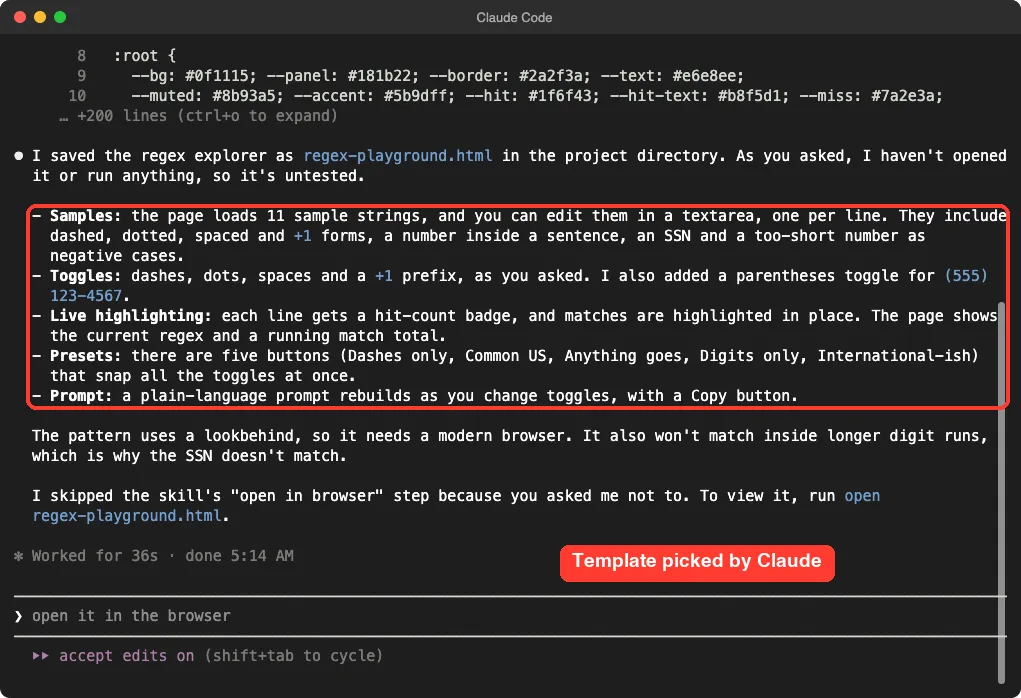
To see whether Claude picks a different template, we asked for a regex explorer for US phone numbers. We wanted sample strings, toggles for dashes, dots, spaces and a +1 prefix, and live match highlighting.
Claude took 36 seconds and built regex-playground.html. It loaded 11 sample strings and added a parentheses toggle we had not asked for. It also built five presets and a prompt box, and it explained that the pattern uses a lookbehind, so it needs a modern browser.
In the browser, the Common US preset turned on dashes, dots, spaces and parentheses. The page showed 9 matches across 8 of the 11 lines, and the regex above the samples rebuilt as we toggled options. The SSN-style line and the too-short numbers were correctly left unmatched.
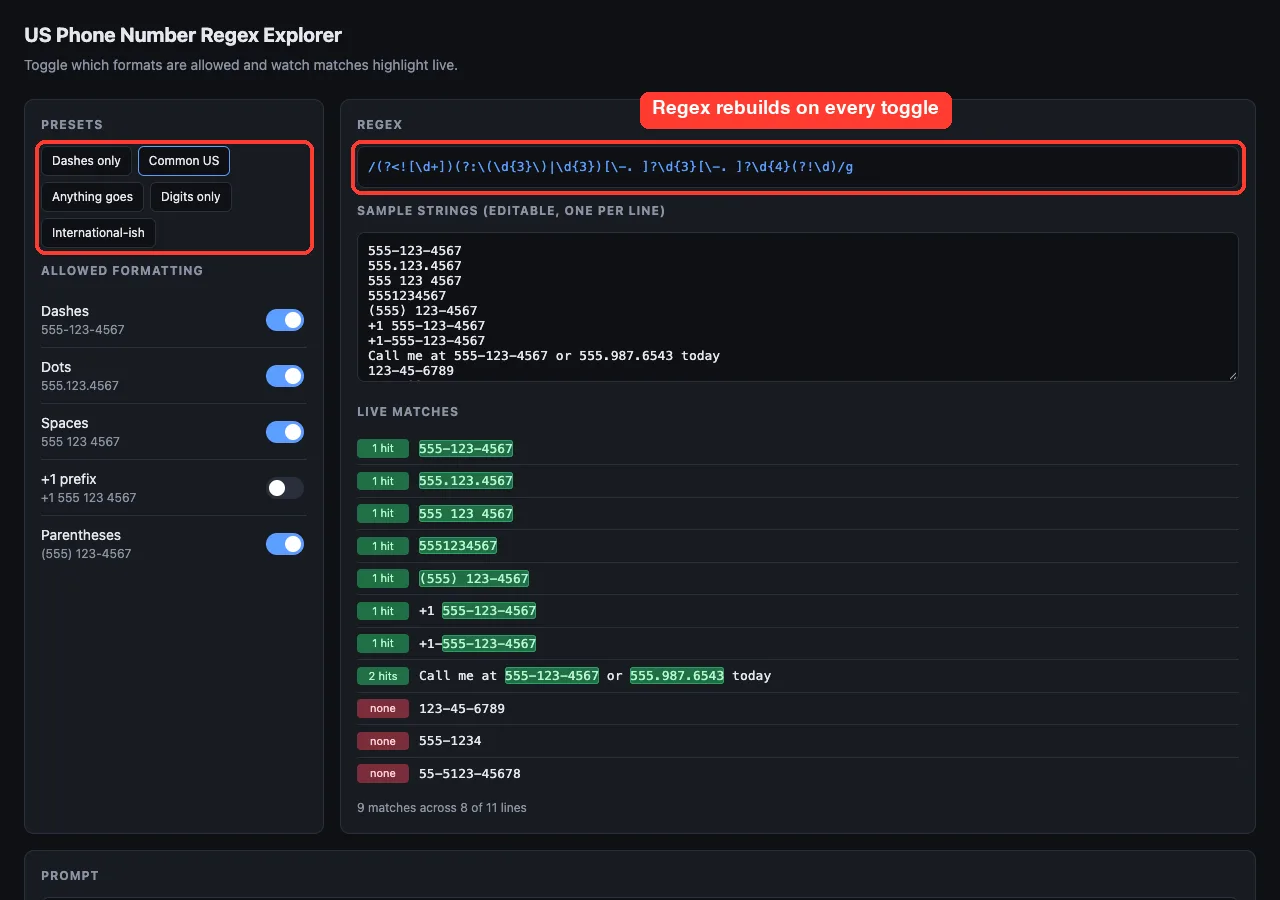
We found one thing to watch. With only dashes on, switching on the +1 prefix toggle did not add matches, because the +1 samples used spaces between the groups. The toggles interact, so read the regex line and not only the toggle names.
What Worked and What Did Not
| What worked | What to watch |
|---|---|
| Both pages built in under 40 seconds and opened with no errors we could see | Claude never opened them, so you must check the page yourself |
| The prompt reads like a person wrote it and mentions only changes | You still choose how exact the final values are |
| Presets give you a good starting point | The regex toggles interact in ways the labels do not show |
| Single file, no outside links, no account | We ran two of the six templates, so we cannot vouch for the other four |
Real Examples You Can Try
- Design: a card component with shadow, radius and spacing sliders.
- Design: a type scale with base size and ratio controls.
- Data: a SQL query builder or an API request builder.
- Learning: a concept map for a topic you are studying.
- Review: a document critique page where you approve or reject suggestions.
These come from the example topics in the template files. We ran the button and regex ones only. For other ways to shape how Claude works with your files, see our guide to skills versus plugins.
Try It Yourself
Pick something on your own project that is hard to describe in words. Start with a layout or color choice, since the design template is the simplest. Use a demo folder, not a real project.
Use the playground skill to build a card style explorer for my site, with sliders for radius, shadow and padding and four presets. Save it as card-playground.html. Do not open it or run anything.Open the file, pick a preset, move two sliders and copy the prompt. Then paste it into a new session and ask Claude to edit one file.
Common Mistakes
- Skipping the check. Claude said both pages were untested, so open them before you trust them.
- Asking for too much at once. The skill warns against too many controls, so ask for one decision at a time.
- Pasting the whole prompt into a big project. Say which file to edit, as we did with
index.html. - Expecting exact numbers. Words like pronounced leave the final values to Claude.
- Forgetting the cost. Every enabled skill puts its name and description in context, about 100 tokens here.
Pro Tips
- Say do not open it if you want to check the page yourself, or let Claude run
openif you want it to launch the page. - Ask for presets that match your brand so you start close to what you want.
- Keep the generated HTML file. It is a handy design note for later.
- Save repeated choices in your CLAUDE.md file once you know what you like.
- Disable the plugin with
/pluginwhen you are not using it, as the official plugins overview describes.
Cheat Sheet
Frequently Asked Questions
Is the Claude Code playground plugin free?
Yes. It is in Anthropic’s official marketplace and needs no account or key beyond your normal Claude Code use. Each request still uses your usage, like any other prompt.
Does the playground plugin run any code on my computer?
The plugin itself ships text files only: a skill and templates. The page Claude writes is ordinary HTML and JavaScript that runs in your browser when you open it, so give it a quick look first.
Do I need the plugin to make an HTML explorer?
No. You can ask Claude for a single-file explorer in plain words. The plugin gives Claude a fixed recipe, so the pages share the same layout, presets and prompt box.
Which templates does it include?
Six: design, data explorer, concept map, document critique, diff review and code map. We ran the design and data explorer templates only.
Can I use it on Windows or Linux?
It is plain files, so yes. We tested on macOS, and the install steps for Windows and Linux follow Anthropic’s official instructions. Our Claude guide covers the wider product.
Conclusion
The Claude Code playground plugin is a small, safe add-on that gives you a better way to make visual choices: drag, look, then copy a clear prompt back to Claude. In our two runs it built working pages in about half a minute, wrote prompts that Claude applied cleanly, and cost about 100 tokens when idle. It is worth installing if you tweak design or build queries often, but open every page yourself and treat the exact numbers as Claude’s best guess.