If you are looking for a Claude Code HubSpot plugin, it is in the official marketplace, and so are plugins for Apollo, Clay, ZoomInfo, Hunter, Lusha, ActiveCampaign, Leadfeeder, Vibe Prospecting, Windsor.ai and Carta CRM. This guide explains what each one adds, which parts we ran on a Mac, and which parts need your own paid account, because none of them can touch real leads or deals until you sign in.
This guide is part of our Claude Code tutorials. Find more add-ons in our Skills Directory.
Tested with Claude Code v2.1.319 on 2026-11-09 (macOS).
We read every manifest, hook and connection file first. Then we loaded ten plugin folders into a throwaway sandbox and asked four short questions in plan mode, so Claude could not change anything. We never signed in anywhere, never typed a key and never touched a real CRM, so anything about live contacts, deals or credits comes from each plugin’s own files and README.
Quick Summary: Sales and CRM Plugins at a Glance
Most of these plugins add a connection (an MCP server) to a hosted service, and many also add skills that teach Claude how to use that service. The connection gives Claude real data, and it always needs your login.
| Plugin | Maker | What it adds | Account needed? | Install command |
|---|---|---|---|---|
| hubspot-sales | HubSpot | 9 skills, 2 agents and the HubSpot connection | Yes, a HubSpot account | /plugin install hubspot-sales@claude-plugins-official |
| apollo | Apollo.io | 5 skills and the Apollo connection | Yes, an Apollo account and credits | /plugin install apollo@claude-plugins-official |
| clay | Clay | 31 skills, 2 hooks and a bundled CLI launcher | Yes, a Clay account | /plugin install clay@claude-plugins-official |
| zoominfo | ZoomInfo | 35 skills and the ZoomInfo connection | Yes, a ZoomInfo account | /plugin install zoominfo@claude-plugins-official |
| hunter | Hunter.io | 13 skills and the Hunter connection | Yes; its README says every plan works, including Free | /plugin install hunter@claude-plugins-official |
| lusha | Lusha | 6 skills and the Lusha connection | Yes, a Lusha account | /plugin install lusha@claude-plugins-official |
| activecampaign | ActiveCampaign | 6 skills, 5 commands and 2 agents | Yes, plus your own server URL | /plugin install activecampaign@claude-plugins-official |
| leadfeeder | Leadfeeder | 6 skills and the Leadfeeder connection | Yes, a Leadfeeder account | /plugin install leadfeeder@claude-plugins-official |
| vibe-prospecting | vibeprospecting.ai | 1 skill, 1 command and a command-line tool | Yes, to sign in to its CLI | /plugin install vibe-prospecting@claude-plugins-official |
| windsor-ai | Windsor.ai | 1 skill, 3 commands and 1 agent | Yes, a Windsor account | /plugin install windsor-ai@claude-plugins-official |
| carta-crm | Carta | Skills for an investor CRM, plus hooks | Yes, a Carta CRM account | /plugin install carta-crm@claude-plugins-official |
What Is a Claude Code HubSpot Plugin and Its Neighbors?
A plugin is a folder that can hold skills, commands, agents, hooks and connections to outside servers. A skill is a set of instructions Claude loads when your question matches it. A connection, called an MCP server, is what lets Claude read and write data in another service.
The HubSpot Sales plugin shows the pattern well. Its connection file points to https://mcp.hubspot.com/anthropic, and its skills are call-prep, contact-lookup, daily-brief, follow-up, import-contacts, log-call, onboarding, pipeline-pulse and a general hubspot skill. Without the connection, the skills have no CRM to work on.
Our MCP guide explains the connection layer, and our plugin install guide covers scopes and updates. Anthropic’s docs on discovering plugins and building plugins describe how the pieces fit together. If you also plan your work in tickets, see our project management plugins guide.
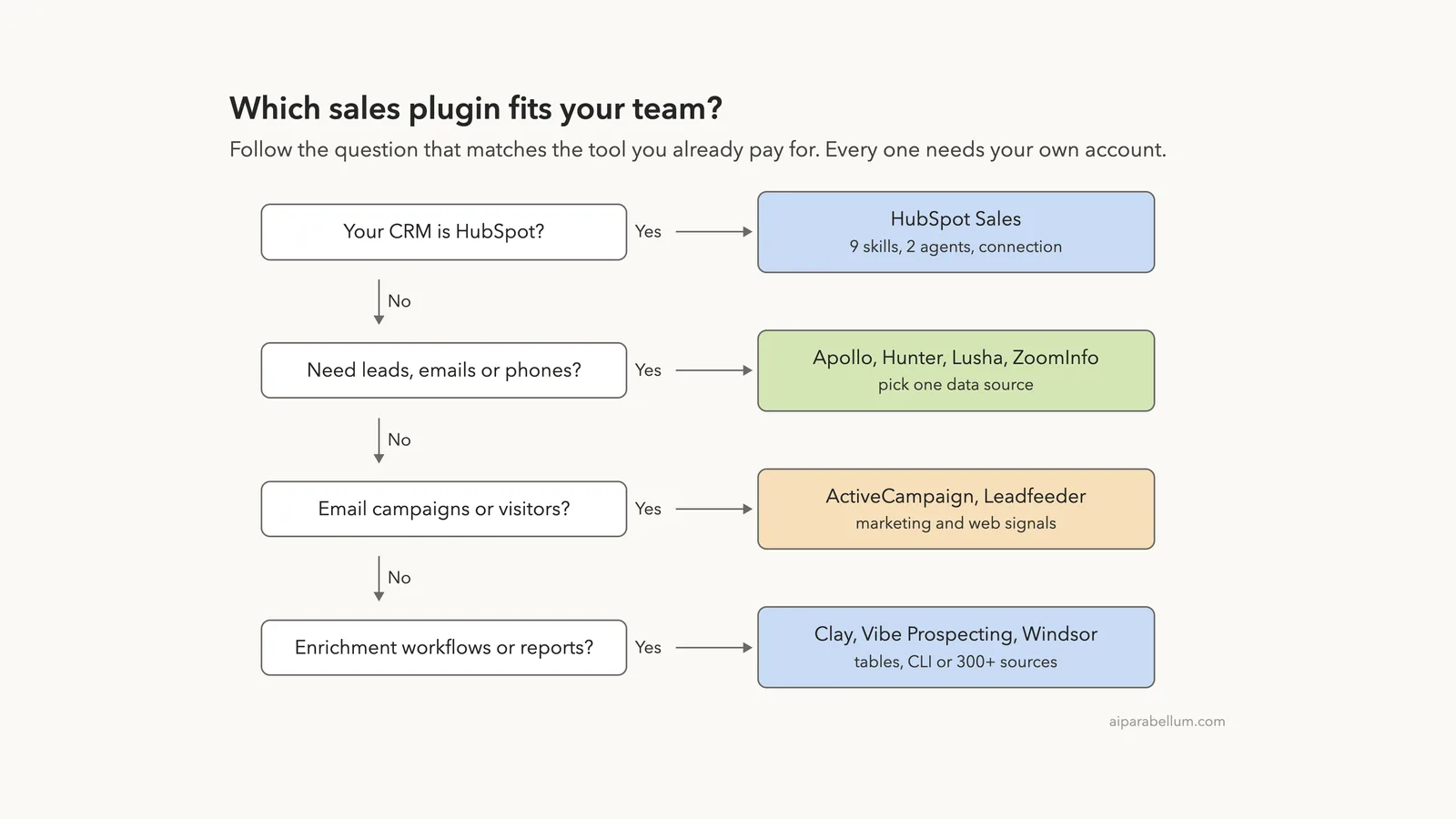
Which Sales Plugin Fits Which Job?
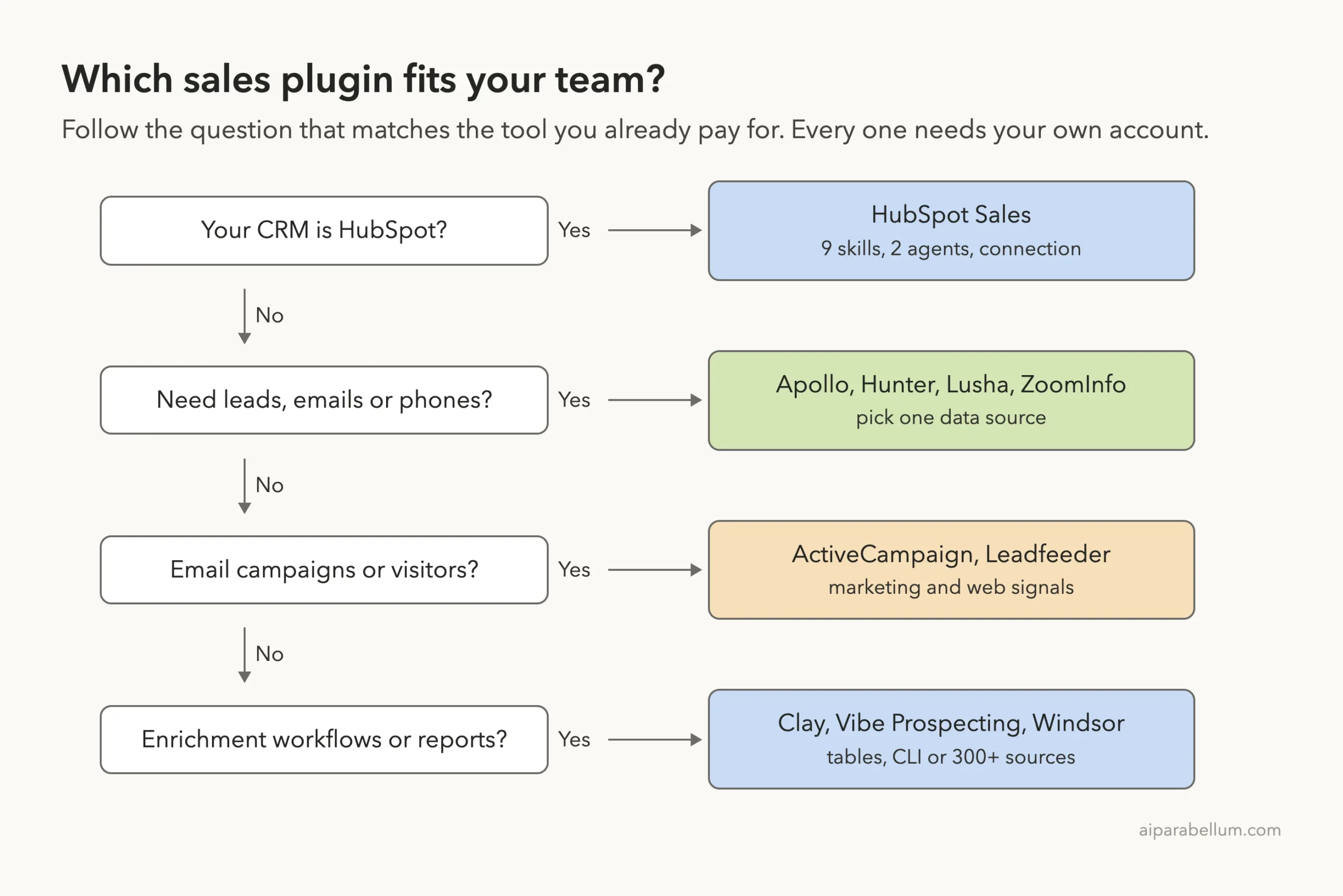
Start from the tool your team already pays for. If your CRM is HubSpot, start there. If you need new leads, pick one data source, because Apollo, Hunter, Lusha and ZoomInfo overlap a lot.
How We Tested Without Touching Our Setup
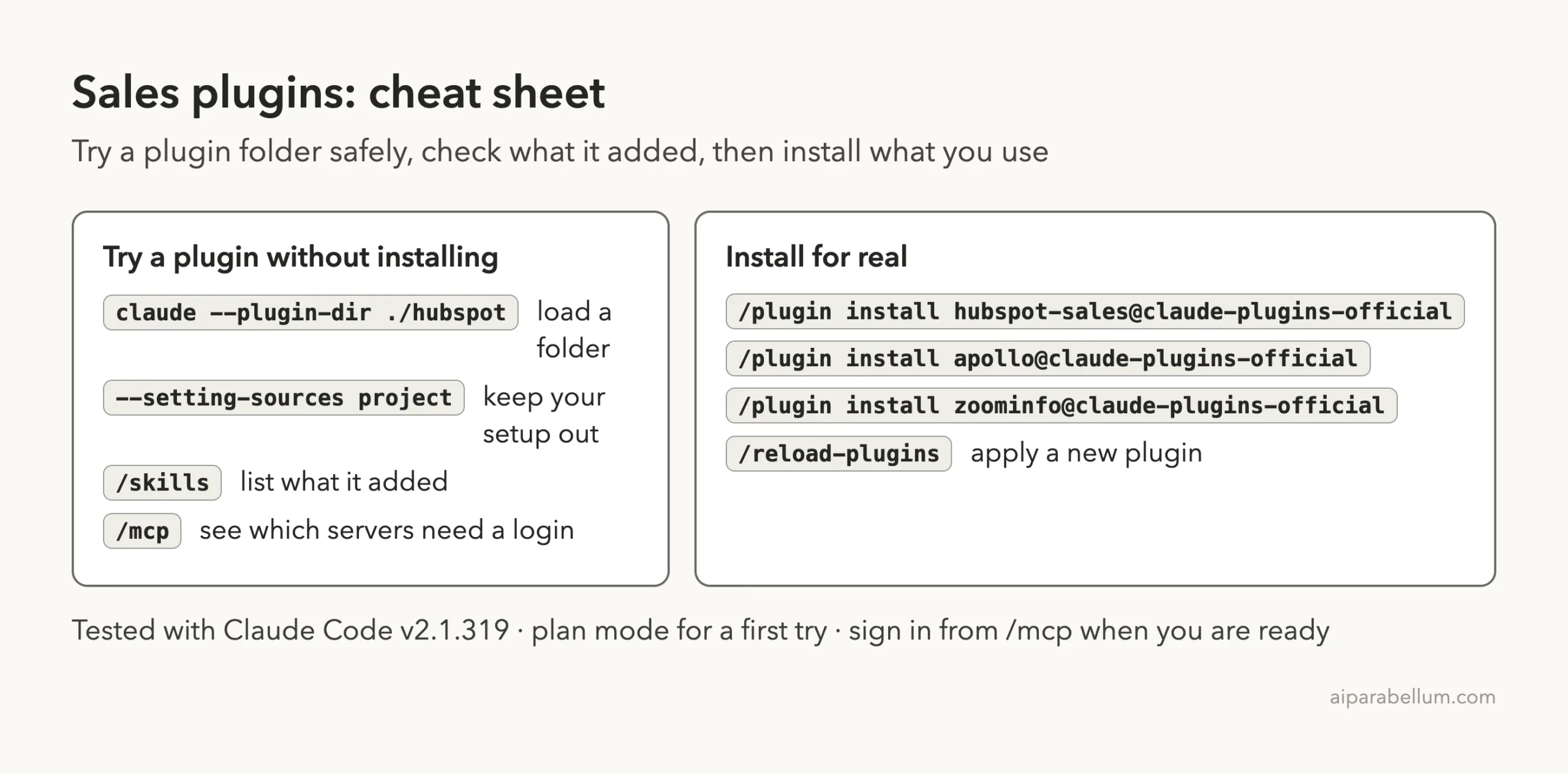
We cloned each plugin’s repository at the exact commit the official marketplace points to. Then we started Claude Code in an empty demo project with one --plugin-dir flag per plugin and --setting-sources project, so nothing from our own Claude setup mixed in. We never ran /plugin install.
The demo project has two tiny made-up files. leads.csv lists three bike shops, and call-notes.md has three notes from an imaginary sales call.
| Plugin | Version | Marketplace commit | Commit date |
|---|---|---|---|
| hubspot-sales | 2.3.0 | a0c5960 | 2026-09-11 |
| apollo | 0.1.1 | bd0513c | 2026-09-16 |
| clay | 2.26.0 | 769514a | 2026-09-21 |
| zoominfo | 1.0.1 | 31a1ec5 | 2026-09-30 |
| hunter | 0.1.0 | 44f0f56 | 2026-09-18 |
| lusha | 0.1.3 | 4bcf5c7 | 2026-10-21 |
| activecampaign | 0.3.1 | 0ff8587 | 2026-08-31 |
| leadfeeder | 1.0.0 | cddf27f | 2026-09-17 |
| vibe-prospecting (named vpai) | 0.1.107 | ca43f6d | 2026-10-11 |
| windsor-ai | 1.0.0 | d7ba1cb | 2026-08-13 |
| carta-crm (read only) | 1.15.0 | ea7fe1d | 2026-10-10 |
Installing a sales plugin takes seconds, but it stays idle until you connect it to your real account.
What We Read Before Running Anything
Hooks run commands on your computer on their own, so we looked for them first. Only two of the eleven plugins have any, and the rest hold skills, commands and a connection file.
- Clay: two hooks that auto-approve the plugin’s own
claycommand-line calls and its own skills. The script refuses anything with redirects, variable expansion or chained commands, and it never auto-approves login, logout, API keys, webhooks or credit top-ups. We read both scripts. - Clay also ships a
bin/claylauncher that downloads and checks a platform binary from a GitHub release on first use. We did not run it. - Carta CRM: six hooks that run prebuilt Go programs at session start, on each prompt and before some tool calls. Its README describes recording the active skills and model for instrumentation. We could not audit prebuilt binaries, so we left this plugin unloaded and covered it from its files.
- Vibe Prospecting: its guide tells Claude to run
npm install -g @vibeprospecting/vpai@latestat the start of each workflow. We did not run that command. - HubSpot, Apollo, ZoomInfo, Hunter, Lusha, Leadfeeder, ActiveCampaign and Windsor: skills, commands or agents plus a connection file, with no hooks.
What We Ran and What Comes From the Docs
| Item | Status |
|---|---|
| Loading ten plugins and listing their skills | We ran it |
| Seeing which connections need a login | We ran it |
HubSpot log-call skill on a local notes file | We ran it, without a HubSpot account |
Apollo prospect skill | We ran it, without an Apollo account |
ZoomInfo score-leads skill | We ran it, without a ZoomInfo account |
Windsor /windsor-ai:windsor-sources | We ran it; no Windsor tools loaded |
| Hunter, Lusha, Leadfeeder, ActiveCampaign, Clay, Vibe Prospecting | Loaded only; no skill was asked a question |
| Carta CRM | Read only, not loaded |
| Real leads, deals, credits and campaigns | From each README and files, not tested |
Loading Ten Plugins in One Session
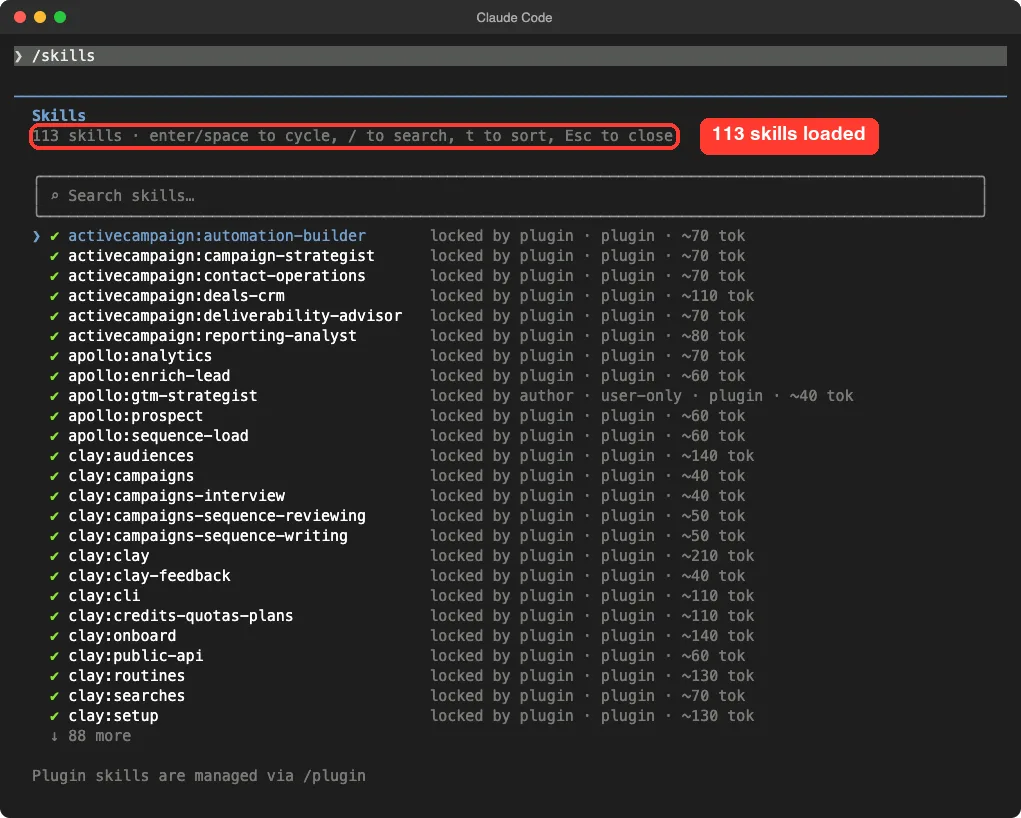
The /skills screen showed 113 skills. ActiveCampaign, Apollo and Clay sit at the top of the alphabetical list, and 88 more are below. Each shows a rough size such as 70 or 140 tokens, which is what its name and description cost in Claude’s context.
The folders hold the same 113 skills: ZoomInfo 35, Clay 31, Hunter 13, HubSpot 9, Apollo 5, ActiveCampaign 6, Leadfeeder 6, Lusha 6, Vibe 1 and Windsor 1. Apollo’s gtm-strategist shows as locked by its author and user-only, so you start it yourself instead of waiting for Claude to pick it.
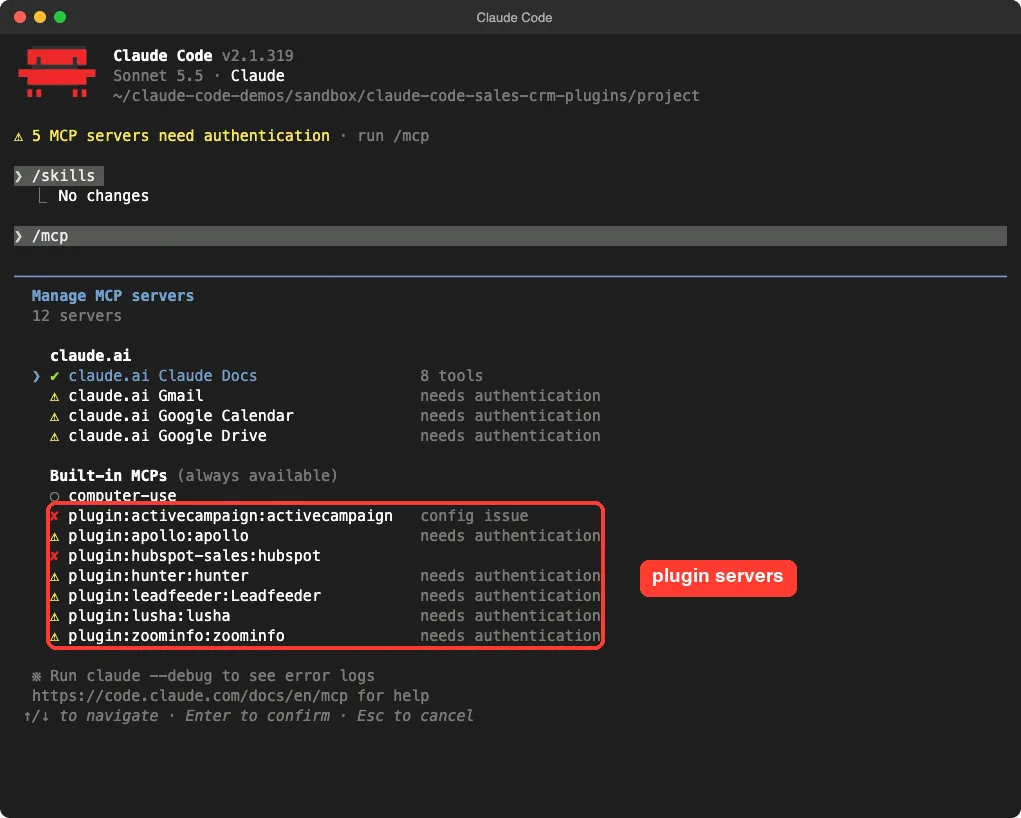
The /mcp screen showed what the plugins connect to. Apollo, Hunter, Leadfeeder, Lusha and ZoomInfo said “needs authentication”.
ActiveCampaign said “config issue”, because its manifest asks you for your own server URL, found under Settings, Developer, MCP in your ActiveCampaign account. HubSpot showed a red cross.
Clay, Vibe Prospecting and Windsor showed no server at all. Clay and Vibe work through a command-line tool, so that fits. Windsor’s connection file is shaped differently from the others (it has no mcpServers wrapper), and we did not dig into why it never loaded.
Claude Code HubSpot Plugin: Log a Call From Your Notes
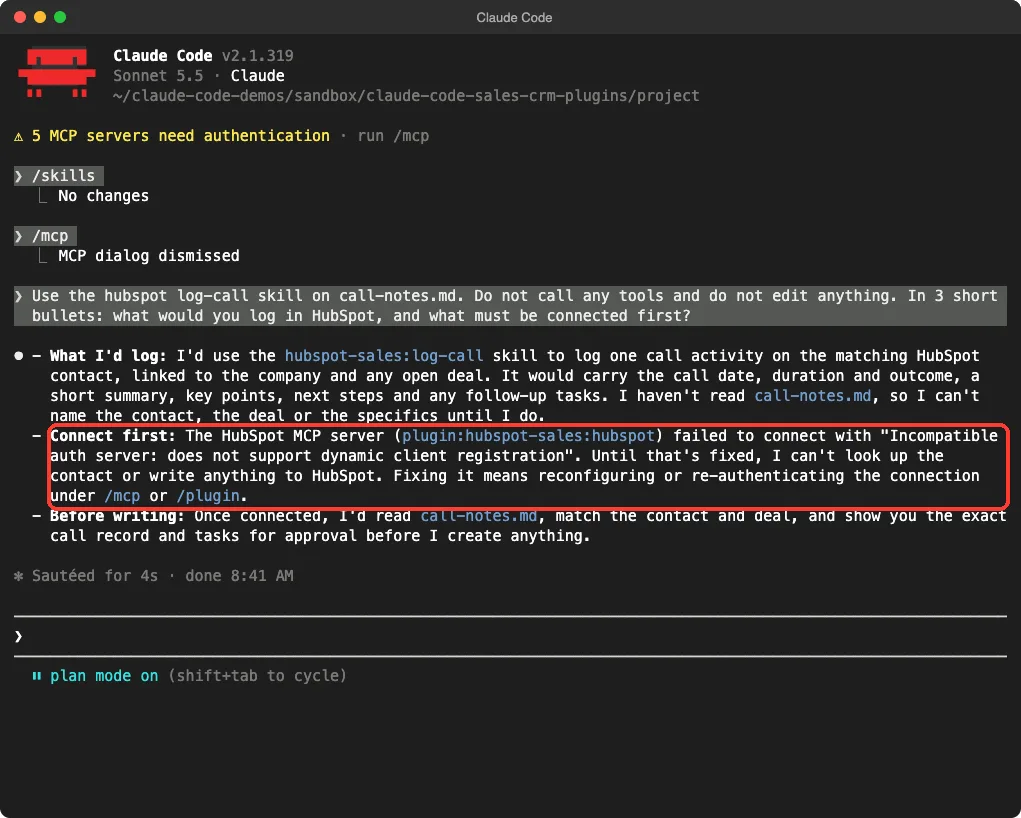
We asked the log-call skill to work from our local call-notes.md and to call no tools. Claude loaded the skill and said it would log one call activity on the matching contact, linked to the company and any open deal, with the date, duration, outcome, a short summary, next steps and follow-up tasks. It added that it would show you the exact record for approval before creating anything.
The useful part was the blocker.
Claude reported that the HubSpot server failed with “Incompatible auth server: does not support dynamic client registration”. That is a real connection problem we hit in this sandbox on a plugin pinned to 2026-09-11, so we cannot say whether it affects you. If you see it, check the plugin’s README and the /mcp screen first.
Claude Code Apollo Plugin: From a Plain-English Goal to Leads
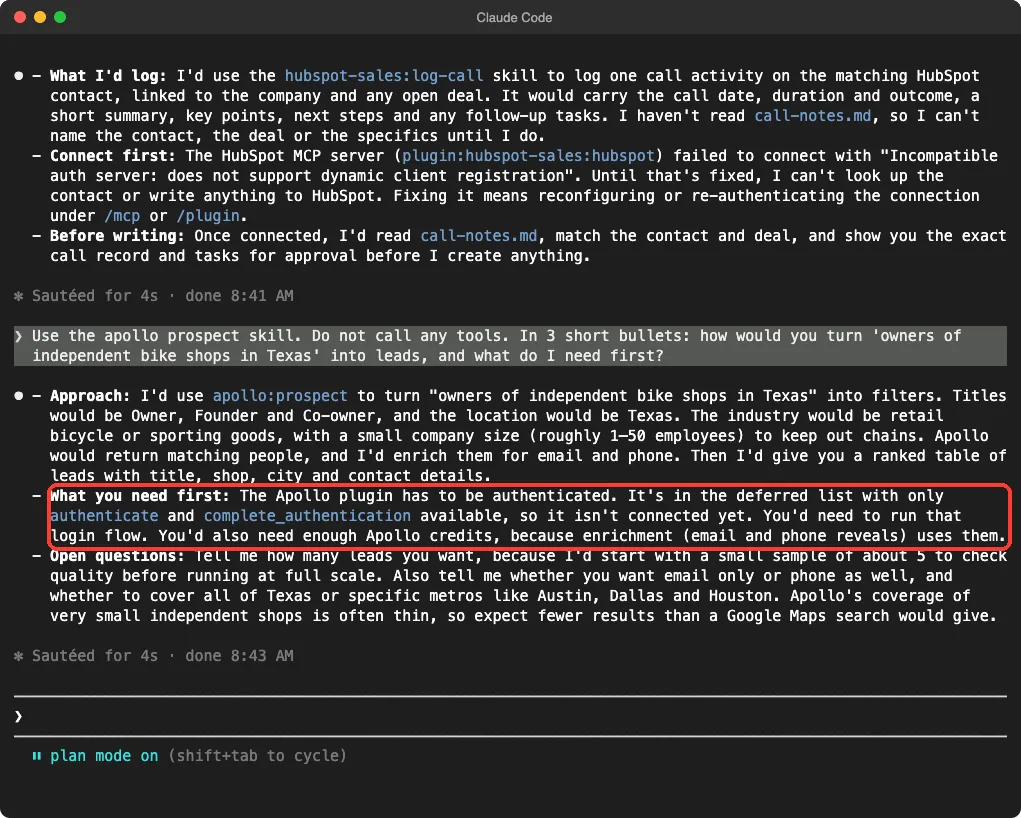
The Apollo plugin has five skills: prospect, enrich-lead, sequence-load, analytics and gtm-strategist. We asked the prospect skill how it would turn “owners of independent bike shops in Texas” into leads.
Claude proposed titles such as Owner and Founder, a Texas location, a retail bicycle industry and a small company size, then a ranked table of enriched leads.
It said it would start with a sample of about 5 to check quality, and that email and phone reveals use Apollo credits. It also warned that coverage of very small shops is often thin. That last point is Claude’s own judgment, not an Apollo claim.
Claude Code ZoomInfo Plugin: Score Leads
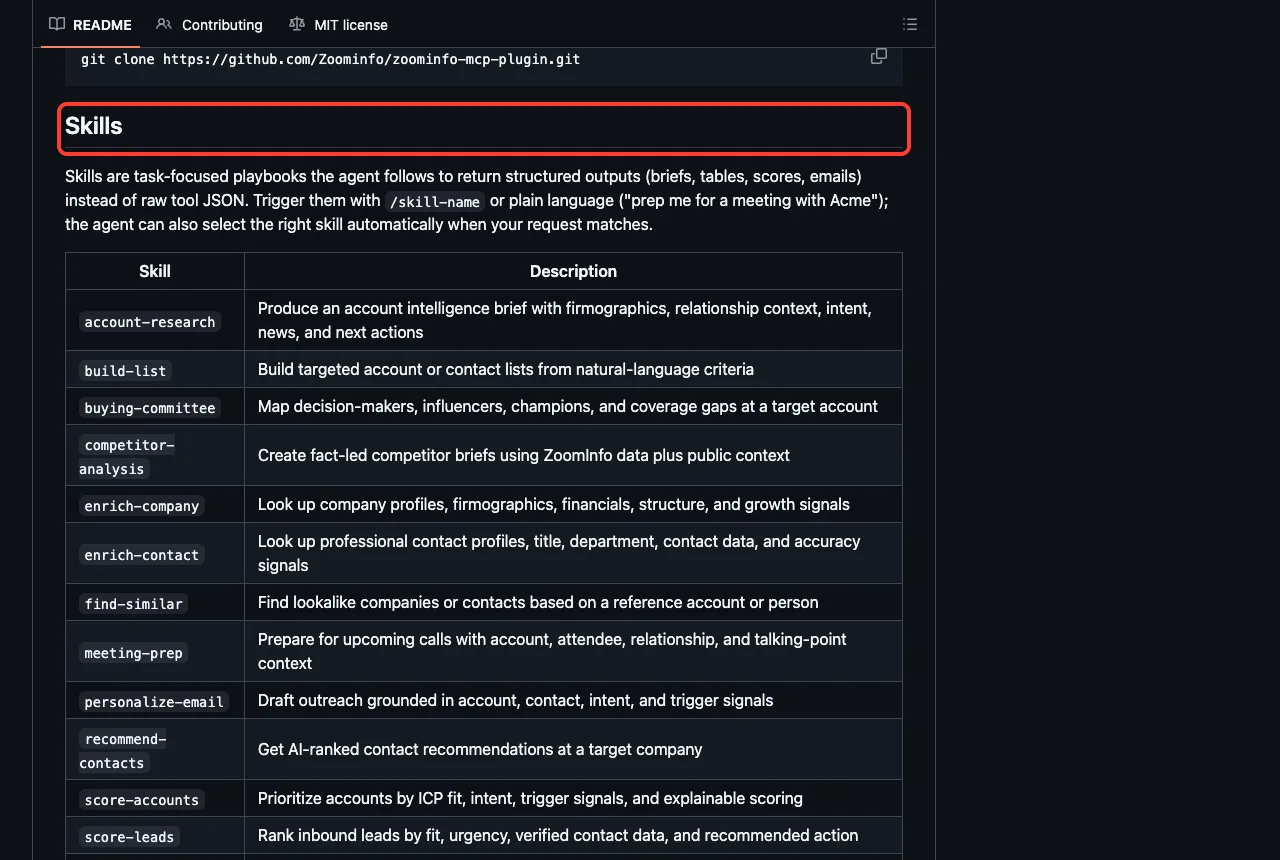
ZoomInfo is the biggest plugin here, with 35 skills such as score-leads, score-accounts, meeting-prep, buying-committee, tam-sizer, why-now and qbr-prep. Its README says you can trigger them with /skill-name or plain language.
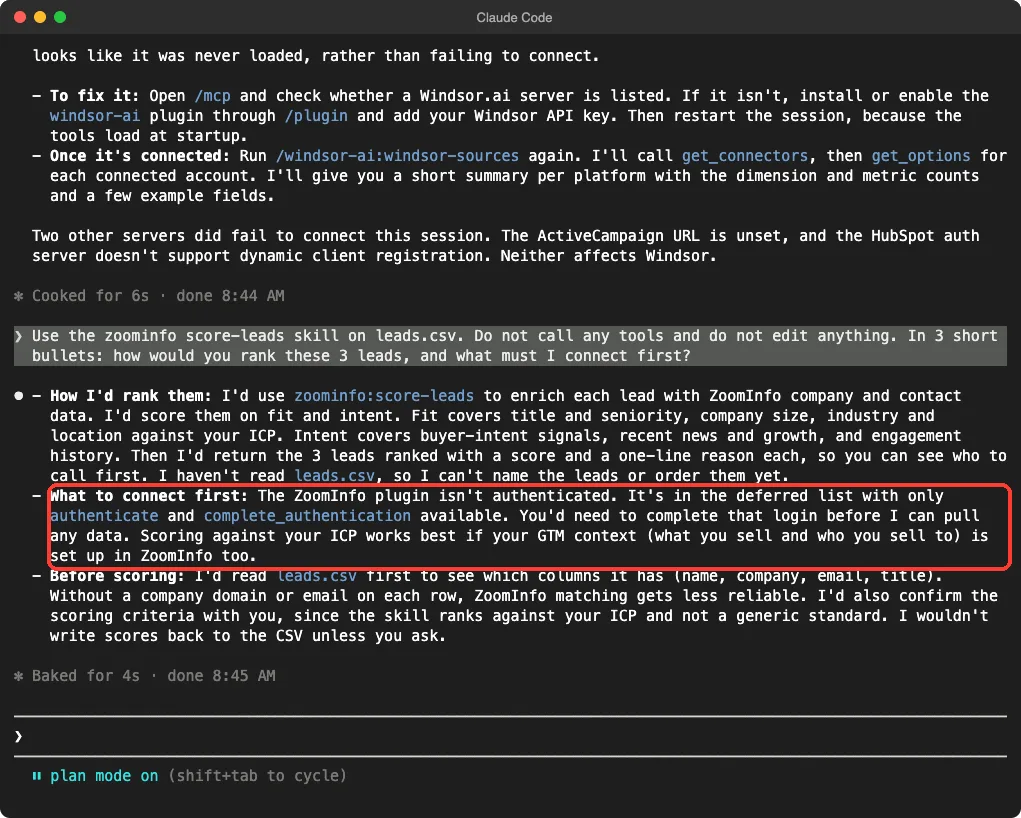
We pointed score-leads at our leads.csv. Claude explained it would enrich each lead, score fit and intent, and return the leads with a score and a one-line reason. It admitted it had not yet read the file, so it could not rank anything, and it said company domains or emails make matching more reliable.
Windsor.ai: When a Plugin Does Not Load
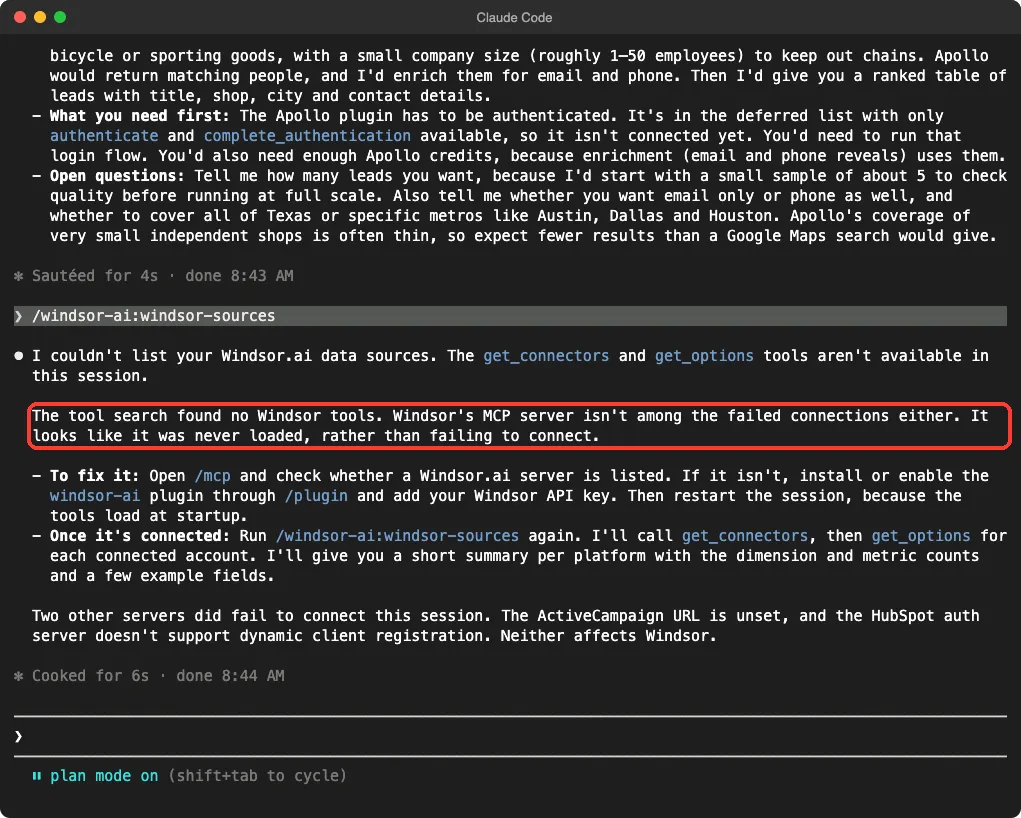
We ran /windsor-ai:windsor-sources, a command meant to list your connected data sources. Claude said it could not, because no Windsor tools were available, and that the server looked never loaded rather than failed. It suggested checking /mcp and restarting the session.
This is why a test run matters. The plugin’s description says 350+ data sources, while its connection file says 50+, and in our sandbox it connected to none. Treat Windsor as unverified until you try it with your own account.
The Other Sales Plugins We Only Loaded
These we loaded but did not question, so this section comes from their files and READMEs.
Clay
Clay has the most skills after ZoomInfo, covering tables, audiences, signals, routines, workflows and sequencer campaigns.
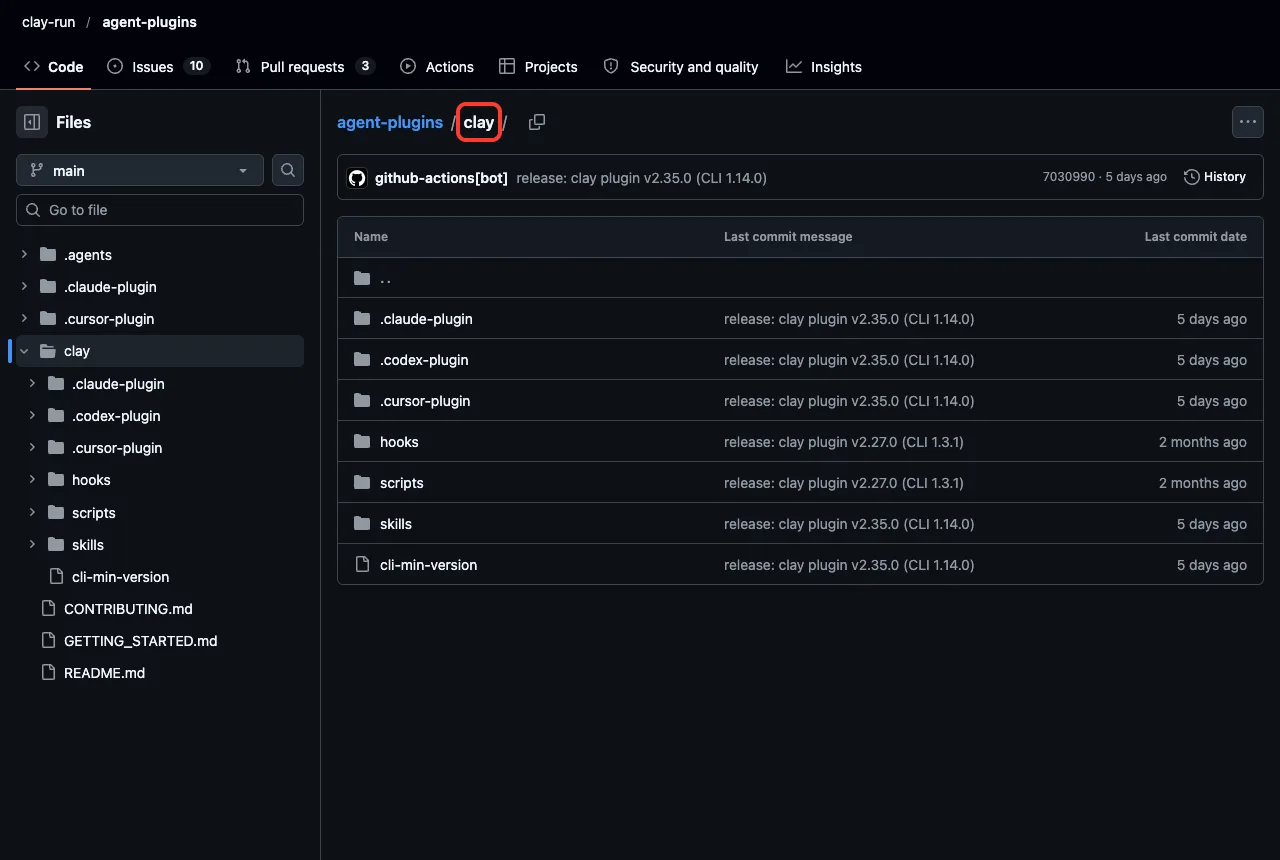
Its description says it works through a clay command-line tool and needs a Clay account. The marketplace pins version 2.26.0, but the live repository was already at v2.35.0 when we looked, so expect the install to differ over time. You can browse it on the Clay agent-plugins repository.
Hunter
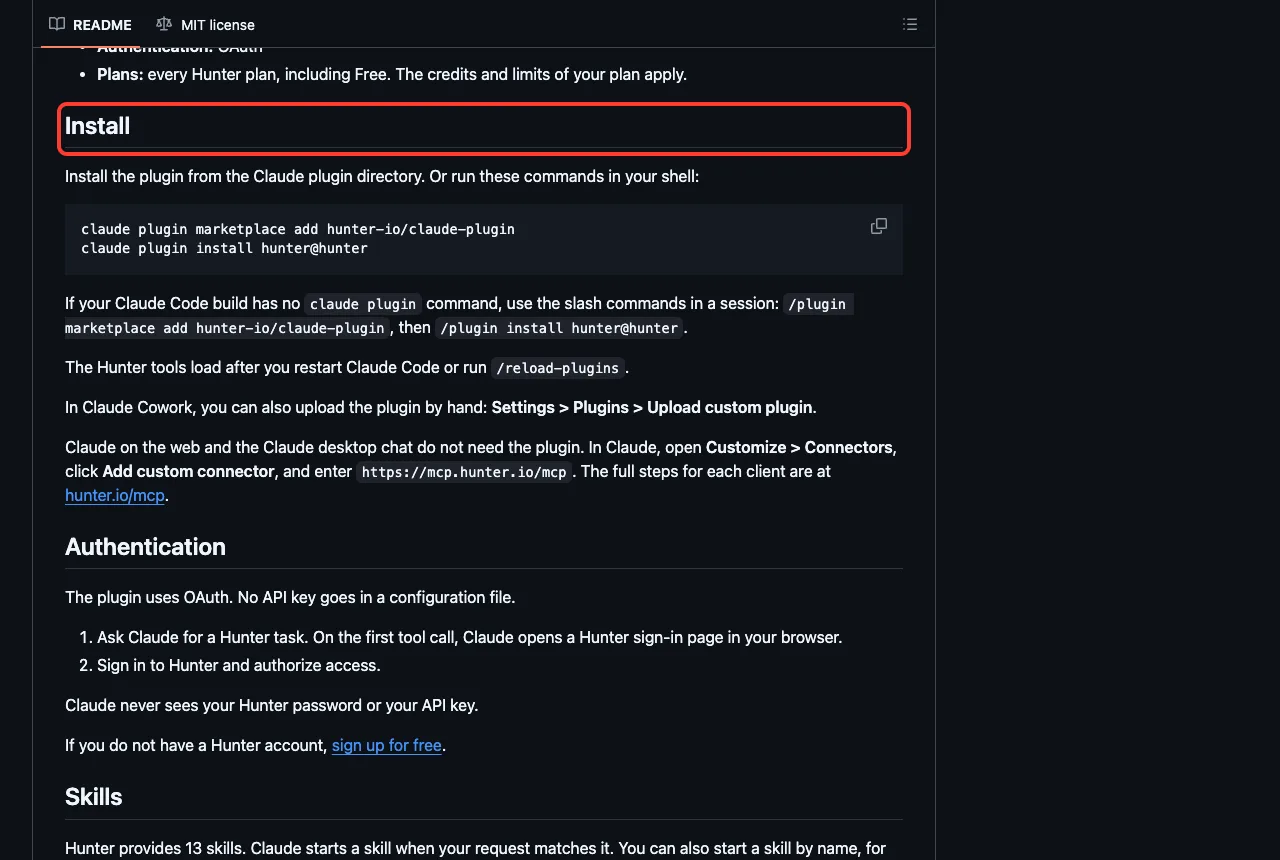
Hunter has 13 skills, including email-finder, email-verifier, domain-search, prospecting, build-sequences and push-to-crm. Its README says sign-in uses OAuth, no API key goes in a config file, and every Hunter plan works, including Free, within that plan’s credits and limits.
Lusha and Leadfeeder
Lusha has six skills: prospect, enrich-contact, lookalike-prospect, signal-prospect, outreach-research and outreach-sequence. Leadfeeder has six too, built around website visitors: a daily visitor brief, visitor company research, buyer discovery, outreach drafts and adding companies to your lists. Its manifest has an optional field for your Leadfeeder account ID.
ActiveCampaign
ActiveCampaign adds skills for automations, campaigns, contacts, deals, deliverability and reporting. It also adds five commands: /campaign-report, /automation-audit, /audience-health, /weekly-digest and /deal-pipeline-review, plus two agents.
Vibe Prospecting and Carta CRM
Vibe Prospecting has one skill, vibe-prospecting, and a /skip_sample command. By default it previews five entities before running a full search. Carta CRM is different from the others: it manages an investor and deal CRM, with skills to add and search investors, companies, contacts, deals, notes and fundraisings.
Try It Yourself
You can repeat our approach with any plugin and no account. Clone the plugin, load it with --plugin-dir, and ask one skill what it would do in plan mode. Paste this prompt after loading a data plugin:
Use the prospect skill. Do not call any tools.
In 3 short bullets: how would you turn "owners of
independent bike shops in Texas" into leads, and
what do I need first?
Common Mistakes
- Installing five data plugins that do the same job. Pick one source first.
- Expecting skills to work before you sign in from
/mcp. - Letting a plugin write to your CRM without reading the record it plans to create.
- Ignoring credit costs. Apollo’s skill told us enrichment uses credits.
- Trusting a plugin’s description over a test. Windsor’s description and our result did not match.
Pro Tips
- Start in plan mode with
--permission-mode planso a first try cannot change anything. - Read the hooks folder before loading a plugin that has one.
- Use
/skillsto see how many tokens each skill adds to your context. - Ask for a sample of five leads before a full run.
Cheat Sheet
Frequently Asked Questions
Is there an official Claude Code HubSpot plugin?
Yes. The official marketplace lists hubspot-sales, made by HubSpot. It needs a HubSpot account, and in our sandbox its connection failed with an authentication error.
Do these plugins cost money?
The plugins are free to install, but each connects to a service with its own plan. Hunter’s README says every plan works, including Free, within that plan’s limits.
Which plugin should I install first?
Start with the tool you already use. If that is HubSpot, install hubspot-sales. If you only need leads, try one of Apollo, Hunter, Lusha or ZoomInfo.
Can Claude change my CRM by itself?
Skills like log-call are written to show the record for your approval first. Keep plan mode on until you trust a plugin.
Why did a plugin show no connection?
Some plugins use a command-line tool instead of a server, like Clay and Vibe. Windsor showed none in our test, and we do not know why.
Conclusion
Claude Code sales plugins mostly add a connection plus skills, and the connection is where your account comes in. In our test, ten plugins loaded 113 skills, and five of the servers asked for a sign-in, one needed a URL and one failed. Pick the plugin for the tool you already pay for, try it in plan mode, and read any hooks before you trust it. See our Claude guide for the wider picture.