The Claude doc coauthoring skill turns a blank page into a guided writing session. Instead of asking Claude for a finished document in one shot, you answer questions, pick from options, and approve each section as it is drafted. We loaded it into a throwaway Claude Code project, used it to start a real decision doc, and checked what it did at each stage.
This guide is part of our Claude Code tutorials. Find more add-ons in our skills directory.
Tested with Claude Code v2.1.318 on November 7, 2026. We read the skill from the anthropics/skills repository at commit 2c5958e (committed November 6, 2026).
Doc Co-Authoring Skill at a Glance
| Question | Short answer |
|---|---|
| What is it? | A skill (a written set of instructions) that guides you through writing a document |
| Where does it live? | skills/doc-coauthoring in the anthropics/skills repository |
| What is inside? | One file, SKILL.md. No scripts, no hooks |
| How many stages? | Three: context gathering, refinement and structure, reader testing |
| Does it write the doc for you? | It drafts, but you steer every section |
| What did we run? | Stages 1 and 2 on a demo decision doc |
| What did we not run? | Stage 3, the reader test with fresh Claude agents |
| Our verdict | Worth installing if you write specs, proposals or decision docs |
What the Doc Co-Authoring Skill Is
A skill is a folder with a SKILL.md file. Claude Code reads the file when a task matches its description, then follows the steps inside. If you want the basics, our guide to Claude Code skills explains how they work.
This one is about process, not code. Its description says it guides you through a structured workflow for co-authoring documentation, such as proposals, technical specs and decision docs. The file tells Claude to act as an active guide and to walk you through three stages.
Most weak AI-written documents fail for one reason: Claude does not know what you know, so it fills gaps with generic text. This skill spends the first stage closing that gap before anything gets drafted.
A good doc starts with what you know, not with what the model guesses.
The Three Stages Explained
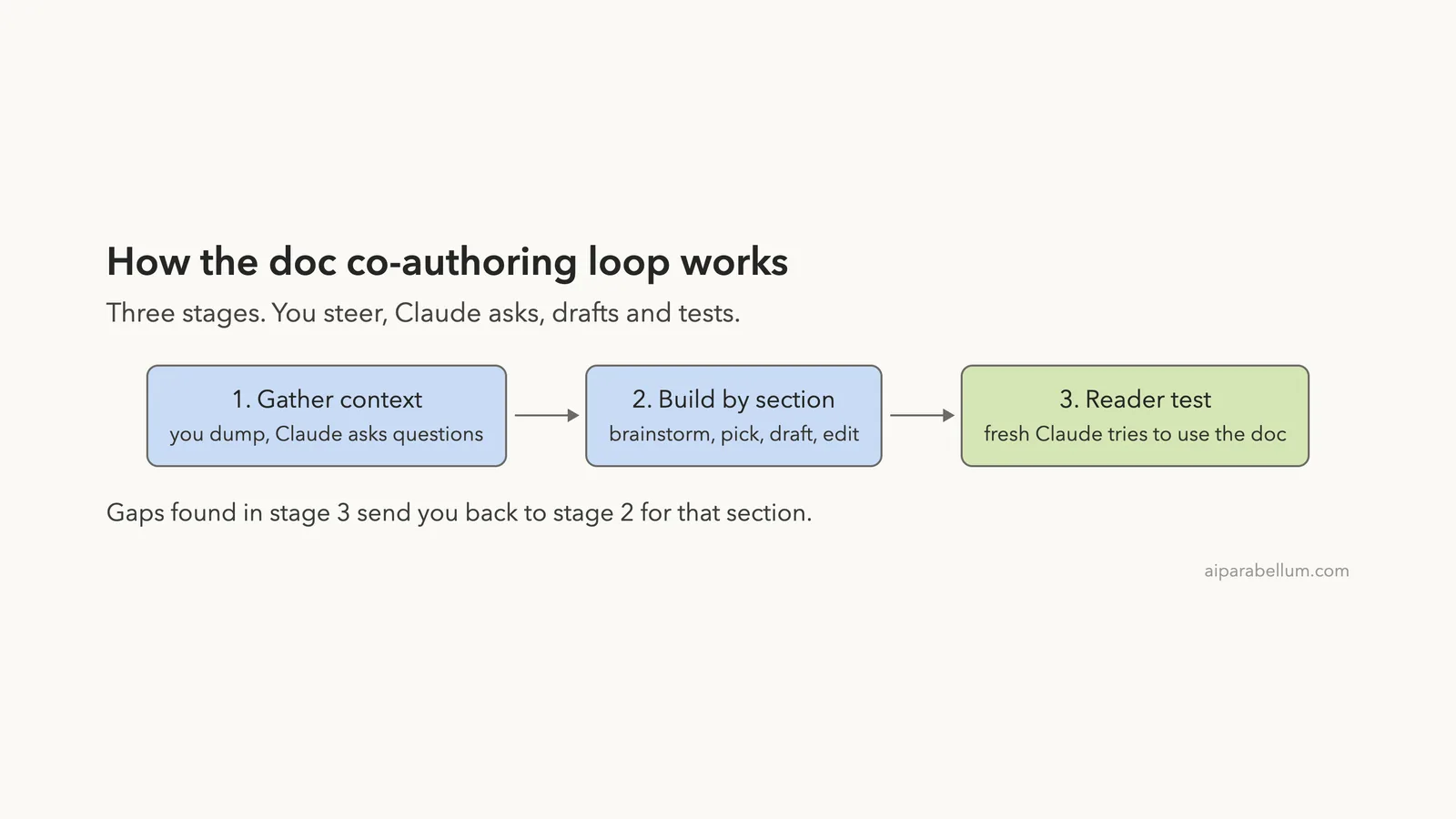
The skill file names three stages. Here is what each one asks of you and of Claude.
- Context gathering: you share everything you know, and Claude asks clarifying questions until it understands the edge cases.
- Refinement and structure: you build the document one section at a time, with options to pick from and small edits.
- Reader testing: a fresh Claude with no context tries to use the doc, so blind spots show up before real readers find them.
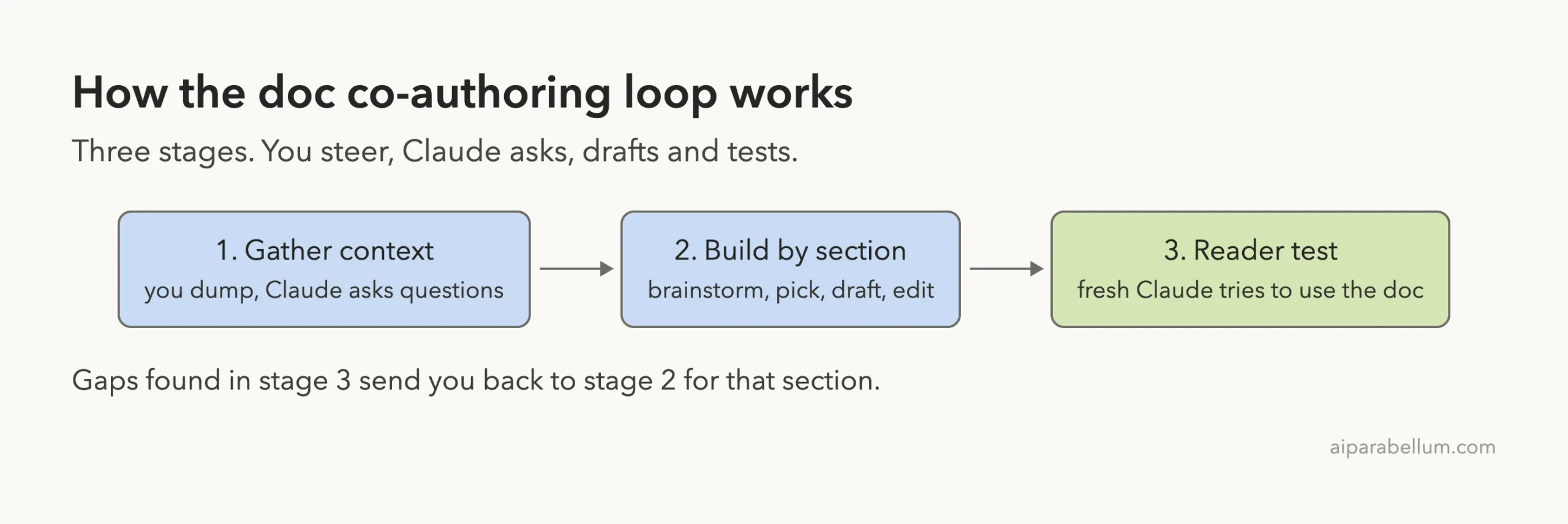
The skill also says you can skip any stage. If you want to move faster, Claude is supposed to ask whether you want to skip it and write freeform.
How to Load the Skill Safely in Claude Code
Our directory lists two install commands for this skill. They add the whole anthropics/skills collection as a marketplace and then install a bundle that includes it.
/plugin marketplace add anthropics/skills
/plugin install example-skills@anthropic-agent-skills
You can read how marketplaces work in the official plugin discovery guide. We did not use those commands, because they change your own setup.
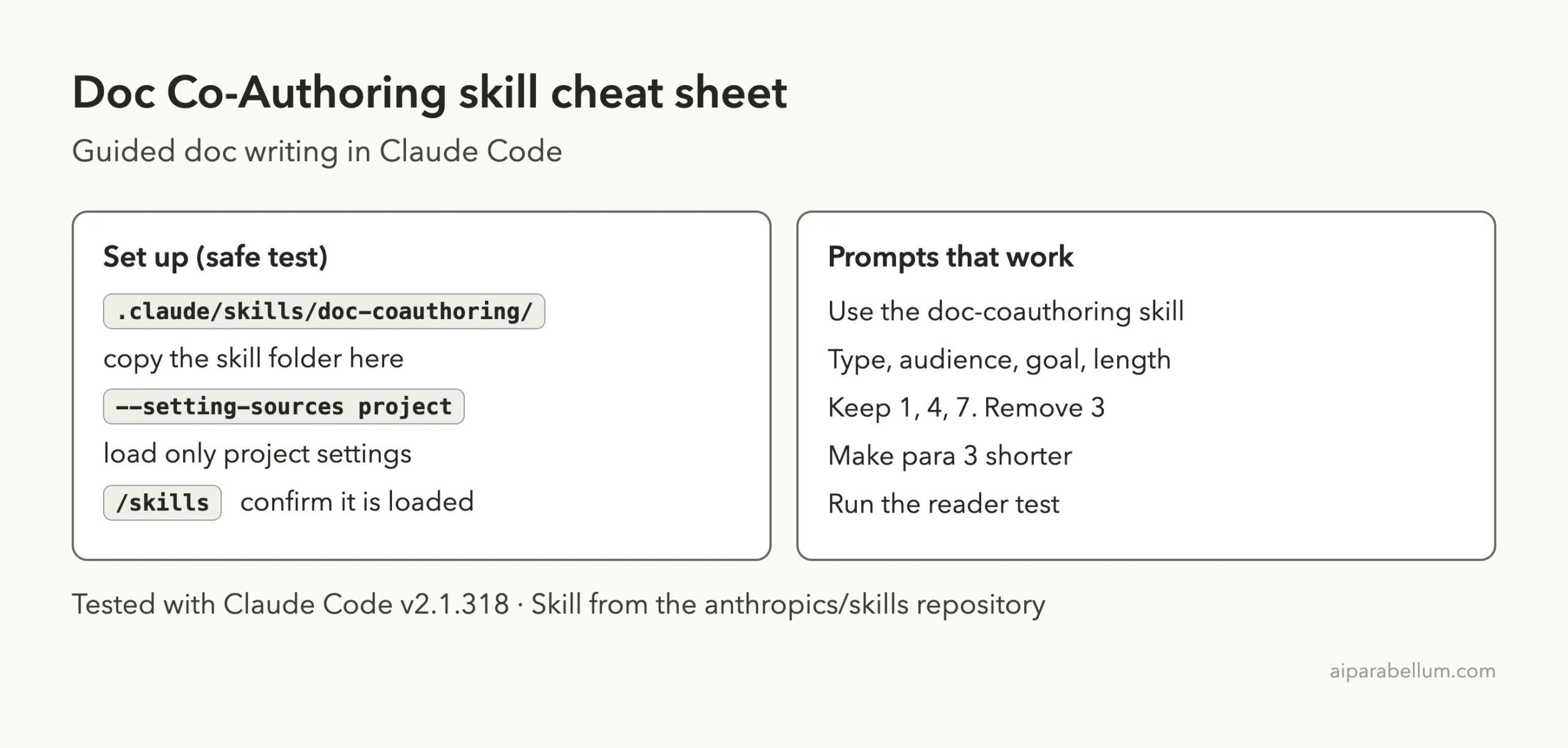
For the test we copied one folder instead. We cloned the repository into a throwaway folder and copied skills/doc-coauthoring into the demo project at .claude/skills/doc-coauthoring. Then we started Claude Code with --setting-sources project, so only that project’s settings were loaded.
Project skills live in .claude/skills/, as the skills documentation describes. Deleting that folder removes the skill again. Nothing was written to our personal Claude folder.
What we checked before running it
We read the whole file before loading it. It has about 16,000 characters of plain instructions. The folder contains nothing else, so there are no scripts to run and no hooks.
That makes it one of the safer add-ons to try. The worst it can do is change how Claude talks to you and what files Claude asks to create. Claude Code still asks permission before writing a file.
Confirming the Skill Is Loaded
After the trust prompt, we typed /skills. The list showed doc-coauthoring marked as a project skill, with about 150 tokens counted for it. That small number is the description, which Claude keeps in view so it knows when to use the skill.
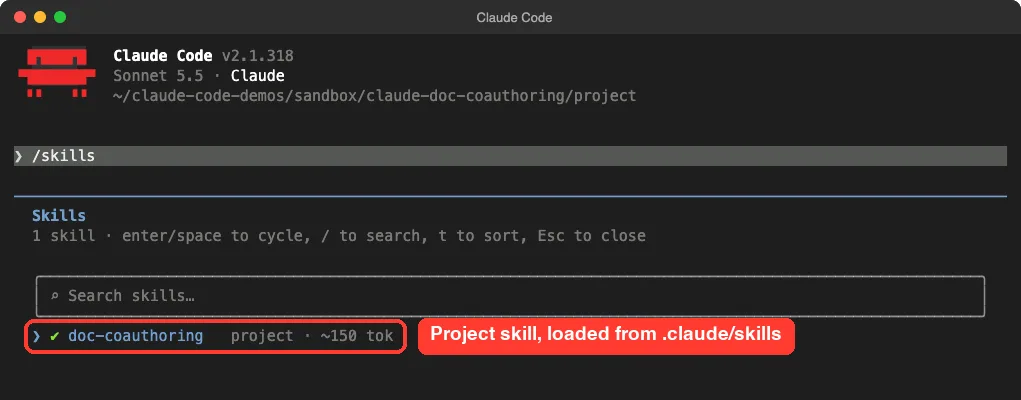
/skills as a project skillStage 1: Context Gathering in a Real Session
We made a tiny demo project with a todo script, a tasks.json data file and a short README. The README mentions a known problem: two terminals writing at once can overwrite each other’s changes.
Our first prompt was one sentence:
I want to write a short decision doc on moving this todo tool from tasks.json to SQLite. Use the doc-coauthoring skill.Claude did not start writing. It described the three stages and asked whether we wanted the workflow or preferred to work freeform. It also asked five meta questions: the document type, the audience, the desired impact, any template, and constraints like length or a deadline.
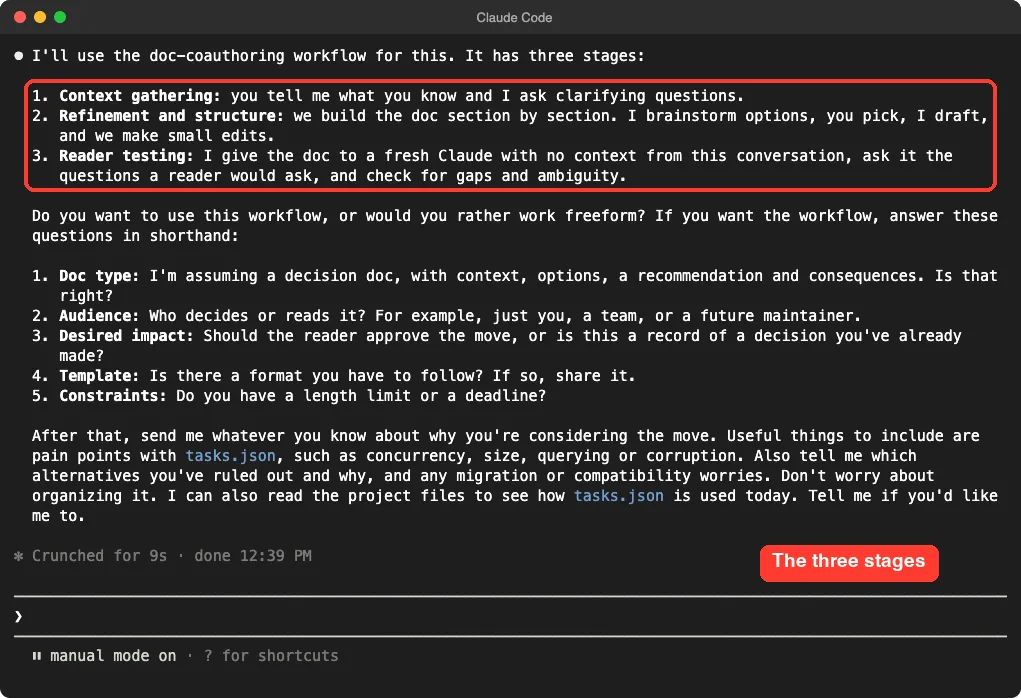
This matches the skill file, which says to offer the workflow, explain the stages and ask if you want to try it. Claude also offered to read the project files itself instead of making us type everything.
Answering in shorthand
We replied in one message with the document type, the audience, the goal and the length limit. Then we asked for the context questions, with a maximum of five.
Yes, use the workflow. Type: decision doc. Audience: the two maintainers. Goal: pick one option by Friday. No template. Keep it under one page. Ask me your context questions now, max 5.Claude came back with five questions about the pain, the scale, the candidate options, constraints and leanings. They were specific to our project, such as whether concurrent writes lose data, and whether Python’s built-in sqlite3 module meets a zero-new-dependencies rule.
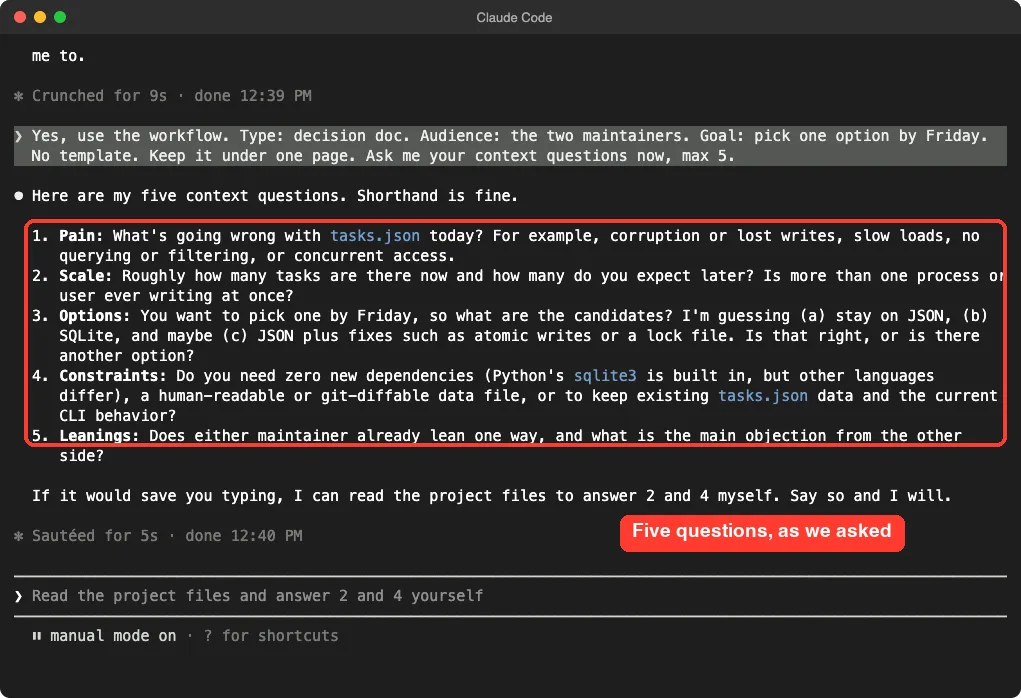
The skill file says it should ask five to ten questions, and that you can answer in shorthand. We kept ours to five because that was our request, so the skill’s own range was not tested.
Stage 2: Building the Doc Section by Section
Next we gave short answers and asked Claude to suggest three sections and create a file with placeholders only. This follows the skill, which says to create a scaffold with a note like to be written for each section.
Claude Code showed a preview of decision-doc.md before creating it. The file had a title, a deadline line, a deciders line and three headings: problem and constraints, options and trade-offs, and recommendation. Every section body said to be written.
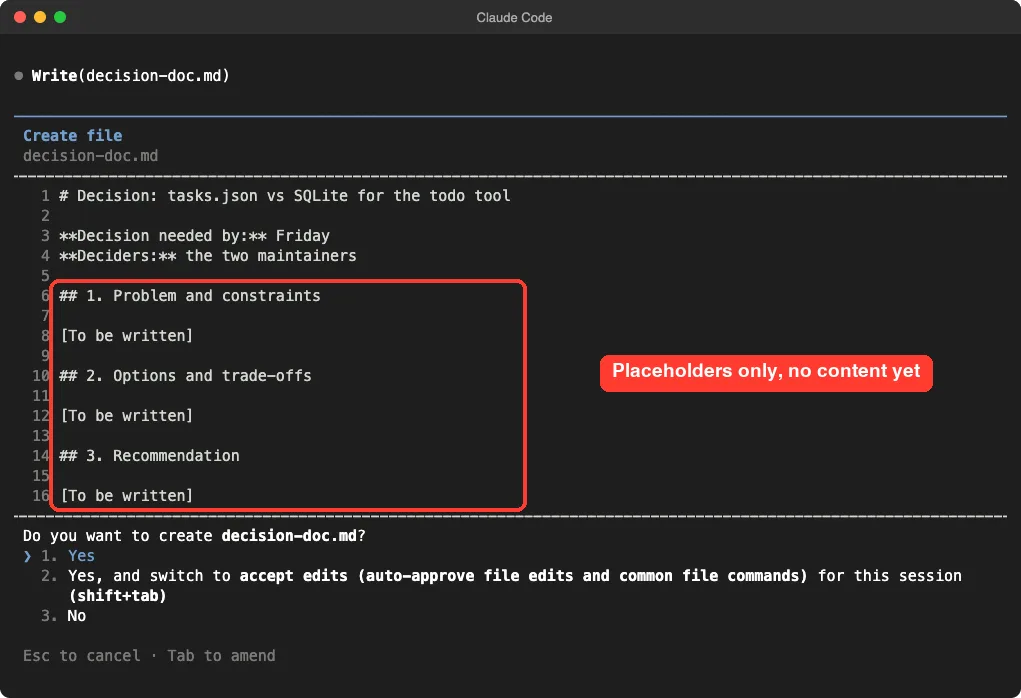
We approved the file. Claude then said it would start with the options section because it had the most unknowns, which is the order the skill recommends for decision docs.
Questions, brainstorm, curate
For that section the skill follows a fixed routine. Claude asks clarifying questions, brainstorms options, lets you curate them, checks for gaps, drafts, and then edits in small steps.
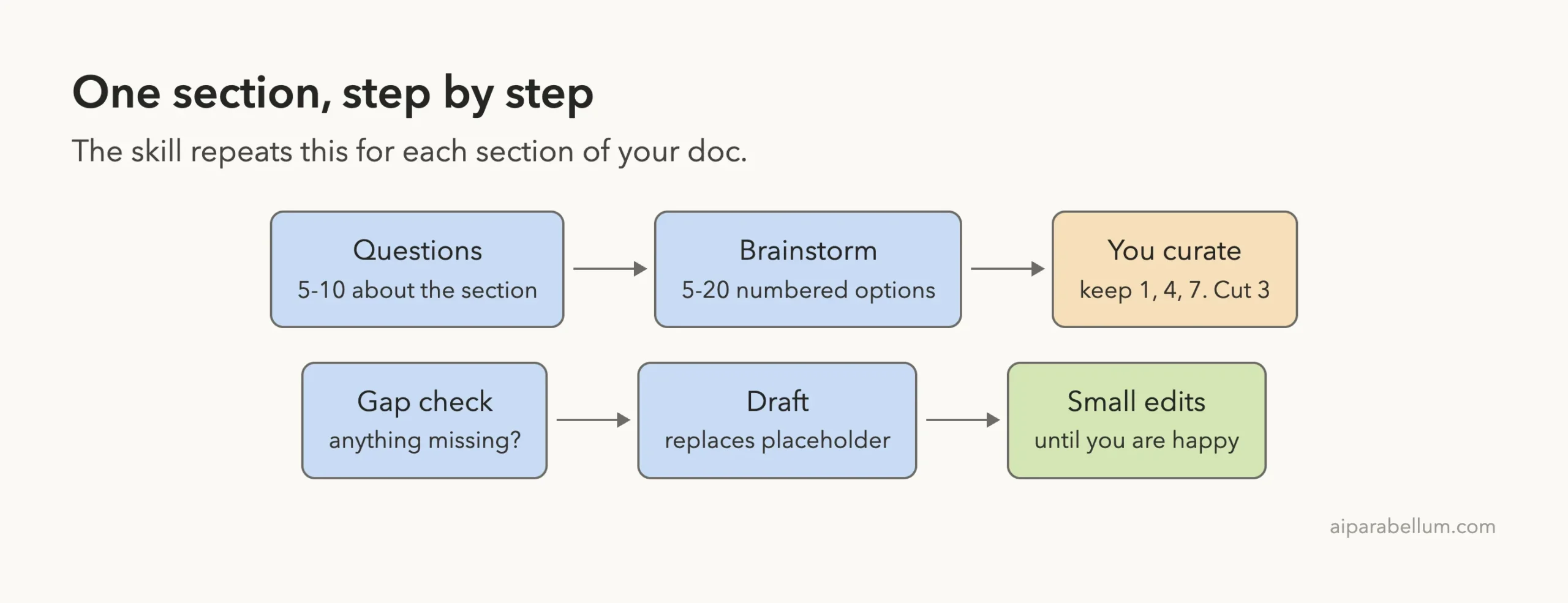
Claude asked eight questions about the options section. Instead of answering all of them, we asked Claude to read the code and answer three of them itself, and to brainstorm six options.
Read the code and answer 1, 3 and 6 yourself. Then brainstorm 6 short options for section 2, numbered, nothing else.The answers matched our files. Claude pointed out that saving rewrites the whole file, so the last writer wins. It also noticed that opening the file for writing truncates it first, which can leave partial JSON if something crashes mid-write.
It said sqlite3 adds no dependency, that fcntl locking is Unix-only, and that the migration would be roughly 20 to 30 lines. Those are claims about our small demo code, and they were easy to check against the file.
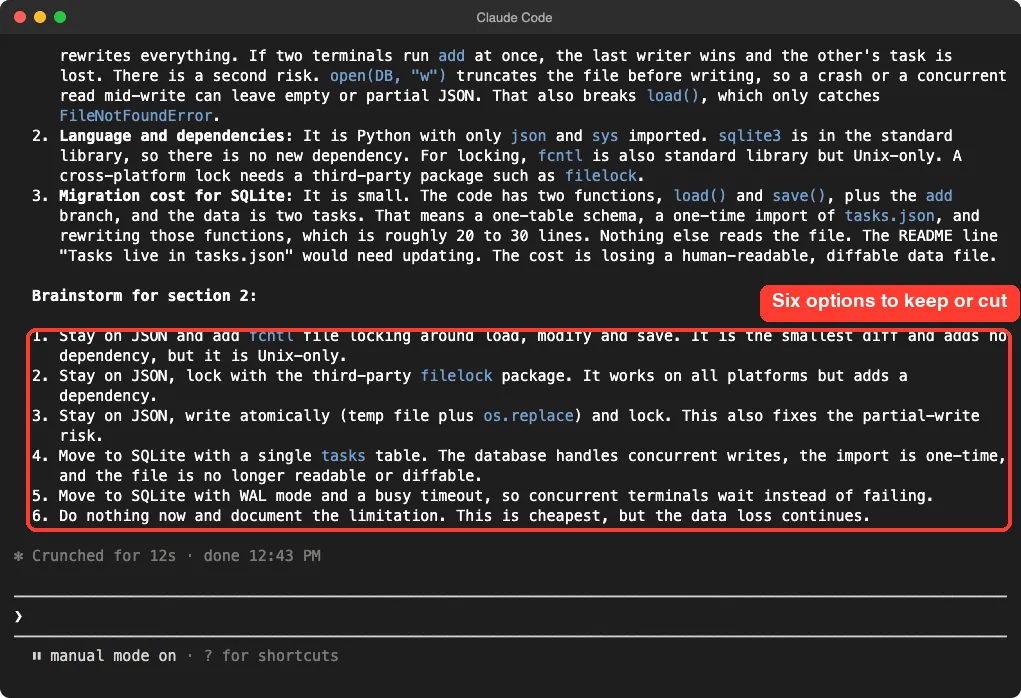
What the options looked like
| No. | Option Claude proposed |
|---|---|
| 1 | Stay on JSON and add fcntl file locking |
| 2 | Stay on JSON and lock with the third-party filelock package |
| 3 | Stay on JSON, write atomically, and lock |
| 4 | Move to SQLite with a single table |
| 5 | Move to SQLite with WAL mode and a busy timeout |
| 6 | Do nothing now and document the limitation |
This is the point of the brainstorm step. Option 3 and option 5 are the kind of idea we might not have listed on our own, and the skill asks you to keep, remove or combine them with short reasons.
Stage 3: Reader Testing, From the Skill File
We stopped before stage 3, so this part comes from the skill file, not from our run. The file says that when sub-agents are available, as in Claude Code, Claude does the test itself.
It predicts five to ten questions readers would ask, and gives each question to a fresh sub-agent that has only the document. Then it runs extra checks for ambiguity, false assumptions and contradictions. If problems show up, it reports them and loops back to refine the weak sections.
Each test question uses a separate agent, so a long document with ten questions costs more usage than a normal chat turn. We kept our test small for that reason. Run it yourself on a real doc to see how well it works for you.
What the Skill Does Well and Where It Falls Short
Here is our honest read after the two stages we ran.
- It asks before it writes. In our run, no section was drafted until Claude had questions answered.
- It reads your project. Offering to answer questions from the code saved us typing.
- The scaffold keeps the doc visible. You see the structure from the first minute.
- It is slower than one prompt. If you only want a quick draft, the loop is overkill, and the skill itself says you can skip it.
- Many questions. Eight questions for one section is a lot for a one-page doc, so expect to answer in shorthand.
It is a good match for people who write specs, proposals, RFCs and decision docs. If you only need a README, a lighter approach works. Our post on docs and README covers that.
Try It Yourself
Copy the skill folder into a throwaway project and try the same flow on a doc you actually need. This prompt works as a starting point:
I need to write a proposal for [your topic]. Use the doc-coauthoring skill. Audience: [who reads it]. Goal: [what should happen after they read it]. Ask me your context questions now.Answer in shorthand, then keep going. When Claude brainstorms options, reply with numbers, such as “keep 1, 4, 7, remove 3.” The skill notes that specific feedback helps Claude learn your style for the next sections.
Common Mistakes
- Editing the file yourself in the middle. The skill prefers that you tell Claude what to change, so it can learn your preferences.
- Skipping context. A rushed first stage gives you generic sections later.
- Installing the whole collection when you need one skill. Copying one folder keeps your setup smaller.
- Trusting every claim. We checked Claude’s statements about our code against the file. Do the same with your own facts and links.
- Expecting the reader test to replace human readers. The skill itself recommends a final read-through by you.
Pro Tips
- Start with the section that has the most unknowns. The skill suggests this, and it worked for us.
- Let Claude read your files to answer questions about the code. Check the answers.
- Ask for a limit, such as one page or five questions, in your first message.
- Use it for the first draft, then run the reader test before you share the doc.
- Use our permission prompts if the file approvals feel repetitive.
Doc Co-Authoring Cheat Sheet
Frequently Asked Questions
What is the Claude doc coauthoring skill?
It is a skill from the anthropics/skills repository that guides you through writing a document in three stages: context gathering, section-by-section refinement, and a reader test.
Do I need to install a plugin?
Not necessarily. We copied the single skill folder into a project’s .claude/skills folder and it appeared in /skills. The marketplace commands are the other route.
Is it safe to run?
We read the whole skill first. It is one text file with no scripts or hooks, and Claude Code still asked before creating our file. Read any skill you add the same way.
Can I use it for things other than technical docs?
The description names proposals, specs, decision docs and similar structured content. We only tested a decision doc, so we cannot speak for other types.
Does it work in the Claude app too?
The skill file has separate steps for chat apps, such as testing in a fresh conversation by hand. We only tested Claude Code. You can read about the chat app on our Claude AI page.
Conclusion
The doc co-authoring skill replaces the one-shot draft with a short conversation, and in our test that made the questions sharper and the structure clear from the start. We ran the first two stages and saw it ask, scaffold and brainstorm for real, while the reader test comes from the skill file and stays untested by us. If you write specs, proposals or decision docs, copy the folder into a throwaway project, run it on one real document, and keep the stage-three check for last. For a deeper look at the wider skills collection, see our Humanizer skill review.