The Claude internal comms skill gives Claude a set of house formats for the messages every team has to write: weekly status updates, company newsletters and staff FAQs. Instead of getting a generic memo, you get a message in a strict, short shape. We loaded it into a throwaway Claude Code project, fed it made-up team notes, and checked what came back.
This guide is part of our Claude Code tutorials. Find more add-ons in our skills directory.
Tested with Claude Code v2.1.318 on November 7, 2026. We read the skill from the anthropics/skills repository at commit 2c5958e (committed November 6, 2026).
Internal Comms Skill at a Glance
| Question | Short answer |
|---|---|
| What is it? | A skill (a written set of instructions) for writing internal company messages |
| Where does it live? | skills/internal-comms in the anthropics/skills repository |
| What is inside? | SKILL.md, a license file and four guide files in examples/. No scripts, no hooks |
| Which formats does it cover? | 3P updates, company newsletters, FAQ answers, and a general catch-all |
| What did we run? | A 3P update, a newsletter and an FAQ, all from made-up notes |
| What did we not run? | The general guide, and any pull from Slack, email, calendar or Google Drive |
| Our verdict | Useful if your team writes the same updates every week |
What the Internal Comms Skill Is
A skill is a folder with a SKILL.md file. Claude Code reads it when a task matches the description, then follows the steps inside. If you are new to the idea, our guide to Claude Code skills covers the basics.
The description of this one says it helps write internal communications in the formats a company likes to use. It names status reports, leadership updates, 3P updates, company newsletters, FAQs, incident reports and project updates.
The skill file itself is short. It tells Claude to identify the type of message, load the matching guide file, and follow the rules in that file. The real content lives in four small guides.
Most weekly updates are not hard to write, they are hard to keep short and consistent.
How the Skill Picks a Format
The routing is simple. Your request names a type, the skill file maps that type to a guide, and Claude reads the guide before writing a word.
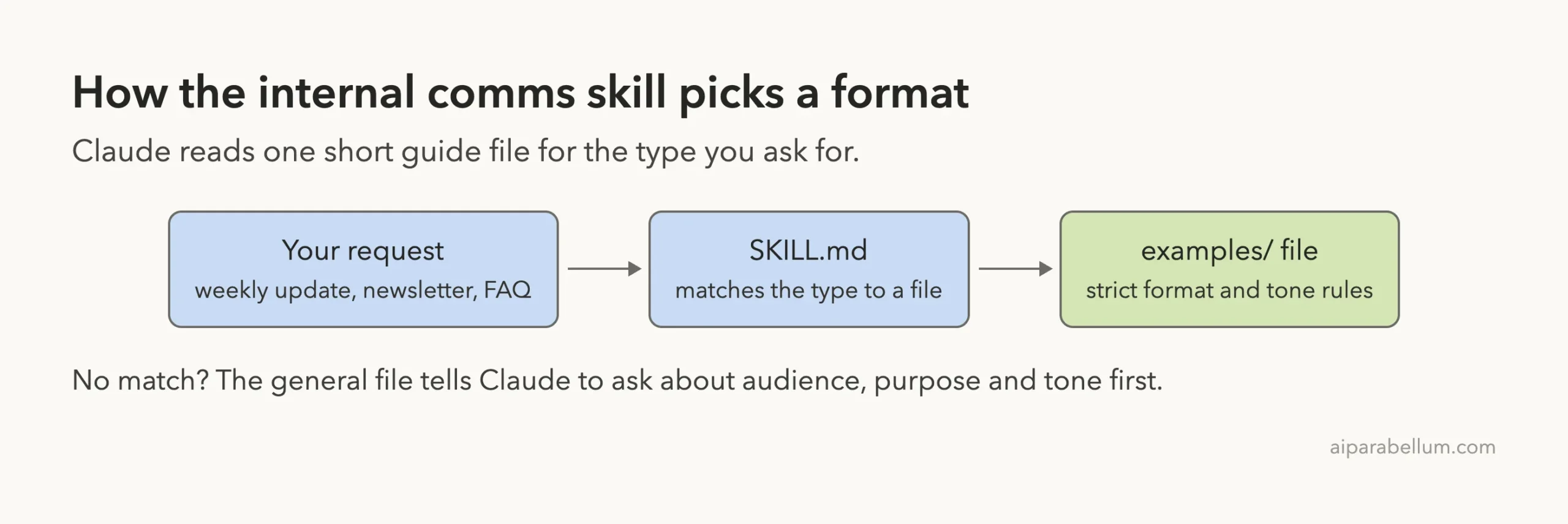
If your message does not fit any of the first three guides, Claude falls back to the general one. That file tells Claude to ask about the audience, the purpose and the tone before it writes.
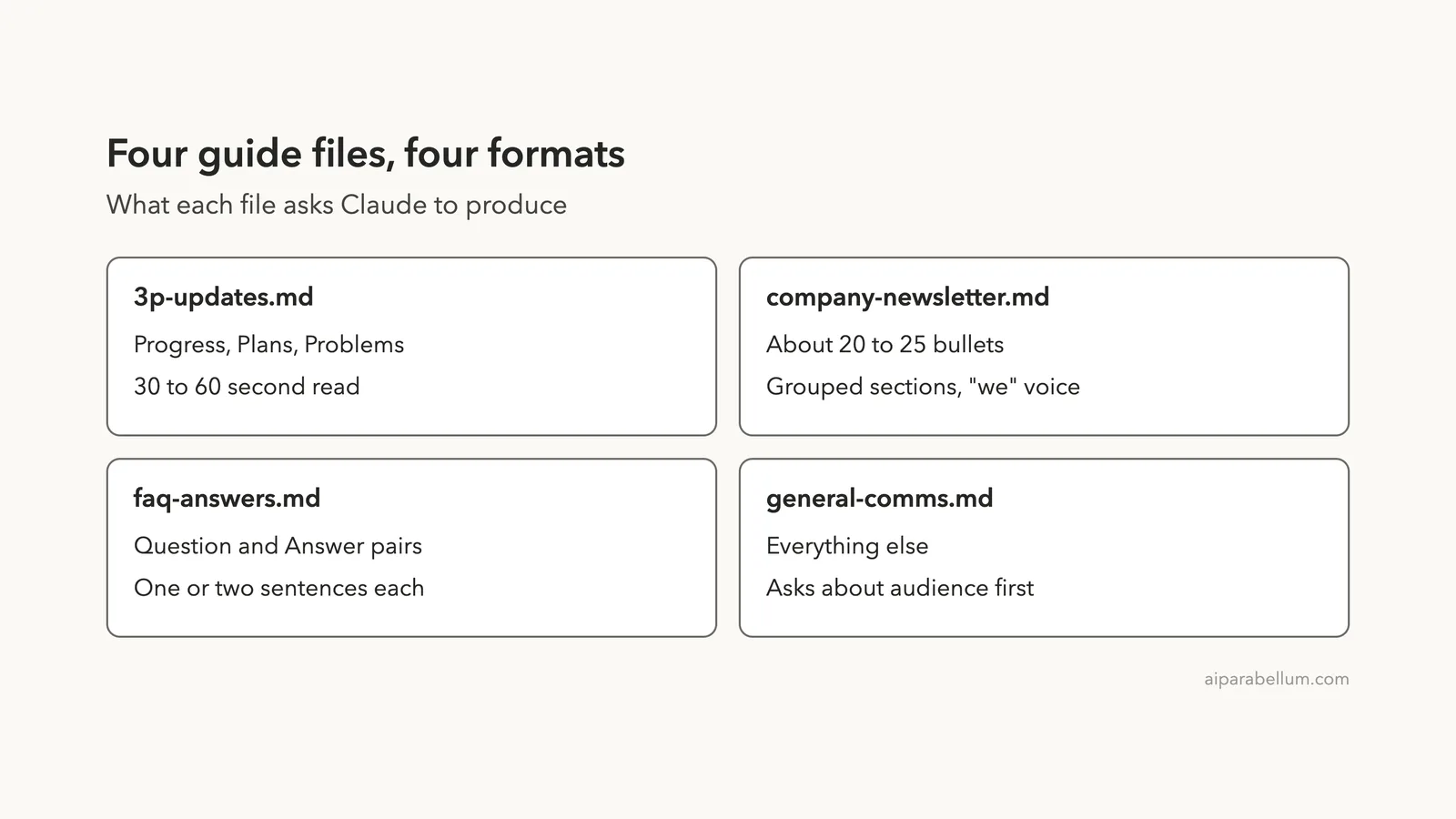
The four guide files
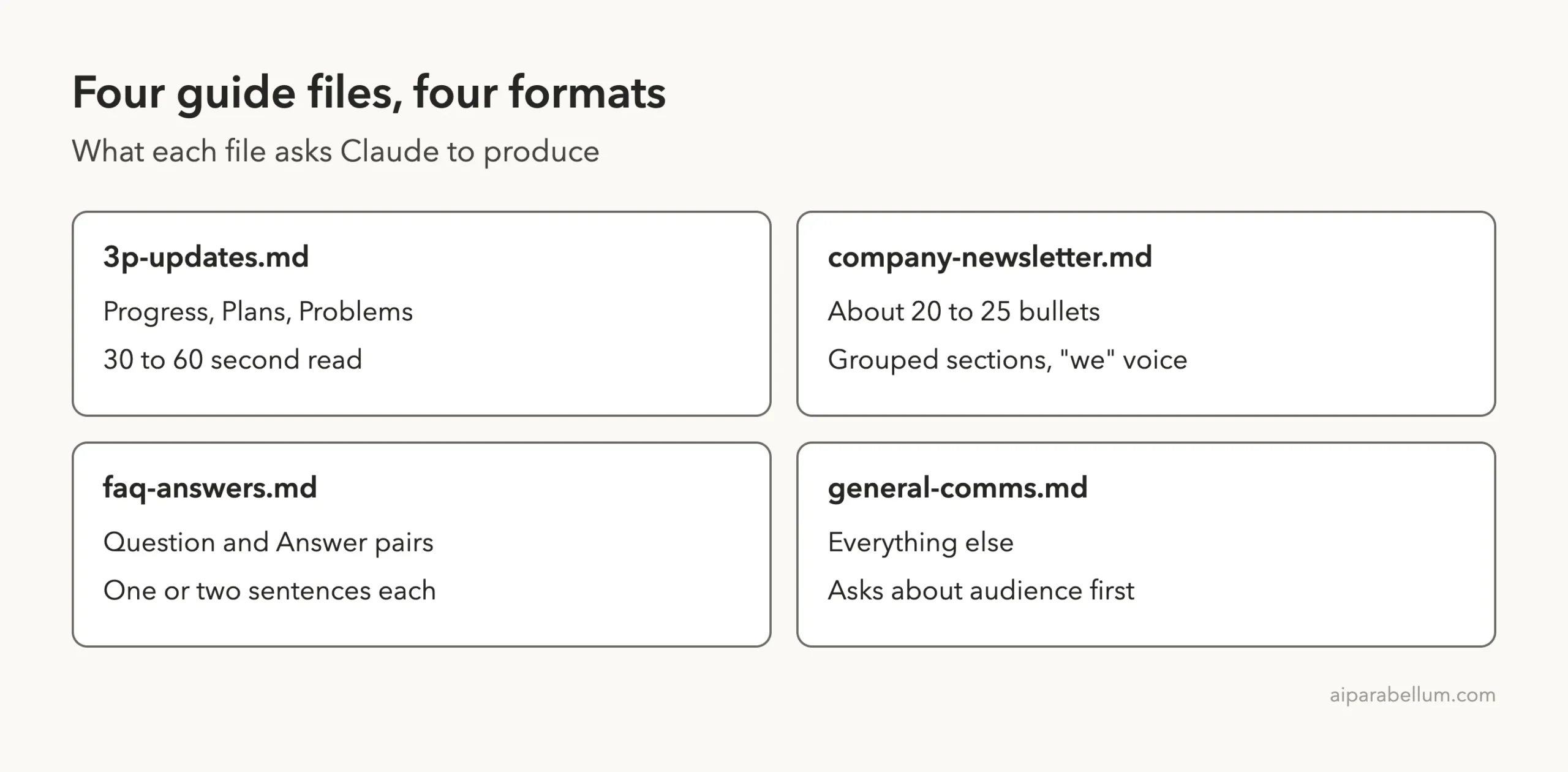
Each guide asks for a different shape. This is what we found when we read them.
| Guide file | What it asks for |
|---|---|
3p-updates.md | Progress, Plans and Problems, each in one to three sentences, readable in 30 to 60 seconds |
company-newsletter.md | About 20 to 25 bullets in grouped sections, in the “we” voice, with links where possible |
faq-answers.md | Question and answer pairs, each one or two sentences |
general-comms.md | Anything else, after asking about audience, purpose, tone and format |
The newsletter guide assumes a company of 1,000 or more people. The 3P guide says the bigger the team, the less granular the tasks should be. Keep that in mind when you adapt it to a small team.
How to Load the Skill Safely in Claude Code
Our directory lists two install commands for this skill. They add the whole anthropics/skills collection as a marketplace and install a bundle that includes it.
/plugin marketplace add anthropics/skills
/plugin install example-skills@anthropic-agent-skills
The official plugin discovery guide explains marketplaces. We did not run those commands, because they change your own setup.
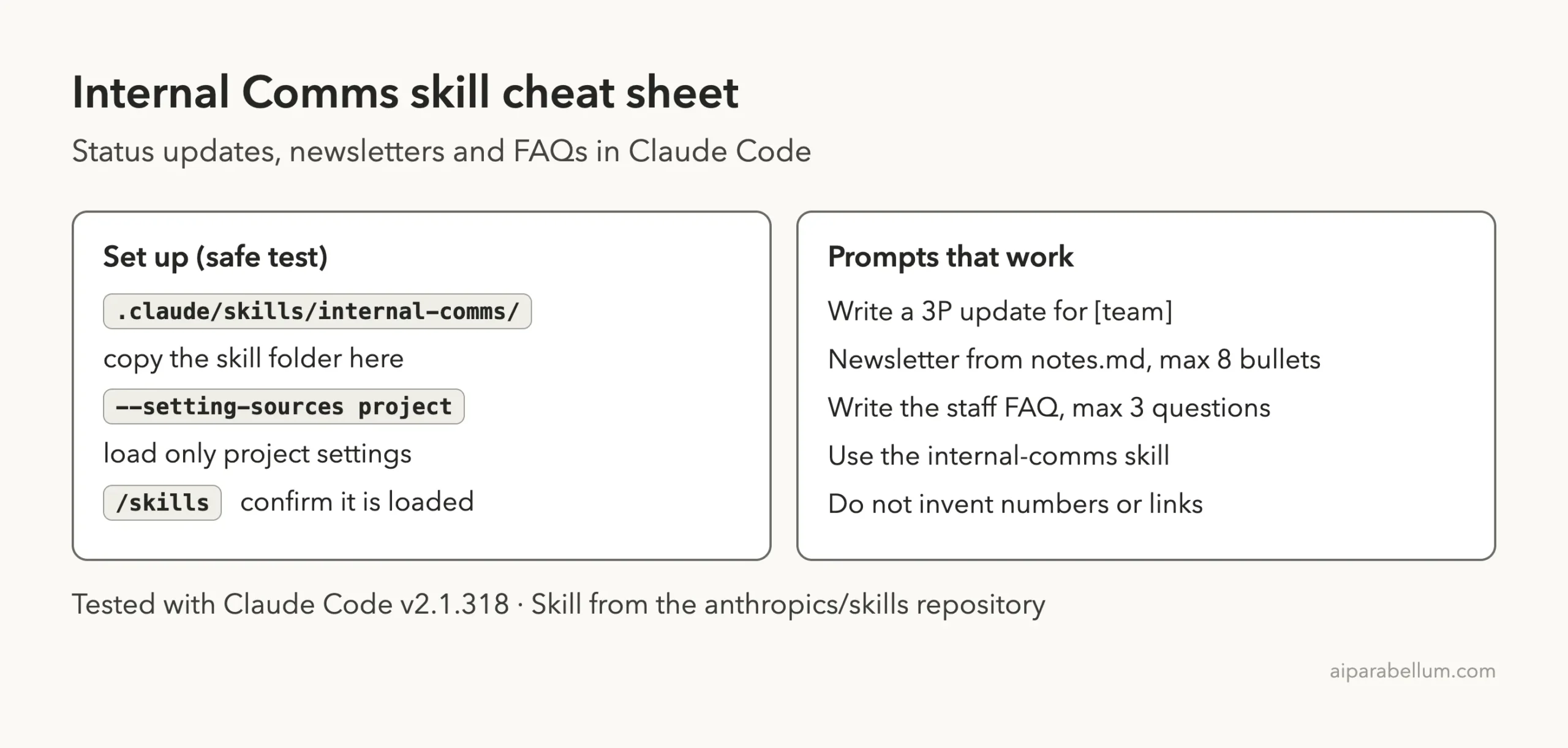
For the test we cloned the repository into a throwaway folder and copied skills/internal-comms into a demo project at .claude/skills/internal-comms. We started Claude Code with --setting-sources project, so only that project’s settings were loaded. The skills documentation says project skills live in .claude/skills/.
What we checked before running it
We read every file first. The folder holds markdown only, about 9,500 characters across the four guides plus the skill file. There are no scripts and no hooks.
That makes it low risk. It changes how Claude writes and what it asks you. Nothing was written to our personal Claude folder.
Confirming the Skill Is Loaded
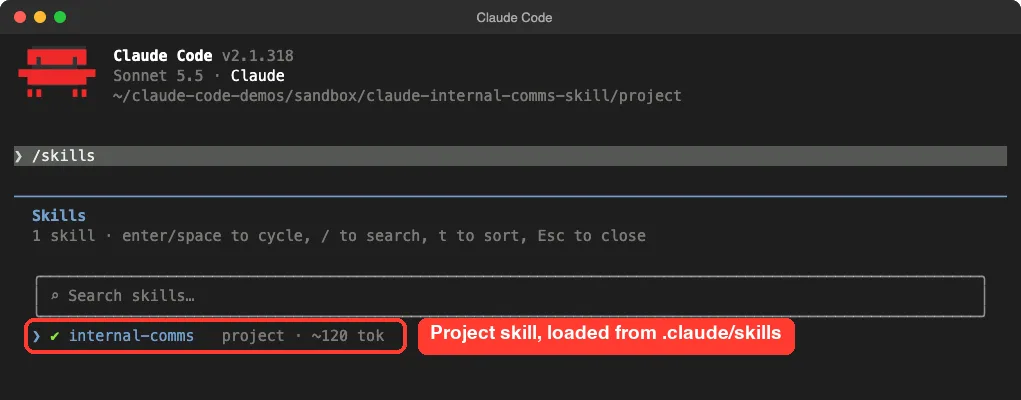
After the folder trust prompt, we typed /skills. The list showed internal-comms as a project skill with about 120 tokens counted for it. That is the description Claude keeps in view so it knows when to use the skill.
/skills as a project skillOur Demo Project and Test Notes
We made two short markdown files with invented content. One was a week of notes for a pretend mobile team. The other was a list of October highlights for a pretend company.
The team notes had six bullets: a shipped feature, a bug fix with crash numbers, a redesign in progress, next week’s plan, a staffing blocker and a slow app store review. The company file had six highlights and one open question from staff about the holiday shutdown.
Using made-up notes meant we could check every sentence Claude wrote against a source we controlled. That matters, because the point of the test was to see whether Claude stays inside the facts.
Test 1: The 3P Update
Our first prompt was one line:
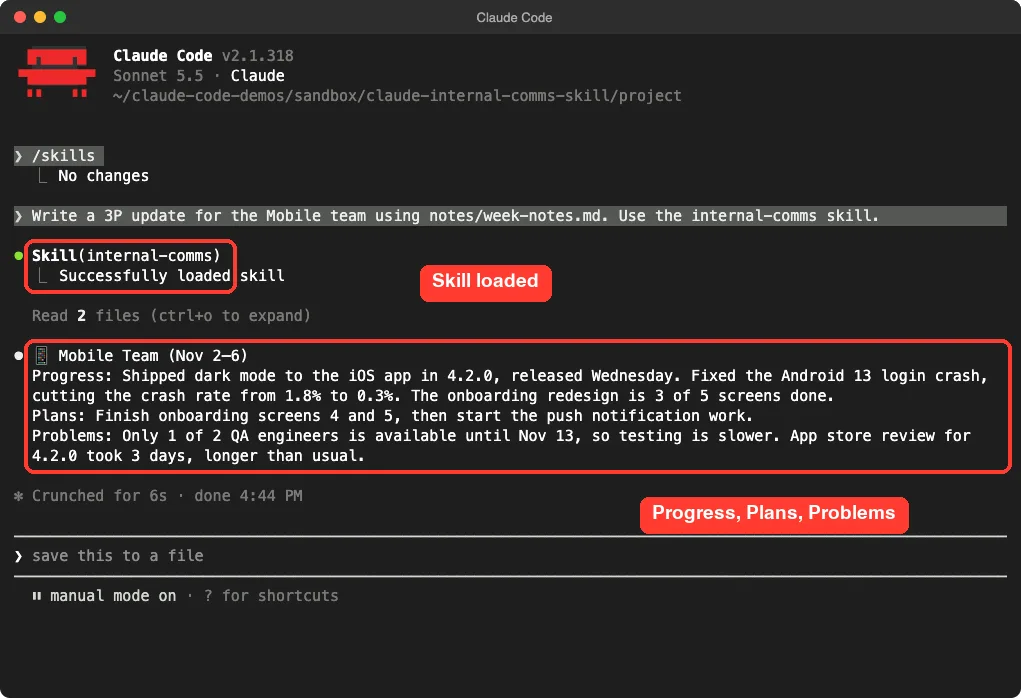
Write a 3P update for the Mobile team using notes/week-notes.md. Use the internal-comms skill.Claude Code showed the skill being loaded, then read two files: the guide for 3P updates and our notes. It did not ask for the team name, because we had named it in the prompt.
The result had the header the guide asks for, with an emoji, the team name and the dates. Then came three labeled lines: Progress, Plans and Problems. Each was one or two sentences with our numbers intact, such as the crash rate falling from 1.8% to 0.3%.
Did it stay within the guide?
Mostly yes. The guide says each section should be one to three sentences, so our Problems line with two sentences fits. The Progress line ran slightly long, at roughly two sentences with several facts, but it stayed readable in well under a minute.
One small point: the guide says to pick a fun emoji, and Claude chose a phone icon for a mobile team. That is exactly the kind of tiny detail the guide wants.
Test 2: The Company Newsletter
Next, we asked for a newsletter from the company highlights, capped at eight bullets so the run stayed small.
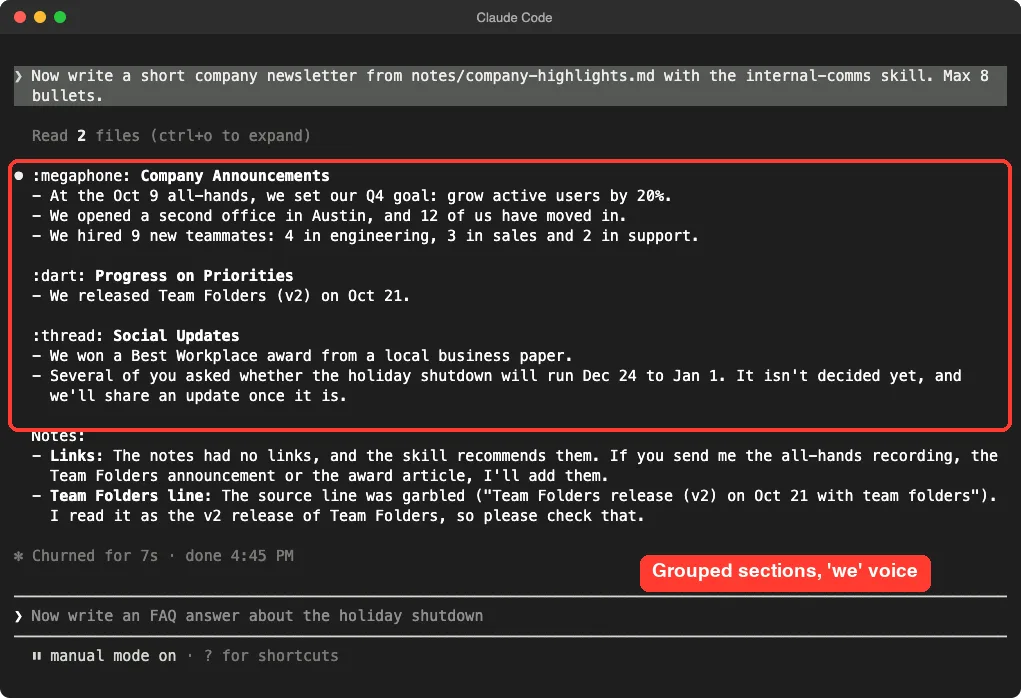
Now write a short company newsletter from notes/company-highlights.md with the internal-comms skill. Max 8 bullets.Claude grouped the bullets under three headings in the style of the guide’s example format: announcements, progress on priorities and social updates. Every bullet used “we”, such as “we opened a second office in Austin”.
It flagged what was missing
This was the most useful part. The guide says to include lots of links, and our notes had none.
Claude did not invent any. It added a note saying the notes had no links and offered to add them if we sent the sources.
It also flagged a line in our own notes. We had edited a product name in the file between runs, and the sentence read awkwardly. Claude said the source line looked garbled, explained how it had read it, and asked us to check.
That is honest behavior, and it is what you want from a tool that writes for a whole company.
What it did not do
The guide targets about 20 to 25 bullets. We capped ours at eight, so we did not test that length.
Claude also wrote the section labels as text, such as :megaphone:, which is the Slack emoji style. That suits a Slack post and looks odd in a plain email, so check before you paste.
Test 3: The Staff FAQ
The third prompt asked for an FAQ with a maximum of three questions.
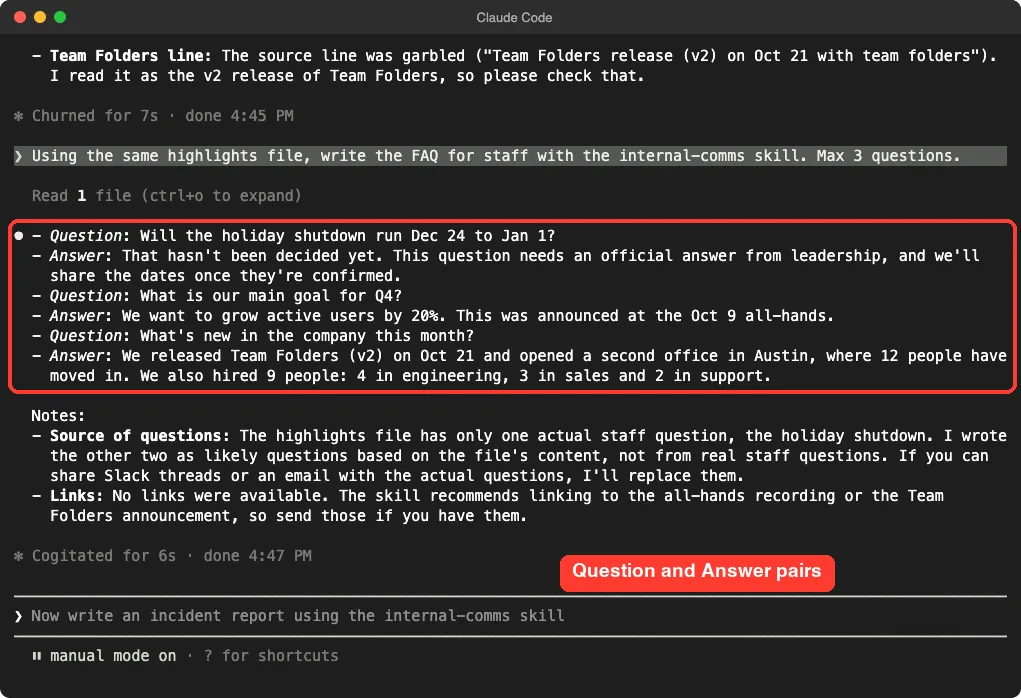
Using the same highlights file, write the FAQ for staff with the internal-comms skill. Max 3 questions.Claude produced three question and answer pairs in the format the guide shows. The first, about the holiday shutdown, was the only real staff question in our notes. Claude said so, marked the dates as not confirmed, and noted that the answer needs an official decision from leadership.
Where it was open about guessing
Claude wrote the other two questions itself, then told us plainly that they were likely questions based on the file, not questions staff had really asked. The guide says to find questions that confuse many employees, usually from Slack or email.
Without those tools, the skill is only as good as the notes you give it. A real FAQ needs real questions, so paste them in.
What We Did Not Test
The guides tell Claude to pull context from Slack, email, calendar and Google Drive when it can reach them. Our Claude Code session had none of those connected, so we did not run any of that.
We also did not use the general guide, and we did not try incident reports or leadership updates. The skill description mentions them, but we have no evidence from our own run about how they turn out.
What the Skill Does Well and Where It Falls Short
- It keeps the format fixed. The 3P update came out in the same three-part shape the guide asks for.
- It admits gaps. Claude said when links were missing and when questions were its own guesses.
- It is cheap. About 120 tokens for the description, and the guides load only when needed.
- It is tuned for a large company. The newsletter guide assumes 1,000 or more people, so a small team may want to edit it.
- It works best with connected tools. Without Slack or email access, you supply the facts yourself.
- The format is strict by design. If your company uses a different template, you will need to change the guide files.
Make It Fit Your Company
The skill’s own description says “the formats that my company likes to use”, which hints that you are meant to adapt it. The guide files are plain markdown, so editing them is easy.
You could change the 3P header to match your team style, replace the newsletter sections with your own, or add a guide for incident reports. Keep your edits in the project folder. If you want Claude to always know your tone, our guide to the CLAUDE.md file shows where to put that.
We did not test an edited guide, so treat that as a suggestion and try it on one message first.
Try It Yourself
Copy the skill folder into a throwaway project, add a notes file with your own facts, and run this prompt:
Write a 3P update for the [team name] team using notes/week-notes.md. Use the internal-comms skill. Do not invent numbers or links.Then try the newsletter and FAQ prompts from above on a second file. Read each output against your notes before you send anything.
Common Mistakes
- Sending the result without checking it. Compare every number and date with your source.
- Giving no notes. The skill formats facts, so it needs facts to work from.
- Expecting real links. Claude only links what it is given.
- Installing the whole collection when you need one skill. Copying one folder keeps your setup small.
- Pasting Slack-style emoji codes into email. Ask Claude for plain text if you are not using Slack.
Pro Tips
- Name the team and the dates in your first prompt, so Claude does not stop to ask.
- Keep a running notes file during the week. The Friday update then takes one prompt.
- Ask for a maximum, such as three questions or eight bullets, to keep runs short.
- Say “do not invent numbers or links” for messages that go to many people.
- Pair it with our guide on doc co-authoring when a message turns into a longer document.
Internal Comms Cheat Sheet
Frequently Asked Questions
What is the Claude internal comms skill?
It is a skill from the anthropics/skills repository that helps Claude write internal messages such as 3P updates, company newsletters and FAQ answers in set formats.
What is a 3P update?
It stands for Progress, Plans and Problems. The guide describes a short weekly update, readable in 30 to 60 seconds, with one to three sentences for each part.
Do I need to install a plugin?
Not necessarily. We copied the single skill folder into a project’s .claude/skills folder and it appeared in /skills. The marketplace commands are the other route.
Does it connect to Slack or email?
The guides tell Claude to use those tools if they are available. We did not connect any, so we only tested it with notes that we supplied.
Can I use it in the Claude app?
We only tested Claude Code. You can read about the chat app on our Claude AI page.
Conclusion
The internal comms skill is a small bundle of formatting rules, and in our test it did what it promised: a tight 3P update, a grouped newsletter in the “we” voice and a clean FAQ. It also told us when it had no links and when it had guessed the questions, which is the habit you want before a message reaches a whole company. We did not test Slack or email pulls, the general guide or any edited version of the files. If your team writes the same updates every week, copy the folder into a throwaway project, run it on one real set of notes, and check every fact before you send.