DeepTutor is a free, open-source AI tutor you run on your own computer. It explains topics, solves problems step by step, writes practice questions and remembers what you studied. We installed DeepTutor on a Mac, connected it to a free local AI model so nothing left the computer, and tested it on a real topic.
The short version: the app itself is polished and easy to use, and setup took about 15 minutes. But DeepTutor is only as smart as the AI model you connect, and the small free model we used made math mistakes in two of our three tests.
This guide shows how to install it, how to connect a model with no API key, what it got right and wrong, and how to get better answers.
Tested with DeepTutor 1.7.0 on October 29, 2026, on macOS, with Python 3.14, Node.js 25 and the Llama 3.2 3B model running in Ollama.
DeepTutor at a Glance
| Question | Short answer |
|---|---|
| What is it? | A personal AI tutor app with chat, practice questions, a notebook, a calendar and learning plans. |
| Who makes it? | HKUDS, the Data Intelligence Lab at the University of Hong Kong, under the Apache 2.0 license. |
| Is it free? | The app is free. The AI model can be free (local) or paid (cloud API). |
| Does it need an API key? | No, if you use a local model through Ollama or LM Studio. |
| How big is the install? | About 1.1 GB for the app, plus the model you choose (ours was 2 GB). |
| Can you trust its answers? | Only with a capable model. Our small local model got some math wrong. |
What Is DeepTutor?
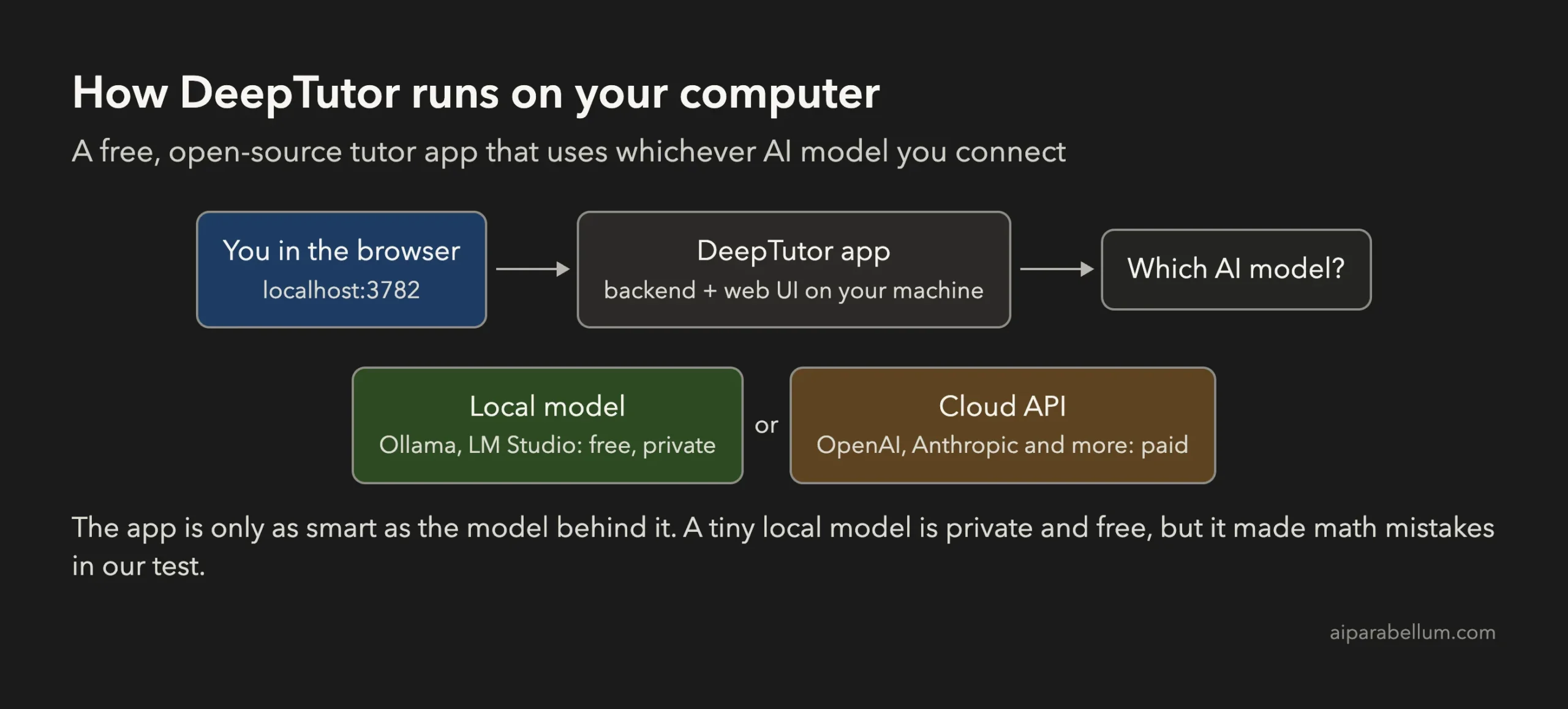
DeepTutor is a web app that runs on your own machine and opens in your browser. Unlike a plain chatbot, it is built around learning: it keeps your conversations, suggests what to study next, and has tools for planning and practice. Our guide to AI in tutoring covers the bigger picture of how these tools fit into studying.
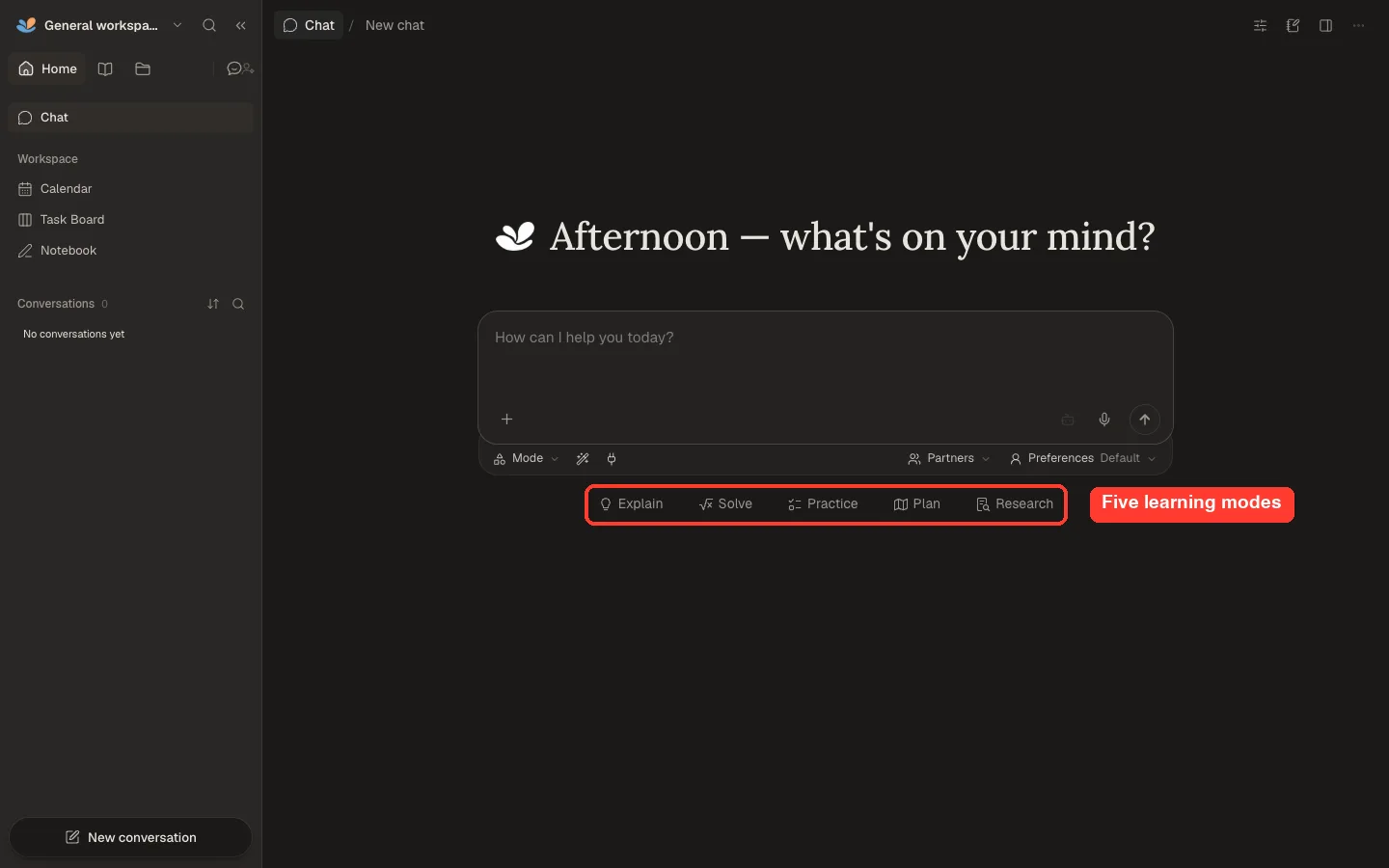
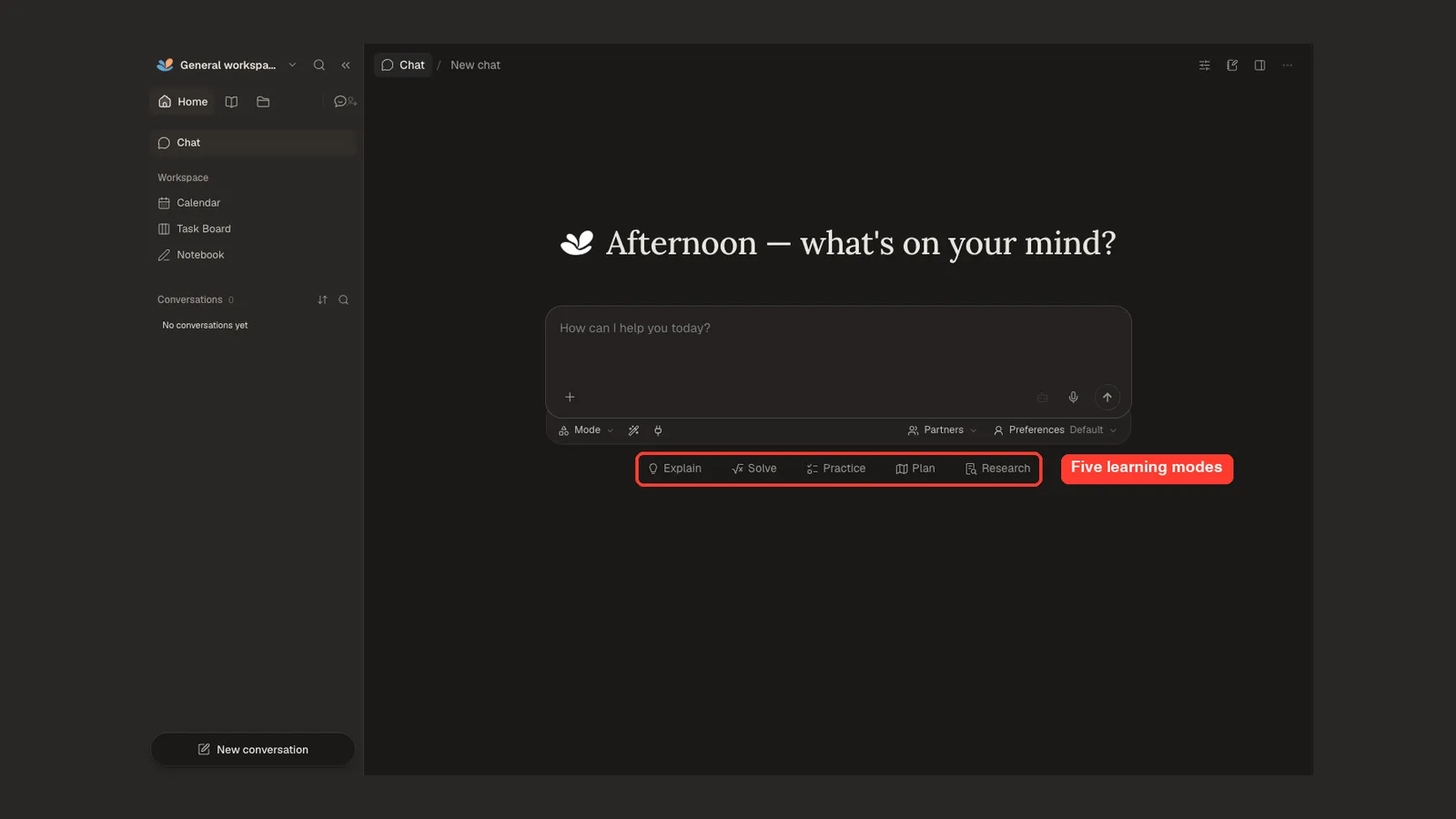
Its main learning modes are:
- Explain: teaches a topic in plain language with examples.
- Solve: works through a problem one step at a time.
- Practice: writes questions so you can test yourself.
- Plan: builds a study plan for a goal.
- Research: digs into a topic in more depth.
The sidebar also has a Calendar, a Task Board, a Notebook and a Learning section for longer study activities. With an extra embedding model you can add your own documents as a knowledge base; we did not test that part.
How to Install DeepTutor
You need Python 3.11 to 3.14 and Node.js 20 or newer. On a Mac with Homebrew, brew install python node covers both. We installed DeepTutor into its own Python environment so it stays separate from everything else.
mkdir deeptutor && cd deeptutor
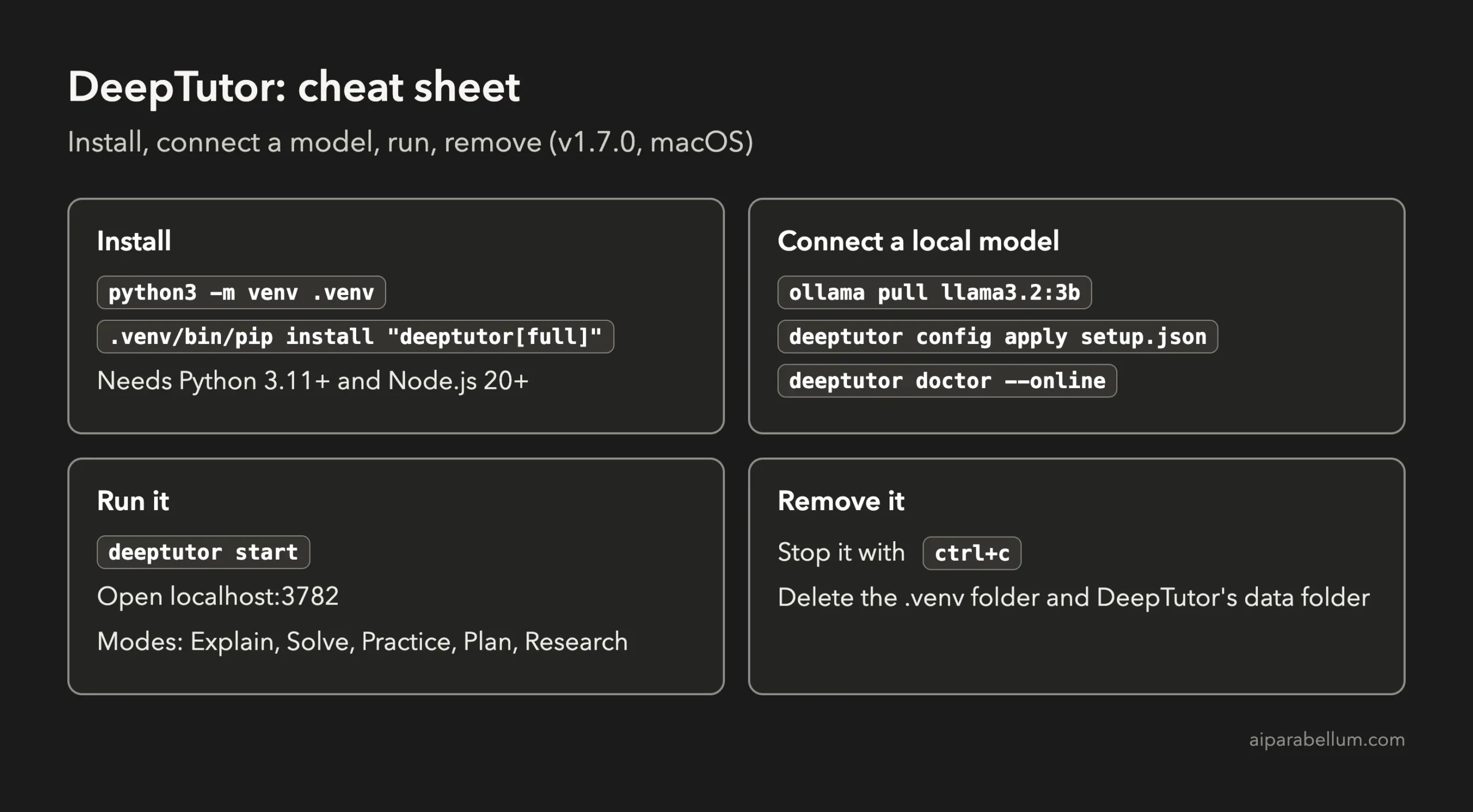
python3 -m venv .venv
.venv/bin/pip install "deeptutor[full]"
The [full] part matters. Without it you only get the core chat, not the web app. The install took a few minutes and used about 1.1 GB of disk space.
Next, create DeepTutor’s settings. Running deeptutor init asks you a few questions about ports and your AI model, or you can add --non-interactive to accept the defaults and set the model in the next step.
.venv/bin/deeptutor init --non-interactiveDeepTutor also offers a one-command Docker trial if you already use Docker, which skips the Python and Node.js setup.
Connect a Free Local Model (No API Key)
We used Ollama, a free app that runs AI models on your own computer. Install Ollama, download a model, and make sure Ollama is running. We used the small Llama 3.2 3B model, which is about 2 GB.
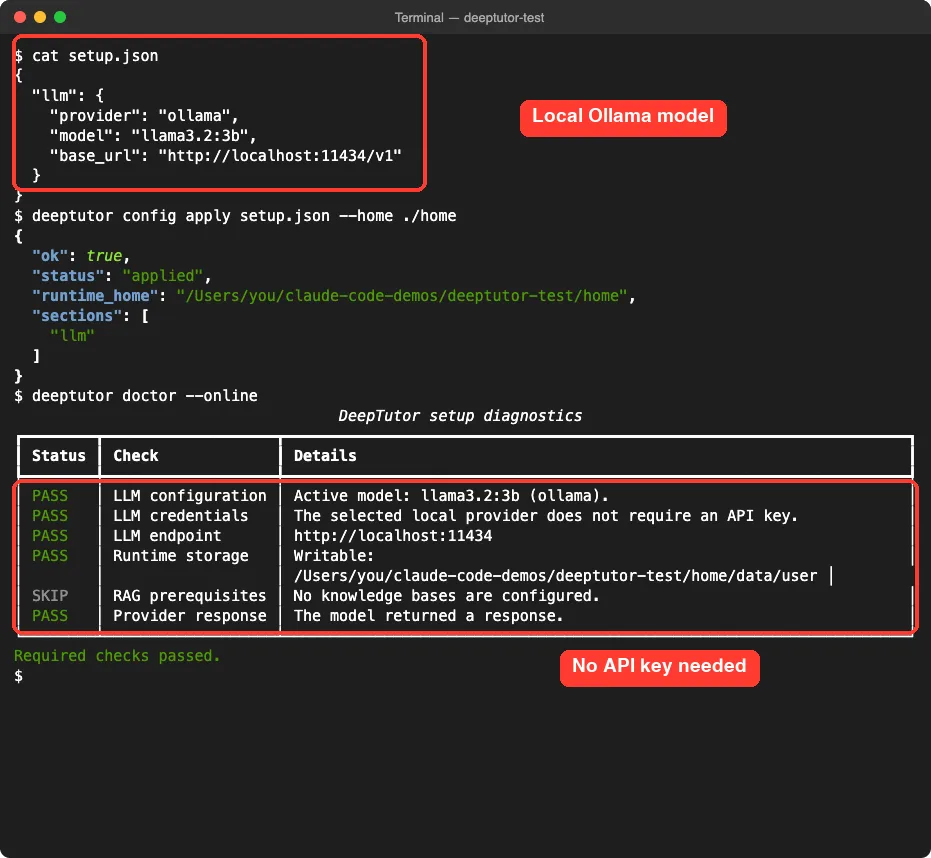
ollama pull llama3.2:3bThen tell DeepTutor to use it. We saved this in a file called setup.json and applied it with deeptutor config apply:
{
  "llm": {
    "provider": "ollama",
    "model": "llama3.2:3b",
    "base_url": "http://localhost:11434/v1"
  }
}
Finally, run deeptutor doctor --online. It checks your settings and sends one small test request to the model.
You can also connect a cloud model instead, such as one from OpenAI or Anthropic, by adding your own API key in Settings, Providers. DeepTutor also supports LM Studio, llama.cpp and vLLM for local models.
Choose your model carefully. DeepTutor’s quality depends far more on the model than on the app.
How to Use DeepTutor
Start the app with deeptutor start, then open localhost:3782 in your browser. Pick a mode, type your question and press Enter.
We asked it to explain compound interest to a 14-year-old with an example in dollars. The answer came back in 26 seconds, was clear and friendly, and its example was correct: $1,000 at 5% grows to $1,157.63 after three years.
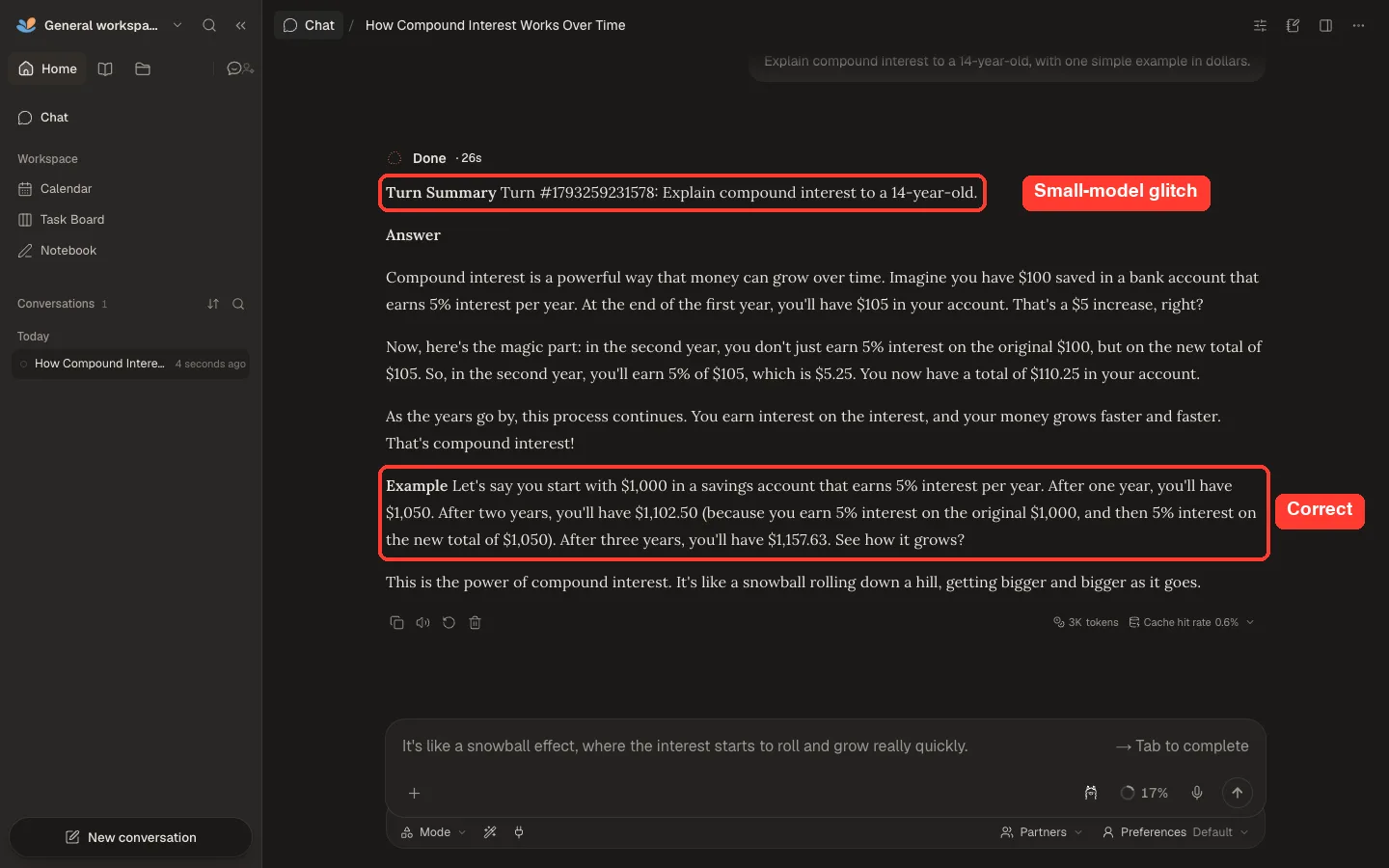
One odd thing: a line starting “Turn Summary Turn #” with a long number appeared above the answer. That looks like internal text leaking through, which small models sometimes do.
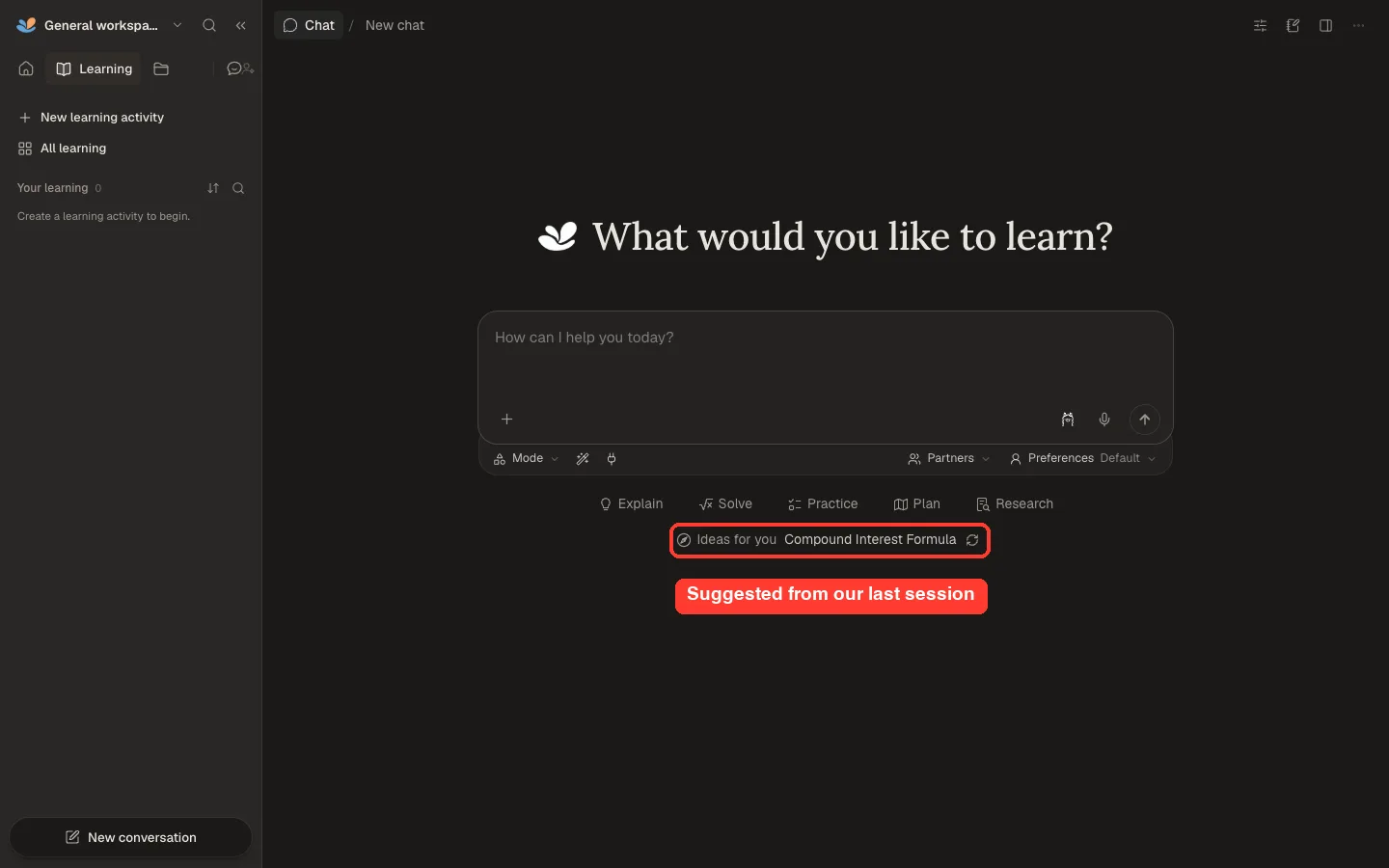
DeepTutor also remembered what we studied. On a fresh page, its “Ideas for you” suggestion offered a follow-up on the compound interest formula.
Our Test: Where the Small Model Went Wrong
We ran three tests on the same topic and checked every number by hand. The app handled each request smoothly, but the small model’s math was not reliable.
| Mode | What we asked | Time | Result |
|---|---|---|---|
| Explain | Compound interest for a 14-year-old | 26 seconds | Correct |
| Solve | $2,000 at 4% for 5 years, step by step | 9 seconds | Off by 2 cents |
| Practice | 3 beginner questions with answers | 13 seconds | 2 of 3 answers wrong |
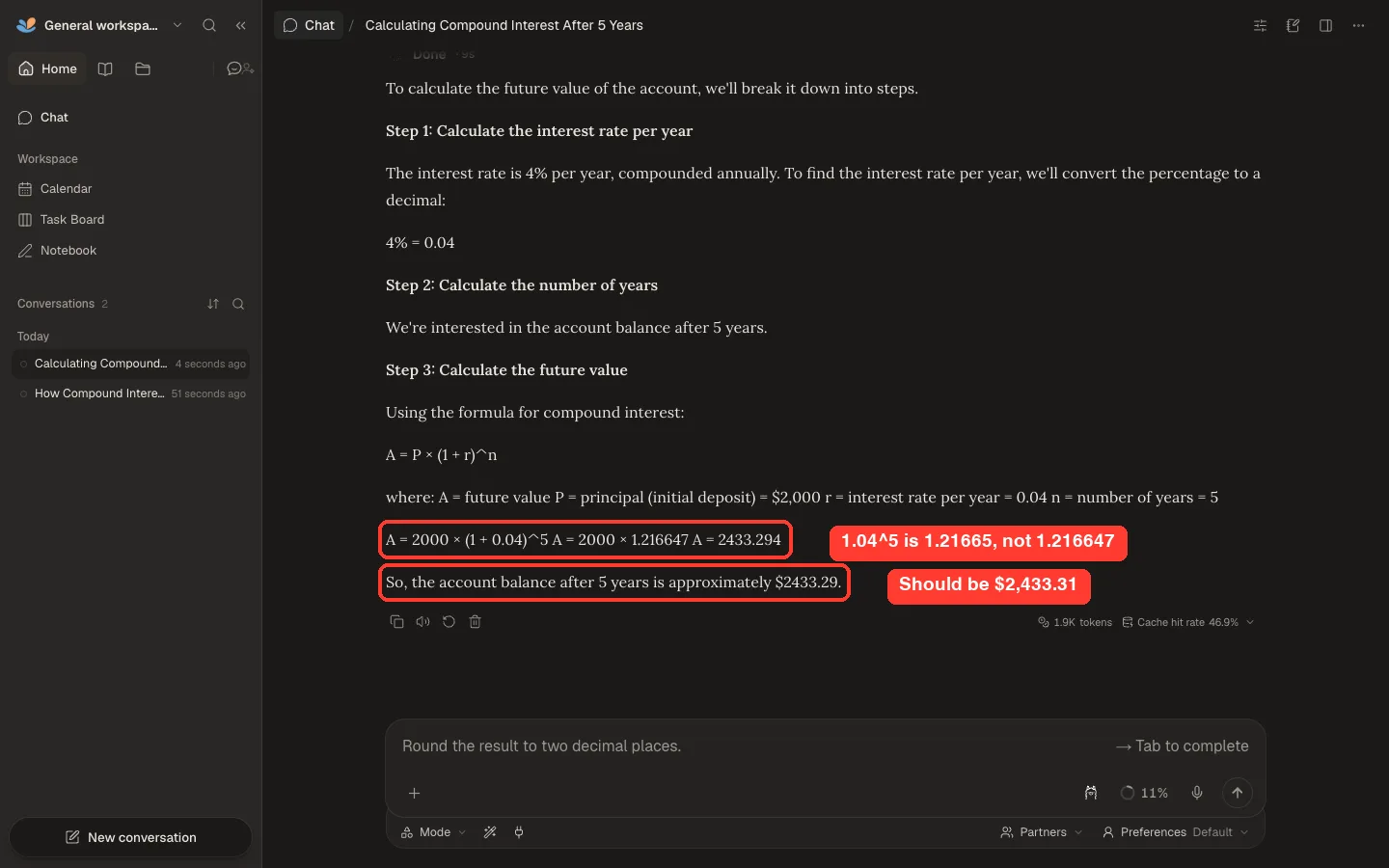
In Solve mode, the steps and formula were right, but the model miscalculated 1.04 to the power of 5. It answered $2,433.29 instead of the correct $2,433.31.
Practice mode was worse. Two of its three answer keys were wrong: $500 at 7% for 2 years should be $572.45, not $552.50, and $2,000 at 6% compounded twice a year for 3 years should be $2,388.10, not $2,168.24. Its first question was also about simple interest, even though we asked for compound interest.
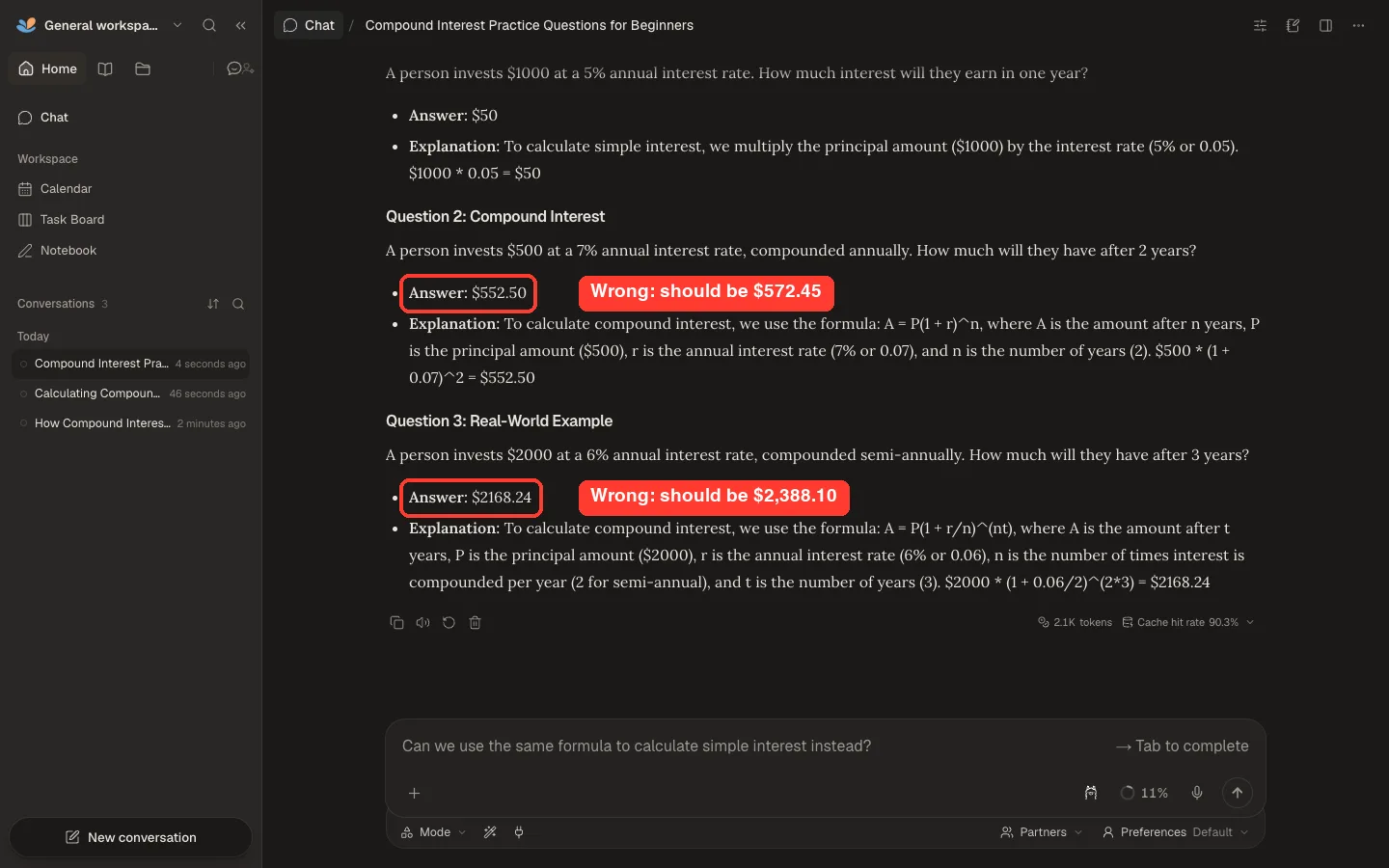
This is the most important thing to know before you rely on DeepTutor. A student checking answers against a wrong key learns the wrong thing, so use a stronger model for anything with numbers.
What Makes Sense and What Doesn’t
DeepTutor is getting a lot of attention, and much of it is deserved. Here is how the main claims held up for us.
| Claim | What we found | Verdict |
|---|---|---|
| It is free and open source | Apache 2.0 license; the app costs nothing | True |
| It can run fully on your computer | Worked with Ollama and no API key | True |
| It is a personalized tutor | It kept our history and suggested a follow-up topic | True |
| It gives correct answers | Depends on the model; ours made math mistakes | Only with a strong model |
| It is quick to set up | About 15 minutes for someone comfortable with a terminal | Mostly true |
| It is just for students | Works for any self-learner, from coding to personal finance | Not just students |
One safety note: in our test, DeepTutor’s servers listened on all network addresses, not only on this computer. On shared Wi-Fi, check its settings or your firewall so others on the network can’t reach it.
Tips for Better Results
- Use a stronger model for math, science and coding. A larger local model or a cloud model from OpenAI or Anthropic will make far fewer mistakes.
- Check any number it gives you, especially in Practice answer keys, until you trust your setup.
- Use Explain for concepts and Solve for step-by-step work, then ask follow-up questions in the same chat.
- Run
deeptutor doctor --onlinewhenever something stops working; it shows exactly which part failed. - Keep DeepTutor in its own folder and Python environment so it is easy to remove later.
If you would rather not run anything yourself, hosted study tools like Study Fetch, StudyX and GeniusTutor work in the browser, and general assistants like ChatGPT and Claude can tutor too. For more on running AI on your own hardware, see our report on local AI laptops.
How to Remove DeepTutor
Stop DeepTutor with ctrl+c in the terminal where it runs. Then delete the folder you installed it in, which holds the .venv environment and, if you set it up that way, DeepTutor’s data. If you downloaded a model only for DeepTutor, remove it with ollama rm llama3.2:3b.
We removed DeepTutor and everything it created from our test machine after writing this guide.
Frequently Asked Questions
Is DeepTutor free?
Yes. DeepTutor is open source under the Apache 2.0 license. You only pay if you connect a paid cloud AI model.
Does DeepTutor work without internet?
The tutoring can, once it is installed and connected to a local model like one in Ollama. Installing it and features like web research need internet.
Which AI model should I use with DeepTutor?
For accurate math and science, use a capable model: a larger local model or a cloud model from OpenAI or Anthropic. Small models like Llama 3.2 3B are fine for simple explanations but made mistakes in our test.
Does DeepTutor work on Windows?
Yes. It supports Windows, macOS and Linux, with a Docker option too. We tested on macOS only.
Can I add my own notes or textbooks?
Yes, through its knowledge base feature, which also needs an embedding model. We did not test that part in this guide.
Conclusion
DeepTutor is one of the most complete free AI tutors you can run yourself: the app is polished, it works with a free local model and no API key, and it remembers what you study. Our test also showed its biggest catch, which is that the answers are only as good as the model behind them, and our small local model got some math wrong. Install it in its own folder, connect the strongest model you can, and double-check numbers until you trust your setup.