If you run background agents in Claude Code, you may have heard that the little 3-word status line next to each agent quietly eats a big slice of your tokens. We wanted to know if that is true, so we tested Claude Code status line tokens ourselves in real sessions and measured every request.
The short answer: the feature is real, and it can cost a lot more than you would expect. In our quick test it used 1.3% of the session cost. In our slow test, where agents waited on long-running commands, it used 15.7%.
This guide shows what the status line is, how to check how much it costs you, and the safe ways to cut that cost without hacking Claude Code. We also go through what the viral claims get right and what they get wrong.
Tested with Claude Code v2.1.312 on October 29, 2026, on macOS, with the default Sonnet 5.5 model.
Quick Answer: Claude Code Status Line Tokens
| Question | Short answer |
|---|---|
| Is the 3-word status line real? | Yes. Claude Code writes a short label like “Checking login-form.md” for each background agent. |
| How often does it run? | About every 30 seconds per background agent, but only when the agent has done something new. |
| Does it really cost 15-20%? | Sometimes. We measured 15.7% with slow agents and 1.3% with fast ones. |
| Does it reach your conversation? | No. The label only updates the agents panel. |
| Can you turn it off? | We found no documented setting for it in v2.1.312. |
| Best fix today | Fewer and shorter background agents, a cheaper agent model, and stopping agents you don’t need. |
What Is the 3-Word Status Line in Claude Code?
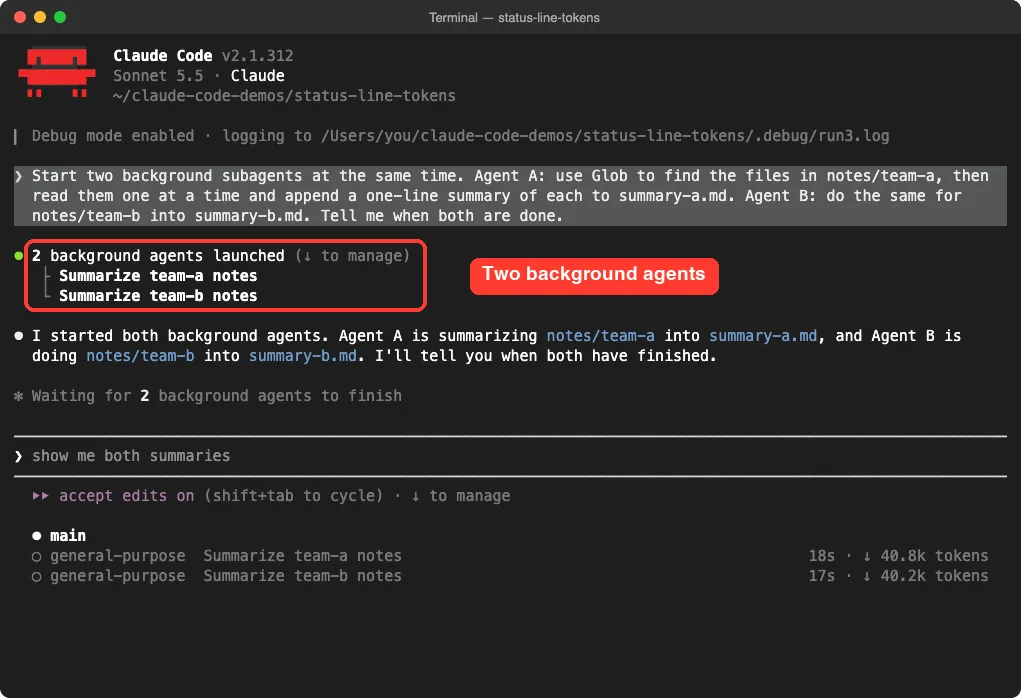
When you ask Claude Code to run work in the background, it starts one or more background subagents. They keep working while you keep chatting in the main session. You can see them in a small agents list under the prompt box.
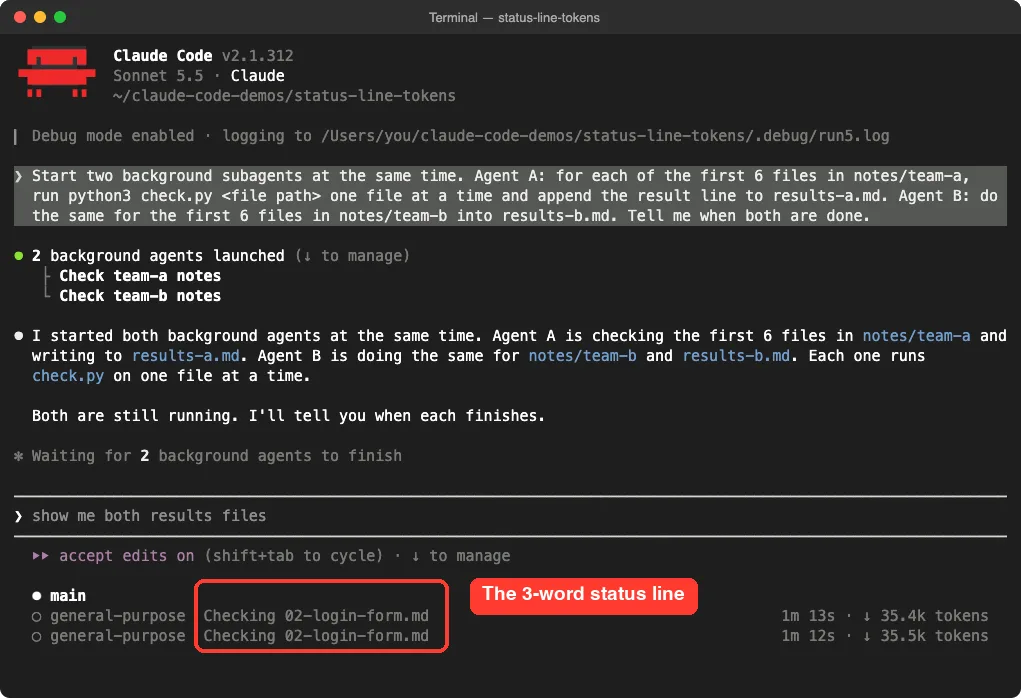
Next to each agent, Claude Code shows a short progress label, written in present tense. In our test it read “Checking 02-login-form.md”, then “Checking 03-search-filters.md”, and so on. That label is the 3-word status line everyone is talking about.
This is not the same thing as the status bar you can design yourself with the statusLine setting. That bar runs your own script and costs no tokens; we cover it in our guide to the customizable status line. The 3-word label is different because a model writes it.
How the Status Line Uses Tokens
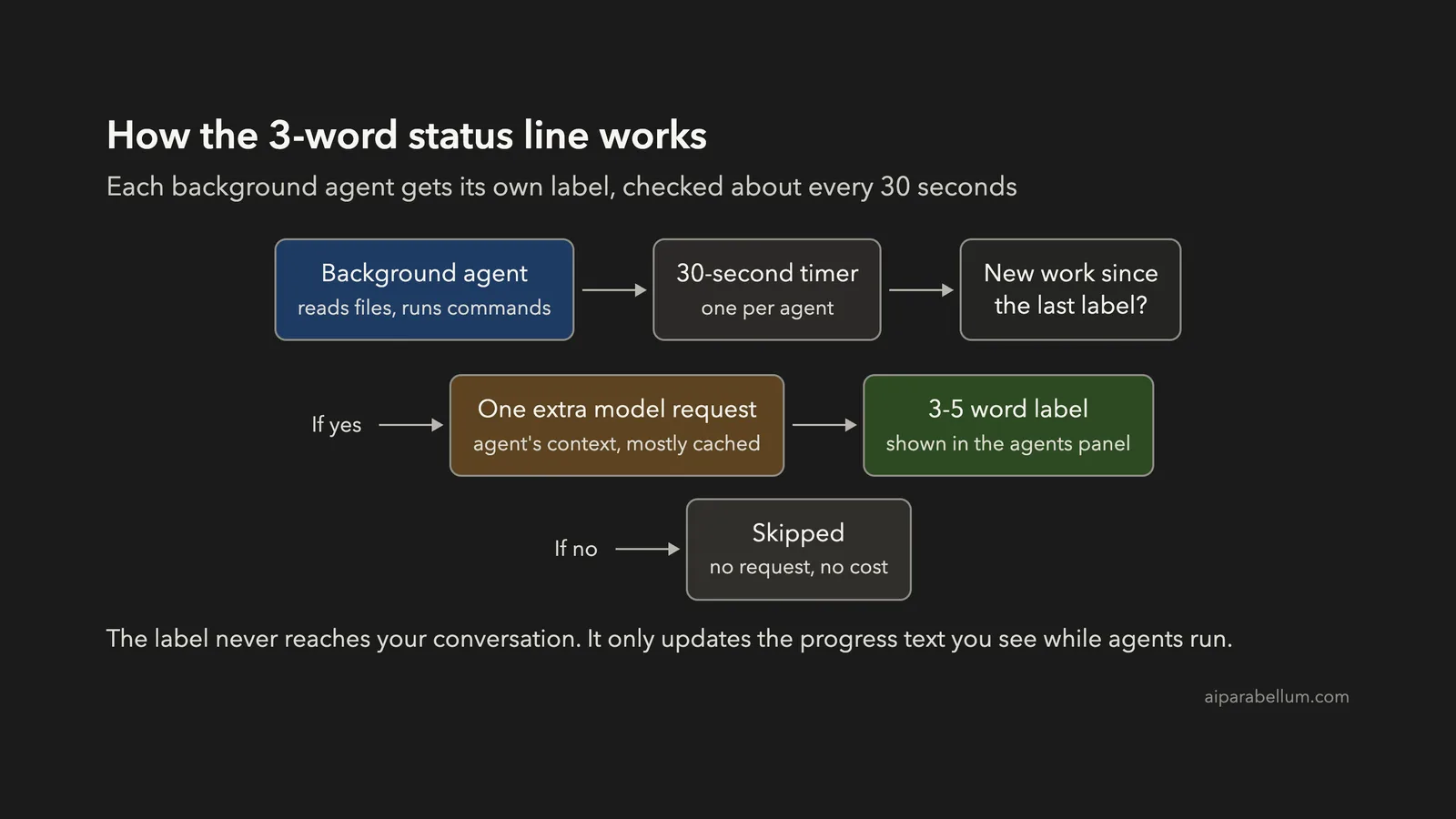
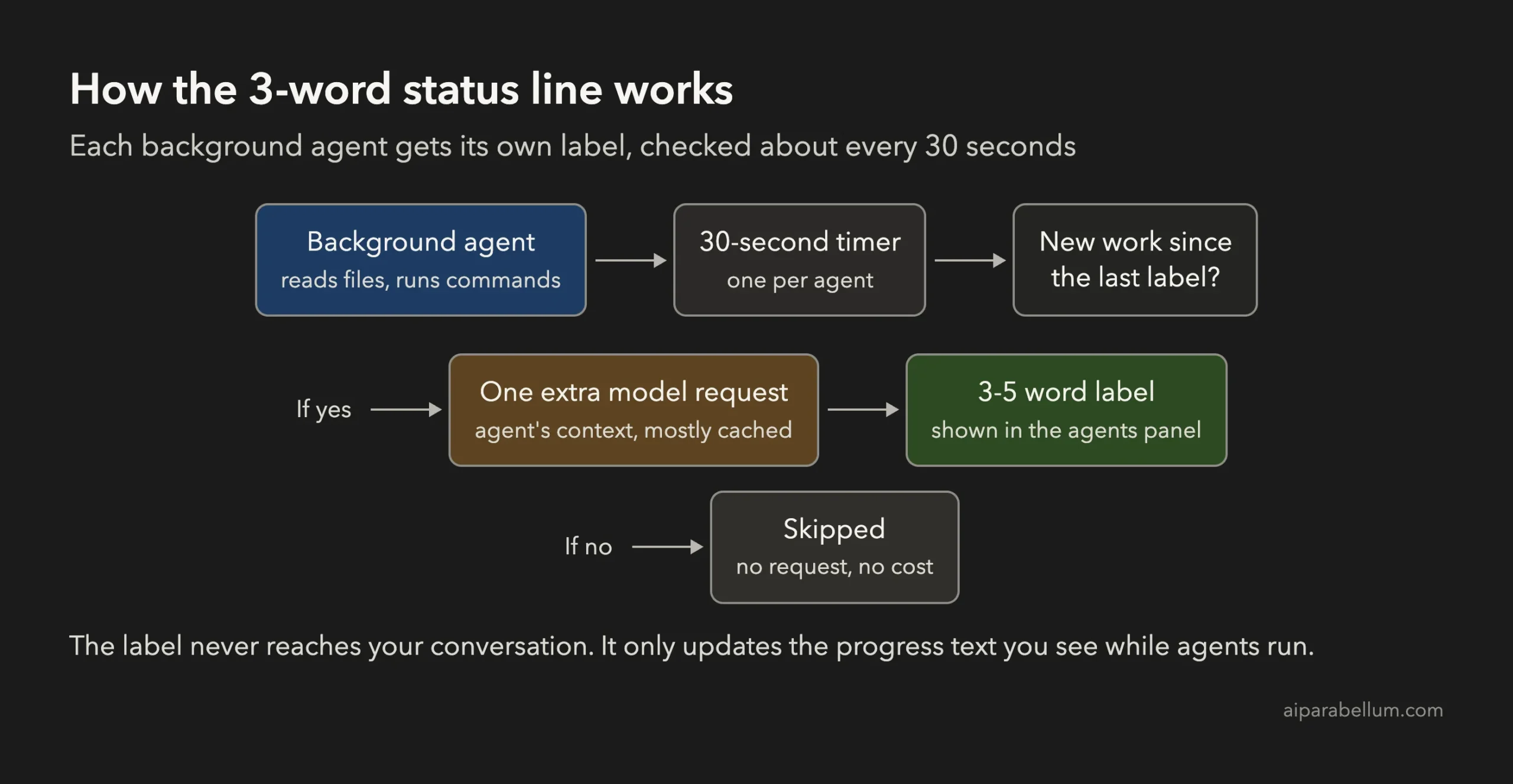
The label is not free text that Claude Code makes up locally. Each time it updates, Claude Code sends a small request to the model that asks it to describe the agent’s latest action in 3 to 5 words. Inside the app, that request type is called agent_summary.
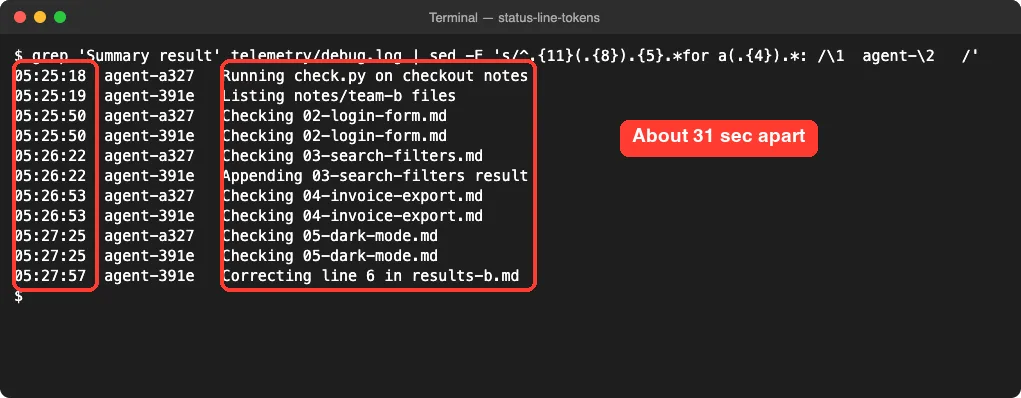
Here is what we saw in the debug log and the usage data:
- Each background agent gets its own timer, and it fires about every 30 seconds.
- If the agent has done nothing new since the last label, Claude Code skips the request. Agents that sit waiting cost nothing here.
- If there is new work, Claude Code sends the agent’s context along with the request. Most of that context is read from the prompt cache, which is cheaper than fresh input, but it still counts.
- In our tests, every label request used the same model as the agent itself.
The label never helps the model do its job. It exists only so you can see what each background agent is doing.
We Measured It: How Much Does the Status Line Really Cost?
We ran the same kind of job twice in a demo folder with made-up meeting notes. Claude Code’s own usage data (OpenTelemetry) recorded every request, its type and its estimated cost. Then we added the numbers up by request type.
| Test | What the two agents did | Labels written | Share of requests | Share of cost |
|---|---|---|---|---|
| Quick job | Read 12 small files each and wrote a summary, done in about 30 seconds | 1 | 2.5% | 1.3% |
| Slow job | Ran a 25-second check on 6 files each, about 3 minutes in total | 11 | 34.4% | 15.7% |
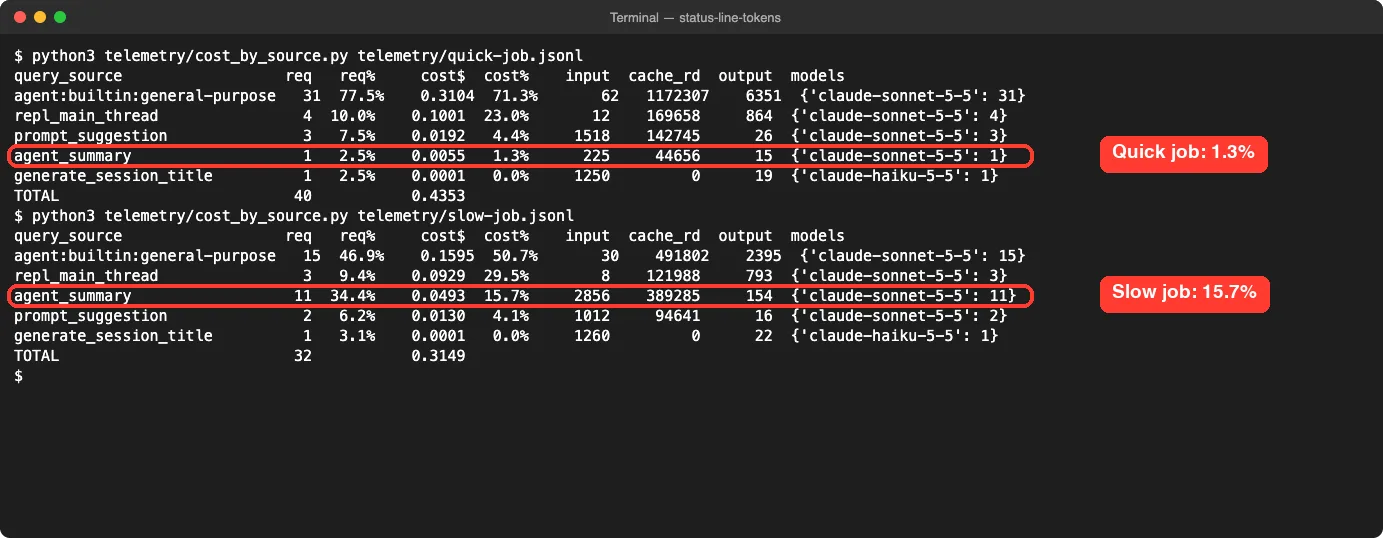
The difference comes down to time. A fast agent finishes before the timer has much chance to fire. A slow agent that keeps making progress gets a new label every 30 seconds, and each label re-reads its whole context.
In the slow job, each label cost about half a cent at API rates, and the labels added roughly 31% on top of what the two agents spent on their actual work. On a subscription you don’t pay per request, but these requests still use up your usage limits, which matters if you often hit rate limit errors.
How to Check Your Own Claude Code Status Line Tokens
Your numbers will be different from ours, so it is worth checking your own sessions. There are two ways: a quick count of the labels, and an exact cost breakdown.
Method 1: Count the Labels in the Debug Log
Start Claude Code with a debug log file, use background agents as you normally would, then count the label lines.
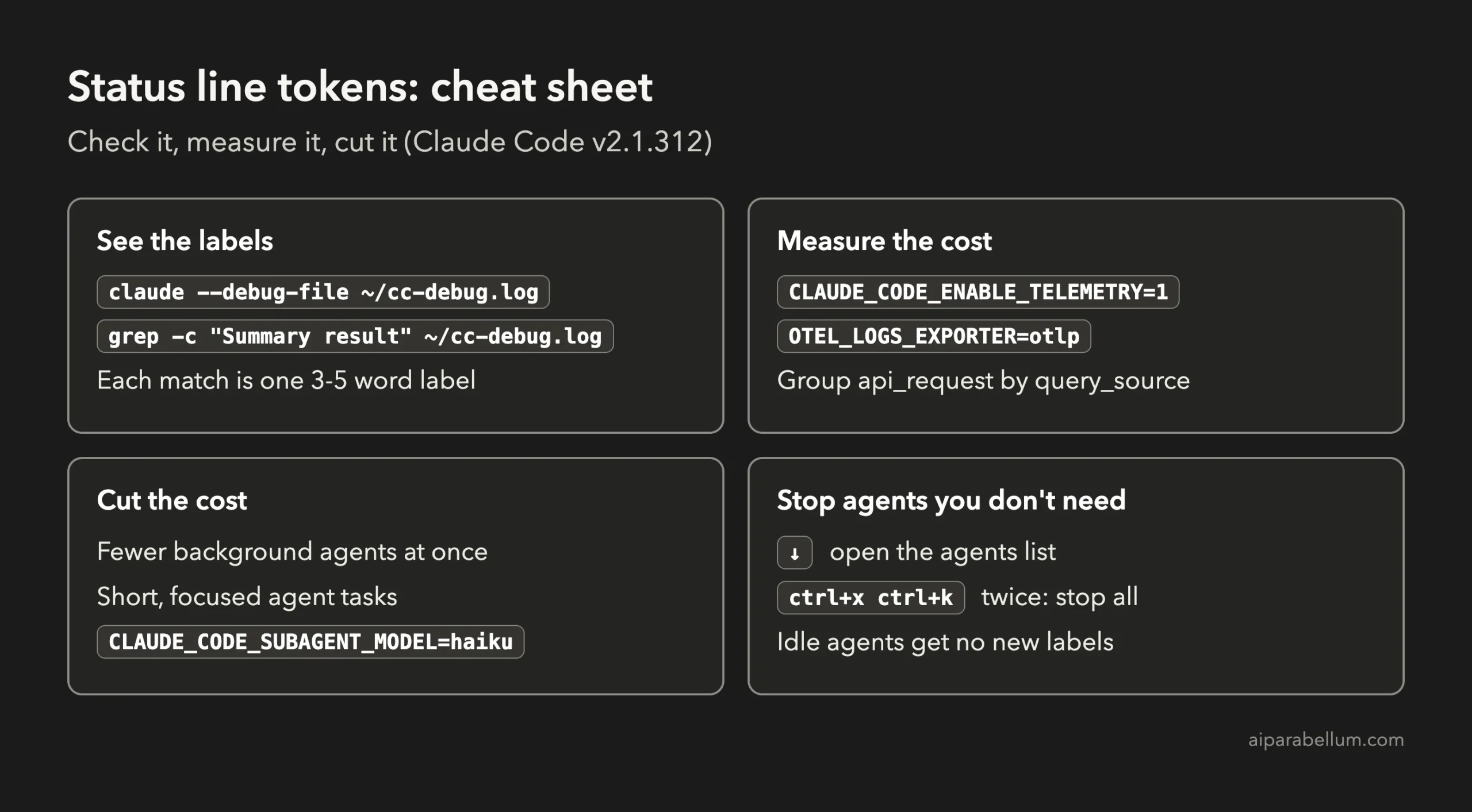
claude --debug-file ~/cc-debug.log
# ...work normally, then in another terminal:
grep -c "Summary result" ~/cc-debug.log
Each match is one label, which means one extra model request. If you see hundreds after a long session, the status line is a real part of your usage.
Method 2: Measure the Exact Cost With Telemetry
Claude Code can send its own usage events through OpenTelemetry, as explained in Anthropic’s monitoring guide. Every api_request event includes a query_source field, and the status line shows up as agent_summary.
export CLAUDE_CODE_ENABLE_TELEMETRY=1
export OTEL_LOGS_EXPORTER=otlp
export OTEL_EXPORTER_OTLP_PROTOCOL=http/json
export OTEL_EXPORTER_OTLP_ENDPOINT=http://127.0.0.1:4318
claude
Point the endpoint at any OpenTelemetry collector you use. For a one-off check, we used a tiny local receiver that only saves what it gets to a file on our own Mac:
# otel_receiver.py - run: python3 otel_receiver.py
import http.server
class H(http.server.BaseHTTPRequestHandler):
    def do_POST(self):
        body = self.rfile.read(int(self.headers.get('Content-Length', 0)))
        open('otel.jsonl', 'ab').write(self.path.encode() + b'\t' + body.replace(b'\n', b' ') + b'\n')
        self.send_response(200); self.end_headers()
    def log_message(self, *a): pass
http.server.HTTPServer(('127.0.0.1', 4318), H).serve_forever()
Then group the api_request events by query_source and add up cost_usd. The row named agent_summary is your status line cost. Keep the saved file private, because telemetry events can include account details.
How to Reduce the Status Line Token Cost
We found no documented setting to switch the labels off in v2.1.312. These are the safe ways to keep the cost down with what Claude Code already offers.
- Run fewer background agents at once. Every agent has its own 30-second timer, so four busy agents make four times the labels. Our guide to parallel agents helps you decide when more agents are really worth it.
- Keep agent tasks short and focused. The label cost grows with how long an agent stays busy. Two short agents that finish fast cost less in labels than one agent that grinds for 20 minutes.
- Don’t make an agent babysit slow commands. In our slow test, the agent waited on a 25-second check, then got a new label for nearly every step. Run long test suites or builds yourself, or in the main session, and hand the agent only the result.
- Use a cheaper model for subagents. Labels used the agent’s own model in our tests, so a cheaper agent model should make each label cheaper too. Set CLAUDE_CODE_SUBAGENT_MODEL=haiku, or add a model line to an agent’s definition, as the subagents docs describe. Our guide on choosing a model explains the trade-offs.
- Stop agents you no longer need. Press the down arrow to open the agents list, or press ctrl+x ctrl+k twice to stop all background agents. A stopped or idle agent gets no new labels.
- Check your usage regularly. Anthropic’s cost guide lists other background usage too, and our cost guide walks through the main ways to keep spending under control.
# Example: run all subagents on Haiku for this session
CLAUDE_CODE_SUBAGENT_MODEL=haiku claude
What Makes Sense and What Doesn’t
A viral post is not always right, and it is not always wrong either. Here is how the common claims held up in our own tests.
| Claim going around | What we found | Verdict |
|---|---|---|
| Claude Code writes a 3-word status line for background agents | Seen in the agents list and the debug log | True |
| It runs about every 30 seconds | About 31 seconds apart per agent | True |
| It burns 15-20% of your tokens | 15.7% with slow agents, 1.3% with fast ones | True for some workflows, not all |
| It sends the agent’s whole transcript each time | It sends the agent’s context, mostly from cache, and skips idle agents | Partly true |
| You should patch Claude Code to turn it off | Possible with outside scripts, but risky | Not recommended |
Patching Claude Code with a script from the internet means running someone else’s code inside a tool that can read and edit your files. It can also break silently after any update, and Claude Code updates often. The safer path is to use the steps above and ask Anthropic for an official setting through the /feedback command.
If you use background agents for long jobs, the status line can be one of your bigger hidden costs. If your agents finish fast, you can mostly ignore it.
Frequently Asked Questions
Does the 3-word status line run for normal chats?
No. In our tests it only ran for background agents. Your main conversation does not get these labels.
Does it cost money on a Pro or Max plan?
Not directly, because you are not billed per request. It does use part of your plan’s usage limits, so you may hit limits sooner on long agent-heavy days.
Can I turn off the agent status labels?
We found no documented setting for it in Claude Code v2.1.312. Fewer, shorter background agents and a cheaper subagent model are the safe ways to reduce it for now.
Is this the same as the custom status line?
No. The custom status line is a bar you set up with your own script, and it uses no tokens. The 3-word label is written by the model for each background agent.
Why did our two tests give such different numbers?
Because the label cost depends on time. Agents that work fast finish before many labels are written, while agents that make slow progress get a new label about every 30 seconds.
Conclusion
The Claude Code 3-word status line is real, it runs about every 30 seconds for each busy background agent, and in slow, long-running jobs it really can take around 15% of your session’s cost. For quick agent tasks it barely matters, which is why some people see a big hit and others see almost nothing. Check your own sessions with the debug log or telemetry, keep background agents few and focused, use a cheaper subagent model, and stop agents you no longer need. For more hands-on guides, browse all our Claude Code tutorials or read our overview of Claude AI.