Claude Code writes code fast, but fast code is not always good code. A growing set of free add-ons tries to fix that by giving Claude engineering discipline: review checklists, design rules and workflows borrowed from classic books. These Claude Code engineering skills are easy to find on GitHub and hard to compare.
We took five of the most popular ones into a throwaway sandbox, read their hooks first, and ran four of them in real Claude Code sessions on a small, messy order-processing script. This guide shows what each one did, what it cost you in setup, and which one fits which job.
This guide is part of our Claude Code tutorials. Find more add-ons in our Skills Directory.
Tested with Claude Code v2.1.319 on 2026-11-10 (macOS). We used pstack-claude 0.9.133 at commit 42fcb61, brooks-lint 1.9.1 at commit 019c9cf, agent-rules-books v0.6 at commit 893a88a and elephant-goldfish-model 0.1.1 at commit bdcfe8c. The Windows and Linux steps follow Anthropic’s official instructions.
Claude Code Engineering Skills at a Glance
| Add-on | What it gives Claude | How we loaded it | What we ran |
|---|---|---|---|
| Brooks-Lint | Six review skills with book citations and a health score | Skills copied into the demo project’s .claude/skills folder | A full code review |
| pstack (pstack-claude port) | 67 workflow skills, from writing cleanup to formal verification | --plugin-dir | The unslop skill |
| Agent Rules Books | One rule set per classic book | The clean-code skill copied into the project | A refactor of one function |
| Elephant-Goldfish Model (EGM) | Design and review skills with fresh-eyes reviewers | --plugin-dir | Loaded and listed only |
| pstack (original mirror) | The same skills as pstack-claude, for many agents | Cloned and read | Not run; we used the Claude Code port |
The short version: Brooks-Lint gave the most useful single result, the clean-code rules produced a tidy refactor, and pstack is a large toolbox where we only tried one tool. EGM loaded fine, but we did not run its design workflow.
What Are Engineering Skills for Claude Code?
A skill is a folder with a SKILL.md file that tells Claude how to do one kind of job. Anthropic’s plugin docs explain that plugins can bundle skills, agents and hooks, and that you can load a plugin from a local folder for a single session.
The add-ons in this guide all aim at the same gap. Claude can write working code, but it does not always care about naming, structure, tests or design choices. These skills write down that care as rules or checklists, so Claude applies it every time.
If you are new to add-ons, our plugin marketplace guide explains how marketplaces work, and our CLAUDE.md guide covers the simpler way to give Claude standing rules.
How We Tested Without Touching Our Own Setup
Third-party add-ons can run commands, so we treated them with care. We cloned each repo into a sandbox folder, read its hooks and scripts, and loaded it only for one session. Nothing was installed into the global ~/.claude folder.
The demo was a single file, orders.py, with one 30-line function. It uses one-letter parameter names, magic numbers, repeated branches, floats for money, file writes mixed with pricing, and a test that only checks the result is not None. A README full of filler wording sat next to it.
We started every session with --setting-sources project, so the demo did not read our personal settings. Our skill scanner guide helps if you want a second safety layer before loading unknown skills.
What the hooks do
We read every hook before running anything. Here is what we found.
- pstack-claude has one
SessionStarthook. It checks for an optional settings file and then prints a short routing message that tells Claude when to use thepoteto-modeskill. - brooks-lint has a
SessionStarthook too. It writes copies of its slash commands into~/.claude/commands, which is the global folder we keep unchanged, so we did not run that hook. - Elephant-Goldfish Model had no hooks folder in the version we cloned.
- Agent Rules Books is plain Markdown rule files, so there is nothing to execute.
Because of that brooks-lint hook, we copied its skills folder into the demo project instead of installing the plugin. The skills loaded fine this way. You get the same six review skills, just without the extra short commands the hook would add.
Brooks-Lint: A Code Review With Book Citations
Brooks-Lint turns twelve classic engineering books into a review checklist. According to its README, it looks for six decay risks and reports each finding as symptom, source, consequence and remedy. It ships six skills for reviews, architecture audits, tech debt, test quality, a health dashboard and a full sweep.
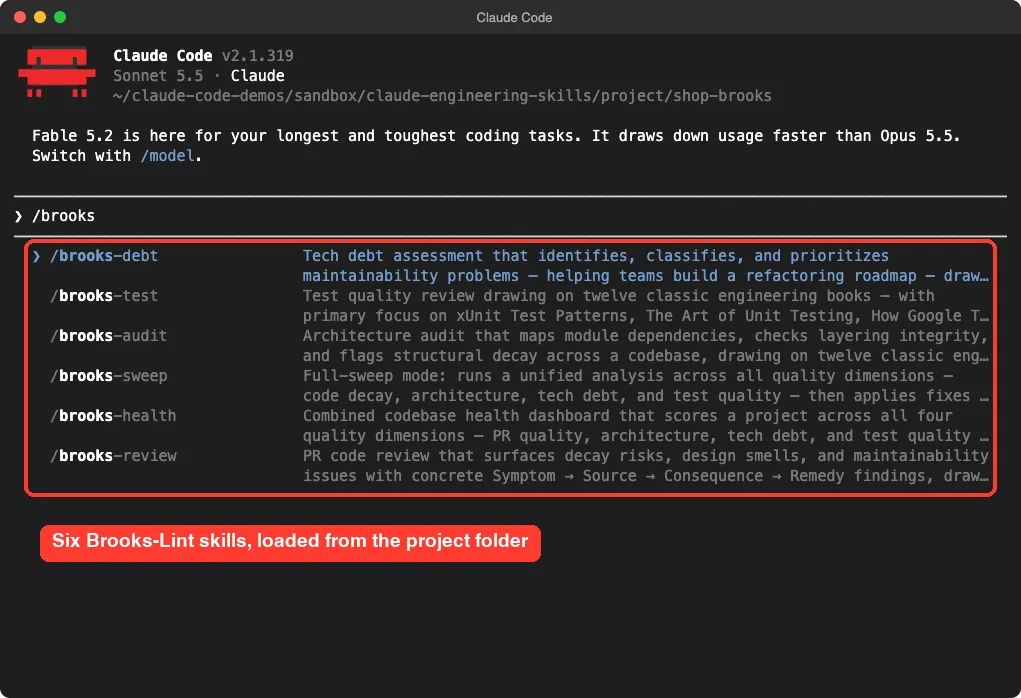
We typed /brooks-review review orders.py. Claude read the shared guide files, the code, the test and the README before answering. It also asked permission to write a small .brooks-lint-history.json file in the project, which records the score of each review.
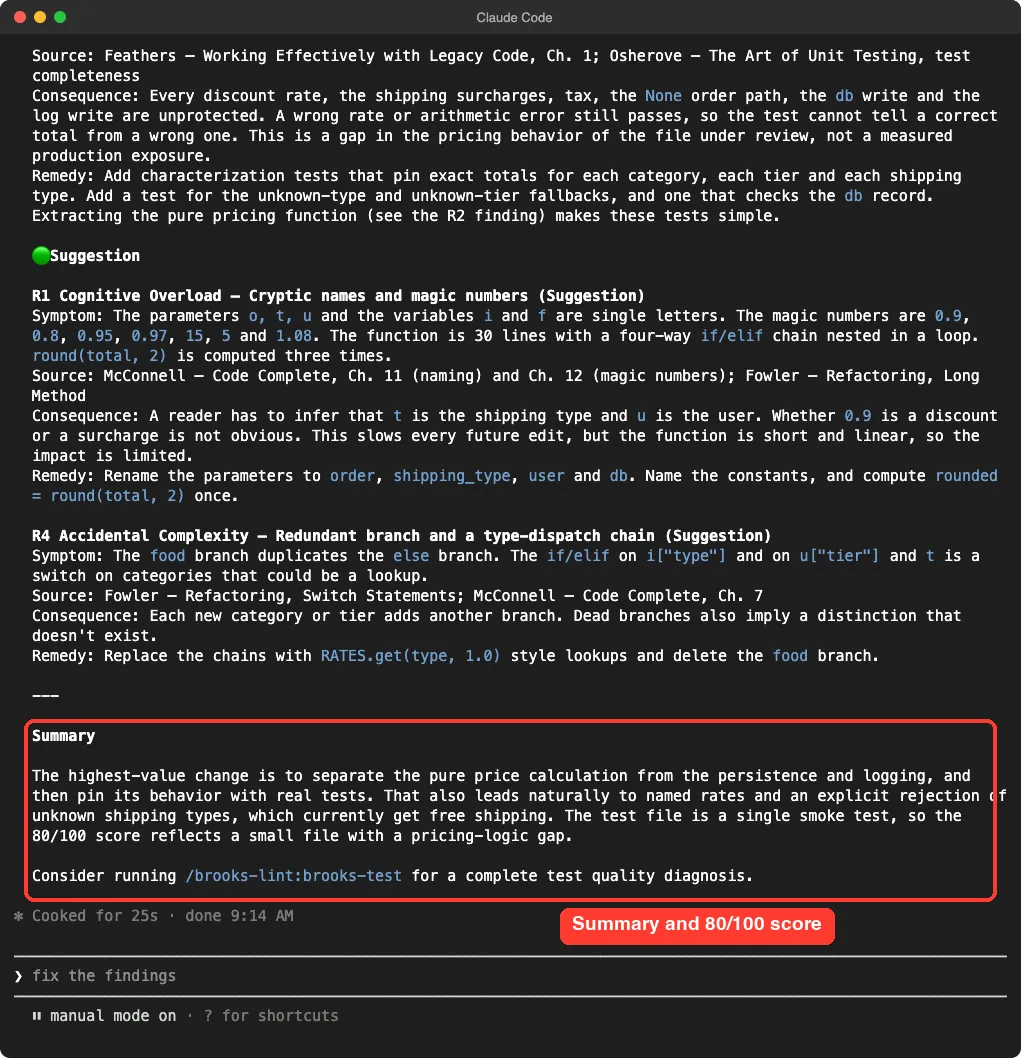
The report had the structure the README promises. Each finding named a symptom, cited a book such as Code Complete or Working Effectively with Legacy Code, explained the consequence and gave a fix.
What it found
These are the findings we saw in the report, using Brooks-Lint’s own labels.
- Dependency Disorder (warning): the pricing math calls
open,printand the database directly, and the file handle is never closed safely. - Domain Model Distortion (warning): money is stored as floats, an unknown shipping method adds no fee, and a missing order returns
Nonewithout a clear error. - Coverage Illusion (warning): the only test checks that a result exists, so changing a discount rate would not fail it.
- Cognitive Overload (suggestion): one-letter names and magic numbers such as
0.9,0.95and1.08. - Accidental Complexity (suggestion): the
foodbranch duplicates theelsebranch, and the if/elif chains could be lookups.
Every one of those is a real problem in our file, and the remedies were specific. For example, it suggested a test for one book with standard shipping that should total 15.12, which we confirmed by hand: 9 plus 5, times 1.08.
One caution: scores moved between runs
We ran the same review more than once. The first run gave 72 out of 100, with five warnings and three suggestions, and a later run ended at 80 out of 100.
The findings overlapped, but the score is not a fixed measurement, so treat it as a rough signal.
pstack: A Big Toolbox of Workflow Skills
pstack started as a Cursor skill stack by Lauren Tan, known as Poteto. The pstack-claude port translates it for Claude Code and adds the routing hook we described. A separate standalone mirror keeps the original skills usable across agents.
The folder we loaded has 67 skills. Many are small and sharp, like unslop, bro, tdd and blast-radius.
Others are principles, such as principle-fix-root-causes, that bigger skills call on. The README says that poteto-mode is the entry point that routes a goal to the right workflow.
We loaded it with one flag, pointing at the plugin folder inside the cloned repo.
claude --setting-sources project --plugin-dir /path/to/pstack-claude/plugins/pstack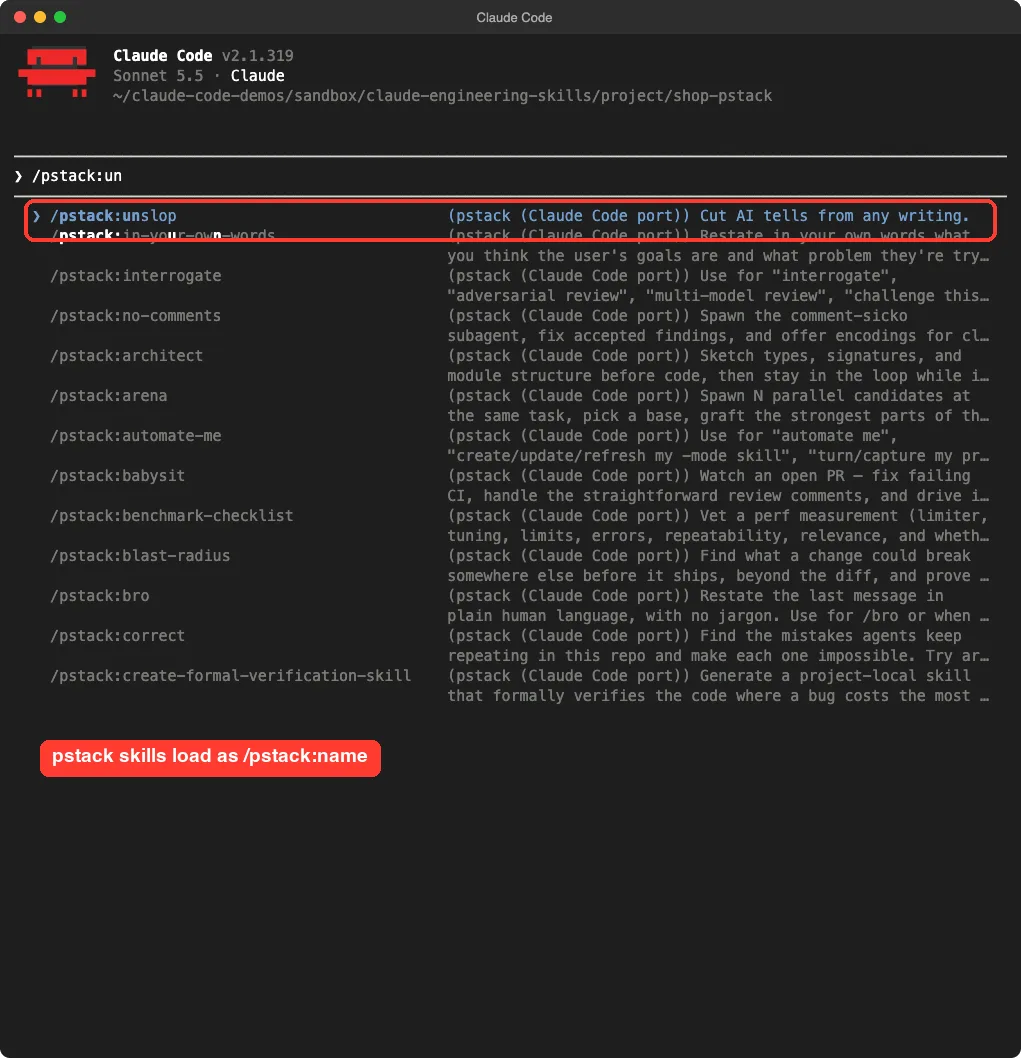
Trying unslop on a filler README
We picked unslop because it is small, safe and easy to judge. Its skill file lists patterns to remove from writing, such as inflated vocabulary, em dash overuse and chatbot phrases.
We ran /pstack:unslop README.md on our filler paragraph. Claude read the file and proposed overwriting it with one plain sentence.
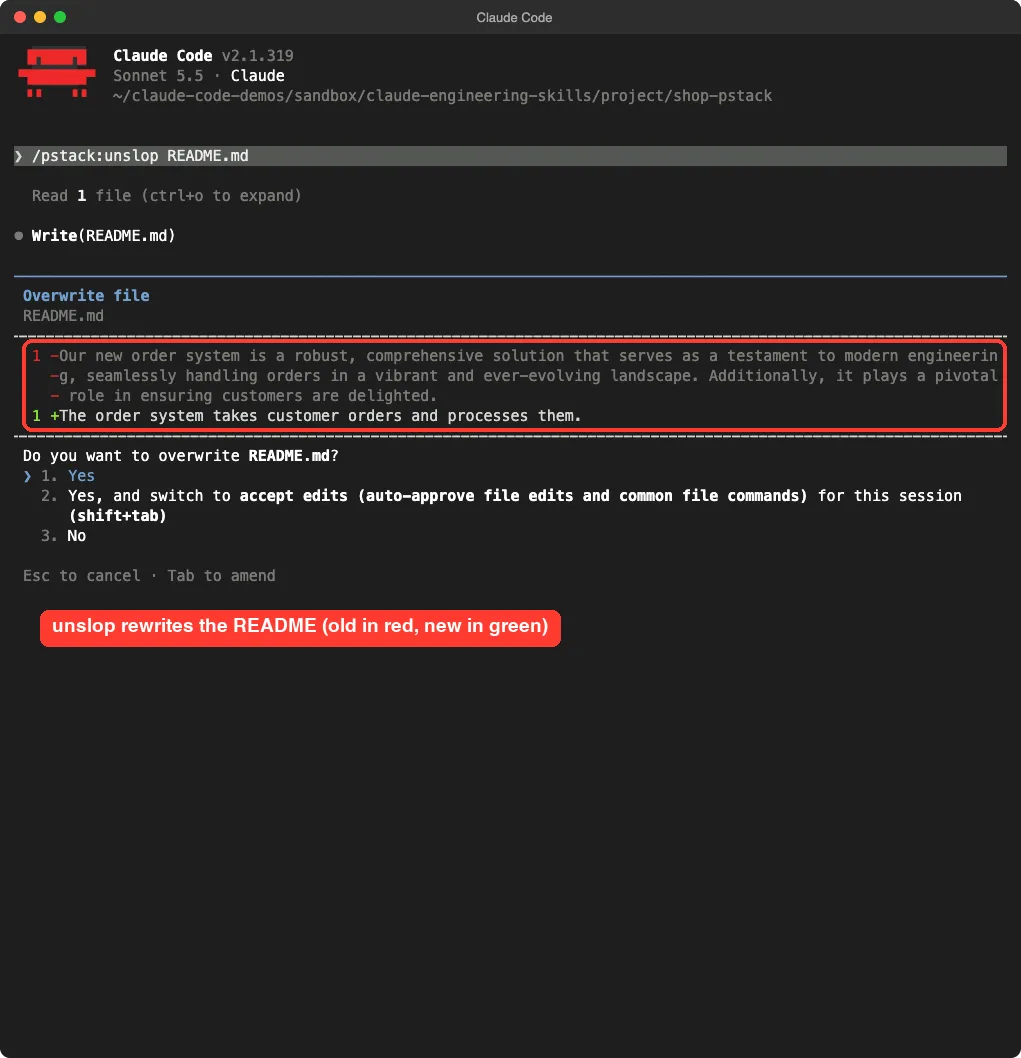
The rewrite is honest about what the README said, which was very little. It cut the filler, but it also cut the tone entirely, so a real project would want to review the result. We never approved the write, so the file stayed unchanged.
That is the lesson with pstack. We only ran one of its 67 skills, so we cannot say how poteto-mode or the heavier workflows perform. Start with one skill you understand, then add more.
Agent Rules Books: Classic Books as Rules
Agent Rules Books contains rule sets inspired by books like Clean Code, Refactoring and Domain-Driven Design. Each rule set comes in three sizes, called mini, nano and full, and the README recommends mini for most tasks.
The size difference is large. For Clean Code, the mini file is about 580 words and the full file is about 2,100 words. A smaller file costs less context every time Claude reads it.
We copied the clean-code folder into the demo project’s .claude/skills folder. Then we gave Claude a plain prompt:
Use the clean-code skill to refactor the process function in orders.py. Keep behavior the same.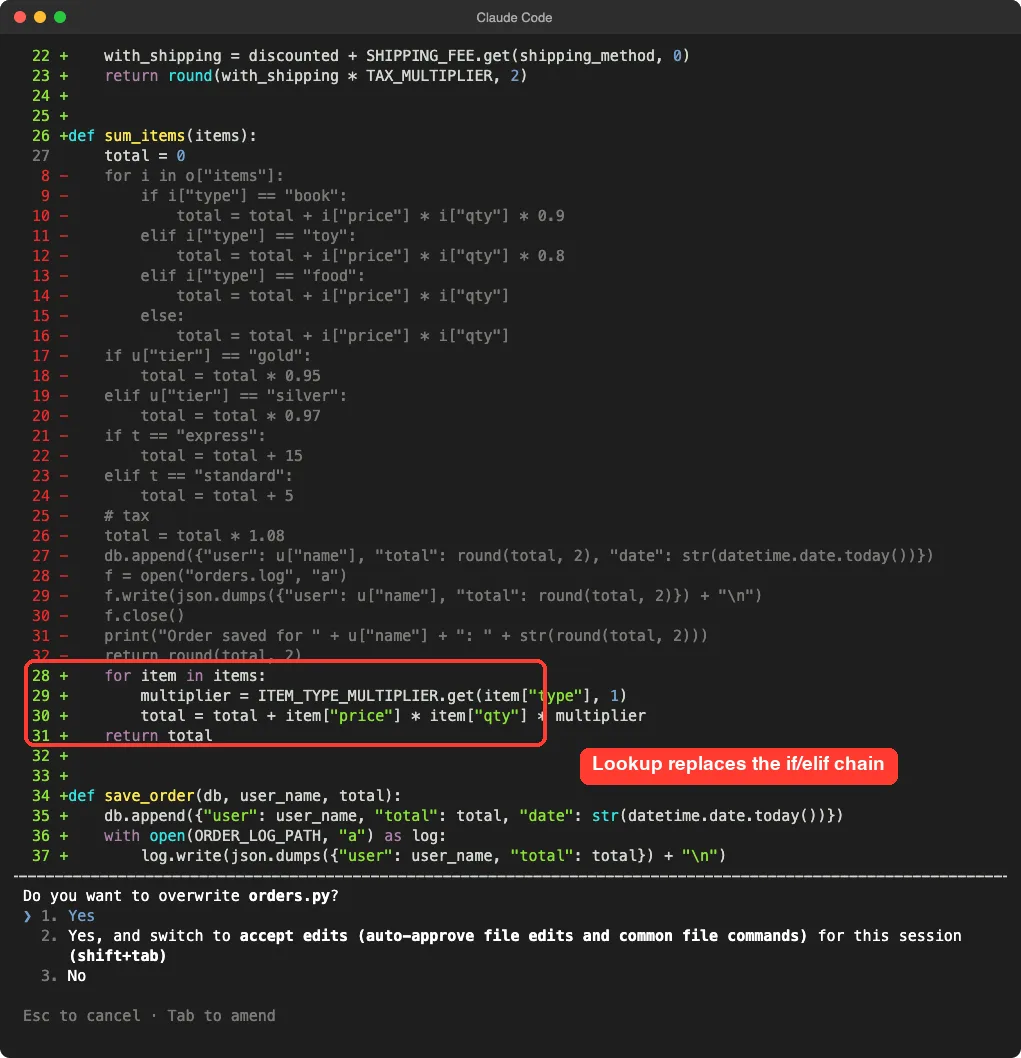
Claude split the function into smaller pieces. The item loop now uses a named lookup table, a separate save_order function handles the database and log, and the log file is opened with a with block. The diff also showed named constants for the log path, shipping fees and the tax multiplier.
These are the same fixes Brooks-Lint asked for, which makes sense, since both lean on the same books. We did not approve the write, and we did not run the refactored code, so we cannot confirm that totals stay identical. Run your tests before you accept a change like this.
Elephant-Goldfish Model: Design First, Then Review
Elephant-Goldfish Model, or EGM, comes from Google’s open-source repo. Its README describes an elephant that holds project context and drafts a specification, and goldfish reviewers that read the draft without the earlier conversation to expose unstated assumptions.
It is the one add-on here that is about design, not code. It has seven skills for brainstorming, drafting, reviewing, resolving findings, bootstrapping docs and checking drift between docs and code.
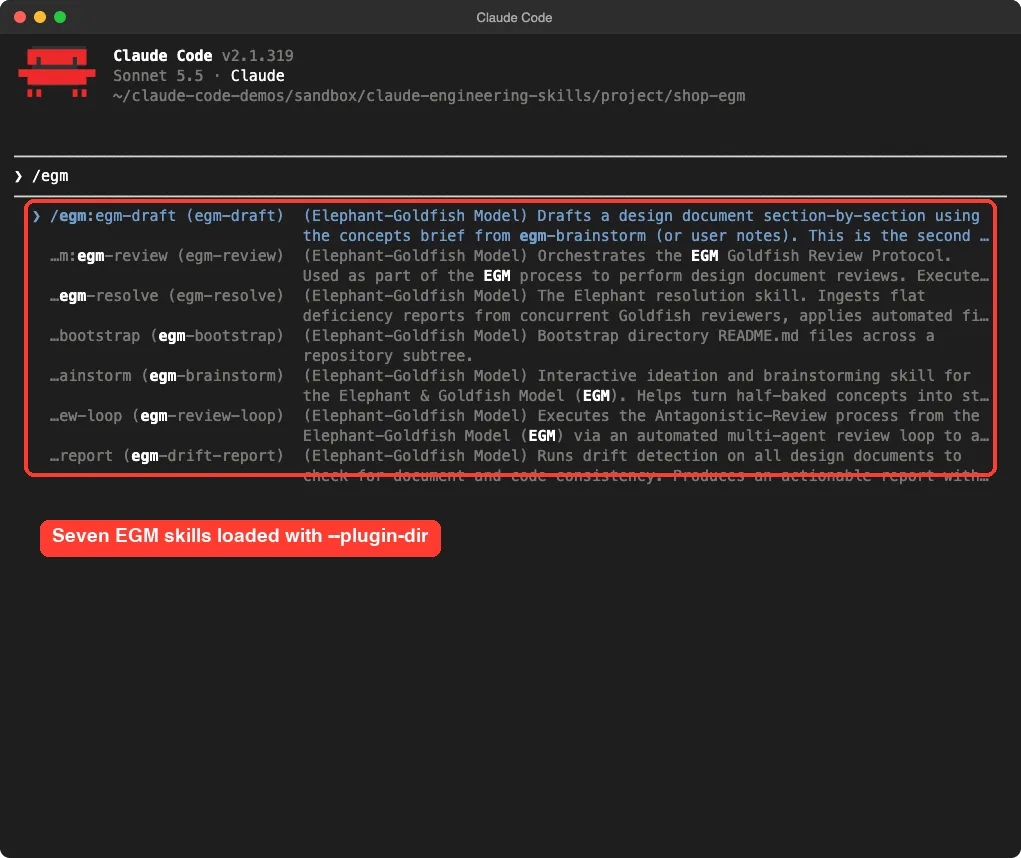
We loaded the plugin with --plugin-dir and confirmed the skills show up. We did not run the brainstorm and review workflow. The README says it needs a session that can create fresh subagents, and each review spawns several reviewers, which costs more usage than we wanted to spend on a demo.
Its documented commands use the plugin prefix, for example /egm:egm-brainstorm. Everything else about EGM in this guide comes from its README, not from our own run.
Which One Should You Use?
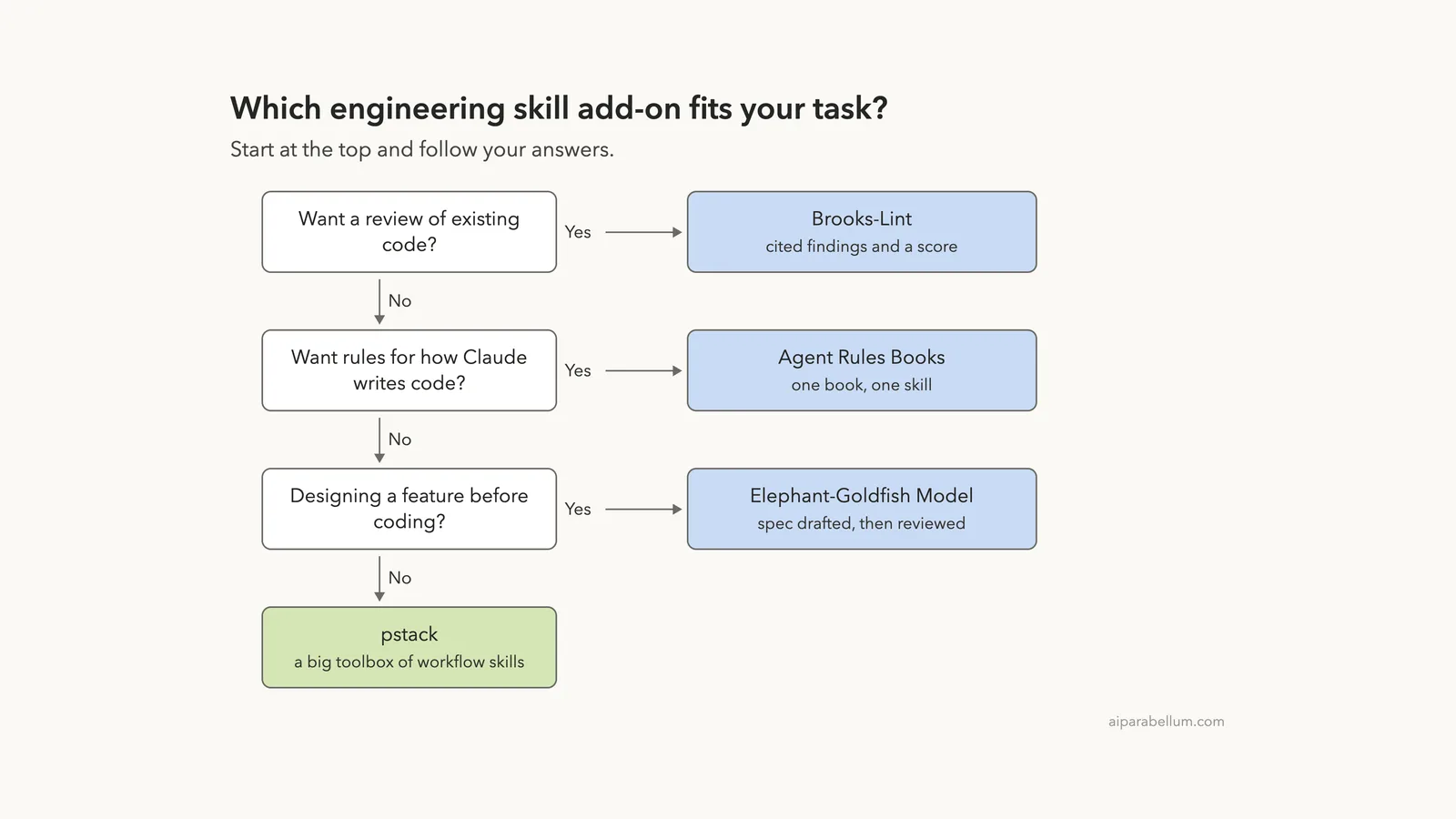
Pick by the job in front of you, not by the star count. The chart below sums up how we would choose.
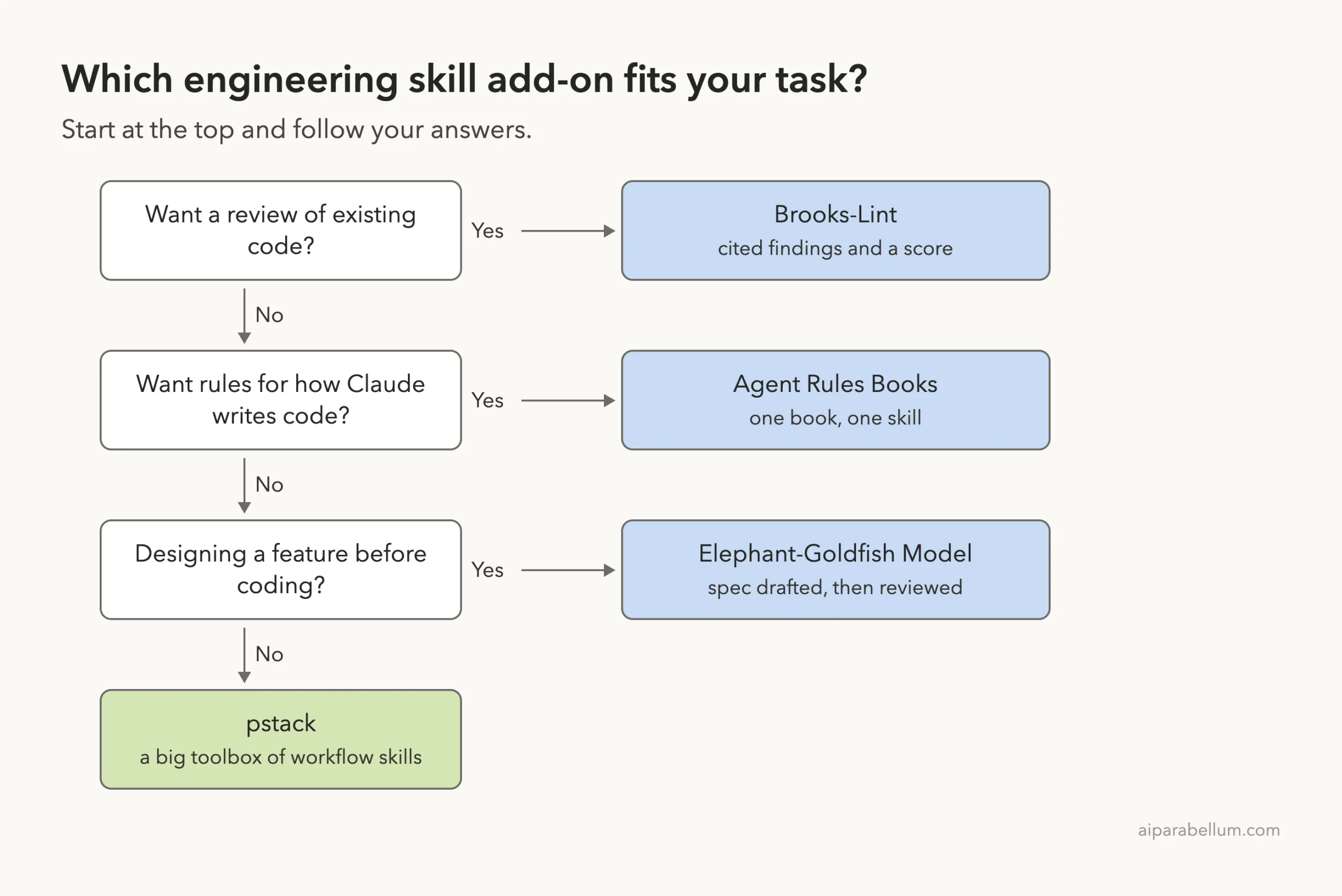
| Your situation | Try this first | Why |
|---|---|---|
| You inherited messy code and want a list of problems | Brooks-Lint | Cited findings with fixes, ready to turn into tasks |
| Claude’s new code is hard to read | Agent Rules Books | Small rule files that steer how code gets written |
| You are about to build a big feature | Elephant-Goldfish Model | Design review before any code exists |
| You want many small helpers in one install | pstack | 67 skills, so pick the few you need |
Our honest verdict: if you only try one, try Brooks-Lint on a file you already know is messy. The report format makes it easy to judge whether the findings are real. Our output style plugins post shows a lighter way to change how Claude explains its work.
Try It Yourself
Make a small throwaway folder with one messy file, then run a review on it. Use a copy, not a real project.
git clone https://github.com/hyhmrright/brooks-lint
mkdir -p demo/.claude
cp -R brooks-lint/skills demo/.claude/skills
cd demo
claude --setting-sources project
Then ask Claude for the review:
/brooks-review review messy_file.pyCommon Mistakes
- Installing a plugin globally before reading its hooks. A hook can run commands every time a session starts.
- Loading a whole pack when you need one skill. Every skill description adds to your context.
- Approving an edit without running your tests. A tidy diff can still change behavior.
- Trusting the score as a fixed number. Our own score moved between runs.
- Loading several overlapping rule sets at once. They can give Claude conflicting advice.
Pro Tips
- Use
--plugin-dirto try a plugin for one session, then close it when you are done. - Prefer the mini version of a rule set unless you need the full reference.
- Run
/contextafter loading a pack to see what its skills cost. - Use a review skill first, then pick one finding at a time to fix.
- Ask Claude to add a characterization test before it refactors old code.
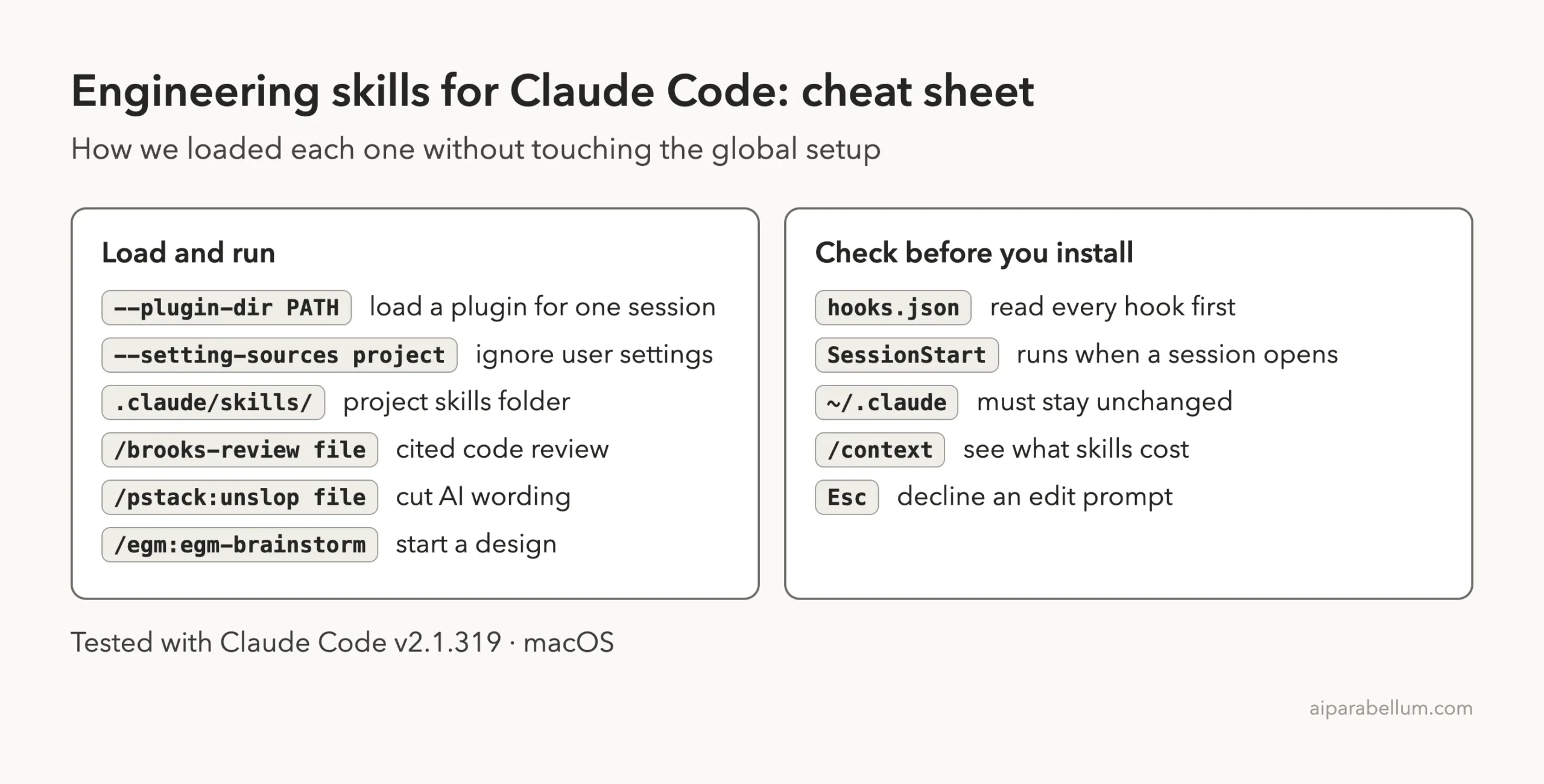
Cheat Sheet
Frequently Asked Questions
Are these engineering skills free?
The repos we cloned list open-source licenses, and the add-ons cost nothing to download. Using Claude Code itself still follows your own plan or API billing.
Do I have to install them as plugins?
No. A skill is just a folder, so you can copy it into a project’s .claude/skills folder, as we did for Brooks-Lint and clean-code. A plugin also lets you load skills with --plugin-dir.
Can I use more than one at the same time?
We tested each one in its own session, so we cannot say how they behave together. Overlapping rules could conflict, so add them one at a time.
Which one is safest to try first?
Agent Rules Books is plain Markdown with no hooks, so it has nothing to execute. For any plugin, read the hooks.json file before loading it.
Does this replace a human code review?
No. In our test the findings were accurate for one small file, but one demo is one demo. Use the output as a starting list for your own review.
Conclusion
Brooks-Lint found real, well-explained problems in our messy file, the clean-code rules produced a sensible refactor proposal, and pstack and EGM loaded cleanly with a lot of depth we did not fully test. Start with one skill, read its hooks, load it for one session and check the result against your own tests. To learn more about the assistant behind it all, read our Claude guide.