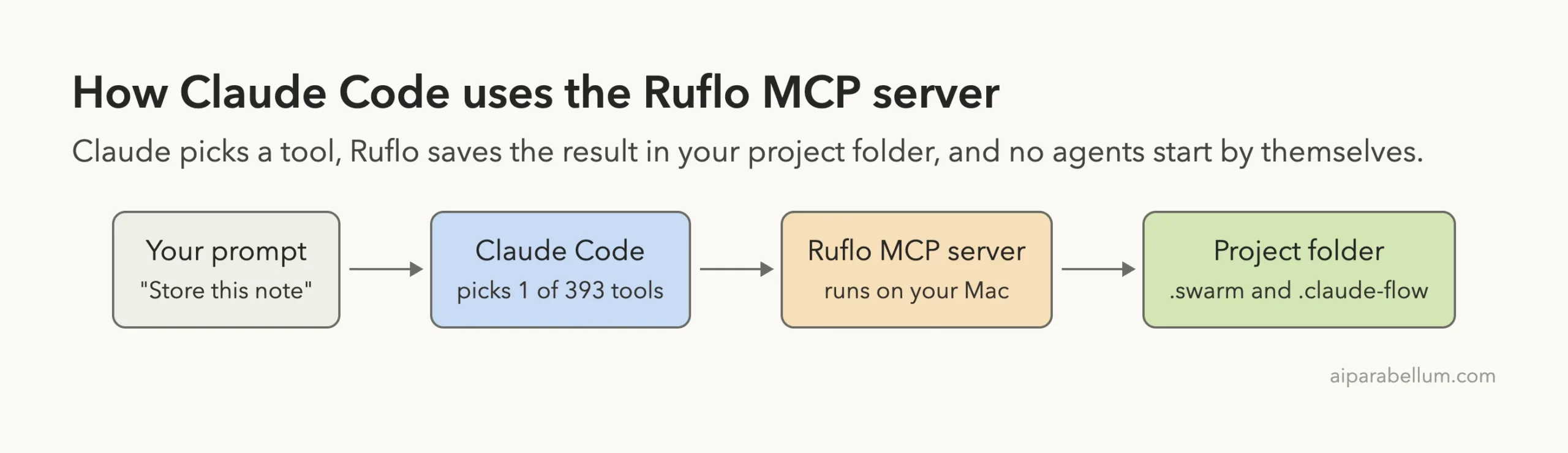
Ruflo, formerly called Claude Flow, is a huge open-source toolkit that promises agent swarms for Claude Code. Search for “claude flow” and you will find big claims about 100+ agents and self-learning memory. We added its MCP server to a throwaway project and ran it for real, so this guide shows what it actually did, what it costs in tokens, and what a “swarm” turned out to be.
This guide is part of our Claude Code tutorials. Find more servers in our MCP servers directory.
Tested with Claude Code v2.1.322 on November 12, 2026, using the ruflo npm package pinned at version 3.76.0. The project lives at github.com/ruvnet/ruflo. We cloned it at commit dc25dd9.
It uses the MIT license, was not archived, and its latest commit was made on November 11, 2026. Its older name, Claude Flow, is the same project, and the npm package metadata still points at the old repository address.
Before running anything we downloaded the two npm packages without installing them and read the install scripts. The ruflo package is a thin wrapper with no scripts.
The package it depends on, @claude-flow/cli, has one postinstall script that only patches files in its own node_modules folder. We did not read the rest of the large code base.
The server needs no account and no key. It runs on your Mac, but it is big, slow on its first start, and its tool list is expensive if your setup loads it all.
Quick Summary: What We Tested
| Question | Answer |
|---|---|
| What is it? | A toolkit for agent swarms, memory and hooks; we tested only its MCP server |
| Does it need an account or key? | No. We used none |
| What did we run? | Tool count, a memory store and search, a swarm setup and status, and a /context check |
| How many tools? | 393 in our run. The README says 406 |
| Context cost | About 123k to 125k tokens for the full list, held back until needed |
| First start | 73 seconds to download, so Claude Code’s first connect timed out |
| Our verdict | Memory works. The swarm tool only records a plan and starts no agents |
One honest note. We ran each step once, so this is one demo and not a benchmark. We never started an agent, so we cannot say how well its multi-agent features perform.
What Ruflo and Claude Flow Are
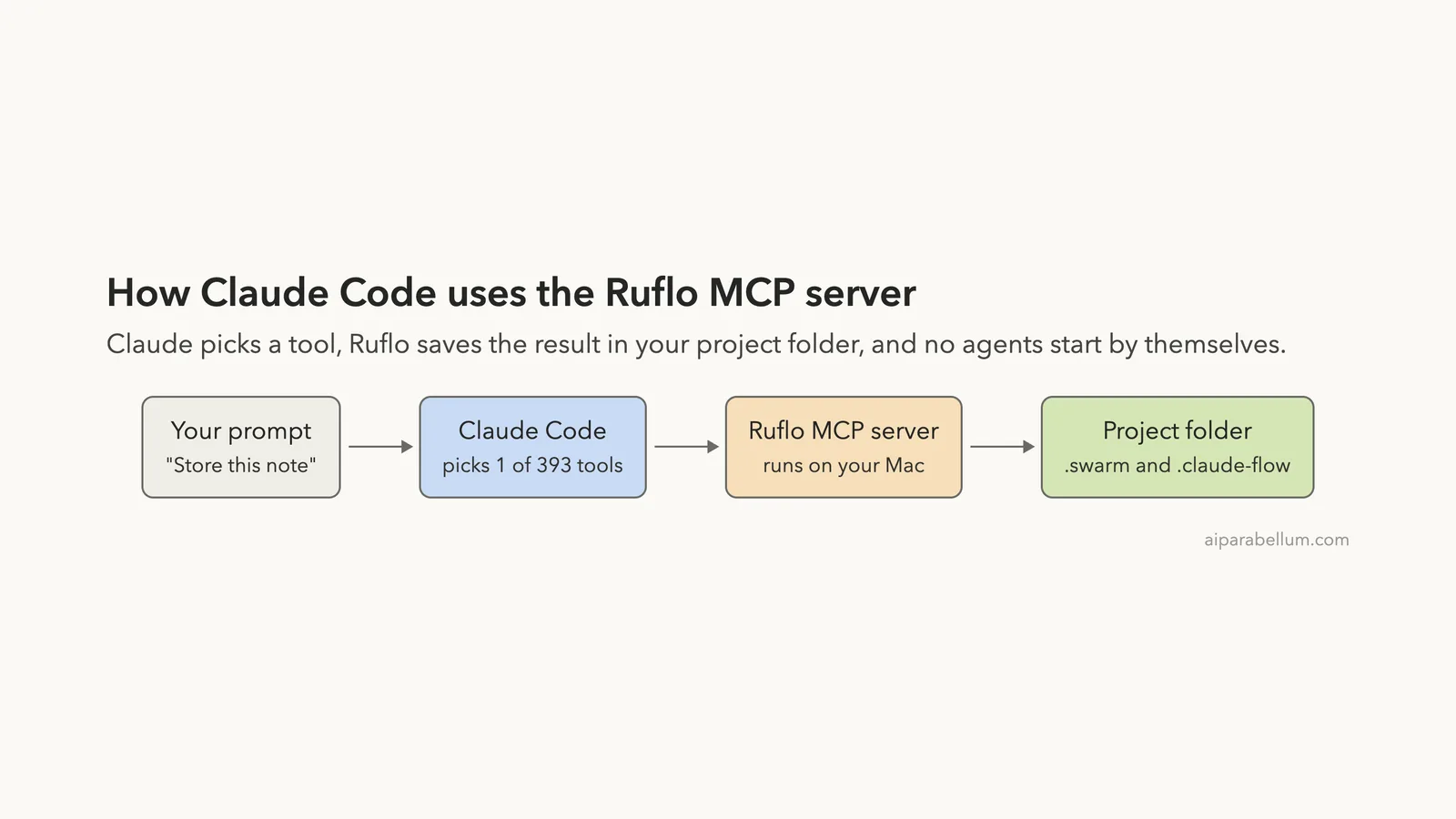
The README calls Ruflo the “harness” around Claude Code. The idea is that Claude writes the code, while Ruflo adds memory, routing, background workers and coordination on top.
It ships in several ways: a command line, a set of Claude Code plugins and an MCP server. MCP is the Model Context Protocol, a standard way to give Claude extra tools. If it is new to you, our MCP guide explains it from the start.
We chose the MCP route because it is the one command in the README that adds the tools without writing files into your project. The README’s own command is shown below.
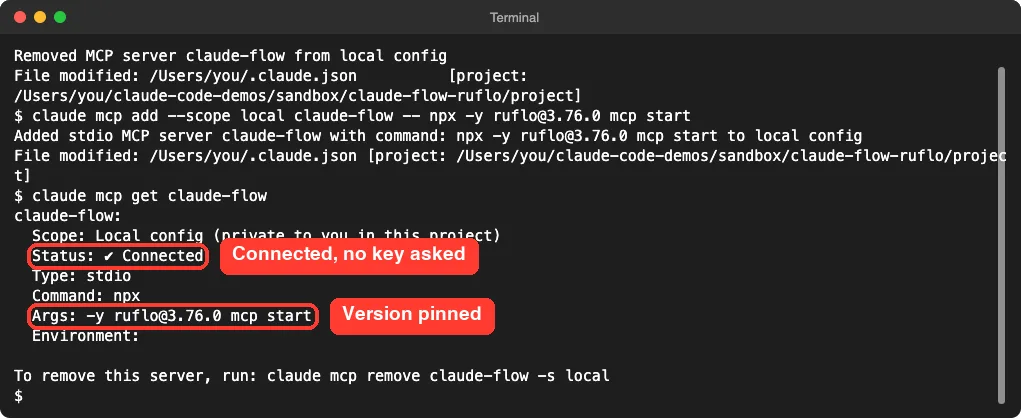
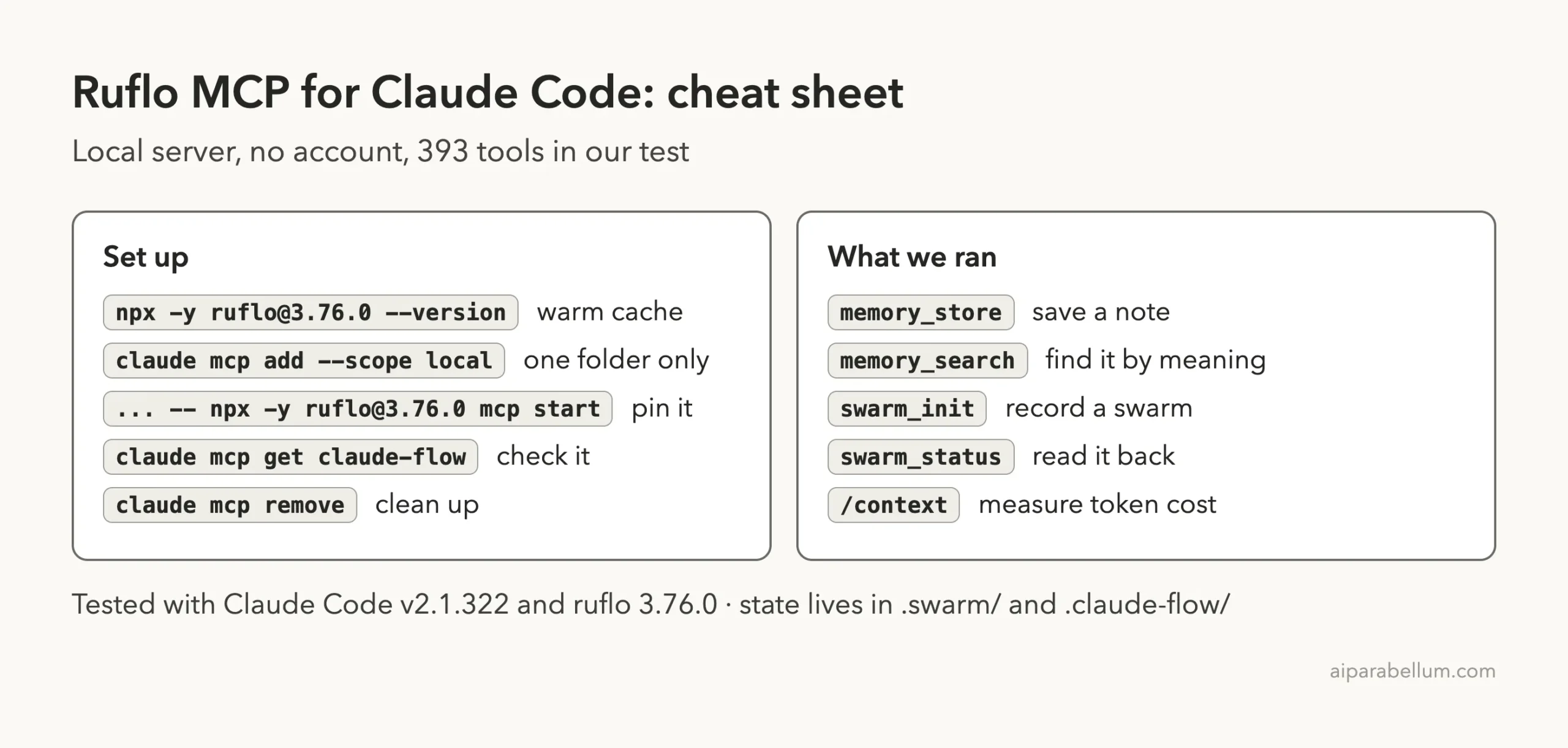
claude mcp add claude-flow -- npx ruflo@latest mcp startWe changed two things: we added --scope local so it stays in one folder, and we pinned the version instead of using @latest. The MCP docs explain scopes, and the MCP quickstart covers the basic steps.
How to Add Ruflo to Claude Code
We worked in a throwaway demo project with a tiny src/calc.py file. Your normal setup stays unchanged, because the server is stored for that one folder only.
Our first try failed. The command added the server, but claude mcp get reported “connection timed out after 30000ms”. The cause was npx downloading the full package on first use.
We ran npx -y [email protected] --version by itself, which took 1 minute 13 seconds. After that the cache was warm, and the server connected in about 3 seconds.
npx -y [email protected] --version
claude mcp add --scope local claude-flow -- npx -y [email protected] mcp start
claude mcp get claude-flow
Warm the cache first and you will skip the timeout. We saw no sign-in prompt and no key request.
393 Tools in One Server
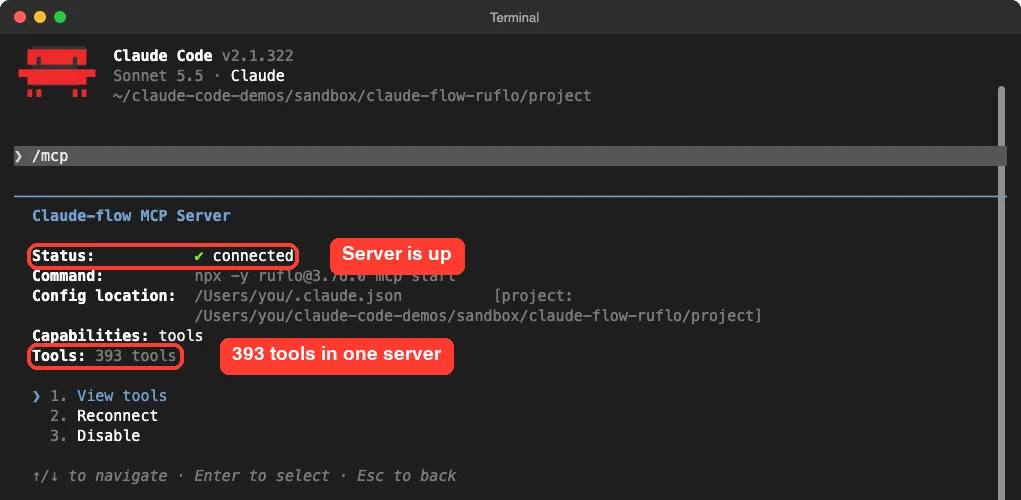
We started claude in the folder and ran /mcp. The claude-flow entry showed 393 tools, far more than most servers.
We also asked the server for its tool list directly and grouped the names by prefix. These were the biggest groups.
| Prefix | Tools | What the names suggest |
|---|---|---|
hooks_ | 46 | Hook and routing helpers |
agentdb_ | 31 | The vector database behind memory |
wasm_ | 27 | Sandboxed agent tools |
memory_ | 16 | Store, search and list notes |
swarm_ | 6 | Create and inspect swarms |
agent_ | 9 | Spawn and track agents |
The meanings come from tool names and descriptions, not from us running them. We ran only the memory and swarm tools.
One tool is worth a warning. The description of memory_import_claude says it reads Claude Code memory files from your ~/.claude folder. We did not run it, and we would think twice before approving it.
What It Costs in Context
Every MCP server adds tool definitions to your session. With 393 tools, that matters, so we ran claude -p "/context" in the demo folder.
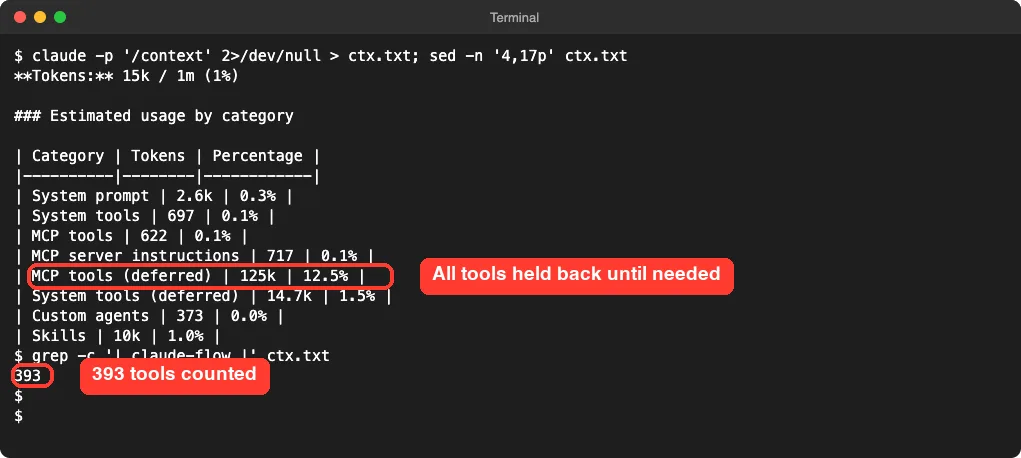
Across four runs the deferred line read 123.2k, 123.2k, 123.2k and 125k tokens, which is about 12 percent of a 1 million token window. Only 622 tokens of MCP tools were loaded at the start in the last run.
That means Claude Code held the definitions back and fetched them when a request needed one. This is the default behavior in the Claude Code version we used. A tool that loads everything up front would cost far more, and on a 200k window the same list would be over 60 percent of the space.
One run showed 0 claude-flow tools, because the server had not connected yet when the command ran. Allow a few seconds after a cold start. Our context window guide explains what these numbers mean.
Test 1: Store a Note and Find It by Meaning
The README says memory survives across sessions and is searched by meaning. We tested that with two tools in one prompt.
Use the claude-flow MCP memory tools: store a memory with key calc-note in namespace demo with the value 'divide() in src/calc.py has no zero check', then search memory for 'division by zero bug' and tell me in two short lines what came back.Claude Code asked permission before each call, which is the default. The first prompt showed the key, namespace and value it would store.
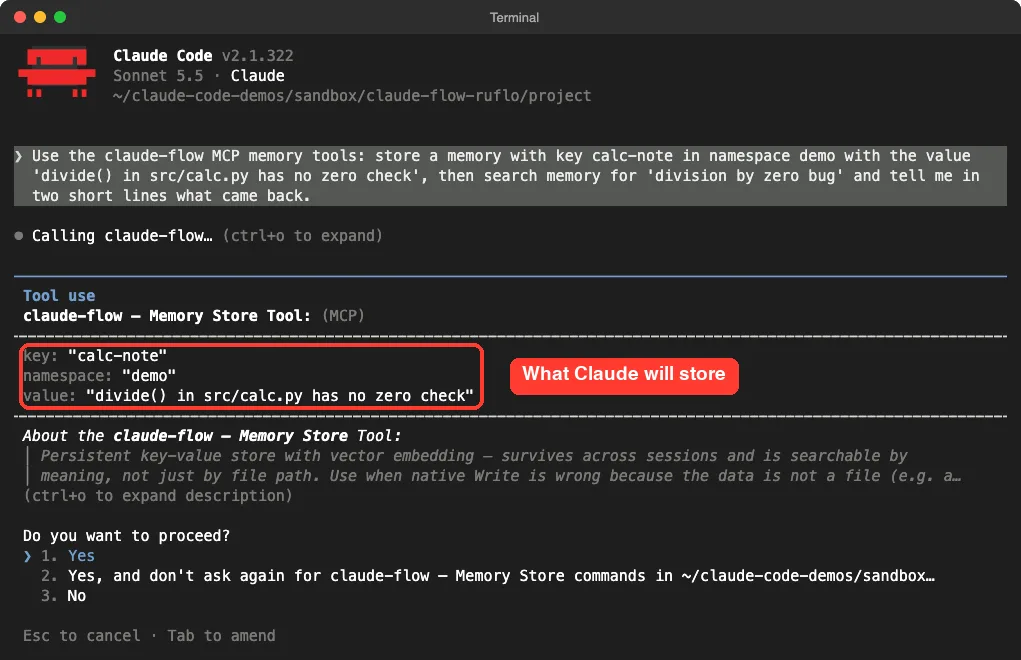
We approved both calls. The whole round trip took 18 seconds.
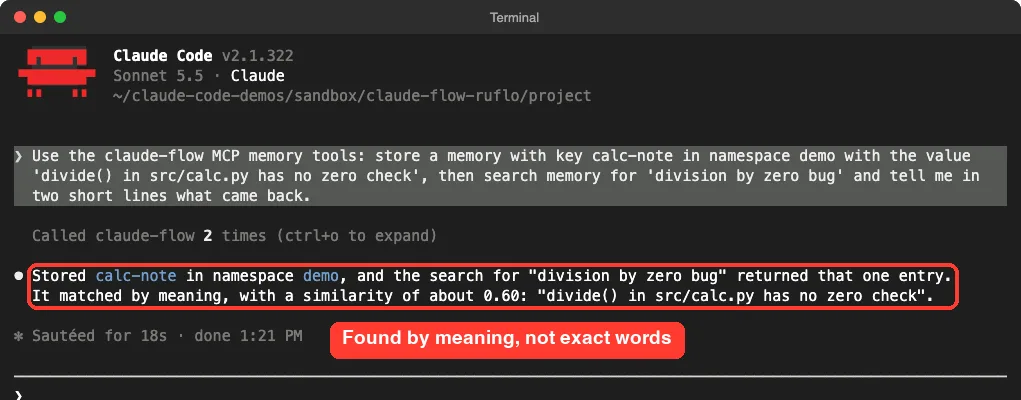
The search phrase was “division by zero bug”, and the stored text said “no zero check”. The match was by meaning, with a similarity of about 0.60. That is a real feature working as described.
We stored one note, so this proves it can find a match, not that it ranks many notes well. We did not test a restart, so we did not confirm that the note survives into a new session.
Test 2: Start a Swarm
This is the headline feature, so we tried it carefully. We asked for a hierarchical swarm of at most 3 agents, and told Claude not to spawn any.
Use the claude-flow tools to initialize a hierarchical swarm with at most 3 agents, then show me the swarm status. Do not spawn any agents. Answer in three short lines.It took 5 seconds and two approvals. Claude reported a swarm ID, hierarchical topology, a maximum of 3 agents and a running status.
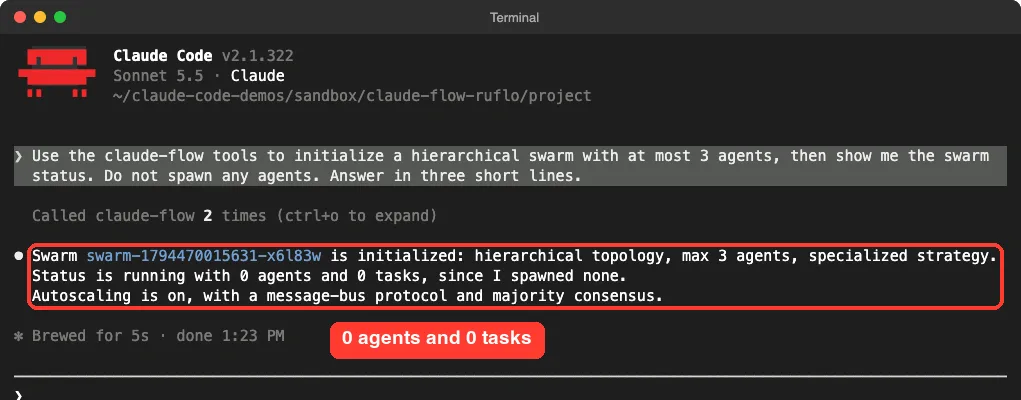
Here is what we learned. The tool description says the swarm has “persistent state tracking”, and that is exactly what happened. We opened the project folder to check.
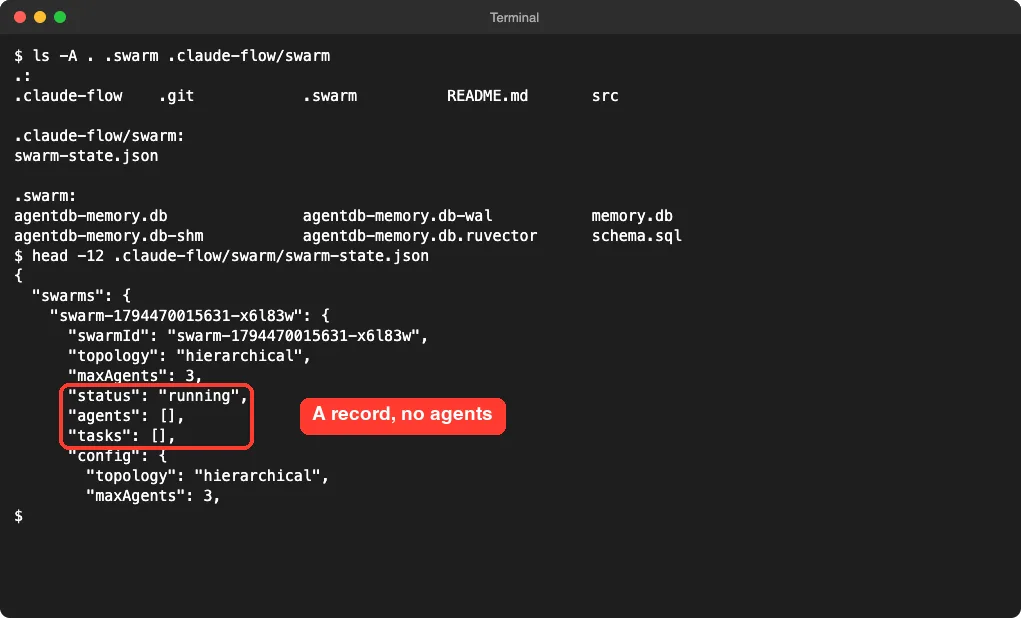
The file .claude-flow/swarm/swarm-state.json holds a topology, a limit and empty agents and tasks lists. Nothing else ran. No process started and no model was called.
That is not a flaw. The README describes the MCP tools as coordination, and the agent work still happens through Claude Code. But “swarm_init” sounds bigger than it is, so set your expectations.
What It Writes to Your Disk
After our two tests the project folder had two new folders. The .swarm folder held about 4.3 MB of database files, and .claude-flow held 3 small JSON files.
| Location | What it held |
|---|---|
.swarm/ | Memory databases and a schema file, about 4.3 MB |
.claude-flow/swarm/ | The swarm record |
.claude-flow/policy/ | Policy state and a ledger file |
~/.swarm and ~/.claude-flow | Not created |
So the data stays in the project, not in your home folder. Add both folders to your .gitignore, or you will commit database files by accident.
We did not watch network traffic, so we cannot say the server never calls out. We saw no account step and no key prompt.
Is Ruflo Safe to Add?
It is a large package. The npm install pulled in many dependencies, and npm printed deprecation warnings about some of them. That is common, but it widens what you are trusting.
Our safeguards were simple. We pinned the version, used local scope, worked in a throwaway folder and read the install scripts first. Claude Code asked before each tool call.
The /mcp tool permission is per tool, so you can approve memory_store and still say no to anything that sounds like spawning, file import or federation. Read the parameter box on each prompt, as in the screenshot above.
Our advice: if you want to try it, use the same setup as ours, and remove it afterward with claude mcp remove claude-flow -s local. Our permission modes guide shows how to keep the approval prompts on.
What We Could Not Test
- We never spawned an agent, so we did not test real swarm work, consensus or the agent tools.
- We did not run
init, the hooks, the 48 plugins, background workers or the federation tools. - We did not test memory across sessions, large memories or search ranking over many notes.
- We did not test the model routing, the learning claims or the speed claims in the README.
- We did not watch network traffic.
- We tested on macOS only. The Windows notes follow the project’s README.
Who Should Add Ruflo to Claude Code?
| Your situation | Our advice |
|---|---|
| You want notes Claude can search by meaning | Try the memory tools. They worked on our first test |
| You want parallel agents out of the box | Do not expect it from the swarm tool alone. It recorded a plan and started nothing |
| You watch your token budget | Check /context first. The list is about 125k tokens, held back in our version |
| You want a small, simple server | Look at a lighter one. This has 393 tools |
| You are on slow internet | Run npx once by hand before adding it, or the connect will time out |
Common Mistakes
- Adding the server and giving up when the first connect times out. Warm the
npxcache first. - Using
@latest, so a later release can change what runs. Pin the version. - Adding it at user scope for a quick test. Use
--scope local. - Assuming
swarm_initstarts agents. In our test it only wrote a record. - Approving every prompt without reading the parameters.
- Committing the
.swarmfolder to git.
Pro Tips
- Run
/mcpto confirm the tool count and the connection. - Ask for one tool at a time at first, such as memory only.
- Name the namespace in your prompt, so your notes stay grouped.
- Measure with
/contextbefore you rely on any big server. - Read the tool description in the permission box. It says when the tool is meant to be used.
Try It Yourself
Run this in a throwaway folder. Remove the server when you are done.
npx -y [email protected] --version
claude mcp add --scope local claude-flow -- npx -y [email protected] mcp start
claude
Then paste this prompt inside Claude Code.
Use the claude-flow memory tools to store a note called test-note in namespace demo saying 'my parser fails on empty input', then search memory for 'crash on blank file' and tell me what came back.When you are finished, remove the server.
claude mcp remove claude-flow -s localCheat Sheet
Frequently Asked Questions
Are Ruflo and Claude Flow the same thing?
Yes. The project was called Claude Flow and is now Ruflo. In our test the server was named ruflo, the command is claude-flow in the README example, and the npm metadata still points to the old repository name.
Does Ruflo need an account or API key?
Not for what we ran. We used no account and no key. Some of its plugins mention outside accounts, but we did not test those.
Does the swarm tool run agents for me?
Not in our test. It saved a swarm record with no agents and no tasks. We did not test the agent-spawning tools.
How many tokens does it cost?
About 123k to 125k tokens for all 393 tool definitions in our four runs. Claude Code held them back, so only a few hundred tokens were loaded at the start. Measure your own setup with /context.
Where does Ruflo store its data?
In the project folder, under .swarm and .claude-flow. We found nothing in our home folder.
Conclusion
Ruflo for Claude Code did what the memory pitch says: it stored a note and found it by meaning, all locally and with no account. The “swarm” tool, though, only wrote a record with no agents, and the 393-tool list is large enough that you should check /context before you rely on it. Warm the cache, pin the version, use local scope and read each approval prompt.
Want more on the assistant behind it? Our Claude guide covers the models and plans.