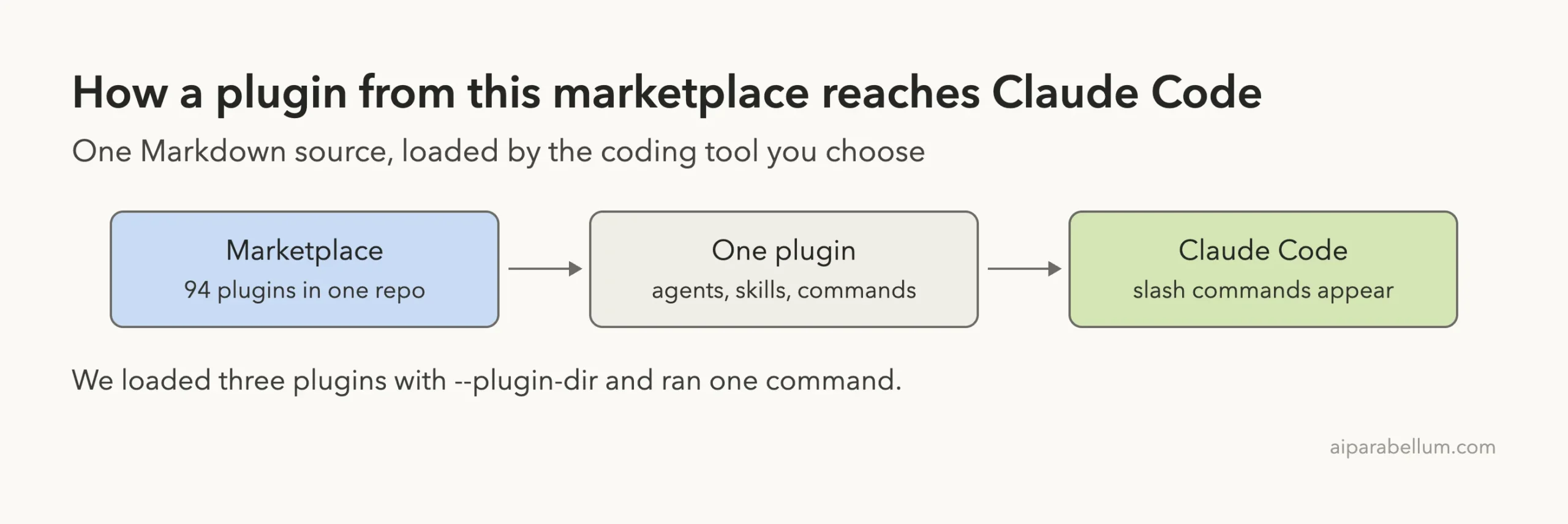
If you search for wshobson agents claude code, you land on a very large GitHub repo with 94 plugins in one catalog. It promises agents, skills and slash commands for almost every kind of coding work. We loaded three of its plugins into Claude Code in a safe sandbox and ran one command for real.
This guide is part of our Claude Code tutorials. Find more add-ons in our Claude Code Skills Directory.
Tested with Claude Code v2.1.318 on 2026-11-08, using commit 4bde316 of the repo (pushed 2026-11-05).
Quick Summary
| Question | Short answer |
|---|---|
| What is it? | A marketplace repo by Seth Hobson (wshobson) with 94 plugins: 92 local ones and 2 external entries |
| What does it add? | Agents, skills and slash commands, grouped by job (Python, testing, security, docs and more) |
| License | MIT |
| What we ran | Three plugins loaded; the /tdd-workflows:tdd-red command run end to end |
| Our verdict | Useful if you pick two or three plugins that match your work; do not install everything |
What Is the wshobson Agents Repo for Claude Code?
The repo is a plugin marketplace. A marketplace is a catalog that tells Claude Code which plugins exist and where to find them. Each plugin is a folder that groups related agents, skills and commands.
The README says the catalog holds 94 plugins. The local source has 202 agents, 185 skills and 105 commands. The plugins cover Python and JavaScript, code review, testing, infrastructure, security and more.
The repo also targets other tools such as Codex CLI, Cursor, OpenCode, GitHub Copilot and Pi. This post only covers Claude Code. If you are new to the idea, read our guide to Claude Code plugins first, then our comparison of skills versus subagents.
How We Tested It Safely
We did not install anything into our real Claude Code setup. A marketplace this large can add a lot of commands and agents to every session, so we used a throwaway sandbox instead.
The steps were simple:
- We cloned the repo into a sandbox folder.
- We read the plugins we planned to load. These three had no hooks, only Markdown files for agents, skills and commands.
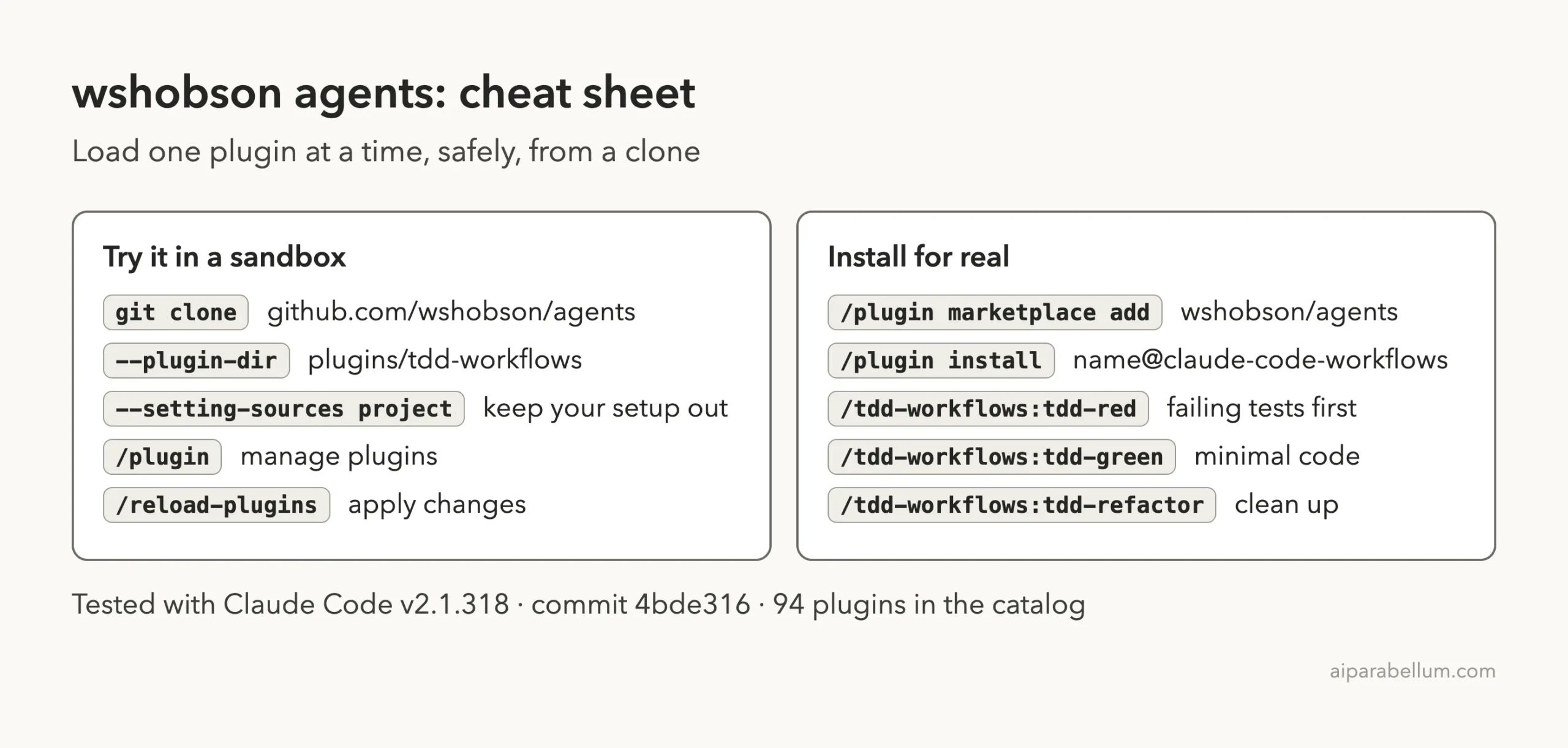
- We started Claude Code in a tiny demo project and loaded each plugin folder with
--plugin-dir. - We added
--setting-sources projectso none of our personal settings were read.
Here is the command shape, with the sandbox path shortened:
git clone --depth 1 https://github.com/wshobson/agents
cd my-demo-project
claude --permission-mode default \
  --setting-sources project \
  --plugin-dir ../agents/plugins/tdd-workflows \
  --plugin-dir ../agents/plugins/code-documentation \
  --plugin-dir ../agents/plugins/python-development
The official plugins guide describes --plugin-dir for testing a plugin without installing it. The plugin was only active for that one session.
Step 1: See What Each Plugin Adds
Once Claude Code started, we typed a slash and a few letters to see what each plugin contributed. The tdd-workflows plugin gave us four commands: /tdd-workflows:tdd-red, /tdd-workflows:tdd-cycle, /tdd-workflows:tdd-green and /tdd-workflows:tdd-refactor.
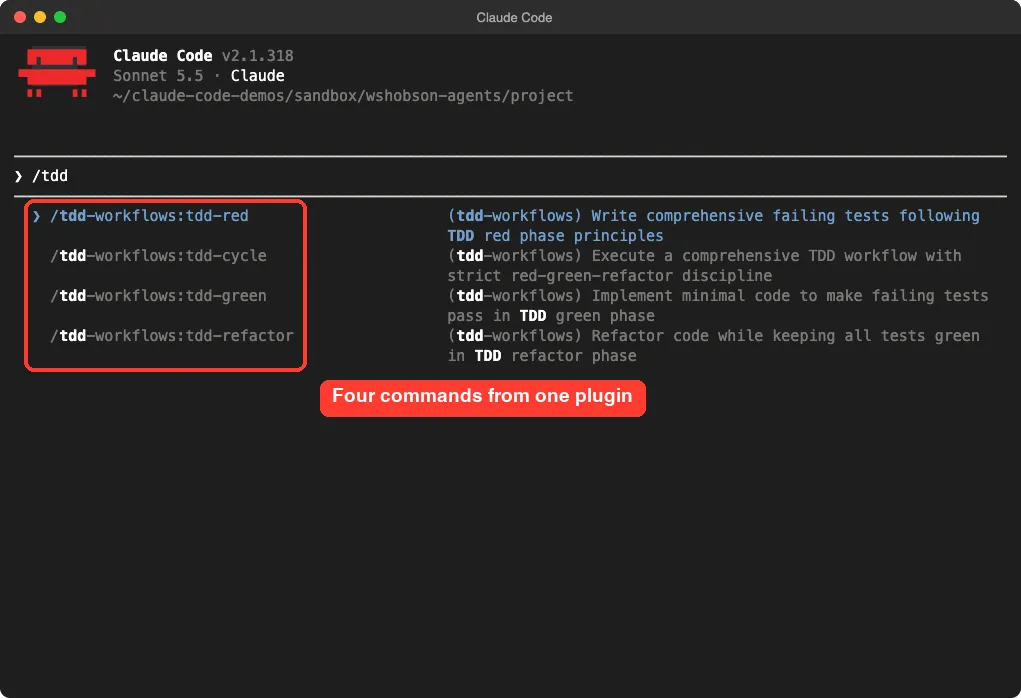
/tdd lists the four commands from the tdd-workflows pluginThe python-development plugin added a scaffold command and a long list of skills. In our list we saw skills for packaging, resilience, code style, type safety, the uv package manager, anti-patterns and configuration.
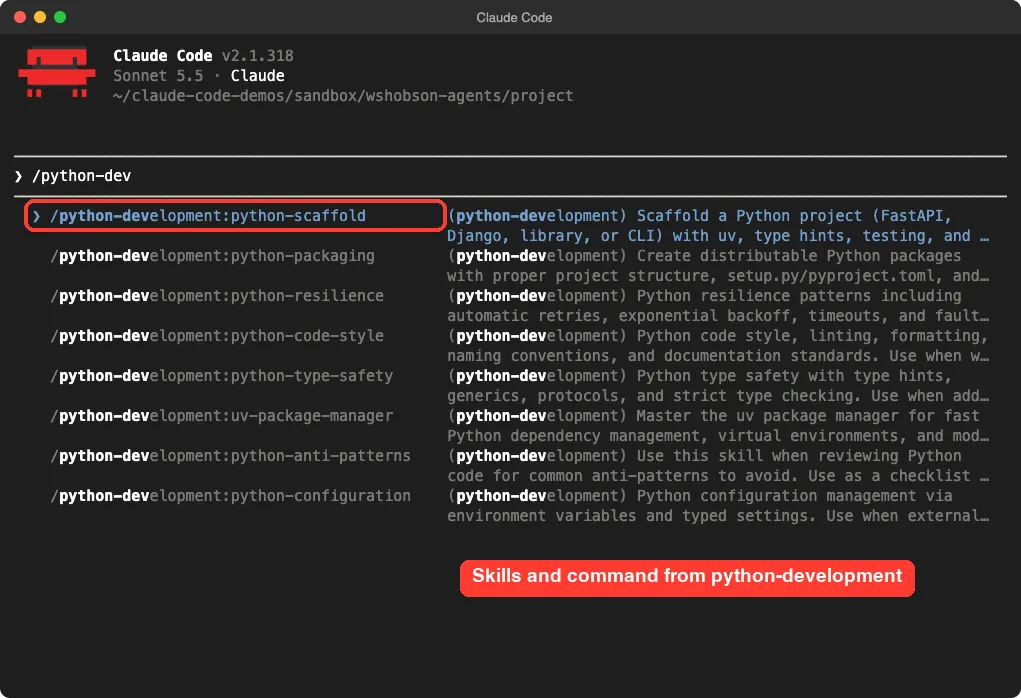
Namespacing is a nice detail. Every item starts with the plugin name, so two plugins cannot clash. The code-documentation plugin did the same for its /code-documentation:code-explain and /code-documentation:doc-generate commands, though we did not run those two.
Step 2: Run One Command for Real
We wrote a tiny file, textutils.py, with a slugify function that turns a title into a URL slug. It handles basic cases but nothing tricky. Then we ran one prompt:
/tdd-workflows:tdd-red edge cases for slugify in textutils.py, keep it to one test fileThe red phase of test-driven development means writing tests that fail first. The command’s own rules say to write tests only, write no production code, and confirm that the tests fail.
Claude Code Still Asks Before It Acts
Installing a plugin does not turn off the permission system. Claude first asked to run a shell command to list the files and check for pytest. It later asked before creating the test file.
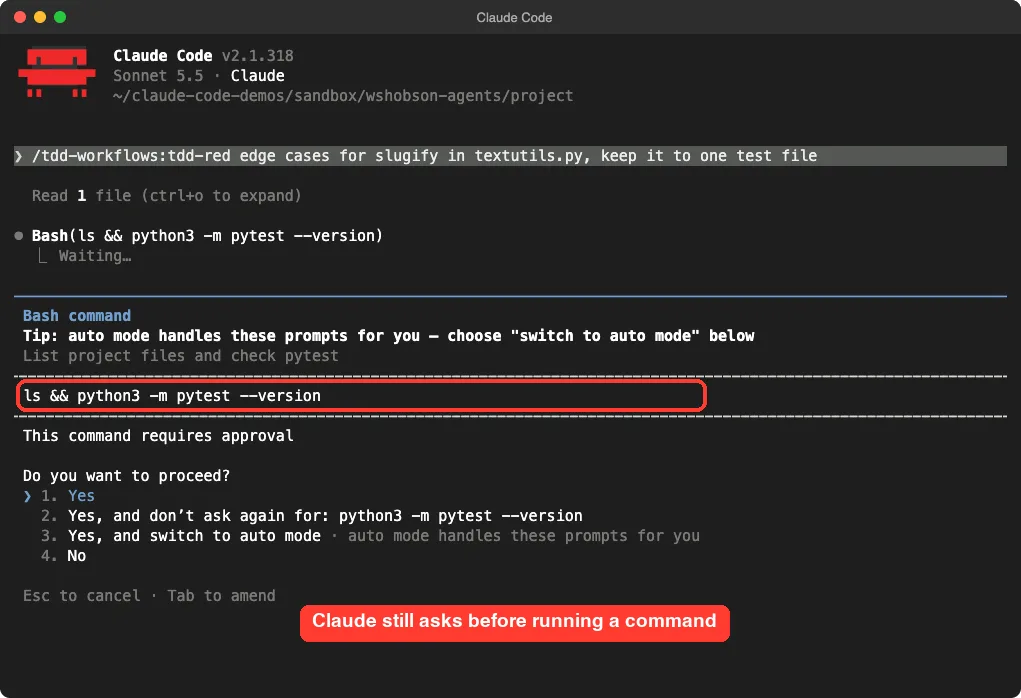
Pytest was not installed on our machine, so the plugin’s workflow used Python’s built-in unittest instead. That was a sensible fallback and kept us from installing anything.
The Tests It Wrote
Claude produced a file called test_slugify_edge_cases.py with nine tests. They cover accents, curly apostrophes, the ampersand, bad input types and a max_length option.
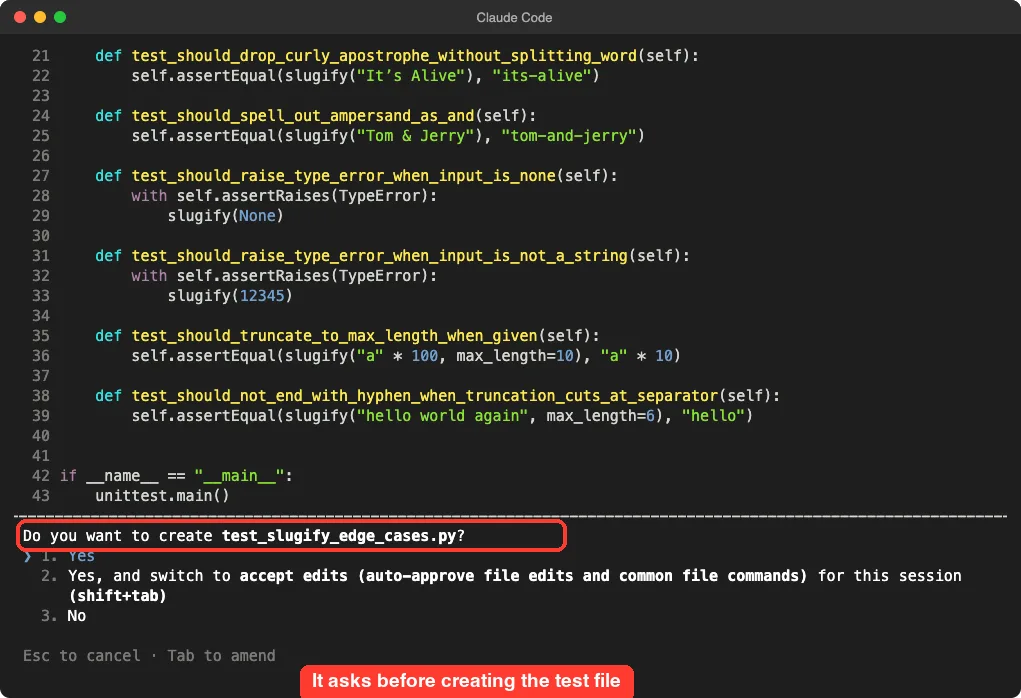
One honest note: some tests reflect choices the plugin made, such as turning & into and and adding a max_length option. Claude said so itself in its summary and told us to change those tests if we wanted something different. Read the tests before you accept them.
Did the Tests Really Fail?
Yes. We ran the file ourselves, outside Claude Code, using python3 -m unittest test_slugify_edge_cases.
The result was nine tests run, five failures and four errors. In red-phase terms, that is the correct outcome.
Takeaway: the red phase worked because every new test failed before any production code changed.
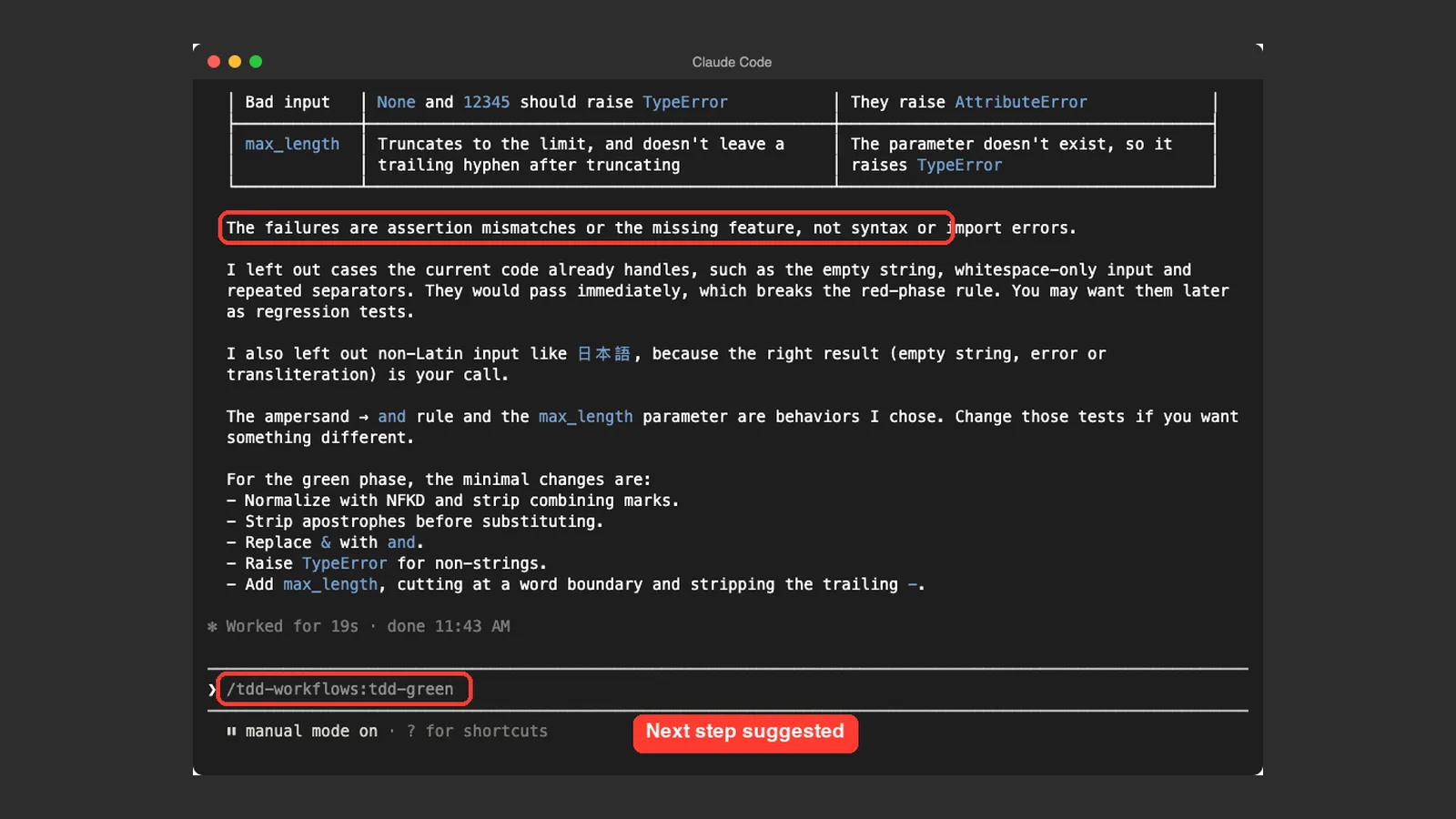
Claude’s own summary said the failures were assertion mismatches or the missing feature, not syntax or import errors. It also left out cases that already passed, such as an empty string, because they would break the red-phase rule. Then it listed the minimal changes for the green phase and pre-filled the next command, /tdd-workflows:tdd-green.
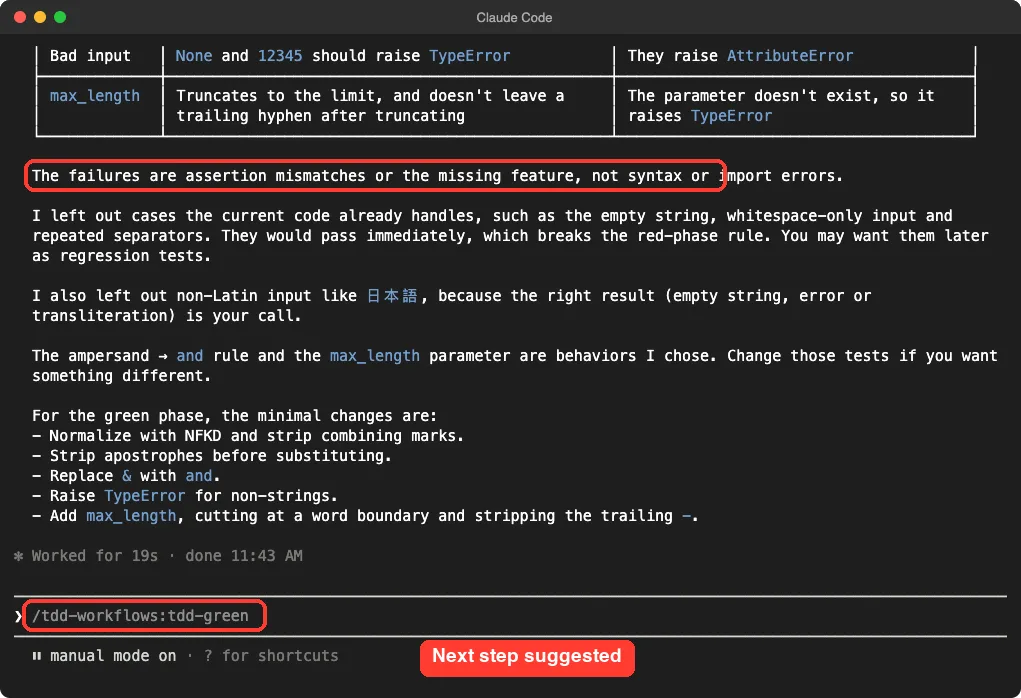
We stopped there. Running the green and refactor steps would have used more of the model for a post about the marketplace, so those two commands are untested by us.
What We Ran and What We Did Not
| Plugin | Loaded | Command run | Notes |
|---|---|---|---|
tdd-workflows | Yes | tdd-red | Worked as described; green and refactor not run |
python-development | Yes | None | We only checked the command and skills list |
code-documentation | Yes | None | Loaded; commands appear in the list |
| The other 89 local plugins | No | None | Described from the README only |
What Is Inside a Plugin?
Each plugin folder has the same simple layout. A .claude-plugin/plugin.json file holds the name, version, description and license. Next to it you find an agents folder, a commands folder and sometimes a skills folder, all made of Markdown files.
For example, python-development ships three agents (django-pro, fastapi-pro and python-pro), one scaffold command and many skill folders. The tdd-workflows plugin has two agents and four commands. A command file is just a prompt with a short description at the top and your typed text dropped in where it says $ARGUMENTS.
That is good news for safety. Because the files are plain text, you can read a whole plugin in a few minutes. The tdd-red file, for example, starts with five behavioral rules: write tests only, verify that they fail, stop on errors, use only agents from the same plugin, and never enter plan mode on its own.
Plugin, Skill or Agent?
| Piece | What it is | When it runs |
|---|---|---|
| Command | A saved prompt you call with a slash | When you type it |
| Skill | A folder of guidance Claude can load | When the task matches its description |
| Agent | A helper with its own instructions | When Claude hands it a job |
| Plugin | A bundle of the three above | Whenever one of its parts is used |
A Safety Checklist Before You Install
Because the catalog is community-made, treat each plugin like any code you download. Our checklist is short and takes five minutes per plugin.
- Check that the repo is active. This one was last pushed on 2026-11-05 and is not archived.
- Search the plugin folder for a
hooksfolder. Hooks run commands automatically. - Open the commands and read any line that runs a shell command.
- Try the plugin with
--plugin-dirin a demo folder first. - Install it at project scope instead of user scope if only one repo needs it.
The Real Install Route (Not Used Here)
If you want these plugins in your everyday setup, the normal route is to add the marketplace and then install single plugins. The marketplace name in the repo’s catalog is claude-code-workflows. Our Skills Directory lists this command pair for the repo:
/plugin marketplace add wshobson/agents
/plugin install documentation-standards@claude-code-workflows
Swap in the plugin you want. The official discover plugins page explains install scopes: user, project and local. It also says marketplaces other than the official ones have auto-update off by default, so updates are your call.
Before you install a marketplace you do not know, read the official notes on plugin trust. Plugins can add hooks and servers, not just prompts. In our three plugins we found none, but two plugins elsewhere in the catalog (protect-mcp and review-agent-governance) do ship a hooks.json file, so check each one.
Is wshobson Agents for Claude Code Worth It?
- Developers who want a ready-made test-first workflow: try
tdd-workflows. - Python teams who like skill packs for style, typing and packaging: try
python-development. - People who want to browse ideas for their own agents and skills: clone the repo and read the Markdown.
It is a poor fit if you want a tiny setup. Our guide on Claude Code skills shows how a single skill can do the job with far less overhead.
Common Mistakes
- Installing the whole catalog. More plugins means more commands and descriptions competing for Claude’s attention.
- Skipping the read-through. Open a plugin’s
commandsandagentsfiles before you trust them. - Accepting generated tests blindly. The plugin makes design choices for you, so review them.
- Forgetting
--setting-sources projectwhen sandboxing. Without it your personal settings still load.
Pro Tips
- Start with one plugin and use it for a week before adding another.
- Use the full namespaced name, such as
/tdd-workflows:tdd-red, so you always run the plugin you meant. - Give the command a narrow target, like one function or one file. Our test run was fast because we did exactly that.
- Pair it with our notes on Claude models if you want to pick a cheaper model for routine plugin runs.
Try It Yourself
Clone the repo into a scratch folder, load tdd-workflows with --plugin-dir and try this prompt on a small function of your own:
/tdd-workflows:tdd-red edge cases for my_function in my_file.py, keep it to one test fileRun the new test file yourself afterwards and confirm that it fails for the right reason.
Cheat Sheet
Frequently Asked Questions
Is the wshobson agents repo free?
Yes. It uses the MIT license. You still pay for the model usage your Claude Code session consumes.
Do I need all 94 plugins?
No. Each plugin installs on its own, and most people need only a few that match their work.
Can I try a plugin without installing it?
Yes. Clone the repo and start Claude Code with --plugin-dir pointing at one plugin folder. That is how we tested.
Does a plugin skip Claude Code’s permission prompts?
Not in our test. Claude still asked before running a shell command and before creating a file.
Does it work with other tools besides Claude Code?
The README says it also supports Codex CLI, Cursor, OpenCode, GitHub Copilot, Antigravity CLI and Pi. We only tested Claude Code.
Conclusion
The wshobson agents marketplace is a big, well-organized catalog, and the one command we ran worked as promised: it wrote failing tests, confirmed they fail and suggested the next step. Pick a few plugins that match your daily work, read them first and keep the rest on the shelf. For more add-ons, browse the directory linked above or the official repo.