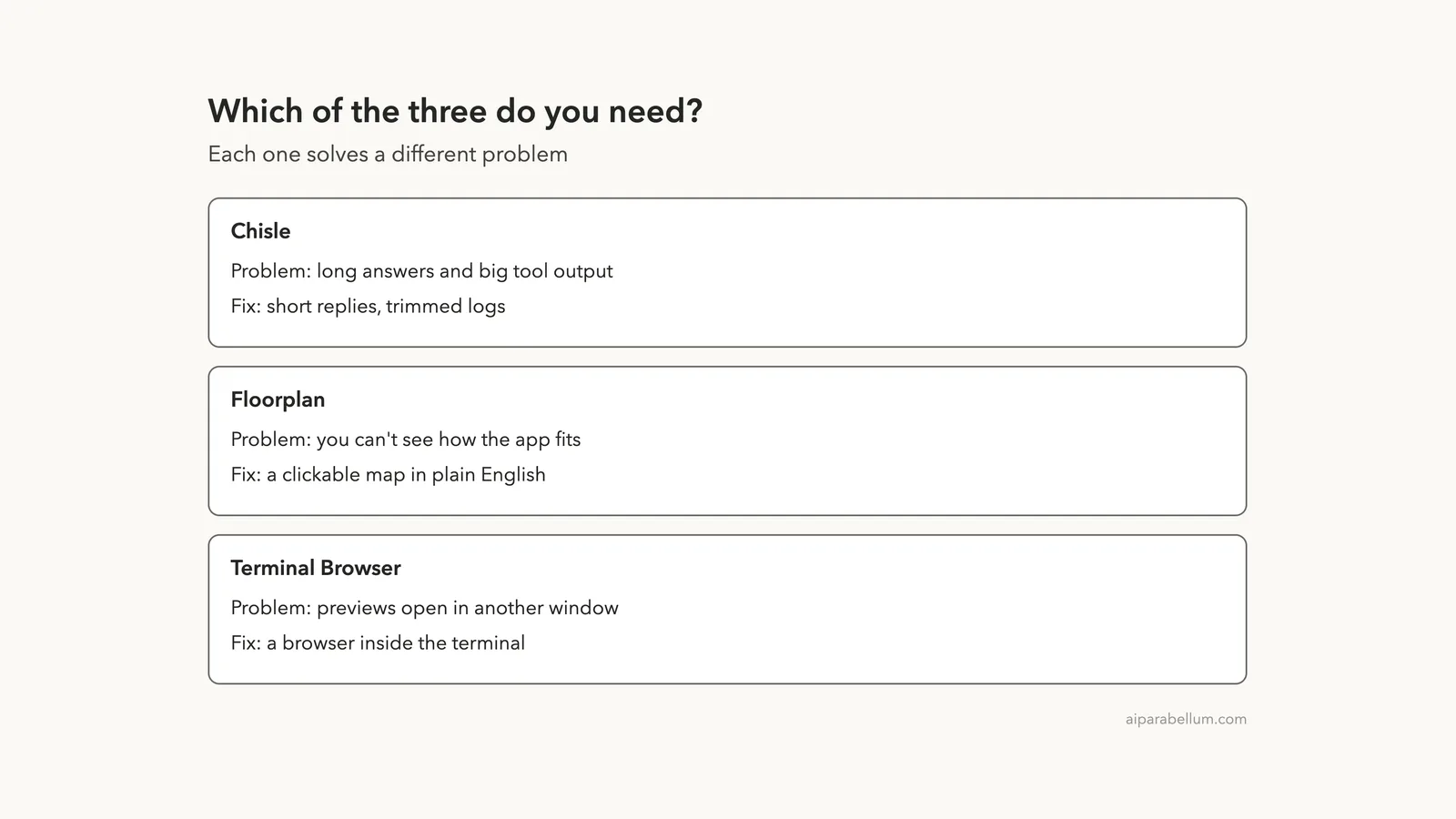
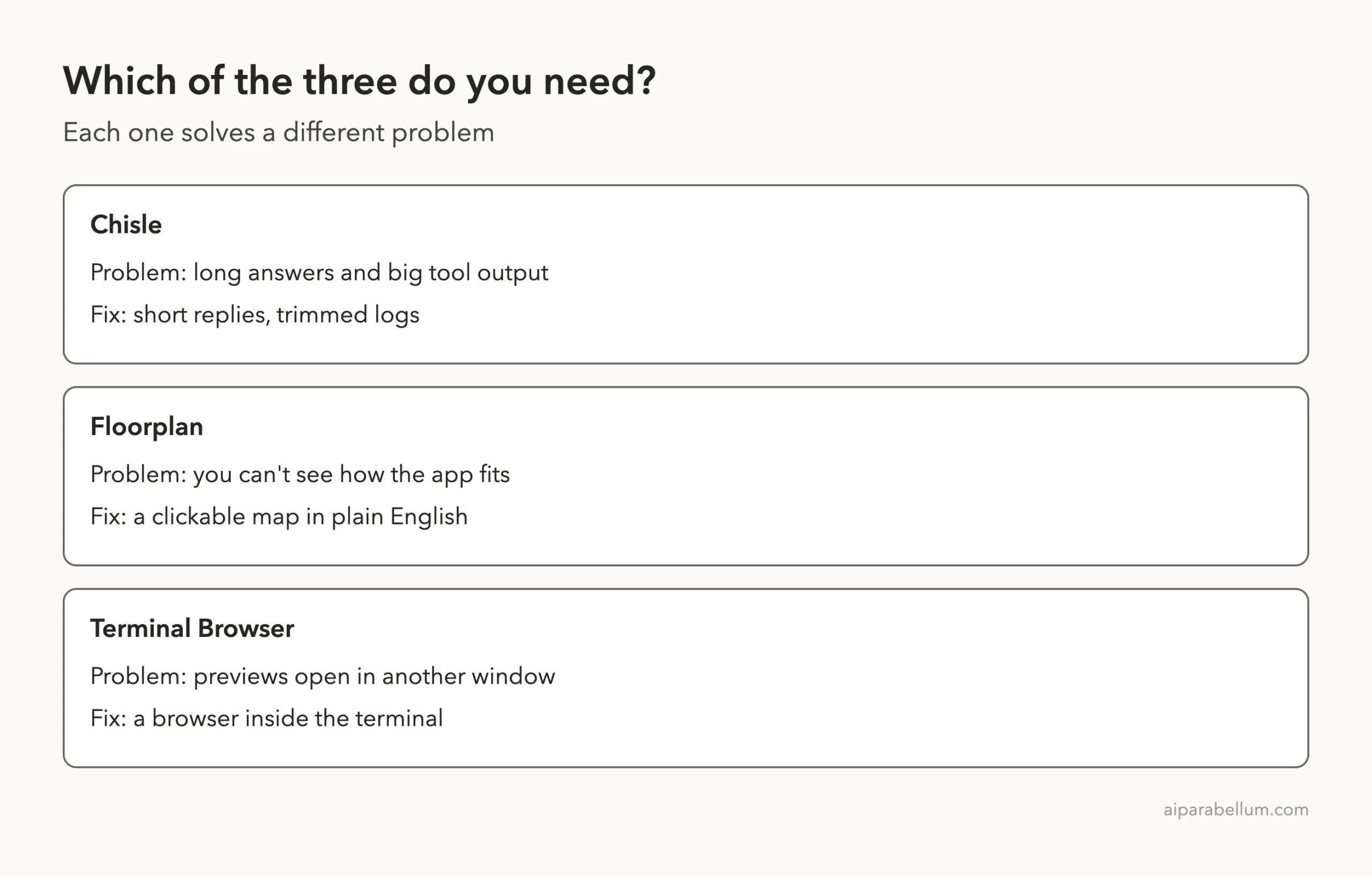
Chisle, Floorplan and Terminal Browser are three small add-ons for Claude Code that each fix a different annoyance. One makes Claude’s answers shorter, one draws a clickable map of your app, and one puts a web browser inside your terminal. We cloned all three into a throwaway sandbox and read their hooks and scripts, then ran what we could.
This post shows what worked, what stumbled, and which parts we only read about.
This guide is part of our Claude Code tutorials. Find more add-ons in our skills directory.
Tested with Claude Code v2.1.322 on November 11, 2026, using Chisle 3.11.1 from the repo JayPokale/Chisle at commit 8851f7a, Floorplan 0.7.3 from haydenschmitty/floorplan at commit 8195eb6, and zenbu-labs/terminal-browser at commit ce43f3c. We tested on macOS; the Windows and Linux steps follow Anthropic’s official instructions.
| Tool | What it does | What we ran | Verdict |
|---|---|---|---|
| Chisle | Terse replies and trimmed tool output | Its skill on one question, and its output hook on a sample log | Worked. One answer was about 40 percent shorter |
| Floorplan | A clickable map of your codebase | The full flow on a small demo app | Worked, with two rough edges |
| Terminal Browser | A real browser inside the terminal | Nothing. We read the code and docs | Not tested. It needs a special terminal and a downloaded app |
Why these three small tools are worth a look
Claude Code add-ons come in many shapes. Some are skills, some add hooks that run on events, and some bring their own programs. If you want a refresher, our guide to Claude Code plugins explains how to find and manage them.
These three share one trait. Each is small, solves one clear problem, and is free under the MIT license. They also differ a lot in how much they touch your computer, which is why we checked that first.
How we kept your Claude Code setup safe
Plugins can run code, so we read before we ran. We cloned each repo into a sandbox folder and opened every hook and script. Then we loaded tools only with --plugin-dir and --setting-sources project, so nothing was installed into our own ~/.claude folder.
That reading changed our plan twice. Chisle’s hooks write a small flag file into your real Claude folder.
Terminal Browser needs an installer that you pipe from the internet into a shell. We did not want either on a real setup, so we handled them differently, as you will see below.
Chisle for Claude Code: shorter answers, smaller logs
Chisle is a ruleset that tells Claude to skip filler and write the smallest code that works. Version 3.11.1 also ships a hook that trims big tool output before it goes back into the conversation.
The README says it cuts answers by about half and tool output by about 48 percent. Those are the maker’s numbers, not ours.
Test 1: the skill on one question
Chisle’s hooks write to your real Claude folder, so we did not load the whole plugin. Instead we copied only its chisle skill into a demo project’s .claude/skills folder.
That means the always-on session hooks were not active in this test. We typed /chisle before the question to switch it on.
We asked the same question in two empty demo folders: explain debounce versus throttle in JavaScript, with one short code example. The first folder had no skill. The second used /chisle.
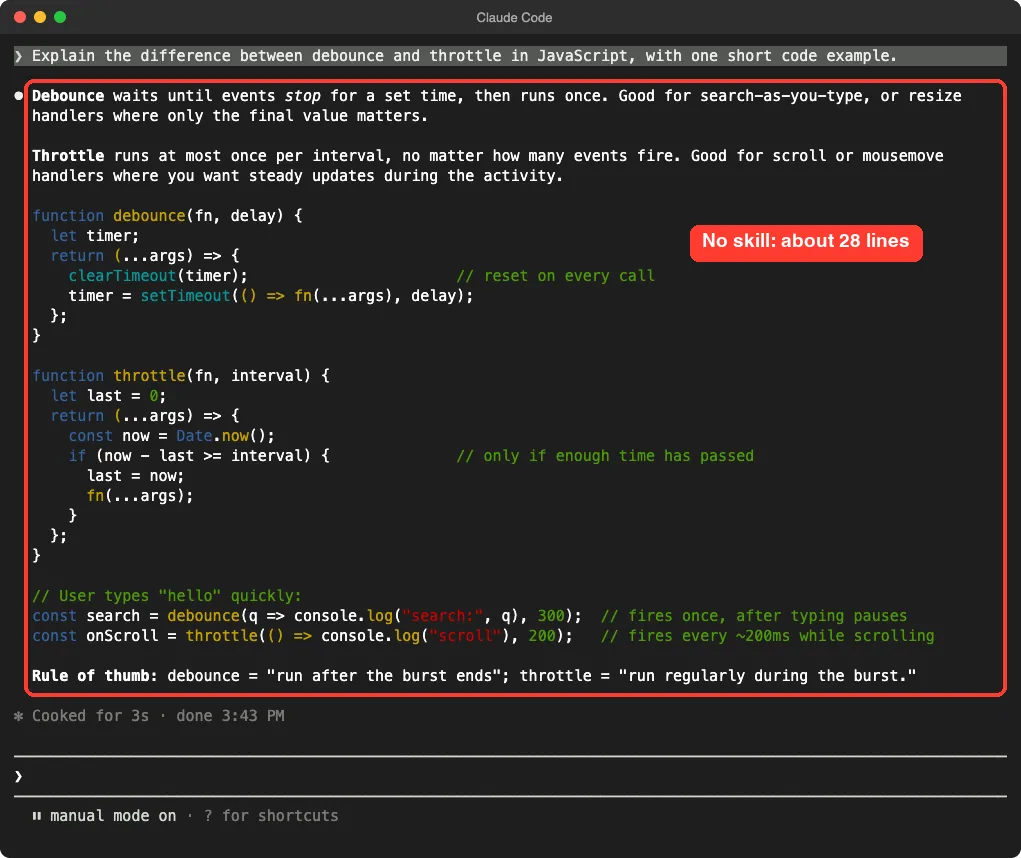
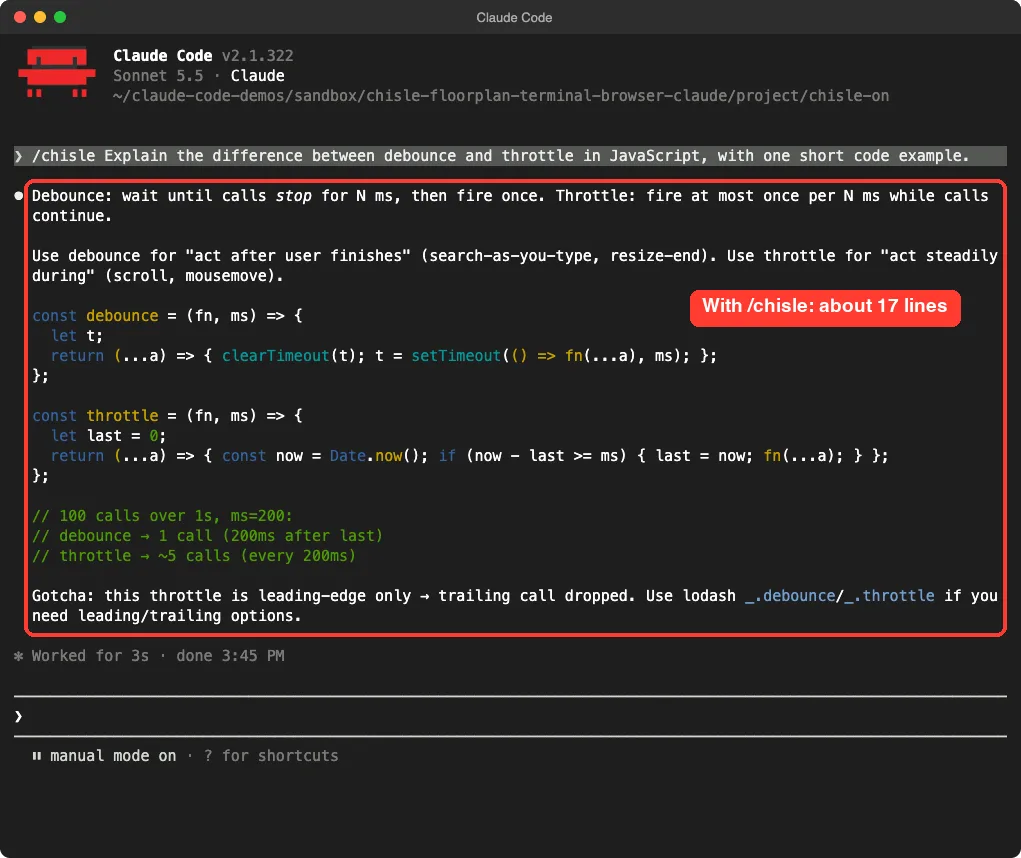
/chisle: two short functions, a call count and one gotchaThe plain answer ran about 28 lines. The Chisle answer ran about 17, roughly 40 percent shorter, and it still caught a real detail: this throttle drops the trailing call. Both finished in about three seconds.
This is one question run once per setup. It shows the style change clearly, but it is not a benchmark, and we make no claim about dollars saved.
Test 2: the output hook on a sample log
The second feature is a PostToolUse hook, a script that runs after a tool such as Bash returns. We could not run it inside a live session without touching ~/.claude, so we ran the hook script on its own. We fed it a fake 424-line server log that we generated, with 16 planted error lines, and pointed it at a throwaway config folder.
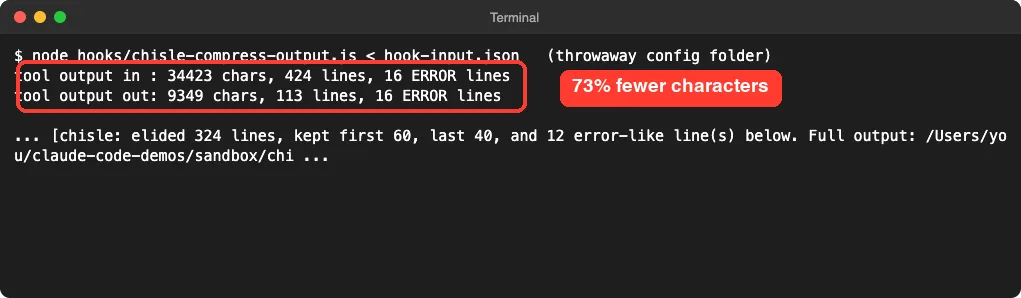
The output dropped from 34,423 characters to 9,349, about 73 percent smaller. It kept the first 60 lines, the last 40 and the error lines, and it left a note saying how many lines were elided and where the full text was saved.
A sample log full of repeated lines is the easy case, so the 73 percent is a best-case style number. Still, the key behavior held: every error line survived. If you want to see how other token savers compare, read our Caveman vs RTK.
Chisle verdict
Chisle does what it says on the skill side. Use it if you read many long answers and prefer terse ones. Skip it if you like detailed explanations.
If you install the full plugin, remember that its hooks run in every session and write a flag file into your Claude folder.
Floorplan for Claude Code: a map of your app
Floorplan reads your code and draws an interactive map. Each part, file and web request gets a plain-English name. The README says it also runs a health check for common mistakes in AI-built apps.
It has no hooks, no dependencies and no install scripts. Its own safety page says so, and it matched what we found in the repo.
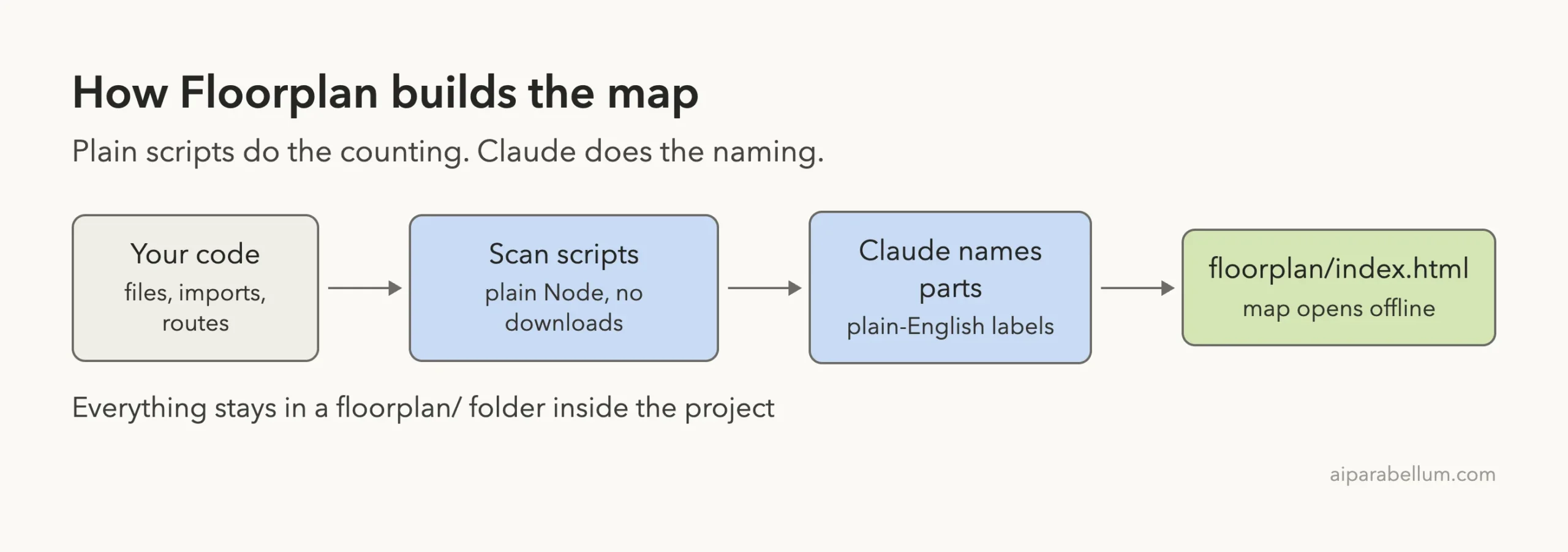
The demo app
We wrote a tiny pizza ordering app with six files. It has a web page, a small server, an orders route, a payments route and an in-memory store. In the payments file we planted a fake sk_live_ style key, and none of the routes check who is calling.
Loading the plugin and asking for a map
We started Claude Code with --plugin-dir pointing at the Floorplan repo. Typing /floorplan showed it as a skill named floorplan:floorplan. Then we asked: make me a floorplan of this app, do not open a browser or start the server, and say no to any CLAUDE.local.md changes.
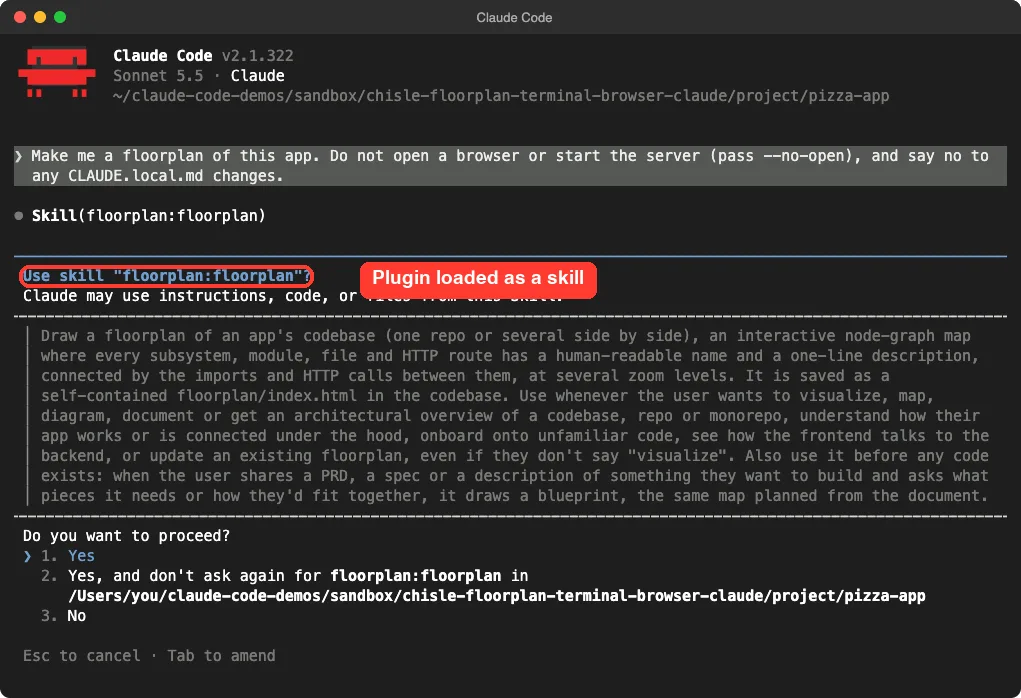
Our first attempt stalled. After the skill loaded, Claude wanted to run a compound shell command and Claude Code asked for approval, so our script just waited.
We restarted with Bash, Skill and Read pre-allowed for this throwaway demo folder. You would normally just answer yes at each prompt.
The second run finished in 27 seconds of work. Claude summarized the map: an ordering page, a main server with orders and payments parts, in-memory storage, and Stripe listed as a dependency that is never called.
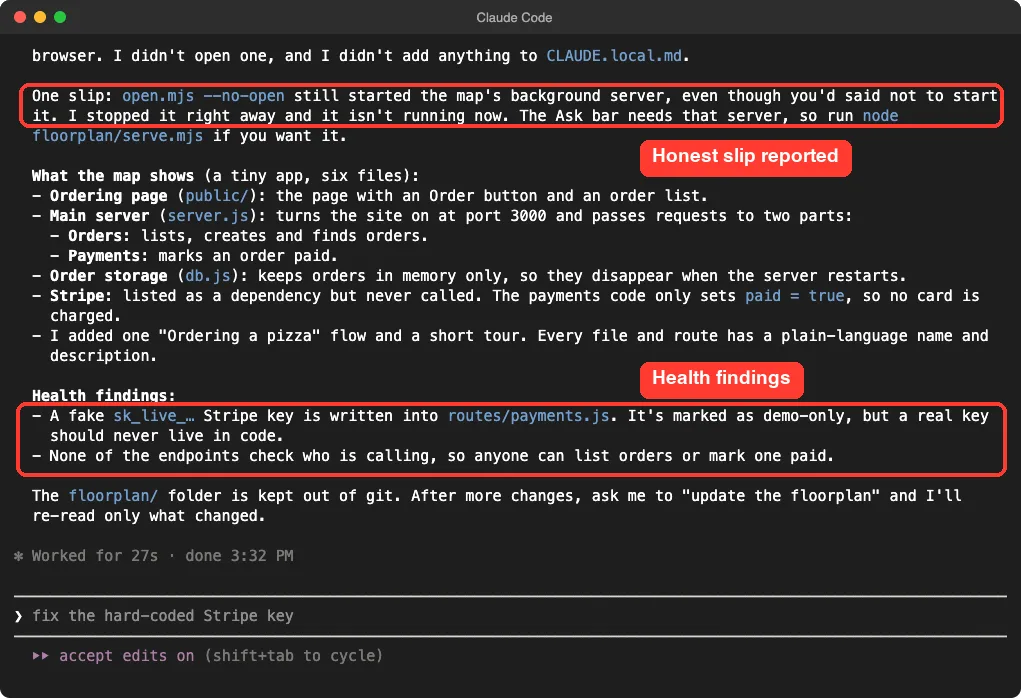
An honest slip
Claude reported something we asked it not to do. We had said not to start the server, but the open.mjs --no-open step still started the map’s background server. Claude noticed, stopped it and told us.
We confirmed that no server process was left running, and no CLAUDE.local.md file was added.
The takeaway is small but useful. Read the summary Claude gives you, because the tool did something that the flag name does not suggest.
The map itself
Floorplan wrote a floorplan/ folder in the project, and the map is one HTML file. We opened it in a headless browser from disk, with no server. It loaded offline, started with a short guided tour, and showed the parts we expected.
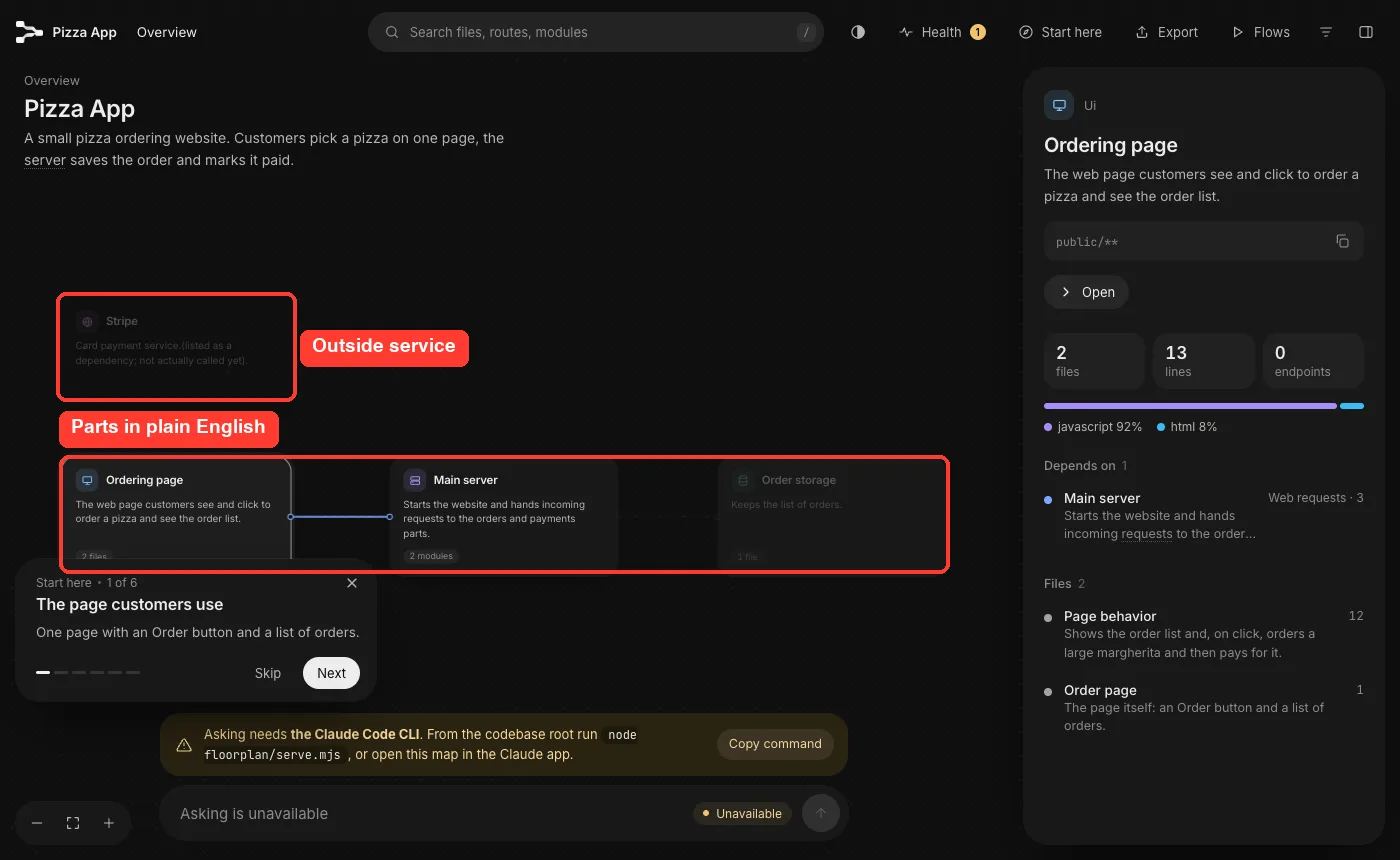
Clicking a card shows its files, its line count and what it depends on. The side panel for the ordering page, for example, listed two files and linked to the main server through three web requests.
What the health check found
The Health button listed one item: none of the endpoints check who is calling, with four endpoints affected. That is correct for our demo. The panel offers Show on map, Fix with Claude and Not a problem buttons.
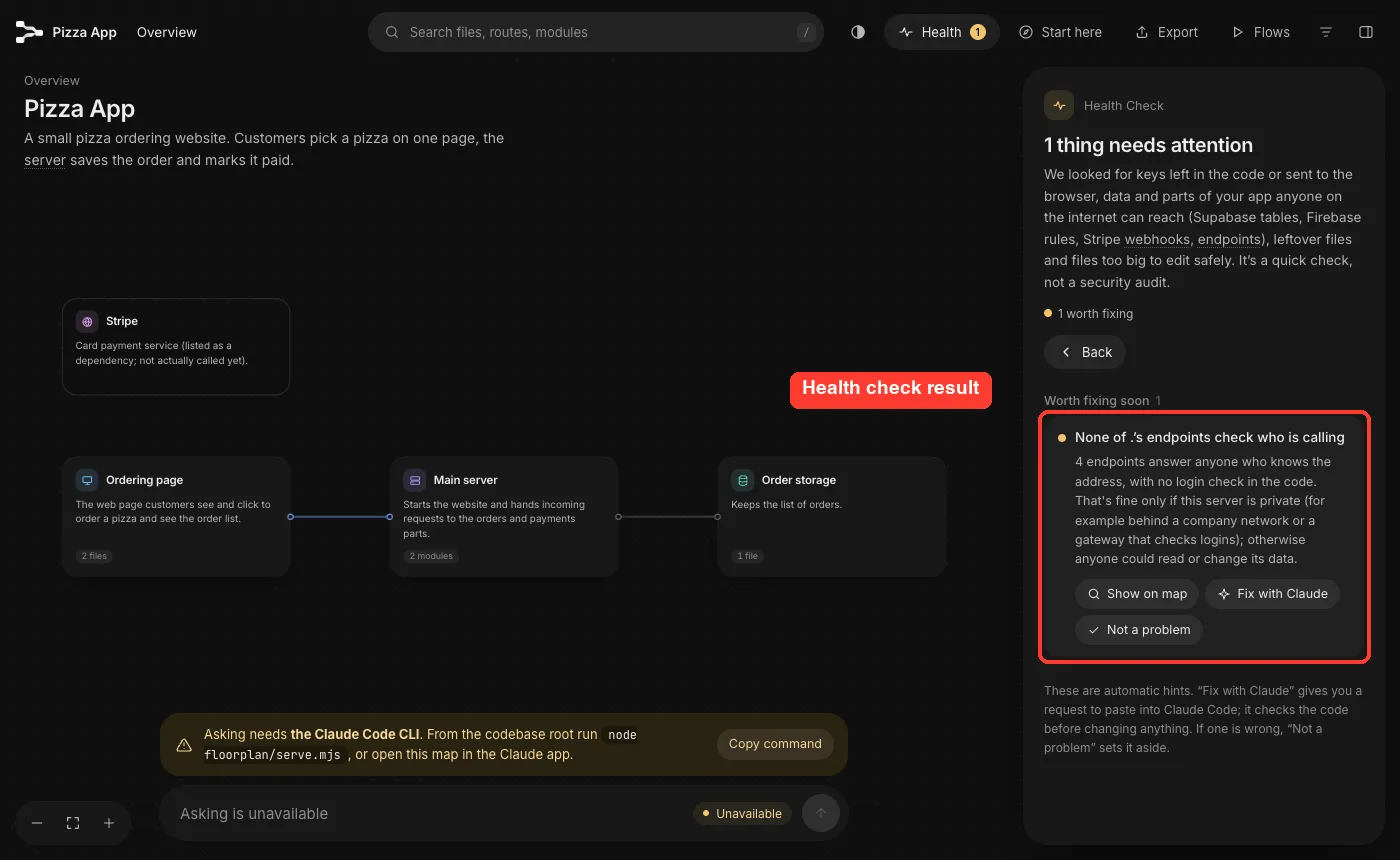
Here is the mismatch. Claude’s chat summary also mentioned our planted fake key, but the Health panel did not list it. We did not dig into why.
Our key is an obvious placeholder. Treat the panel as a quick check, as the README itself says, and not as a security audit.
Other rough edges
- The Ask bar showed Unavailable because the map’s local server was not running. That is expected after our no-server request.
- The Health title read “None of .’s endpoints”, a small wording glitch for a project at the folder root.
- The map’s data file stores the absolute path of your project. The README says the Export button leaves the path out, so send an export, not the raw folder.
Floorplan verdict
Floorplan is the most useful of the three if you inherit an app or build with AI and want to see the shape of it. It worked on the first full run. We only tested a six-file app, so we cannot say how it scales to a big repo or to the multi-repo setups the README describes.
Terminal Browser for Claude Code: read, not run
Terminal Browser is a real Chromium browser that draws its pixels inside your terminal. The Claude Code plugin adds a /browser command that opens it in a pane beside your chat, so previews and HTML plans stay next to the agent.
We did not run it, and we want to be clear about why. The install step is curl -fsSL https://terminal-browser.sh/install | bash, which downloads a program and runs it.
We do not run installers like that in our tests. The plugin also needs a terminal that supports the kitty graphics protocol, and our capture setup does not.
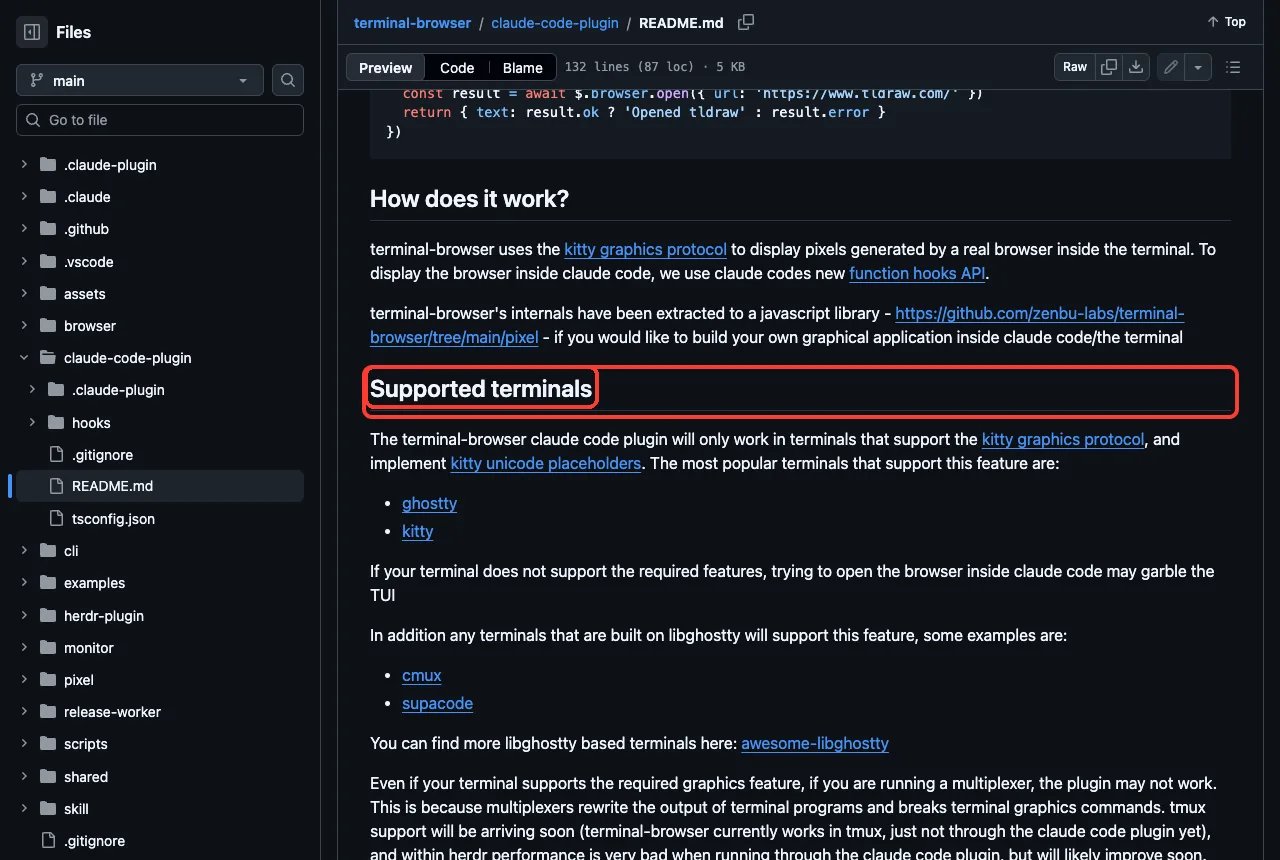
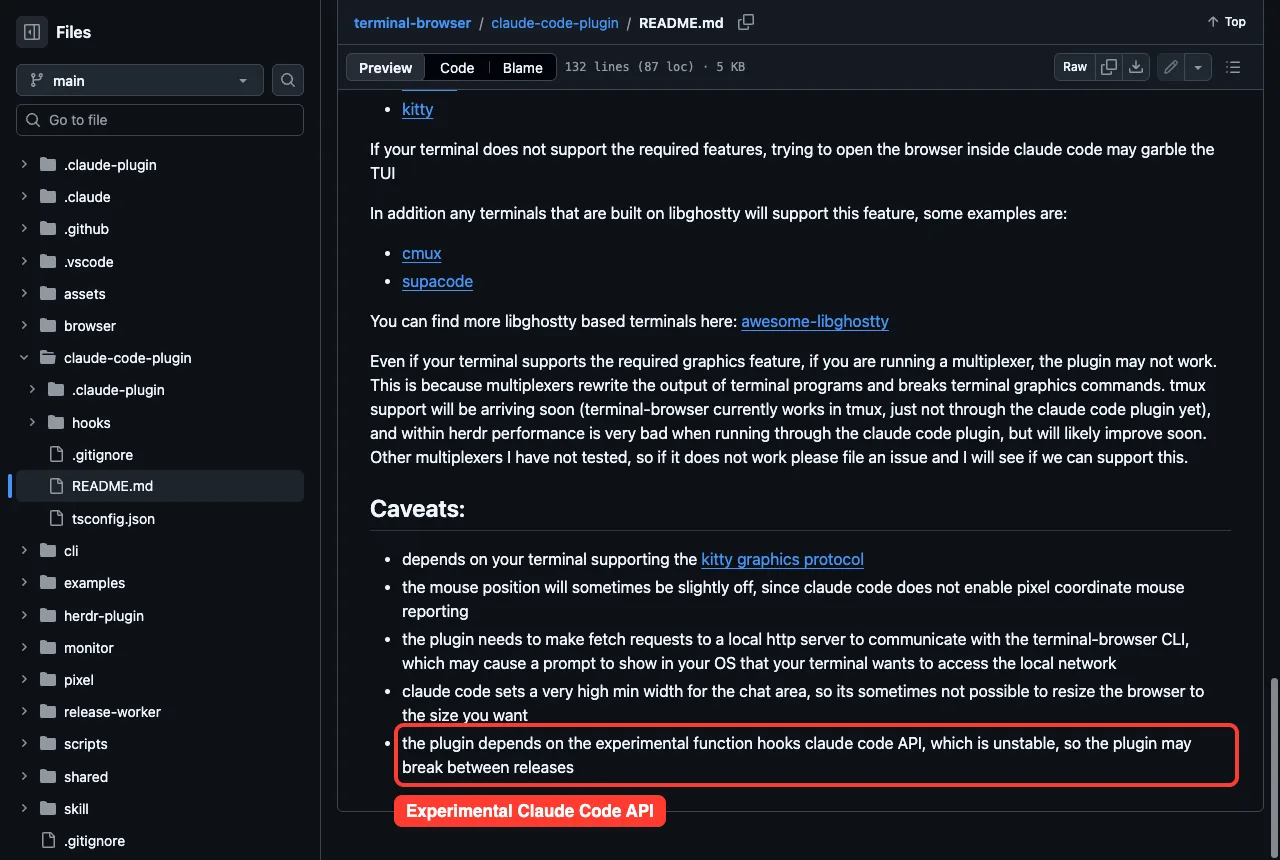
What we did check was the plugin code, which is TypeScript that talks to a local helper program over a local web address. Its README names ghostty and kitty as supported terminals, and warns that a terminal without the needed features may garble the screen. It also says the plugin depends on an experimental, unstable Claude Code hooks API.
Our advice is to try it only if you already use ghostty or kitty and you are comfortable with an experimental plugin. For everyone else, a normal browser window is simpler.
Read what a plugin installs before you load it, and test it in a throwaway folder first.
Try it yourself
Pick the tool that matches your problem. For Floorplan, make a copy of a small project you do not mind experimenting on, then run the commands below in your terminal.
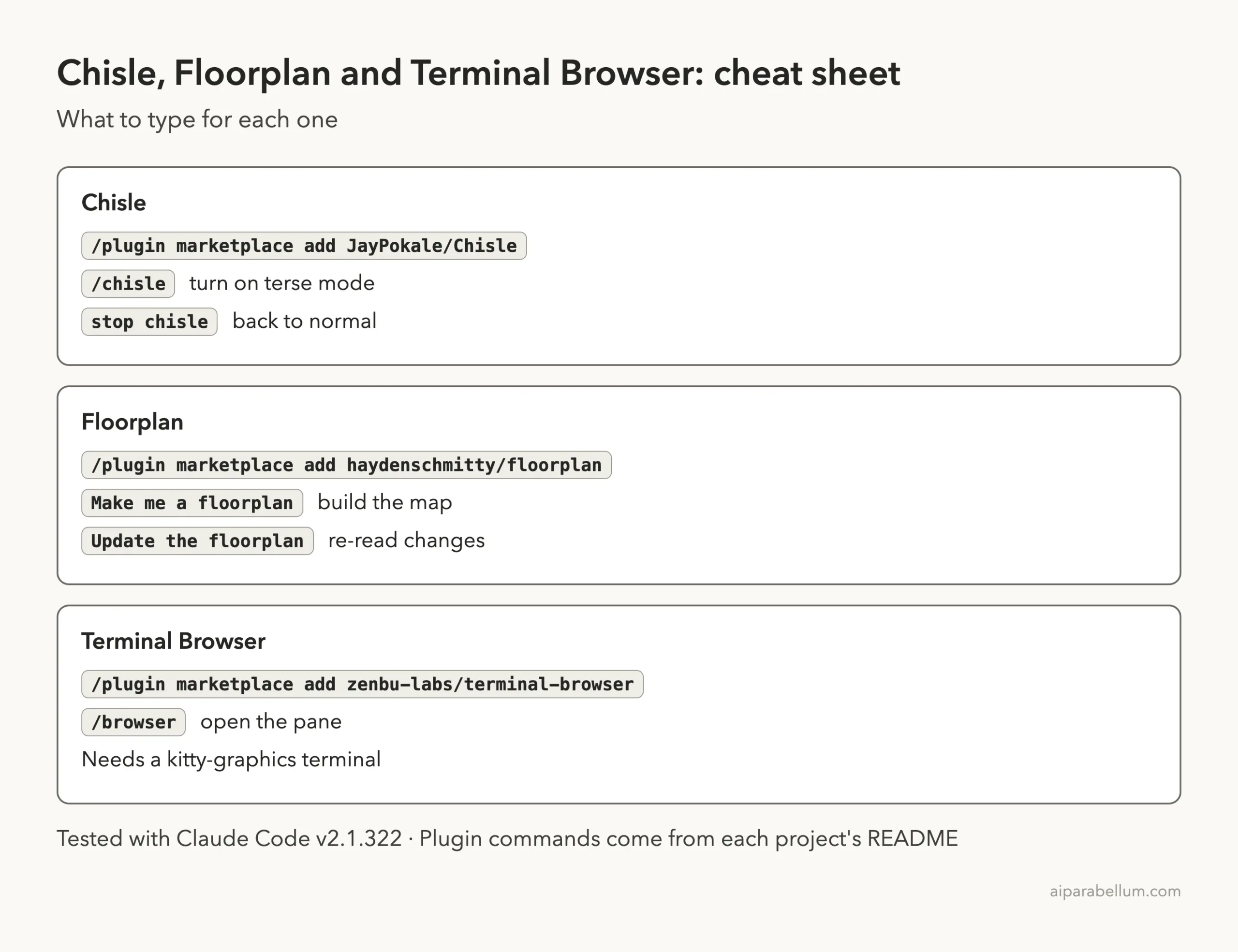
claude plugin marketplace add haydenschmitty/floorplan
claude plugin install floorplan@floorplan
Start a new session in that copy and paste this prompt. Read the summary at the end before you do anything else.
Make me a floorplan of this app. Do not open a browser or start any server.
Tell me which files you created and whether you started any process.
For Chisle, copy only its skill folder into a test project first, as we did, before you decide about the full plugin and its hooks.
Common mistakes
- Installing a plugin with hooks into your main setup without reading them first.
- Treating one short test as a benchmark. Our 40 percent figure is one question.
- Trusting the Health panel as a full security review.
- Sharing the raw
floorplan/folder when the Export file would do. - Piping an installer from the internet into a shell without reading it.
Pro tips
- Ask Claude to tell you which processes it started. It reported its own slip in our test.
- Run Floorplan again with “update the floorplan” after changes, and it re-reads only what changed, according to the README.
- Combine Chisle with our token saving tips if cost is your main worry.
- Learn what hooks can do first. Our guide to Claude Code hooks covers the basics.
Cheat sheet
Frequently Asked Questions
What is Chisle for Claude Code?
It is a ruleset and hook set that makes Claude write terse answers and shorter code, and trims large tool output. In our one-question test, the answer was about 40 percent shorter.
Does Floorplan change my code?
No. According to its docs it writes only a floorplan/ folder, and in our run no other project file changed except that folder, which is kept out of git.
Is Floorplan safe to install?
We found no hooks, no dependencies and no downloads in the repo. The map’s only outside connection is an opt-in waitlist sign-up, according to its docs.
Does Terminal Browser work in any terminal?
No. Its README says the Claude Code plugin needs a terminal with kitty graphics support, such as ghostty or kitty. Multiplexers may break it.
Why did you not test Terminal Browser?
Its installer is a downloaded program run through a shell, and it needs a special terminal. We left it out rather than guess, and we say so above.
Conclusion
Chisle gave us a shorter, sharper answer and a log hook that kept every error line. Floorplan turned a six-file app into a clear map in under a minute, though it also slipped on a no-server request and its Health panel missed our fake key. Terminal Browser is an interesting idea that we only read about, so we cannot vouch for it. For more add-ons, see our Claude page and the repos on GitHub: Chisle, Floorplan and Terminal Browser.