Caveman vs RTK is a popular debate if you want to spend fewer tokens in Claude Code. We gave both tools the same small bug-fix task and compared them with a plain Claude Code setup.
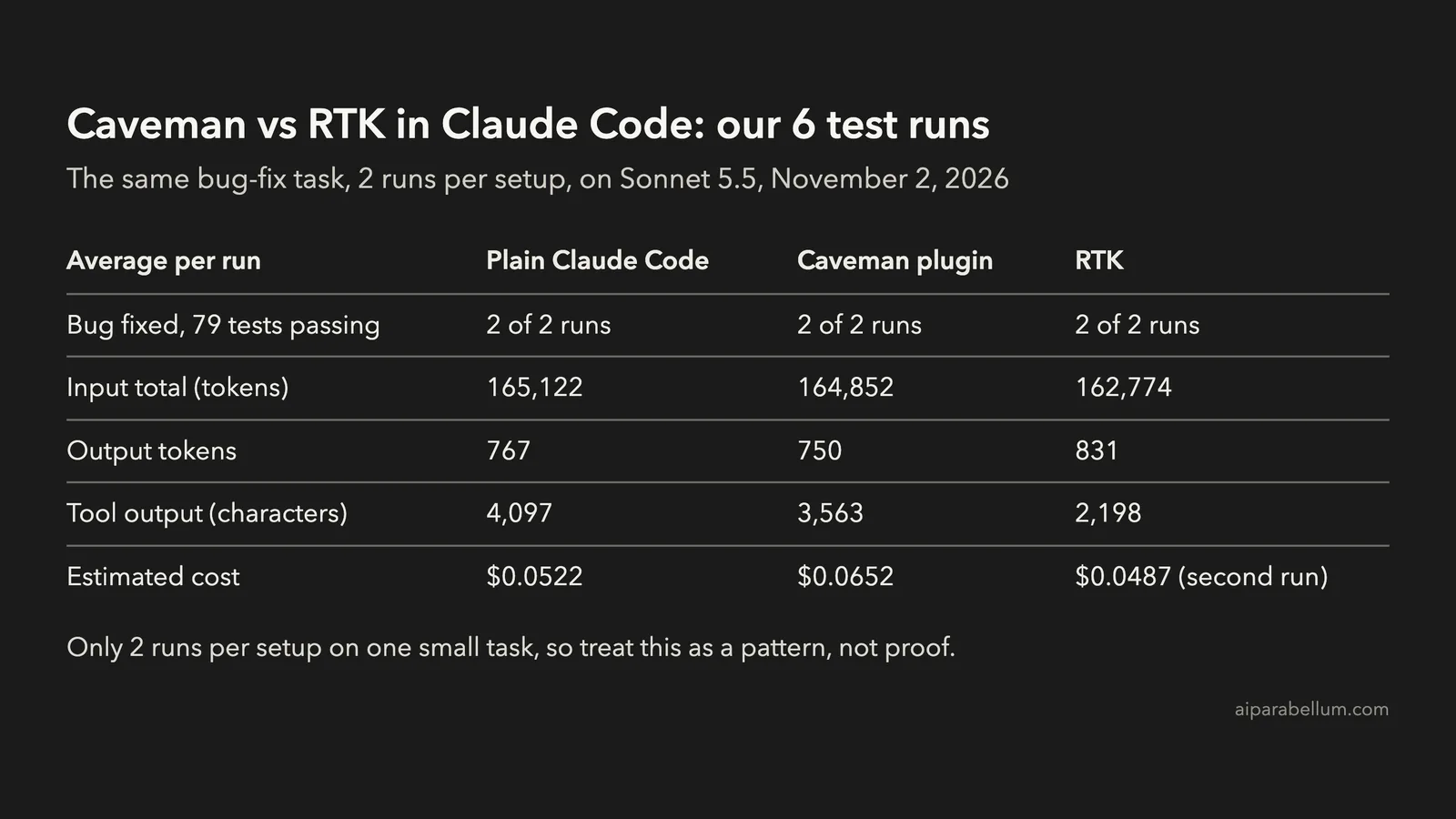
The short answer is that neither tool changed the total much on this task. RTK cut the tool output by 46%, but total input fell by only about 1.4%. The Caveman plugin cost more here, because its rules load at the start of every session.
This was a small test of six runs, so treat the numbers as a real example, not a promise. Here is exactly what we ran and what you can take from it.
Caveman vs RTK: What Each Tool Does
These tools attack different parts of your token bill. That matters more than which one has the bigger headline number.
| Tool | What it changes | How it works | Tested version |
|---|---|---|---|
| RTK | What Claude reads from commands | A hook rewrites commands such as pytest to rtk pytest and shortens the output | 1.1.0 |
| Caveman | How Claude writes back | A plugin loads rules at session start that ask for short replies | 4.0.1 plugin |
Caveman 4 also has a separate CLI with more features, including output compression and model routing. We tested only the Claude Code plugin, so our numbers say nothing about those extras.
How We Ran the Claude Code Token Test
We built a tiny Python shop project with 79 tests. Five of them failed because of one planted bug: the discount code used > where it needed >=.
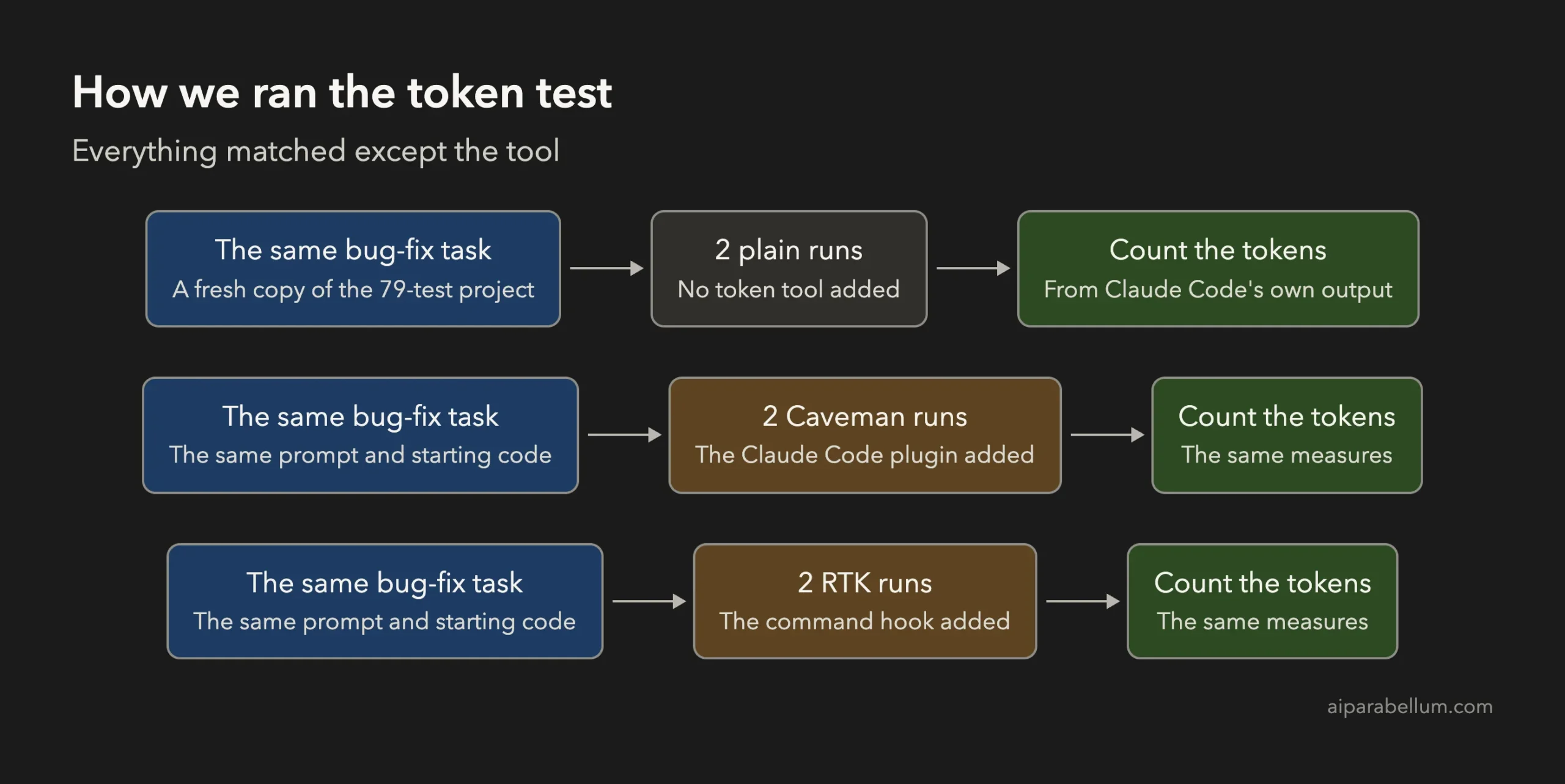
Every run used the same prompt on a fresh copy of the project:
Run pytest in this repo. A test fails. Find the bug, fix it with the
smallest change, run pytest again, then run git diff and tell me what
you changed.
Here is what stayed the same across the runs:
- Claude Code v2.1.316 in print mode, with Sonnet 5.5
- No user settings, no MCP servers and no auto memory
- One run at a time, with two runs for each setup
- Pytest set to verbose, so the raw output was long
All six runs found the bug, made the same two-line fix and finished with 79 tests passing. So the quality was equal on this task, and only the token counts differ.
RTK vs Caveman Results: The Real Numbers
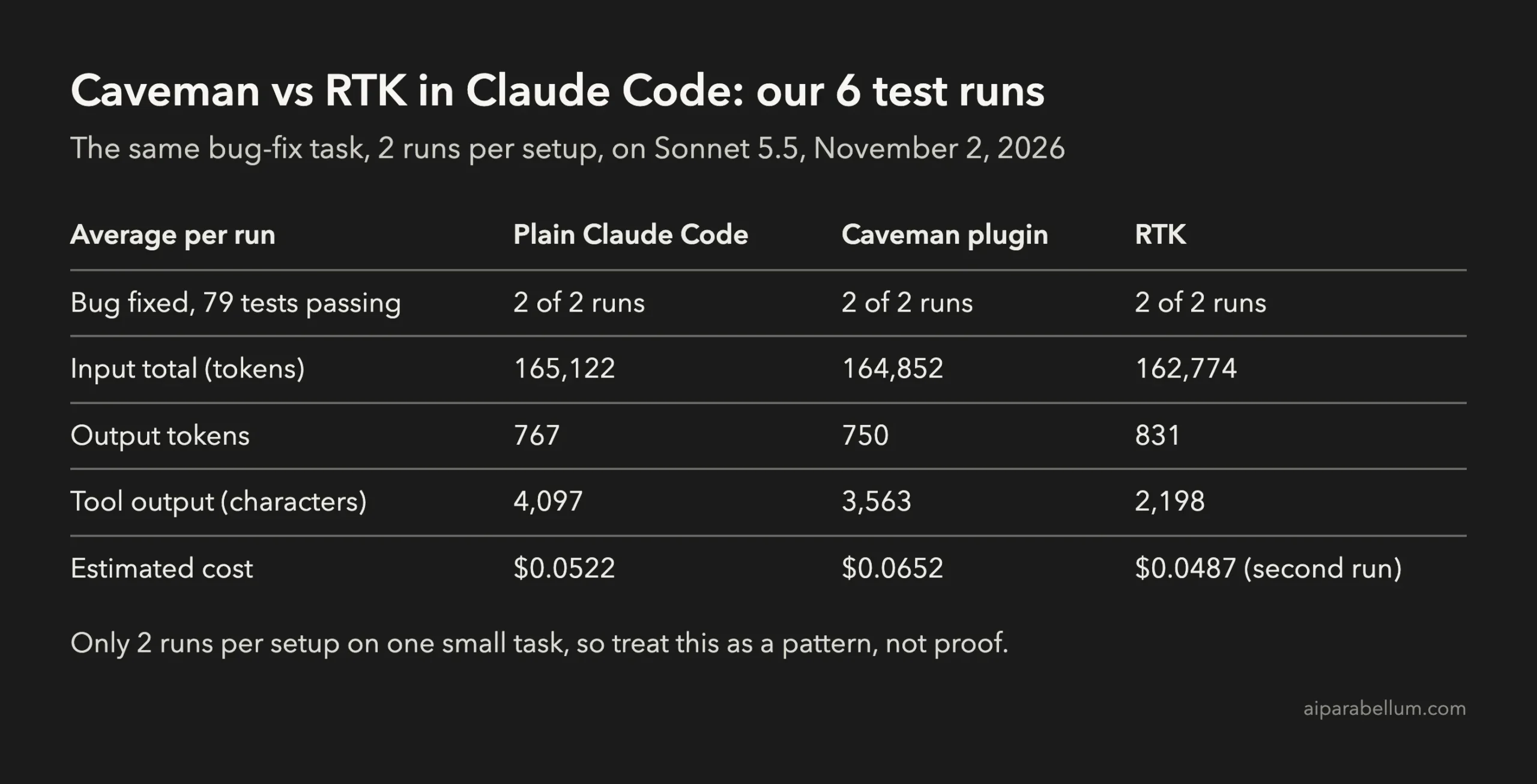
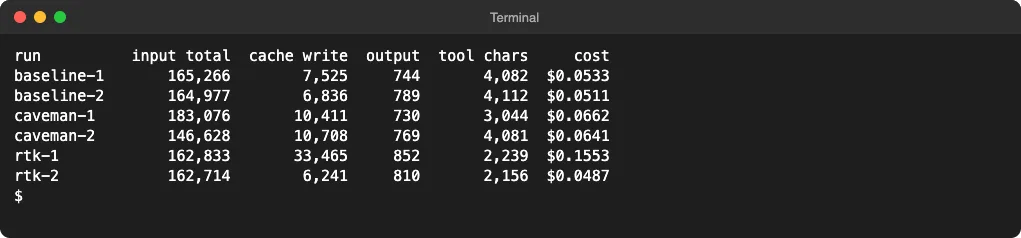
Input total counts every input token Claude processed, including cached context it read again on each turn. Tool chars counts the characters returned by commands and file tools.
Here are the averages for each setup:
| Setup | Input total | Cache write | Output tokens | Tool chars | Cost |
|---|---|---|---|---|---|
| Plain Claude Code | 165,122 | 7,181 | 767 | 4,097 | $0.0522 |
| Caveman plugin | 164,852 | 10,560 | 750 | 3,563 | $0.0652 |
| RTK | 162,774 | 6,241 (second run) | 831 | 2,198 | $0.0487 (second run) |
One note on the RTK row. Its first run was the first of the whole test, so it had to write the prompt cache from scratch, at 33,465 tokens and $0.1553. That is a test-order effect and not a cost of RTK, so we show only its second run for cache write and cost.
That leaves a single comparable cost figure for RTK, which is too little to call a firm saving. The costs are the estimates Claude Code reports, and your plan may bill differently.
What RTK Actually Saved
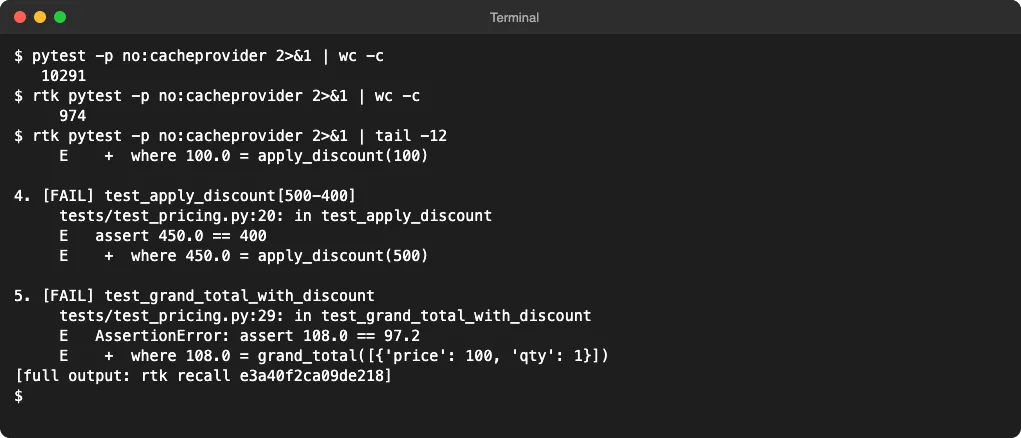
RTK’s raw compression is real. On our failing test suite, verbose pytest printed 10,291 characters, and RTK reduced that to 974 while keeping the failures visible.
So why didn’t the total drop by 90%? Claude Code was already careful, and every run piped pytest through tail before reading it.
That left less for RTK to save. Across the two RTK runs, its own rtk gain report showed 786 tokens saved, or 53.1% of the command output it handled.
That is a good rate on a small amount. Most of the 160,000-plus input tokens were context Claude read again on each turn, and RTK doesn’t touch that.
RTK’s documentation also gives a useful limit: “The hook only fires on Bash tool calls.” Claude’s built-in Read and Grep tools skip it.
What the Caveman Plugin Actually Saved
Caveman did shorten some replies. Its final messages ran 71 and 91 words, compared with 94 and 94 in the plain runs.
Output tokens barely moved, though, at about 750 compared with 767. Much of the output on a task like this is tool calls and code, and Caveman leaves code as it is.
Meanwhile, cache writes rose by about 3,400 tokens per run, likely from the rules and plugin that load at session start. That is the most likely reason the Caveman runs cost about 25% more here.
Don’t read much into its average input total. The two Caveman runs landed at 146,628 and 183,076, and that spread is far bigger than any gap between the setups.
A long, chat-heavy session could turn out differently, because shorter replies add up over many turns. We didn’t test that, so we can’t tell you where the break-even point is.
Should You Install RTK or Caveman?
It depends on where your tokens go. Use this as a starting point:
| Your situation | What to try |
|---|---|
| Short tasks and small projects | Neither tool yet; the savings may be too small to notice |
| Long test, build or log output | RTK, since this is the output it shrinks |
| You just prefer short answers | Caveman, but judge it by reading comfort, not savings |
| You want the biggest cut first | Smaller context, using /clear and /compact |
Before you add a tool, check your baseline. Our guide on how to see token usage in Claude Code shows where to look, and our 12 tips to reduce token usage cover the built-in fixes.
How to Install Them
To install RTK on a Mac with Homebrew and add its global hook, run:
brew install rtk
rtk init -g
To install the Caveman plugin for Claude Code, run:
claude plugin marketplace add JuliusBrussee/caveman
claude plugin install caveman@caveman
Check the Privacy Settings
RTK’s documentation says its telemetry is off by default and needs your consent. Caveman’s README says its separate CLI sends usage stats by default, and that DO_NOT_TRACK=1 or caveman telemetry off turns them off.
The Limits of This Test
Six runs on one small task can’t give you a general savings figure. Keep these limits in mind:
- A larger project or a longer session could favor either tool.
- Each setup got only two runs, and identical setups still varied.
- Caveman’s CLI features were not part of this test.
- Other languages and test tools may compress differently under RTK.
The easiest way to know for your own work is to run one typical task with and without the tool. Then compare the totals, not just the tool’s own savings report.
Conclusion
In our Caveman vs RTK test, all six runs fixed the bug equally well, and neither tool changed the total much on a small task. RTK cut tool output by 46% while total input fell only about 1.4%, and the Caveman plugin shortened some replies but cost about 25% more here. Try RTK if your commands print a lot, choose Caveman if you like its style, and shrink your context first if your main goal is a smaller token bill.