If you have searched for a claude code best practice github repo, you have probably landed on shanraisshan/claude-code-best-practice. It has about 68.7k stars, a huge README and hundreds of files. That is a lot to take in, so we cloned it, read it and tested a few pieces to see what is actually worth copying.
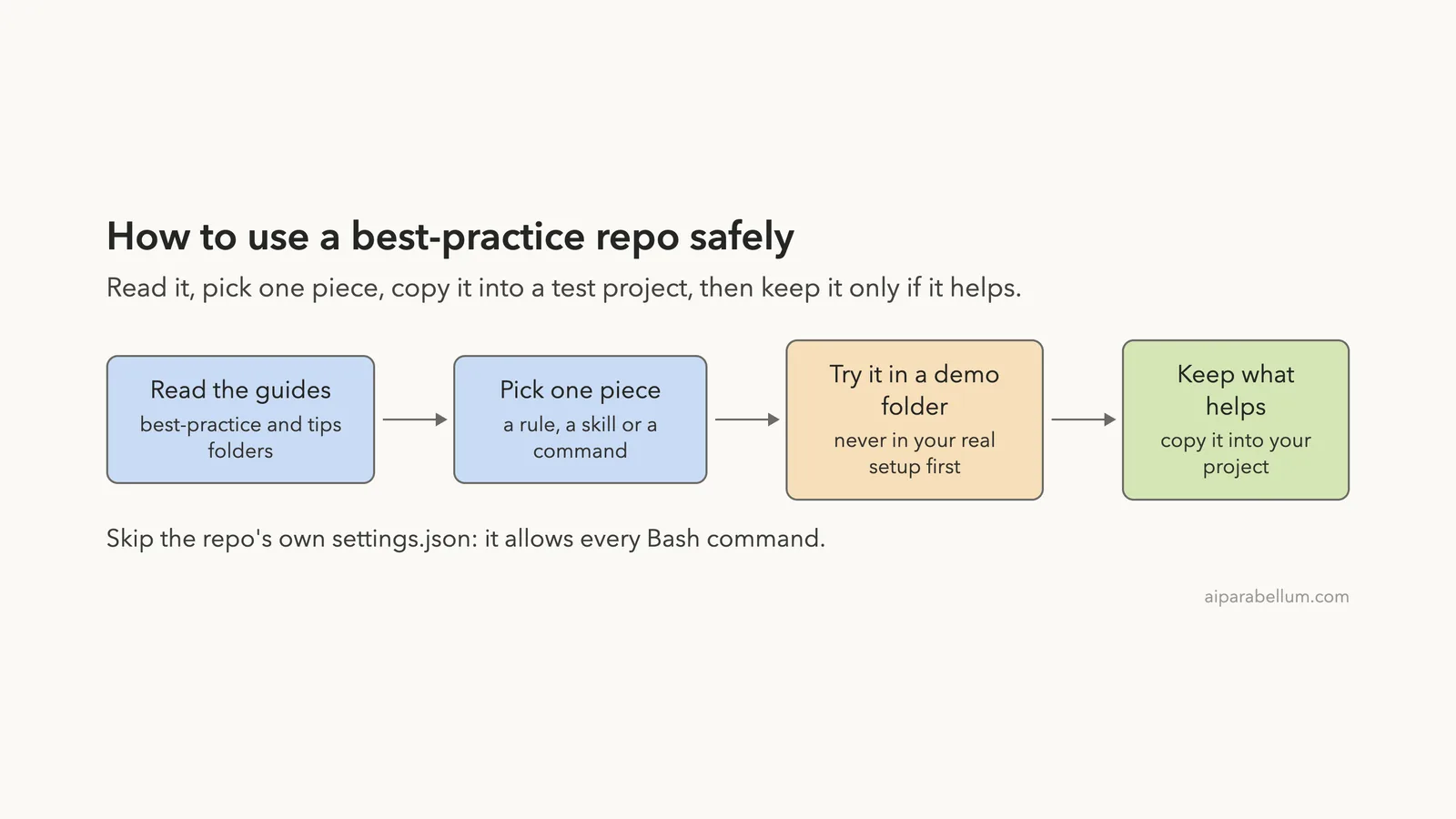
The short answer: copy the ideas and a few small files, but skip the repo’s own settings file. Below you will see what is inside, what we tried in a safe demo folder, and what we would leave alone.
This guide is part of our Claude Code tutorials. You can find more add-ons in our Skills Directory.
Tested with Claude Code v2.1.318 on November 6, 2026, using repo commit 722071c (committed the same day).
Quick Summary
| Question | Answer |
|---|---|
| What is it? | A reference repo of guides, tips and example .claude files, not an app or a plugin |
| Maker | shanraisshan (community project, MIT license) |
| Install needed? | No. You read it and copy files by hand |
| What we ran | A copied rule, skill and command in a demo project |
| Worth copying | Path-scoped rules, small skills and commands, short CLAUDE.md habits |
| Skip | The repo’s own settings.json and its sound-notification hooks |
What the Claude Code Best Practice Repo Is
The repo describes itself as “from vibe coding to agentic engineering.” It is a place where one person collects what works in Claude Code: guides per feature, tips from public posts, and a working example of a .claude folder.
It is not a plugin you install. There is no install command, and nothing runs until you copy a file into your own project.
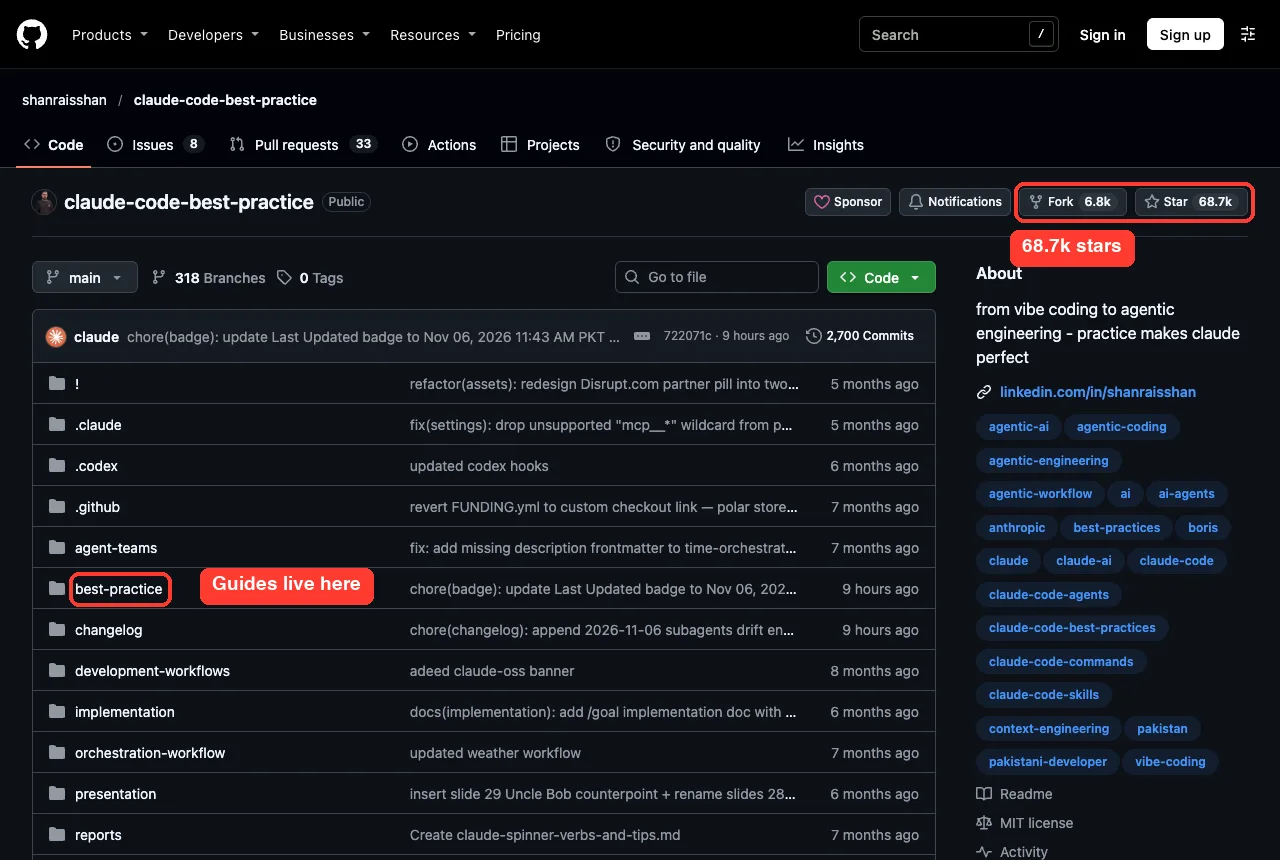
When we cloned it, the repo had 455 files and 2,700 commits, and it was not archived. The last commit landed on November 6, 2026, so it is actively kept up to date.
What Is Inside the Repo
The top level has a few folders that matter. Here is how we would describe each one.
| Folder or file | What it holds | Worth your time? |
|---|---|---|
best-practice/ | One guide each for skills, subagents, commands, MCP, memory, settings and startup flags | Yes, start here |
tips/ | Notes collected from public tip threads | Yes, skim it |
.claude/ | Example agents, commands, skills, rules and hooks | Some of it |
reports/ | Longer write-ups, such as global versus project settings | When you need depth |
CLAUDE.md | The repo’s own project memory file | Good model to read |
presentation/, videos/ | Slides and video notes | Optional |
The README is the front door. It has a concepts table that links each Claude Code feature to a guide, plus a long Tips and Tricks section (the heading says 83 tips) split into groups such as prompting, planning, context, sessions and hooks.
Is It Safe to Read and Try?
Before running anything, we read the hooks and scripts. The repo ships a Python hook script, .claude/hooks/scripts/hooks.py, that plays a sound for each Claude Code event and writes a local log. We did not find network calls in it, but we also did not load it.
The repo also has an .mcp.json that starts three MCP servers with npx. If you open the whole repo as a project and trust it, those servers can be offered to you. For that reason we never opened the repo itself as a Claude Code project.
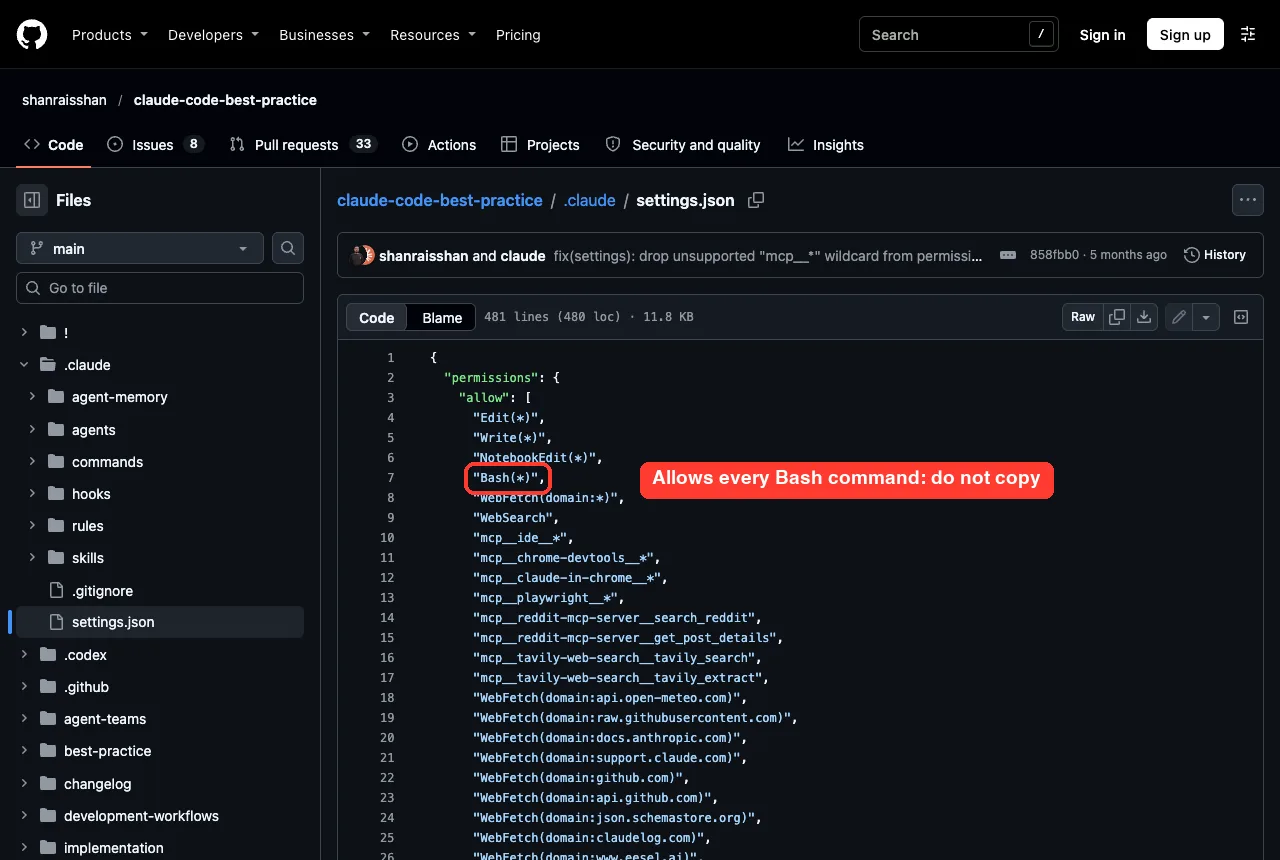
The biggest warning is in .claude/settings.json. Its allow list includes Bash(*), Edit(*) and Write(*), which lets Claude run any shell command and change any file without asking. That is fine for the author’s own demo, but it is not a good default for your work.
How We Tested It Without Touching Our Setup
We cloned the repo into a throwaway sandbox and built a tiny demo project next to it. The project had a short CLAUDE.md, a three-line notes.py and a docs/ folder.
Then we copied three pieces from the repo into the demo project’s .claude folder:
- the rule
.claude/rules/markdown-docs.md - the skill
.claude/skills/time-skill/SKILL.md - the command
.claude/commands/time-command.md
We started Claude Code in that folder with project-only settings, so nothing from our own setup could mix in:
claude --setting-sources project --permission-mode default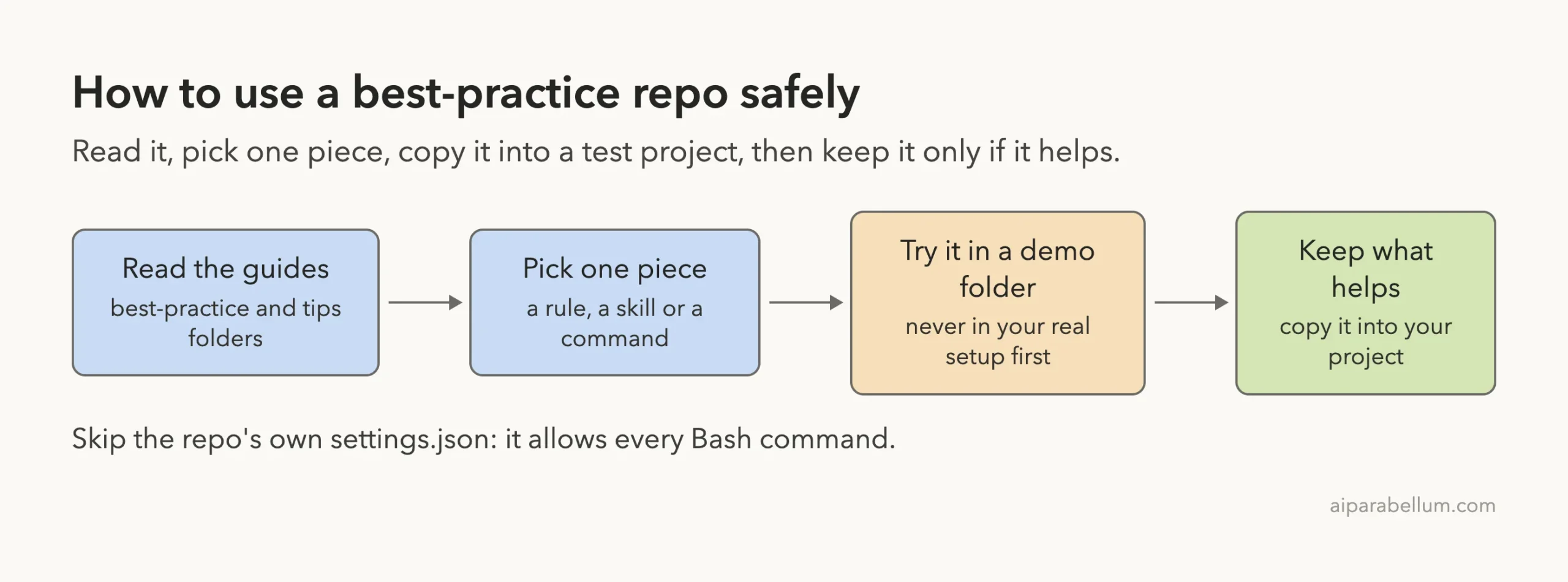
Test 1: A Copied Skill and Command Show Up
When we typed /time inside Claude Code, the slash menu listed both copied items. The skill /time-skill and the command /time-command each carried the label (project), which tells you they came from the project folder.
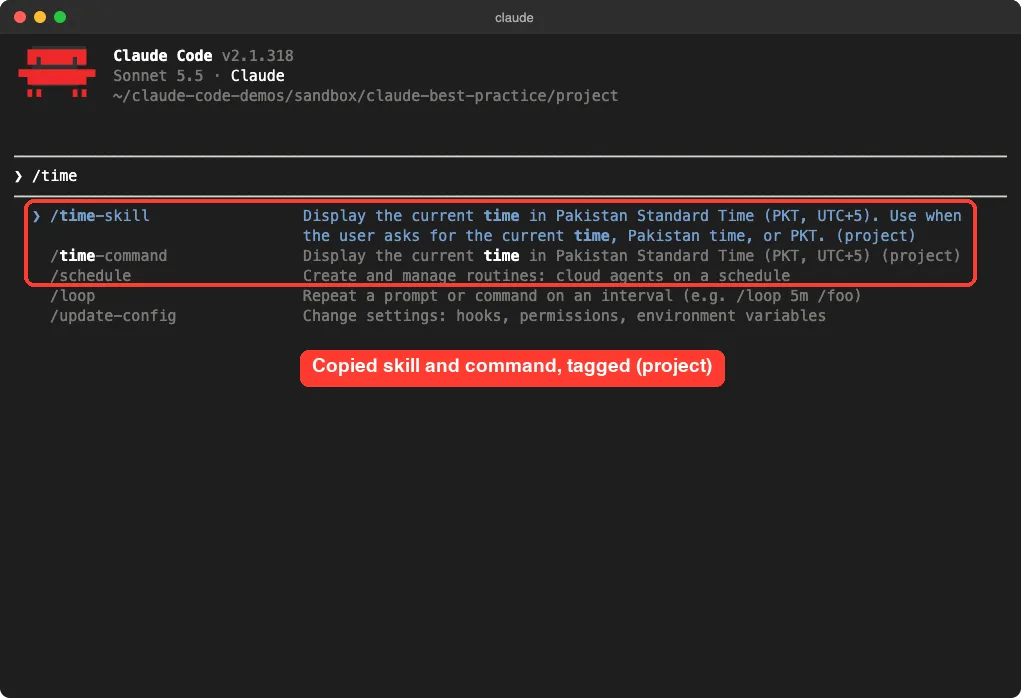
This is the easiest win in the repo. A skill is just a folder with a SKILL.md, and a command is one Markdown file, so you can copy and read them in a minute.
Test 2: The Copied Command Runs as Written
Next we ran /time-command. Claude ran the Bash line from the file, TZ='Asia/Karachi' date ..., and printed the time in the exact format the file asked for.
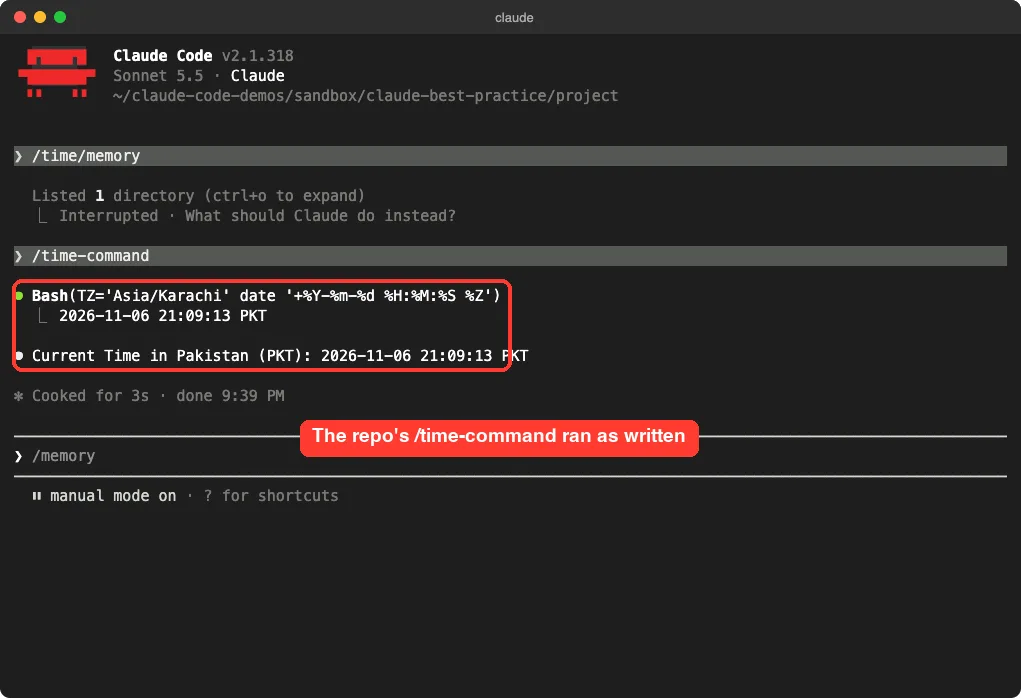
It is a tiny example, but it shows the pattern well. The command file says what to run and how to show the result, and Claude follows it. That is the whole idea behind reusable commands.
The repo’s larger example, a weather workflow that chains a command, an agent and a skill, needs web access and was not part of our test. We did not run it, so we can only say what its files describe.
Test 3: A Path-Scoped Rule Loads Only When Needed
This was the most useful piece. The copied rule starts with a paths: section that points to **/*.md, so it should load only when Claude touches Markdown files.
We asked Claude to create docs/setup.md with a short setup guide. Right after the write, Claude Code printed Loaded .claude/rules/markdown-docs.md.
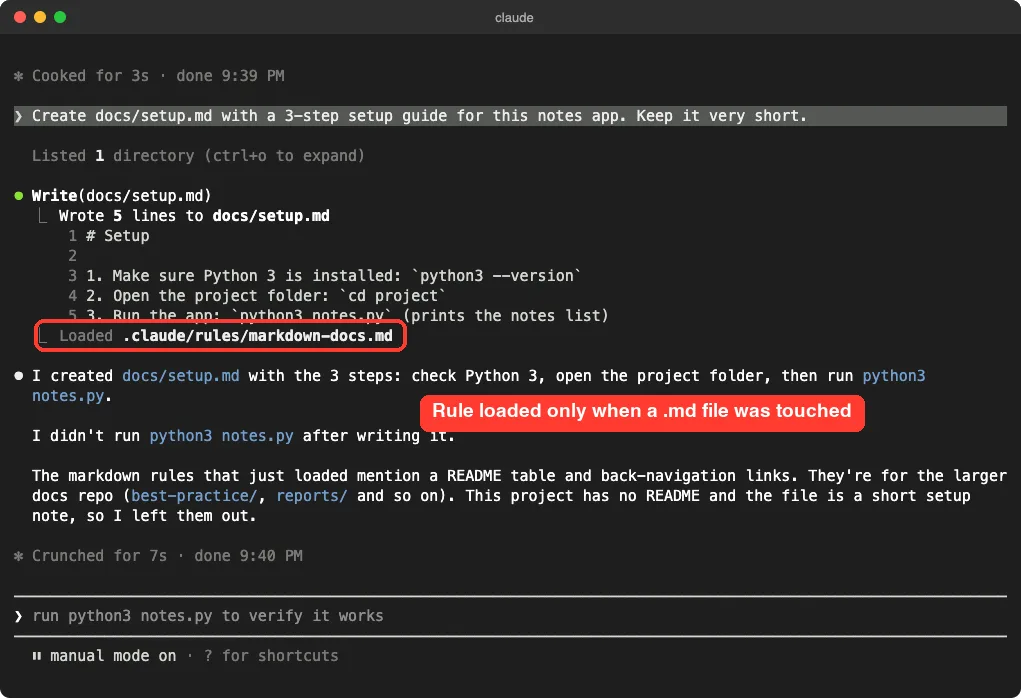
Notice what happened next. Claude read the rule, saw that it was written for the repo’s own docs layout, and decided to leave out the README table and back links because this demo project had neither. A rule is guidance, not a script, so you should rewrite copied rules to match your project.
Claude Code Best Practice on GitHub: What the Guides Teach
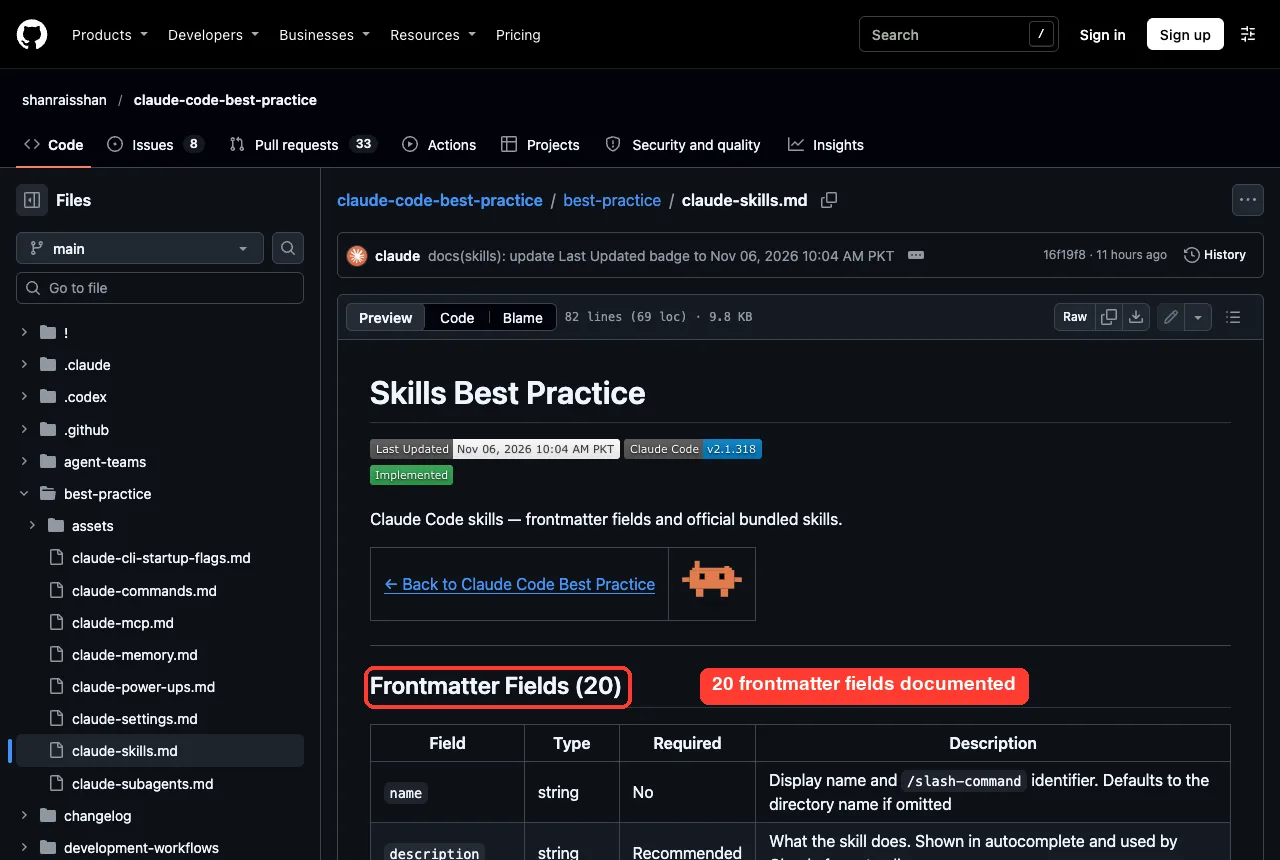
The guides are where the repo earns its stars. The skills guide, for example, lists 20 frontmatter fields with type, required status and a description for each. That is a handy checklist when you write your own skills.
The repo’s guides and tips say a few things we agree with after testing:
- Keep
CLAUDE.mdshort. The README suggests staying under 200 lines per file. - Use
.claude/rules/with apaths:section so rules load only when relevant (we saw this work). - Make sure someone can launch Claude, say “run the tests” and have it work, which means your memory file needs the real run commands.
- Manage context on purpose with
/compact,/clearand rewinding instead of letting a long session drift.
We did not test every tip. Treat the tips list as ideas to try, and check each against the official memory docs and skills docs before you rely on it.
What Is Worth Copying and What to Skip
| Piece | Verdict | Why |
|---|---|---|
| Path-scoped rules | Copy the idea | We saw it load only on Markdown work |
| Small skills and commands | Copy and edit | Both showed up and ran, but they are written for the author’s needs (Pakistan time) |
| Best-practice guides | Read them | Clear tables, kept current |
| Tips list | Skim and test | Sources vary, so verify what you adopt |
| Sound-notification hooks | Skip unless you want sounds | Not tested, and it adds a script to every event |
The settings.json allow list | Do not copy | It allows every Bash command and every file edit |
.mcp.json | Only if you need those servers | It starts servers through npx |
Copy one small piece at a time, and read it before you trust it.
How to Pick a Best Practice Repo Worth Your Time
Stars alone do not tell you whether a repo will help. We used a few simple checks on this one, and you can reuse them on any other Claude Code collection you find.
- Check the date of the last commit. A guide about a fast-moving tool goes stale quickly, and this repo had a commit the same day we looked.
- Check that it is not archived and that issues and pull requests are being handled.
- Read every script and hook before you run anything. Look for network calls, file deletes and anything that writes outside the project.
- Look at the settings file. If it allows everything, do not copy it.
- Test one piece in a demo folder with project-only settings before it goes near your real work.
These checks take about ten minutes. They also protect you from the most common problem with shared setups, which is quietly giving Claude more permission than you meant to.
Try It Yourself
Here is a safe way to repeat our test, using the claude code best practice github repo as the source. Work in a throwaway folder, not in your real project.
git clone --depth 1 https://github.com/shanraisshan/claude-code-best-practice
mkdir -p demo/.claude/rules demo/.claude/commands
cp claude-code-best-practice/.claude/rules/markdown-docs.md demo/.claude/rules/
cp claude-code-best-practice/.claude/commands/time-command.md demo/.claude/commands/
cd demo
claude --setting-sources project
Once Claude is running, try this prompt and watch for the Loaded line:
Create docs/setup.md with a 3-step setup guide for this project. Keep it very short.Common Mistakes
- Opening the whole repo as a Claude Code project and trusting the folder, which brings in its allow list, hooks and MCP servers.
- Copying
settings.jsonwholesale, includingBash(*). - Copying a rule without editing it, so Claude follows instructions that do not fit your project.
- Treating every tip as proven. The list mixes sources, and some tips depend on your model and workflow.
- Skipping the check that a copied item loaded. The
(project)label and theLoadedline are quick proof.
Pro Tips
- Use
--setting-sources projectwhen you test someone else’s setup, so your own settings do not hide problems. - Read the repo’s best-practice folder first and the tips second.
- Rewrite examples in your own words. A short, specific rule beats a long copied one.
- If you want ready-made add-ons instead of reading guides, look at our Hookify plugin guide or the review toolkit test.
- For picking between skills, see our design skills comparison, and for safer defaults see the security plugins test.
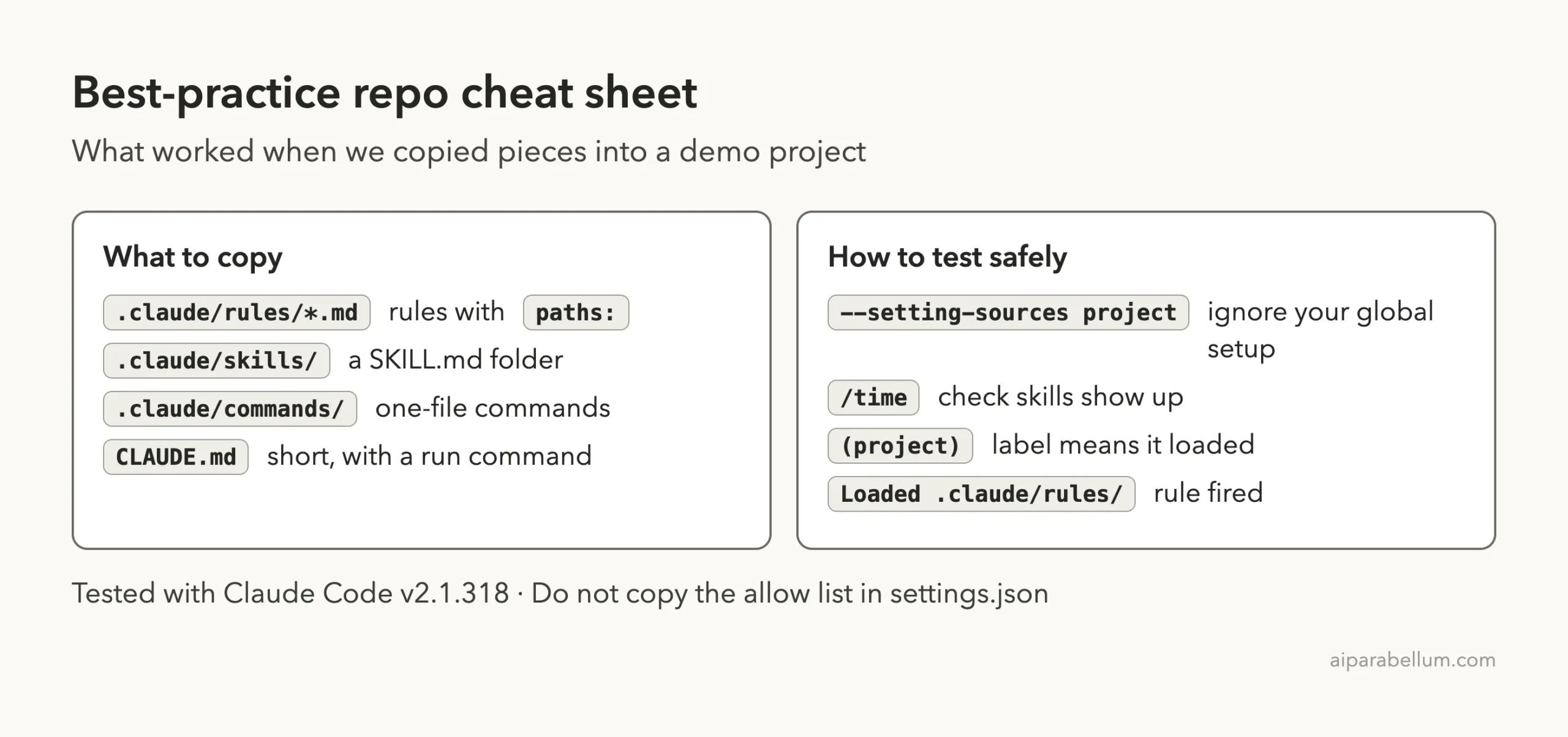
Cheat Sheet
Frequently Asked Questions
Is the claude-code-best-practice repo an official Anthropic project?
No. It is a community repo by shanraisshan. It links to the official docs often, and you should use those docs as the final word.
Do I install it with a plugin command?
No. We found no plugin or marketplace entry in it, so you clone it to read and copy files by hand. For how real plugins work, see the official plugins docs and discover plugins page.
Can I just copy its whole .claude folder?
We would not. It includes a permissive allow list, a hooks script and agents written for the author’s demos. Copy single files you have read.
Will a copied rule always load?
Only when its paths: pattern matches files Claude touches. In our test, the Markdown rule loaded after Claude wrote a .md file.
Is the repo still maintained?
When we checked on November 6, 2026, it was not archived and had a commit from that morning.
Conclusion
The claude code best practice github repo is a strong reading list and a decent source of small examples, as long as you treat it as a library to borrow from rather than a setup to install. In our demo, a copied skill, command and path-scoped rule all worked, but the rule needed judgment because it was written for a different project. Read the guides, copy one small file at a time, test it in a demo folder, and leave its permissive settings.json behind. You can find the Claude app itself on our Claude page, and more add-ons in the Skills Directory linked above.
Browse all our Claude Code tutorials in the tutorials hub.