A Claude Code security plugin can catch risky code while Claude writes it, or audit code that already exists. Anthropic ships two of them in its official marketplace, and they do very different jobs. We loaded both in a throwaway project, planted a few problems on purpose, and watched what each one did.
This guide is part of our Claude Code tutorials. Find more add-ons in our skills directory.
Tested with Claude Code v2.1.318 on November 6, 2026, using security-guidance version 2.0.17 and claude-security version 0.12.0 from Anthropic’s official plugin repository (commit a1ecfbc). We ran everything in a demo folder with made-up files on macOS, not in a real project.
Quick Summary: Two Security Plugins, Two Jobs
| Plugin | What it does | Did we run it? |
|---|---|---|
| Security Guidance, pattern warnings | Instant warnings when Claude edits a file with a risky pattern | Yes, it fired on pickle |
| Security Guidance, LLM diff review and commit review | Asks a model to review changes at the end of a turn and on git commit | No, the plugin found no credentials in our setup |
| Claude Security, scan codebase | Agents hunt for vulnerabilities, then a panel verifies each one | Yes, at low effort |
| Claude Security, scan changes | Reviews a branch, pull request or commit diff | No |
| Claude Security, suggest patches | Turns findings into patch files you apply yourself | No |
We say “yes” only for what we really ran. The rest of this guide comes from the plugins’ own documentation and is marked that way.
What Are the Claude Code Security Plugins?
Both plugins live in the official marketplace, claude-plugins-official. You can read their pages in the security-guidance folder and the claude-security folder. If you are new to add-ons, our Claude Code plugins guide explains how plugins work.
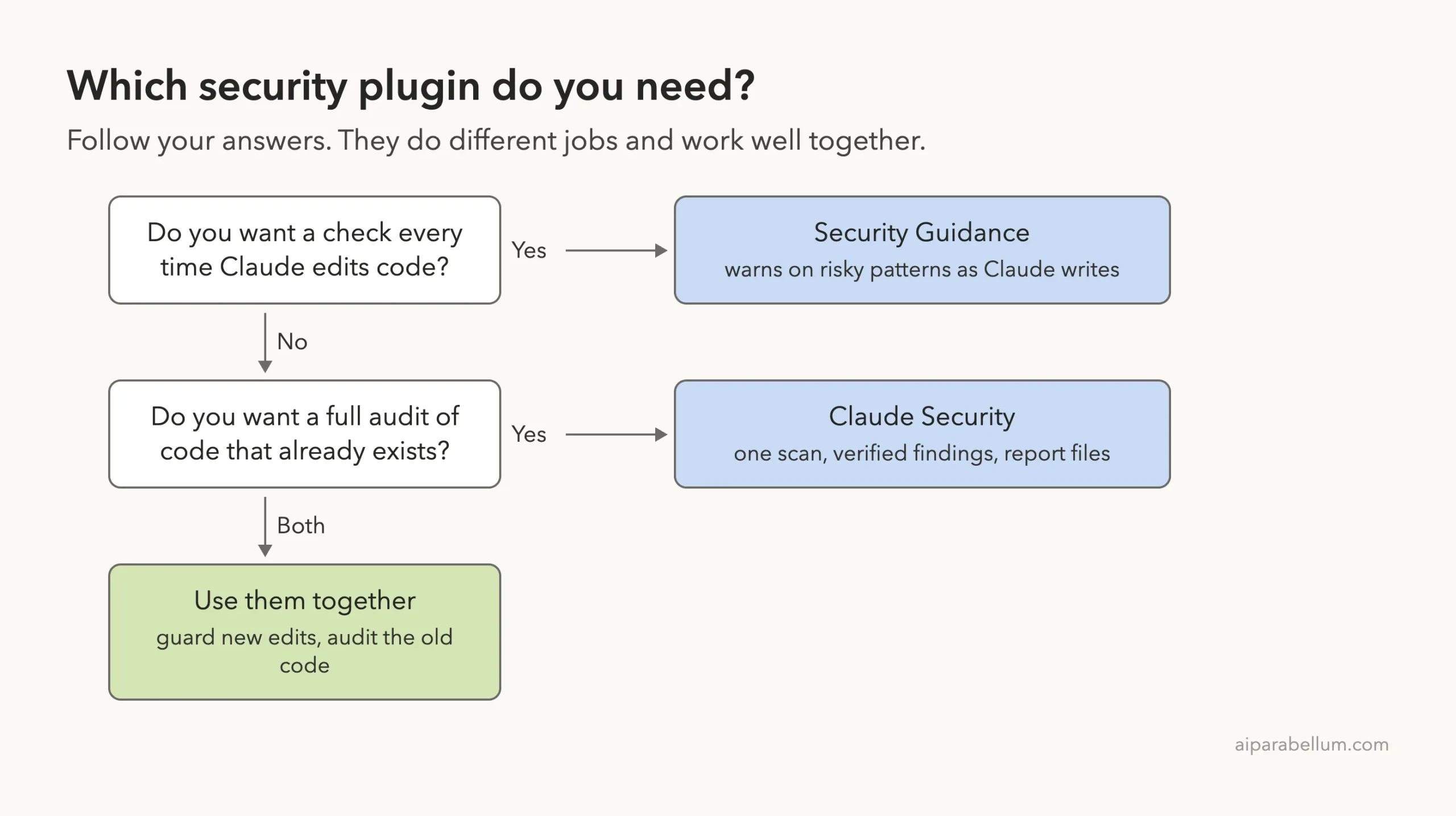
Security Guidance watches while Claude writes. Claude Security audits on demand. Think of one as a smoke detector and the other as an inspector who visits once.
Security Guidance in one minute
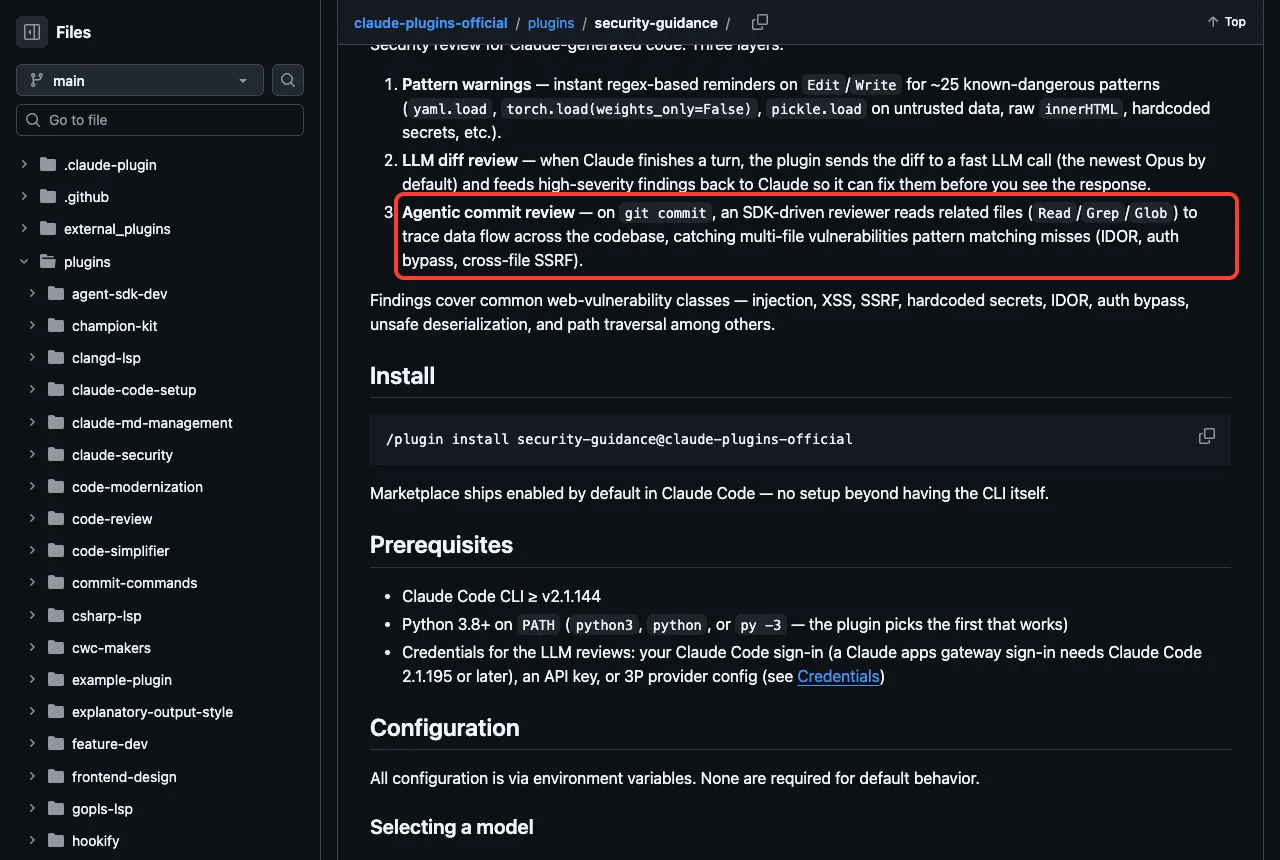
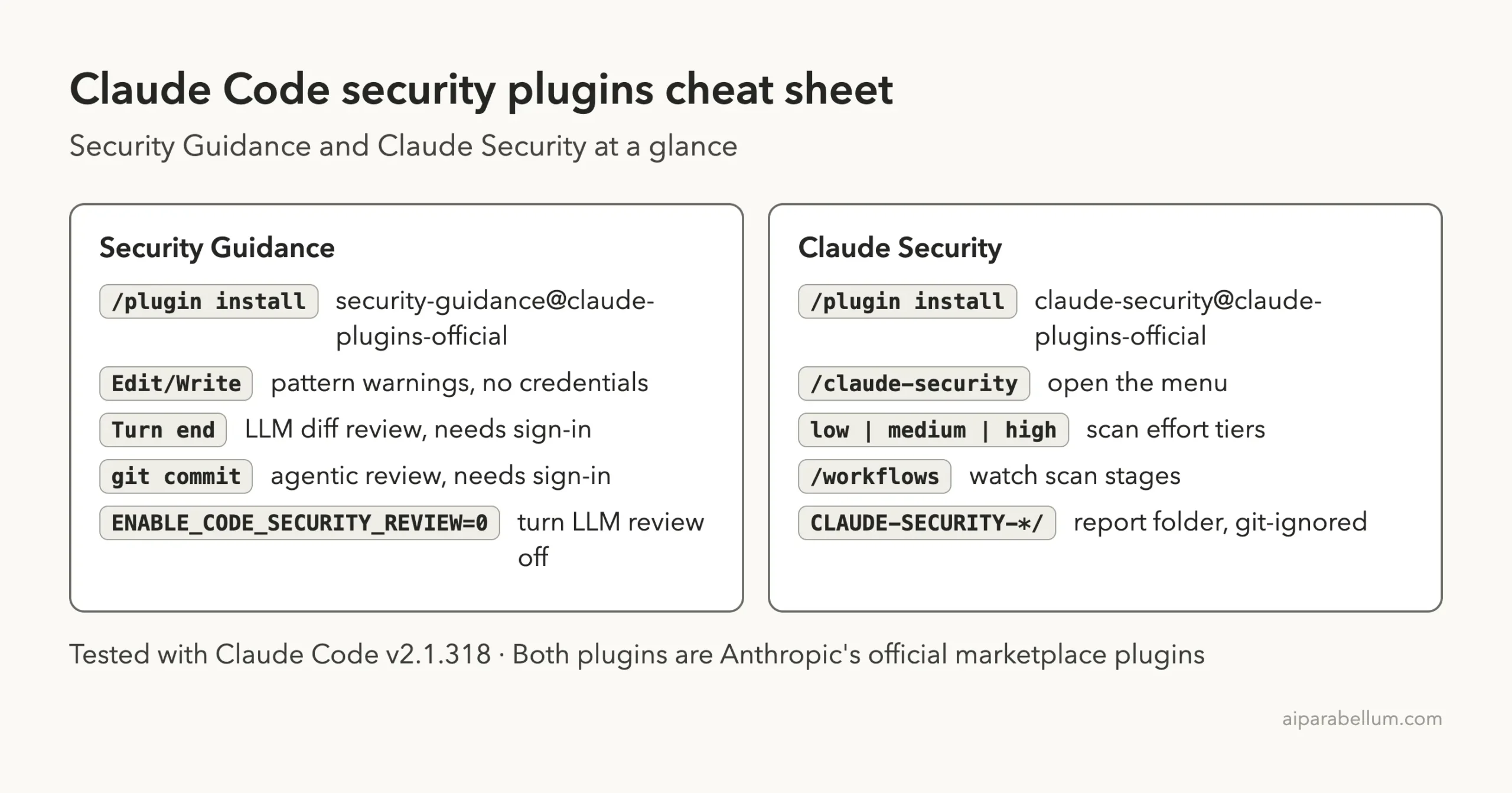
The plugin’s page describes three layers. Pattern warnings are instant, regex-based reminders on Edit and Write for about 25 known-dangerous patterns. An LLM diff review runs when Claude finishes a turn, and an agentic commit review runs on git commit.
It covers classes such as injection, XSS, SSRF, hardcoded secrets, IDOR, auth bypass, unsafe deserialization and path traversal. The page also says the marketplace ships it enabled by default in Claude Code.
Claude Security in one minute
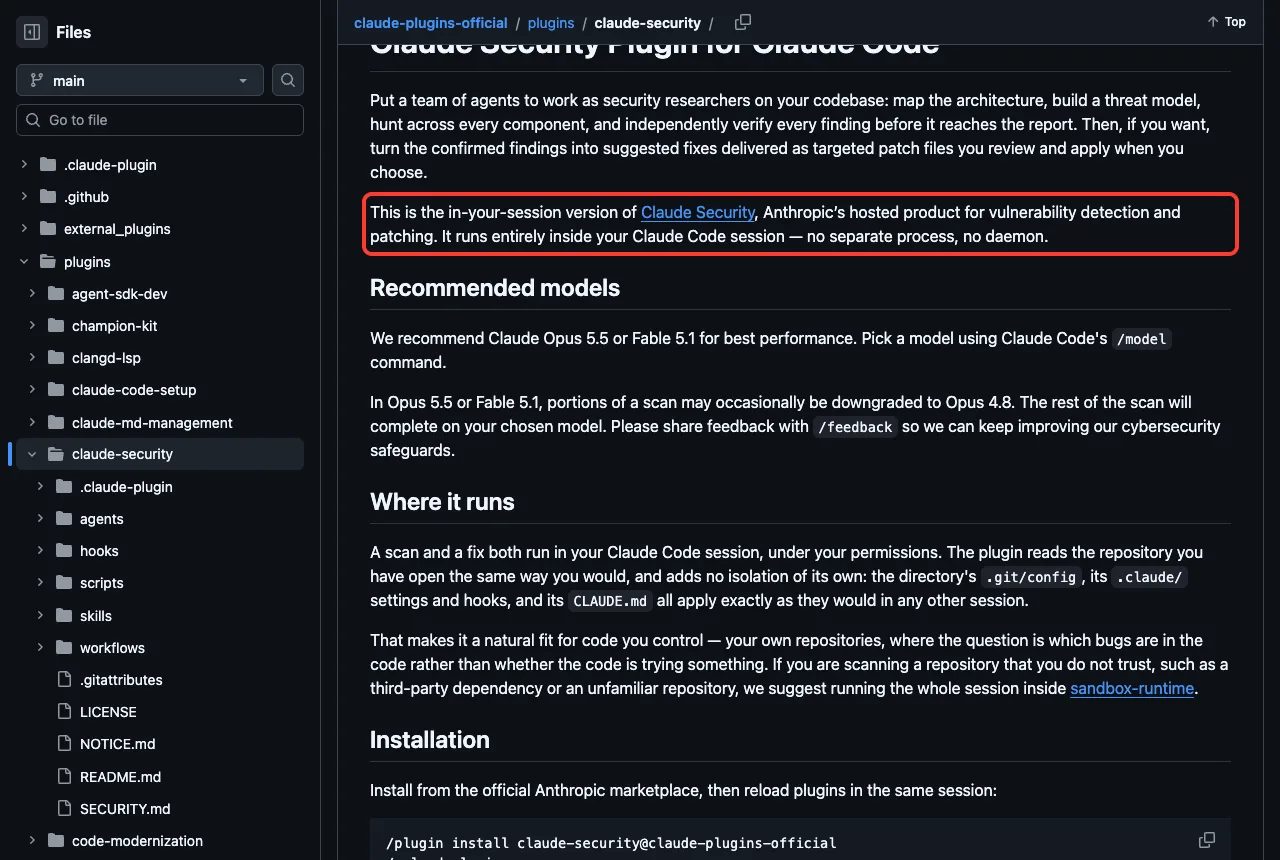
Claude Security is the in-session version of Anthropic’s hosted Claude Security product. The plugin page says it runs entirely inside your Claude Code session, with no separate process and no daemon. A team of agents maps the code, hunts for problems, and verifies each finding before it reaches a report.
It offers three jobs: scan the codebase, scan changes, and suggest patches. Findings are written to a timestamped folder in your repository.
How We Tested Them Safely
We never installed anything into our own Claude Code setup. Both plugins were cloned into a sandbox folder, and we loaded each with --plugin-dir plus --setting-sources project. That way the plugin only exists for that one session.
Before running anything we read both plugins’ hook files. They run Python helpers, show a banner, count usage, and in Security Guidance’s case, keep state in a folder. We pointed that folder at the sandbox with the SECURITY_WARNINGS_STATE_DIR setting and moved its log with SECURITY_GUIDANCE_DEBUG_LOG, so nothing landed in ~/.claude.
claude --permission-mode acceptEdits \
  --setting-sources project \
  --plugin-dir ./claude-plugins-official/plugins/security-guidance
The demo project was a git folder with one tiny file, app.py, that creates a small users table in SQLite. Later we added a second file with two planted problems.
Test 1: Security Guidance Warns While Claude Writes
We asked Claude to add two functions to app.py. One looks a user up by name in the table. The other turns a saved pickle blob back into a settings dictionary, which is a classic risky pattern.
Add two functions to app.py: find_user(name) that looks a user up by name
in the users table and returns the row, and load_settings(blob) that turns
a saved pickle blob back into a settings dict. Keep it short.
The plugin’s own log recorded the match right after the edit: pickle_deserialization. Claude then wrote the pickle function with a restricted unpickler that refuses to load any class or function. In its summary Claude said that plain pickle can run arbitrary code when it loads, and that the plugin’s security hook flagged it.
The lookup function used a parameterized query (WHERE name = ?), so a name cannot inject SQL. We did not run either function, and Claude said so too.
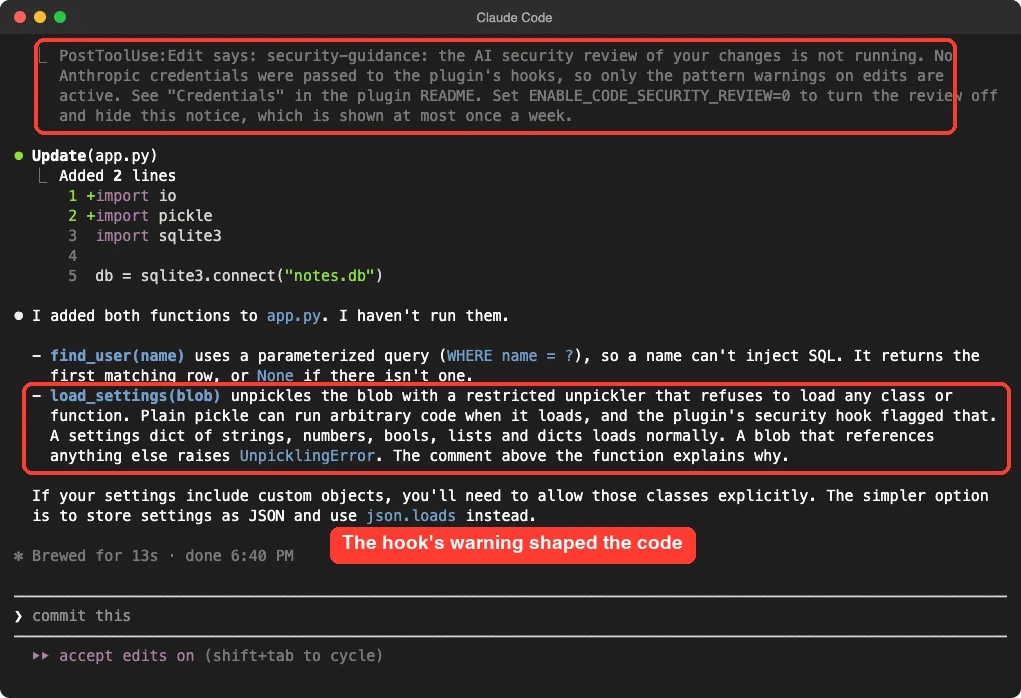
One demo is one demo. We cannot say how often the warning changes Claude’s code, only that it did here. The first red box in the screenshot shows a second thing worth knowing, which we cover next.
The part that did not run: LLM reviews
The screenshot shows a notice from the plugin: the AI security review is not running because no Anthropic credentials were passed to its hooks, so only pattern warnings are active. The plugin’s log said the same thing at the end of the turn and again when Claude committed.
We asked Claude to commit the change, and the commit went through with no review result. That means we did not see the diff review or the agentic commit review work. We can only describe them from the plugin’s documentation.
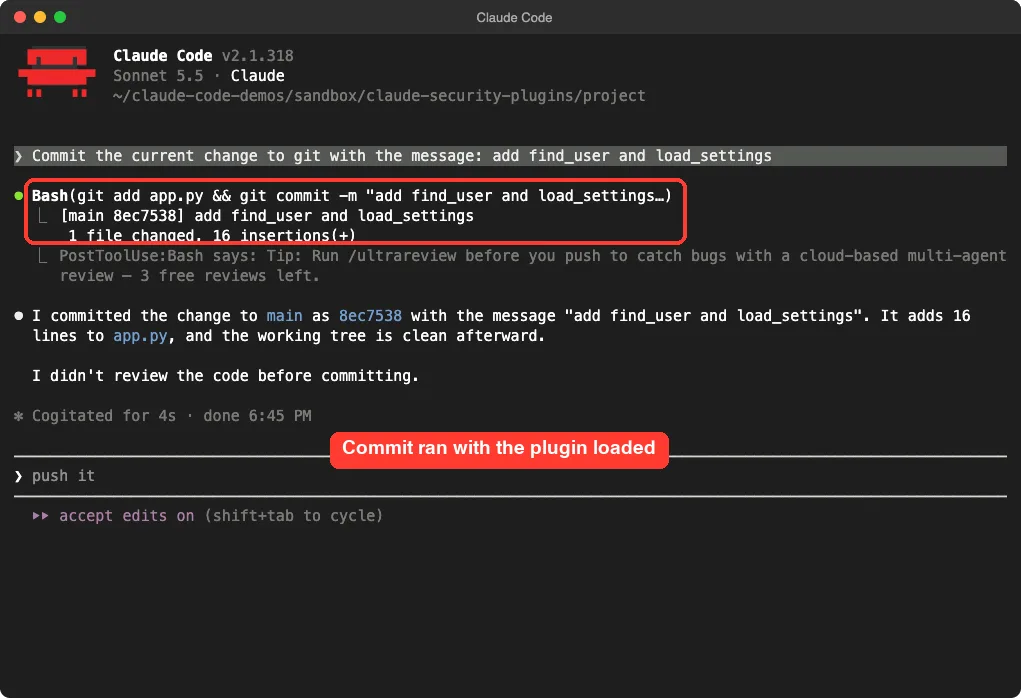
The documentation lists the ways credentials reach the plugin: a cloud provider setup, an ANTHROPIC_API_KEY in the environment, or your Claude Code sign-in. It also says sessions started with DISABLE_TELEMETRY, DO_NOT_TRACK or CLAUDE_CODE_DISABLE_NONESSENTIAL_TRAFFIC do not pass your sign-in. We did not find the exact cause in our run, so check the Credentials section of the plugin page if the notice appears for you.
Test 2: Claude Security Scans the Codebase
For the second test we added export.py to the demo project and committed it. It has a function that runs a shell command built from a folder name, and a hardcoded admin token. Both were planted on purpose, and the token is a fake demo value.
import os

ADMIN_TOKEN = "demo-admin-token-1234567890"


def export_folder(name):
    # packs a folder the user names into an archive
    os.system(f"tar czf /tmp/{name}.tgz ./data/{name}")
Open the menu
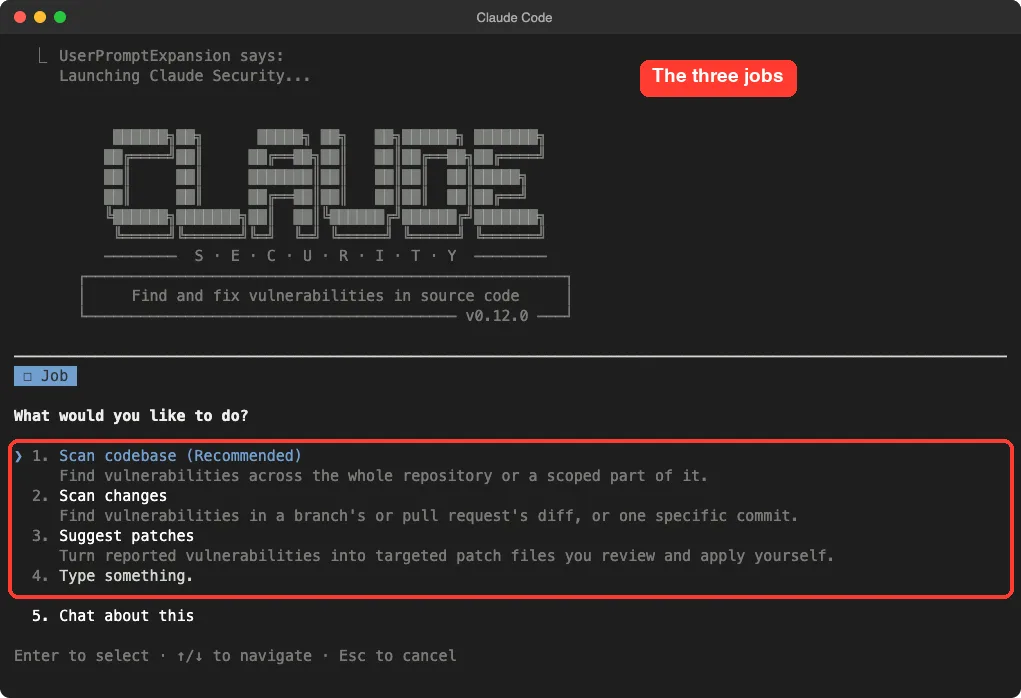
We loaded the plugin the same way and typed /claude-security. A banner appears, then a menu with three jobs: scan codebase (recommended), scan changes, and suggest patches.
Be careful with autocomplete here. Typing a shortened name picked a different command, /claude-security:scan, which needs settings the menu collects, and it did nothing.
Run a low-effort scan
To keep usage small we skipped the menu and typed the job in plain words, with the effort tier and cost accepted in the same line.
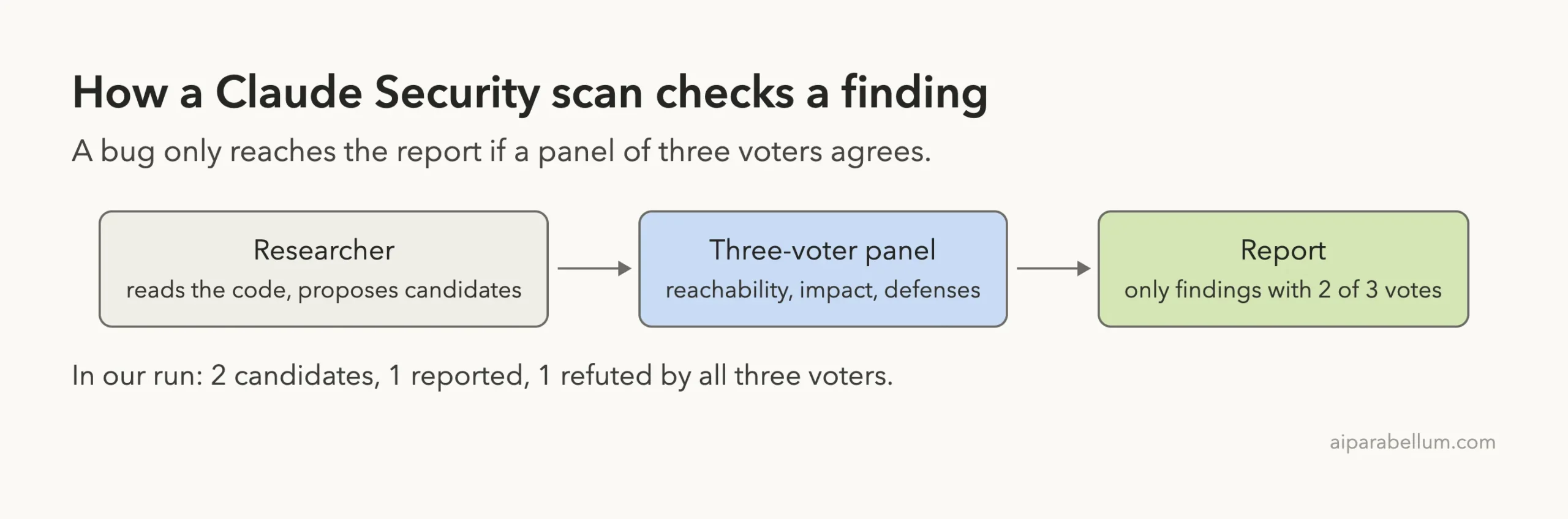
/claude-security:claude-security scan the whole repository at low effort and I accept the costThe plugin works in effort tiers. Per its docs, low uses one researcher over the whole repository followed by a three-voter panel. medium adds an inventory, a threat model and a breadth sweep, and high adds more researchers and sweeps.
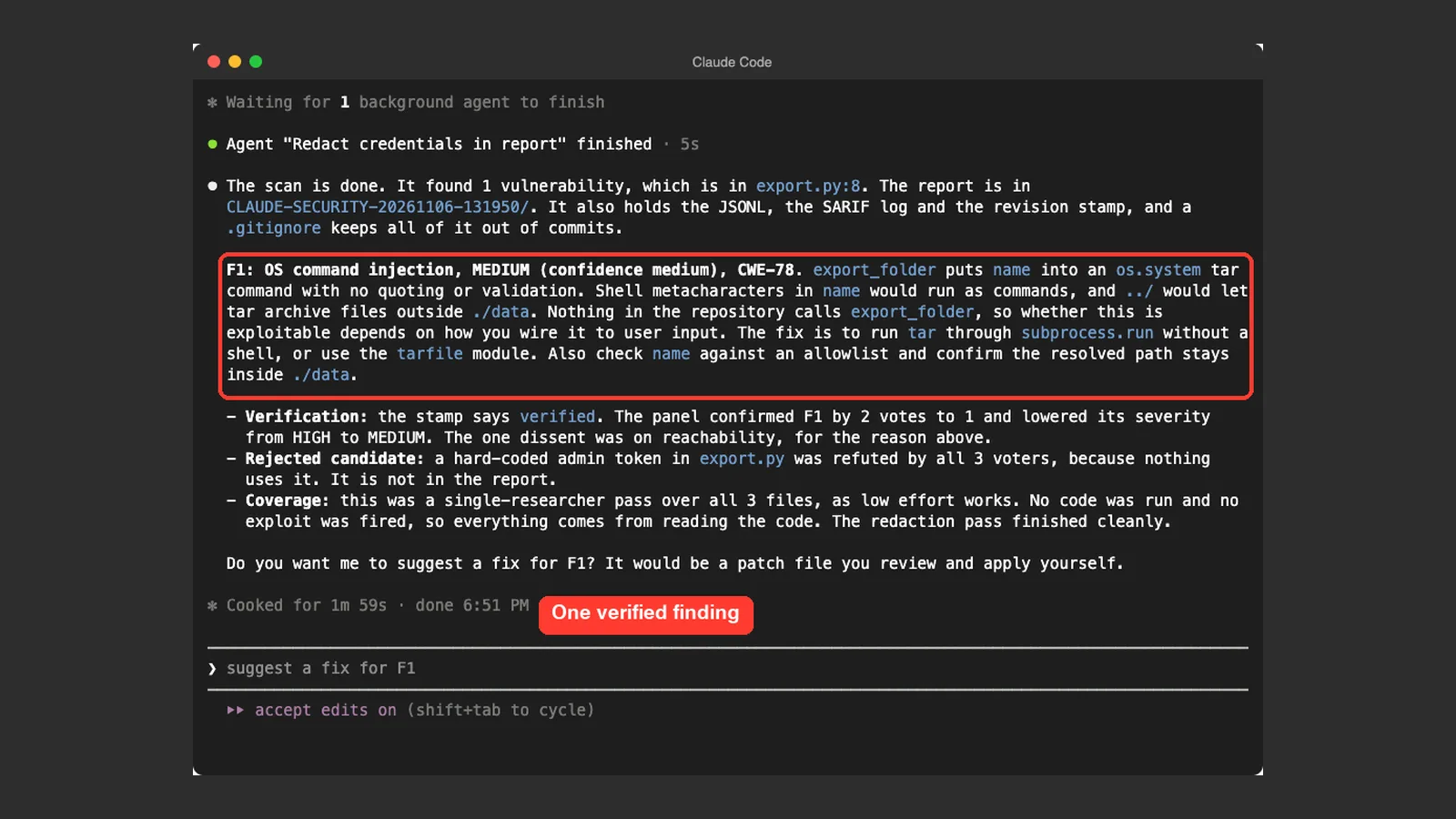
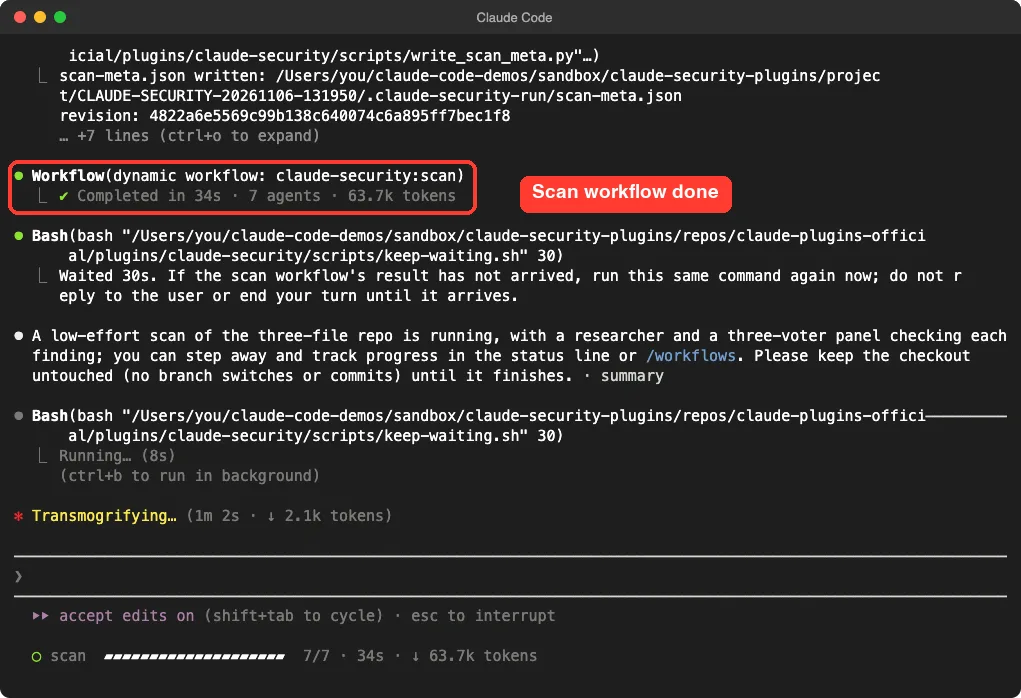
The scan workflow finished in 34 seconds, used 7 agents and about 63.7k tokens, according to Claude Code’s own status line. The whole turn, including the report and a redaction step, took about two minutes. That is one small three-file repo at the lowest tier, so do not read it as a speed estimate for your project.
Read the result
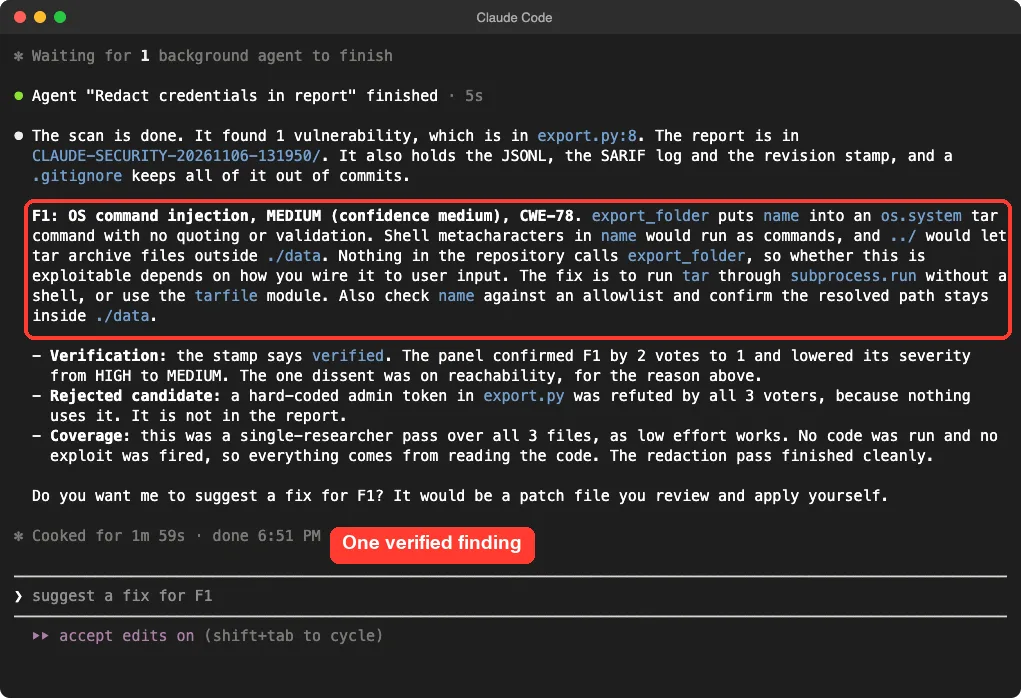
The scan reported one finding: OS command injection in export_folder, rated MEDIUM with medium confidence. It explained that shell characters in the name would run as commands and that a name with ../ would reach outside the data folder.
The fix it suggested was to run tar through subprocess.run without a shell, or use the tarfile module, and to check the name against an allowlist. It also noted that nothing in the repo calls the function, so real exploitability depends on how you wire it up.
What the verification panel did
This is the interesting part. The researcher proposed two candidates, and a three-voter panel checked each one on reachability, impact and defenses. The command injection survived with 2 of 3 votes, and the panel lowered its severity from HIGH to MEDIUM because the reachability voter found no caller.
The hardcoded admin token was refuted by all three voters because nothing in the repo uses it, so it never reached the report. You could argue a committed token is a problem even when unused. That is a judgment call the panel made, and you may disagree with it.
The report files
The scan wrote a folder named like CLAUDE-SECURITY-20261106-131950/ in the project. It held CLAUDE-SECURITY-RESULTS.md for people, a .jsonl file and a .sarif file for tools, a revision stamp tied to the scanned commit, and a .gitignore so a stray git add does not commit the report.
The report’s coverage section was honest about limits. It said low effort skips the inventory and threat model, and that nothing in the scan executes your code, so no exploit was fired. Every finding comes from reading the code.
Security Guidance vs Claude Security: Side by Side
| Question | Security Guidance | Claude Security |
|---|---|---|
| When does it run? | Automatically, on edits, turn end and commit | Only when you ask |
| What does it look at? | The change Claude just made | The repository, or a branch, pull request or commit |
| Needs credentials? | Pattern warnings no; LLM reviews yes | Runs in your session under your permissions |
| Output | Warnings fed back to Claude | Report folder with Markdown, JSONL and SARIF |
| Cost | Pattern layer free; LLM reviews use your tokens or usage | A scan asks you to confirm its time and token cost |
| Our verdict | Useful and cheap; we verified only the pattern layer | Impressive verification; start at low effort |
Parts We Did Not Run
Three features are described only from the docs. Scan changes reviews a diff and reports only flaws the change takes part in. Suggest patches drafts one patch file per finding in a scratch copy of your repo, has agents review each patch, and applies nothing for you.
The third is Security Guidance’s LLM layers, which need credentials we did not have in the sandbox. We will not claim they work well or badly. The Security Guidance page itself calls the plugin a best-effort assistive tool and tells you to keep human review, SAST and dependency scanning.
Is It Safe to Run These on Any Code?
Claude Security’s page says a scan and a fix both run under your permissions, with no isolation of their own. Your .git/config, your .claude/ hooks and your CLAUDE.md all apply as usual. It recommends using it on code you control and running unfamiliar repositories inside sandbox-runtime.
It also treats text in the repo as data, so a comment addressed to the scanner is noted rather than obeyed. The page is clear that this helps accuracy and is not a defense against a hostile repository.
Guard new edits with Security Guidance, and audit old code with Claude Security.
Try It Yourself
Practice in a throwaway folder, never a real project. Create a git repo with one small Python file, add a function that builds a shell command from an argument, and commit it. Then load Claude Security and run a low-effort scan.
/claude-security:claude-security scan the whole repository at low effort and I accept the costCompare the report with what you planted. Then try Security Guidance by asking Claude to write a function that loads a pickle file, and watch whether it changes its approach.
Common Mistakes
- Expecting Security Guidance’s LLM reviews to run without credentials. Check for the plugin’s notice or its log.
- Typing a shortened command and letting autocomplete pick
/claude-security:scan. Use the full/claude-securitymenu. - Switching branches or committing while a scan runs. The plugin asks you to leave the checkout alone until it finishes.
- Committing the report folder. It ships with its own
.gitignorefor a reason, and its credential redaction is a best effort. - Treating a clean report as proof of safety. Scans are nondeterministic, so two runs can differ.
Pro Tips
- Start at
loweffort on a small scope, then move up tomediumfor a feature-sized change. - Use
/workflowsto watch the scan stages while you wait. - If Security Guidance gives noisy results, its docs suggest setting
SECURITY_REVIEW_MODELto a cheaper model, or adding a comment that explains why a line is safe. - Run scans regularly. The Claude Security page says the same scan finds more over time as models improve.
- Pair these plugins with the habits in our Claude Code security guide and our walkthrough on how to security issue fix.
Cheat Sheet
Frequently Asked Questions
How do I install these Claude Code security plugins?
Run /plugin install security-guidance@claude-plugins-official or /plugin install claude-security@claude-plugins-official in Claude Code. If the marketplace is not found, run /plugin marketplace add anthropics/claude-plugins-official first. We loaded ours with --plugin-dir in a sandbox instead.
Do I need both plugins?
No. They do different jobs, and many people will start with one. Security Guidance helps while Claude writes code, and Claude Security helps when you want a deeper audit.
Does Claude Security change my code?
Not in our run. The scan only wrote a report folder. Per its docs, even the patch job only writes patch files you apply yourself.
Do these plugins replace other security tools?
No. Both pages say they complement code review, SAST and dependency scanning rather than replace them. Treat findings as suggestions.
Does it cost extra?
Both use your Claude usage. A Claude Security scan asks you to confirm its time and token cost first, and Security Guidance’s LLM reviews count against your tokens or usage limits.
Conclusion
The Claude Code security plugins earned a place in our test, with limits we can state plainly. Security Guidance’s pattern warning fired and changed Claude’s code, but its LLM reviews never ran in our setup. Claude Security found a real command injection, refused to report an unused token, and showed its voting, all in about two minutes on a tiny repo. Install the one that matches your goal, start small, and keep human review in the loop. For more add-ons, see our Claude AI page and the PR review toolkit test.