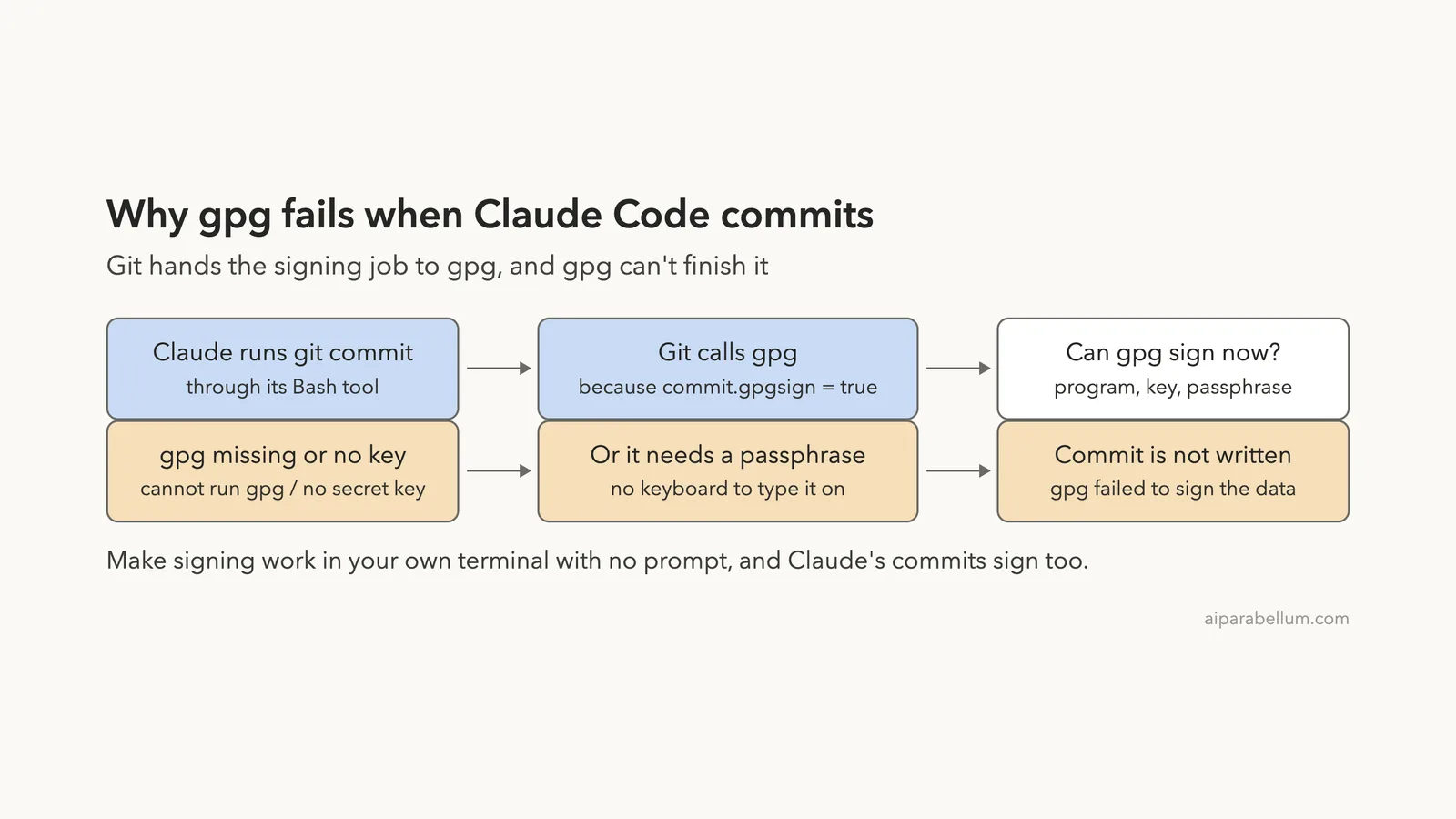
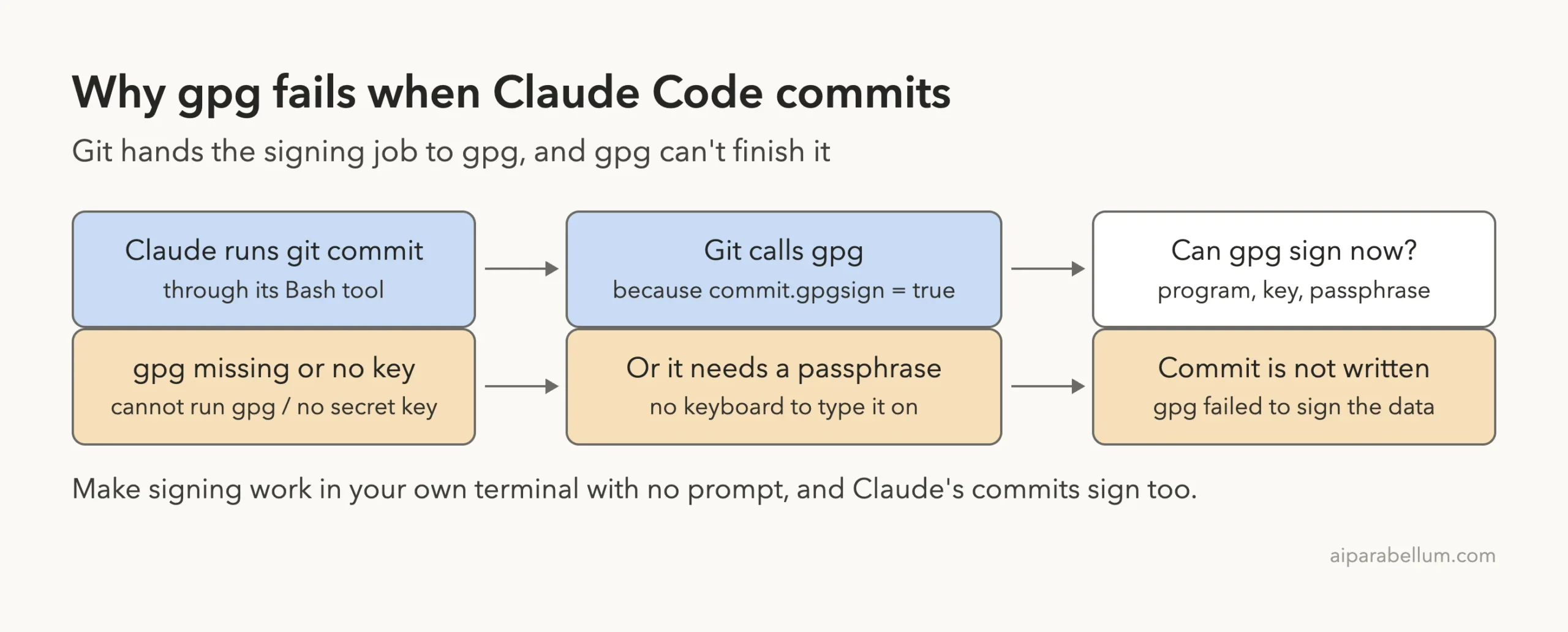
A Claude Code gpg failed to sign error means the commit itself is fine; the signing step is not. Your Git config says every commit must be signed (commit.gpgsign = true), so Git hands the commit to gpg. If gpg is missing, can’t find your key, or needs a passphrase that nobody can type, Git prints error: gpg failed to sign the data and fatal: failed to write commit object, and no commit is made.
The short answer: make a signed commit work in your own terminal with no prompt, and Claude’s commits will sign too. Install gpg if it’s missing, point user.signingkey at a key you really have, and use pinentry-mac or an unlocked key so the passphrase never has to be typed into Claude’s shell. Or switch Git to SSH signing, which we tested end to end below.
Claude Code can’t type a passphrase for you, and it shouldn’t skip signing on its own. Below we reproduce the error for real, show what Claude says about it, and walk through every fix.
Browse all our Claude Code tutorials for more fixes and how-tos.
Tested with Claude Code v2.1.332 on macOS on November 28, 2026. Every run used a throwaway demo project called notes-app with its own separate Git config, a made-up GPG key ID and a fresh SSH key created just for this test. We reproduced the missing-gpg case and tested the SSH-signing fix; the GPG passphrase fixes follow GnuPG’s standard setup and were not part of our test run.
We tested on macOS; the Windows and Linux steps follow Anthropic’s official instructions and the same Git and GnuPG commands.
Quick Summary
| Line above the error | Cause | Fix | Reproduced in our test? |
|---|---|---|---|
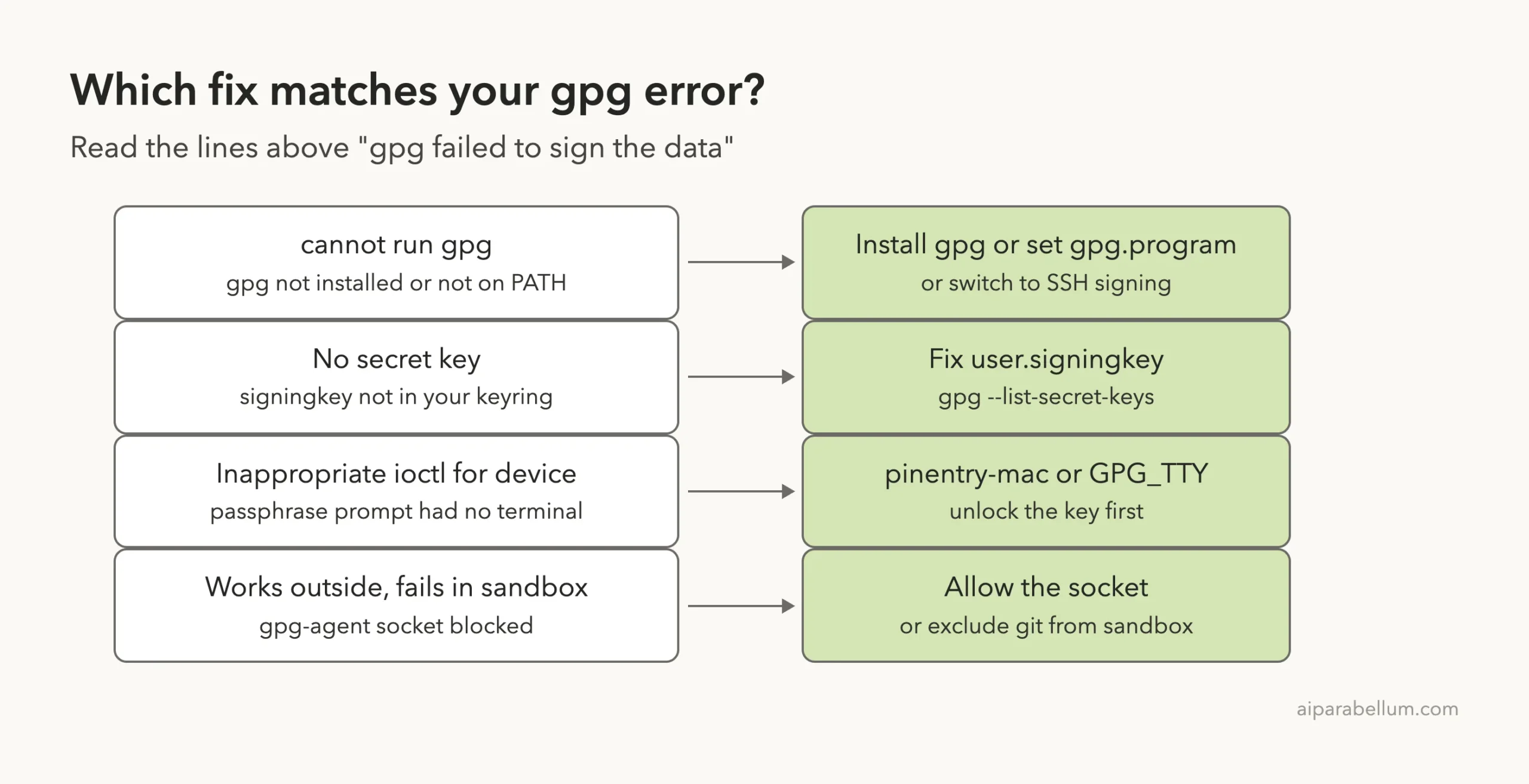
error: cannot run gpg: No such file or directory | gpg not installed or not on PATH | Install GnuPG, set gpg.program, or use SSH signing | Yes |
No secret key | user.signingkey points to a key you don’t have | Set the right key ID from gpg --list-secret-keys | From GnuPG’s tools |
Inappropriate ioctl for device | gpg tried to ask for a passphrase with no terminal | pinentry-mac, GPG_TTY, unlock the key first | From GnuPG’s tools |
| Works in your terminal, fails only inside Claude’s sandbox | The sandbox blocks Unix sockets, including gpg-agent’s | sandbox.network.allowUnixSockets or excludedCommands | From the docs |
| Any of the above, and you just need this one commit | Signing can’t finish right now | Run git commit yourself | Yes (SSH fix) |
Why gpg Failed to Sign When Claude Code Commits
Claude Code doesn’t sign anything itself. When you ask it to commit, it runs the same git commit you would type, through its Bash tool, using your Git config, your keys and your gpg setup.
Git then calls gpg to sign the commit. If gpg can sign right away, the commit goes through. If gpg is missing, can’t find the key, or wants to ask you for a passphrase, the signing fails, and Git refuses to write an unsigned commit.
To see the error clearly, we turned on signing in a demo repo’s Git config, set a made-up key ID and staged one change. Then we tried a normal commit in our own terminal first.
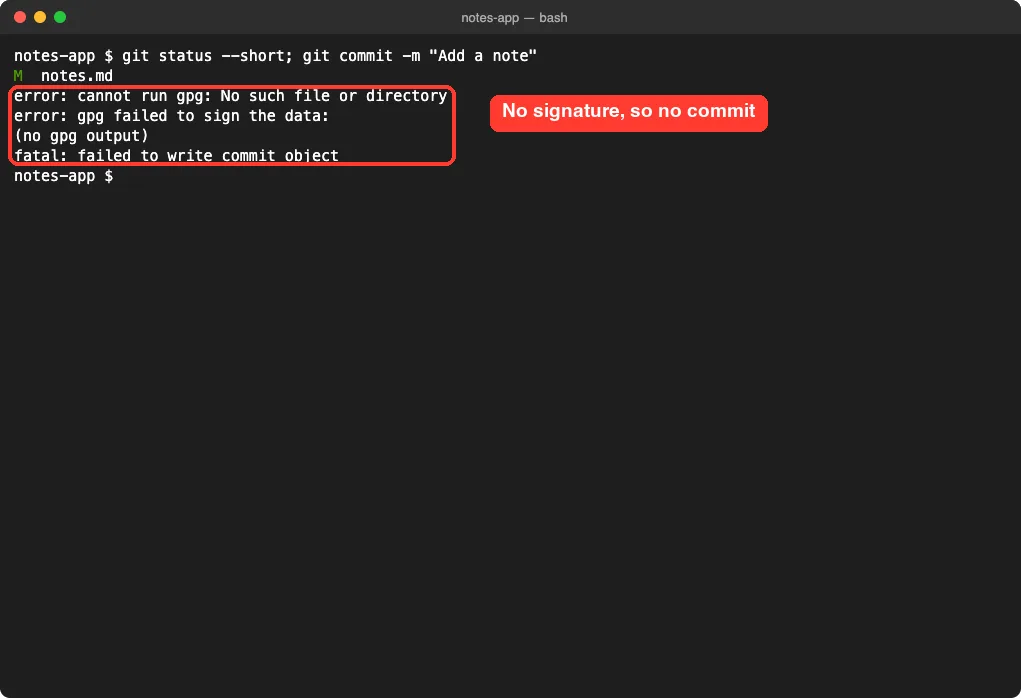
This proves the problem lives in Git and gpg, not in Claude. The full output was error: cannot run gpg: No such file or directory, then error: gpg failed to sign the data:, (no gpg output) and fatal: failed to write commit object.
The line above “gpg failed to sign the data” tells you the real cause. Read it before you change anything.
What “gpg Failed to Sign” Looks Like Inside Claude Code
Next we started Claude Code in the same folder and asked it to commit the staged change. We also told it to quote the exact error, explain it in three lines, and not change any Git config or skip signing.
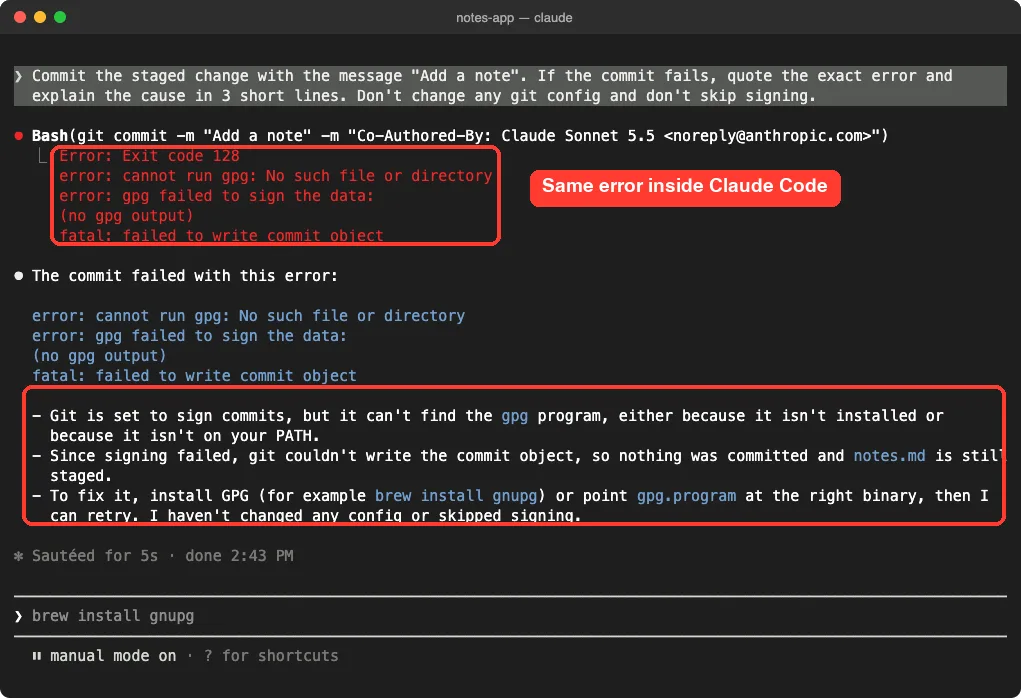
The commit failed with exit code 128 and the exact same four lines. Claude’s reading was right: Git is set to sign commits but can’t find gpg, so nothing was committed and notes.md was still staged. It suggested installing GnuPG or pointing gpg.program at the right binary, and it confirmed it had not skipped signing.
Before the commit ran, Claude Code showed its usual permission prompt for git commit. Claude also added a Co-Authored-By trailer to the message, which you can change or hide with the attribution.commit setting in the settings reference.
Check your signing setup
Run these in your own terminal, in the project folder. They show whether signing is on, which file turned it on, and whether gpg is even there.
git config --show-origin --get commit.gpgsign
git config --show-origin --get user.signingkey
git config --get gpg.program
command -v gpg
echo "$GPG_TTY"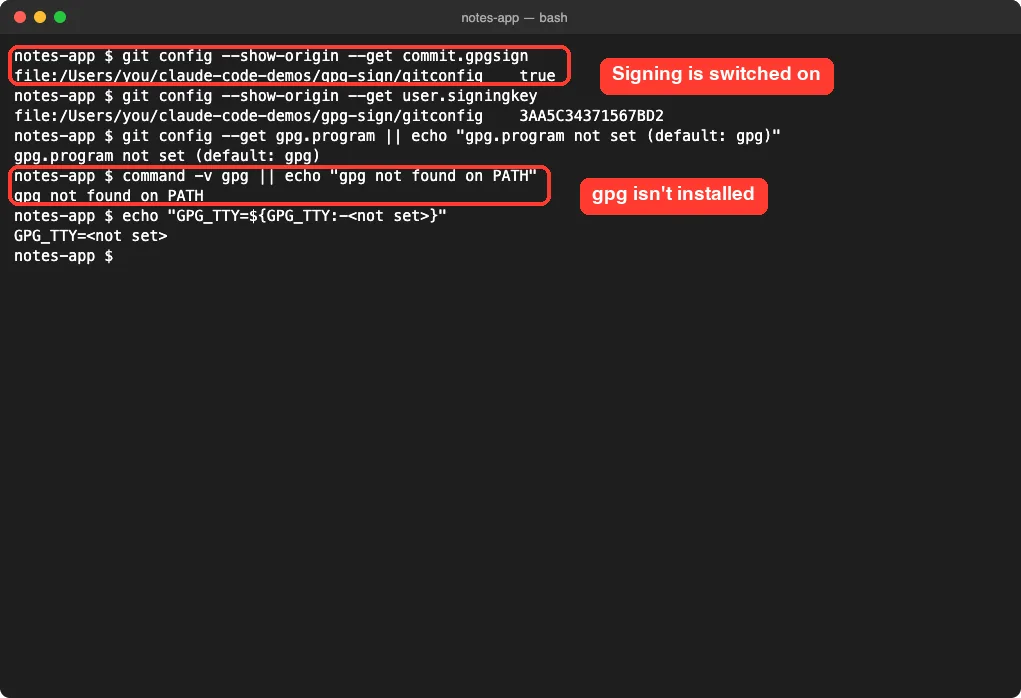
The --show-origin flag is handy. It names the exact file that turned signing on, so you know whether it came from your global ~/.gitconfig, the repo’s own config, or a company-managed file.
Fix 1: Install gpg or Point Git at It
If you see cannot run gpg, Git can’t find the program. On macOS the usual install is Homebrew:
brew install gnupg
gpg --version
On Linux, install the gnupg package from your distro. On Windows, Git for Windows ships its own gpg, and many people use Gpg4win instead.
If gpg is installed but in an odd place, tell Git exactly where it is. Use the full path that command -v gpg or which gpg prints:
git config --global gpg.program /opt/homebrew/bin/gpgA quick check: Claude Code runs commands with the environment it started with. If you installed gpg after opening Claude, restart Claude Code from a fresh terminal so its PATH includes the new program. Our guide to shell config errors covers how your profile reaches Claude’s Bash tool.
Fix 2: Use a Key You Actually Have
If gpg runs but prints No secret key, the key ID in user.signingkey isn’t in your keyring. List the keys you can sign with:
gpg --list-secret-keys --keyid-format=longCopy the long key ID from the sec line and set it:
git config --global user.signingkey YOUR_KEY_IDAlso check that your user.email matches an email on that key if you want GitHub or GitLab to show the commit as verified. Then make a test commit in your own terminal before you go back to Claude.
Fix 3: Stop gpg From Asking for a Passphrase in Claude’s Shell
This is the most common cause on machines where signing works fine by hand. Your key has a passphrase, gpg needs to ask for it, and Claude’s Bash tool has no keyboard to answer. The tell-tale line is gpg: signing failed: Inappropriate ioctl for device.
It’s the same family of problem as other prompts that stall Claude, which we cover in our guides to hanging interactive commands and the sudo password prompt.
Use a graphical pinentry on macOS
A graphical pinentry asks for the passphrase in a small window instead of the terminal. That window can appear even when Claude is the one running the commit.
- Install it:
brew install pinentry-mac - Add this line to
~/.gnupg/gpg-agent.conf, using the path fromwhich pinentry-mac:pinentry-program /opt/homebrew/bin/pinentry-mac - Restart the agent:
gpgconf --kill gpg-agent - Test it:
echo test | gpg --clearsign
On Linux desktops, a graphical pinentry such as pinentry-gnome3 or pinentry-qt plays the same role.
Set GPG_TTY in your shell profile
gpg’s terminal prompt needs to know which terminal to use. Add this line to ~/.zshrc or ~/.bashrc:
export GPG_TTY=$(tty)This fixes passphrase prompts in your own terminal. It can’t make Claude’s Bash tool answer a prompt, so pair it with an unlocked key or a graphical pinentry.
Unlock the key before you start Claude
gpg-agent remembers your passphrase for a while after you use it. Sign something once in your own terminal, for example with echo test | gpg --clearsign, then start Claude Code. Its commits can reuse the cached passphrase.
How long the cache lasts is set by default-cache-ttl and max-cache-ttl in gpg-agent.conf. Longer caching is more convenient but less safe, so choose a value you’re comfortable with.
Fix 4: Switch Git to SSH Signing (Tested)
Git can sign commits with an SSH key instead of a GPG key. Many people already have SSH set up for GitHub, so this can be the quickest way out. We tested it in our demo repo with a fresh key.
ssh-keygen -t ed25519 -C "[email protected]"
git config gpg.format ssh
git config user.signingkey ~/.ssh/id_ed25519.pub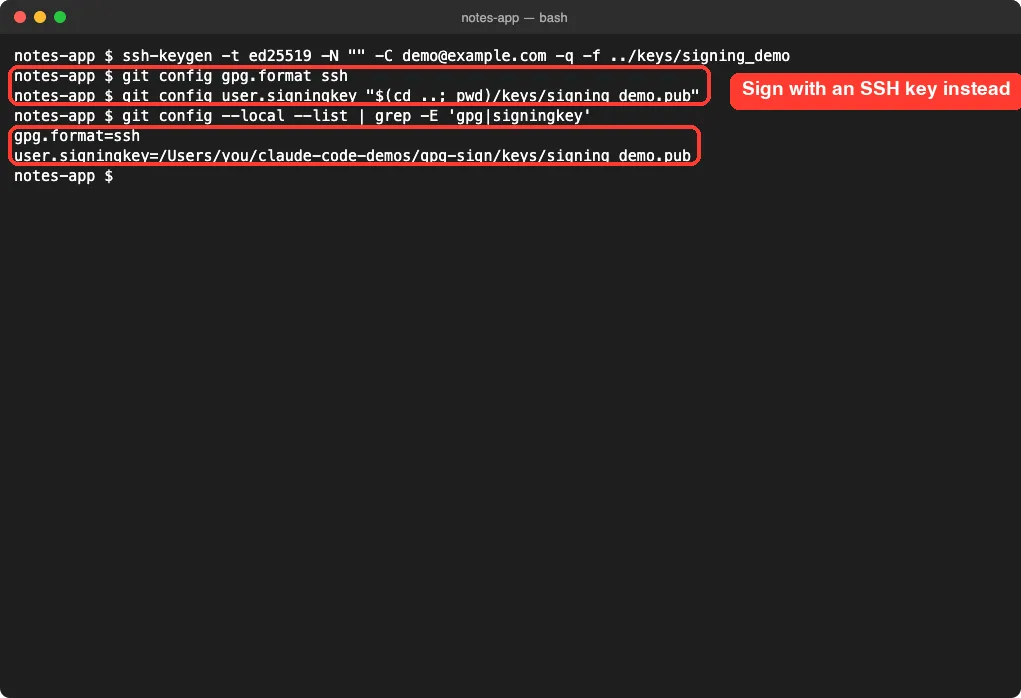
We set both values without --global, so they applied to the demo repo only. Add --global if you want SSH signing everywhere. Our demo key had no passphrase to keep the test simple; for your real key, keep a passphrase and load it with ssh-add before you start Claude, so nothing has to be typed.
Then we started Claude Code again and asked it to retry the same commit and show the last two commits.
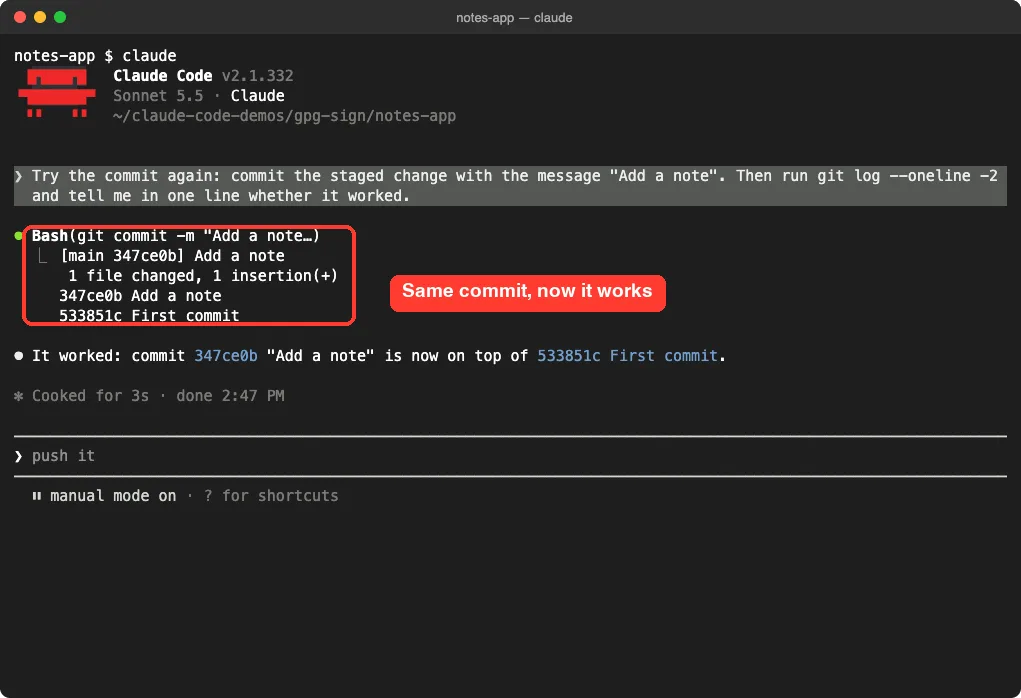
The commit worked on the first try. Nothing about Claude changed; only the signing method did.
Verify the SSH signature
To check SSH signatures locally, Git needs an allowed signers file that maps emails to public keys:
echo "[email protected] namespaces=\"git\" $(cat ~/.ssh/id_ed25519.pub)" > ~/.ssh/allowed_signers
git config --global gpg.ssh.allowedSignersFile ~/.ssh/allowed_signers
git log --show-signature -1
git verify-commit HEAD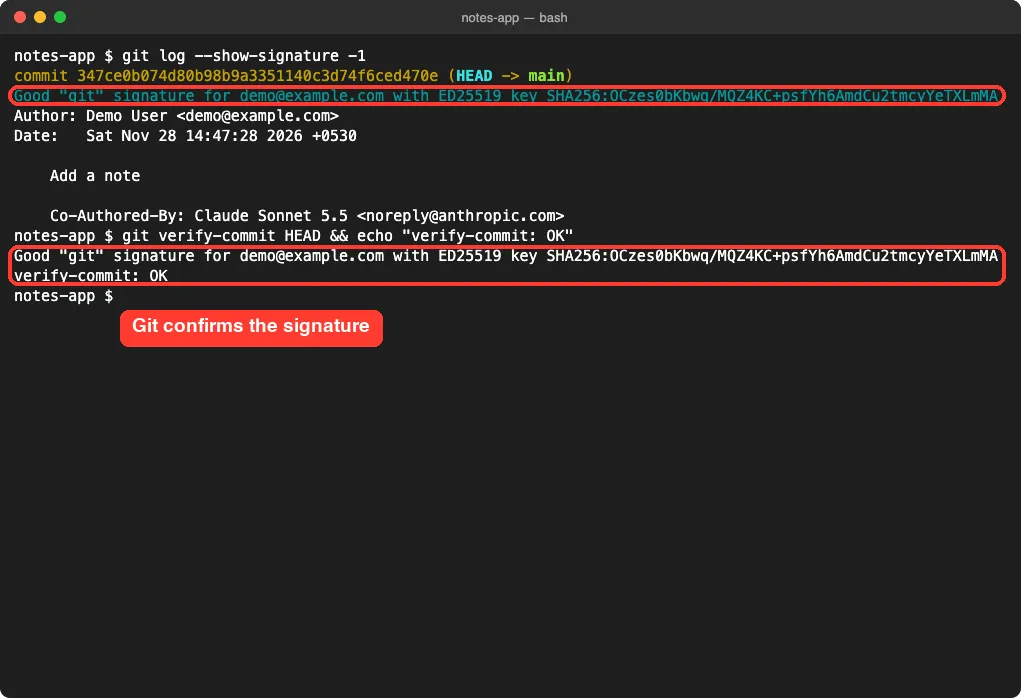
Both commands reported Good "git" signature for the demo email. On GitHub, add the same public key as a signing key in your account settings so the site marks these commits as verified.
Fix 5: Allow gpg-agent Through Claude Code’s Sandbox
If signing works in your terminal but fails only when Claude runs it with the sandbox turned on, look at the sandbox. gpg talks to gpg-agent over a Unix socket, and Claude Code’s settings reference says that, by default, the macOS sandbox blocks every Unix socket.
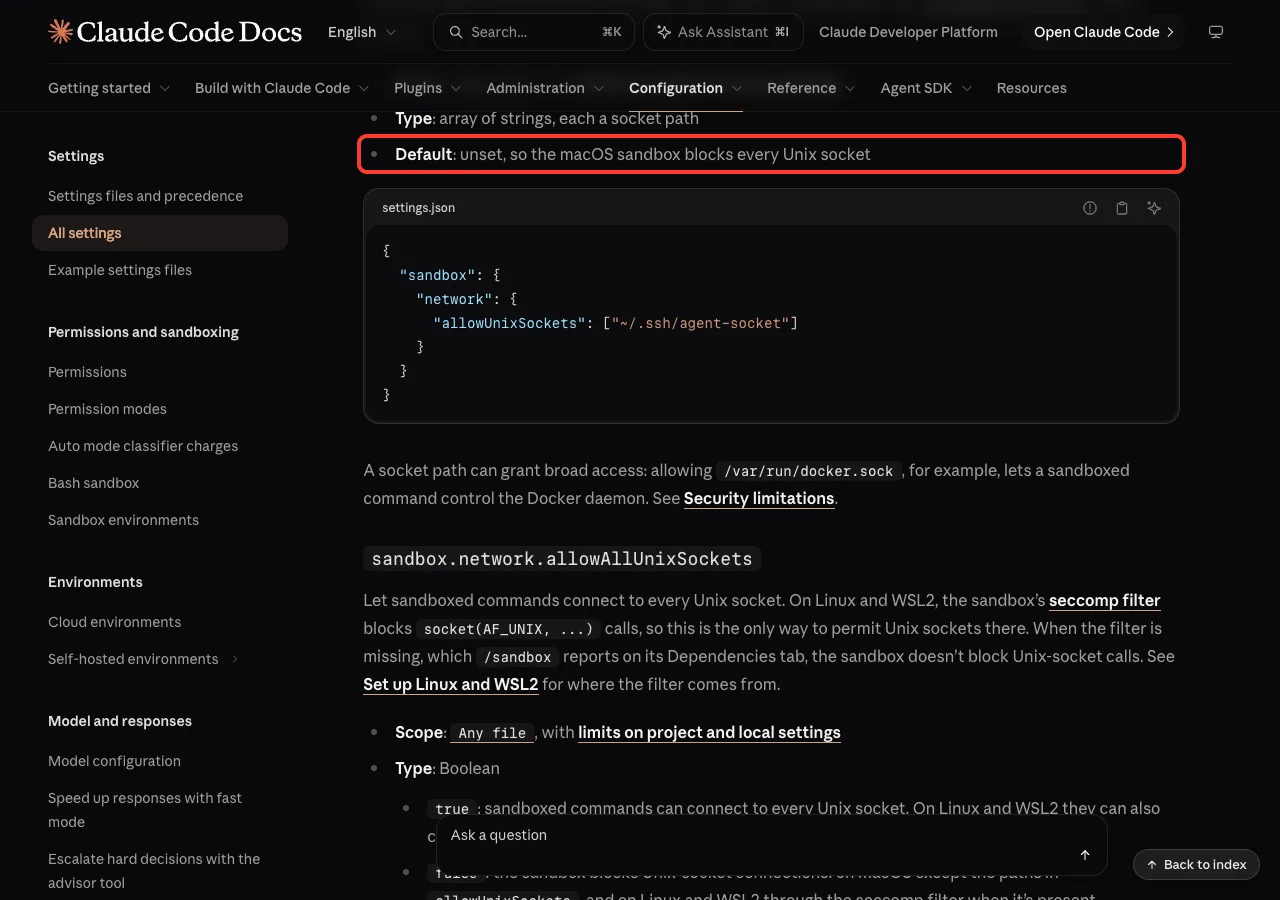
You have two ways out. List the gpg-agent socket in sandbox.network.allowUnixSockets (find its path with gpgconf --list-dirs agent-socket), or run Git commits outside the sandbox with sandbox.excludedCommands.
{
  "sandbox": {
    "excludedCommands": ["git commit *"]
  }
}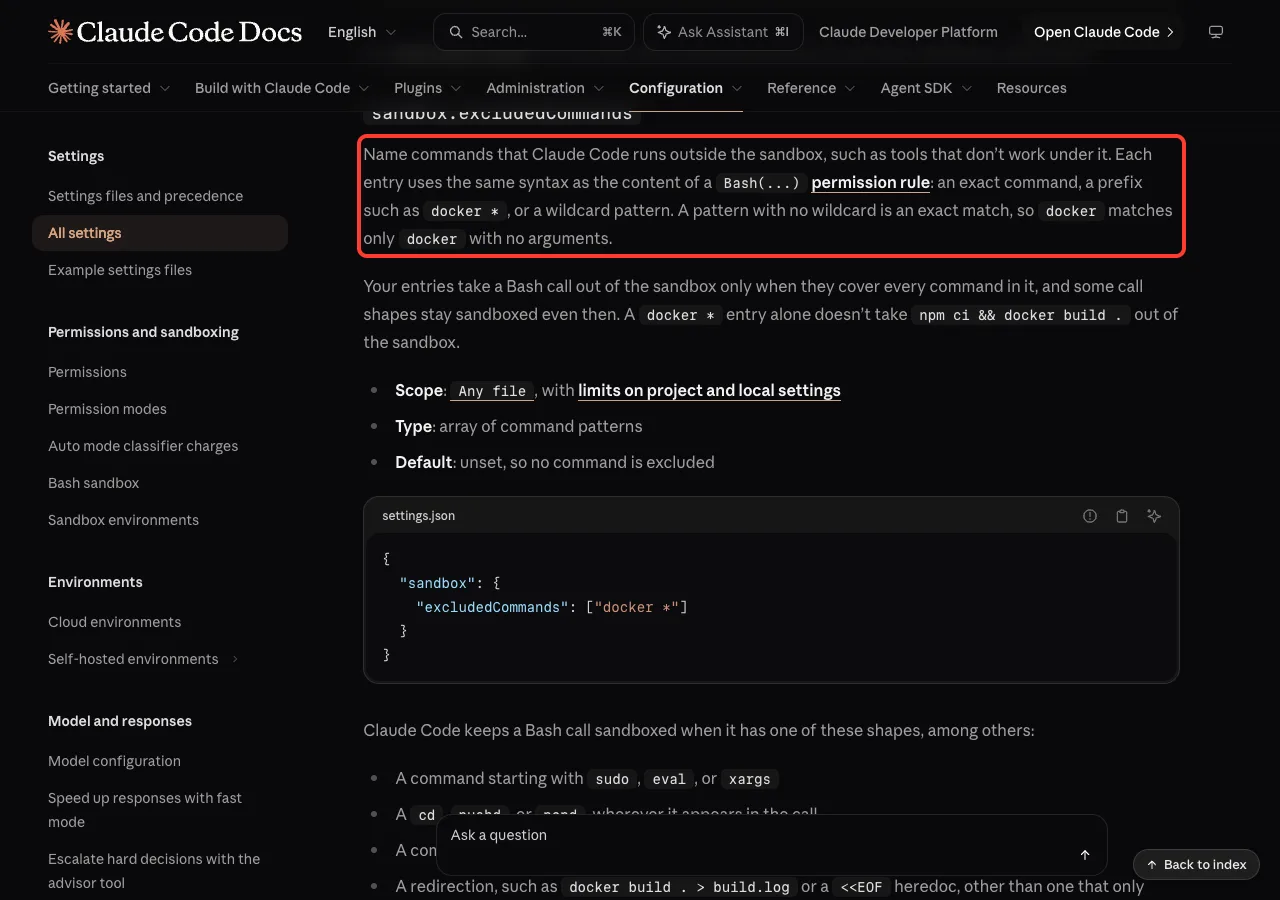
Commands that run outside the sandbox go back through the normal permission prompt, so you still approve each commit. On Linux and WSL2, the docs say allowUnixSockets is ignored and allowAllUnixSockets is the option there. We didn’t run the sandbox in our test, so this fix comes from the sandboxing docs; our Claude Code sandbox guide covers the rest.
Fix 6: Run the Commit Yourself
Sometimes you just need this one commit done. Let Claude stage the changes and write the message, then run the commit yourself, either in another terminal or with Claude Code’s ! shell mode.
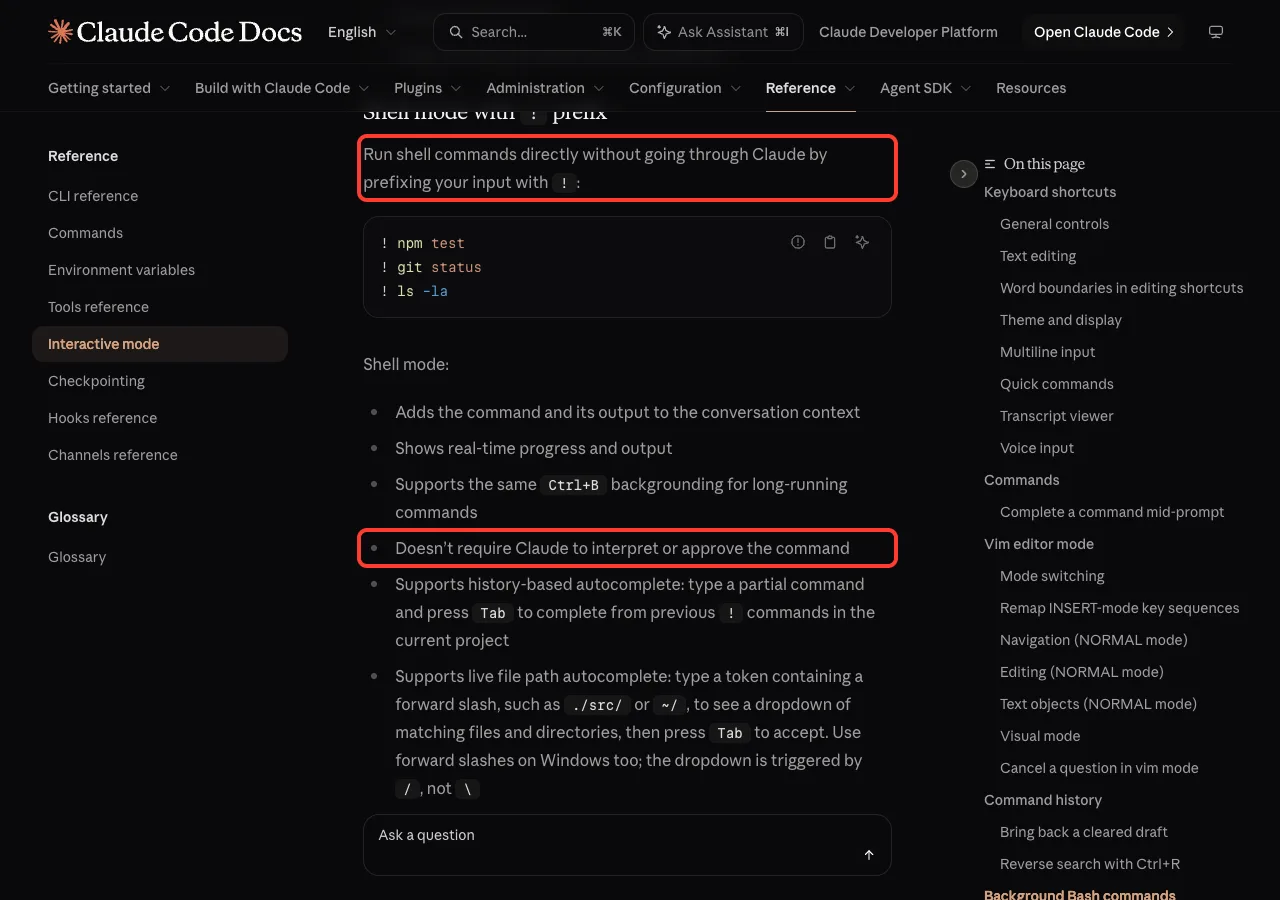
The interactive mode docs say ! commands run directly, without Claude interpreting or approving them, and the output lands in the conversation.
If your key needs a passphrase prompt in the terminal, use a separate terminal tab instead, since that is a normal shell where you can type. Our shortcuts guide covers shell mode and other input tricks.
What about skipping signing?
Git can skip signing for one commit with git commit --no-gpg-sign, or for one repo with git config commit.gpgsign false. Only do this when unsigned commits are acceptable for that repo. Many teams require signed commits, and a branch rule may reject the push later.
Don’t let Claude make that choice for you. Add a line like “Never use –no-gpg-sign or turn off commit signing” to your project’s CLAUDE.md, just as we said it in our test prompt, so Claude knows to stop and explain instead.
Try It Yourself
Make a safe practice repo with its own config, so your real Git setup stays untouched:
mkdir sign-practice && cd sign-practice
git init && echo "hello" > notes.txt && git add .
git config commit.gpgsign true
git config gpg.program does-not-exist
git commit -m "First commit"
You’ll get a cannot run error followed by gpg failed to sign the data. Now start claude in that folder and paste this prompt:
Commit the staged change with the message "First commit". If it fails, quote the exact error and explain the cause in 3 short lines. Don't change any git config and don't skip signing.Then fix it with the SSH signing steps above, using repo-local git config commands, and ask Claude to retry. When you’re done, delete the practice folder.
Common Mistakes
- Asking Claude to type your gpg passphrase. It can’t answer a terminal prompt, and you shouldn’t paste a passphrase into the chat.
- Letting Claude “fix” the error with
--no-gpg-signon a repo that requires signed commits. - Setting
user.signingkeyto a key on another machine, then wondering why gpg saysNo secret key. - Installing gpg but leaving Claude Code open, so its PATH still doesn’t include it.
- Editing
gpg-agent.confwithout restarting the agent withgpgconf --kill gpg-agent. - Testing only inside Claude. Always try
git commitin your own terminal first to separate Git problems from Claude Code problems.
Pro Tips
- Start Claude Code from a terminal where a signed
git commitalready works. Claude uses that same environment. - Ask Claude to quote the exact error before fixing anything. In our test, its first read of the error was correct.
- SSH signing with a key loaded in
ssh-agentavoids most passphrase trouble, as long as the sandbox isn’t blocking the agent socket. - If pushing fails after the commit works, that’s a login problem, not a signing one. See our push error fixes.
- Want a tidy commit flow? Our commit commands plugin guide shows one, and the common workflows docs cover commits and pull requests.
- For other Claude Code failures, check our list of common Claude Code errors.
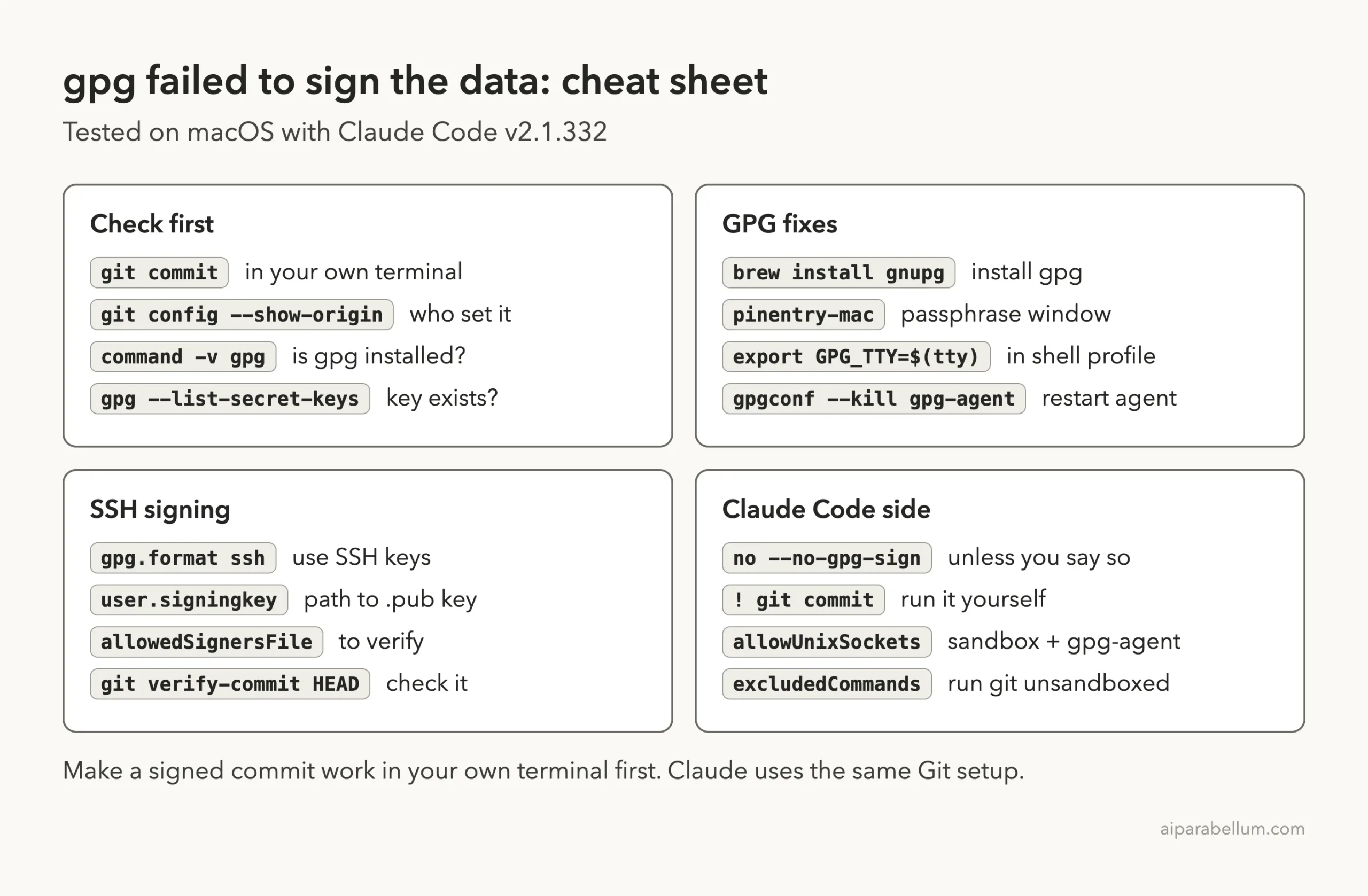
Cheat Sheet
Frequently Asked Questions
Why does git commit work in my terminal but fail in Claude Code?
Usually because gpg asks for your passphrase. Your terminal can show that prompt, but Claude’s Bash tool can’t, so signing fails. Unlock the key first, use a graphical pinentry, or switch to SSH signing.
Can Claude Code sign commits with my GPG key?
Yes. Claude runs your normal git commit, so it uses your gpg setup and key. It works as long as gpg can sign without asking a question in the terminal.
Is it safe to turn off commit signing for Claude?
Only if unsigned commits are fine for that repo. If your team or branch rules require signatures, fix signing instead, because unsigned commits may be rejected later.
Does Claude Code’s sandbox break gpg signing?
It can on macOS. The docs say the sandbox blocks every Unix socket by default, and gpg uses one to reach gpg-agent. Allow the socket or exclude git commit from the sandbox.
What does “fatal: failed to write commit object” mean?
Git stopped before saving the commit, here because signing failed. Your changes are still staged, so nothing is lost; fix signing and commit again.
Conclusion
When Claude Code hits “gpg failed to sign the data”, read the line above it: cannot run gpg means gpg is missing or off your PATH, No secret key means a wrong user.signingkey, and Inappropriate ioctl for device means gpg wanted a passphrase that nobody could type. Install gpg, fix the key, unlock it or use pinentry-mac, or switch to SSH signing, which fixed the same commit in our test without any change to Claude. If it fails only with the sandbox on, allow the gpg-agent socket or exclude commits from the sandbox, and get a signed commit working in your own terminal first. To learn more about the model behind the tool, see our Claude AI overview.