When Claude Code output is truncated, Claude only sees part of what a command printed. A long build log, a full test run or a big git log goes past the limit, and Claude gets a short preview plus the path of a saved file instead of the whole text. In the transcript you see a line like … more output (1.2MB in all) saved to ..., and Claude may guess at the part it never saw.
The short answer: by default Claude receives up to about 30,000 characters of a successful command inline. To raise that, set the bashOutputMaxChars setting (4,000 to 128,000) in a settings file. The BASH_MAX_OUTPUT_LENGTH environment variable most people search for only sizes the read-back window (up to 150,000), and in our test it did not stop a 43,893-character output from going to a file.
For output bigger than any limit, have Claude write it to a file and read the parts it needs with tail, grep or sed. Below we reproduce the truncation for real, test each fix, and show which one to pick.
Browse all our Claude Code tutorials for more fixes and how-tos.
Tested with Claude Code v2.1.332 on macOS on November 28, 2026. Every run used a throwaway demo project called log-demo with two tiny files, and the only settings file we changed was that project’s own .claude/settings.local.json.
We tested on macOS; the limits and settings are the same on Windows and Linux, following Anthropic’s official instructions.
Quick Summary
| What you want | What to use | Range | Did it work in our test? |
|---|---|---|---|
| Claude sees more of a successful command inline | bashOutputMaxChars setting | 4,000 to 128,000 characters | Yes: 43,893 characters came back in full |
| A bigger read-back window and bigger failure excerpts | BASH_MAX_OUTPUT_LENGTH env var | Up to 150,000 characters | No change to inline: still a saved file |
| Output larger than any limit | Save to a file, then tail, grep, sed | No limit | Yes, any line of a 1.29 MB log |
| Only the end or the errors matter | Pipe to tail -n 50 or grep | No limit | Yes |
What Truncated Bash Output Looks Like in Claude Code
We asked Claude Code to run seq 1 200000, which prints 200,000 numbered lines (1,288,895 characters). Then we asked Claude, without reading any file, how the output reached it and which number it could see last.
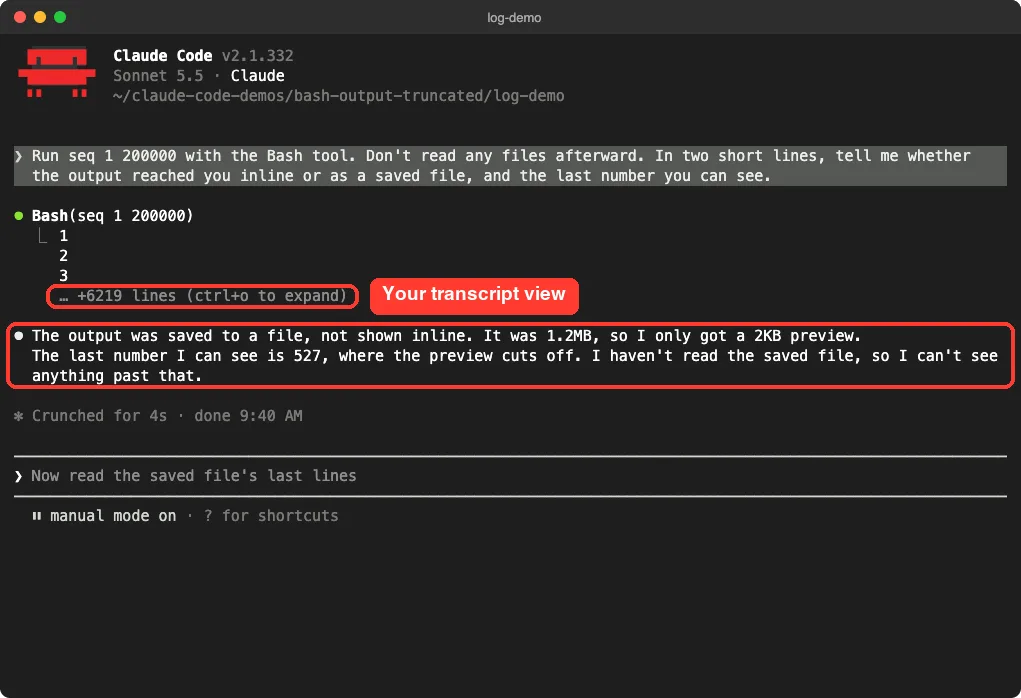
Claude’s answer matches the docs exactly. The output went to a file, Claude received only a 2 KB preview, and the last number it could see was 527. Everything past that was invisible to it unless it opened the file.
Why you and Claude see different amounts
Here is the part that confuses people. Press ctrl+o to open the detailed transcript, and you see far more than Claude did: thousands of lines, up to 6221, then a note with the saved file’s path.
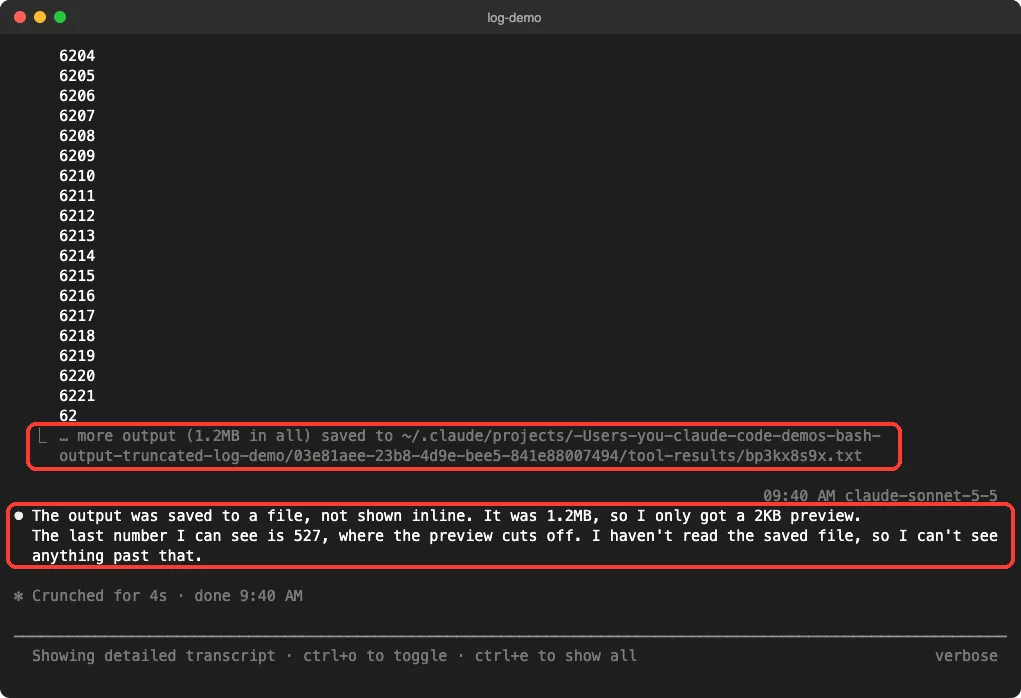
That number is no accident. Lines 1 to 6221 add up to about 30,000 characters, which is the default read-back window. So the transcript can look complete to you while Claude worked from a 2,000-character preview.
What you see in the transcript is not always what Claude saw. Ask Claude what it actually received before you trust its summary.
Why Claude Code Truncates Command Output
Every character Claude reads goes into its context window. A single 1 MB log could fill most of it and push out your actual conversation. So Claude Code keeps big outputs out of the conversation and gives Claude a way to read them on demand.
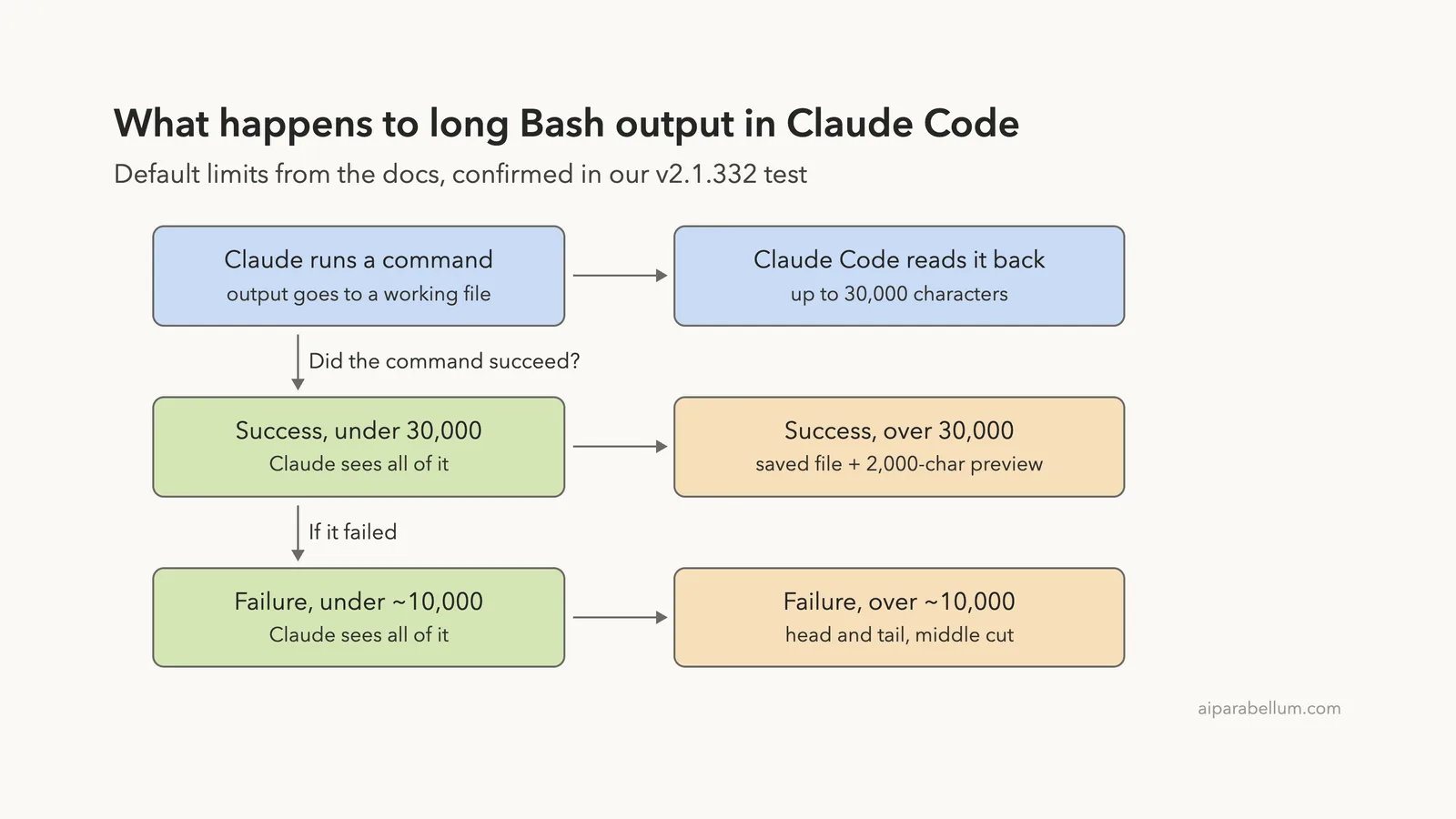
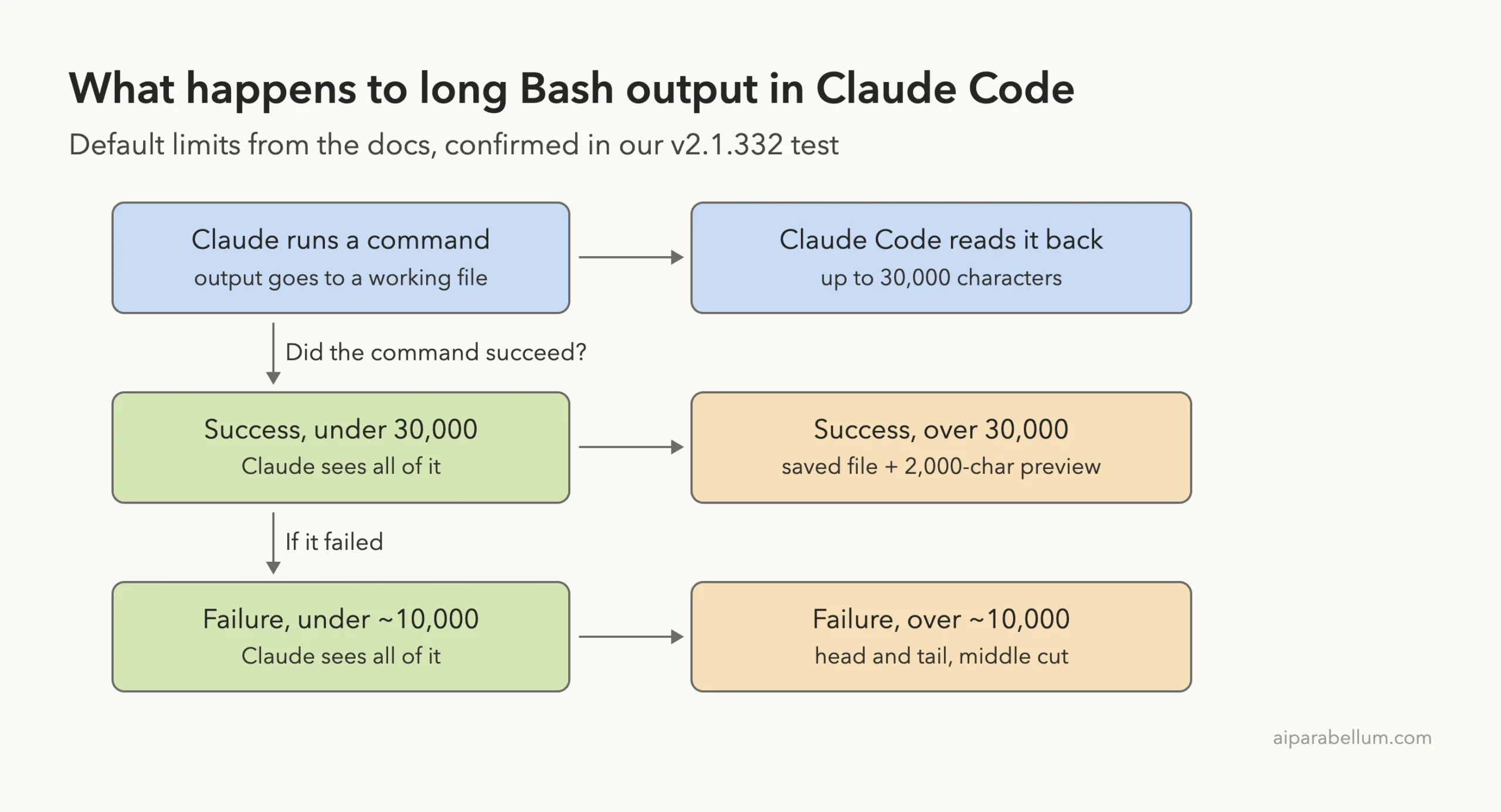
Anthropic’s tools reference describes the rules. Claude Code streams a command’s output to a working file, then reads it back when the command ends. What Claude gets depends on whether the result counts as valid or as a failure.
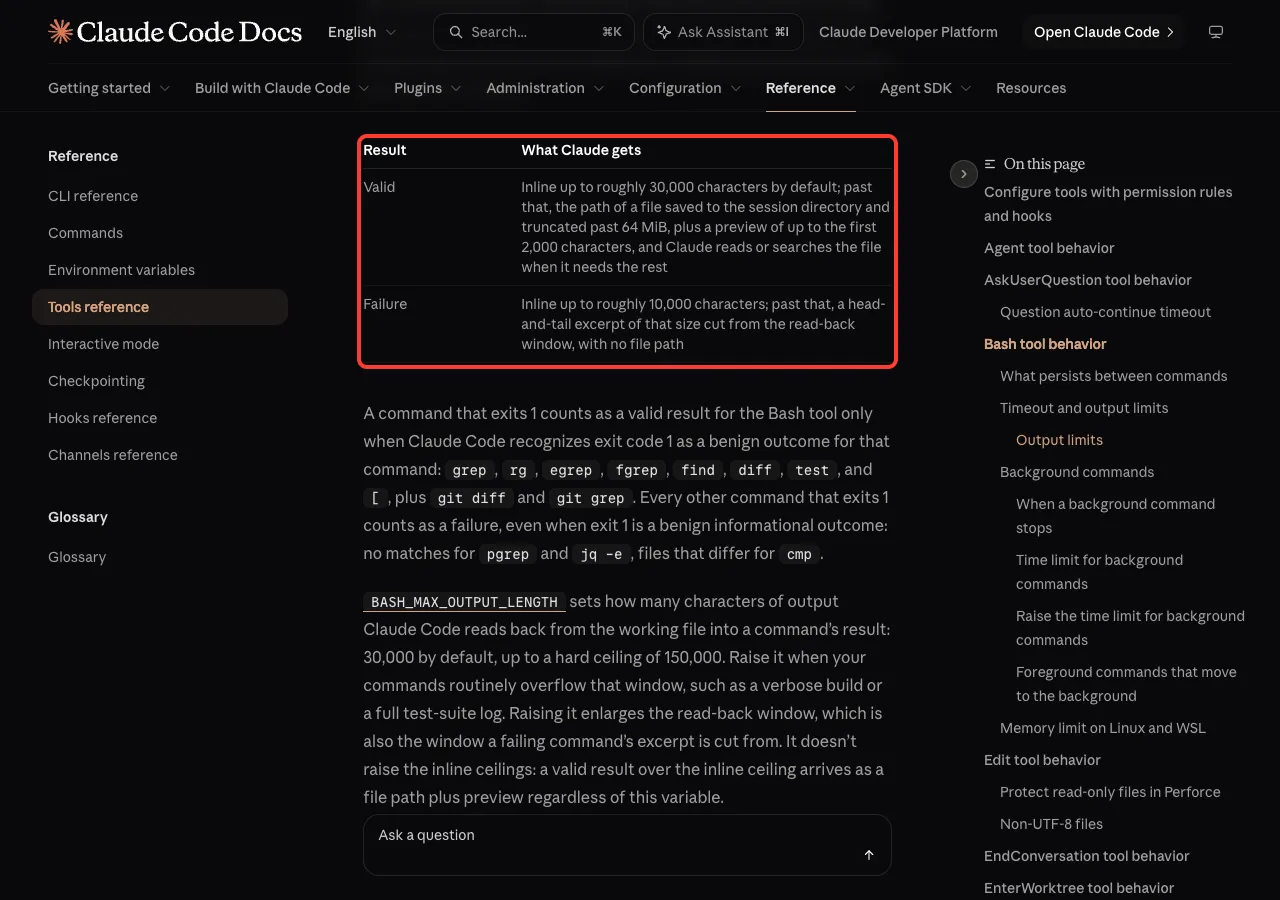
- A valid result under about 30,000 characters arrives inline, in full.
- A valid result over that becomes a saved file plus a preview of up to the first 2,000 characters. Claude reads or searches the file when it needs more.
- A failed command under about 10,000 characters arrives inline.
- A failed command over that becomes a head-and-tail excerpt with the middle cut out, and no file path.
The docs add one detail about exit codes. A command that exits 1 counts as valid only for commands where that’s a normal outcome, such as grep, find, diff and git diff. Any other non-zero exit is treated as a failure.
This is a different problem from Claude’s own replies being cut off. If you see a message about Claude’s response hitting a token limit, see our guide to the output token maximum instead.
Fixes for Claude Code Output Truncated
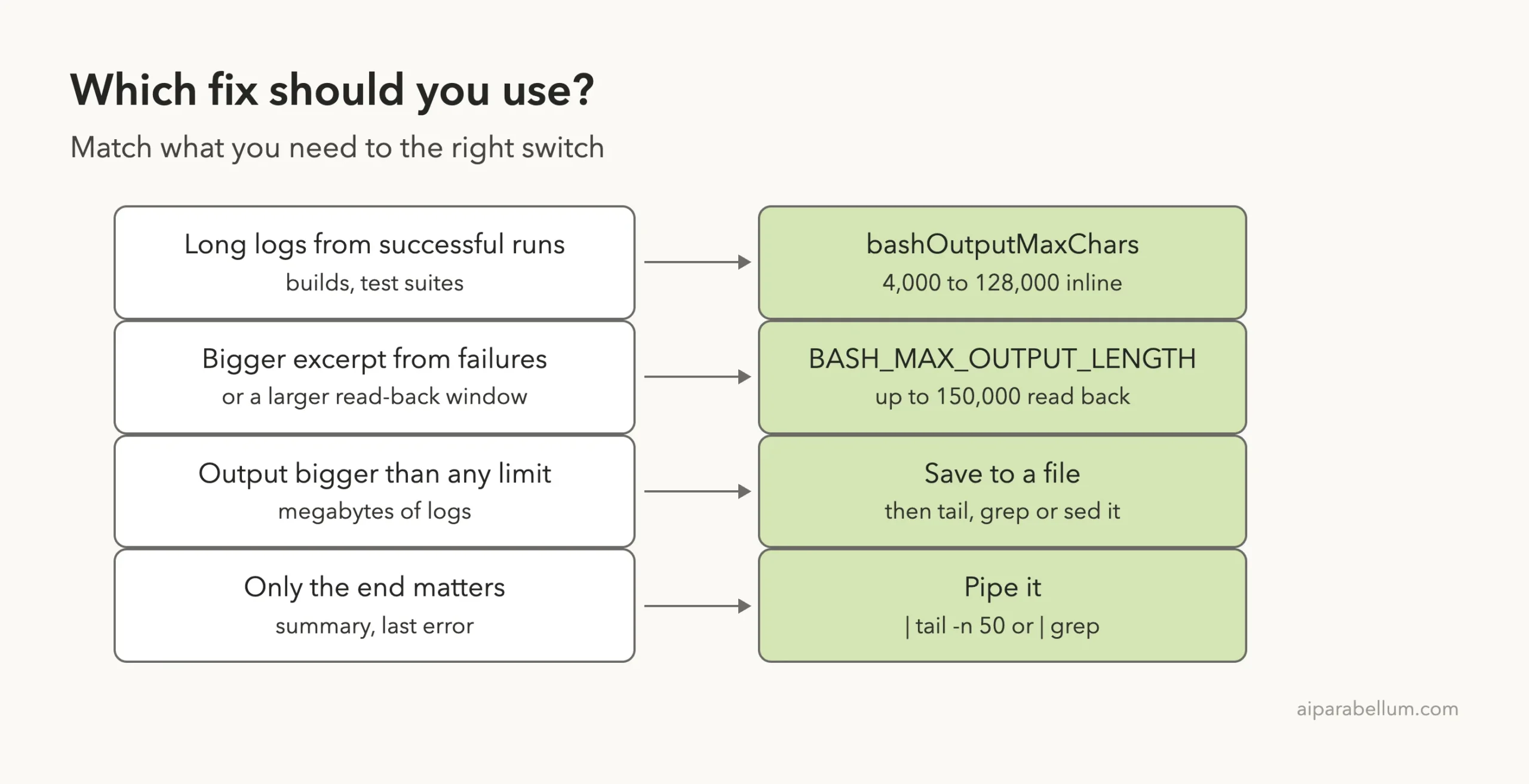
Pick the fix by what you need. If Claude should read long successful logs in full, start with Fix 1.
Fix 1: Raise the inline limit with bashOutputMaxChars
The settings reference lists bashOutputMaxChars as the setting that controls how many characters of a successful command Claude receives inline. It needs Claude Code v2.1.261 or later and works in any settings file.
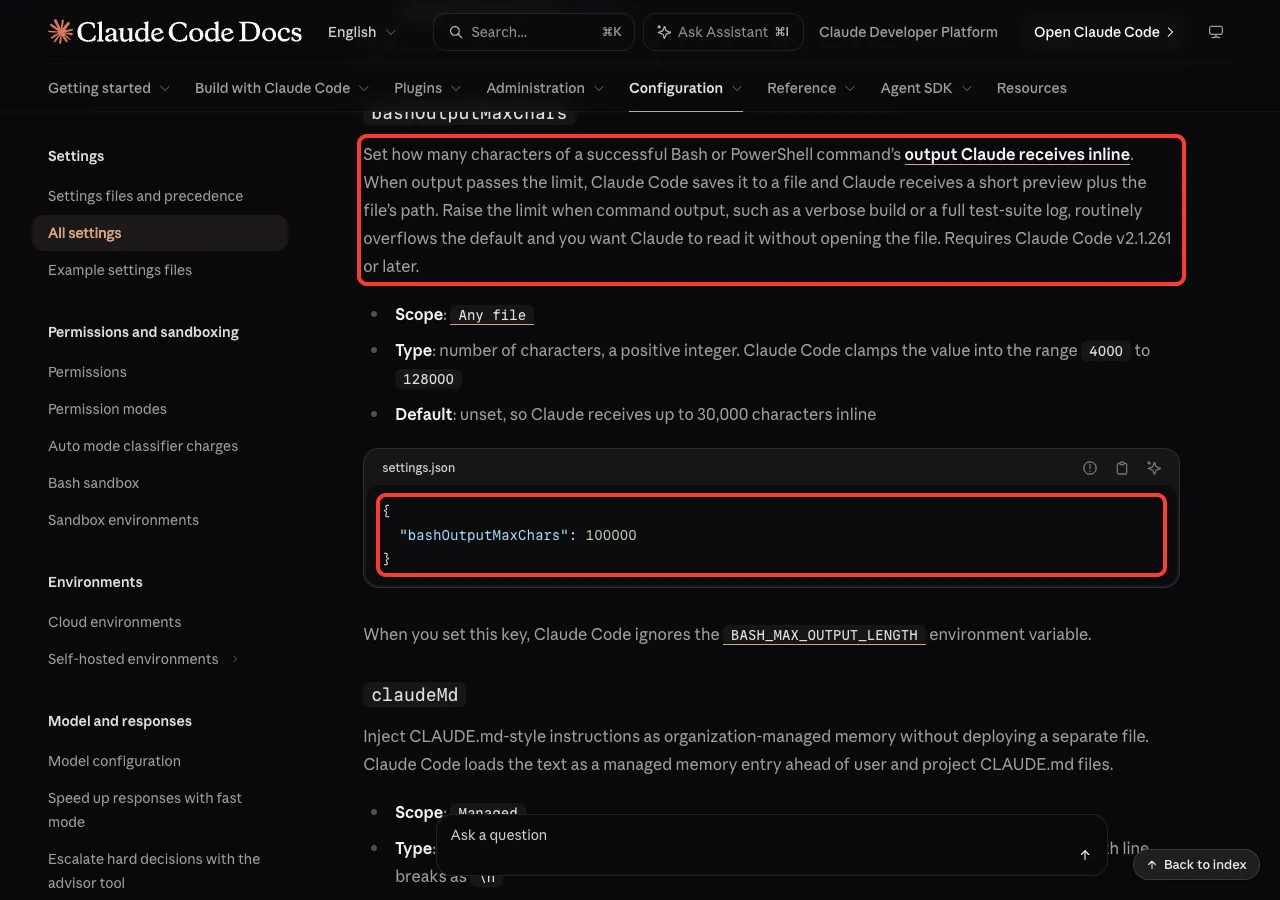
To apply it to one project only, put it in .claude/settings.local.json inside that project:
{
  "bashOutputMaxChars": 100000
}
Use ~/.claude/settings.json instead if you want it everywhere. Claude Code clamps the value to the range 4,000 to 128,000, so a larger number just becomes 128,000.
We tested it with seq 1 9000, which prints 43,893 characters. That’s over the default 30,000, so without the setting it went to a saved file. With the setting at 100,000 and no environment variable set, a fresh session got the full output inline.
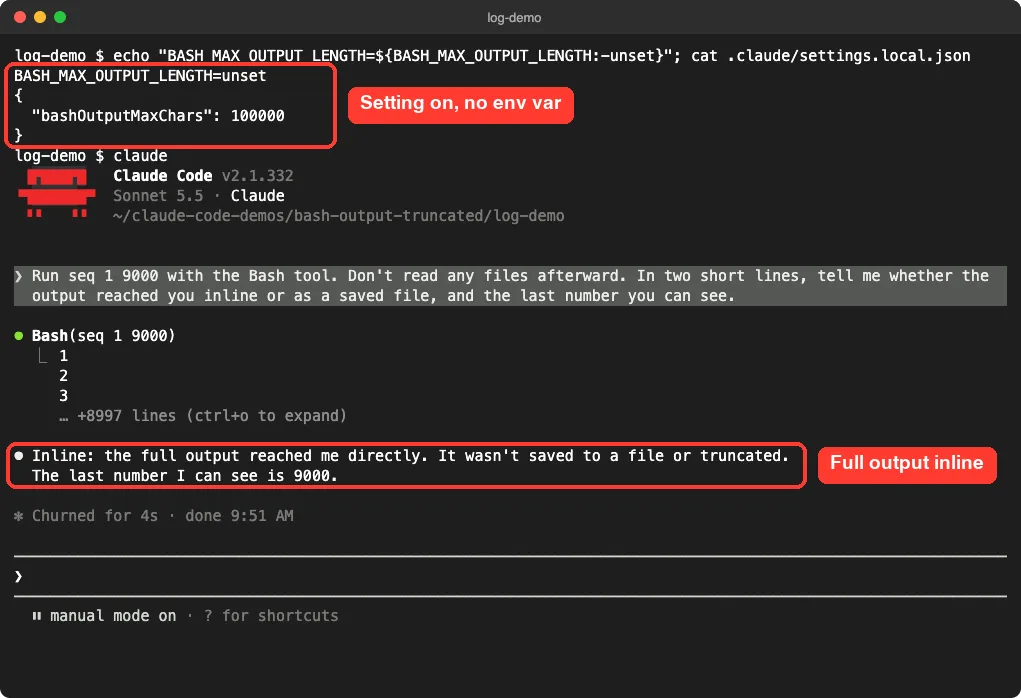
One thing we noticed while testing: when the setting was added to settings.local.json during a running session, the next command already used it. Still, start a new session after the change if you want to be sure.
Fix 2: Set BASH_MAX_OUTPUT_LENGTH (and know what it does)
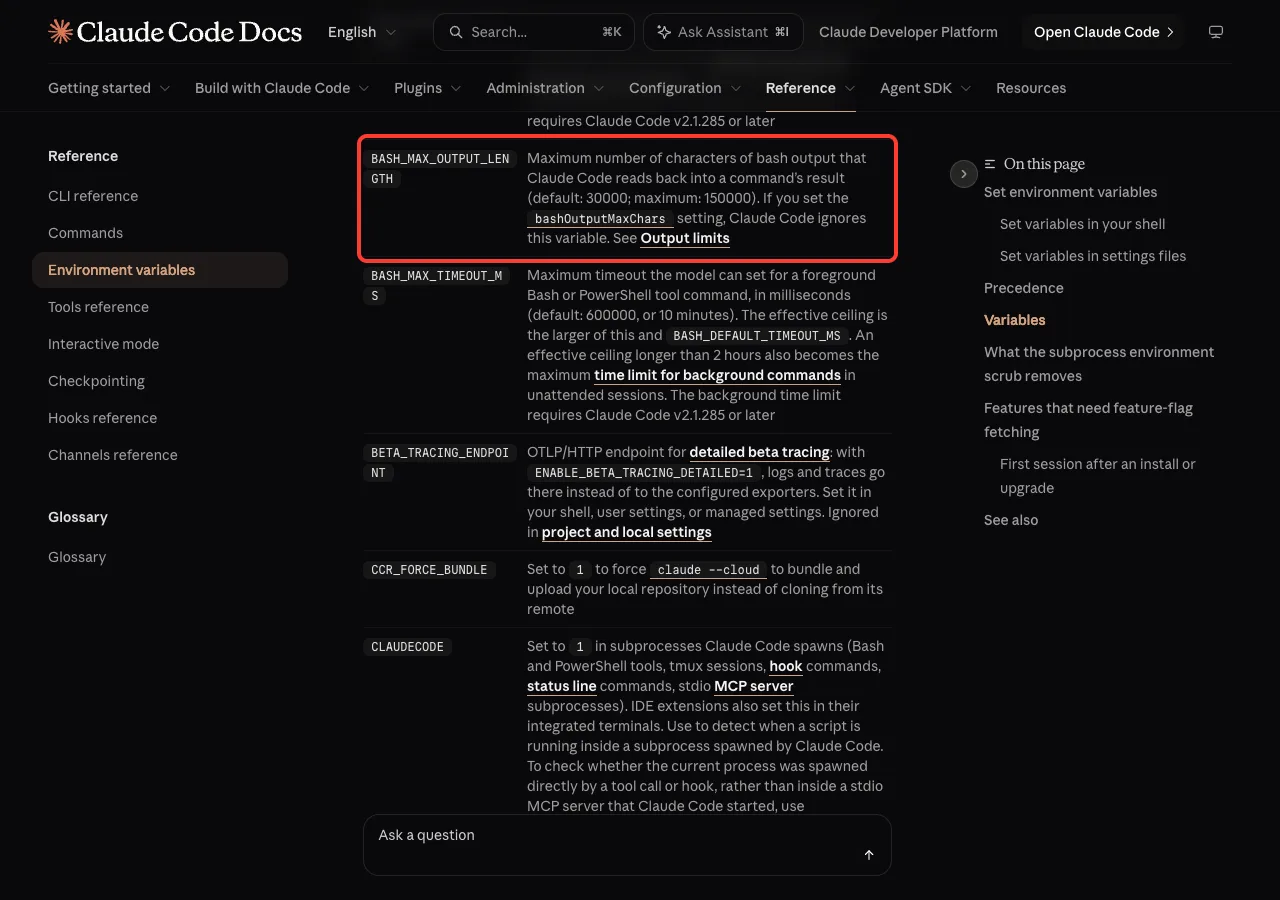
The environment variables reference describes BASH_MAX_OUTPUT_LENGTH as the number of characters Claude Code reads back into a command’s result, with a default of 30,000 and a maximum of 150,000.
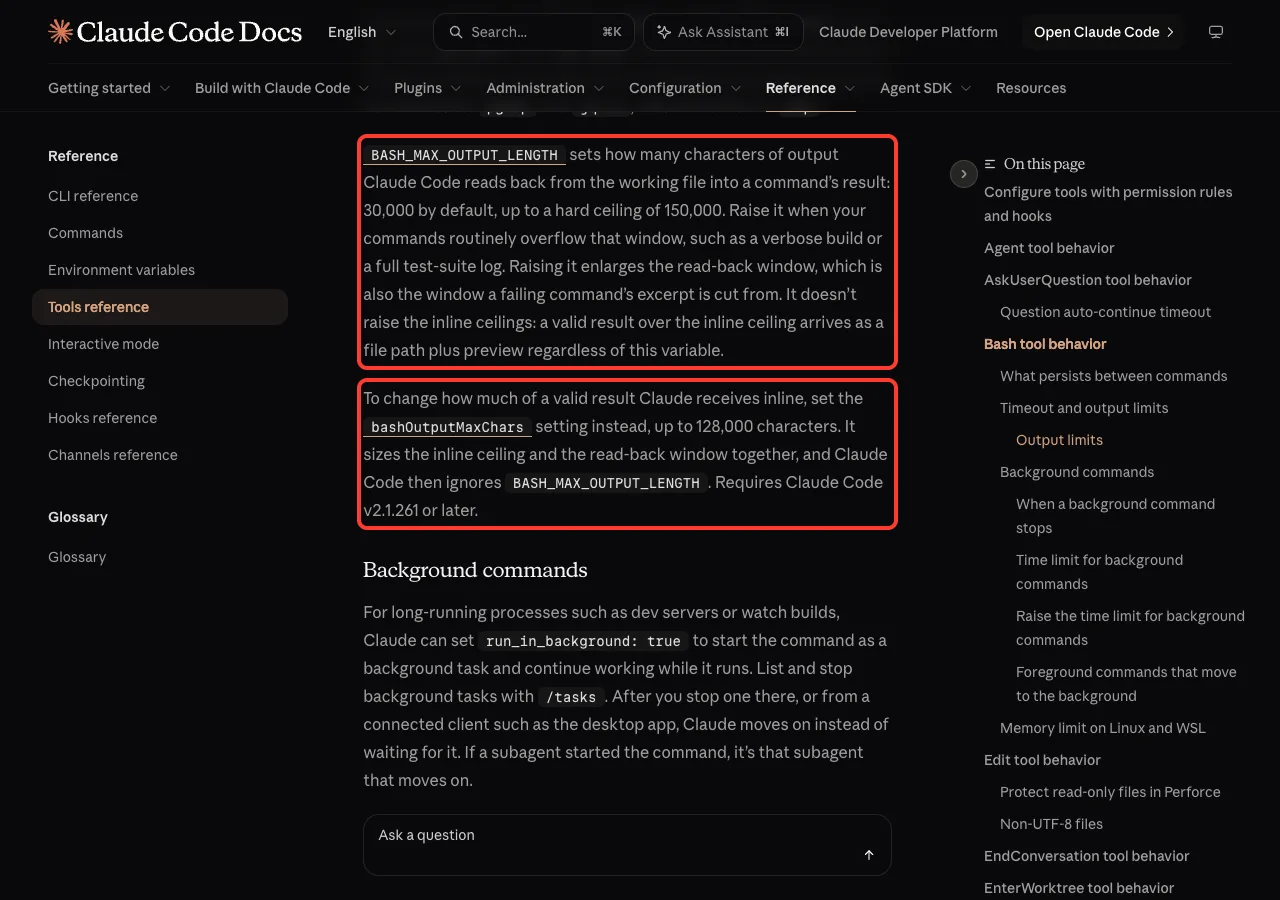
The tools reference is clear about its limits. It enlarges the read-back window, which is also the window a failing command’s excerpt is cut from, but it doesn’t raise the inline ceilings.
We checked this for real. We exported BASH_MAX_OUTPUT_LENGTH=100000, started Claude Code and ran the same seq 1 9000. Claude still got a saved file and a preview ending at 527.
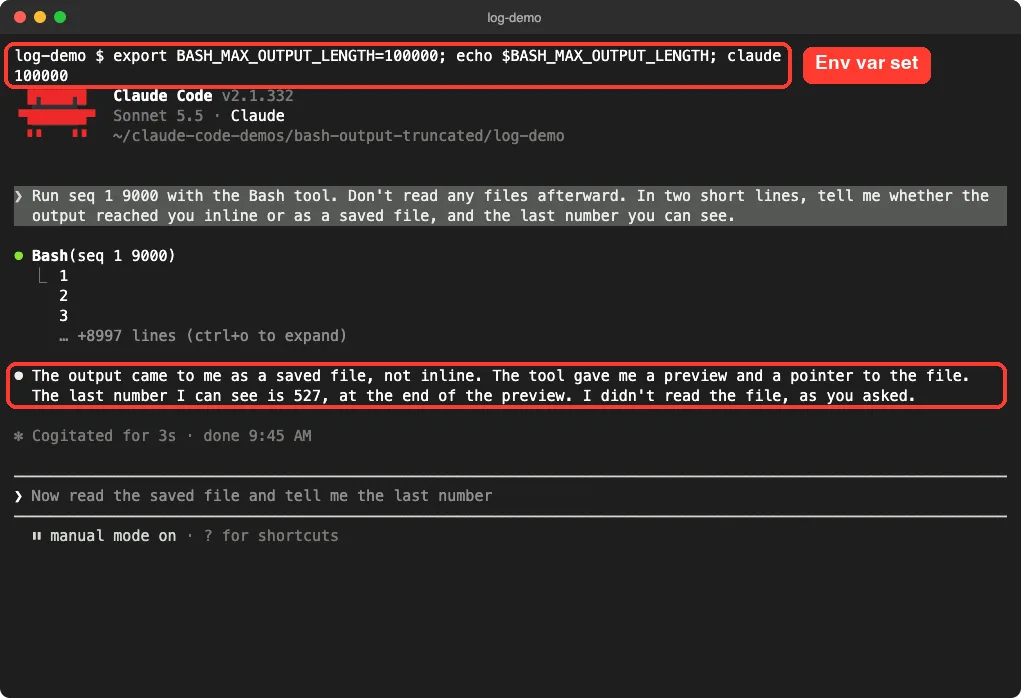
What did change was the transcript. With the variable set, ctrl+o showed all 9,000 lines instead of stopping at 6221, because the read-back window was now big enough to hold them. Your view grew, but Claude’s didn’t.
So when is the variable useful? When a failing command’s excerpt needs more room to come from, or when you want the read-back window larger. Set it in your shell before launching Claude Code:
export BASH_MAX_OUTPUT_LENGTH=150000
claude
You can also put it in the env block of a settings file. Remember the rule from the docs: once bashOutputMaxChars is set, Claude Code ignores BASH_MAX_OUTPUT_LENGTH.
Fix 3: Save big output to a file and read it in parts
Our 1.29 MB log is bigger than every limit, even 128,000 or 150,000. For output like that, the cleanest fix is to save it once and read only what matters. Claude can do this itself when you ask.
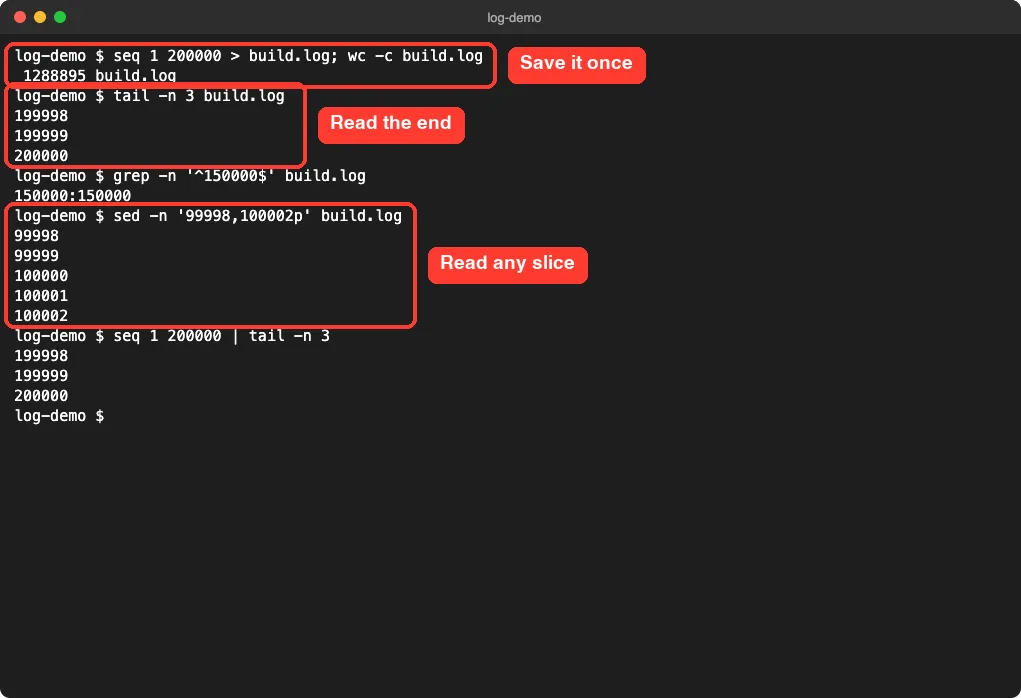
npm test > build.log 2>&1
tail -n 50 build.log
grep -n "FAIL\|Error" build.log
sed -n '100,200p' build.log
Each read stays small, so nothing gets truncated, and the full log stays on disk if Claude needs to look again. The 2>&1 part also captures error messages, which many tools print separately.
Fix 4: Keep failing commands short
Failures get a smaller window. We ran seq 1 9000; exit 3, and Claude got an error result with the middle cut out: it could see 1 to 1219 and 8001 to 9000, with 33,904 characters dropped.
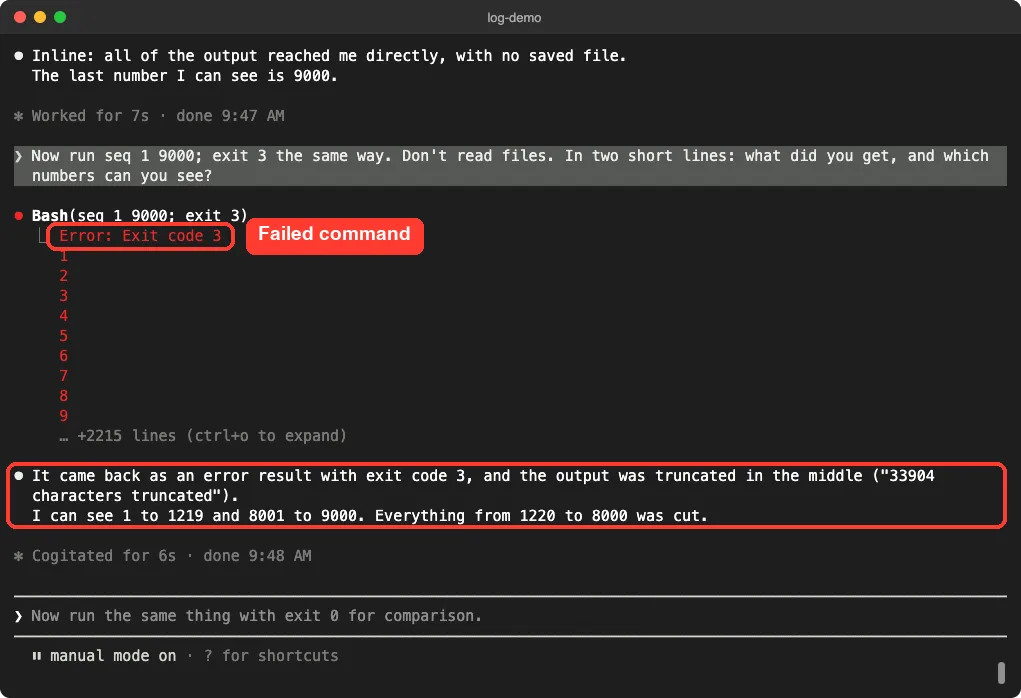
That excerpt adds up to roughly 10,000 characters, which matches the docs. Our test had bashOutputMaxChars set to 100,000, and the failure excerpt stayed at that size, so don’t count on the setting to show more of a failure.
Errors in the middle of a long failed run are the easiest thing to lose. Save the output to a file and grep it, as in Fix 3, or rerun only the failing test.
Fix 5: Filter output before Claude reads it
Often you don’t need the full log at all. Pipe it through a filter so only the useful part comes back:
npm run build 2>&1 | tail -n 40
pytest -q 2>&1 | grep -E "FAILED|Error"
git log --oneline -n 30
Quieter flags help too, such as -q for many test runners. Less output means fewer tokens, which also helps your budget; see our token saving tips.
Real Example: Same Command, Three Setups
Here is what happened to the same 43,893-character output from seq 1 9000 in our three sessions.
| Setup | What Claude received | Last number Claude saw | Transcript (ctrl+o) |
|---|---|---|---|
| Defaults | Saved file plus 2 KB preview | 527 | Up to 6221, then the file path |
BASH_MAX_OUTPUT_LENGTH=100000 | Saved file plus preview | 527 | All 9,000 lines |
"bashOutputMaxChars": 100000 | Full output inline | 9000 | All 9,000 lines |
The lesson is simple. If you want Claude itself to read more, change the setting, not the variable. Raise it only as far as you need, because every extra character counts against the context window; our guide to the context window explains why that matters in long sessions.
Try It Yourself
Make an empty folder, start Claude Code in it, and paste this prompt. It uses no real files and costs very little.
Run seq 1 9000 with the Bash tool. Don't read any files afterward. In two short lines, tell me whether the output reached you inline or as a saved file, and the last number you can see.Then create .claude/settings.local.json in the folder with {"bashOutputMaxChars": 100000}, start a new session and paste the same prompt. The answer should change from 527 to 9000. If you want to know where settings files live, see settings.json locations.
Common Mistakes
- Setting only
BASH_MAX_OUTPUT_LENGTHand expecting Claude to see more of a successful command. In our test it didn’t. - Setting both and wondering why the variable does nothing. With
bashOutputMaxCharsset, the variable is ignored. - Exporting the variable in a different terminal tab than the one where you start
claude. - Trusting the
ctrl+otranscript as proof of what Claude read. It can show far more than Claude received. - Setting the maximum everywhere. Big inline outputs fill the context window faster and cost more tokens.
- Expecting a value above 128,000 to work. Claude Code clamps
bashOutputMaxCharsto 128,000, and the variable caps at 150,000. - Running on a version older than v2.1.261, where
bashOutputMaxCharsdoesn’t exist. Check withclaude --versionand update withclaude update.
Pro Tips
- Use
.claude/settings.local.jsonfor a project with noisy builds, so other projects keep the leaner default. - Add a line to your project’s
CLAUDE.mdsuch as “Save long test output to a file and grep it” so Claude does this on its own. - Ask Claude directly: “Did that output reach you in full?” In our runs, it answered honestly every time.
- Long-running commands are a separate limit. If a command is stopped rather than truncated, see our fix for a command timed out error.
- MCP tools have their own cap,
MAX_MCP_OUTPUT_TOKENS, listed with the other environment variables. - For other messages you might hit, keep our list of common Claude Code errors handy.
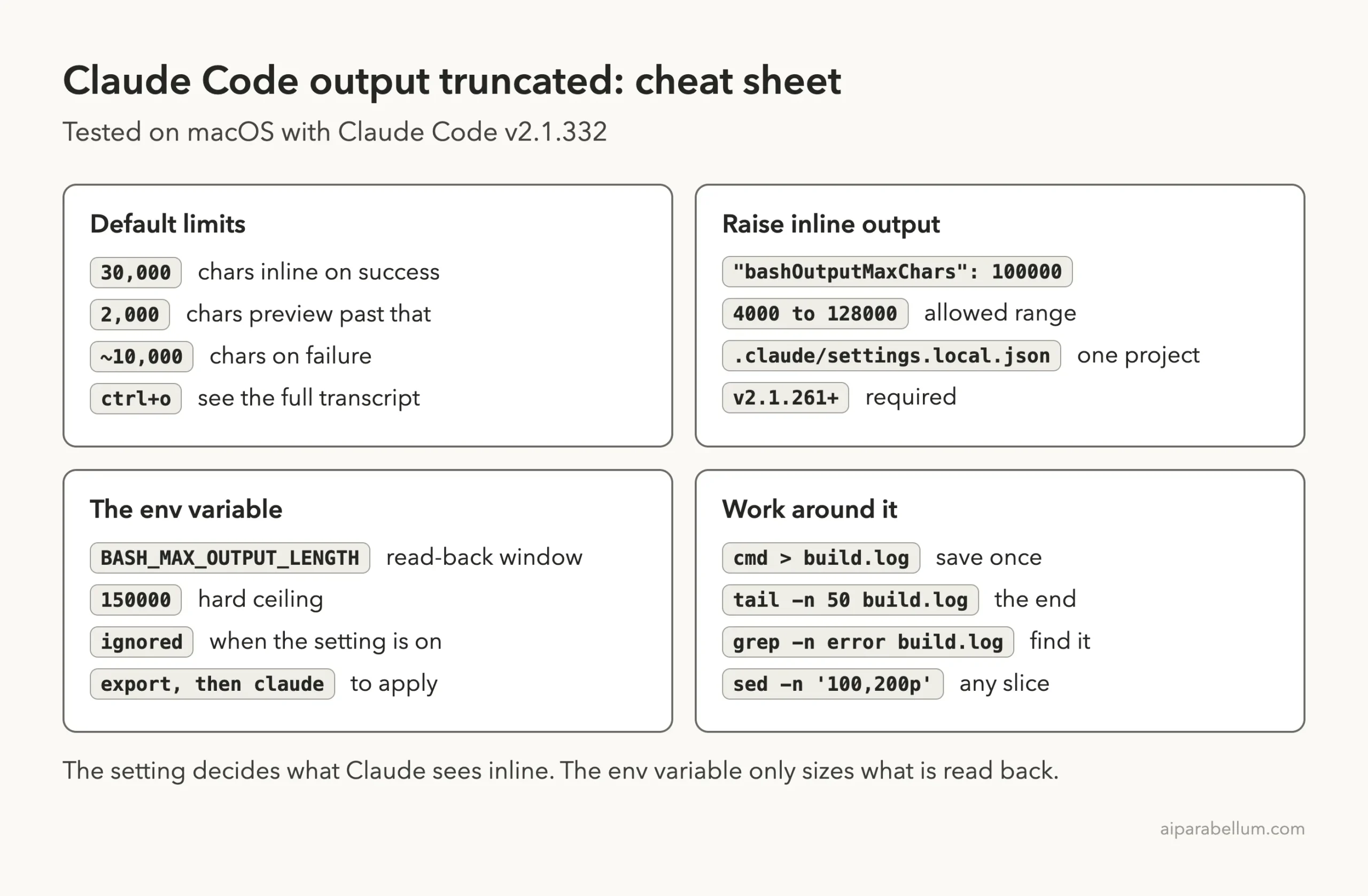
Cheat Sheet
Frequently Asked Questions
What is the default Bash output limit in Claude Code?
About 30,000 characters for a successful command and about 10,000 for a failed one. Past that, a successful command becomes a saved file with a 2,000-character preview, and a failed one becomes a head-and-tail excerpt.
Does BASH_MAX_OUTPUT_LENGTH still work?
Yes, but it controls the read-back window, up to 150,000 characters, not what Claude gets inline. The docs say Claude Code ignores it when bashOutputMaxChars is set.
What is the maximum for bashOutputMaxChars?
128,000 characters. Claude Code clamps any value into the range 4,000 to 128,000.
Where does Claude Code save truncated output?
In a tool-results folder in the session directory under ~/.claude/projects/. The transcript shows the exact path, and Claude can read or search that file when it needs the rest.
Can Claude still read the full output after truncation?
Yes. For a successful command it gets the file path and can open or search the file. For a failed command there’s no file path, so rerun it with the output saved to a file.
Conclusion
Claude Code output truncated is a deliberate limit, not a bug: successful commands get about 30,000 characters inline and failures about 10,000, so one huge log can’t flood the context window. In our test, BASH_MAX_OUTPUT_LENGTH=100000 changed what the transcript showed but not what Claude received, while "bashOutputMaxChars": 100000 in .claude/settings.local.json brought a 43,893-character output in full. Use the setting for long successful logs, the variable for a bigger read-back window, and for anything larger, save the output to a file and let Claude read the parts it needs. To learn more about the model behind the tool, see our Claude AI overview.