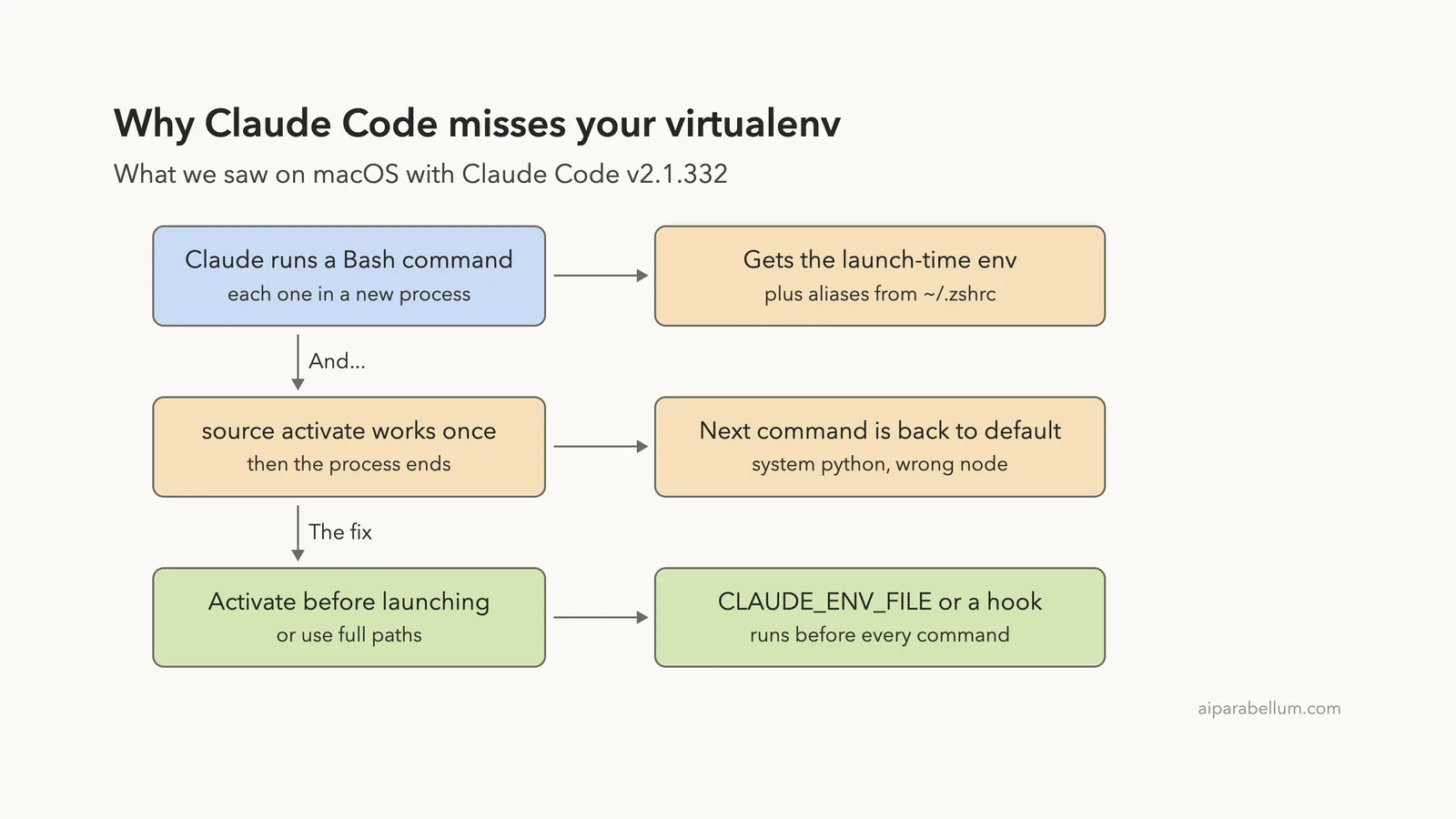
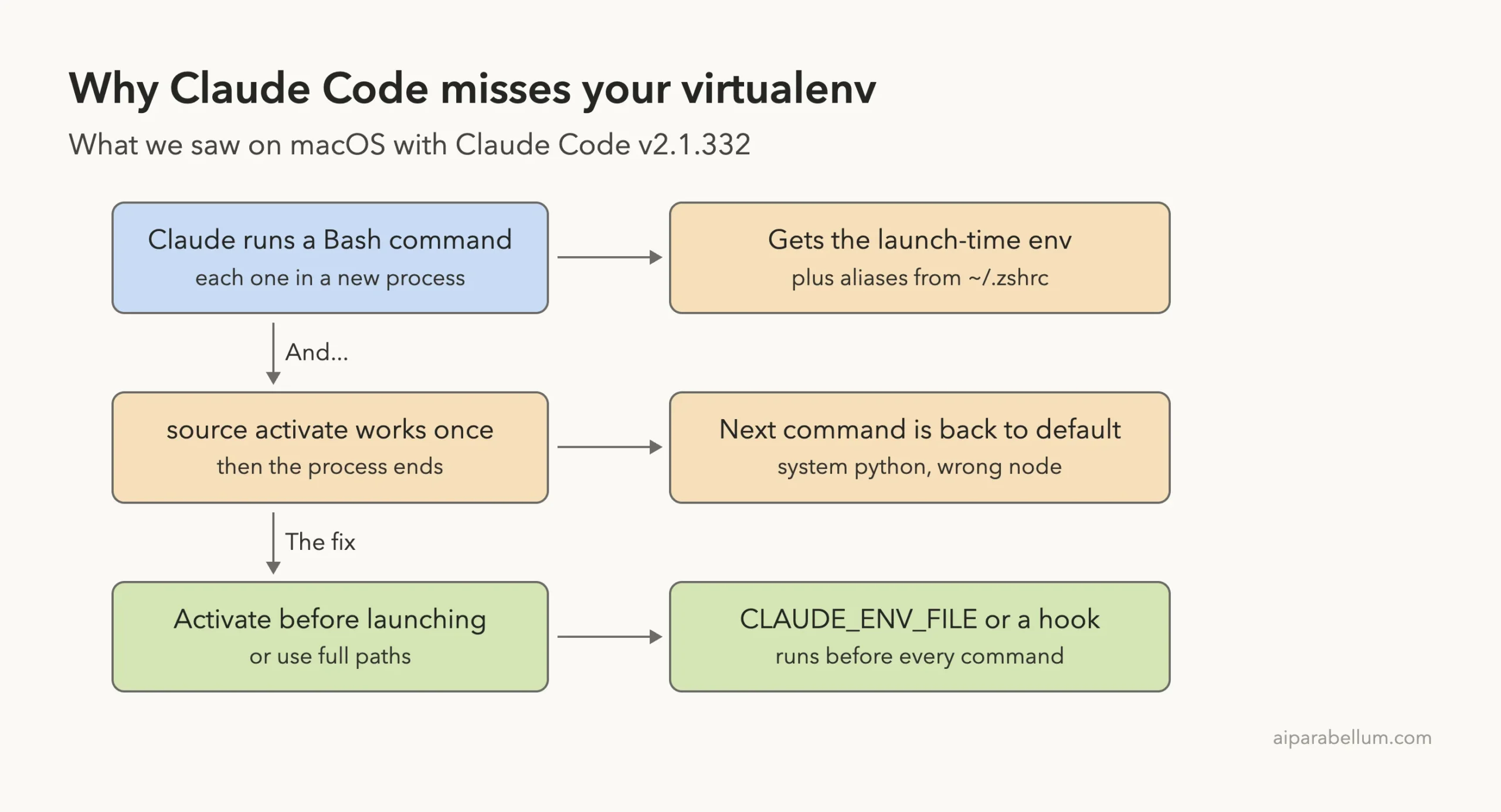
If your claude code virtualenv seems to be ignored, you’re not imagining it. Every Bash command Claude runs starts in a fresh process, so a source .venv/bin/activate or nvm use that runs inside one command is gone by the next one. In our test, python3 inside Claude Code pointed at the system Python until we fixed the environment.
The quick fix is to activate your virtualenv (or run nvm use) in your terminal before you start claude, because Claude Code passes on the environment it was launched with. For a fix that sticks, point CLAUDE_ENV_FILE at a small script, or add a SessionStart hook that writes your activation to that file. Both run before every Bash command.
Below we reproduce the problem in a throwaway project, test each fix for real, and cover the setting mistakes that make things worse, like putting $PATH in a settings file.
Browse all our Claude Code tutorials for more fixes and how-tos.
Tested with Claude Code v2.1.332 on macOS on November 27, 2026. Every run used a throwaway demo project called weather with a Python .venv, a tiny check_env.py script and a demo command called forecast in tools/bin.
nvm isn’t installed on our test Mac, so the nvm steps follow Anthropic’s official hook example rather than our own run. We tested on macOS; the Windows and Linux notes follow Anthropic’s official documentation.
Quick Summary
| What you see | Why it happens | Fix |
|---|---|---|
python3 is the system or Homebrew Python, not .venv | The venv wasn’t active when Claude Code started | Activate it, then run claude |
| Activation works once, then it’s gone | Each Bash command is a new process | CLAUDE_ENV_FILE or a SessionStart hook |
Wrong Node version after nvm use | Same reason: the change doesn’t carry over | Run nvm use before launch, or a hook |
command not found for a project tool | Its folder isn’t on the PATH Claude gets | Add it in the env file or hook |
"PATH": "$PATH:..." in settings breaks things | Settings values aren’t expanded by a shell | Use the env file, not the env block |
Why Claude Code Ignores Your Virtualenv
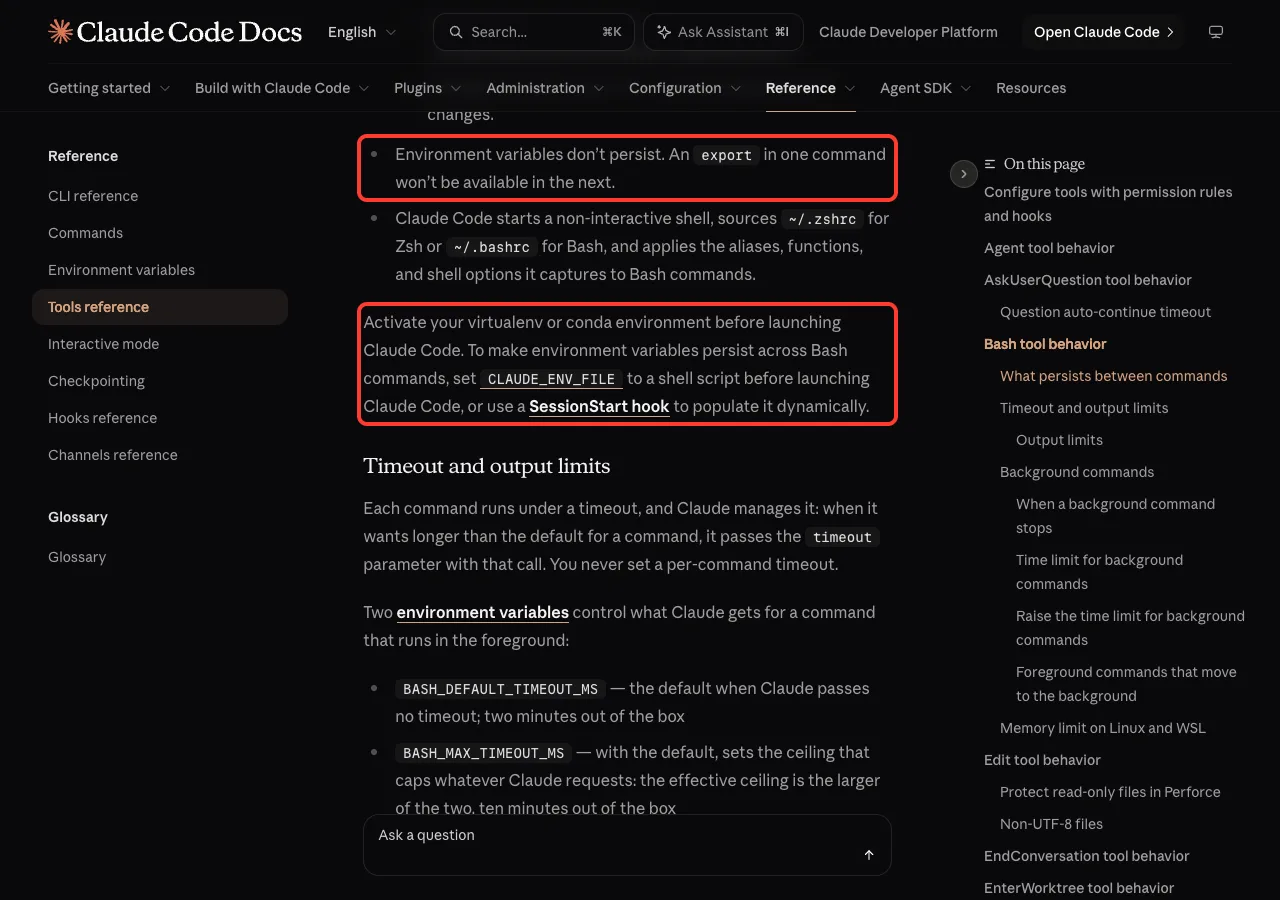
Anthropic’s tools reference spells out what carries over between Bash commands. Environment variables don’t: an export in one command isn’t there in the next. Claude Code does read ~/.zshrc or ~/.bashrc and keeps the aliases, functions and shell options it finds there.
A virtualenv is nothing more than environment changes: activate puts the venv’s bin folder at the front of PATH and sets VIRTUAL_ENV, and nvm works the same way for Node. So when that change happens inside one Bash command, it ends with that command.
Reproducing the Problem
We opened a plain terminal in the weather project without activating anything and started Claude Code. Then we used shell mode (type ! before a command) to see exactly what Claude’s shell sees.
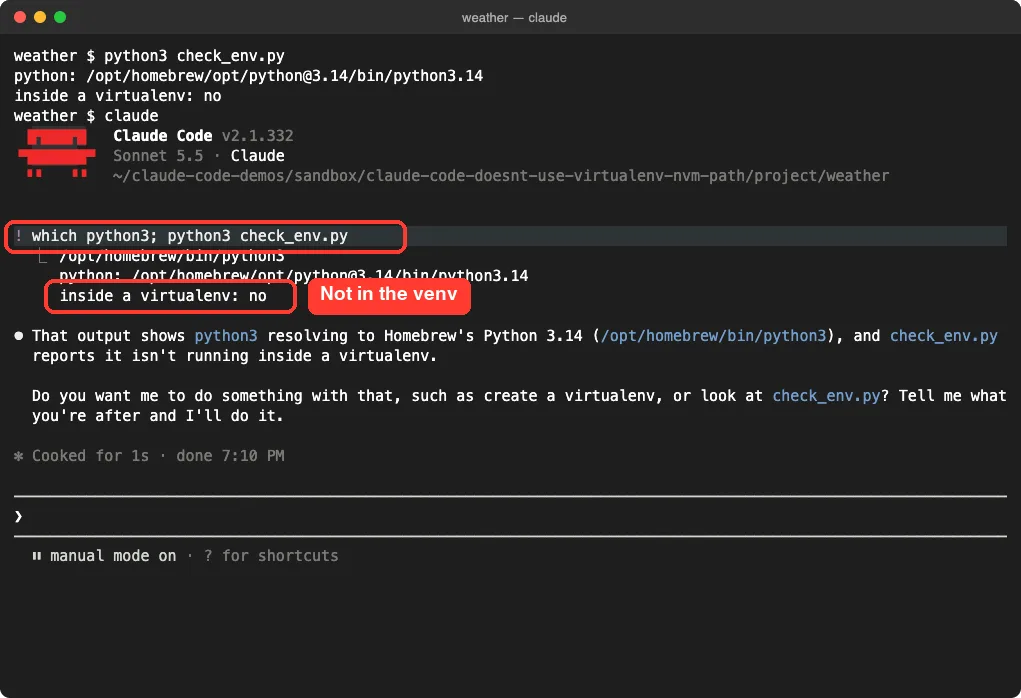
Step 1: Check Which Python Claude Code Uses
Running ! which python3; python3 check_env.py showed /opt/homebrew/bin/python3 and “inside a virtualenv: no”. The project’s .venv was sitting right there, but nothing told the shell to use it.
Step 2: Activate Inside Claude Code and Watch It Vanish
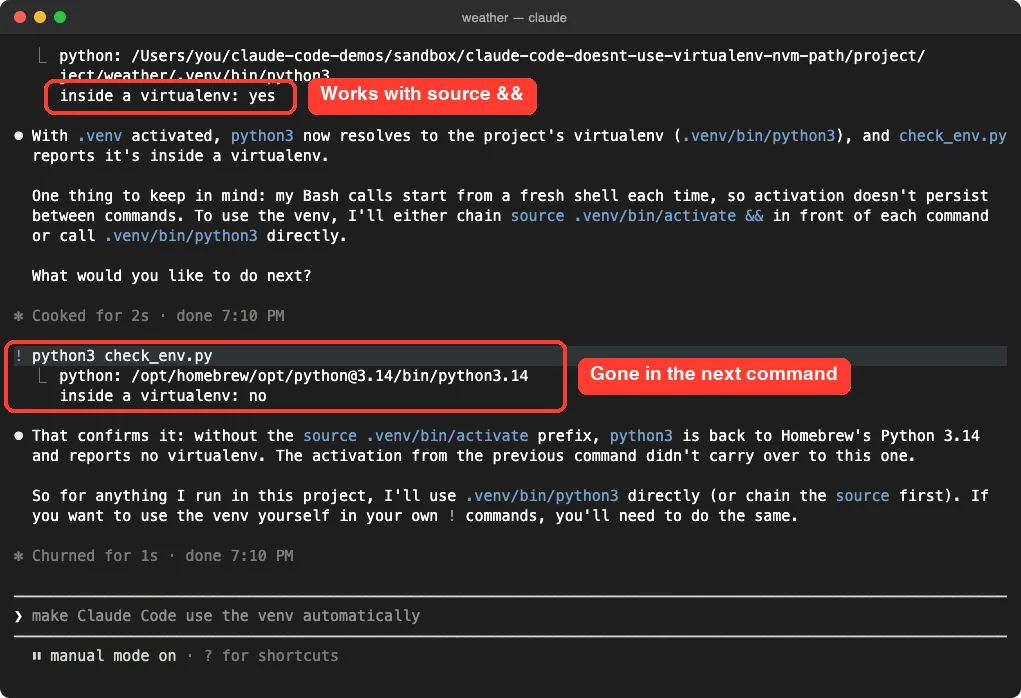
Next we chained activation and the script in one shell-mode command, and that worked: the script reported the venv Python. Then we ran ! python3 check_env.py on its own, and it was back to Homebrew’s Python.
Claude even explained it in its reply: each Bash call starts from a fresh shell, so activation doesn’t persist. Our forecast demo command failed too, with command not found: forecast, because tools/bin wasn’t on the PATH.
A virtualenv is just environment variables. If they aren’t there when a command starts, that command doesn’t get them.
How to Fix Claude Code Virtualenv and PATH Problems
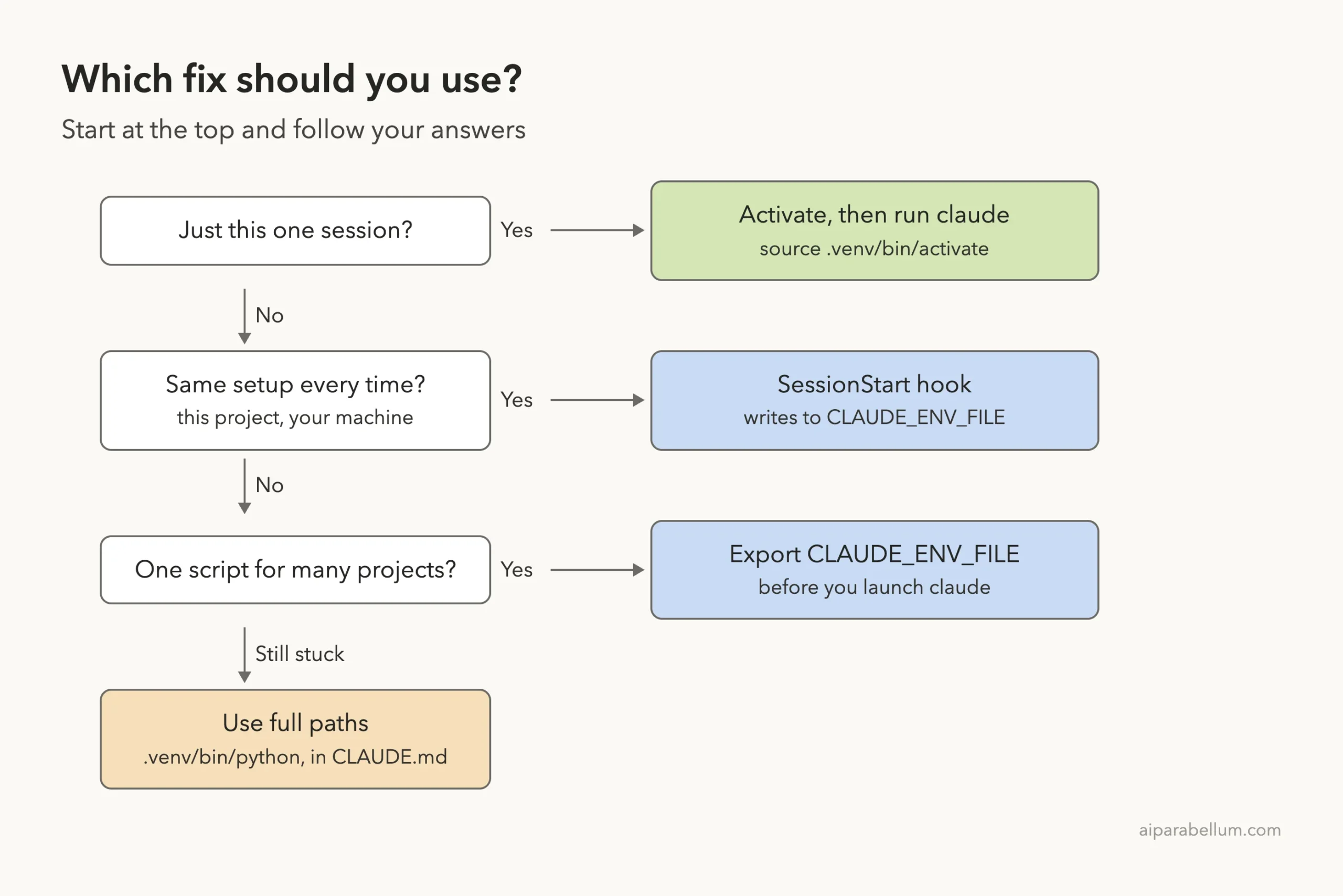
Here are the fixes from simplest to most permanent. Pick the first one that matches how you work; the decision chart further down helps.
Fix 1: Activate Before You Launch Claude Code
This is what the docs recommend first. Activate in your own terminal, then start Claude Code from that same window:
cd my-project
source .venv/bin/activate
claude
In our test, the first shell-mode check reported the venv Python, because Claude Code passed on the environment it was started with. The demo forecast command still failed, which makes sense: we never added tools/bin to that terminal’s PATH.
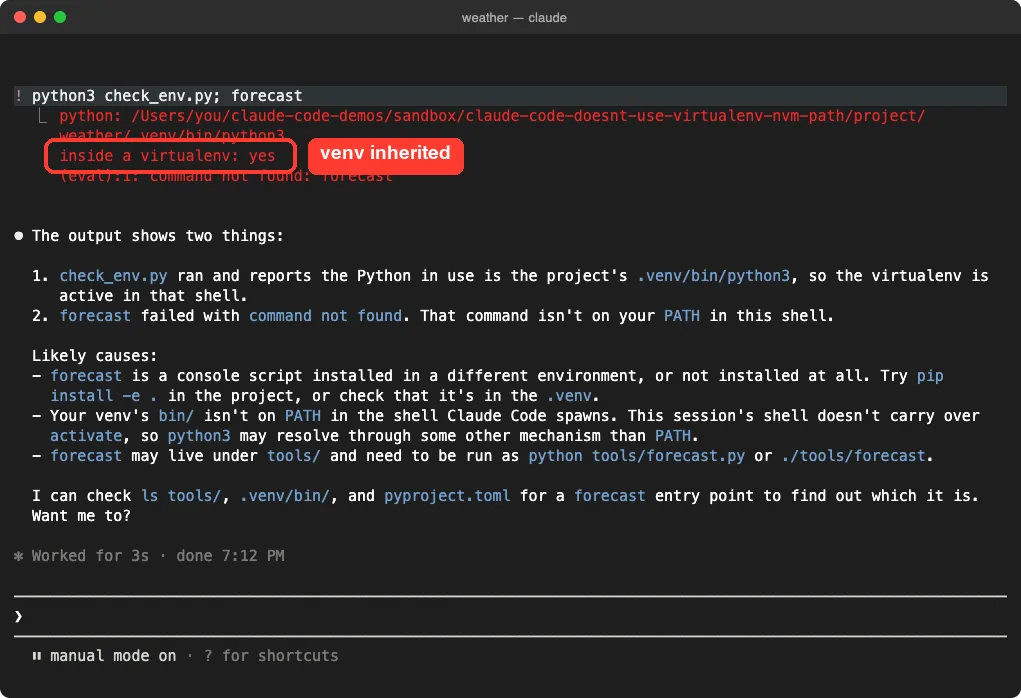
For Node, the same idea applies: run nvm use 20 (or whichever version you need) before typing claude. Conda works the same way with conda activate. The catch is that you have to remember it every single time, and a new terminal tab starts without it.
Fix 2: Point CLAUDE_ENV_FILE at an Activation Script
CLAUDE_ENV_FILE is the documented way to make environment changes stick. According to the environment variables reference, it’s a path to a shell script that Claude Code runs before each Bash command, in the same shell process. The docs name virtualenv and conda activation as the use case.
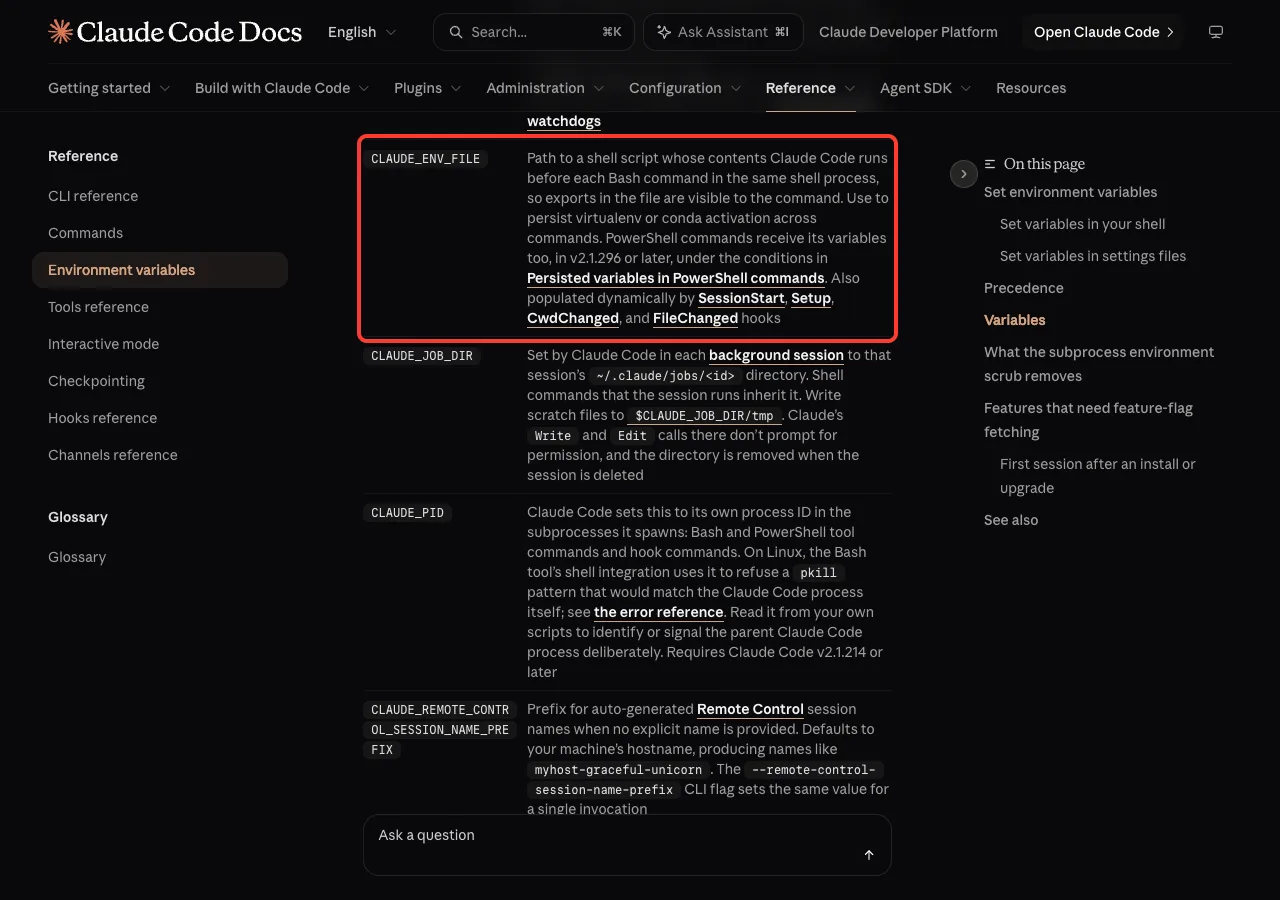
We wrote a two-line script at .claude/venv-env.sh with absolute paths (shown here with a placeholder for the project folder):
source /path/to/weather/.venv/bin/activate
export PATH="/path/to/weather/tools/bin:$PATH"
Then we exported the variable and started Claude Code, with no venv active in the terminal:
export CLAUDE_ENV_FILE="$PWD/.claude/venv-env.sh"
claude
This time ! python3 check_env.py; forecast reported the venv and printed our demo forecast. We ran python3 check_env.py again as a separate command, and the venv was still active.
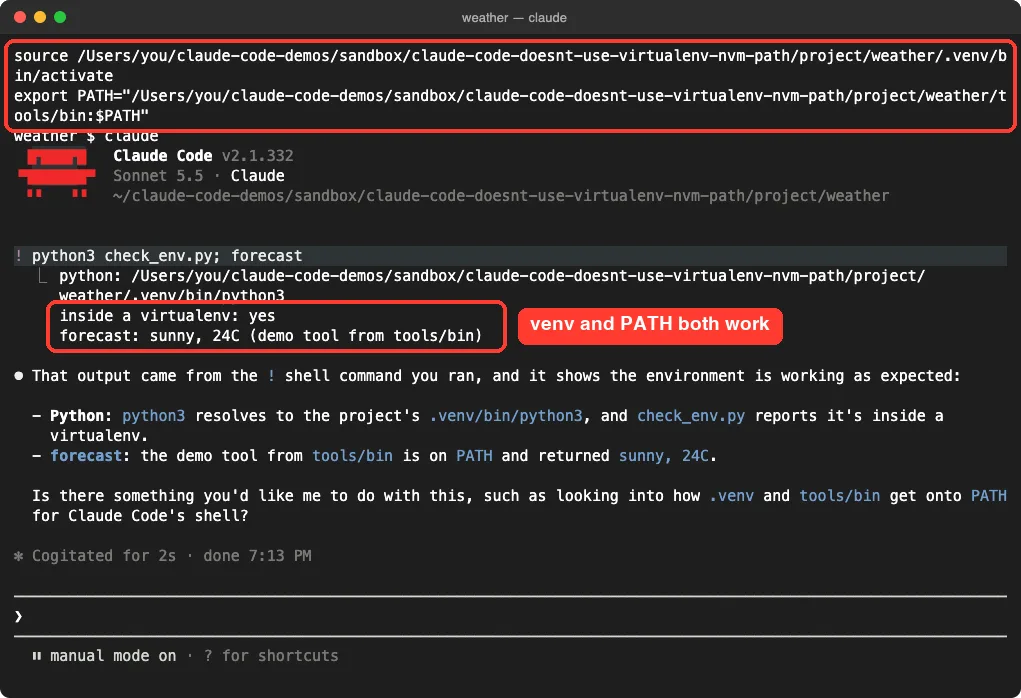
Use absolute paths in this file. A relative path such as source .venv/bin/activate only works while the shell sits in the project root. You still need to export CLAUDE_ENV_FILE before launch, so it fits best in a shell alias or a launcher script.
Fix 3: Use a SessionStart Hook (Best for One Project)
A SessionStart hook runs when a session starts, and the hooks reference says these hooks get a CLAUDE_ENV_FILE path to write to. Anything the hook appends there is applied to later Bash commands in that session. Nothing needs to be exported by hand.
Here is the hook script we saved as .claude/hooks/activate-venv.sh (made executable with chmod +x):
#!/bin/bash
# SessionStart hook: make every later Bash command use the project venv and tools/bin
if [ -n "$CLAUDE_ENV_FILE" ]; then
  echo "source \"$CLAUDE_PROJECT_DIR/.venv/bin/activate\"" >> "$CLAUDE_ENV_FILE"
  echo "export PATH=\"$CLAUDE_PROJECT_DIR/tools/bin:\$PATH\"" >> "$CLAUDE_ENV_FILE"
fi
exit 0
And the project’s .claude/settings.json that registers it:
{
  "hooks": {
    "SessionStart": [
      {
        "hooks": [
          {
            "type": "command",
            "command": "\"$CLAUDE_PROJECT_DIR\"/.claude/hooks/activate-venv.sh"
          }
        ]
      }
    ]
  }
}
Two details matter. Use >> to append, as the docs advise, so you don’t wipe out lines another hook wrote. And $CLAUDE_PROJECT_DIR gives the hook an absolute project path, so teammates with different folders get the right paths.
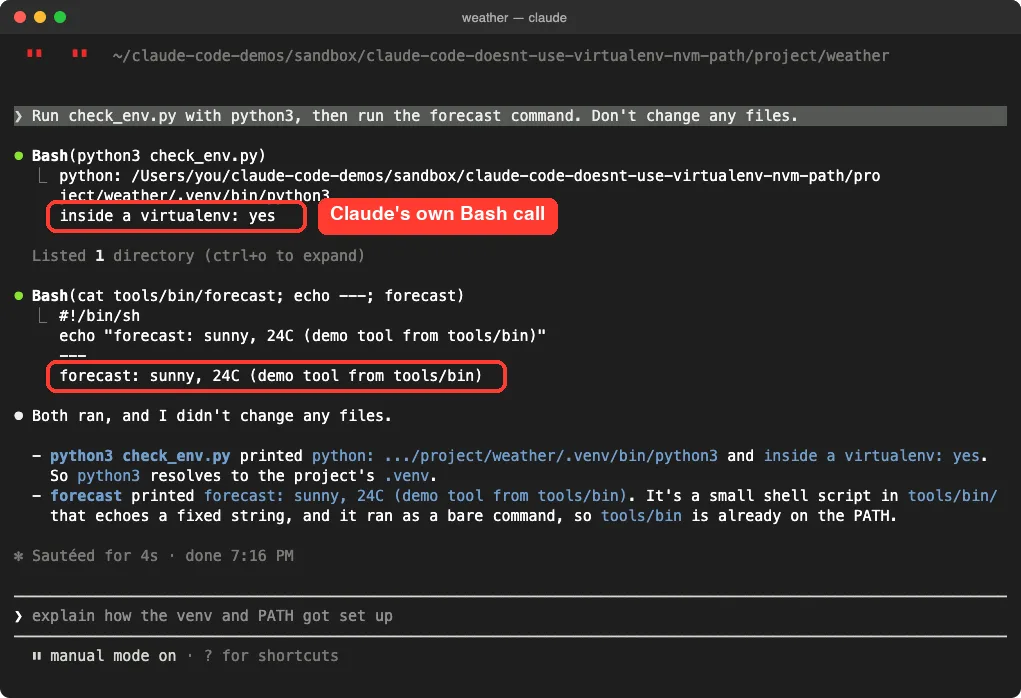
We started a fresh terminal with no venv and no CLAUDE_ENV_FILE exported, then gave Claude one prompt: run check_env.py with python3, then run forecast. Claude’s own Bash calls used the venv Python and found the demo tool.
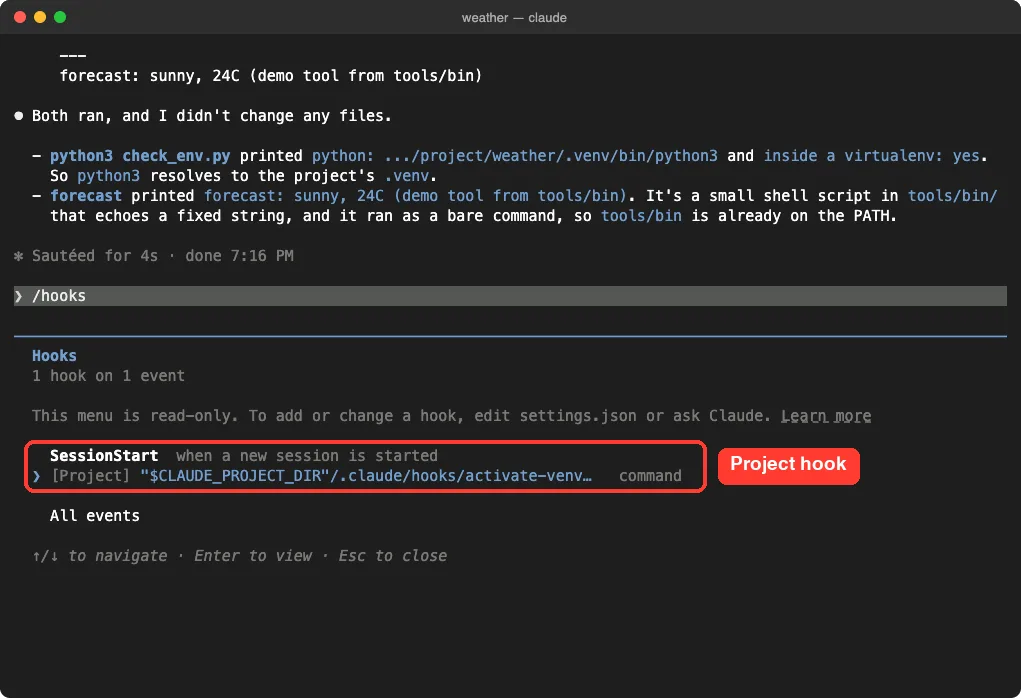
To confirm a hook loaded, type /hooks. Ours showed up under SessionStart, marked as a Project hook.
If a hook seems to do nothing, our guide to hooks not firing walks through the usual causes.
Fix 4: Load nvm With a SessionStart Hook
nvm is harder because nvm use changes several variables, not just one. Anthropic’s hooks reference has an example for exactly this case. It saves the exported variables, runs source ~/.nvm/nvm.sh and nvm use 20, then appends only the variables that changed to CLAUDE_ENV_FILE.
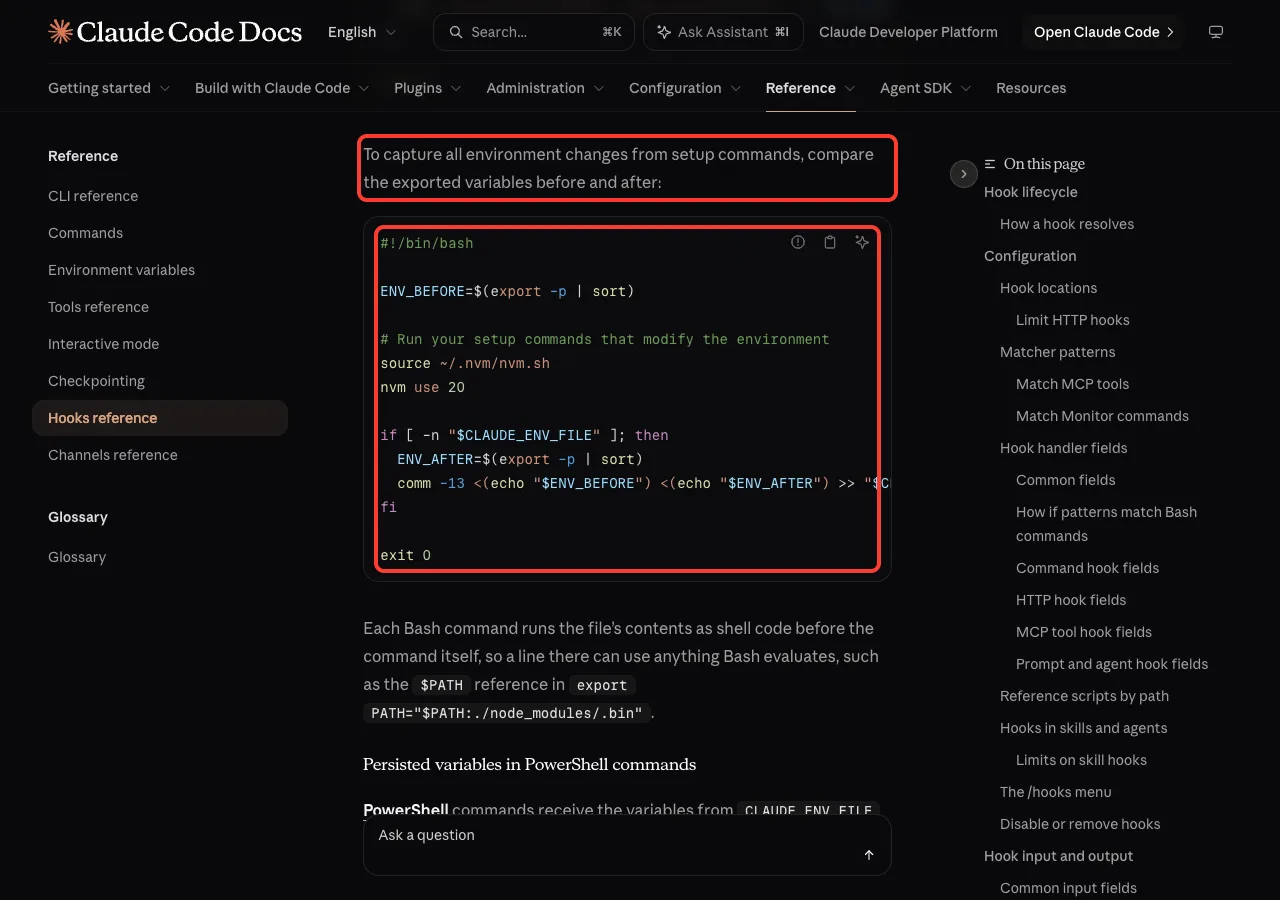
Register that script as a SessionStart hook the same way as Fix 3. Change 20 to the version your project needs. We didn’t run this one ourselves, since nvm isn’t on our test Mac.
Fix 5: Use Full Paths and Tell Claude in CLAUDE.md
When you can’t change how Claude Code starts, full paths always work. .venv/bin/python script.py runs the venv Python no matter what the PATH says, and .venv/bin/pytest runs the venv’s pytest.
Add a short note to your project’s CLAUDE.md file so Claude does this by default:
## Environment
- Python: always use .venv/bin/python and .venv/bin/pytest
- Never pip install globally; use .venv/bin/pip
This is guidance, not enforcement: Claude reads it and usually follows it. The hook in Fix 3 changes the environment itself, so it’s the stronger option.
Fix 6: Pick the Shell Claude Code Uses
If your activation lives in a shell profile Claude Code isn’t reading, check which shell it picked. The CLAUDE_CODE_SHELL variable accepts a path to a bash or zsh binary. Other shells such as fish aren’t supported, and an invalid value falls back to auto-detection based on your $SHELL.
Which Fix Should You Use?
| Fix | Lasts | Shared with team | We tested it |
|---|---|---|---|
Activate, then claude | One session | No | Yes |
CLAUDE_ENV_FILE exported | Every command in the session | Only if scripted | Yes |
| SessionStart hook | Every session in the project | Yes, via .claude/settings.json | Yes |
| nvm hook | Every session in the project | Yes | No (docs example) |
| Full paths in CLAUDE.md | Whenever Claude follows it | Yes | No |
Try It Yourself
Create a tiny project with a venv, then ask Claude to set up the hook for you. Paste this into Claude Code from inside that folder:
Create a SessionStart hook for this project only. Save the script as
.claude/hooks/activate-venv.sh, make it executable, and register it in
.claude/settings.json. It should append a line to "$CLAUDE_ENV_FILE" that
sources "$CLAUDE_PROJECT_DIR/.venv/bin/activate". Don't touch any other files.
Exit, start claude again, and run ! which python3; it should point inside the venv folder. Then type /hooks to see the hook listed.
Common Mistakes
Putting PATH in the settings env Block
It’s tempting to add "PATH": "$PATH:/my/tools" to the env block in your settings files. The docs warn that Claude Code copies these values in as written and no shell processes them. So $PATH and ~ stay as literal text, and that entry replaces your real PATH with a broken one.
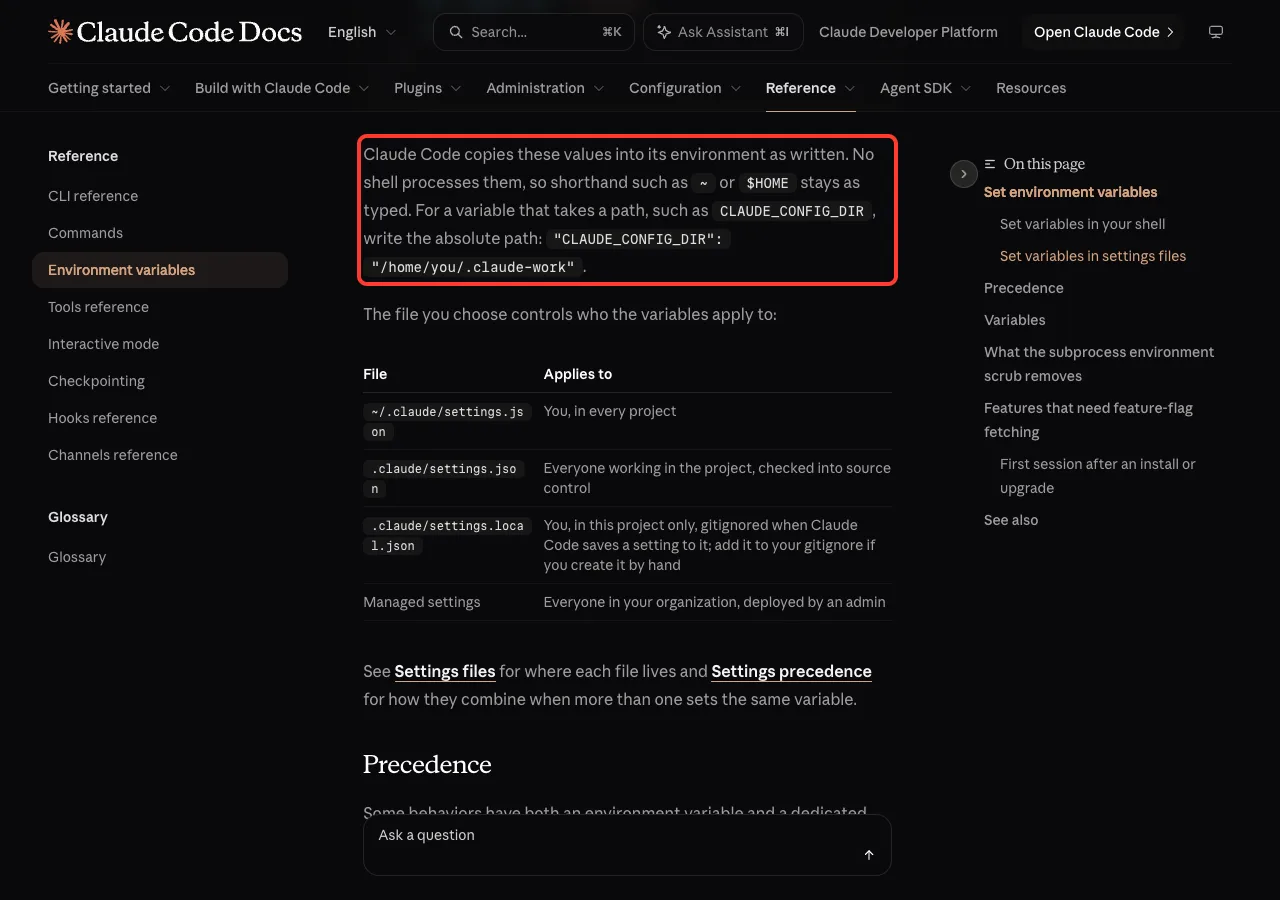
The env block is fine for plain values like VIRTUAL_ENV_DISABLE_PROMPT or a timeout. For anything that builds on $PATH, use CLAUDE_ENV_FILE, where the file runs as real shell code. Our guide to environment variables guide covers which variables belong where.
Overwriting CLAUDE_ENV_FILE With a Single >
Writing echo ... > "$CLAUDE_ENV_FILE" erases what other hooks already added. Always append with >>.
Telling Claude to Run export or source as a Fix
Asking Claude to “activate the venv” just runs source in one command, which we showed disappears right after. It looks fixed for a moment, then the next command is back on the system Python.
Mixing It Up With “command not found: claude”
A PATH problem with the claude command itself is a different issue: the installer’s folder isn’t on your terminal’s PATH. Our PATH install fix covers that one, and our list of common errors covers the rest.
Pro Tips
- Run
! echo $VIRTUAL_ENVat the start of a session. Empty output means no venv is active. - Check Node the same way with
! which node; node -vbefore you let Claude install packages. - Keep project hooks in
.claude/settings.jsonso the whole team gets the same environment; use.claude/settings.local.jsonfor paths that only exist on your machine. - Remember that shell mode (
!) uses the same environment as Claude’s own Bash calls, so it’s a cheap way to check a fix. - On Windows, the docs say PowerShell commands only get
CLAUDE_ENV_FILEvariables when every line is a plain assignment, so a line withsourceor$PATHisn’t passed to PowerShell. Bash commands still get all of them.
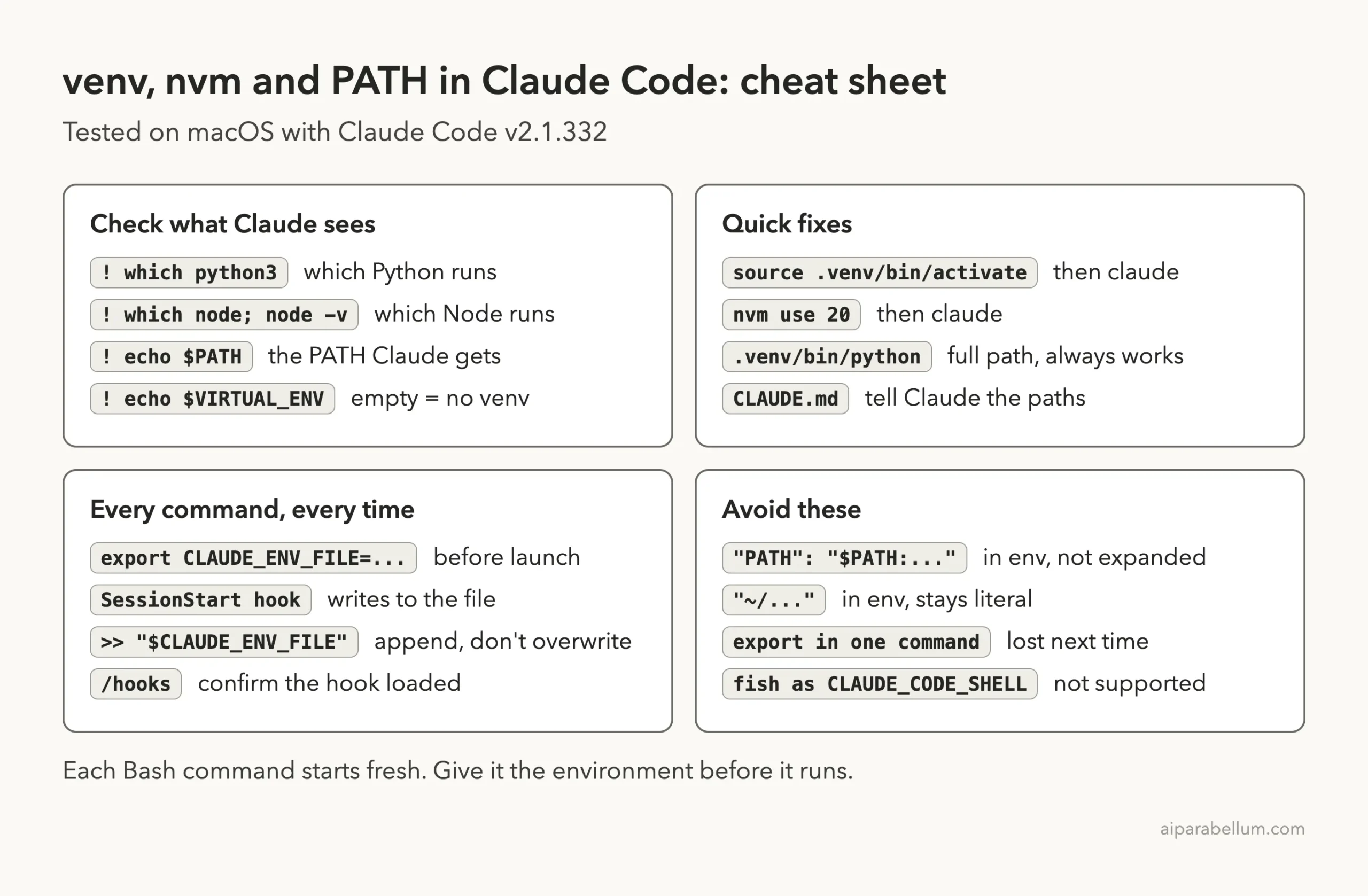
Cheat Sheet
Frequently Asked Questions
Why doesn’t Claude Code use my activated virtualenv?
Usually the venv wasn’t active in the terminal where you started claude, or it was activated inside a single Bash command. Each command runs in a new process, so activation only carries over when it happens before launch or through CLAUDE_ENV_FILE.
Does Claude Code read my .zshrc?
Yes. The docs say it sources ~/.zshrc for Zsh or ~/.bashrc for Bash and keeps the aliases, functions and shell options it captures. Environment changes you make later in a command still don’t carry over to the next command.
How do I make Claude Code use a specific Node version?
Run nvm use before starting claude, or use Anthropic’s SessionStart hook example that runs nvm use and saves the changed variables to CLAUDE_ENV_FILE.
Can I set PATH in settings.json?
You can set a variable in the env block, but values aren’t shell-expanded. "$PATH:..." stays literal and breaks your PATH. Use CLAUDE_ENV_FILE or a hook to add folders.
Does this work with conda?
The docs name conda alongside virtualenv: activate it before launching, or put the activation in CLAUDE_ENV_FILE. We tested only a standard Python venv.
Conclusion
A claude code virtualenv problem almost always comes down to one fact: each Bash command starts fresh and only gets the environment Claude Code started with, plus what CLAUDE_ENV_FILE adds. In our tests, activating before launch worked for one session, an exported CLAUDE_ENV_FILE kept the venv and an extra PATH folder for every command, and a project SessionStart hook did the same with nothing to remember. Use full paths as a backup, keep $PATH out of the settings env block, and check with ! which python3 before you trust a fix. To learn more about the model behind the tool, see our Claude AI overview.