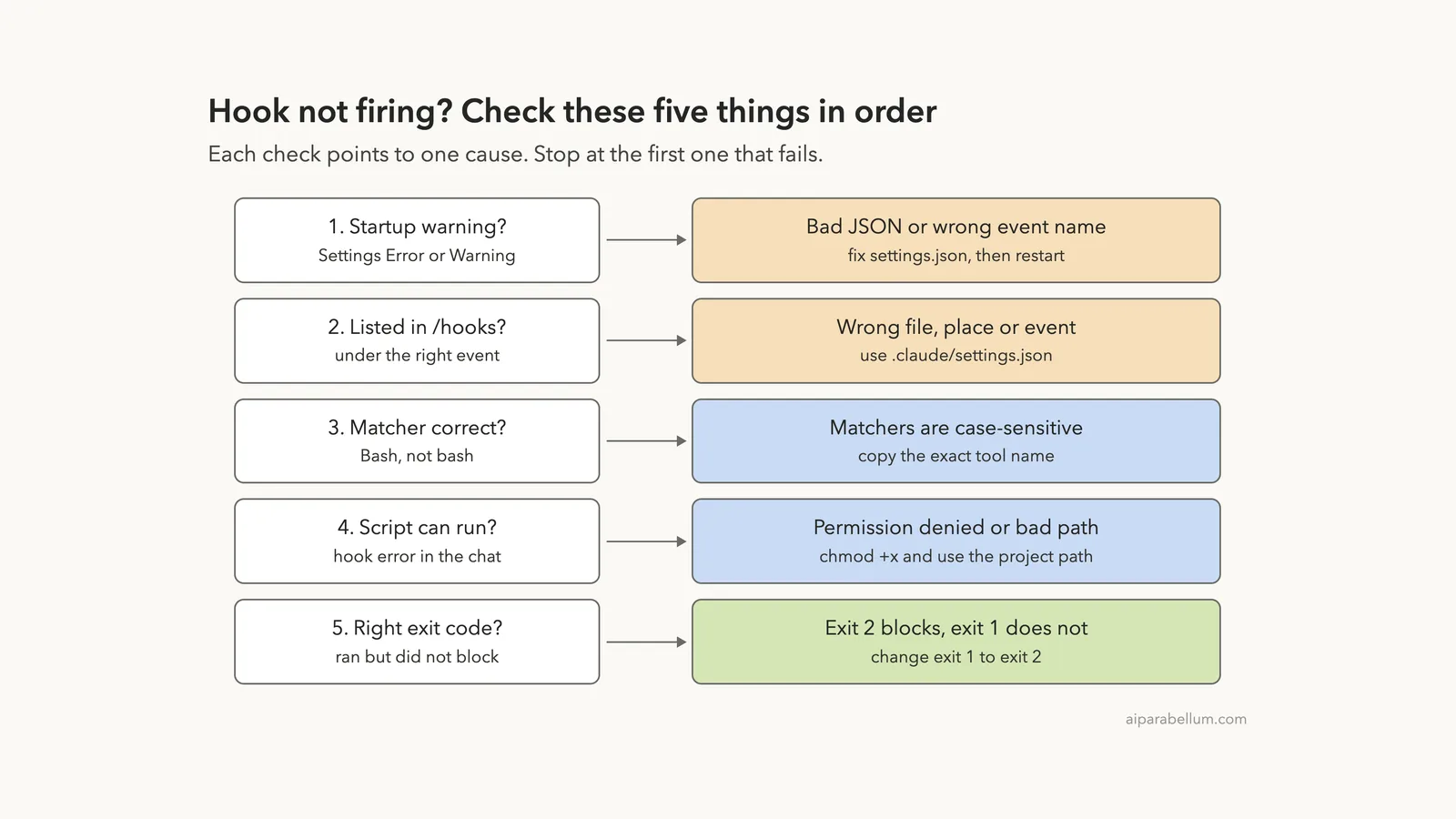
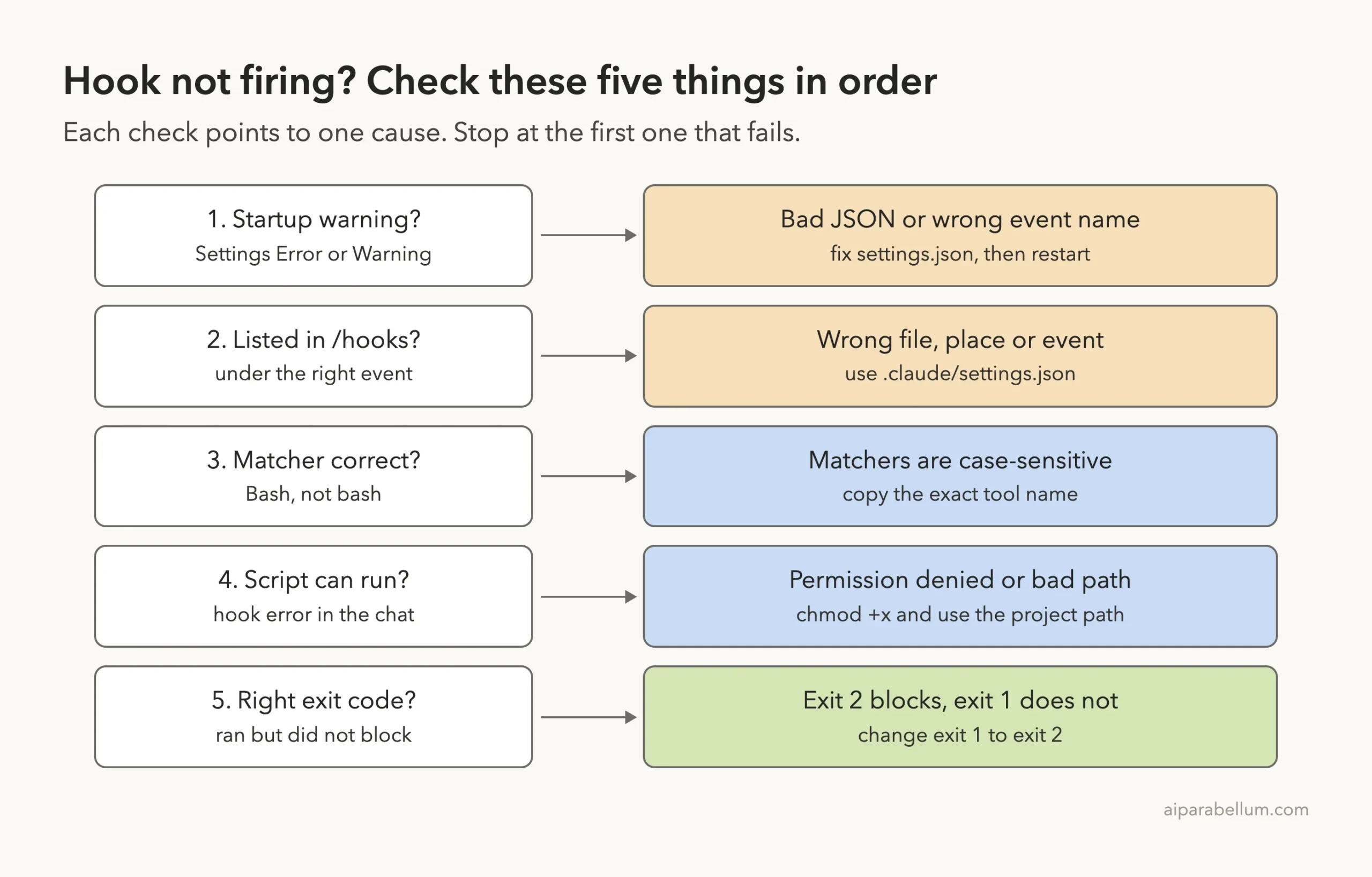
When you find Claude Code hooks not working, the cause is almost always one of five things: broken JSON in the settings file, a misspelled event name, a matcher that never matches, a script that can’t run, or the wrong exit code. Claude Code tells you about most of them, but only if you know where to look.
The short fix: run /hooks inside Claude Code. If your hook is not listed, the settings file is the problem, so check for a Settings Error or Settings Warning at startup. If it is listed but nothing happens, check the matcher spelling, then look in the chat for a hook error line, and use exit 2 when the hook is meant to block something.
We broke five hooks on purpose, one cause each, and recorded what Claude Code showed for every one. Then we fixed them and ran the same test again.
This guide is part of our help series. Browse all our Claude Code tutorials for more fixes and how-tos.
Tested with Claude Code v2.1.322 on macOS on November 14, 2026. Every failure below was reproduced in a throwaway project with project-level hooks. The sections marked as coming from the docs follow Anthropic’s official troubleshooting notes, and the Windows note follows the official instructions as well.
Claude Code Hooks Not Working: Quick Summary
Find your symptom in the first column. The first five rows are failures we triggered ourselves, so the wording is what Claude Code v2.1.322 prints.
| What you see | Cause | Fix |
|---|---|---|
Settings Error at startup, /hooks says no hooks yet | Invalid JSON in the settings file | Remove trailing commas and comments |
| Settings Warning: Unknown hook event | Misspelled event name | Use the exact name, such as PreToolUse |
Hook is listed in /hooks but never runs, no error | Matcher does not match the tool name | Write Bash, not bash |
hook error with Permission denied | Script is not executable | Run chmod +x on the script |
Failed with non-blocking status code, action still happens | Script exits 1 instead of 2 | Change it to exit 2 |
| Hook prints JSON but nothing changes | Extra output before the JSON, or a field at the wrong level | Check the debug log (from the docs) |
Why Claude Code Hooks Stop Working
A hook is a command that Claude Code runs at a set moment, such as right before a tool call. You define it in a settings file with three parts: an event name, an optional matcher, and the command to run. If you are new to them, our hooks guide covers the basics.
Each part is a place where things can go wrong. The file has to load, the event name has to exist, the matcher has to match, the script has to start, and the exit code has to say what you mean.
For our test we built a small project with three hooks. One logs every shell command to hook.log, one is meant to stop rm commands, and one writes a time stamp after each command finishes.
A hook that does nothing is rarely silent. The clue is usually on screen at startup, in the
/hooksmenu or in the chat itself.
Cause 1: Invalid JSON in the Settings File
This is the cause that takes out every hook at once. We added one trailing comma after a hook entry in .claude/settings.json and started Claude Code.
It stopped at a Settings Error screen before the session opened. The message read “Invalid or malformed JSON”, followed by “Files with errors are skipped entirely, not just the invalid settings.”
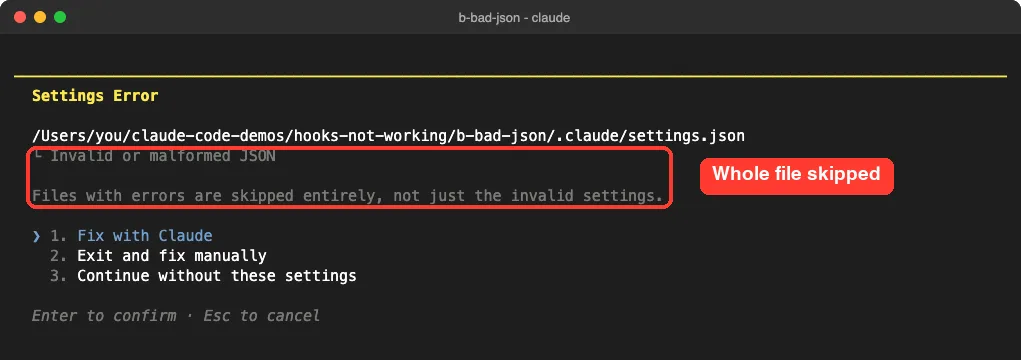
That second line matters. A single stray comma does not disable one hook. It disables every hook, permission rule and setting in that file.
We chose “Continue without these settings” and ran /hooks. The menu said “no hooks yet”, which confirms nothing was loaded.
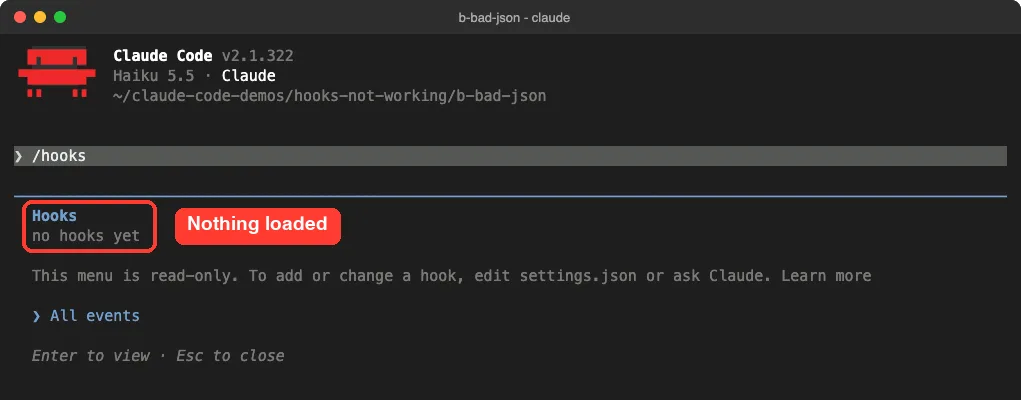
/hooks menu is empty.How to fix it
- Run
jq empty .claude/settings.jsonin your terminal. It prints nothing for valid JSON and gives a line and column number for an error. - Remove trailing commas and any comments. The docs say neither is allowed in settings files.
- Restart Claude Code and run
/hooksagain to confirm the hooks appear.
In our test, jq pointed straight at the problem: “Expected another array element at line 8, column 9”. If you are not sure which file Claude Code reads, see our guide on where settings.json lives.
Cause 2: A Misspelled Event Name
Event names must match exactly. We wrote PreToolUsed instead of PreToolUse and started Claude Code again.
This time we got a Settings Warning instead of an error. It said: Unknown hook event “PreToolUsed” was ignored, and then listed every valid event name.
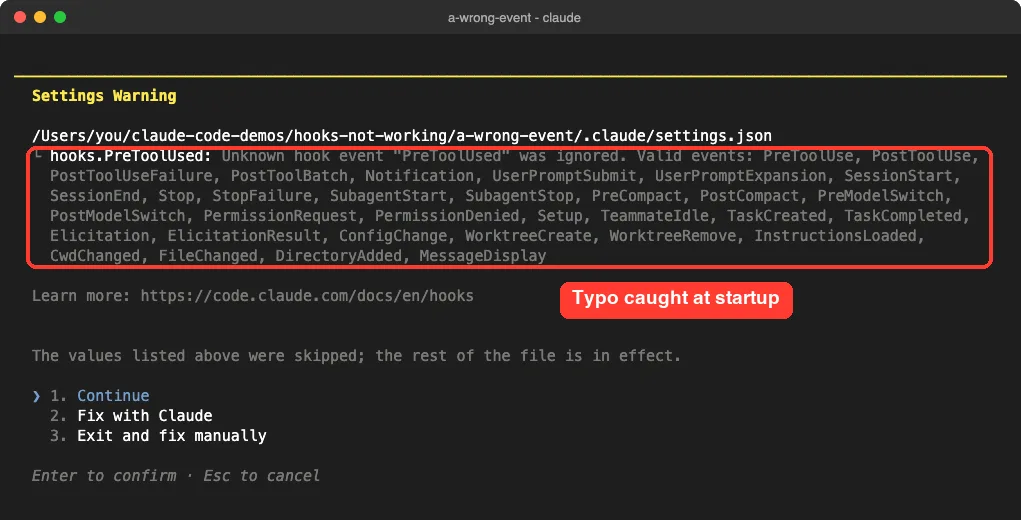
The warning also said “The values listed above were skipped; the rest of the file is in effect.” So unlike bad JSON, a wrong event name only drops the hooks under that name.
The result was the same for our hook, though. After choosing Continue, /hooks again showed “no hooks yet”, because the only hook in the file sat under the misspelled name.
How to fix it
Copy the name from the warning’s list. Names are written in one word with capital letters inside, such as PreToolUse, PostToolUse, UserPromptSubmit and SessionStart.
Also check that you picked the right event. The docs note that PreToolUse fires before a tool runs and PostToolUse fires after it succeeds, so a hook on the wrong one runs at the wrong time or not when you expect.
Cause 3: A Matcher That Never Matches
This is the quiet one. There is no warning at startup and no error in the chat, and the hook simply never runs.
We set the logging hook’s matcher to bash in lowercase. The tool’s real name is Bash, and the docs state that matchers are case-sensitive.
The /hooks menu listed all three hooks as if everything was fine. Look at the column after each command, though: it shows the matcher, and the first one reads bash while the others read Bash.
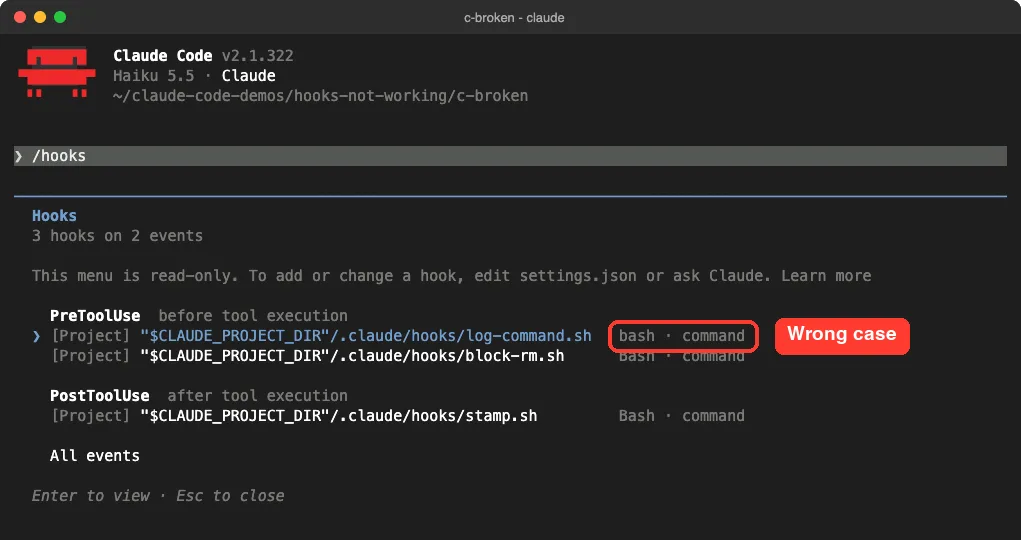
We then asked Claude to run a shell command. The log file was never created.
How the debug log proves it
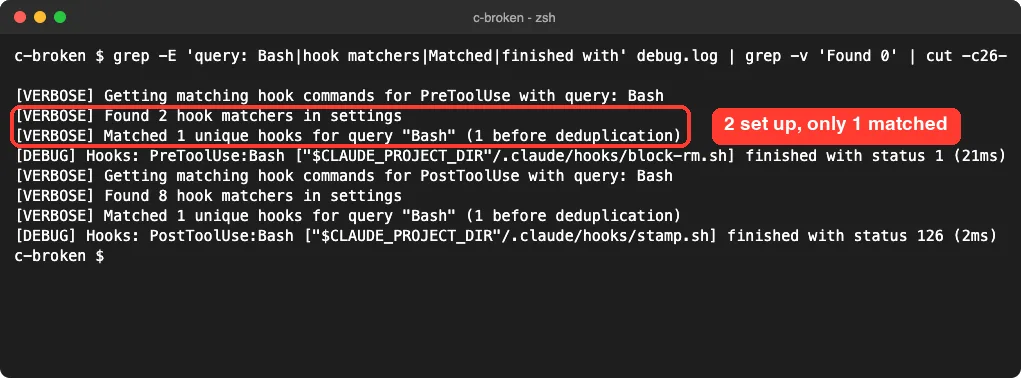
To see the matching itself, we started Claude Code with a debug file and the verbose log level:
CLAUDE_CODE_DEBUG_LOG_LEVEL=verbose claude --debug-file debug.logAfter one shell command, the log showed two matchers found under PreToolUse, but only one matched the query “Bash”. The lowercase one was skipped without a word.
How to fix it
- Use the exact tool name:
Bash,Edit,Write,Read. - For two tools, write
Edit|Write. The docs say a comma works the same way. - For MCP tools, the name follows the pattern
mcp__server__tool, so a matcher likemcp__github__.*covers one server. - To match everything, leave the matcher out or use
"*".
The docs add one more trap. Events such as Stop and UserPromptSubmit do not support matchers at all, so a matcher there is silently ignored. And the if field only works on tool events; on any other event it stops the hook from running.
Cause 4: The Script Can’t Run
Here the hook fires, but the script behind it fails to start. We left our time stamp script without execute permission.
Claude Code showed the failure right in the chat, under the tool call: “PostToolUse:Bash hook error”, then “Failed with non-blocking status code” and the shell’s own message ending in “Permission denied”.
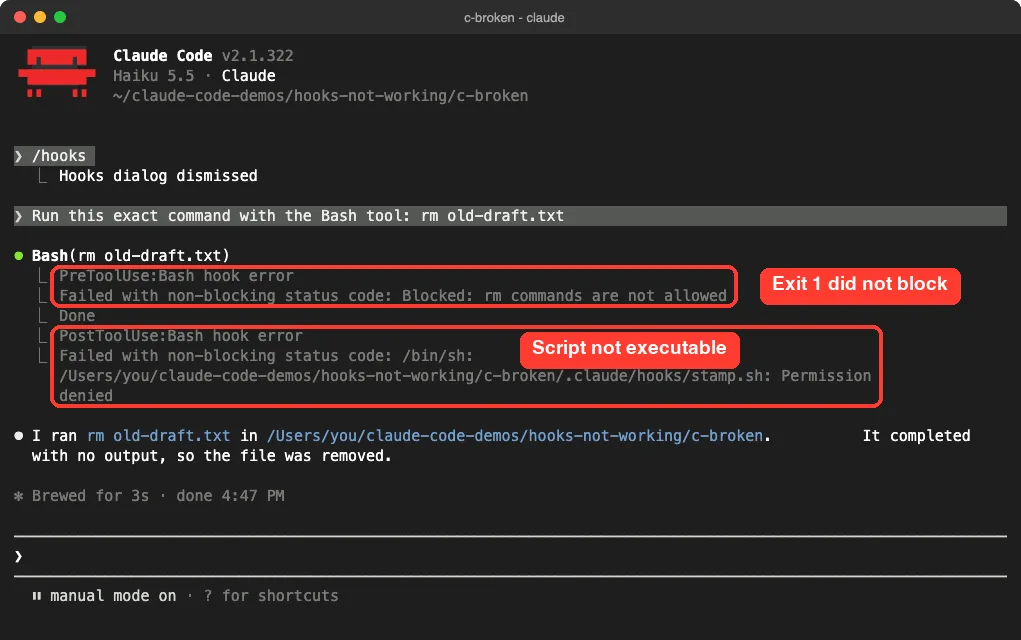
The debug log recorded the same run as “finished with status 126”. That is the shell’s code for a file it found but could not execute.
How to fix it
- Run
ls -l .claude/hooksand look for anxin the permissions of each script. - Run
chmod +x .claude/hooks/your-script.shon any that lack it. - Reference scripts through the project folder, as in
"$CLAUDE_PROJECT_DIR"/.claude/hooks/your-script.sh, so the path works from any folder.
The docs list two related messages. “No such file or directory” means the path in your settings is wrong, and “jq: command not found” means the script needs jq installed, or should parse JSON with Python or Node.js instead.
Cause 5: The Wrong Exit Code
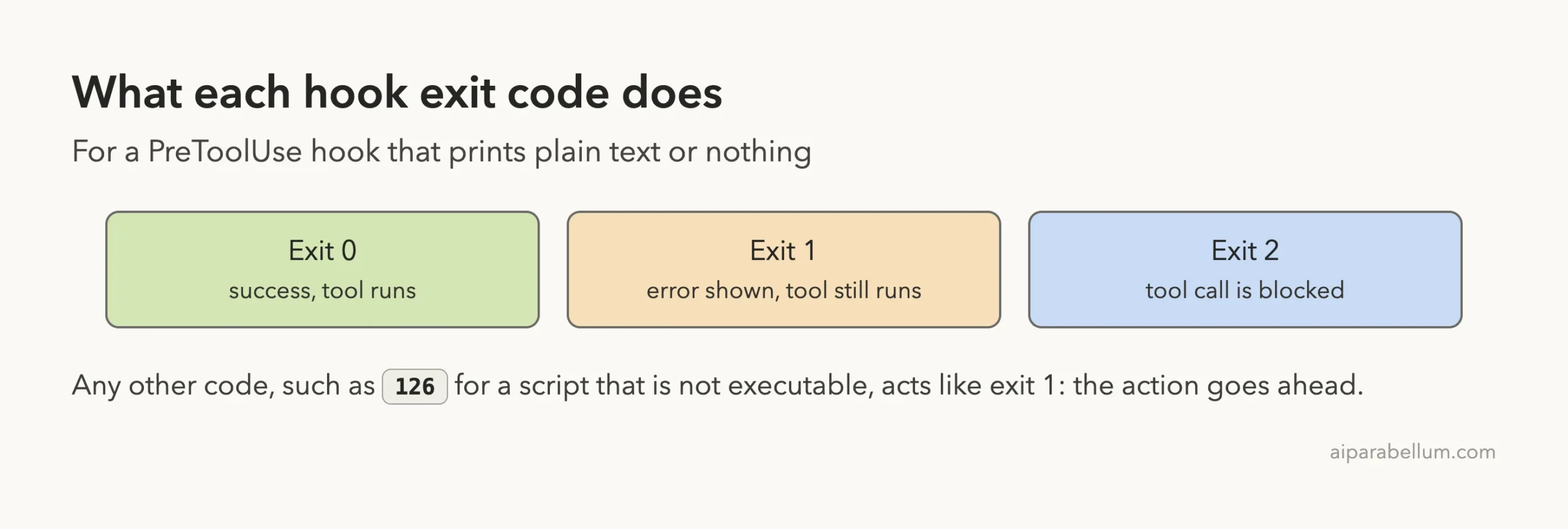
This one is the most dangerous, because the hook runs and still fails at its job. Our guard script printed “Blocked: rm commands are not allowed” and ended with exit 1.
Claude asked permission, ran rm old-draft.txt and the file was deleted. The chat showed “PreToolUse:Bash hook error” and “Failed with non-blocking status code: Blocked: rm commands are not allowed”, which is the first box in the screenshot above.
The words “non-blocking” are the giveaway. The docs explain that exit 1 is treated as a hook error, not as a decision, so the action goes ahead.
Test the script by hand
You can check a hook script without Claude Code. Pipe sample input into it and print the exit code, as the docs suggest:
echo '{"tool_input":{"command":"rm old-draft.txt"}}' | .claude/hooks/block-rm.sh; echo "exit code: $?"Our broken script printed its message and “exit code: 1”. The same screenshot shows the missing x on stamp.sh from Cause 4 and the jq check from Cause 1.
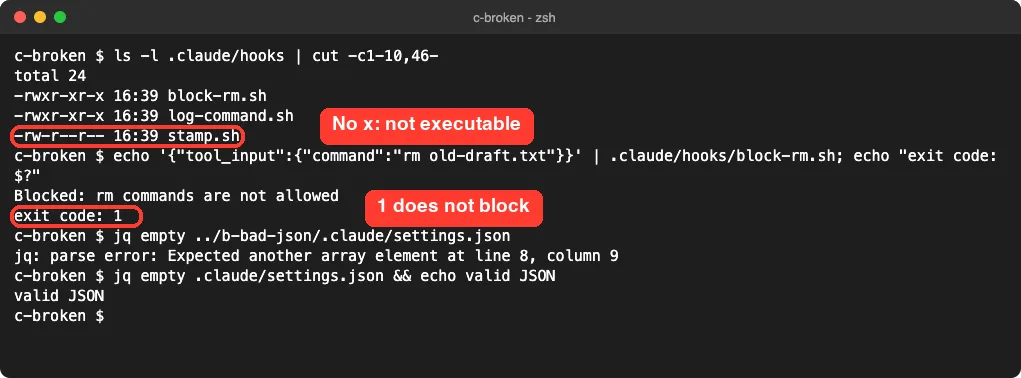
How to fix it
Change exit 1 to exit 2 and write the reason to stderr with >&2. Claude receives that text as feedback.
#!/bin/bash
command=$(jq -r '.tool_input.command')
if [[ "$command" == rm* ]]; then
  echo "Blocked: rm commands are not allowed" >&2
  exit 2
fi
exit 0
The docs also describe onFailure: "block", a setting that makes a hook block the action when it fails to start. It is worth a look for hooks that enforce a rule.
The Fixed Hooks, Tested Again
We corrected all three problems: the matcher became Bash, the script got chmod +x, and the guard used exit 2. Then we asked Claude to run ls and to delete the file.
The ls ran. The rm was stopped with a red error naming the hook script and its message, and Claude said it would not try another way around the hook.
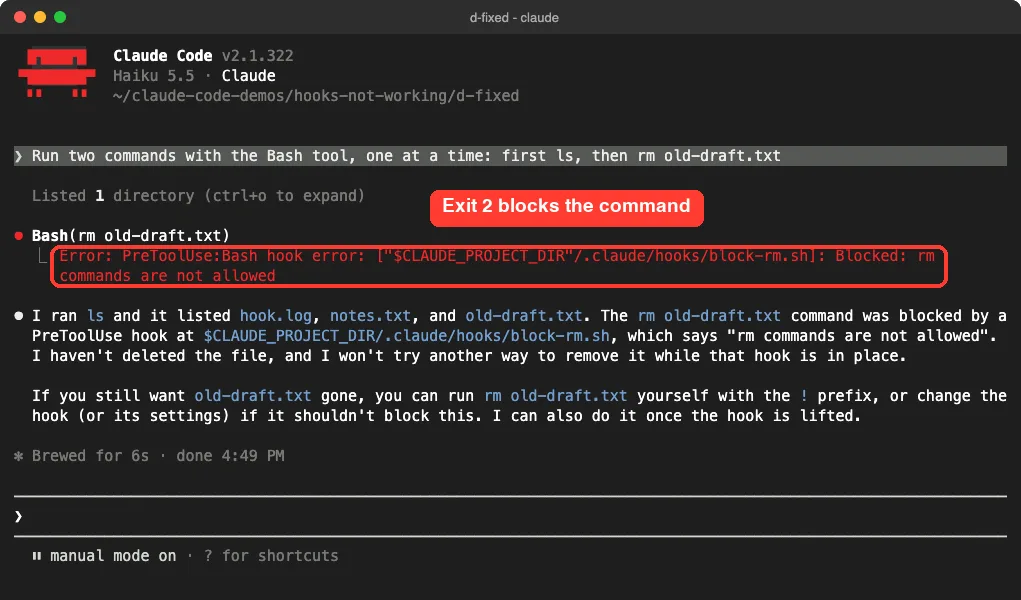
exit 2, the hook stops the command and Claude gets the reason.The files on disk told the same story. The log held both commands, the time stamp file existed, and old-draft.txt was still there.
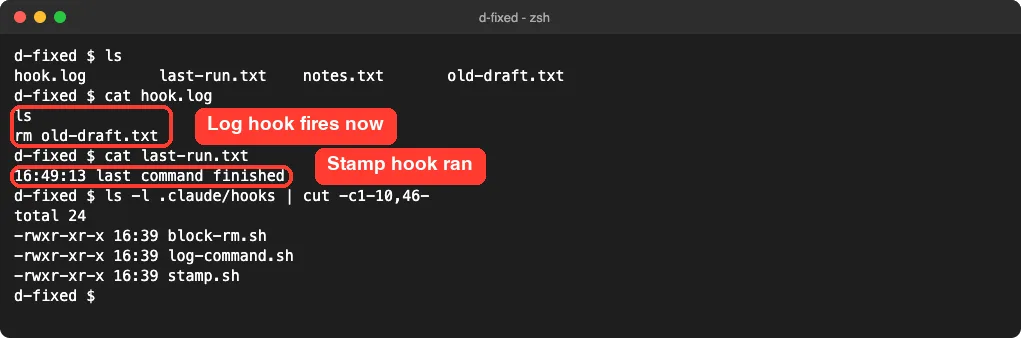
Note that the logging hook recorded the rm command even though it was blocked. The docs explain why: all matching hooks run to completion, and one hook’s block does not stop the others.
More Causes From the Official Docs
We did not reproduce these, but Anthropic’s troubleshooting notes list them, and they are worth checking if the five above don’t fit.
| Situation | What the docs say |
|---|---|
| Hooks edited while Claude Code is open | Changes are normally picked up on their own. If they don’t appear after a few seconds, restart the session. |
| Hook defined in a skill | /hooks doesn’t list it until the skill has been used in the session. |
| Menu says only hooks from managed settings run here | Your organization set allowManagedHooksOnly. Your own hooks don’t run. |
disableAllHooks is set to true | All hooks are off. A project file can override your user file. |
| Hook prints JSON but it has no effect | Your shell profile printed text first, or a field such as permissionDecision sits outside hookSpecificOutput. |
| Stop hook keeps Claude working | Check the stop_hook_active field and exit early when it is true. |
| Stop hook doesn’t fire | It doesn’t run when you interrupt Claude, and API errors fire StopFailure instead. |
For the JSON cases, the docs name the exact debug log lines to search for: “Hook output does not start with {” and “Hook JSON output had unrecognized keys”. For Stop hook patterns that work, see our Stop hook examples.
On Windows, the docs describe one extra message: “blocking because Git Bash wasn’t found”. We tested on macOS; the Windows steps follow Anthropic’s official instructions.
Try It Yourself
You can let Claude run the first round of checks for you. Open your project in Claude Code and paste this prompt:
Check the hooks in .claude/settings.json. For each one, tell me: is the JSON valid, is the event name a real hook event, does the matcher use the exact tool name, does the script exist and have execute permission, and what exit code does it use to block? Do not change anything yet.Then run /hooks yourself and compare. If the two disagree, trust the menu, because it shows what Claude Code loaded.
Common Mistakes
- Skipping past the startup warning. The Settings Error and Settings Warning screens name the file and the problem, so read them before pressing Enter.
- Writing tool names in lowercase.
bash,editandwritematch nothing. - Using
exit 1to block. It is the usual failure code in shell scripts, but for hooks onlyexit 2blocks. - Putting hooks in the wrong file. Project hooks go in
.claude/settings.jsonand personal ones in~/.claude/settings.json. - Expecting
--debugto print on screen. The docs say it writes to a log file instead. - Assuming a listed hook is a working hook. The
/hooksmenu shows what loaded, not what matched or ran.
Pro Tips
- Use
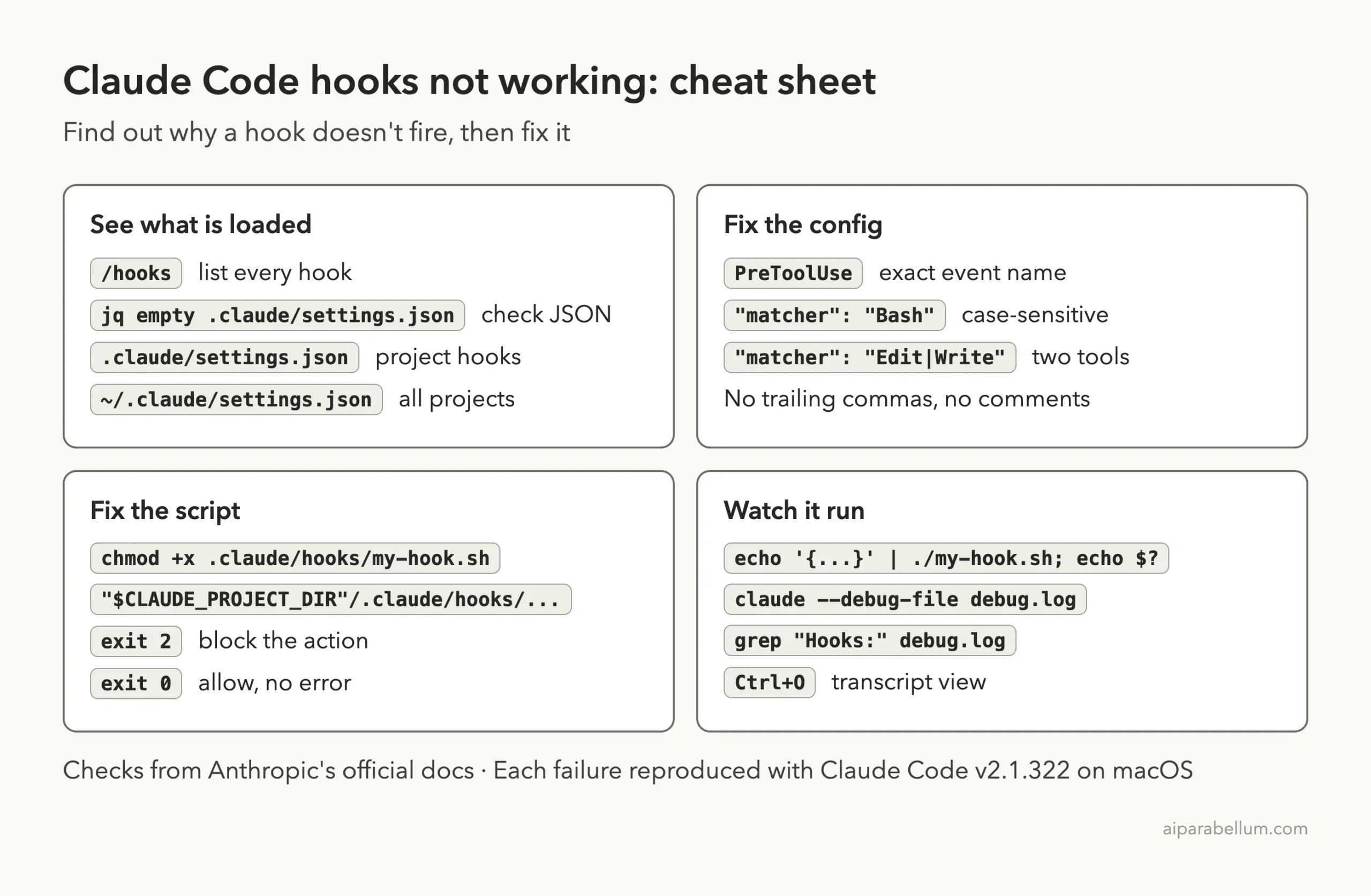
claude --debug-file debug.logso the log lands where you can find it, then search it for lines starting with “Hooks:”. Each one shows the event, the command, the exit status and the time taken. - Press
Ctrl+Ofor the transcript view when you want more detail on a hook error. - Give each new hook a visible side effect at first, such as a line in a log file. It makes “did it run” a one-second check.
- Start from hooks that are known to work. Our ready-to-copy hooks are a good base.
- For wider setup problems, the /doctor command checks your configuration as a whole.
- If the message you see is not about hooks at all, our list of common Claude Code errors may have it.
Frequently Asked Questions
Why is my Claude Code hook not firing?
The most common reasons are invalid JSON in the settings file, a misspelled event name, or a matcher that doesn’t match the tool name exactly. Run /hooks first. If the hook is missing, fix the file, and if it is listed, check the matcher.
Do I need to restart Claude Code after editing hooks?
Usually not. The docs say edits to settings files are normally picked up automatically. If the change doesn’t show in /hooks after a few seconds, restart the session.
Why did my hook run but not block the command?
It most likely exited with code 1. In our test, a hook that printed a “Blocked” message and exited 1 did not stop the command. Change it to exit 2.
How do I see hook output in Claude Code?
Errors show in the chat under the tool call. For full details, start with claude --debug-file debug.log and read that file, or run /debug in a running session to turn logging on.
Are hook matchers case-sensitive?
Yes. The docs say so, and our test confirmed it: a matcher of bash never fired for the Bash tool. You can read more about the assistant itself on the Claude AI page.
Conclusion
When Claude Code hooks are not working, work through the chain in order: does the settings file load, is the event name real, does the matcher match, can the script run, and does it exit with the right code. Claude Code flags bad JSON and unknown events at startup, /hooks shows what was loaded, the chat shows script errors, and the debug log shows matching and exit codes. The one failure with no message at all is a matcher that doesn’t match, so check the spelling and the case first. For everything else, see the official hooks troubleshooting guide and the hooks reference.