A Claude Code stop hook example is the fastest way to see what hooks can do. A Stop hook is a small script that runs when Claude is about to finish, and it can log activity or send Claude back to work. We built two copy-ready examples, ran them for real, and recorded what happened.
This is Part 35 of 45 in our Claude Code Deep Dives, part of our Claude Code tutorials. In the last part we showed how to read context and cost in the status line. If hooks are new to you, start with our hooks overview first.
Tested with Claude Code v2.1.322 on November 12, 2026, on macOS. Everything ran in a throwaway demo folder with --setting-sources project, so our personal Claude Code setup stayed untouched. We did not use any Windows or Linux machine, so the shell scripts below are for macOS and Linux style shells.
Quick Summary
| Question | Short answer |
|---|---|
| When does a Stop hook run? | Whenever Claude finishes responding, not only when a task is complete |
| Where do I put it? | In .claude/settings.json under the Stop event |
| How do I make Claude keep going? | Print a reason to stderr and exit with code 2 |
| How do I avoid an endless loop? | Check stop_hook_active in the JSON the hook receives |
| What did we test? | A logging hook and a test-gate hook on a tiny project with one failing test |
| What happened? | The gate blocked the first stop, Claude fixed the bug, and the second stop was allowed |
What Is a Claude Code Stop Hook?
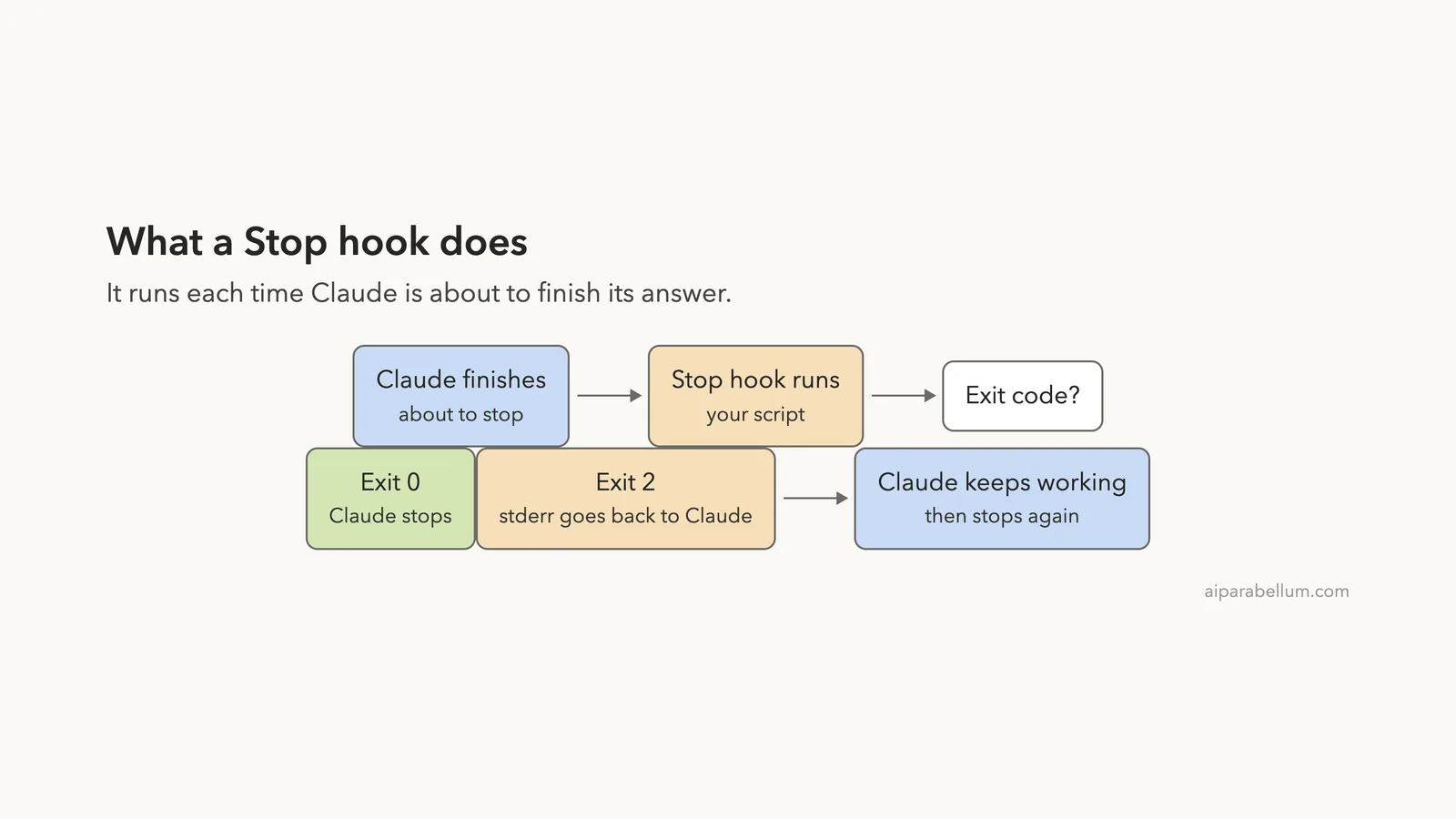
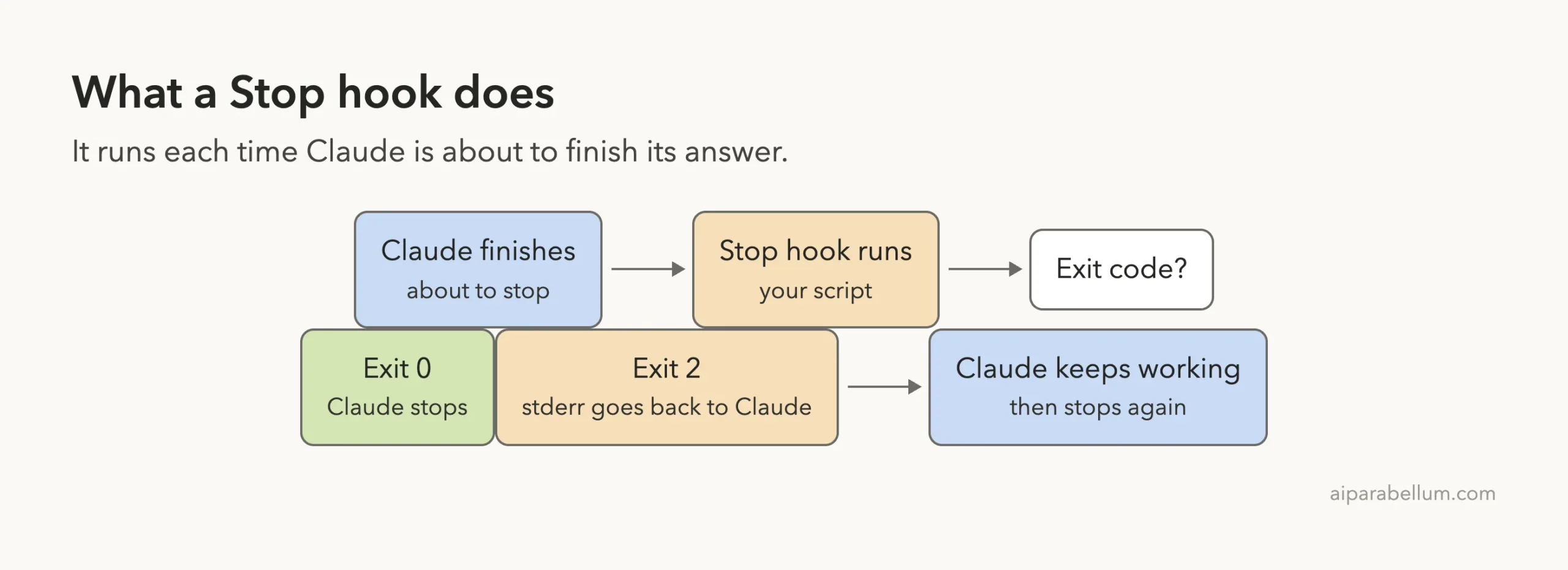
Hooks are commands that Claude Code runs automatically at set moments in a session. The Stop event fires right before Claude concludes its response. The official hooks guide says Stop hooks fire whenever Claude finishes responding, not only at task completion, and that they do not fire on user interrupts.
That makes Stop a good place for two kinds of jobs. The first is bookkeeping, like writing a log line or sending a notification. The second is a quality gate, where your script checks the work and can push Claude to keep going.
How a Stop Hook Talks to Claude
Your script gets JSON on standard input and answers with an exit code. The docs describe two outcomes that matter here.
- Exit code
0means all is fine, and Claude can stop. - Exit code
2means block. Whatever you write to stderr is fed back to Claude so it can act on it. On Stop events, the conversation continues so Claude can respond to your feedback.
Any other exit code is a non-blocking error, so the action carries on. For the full picture of the exit-code rules, see the hooks reference.
What the Hook Receives
We logged the real input of our first example. Each Stop event arrived as one JSON object. These are the fields we saw in our run:
hook_event_name, which wasStopstop_hook_active, which wasfalsethe first time andtrueon the retrylast_assistant_message, the text of Claude’s final replytranscript_path,session_id,cwdandpermission_mode
The stop_hook_active flag is the key to safe gates, and we will come back to it in a moment.
Set Up the Demo Project
Our demo folder is tiny on purpose. It has one source file with a planted bug and one test file. The discount is divided by 10 instead of 100, so a 10 percent discount wipes out the whole total.
def cart_total(prices, discount_percent):
    total = 0
    for p in prices:
        total += p
    return total - total * discount_percent / 10
The test file checks that two items of 50 with a 10 percent discount give 90, and that no discount gives the plain total. Before any hook ran, we confirmed by hand that one of the two tests fails.
demo/
  src/cart.py
  tests/test_cart.py
  .claude/
    settings.json
    hooks/log-stop.sh
    hooks/test-gate.sh
Example 1: Log Every Stop Event
This is the simplest useful Stop hook. It appends a timestamp and the input JSON to a log file, then exits with 0 so it never blocks anything. It is a handy way to see exactly what your own sessions send to hooks.
#!/bin/bash
# Example 1: log every Stop event (the JSON Claude Code sends on stdin)
mkdir -p "$CLAUDE_PROJECT_DIR/.claude/logs"
{ date '+%H:%M:%S'; cat; echo; } >> "$CLAUDE_PROJECT_DIR/.claude/logs/stop.log"
exit 0
Save it as .claude/hooks/log-stop.sh and make it executable with chmod +x. The script uses $CLAUDE_PROJECT_DIR, which the hooks guide recommends for referencing scripts so the path works from any folder.
Example 2: Block Stopping Until the Tests Pass
The second hook is the one most people want. It runs your test command when Claude tries to stop. If the tests fail, it prints the failure to stderr and exits with 2, so Claude gets the output and keeps working.
#!/bin/bash
# Example 2: do not let Claude stop while the tests fail
INPUT=$(cat)
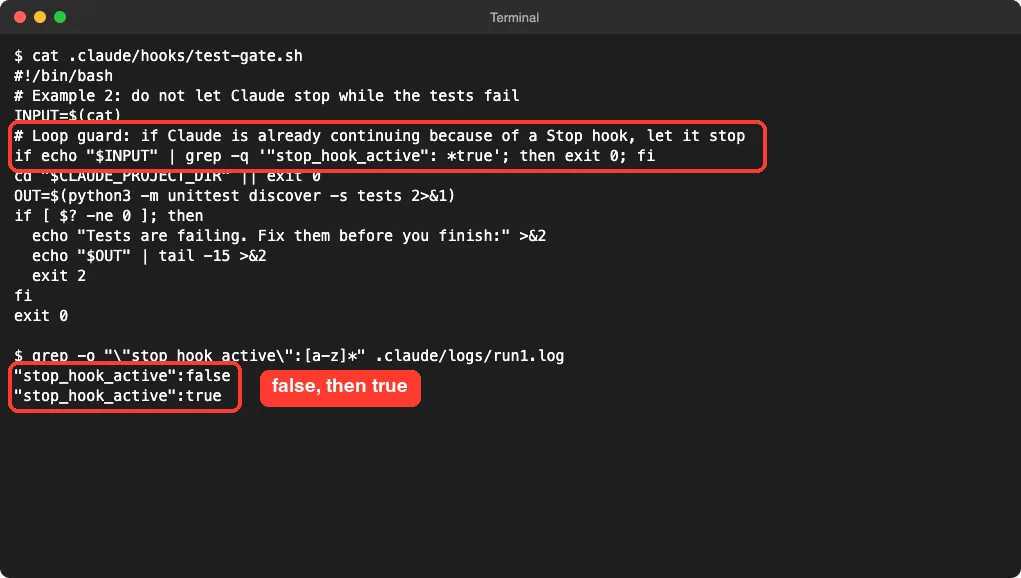
# Loop guard: if Claude is already continuing because of a Stop hook, let it stop
if echo "$INPUT" | grep -q '"stop_hook_active": *true'; then exit 0; fi
cd "$CLAUDE_PROJECT_DIR" || exit 0
OUT=$(python3 -m unittest discover -s tests 2>&1)
if [ $? -ne 0 ]; then
  echo "Tests are failing. Fix them before you finish:" >&2
  echo "$OUT" | tail -15 >&2
  exit 2
fi
exit 0
Swap the python3 -m unittest line for your own command, such as npm test or pytest. We only ran the Python version.
Why the Loop Guard Matters
Without a guard, a gate can trap Claude. Say the tests keep failing for a reason Claude cannot fix. Every time it tries to stop, your hook blocks it again.
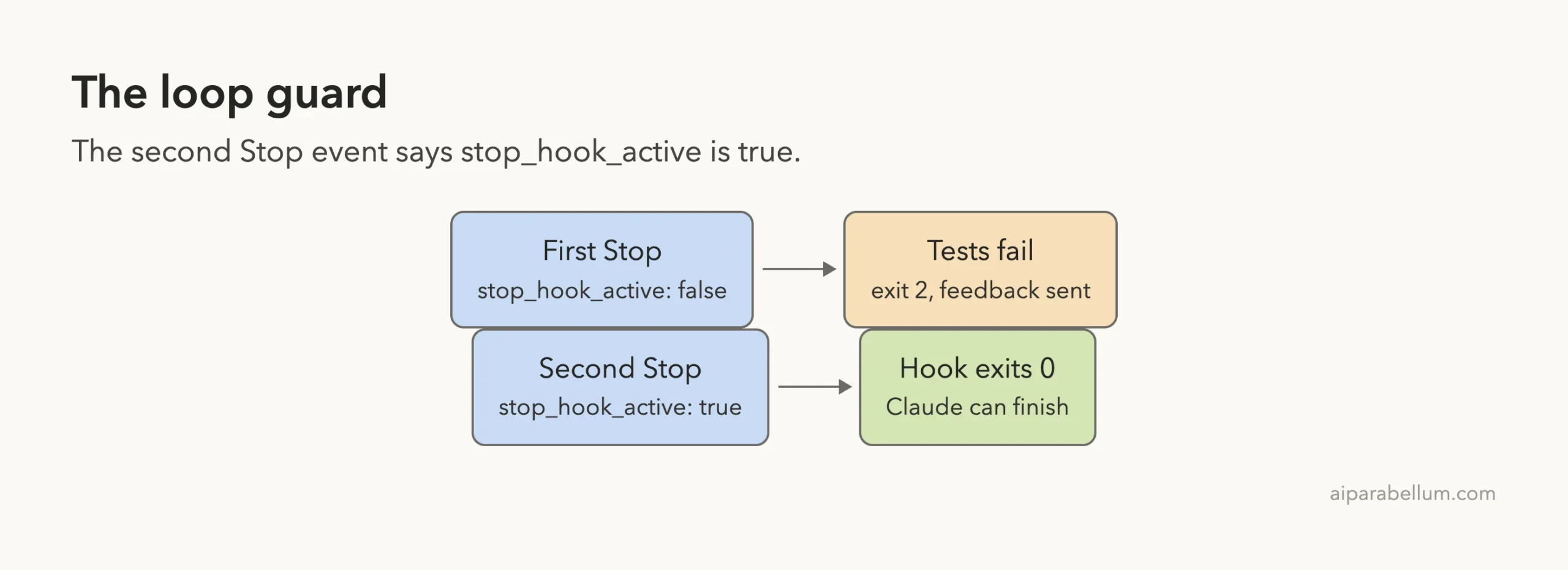
The stop_hook_active field tells your script that Claude is already continuing because of a Stop hook. In our run it was false on the first stop and true on the second. Our script lets Claude finish when it sees true.
The official docs also describe an impossible: true option for Stop hooks that return JSON, to mark a condition that can never be met. We did not test that route, so we stick to the exit code approach here.
Wire Both Hooks Into settings.json
Both hooks go under the Stop event in .claude/settings.json. Stop does not use a matcher, so the list is short. Here is the full file from our demo.
{
  "hooks": {
    "Stop": [
      {
        "hooks": [
          { "type": "command", "command": "\"$CLAUDE_PROJECT_DIR\"/.claude/hooks/log-stop.sh" },
          { "type": "command", "command": "\"$CLAUDE_PROJECT_DIR\"/.claude/hooks/test-gate.sh" }
        ]
      }
    ]
  }
}
One thing to know about trust. In an interactive session, Claude Code holds back hooks from your settings files until you accept the workspace trust dialog for the folder. We accepted it in our demo folder, as any user would on a first visit.
After that, type /hooks in the session. It shows a read-only list of every hook by event, which is the quickest way to confirm Claude Code found yours.
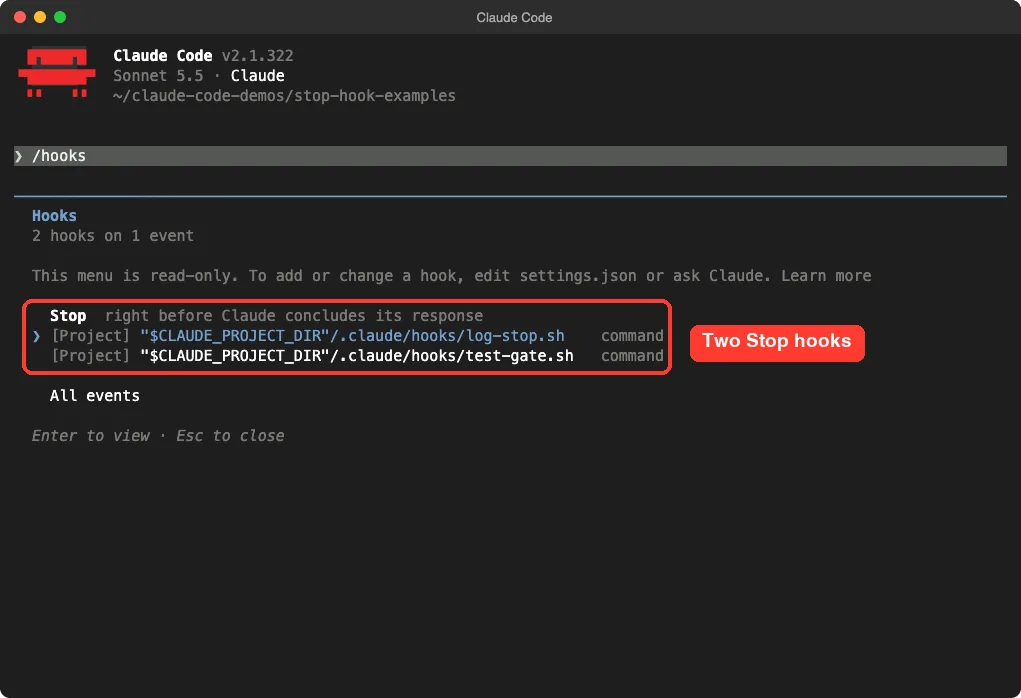
/hooks menu lists both of our project hooks under StopRun It: The Gate in Action
Now the real test. We started Claude Code in the demo folder and typed a harmless prompt that has nothing to do with the bug: “Reply with just the word hello.”
Claude answered “hello”. Then the Stop event fired, our logger wrote its line, and the test gate ran. The test failed, so the gate exited with 2 and the failure output went to Claude as feedback.
What happened next is the useful part. Claude read the failing test, found the cause, and proposed an edit that changes the divisor from 10 to 100.
It asked for our approval first, because the session was in the default permission mode. The screenshot below shows the hook’s output, Claude’s one-line diagnosis and the proposed diff.
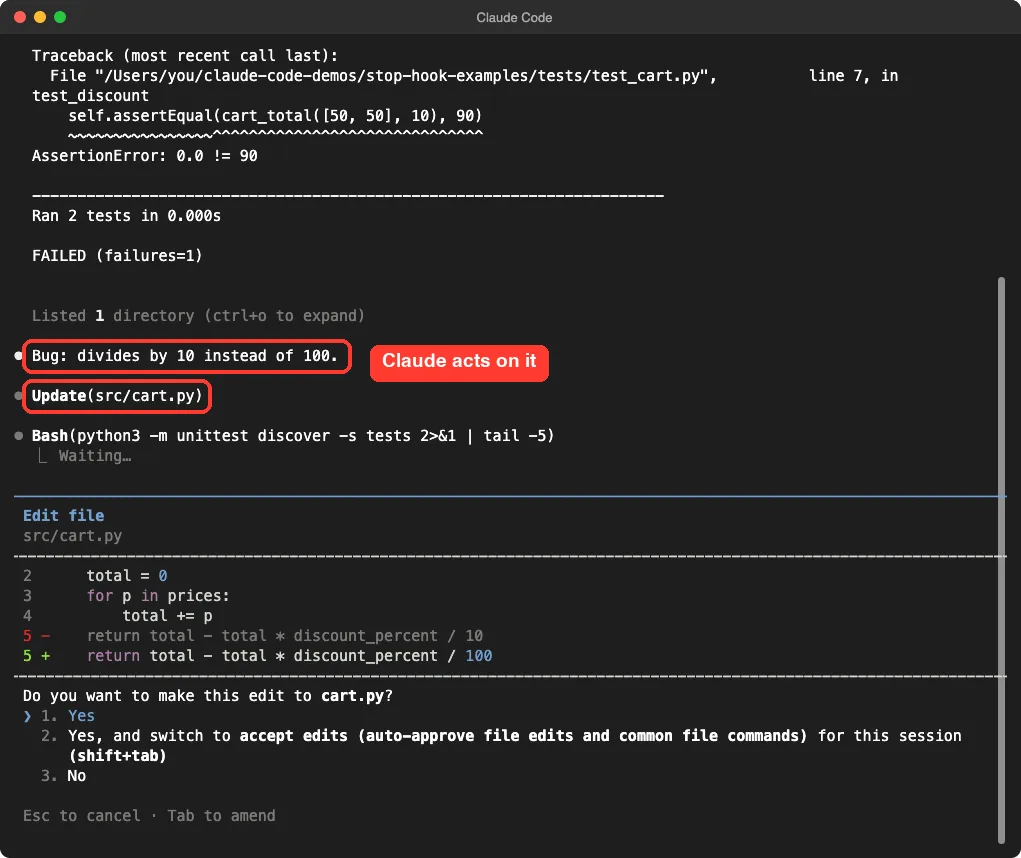
We approved the edit. Afterward we ran the tests ourselves and both passed. The log from our first run also shows the order of events: first a Stop with stop_hook_active false, then a second Stop with it true.
What We Did Not Capture
In the second run, Claude also asked to approve a Bash command to re-run the tests, and our capture window closed while that prompt was open. So the screenshot above is the moment that matters, and the passing result comes from our own manual test run, not from the recording.
Surprise: Claude Still Follows Your Own Rules
In our first run, we added a restriction to the prompt: “Do not read or edit any files.” The hook still blocked the stop and fed the failing test back to Claude.
Claude did not break our rule. It explained that the stop hook reported a failing test, said it had been asked not to touch files, and offered to fix the bug if we said so. The files stayed unchanged, and then it was allowed to stop, since the second Stop event carried the guard flag.
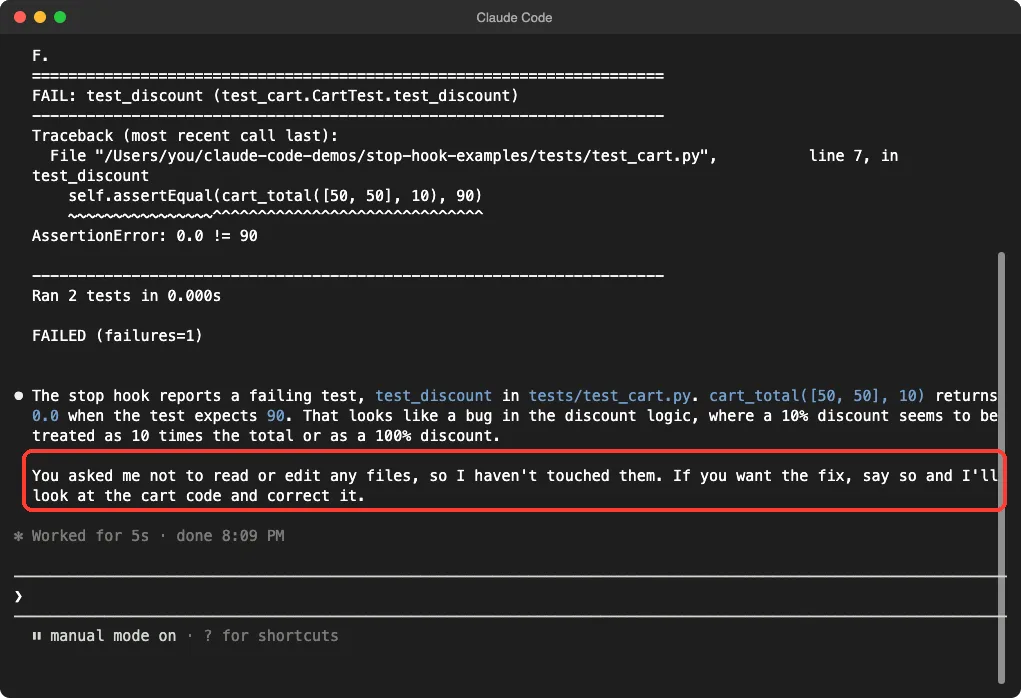
This is worth remembering. Exit code 2 sends a message and gives Claude another turn. It does not force a particular action.
A Stop hook is feedback for Claude, not a command it must obey.
Our one demo shows this once, so treat it as an example of behavior rather than a guarantee.
More Stop Hook Ideas to Try
We only ran the two examples above. These ideas follow the same pattern, and you can build them with the same input fields. We have not tested them.
| Idea | How it would work | Tested by us |
|---|---|---|
| Lint gate | Run your linter, exit 2 with the errors | No |
| Desktop notification | Run a notify command, exit 0 | No |
| Read the final message | Check last_assistant_message for a phrase | No |
| Prompt hook | Use a prompt type hook so a model judges if work is done | No |
| Agent hook | Use an agent type hook that can read files to verify the work | No |
The hooks guide lists prompt hooks as single-turn model checks and agent hooks as multi-turn checks with tool access, and it marks agent hooks as experimental. For several more ready-made patterns, see our ready-to-copy hooks, and to create hooks by describing them, try the Hookify plugin.
Try It Yourself
Make a folder with a function and one failing test, then add the two scripts and the settings file above. Start Claude Code in the folder, accept the trust dialog, and run /hooks to confirm both hooks appear. Then paste this prompt:
Reply with just the word hello.If your setup works, you will see the test output appear, and Claude will start working on the failing test. Check the log file to see the two Stop events and the stop_hook_active values.
Common Mistakes
- Skipping the loop guard. A gate with no check for
stop_hook_activecan keep blocking Claude. - Printing the feedback to stdout instead of stderr. With exit code 2, the message that reaches Claude comes from stderr.
- Forgetting
chmod +x. A script that is not executable never runs. - Expecting Stop to mean “task done”. It fires after every response, even a simple “hello”.
- Running slow checks. A long test suite delays every reply, so keep the gate command fast.
- Using a relative path to the script. Use
$CLAUDE_PROJECT_DIRso it works from any folder.
Pro Tips
- Pipe sample JSON into your script by hand first, then check the exit code with
echo $?. The hooks guide suggests this for debugging. - Keep the stderr message short. We used only the last 15 lines of test output.
- Put the logger first and the gate second so you always get a log line, even when the gate blocks.
- Test in a throwaway folder before you add a Stop gate to a real project. Our settings.json examples show where project settings live.
- Use the permission modes guide to decide how much Claude may do when a gate sends it back to work.
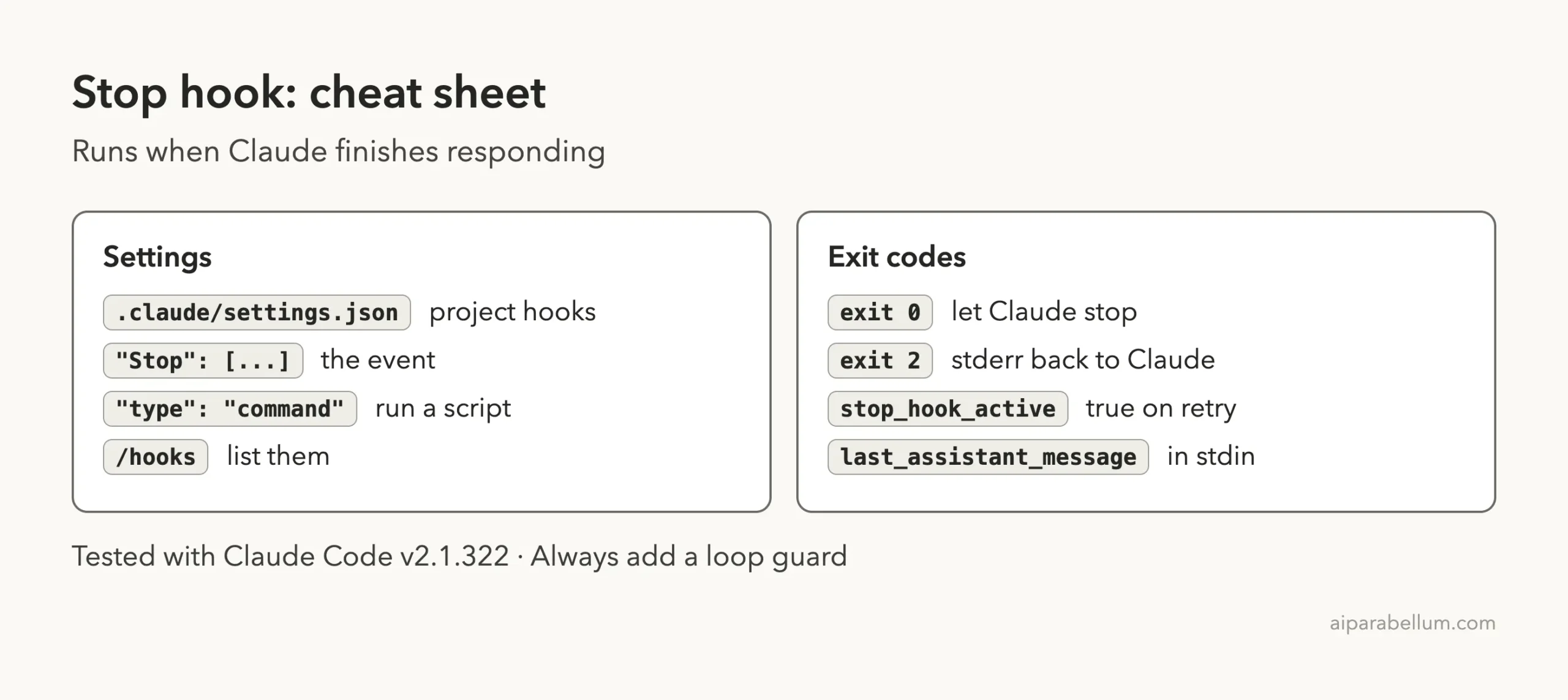
Cheat Sheet
Frequently Asked Questions
When does a Claude Code Stop hook run?
It runs whenever Claude finishes responding, not just when a task is complete. It does not run when you interrupt Claude. API errors fire a separate StopFailure event instead.
How do I make Claude keep working after a Stop hook?
Write your reason to stderr and exit with code 2. Claude receives the message and gets another turn. The docs also describe a JSON route with a decision and a reason, which we did not test.
How do I stop a Stop hook from looping forever?
Read stop_hook_active from the input JSON. If it is true, exit with 0. In our run it was false on the first stop and true on the retry.
Where do I save a Stop hook?
Put it in .claude/settings.json for a single project, or in your user settings for every project. We only tested the project file.
Does a Stop hook force Claude to edit files?
No. It sends feedback. In our test, Claude declined to edit files when our prompt told it not to, and offered to fix the bug on request instead.
Conclusion
A Claude Code Stop hook gives you a checkpoint at the end of every response. Our logger showed exactly what Claude Code sends, and our test gate pushed Claude to fix a real bug before it finished. Add the loop guard, keep the check fast, and try it in a throwaway folder first. For more background on Claude, see our Claude guide.
Previous in the series: Part 34, Status Line Cost
Next in the series: Part 36: Build a Custom Claude Code Output Style.