The claude code hookify plugin lets you create a hook by typing one sentence instead of editing a JSON file. You say what you want to stop, Claude writes a small rule file, and from then on a hook checks every matching action. We loaded the official plugin into a throwaway project, asked it to block rm -rf, and then tried to trigger the rule for real.
This guide is part of our Claude Code tutorials. Find more add-ons in our Skills Directory.
Tested with Claude Code v2.1.318 on November 6, 2026, using hookify version 0.1.1 from Anthropic’s official plugin repository (commit a1ecfbc). We ran it in a sandbox demo folder with --plugin-dir, so nothing was installed into the normal Claude Code setup.
Quick Summary
| Question | Short answer |
|---|---|
| What is hookify? | An official Anthropic plugin that turns a plain-English request into a hook rule |
| Where do rules live? | In .claude/hookify.NAME.local.md inside your project |
| Main command | /hookify:hookify followed by what you want to prevent |
| Warn or block? | Set action: warn or action: block in the rule file |
| Restart needed? | No, a new rule worked on the next tool call in our test |
| Install command | /plugin install hookify@claude-plugins-official |
What Is the Hookify Plugin?
Claude Code hooks are small commands that run at set moments, such as before Claude runs a shell command. They are powerful, but writing them means editing settings files and writing a script. Our hooks guide covers that classic way.
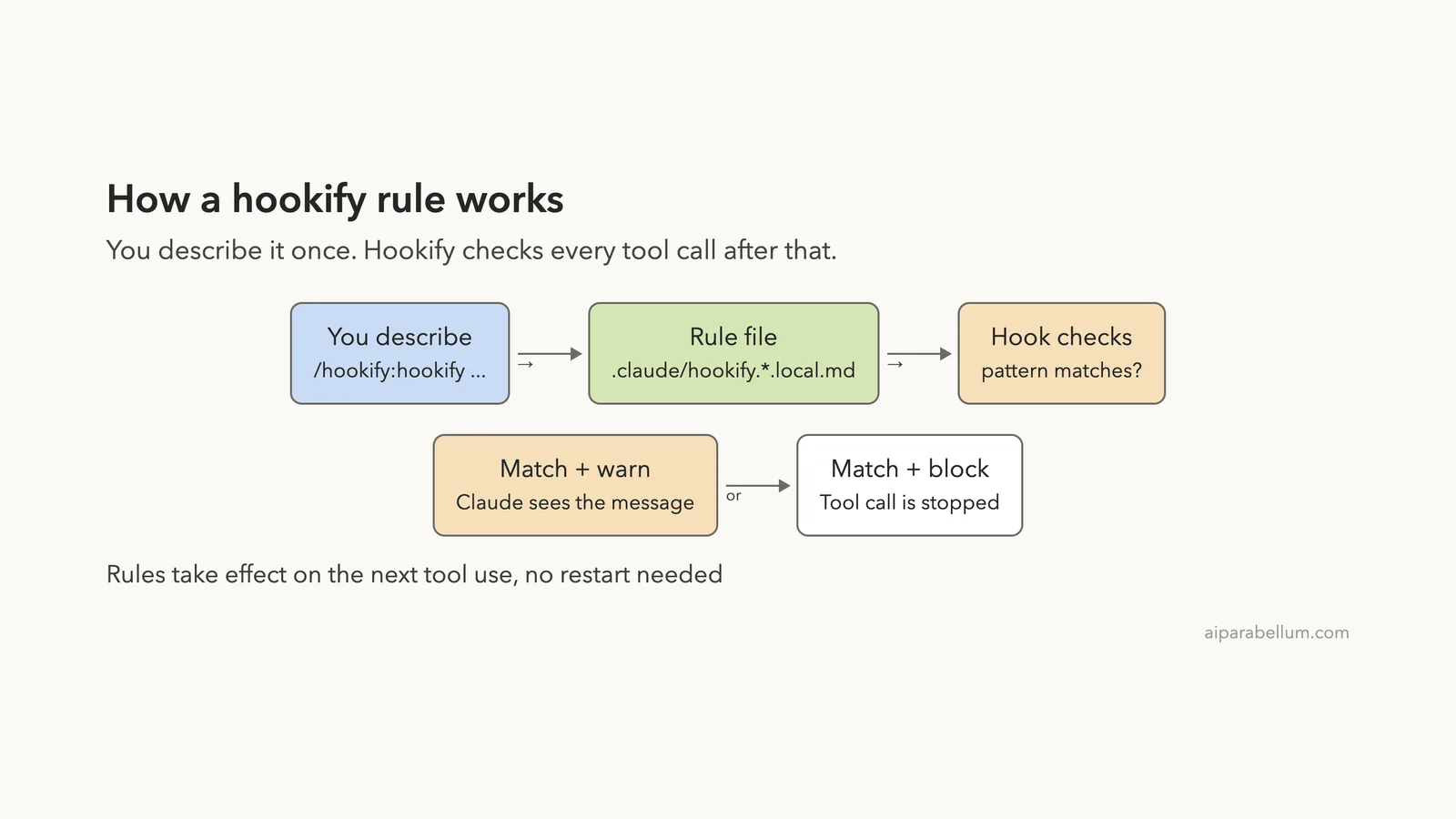
Hookify hides that work. The plugin ships one set of hooks that read simple markdown files, so you only write (or ask Claude to write) the rule file. Each file holds a pattern to watch for and a message to show when it matches.
The plugin comes from Anthropic’s official marketplace. If you are new to add-ons, our plugins guide explains how to find and manage them, and our plugins comparison helps you decide when a plugin is the right tool.
How Claude Code Hookify Works
When the plugin is enabled, it adds four hooks to Claude Code: before a tool runs, after a tool runs, when Claude tries to stop, and when you submit a prompt. We read the plugin’s source before running it. The hook scripts are local Python that load your rule files and match patterns, and we found no network calls in them.
Every time one of those moments happens, hookify reads the rule files in your .claude folder. If a rule’s pattern matches, it either shows Claude a message (warn) or stops the action (block).
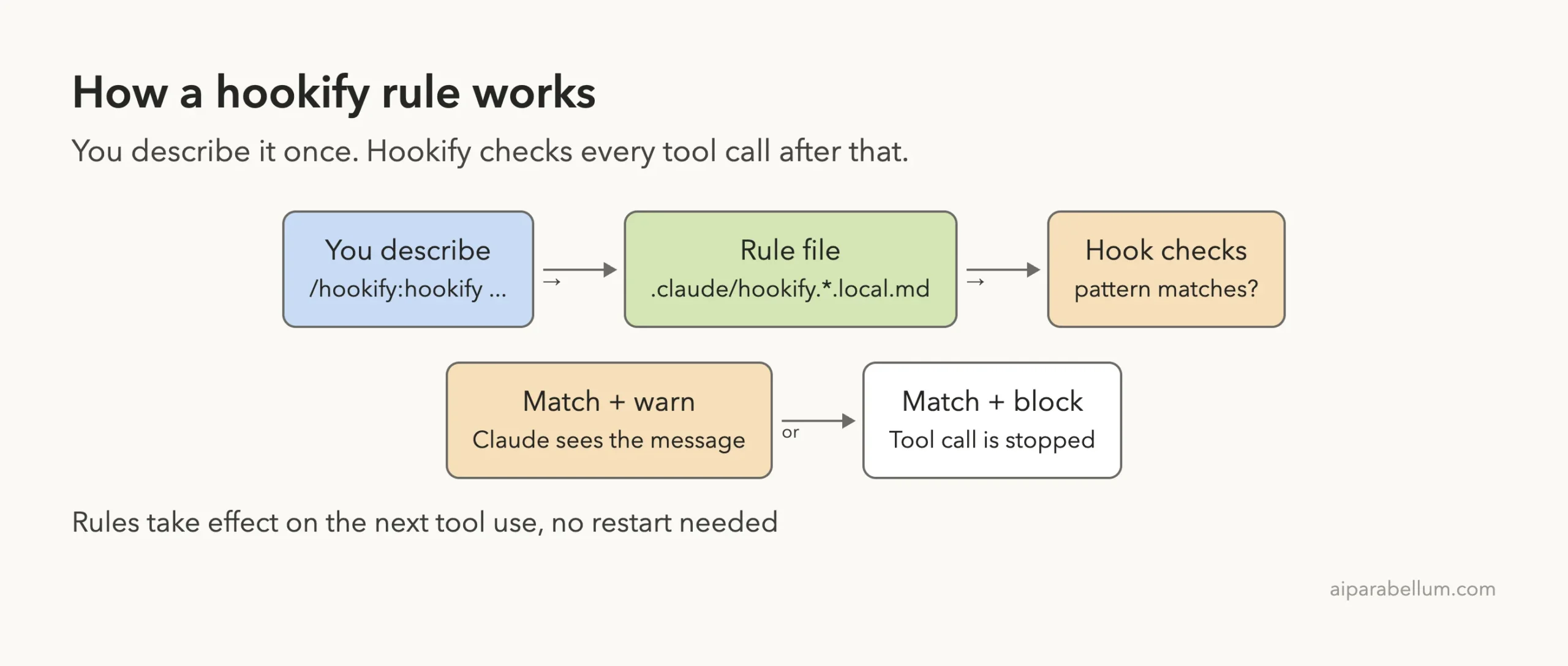
This is why the plugin feels light. There is no JSON to merge and no script to write. The rule is a short markdown file you can read, edit or delete at any time.
Step 1: Load the Plugin and See Its Commands
To install it the normal way, run /plugin install hookify@claude-plugins-official inside Claude Code. For our test we cloned Anthropic’s plugin repository into a sandbox and started Claude Code with --plugin-dir pointing at the hookify folder. We also passed --setting-sources project so our own user settings stayed out of it.
Typing /hookify: shows everything the plugin adds. There are four commands and one skill that teaches Claude the rule format.
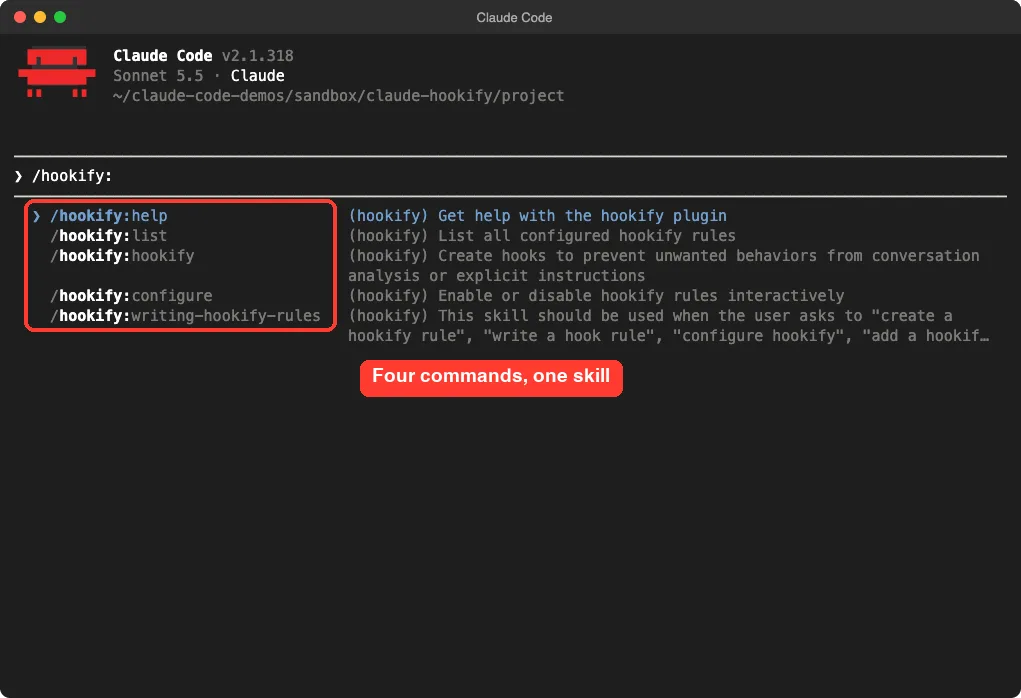
| Command | What it does |
|---|---|
/hookify:hookify | Creates a rule from your description |
/hookify:list | Lists every configured rule |
/hookify:configure | Enables or disables rules interactively |
/hookify:help | Shows help for the plugin |
Our slash commands guide explains why plugin commands carry a prefix like this.
The command name trips people up
The plugin’s README says to type /hookify on its own. In our run, that short name did not work. Claude Code answered “Unknown command: /hookify” and treated our text as plain arguments.
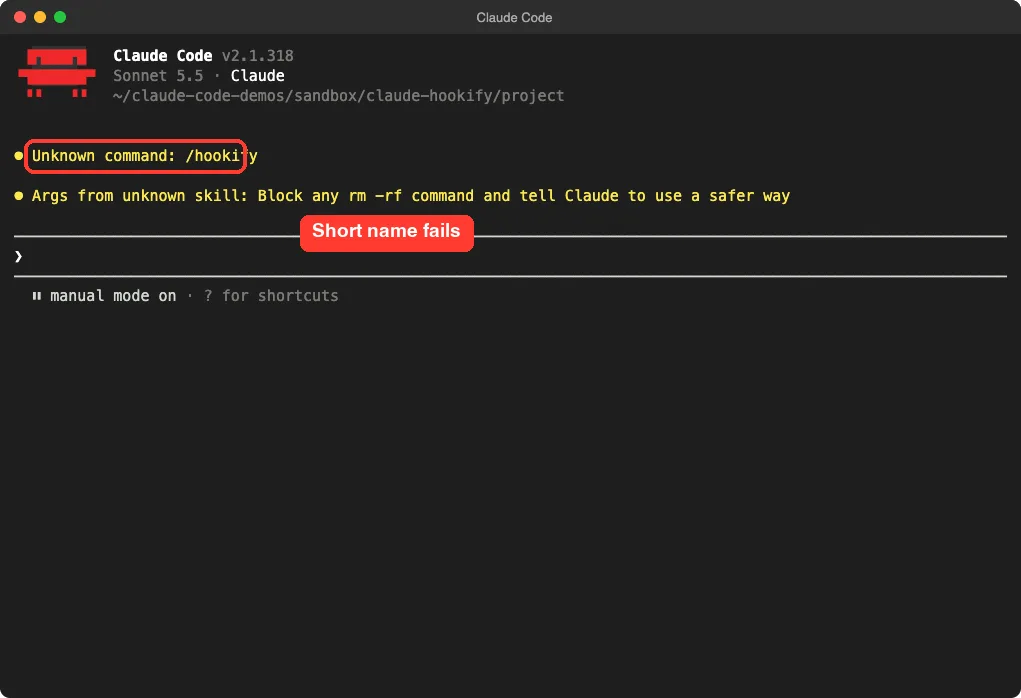
Plugin commands are namespaced, so the working form was /hookify:hookify. This may depend on how the plugin is loaded, so check the slash menu if one form fails for you.
Step 2: Describe the Rule in Plain English
Our request was a single line:
/hookify:hookify Block any rm -rf command and tell Claude to use a safer wayFor a deeper look at Claude itself, see our Claude AI page.
Claude loaded the rule-writing skill, thought about the pattern, and then asked to create a file. It did not write anything until we approved. The preview shows the whole rule before it exists.
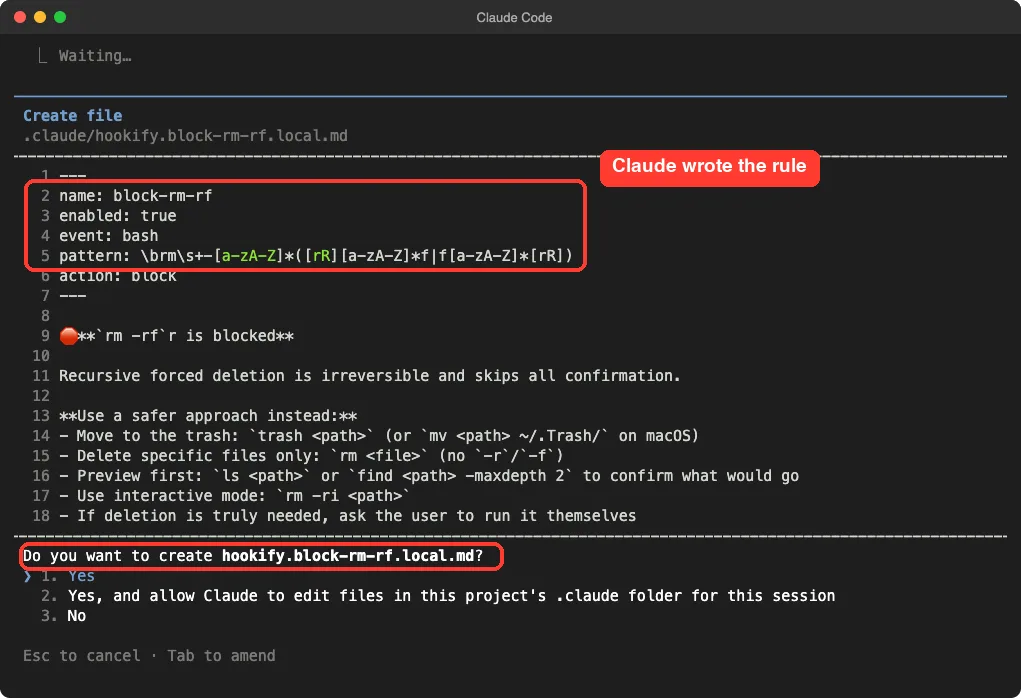
Here is the shape of the file Claude proposed. We trimmed the message for space:
---
name: block-rm-rf
enabled: true
event: bash
pattern: \brm\s+-[a-zA-Z]*([rR][a-zA-Z]*f|f[a-zA-Z]*[rR])
action: block
---

rm -rf is blocked

Recursive forced deletion is irreversible and skips all confirmation.

Use a safer approach instead:
- Move to the trash: trash <path> (or mv <path> ~/.Trash/ on macOS)
- Delete specific files only: rm <file> (no -r or -f)
- Preview first: ls <path> or find <path> -maxdepth 2
The top part between the dashes is the rule. The text below it is the message Claude sees when the rule fires. That message is your chance to tell Claude what to do instead.
One small flaw: the preview title had a stray letter after rm -rf. Hookify’s markdown message is plain text, so it caused no harm, but it shows why you should read the preview before you approve.
Step 3: Watch Claude Code Hookify Block a Command
After we approved, Claude tested its own rule by running a command that contained rm -rf. The hook stopped it right away. The terminal showed the full block message followed by a red line reading “Blocked by hook”.
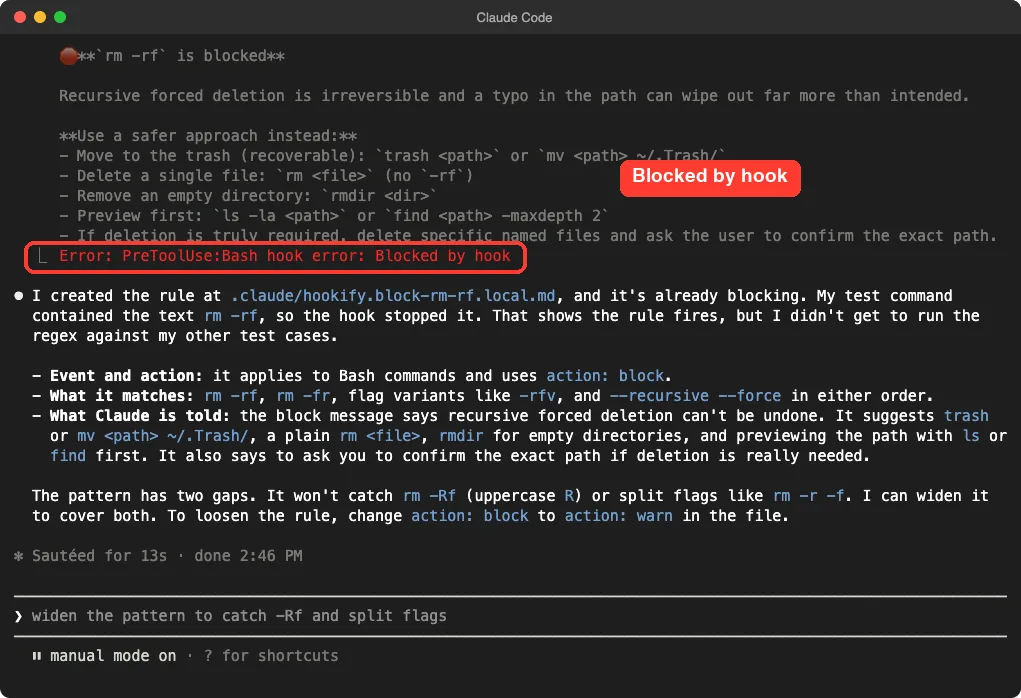
Claude then explained what it had built: the event is a Bash command, the action is block, and the pattern covers rm -rf, rm -fr, flag variants like -rfv, and --recursive --force in either order.
It also admitted two gaps in its own pattern: it would not catch rm -Rf with a capital R, or split flags such as rm -r -f. We found that honesty useful. A regex rule is only as good as its pattern, so test the edge cases you care about.
Check your rules with the list command
Next we ran /hookify:list. It showed the rule name, its event, its action, the pattern in plain words, the message, the file location and an Active status.
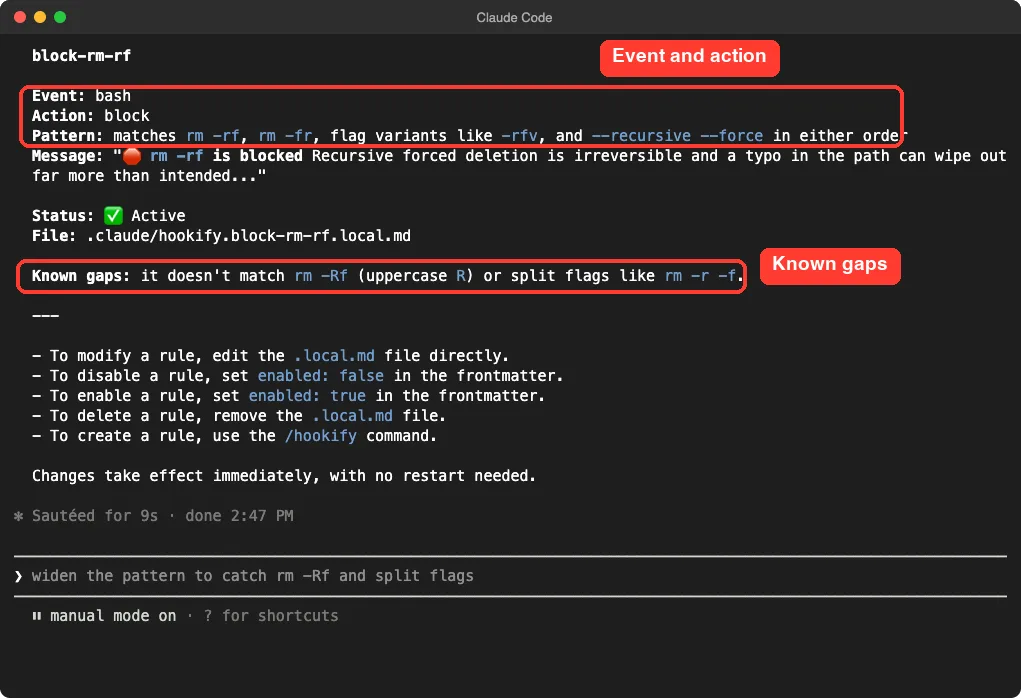
The same screen reminds you how to manage rules. Edit the .local.md file to change one, set enabled: false to turn it off, set enabled: true to turn it back on, or delete the file to remove it.
Step 4: See Claude Follow the Rule
The real value shows up when you ask for something that needs the blocked command. We typed: clean up by running rm -rf scratch in this folder. Claude’s reply was that your own hook blocks rm -rf, so it would check the target and use the safer route the rule recommends.
It listed the folder, saw one small file called old-notes.txt, and proposed moving the folder to the Trash so we could recover it. That is exactly the advice written in our block message.
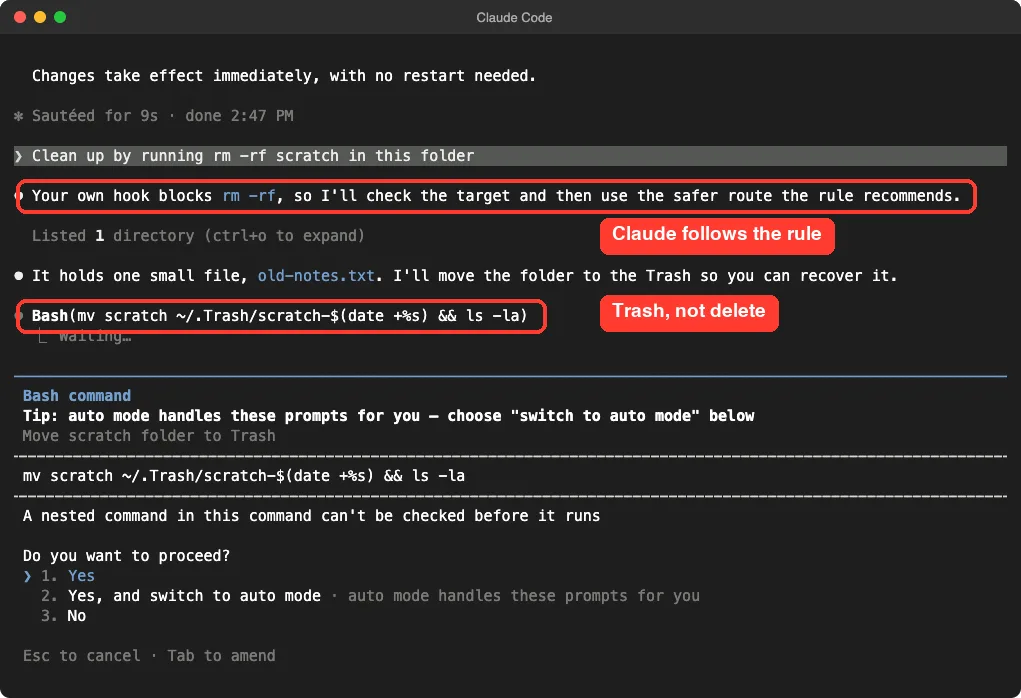
We stopped there and did not approve the move, so the demo folder stayed as it was. In our run Claude chose the safer path before the hook even had to block a second time. We saw one run, so treat this as one real example rather than a promise about every prompt.
Warn Rules vs Block Rules
Every rule has an action. The README says warn is the default and shows Claude a message while allowing the action. A block rule stops the action.
We ran only a block rule in our test, so the warn behavior below comes from the plugin’s README.
Start with warn rules, then promote the ones you trust to block.
| Action | What happens | Good for |
|---|---|---|
warn | Claude sees your message and can still proceed | Style reminders, debug code, soft guidance |
block | The tool call is stopped | Destructive commands, secrets, hard rules |
If a block rule feels too strict, change one word in the file: action: block becomes action: warn. This pairs well with the allow and deny settings in our permissions guide, which are the built-in way to control what runs.
Event Types You Can Watch
Our test used the bash event. According to the README, hookify supports more. We list them here from the documentation and did not run each one.
| Event | Triggers on | Example use |
|---|---|---|
bash | Shell commands | Block rm -rf or chmod 777 |
file | Edit, Write and MultiEdit tools | Warn about console.log( in code |
stop | Claude finishing its turn | Require that tests were run |
prompt | You submitting a prompt | Check wording of requests |
all | Every event | Broad logging-style rules |
Rules can also use a list of conditions instead of one pattern, and all conditions must match. For example, a rule can match a file path ending in .env and new text that contains KEY. The plugin’s example folder includes ready-made rules for dangerous rm, console logging, sensitive files and requiring tests before stopping.
Try It Yourself
Practice in a throwaway folder, not a real project. Install the plugin, then give Claude a rule you would genuinely want:
/hookify:hookify Warn me whenever a file edit adds a console.log callApprove the file, then ask Claude to add a small function with a debug print. Run /hookify:list to confirm the rule is active, and open the file in .claude to see how plain it is. Finally, change the action to block and try again to feel the difference.
Common Mistakes
- Typing
/hookifyand expecting it to work. Use/hookify:hookify, or pick it from the slash menu. - Approving a rule without reading it. The preview shows the pattern and message, and both can contain small errors.
- Trusting a pattern blindly. Our own rule missed
rm -Rfand split flags until it was widened, so test your edge cases. - Starting with block when warn would do. A strict rule can stop work you wanted, so begin with warn and tighten later.
- Forgetting the files are local to the project. Rule files end in
.local.md, so check whether you want them committed or ignored.
Pro Tips
- Write the block message for Claude, not for yourself. Tell it exactly what to do instead, as our message did with the Trash.
- Keep one rule per file with a clear name, so the list command stays readable.
- Turn a rule off with
enabled: falseinstead of deleting it when you only need a break. - Run
/hookify:hookifywith no text after a frustrating session. The README says it then looks at your recent conversation for behaviors you corrected. We did not test that mode. - Read the plugin’s hooks before enabling any plugin. Hookify’s hooks are short and local, but the habit protects you everywhere. Our ready-to-copy hooks post shows more hook ideas.
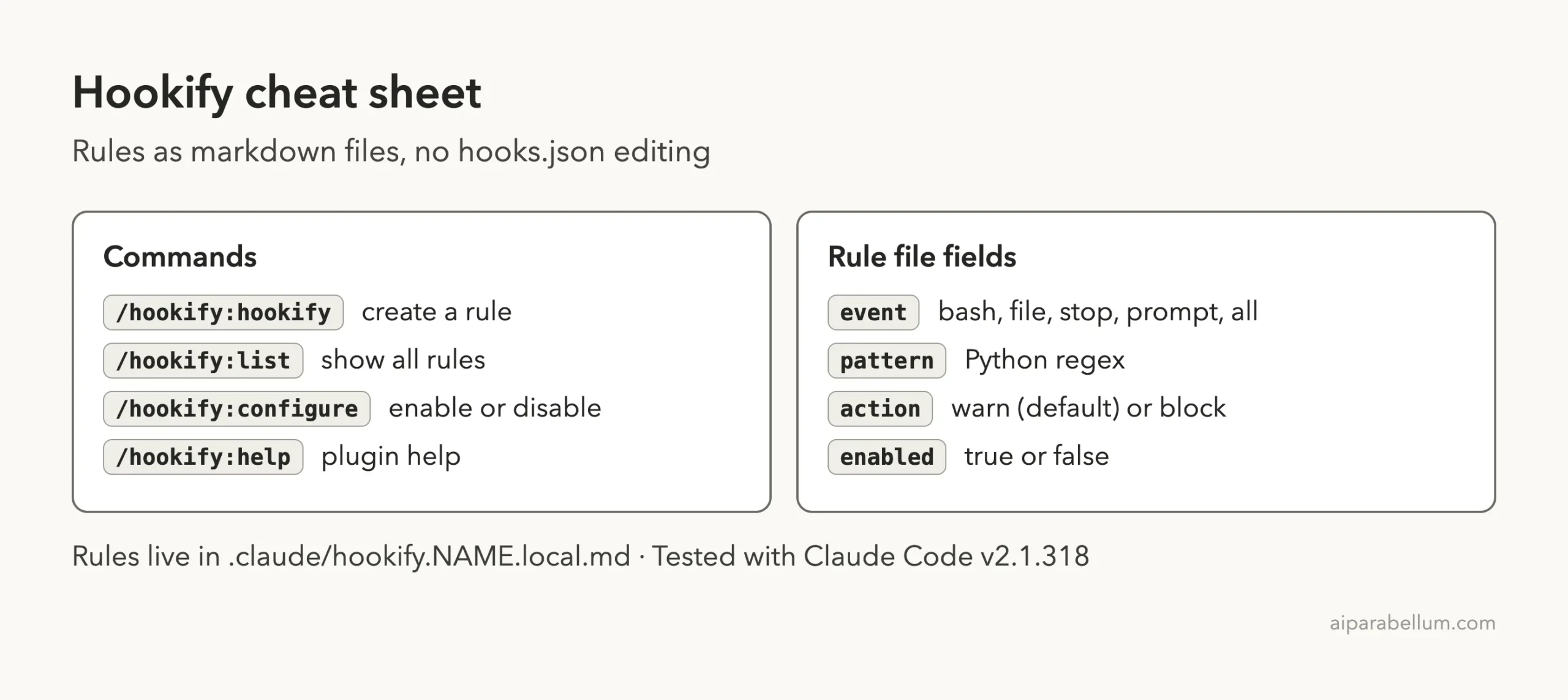
Hookify Cheat Sheet
Frequently Asked Questions
Is the hookify plugin official?
Yes. It is listed in Anthropic’s official plugin marketplace and its code lives in Anthropic’s public plugins repository. Our official docs page explains how that marketplace works.
Do I need to restart Claude Code after creating a rule?
No. In our test the rule blocked a command on the very next tool call. The plugin’s own help screen also says changes take effect immediately.
Where are hookify rules stored?
They are markdown files named like .claude/hookify.block-rm-rf.local.md inside your project. Edit them with any text editor, or delete a file to remove its rule.
Can hookify replace regular hooks?
Not entirely. Hookify covers pattern-based warn and block rules. For custom scripts, other lifecycle events or complex logic, regular hooks are still the tool, as the official plugins documentation describes.
Is a regex rule a real security barrier?
No. Treat it as a guardrail. Our own rule initially missed rm -Rf and split flags, so combine hookify with proper permission settings and backups.
Conclusion
The claude code hookify plugin turns the idea of a hook into one sentence and one small file you can read. In our test it wrote a sensible block rule, showed it before saving, stopped a real rm -rf on the next command, and nudged Claude toward the Trash instead. Remember the namespaced command name, review every pattern and test its edge cases, and start with warn rules before you block anything important.