A claude code zoxide error usually shows up the first time Claude tries to change folders. The Bash call fails with Error: Exit code 127 and a line like cd:1: command not found: __zoxide_z, even though cd works fine in your own terminal. The same thing happens with conda blocks, greetings and other lines in your shell config.
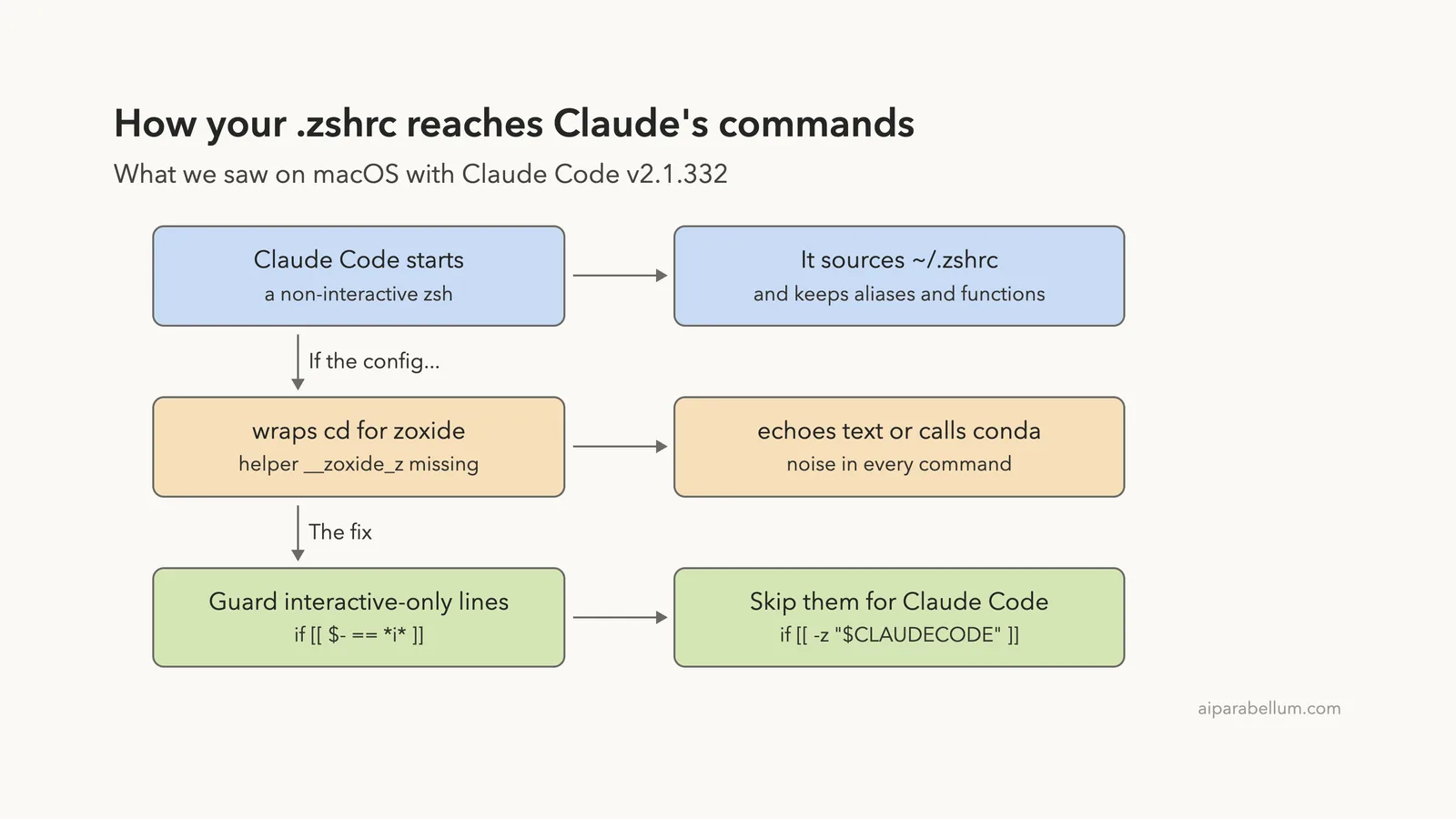
The cause is your shell config, not Claude. Claude Code runs commands in a non-interactive shell that still reads ~/.zshrc (or ~/.bashrc) and keeps the aliases and functions it finds there. When zoxide’s cd wrapper reaches that shell but the __zoxide_z helper it calls doesn’t, every cd breaks.
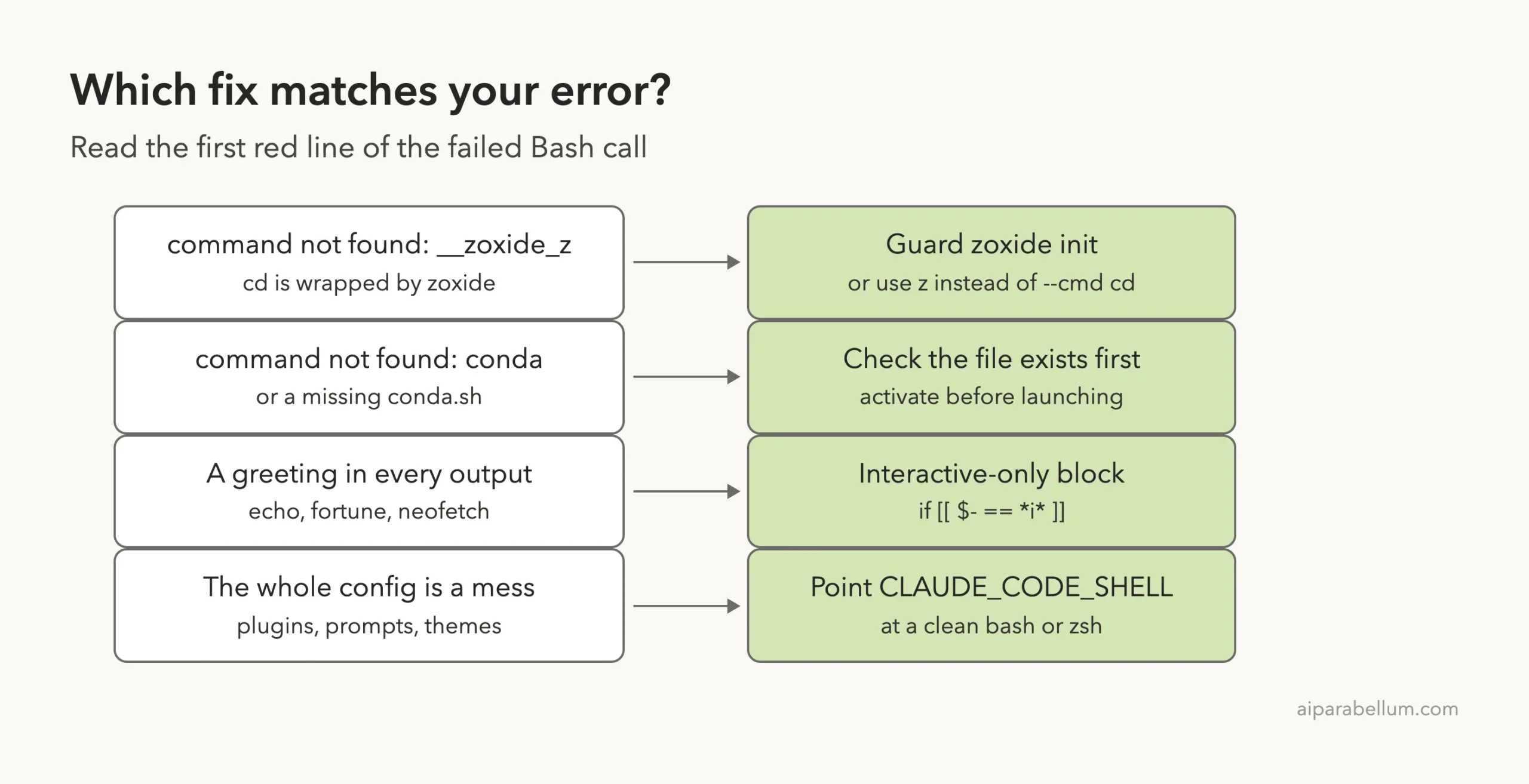
The fix is to wrap interactive-only lines in a guard such as if [[ $- == *i* ]]; then ... fi, or to skip them when the CLAUDECODE variable is set. Below we reproduce the error for real, show how to find the guilty line in two minutes, and test each fix.
Browse all our Claude Code tutorials for more fixes and how-tos.
Tested with Claude Code v2.1.332 on macOS on November 28, 2026. Every run used a throwaway demo project called notes-app (three tiny files) and a throwaway zsh config loaded through ZDOTDIR, so no real shell config was edited.
zoxide and conda aren’t installed on our test Mac, so our demo config defines the same cd wrapper and __zoxide_z function names that zoxide init zsh --cmd cd creates, plus a conda line that points at a missing file. The error text, the Claude Code output and every fix below come from real runs.
We tested on macOS; the Linux steps use the same ~/.zshrc and ~/.bashrc files, following Anthropic’s official documentation.
Quick Summary
| What you see in the Bash output | Likely cause | Fix |
|---|---|---|
command not found: __zoxide_z | zoxide’s cd wrapper loaded without its helper | Guard the zoxide line, or use z instead of --cmd cd |
no such file or directory: .../conda.sh | A conda block that runs in every shell | Source it only if the file exists; activate before launch |
command not found: conda | conda isn’t on the PATH Claude gets | Activate the environment, then start claude |
| A greeting or banner in every result | An unconditional echo in your config | Wrap it in if [[ $- == *i* ]] |
| Many odd errors from plugins and themes | A heavy interactive setup | Guard the whole block, or set CLAUDE_CODE_SHELL |
What the Claude Code zoxide Error Looks Like
We asked Claude Code to run cd src && ls in the demo project, with the broken demo config loaded. The Bash tool failed with exit code 127, which is the shell’s code for “command not found.”
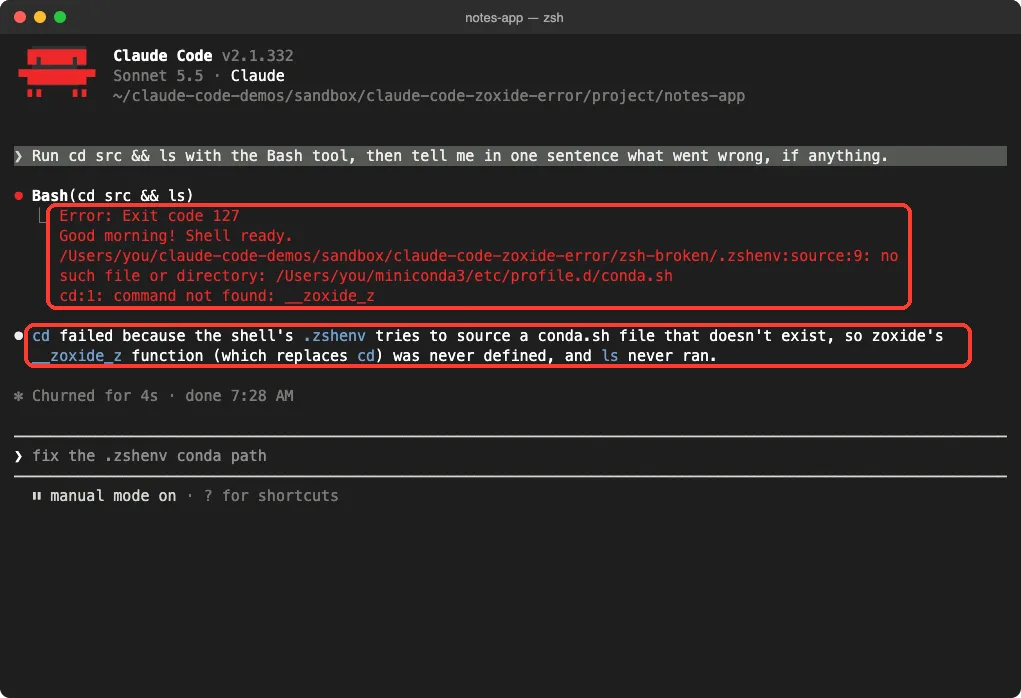
Look closely at the red lines. Only the last one is the zoxide error, and the two lines above it come from the same config file. One small config problem can print several errors in every single command.
Also notice Claude’s one-line explanation. It blamed the conda line for the missing __zoxide_z function, which isn’t quite right: the two problems are separate. Read the raw error lines yourself before you accept a diagnosis.
The same error outside Claude Code
You don’t need Claude to see this. Running the command through a plain non-interactive zsh gave the exact same errors in our terminal.
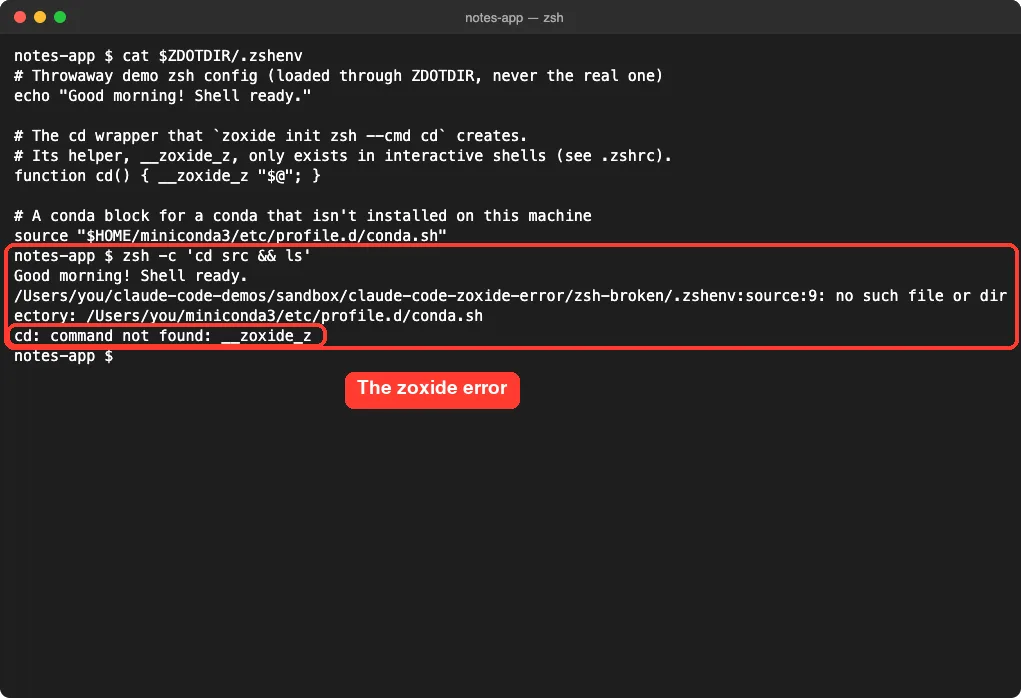
That is good news. It means you can test every fix in your own terminal first, without spending any Claude usage.
Why Your Shell Config Breaks Claude’s Bash Commands
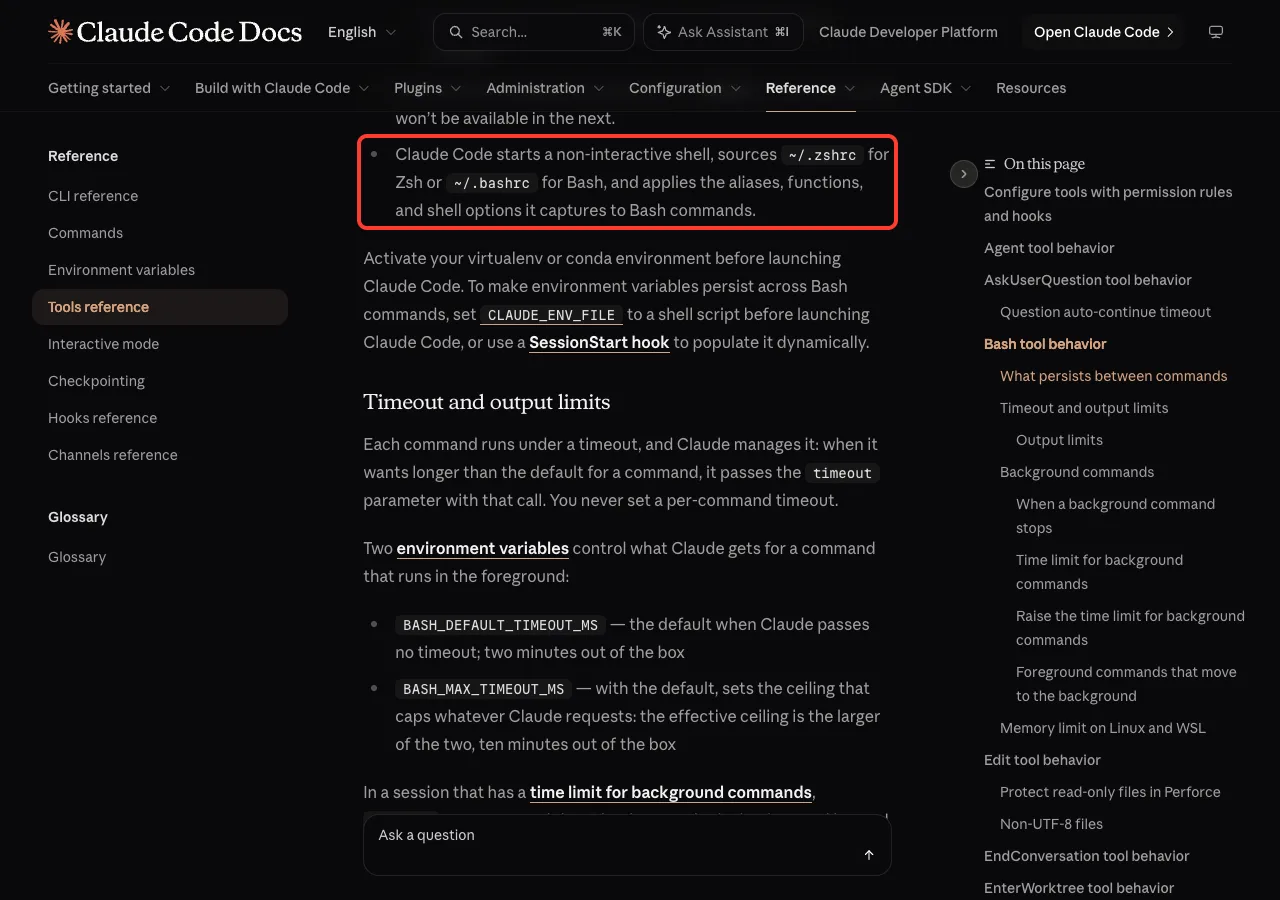
Anthropic’s tools reference explains how the Bash tool treats your shell. Claude Code starts a non-interactive shell, sources ~/.zshrc for Zsh or ~/.bashrc for Bash, and applies the aliases, functions and shell options it captures to later commands.
Most shell configs are written for a human at a keyboard, not for a script. Here is what tends to go wrong:
- Tools like zoxide replace
cdwith a function that calls helper functions. If the wrapper reaches Claude’s shell but a helper doesn’t,cdfails. - Greetings,
fortuneor system banners print text into every command result. - conda, pyenv and similar blocks call files or commands that may not exist in Claude’s environment.
- Prompt themes and plugin managers expect a real terminal and can error out without one.
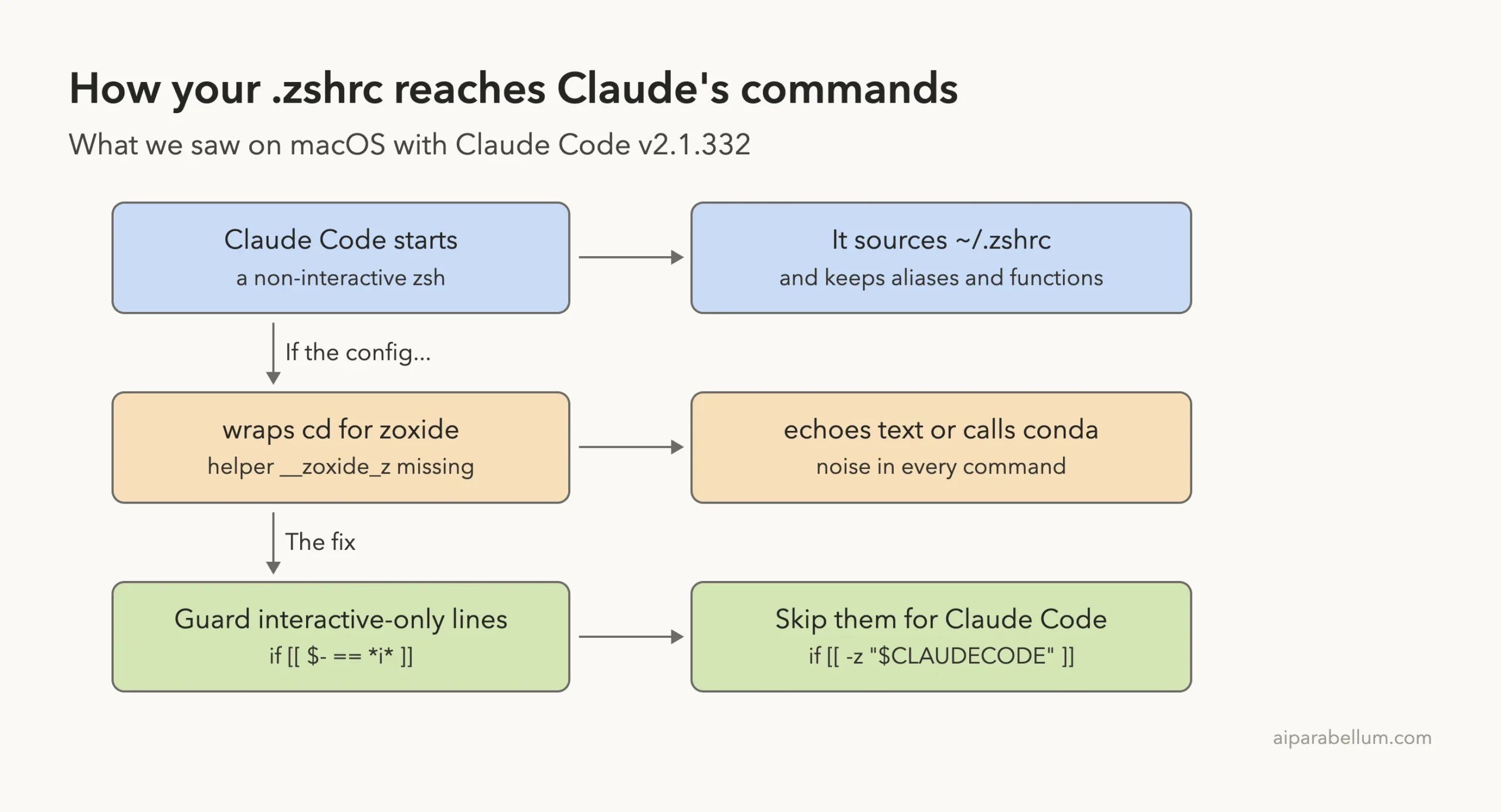
Your terminal is interactive. Claude’s command shell is not. Most of these errors live in that gap.
One detail from our test is worth knowing: a .zshrc placed in a custom ZDOTDIR was not picked up by Claude’s Bash tool, which matches the docs naming ~/.zshrc. A .zshenv in that folder did load in every command, because zsh reads .zshenv for every shell it starts.
If you keep tool setup in .zshenv, check that file too.
How to Diagnose It in Two Minutes
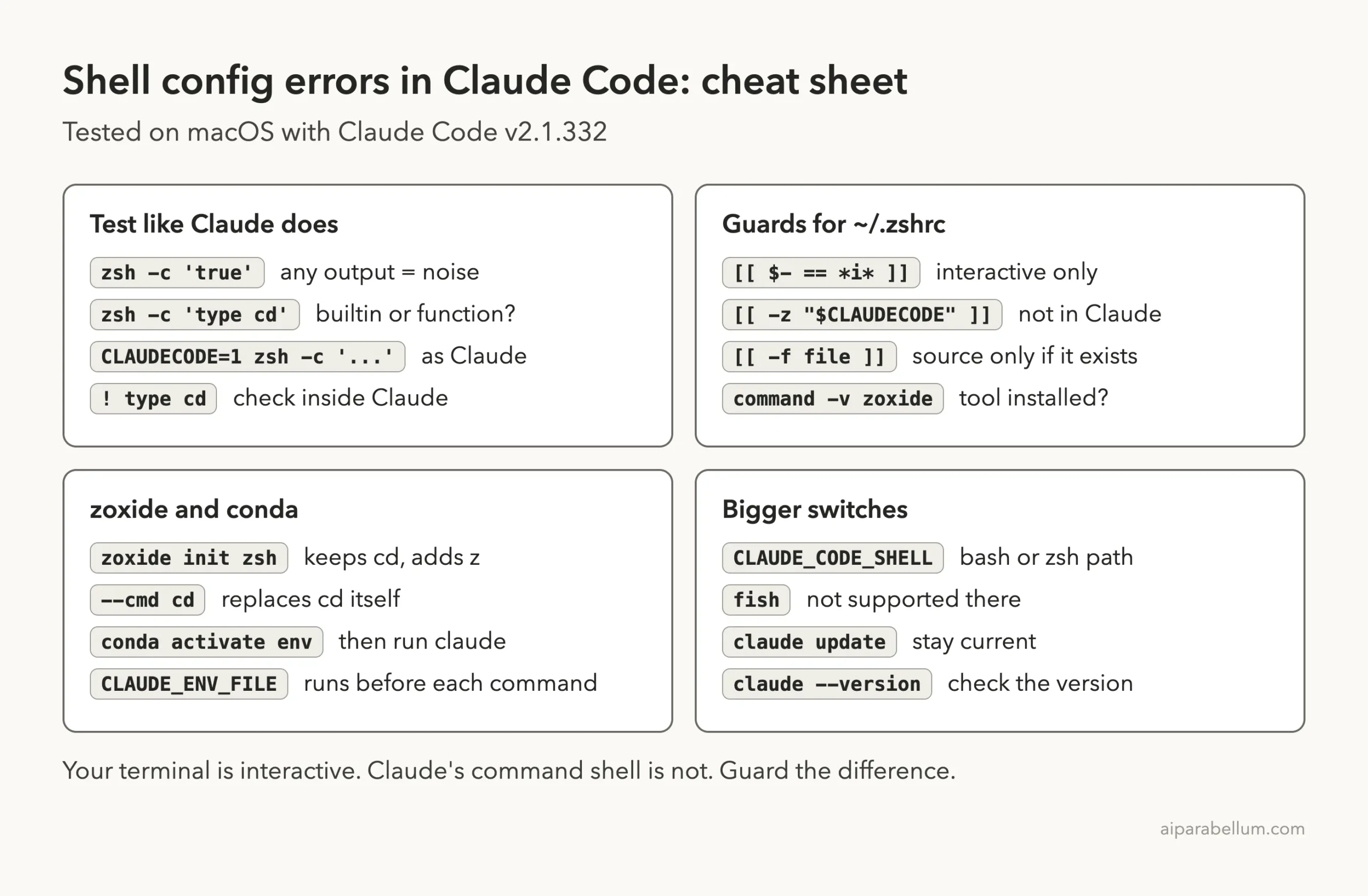
You can find the guilty line with four quick commands in your normal terminal. Each one starts a non-interactive zsh, which is the kind of shell Claude uses.
zsh -c 'true'
zsh -c 'type cd; type __zoxide_z'
zsh -c 'echo $-'
grep -n 'echo\|zoxide\|conda' ~/.zshrc ~/.zshenv
Here is what each one tells you:
zsh -c 'true'does nothing, so any output at all is noise from your config.type cdsays whethercdis a shell builtin or a function. A function plus__zoxide_z not foundis the zoxide problem.echo $-prints the shell’s flags. Animeans interactive, and Claude’s shell won’t have it.grep -nlists the line numbers you need to guard.
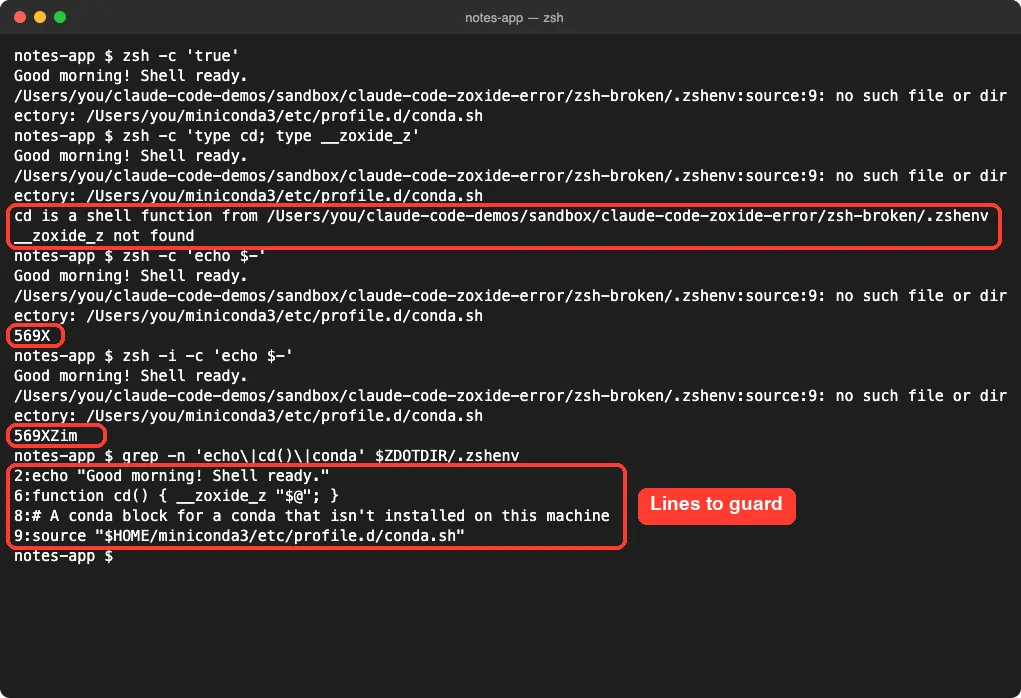
In our run, zsh -c 'echo $-' printed 569X and zsh -i -c 'echo $-' printed 569XZim. The extra i is exactly what the guard in Fix 1 checks for.
Inside Claude Code, you can run the same check with the bash-mode prefix: type ! type cd at the prompt. In our session, Claude also read and answered that output, so the terminal version above is the cheaper test.
Fixes for Shell Config Errors in Claude Code
Start with Fix 1. It solves most cases and doesn’t change how your own terminal behaves.
Fix 1: Guard interactive-only lines in ~/.zshrc
Anthropic’s hooks guide recommends this exact pattern for profile output: wrap the line so it runs only in interactive shells. The $- variable holds the shell’s flags, and i means interactive.
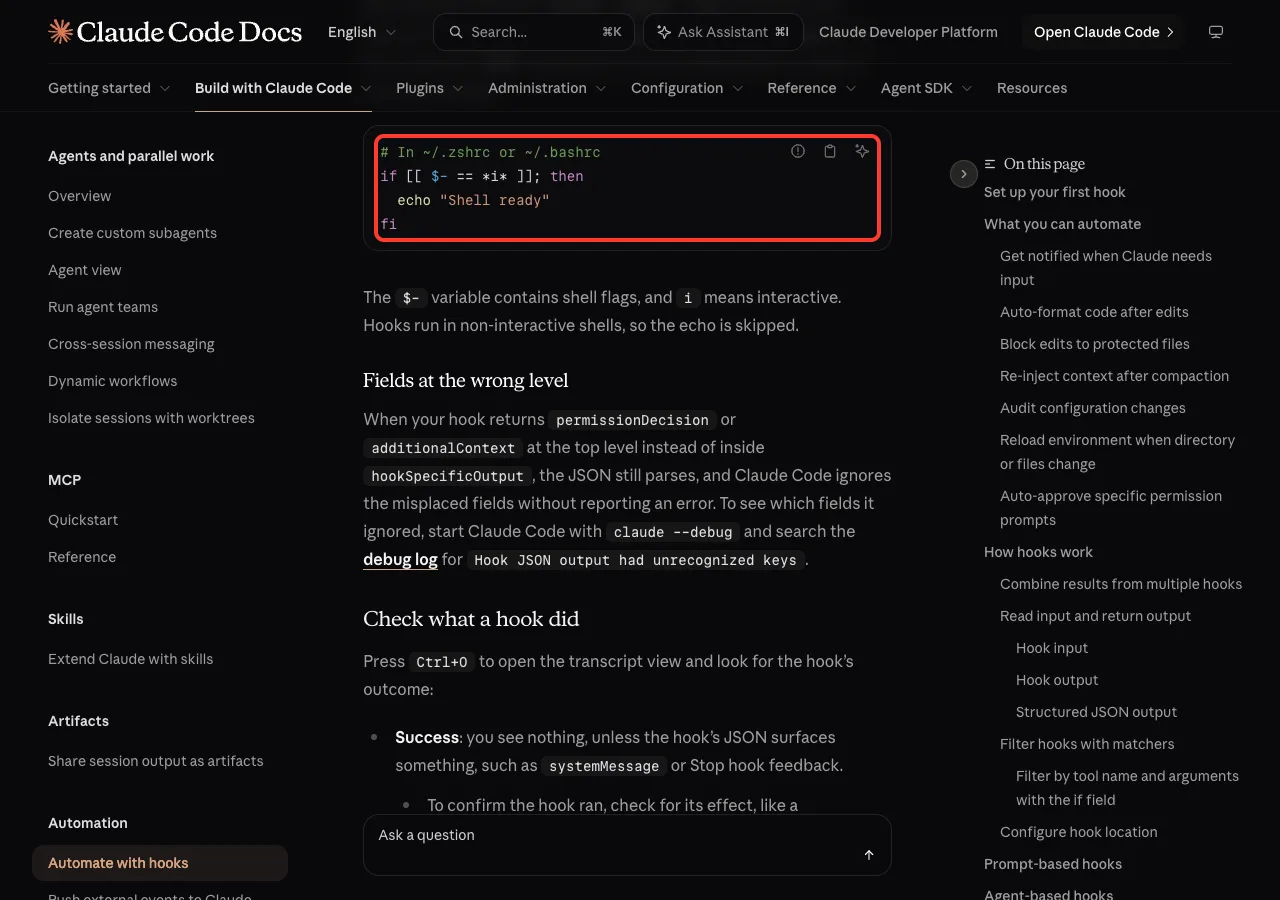
Apply it to everything that only makes sense at a keyboard, including zoxide:
# In ~/.zshrc
if [[ $- == *i* ]]; then
  echo "Good morning! Shell ready."
  eval "$(zoxide init zsh --cmd cd)"
fi
Because the docs say Claude Code starts a non-interactive shell, this block is skipped there, while your own terminal still gets zoxide. Open a new terminal tab afterward and run zsh -c 'type cd'. It should say cd is a shell builtin.
Fix 2: Skip zoxide’s cd wrapper when CLAUDECODE is set
Claude Code sets CLAUDECODE to 1 in the shells it spawns, according to the environment variables reference. You can use it to keep a line out of Claude’s shell only.
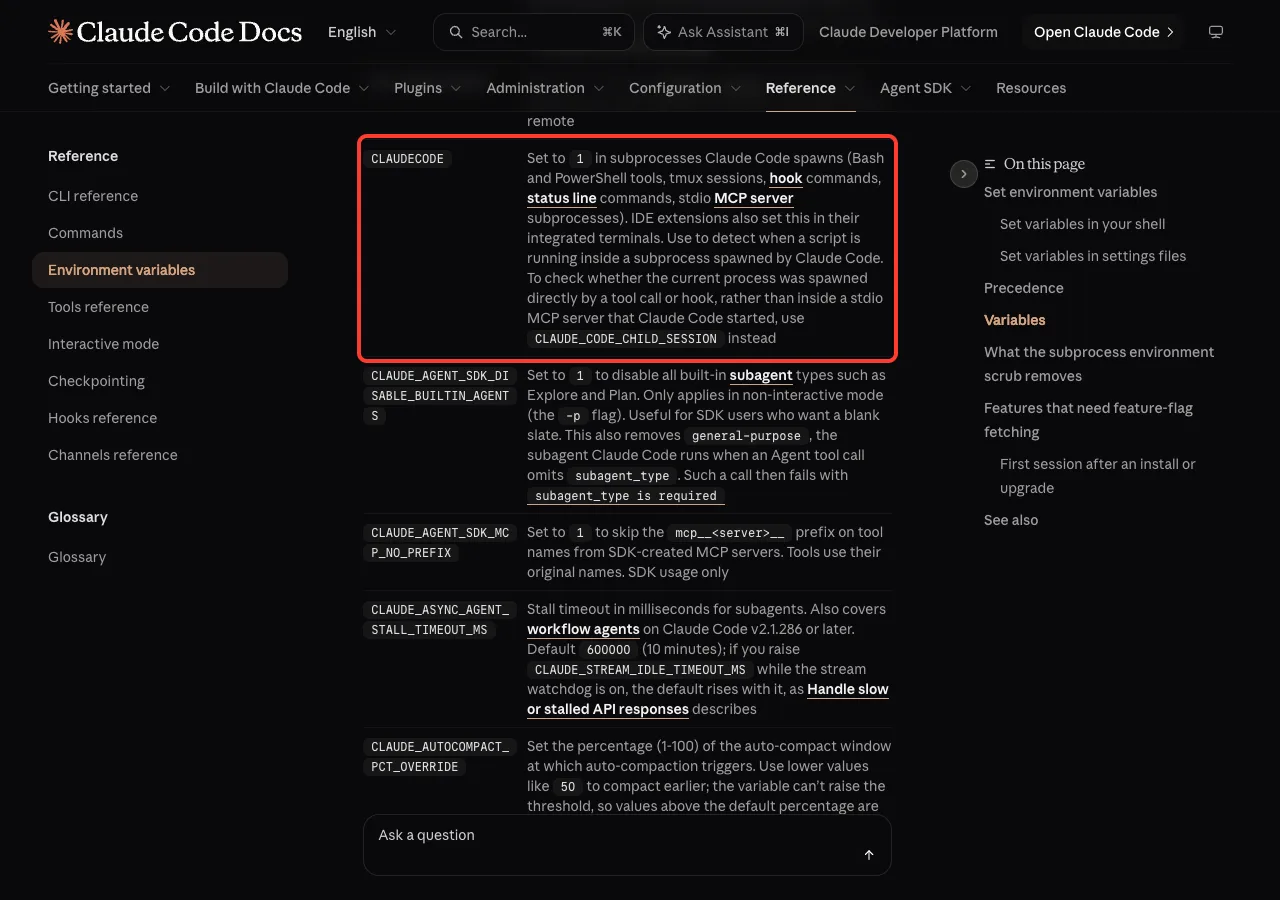
# In ~/.zshrc
if [[ -z "$CLAUDECODE" ]]; then
  eval "$(zoxide init zsh --cmd cd)"
fi
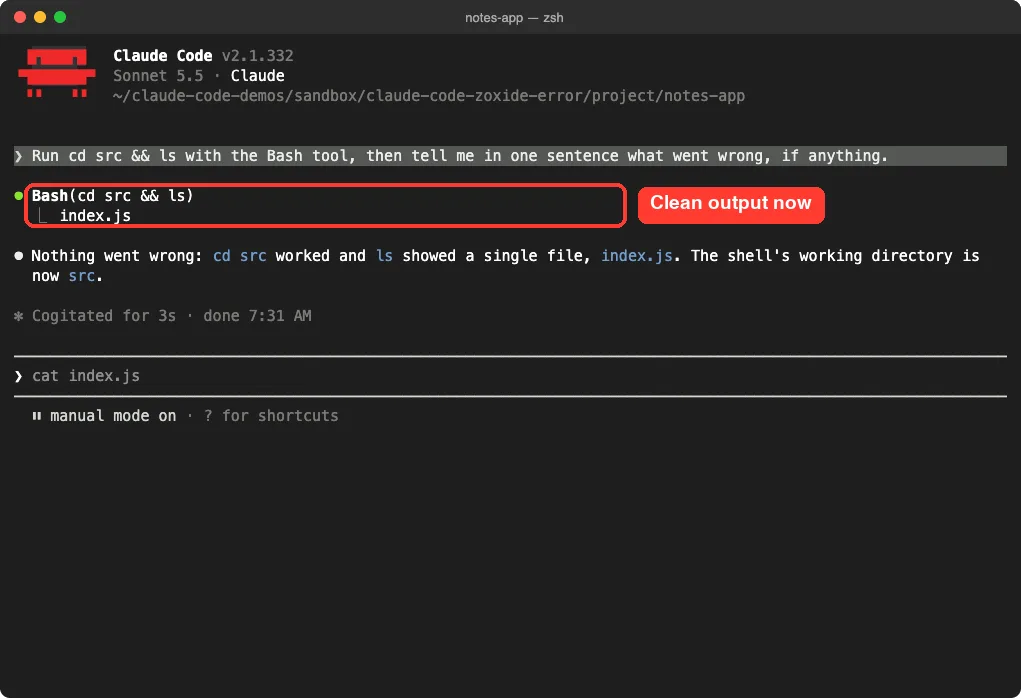
We tested this guard in our demo config. With CLAUDECODE=1 set, cd stayed a plain builtin and cd src && ls worked, while an interactive shell still loaded the wrapper.
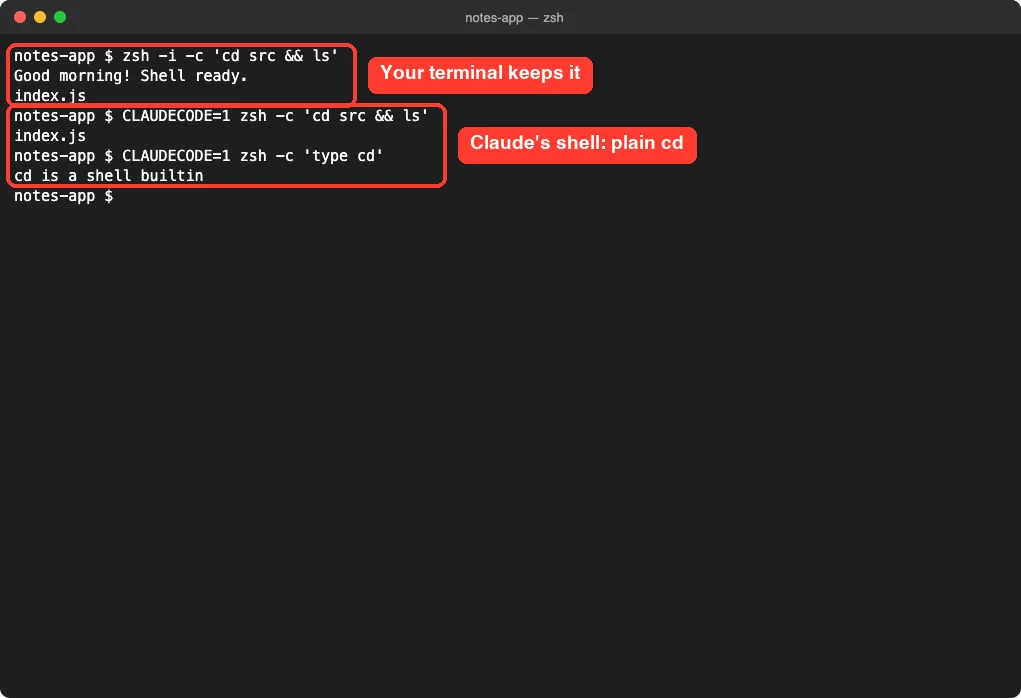
Then we ran the same prompt in Claude Code with the fixed config. The Bash call returned index.js with no errors.
One catch: the docs say IDE extensions also set CLAUDECODE in their integrated terminals. If you want zoxide in your editor’s terminal, prefer the interactive guard from Fix 1.
Fix 3: Use zoxide without replacing cd
The --cmd cd option tells zoxide to take over the cd command itself. Without it, zoxide’s zsh setup creates its own z and zi commands and leaves cd alone.
# In ~/.zshrc: cd stays a builtin, you jump with z
eval "$(zoxide init zsh)"
Claude uses cd all the time, so keeping it a plain builtin removes the whole class of problems. You keep your smart jumps by typing z instead.
Fix 4: Make conda lines safe
A conda block that sources a file which doesn’t exist prints no such file or directory in every command, as our first screenshot shows. Check for the file first:
# In ~/.zshrc
if [[ -f "$HOME/miniconda3/etc/profile.d/conda.sh" ]]; then
  source "$HOME/miniconda3/etc/profile.d/conda.sh"
fi
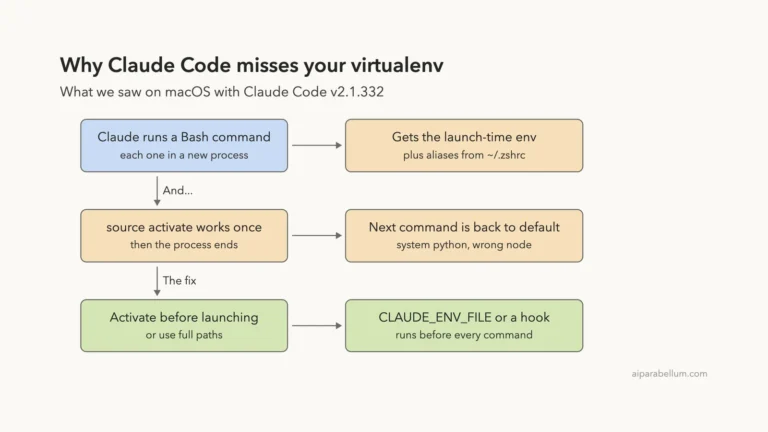
For the environment itself, the tools reference says to activate your virtualenv or conda environment before launching Claude Code. For an activation that applies to every Bash command, the docs point to CLAUDE_ENV_FILE or a SessionStart hook, which we tested in our post on virtualenv fixes.
Fix 5: Pick a cleaner shell with CLAUDE_CODE_SHELL
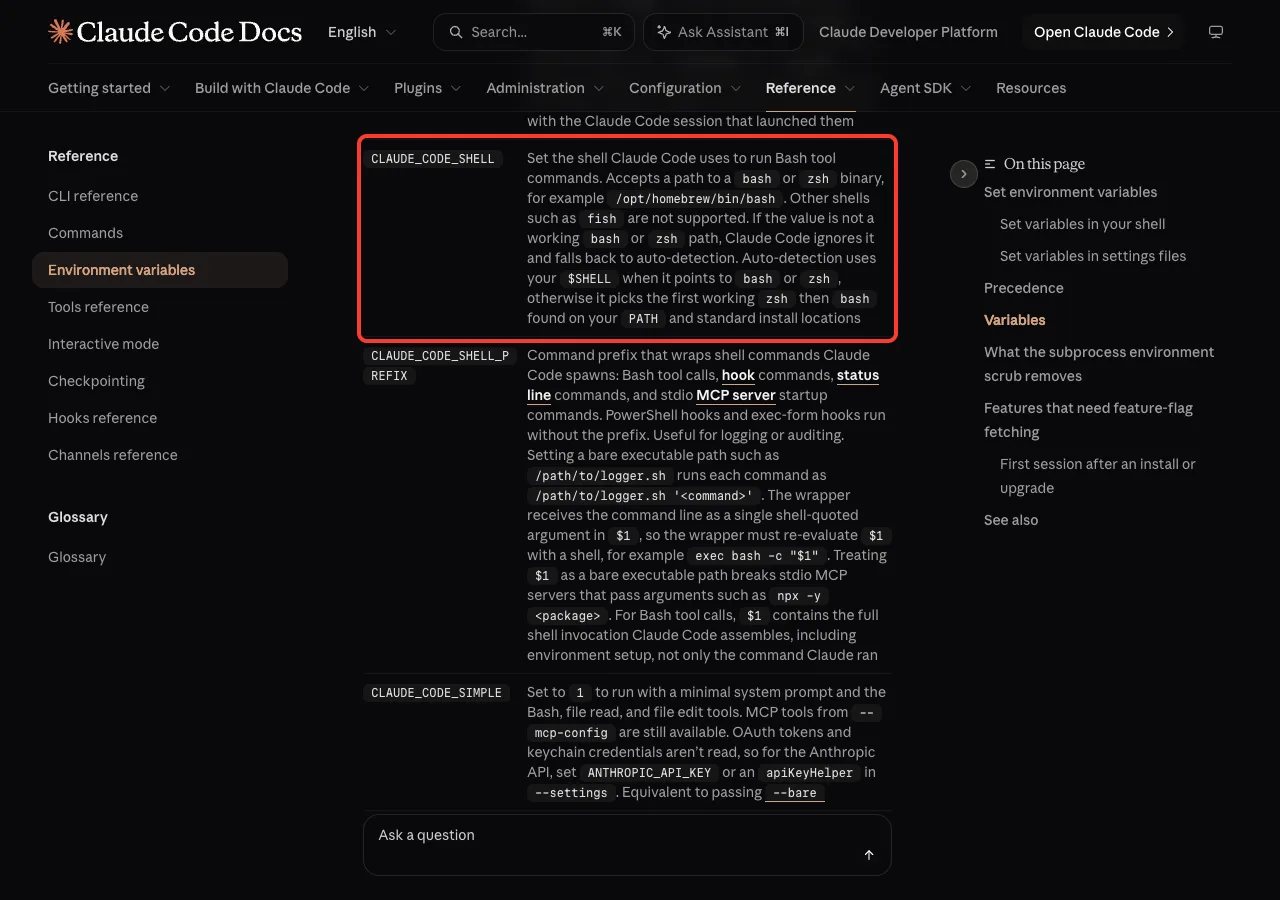
If your zsh setup is heavy and you don’t want to guard every plugin, you can point Claude Code at a different shell. CLAUDE_CODE_SHELL accepts a path to a bash or zsh binary.
export CLAUDE_CODE_SHELL=/bin/bash
claude
Keep in mind that Claude then reads ~/.bashrc instead, so that file needs to be clean. If the value isn’t a working bash or zsh path, the docs say Claude Code ignores it and falls back to auto-detection.
Fix 6: Stay on a current version
How Claude Code captures your shell has changed across releases. Run claude --version to see your version and claude update to get the latest, then test again before you rewrite your config.
Real Example: The Fixed Config Before and After
Here is the full fixed version of our demo config. It keeps all three features for the terminal and keeps them out of Claude’s shell.
# 1. Greetings only in an interactive terminal
if [[ $- == *i* ]]; then
  echo "Good morning! Shell ready."
fi

# 2. Keep zoxide's cd wrapper out of Claude Code's shell
if [[ -z "$CLAUDECODE" ]]; then
  function cd() { __zoxide_z "$@"; }
fi

# 3. Load conda only when it's really installed
if [[ -f "$HOME/miniconda3/etc/profile.d/conda.sh" ]]; then
  source "$HOME/miniconda3/etc/profile.d/conda.sh"
fi| Check | Broken config | Fixed config |
|---|---|---|
Claude’s cd src && ls | Exit code 127, three error lines | index.js, no errors |
type cd in Claude’s kind of shell | Shell function | Shell builtin |
| Greeting in your own terminal | Yes, and in every Claude command | Yes, only in your terminal |
| conda line | Error in every command | Skipped when the file is missing |
If you use hooks, this cleanup helps there too. The hooks guide notes that profile output printed before a hook’s JSON can make Claude Code ignore the JSON, which we cover in hooks not working.
Try It Yourself
Practice on a copy, not your real config. Make an empty folder, put a test config in it, and point ZDOTDIR at it for one terminal tab, as we did. Then start Claude Code in a throwaway project and paste this prompt:
Run cd src && ls with the Bash tool, then tell me in one sentence what went wrong, if anything. Show me the raw error lines before your explanation.Break the config on purpose, watch the error, then add a guard and run the prompt again. When the output is clean, copy only the guard pattern into your real ~/.zshrc, and keep a backup of the original first.
Common Mistakes
- Testing only in your own terminal. It’s interactive, so it hides the problem. Use
zsh -cinstead. - Deleting zoxide or conda when a one-line guard is enough.
- Guarding the
cdwrapper but leaving an unconditionalechothat still pollutes every result. - Forgetting
~/.zshenv, which zsh reads for every shell, not just interactive ones. - Setting
CLAUDE_CODE_SHELLto fish. The docs say only bash and zsh are supported. - Trusting a one-line diagnosis from Claude without reading the actual error lines, as our first screenshot shows.
Pro Tips
- Put all keyboard-only setup in one guarded block at the end of
~/.zshrc. It’s easier to maintain than many small guards. - Use
command -v zoxide >/dev/nullbefore running a tool’s init line, so a missing tool fails quietly. - After any config change, run
zsh -c 'true'. Empty output means Claude’s commands stay clean. - If many unrelated errors appear, check our list of common Claude Code errors and our guide to environment variables such as
CLAUDE_CODE_SHELL. - If
claudeitself isn’t found after a config edit, your PATH line may have been caught in a guard; see our PATH fix guide.
Cheat Sheet
Frequently Asked Questions
Why does cd fail in Claude Code but work in my terminal?
Your terminal is interactive and loads everything zoxide needs. Claude’s Bash tool uses a non-interactive shell that still picks up functions from ~/.zshrc, so a cd wrapper can arrive without its helper and fail with command not found: __zoxide_z.
Does Claude Code read my .zshrc?
Yes. The docs say it sources ~/.zshrc for Zsh or ~/.bashrc for Bash and applies the aliases, functions and shell options it captures. Environment changes made inside one command still don’t carry over to the next one.
Is it safe to guard zoxide with CLAUDECODE?
Yes, it only skips the line when CLAUDECODE is set. The docs say IDE extensions also set it in their terminals, so use the interactive guard instead if you want zoxide there.
Can I stop Claude Code from reading my shell config?
We found no setting that turns this off in the docs. You can point CLAUDE_CODE_SHELL at bash with a minimal ~/.bashrc, or guard the lines that cause trouble.
Why do I see my greeting in every command result?
An unconditional echo in your shell config runs every time a shell starts. Wrap it in if [[ $- == *i* ]]; then ... fi so it only prints in your own terminal.
Conclusion
A claude code zoxide error, a conda complaint or a greeting in every result all come from the same place: shell config lines written for an interactive terminal that also reach Claude’s non-interactive command shell. In our test, the broken config made cd src && ls fail with exit code 127 and __zoxide_z not found, and the guarded config made the same Claude Code call run cleanly. Diagnose with zsh -c 'true' and zsh -c 'type cd', wrap keyboard-only lines in an interactive or CLAUDECODE guard, keep cd a builtin if you can, and switch shells with CLAUDE_CODE_SHELL only when the config is too heavy to clean up. To learn more about the model behind the tool, see our Claude AI overview.