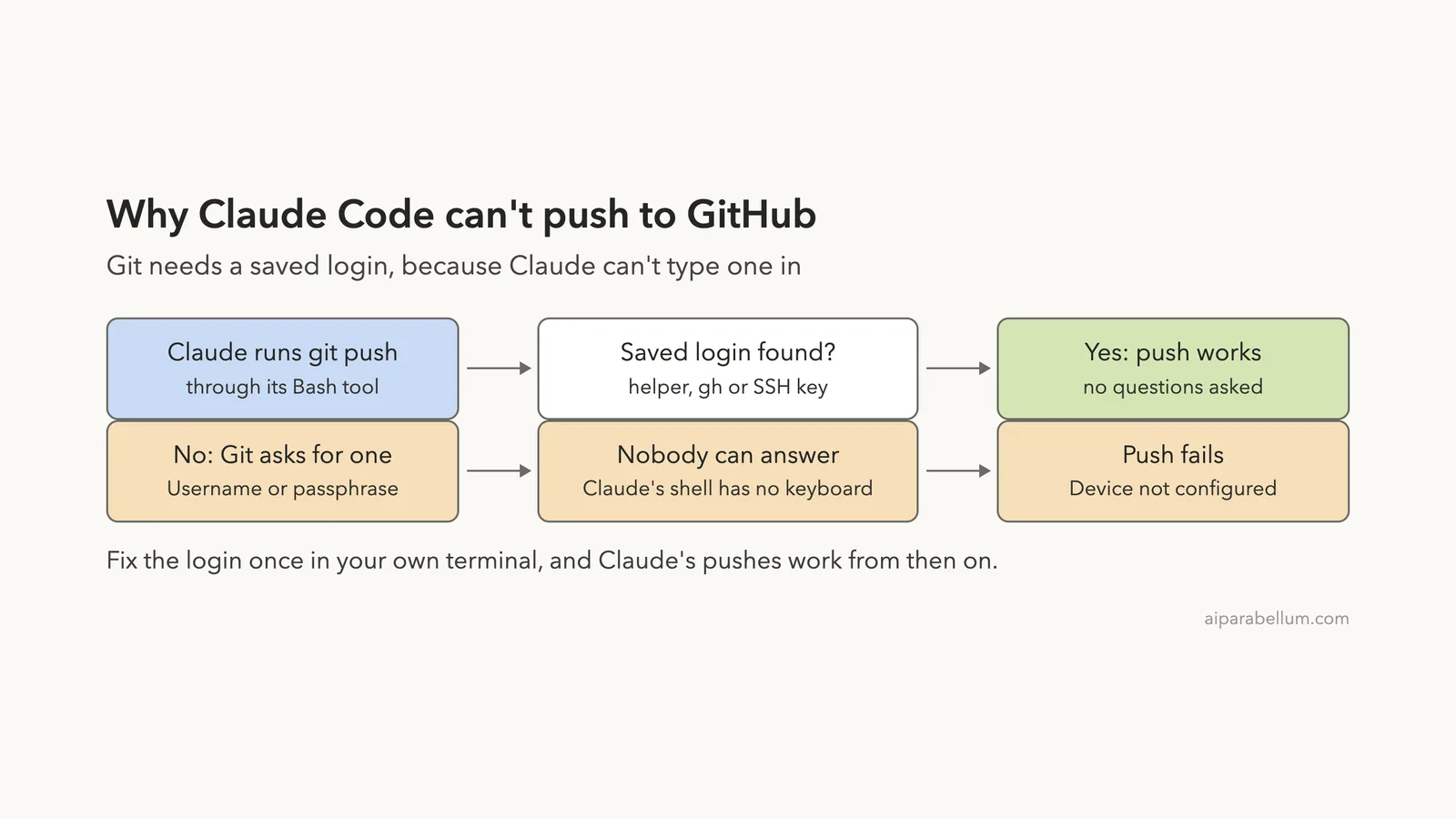
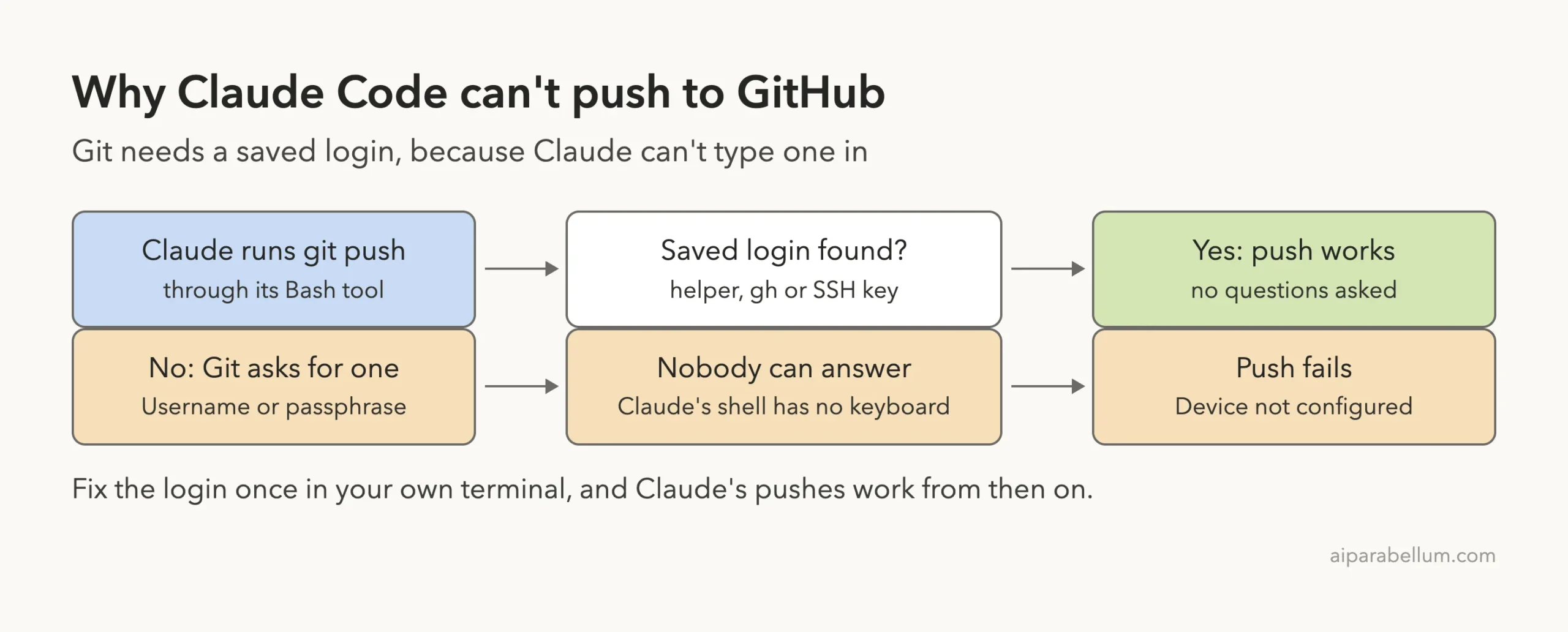
When Claude Code can’t push to GitHub, the problem is almost always Git’s login, not Claude. Claude runs git push through its Bash tool, and that shell has no keyboard. If Git has no saved login, it stops to ask for a username or an SSH passphrase, nobody can answer, and the push fails with an error like fatal: could not read Username for 'https://github.com': Device not configured.
The short answer: get git push working once in your own terminal, with a saved login, and Claude’s pushes will work too. For HTTPS remotes, run gh auth login and then gh auth setup-git. For SSH remotes, add your key to GitHub and load it with ssh-add, then check it with ssh -T [email protected].
Two causes come from Claude Code itself: a deny rule such as Bash(git push *) in your settings, or the sandbox blocking github.com. Below we reproduce each error for real, show what Claude says about it, and walk through every fix.
Browse all our Claude Code tutorials for more fixes and how-tos.
Tested with Claude Code v2.1.332 on macOS on November 28, 2026. Every run used a throwaway demo project called notes-app with a clean, separate Git config, a fresh SSH key that was never added to any account, and a local bare repository as a stand-in remote. No real GitHub login or token was used or shown.
We tested on macOS; the Windows and Linux steps follow Anthropic’s official instructions and the same Git and GitHub CLI commands.
Quick Summary
| What you see | Cause | Fix | Reproduced in our test? |
|---|---|---|---|
could not read Username for 'https://github.com' | HTTPS remote with no saved login | gh auth login, then gh auth setup-git | Yes |
[email protected]: Permission denied (publickey) | SSH key missing, not loaded or not on GitHub | Add the key to GitHub, run ssh-add | Yes |
Permission to use Bash with command git push ... has been denied | A Bash(git push *) deny rule | Edit or remove the rule, or push yourself | Yes |
| Push blocked when the sandbox is on | github.com not in allowed domains | Add it to sandbox.network.allowedDomains | From the docs |
| Claude’s pushes don’t trigger CI in GitHub Actions | Commits made with the default GITHUB_TOKEN | Let the action use the Claude GitHub App | From the docs |
Why Claude Code Can’t Push to GitHub
Claude Code doesn’t have its own GitHub account. When you ask it to push, it runs the same git push you would type, using your Git config, your credential helper and your SSH keys. If those work without asking questions, the push works.
The trouble starts when Git needs to ask something. In your own terminal, Git can pause and wait for you. In Claude’s Bash tool, there’s no one at the keyboard, so the question fails right away.
We set up a demo repo with an HTTPS remote called origin and no saved login. In a normal terminal, git push origin main simply waits for a username.
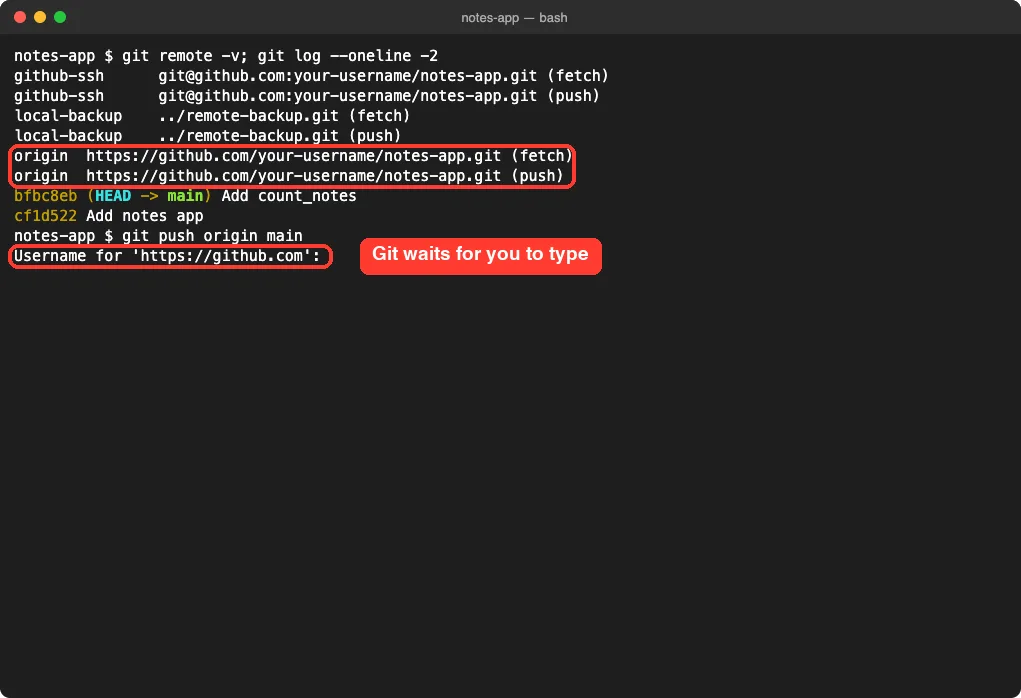
That prompt is fine when you’re there to answer it. It’s the exact thing that breaks when Claude runs the same command.
If git push asks you a question in your own terminal, it will fail when Claude runs it. Fix the question, and Claude’s push works.
Error 1: could not read Username for ‘https://github.com’
We started Claude Code in the same folder and asked it to push to origin, quote the exact error and explain it in three lines without trying any fixes.
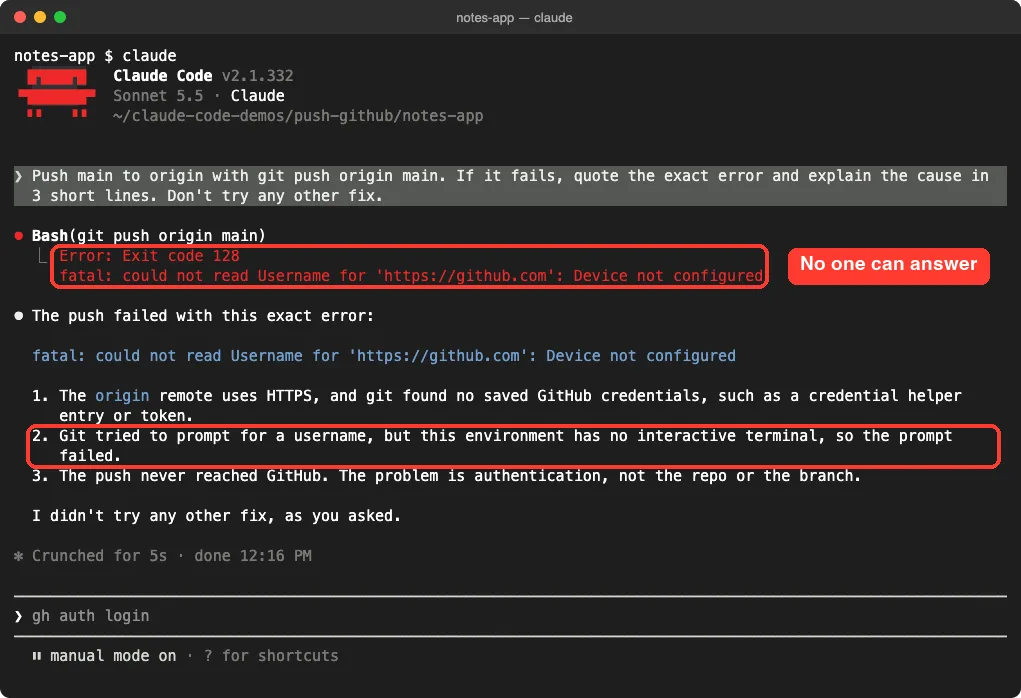
The push failed with exit code 128 and fatal: could not read Username for 'https://github.com': Device not configured. Claude’s explanation was spot on: no saved credentials, and no interactive terminal to ask for them. The push never reached GitHub.
The exact wording can differ by system. On macOS we saw Device not configured; other systems may print a different reason after the same could not read Username part. The cure is the same either way.
This is the same family of problem as other prompts that stall Claude, which we cover in our guide to hanging interactive commands.
Check whether Git has a saved login
Run these in your own terminal, in the project folder:
git remote -v
git config --get-all credential.helper
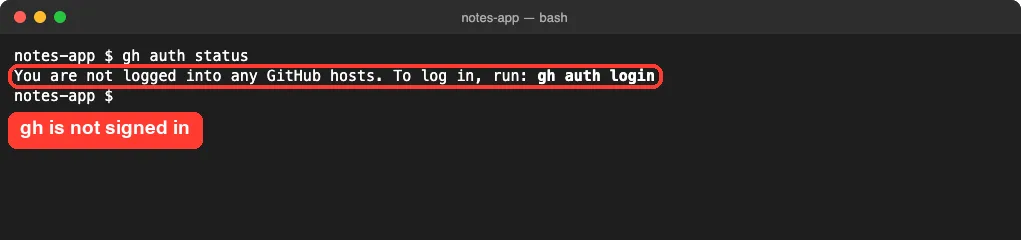
gh auth status
In our clean demo setup, credential.helper printed nothing (exit code 1), and the GitHub CLI was not signed in.
Fix 1: Sign in with the GitHub CLI and connect it to Git
The simplest fix for HTTPS remotes is the GitHub CLI. Run this in your own terminal, not inside Claude:
gh auth login
gh auth setup-git
gh auth login opens a browser sign-in by default and, according to its own help text, stores the token in your system’s credential store. gh auth setup-git then tells Git to use the GitHub CLI as its credential helper.
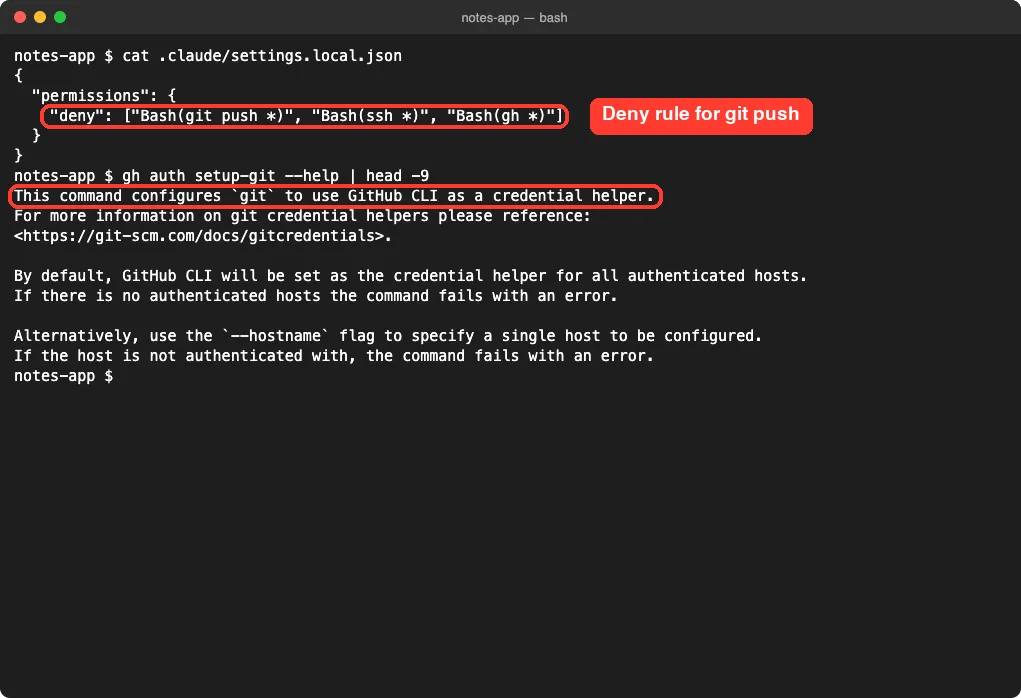
Note what the help also says: if no host is signed in, gh auth setup-git fails with an error. So always run gh auth login first. Afterward, check that gh auth status shows you signed in and that a plain git push works in your terminal with no prompt.
Fix 2: Use the macOS keychain helper
If you’d rather not install the GitHub CLI, you can save HTTPS logins in a credential helper. On macOS, Git can use the keychain:
git config --global credential.helper osxkeychainThen push once in your own terminal. GitHub doesn’t accept your account password over HTTPS, so enter a personal access token when Git asks for a password.
The keychain saves it, and Claude’s later pushes reuse it without a prompt. Never paste a token into Claude’s chat or into a file in your repo.
Error 2: [email protected]: Permission denied (publickey)
If your remote starts with [email protected]:, Git uses SSH instead of HTTPS. We added a second remote called github-ssh and gave Git a brand-new SSH key that was never added to any GitHub account. Then we asked Claude to push to it.
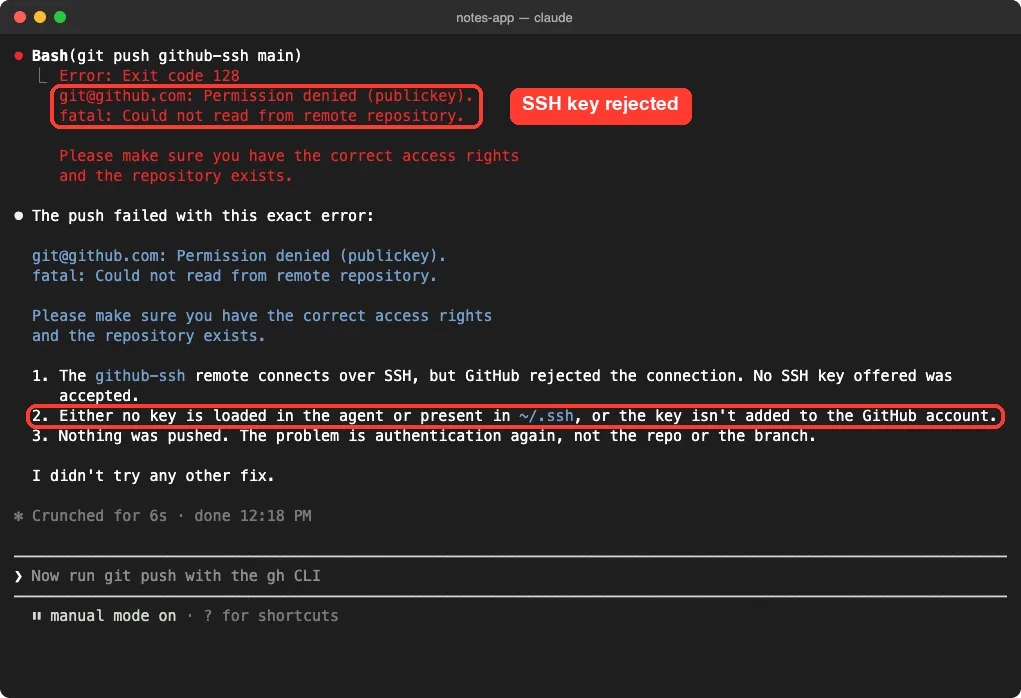
The error was [email protected]: Permission denied (publickey). followed by fatal: Could not read from remote repository. Claude’s reading was right: either no key was loaded or present, or the key wasn’t added to the GitHub account.
Test SSH outside Claude first
Run the same test in your own terminal. ssh -T [email protected] checks your key without touching any repo.
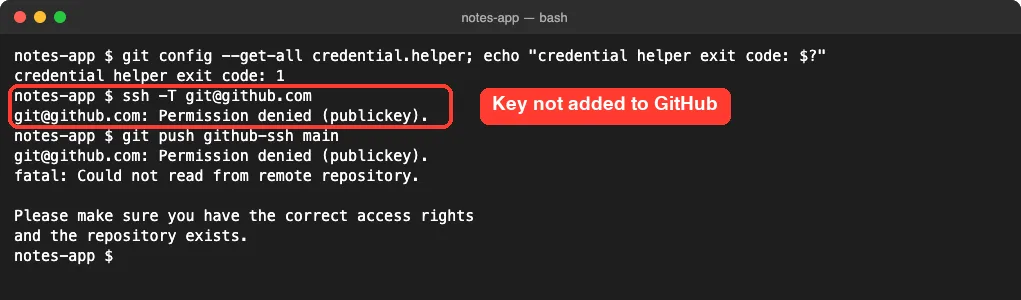
When the key is set up correctly, the test greets you by your GitHub username instead. If it fails in your terminal, it will fail for Claude, so fix it here first.
Fix 3: Create, load and add an SSH key
- Create a key, if you don’t have one:
ssh-keygen -t ed25519 -C "[email protected]" - Load it into the SSH agent:
ssh-add ~/.ssh/id_ed25519. On macOS,ssh-add --apple-use-keychain ~/.ssh/id_ed25519also stores the passphrase in your keychain. - Copy the public key (the
.pubfile) and add it on GitHub under Settings, then SSH and GPG keys. - Run
ssh -T [email protected]again and look for the greeting.
The passphrase matters. If your key has one and it isn’t loaded in the agent, SSH needs to ask for it, and Claude’s shell can’t answer. Loading the key with ssh-add before you start Claude Code avoids that.
Fix 4: Switch the remote between HTTPS and SSH
Sometimes one method already works on your machine and the repo just uses the other. Check with git remote -v, then switch:
# switch to SSH
git remote set-url origin [email protected]:your-username/notes-app.git

# or switch to HTTPS
git remote set-url origin https://github.com/your-username/notes-app.git
Replace your-username/notes-app with your real account and repo. You can also ask Claude to run git remote set-url for you, since it doesn’t need a login.
Error 3: Permission to use Bash with command git push has been denied
This one isn’t Git at all. Claude Code asks before it runs git push, and it can be told to refuse pushes completely. Here is the normal case in our demo: a prompt that you approve once, or for good.
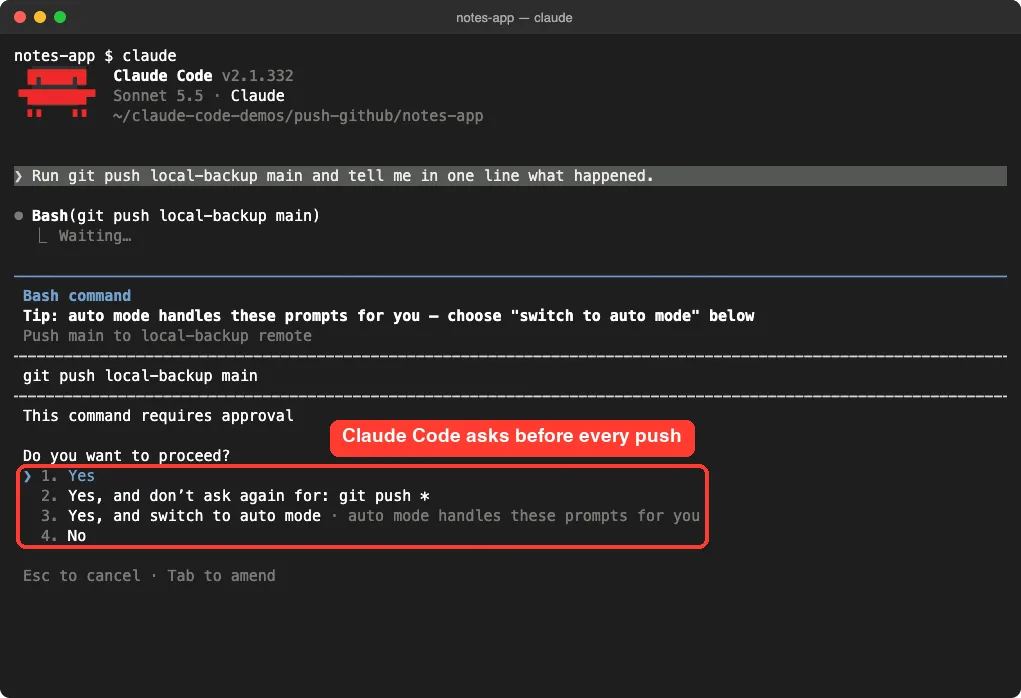
If you choose No, or a settings file has a deny rule, the push stops before Git runs. The official permissions docs show this exact rule as an example of refusing pushes.
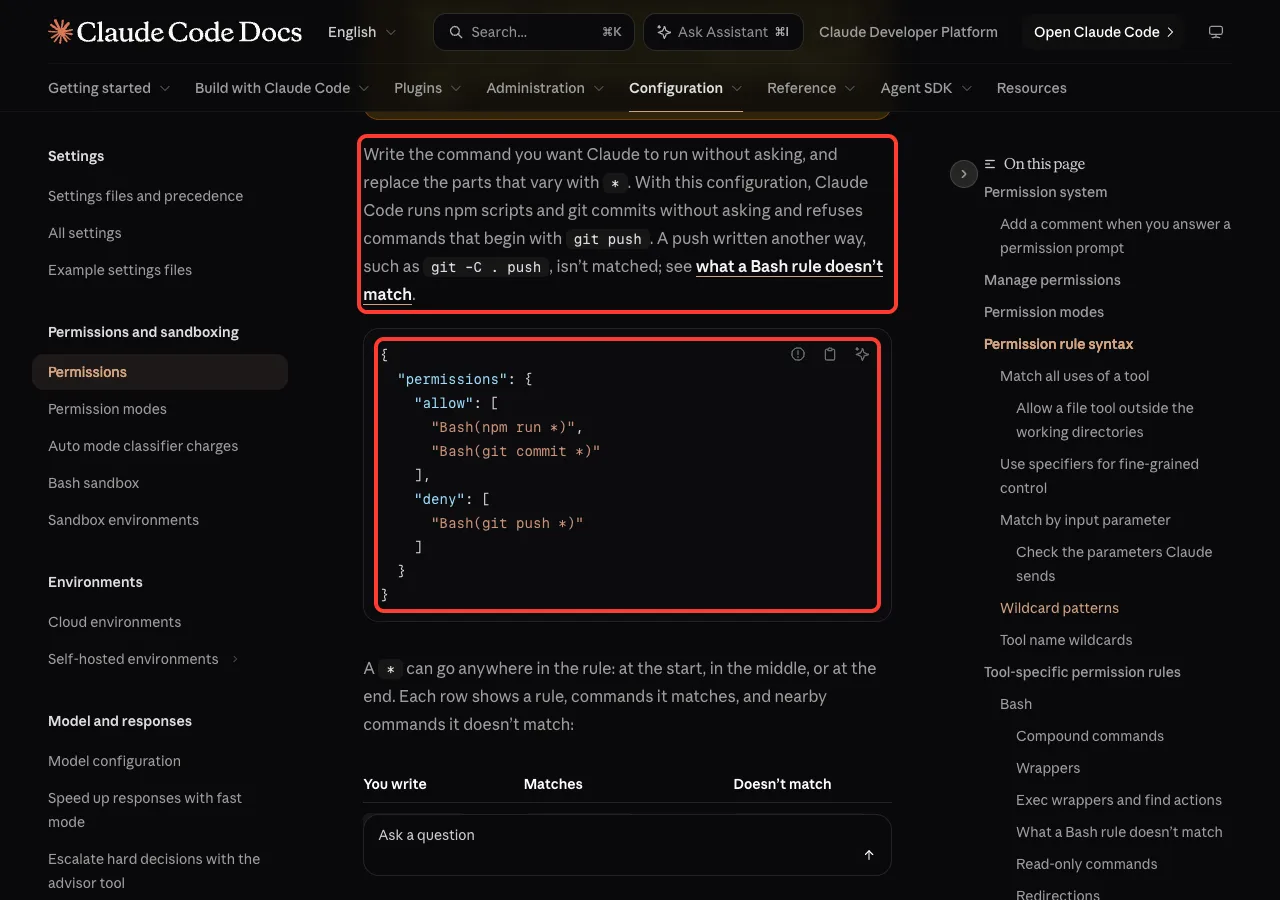
We added that rule to the demo project’s .claude/settings.local.json and asked Claude to push to the local test remote, which needs no login at all.
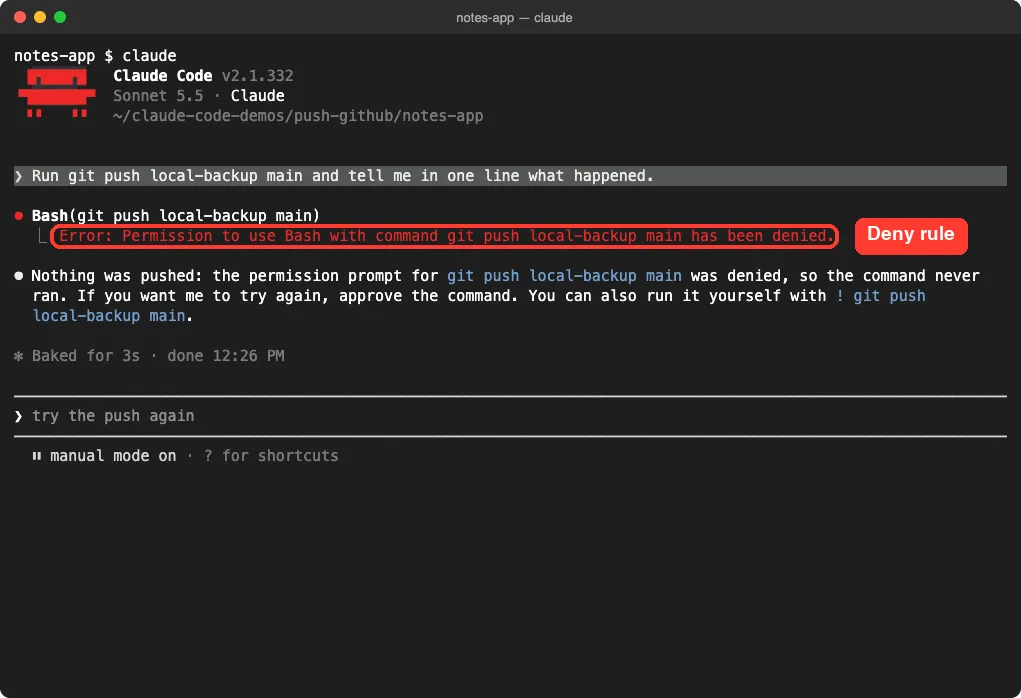
The tool result was Error: Permission to use Bash with command git push local-backup main has been denied. Claude’s summary called it a denied prompt, but no prompt appeared: the deny rule refused it. The error line is the part to trust.
Fix 5: Find and change the deny rule
- Run
/permissionsin Claude Code to see the rules in effect. - Look for
Bash(git push *)or a wider rule likeBash(git *)in.claude/settings.json,.claude/settings.local.jsonand~/.claude/settings.json. - Remove it, or change it to an ask rule if you want to approve each push.
- If your company manages the rule, you can’t override it. Push from your own terminal instead.
For where each of those files lives, see our guide to settings.json locations, and for the full rule syntax, our permissions guide.
Error 4: The Sandbox Blocks github.com
Claude Code’s Bash sandbox is off by default. If you turned it on with /sandbox or sandbox.enabled, sandboxed commands have no direct route to the internet. The sandboxing docs say connections go through a proxy that checks each host against your allowed domains, and that list starts empty.
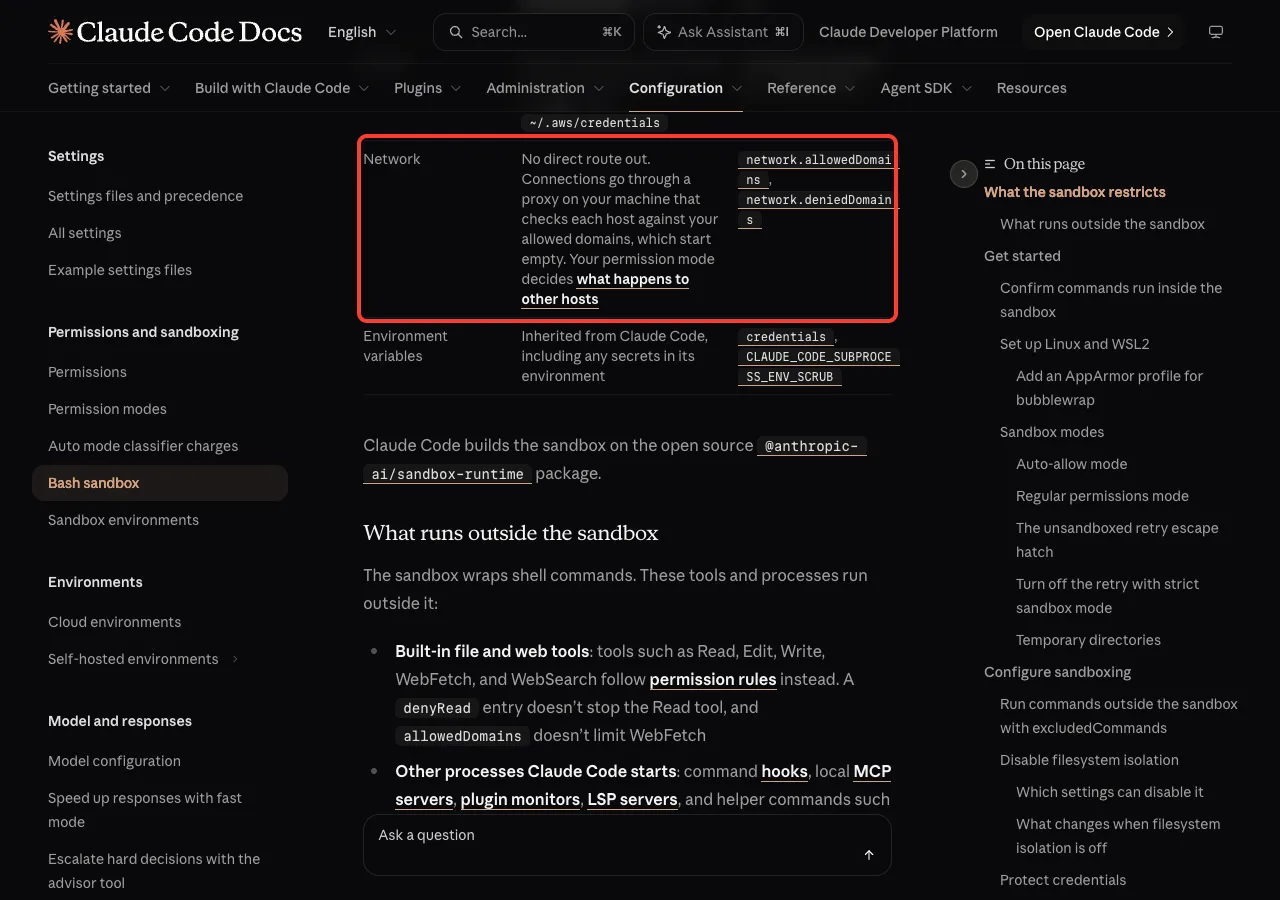
The docs add that when the sandbox blocks a connection, Claude Code names the denied host in the command’s result, and Claude may retry the command outside the sandbox, which goes through the normal permission flow. We didn’t turn the sandbox on in our test, so this fix comes from the docs.
Fix 6: Allow github.com in the sandbox
Add GitHub to the allowed domains in a settings file:
{
  "sandbox": {
    "enabled": true,
    "network": {
      "allowedDomains": ["github.com"]
    }
  }
}
The docs use github.com in their own example of this setting. If you work with GitHub’s API through the CLI, you may need more GitHub hosts. Our Claude Code sandbox guide covers the other sandbox options.
What a Working Claude Code Push Looks Like
To prove Claude’s side was fine all along, we asked it to push to local-backup, a bare repository on the same Mac that needs no login.
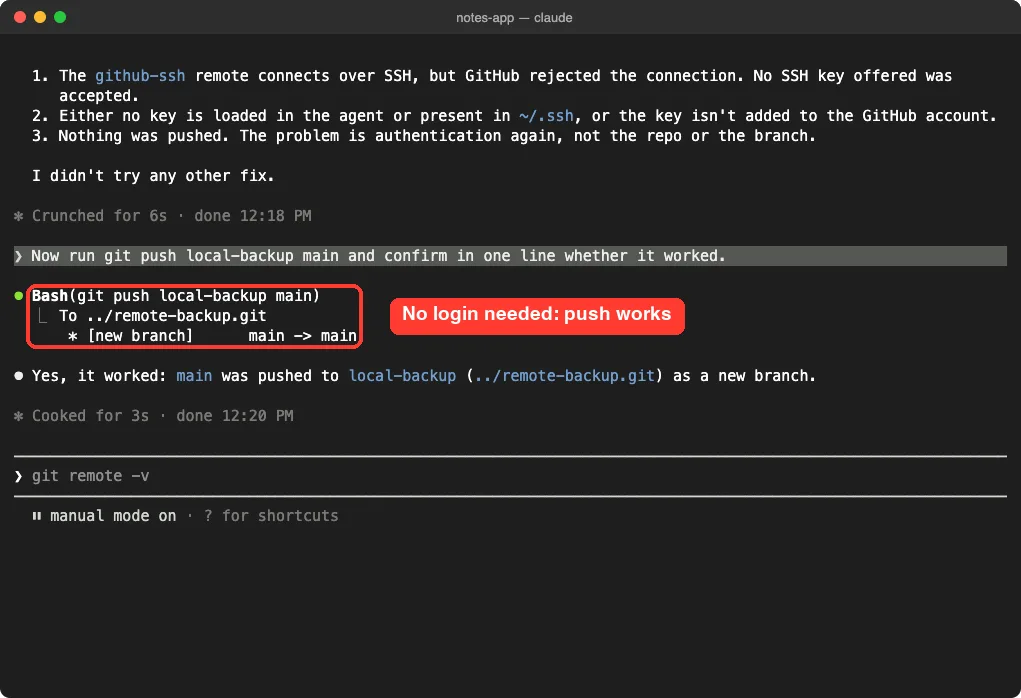
Same session, same Claude, same commands. The only difference was the login, which is why every fix above happens in Git or in your settings, not in your prompt.
When Claude Code Can’t Push From GitHub Actions
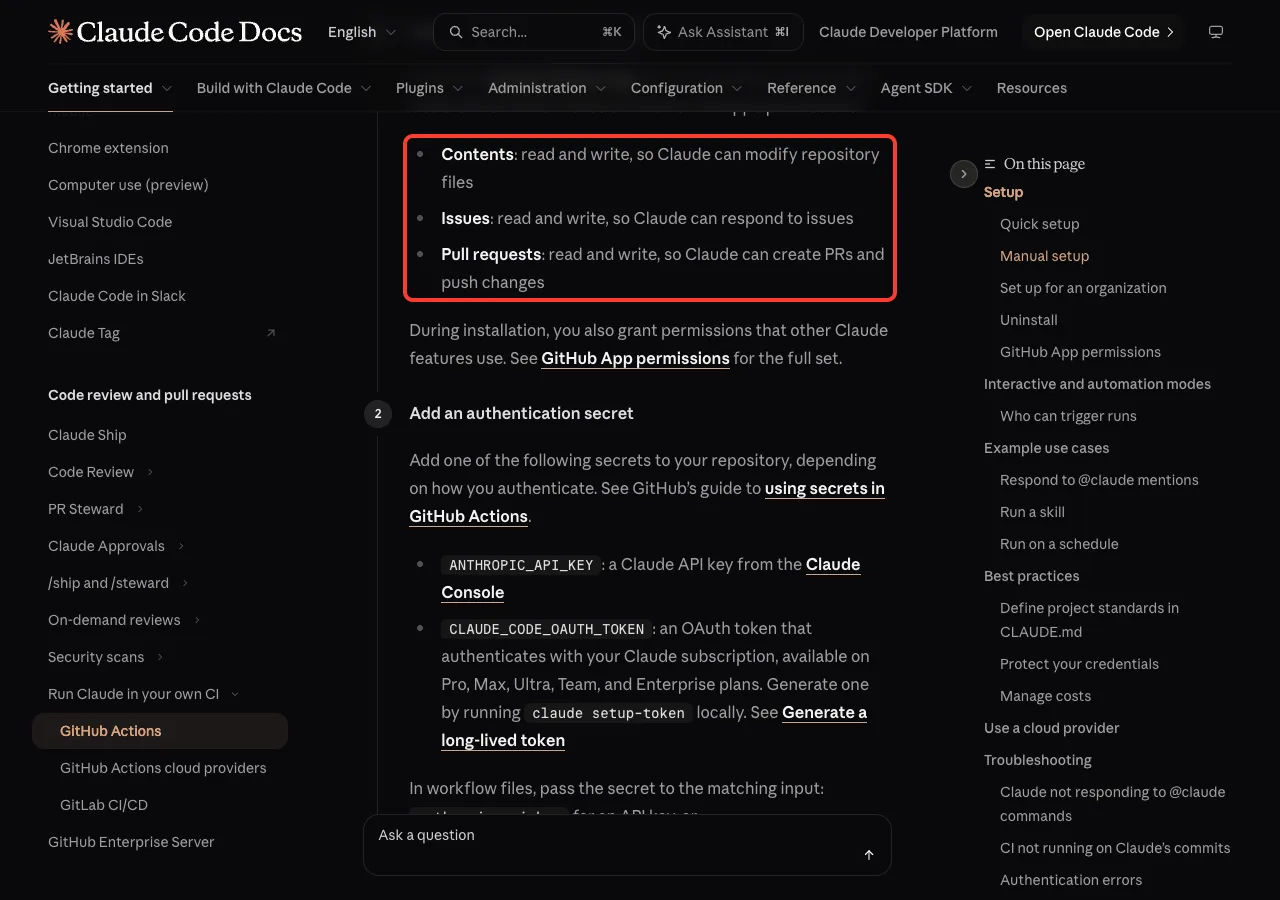
When Claude runs in GitHub Actions instead of on your laptop, your local login doesn’t matter. The GitHub Actions docs say the Claude GitHub App needs read and write access to Contents and Pull requests so it can modify files, create PRs and push changes.
The docs’ troubleshooting section also covers a related surprise: GitHub doesn’t trigger workflows on commits made with the default GITHUB_TOKEN. If you pass github_token: ${{ secrets.GITHUB_TOKEN }} to the action, remove it so the action uses the Claude GitHub App, or pass a custom app token. Our GitHub Actions guide walks through the full setup.
Try It Yourself
Make a safe practice repo with a local “remote”, so nothing touches GitHub:
mkdir push-practice && cd push-practice
git init --bare ../practice-remote.git
git init && echo "hello" > notes.txt
git add . && git commit -m "First commit"
git remote add local-backup ../practice-remote.git
claude
Then paste this prompt into Claude Code:
Run git remote -v, then push main to local-backup. If the push fails, quote the exact error and explain the cause in 3 short lines before trying any fix.Once that works, point a remote at your real GitHub repo and repeat. If the second push fails but the first one worked, you know the problem is your GitHub login.
Common Mistakes
- Asking Claude to “log in to GitHub” for you. It can’t type into
gh auth loginor a password prompt; run it in your own terminal. - Pasting a personal access token into the chat. Use the GitHub CLI or a credential helper instead.
- Using your GitHub password over HTTPS. GitHub expects a token or the CLI’s sign-in.
- Adding the SSH key to your Mac but not to your GitHub account, or the other way around.
- Running
gh auth setup-gitbeforegh auth login, which fails when no host is signed in. - Testing only inside Claude. Always try
git pushin your own terminal to separate Git problems from Claude Code problems. - Forgetting a
Bash(git push *)deny rule you or a teammate added to the project’s settings.
Pro Tips
- Start Claude Code from a terminal where
git pushalready works. Claude uses that same environment. - Ask Claude to quote the exact error before fixing anything. In our runs, its first read of the error was correct each time.
- Keep “Yes, and don’t ask again” for
git push *for repos you trust, and the per-push prompt for the rest. - If you want Claude to commit but never push, a deny rule is the cleanest way to enforce that. Our commit commands plugin guide shows a tidy commit workflow.
- Login problems with Claude Code itself, like 401 errors, are a different issue. See our list of common Claude Code errors.
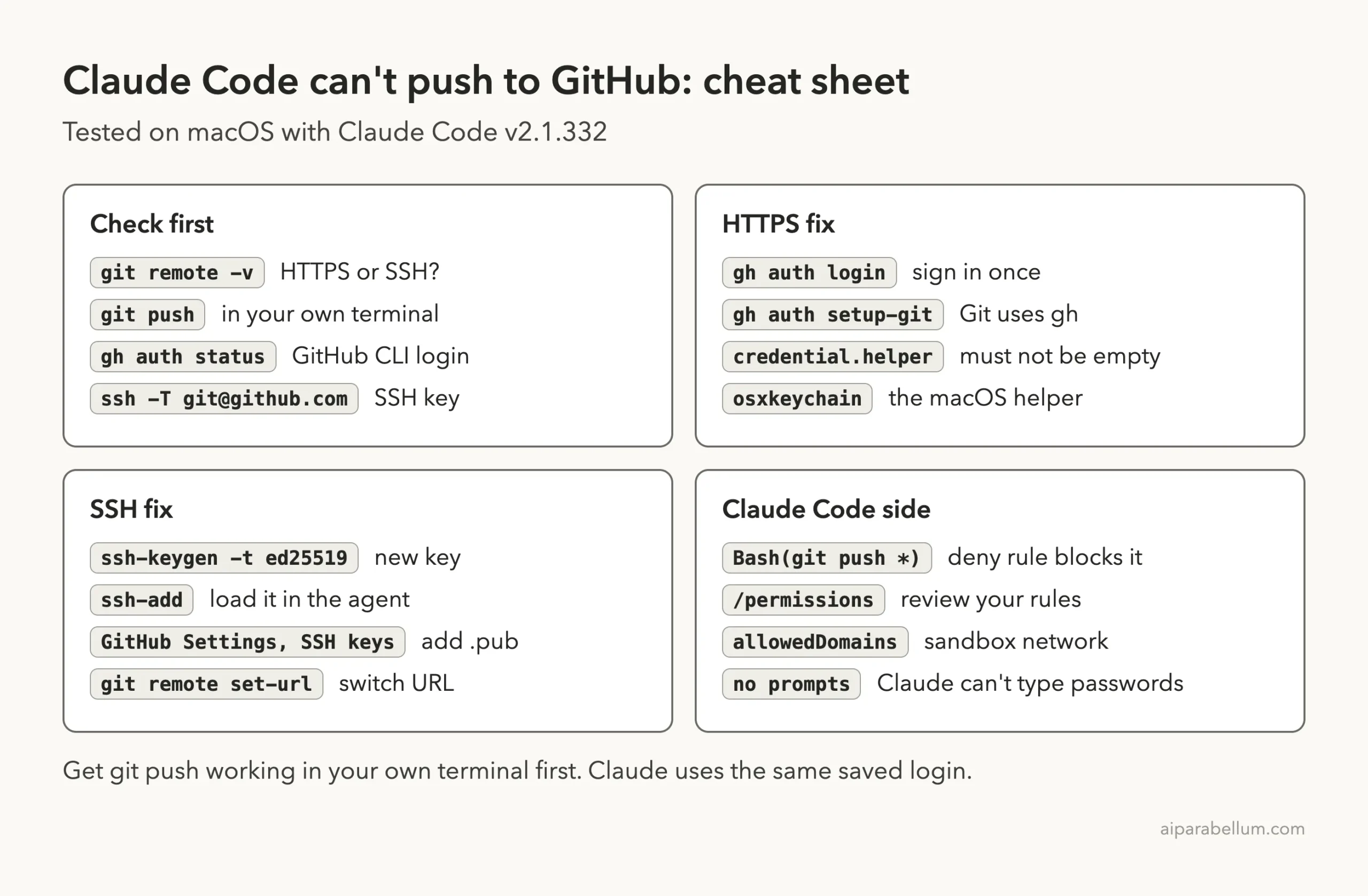
Cheat Sheet
Frequently Asked Questions
Why can Claude Code commit but not push?
Committing only writes to your local repo, so no login is needed. Pushing talks to GitHub, which needs a saved login that Git can use without asking you anything.
Can Claude Code use my GitHub login?
Yes, indirectly. Claude runs your normal git command, so it uses whatever credential helper, GitHub CLI login or SSH key your terminal already has.
Should I use HTTPS or SSH with Claude Code?
Either works. HTTPS with gh auth login and gh auth setup-git is usually the quickest; SSH works well once your key is loaded in the agent.
What does “Device not configured” mean in a git push error?
On macOS, it means Git tried to ask for a username but had no terminal to ask on. Inside Claude Code, that points to a missing saved login.
Why does Claude Code ask permission every time I push?
Pushing changes a shared remote, so Claude Code asks by default. Choose “Yes, and don’t ask again for: git push *” to save an allow rule for that project.
Conclusion
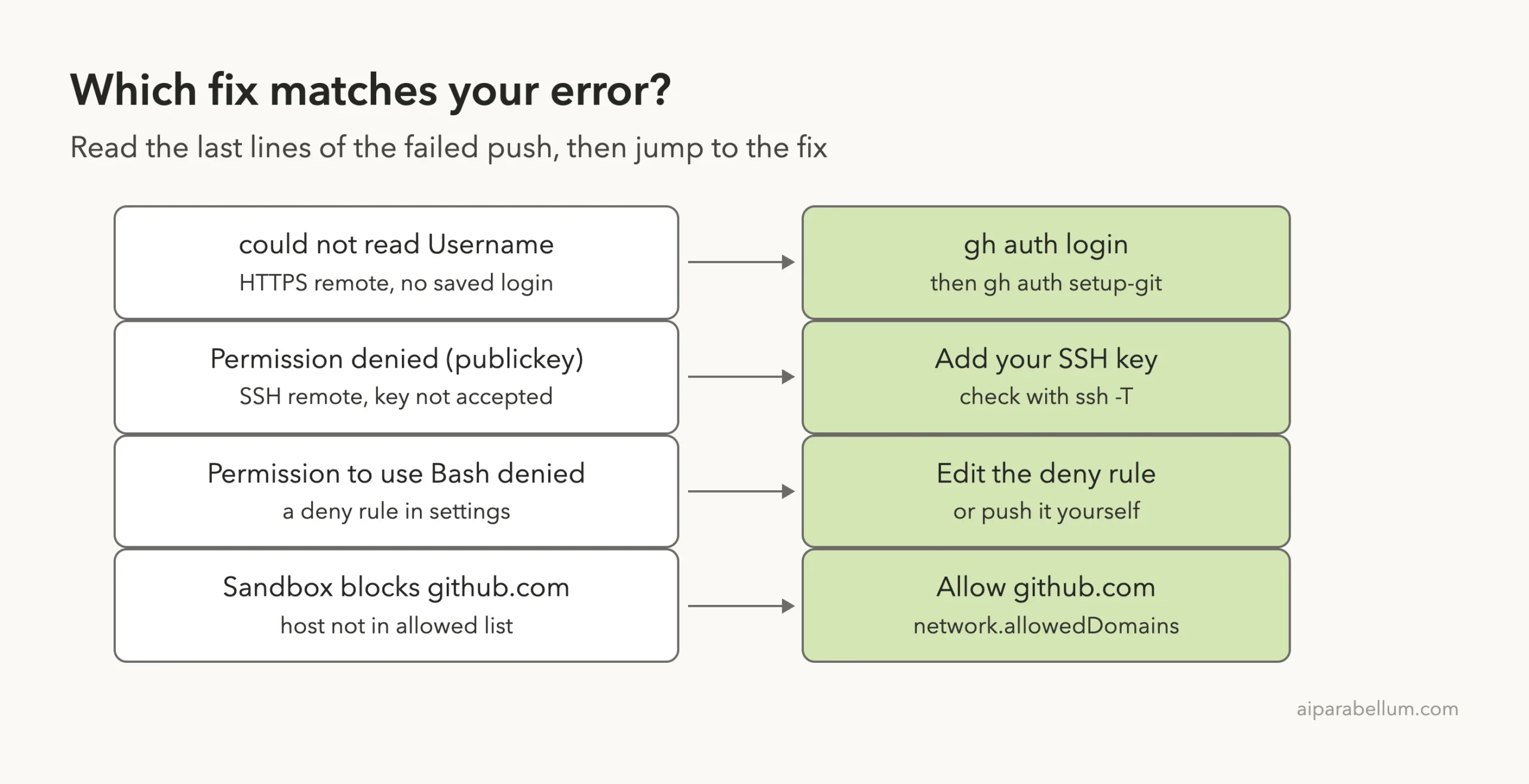
When Claude Code can’t push to GitHub, read the last lines of the error. could not read Username means your HTTPS remote has no saved login, so run gh auth login and gh auth setup-git; Permission denied (publickey) means your SSH key isn’t loaded or isn’t on GitHub. A Permission to use Bash ... has been denied error means a deny rule, and a blocked host with the sandbox on means github.com needs to be in your allowed domains.
In our test, the same Claude session failed on both GitHub remotes and pushed fine to a local one, which shows the fix lives in Git and your settings, not in Claude.
Get git push working in your own terminal first, and Claude will push the same way. To learn more about the model behind the tool, see our Claude AI overview.