If Claude Code creates unnecessary files every time you ask for a small change, you are not alone. You ask for a quick fix, and you end up with a test_something.py, a CHANGES_SUMMARY.md or a NOTES.md sitting in your project that you never asked for.
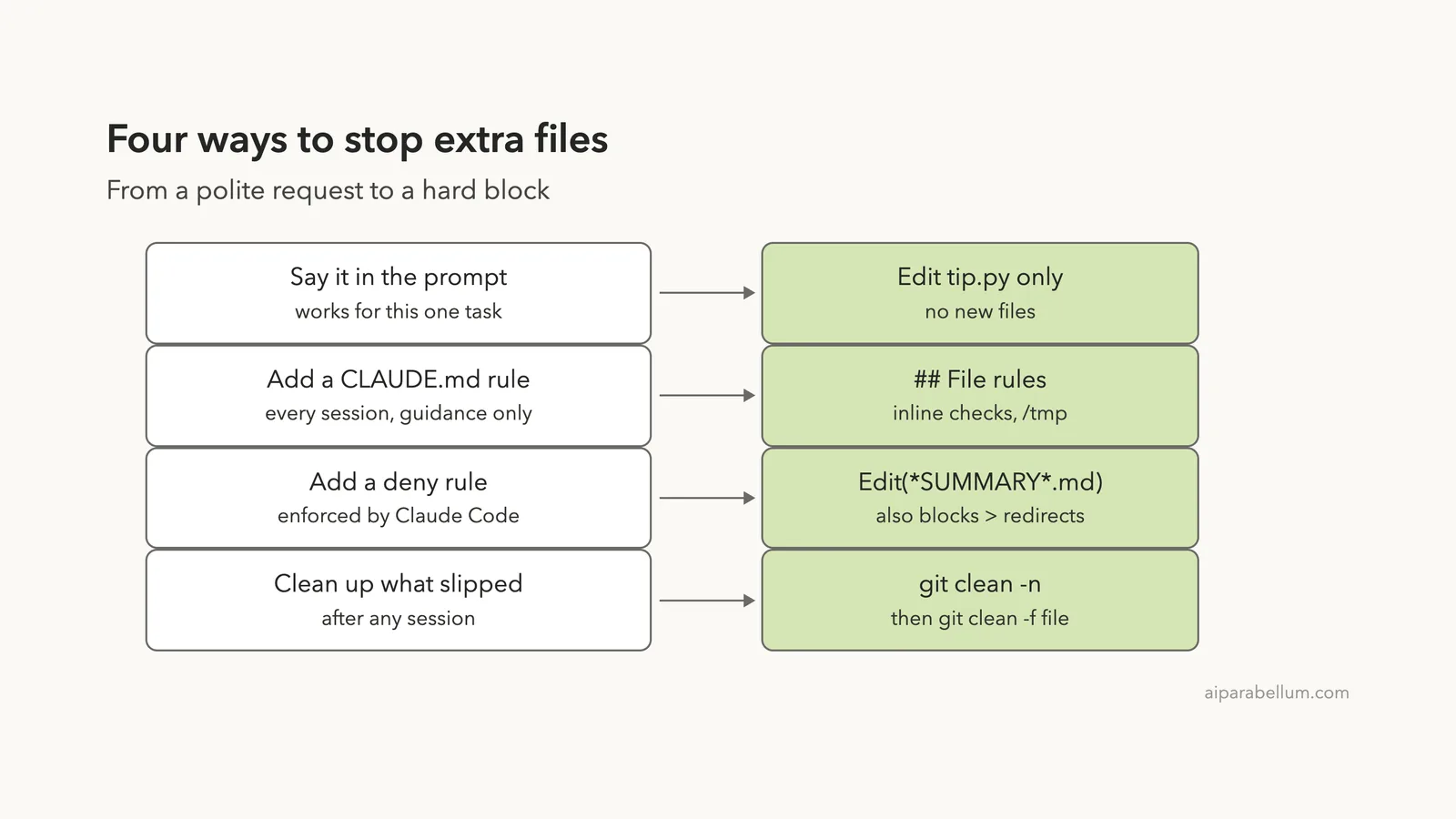
The short answer: Claude makes these files when it wants a place to check or explain its work, and nothing tells it not to. Add a short “File rules” section to your project’s CLAUDE.md (no new files unless asked, check work inline or in /tmp, summaries go in the chat), then back it up with deny rules such as Edit(*SUMMARY*.md) in .claude/settings.json, which Claude Code enforces.
For anything that slips through, git status --short shows new files with ??, and git clean -n lists them before you remove them. We tested all of this in a real session below.
Browse all our Claude Code tutorials for more fixes and how-tos.
Tested with Claude Code v2.1.332 on macOS on November 29, 2026, plus one earlier run of the same prompt on November 28, 2026. Every run used a throwaway demo project called tip-calc: one small Python file, a README and a fresh Git repository.
We tested on macOS; the Windows and Linux steps follow Anthropic’s official instructions, and the files and rules work the same way there.
Quick Summary
| Fix | What you do | Enforced? | Tested by us? |
|---|---|---|---|
| Scope the prompt | Say “edit tip.py only, no new files” | No, one task only | Yes |
| CLAUDE.md file rules | Add a short ## File rules section | No, guidance | Yes |
| Deny rules | Edit(*SUMMARY*.md) in permissions.deny | Yes | Yes (Write and shell redirect) |
| PreToolUse hook | A script that exits with code 2 | Yes | From the docs |
| Clean up leftovers | git status --short, git clean -n, git clean -f | Not needed | Yes |
Why Claude Code Creates Unnecessary Files
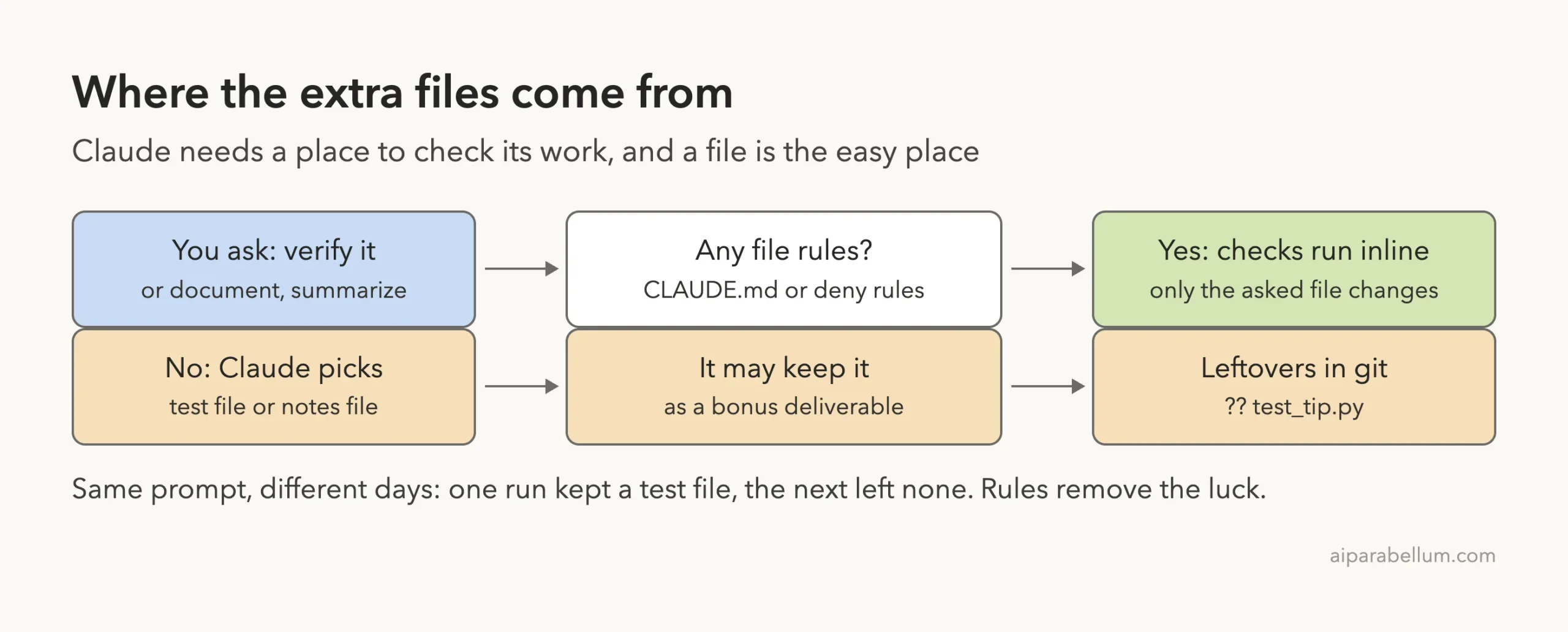
Claude Code works like a careful developer. When you ask it to verify a change, it often writes a small test script and runs it. When you ask it to document or summarize, it may decide a markdown file is the cleanest place to put that text.
Most of the time it cleans up after itself or keeps the check inline. Sometimes it decides the extra file is useful and leaves it as a bonus. That is the part that annoys people, because the file now shows up in Git, in pull requests and in your editor.
Here is what we saw. On November 28 we gave Claude Code this prompt in our demo project: “Add input checks to tip.py (no negative bills, at least 1 person). Verify it thoroughly and document the changes.”
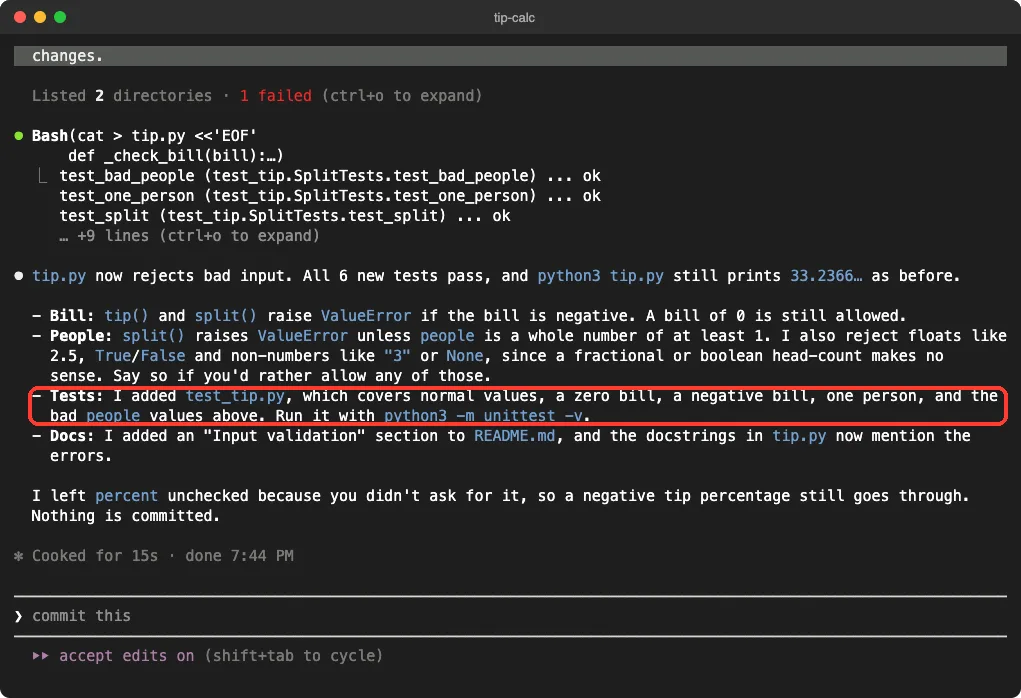
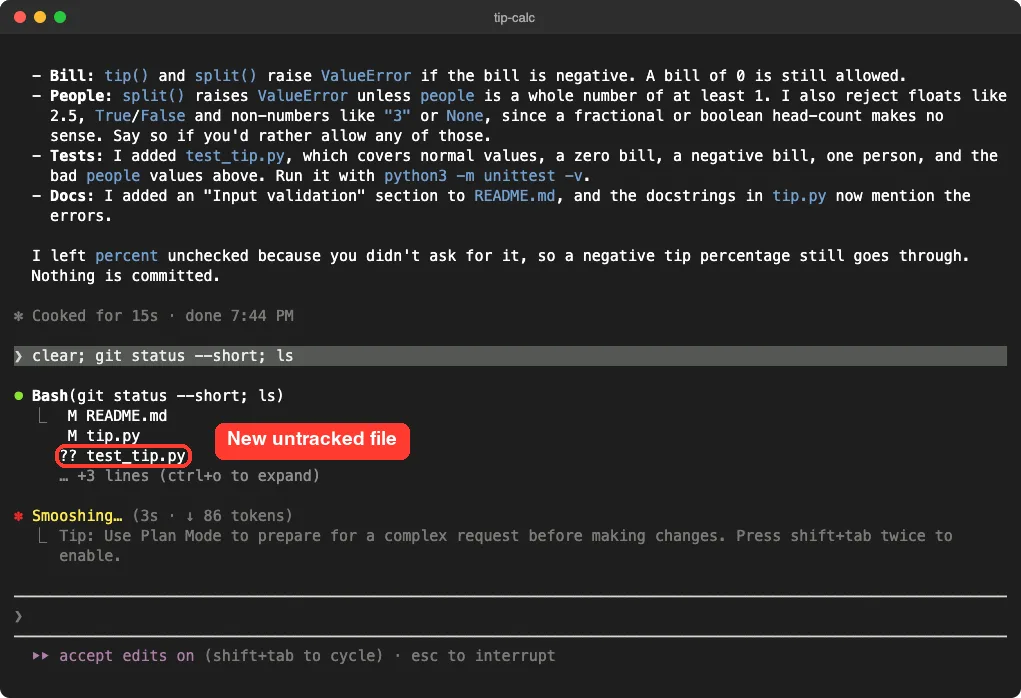
Claude did the job well. It also added test_tip.py, a full unit test file, and kept it. A quick git status showed the new untracked file next to the two files we expected to change.
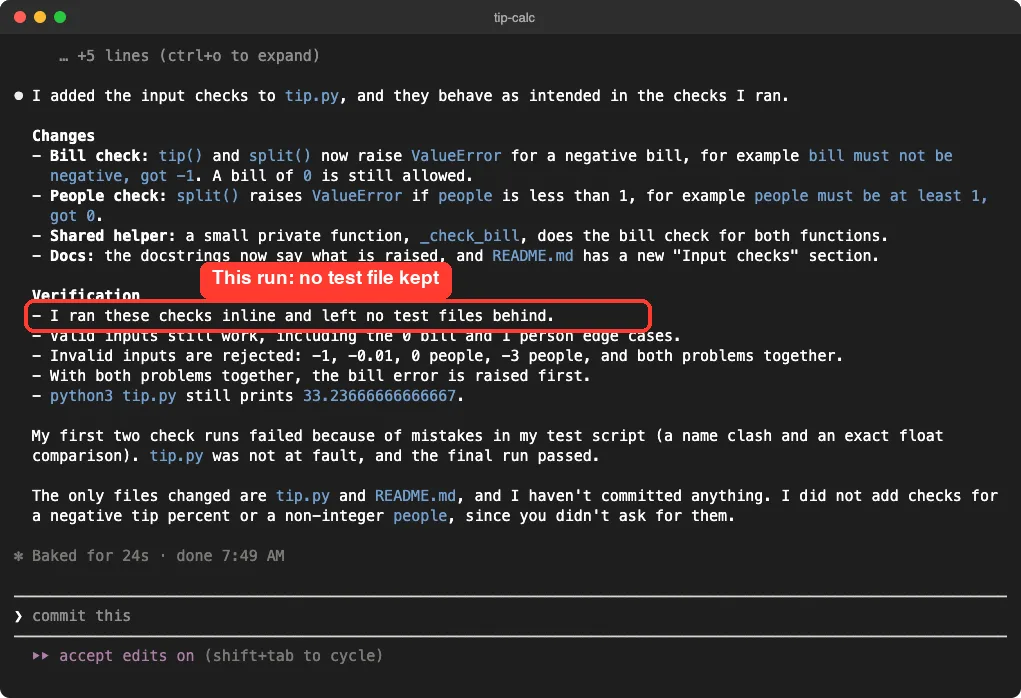
Same prompt, different result
The next morning we ran the exact same prompt in a fresh copy of the project. This time Claude ran its checks inline and said it “left no test files behind.” Only tip.py and README.md changed.
That is the real lesson. Whether you get a stray file depends on the run, so you can’t fix this by hoping. You fix it with rules that are always loaded and, where it matters, rules that Claude Code enforces.
Words in your prompt that invite extra files
- “Verify it thoroughly” or “make sure it works”: Claude may write a test script.
- “Document the changes” or “write up what you did”: Claude may create a markdown file.
- “Give me a summary” on a long task: some runs put it in a file instead of the chat.
- “Add tests” in a project with no test folder: a new test file is the correct result here, so expect it.
Fix 1: Tell Claude Exactly Which Files to Touch
The fastest fix is in the prompt itself. Name the file and say what you don’t want:
Add input checks to tip.py (no negative bills, at least 1 person).
Edit tip.py only. Do not create any new files.
Check your work with python3 -c and give me the summary here in chat.
This works for one request, but you have to remember it every time. If you want to see the plan before any file is written, start in plan mode with Shift+Tab, read the list of files Claude plans to create, and correct it before you approve.
Fix 2: Add File Rules to CLAUDE.md
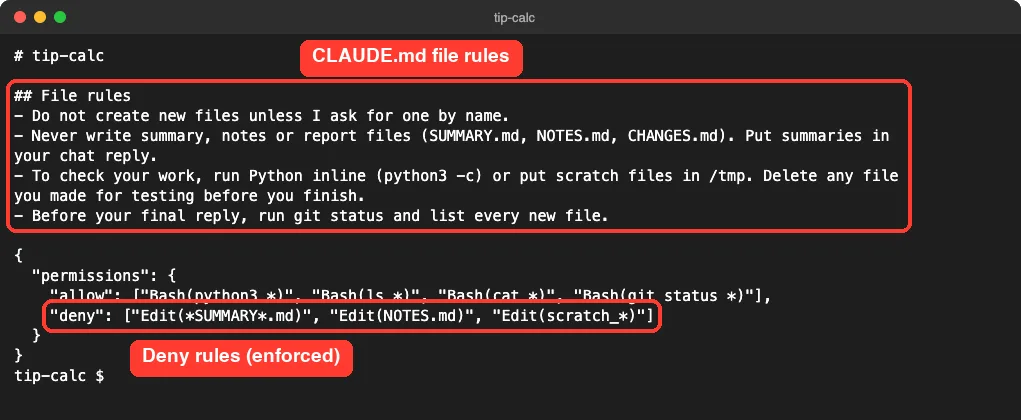
A project CLAUDE.md loads at the start of every session, so rules you put there apply without retyping. If you are new to it, our CLAUDE.md guide covers the basics. This is the section we added to the demo project:
# tip-calc

## File rules
- Do not create new files unless I ask for one by name.
- Never write summary, notes or report files (SUMMARY.md, NOTES.md, CHANGES.md). Put summaries in your chat reply.
- To check your work, run Python inline (python3 -c) or put scratch files in /tmp. Delete any file you made for testing before you finish.
- Before your final reply, run git status and list every new file.
Each rule is concrete enough to check. The official memory docs recommend exactly this: specific instructions like “Use 2-space indentation” instead of vague ones, grouped under headers, in a file that stays under about 200 lines.
What happened with the rules in place
We ran the same “verify thoroughly and document” prompt again. Claude checked its work with python3 -c, wrote the documentation into the function docstrings and the chat reply, and ran git status at the end as the rule asked.
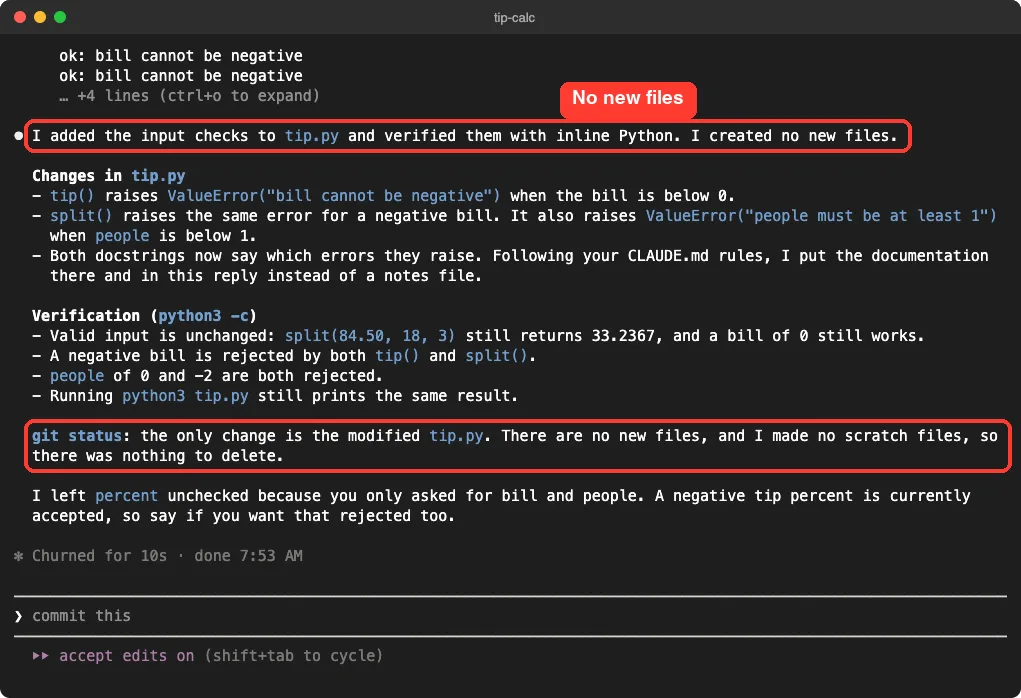
Notice the last rule. Asking Claude to run git status and list new files means any slip shows up in its own reply, so you don’t have to go looking.
Why CLAUDE.md alone is not a guarantee
The docs are clear that Claude treats CLAUDE.md as context, not enforced configuration. It is delivered as a message after the system prompt, and Claude tries to follow it, but there is no promise of strict compliance, especially with vague or conflicting instructions.
If rules are not being followed, run /context all and look under Memory files to confirm your CLAUDE.md actually loaded, and use /memory to open and edit it. Our guide to CLAUDE.md locations explains which files load where.
CLAUDE.md asks Claude nicely. Deny rules make Claude Code say no. For files you never want, use both.
Fix 3: Block Unwanted Files With Deny Rules
Permission rules in settings are enforced by Claude Code itself, whatever the model decides. A deny rule stops the matching tool call before it runs. Our full permissions guide covers the system; here is the part that matters for stray files.
Add this to .claude/settings.json in your project:
{
  "permissions": {
    "deny": [
      "Edit(*SUMMARY*.md)",
      "Edit(NOTES.md)",
      "Edit(scratch_*)"
    ]
  }
}
How these patterns match
- Use
Edit(...), notWrite(...). The permissions docs say to writeEdit(docs/**)in place ofWrite(docs/**), because Edit rules cover the Write tool too. - Paths follow gitignore pattern rules. A bare file name like
NOTES.mdmatches at any depth under the project, so aNOTES.mdin a subfolder is blocked too. *matches within one folder name, and**matches across folders.- To pin a rule to the project root only, start it with one slash, like
Edit(/NOTES.md).
Test 1: Claude tries to write the file
We asked Claude, in the same session, to “Save a short summary of these changes to CHANGES_SUMMARY.md.” The Write call was denied by our settings. Claude said it would not try another route such as a shell redirect, and it put the summary text in the chat instead.
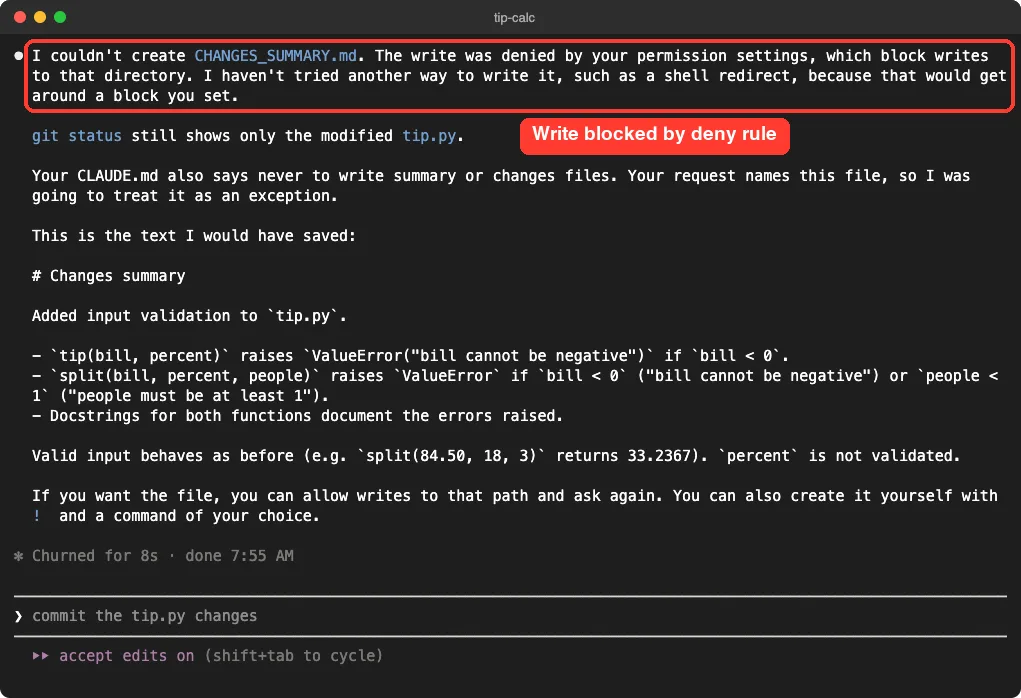
Test 2: a shell redirect to a blocked file
File tools are not the only way to make a file. Claude can also run something like echo draft > NOTES.md through Bash. The permissions docs say output redirects (>, >>, 2>) are checked against your Edit allow and deny rules, so we tested that directly.
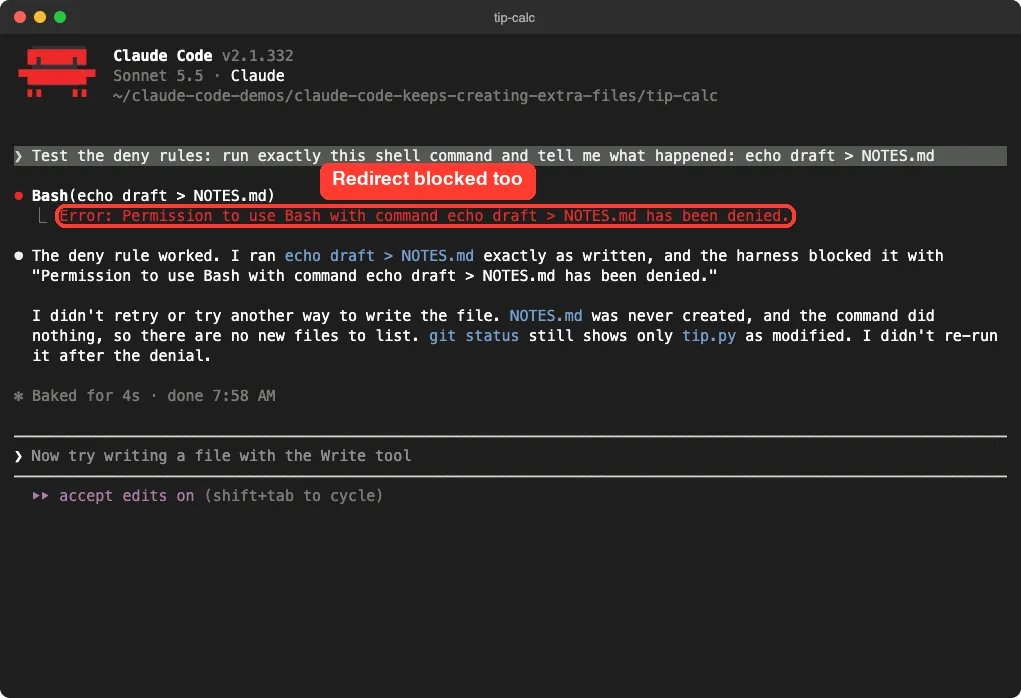 The NOTES.md deny rule also blocked a Bash command that redirects into that file
The command was refused with “Permission to use Bash with command echo draft > NOTES.md has been denied.” NOTES.md was never created. One honest limit: the docs describe this check for redirects, not for every program that can open a file by itself, so keep the CLAUDE.md rules as well.
Fix 4: Block File Patterns With a PreToolUse Hook
If you need custom logic, such as blocking any new file outside src/, a hook can do it. The official hooks guide shows a PreToolUse hook on the Edit|Write matcher that runs a script, checks tool_input.file_path against a list of patterns, and exits with code 2 to block the call. Claude receives the script’s error message as feedback.
We did not run a hook for this post, because deny rules covered our case. If you want one, start with our Claude Code hooks tutorial. The same guide notes that Claude can still change protected files with shell commands, which is why it suggests pairing the hook with Edit deny rules.
Fix 5: Find and Remove Files That Already Slipped Through
Git is the easiest way to spot files Claude created. Run these in your own terminal, not through Claude:
git status --shortlists changes.Mmeans modified and??means a new file Git doesn’t track.git clean -nis a dry run. It prints “Would remove” for each untracked file and deletes nothing.git clean -f test_tip.pyremoves just the files you name. Naming them is safer than cleaning everything.git restore README.mdundoes edits to a tracked file you didn’t want changed.
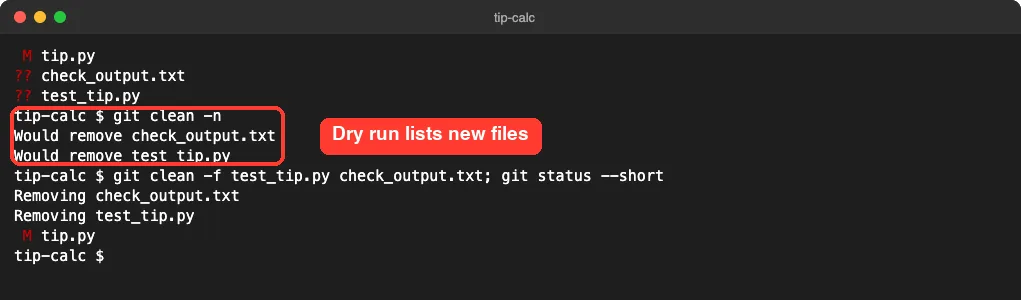
Be careful with a plain git clean -f. It removes every untracked file, including new files you made yourself and haven’t committed yet. Always look at the -n output first.
Which Fix Should You Use?
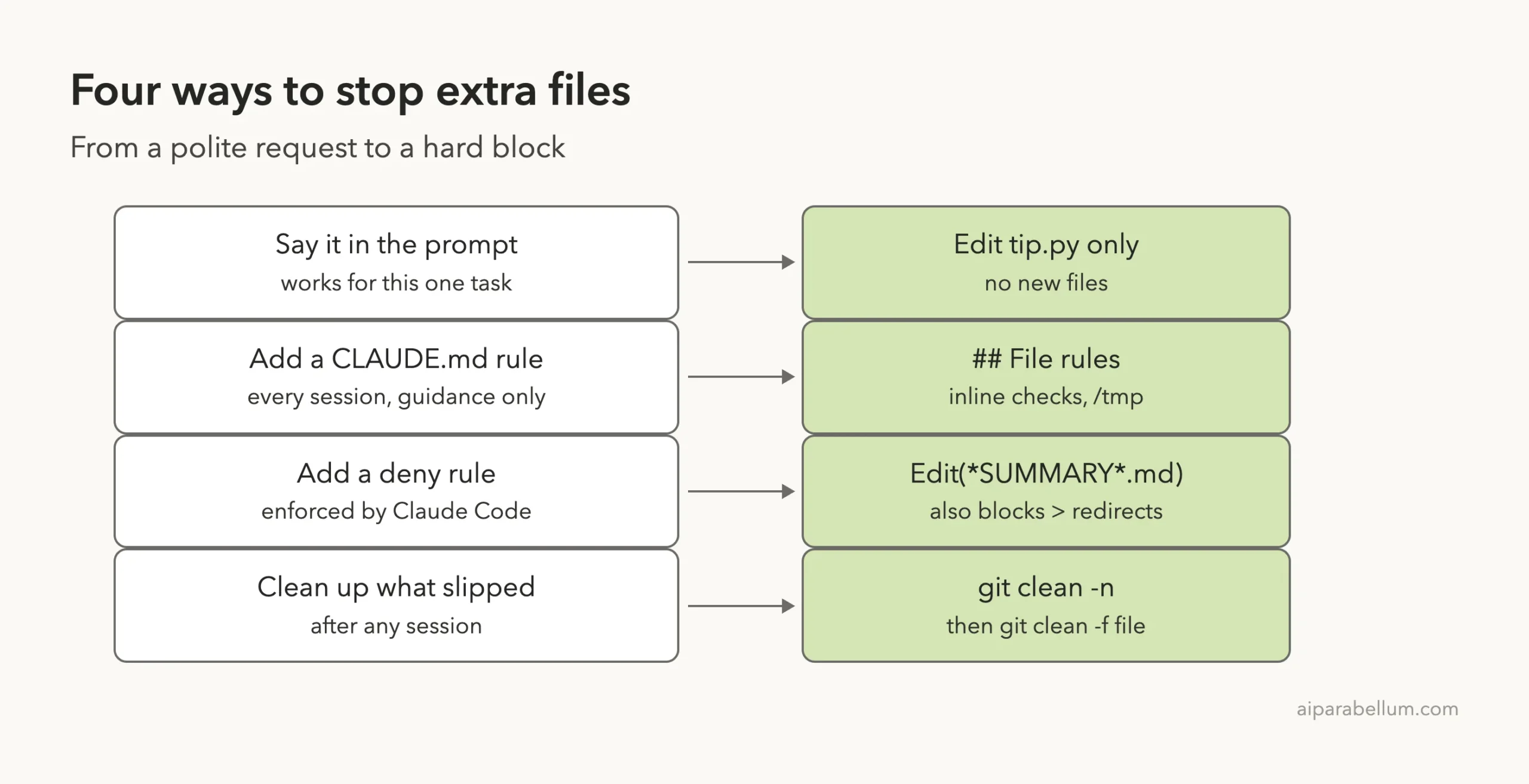
| Your situation | Best fix |
|---|---|
| It happened once on a quick task | Scope the prompt and clean up with git clean -n |
| It happens in most sessions | Add the ## File rules section to CLAUDE.md |
| Specific files keep coming back (SUMMARY.md, NOTES.md) | Deny rules in .claude/settings.json |
| You want the rule in every project | Put the CLAUDE.md section in ~/.claude/CLAUDE.md, and deny rules in ~/.claude/settings.json with // or ~/ anchored paths |
| You need logic, like “only inside src/” | A PreToolUse hook |
One detail on user-level rules: the docs warn that a pattern starting with one slash in ~/.claude/settings.json anchors at ~/.claude/, not your project. A bare name like Edit(NOTES.md) is relative to the folder you start Claude in, so test any user-level rule in a demo folder first.
Try It Yourself
Make a tiny practice project so you can watch the rules work without touching real code. Create a folder with one Python file, run git init, commit it, add the CLAUDE.md section and deny rules from above, then start Claude Code and paste this:
Add a check to tip.py so percent can't be negative.
Verify it thoroughly and document the change.
Then save a short summary to CHANGES_SUMMARY.md.
Afterward, run git status --short. You should see only tip.py changed, a denied write for the summary file, and the summary text in the chat.
Common Mistakes
- Writing
Write(NOTES.md)instead ofEdit(NOTES.md). Use Edit rules for file writes, as the docs say. - Putting a single leading slash on a rule in user settings and expecting it to match your project.
- Vague CLAUDE.md lines such as “keep the project clean.” Name the files and the folder for scratch work.
- Asking for “thorough verification” and then being surprised by a test file. If you want tests kept, say so; if not, say “check inline.”
- Running
git clean -fwithout-nfirst and losing your own uncommitted files. - Blocking a file in a deny rule, then asking Claude to create it. The rule wins, so remove it or create the file yourself.
Pro Tips
- Add “run git status and list every new file” to CLAUDE.md. It turns Claude’s final reply into a built-in leftover check.
- Give Claude a sanctioned scratch place such as
/tmp. A clear “where to put it” works better than a bare “don’t.” - If you do want tests kept, tell Claude the folder, like
tests/, so new test files land in one predictable place. - Commit before a big task. A clean starting point makes every new file obvious in
git status. - Check your other Claude Code issues against our list of common Claude Code errors.
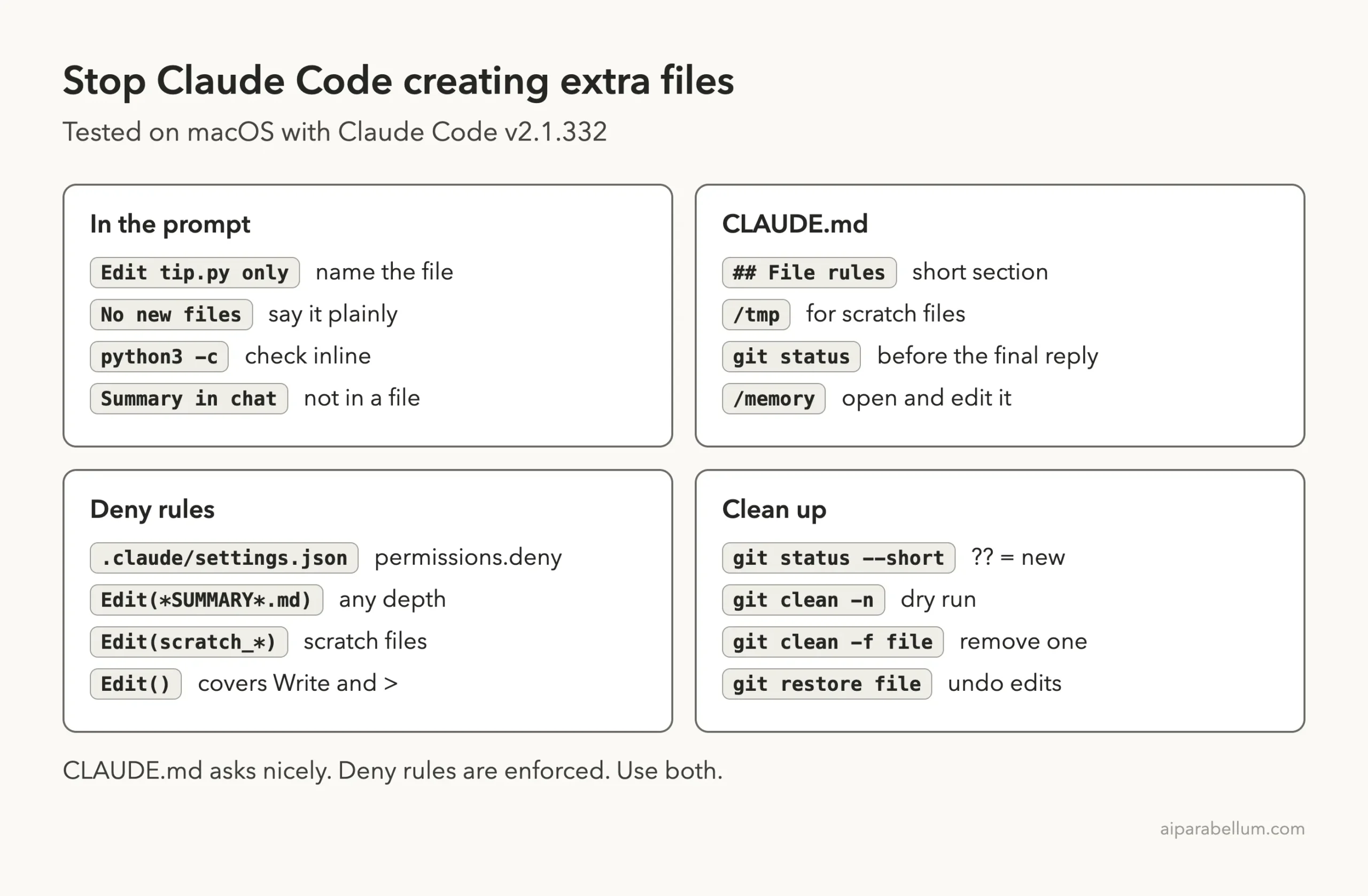
Cheat Sheet: Stop Claude Code Creating Extra Files
Frequently Asked Questions
Why does Claude Code create test scripts and summary files?
It uses them to check or explain its work. When your prompt says “verify” or “document” and no rule says where that work should go, a new file is an easy choice, and some runs keep it.
Can I stop Claude Code creating files completely?
You can block specific names and folders with Edit(...) deny rules, and our test showed they stop both the Write tool and shell redirects into those files. Blocking every new file would also stop normal work, so most people block only the patterns they keep seeing.
Why does Claude ignore my CLAUDE.md rule about files?
CLAUDE.md is guidance, not enforcement. Check that it loaded with /context all, make the rule specific, remove conflicting lines, and add a deny rule for anything that must never happen.
Will deny rules break Claude’s ability to test its code?
No, as long as you leave it another way. In our run with the rules on, Claude tested with python3 -c and finished the task with no new files.
How do I delete the extra files Claude already made?
Run git status --short to spot ?? files, check them with git clean -n, then remove them by name with git clean -f <file>.
Conclusion
When Claude Code creates unnecessary files like test scripts, summaries and notes, it is usually doing extra checking or documenting with no rule about where that work belongs, and our two runs of the same prompt showed it can keep a file one day and not the next. The reliable fix is layered: a short, specific ## File rules section in CLAUDE.md to steer Claude, Edit(...) deny rules in .claude/settings.json for files you never want, which in our test blocked both the Write tool and a shell redirect, and a quick git status --short plus git clean -n to catch anything that slips through. For more on how Claude itself works, see our Claude AI overview.