You can put a CLAUDE.md file in more places than most people realize, and these claude.md locations each behave a little differently. Some files load the moment you start Claude Code, some wait until Claude touches a file in their folder, and one kind did not load at all in our first test. This guide lists every location, explains the load order, and shows a real session where we put a codeword in each file to see which ones Claude actually read.
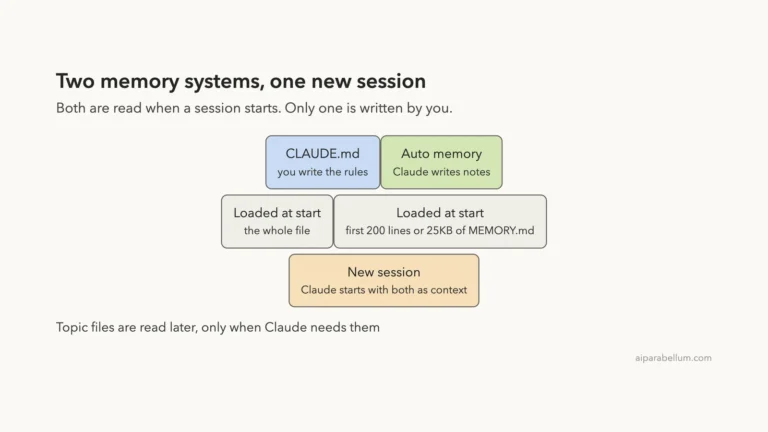
This is Part 33 of 45 in our Claude Code Deep Dives, part of our Claude Code tutorials. In the last part we explained the Claude Code memory system, and this part zooms in on the files you write yourself.
Tested with Claude Code v2.1.322 on November 12, 2026, on macOS. Everything ran in a throwaway demo folder with the --setting-sources flag set, so our personal Claude Code setup stayed untouched. We did not use any Windows or Linux machine; the paths for those systems come from Anthropic’s official docs.
Quick Summary
| Location | Scope | When it loads |
|---|---|---|
| Managed policy path (set by IT) | Everyone in an organization | At launch |
~/.claude/CLAUDE.md | You, in all projects | At launch |
CLAUDE.md in parent folders | Everything below that folder | At launch |
./CLAUDE.md or ./.claude/CLAUDE.md | The project, shared with the team | At launch |
./CLAUDE.local.md | You, in one project | At launch |
CLAUDE.md in a subfolder | That subfolder | On demand, when Claude works in it |
What a CLAUDE.md File Does
A CLAUDE.md file is a plain markdown file of instructions that Claude Code reads at the start of every session. It is the place to write down what you would otherwise repeat, such as build commands, naming rules and project layout. If you want a deeper look at writing one, see our guide to the CLAUDE.md file.
The docs say Claude treats these files as context, not as enforced settings. That means a clear, short rule works better than a long one, and a rule you must never see broken belongs in a hook instead.
The question this post answers is simpler: where can the file live, and which copies does Claude see in a given session?
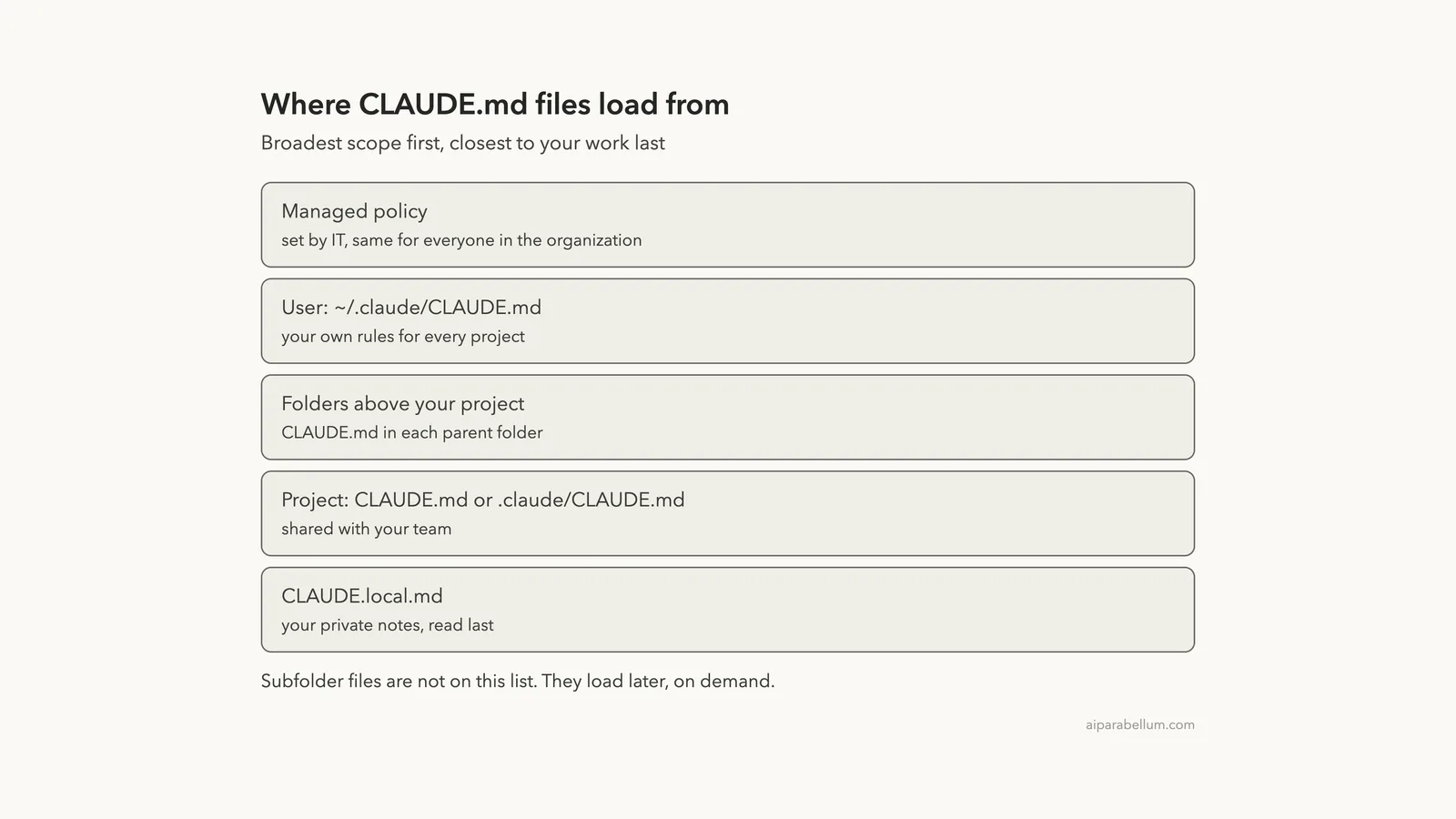
CLAUDE.md Locations by Scope and Load Order
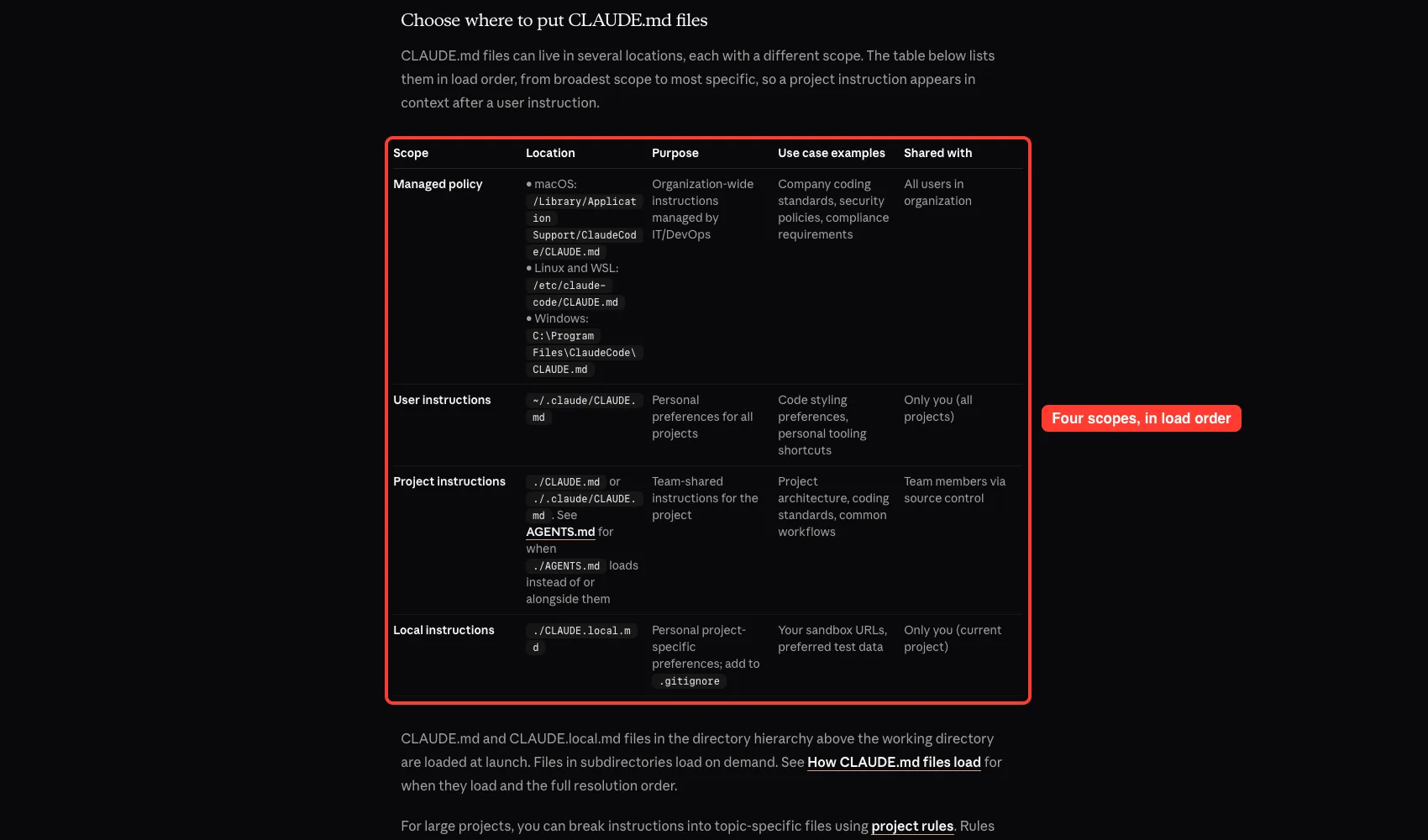
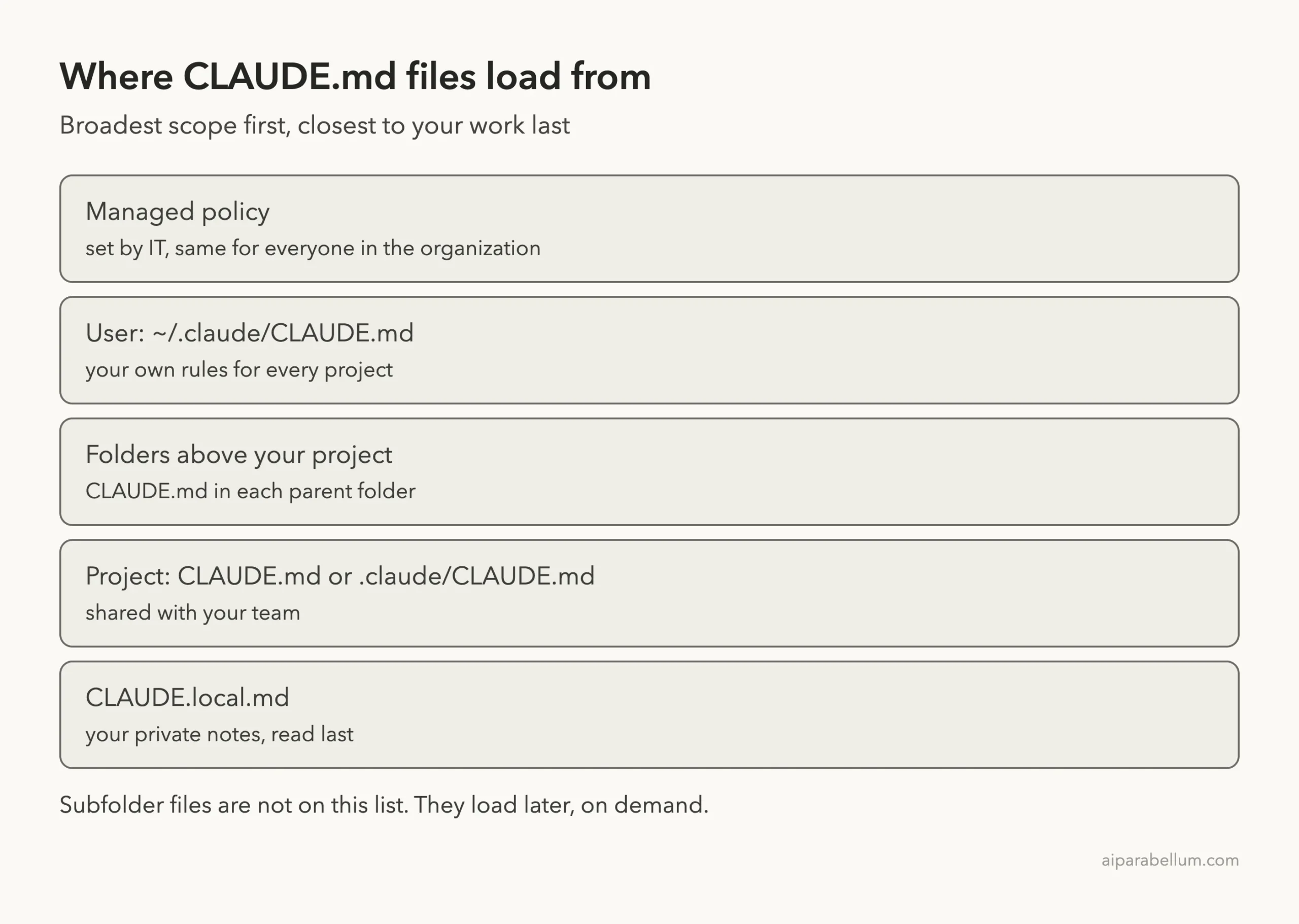
The official docs list the locations in load order, from the broadest scope to the most specific. A project instruction therefore appears in context after a user instruction.
Managed Policy
This is an organization-wide file set by IT or DevOps. The docs give one path per system:
- macOS:
/Library/Application Support/ClaudeCode/CLAUDE.md - Linux and WSL:
/etc/claude-code/CLAUDE.md - Windows:
C:\Program Files\ClaudeCode\CLAUDE.md
It is meant for company coding standards, security policies and compliance notes. The docs also say you cannot exclude a managed file with claudeMdExcludes. We did not create one, since that would need admin rights on the machine, so this scope comes from the docs only.
User Instructions
The file ~/.claude/CLAUDE.md holds your personal preferences for every project, such as code style or favorite shortcuts. Only you see it. We left our own copy alone and did not show it in any screenshot, so this scope also comes from the docs.
Project Instructions
A project file can sit at ./CLAUDE.md or at ./.claude/CLAUDE.md. Both are team-shared through version control, so put build commands, standards and workflows there. Our post on the .claude folder shows what else lives next to the second option.
Local Instructions
The file ./CLAUDE.local.md is for private, project-specific notes such as your sandbox URLs or test data. The docs say to add it to .gitignore so it is not committed. It loads right alongside CLAUDE.md.
Set Up Our Demo Project
To see this for ourselves, we built a small folder tree. Each file contains one rule: when asked for codewords, include a specific word. Each word is different, so the answer tells us exactly which files Claude read.
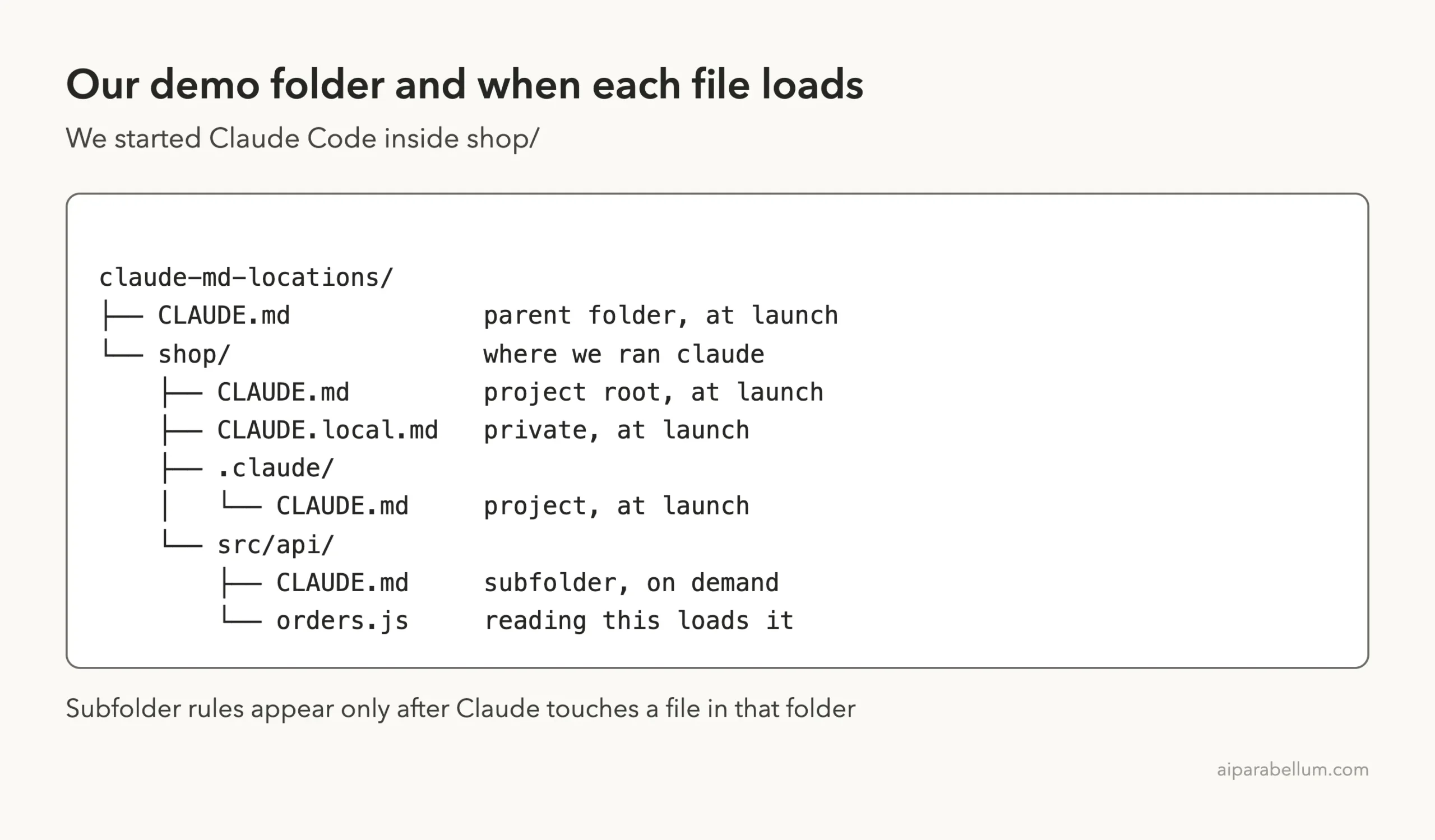
The parent folder had its own CLAUDE.md with the word maple. Inside shop/ we added four more:
shop/CLAUDE.md: cedarshop/.claude/CLAUDE.md: birchshop/CLAUDE.local.md: willowshop/src/api/CLAUDE.md: aspen
We started Claude Code inside shop/, not in the parent folder. That matters, because the docs say Claude loads files from your working directory and every directory above it.
Step 1: See Which CLAUDE.md Locations Load at Launch
Our first prompt asked Claude to list every codeword from the instruction files it loaded at startup, with the file each came from, and to use no tools. That way the answer could only come from files already in context.
We first ran this with --setting-sources project, our usual safe setting for demos. Claude listed three words.

The parent folder file, the project root file and the .claude/CLAUDE.md file all loaded. The CLAUDE.local.md file did not, and Claude did not mention willow at all.
Why CLAUDE.local.md Was Missing
The cause was our own flag. The docs note that CLAUDE.local.md is skipped if you exclude local from --setting-sources. With project alone, the local source is excluded.
We started a new session with --setting-sources project,local and asked the same question.
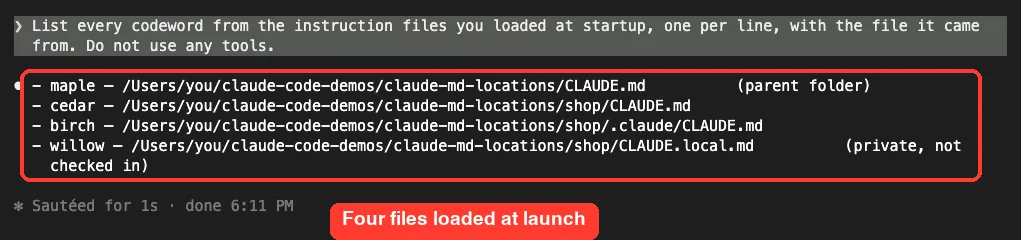
This time Claude listed four words: maple, cedar, birch and willow.
It even described the last one as private and not checked in. If your CLAUDE.local.md seems ignored, check how you start Claude Code before you check the file. Our settings guide explains what each source covers.
Step 2: Check With /context all
You do not need a trick prompt to verify this. The docs say to run /context all and read the list under Memory files. If a file is not on that list, Claude cannot see it.

Our list showed four files, each with a small token count, in this order: the parent folder file, then CLAUDE.md, then .claude/CLAUDE.md, then CLAUDE.local.md. The subfolder file is not there, and that is correct. The docs say it loads on demand, not at launch.
In fullscreen mode, /context alone collapses that list, so add the all word. Our context window guide shows how these tokens add up.
How the Folder Walk Works
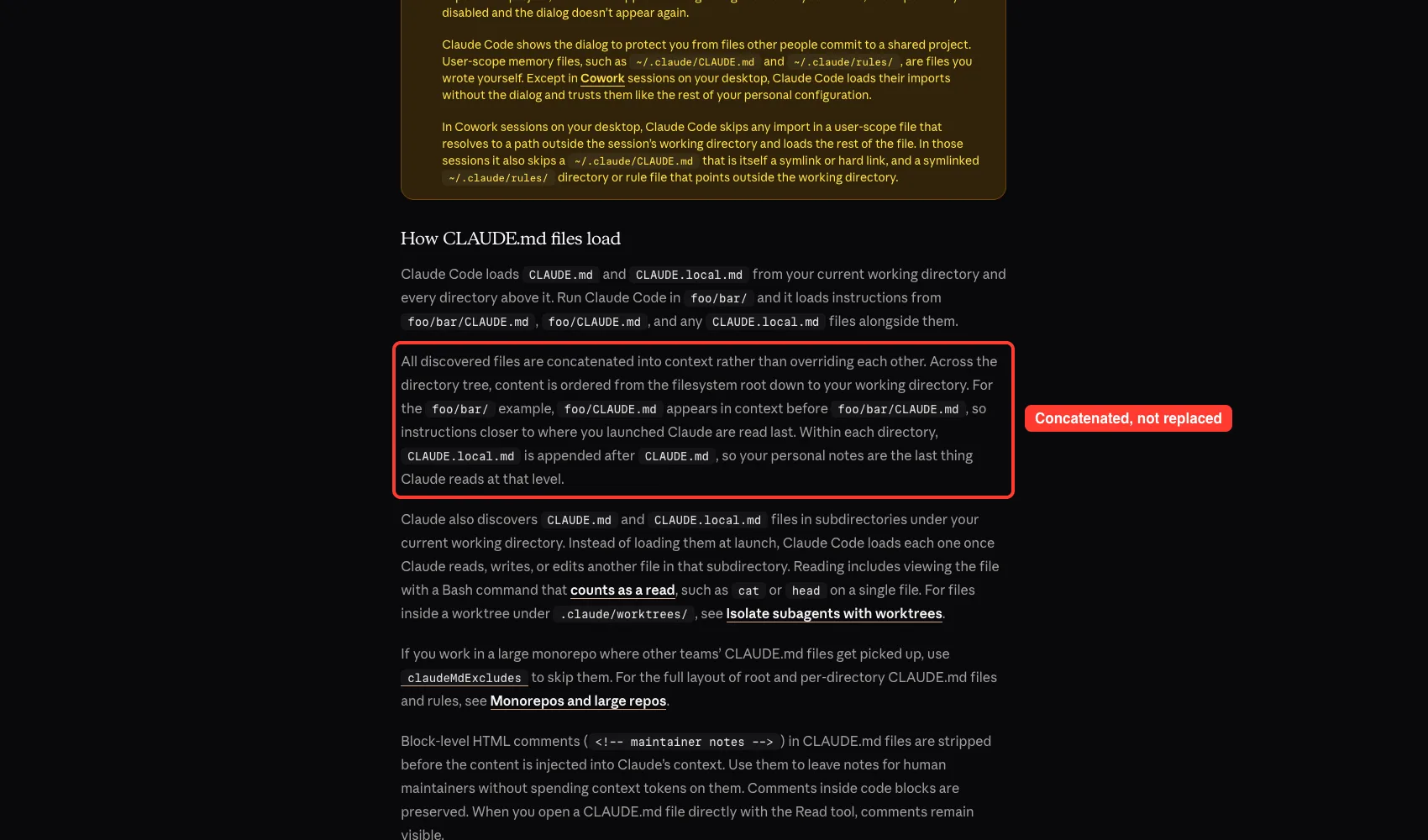
The docs describe the walk in plain terms. Run Claude Code in foo/bar/ and it loads foo/bar/CLAUDE.md and foo/CLAUDE.md, plus any CLAUDE.local.md files beside them.
Files Add Up, They Do Not Override
All discovered files are concatenated into context. A closer file does not replace a farther one. Instead, content is ordered from the filesystem root down to your working directory, so the files nearest to you are read last.
Within one folder, CLAUDE.local.md is added after CLAUDE.md. Your personal notes are therefore the last thing Claude reads at that level.
If a parent file and a project file disagree, nothing resolves the conflict for you. The docs warn that when two instructions contradict each other, Claude may pick one arbitrarily. Keep them consistent.
Folders You Might Not Expect
Because the walk goes up from where you started, any CLAUDE.md in a parent folder counts, even one from another team or an old experiment. In a monorepo, the docs suggest the claudeMdExcludes setting to skip files by path or glob pattern. It can live in any settings layer, and the arrays merge across layers.
Step 3: Watch a Subfolder File Load on Demand
Files in subdirectories under your working directory are handled differently. The docs say Claude Code loads each one once Claude reads, writes or edits another file in that subdirectory.
In our same session we asked Claude to read src/api/orders.js, say in one line what it does, and then list every codeword it now had.
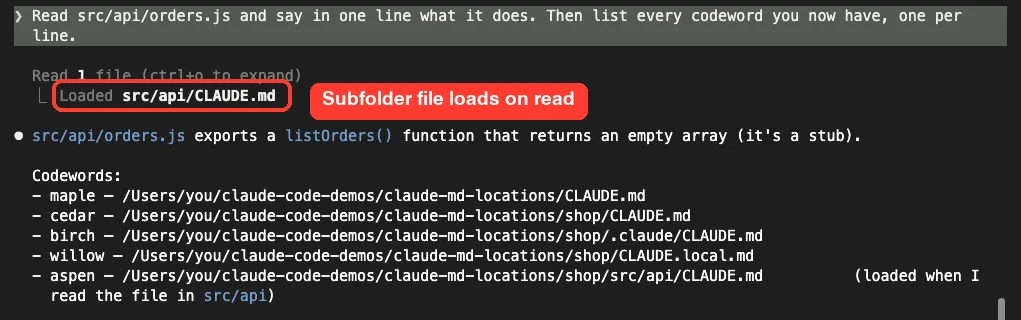
Right under the read, Claude Code printed a Loaded line for src/api/CLAUDE.md. The answer then included a fifth word, aspen, and Claude noted it came from reading a file in that folder. Before that read, aspen was nowhere in context.
The docs add a testing tip. To try a new subfolder file, create it from your own shell instead of asking Claude to write it, then ask Claude to read a file in that folder. Reading counts even through a Bash command such as cat or head on a single file.
Other Ways Files Get In
Imports With @path
A CLAUDE.md file can import other files with the @path/to/file syntax. Relative paths resolve from the file that holds the import, and imports can nest up to four hops deep. Imports help you organize a long file but do not reduce its context cost, since imported files load with their parent.
The docs add a safety step. The first time Claude Code meets an import that points outside your working directory, it shows an approval dialog. If you decline, those imports stay off.
Extra Directories With –add-dir
The --add-dir flag gives Claude access to another folder, but by default its CLAUDE.md files are not loaded. To load them, set CLAUDE_CODE_ADDITIONAL_DIRECTORIES_CLAUDE_MD=1 for that launch. We did not run this one, so treat it as the docs’ word.
Rules Files and AGENTS.md
The .claude/rules/ folder holds topic files that can be scoped to certain paths, and they have their own loading behavior. If your repository uses AGENTS.md, Claude reads it only when none of the three CLAUDE.md-style files exist in your working directory or above it, by default. We covered that in AGENTS.md vs CLAUDE.md.
Comments Cost Nothing
Block-level HTML comments in a CLAUDE.md file are stripped before the content reaches Claude’s context. Use them for notes to human maintainers. Comments inside code blocks are kept.
Parents load at launch, subfolders load on demand, and the local file only loads if its source is on.
Where Should Each Instruction Go?
| If the instruction is… | Put it in |
|---|---|
| A company-wide rule | The managed policy file |
| Your own habit in every project | ~/.claude/CLAUDE.md |
| A team rule for one project | ./CLAUDE.md or ./.claude/CLAUDE.md |
| Your private note for one project | ./CLAUDE.local.md |
| Only about one part of the code | A CLAUDE.md in that subfolder, or a path-scoped rule |
Keep each file under about 200 lines, as the docs recommend, because longer files use more context and reduce how well Claude follows them.
Try It Yourself
Make a throwaway folder with a few small CLAUDE.md files, each holding a different codeword, then run claude in the project folder. Paste this prompt.
List every codeword from the instruction files you loaded at startup, one per line, with the file it came from. Do not use any tools.Run /context all to compare the answer with the Memory files list. Then ask Claude to read one file in a subfolder that has its own CLAUDE.md, and watch for the Loaded line.
Common Mistakes
- Starting Claude Code with a
--setting-sourcesvalue that leaves outlocal, then wondering whyCLAUDE.local.mdis ignored. - Expecting a subfolder
CLAUDE.mdto load at launch. It loads only after Claude touches a file there. - Forgetting that parent folders count. An old
CLAUDE.mdabove your project is still read. - Committing
CLAUDE.local.md. Add it to.gitignore. - Writing contradictory rules in two files. Claude may follow either one.
- Asking Claude to write a new subfolder file as a test. Create it yourself from the shell instead.
Pro Tips
- Run
/context allfirst whenever Claude seems to ignore an instruction. - Use
/memoryto open and edit your instruction files without hunting for paths. - Share a personal file across git worktrees by importing it from your home folder, since a gitignored
CLAUDE.local.mdonly exists where you created it. - Use
claudeMdExcludesin a monorepo to skip other teams’ files. - Put long, narrow instructions in a subfolder file or a path-scoped rule so they load only when needed.
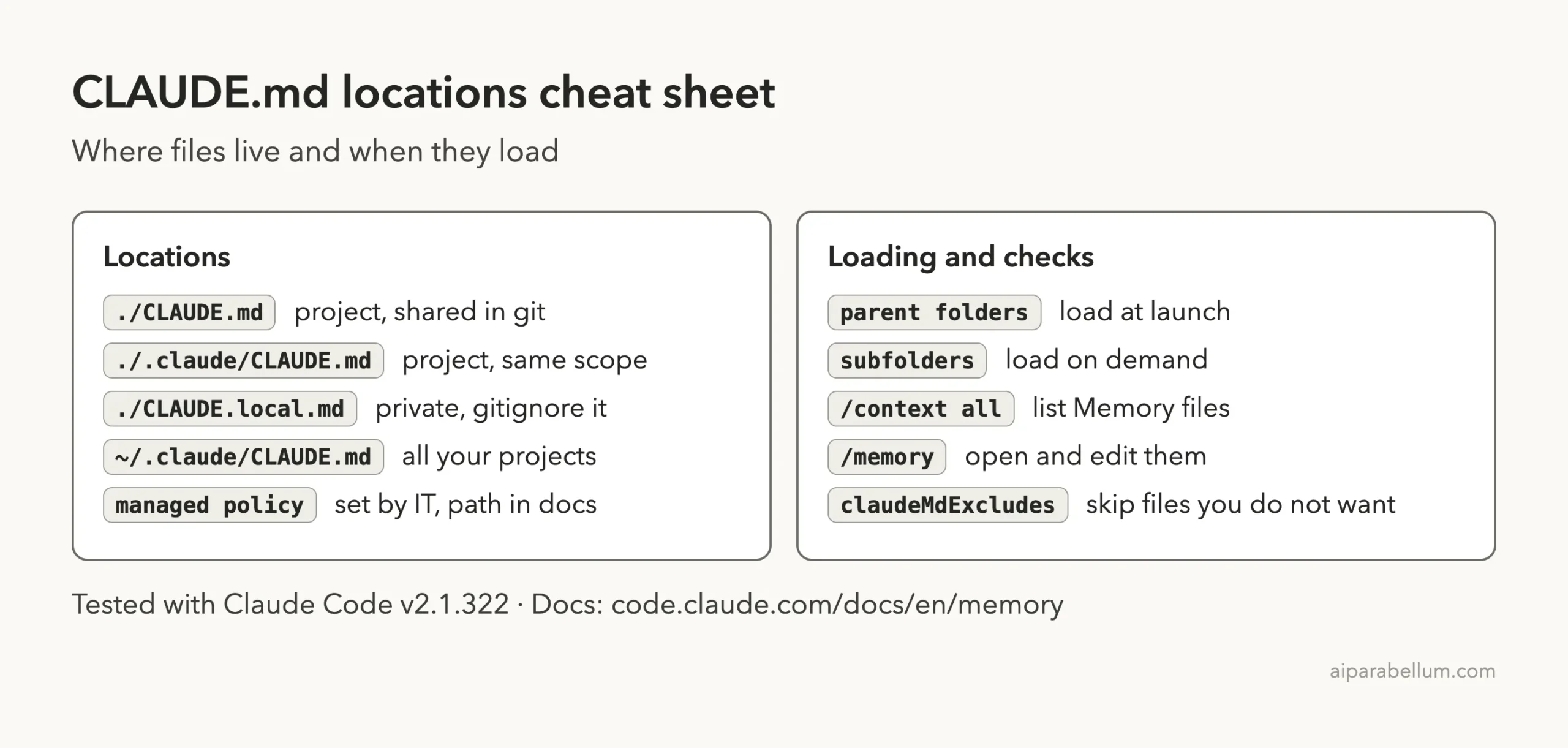
Cheat Sheet
Frequently Asked Questions
Where do I put a CLAUDE.md file?
Put a team file at ./CLAUDE.md or ./.claude/CLAUDE.md, personal rules at ~/.claude/CLAUDE.md, and private project notes in ./CLAUDE.local.md.
Does Claude read CLAUDE.md files in parent folders?
Yes. It loads them at launch from your working directory and every directory above it. In our test, a file one level up loaded.
Why is my CLAUDE.local.md not loading?
If you start Claude Code with --setting-sources, make sure local is included. In our test it loaded only with project,local.
When does a subfolder CLAUDE.md load?
Only after Claude reads, writes or edits a file in that subfolder. A Loaded line with its path appears when it happens.
Do closer CLAUDE.md files override farther ones?
No. All files are added to context, ordered from the filesystem root down to your working directory, so nothing is replaced.
Conclusion
CLAUDE.md files can live at the managed, user, parent folder, project, local and subfolder levels, and Claude combines them rather than choosing one. In our real session, four files loaded at launch, and a fifth arrived only after Claude read a file in its folder. Check any session with /context all, keep your files short and consistent, and read the official memory documentation or our overview of Claude for more.
Previous in the series: Part 32: Memory System
Next in the series: Part 34, Show Context Usage and Cost in the Claude Code Status Line, is coming soon.