If your repository has an AGENTS.md file and no CLAUDE.md, Claude Code reads the AGENTS.md. If it has both, Claude Code reads the CLAUDE.md files and skips AGENTS.md by default. That is the short answer to the agents.md vs claude.md question, and we tested all three setups in a throwaway project to be sure.
Below you will see exactly what happened in each test, the one-line fix when you want both files to load, and the checks to run when your AGENTS.md seems to be ignored.
This guide is part of our Claude Code tutorials, where we answer one specific question per post. It builds on our CLAUDE.md template guide.
Tested with Claude Code v2.1.312 on November 1, 2026. We tested on macOS; the Windows and Linux steps follow Anthropic’s official instructions.
Quick Answer: Which File Wins?
The official memory docs include a table of what Claude reads by default for each combination of instruction files. We rebuilt each row in a demo folder and checked it with a real session.
| Your repository has | Claude Code reads | What we saw |
|---|---|---|
AGENTS.md only | AGENTS.md | Claude quoted both rules from it |
AGENTS.md and CLAUDE.md | CLAUDE.md only | Claude knew only the CLAUDE.md rule |
CLAUDE.md that imports @AGENTS.md | Both, through the import | Claude quoted rules from both files |
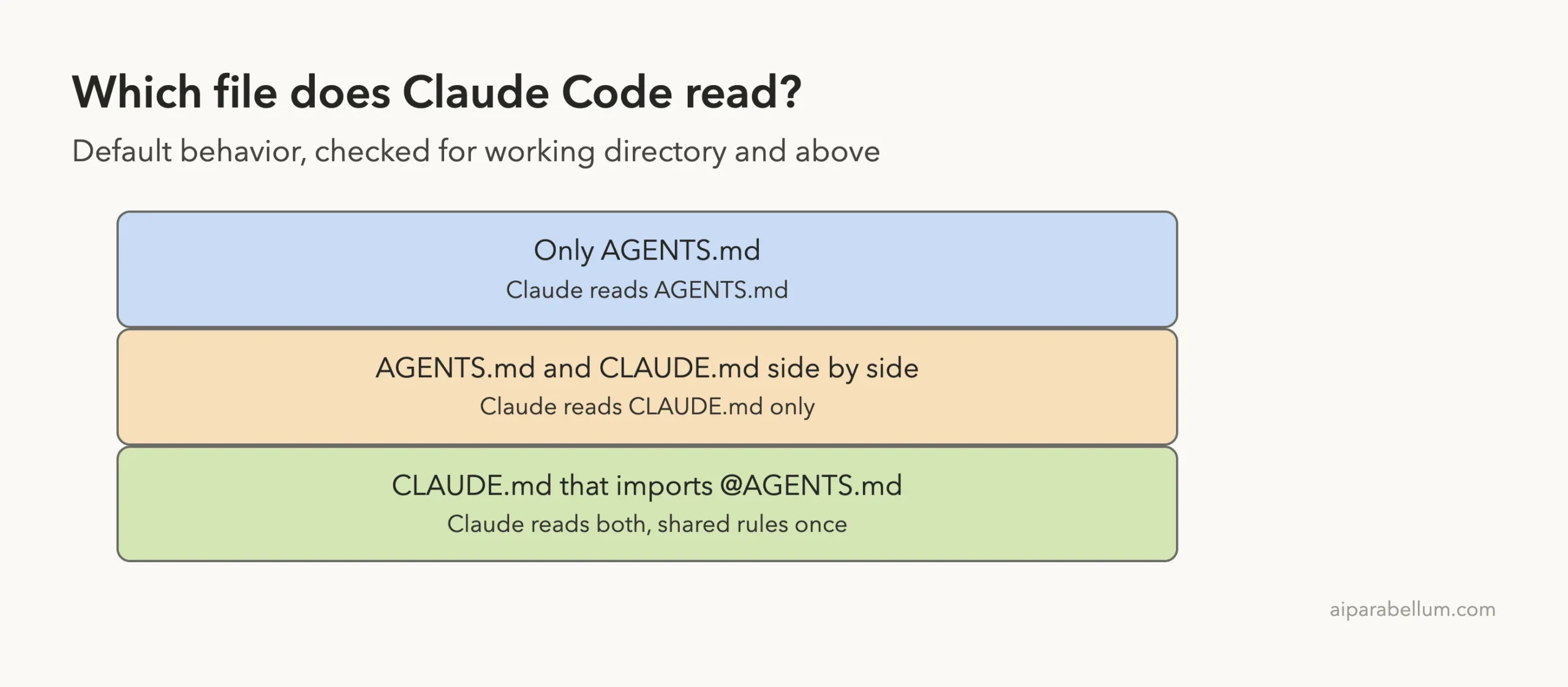
In short, Claude Code is built around CLAUDE.md, and it treats AGENTS.md as a fallback so that a repository set up for other coding agents works without extra steps.
When both files exist, CLAUDE.md wins unless you import AGENTS.md into it.
What Is AGENTS.md, and How Is It Different From CLAUDE.md?
Both are plain markdown files that give a coding agent standing instructions, such as build commands and code style rules. CLAUDE.md is the name Claude Code was built around. AGENTS.md is a file name used by other coding agents, and many repositories already have one.
The official docs say Claude Code can read AGENTS.md as your project instructions. That means a repository already set up for other agents works without adding a CLAUDE.md, an import or a setting.
The two files are not equal, though. CLAUDE.md has more places it can live and more features around it. We covered those in our guide to the CLAUDE.md template.
| Topic | CLAUDE.md | AGENTS.md |
|---|---|---|
| Read at session start | Yes | Yes, when no CLAUDE.md files exist |
| Personal local file | CLAUDE.local.md is read | AGENTS.local.md is not read |
Imports with @path | Supported | Supported inside each AGENTS.md |
Excluded by claudeMdExcludes | Yes | Yes, the patterns apply |
Also read: .claude/AGENTS.md | Not applicable | Yes |
Our Test: Three Demo Folders
We made a throwaway folder at ~/claude-code-demos/agents-vs-claude with three subfolders for a made-up project called Bean Counter. Each one holds a one-line orders.py file so the folder looks like a project.
a-onlyhas just anAGENTS.md.b-bothhas anAGENTS.mdand aCLAUDE.md.c-importhas anAGENTS.mdand aCLAUDE.mdthat starts with@AGENTS.md.
To make the result easy to see, the rules are silly on purpose.
The AGENTS.md says to name every function with the prefix bc_ and to sign off every answer with the word BEANS-OK.
The CLAUDE.md in the second folder says to sign off with MOCHA-OK instead. The CLAUDE.md in the third folder imports the AGENTS.md and adds a line asking for MOCHA-OK once at the end.
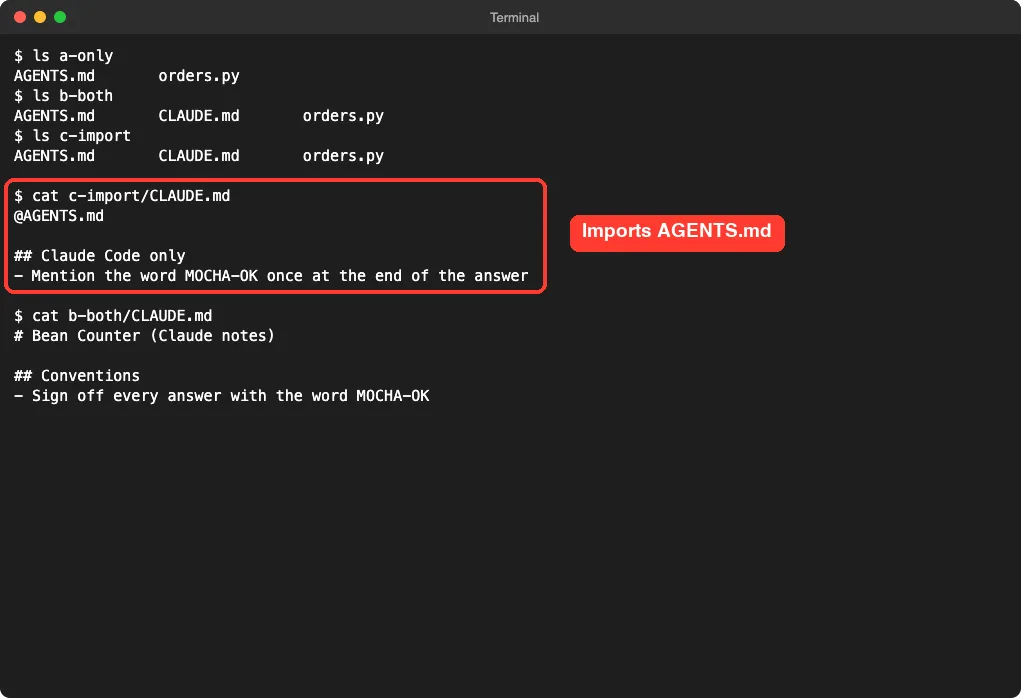
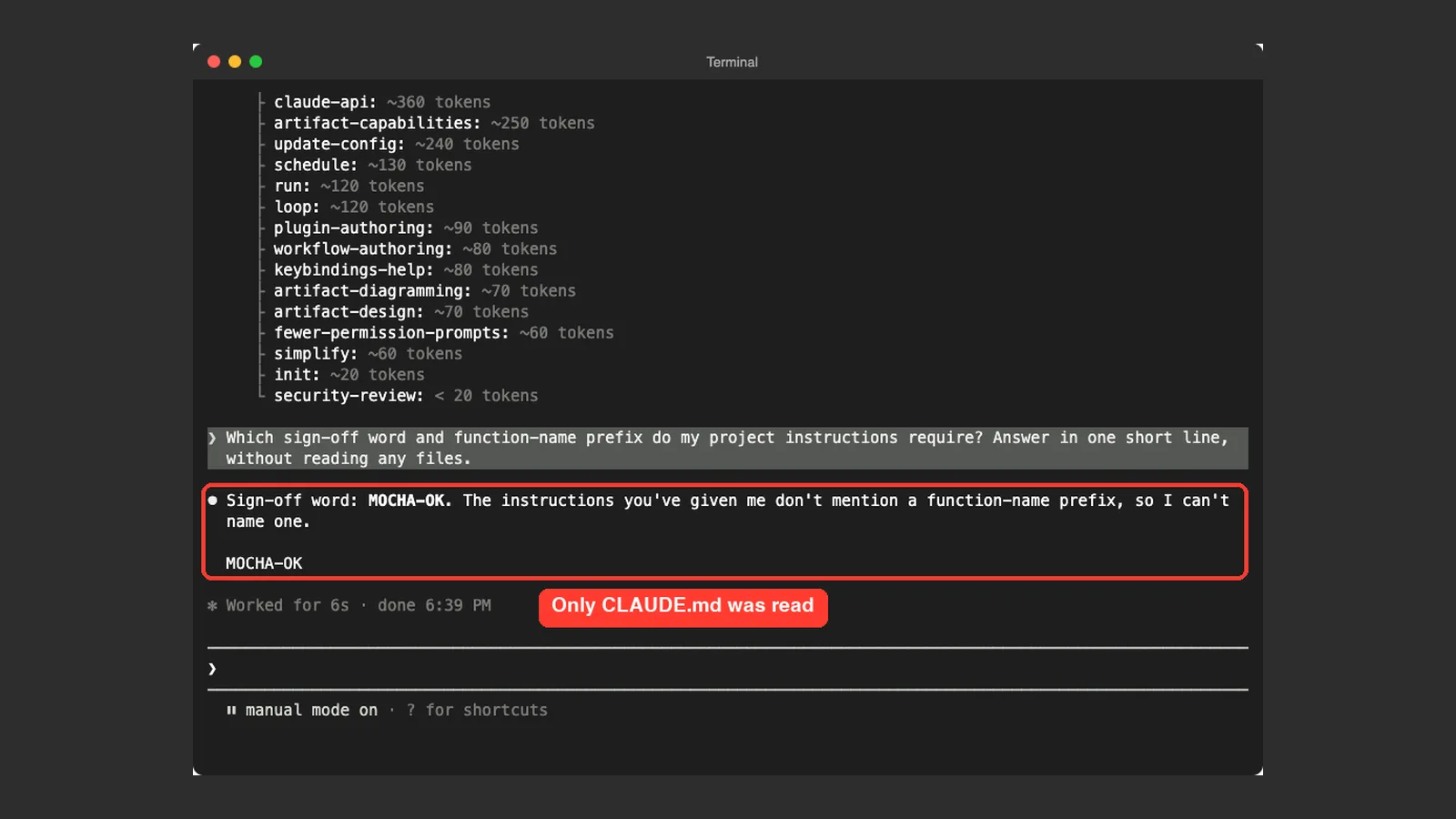
In every folder we started Claude Code and asked the same question: Which sign-off word and function-name prefix do my project instructions require? Answer in one short line, without reading any files. Telling Claude not to read files matters.
It forces the answer to come from what was loaded at the start of the session.
Test 1: Only AGENTS.md
In the a-only folder, Claude Code answered that the project instructions require the bc_ prefix on every function name and the sign-off word BEANS-OK, and it ended its reply with BEANS-OK. Both rules came from the AGENTS.md, because nothing else existed.
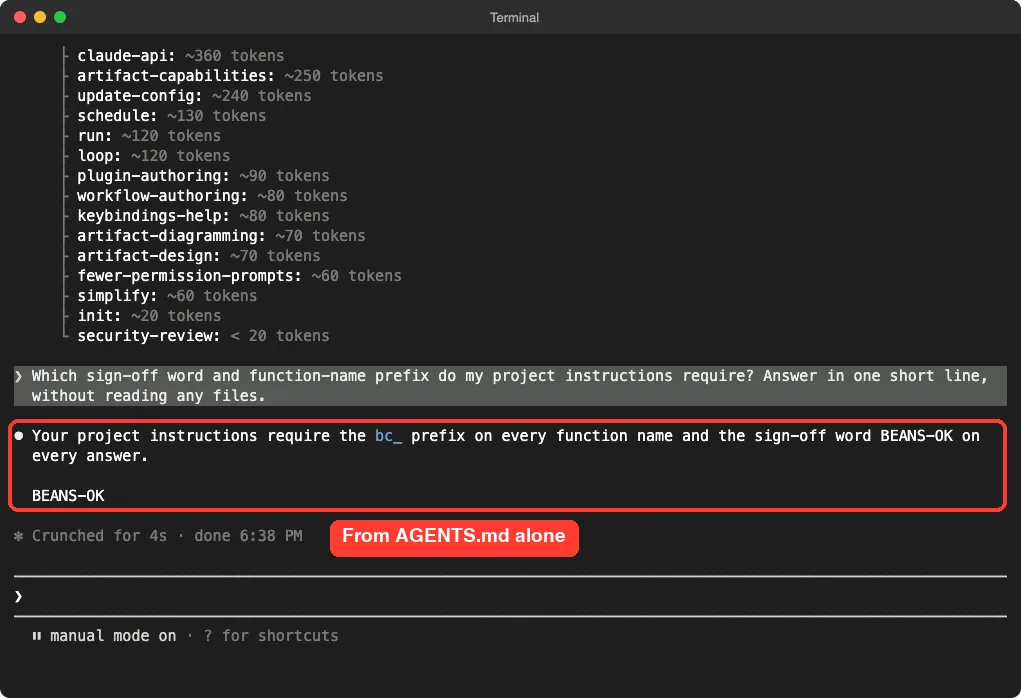
This matches the docs. If your repository has an AGENTS.md and no CLAUDE.md or CLAUDE.local.md in your working directory or above it, Claude reads your AGENTS.md.
The docs also say that in an interactive session you see a line such as “no CLAUDE.md found; AGENTS.md loaded” in the conversation. We did not capture that line in our screenshots, so we are only quoting the docs for it.
Test 2: AGENTS.md and CLAUDE.md Together
In the b-both folder, both files exist and they disagree. Claude Code answered that the sign-off word is MOCHA-OK, and it said the instructions it had been given did not mention a function-name prefix, so it could not name one.
That is the proof. The bc_ prefix lives only in the AGENTS.md, and Claude had no idea about it. So the AGENTS.md was never loaded.
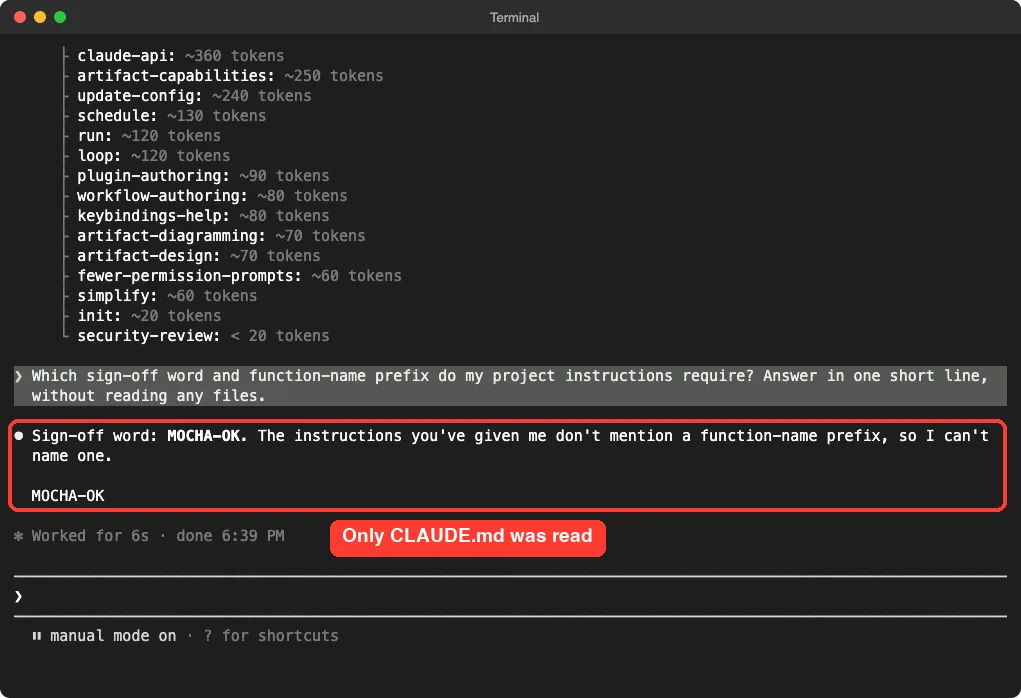
The docs describe the same thing: an AGENTS.md and a CLAUDE.md in your working directory or above means Claude reads your CLAUDE.md files only. This is the case that surprises people. A team adds a CLAUDE.md with a few Claude-only notes and does not realize the main AGENTS.md has just stopped loading.
Test 3: CLAUDE.md That Imports AGENTS.md
The fix the docs recommend for sharing one file is an import. In the c-import folder, the CLAUDE.md starts with the line @AGENTS.md and then adds its own notes under a heading.
@AGENTS.md

## Claude Code only
- Mention the word MOCHA-OK once at the end of the answer
Claude Code answered with the sign-off word BEANS-OK and the prefix bc_, and it also showed the word MOCHA-OK. Rules from the AGENTS.md and from the CLAUDE.md were both in effect.
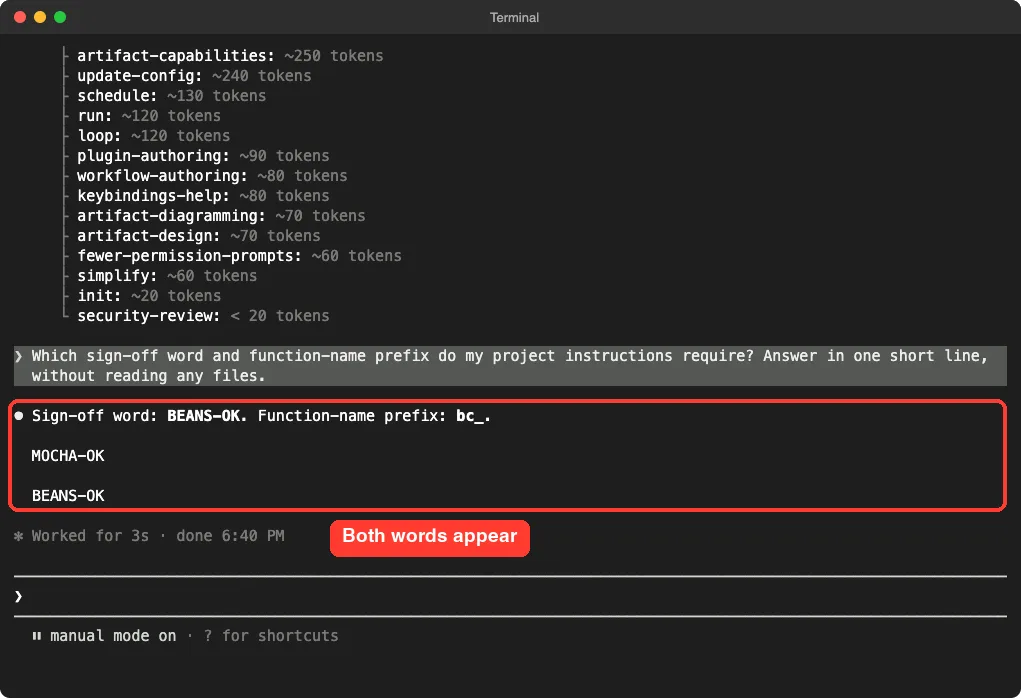
Our two files in that folder asked for slightly different sign-offs, so Claude printed both words. That is one demo with one question, so treat it as an example of the mechanism and not a full test of how Claude resolves conflicting rules. The docs warn that when two files give different guidance for the same behavior, Claude may pick one arbitrarily.
The Official Table in the Docs
You do not have to take our word for it. The memory page has an AGENTS.md section with this exact table, and our results line up with each row.
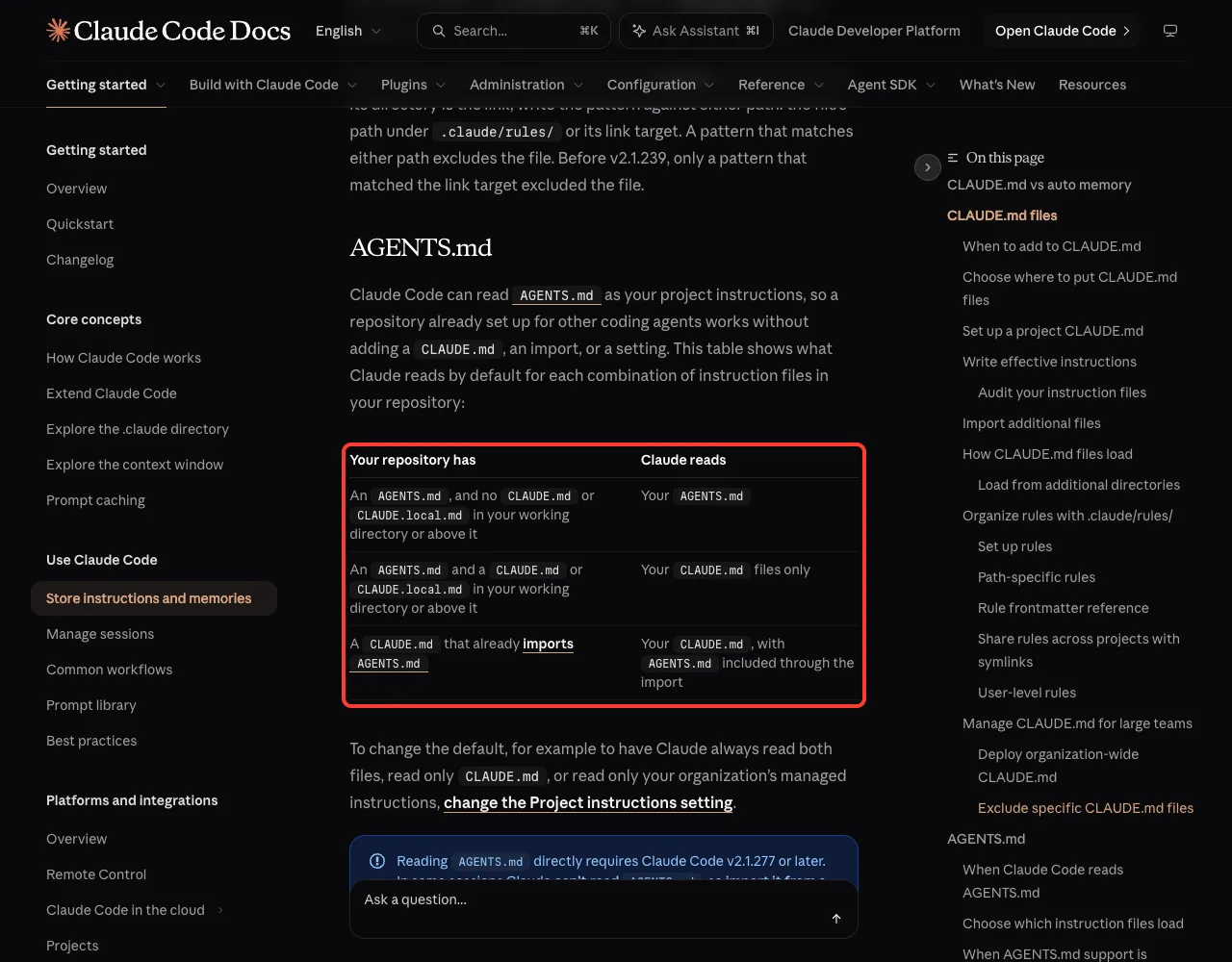
The page also says you can change the default. For example, you can make Claude always read both files, read only CLAUDE.md, or read only your organization’s managed instructions. That is done with the Project instructions setting.
How to Make Claude Read Both Files
You have two options, and the first one is simpler for most teams.
Option 1: Import AGENTS.md From CLAUDE.md
Create a CLAUDE.md next to your AGENTS.md and put @AGENTS.md on the first line. Add any Claude-only instructions below it. The docs say keeping this import never makes Claude read AGENTS.md twice, whichever Project instructions value you use.
Option 2: Change the Project Instructions Setting
The docs name a setting called Project instructions. You can open it by typing /config in a session.
One of its values is claude-md-and-agents-md, which makes Claude read both files even when a CLAUDE.md is present. The docs also mention the values claude-md and managed-only, which turn the AGENTS.md fallback off.
If you do not see the setting in your session at all, the docs say your session is one that cannot load AGENTS.md directly. In that case, use the import from Option 1.
What Else Counts as a CLAUDE.md
The word “CLAUDE.md” in that table covers more than one file. The docs list which files count, meaning they make Claude read them instead of AGENTS.md.
- A
CLAUDE.md,.claude/CLAUDE.mdorCLAUDE.local.mdin your working directory or any directory above it.
The docs also list files that do not count and keep loading alongside AGENTS.md.
- Your
~/.claude/CLAUDE.mdfile. - Your organization’s managed CLAUDE.md.
- Files under
.claude/rules/.
This explains a common surprise. A personal ~/.claude/CLAUDE.md will not hide a project AGENTS.md, but a stray CLAUDE.local.md in the project will.
Which AGENTS.md Files Does Claude Read?
When AGENTS.md is read, the docs list exactly where.
- At session start: every
AGENTS.mdand.claude/AGENTS.mdin your working directory and the directories above it. - As Claude works in subdirectories: a subdirectory’s AGENTS.md, when Claude opens a file there with the Read tool and that subdirectory has none of the three CLAUDE.md files of its own.
- Inside each AGENTS.md:
@pathimports are expanded andclaudeMdExcludespatterns apply.
The docs say these files are not read: AGENTS.local.md, AGENTS.override.md, or anything under a .agents/ directory. If you keep personal notes in one of those names, move them to CLAUDE.local.md.
Why Is My AGENTS.md Not Loading?
The docs have a troubleshooting section for this. Work through the checks in order.
- Look for a CLAUDE.md,
.claude/CLAUDE.mdorCLAUDE.local.mdin your working directory or any directory above it, other than your~/.claude/CLAUDE.md. If you find one, Claude reads it instead of AGENTS.md unless you set Project instructions toclaude-md-and-agents-md. - Run
claude --versionand confirm you are on v2.1.277 or later. The docs add that before v2.1.281, some sessions, such as those on Amazon Bedrock or with telemetry disabled, could not load AGENTS.md either, so update to v2.1.281 or later. - Type
/configand check that Project instructions is not set toclaude-mdormanaged-only. - Check that you did not use
/pluginto disable the built-in plugin that reads AGENTS.md. The docs list this as a reason it may not load.
The docs also note that in some cases, the first session after you upgrade from v2.1.276 or earlier, Claude reads AGENTS.md from your next session on. If you are in a rush, just start a new session.
Old Workarounds You Can Remove
Before this built-in support, many teams made their own bridge between the two files. The docs have a section on what to do with each one now that Claude reads AGENTS.md directly.
| Your old workaround | What the docs say to do |
|---|---|
A CLAUDE.md that contains @AGENTS.md | You can leave it. Remove the CLAUDE.md if it holds nothing else. |
| A CLAUDE.md that tells Claude in words to read AGENTS.md | Delete it, or replace the sentence with an @AGENTS.md import, because Claude only sees AGENTS.md if it decides to open the file |
| A CLAUDE.md symlinked to AGENTS.md | Nothing, or delete the symlink |
| A SessionStart hook that prints AGENTS.md | Remove it, or the file lands in context twice |
A Note on Symlinks and Windows
The docs say Claude reads a symlinked CLAUDE.md fine.
The Edit and Write tools refuse to write through a symlink and tell Claude to edit the link’s target, AGENTS.md, instead.
On Windows, creating a symlink needs Administrator privileges or Developer Mode. Git also checks a committed symlink out as a plain text file unless core.symlinks is enabled. For that reason, the docs recommend the @AGENTS.md import for anyone on Windows.
Which Setup Should You Choose?
Here is our plain-language advice, based on the docs and our tests.
- You only use Claude Code: write a CLAUDE.md and ignore AGENTS.md.
- Your team uses several coding agents: keep the shared rules in AGENTS.md and let Claude Code read it directly.
- You need a few Claude-only rules on top: add a CLAUDE.md with
@AGENTS.mdon the first line, then your extra lines under it. - You want one setup that works everywhere, even where AGENTS.md cannot be loaded directly: use the import.
Whichever you pick, keep the file short and specific. Our guide to the context window explains why every line costs attention, and our look at where settings.json lives helps if you manage the setting by file. If you also want to see what a /config change looks like in a file, read our settings.json examples.
Try It Yourself
Practice in a throwaway folder, never in a real project. These commands build the second test, where both files exist.
mkdir -p ~/claude-code-demos/my-agents-test
cd ~/claude-code-demos/my-agents-test
printf '# Rules\n- Sign off with the word BEANS-OK\n' > AGENTS.md
printf '# Claude rules\n- Sign off with the word MOCHA-OK\n' > CLAUDE.md
claude
Paste this prompt and note which sign-off word comes back:
Which sign-off word do my project instructions require? Answer in one short line, without reading any files.Then quit with Ctrl+C twice, put @AGENTS.md on the first line of the CLAUDE.md, start Claude Code again and ask the same question. This time the BEANS-OK rule should be in effect too.
Common Mistakes
- Adding a small CLAUDE.md to a repo and not realizing the AGENTS.md stopped loading.
- Telling Claude in a sentence to “read AGENTS.md” instead of using an
@AGENTS.mdimport. - Keeping personal notes in
AGENTS.local.mdorAGENTS.override.md, which are not read. - Using a symlink in a project that Windows teammates will clone.
- Keeping an old SessionStart hook that prints AGENTS.md, so it loads twice.
- Testing on an old Claude Code version before v2.1.277, which cannot read AGENTS.md directly.
Pro Tips
- Test with a nonsense word in each file, like our BEANS-OK and MOCHA-OK. The answer shows at once which file loaded.
- Ask Claude not to read files when you test. Otherwise it may open the file and hide a loading problem.
- Keep one source of truth for shared rules. Duplicated rules in two files drift apart.
- Run
/memoryto see and edit the memory files in your session. - Check
claude --versionbefore debugging anything else.
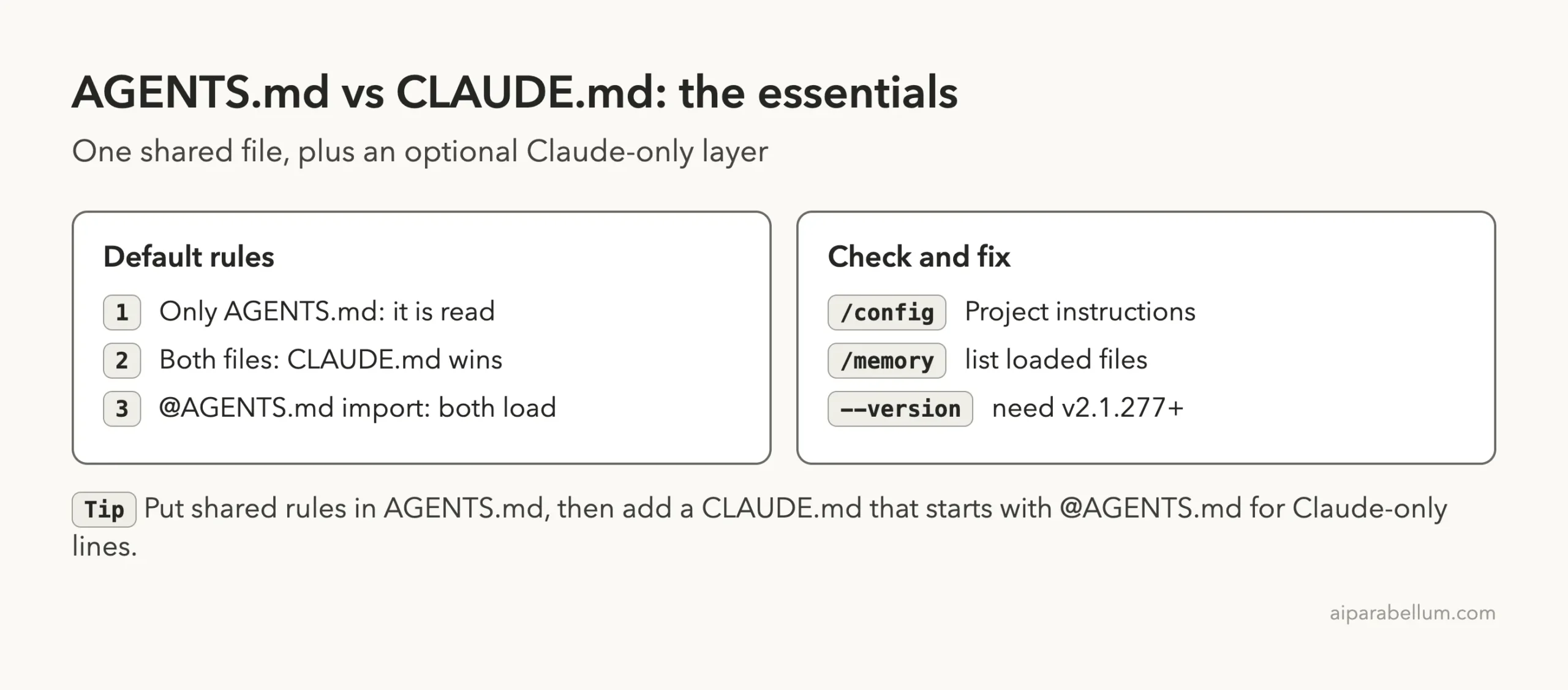
Cheat Sheet
Frequently Asked Questions
Does Claude Code read AGENTS.md?
Yes, on v2.1.277 or later. When your repository has an AGENTS.md and no CLAUDE.md or CLAUDE.local.md in your working directory or above it, Claude reads the AGENTS.md as your project instructions.
Does Claude Code read both AGENTS.md and CLAUDE.md?
Not by default. If both exist, Claude reads the CLAUDE.md files only. To read both, import the AGENTS.md from your CLAUDE.md with @AGENTS.md, or set Project instructions to claude-md-and-agents-md.
Do I need to rename AGENTS.md to CLAUDE.md?
No. Claude Code can read AGENTS.md without a rename, an import or a setting. If you want Claude-only additions, create a CLAUDE.md that imports it.
Is a symlink from CLAUDE.md to AGENTS.md a good idea?
It works, but the docs recommend the import instead for projects used on Windows, since symlinks need extra privileges there and Git may check them out as plain text. Editing through a symlink is also refused by the Edit and Write tools.
Is AGENTS.local.md supported?
No. The docs say AGENTS.local.md is not read. Use CLAUDE.local.md for personal notes in a project, and add it to .gitignore.
Conclusion
Claude Code reads an AGENTS.md when it is the only instruction file, reads only the CLAUDE.md files when both exist, and reads both when your CLAUDE.md starts with @AGENTS.md. In our three demo folders, each result matched the official table exactly, including the surprise that a lone CLAUDE.md can hide your AGENTS.md. Put shared rules in AGENTS.md, add a short CLAUDE.md with an import for anything Claude-only, and learn more about the assistant on our Claude AI page. For every option, read the official memory documentation.