Every Claude Code session starts with a blank slate, so how does it remember that you prefer one tool over another? The answer is the Claude Code memory system, which has two parts: a file you write called CLAUDE.md, and notes that Claude writes for itself, called auto memory. In this guide we ran both in a real session, opened the files Claude saved, and checked what the official docs say about limits, folders and switches.
This is Part 32 of 45 in our Claude Code Deep Dives, part of our Claude Code tutorials. In the last part we covered subagent best practices, and our guide to the CLAUDE.md file goes deeper on the file you write yourself.
Tested with Claude Code v2.1.322 on November 12, 2026, on macOS. Everything ran in a throwaway demo folder with --setting-sources project, so our personal Claude Code setup stayed untouched. We did not use any Windows or Linux machine; the paths for those systems come from Anthropic’s official docs.
Quick Summary
| Question | Short answer |
|---|---|
| What are the two memory systems? | CLAUDE.md files you write, and auto memory that Claude writes |
| Where does auto memory live? | ~/.claude/projects/<project>/memory/ |
What is MEMORY.md? | A short index with one line per saved memory |
| How much of it loads each session? | The first 200 lines or 25KB, whichever comes first |
| How do I see or edit it? | Run /memory, or open the plain markdown files |
| How do I turn it off? | The /memory toggle, autoMemoryEnabled, or CLAUDE_CODE_DISABLE_AUTO_MEMORY=1 |
Why Claude Code Needs a Memory System
Each Claude Code session begins with a fresh context window. When you close the session, the conversation is gone, and a new one has no idea what you told the last one. Two mechanisms carry knowledge across sessions, and the docs describe both on one page.
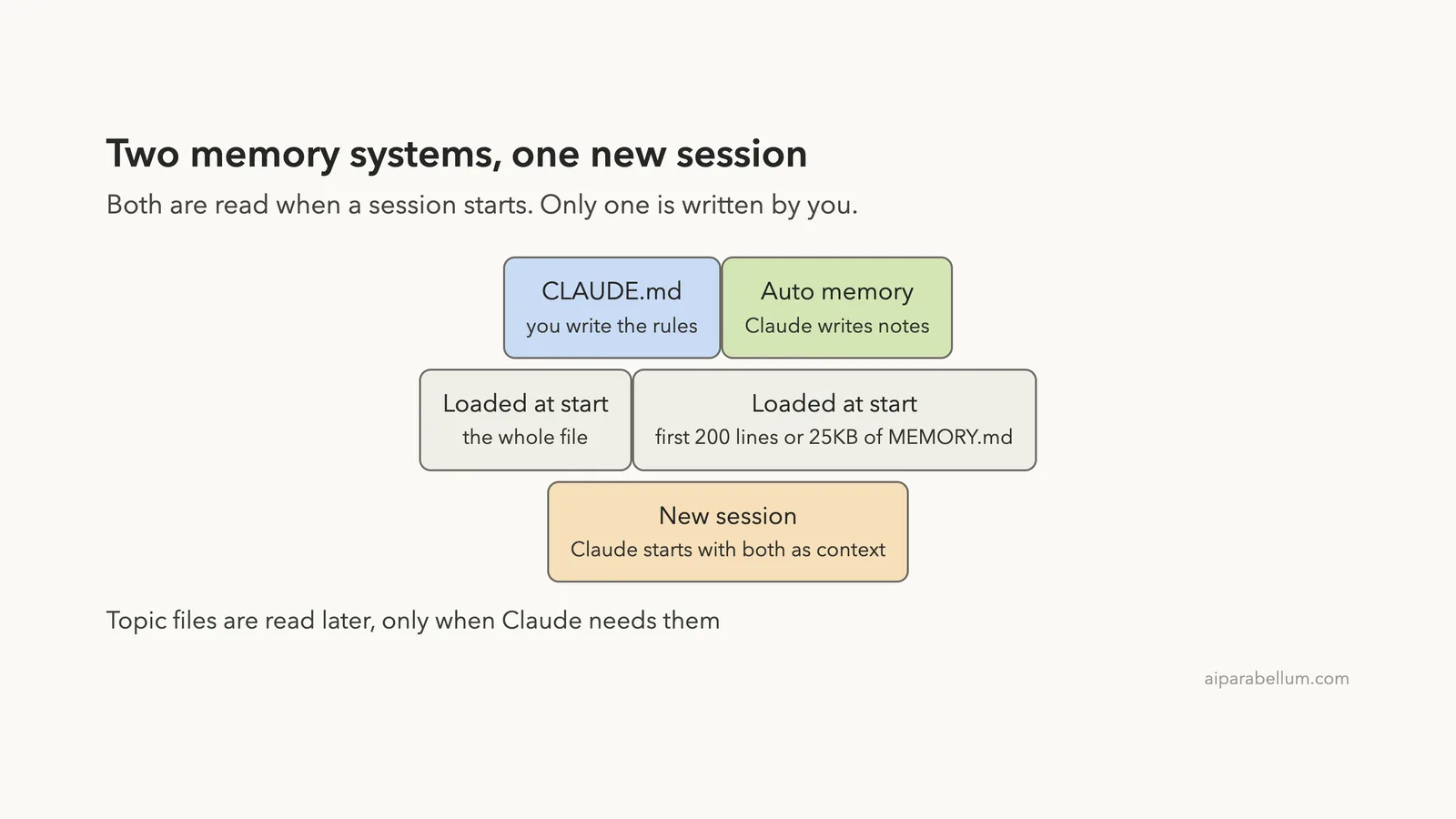
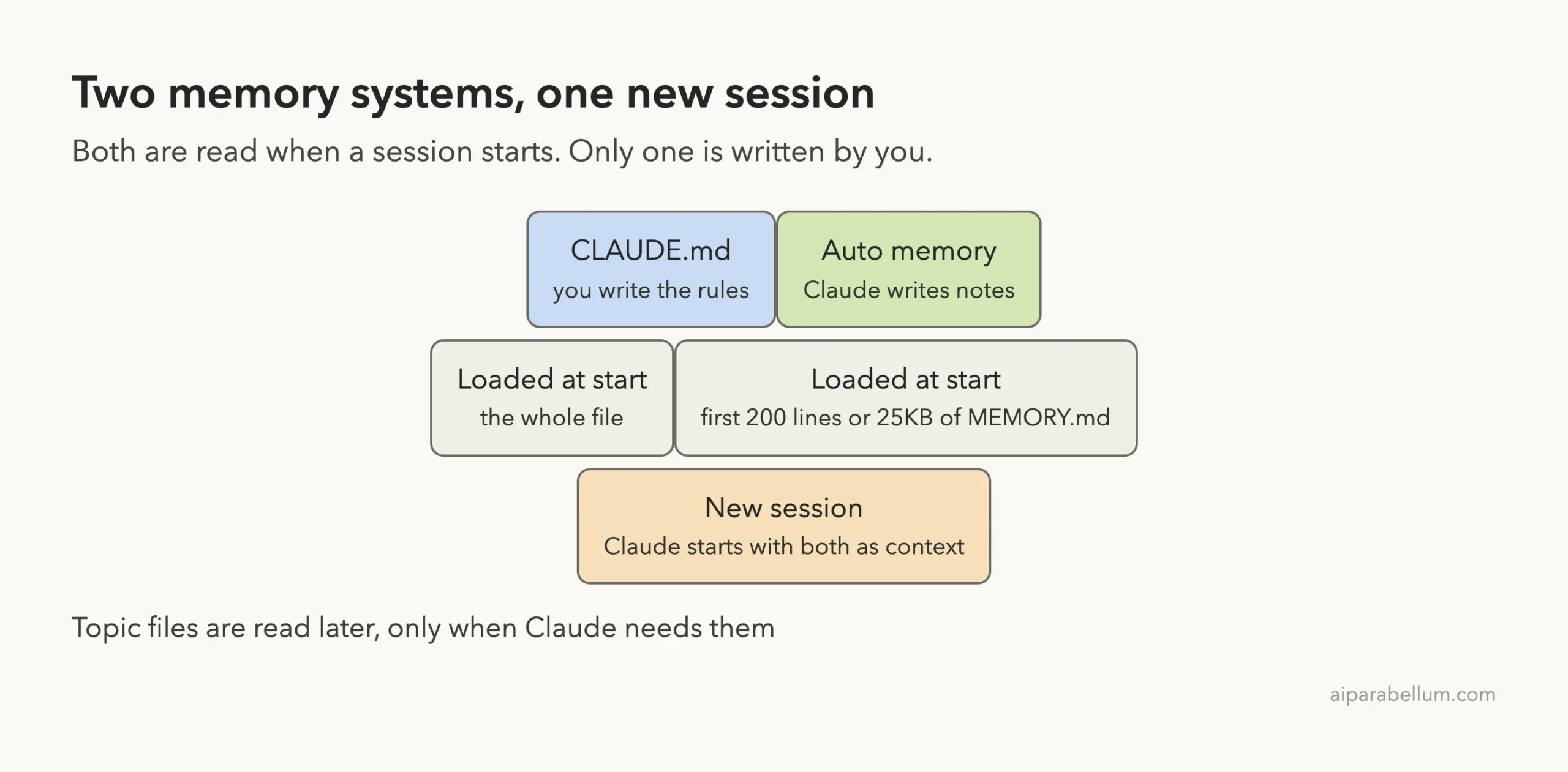
The first is CLAUDE.md, instructions that you write. The second is auto memory, notes that Claude writes itself based on your corrections and preferences. Both load at the start of a conversation, and Claude treats them as context, not enforced settings.
That last point matters. If you must block an action no matter what Claude decides, the docs point you to a hook instead. Memory shapes behavior, but it is not a lock.
CLAUDE.md vs Auto Memory: What Is the Difference?
Think of CLAUDE.md as the rule book you hand to a new teammate. Auto memory is the notebook that teammate keeps after working with you for a while. The table below follows the official comparison.
| CLAUDE.md files | Auto memory | |
|---|---|---|
| Who writes it | You | Claude |
| What it holds | Instructions and rules | Learnings and patterns |
| Scope | Project, user or organization | Per repository, shared across worktrees |
| Loaded into | Every session | Every session (first 200 lines or 25KB) |
| Best for | Coding standards, workflows, project layout | Your preferences, corrections, context Claude cannot read from the code |
Set Up Our Demo Project
To see the memory system work, we made a tiny project called Bookshelf. It has a short CLAUDE.md, one rule file, and one source file. Nothing else was needed.
CLAUDE.md
.claude/rules/api.md
src/api/handlers.js
src/server.js
package.json
The CLAUDE.md file lists two commands and two style rules. It says to run tests with npm test, start with npm start, use 2-space indentation, and write short comments. We left it this way on purpose, because it sets up a small clash later.
The rule file, .claude/rules/api.md, starts with a paths line that matches src/api/**/*.js. Its two rules say every handler must check its input, and errors return as a small JSON object. This is a path-scoped rule, which the docs say loads only when Claude works with matching files.
Step 1: See What Loads at Launch
The docs say to run /context all and check the list under Memory files to confirm which CLAUDE.md files loaded. If a file is missing from that list, Claude cannot see it. In our demo the list showed our project CLAUDE.md at 70 tokens.
We kept that screen out of this post because it also lists tools and plan details from our own account. You can run it in your own session to check yours. In fullscreen mode, the docs note that /context alone collapses that list, so use the all option.
Step 2: Watch a Rule Load on Demand
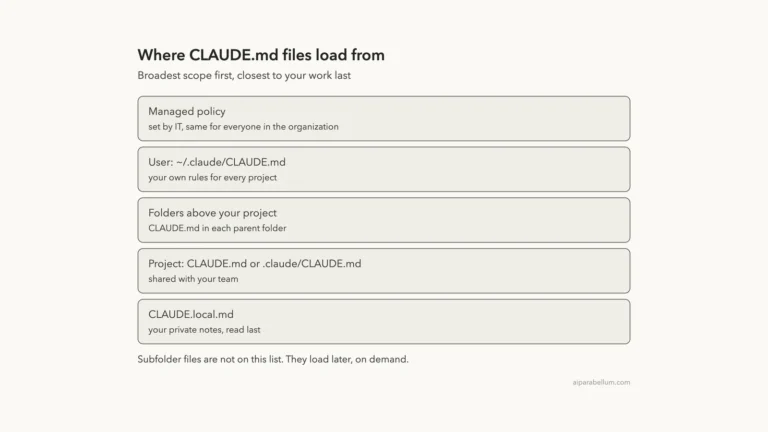
Files in subdirectories do not load at launch. The docs say Claude Code loads them once Claude reads, writes or edits a file in that area.
Path-scoped rules work the same way. We asked Claude to read src/api/handlers.js and tell us what it does in one line.
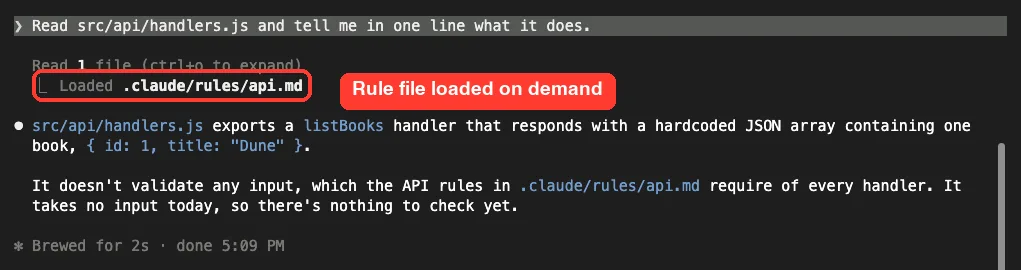
Right under the read, Claude Code printed a Loaded line for .claude/rules/api.md. The answer then mentioned that the handler does not validate input, which the API rules require. That is the rule doing its job: it was not in context until a matching file came up.
Step 3: Ask Claude to Remember Something
Now for auto memory. The docs say that when you ask Claude to remember something, such as “always use pnpm, not npm”, it saves that to auto memory. We typed a nearly identical sentence: remember that I prefer pnpm over npm in this project.
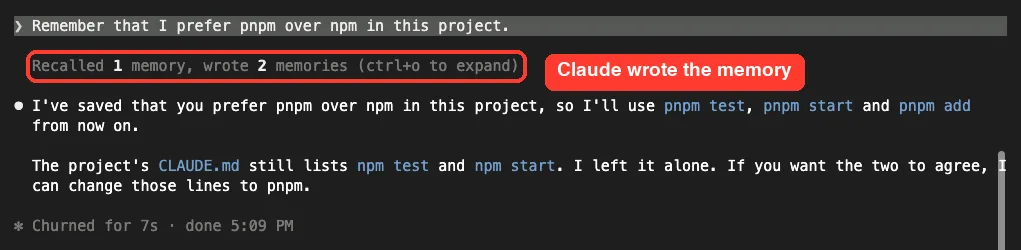
Claude Code showed a line saying it recalled 1 memory and wrote 2. Claude then confirmed the preference and, helpfully, pointed out that our CLAUDE.md still says npm test and npm start. It left that file alone and offered to change those lines.
Notice that Claude did not edit CLAUDE.md. To add something there instead, the docs say to ask directly, such as “add this to CLAUDE.md”, or to edit the file yourself through /memory.
Step 4: Open the Files Claude Saved
Auto memory is just markdown on your disk. We opened the folder for our demo project and found two files. The first, MEMORY.md, is the index, and here it is in full.
- [Prefer pnpm](prefer-pnpm.md) — use pnpm, not npm, in this projectThe second file, prefer-pnpm.md, holds the memory itself. This is what Claude wrote, with our own demo values left as they were.
---
name: prefer-pnpm
description: User prefers pnpm over npm for package management and scripts in this project
metadata:
  node_type: memory
  type: feedback
  modified: 2026-11-12T11:39:56.362Z
---

Use pnpm instead of npm in this project (installs, running scripts, adding deps).

**Why:** The user stated this preference directly. CLAUDE.md still lists `npm test` and `npm start`, so the two disagree.

**How to apply:** Run `pnpm test`, `pnpm start`, `pnpm add <pkg>` and so on, instead of the npm equivalents. If CLAUDE.md's npm commands come up, mention the mismatch rather than silently picking one.
Two details match the docs.
The frontmatter has a type field, and ours is feedback, one of the four kinds. Claude Code also stamped a modified time, which the docs say shows how current a fact is. We trimmed one session ID line from the frontmatter above.
The Four Kinds of Memory
The docs list four types that Claude records in that type field.
user: your role, expertise and working preferencesfeedback: corrections you give Claude and approaches you confirmproject: ongoing work, deadlines and decisions Claude cannot work out from the code or git historyreference: where to find information outside the project, such as an issue tracker or dashboard
Claude skips anything it can derive from the codebase, like architecture or file paths. It also skips anything your CLAUDE.md already says, and it does not save something every session.
Where Auto Memory Is Stored
Each project gets its own folder at ~/.claude/projects/<project>/memory/.
The project name comes from the git repository, so every worktree and subdirectory of one repo shares a single memory folder. Outside a git repo, the project root is used instead. If you want to understand the rest of that directory, our guide to the .claude folder covers it.
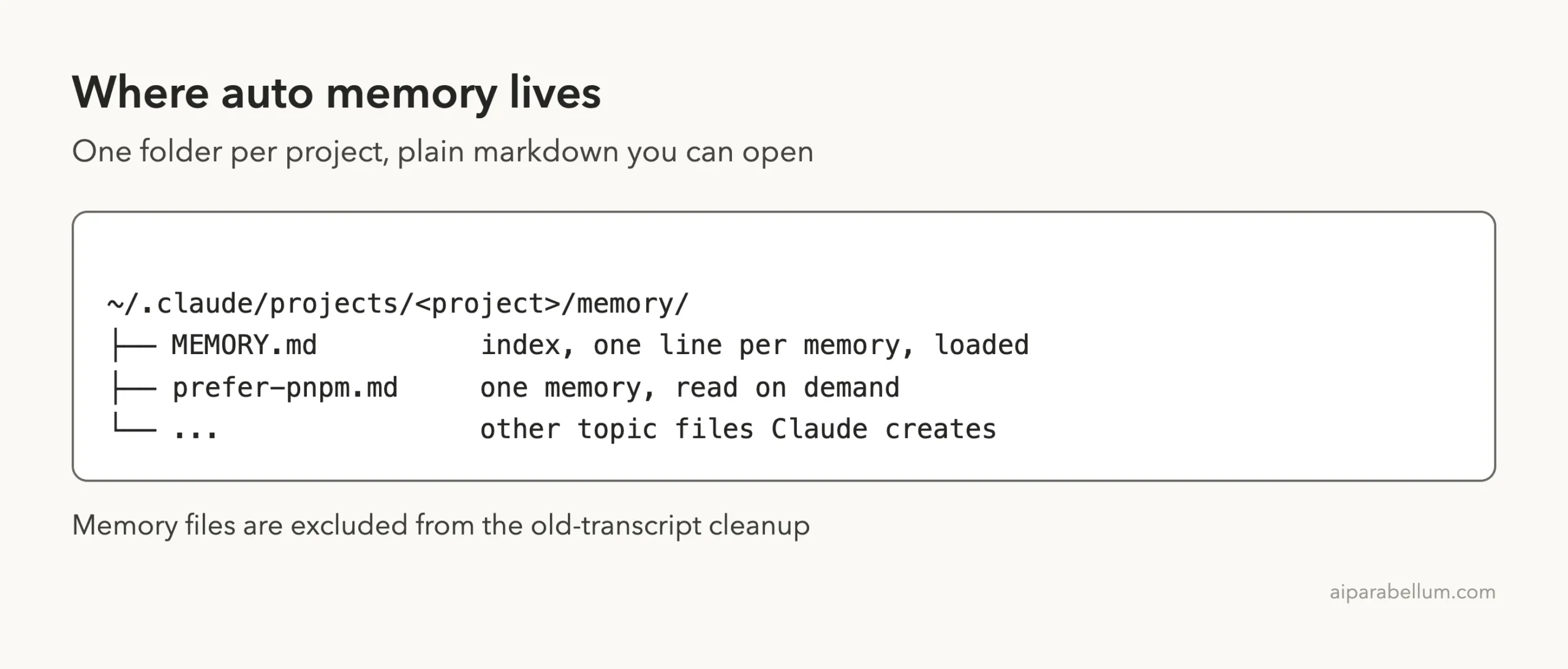
Auto memory is machine-local. The docs say files are not shared across machines or cloud environments. Old session transcripts get deleted after the cleanupPeriodDays period, but memory files are excluded from that cleanup, so they stay until you or Claude edit or delete them.
To store memory somewhere else, set autoMemoryDirectory in your settings file. The value must be an absolute path or start with ~/. Our post on settings files explains which settings layer to pick.
How MEMORY.md Loads: The 200-Line and 25KB Limit
The index file is the part that loads every session. The docs say the first 200 lines of MEMORY.md, or the first 25KB, whichever comes first, load at the start of every conversation. Anything past that point is not loaded at session start.
Claude keeps the index short by moving detail into topic files. Those topic files, such as our prefer-pnpm.md, do not load at startup. Claude reads them on demand with its normal file tools when it needs the information.
After Claude writes to MEMORY.md, Claude Code checks the file against both limits. If it is close, Claude gets a reminder to shorten it. If it is over, the write still works, but Claude gets an error telling it to rewrite the index, because everything past the limit is dropped on the next load.
This limit applies only to MEMORY.md.
A CLAUDE.md that loads at launch is read whole, as long as it is 4 MiB or smaller. Still, the docs recommend keeping each CLAUDE.md under 200 lines, because longer files use more context and reduce how well Claude follows them. Our context window guide shows how that space fills up.
Step 5: Prove It Survives a New Session
The real test is whether a brand new session remembers. We quit Claude Code, started a fresh session in the same folder, and asked which package manager to use to run the tests, in one line.

Claude answered that it would use pnpm test, going by our saved preference. It also noted that CLAUDE.md still says npm test, so the two disagree. The note had survived the restart.
This shows a real gotcha.
When your two memory sources conflict, Claude has to choose, and the docs warn that conflicting instructions can lead Claude to pick one arbitrarily. Here Claude flagged the clash, but do not count on that. Fix the conflict yourself.
Step 6: Use /memory to Browse, Edit and Toggle
The /memory command is your control panel. It lists your CLAUDE.md, CLAUDE.local.md and other memory file locations across user and project scopes. It also lets you toggle auto memory and open the auto memory folder.
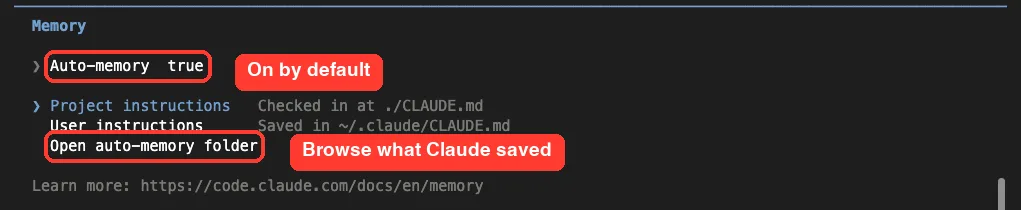
Our menu showed auto-memory set to true, the project instructions checked in at ./CLAUDE.md, and the user instructions saved at ~/.claude/CLAUDE.md. Selecting a file opens it in your editor, and picking one that does not exist yet creates it first. If you are ever unsure what Claude saved, this is where you look.
How to Turn Auto Memory On or Off
Auto memory is on by default in local sessions. You have three ways to change that.
- Use the auto memory toggle in
/memory, which savesautoMemoryEnabledto your user settings - Set
autoMemoryEnabledtofalsein one project’s settings to turn it off for that project only - Set the environment variable
CLAUDE_CODE_DISABLE_AUTO_MEMORY=1
{
  "autoMemoryEnabled": false
}
There is one catch. In a background session, or a session that another Claude Code session started, the toggle turns memory off but cannot turn it back on. To turn it back on, run claude directly in your terminal and use the toggle there.
Other Memory Features Worth Knowing
Rules, Imports and AGENTS.md
Beyond the two main systems, the same docs page covers a few helpers. Rule files in .claude/rules/ split instructions by topic and can be scoped with paths. An @path import inside CLAUDE.md pulls in another file, up to four hops deep, though imports do not reduce context cost.
If your repo uses AGENTS.md, Claude reads it only when no CLAUDE.md exists in your working directory or above it, by default. We compared the two in AGENTS.md vs CLAUDE.md.
Subagents and Memory
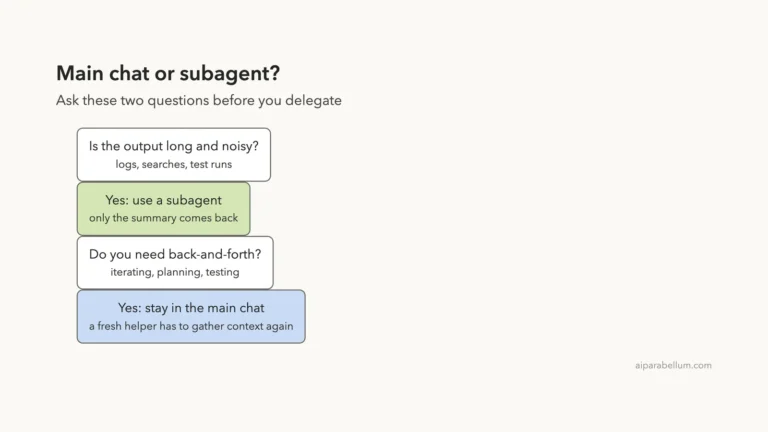
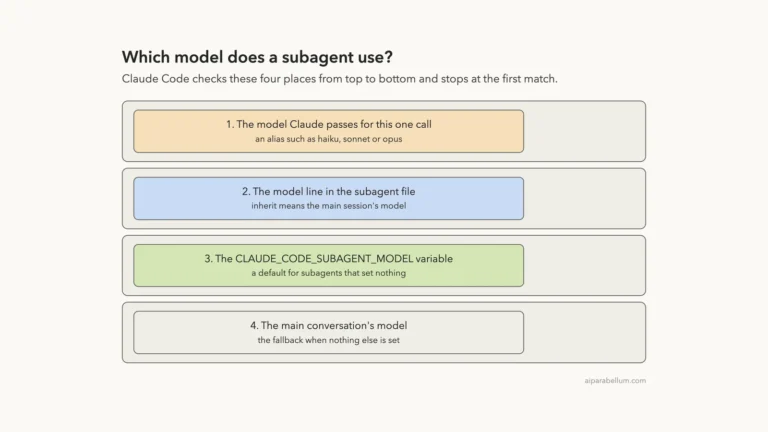
The main conversation’s auto memory is not loaded into subagents, except for a fork, which inherits the parent conversation. A subagent can keep its own separate memory, enabled with its memory field. See our guide to Claude Code skills for how skills load on demand instead.
Audit Your Instructions
The docs describe /doctor prompt-audit, which needs Claude Code v2.1.283 or later. It reports outdated, missing or conflicting content in your instruction files and proposes edits, but changes nothing until you ask. This would have caught our npm versus pnpm clash.
After /compact
The docs say the project-root CLAUDE.md survives /compact, because Claude re-reads it from disk. An instruction you gave only in conversation does not survive, so move anything that matters into CLAUDE.md.
Write rules in CLAUDE.md, let Claude keep its own notes, and check both with /memory.
Try It Yourself
Make a throwaway folder, add a short CLAUDE.md, and run claude inside it. Then paste this prompt.
Remember that I prefer short answers and 2-space indentation in this project.Run /memory, open the auto memory folder, and read the file Claude wrote. Then quit, start a new session, and ask a question that depends on the preference. If the answer reflects it, auto memory is working for you.
Common Mistakes
- Putting rules in conversation only. They vanish after
/compactor a new session, so write them toCLAUDE.md. - Letting
CLAUDE.mdand auto memory disagree. Claude may pick either one. - Letting
MEMORY.mdgrow past 200 lines or 25KB. Everything after the limit is dropped at the next load. - Expecting memory to enforce a rule. It is context, so use a hook for must-run actions.
- Assuming memory follows you to another computer. Auto memory is machine-local.
- Asking a nested session to turn memory back on. Use a normal terminal session for that.
Pro Tips
- Be specific. The docs say “Use 2-space indentation” works better than “format code nicely”.
- Run
/context allwhen Claude seems to ignore a file, to confirm it loaded. - Read your auto memory folder now and then, and delete stale notes. It is plain markdown.
- Keep one-time instructions out of
CLAUDE.md. Use a skill or a path-scoped rule for steps that matter in one area. - Review the line counts of your instruction files. A startup warning appears when a file is too long.
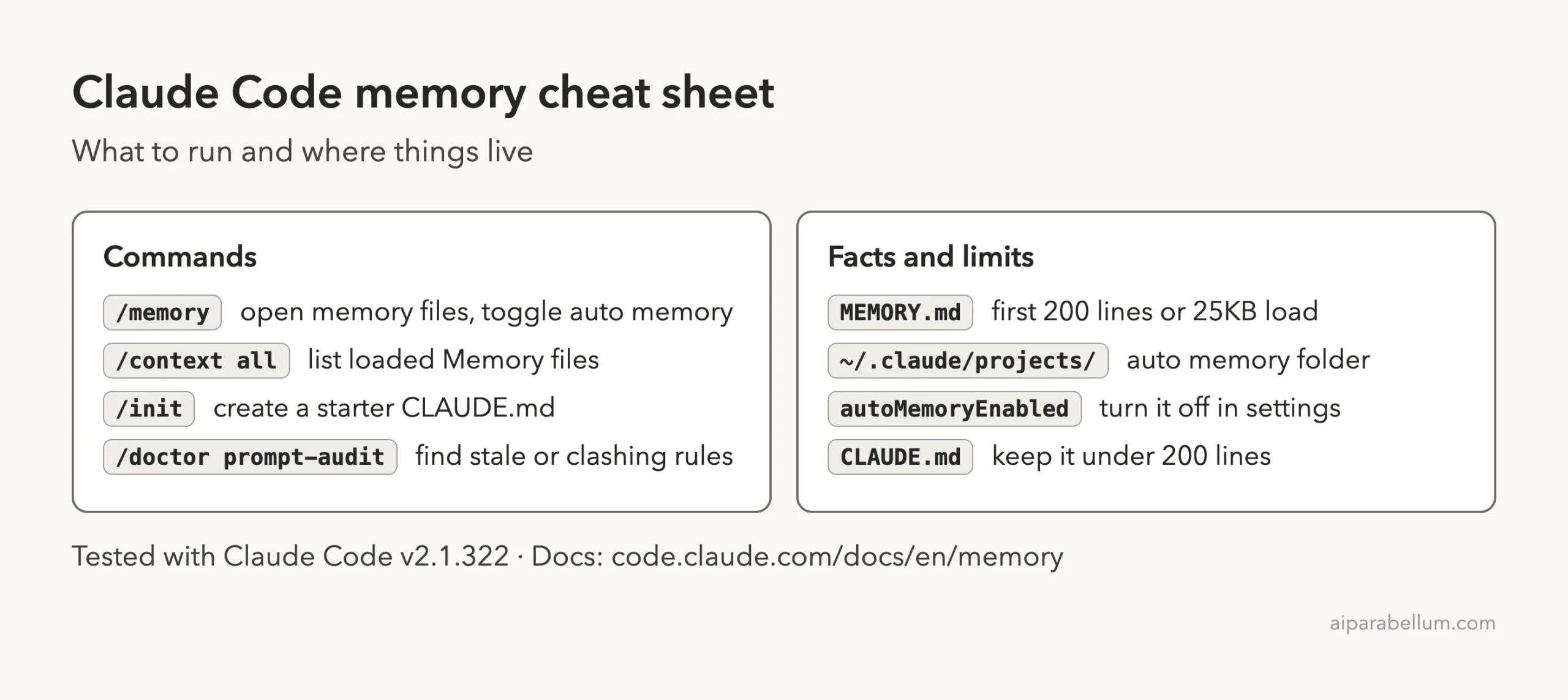
Cheat Sheet
Frequently Asked Questions
What is the Claude Code memory system?
It is two ways Claude carries knowledge between sessions: CLAUDE.md files you write, and auto memory notes Claude writes itself.
Where is Claude Code auto memory stored?
In ~/.claude/projects/<project>/memory/, with a MEMORY.md index and one file per memory. You can change the folder with autoMemoryDirectory.
How much of MEMORY.md does Claude read?
The first 200 lines or the first 25KB, whichever comes first. Topic files are read only when Claude needs them.
Can I edit or delete what Claude remembers?
Yes. The files are plain markdown, and /memory opens them in your editor. You can edit or delete any of them at any time.
Does auto memory work on every machine?
No. It is machine-local, so files are not shared across machines or cloud environments, and sessions in some environments run with it off by default.
Conclusion
The Claude Code memory system is simpler than it first looks: you write CLAUDE.md for rules, and Claude writes auto memory for the preferences you teach it, saved as plain files under ~/.claude/projects/. In our test, one sentence became a real file, and a brand new session used it right away. Keep both sources short and consistent, check them with /memory and /context all, and read more in the official memory documentation or in our overview of Claude.
Previous in the series: Part 30: Subagent Best Practices
Next in the series: Part 33: Every CLAUDE.md Location and How They Load.