If you want Claude Code to remove co-authored-by lines from your commits, the fix is one setting. Add "attribution": false to a Claude Code settings file, and Claude stops adding the Co-Authored-By: Claude ... <[email protected]> trailer to commits and the “Generated with Claude Code” line to pull requests.
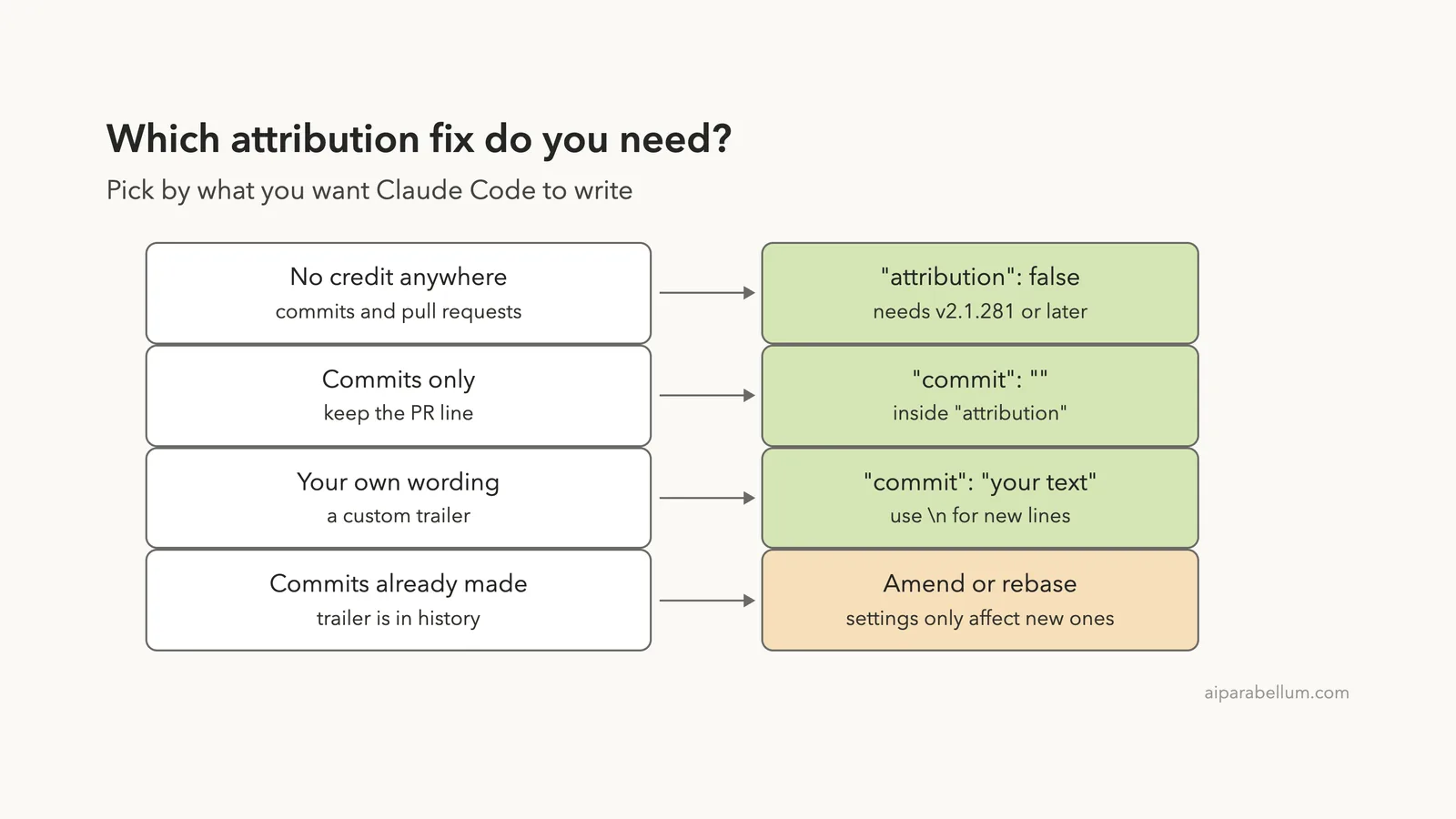
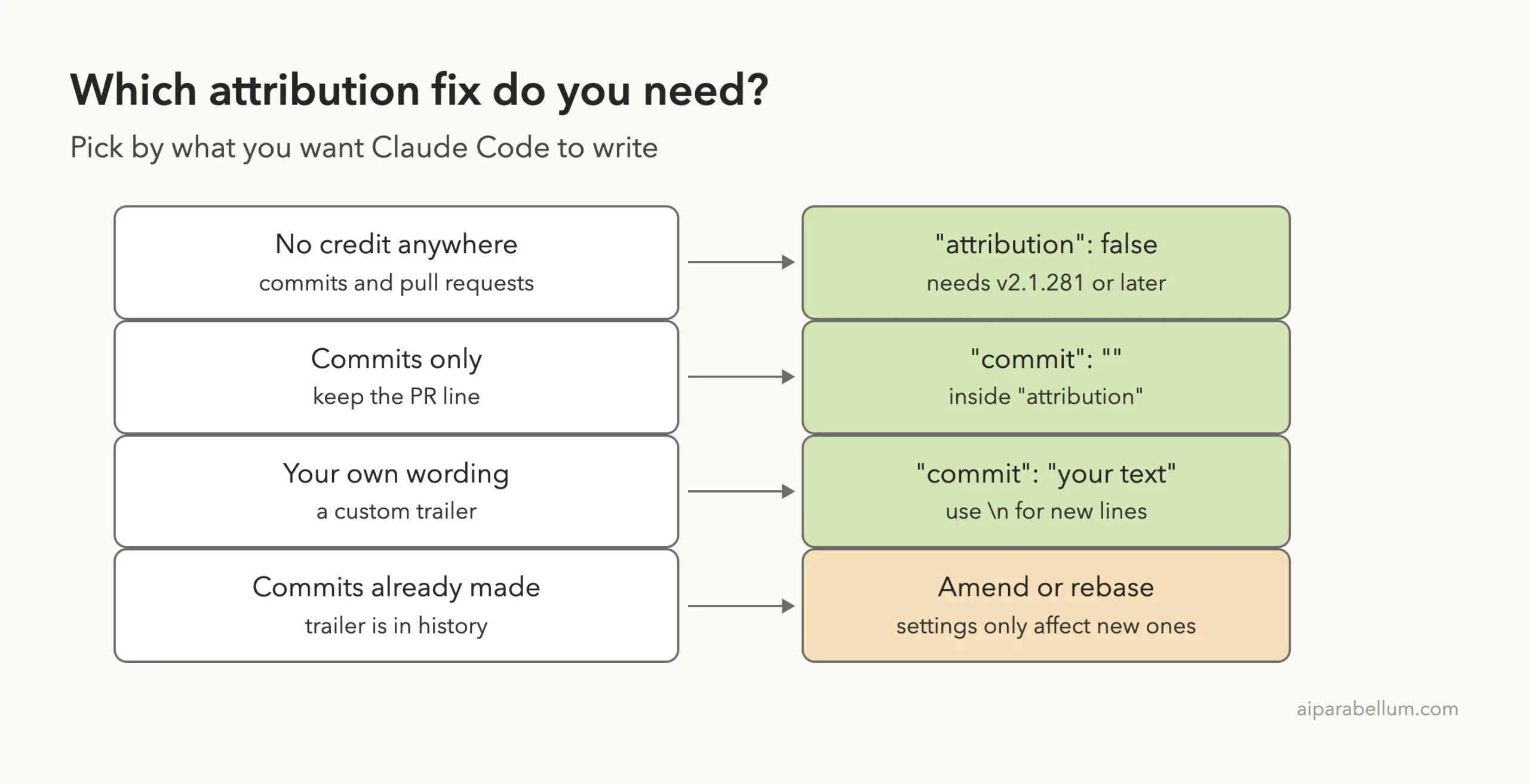
The short answer: put {"attribution": false} in ~/.claude/settings.json to turn it off in every project, or in .claude/settings.json to turn it off for one repository and your whole team. That value needs Claude Code v2.1.281 or later. If you only want to drop the commit line, or swap in your own wording, use "attribution": {"commit": ""} or "attribution": {"commit": "your text"} instead.
Settings only change new commits. Commits that already carry the trailer keep it until you rewrite them with git commit --amend or a small git rebase, which we also tested below.
Browse all our Claude Code tutorials for more fixes and how-tos.
Tested with Claude Code v2.1.332 on macOS on November 28, 2026. Every run used a throwaway demo repository called greet-app with its own Git config and a made-up author, Demo User <[email protected]>.
We made three real commits through Claude Code: one with the default settings, one with attribution turned off, and one with a custom trailer. The pull request text and the session link settings come from the official docs, since our demo had no remote.
We tested on macOS; the settings file works the same way on Windows and Linux, following Anthropic’s official instructions.
Quick Summary
| What you want | Setting | Where it goes | Tested by us? |
|---|---|---|---|
| No Claude credit on commits or pull requests | "attribution": false | Any settings file (v2.1.281+) | Yes |
| No commit trailer, keep the PR line | "attribution": {"commit": ""} | Any settings file | From the docs |
| Your own trailer text | "attribution": {"commit": "Assisted-by: Claude Code"} | Any settings file | Yes |
| No “Generated with Claude Code” in PRs | "attribution": {"pr": ""} | Any settings file | From the docs |
| No session link from cloud or Remote Control sessions | "attribution": {"sessionUrl": false} | Any settings file | From the docs |
| Older config that still works | "includeCoAuthoredBy": false | Deprecated since v2.0.62 | From the docs |
| Clean commits you already made | git commit --amend or git rebase -x | Your terminal | Yes (rebase) |
Why Claude Code Adds “Co-Authored-By: Claude” to Commits
When you ask Claude Code to commit, it writes a normal git commit command through its Bash tool. By default, it adds a Git trailer at the end of the message that credits the model, like Co-Authored-By: Claude Sonnet 5.5 <[email protected]>.
The name in the trailer is the model in use when the commit is made. The official settings reference says a subagent’s commit names the subagent’s model, a Claude model it can’t pin to an exact version is written as plain Claude, and a non-Claude model behind a custom base URL is written as Claude Code.
Pull requests get a different line. By default, Claude Code adds 🤖 Generated with [Claude Code](https://claude.com/claude-code) to the PR description. Both lines are controlled by one setting called attribution, documented in the official settings reference.
The trailer is not a bug or a hidden tracker. It is a default credit line, and Claude Code gives you a supported switch to change it or turn it off.
Why people want it gone
Some teams don’t want tool credits in their Git history at all. Others have commit message rules, like Conventional Commits checks, that flag extra lines.
Git hosts such as GitHub also read Co-authored-by trailers to list co-authors on a commit. If you’d rather your history shows only human authors, removing the trailer is the clean way to do it.
What the Co-Authored-By Trailer Looks Like
We started Claude Code in the demo repo with no attribution settings and asked it to commit a staged file. Before running anything, Claude showed the full command in the permission prompt, trailer included.
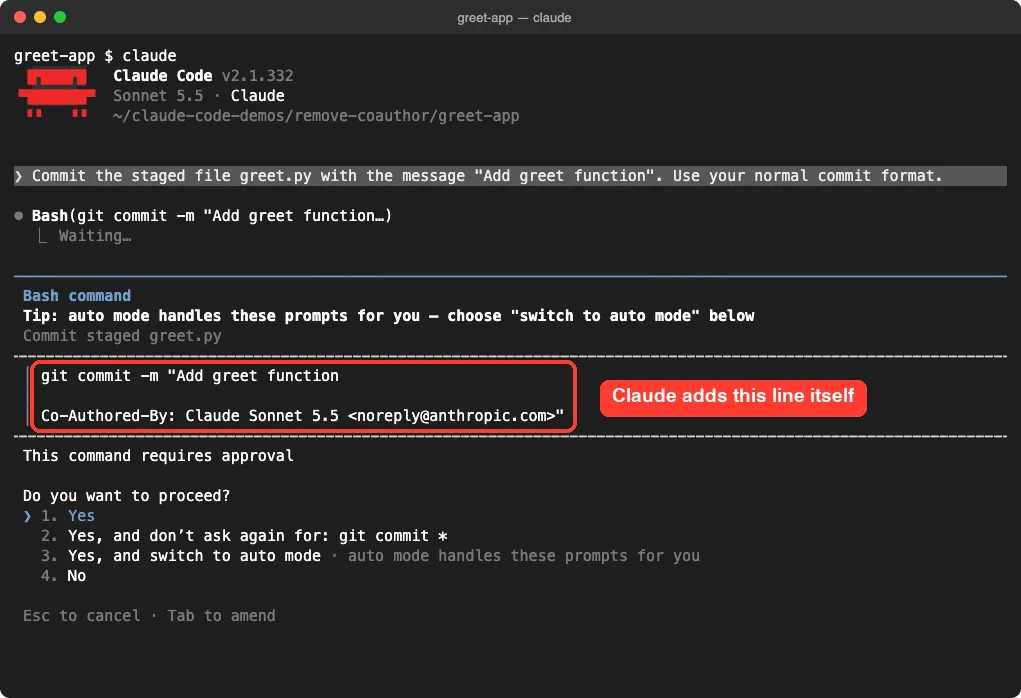
This is the easiest place to spot it. If you read the command before you approve it, you’ll see the extra line every time.
After the commit, a plain git log -1 in our own terminal showed the trailer stored in the commit message.
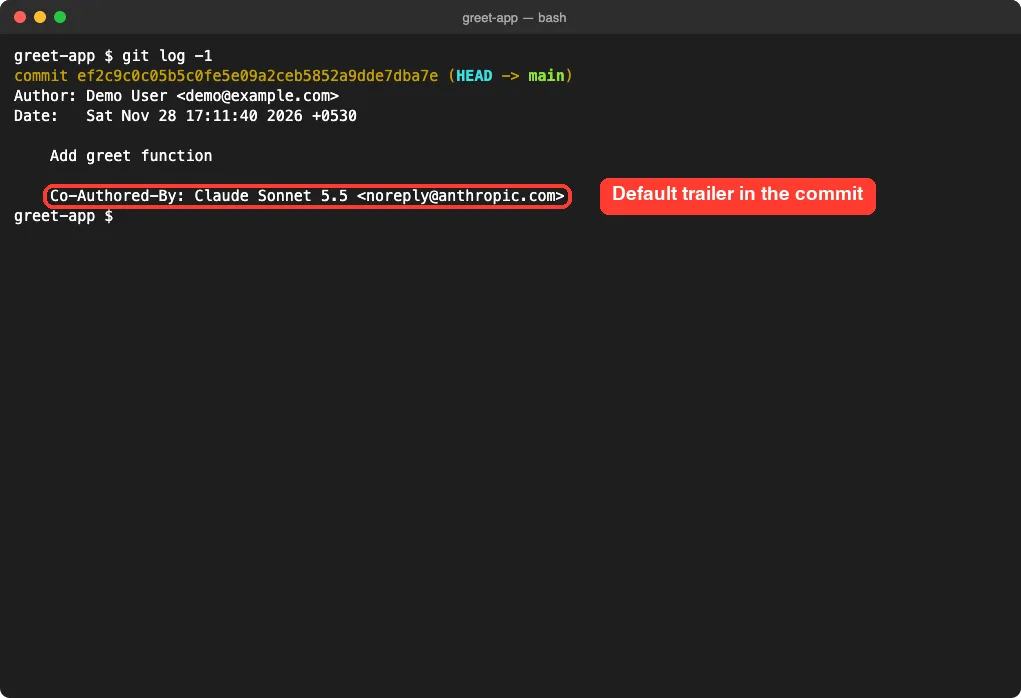
Notice the author is still the human, Demo User. The trailer adds Claude as a co-author; it doesn’t replace you as the author.
Fix 1: Turn Off All Attribution With “attribution”: false
This is the one-line fix most people are looking for. It hides the commit trailer, the pull request line and the session link together.
{
  "attribution": false
}
We saved that as .claude/settings.json in the demo repo. Our session ran Claude Code v2.1.332, which is newer than the v2.1.281 the docs list as the minimum for this value.
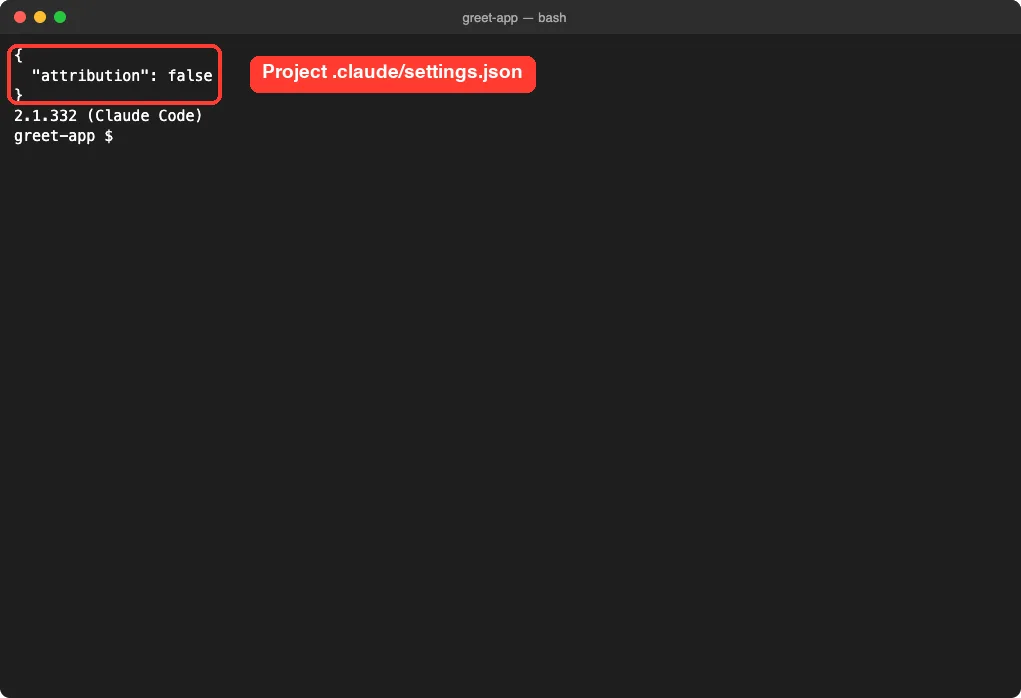
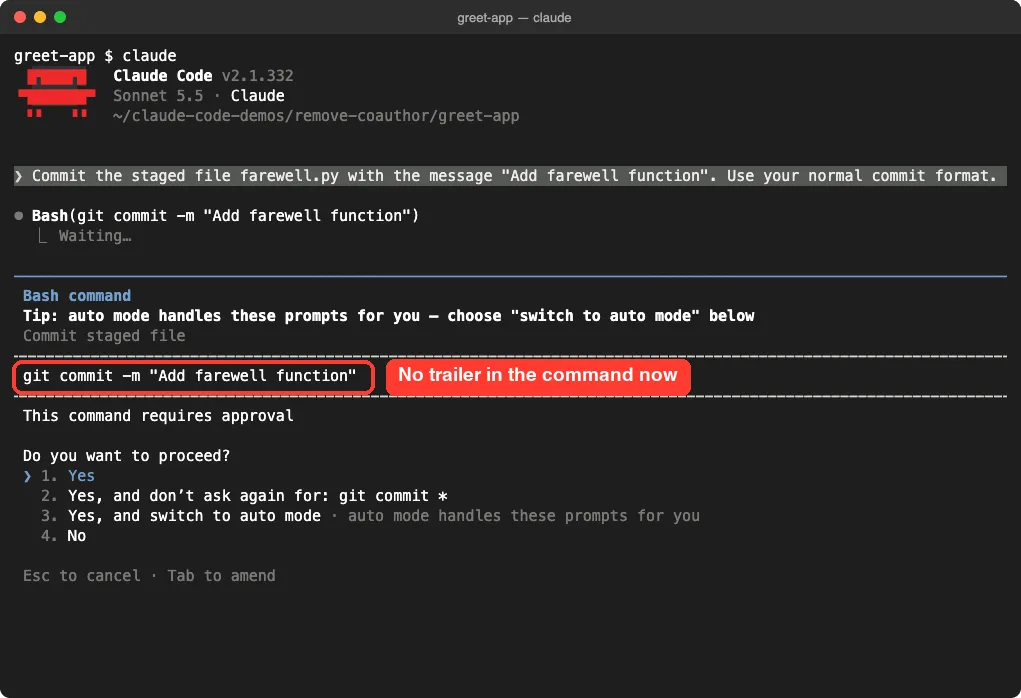
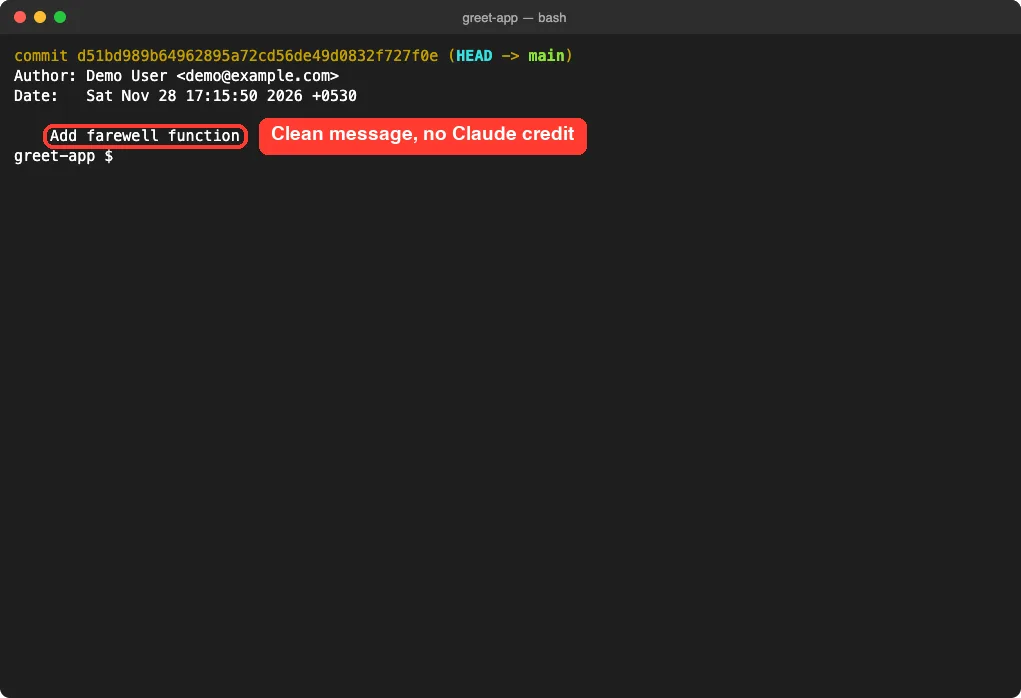
Then we started a new Claude Code session and asked for the same kind of commit. This time the permission prompt showed a plain git commit -m "Add farewell function" with nothing extra.
The saved commit confirmed it. The message is just the subject line.
If you’re on an older version
The docs warn that versions before v2.1.281 reject the false value and skip the whole settings file that holds it. That means your other settings in that file stop working too.
Check with claude --version and run claude update if you’re behind. If you must support older versions, use the long form instead, which the docs recommend for files that older versions also read:
{
  "attribution": {
    "commit": "",
    "pr": "",
    "sessionUrl": false
  }
}
Fix 2: Remove Only the Commit Trailer
Maybe you’re happy for pull requests to say they were made with Claude Code, but you want commits clean. Set just the commit part to an empty string.
{
  "attribution": {
    "commit": ""
  }
}
The reverse works too. Set "pr": "" to hide the PR line and keep the commit trailer. Any part you leave unset uses Claude Code’s default text.
Fix 3: Replace It With Your Own Trailer
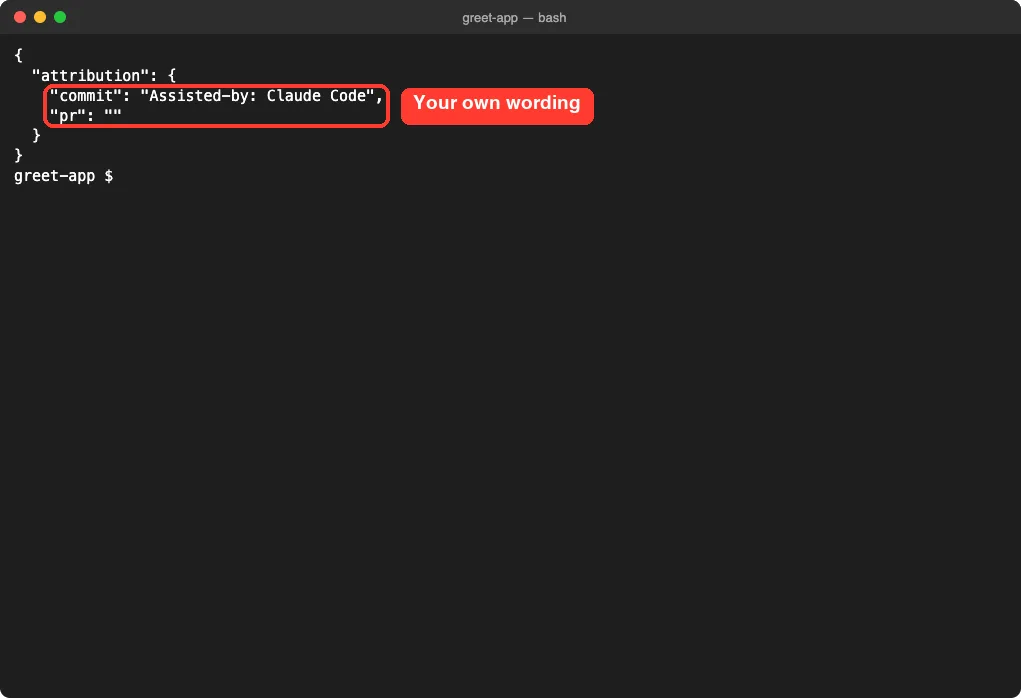
Some teams want a credit line, just in their own words. The commit value is the exact text Claude Code adds to commits, including any trailers.
We set our demo project to use Assisted-by: Claude Code and to drop the PR line.
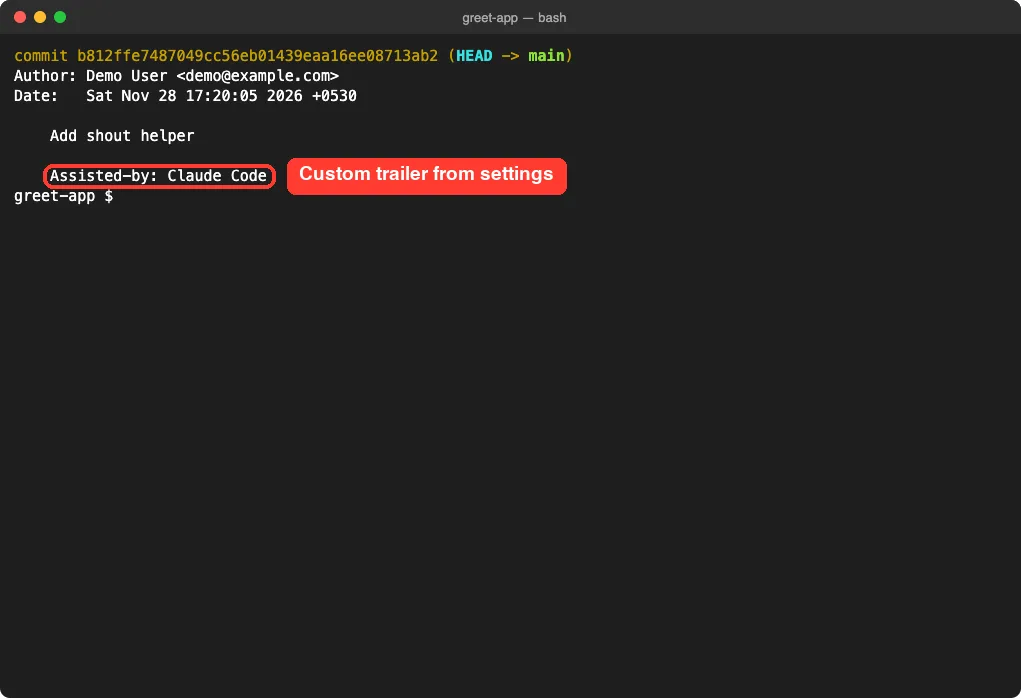
In a fresh session, Claude used our text. Its command was git commit -m "Add shout helper" -m "Assisted-by: Claude Code", and the saved commit ended with our line.
For more than one line, use \n inside the JSON string. The official example is "Generated with AI\n\nCo-Authored-By: AI <[email protected]>", which puts a blank line between a note and a trailer.
Fix 4: The Old includeCoAuthoredBy Setting
You’ll still see "includeCoAuthoredBy": false in older guides and dotfiles. According to the docs, it was deprecated in v2.0.62 when attribution replaced it.
Claude Code still honors includeCoAuthoredBy: false, and it hides both the commit trailer and the PR text. But once you set attribution.commit or attribution.pr, Claude Code ignores the old key.
| Your settings | Commit trailer | PR line |
|---|---|---|
| Nothing set | Default Co-Authored-By | Default “Generated with Claude Code” |
includeCoAuthoredBy: false only | Hidden | Hidden |
includeCoAuthoredBy: false plus attribution.commit | Your commit text | Default (old key is ignored) |
attribution: false | Hidden | Hidden |
If you have the old key, switch to attribution now. It’s clearer and gives you separate control over each part.
Where to Put the Attribution Setting
Claude Code reads several settings files, and the scope you pick decides who the change affects. Our guide to settings.json locations covers every path, but here’s the short version for this key.
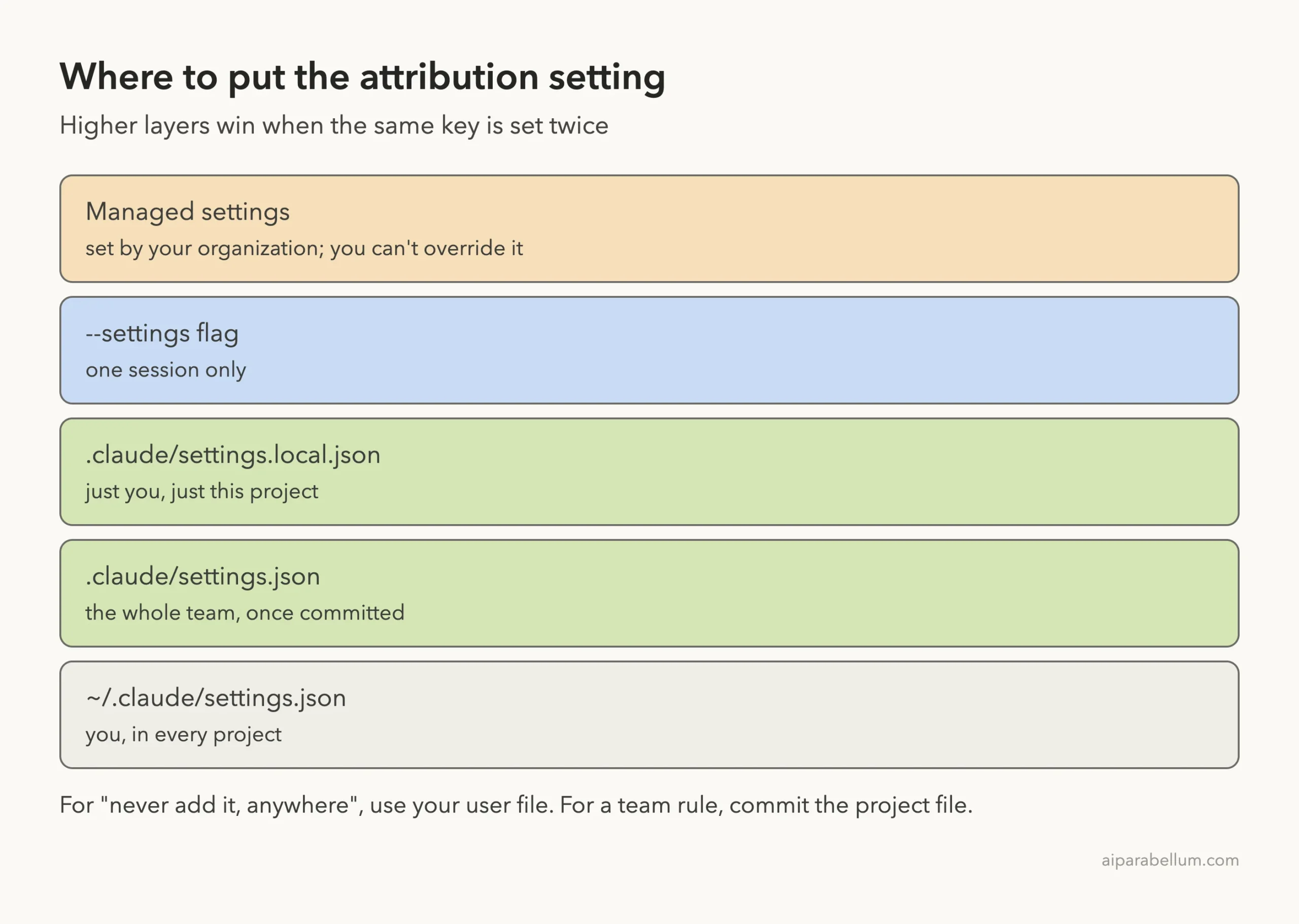
~/.claude/settings.json: your user file, for every project on your machine. Best if you never want the trailer..claude/settings.json: the shared project file. Commit it so the whole team gets the same rule..claude/settings.local.json: just you, just this project. Claude Code keeps it out of your commits.--settings: a flag for one session, such asclaude --settings '{"attribution": false}'.- Managed settings: set by your organization. You can’t override a managed value with your own files.
The general rules for these layers are in the official settings guide, and our post on settings file scopes walks through each scope with examples.
CLAUDE.md rules and managed settings
The settings reference adds one more detail. Claude Code tells Claude that your own instructions about attribution, such as a line in your CLAUDE.md file or memory, take precedence over these commit and PR lines.
The exception is managed settings. If your organization sets the attribution text in managed settings, that line stays. Ask your admin rather than fighting it with prompts.
Fix 5: Remove Co-Authored-By From Commits You Already Made
Settings don’t touch history. Every commit Claude made before you changed them still has the trailer, so you need Git to rewrite those messages.
Just the last commit
Run git commit --amend, delete the Co-Authored-By line in the editor, and save. That changes only the most recent commit.
Several recent commits
To clean a range in one go, let git rebase run a small command after each commit. This is the exact command we ran on the last three commits of our demo repo:
git rebase HEAD~3 -x 'git log -1 --format=%B | sed "/^Co-Authored-By: Claude/d" | git commit --amend --no-verify -F -'For each commit, it reads the message, deletes any line that starts with Co-Authored-By: Claude, and amends the commit with the cleaned text. The --no-verify flag skips commit hooks during the rewrite, since the code itself isn’t changing.
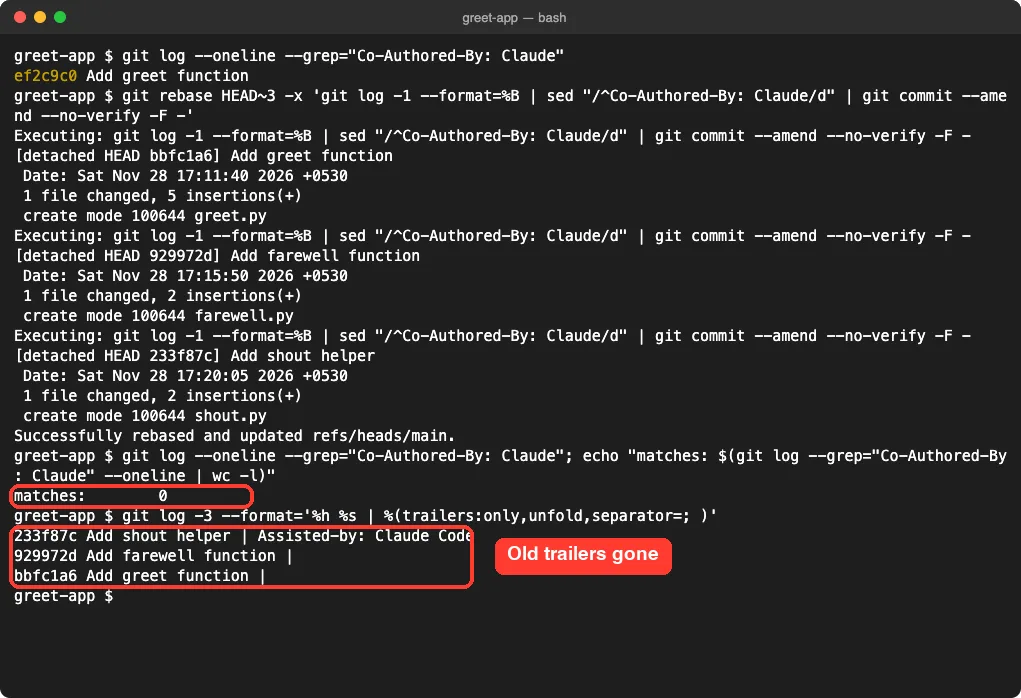
Before the rebase, git log --grep="Co-Authored-By: Claude" found one commit. Afterward it found zero, and the Assisted-by line we wanted to keep was untouched.
Before you rewrite pushed commits
Rewriting gives each commit a new hash. If you already pushed them, you’ll need git push --force-with-lease, which overwrites the remote branch only if nobody else pushed to it since you last fetched.
Do this on your own feature branch, not on a shared main branch. If teammates built on those commits, their history won’t match yours. Our guide to GitHub push errors covers push errors if the force push is rejected.
Removing the Line From Pull Requests
The PR text comes from attribution.pr. Set it to an empty string, or use "attribution": false, and Claude Code stops adding the “Generated with Claude Code” footer to new pull request descriptions.
We didn’t open a real pull request in this test, since our demo repo had no remote, so this part follows the docs. For PRs that already exist, edit the description on your Git host; the setting won’t change them.
Cloud and Remote Control sessions can also add a Claude-Session trailer and a session URL. The docs say "sessionUrl": false inside attribution turns that off.
Try It Yourself
Practice on a throwaway repo before you change your real setup. Create a folder, run git init, add a small file, stage it, and add {"attribution": false} to .claude/settings.json. Then start Claude Code there and paste this prompt:
Commit the staged file with the message "Add first file". Use your normal commit format. Then run git log -1 and tell me in one line whether the message has any Co-Authored-By trailer.Read the permission prompt before you approve. Then try a custom commit value and run the same prompt again to see your text appear.
Common Mistakes
- Expecting the setting to clean old commits. It only affects commits Claude makes after you save it.
- Using
"attribution": falseon a version older than v2.1.281. The whole settings file gets skipped, not just this key. - Putting the key in the wrong file. A rule in
.claude/settings.local.jsonwon’t reach your teammates; a committed.claude/settings.jsonwill. - Mixing the old and new keys. Once
attribution.commitorattribution.pris set,includeCoAuthoredByis ignored. - Writing broken JSON, like a trailing comma. Claude Code shows a settings error and may skip the file.
- Force-pushing a shared branch after a rebase. Keep history rewrites to branches only you use.
Pro Tips
- Set
"attribution": falseonce in~/.claude/settings.jsonif you never want the trailer, then forget about it. - For a team policy, commit
.claude/settings.jsonso every clone gets the same rule without anyone editing their own config. - Glance at the command in Claude’s permission prompt. It shows the full commit message before anything is written.
- Use
git log --grep="Co-Authored-By: Claude" --onelineto find every commit that still has the trailer. - If you also want Claude’s built-in commit instructions gone, the reference documents
includeGitInstructions; our settings.json examples show more keys you can copy. - Prefer slash commands for commits? The commit commands plugin is another way to shape how commits are written.
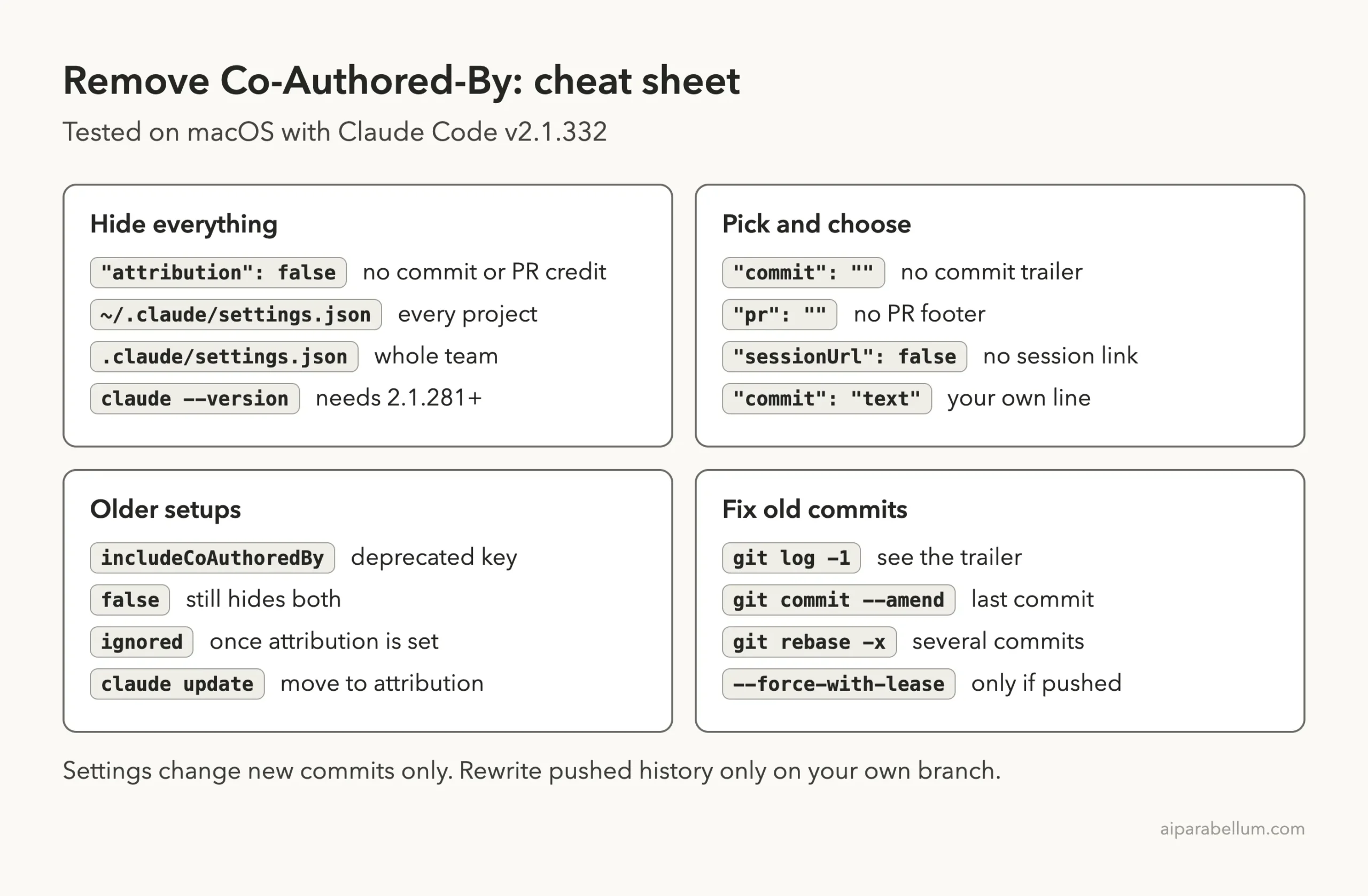
Cheat Sheet
Frequently Asked Questions
How do I stop Claude Code from adding Co-Authored-By to commits?
Add "attribution": false to ~/.claude/settings.json for all projects, or to .claude/settings.json for one repo. To hide only the commit line, use "attribution": {"commit": ""}.
Is includeCoAuthoredBy still supported?
Yes, but it’s deprecated since v2.0.62. Claude Code still honors includeCoAuthoredBy: false, but ignores it once you set attribution.commit or attribution.pr, so new configs should use attribution.
Why does my setting not work?
The usual causes are an old Claude Code version that rejects false, broken JSON, the key sitting in a file this project doesn’t read, or a managed setting from your organization. Start a new session after you edit the file, then check the next commit command in the permission prompt.
Will removing the trailer change who authored the commit?
No. In our test, every commit’s author stayed as the human Git user. The trailer only adds a co-author line at the end of the message.
Can I remove Co-Authored-By from commits that are already on GitHub?
Yes, by rewriting them with git commit --amend or git rebase -x and then pushing with git push --force-with-lease. Only do this on branches nobody else is building on.
Conclusion
To remove “Co-Authored-By: Claude” from Claude Code commits, add "attribution": false to your user or project settings file, which hides the commit trailer and the pull request line on Claude Code v2.1.281 or later, as our test on v2.1.332 confirmed. Use "commit": "" or "pr": "" to drop just one part, set your own commit text for a custom trailer, and move off the deprecated includeCoAuthoredBy key. For commits already made, amend the last one or run a short git rebase -x, and force-push only your own branches. If you hit other problems along the way, our list of common Claude Code errors and our Claude AI overview are good next stops.