If you want a Claude Code Sentry plugin, you will find a small crowd in the official marketplace: Sentry, Sentry CLI, PagerDuty, incident.io, Rootly, LogRocket, Fullstory and Noibu. This guide explains what each one does, which parts we ran on a Mac, and which parts need your own account.
This guide is part of our Claude Code tutorials. Find more add-ons in our Skills Directory.
Tested with Claude Code v2.1.318 on 2026-11-07 (macOS).
We loaded all eight plugins in a throwaway sandbox, which added 53 skills, and asked three of them real questions about a tiny demo project. We never signed in to Sentry, PagerDuty or any other service. Anything about live error data or incidents comes from each plugin’s own files and README, and we say so each time.
Quick Summary: Error Tracking and Incident Plugins at a Glance
All eight plugins connect Claude to a company that already watches your production app. The plugin itself is only a bundle of skills and a connection address, so it does nothing useful until you sign in to that company.
| Plugin | Maker | What it does | Account needed? | Install command |
|---|---|---|---|---|
| sentry | Sentry | Debug production errors, set up Sentry in your code, read stack traces | Yes, Sentry sign-in | /plugin install sentry@claude-plugins-official |
| sentry-cli | Sentry | One skill that teaches Claude the Sentry command line tool | Yes, for live commands | /plugin install sentry-cli@claude-plugins-official |
| pagerduty | PagerDuty | Score a commit against past incidents before you ship | Yes, a PagerDuty API key | /plugin install pagerduty@claude-plugins-official |
| incident-io | incident.io | Respond to incidents, check on-call, write postmortems | Yes, sign-in on first use | /plugin install incident-io@claude-plugins-official |
| rootly | Rootly | Deploy safety, incident response, on-call and retrospectives | Yes, sign-in or API token | /plugin install rootly@claude-plugins-official |
| logrocket | LogRocket | Ask about session replays, metrics and issues | Yes | /plugin install logrocket@claude-plugins-official |
| fullstory | Fullstory | Ask about behavior analytics and session replays | Yes | /plugin install fullstory@claude-plugins-official |
| noibu | Noibu | Online store errors, sessions and lost revenue | Yes | /plugin install noibu@claude-plugins-official |
What Is a Claude Code Error Tracking Plugin?
An error tracking service such as Sentry collects crashes from your live app and groups them into issues. An incident tool such as PagerDuty or Rootly tells your team when something is down and who is on call. A plugin lets Claude Code read from those systems while you work on the fix.
Under the hood, a plugin can contain skills, commands, agents, hooks and an MCP server. The MCP server is the connection to the vendor. The skills are written instructions that tell Claude how to use that connection well.
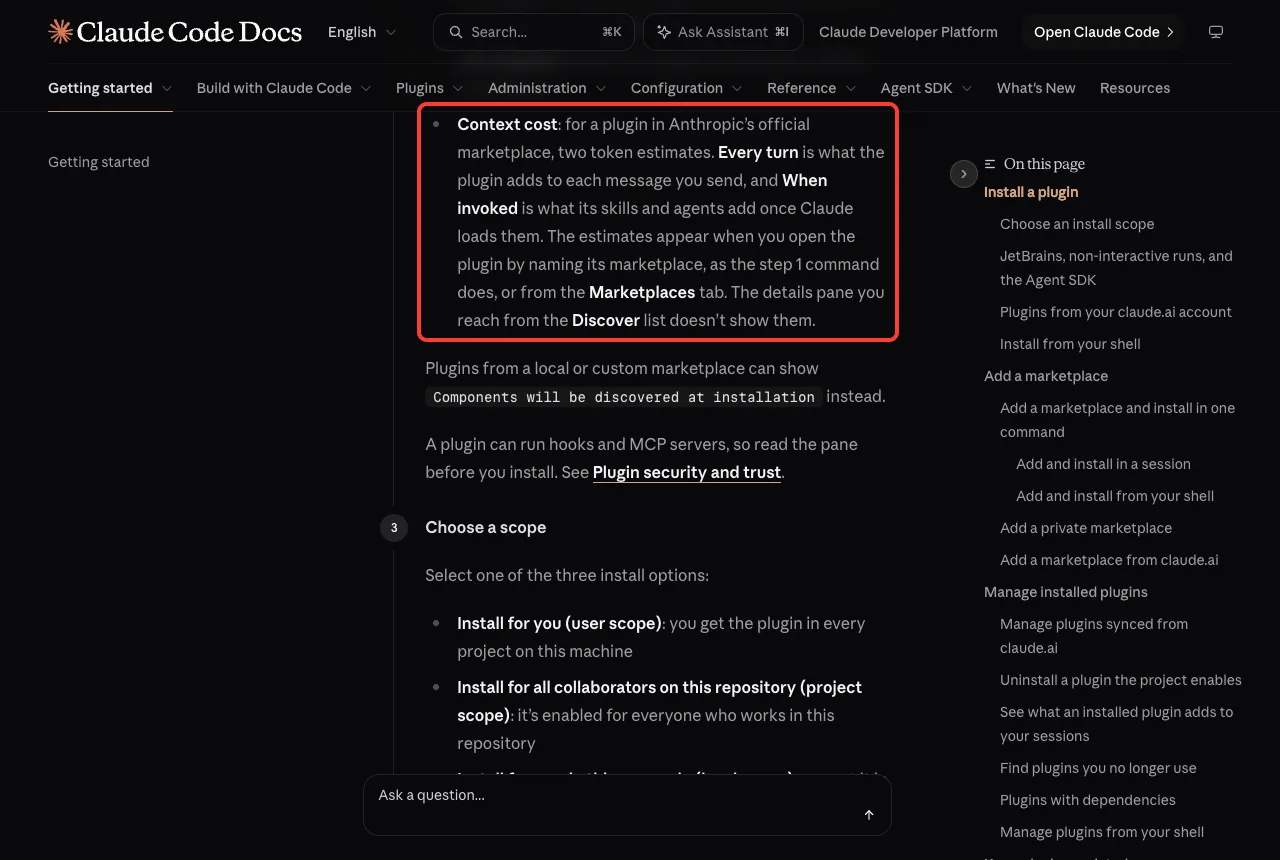
Anthropic’s docs on plugins also warn that the name and description of every skill sit in Claude’s context on every turn. That costs a small amount of usage even in sessions where the plugin never runs. For a plugin from the official marketplace, the /plugin screen shows an estimate of that cost before you install.
Which Plugin Fits Which Job?
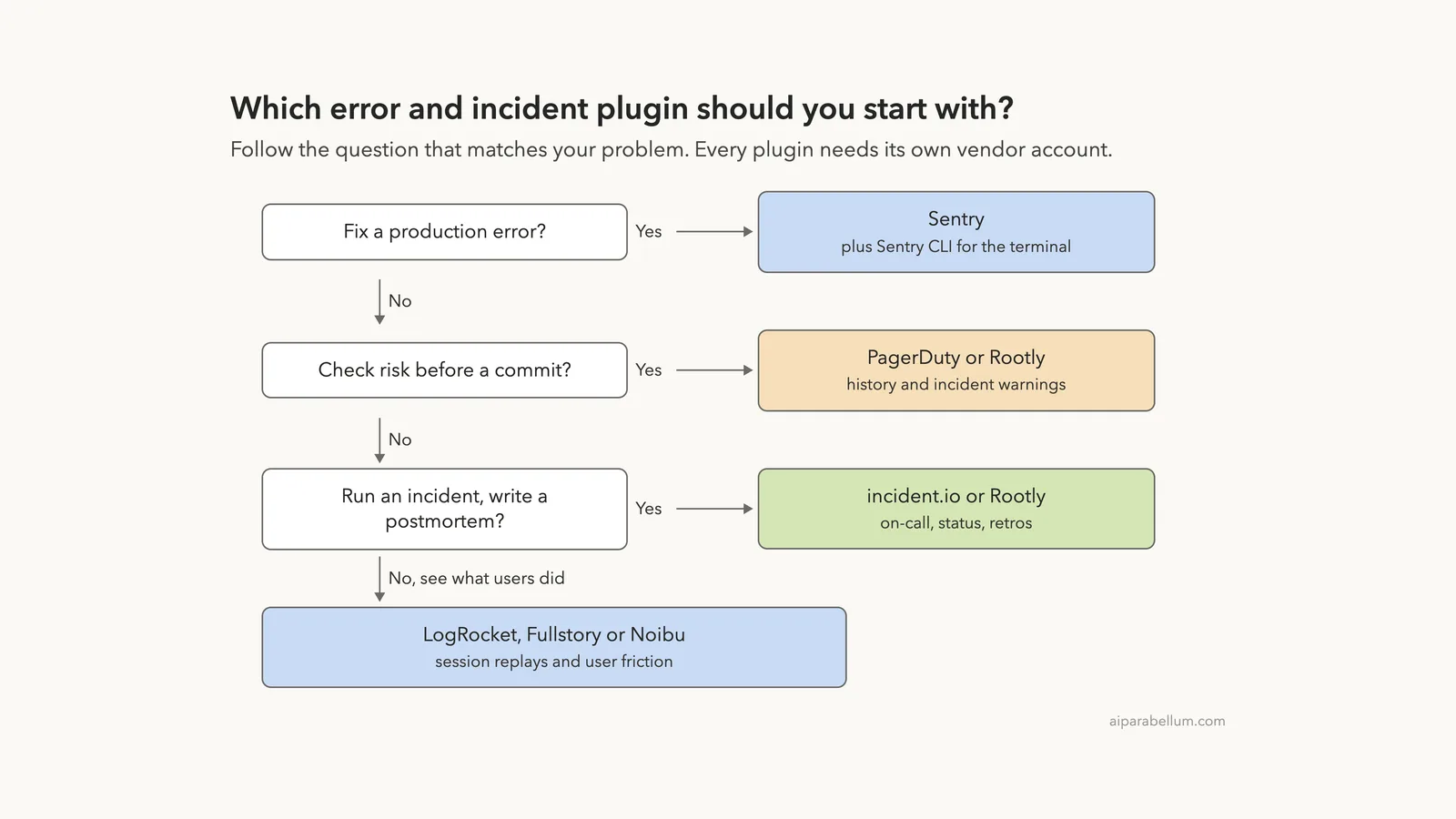
Start from the problem you have, not the logo. The ladder below picks one or two plugins for each job. If you already pay for one of these services, use that one and skip the rest.
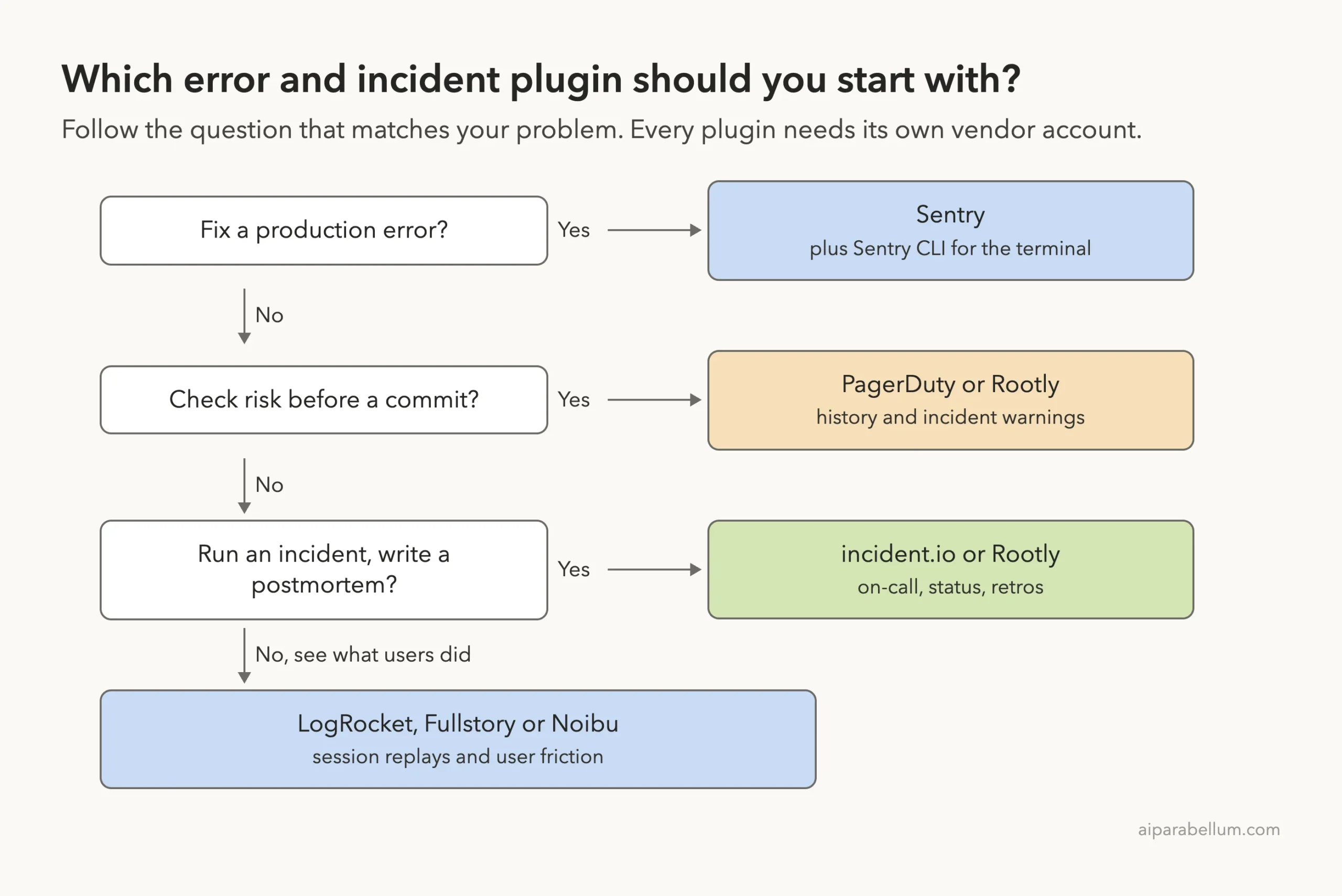
Rootly appears twice because its plugin covers both deploy safety and incident response. According to its own files, it ships 18 skills and 3 agents.
How We Tested Without Touching Our Setup
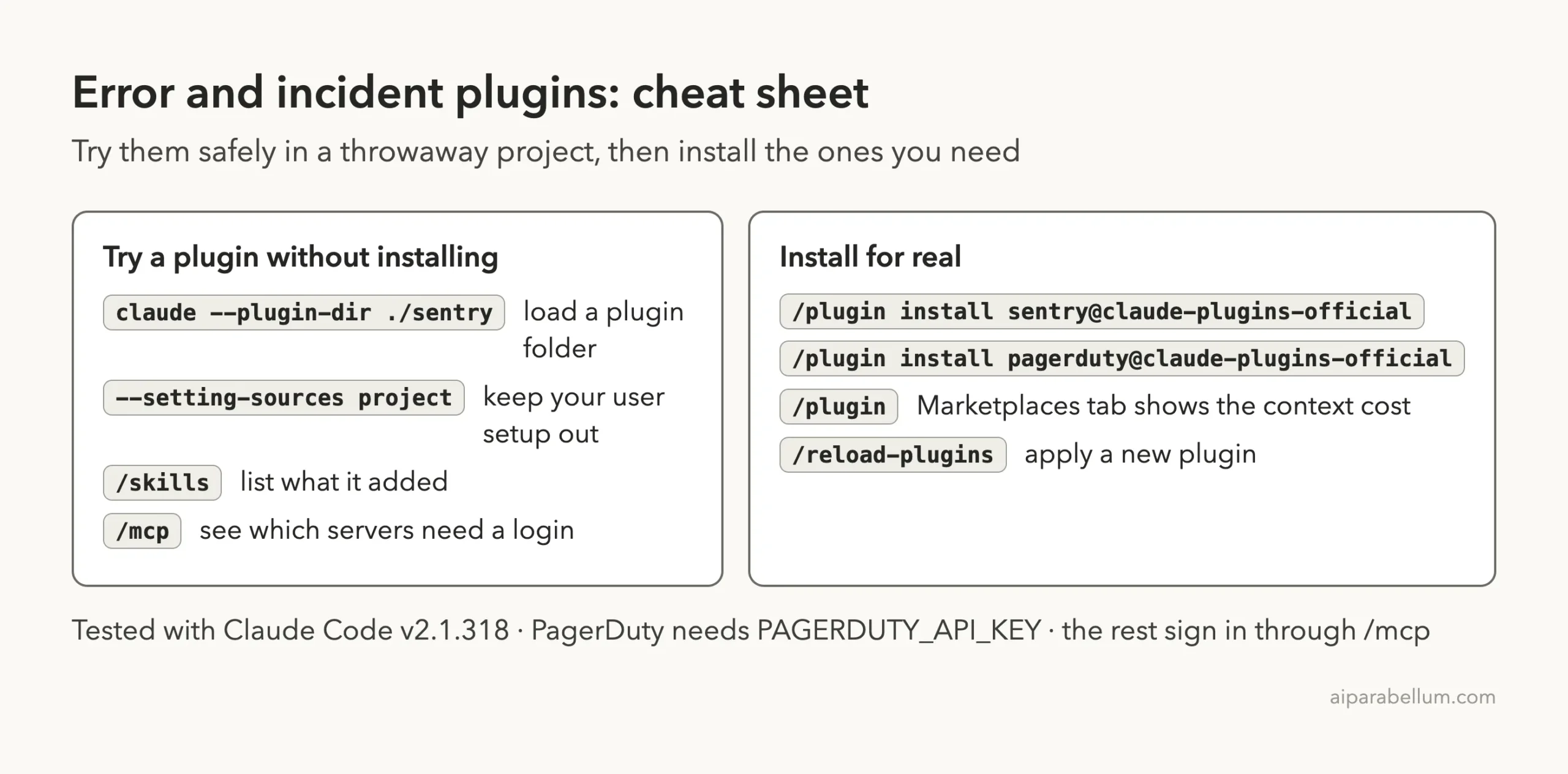
We cloned each plugin into a sandbox folder and copied it into an empty demo project. Then we started Claude Code with one --plugin-dir flag per plugin and the --setting-sources project flag, so nothing from our own Claude setup mixed in. We never ran /plugin install, so no plugin was added to a real setup.
The demo project holds two tiny files. One is checkout.py, a few lines that crash with a KeyError when an order has no coupon. The other is error.txt, the stack trace from that crash.
We also kept Claude in plan mode, so it could read files but not change them.
Installing takes seconds, but every plugin here is idle until you finish the vendor login.
What We Read Before Running Anything
These plugins can run commands on your computer, so we read every hook and connection file first.
- Sentry: no hooks. One connection to
mcp.sentry.devand 8 skills. The repository says it is generated from Sentry’s own skills library, so changes happen upstream. - Sentry CLI: one skill and no hooks.
- PagerDuty: no hooks. Two commands, and a connection to
mcp.pagerduty.comthat sends your API key in a header. - Rootly: the only plugin with hooks. One runs when a session starts and checks whether a token is set. Another runs before
git commitandgit pushand asks Rootly for active critical incidents. Both scripts are short and only call Rootly’s API, and the commit check stays silent if no token is set. - incident.io: no hooks, 11 skills, one connection to
mcp.incident.io. - LogRocket: no hooks, one skill, one connection to
mcp.logrocket.com. - Fullstory: no hooks, 5 skills, one agent, one connection to
api.fullstory.com. - Noibu: no hooks and 9 skills. The files we copied held no connection file, so its connection setup comes from Noibu’s own documentation.
What We Ran and What Comes From the Docs
| Item | Status |
|---|---|
| Loading all eight plugins and listing 53 skills | We ran it |
| Seeing which connections need a login | We ran it |
| Sentry debug skill on a demo crash | We ran it, without Sentry data |
| PagerDuty risk scoring command | We ran it, and it stopped at the connection check |
| incident.io postmortem skill | We ran it, without an incident |
| Real Sentry issues, real incidents, session replays | From each plugin’s README and files, not tested |
Loading Eight Plugins in One Session
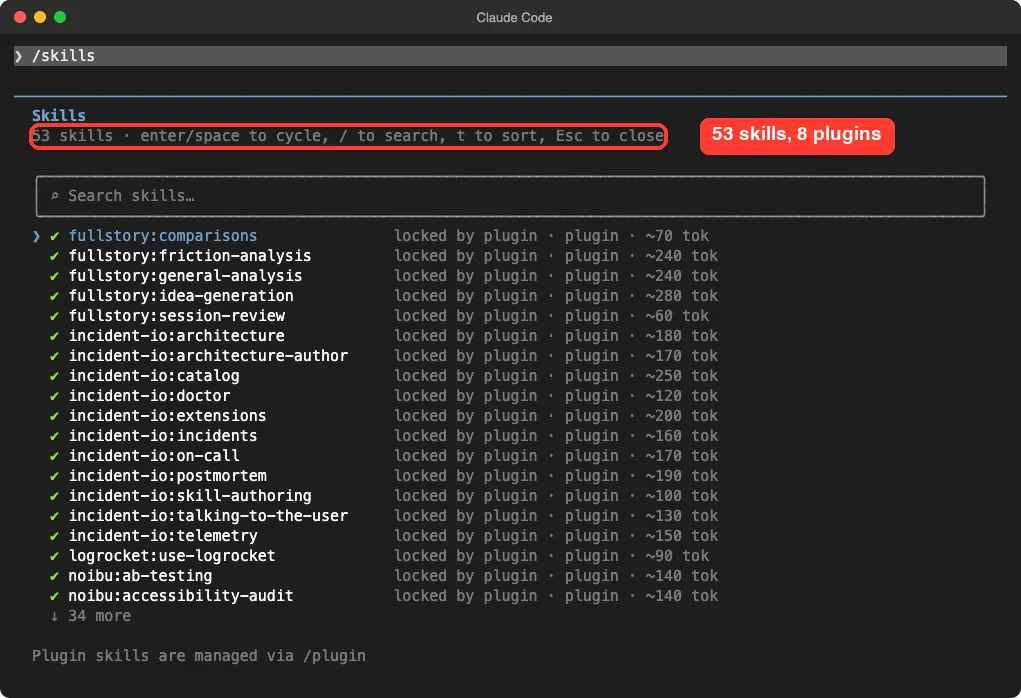
The /skills screen lists 53 skills, each marked as locked by its plugin. That is the sum of what each plugin contains, and the screen shows a rough size for each skill. Most are between 60 and 280 tokens.
The /mcp screen is the more important one. Five connections showed “needs authentication”, and PagerDuty showed a red failure mark. Claude Code also printed a warning at the top that five MCP servers needed authentication.
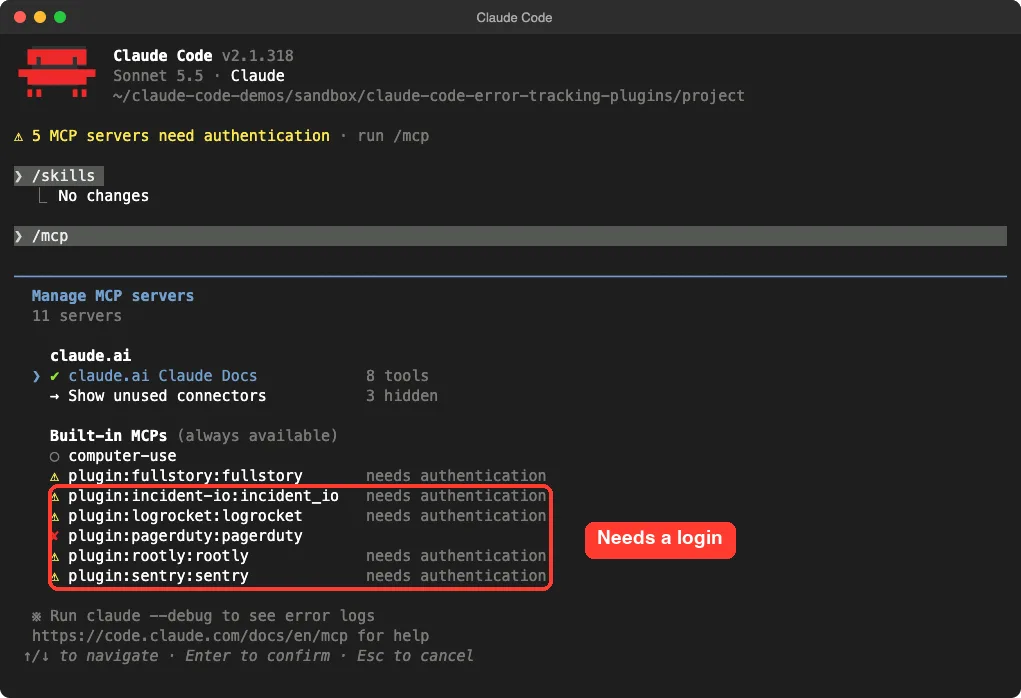
This is the main point of the whole guide. Installing one of these plugins takes seconds, but each one is useless until you finish the vendor login.
Sentry Plugin: Debug a Production Error From Your Terminal
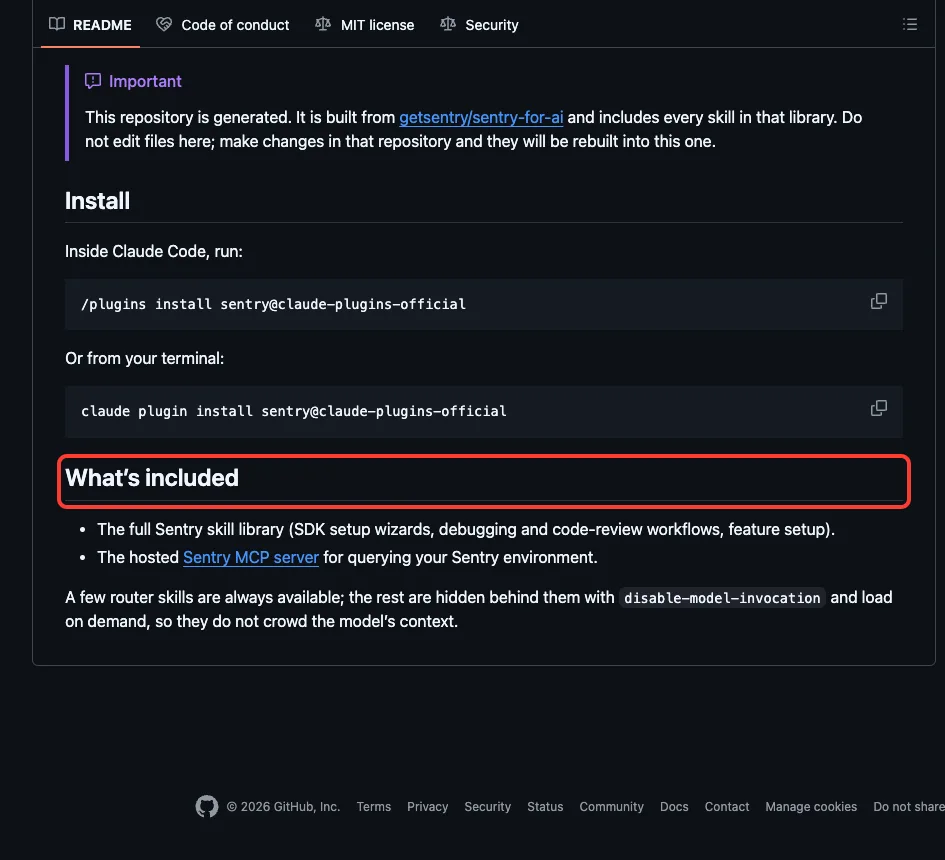
Sentry’s plugin has eight skills, with names such as sentry-debug-issue, sentry-fix-stack-traces, sentry-create-alert, sentry-setup-releases and sentry-instrument. Its README says a few router skills are always available and the rest load on demand, so they do not crowd Claude’s context.
We asked Claude to use the debug skill on our demo crash and to say what it would normally fetch from Sentry. It loaded the skill and answered in three parts.
- With a Sentry login, it would look up the issue by link or ID, then pull the stack trace, breadcrumbs, tags and release. It could also ask Sentry’s Seer analysis for a root cause and finish with a commit that references the issue.
- Right now, it said the Sentry connection was not signed in and we had given no issue ID.
- From
error.txtandcheckout.pyalone, it found the crash on line 7 and suggestedorder.get("coupon") is Noneas the fix.
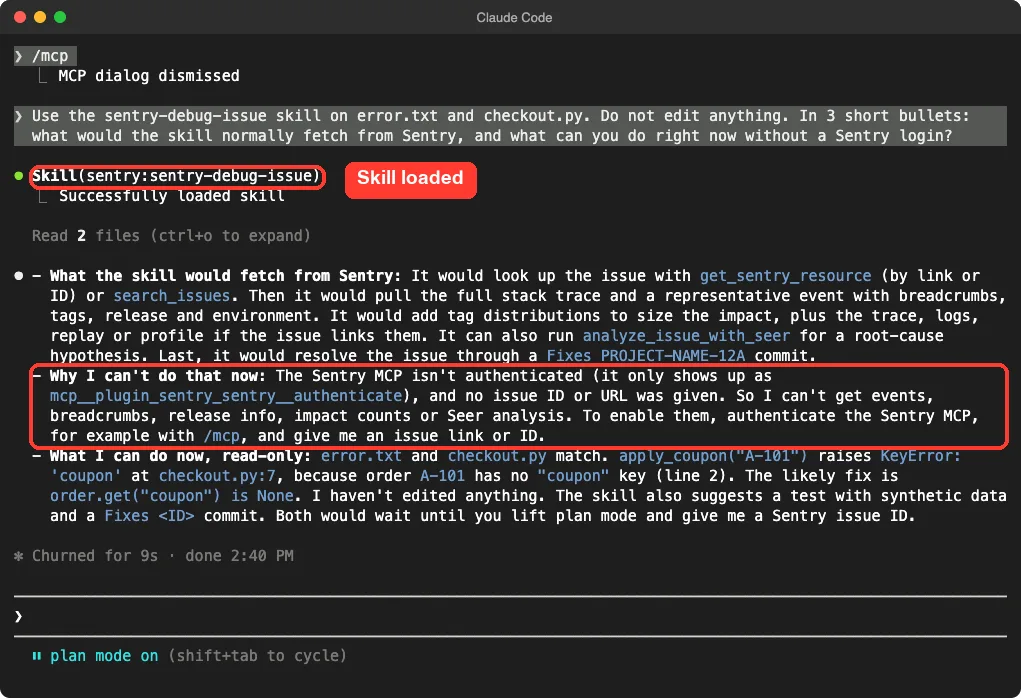
This is one demo, and we did not connect to Sentry, so we cannot say how good the real issue analysis is. What we can say is that the skill behaves honestly: it did not invent Sentry data it could not reach.
Sentry CLI Plugin
The second Sentry plugin holds a single skill about the Sentry command line tool. Per its manifest it is version 0.46.0, and it exists so Claude knows the right commands instead of guessing. You need the CLI installed and signed in for it to run anything live.
PagerDuty Plugin: Score Risk Before You Commit
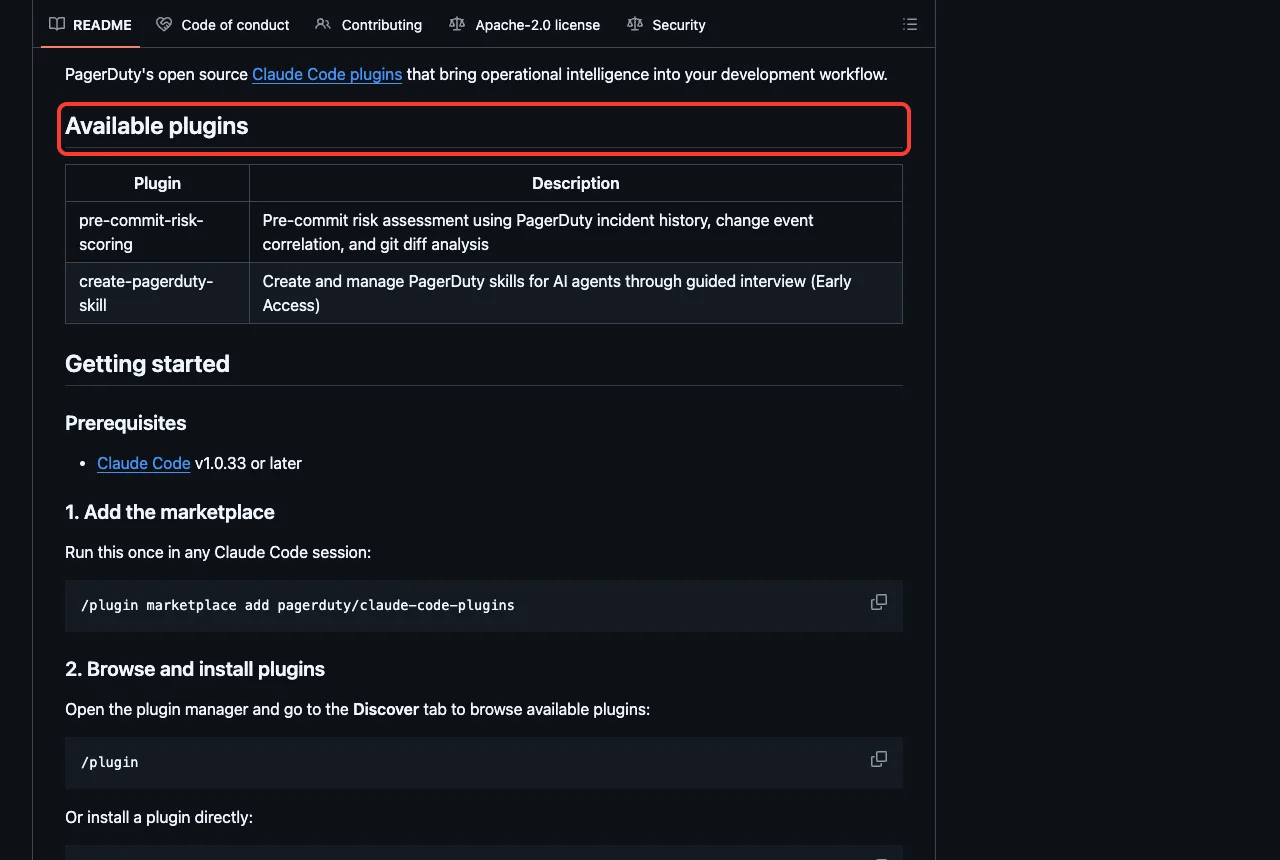
PagerDuty’s repository describes two plugins, both marked early access in its README: pre-commit-risk-scoring and create-pagerduty-skill. The first compares your current changes with your past incidents and change events. The marketplace description says it can score pre-commit diffs and surface deployment risk before you ship.
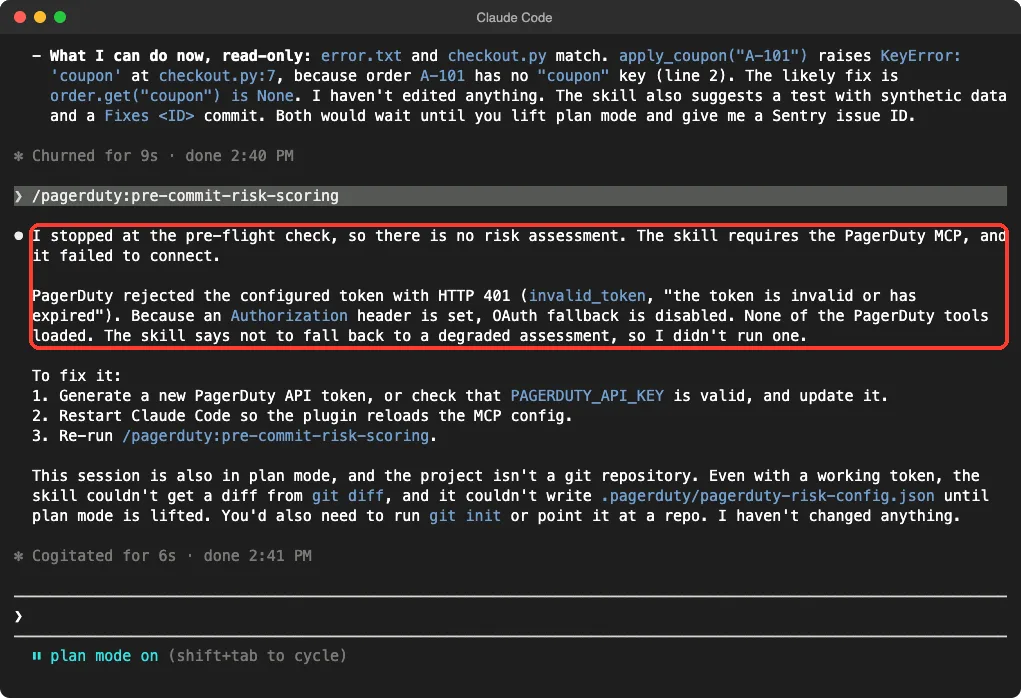
We ran /pagerduty:pre-commit-risk-scoring with no PagerDuty key set. Claude stopped at the pre-flight check, as the command’s own instructions say it must. PagerDuty’s server answered with an HTTP 401 error, and Claude refused to guess a result.
It also pointed out two more things we would need: a real git repository, and permission to write a small config file, which plan mode blocks. The fix it printed is simple. Set a valid PAGERDUTY_API_KEY, restart Claude Code, and run the command again.
If you also care about catching problems while Claude writes code, see our guide to Claude Code security, which mentions this plugin.
incident.io and Rootly: Run the Incident Itself
These two plugins cover the stressful part: an outage is happening and you need to coordinate.
incident.io
The incident.io plugin has 11 skills, including incidents, on-call, postmortem, catalog, telemetry and doctor. Its marketplace description adds that it can author runbooks and architecture docs that incident.io investigations draw on, and that sign-in happens on first use.
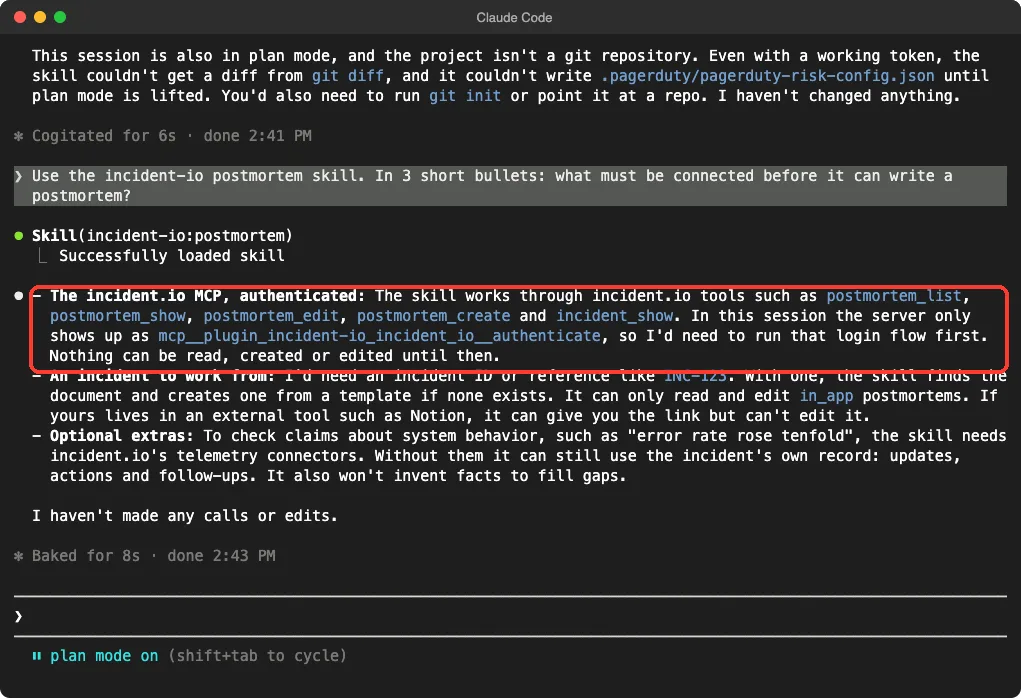
We asked the postmortem skill what must be connected before it can write one. Claude named three needs: a signed-in incident.io connection, an incident to work from such as an ID, and optionally the telemetry connectors to check claims like “error rate rose tenfold”. It also said it would not invent facts to fill gaps.
Rootly
Rootly’s plugin is the largest, with skills named deploy-check, respond, status, oncall, handoff, retro and many more. Its README and manifest describe full-lifecycle incident management, and they say the connection uses sign-in, with an optional API token for the hook scripts.
We did not run any Rootly skill. We only loaded it, read its two hook scripts and confirmed its connection shows as needing a login.
LogRocket, Fullstory and Noibu: See What Users Did
These three answer a different question. Instead of “what crashed”, they answer “what did the person do right before it broke”.
| Plugin | What its files say | Skills we counted |
|---|---|---|
| logrocket | Query session replays, metrics, issues and user behavior in plain language | 1 |
| fullstory | Behavior analytics, with skills such as session-review and friction-analysis | 5, plus 1 agent |
| noibu | Built for online stores, with skills such as checkout-analysis, store-pulse and tech-diagnosis | 9 |
We loaded all three and saw their skills and their connections in the screens above, but we did not ask them questions. They only make sense with a LogRocket, Fullstory or Noibu account that already records your users.
Safety Notes Before You Install
The plugins are small, but they still connect Claude to systems that hold real customer and company data. A few habits help.
- Install from the official marketplace and read the plugin details before you confirm.
- Use the least powerful key or role the vendor offers. A read-only PagerDuty key is enough to look at incidents.
- Keep an API key in an environment variable, not in a file that goes into git.
- Try a new plugin in plan mode first, as we did, so nothing changes while you learn.
- Remember that a plugin runs as you. Anthropic’s docs say what a plugin runs, it runs with your permissions.
Try It Yourself
Make an empty folder, add a tiny file with a bug and its stack trace, and start Claude Code with just the Sentry plugin loaded from a cloned folder. Replace the path with where you cloned it.
git clone https://github.com/getsentry/plugin-claude sentry-plugin
claude --permission-mode plan --setting-sources project --plugin-dir ./sentry-plugin
Then paste this prompt and compare the answer with the Sentry screenshot above.
Use the sentry-debug-issue skill on error.txt. Do not edit anything.
In 3 short bullets: what would the skill normally fetch from Sentry,
and what can you do right now without a Sentry login?
Common Mistakes
- Installing the plugin and expecting data. Without the vendor login, the plugin only contains instructions.
- Forgetting to restart after setting an API key. The PagerDuty fix says Claude Code must reload its connection settings.
- Installing all eight. Each adds skill names to Claude’s context on every turn, so pick the one or two you use.
- Running risk scoring outside a git repository. The PagerDuty command needs your changes to compare.
Pro Tips
- Open a plugin from the Marketplaces tab in
/pluginto see its context cost before you install. - Run
/mcpafter installing, because it shows which connections still need a login. - Pair the error plugin with your code review habits. See our plugin install guide for scopes and updates.
- If your stack runs on a cloud, our guides to AWS plugins and Azure plugins cover the other half of the picture.
Cheat Sheet
Frequently Asked Questions
Is there an official Claude Code Sentry plugin?
Yes. The official marketplace lists sentry, and Sentry’s repository README gives the install command claude plugin install sentry@claude-plugins-official. You can read the source on the Sentry plugin repository.
Do I need a paid account for these plugins?
Each plugin needs an account with its vendor, but we did not check which plans include API or MCP access. Check the vendor’s pricing page before you plan on one.
Why did the PagerDuty command refuse to run?
We had no key set, so PagerDuty’s server rejected the connection. The command is written to stop rather than give a weaker answer, and the PagerDuty plugin repository documents the setup.
Can I use these plugins on Windows or Linux?
We tested on macOS. The Windows and Linux steps follow Anthropic’s official instructions, and the plugins themselves are plain files plus a web connection.
Are these plugins safe to install?
We found hooks only in Rootly’s plugin, and its two scripts only call Rootly’s own API. Still, read the hooks and connection addresses of any plugin before you install it.
Conclusion
The Claude Code Sentry plugin and its seven neighbors bring error tracking, incident response and user session data into your terminal, but every one of them needs your own vendor login. We loaded 53 skills from eight plugins, watched five connections ask for a login and PagerDuty fail without a key, and saw the Sentry and incident.io skills explain honestly what they could not reach. Pick the one or two plugins that match your tools, read the hooks first, try them in plan mode, and find more add-ons in our Claude guide and the Skills Directory.