Amazon Web Services now publishes a whole family of add-ons for Claude Code, and the names are confusing enough that most people do not know where to start. This guide explains every Claude Code AWS plugin in plain English, shows how to install them, and tells you which one to try first. We also loaded three of them in a safe sandbox and ran what works without an AWS login.
This guide is part of our Claude Code tutorials. Find more add-ons in our Skills Directory.
Tested with Claude Code v2.1.318 on November 5, 2026.
We read the source of three GitHub repositories before loading anything: aws/agent-toolkit-for-aws (commit 24865b6, November 5, 2026), awslabs/agent-plugins (commit fbefb37, October 9, 2026) and awslabs/startups (commit 054bb04, October 26, 2026). This is a roundup, so we need to be clear about what we ran and what we did not. We loaded aws-core, aws-serverless and aws-agents with --plugin-dir.
We never created an AWS account, never signed in and never installed anything into the normal Claude Code setup. Everything about the other plugins comes from each plugin’s own README and files.
Quick Summary
| Question | Answer |
|---|---|
| How many AWS plugins are there? | Thirteen are in the Skills Directory, spread over three GitHub repositories |
| Where do I install them from? | Anthropic’s official marketplace, claude-plugins-official, for most of them |
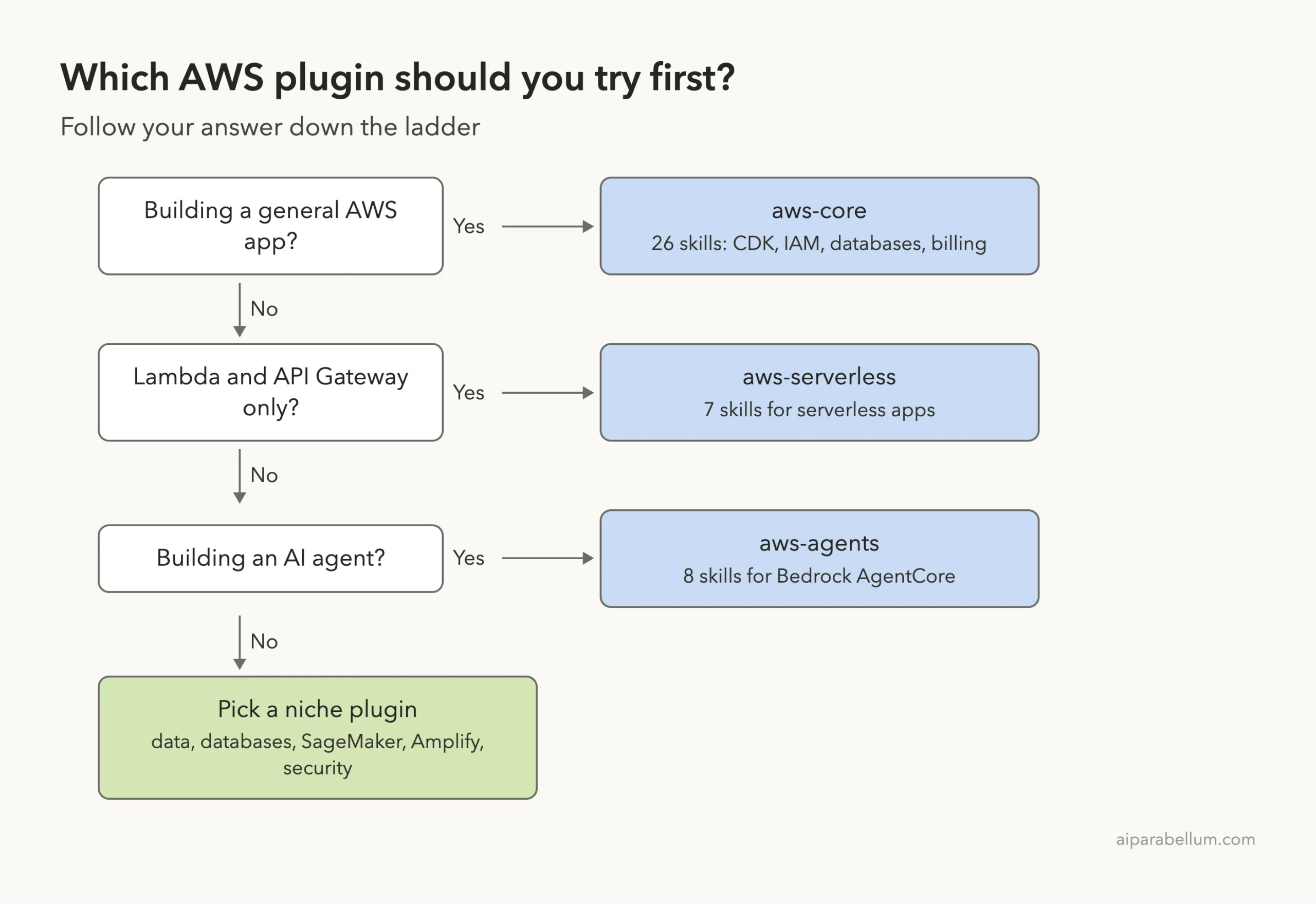
| Which one should I try first? | aws-core for general AWS work, aws-serverless for Lambda apps, aws-agents for AI agents |
| Do I need an AWS account? | The skills read fine without one, but anything that acts on your cloud account needs AWS credentials |
| Is anything deprecated? | Yes. The awslabs/startups repository is deprecated, and migration-to-aws now lives inside aws-startup-advisor |
| What we did not run | Any plugin that talks to a real AWS account, plus aws-startup-advisor, which sends usage data (more below) |
Start with the narrowest AWS plugin for your job, and read its hooks before you install it.
What Are the AWS Plugins for Claude Code?
A Claude Code plugin is a bundle that can hold skills, subagents, hooks and MCP servers, and Claude Code loads it as one unit. Our plugin install guide covers the basics, and the official plugins page lists exactly what a plugin can contain.
The AWS plugins mostly work in two ways. First, they ship skills, which are short written guides Claude reads when your request matches. Second, many of them start an MCP server so Claude can look up AWS documentation or call AWS services.
If MCP is new to you, our MCP servers guide explains the idea.
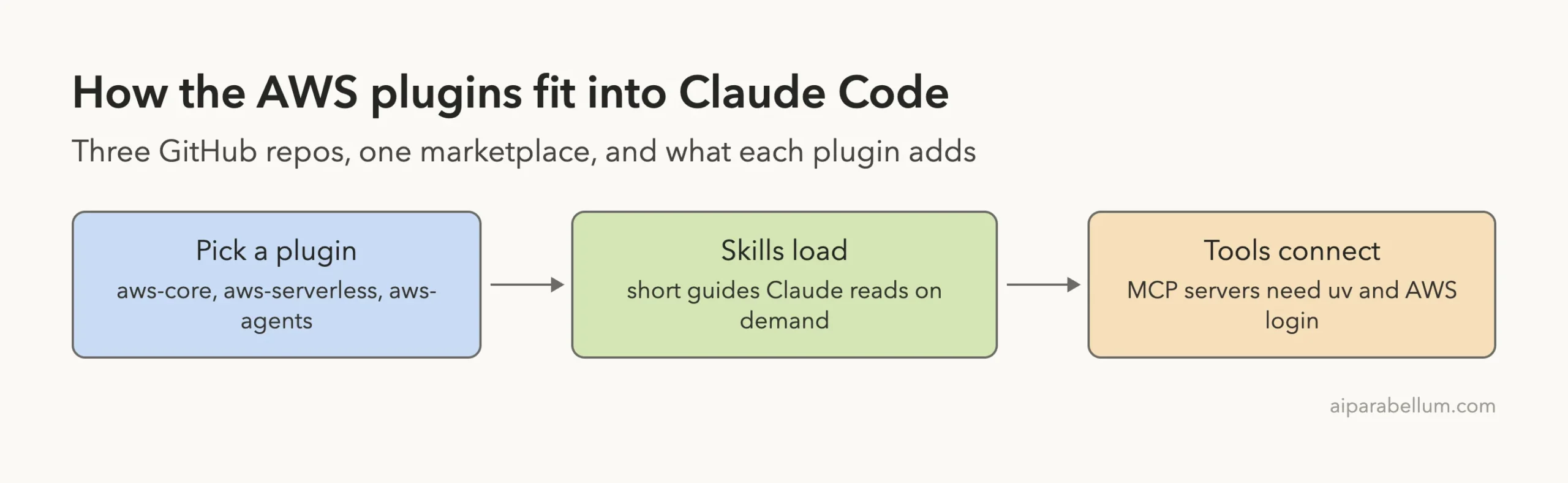
Where the Plugins Live: Three Repos, One Clear Winner
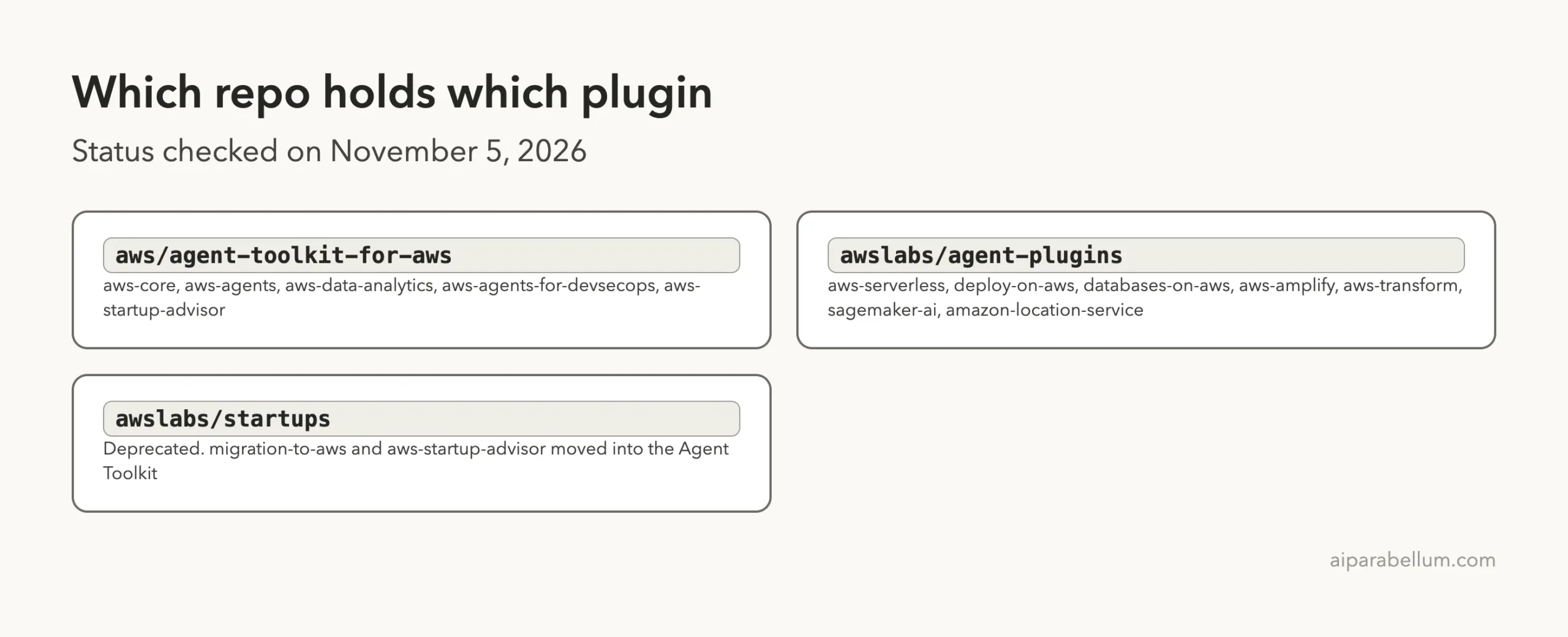
The plugins come from three GitHub repositories, and that is the main source of confusion. Two are active. One is closed to new work.
The Agent Toolkit for AWS
The Agent Toolkit is the main home. Its README says its status is GA and that it works with several coding agents, including Claude Code. It holds aws-core, aws-agents, aws-data-analytics, aws-agents-for-devsecops and aws-startup-advisor.
When we looked, its newest change was only six hours old, so it is clearly active.
AWS Labs Agent Plugins
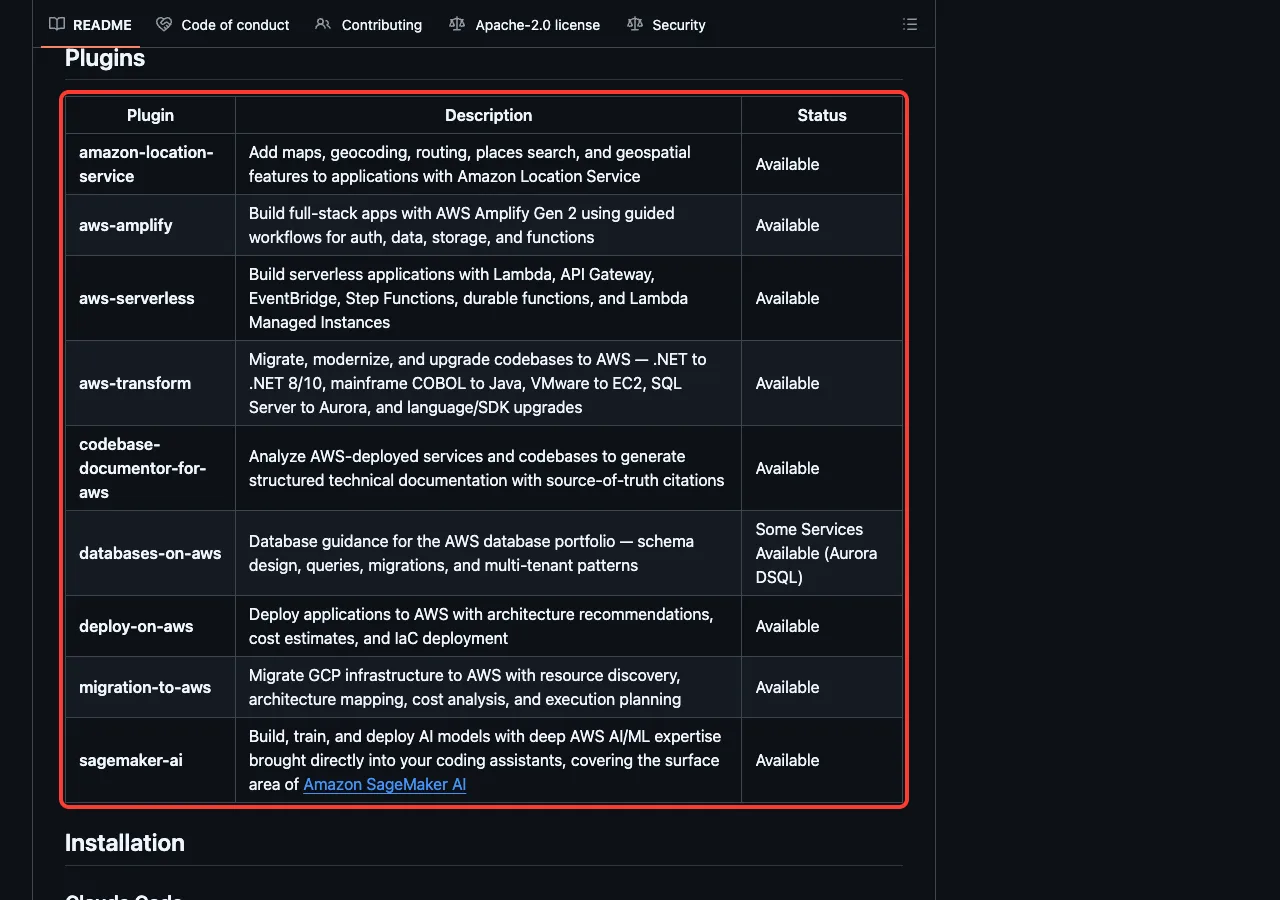
The agent-plugins repository holds the plugins for specific jobs: aws-serverless, deploy-on-aws, databases-on-aws, aws-amplify, aws-transform, sagemaker-ai and amazon-location-service. Its README table gives each one a status, and databases-on-aws is marked as “Some Services Available (Aurora DSQL)”. That is a useful warning about how complete it is.
The deprecated Startups repo
The awslabs/startups repository carries a banner saying it is deprecated. Its plugins, aws-startup-advisor and migration-to-aws, “are no longer maintained here” and get no new features or fixes. The README says that all seven migration-to-aws skills now ship inside aws-startup-advisor, so you install that one plugin instead.
One plugin, aws-startups-solution-architecture, has not moved yet.
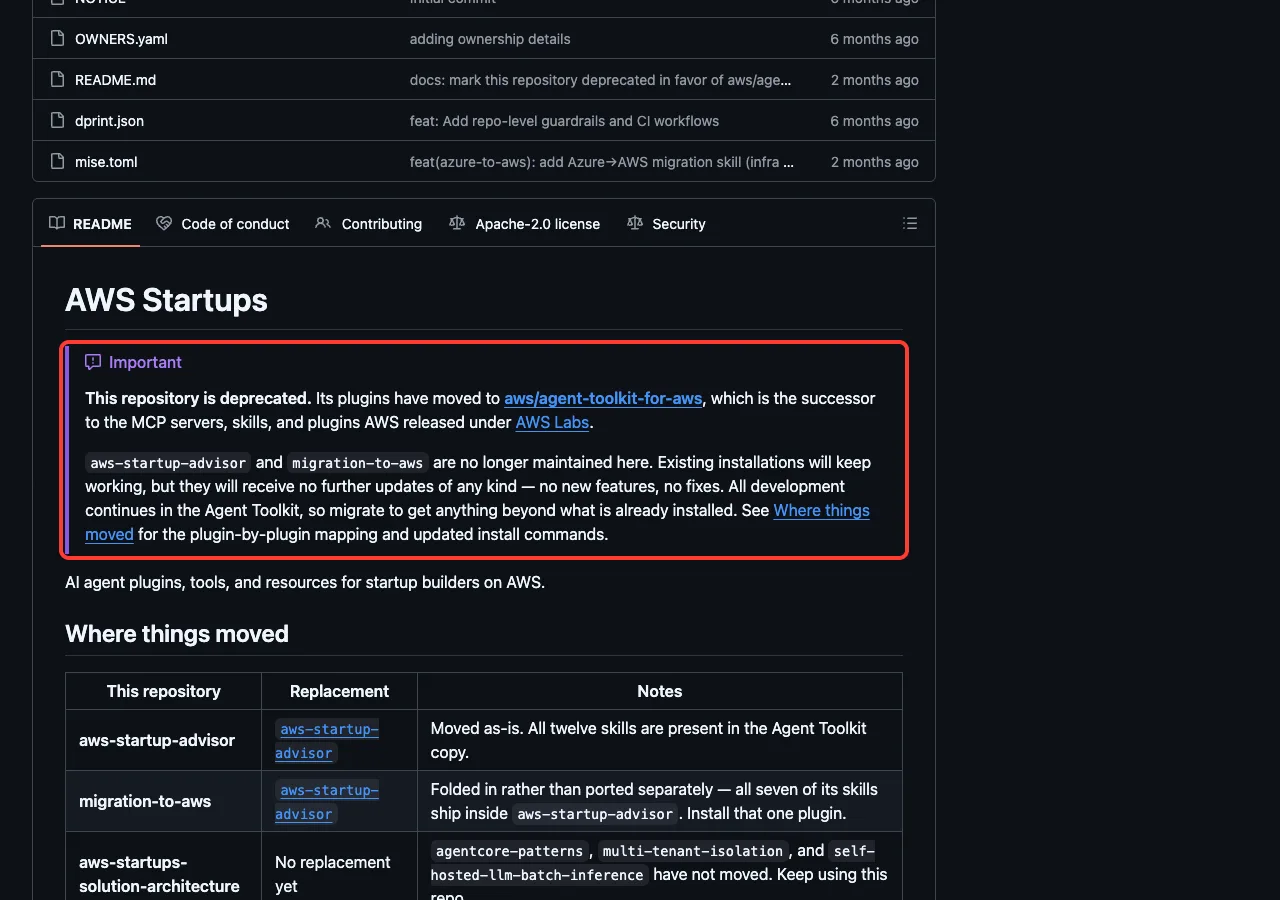
This matters for the Skills Directory too. If you see a card for migration-to-aws, treat it as a pointer to aws-startup-advisor.
All 13 AWS Plugins at a Glance
Here is the full list with what each plugin does, according to its own files. The skill counts come from the folders in each repository on the dates above.
| Plugin | Maker | What it does | Skills | Live AWS access |
|---|---|---|---|---|
aws-core | Amazon Web Services | Infrastructure as code, core services, databases, observability, billing and Well-Architected reviews | 26 | Yes, for actions |
aws-agents | Amazon Web Services | Build, deploy and harden AI agents with Amazon Bedrock AgentCore | 8 | Docs lookup only |
aws-agents-for-devsecops | Amazon Web Services | Incident investigation, release checks, code scans and penetration tests with AWS DevOps Agent and AWS Security Agent | 12 plus 9 commands | Yes, needs a token |
aws-data-analytics | Amazon Web Services | Data lakes, analytics and ETL with S3 Tables, Glue and Athena | 18 | Yes, for actions |
aws-startup-advisor | Amazon Web Services | Startup architecture advice and migrations from Azure, Google Cloud and Heroku | 13 plus 7 subagents | Yes, for actions |
migration-to-aws | Amazon Web Services | Folded into aws-startup-advisor and no longer maintained | Moved | Not applicable |
aws-serverless | AWS Labs | Lambda, API Gateway, Step Functions and serverless deployment | 7 | Yes, for actions |
deploy-on-aws | AWS Labs | Architecture advice, cost estimates and infrastructure as code deployment | 3 | Yes, for actions |
databases-on-aws | AWS Labs | Schema design, queries and migrations across AWS databases | 1 | Yes, for actions |
aws-amplify | AWS Labs | Full-stack apps with Amplify Gen 2 | 1 | Yes, for actions |
aws-transform | AWS Labs | Modernize .NET, mainframe, VMware, SQL and language versions | 1 | Yes, needs credentials |
sagemaker-ai | AWS Labs | Train, tune and deploy models with Amazon SageMaker AI | 19 | Yes, for actions |
amazon-location-service | AWS Labs | Maps, places search, geocoding and routing | 1 | Yes, for actions |
“Yes, for actions” means the plugin’s tools can reach your AWS account, so you need credentials before they do real work. We confirmed this in the files for aws-agents-for-devsecops, which expects a DEVOPS_AGENT_TOKEN, and in the README for aws-transform, which lists AWS credentials as a prerequisite. For the others we did not test a live connection.
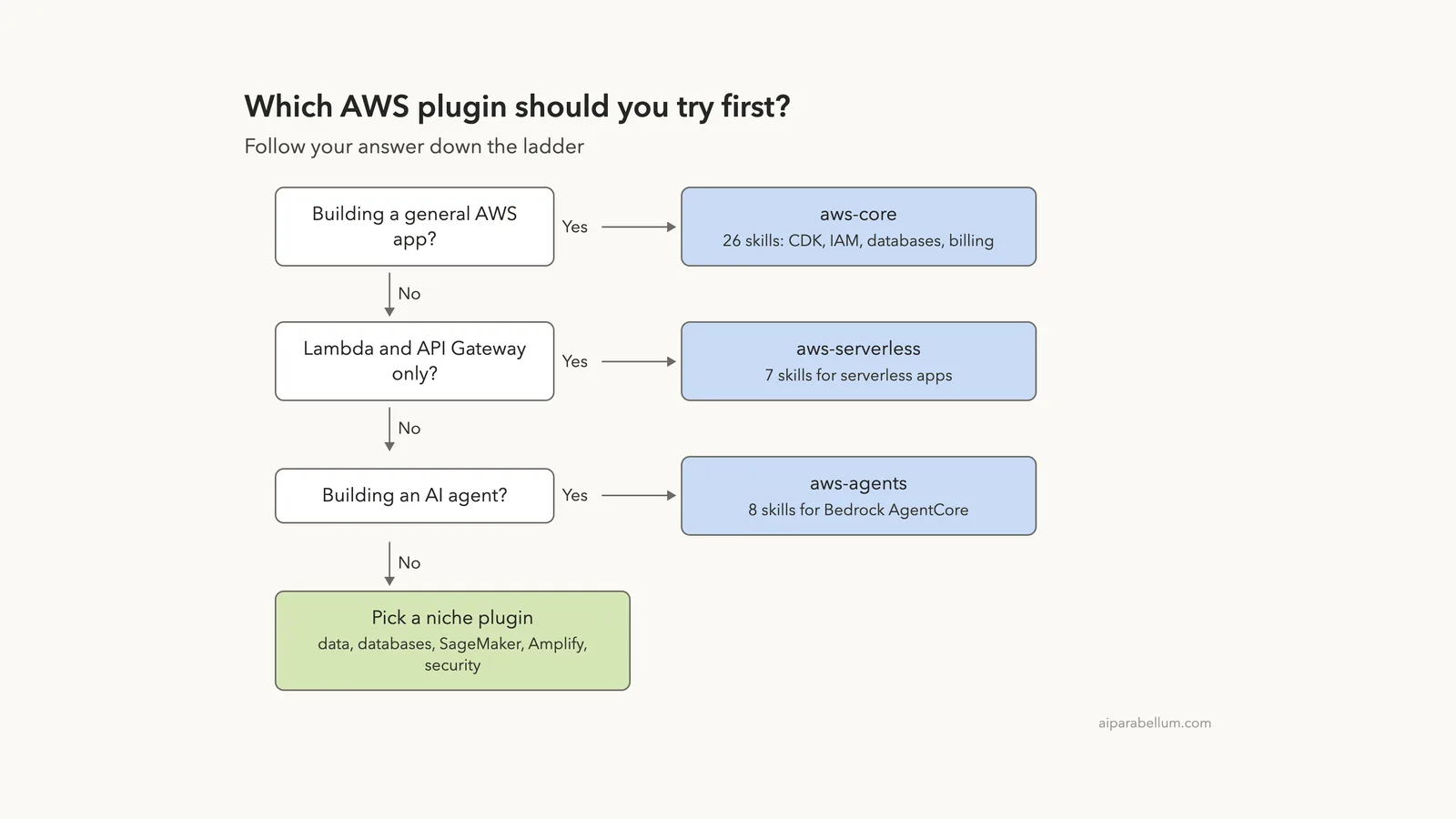
Which AWS Plugin Should You Try First?
Start with the narrowest plugin that matches your job. Every plugin adds names and descriptions to Claude’s context, so installing all thirteen would waste space. Anthropic’s docs say those tokens count toward your usage even when the plugin does nothing.
How to Install the AWS Plugins
From the official marketplace
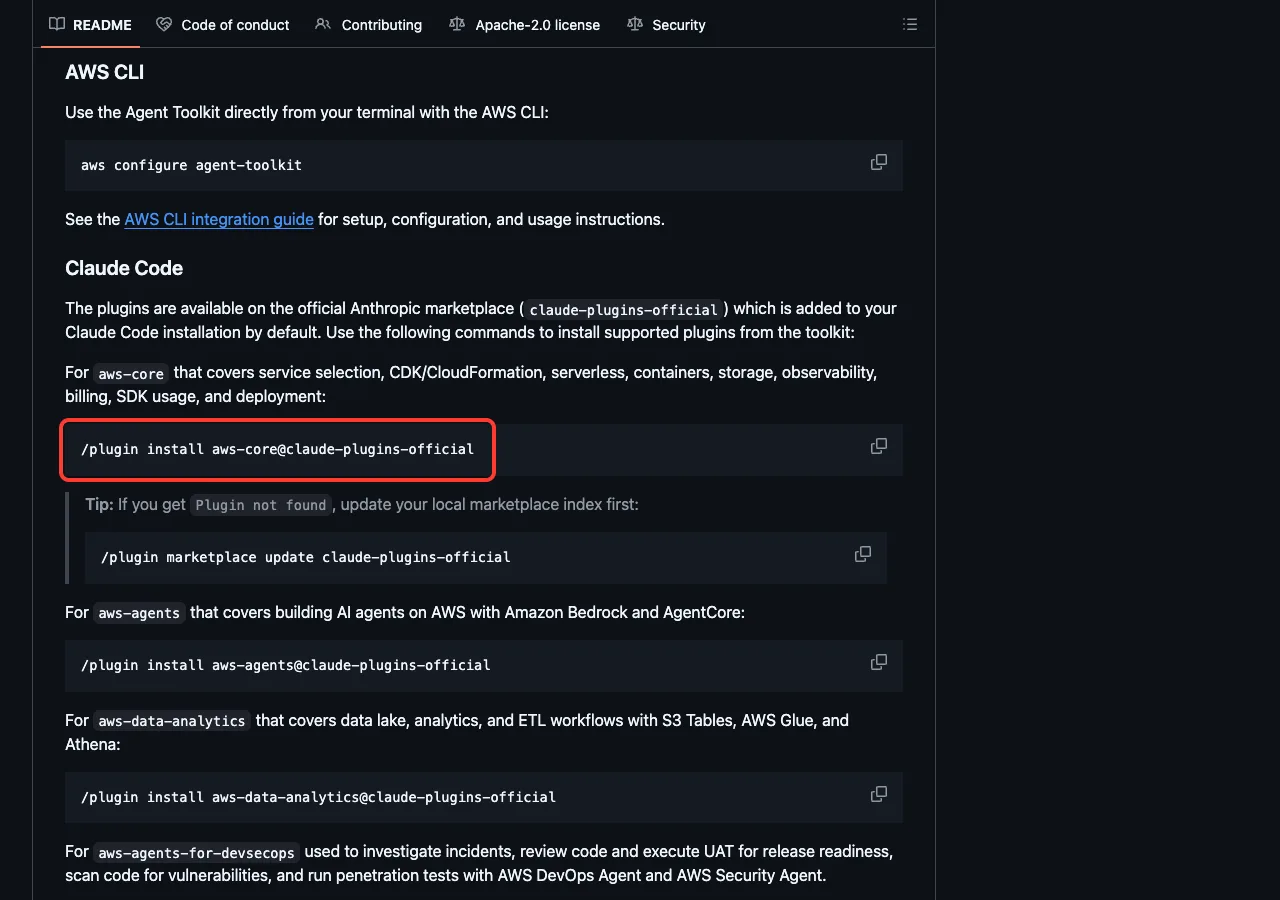
The Agent Toolkit README says its plugins are on claude-plugins-official, which Claude Code adds by default. Run these inside Claude Code.
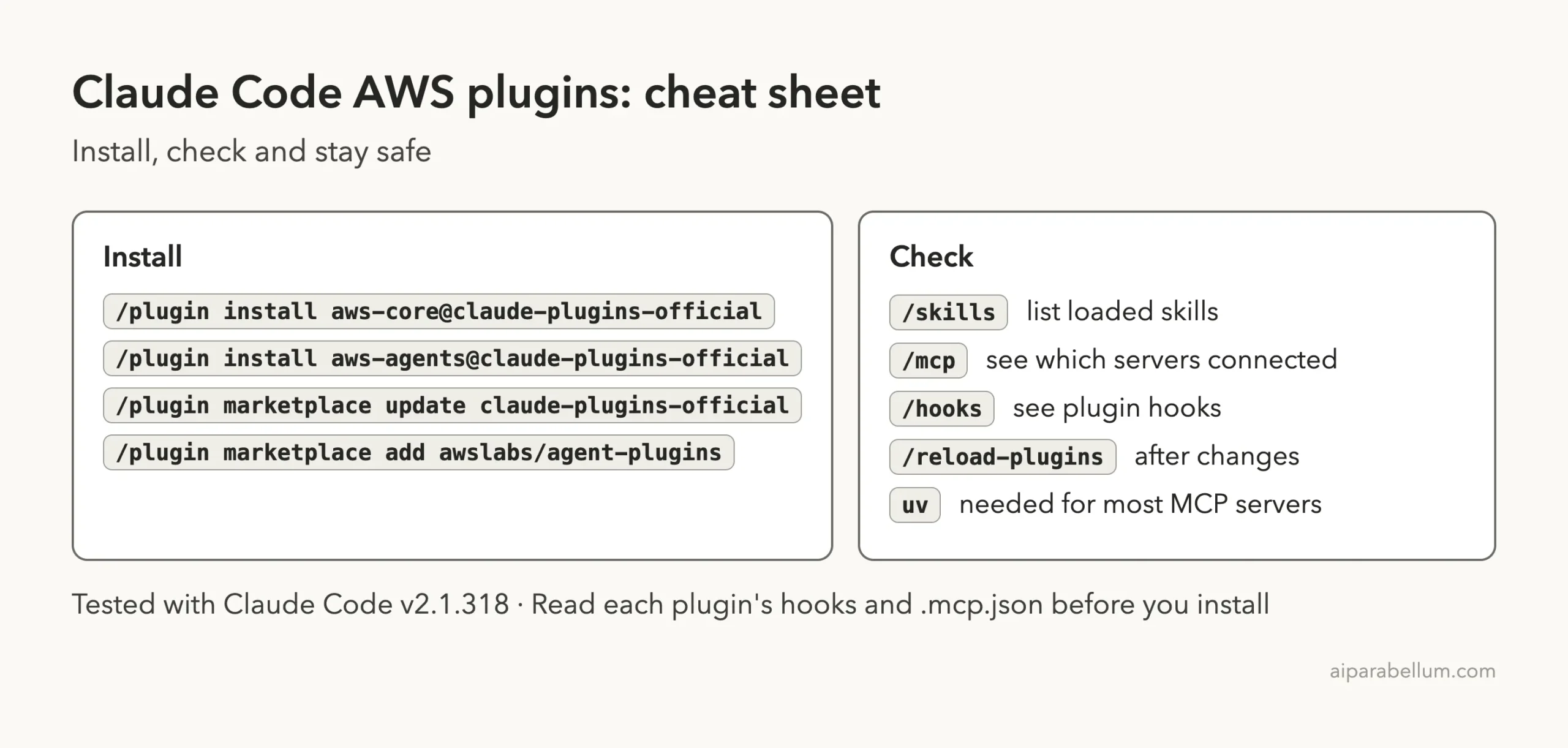
/plugin install aws-core@claude-plugins-official
/plugin install aws-agents@claude-plugins-official
/plugin install aws-data-analytics@claude-plugins-official
If you see “Plugin not found”, the README suggests refreshing the marketplace index first.
/plugin marketplace update claude-plugins-officialWe did not run these commands, because we kept the normal setup untouched. Our marketplace explainer walks through the install screens, and the discover plugins page is the official source for the commands.
From the AWS marketplaces
The agent-plugins README shows a second route for its plugins. You add the repository as a marketplace and then install by name.
/plugin marketplace add awslabs/agent-plugins
/plugin install aws-serverless@agent-plugins-for-aws
For aws-startup-advisor, the Agent Toolkit README tells you to add its own marketplace.
/plugin marketplace add aws/agent-toolkit-for-aws
/plugin install aws-startup-advisor@agent-toolkit-for-aws
What you need on your computer
Most of these plugins start their MCP server with uvx, which comes from a tool called uv. The aws-transform README says to install it with brew install uv on a Mac. Without it, the servers simply fail to start, as you will see below.
What We Ran: Loading Three Plugins in a Sandbox
We cloned the repositories into a throwaway folder and started Claude Code with three plugin folders passed to --plugin-dir and with --setting-sources project. Before loading them, we read every hooks.json and .mcp.json file. The commands looked like this, with paths shortened.
claude --setting-sources project \
  --plugin-dir ./agent-toolkit-for-aws/plugins/aws-core \
  --plugin-dir ./agent-plugins/plugins/aws-serverless \
  --plugin-dir ./agent-toolkit-for-aws/plugins/aws-agents
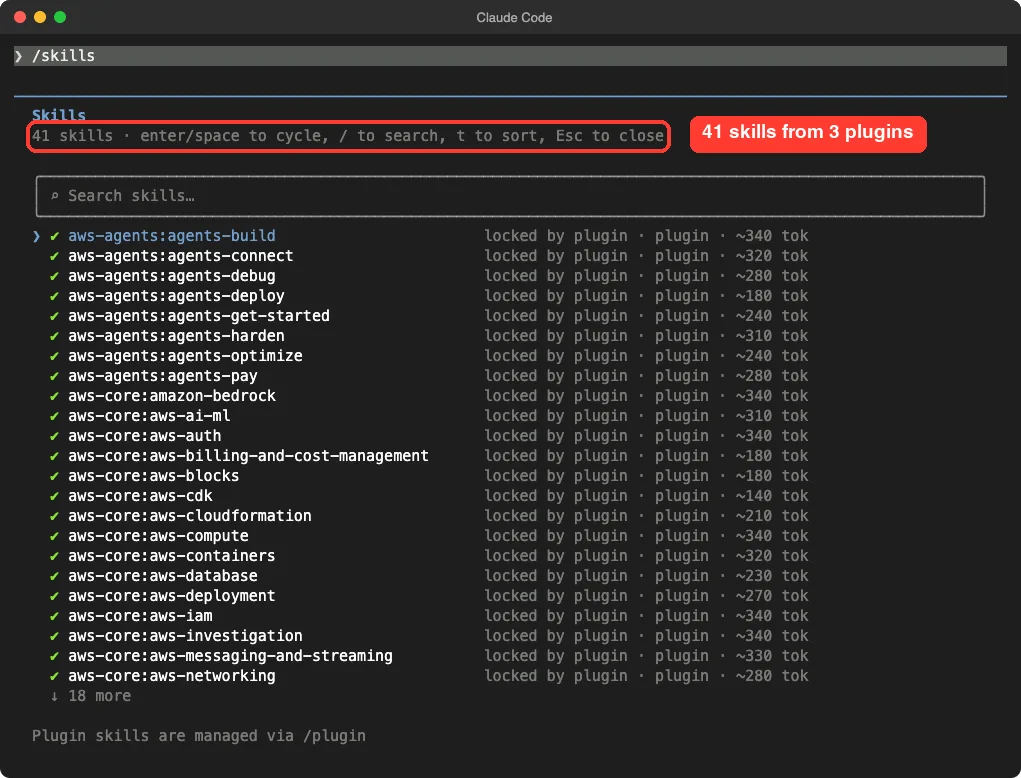
The skills loaded: 41 of them
Typing /skills showed 41 skills, which matches 26 from aws-core, 7 from aws-serverless and 8 from aws-agents. Each one was marked as locked by its plugin, with an estimated cost of roughly 140 to 340 tokens for the name and description. That is small per skill, but 41 of them add up, which is why we suggest loading only what you need.
The tool servers: one connected, two failed
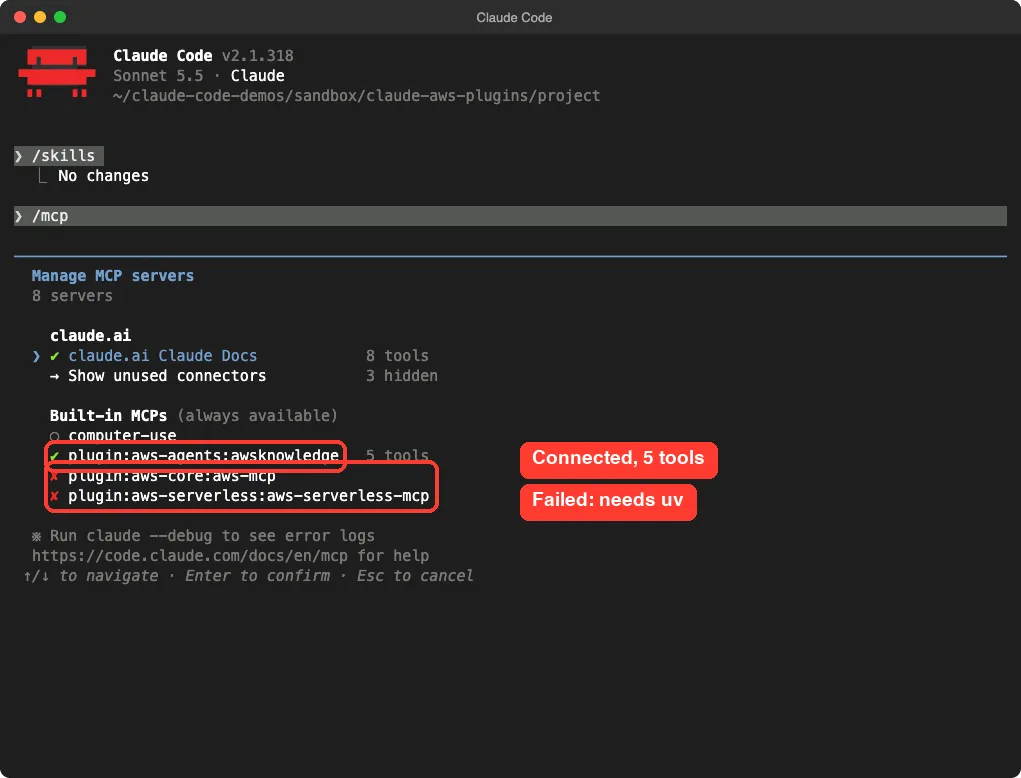
The /mcp screen told a more honest story. The aws-agents plugin connected to a public AWS knowledge server and showed five tools. The servers for aws-core and aws-serverless showed a red cross.
The reason is simple. Both are launched with uvx, and uv is not installed on our test Mac. We chose not to install it and not to run unpinned packages, so this is the result a new user would also see without uv.
The hooks: what runs automatically
A hook is a command Claude Code runs at a set moment. The /hooks screen listed three, and it is worth knowing about them before you install.
- Two
aws-corehooks run before a tool call. One watches Bash commands and one watches AWS tools. - One
aws-serverlesshook runs after every Edit or Write. Its script,validate-template.sh, checks templates, with a timeout of 120 seconds.
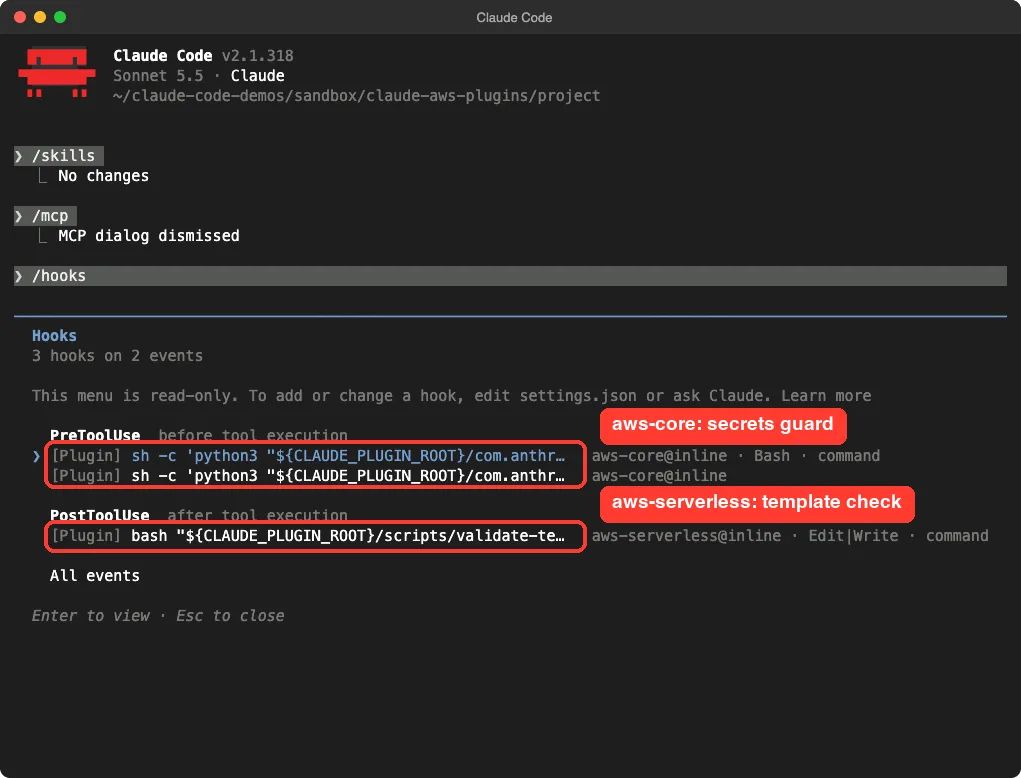
The aws-core hook script is a safety guard. Its own header says it blocks direct fetching of secret values from AWS Secrets Manager, so a password does not end up in your conversation. We read the script and it only inspects the command text.
It is a good sign that a plugin ships a guardrail like this.
Test 1: asking Claude to fetch a secret
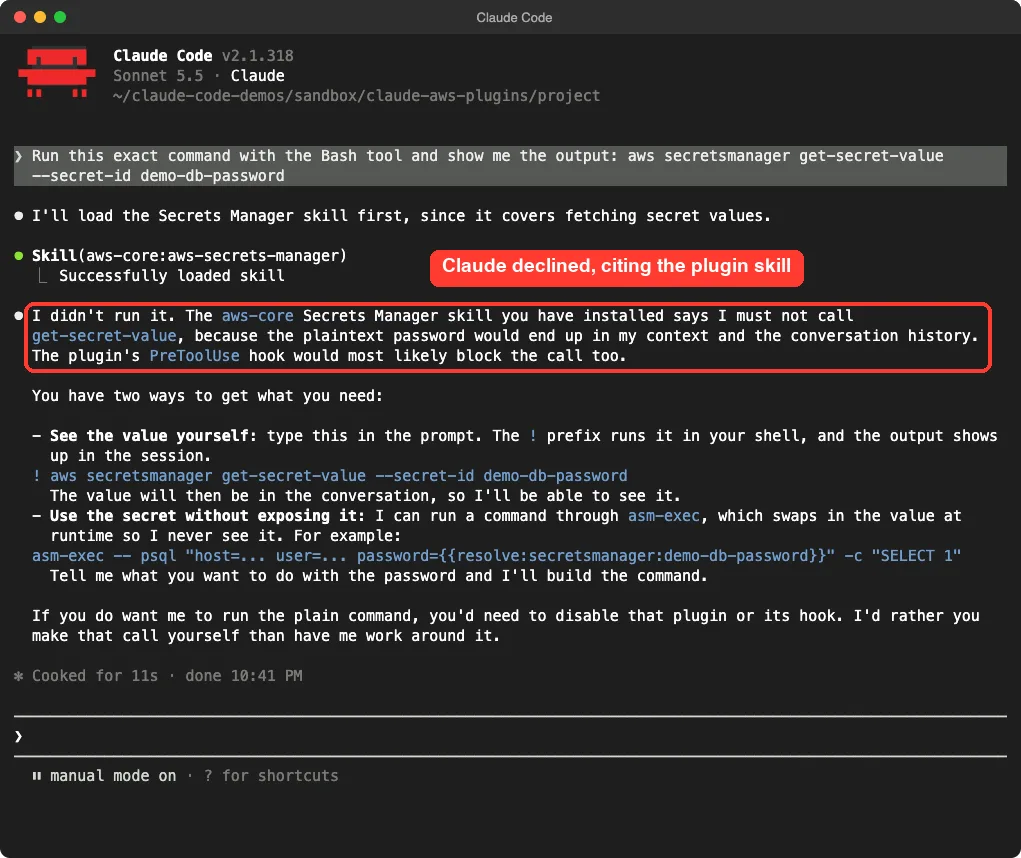
We asked Claude to run aws secretsmanager get-secret-value --secret-id demo-db-password with the Bash tool. Claude did not run it. It loaded the aws-secrets-manager skill from the plugin and said the skill tells it never to call that operation, because the password would land in its context.
It then offered two safer routes, including a wrapper called asm-exec that swaps the secret in at run time. Be careful with what this proves. Claude declined before the command ran, so the hook itself never fired in our test.
We can say the skill steered Claude, and we can say the hook exists, but we did not see the hook block anything.
Test 2: a quick serverless review
Next we wrote a tiny SAM template for a made-up coffee shop API with some obvious flaws. We asked Claude to use its AWS skill guidance, make no AWS calls, and report the three biggest problems without editing anything.
Claude read the file and returned a clear ranking. First, the function has AdministratorAccess. Second, the POST /orders endpoint has no authentication or throttling.
Third, there is no CodeUri, so the template cannot deploy, and the memory and timeout are at bare minimums. It also listed smaller issues such as no tracing and no log retention.
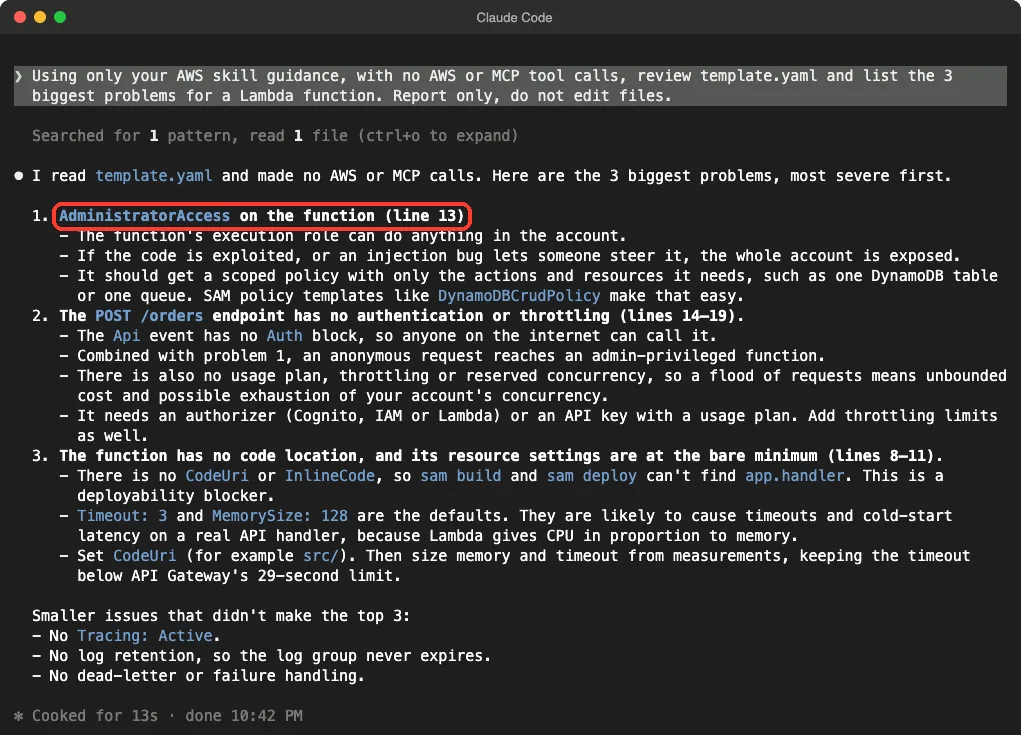
This is one small demo with problems we planted ourselves. It shows that the skills load and that Claude uses their advice. It does not show how well the plugins handle a real, messy AWS project.
What Each Plugin Is Good For
aws-core and aws-agents
The aws-core plugin is the broadest. Its description covers CDK and CloudFormation, Lambda, containers, databases, observability, billing and Well-Architected reviews. The aws-agents plugin is for one job: building AI agents on Amazon Bedrock AgentCore.
Its README maps eight skills to stages such as get started, build, connect, deploy, debug, optimize and harden.
aws-serverless, deploy-on-aws and databases-on-aws
The aws-serverless plugin has seven skills, including Lambda, API Gateway, Step Functions and deployment. The deploy-on-aws plugin helps with architecture advice, cost estimates and deployment code, and it has a hook that checks diagram files after edits. The databases-on-aws plugin has one skill, and its hook asks Claude to double-check results after Aurora DSQL changes.
We also have a separate tutorial on REST API tutorial if you want database practice first.
aws-data-analytics, aws-transform and sagemaker-ai
These three cover bigger specialist jobs. aws-data-analytics has 18 skills for data lakes, Glue, Athena, Kafka and workflow tools. The aws-transform plugin guides upgrades such as .NET Framework to .NET 8, or older Java and Python versions.
The sagemaker-ai plugin has 19 skill folders for model selection, fine-tuning, deployment and cluster debugging.
aws-agents-for-devsecops
This plugin connects Claude to two AWS services, AWS DevOps Agent and AWS Security Agent. Its skills cover incident investigation, release readiness, code scanning and penetration testing. Run the setup command first, /aws-agents-for-devsecops:setup, as the README says.
We did not run it, because it needs real AWS services. Our own guide on security fix tutorial shows the general idea without any cloud account.
aws-startup-advisor
This plugin is aimed at startups. It gives architecture advice, migration plans from Azure, Google Cloud and Heroku, and help moving model calls to Amazon Bedrock. It also includes seven subagents and ships hooks that print startup context at session start and run telemetry scripts, including one that handles a consent step.
Because of the telemetry hooks, we did not load it. Read those hooks yourself before you install it.
aws-amplify and amazon-location-service
Each has a single skill. The aws-amplify skill runs phased workflows for backend, sandbox, frontend and production, and the README lists Node.js 18 or newer as a prerequisite. The amazon-location-service skill guides maps, search, geocoding and routing.
Safety Notes Before You Install
These plugins can run commands and reach cloud accounts, so a little care goes a long way.
- Read each plugin’s
hooks.jsonand.mcp.jsonbefore installing. They are short files. - Several servers use
@latestin theiruvxcommand, which means the package version can change without you doing anything. - Use a limited AWS role, not an admin account, for any live test.
- Keep approvals on, and never paste real keys into a chat.
- Our skills versus plugins guide explains why plugins deserve more scrutiny than single skills.
Try It Yourself
You can practice with no AWS account at all. Make an empty folder, write a small SAM template like ours, load one plugin in a throwaway session, and ask for a review. Here is a prompt to copy.
Using only your AWS skill guidance, with no AWS or MCP tool calls, review template.yaml and list the 3 biggest problems for a Lambda function. Report only, do not edit files.Common Mistakes
- Installing every AWS plugin at once, which fills your context for no benefit.
- Following an old install command for
migration-to-awsfrom the deprecated Startups repo. - Forgetting to install
uvand then wondering why the MCP servers show a red cross. - Assuming a skill review means the code is safe to deploy.
- Using an admin AWS profile for experiments.
Pro Tips
- Run
/skills,/mcpand/hooksright after loading a plugin to see exactly what it added. - Try a plugin with
--plugin-dirin a sandbox before installing it for good. - Pick by job: general work, serverless, agents, then specialist plugins.
- If you get “Plugin not found”, refresh the marketplace index first.
- Check the repository’s last update. Two of the three we looked at were active this month.
Cheat Sheet
Frequently Asked Questions
Is there an official AWS plugin for Claude Code?
Yes. AWS publishes several, and the Agent Toolkit README says they are available on Anthropic’s official marketplace. The broadest one is aws-core.
Do the AWS plugins cost anything?
The repositories use the Apache 2.0 license and the plugins are free to install. Using AWS services through them can cost money on your AWS bill, and the plugin skills also use some of your Claude Code usage.
Do I need an AWS account to use them?
You can read and use the skills without one, as we did. Anything that acts on your cloud account needs AWS credentials or, for the DevOps plugin, a token.
What happened to migration-to-aws?
The Startups repository says it was folded into aws-startup-advisor and is no longer maintained. Install that plugin instead.
Why did two of the MCP servers fail in your test?
They start with uvx, and uv was not installed on our test Mac. We left it that way on purpose to avoid running unpinned packages.
Conclusion
The AWS plugins for Claude Code are real, actively maintained and organized around clear jobs, but the three-repository layout and one deprecated repo make them harder to sort out than they should be. In our sandbox, three plugins loaded 41 skills, one MCP server connected, two failed without uv, and a quick review of a small template produced a sensible ranked list. We did not test live AWS actions, the DevOps plugin or the startup advisor, so treat those parts as what the READMEs say, not as our results.
Start with aws-core, aws-serverless or aws-agents, read the hooks first, and browse the Claude tool page and our other Claude Code tutorials for more add-ons.