Want to build a REST API with Claude Code but not sure where to start? An API is the part of an app that other programs talk to, and a database is where it keeps its data. Together they power almost every app you use.
This is Project 6 of 20 in our Build with Claude Code series, part of our Claude Code tutorials. In Project 5 we made a Snake game in the browser. This time we build something with no screen at all: a bookmarks service that you talk to with simple web requests.
Tested with Claude Code v2.1.310 on October 26, 2026, on macOS.
Everything below really happened. The Claude Code screenshots are real, the prompts are the exact ones we typed, and the curl screenshots show the finished API answering real requests on this Mac. We tested on macOS; the Windows and Linux steps follow Anthropic’s official instructions.
What We Built
A REST API is a set of web addresses that you can read from and write to, and a database makes sure the data is still there tomorrow.
| Item | Details |
|---|---|
| Project | A bookmarks API: save a title, a link and a tag |
| Tools | Python standard library only: http.server for the web part and sqlite3 for the database |
| Endpoints | List, create, read, replace and delete, plus a tag filter and a title search |
| Safety | Clear JSON errors: 400 for bad input and 404 for a missing bookmark |
| Prompts used | 5 short prompts, plus the approvals |
| Install needed | Nothing, if Python 3 is on your computer |
The API only listens on your own computer (127.0.0.1), so nothing is exposed to the internet.
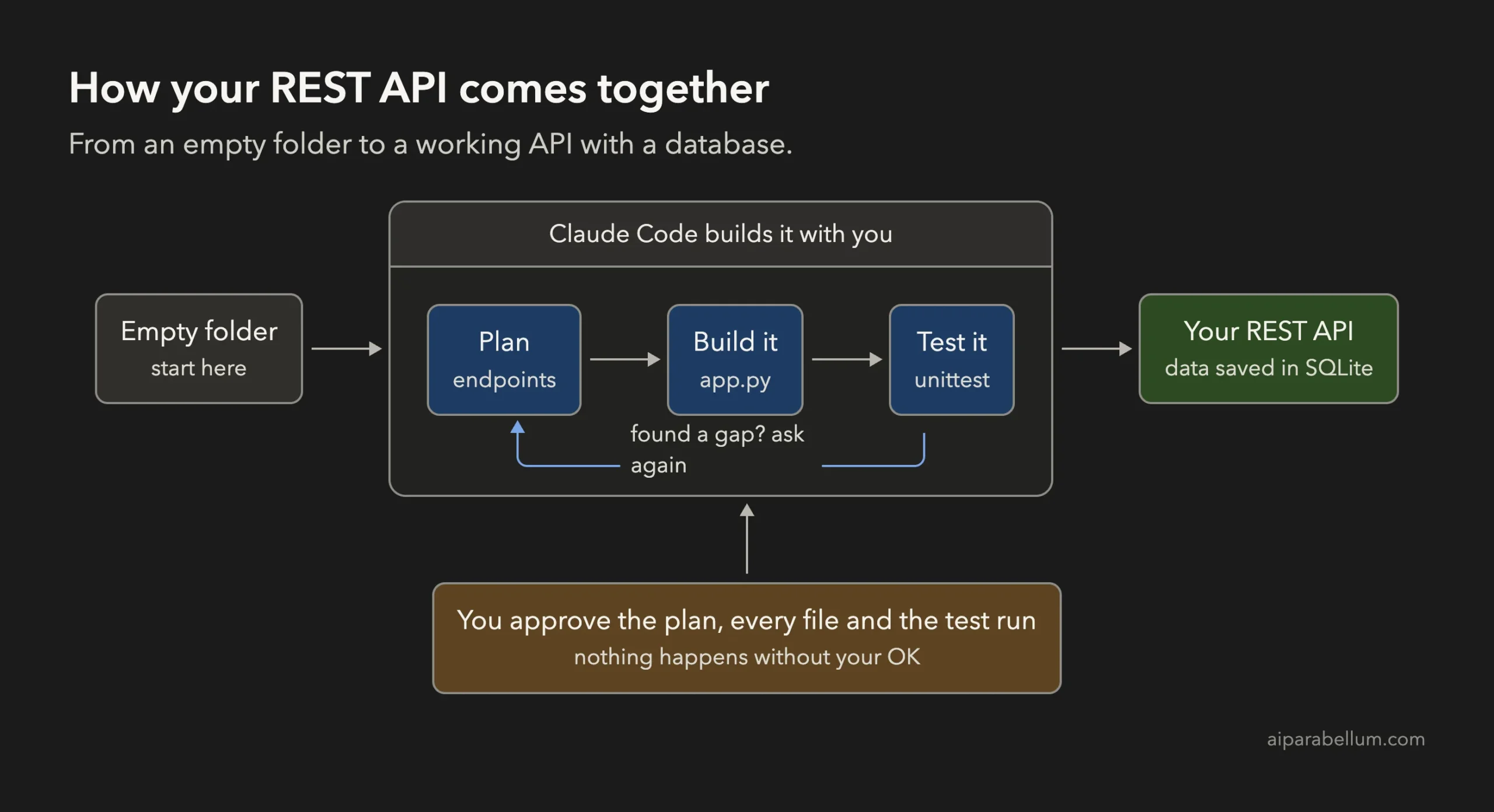
What Is a REST API With a Database?
A REST API lets programs talk to each other over the web. A program sends a request such as “give me all bookmarks” or “save this new one”, and the API sends back an answer, usually in JSON. JSON is just plain text that holds names and values.
The request type tells the API what you want. GET reads, POST creates, PUT replaces and DELETE removes. The answer carries a status code, such as 200 for OK, 201 for created, 400 for bad input and 404 for not found.
A database stores the data on disk. We use SQLite, which keeps everything in one file and comes built into Python, so there is nothing to install or sign up for.
Why Build a REST API With Claude Code?
An API has many small rules, and rules are easy to forget. Which status code goes with which mistake? Claude Code remembers these details and writes them down, and it can also write tests that check them.
Anthropic’s own workflow advice is to explore and plan first, then build, then verify. That fits an API well. If you are new to the tool, read our first session guide and our guide to permission modes before you start.
Step 1: Start in Plan Mode in an Empty Folder
Make a new folder, open a terminal inside it and start Claude Code in plan mode. In plan mode Claude can read and think, but it cannot change files until you approve its plan.
mkdir my-bookmarks-api
cd my-bookmarks-api
claude --permission-mode plan
The first time you open a folder, Claude Code asks if you trust it. Say yes, because you just made it.
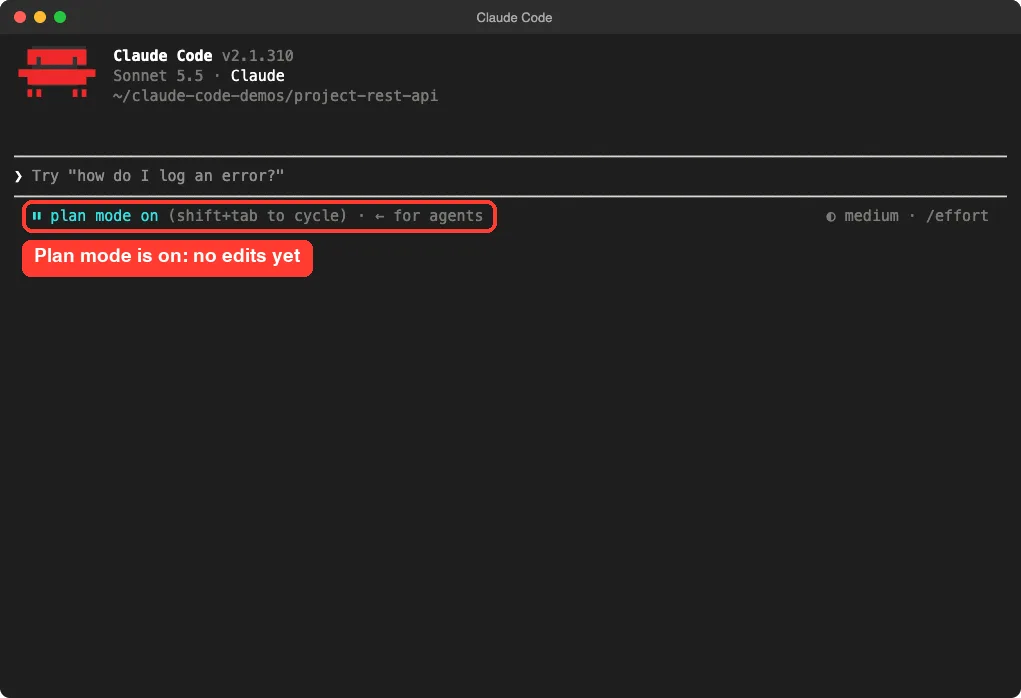
Our guide to plan mode explains the approval flow in more detail.
Step 2: Describe Your REST API to Claude Code
A good API prompt names the tools, the data, the endpoints and the format. This is the first prompt we used:
Build a small REST API for saving bookmarks (title, url, tag). Python standard library only: http.server for the web part and sqlite3 for the database. Endpoints: GET and POST /bookmarks, GET, PUT and DELETE /bookmarks/<id>. Send and receive JSON. Plan the files first, keep it small.The prompt does three jobs.
It limits the tools, so Claude does not pull in a big framework. It lists the endpoints, so nothing is left to guess. And the last sentence asks for a plan and a small result.
Step 3: Review the Plan
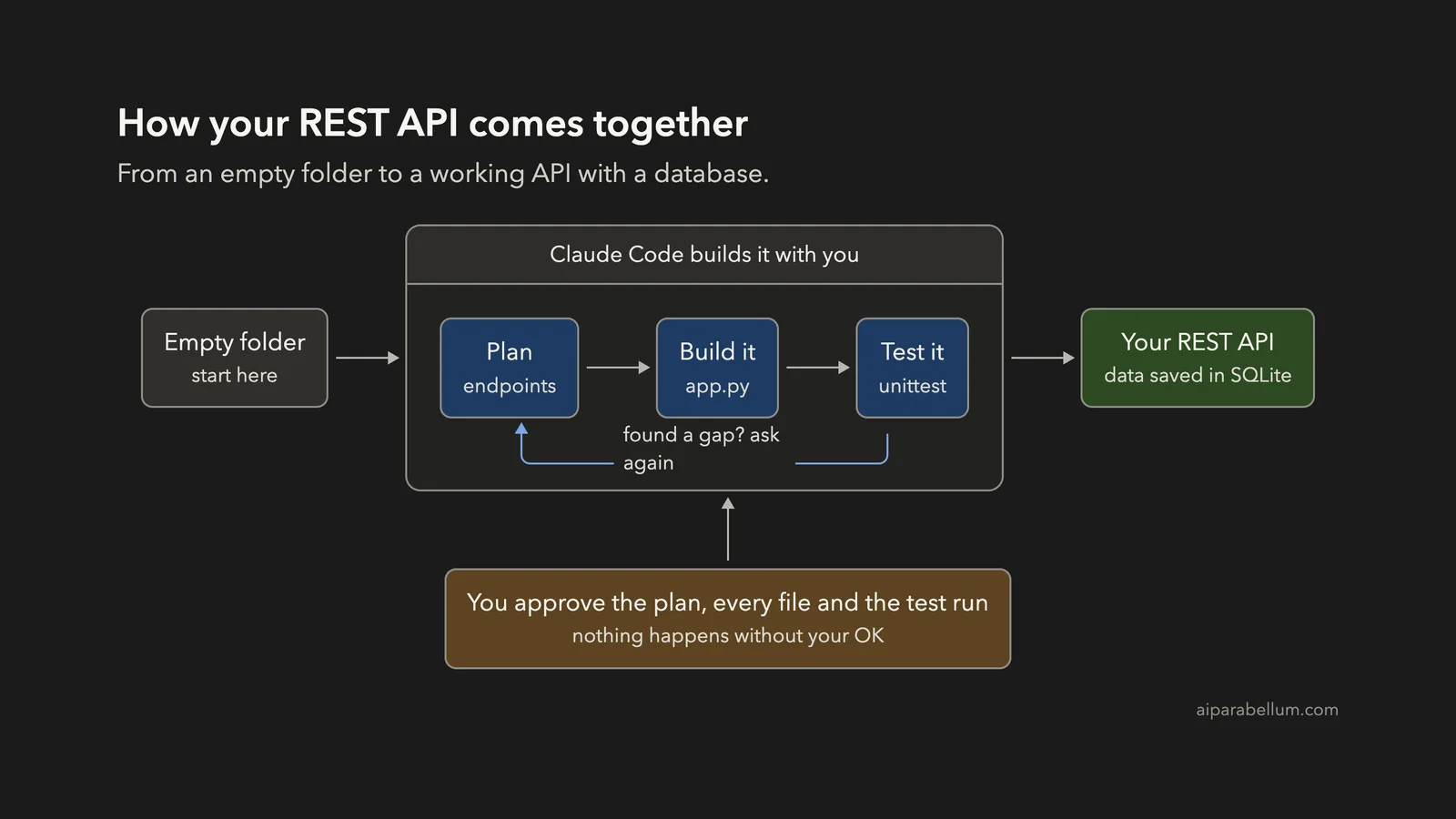
Claude’s plan listed three files and spelled out each endpoint with its status code. A list returns 200, a create returns 201 and a delete returns 204. Anything unknown returns 404.
It also planned the validation: title and url must be non-empty strings, and tag is optional. Failures return 400 with a message shaped like {“error”: “…”}. The plan ended with a way to check the work: a unit test file plus a manual curl test.
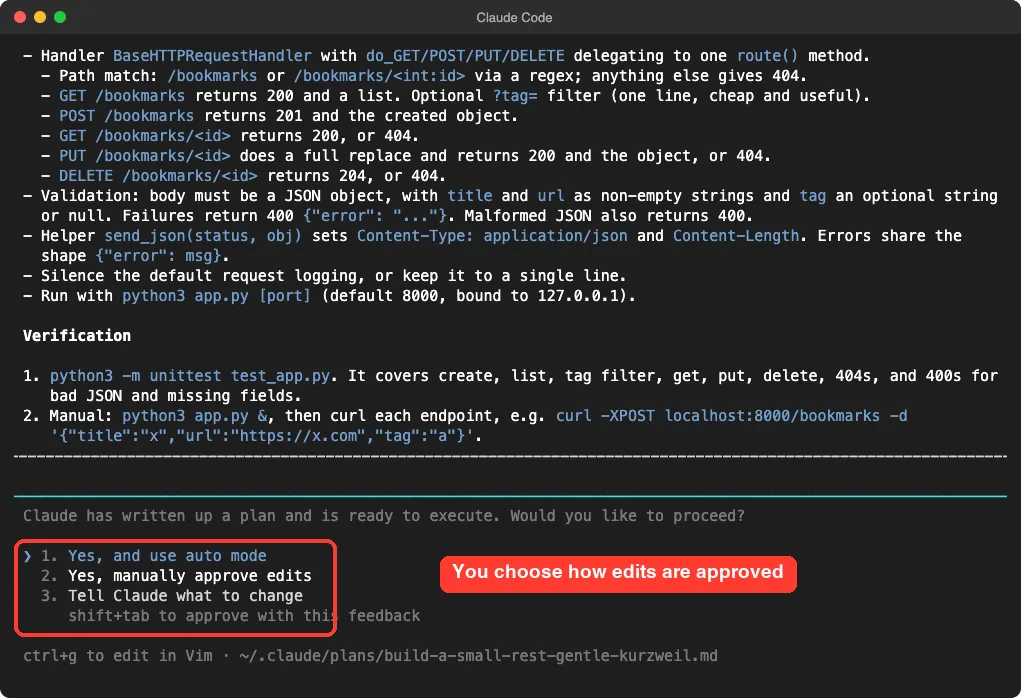
We chose to approve edits manually so we could read each file before it was written.
Step 4: Approve the Files
Claude showed the full app.py and asked, “Do you want to create app.py?” You can say yes once, switch to accept edits for the session, or say no.
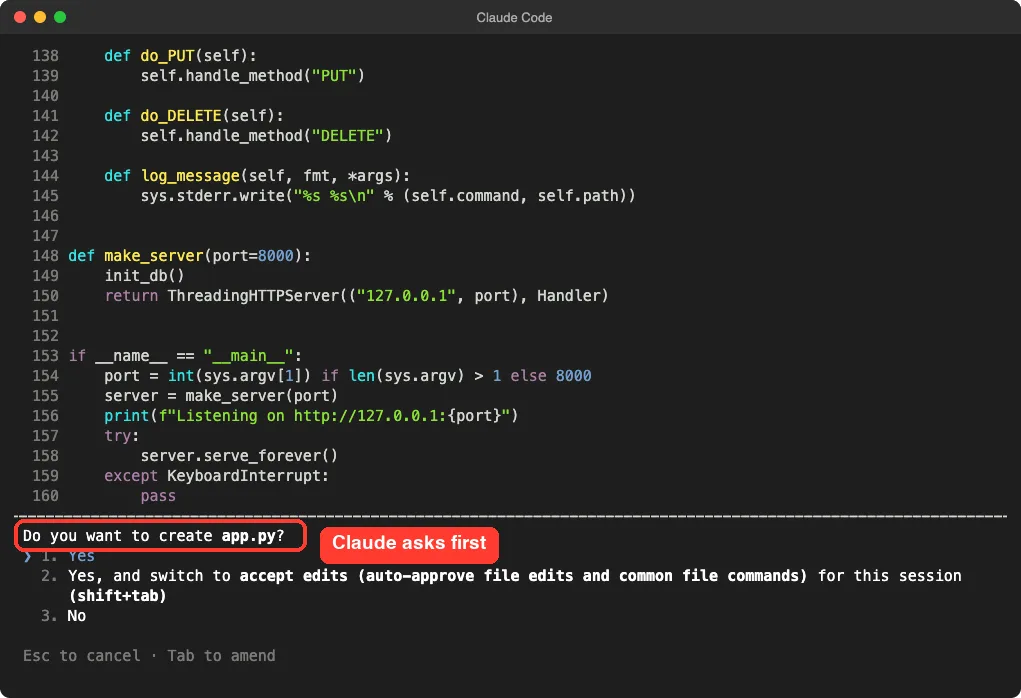
For this throwaway demo we switched to accept edits so the other files went through. For a real project, keep approving by hand until you trust the flow. Our permissions guide covers safer setups.
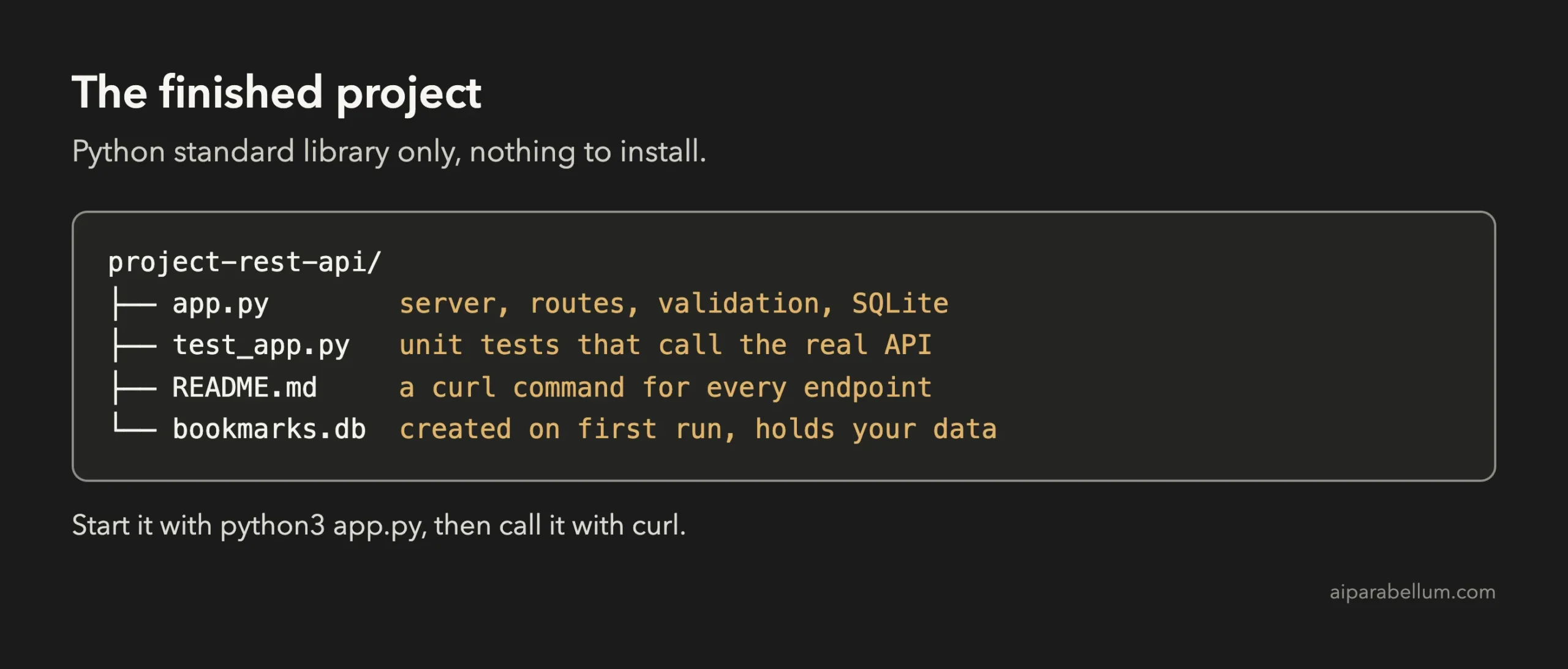
Claude wrote three files: app.py with 160 lines, test_app.py with 73 lines and a README.md with 38 lines.
Step 5: Let Claude Code Test the API
When Claude wanted to run its tests, it stopped and asked first. Running a command is a separate permission from writing a file.
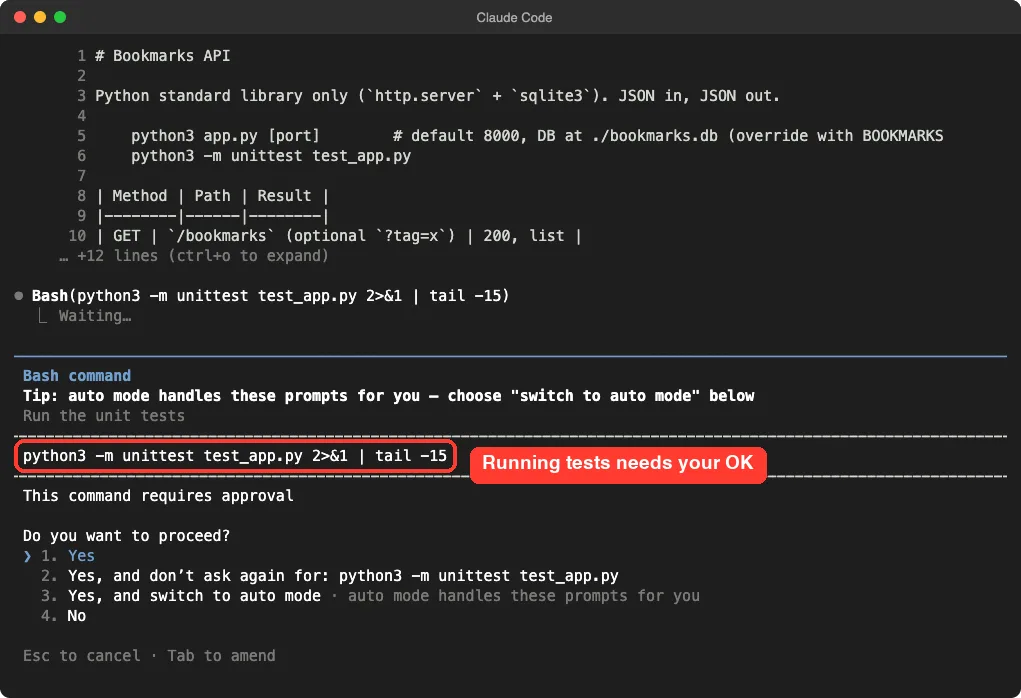
We did not approve that first request and started a fresh session instead. In the new session we asked directly:
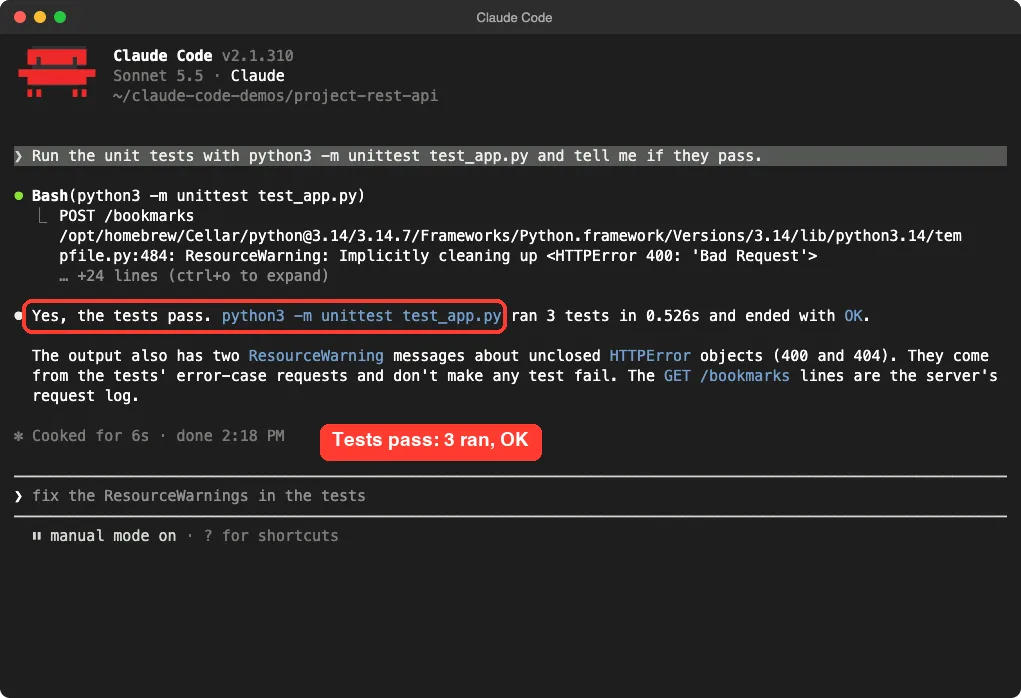
Run the unit tests with python3 -m unittest test_app.py and tell me if they pass.This time we chose the option that lets that command run without asking again. Claude ran the tests and reported that 3 tests passed. It also noticed two harmless ResourceWarning messages from the tests’ error-case requests and explained they did not make any test fail.
Step 6: Call Your REST API With curl
Tests are good, but you should also see the API work. Start it in one terminal tab:
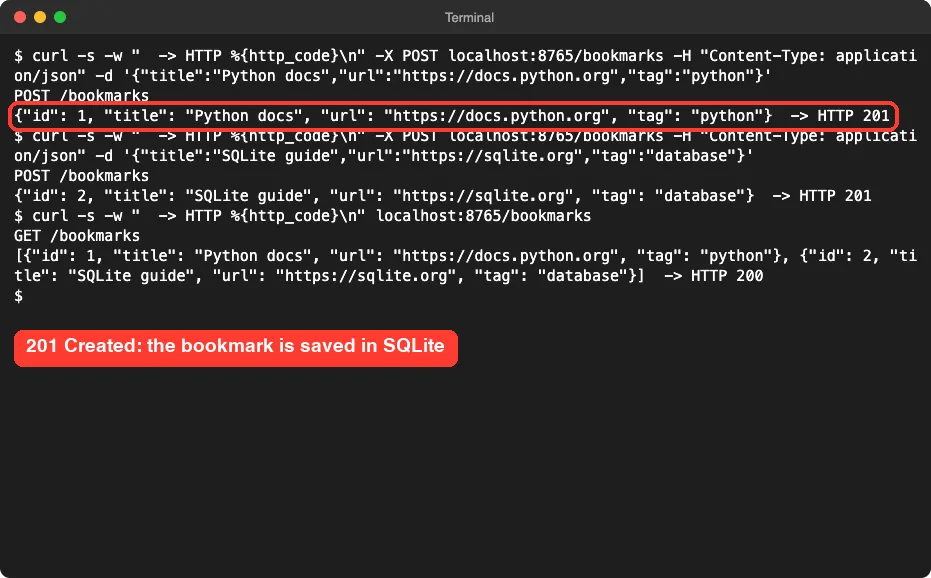
python3 app.pyThen call it from another tab with curl, a tool that sends web requests from the terminal. We used port 8765 in our test, and added a flag so curl prints the status code at the end of each answer.
curl -X POST localhost:8000/bookmarks \
  -H "Content-Type: application/json" \
  -d '{"title":"Python docs","url":"https://docs.python.org","tag":"python"}'
The API saved the bookmark, gave it an id and answered with the new record and a 201 status. We added a second bookmark and listed them all with a plain GET.
Step 7: Check the Errors and the Filters
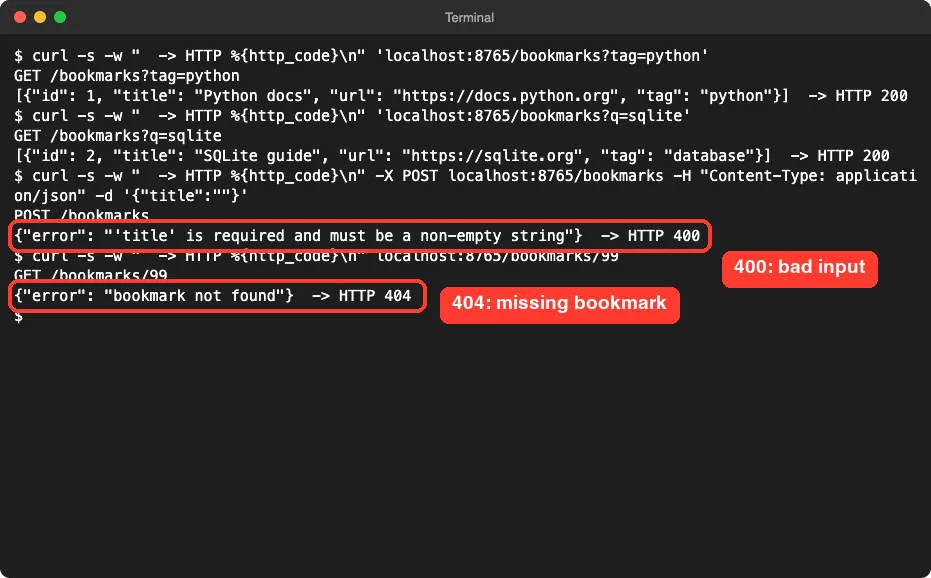
Good APIs say clearly what went wrong. We sent a bookmark with an empty title and asked for a bookmark that does not exist. The API answered with a JSON message and the right code each time.
We also tried the tag filter, which returns only bookmarks with an exact tag, and a search on the title.
Step 8: Add a Search Feature
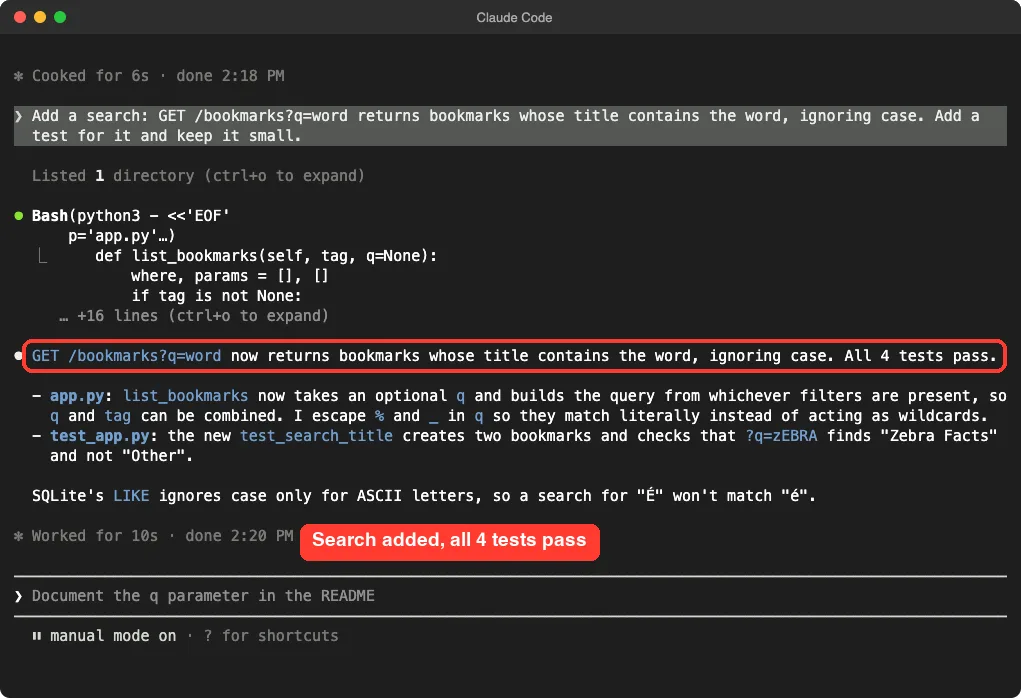
The title search came from a later prompt, which we gave Claude after the tests passed:
Add a search: GET /bookmarks?q=word returns bookmarks whose title contains the word, ignoring case. Add a test for it and keep it small.Claude changed the list function so the tag filter and the search can be combined. It also escaped the percent and underscore characters, so they match literally instead of acting as wildcards. Then it added a test and ran everything: all 4 tests passed.
Claude also warned about a limit. SQLite’s LIKE ignores case only for plain English letters, so a search for an accented capital letter will not match its lowercase twin.
We also asked for error codes and a tag filter in a second prompt, but it was not needed. The plan had already included both. That is a good sign of a clear first prompt.
Check That the Database Keeps Your Data
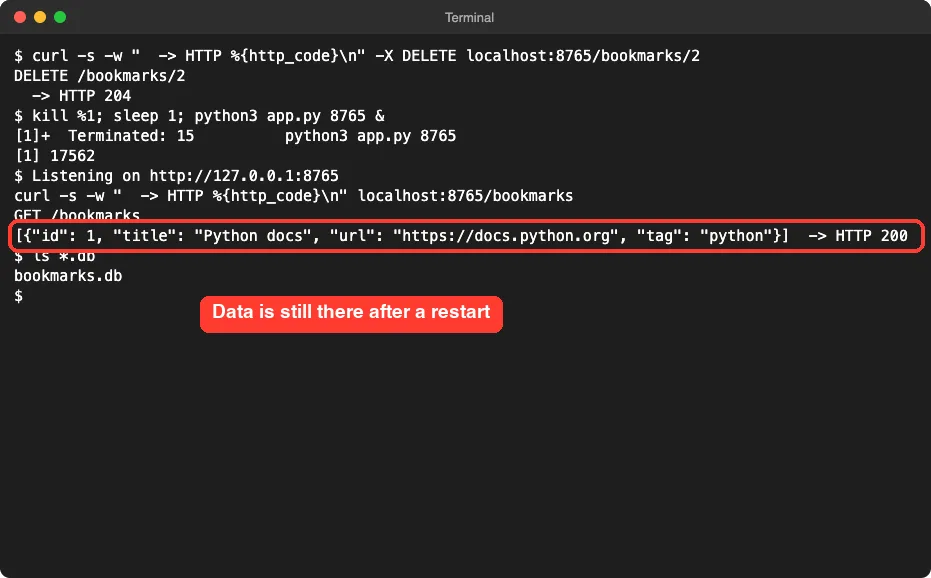
Here is the test that proves there is a real database. We deleted bookmark 2, stopped the server and started it again. The list still held bookmark 1, and the bookmarks.db file sat in the folder.
The Final Project Files
The full app.py has 167 lines, so here are the two pieces that explain the idea. First, the rules for a valid bookmark:
def validate(data):
    if not isinstance(data, dict):
        raise ApiError(400, "body must be a JSON object")
    for field in ("title", "url"):
        if not isinstance(data.get(field), str) or not data[field].strip():
            raise ApiError(400, f"'{field}' is required and must be a non-empty string")
    tag = data.get("tag")
    if tag is not None and not isinstance(tag, str):
        raise ApiError(400, "'tag' must be a string or null")
    return data["title"], data["url"], tag
Second, how a bookmark is saved. Notice the question marks. They keep user input out of the SQL text, which protects you from a common attack called SQL injection.
def create_bookmark(self):
    title, link, tag = validate(self.read_json())
    with connect() as conn:
        cur = conn.execute(
            "INSERT INTO bookmarks (title, url, tag) VALUES (?, ?, ?)", (title, link, tag)
        )
        row = conn.execute("SELECT * FROM bookmarks WHERE id = ?", (cur.lastrowid,)).fetchone()
    self.send_json(201, dict(row))
Here is how to read it.
The first function checks the data and raises an error with a status code if something is wrong. The second one validates first, then inserts a row, reads the row back and sends it with a 201. The rest of the file is routing: it matches the address and the request type and calls the right function.
Try It Yourself
Build your own version with this starter prompt. Start Claude Code in plan mode in an empty folder first.
Build a small REST API for saving bookmarks (title, url, tag). Python standard library only: http.server for the web part and sqlite3 for the database. Endpoints: GET and POST /bookmarks, GET, PUT and DELETE /bookmarks/<id>. Send and receive JSON. Plan the files first, keep it small.Then try these variations, one at a time:
- Ask for a different kind of data, such as books to read, recipes or expenses.
- Ask for a created_at time on every record and sort the list newest first.
- Ask for paging, so GET /bookmarks?limit=10&offset=20 returns one slice at a time.
- Ask for a simple API key that every request must send in a header.
- Ask for a tiny web page that lists the bookmarks by calling your API.
Common Mistakes
- Forgetting the Content-Type header in curl. Without it, some APIs cannot tell the body is JSON.
- Skipping the tests. Claude’s summary says what it wrote, not that it works, so always run them.
- Expecting the data to live in memory. A real database file is what keeps your data after a restart.
- Putting user input straight into SQL text. Ask Claude to use placeholders, as ours did.
- Exposing a demo API to the internet. Ours listens on 127.0.0.1 only, and it has no login.
Pro Tips
- List the endpoints in your prompt. It is the clearest way to get the API you want.
- Always ask for a way to check the work. Anthropic recommends tests or a build so Claude can see a pass or fail.
- Ask Claude to write a README with a curl command for every endpoint. Ours did, and it is handy for later.
- Make one change at a time and run the tests after each one.
- If a change goes wrong, the rewind feature can roll your files back, and our costs guide helps you watch your usage.
Cheat Sheet
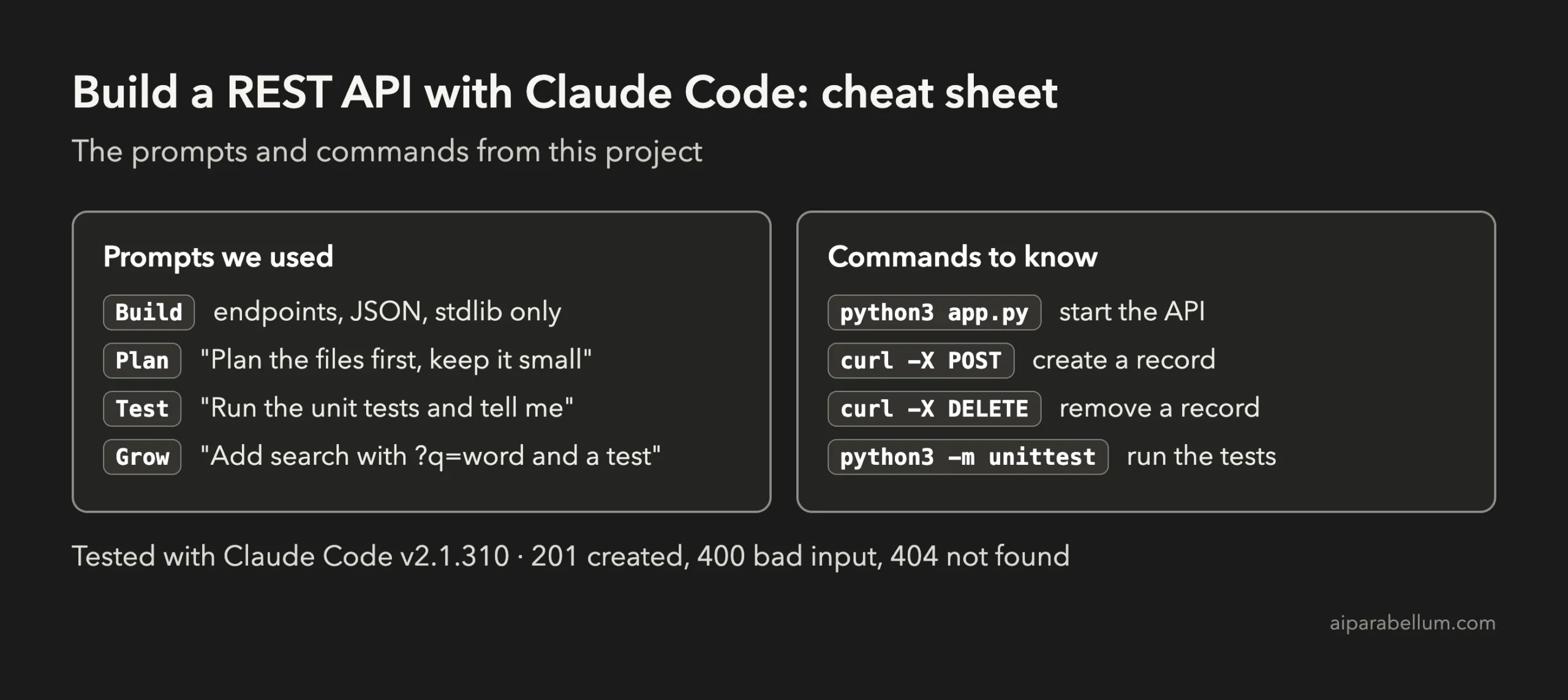
For the official reference, see Anthropic’s page on common workflows. To learn more about the assistant behind the tool, read our Claude AI overview. Project 4, our Python command-line tool, is a good companion because both projects use only the standard library.
Frequently Asked Questions
Do I need to know Python to build a REST API with Claude Code?
No. You describe the API in plain English and Claude writes the code. Reading the code it shows you is a good way to start learning.
Why SQLite and not a bigger database?
SQLite lives in one file and comes with Python, so there is nothing to install. For a large app with many users you would move to a server database, and Claude can help you with that step.
Can I use a framework like Flask or FastAPI?
Yes. We chose the standard library so the demo needs no installs. Tell Claude which framework you prefer in your prompt and it will follow.
Is this API ready for the internet?
No. It has no login, no limits and no secure connection. Treat it as a learning project that runs on your own computer.
What if something does not work?
Describe what you see, for example “POST returns 400 even with a title”, and paste any error message. Claude can then fix that one problem and rerun the tests.
Conclusion
You now know how to build a REST API with Claude Code: plan first, list the tools and endpoints, approve the files, run the tests and then call the API yourself with curl. It took five short prompts and a few approvals, and you end up with a small service and a real database that you own and can read. Try the starter prompt, then come back for the next project in the series.
Previous in the series: Project 5: Build a Simple Game With Claude Code
Next in the series: Project 7: Build a Weather Dashboard With Claude Code.