If you keep notes in Obsidian, you have probably wondered how to connect Claude Code to your vault. Three open-source projects promise a “second brain” that Claude builds and maintains for you: claude-obsidian, obsidian-wiki and Ars Contexta. We ran all three for real in throwaway folders, so you can see what each one actually does before you pick one.
This guide is part of our Claude Code tutorials. Find more add-ons in our Skills Directory.
Tested with Claude Code v2.1.319 on November 9, 2026 (macOS), using claude-obsidian v3.0.1 at commit 2e54556 (October 22, 2026), obsidian-wiki at commit 513c65e (November 9, 2026) and Ars Contexta v0.8.0 at commit 2acfd5c (February 19, 2026).
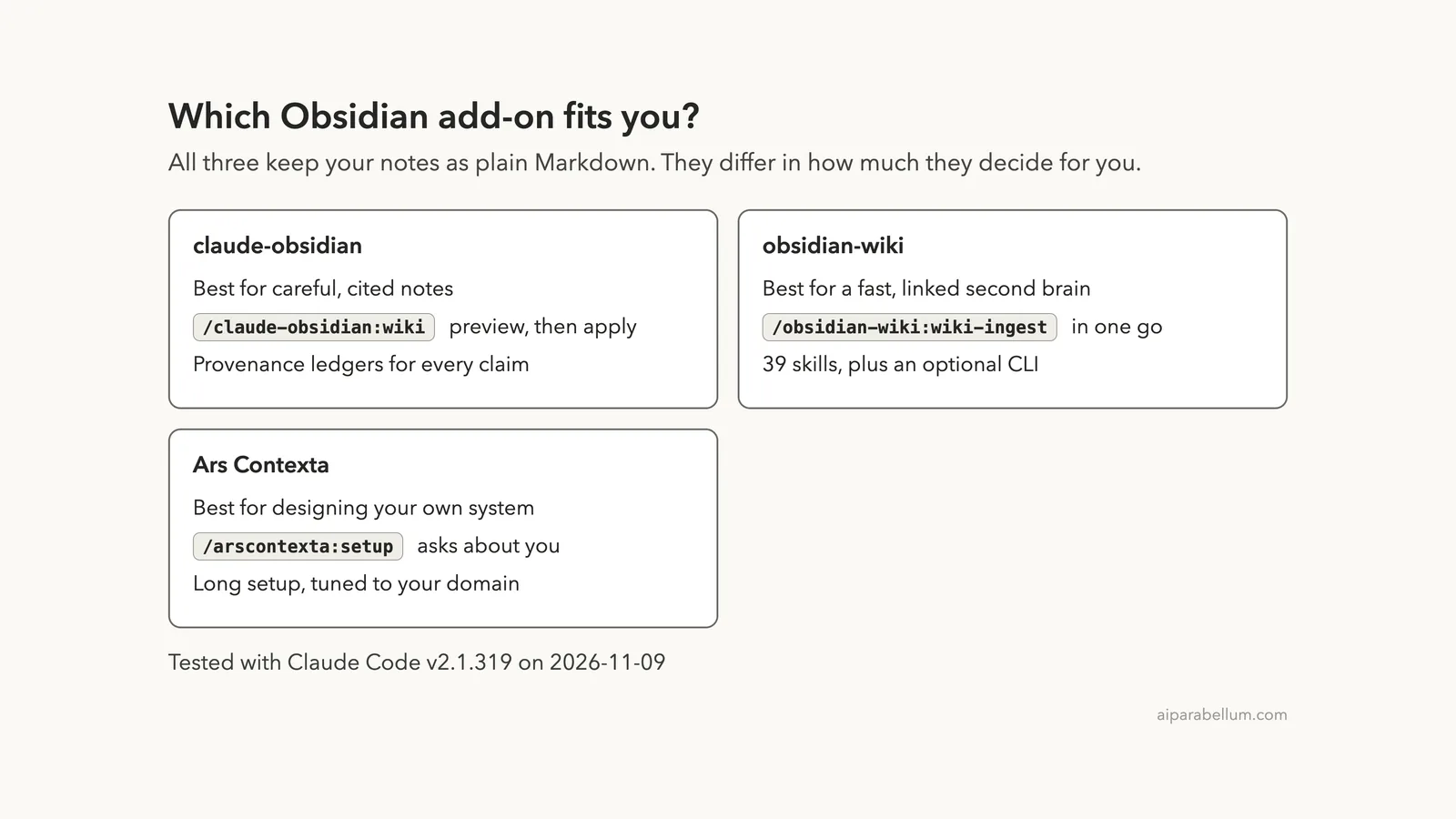
Quick Summary: The Three Obsidian Add-Ons Side by Side
| Feature | claude-obsidian | obsidian-wiki | Ars Contexta |
|---|---|---|---|
| Main idea | Source-cited wiki with a safety net | Fast, linked second brain | A system designed around how you think |
| How it starts | /claude-obsidian:wiki shows a preview first | A .env file points at your vault | /arscontexta:setup asks about your domain |
| Skills in the repo | 15 | 39 | 10 plugin skills, plus generated ones |
| Needs outside tools | Python 3.11 or newer | Optional CLI (not part of the plugin) | None |
| We ran it | Setup, apply and a one-note ingest | A two-note ingest | Help and the start of setup |
| Last commit we saw | October 22, 2026 | November 9, 2026 | February 19, 2026 |
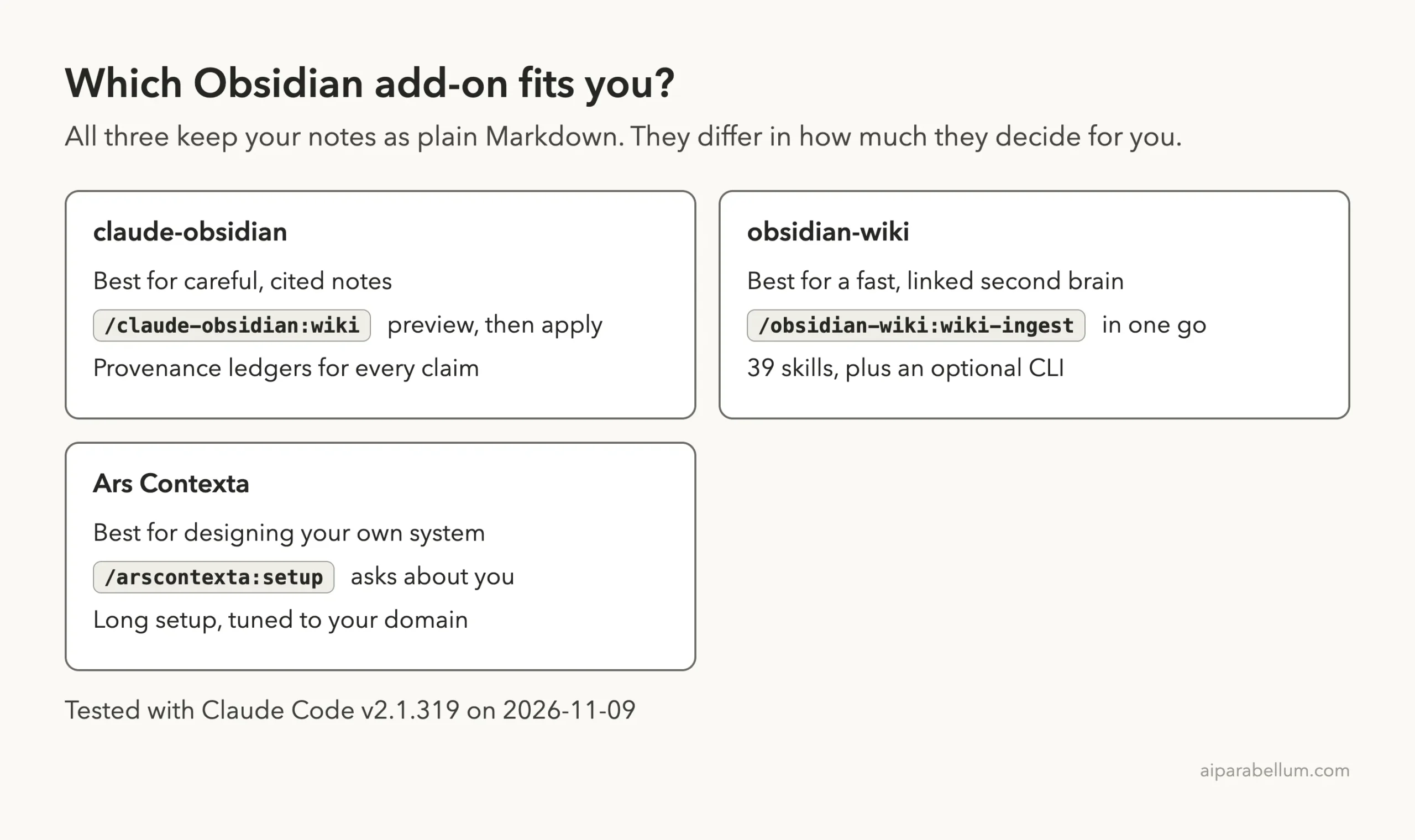
All three store your notes as plain Markdown files, so Obsidian can open them and nothing is locked in. The real difference is how much each one decides for you.
Why Connect Claude Code to Obsidian at All?
Obsidian is a note app that works on a folder of Markdown files, called a vault. Claude Code can read and write files in a folder, so the two fit together naturally. The idea behind all three projects comes from the “LLM wiki” pattern: instead of asking an AI the same questions again and again, you let it compile what you read into linked notes once, and keep them up to date.
A good setup gives you three things. Sources go in, linked notes come out, and you can ask questions and get answers that point back to your own notes. Without a tool like this, you would have to explain your vault to Claude every session.
How we tested safely
We did not install anything into our real Claude Code setup. Each plugin was cloned into a sandbox folder and loaded for one session only, using claude --plugin-dir <folder> --setting-sources project. Each demo vault held two tiny notes we wrote ourselves: one about rate limiting and one about retry with backoff.
Before running anything, we read each repo’s hook files. A hook is a small script that Claude Code runs on events like session start. We describe what each one does in the safety section below.
claude-obsidian: Preview First, Then Apply
The claude-obsidian plugin describes itself as a local-first package for source-cited Obsidian knowledge bases. Its README lists 15 skills and says nothing leaves your machine unless you say so. The documented install is two commands:
claude plugin marketplace add AgriciDaniel/claude-obsidian
claude plugin install claude-obsidian@agricidaniel-claude-obsidian
You also need Python 3.11 or newer. For our test, we skipped the install and loaded the plugin folder with --plugin-dir instead.
Step 1: Preview the vault
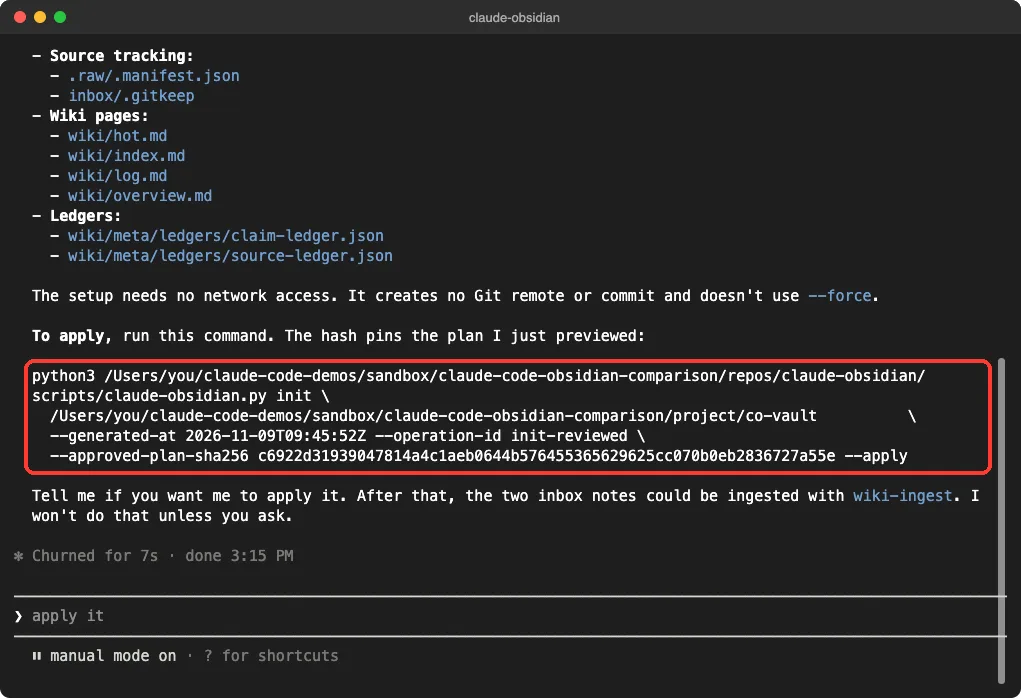
We typed /claude-obsidian:wiki set up this folder as a new vault, preview only. Claude ran the plugin’s script in dry-run mode and listed every file it would create, such as wiki/index.md, wiki/log.md and two ledger files. It also said the setup needs no network access and creates no Git commit.
The important detail is the hash. Claude printed an apply command that included an --approved-plan-sha256 value, which pins the exact plan you just reviewed. If the plan changes, the hash no longer matches.
Step 2: Apply the plan
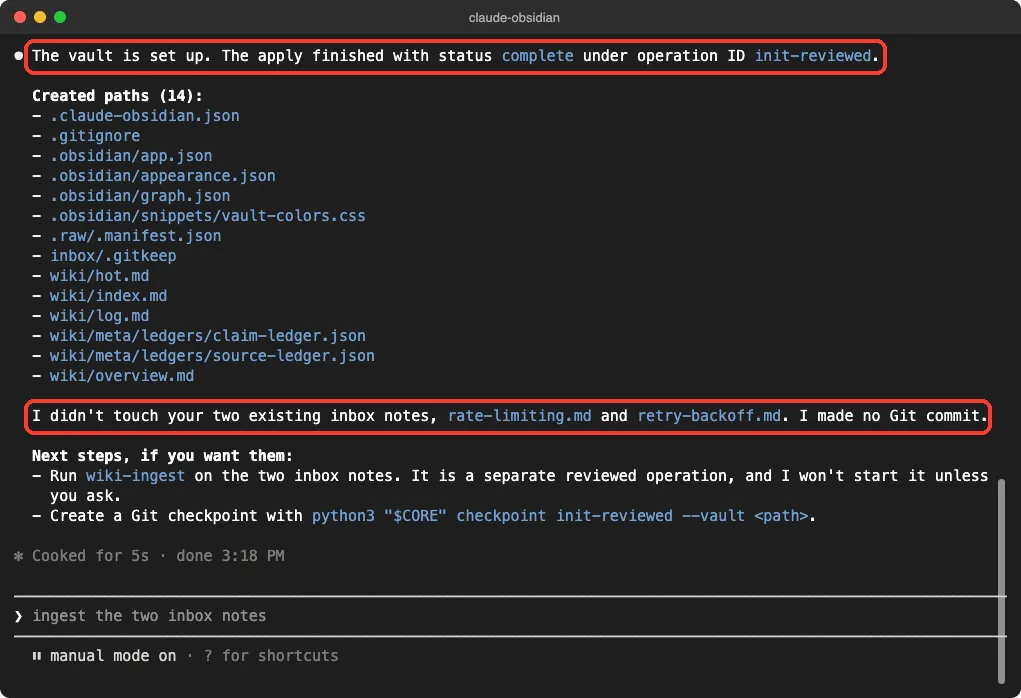
We told Claude to apply it. The vault was created with status complete, and Claude listed 14 created paths. It also said it did not touch our two existing inbox notes and made no Git commit.
Step 3: Ingest a note
Ingesting is where this plugin gets strict. Our first attempt, asking for both inbox notes, did not finish: Claude spent its time reading the plugin’s own ledger code and we stopped it. This is our experience from one run, not proof of a bug.
A narrower request worked. We asked for /claude-obsidian:wiki-ingest inbox/rate-limiting.md only, keep it small. About 38 seconds later, Claude reported one source page with three claims, all marked provisional because the source was our own unreviewed notes.
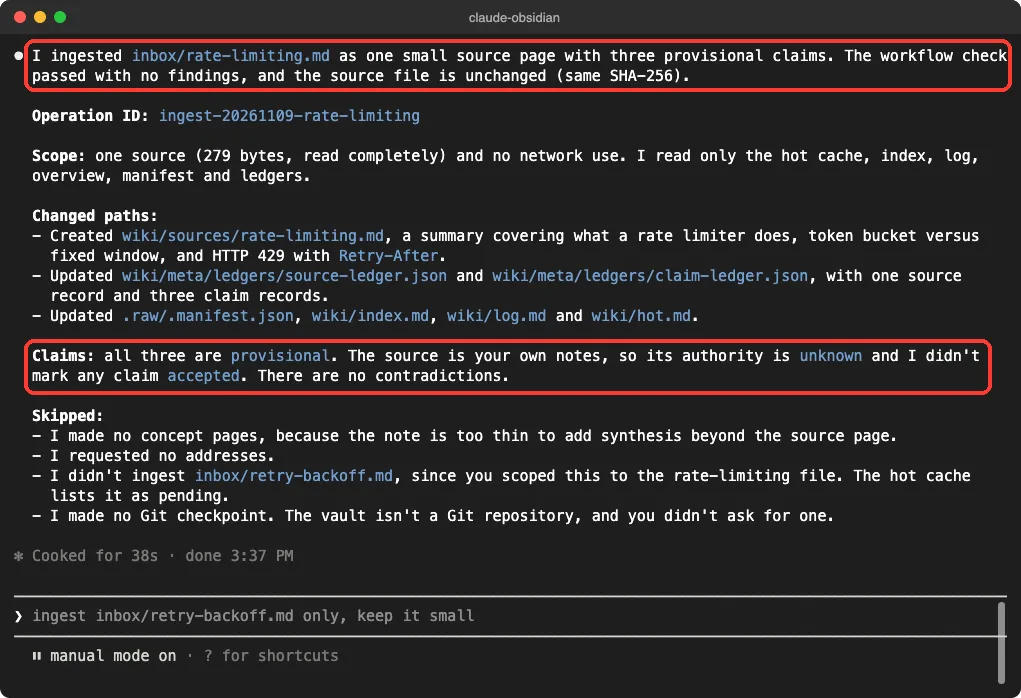
The page it wrote includes the file hash, the source path and the claim IDs in its header. It also added a short caveats section saying the note does not cover other algorithms. That is careful behavior, but it also means you get fewer pages than you might expect: Claude created no concept pages because the note was “too thin.”
obsidian-wiki: Fast Linked Notes With Fewer Guardrails
The obsidian-wiki project is a set of 39 skills that follow the same LLM wiki idea. Its README offers a Python package with a setup command, and a separate path for Claude Code users:
/plugin marketplace add Ar9av/obsidian-wiki
/plugin install obsidian-wiki@obsidian-wiki
The README states that the plugin ships the skills only, not the session hooks or the obsidian-wiki command-line tool. Keep that in mind, because it showed up in our test.
Point it at a vault
The skills read a .env file found by walking up from your current folder. We created one in a demo project folder with two lines: OBSIDIAN_VAULT_PATH for the wiki and OBSIDIAN_SOURCES_DIR for the folder holding our two notes. The skills read only the variables they need.
Ingest both notes in one go
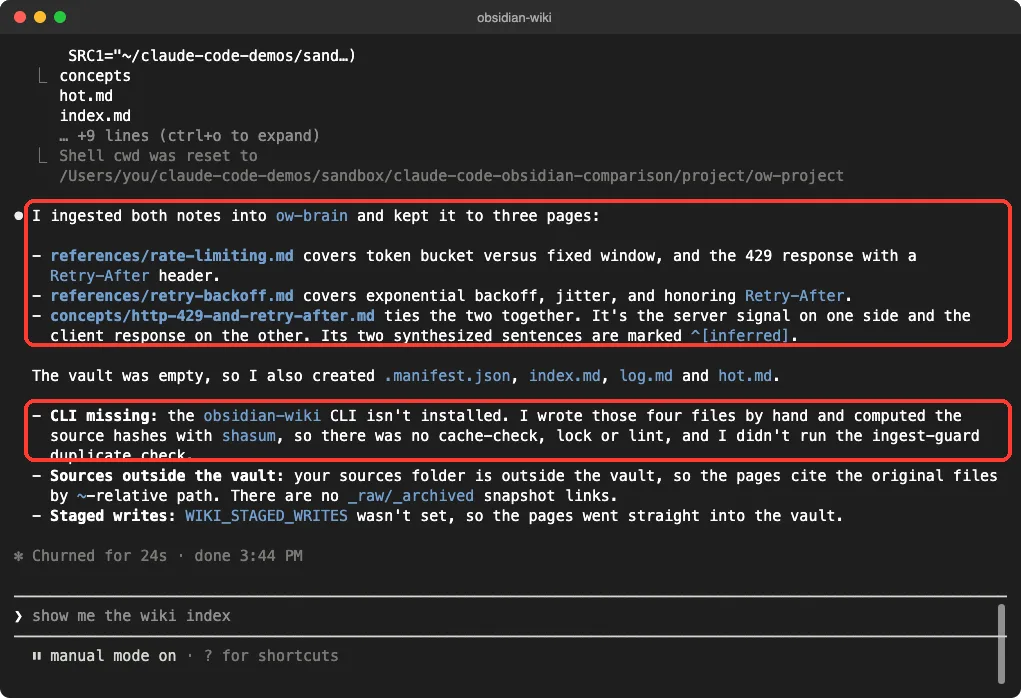
We typed /obsidian-wiki:wiki-ingest ingest the two notes from my sources folder into my wiki, keep it small. About 24 seconds of work later, Claude had created three pages: a reference page for each note and a concept page tying them together. It also created the vault’s index.md, log.md, hot.md and .manifest.json.
The concept page, concepts/http-429-and-retry-after.md, links back to both reference pages with wiki links. It marks two synthesized sentences as inferred, so you can tell what came from your notes and what Claude added.
What Claude said it skipped
Claude was upfront about the gaps. Because the obsidian-wiki command-line tool was not installed in plugin mode, it wrote the four bookkeeping files by hand and computed file hashes with shasum. It said there was no cache check, lock or lint, and it did not run the duplicate check.
Our sources folder was also outside the vault, so the pages cite the original files by path. If you want the full workflow, install the Python package as the README describes. We did not test that route.
Ars Contexta: A System Built From a Conversation
Ars Contexta takes a different approach. Its README calls it a plugin that generates a complete knowledge system from conversation, with folders, templates, hooks and note types tailored to your domain. Install steps from the README:
/plugin marketplace add agenticnotetaking/arscontexta
/plugin install arscontexta@agenticnotetaking
After installing, you restart Claude Code and run /arscontexta:setup. The README says setup takes about 20 minutes and is token-intensive.
What we ran
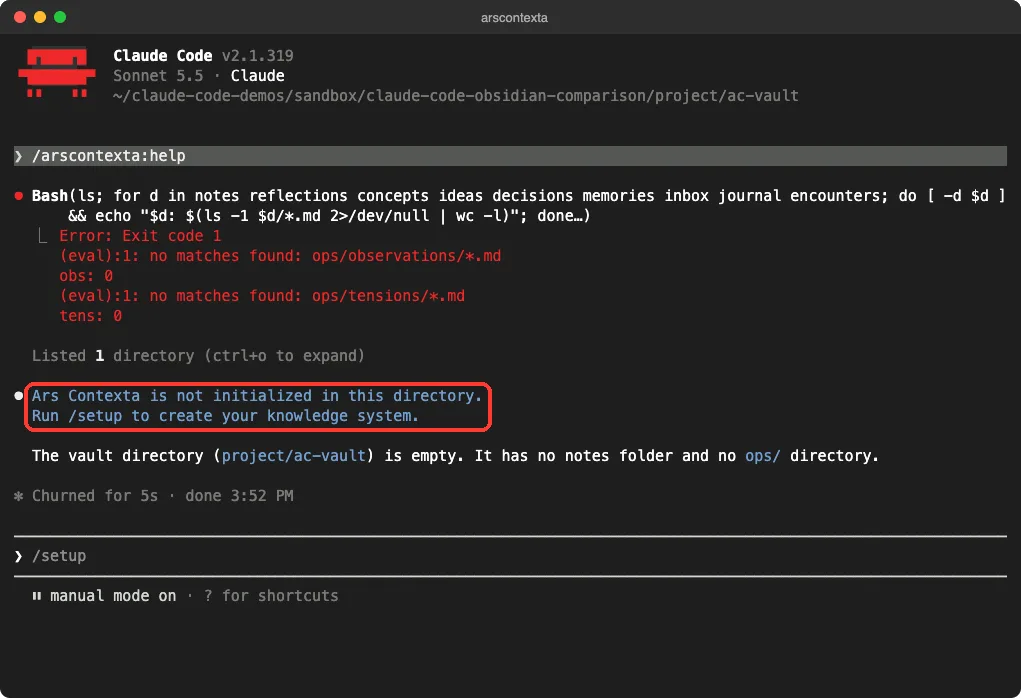
We ran two commands. First, /arscontexta:help in an empty folder. Claude checked for the vault folders, found none, and told us Ars Contexta is not initialized there and that we should run setup.
Second, /arscontexta:setup. Claude started a setup agent that offered three starting points: Research, Personal Assistant and Experimental. It then asked its one opening question: what do you want to track, remember or think about?
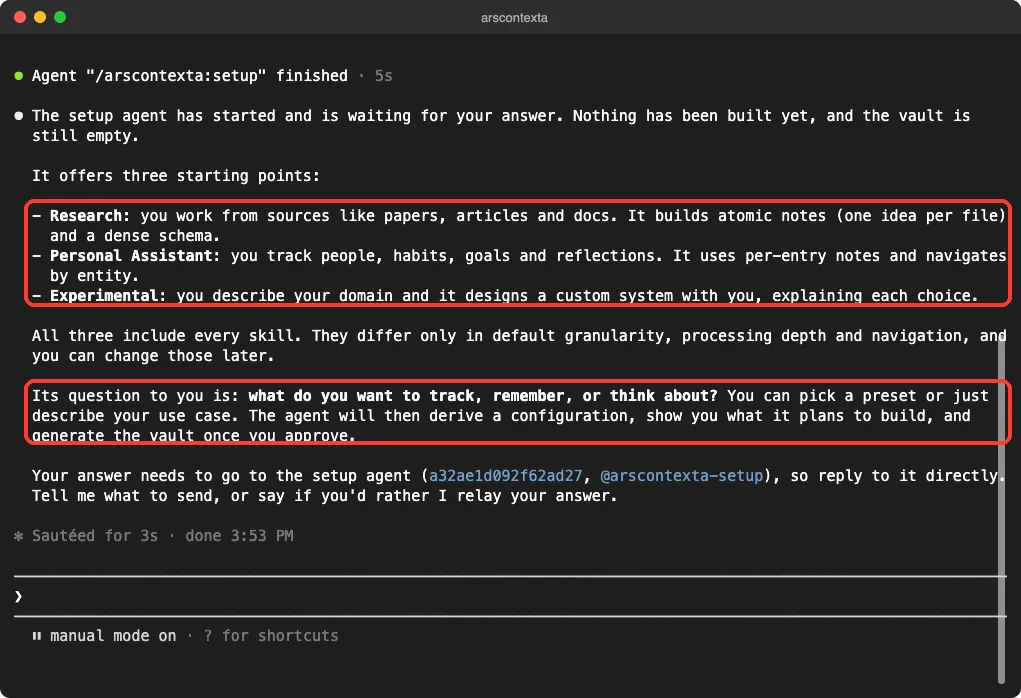
We stopped there. We did not run the full roughly 20-minute setup, so we cannot tell you what the generated vault looks like. What we can say is that the entry point is a conversation, and nothing was built until we answered.
What the Hooks Do (and Why It Matters)
Hooks run automatically, so they deserve a look before you install anything. This is what we read in each repo.
| Plugin | Hooks in the repo | What they do |
|---|---|---|
| claude-obsidian | Session start and stop | The start hook exits quietly unless you set CLAUDE_OBSIDIAN_SESSION_CONTEXT=1. The stop hook prints a status message. |
| obsidian-wiki | None in plugin mode | The README says the plugin ships skills only. The repo’s own hooks (session recap, stop capture) are for the full install. |
| Ars Contexta | Session start and after each file write | Orients the session, checks notes on write, and auto-commits changes with git add -A, but only inside an Ars Contexta vault. |
The Ars Contexta auto-commit is worth a note. It checks that the folder is a vault and a Git repository, and a config setting can turn it off. Even so, keep your vault in its own folder so a commit never sweeps up unrelated files.
Which One Should You Choose?
Here is our honest take, based only on what we ran.
- Choose claude-obsidian if you care about sources and want to approve each change. The preview and hash step is the most careful workflow of the three. The cost is more steps and slower ingests.
- Choose obsidian-wiki if you want linked pages quickly. It built three connected pages from two notes in one prompt. Install the optional tool if you want its caching and lint checks.
- Choose Ars Contexta if you want a system shaped around your own domain and you have time for a long setup. We only tested the start, so treat this as a plan, not a verdict.
Also consider how active each project is. In our clones, obsidian-wiki had a commit dated the day we tested, claude-obsidian was a few weeks old and Ars Contexta’s latest commit was from February 2026. That does not make it broken, but check the repo before you commit to it.
Common Mistakes
- Using the plugin folder as your vault. claude-obsidian says the product folder must never be the vault, so keep the two separate.
- Asking for too much at once. Our two-note claude-obsidian ingest did not finish, while a one-note request did.
- Assuming the plugin includes the command-line tool. For obsidian-wiki it does not, according to its README.
- Skipping the preview. Read the list of files before you apply anything.
- Installing into your daily setup first. Try a plugin with
--plugin-dirin a throwaway folder.
Pro Tips
- Start with two or three real notes, not your whole vault.
- Read the Markdown files Claude writes. They are plain text, and the quality is easy to judge.
- Keep your vault in Git so you can undo anything.
- Use a separate sources folder so your originals are never edited.
- Check how claims are marked. Provisional and inferred labels tell you what to trust.
Try It Yourself
Make a throwaway folder with two short notes, then load one plugin from a cloned copy. Replace the path with your own:
mkdir -p ~/demo-vault/inbox
cd ~/demo-vault
claude --plugin-dir ~/path/to/claude-obsidian --setting-sources project
Then ask Claude for a preview first:
/claude-obsidian:wiki set up this folder as a new vault, preview onlyRead the file list, then ask it to apply the plan and ingest one note. If you want to learn how plugins load, our guide to output style plugins is a gentle place to start, and planning with files shows another way to keep context between sessions.
Cheat Sheet
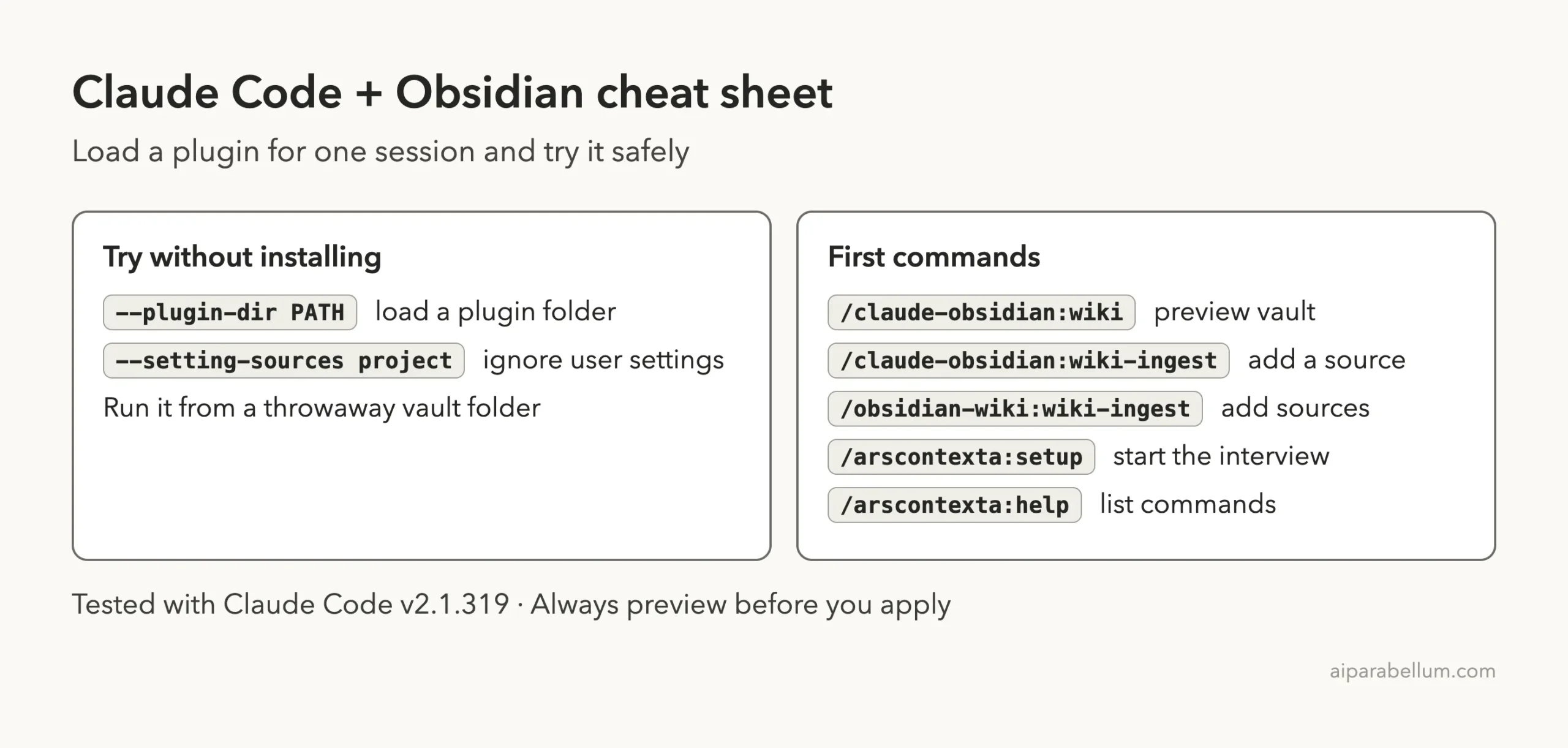
Preview first, ingest one note, and read what Claude wrote before you trust it.
For more tested add-ons, see our guides on session reports and blocking dangerous commands.
You can also read about Claude itself. The official docs cover plugins and discovering plugins. The projects we tested are claude-obsidian, obsidian-wiki and Ars Contexta.
Frequently Asked Questions
Do I need the Obsidian app to use these?
No. The plugins write Markdown files, and Claude Code can read them without Obsidian. The app is useful for browsing the notes and viewing the link graph.
Is it safe to try these plugins?
We read each repo’s hooks and scripts first and ran them only in a sandbox folder with project-only settings. Do the same, and never point a new plugin at your real vault on day one.
Which plugin made the most notes from the same input?
obsidian-wiki. From two notes it produced three pages, while claude-obsidian produced one source page from one note. They were different tasks, so this is a rough comparison, not a benchmark.
Why did the claude-obsidian ingest not finish at first?
In our first attempt, Claude kept reading the plugin’s own code and we stopped it. A narrower request for one file finished in under a minute. We tried this once, so your results may differ.
Can I use more than one of these together?
We did not test that. They use different folder layouts, so use separate vaults to avoid mixing the files.
Conclusion
All three projects turn Claude Code into a note-keeping helper for Obsidian, but they feel very different in practice. claude-obsidian is careful and cited, obsidian-wiki is quick and linked, and Ars Contexta starts with a conversation about how you think. Try one in a throwaway folder with two notes, read what it writes, and keep the one whose output you would actually trust.