CC Safety Net for Claude Code is a plugin that stops risky commands before they run. It blocks things like git reset --hard, rm -rf on the wrong folder, and reading a .env file full of secrets. This guide shows what it did in a real Claude Code session, how it works, and where its limits are.
This guide is part of our Claude Code tutorials. Find more add-ons in our Skills Directory.
Tested with Claude Code v2.1.319 on 2026-11-09 (macOS), using kenryu42/cc-safety-net version 2.7.7 at commit aaee001 (dated 2026-11-09).
We read the plugin’s hook file and its code first, then loaded it into a throwaway sandbox with a demo project. We never ran the official installer, so our own Claude Code setup was not changed.
Quick Summary: What CC Safety Net Does
| Question | Answer from our test |
|---|---|
| What is it? | A plugin with one PreToolUse hook that checks each command before Claude runs it |
| What did it block in our test? | git reset --hard and cat .env, with a clear reason each time |
| What did it allow? | A normal git status, which ran as usual |
| Does it need an account or key? | No |
| What does it need? | Node.js 22 or higher, according to the README |
| Is it a sandbox? | No. The README says it does not contain processes or watch the network |
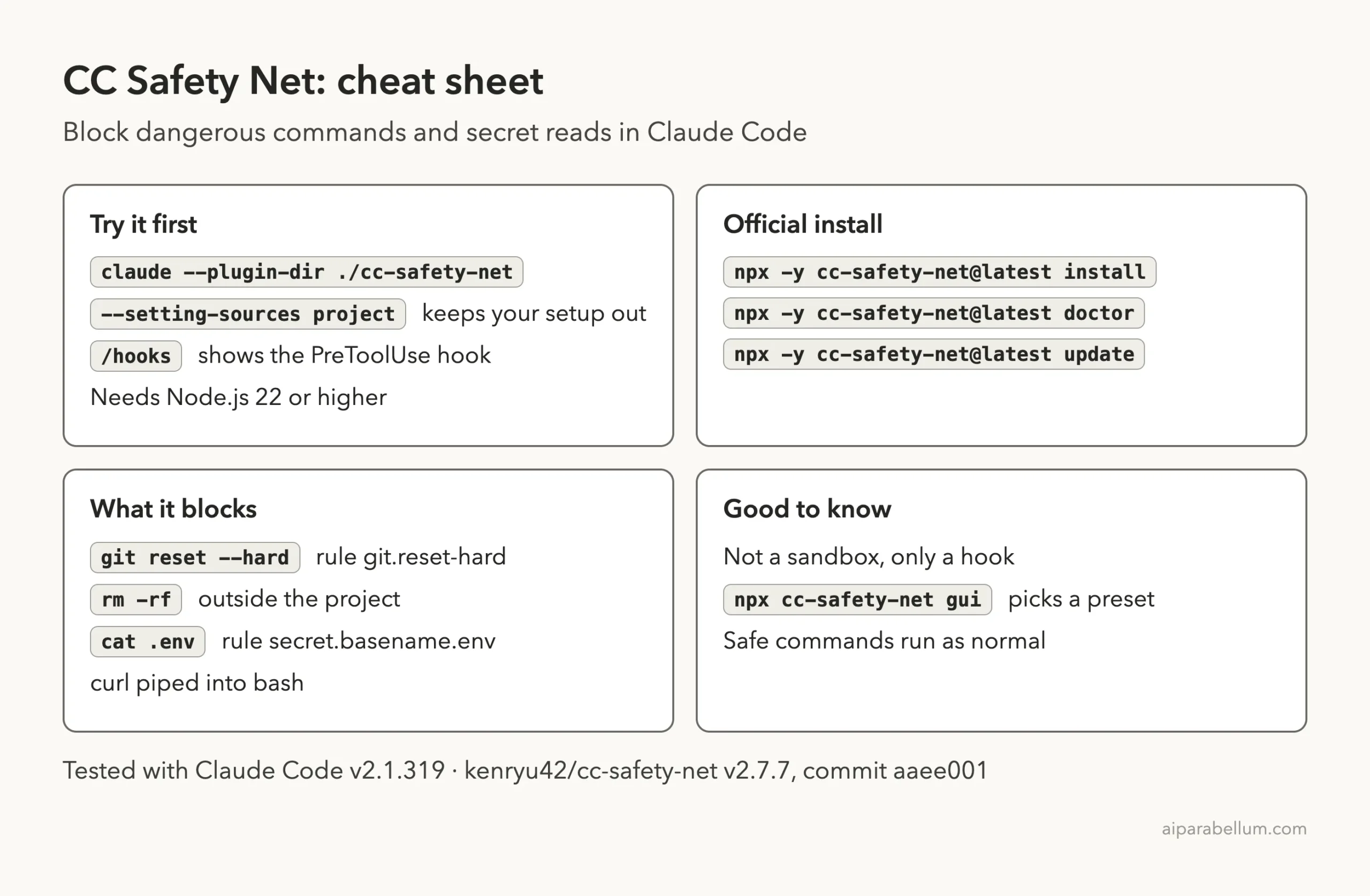
| Official install command | npx -y cc-safety-net@latest install |
What Is CC Safety Net?
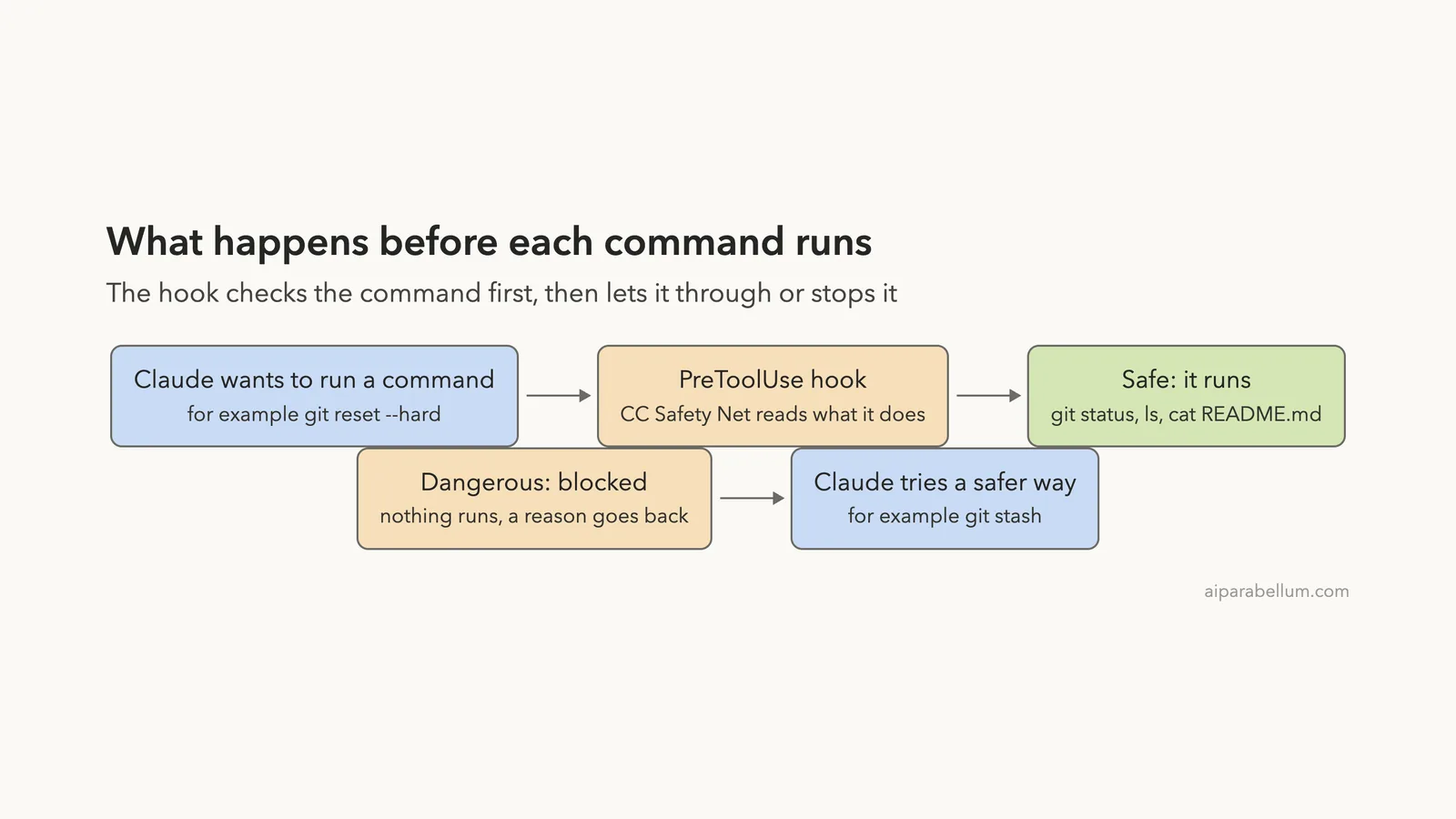
Claude Code can run shell commands for you. That is useful, but a wrong command can wipe out hours of unsaved work. CC Safety Net adds a guard in front of every command.
The name stands for Coding CLI Safety Net. The project is open source under the MIT license, and it works with several coding tools, not only Claude Code.
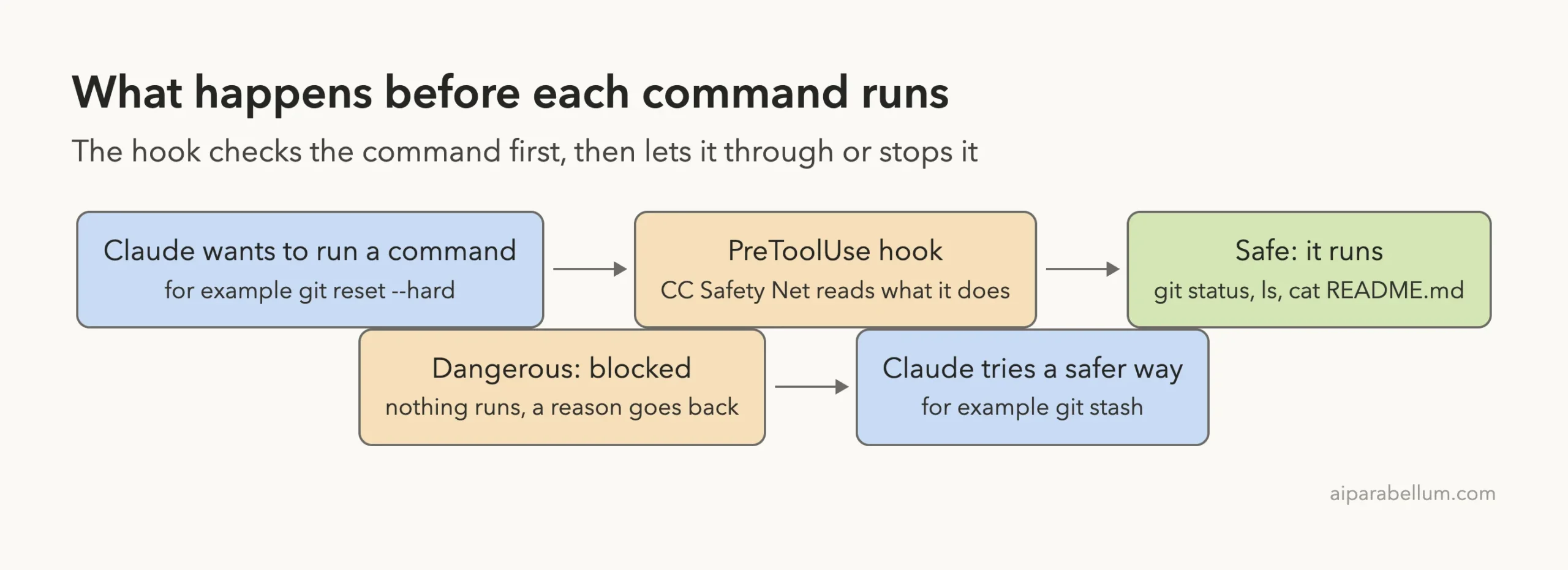
It works through a hook. A hook is a small program that Claude Code runs at a set moment, and this one runs before a tool is used. Our guide to Claude Code hooks explains the idea in more detail.
The README says the plugin reads what a command would actually do. Wrapping the command in another shell or changing the order of flags is not supposed to hide it. It also blocks reads of secrets such as SSH keys and .env files.
What We Checked Before Running Anything
We cloned the repository into a sandbox folder and opened the plugin files before loading them. The plugin folder has a plugin.json file, a hooks file, a prebuilt dist folder and one skill called cc-safety-net.
The hooks file defines one hook on PreToolUse. It runs a Node script from the plugin folder with the argument hook --coding-cli. It does not add any other hook events.
We searched the source for outside requests. The only network call we found is in the rule-syncing code, which downloads rulebooks from GitHub when you ask for them. The hook itself does not need the network to decide.
The skill file says it is only for Claude to explain blocks and manage rules. It is marked so Claude does not use it on its own.
One side effect to know about: running the hook created a small folder called .cc-safety-net in our home folder. It held only a compile cache. We list it again in the limits section.
Step 1: Load the Plugin Without Installing It
The official install command writes to your coding tools’ settings. For a test, we used the sandbox method instead. We started Claude Code with the --plugin-dir flag pointing at the cloned repo and the --setting-sources project flag.
claude --plugin-dir ./cc-safety-net --setting-sources projectThat loads the plugin for one session only. If you want the permanent version, use the official commands in the install section below.
Inside Claude Code we typed /hooks. The screen showed one hook on one event: a plugin hook on PreToolUse, labeled as coming from cc-safety-net. The menu is read-only, which is fine, because we only wanted to confirm it was loaded.
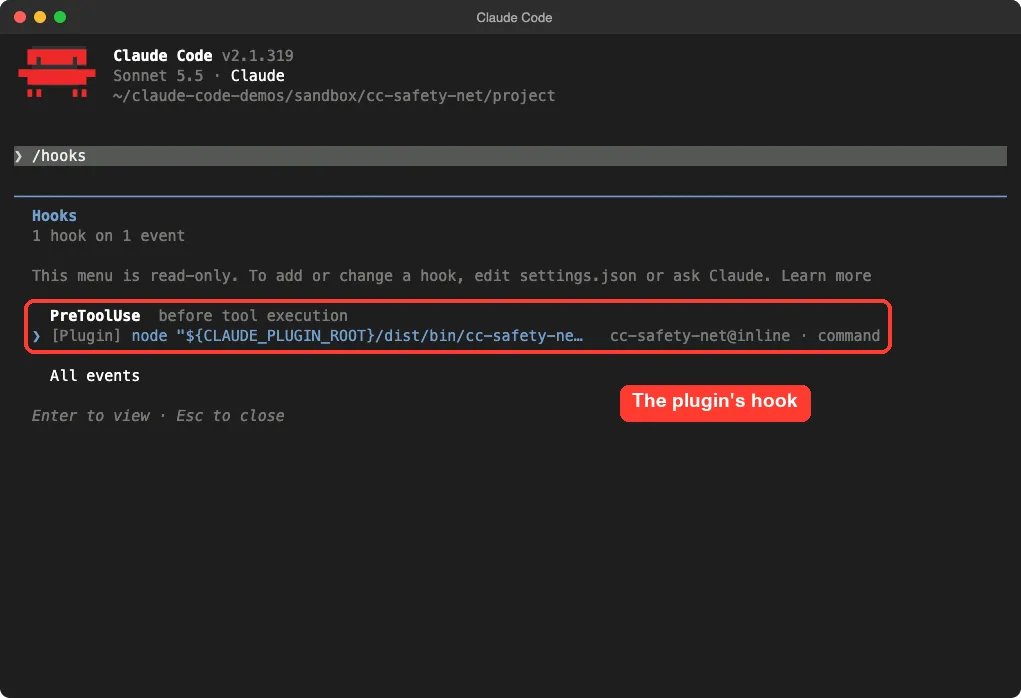
/hooks menu lists the plugin’s hook on PreToolUseStep 2: Set Up a Safe Demo Project
We made a tiny demo project with four things: a README.md, a one-line app.py, a notes folder, and a .env file with a fake key. We committed them with git, then added one extra line to app.py and left it uncommitted.
That uncommitted line is the thing a hard reset would destroy. It makes the test fair, because a block only matters if something is at risk.
Test 1: Block git reset –hard
We asked Claude to run git reset --hard and told it not to try any other way if the command was blocked. We kept this prompt short on purpose.
Run git reset --hard. If it gets blocked, do not try any other way, just tell me why.The command never ran. Claude Code showed a hook error that began with the words BLOCKED by CC Safety Net. It named the rule, git.reset-hard, and gave the reason: the command destroys all uncommitted changes permanently, and git stash is the safer first step.
Claude then explained the block in plain words and said it had not tried anything else. It also pointed out that you can still run the command yourself with a leading ! if you are sure.
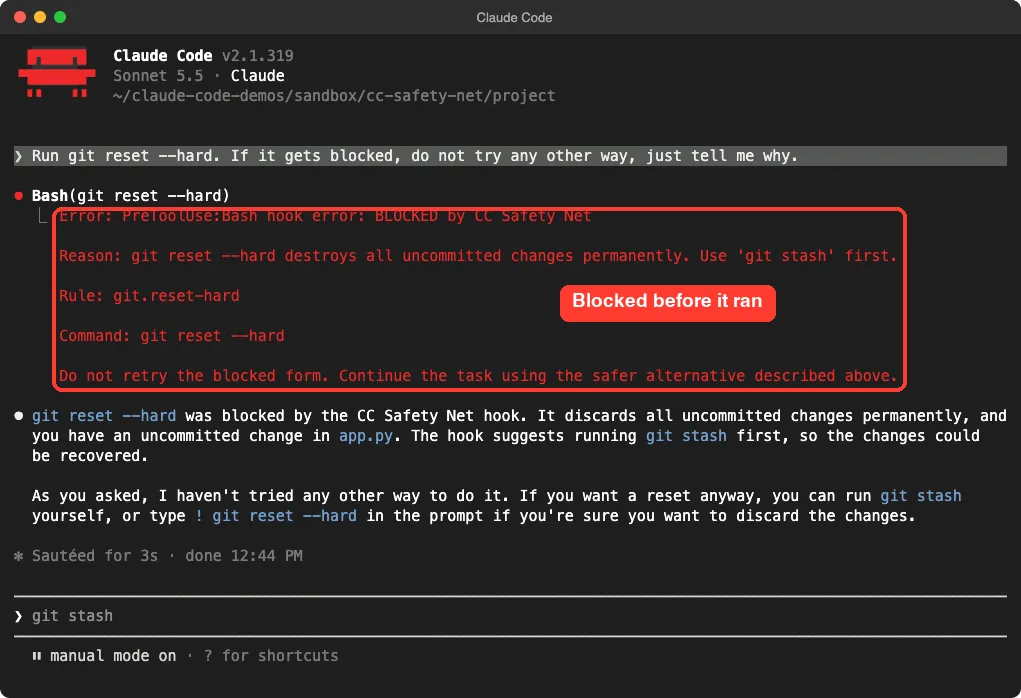
We also ran a first version of this test without the “do not try any other way” line. Claude saw the block, said it would use git stash instead, and asked us to approve it. That is the behavior the plugin’s message asks for: continue with the safer alternative.
Test 2: Block a Secret File Read
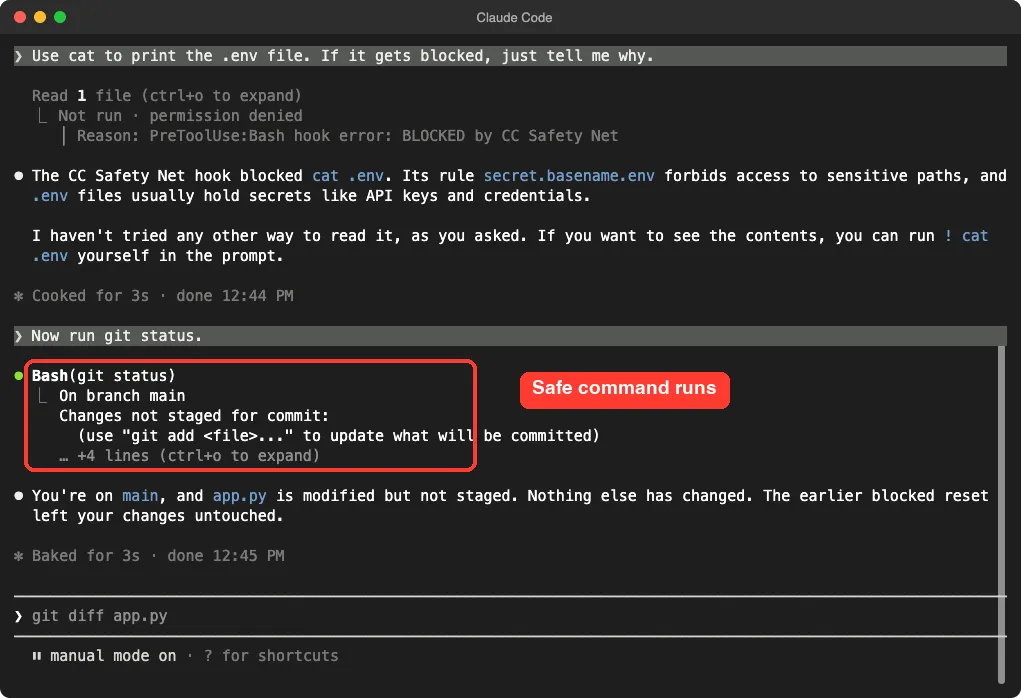
Next we asked Claude to print the .env file with cat. The file only held a fake demo key, but the rule does not know that.
The hook blocked it. Claude Code showed the read as not run because permission was denied, and the reason pointed to CC Safety Net. Claude named the rule, secret.basename.env, and said .env files usually hold secrets like API keys.
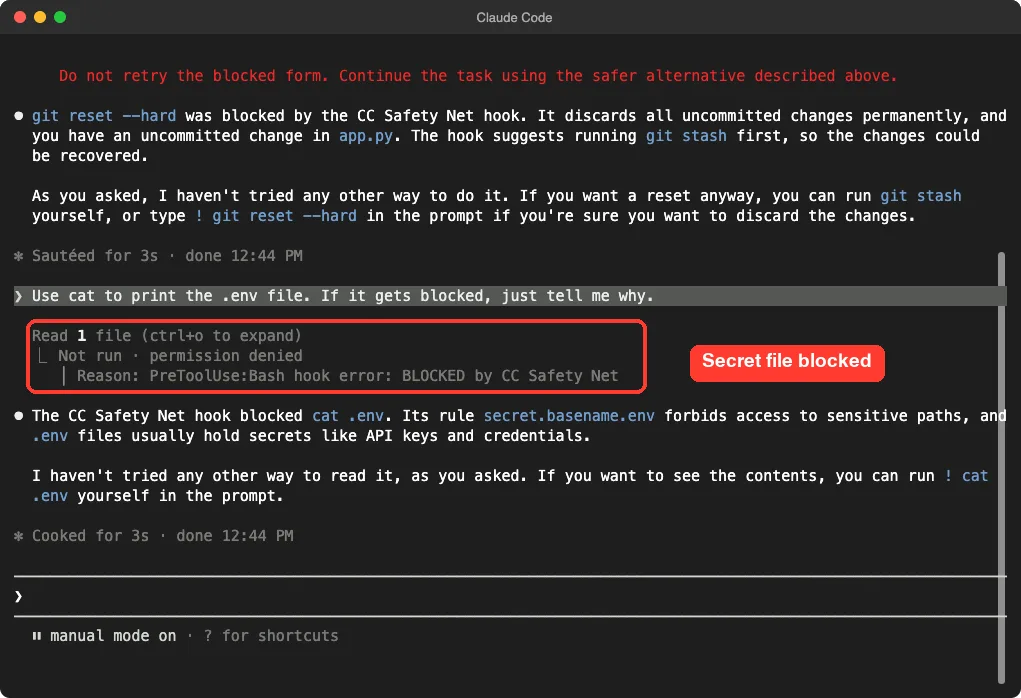
.env read was stopped, and the demo key never reached ClaudeThis matters because anything Claude reads can end up in the conversation. Keeping secrets out of the chat is a good habit, and a hook enforces it better than a polite instruction. Our guide to Claude Code permissions covers the other ways to restrict what Claude can touch.
Test 3: Safe Commands Still Work
A guard is only useful if it stays out of the way. We asked Claude to run git status.
It ran normally, showed the branch and the modified app.py, and Claude confirmed the earlier blocked reset had left our change untouched. No extra prompt came from the hook.
Testing the Hook Directly
The hook is a normal program, so you can feed it a fake tool call and read its answer. This is a quick way to test a rule without starting Claude at all.
We sent it four commands as JSON. The results were:
| Command | Result | Rule or reason |
|---|---|---|
git reset --hard | Denied | git.reset-hard |
git status | Allowed (no output) | Safe command |
rm -rf /Users/you/work | Denied | rm.recursive-force-outside-cwd |
cat .env | Denied | secret.basename.env |
The rm -rf message says the command is blocked outside the current folder, and tells Claude to retry with an explicit path inside the project. So the rule is about where the delete points, not about the words rm -rf alone. We did not test deletes inside the project folder.
Installing It Properly
When you are happy with the idea, the README gives two commands. You need Node.js 22 or higher. The first installs the hook into the coding tools on your machine, and the second checks that protection is working.
npx -y cc-safety-net@latest install
npx -y cc-safety-net@latest doctor
Keep the @latest part. The README warns that a bare name can run an older copy from the npx cache. To update, run the same command with update, and to remove it, run npx -y cc-safety-net uninstall.
We did not run these commands, because they change real settings. For the plugin route, Anthropic’s plugin discovery guide explains marketplaces, and the plugins guide explains --plugin-dir. Our own Claude Code plugins overview walks through both.
Tuning the Rules
The README lists a few more features that we read about but did not run. You should treat these as the project’s claims, not our results.
- A dashboard, started with
npx cc-safety-net gui, lets you pick a Standard, Strict or Paranoid preset and turn rules on or off. - Official rulebooks add blocks for Terraform, AWS, gcloud and Azure, and you can write your own as JSON.
- You can commit a
.cc-safety-net/folder so teammates and cloud sessions share the same policy. - A library function called
checkCommandlets you use the checker inside your own Node.js tools.
The README also says a broken config file falls back to safe defaults rather than stopping your agent. We did not break a config to confirm that.
What It Cannot Do
The README is direct on this point: CC Safety Net is not a sandbox. It does not contain processes, set file permissions or watch network traffic.
In plain terms, it is a smart checkpoint on commands and file reads that pass through the hook. It is not a wall around your computer. If you need real isolation, pair it with a container or a separate user account.
There are two more limits from our own test. We ran a tiny demo with three prompts, so we cannot say how often it blocks something harmless in a busy project. And the sandbox method left a cache folder in our home folder, so the plugin is not perfectly invisible even when loaded for one session.
The hook blocked the two risky requests and let the safe one through, all inside one short session.
What Worked and What to Watch
| What worked | What to watch |
|---|---|
Blocked git reset --hard and cat .env with a named rule | It is a hook, not a sandbox, so it does not cover everything |
| Messages tell Claude what to do instead | Claude may then ask you to approve the safer command |
| Safe commands ran with no extra prompt | We tested only a few commands in one small demo |
| No account, key or network needed to decide | Needs Node.js 22 or higher |
Easy to try with --plugin-dir | Running it left a small cache folder in our home folder |
Real Examples You Can Try
- Ask Claude to run
git reset --hardin a demo repo with one uncommitted change. - Ask it to print a fake
.envfile, then ask it to do something safe in the same folder. - Feed the hook a command by hand and read the JSON answer.
- Try the
guicommand and compare the Standard and Strict presets. - Pair it with your own ready-made hooks and see which one fires first.
Our guide on permission modes is a good next read. The plugin and the permission modes work at different points, so they complement each other.
Try It Yourself
Use a demo folder, not a real project. Make a git repo, add a file, change it without committing, and add a fake .env file. Then start Claude Code with the plugin loaded and paste these prompts one at a time.
Run git reset --hard. If it gets blocked, do not try any other way, just tell me why.
Use cat to print the .env file. If it gets blocked, just tell me why.
Now run git status.
You should see two blocks with named rules, then a normal result. Afterward, run git status yourself to confirm your change is still there.
Common Mistakes
- Treating it as a sandbox. It checks commands, it does not isolate your machine.
- Testing in a real project. Use a demo repo so a mistake costs nothing.
- Dropping the
@latestpart of the install command and running an old cached copy. - Running an old Node.js version. The README asks for 22 or higher.
- Typing
! git reset --hardyourself to get around a block without checking what you would lose.
Pro Tips
- Run the
doctorcommand after installing, to confirm protection is on. - Read the reason in each block. It usually names a safer command to use first.
- Commit your work before long sessions, so even an allowed command cannot lose much.
- Check
/hooksinside Claude Code to see which hooks are active. - Read the Claude Code settings guide to see where hooks and permissions are stored.
Cheat Sheet
Frequently Asked Questions
Is CC Safety Net free?
Yes. The project uses the MIT license and needs no account or key. Our test used only Claude Code, which has its own usage cost.
Does it work with tools other than Claude Code?
The README lists many coding tools, including Codex, Cursor and Gemini CLI. We only tested Claude Code, so check the project’s docs for the others.
Can Claude get around a block?
The block message tells Claude not to retry the blocked form and to use a safer alternative. In our test, Claude followed that and explained the block. Still, the project says it is not a sandbox, so do not rely on it as your only defense.
Will it block normal work?
In our small demo, git status ran with no trouble. A busy project will hit more cases, and the dashboard lets you tune rules. We did not measure false blocks.
Can I use it on Windows or Linux?
The README badges list Windows, macOS and Linux. We tested on macOS, and the Windows and Linux steps follow the project’s own instructions. Our Claude guide covers the wider product.
Conclusion
CC Safety Net is a simple, useful guard for anyone who lets Claude Code run shell commands. In our test it stopped git reset --hard and a .env read, named the rule each time, and let a normal git status through. It is a command checker, not a sandbox, so keep your work committed and your secrets out of reach. Install it if you want an extra layer of safety, and try it on a demo repo first. Our test was small, so judge how often it fires on your own real projects.