A Claude Code Java plugin can review your code against a checklist, and similar add-ons exist for Elixir, Swift and LaTeX. We loaded five of them in a sandbox, ran real prompts on small demo files, and wrote down what worked and what broke.
You will see our screenshots, the exact commands we used, one load failure we hit, and a plain verdict on who should try each one.
This guide is part of our Claude Code tutorials. Find more add-ons in our skills directory.
Tested with Claude Code v2.1.319 on 2026-11-10 (macOS). Tools we cloned: claude-elixir-phoenix at commit 4621ae4, claude-code-java at commit 0490434, bama at commit 22dc792, claude-code-my-workflow at commit fe70774 and plinth at commit bbdd3f8. We tested on macOS; the Windows and Linux steps follow Anthropic’s official instructions.
The Five Language Add-Ons at a Glance
| Tool | Language | What it does | What we ran |
|---|---|---|---|
| claude-code-java | Java | 18 small skills for code review, testing, security and more | Loaded it as a plugin and ran java-code-review |
| plinth | Java | A large toolkit of 124 skills for the whole Java lifecycle | Copied one skill, 124-java-secure-coding, and ran it |
| claude-elixir-phoenix | Elixir | Skills, agents and rules for Phoenix, LiveView and Ecto | Loaded it with its helper plugins and ran n1-check |
| bama | Swift | 21 skills for planning, designing and testing native Mac apps | Loaded it and ran app-brief |
| claude-code-my-workflow | LaTeX | A template for academic work with Beamer slides and papers | Copied the proofread skill and ran it on a short paper |
One short session shows how a skill starts and answers, not how it performs on a year-long project.
A note on scope. Each test used a tiny file we wrote ourselves, with flaws planted on purpose. We did not build an app, compile a paper or run an Elixir server, so our verdicts cover first impressions only.
How We Tested Without Touching Our Own Setup
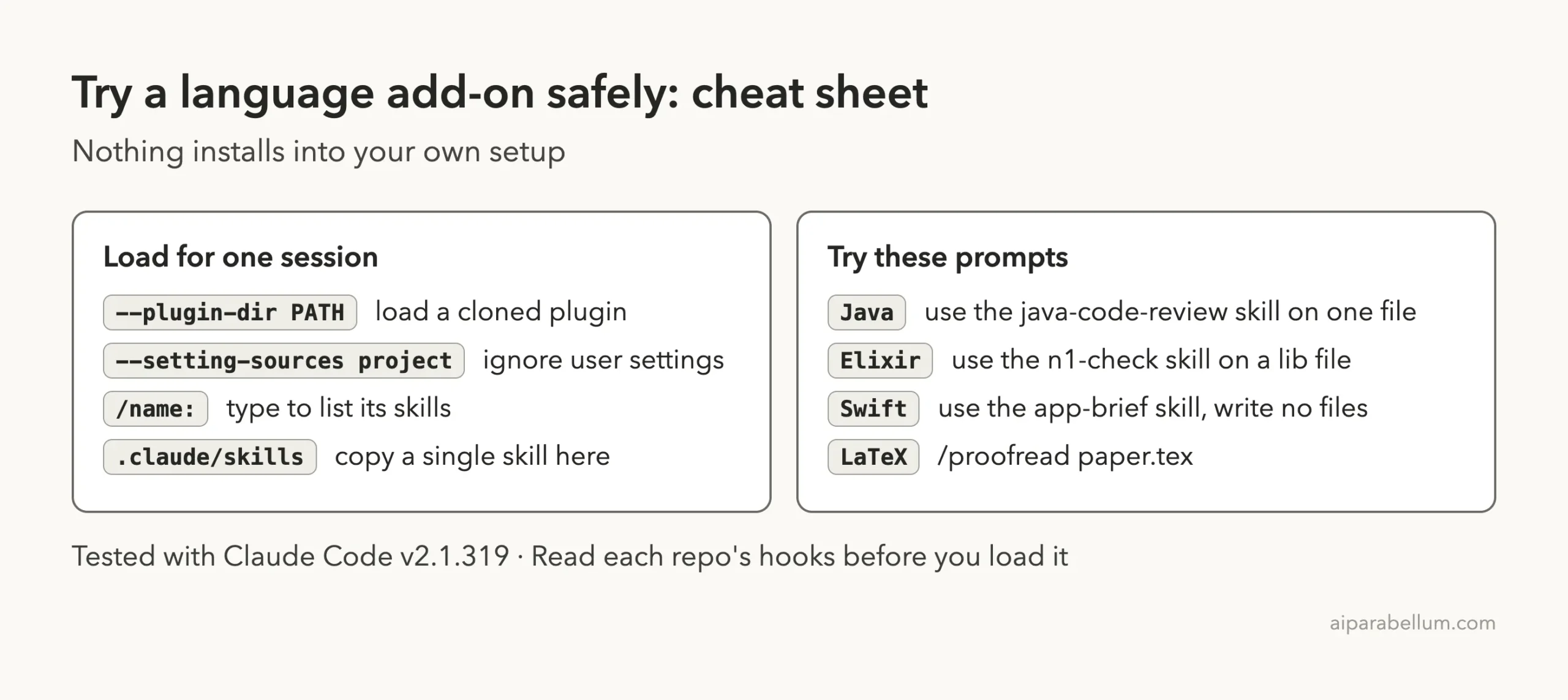
Every session ran in a throwaway sandbox folder. We started Claude Code with --setting-sources project, so only that folder’s settings loaded.
Plugins loaded for one session with --plugin-dir, which is described in the official plugins guide. Nothing was installed into the user-level Claude Code setup.
Before running anything, we read each repo’s hooks. Hooks are scripts that run automatically when Claude does something, so they deserve a look first.
- claude-elixir-phoenix has many hooks. They format Elixir files, block a forced git push, and remind Claude about security. The ones we read only touch the project folder, plus one local check on
localhost. - claude-code-java, bama and plinth ship skills with no hooks in the parts we loaded.
- claude-code-my-workflow has hooks that write session notes under
~/.claude/sessions, a folder in your home setup. So we did not load its settings at all and copied only one skill and one agent.
For a wider view of how add-ons are shared, see our guide to the plugin marketplace.
Claude Code Java Plugin: claude-code-java
This is the lightweight option. The repo holds 18 skills such as java-code-review, security-audit, test-quality, jpa-patterns, java-migration and git-commit. Each one is a short checklist for a single job.
The plugin file sits at the top of the repo, so we pointed --plugin-dir at the cloned folder. Typing /claude-code-java: then listed the skills.
claude --setting-sources project --plugin-dir ~/path/to/claude-code-java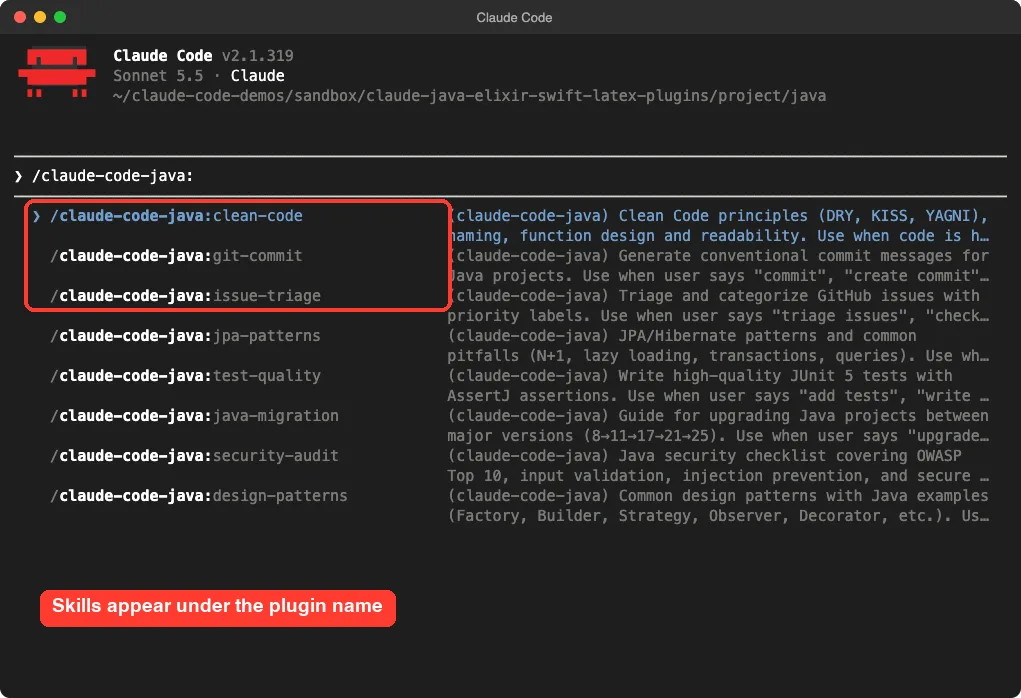
Our demo file, UserRepo.java, had an SQL string built from user input, an MD5 password hash, a password printed to the console, an empty catch block and unclosed database objects. We asked Claude to use the java-code-review skill and return only five findings.
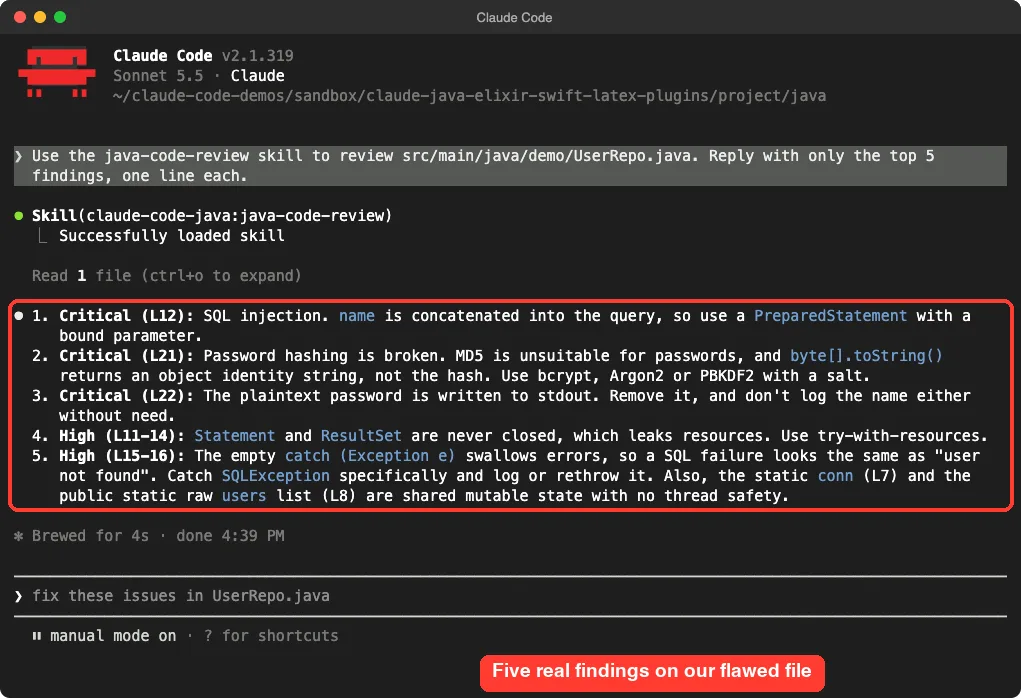
The skill loaded, Claude read the file, and the answer came back in four seconds. It caught the three critical flaws and ranked them first, then listed the resource leak and the swallowed exception.
Our verdict on claude-code-java
It is easy to try and easy to understand, because every skill is small. It suits a Java developer who wants quick, consistent reviews. We did not test whether Claude would have found the same problems without the skill, so we cannot say how much it adds.
Plinth: A Much Bigger Java Toolkit
Plinth describes itself as an engineering toolkit for Java enterprise work. Its marketplace file lists 61 plugins, and its skills folder holds 124 skills. They cover Maven, Spring Boot, Quarkus, Micronaut, testing, profiling, architecture records and more.
The repo is large. Our shallow clone took about 541 MB on disk, so plan for that before you clone it.
We did not load all of it. We copied one skill folder, 124-java-secure-coding, into the demo project’s .claude/skills folder and asked for a secure coding review of the same flawed file.
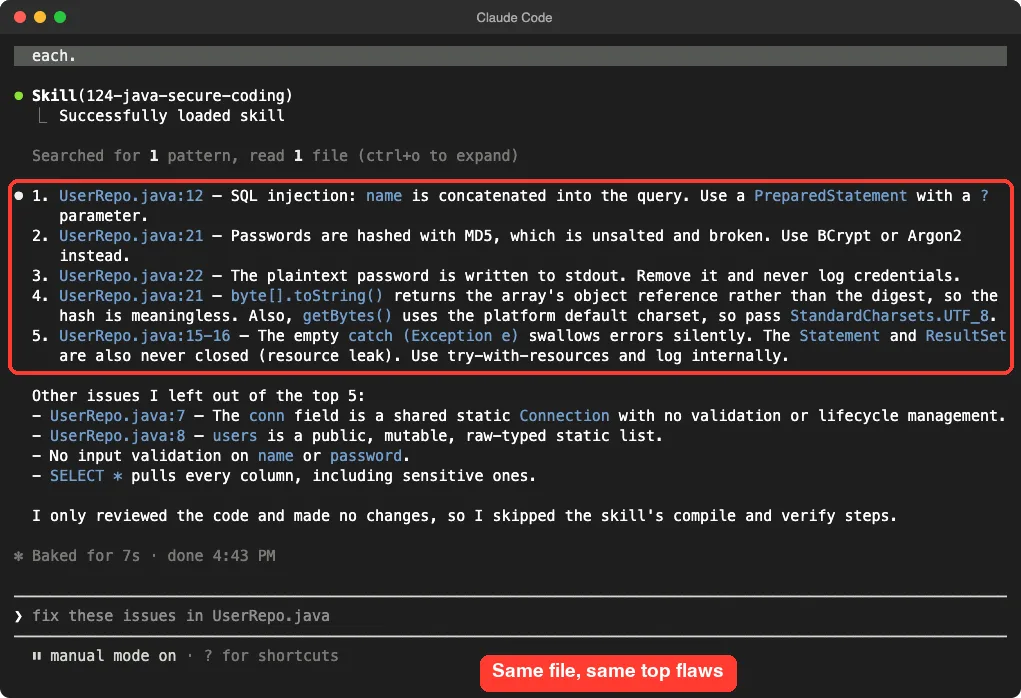
The result was close to the first one. It named the injection, the MD5 hash, the printed password and the empty catch block. It also added points the smaller plugin left out, such as the platform default charset in getBytes() and the lack of input validation.
It then said it only reviewed the code and skipped the skill’s compile and verify steps. That is honest, and it shows the skill expects a real Maven project, which our two-line demo was not.
Which Java option should you pick?
If you want one skill for one job, claude-code-java is simpler. If your team lives in Spring Boot, Quarkus or Micronaut and wants detailed guidance per framework, plinth has far more depth. We tested one plinth skill only, so we cannot judge the other 123.
Claude Elixir Phoenix Plugin: A Load Problem We Hit
This plugin is the most ambitious of the five. According to its description, it adds specialist agents, a set of rules it calls Iron Laws, and a link to the Tidewave tool. Its skills include plan, work, review, audit, perf and n1-check.
Our first attempt failed. We loaded only the elixir-phoenix folder with --plugin-dir and asked for the n1-check skill. Claude replied that the skill was unknown because a plugin did not load, due to an unmet dependency.
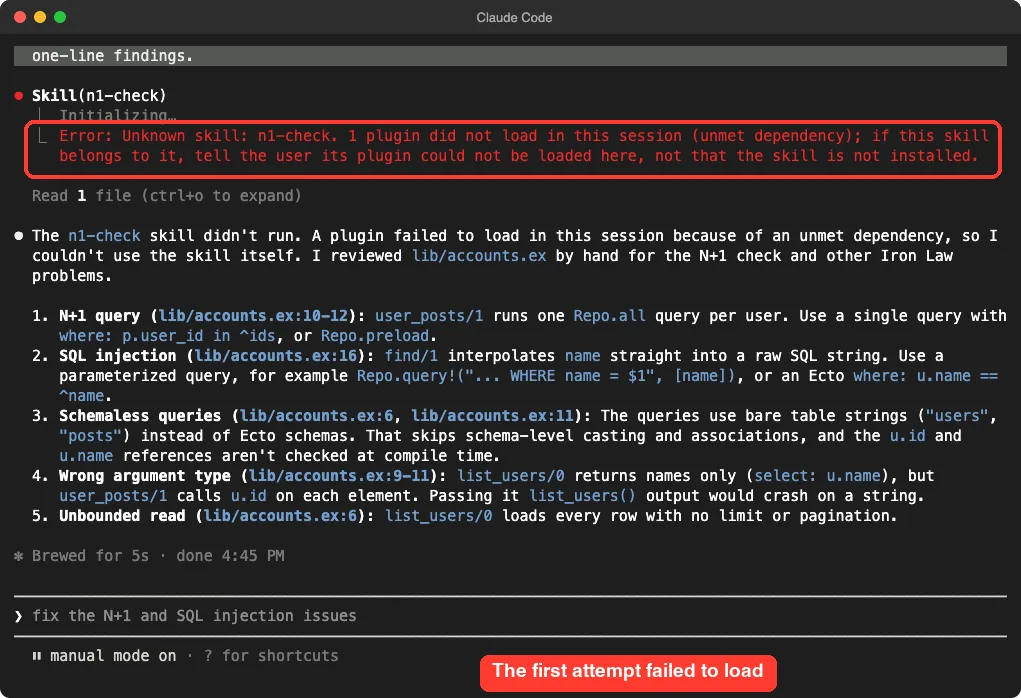
The plugin file lists two dependencies, ecto and lv, which live in sibling folders in the same repo. Claude then reviewed the file by hand, which looked fine at a glance but was not the skill doing the work.
The fix was to pass all three folders. Once we did, the skills appeared under the /phx: prefix, which is the plugin’s internal name.
claude --setting-sources project \
  --plugin-dir plugins/elixir-phoenix \
  --plugin-dir plugins/ecto \
  --plugin-dir plugins/lv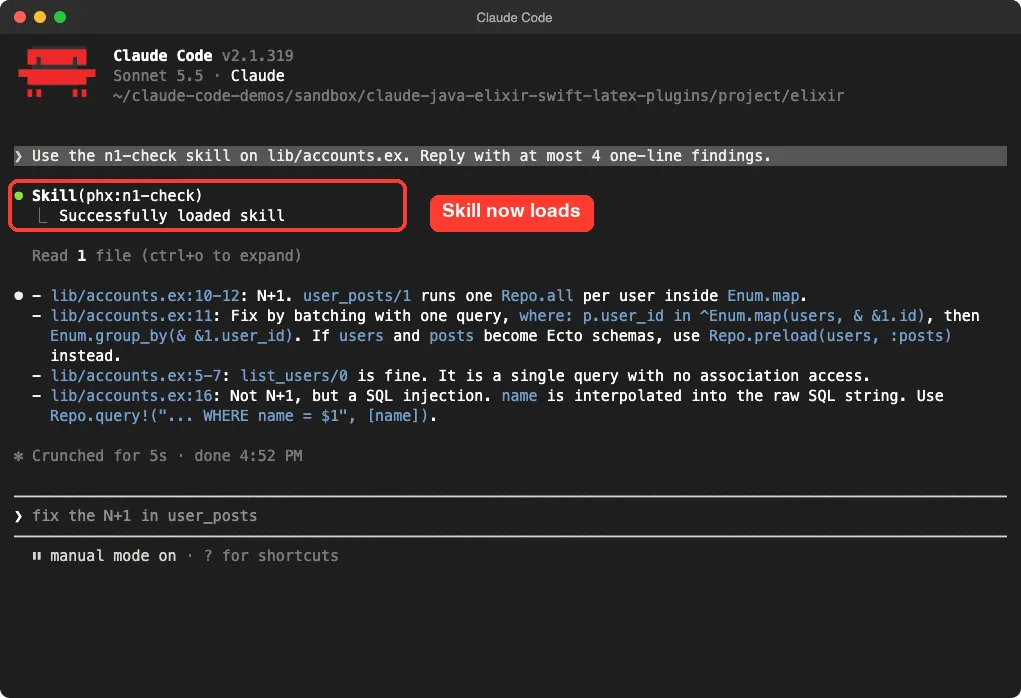
Our demo accounts.ex ran one database query per user inside a loop, a classic N+1 problem, and built a raw SQL string from a variable. The skill spotted the N+1 loop and suggested batching with one query. It also called out the SQL injection and noted that it is not an N+1 issue itself.
One caution. Elixir and its build tool were not installed on our machine, so the plugin’s formatting and verification hooks, which call mix, never ran. We tested the skills’ answers only.
Our verdict on claude-elixir-phoenix
It is built for people who already work in Phoenix daily and want a full workflow, not a single checklist. Expect a learning curve, because it has dozens of skills and many agents. And if you load it from a folder as we did, remember the two helper folders.
Bama: Claude Code Skills for Swift Mac Apps
Bama stands for Build Any Mac App. Its plugin file lists 21 skills across planning, coding, design and shipping. Examples include app-brief, clone, research, swift-swiftui, mac-design, app-icon and test-mac-app.
It loaded cleanly with --plugin-dir, and typing /bama: showed the list.
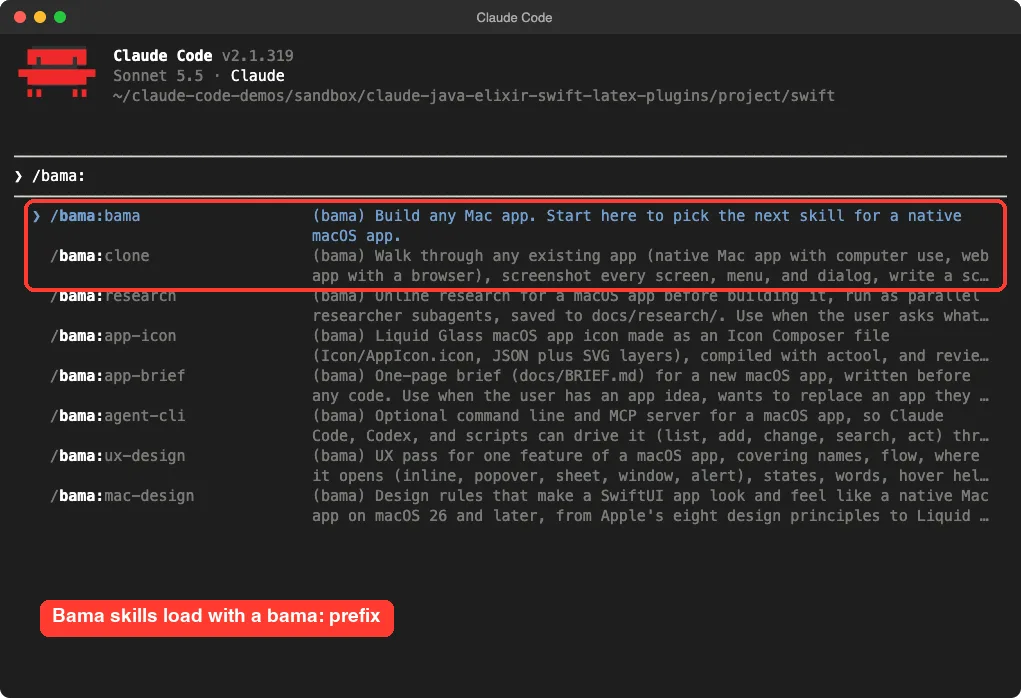
We gave it an empty folder and asked for the app-brief skill for a tiny menu bar timer, with an instruction to write no files. It held off writing and asked nine questions instead, such as what the app replaces, which three jobs it does most, and what stays out of version one.
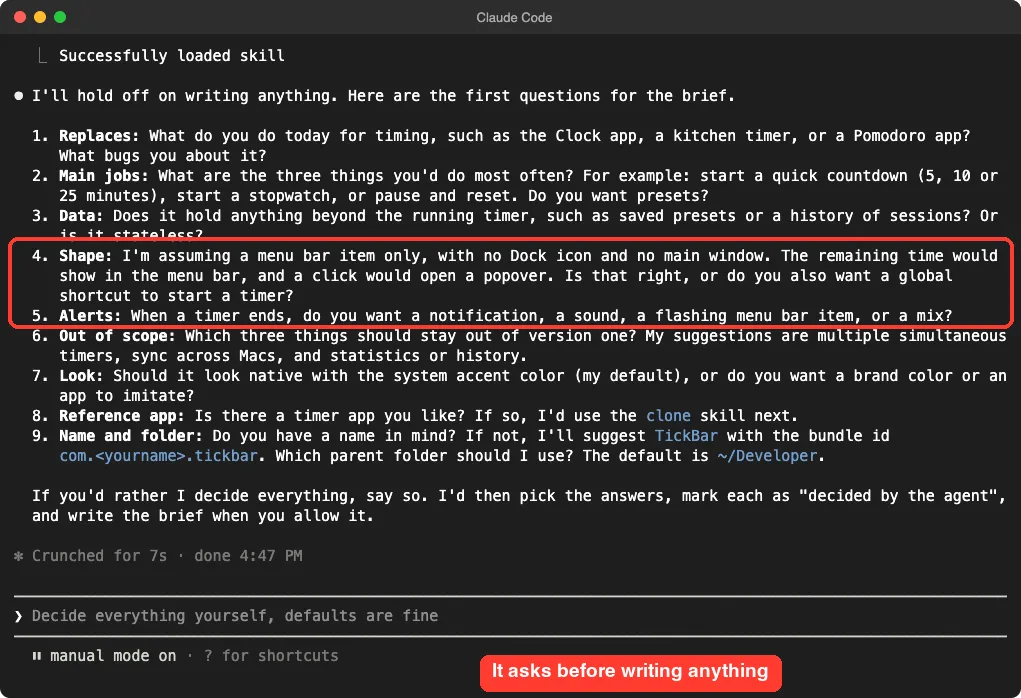
It also offered a shortcut: say so and it will pick the answers and mark each as decided by the agent. We liked that, because it keeps a quick path open for people who do not want an interview.
What we did not test
We did not build or run the app. Xcode is installed on this Mac, but a build and test loop needs far more than a short session, and the plugin’s own build-and-verify and test-mac-app skills were outside our scope. Treat our result as proof that the planning step works.
claude-code-my-workflow: Proofreading LaTeX Papers
This repo is a template for academics who write in LaTeX and use R. It lists 61 skills, from proofread and review-paper to respond-to-referees and preregister. It is meant to be forked, not loaded as a plugin.
That matters for safety, because the template ships hooks that save notes in a home-level folder. So we copied only the proofread skill, a second skill and the proofreader agent into the demo project’s .claude folder. We left the settings and hooks out.
Our paper.tex had a few planted mistakes: “alot”, “better then”, “The results is” and “prove our hypothesis”.
/proofread paper.tex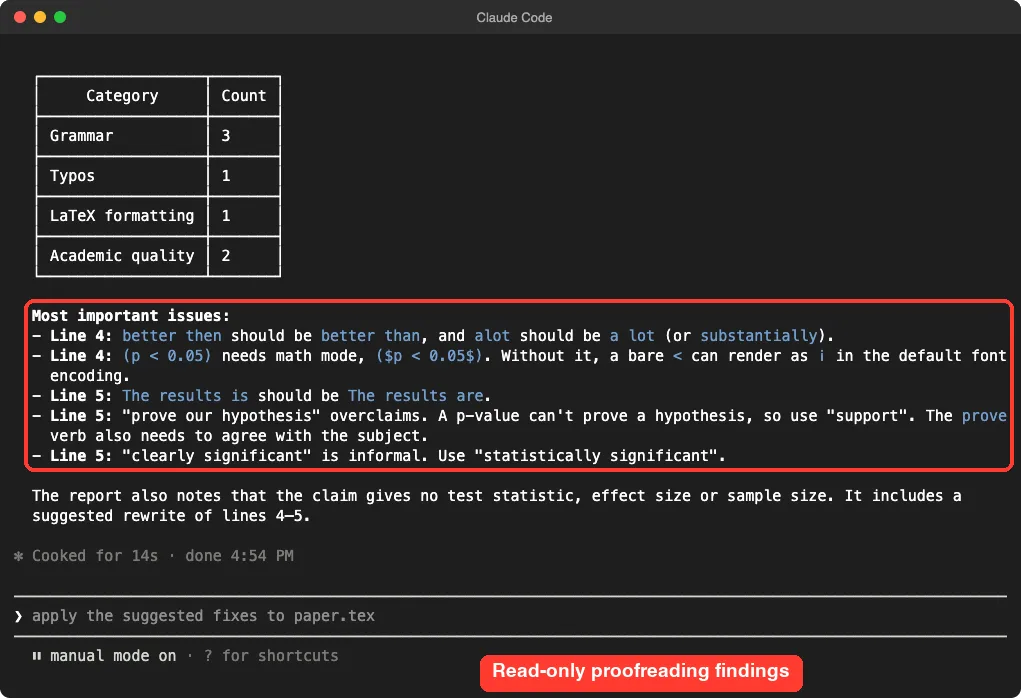
It caught every planted error. It also flagged that “prove” overclaims, since a p-value cannot prove a hypothesis, and that the paper gives no test statistic, effect size or sample size. It suggested a rewrite of the two lines.
The skill is read-only by design and writes a report file. On our first run, Claude asked permission before saving the report with a shell command, and the prompt said the parser did not consume trailing input. We approved it on a second run.
The counts also changed between runs: grammar issues came back as 2 on the first and 3 on the second. That is normal for a language model, so treat the counts as a guide rather than a score.
What we did not test
The pdflatex program was not installed here, so we could not run the template’s compile skills. We also did not try the R, Beamer or Quarto parts. This repo suits researchers who will adopt the whole template, not people who only want a proofreader.
Which Add-On Should You Pick?
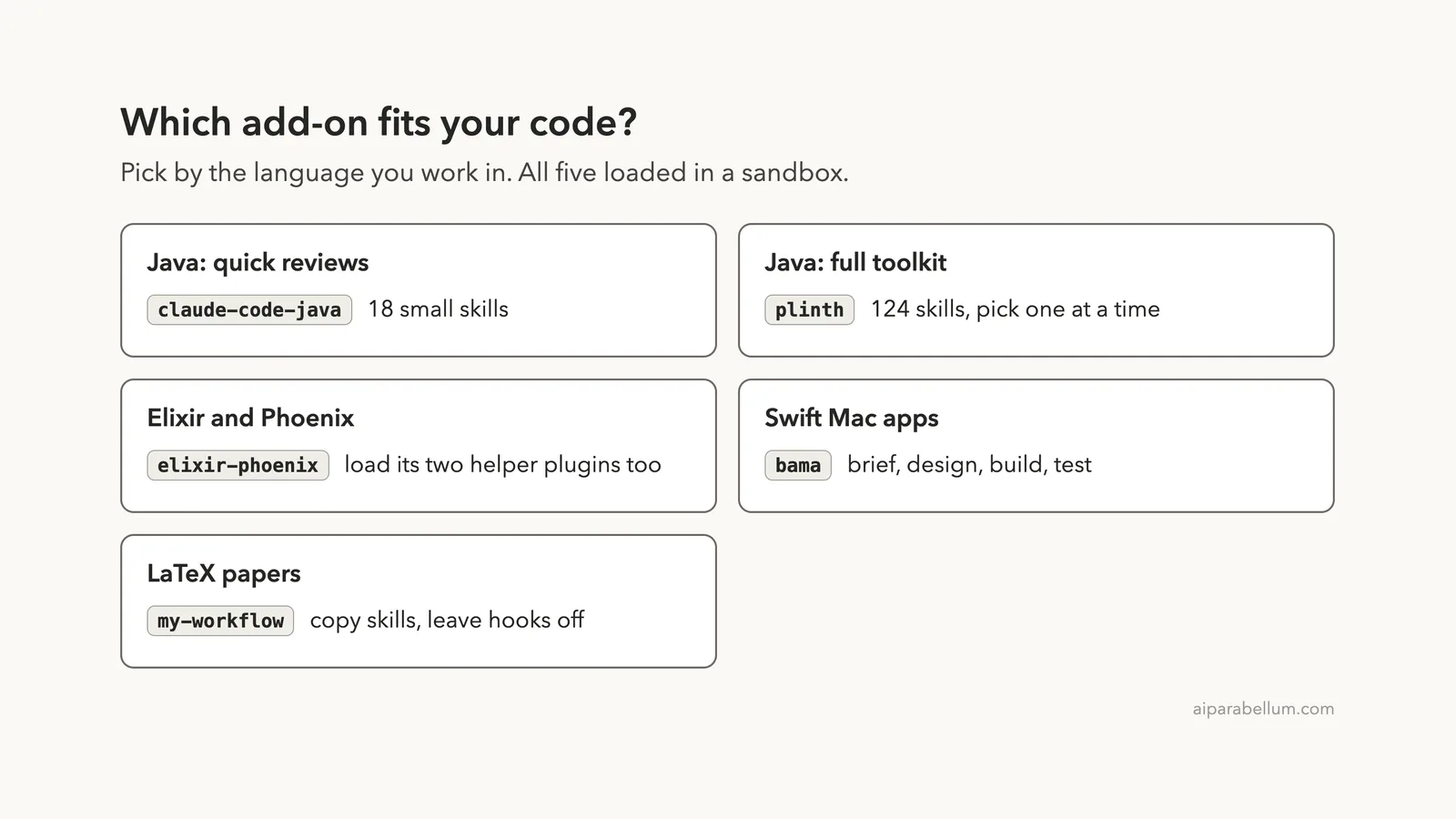
The diagram below sums up our picks. Choose by the language you work in first, then by how much structure you want.
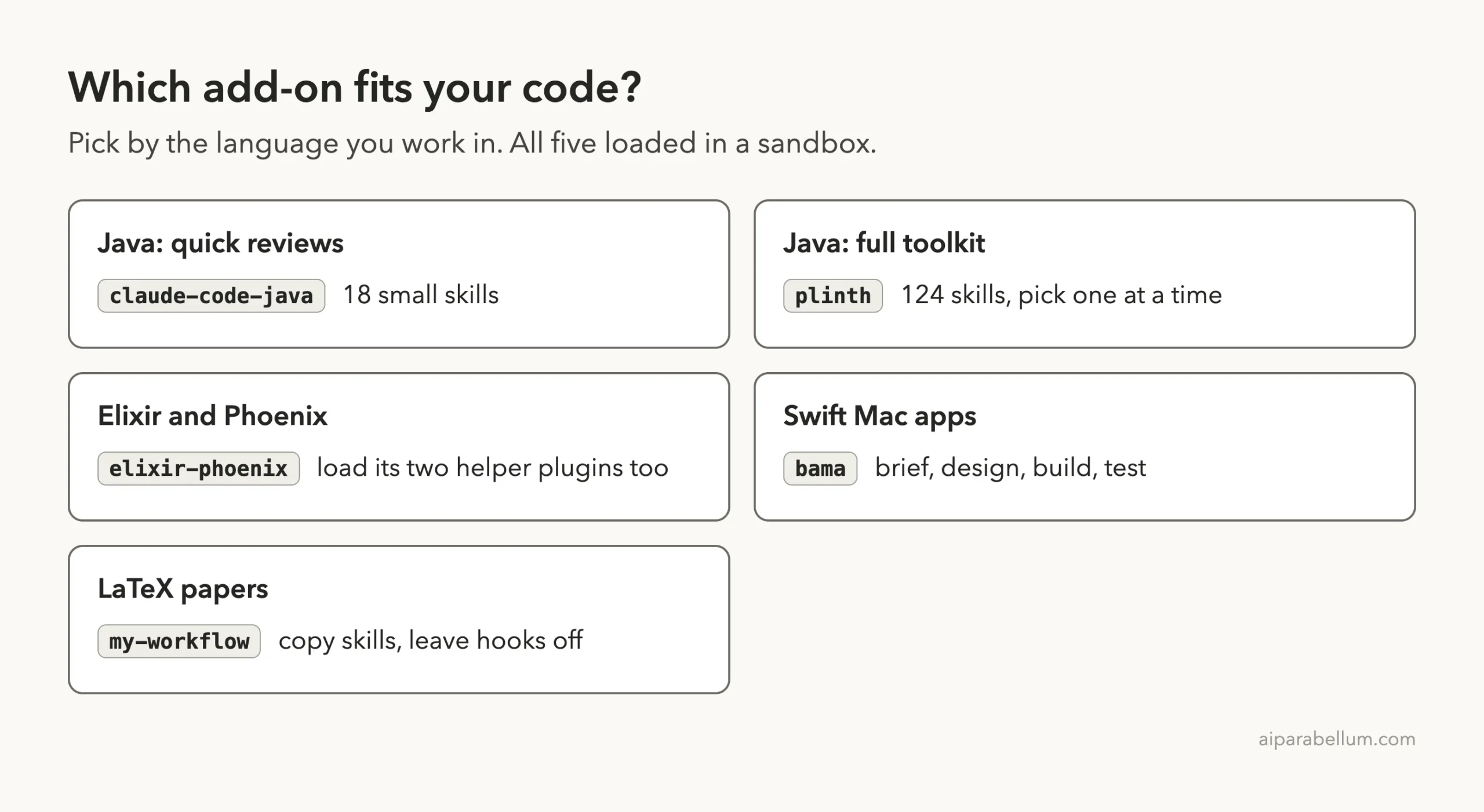
| You want | Try | Watch out for |
|---|---|---|
| Fast Java reviews | claude-code-java | Small skills, so shallow on frameworks |
| Deep Java and Spring guidance | plinth | A 541 MB clone and 124 skills to choose from |
| A full Phoenix workflow | claude-elixir-phoenix | Load the ecto and lv folders too |
| Help planning a Mac app | bama | We tested only the planning step |
| Proofreading academic LaTeX | claude-code-my-workflow | Its hooks write to your home folder, so copy skills only |
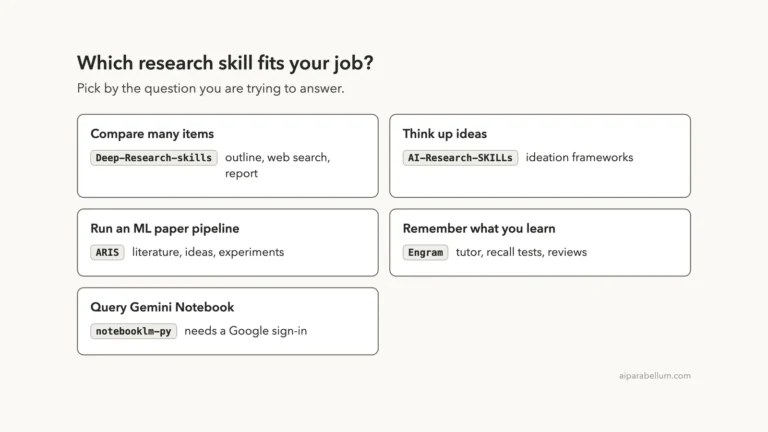
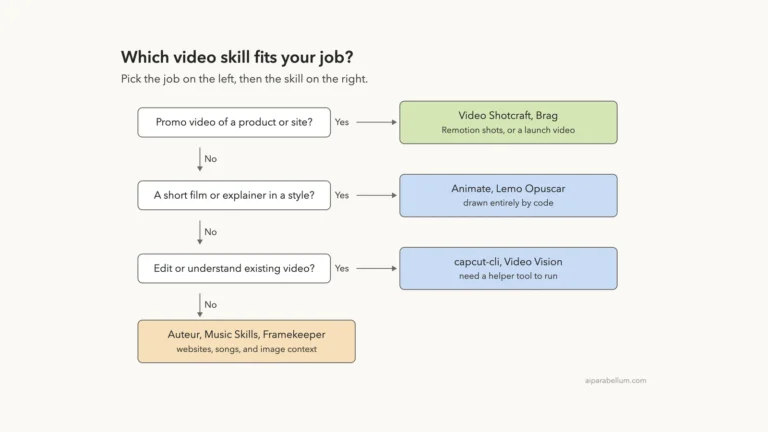
If you are still choosing skills in general, our posts on engineering skills and developer tool plugins cover related options. For another set of sandbox tests, see our research skills review.
Try It Yourself
Practice on a throwaway folder, never your real project. Make a folder, put one small flawed file in it, and load a single add-on.
Here is a prompt you can copy for the Java option after loading claude-code-java:
Use the java-code-review skill to review src/main/java/demo/UserRepo.java. Reply with only the top 5 findings, one line each.Then try the same file with a second add-on and compare the answers. Differences in wording tell you more than any feature list.
Common Mistakes
- Loading a plugin with dependencies from a single folder, as we did with the Elixir one, and then blaming the skill when it is missing.
- Copying a whole template into your real home folder, including its hooks, before reading them.
- Trusting a skill’s first answer without checking the file. In our Elixir failure, Claude answered anyway without the skill.
- Expecting build and test skills to work without the language’s tools installed. Ours skipped steps when Maven, Mix or LaTeX were missing.
Pro Tips
- Type the plugin name followed by a colon to list its skills before you pick one.
- Read the plugin file first. A
dependenciesline, like the one in the Elixir plugin, tells you what else to load. - Ask for a short answer, such as the top five findings, so you can compare tools fairly.
- Keep experiments in one sandbox folder so you can move it to the Trash when you are done.
Cheat Sheet
Frequently Asked Questions
Is there a Claude Code Java plugin?
Yes, there are at least two community options. claude-code-java has 18 small skills, and plinth has 124. Both are open source repos, and both worked in our short tests.
Why did the Elixir plugin say a skill was unknown?
The plugin depends on two helper plugins, ecto and lv. Loading only the main folder left a dependency unmet. Loading all three folders with --plugin-dir fixed it.
Do I need Elixir, Maven or LaTeX installed?
Not to read a skill’s answer, as our tests show. But formatting hooks, builds and compile skills use the real tools, so install them if you want the full workflow.
Can I use these without changing my Claude Code setup?
Yes. Load them for one session with --plugin-dir, or copy one skill into a project’s .claude/skills folder. Read the hooks before you load anything.
Is there a Claude Code plugin for Swift?
Bama is one. It targets native Mac apps with SwiftUI. We tested its planning skill only, not the build and test steps.
Conclusion
Language add-ons for Claude are worth a short, careful trial: the Java ones gave clear reviews, the Phoenix one needed its two helper folders, Bama planned a Mac app by asking good questions, and the LaTeX skill caught every planted error and an overclaim. Pick one for your language, test it on a throwaway file, and read its hooks before you trust it with real work. Browse all our Claude Code tutorials for more.