The claude theme factory skill gives Claude Code ten ready-made color and font themes, so a page, a deck or a report can share one consistent look. Its sibling, the brand-guidelines skill, does the same with Anthropic’s own colors. We loaded both into a throwaway project, restyled a plain event page three ways, and opened every result in a browser to see what really changed.
This guide is part of our Claude Code tutorials. Find more add-ons in our Skills Directory.
Tested with Claude Code v2.1.318 on November 6, 2026, using the theme-factory and brand-guidelines skills from the anthropics/skills collection at commit ca45fc4 (October 28, 2026). Everything ran in a sandbox folder with --setting-sources project, so nothing was added to the global Claude Code setup.
Quick Summary
| Question | Answer |
|---|---|
| What are they? | Two skills that tell Claude which colors and fonts to use when it styles something |
| Who makes them? | Anthropic, in the anthropics/skills collection |
| Test 1 | Ocean Depths, one of the ten preset themes, applied to a plain HTML page |
| Test 2 | Anthropic’s brand look applied to the same page |
| Test 3 | A new theme called Warm Library, made on the spot |
| Time | Claude reported 12, 13 and 14 seconds for the three runs |
| Cost of loading | About 90 tokens for theme-factory and about 80 for brand-guidelines in the skills list |
| Biggest catch | The brand skill is Anthropic’s look, not yours, and its fonts were not installed, so fallbacks showed |
What the Claude Theme Factory Skill Does
A skill is a folder with a SKILL.md file that Claude loads when a task matches its description. If skills are new to you, our guide to Claude Code skills explains the basics.
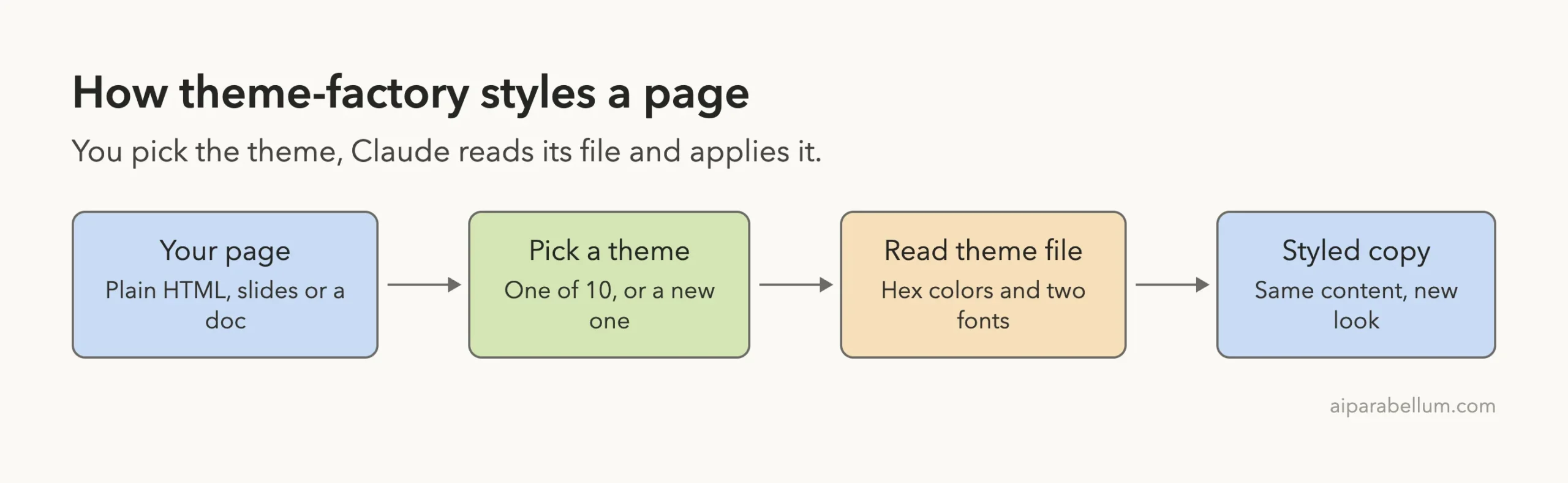
The theme-factory skill is a style kit. Its description says it styles artifacts such as slides, docs, reports and HTML landing pages. It ships ten preset themes, and each one is a short markdown file with four hex colors and two fonts.
The skill also says it can create a new theme when none of the ten fit. Claude then names it, picks colors and fonts from your description, and shows it for review.
The ten preset themes
The skill lists these themes. Each has a one-line mood in its description.
| Theme | Mood described by the skill |
|---|---|
| Ocean Depths | Professional and calming maritime |
| Sunset Boulevard | Warm and vibrant sunset colors |
| Forest Canopy | Natural and grounded earth tones |
| Modern Minimalist | Clean and contemporary grayscale |
| Golden Hour | Rich and warm autumnal palette |
| Arctic Frost | Cool and crisp winter-inspired |
| Desert Rose | Soft and sophisticated dusty tones |
| Tech Innovation | Bold and modern tech aesthetic |
| Botanical Garden | Fresh and organic garden colors |
| Midnight Galaxy | Dramatic and cosmic deep tones |
What the skill asks Claude to do
By default the skill follows four steps. Claude shows a file called theme-showcase.pdf, asks which theme you want, waits for your answer, and then applies it.
In our tests we named the theme in the prompt, so Claude skipped the showcase and the question. It told us so in its reply. We did not open the showcase PDF.
What the Brand Guidelines Skill Does
The brand-guidelines skill is narrower. It applies Anthropic’s official brand colors and typography to anything that should carry Anthropic’s look and feel.
The colors are listed right in its SKILL.md. There are four main colors and three accents.
| Role | Name | Hex |
|---|---|---|
| Main | Dark | #141413 |
| Main | Light | #faf9f5 |
| Main | Mid Gray | #b0aea5 |
| Main | Light Gray | #e8e6dc |
| Accent | Orange | #d97757 |
| Accent | Blue | #6a9bcc |
| Accent | Green | #788c5d |
Headings use Poppins with an Arial fallback, and body text uses Lora with a Georgia fallback. The skill notes that the fonts should be pre-installed for best results.
How to Install the Claude Theme Factory Skill
Both skills live in the skills folder of the anthropics/skills repository. The theme-factory folder holds a SKILL.md, a license, the showcase PDF and a themes folder with ten markdown files. The brand-guidelines folder holds only a SKILL.md and a license.
We found no scripts in either, which made them easy to review before use.
The repository also lists a plugin route: /plugin marketplace add anthropics/skills, then /plugin install example-skills@anthropic-agent-skills. That adds these skills, and others, to your own setup. For our test we copied the two folders into a project instead.
mkdir -p my-site/.claude/skills
cp -R skills/theme-factory skills/brand-guidelines my-site/.claude/skills/
cd my-site
claude
Project skills load from .claude/skills/ in the folder where you start Claude Code. The official skills documentation and the plugins guide cover both routes.
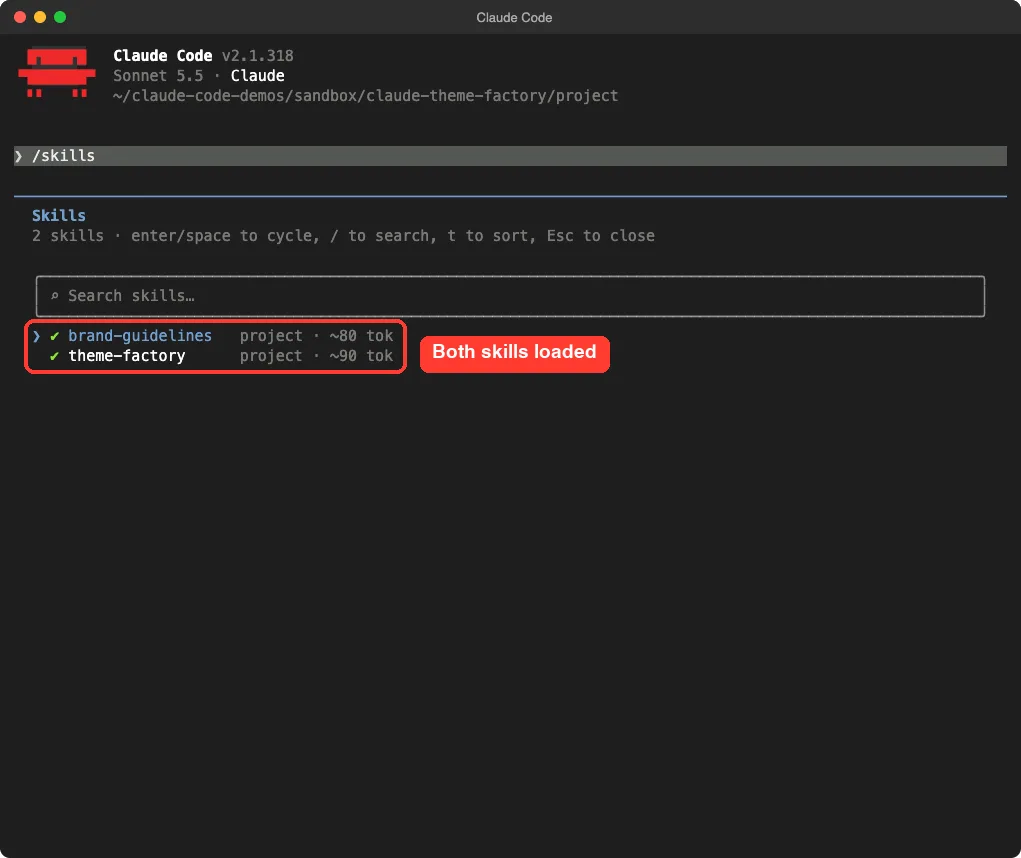
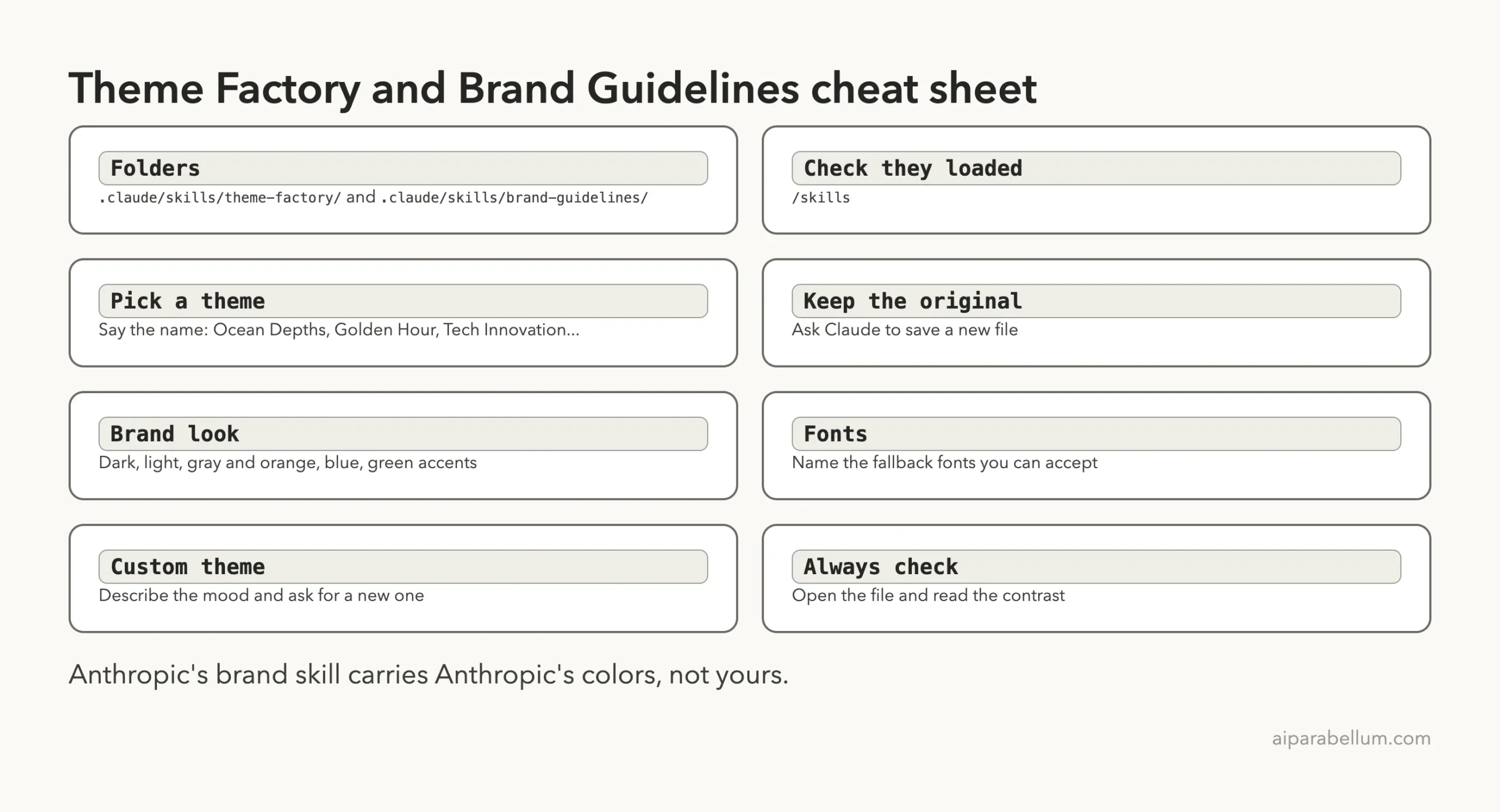
Type /skills to confirm they loaded. Ours listed both as project skills.
The Demo Page We Styled
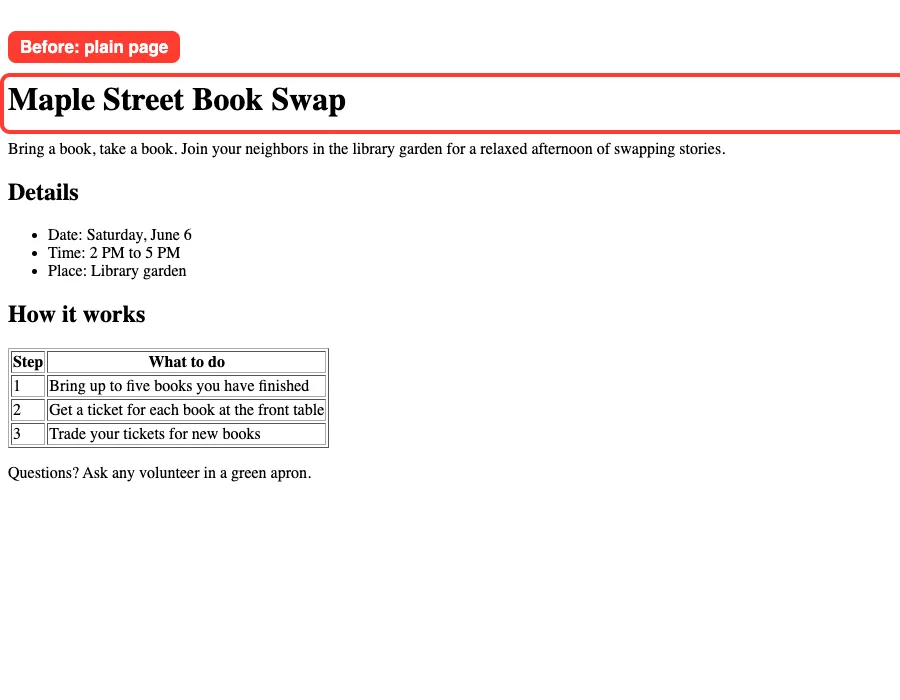
We wrote a tiny page for a made-up event, the Maple Street Book Swap. It has a title, a short intro, a three-item list and a three-row table. No styles at all, so you see the browser defaults.
Test 1: Claude Theme Factory Skill With a Preset Theme
We named Ocean Depths in the prompt, asked for a new file and told Claude to keep the original.
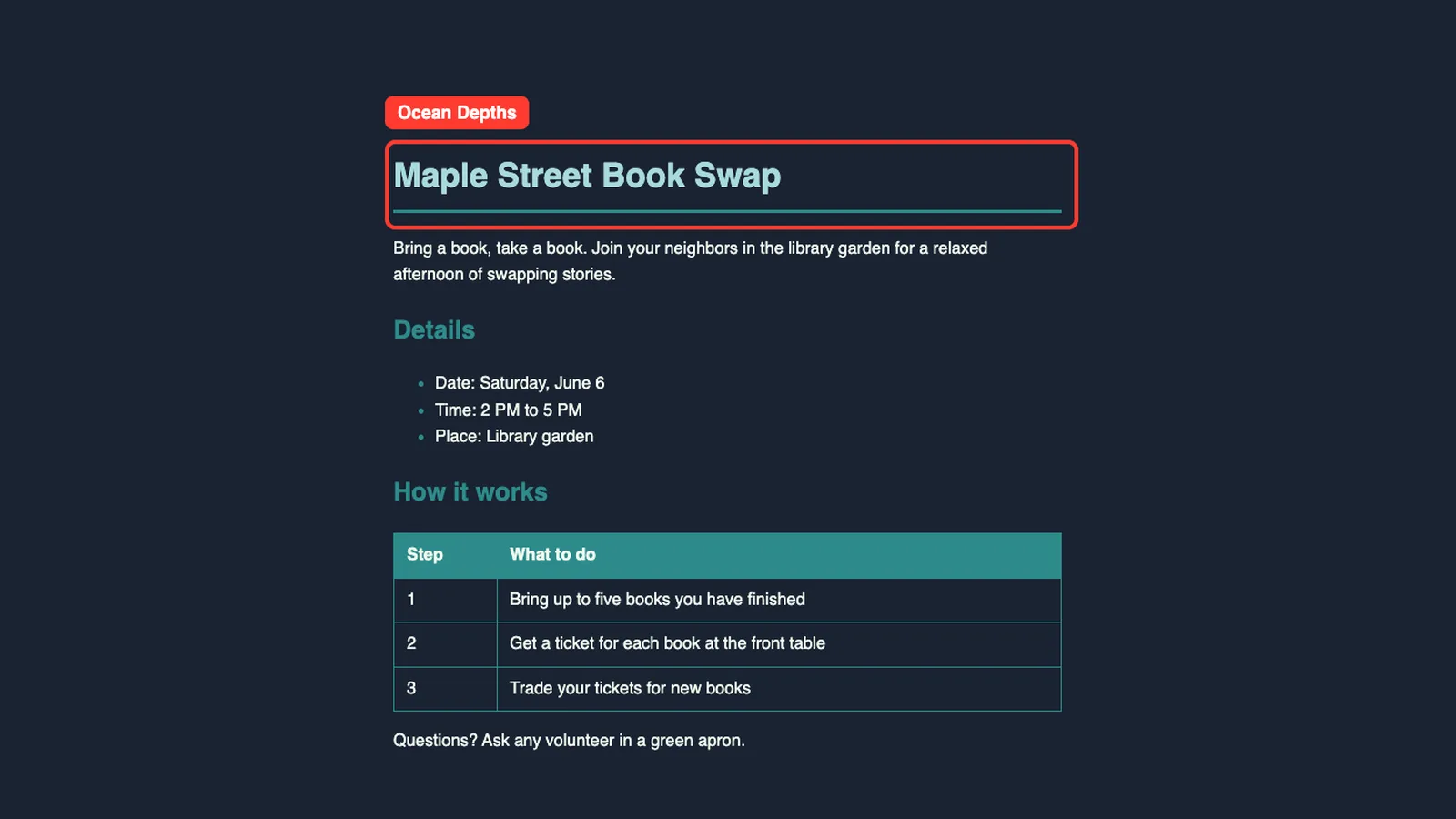
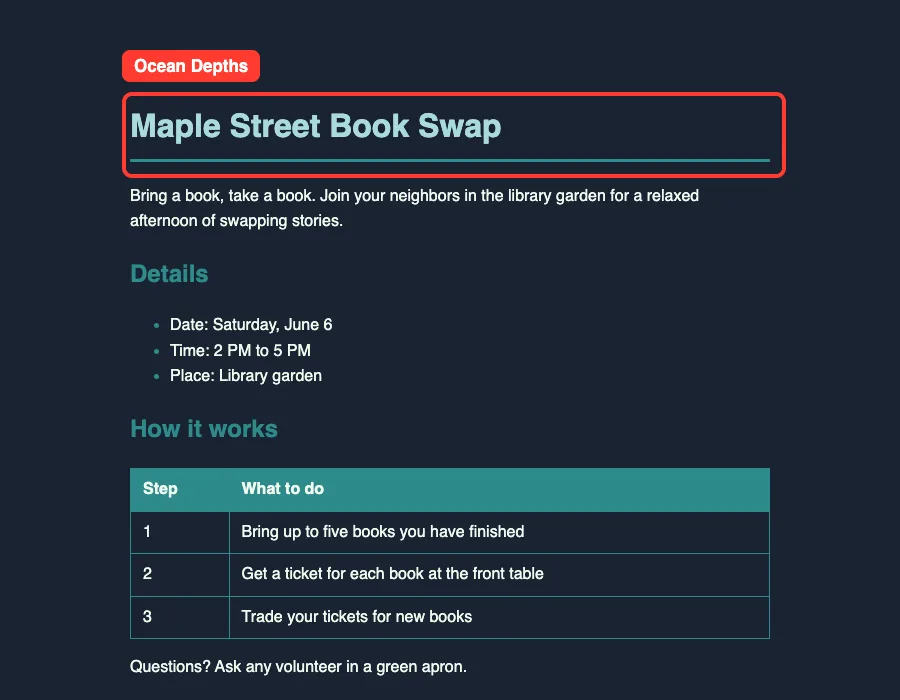
Use the theme-factory skill to style index.html with the Ocean Depths theme (I choose it, so you do not need to ask). Save the result as index-ocean.html and keep index.html unchanged. Use only the colors and fonts from the theme file. Do not install anything.Claude read the theme file and wrote a 33-line page. The page uses the deep navy #1a2332 as a background, cream #f1faee for text, teal #2d8b8b for headings, bullets and the table header, and seafoam #a8dadc for the title.
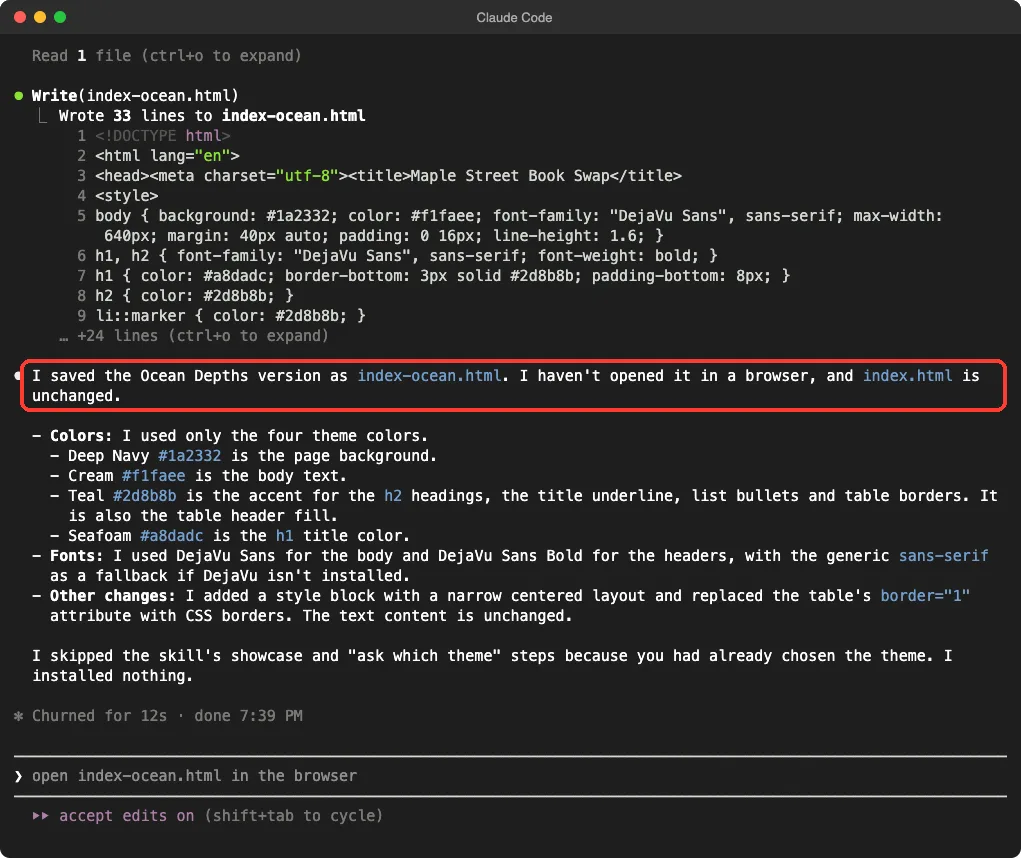
Claude said it had not opened the page in a browser, so we did. It rendered as a calm dark page with a teal table header and good contrast.
What about the fonts?
The theme asks for DejaVu Sans. Claude added a generic sans-serif fallback, as it told us. On our Mac the page showed a standard sans-serif, which looks close but is not guaranteed to be DejaVu on every machine.
Test 2: Apply the Brand Guidelines
The second prompt was shorter, because there is nothing to choose. The skill has one look.
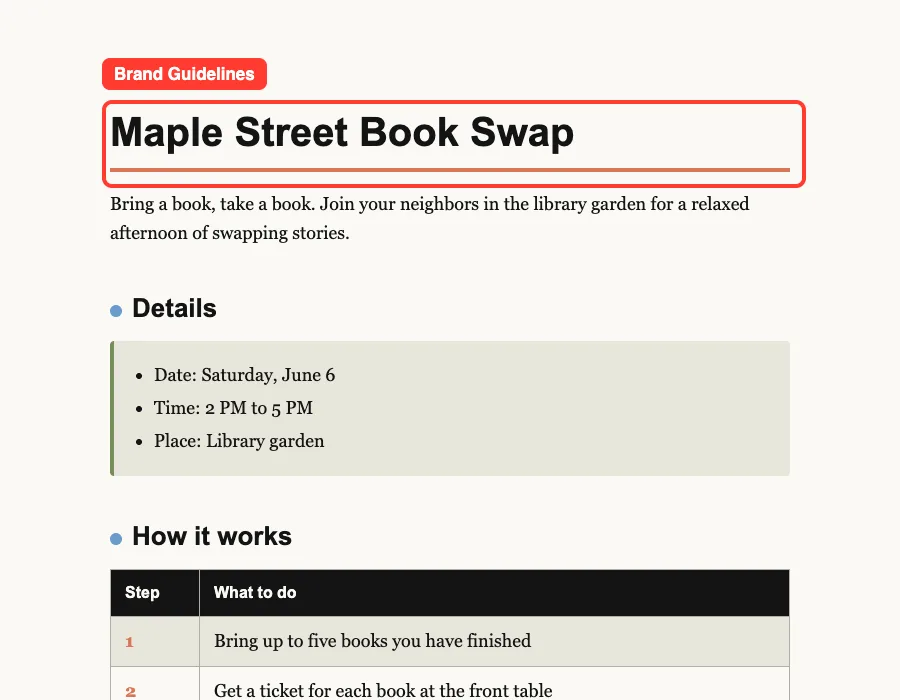
Use the brand-guidelines skill to style index.html. Save the result as index-brand.html and keep index.html unchanged. Use only the colors and fonts from the skill. Do not install anything.Claude wrote a 100-line page with a light cream background, near-black text, an orange rule under the title, blue dots by the headings and a green bar on the details box. It also gave the table a dark header with orange step numbers.
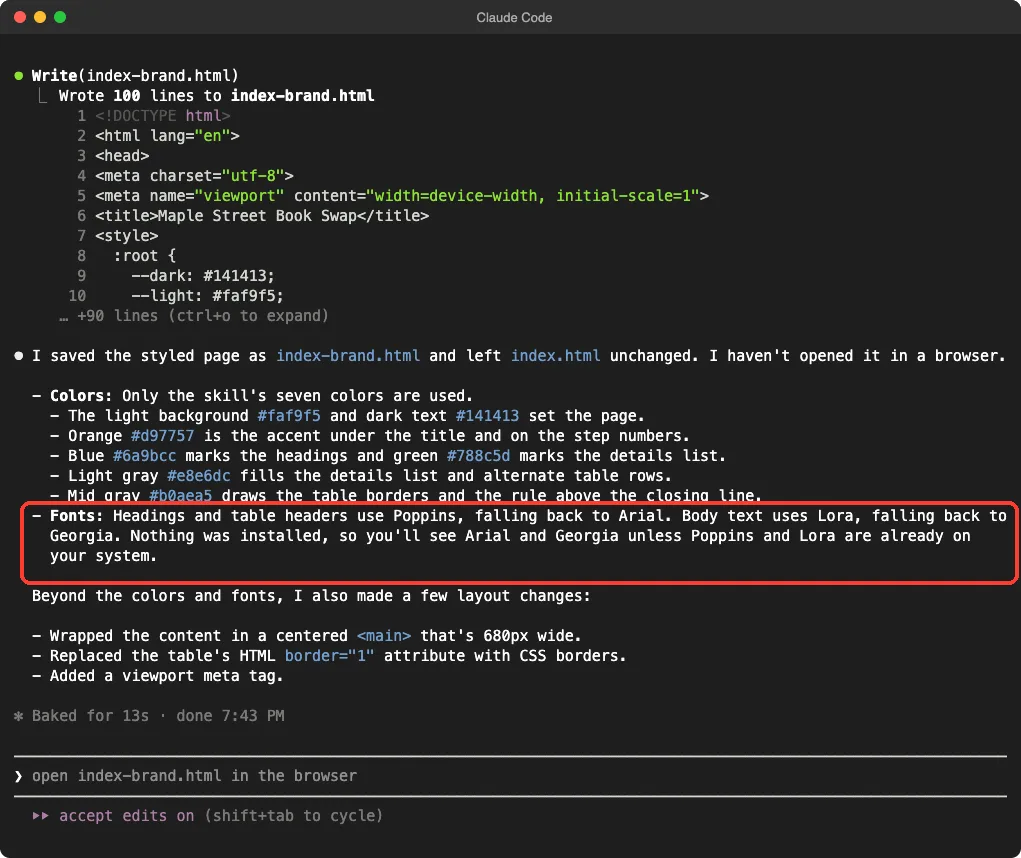
That warning matters. Poppins and Lora were not installed on our test Mac, so the page showed the Arial and Georgia fallbacks, not the true brand fonts.
Did Claude change more than colors?
Yes, a little. In both runs Claude added a narrow centered layout and replaced the old table border attribute with CSS borders.
It said so in its notes. The text of the page stayed the same.
Test 3: Create a New Theme
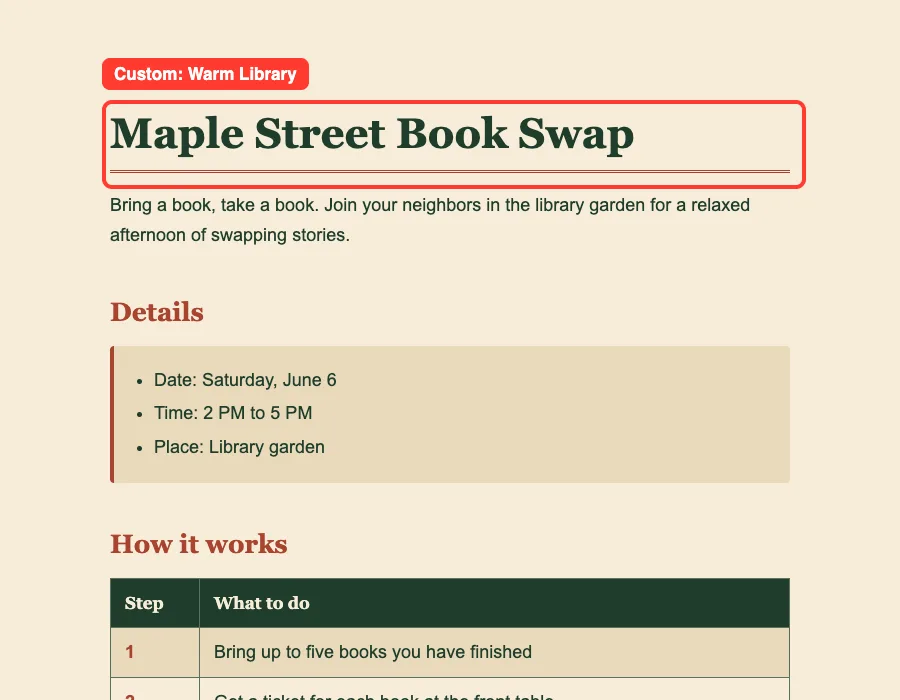
When no preset fits, the skill says to create a theme and show it for review. We asked for a cozy library look.
Now use the theme-factory skill to create a brand new theme called Warm Library for a cozy neighborhood library: warm paper background, deep green text, a brick-red accent, and two fonts. Show me the palette in your reply, then save the page styled with it as index-library.html.Claude showed a palette table and the fonts. Warm paper #f6ecd9, aged paper #e9d9ba, deep green #1f3d2b, soft green #5b7060 and brick red #a8442f. Headings use Playfair Display with a Georgia fallback, and body text uses Lato with an Arial fallback.
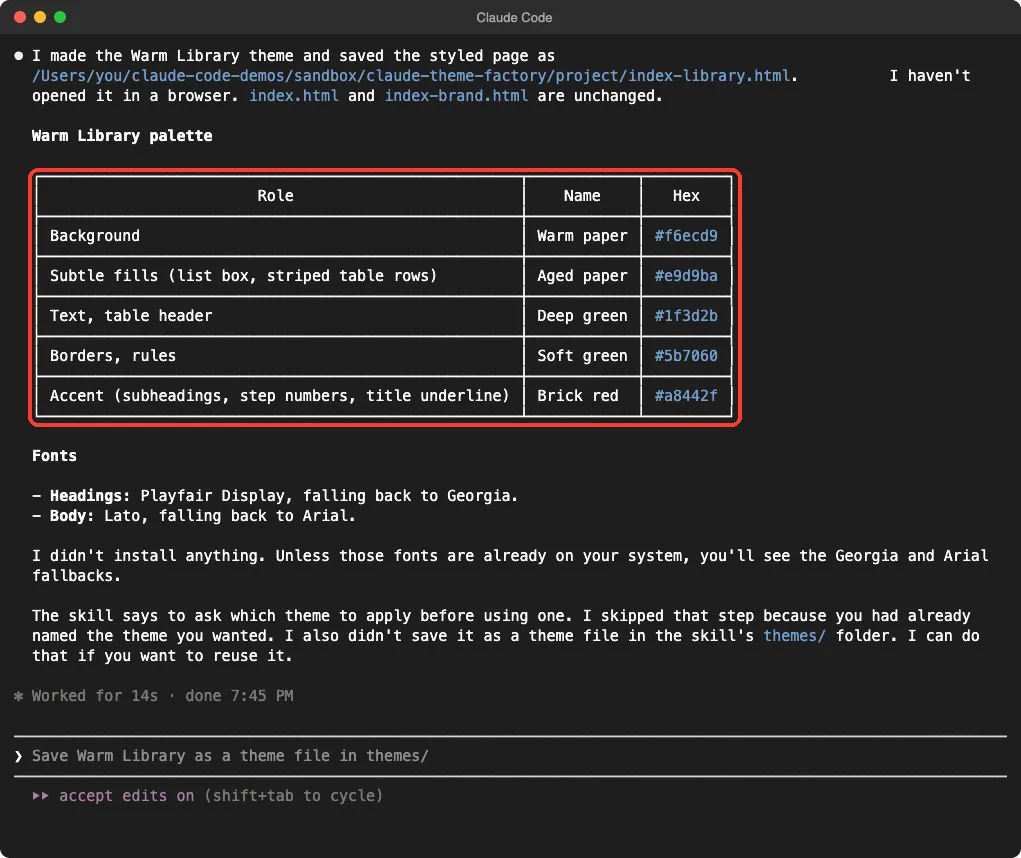
Claude added that it did not save the theme into the skill’s themes folder, and offered to do that if we wanted to reuse it. That is worth knowing. A new theme lives only in that one page unless you ask Claude to keep it.
We did not ask for an extra review round or a second theme, so this is one run.
Which Skill Should You Use?
The choice comes down to who decides the look. Use theme-factory when you want help choosing, and brand-guidelines when you want Anthropic’s palette.
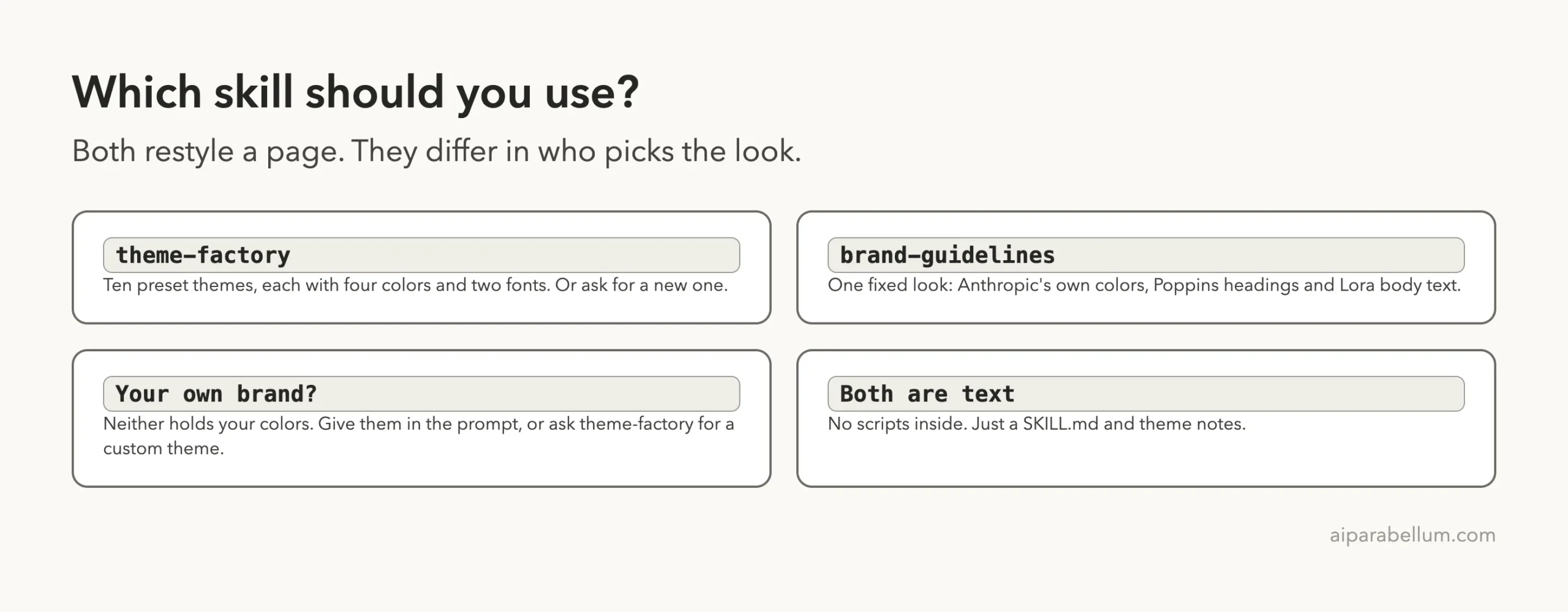
| You want | Use | Say this in the prompt |
|---|---|---|
| A quick mood for a page or deck | theme-factory | The theme name, such as Golden Hour |
| A look made to order | theme-factory | The mood and two or three colors |
| Anthropic’s colors and fonts | brand-guidelines | Nothing extra; there is one look |
| Your own company colors | Either, with your hex codes | Each hex code and font by name |
For your own brand, the second skill is not a fit. Its colors are Anthropic’s, so give Claude your hex codes, or ask theme-factory to make a theme from them.
Real Examples to Try
These prompts follow the patterns we tested. Swap in your own files.
- Landing page: “Use the theme-factory skill to style landing.html with the Forest Canopy theme. Save it as landing-forest.html.”
- Report page: “Use the theme-factory skill to restyle report.html in Modern Minimalist. Keep the text unchanged.”
- Custom look: “Create a new theme called Harbor Morning with soft blues and a sand accent, show me the palette, then apply it to menu.html.”
The skill’s description also mentions slides and docs. We tested only an HTML page, so we cannot tell you how well slide decks come out.
For other ways to make Claude produce good-looking output, see our test of the canvas design skill and the Taste skill.
Try It Yourself
Copy both skill folders into an empty project, add any small HTML page, start Claude Code and paste this prompt. Then open each file in your browser.
Use the theme-factory skill to style index.html in the Arctic Frost theme and save it as index-frost.html. Then use the brand-guidelines skill to style index.html and save it as index-brand.html. Keep index.html unchanged. Tell me which colors and fonts you used, and whether you opened the pages.Common Mistakes
- Overwriting your page. Ask for a new file name, as we did, so you can compare before and after.
- Expecting the brand skill to use your brand. It carries Anthropic’s colors only.
- Assuming the fonts will match. Poppins, Lora, DejaVu Sans and the others only show if they are installed.
- Skipping the visual check. Claude told us twice that it had not opened the page.
- Forgetting to save a new theme. Ours was not stored in the
themesfolder until we asked. - Putting the skill in the wrong folder. It will not show in
/skills.
Pro Tips
- Name the theme in the prompt to skip the showcase and question steps.
- Say “use only the colors and fonts from the theme file” to keep Claude from adding extras.
- Ask Claude to list the hex codes it used, so you can check them.
- Check contrast yourself on text over colored areas.
- Ask Claude to save a good custom theme as a file, then reuse it on the next page.
Cheat Sheet
What We Did Not Test
We ran three prompts, one time each, on one HTML page.
We did not test slide decks, Word or PowerPoint files, the showcase PDF, other presets, or the plugin install route. We also did not install Poppins, Lora or the other fonts, so the pages show fallback fonts. Your results will differ, because Claude writes new code for each request.
During the automated run we allowed file edits inside the demo folder without asking each time.
Frequently Asked Questions
Is the claude theme factory skill free?
The skill folder is public in Anthropic’s skills repository, and its front matter points to a LICENSE.txt for the terms. Read that file before reuse. Running it uses your normal Claude Code usage.
Can I use my own brand colors?
Not through brand-guidelines, which holds Anthropic’s colors. Put your hex codes in the prompt, or ask theme-factory to create a custom theme from them.
Do I need to install the fonts?
The pages still work without them, because Claude adds fallback fonts. For the exact look, install the named fonts on the device that opens the page.
Does it only work on HTML pages?
The skill says it can style slides, docs, reports and HTML pages. We tested only an HTML page.
Will it change my text?
In our runs the words stayed the same. Claude did change layout details, such as centering the content and swapping table borders for CSS, and it said so.
Name the theme, ask for a new file, then open the page and check the fonts.
Conclusion
The claude theme factory skill turned a plain page into a navy ocean look and a custom warm library look in about 15 seconds each, and the brand guidelines skill gave the same page Anthropic’s orange, blue and green. They are best for quick, consistent styling when you can name a mood, and weaker when you need your own brand, because the fixed colors are Anthropic’s. Always name the theme, keep the original file and open the result yourself, since Claude said it had not looked at the pages. For more official skills, see our guide to the Anthropic skills repo, and read about Claude itself.