The Hugging Face skills for Claude Code are a free plugin from Hugging Face that teaches Claude how to find, size and run open models from the Hub. We loaded it in a throwaway project and asked a plain question: which open coding models fit on a 16GB MacBook? Then we asked for the exact command to run the winner.
This post shows what the skills did, where they stumbled, and which parts we could not run on this Mac.
This guide is part of our Claude Code tutorials. Find more add-ons in our skills directory.
Tested with Claude Code v2.1.319 on November 11, 2026, using the plugin huggingface-skills version 1.0.37 from huggingface/skills at commit 25910b3 (October 29, 2026). We tested on macOS; the Windows and Linux steps follow Anthropic’s official instructions.
| Question | Short answer |
|---|---|
| What is it? | A plugin that bundles 25 skills for Hub work: models, datasets, Spaces, training, cloud deployment and more |
| Do you need an account? | Not for what we ran. The Hub pages and leaderboards we used are public |
| Which skills did we run? | huggingface-best and huggingface-local-models |
| Which did we not run? | hf-mem (needs uv), hf-cli (needs the hf tool), and the other 21 |
| Did it work? | Yes. It ranked models for 16GB and produced a ready-to-use llama-server command |
| Cost to try | Free plugin; the Claude Code session uses your normal Claude usage |
What the Hugging Face skills for Claude Code are
Hugging Face is the main hub where people share open models and datasets. A skill is a folder of instructions that Claude loads when your request matches it. Put the two together and Claude gets a written playbook for common Hub jobs, so it does not have to guess which pages or commands to use.
If skills are new to you, our guide to Claude Code skills explains how a skill differs from a normal prompt. The repo itself is github.com/huggingface/skills.
We covered this plugin briefly in our plugins roundup. This post is the full hands-on test of the three skills that match the title: find a model, size it, run it.
| Skill | What it is for | Did we run it? |
|---|---|---|
huggingface-best | Pick the best models for a task from official leaderboards, filtered for your device | Yes |
hf-mem | Estimate the memory a model needs, without downloading it | No, needs uv |
huggingface-local-models | Find GGUF files, choose a quant and launch with llama.cpp | Yes, up to the command |
hf-cli | Teaches every hf command | No, needs the hf tool |
What the README says, and what we loaded
The README gives two Claude Code commands. You add the repo as a marketplace, then install a plugin from it.
/plugin marketplace add huggingface/skills
/plugin install hf-cli@huggingface/skills
Notice what that second command installs. The README says the client marketplaces expose only the hf-cli skill, and that you add every other skill later with hf skills add <skill-name>. That is a real difference from what we loaded, so keep it in mind.
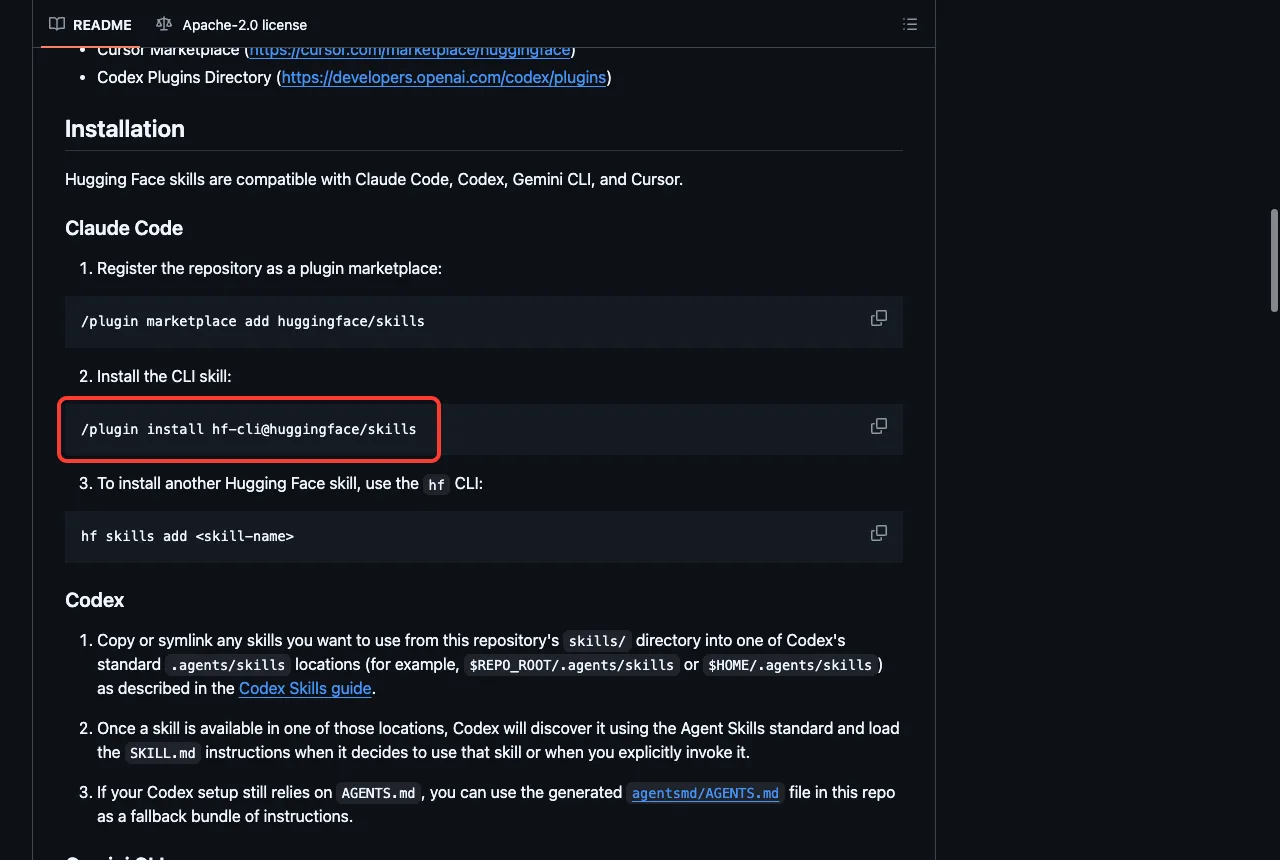
We did not run either command. Both write to your personal Claude Code setup, and we wanted a test that leaves nothing behind. Our plugins guide covers the normal install and manage steps, and Anthropic’s own pages are Plugins and Discover plugins.
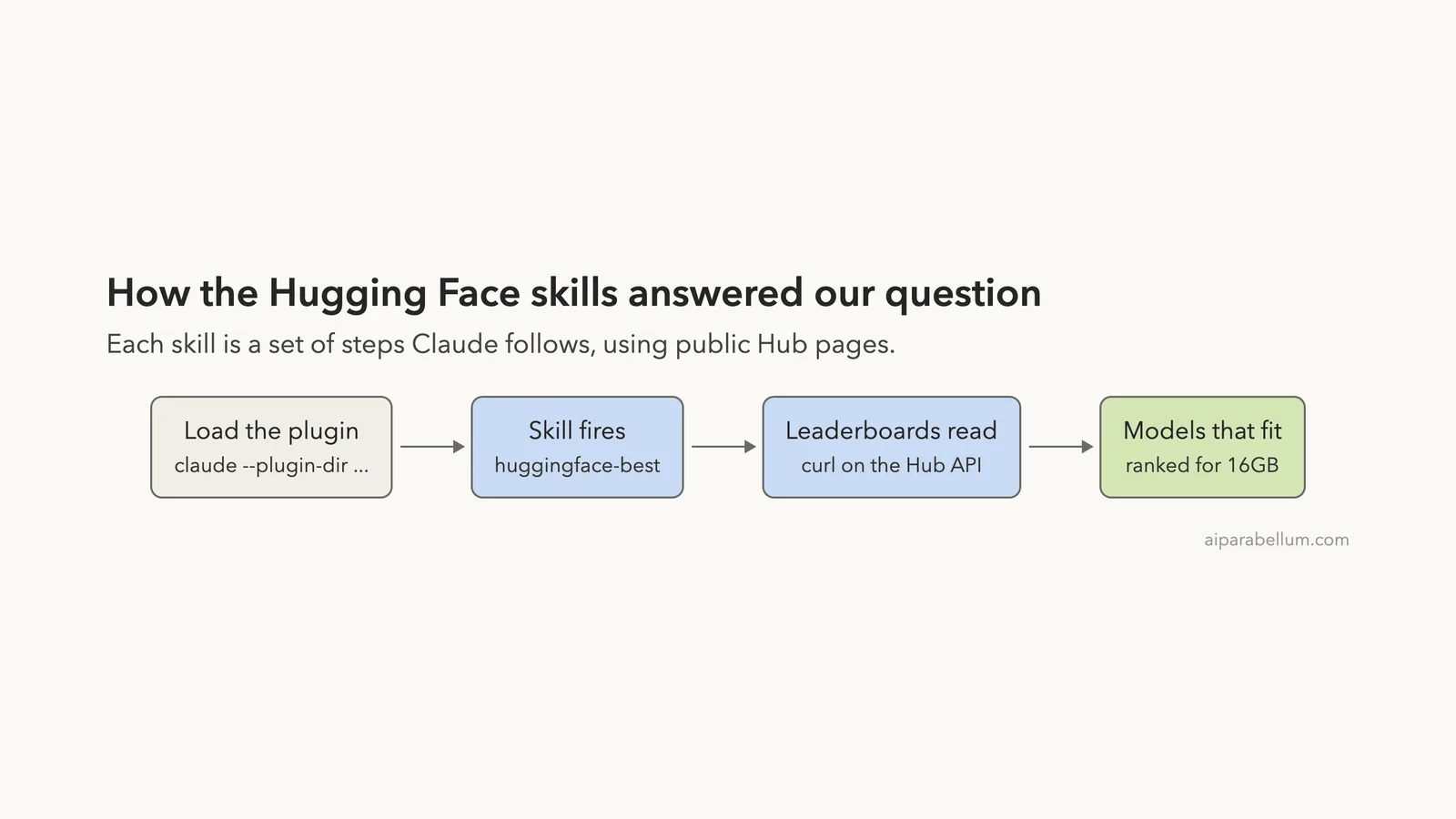
Instead we cloned the repo into a throwaway folder and loaded the whole thing for one session.
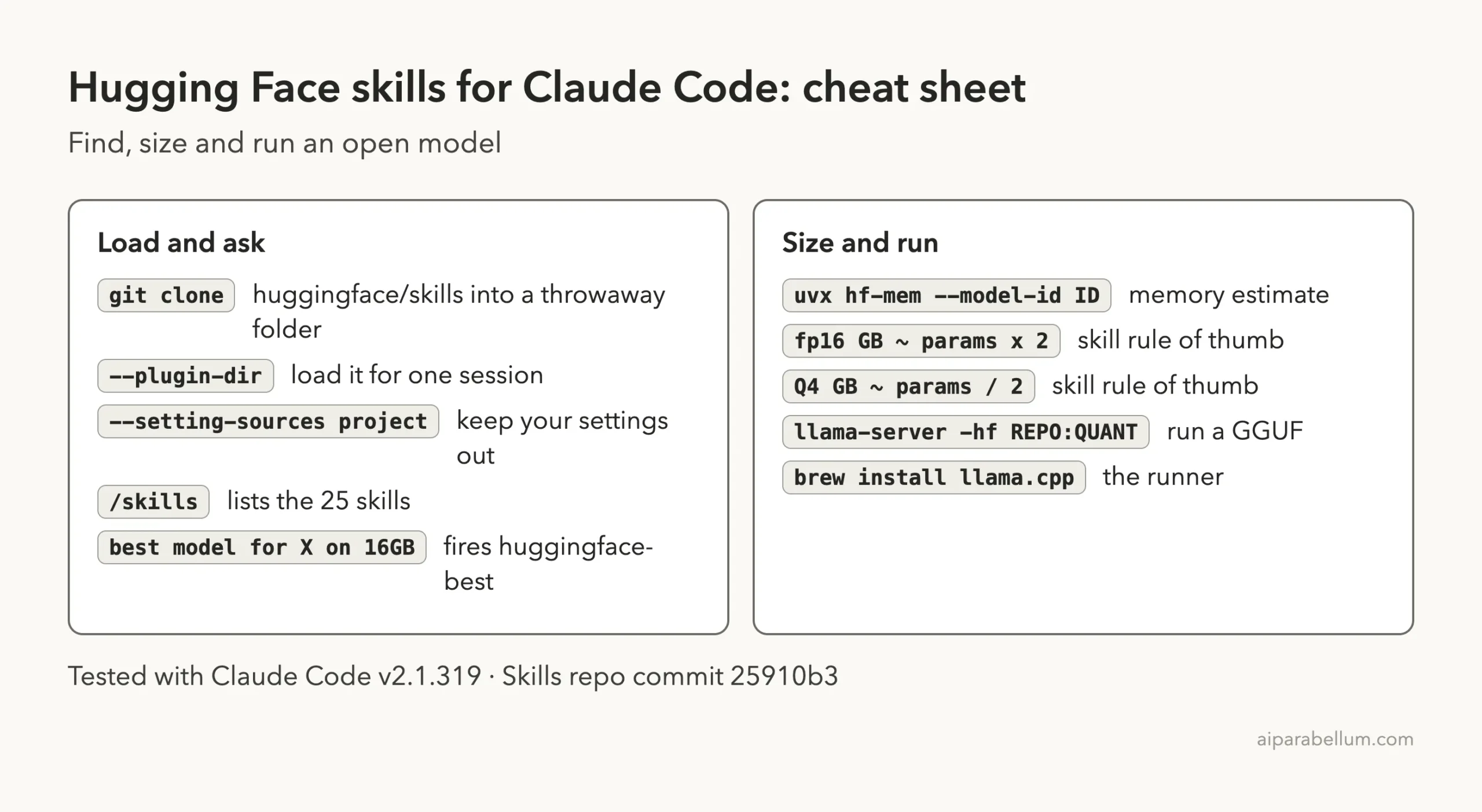
claude --plugin-dir /path/to/skills --setting-sources projectThe --plugin-dir flag loads a plugin from a folder for that run only. The --setting-sources project flag keeps your personal settings out.
Because the repo’s own skills folder came along, Claude Code listed 25 skills, not just hf-cli. That is why we could test the other skills without the hf tool.
What we read before running it
Before loading anything we looked through the repo. The plugin manifest is a short plugin.json. We found no hooks.
There is one .mcp.json that points to Hugging Face’s hosted server at huggingface.co/mcp with a login flow. We never signed in and never used it.
The repo also holds helper scripts, GitHub workflows and small apps, such as leaderboards. None of those load into Claude Code with the plugin, and we did not run them. Some skills do ship scripts, for example the SageMaker ones, and we did not run any of those either.
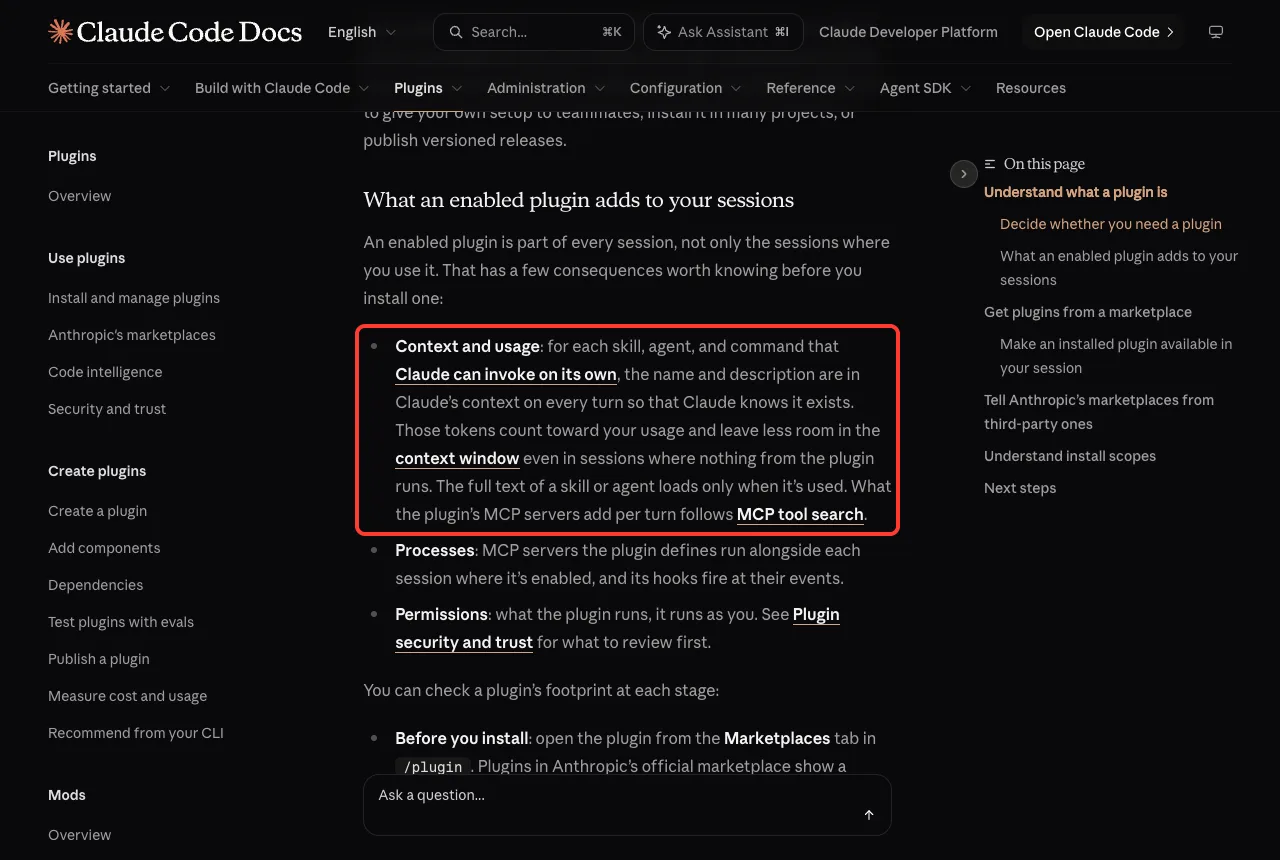
Anthropic’s docs say that for each skill Claude can invoke on its own, the name and description sit in context on every turn. The full text loads only when the skill is used. With 25 skills that adds up, so it helps to see the sizes.
Step 1: List the Hugging Face skills in Claude Code
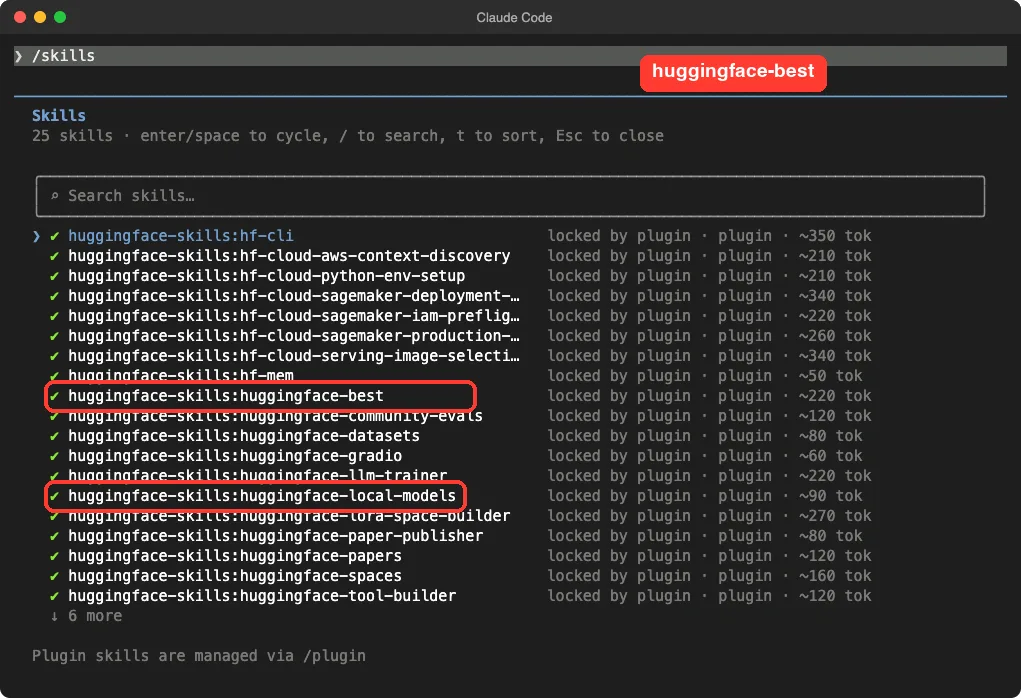
Typing /skills shows every skill with an approximate token cost. The names carry the plugin prefix, so the one we used first is huggingface-skills:huggingface-best.
The costs we saw were small: about 220 tokens for huggingface-best, about 90 for huggingface-local-models and about 50 for hf-mem. The biggest ones were around 350 tokens.
Step 2: Find the best open coding models for 16GB
We did not name a skill. We asked a normal question and told Claude to use the Hugging Face skill.
What are the best open models for coding that fit on a 16GB MacBook? Use the Hugging Face skill, keep the answer short.Claude loaded huggingface-best and began following its steps. The skill says to parse the task and device, fetch the official benchmark list from the Hub, read the leaderboards, add model sizes, then filter and rank.
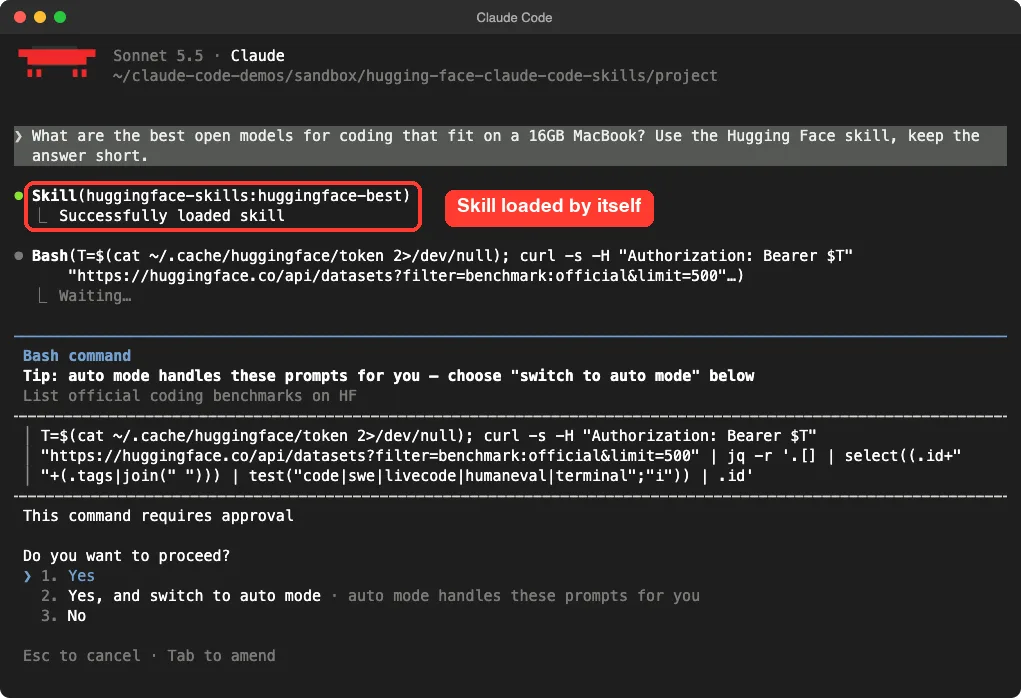
Expect approval prompts. The skill works through curl commands, and Claude Code asked before each compound command it could not check in advance.
Our script pressed Enter on each one. Our permission modes guide explains why Claude Code asks, and how to change that.
One command failed and Claude fixed it
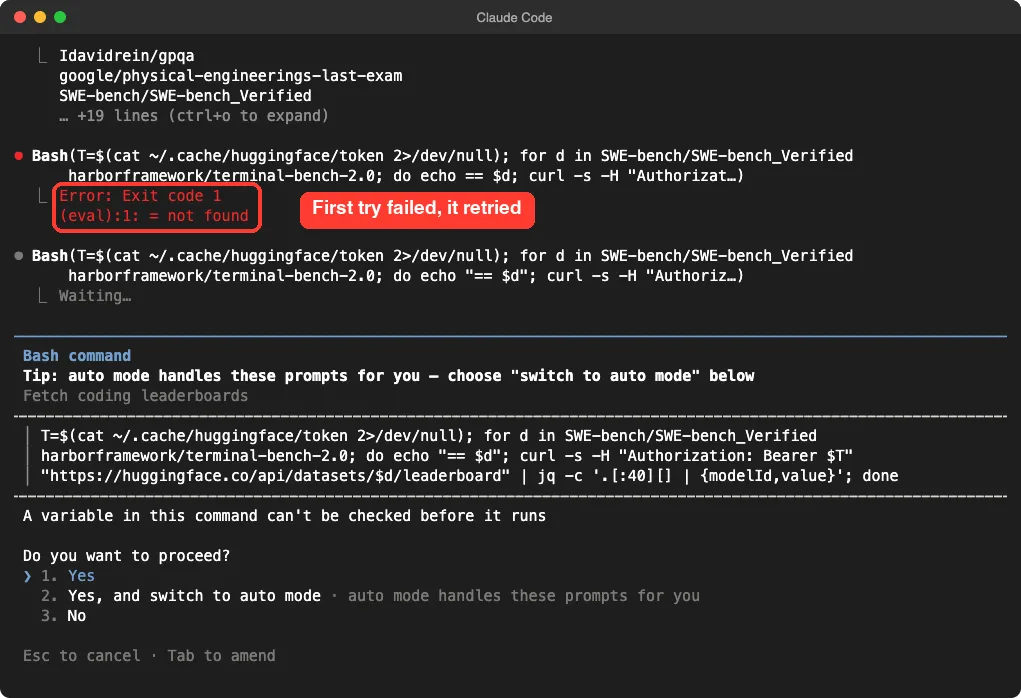
The skill reads your Hugging Face token from ~/.cache/huggingface/token. This Mac has no token file, and Claude handled that by reading it with errors hidden, so the public API calls still worked. We did not log in to anything.
Its second leaderboard command failed on a small shell mistake. The error said = not found. Claude rewrote the line with quotes and asked again, and the retry worked.
What the answer looked like
The whole answer took Claude about 19 seconds of working time, plus our approvals. It gave each model its size, benchmark scores, license and a fit verdict for 16GB.
| Model | Size | Verdict for 16GB |
|---|---|---|
microsoft/FrogNano-4B-2609 | 4.7B | Yes, lots of headroom |
Qwen/Qwen3.6-27B | 27.8B | Barely (about 16GB at Q4), likely to swap |
Qwen/Qwen3.6-35B-A3B | 36B (3B active) | No (about 20GB at Q4) |
poolside/Laguna-XS.2 | 33B | No (about 18GB at Q4) |
Claude recommended Ornith-1.5-9B as the strongest model that fits comfortably, and FrogNano-4B as the lighter pick. It also added a warning that we liked: the 9B and 4B models were not scored on the same benchmarks as the bigger ones, so their scores are not directly comparable.
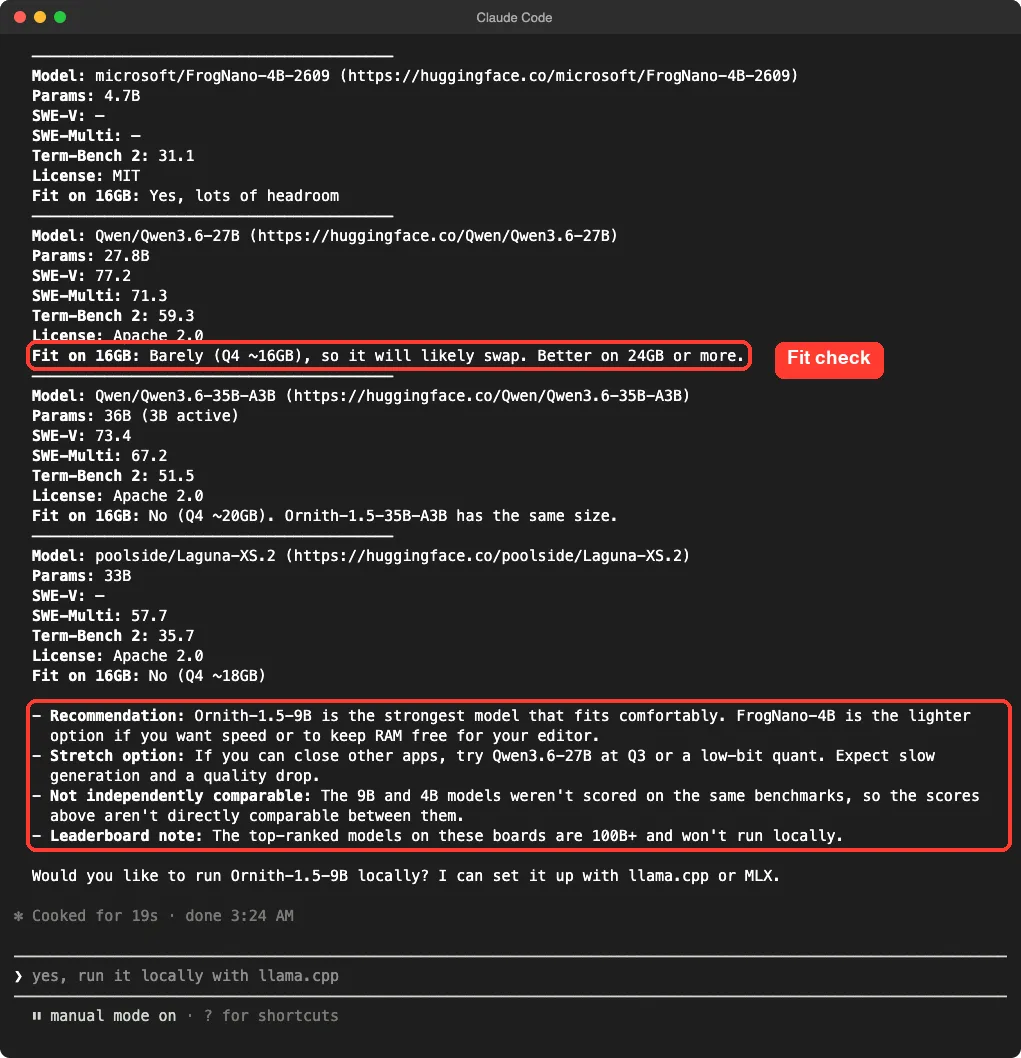
We checked one number ourselves. The Hub reports about 4.66 billion parameters for FrogNano, which matches the 4.7B Claude gave.
A second run gave a looser answer
We asked the same question once before in an earlier session. That answer said Claude had not pulled model metadata, so the parameter counts came from model names and the file sizes were estimates. The later run included real sizes.
So the skill nudges Claude toward the right steps, but the depth of each run can vary. Treat the ranking as a starting list and check the numbers before you download something large.
Step 3: Size a model with hf-mem
The hf-mem skill is the sizing piece. Its text says it estimates the memory needed for inference, including an optional KV cache, by reading file headers over HTTP range requests, without downloading the weights.
uvx hf-mem --model-id <model-id> --experimental --json-outputWe could not run it. It needs uv, and we did not install anything on this Mac for the test. Everything in this section comes from the skill’s own text, not from our run.
The huggingface-best skill also has a simple rule of thumb, and we did see its effect in the answer. Divide your memory in half to get the largest model you can hold at 16-bit precision, or double it for a 4-bit quant. On 16GB that means about 8B at fp16 or 32B at Q4.
| Your memory | Max size at fp16 | Max size at Q4 |
|---|---|---|
| 8GB | 4B | 16B |
| 16GB | 8B | 32B |
| 24GB | 12B | 48B |
That is a ceiling, not a promise. Claude marked the 27.8B model as “barely” at Q4 on 16GB, because the system and the KV cache need room too.
Step 4: Run it with the local models skill
Next we asked for the run step. This prompt loaded the second skill.
Now use the local models skill: find the GGUF files for the top pick and give me the exact llama-server command. Do not run it.Claude loaded huggingface-local-models, noticed that the base repo has no GGUF files, and found the official GGUF repo, ornith-ai/Ornith-1.5-9B-GGUF. It listed every file with its size.
| File | Size | Fits 16GB? |
|---|---|---|
Ornith-1.5-9B-Q4_K_M.gguf | 5.78 GB | Yes |
Ornith-1.5-9B-Q5_K_M.gguf | 6.64 GB | Yes |
Ornith-1.5-9B-Q6_K.gguf | 7.56 GB | Yes |
Ornith-1.5-9B-Q8_0.gguf | 9.79 GB | Yes, but tight with a long context |
Ornith-1.5-9B-BF16.gguf | 18.41 GB | No |
We checked these sizes against the Hub’s file listing ourselves, and they match. The listing also holds a 0.92 GB mmproj file. Claude correctly called it a vision projector that you do not need for coding.
Claude picked Q6_K. Its reason matched the skill text: the skill suggests Q5_K_M or Q6_K for code when memory allows, and that choice leaves about 4GB for the KV cache and macOS.
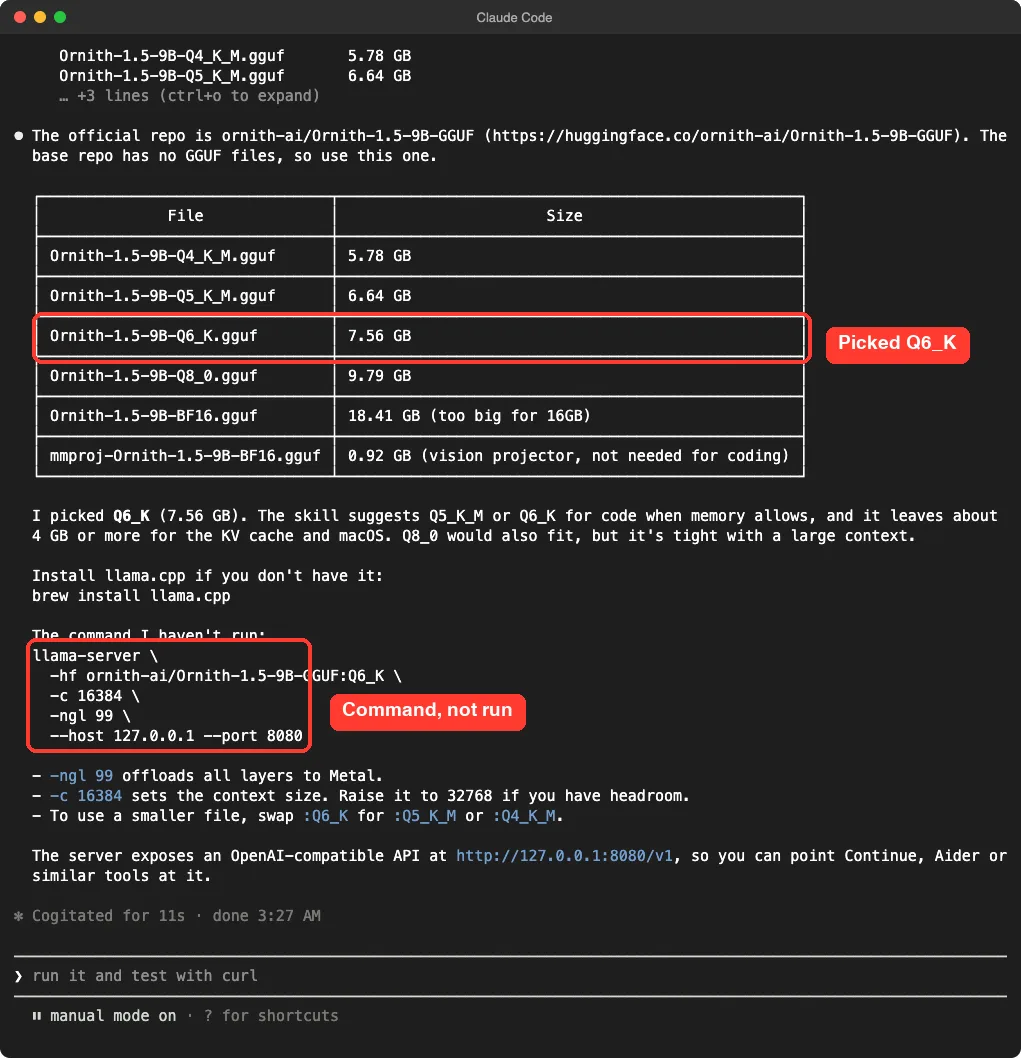
This is the command it gave us.
brew install llama.cpp

llama-server \
  -hf ornith-ai/Ornith-1.5-9B-GGUF:Q6_K \
  -c 16384 \
  -ngl 99 \
  --host 127.0.0.1 --port 8080
The -hf flag pulls the file straight from the Hub, -c sets the context size and -ngl 99 offloads all layers to the Mac’s GPU. Claude added that the server exposes an OpenAI-compatible API at http://127.0.0.1:8080/v1, so editor tools can point at it.
We did not run this command. llama.cpp is not installed here, and the model file is a download of several gigabytes.
So we can tell you the command is the one the skill’s recipe produces, and that the repo and file sizes are real. We cannot tell you how fast the model answers on your Mac.
Which Hugging Face skill should you use?
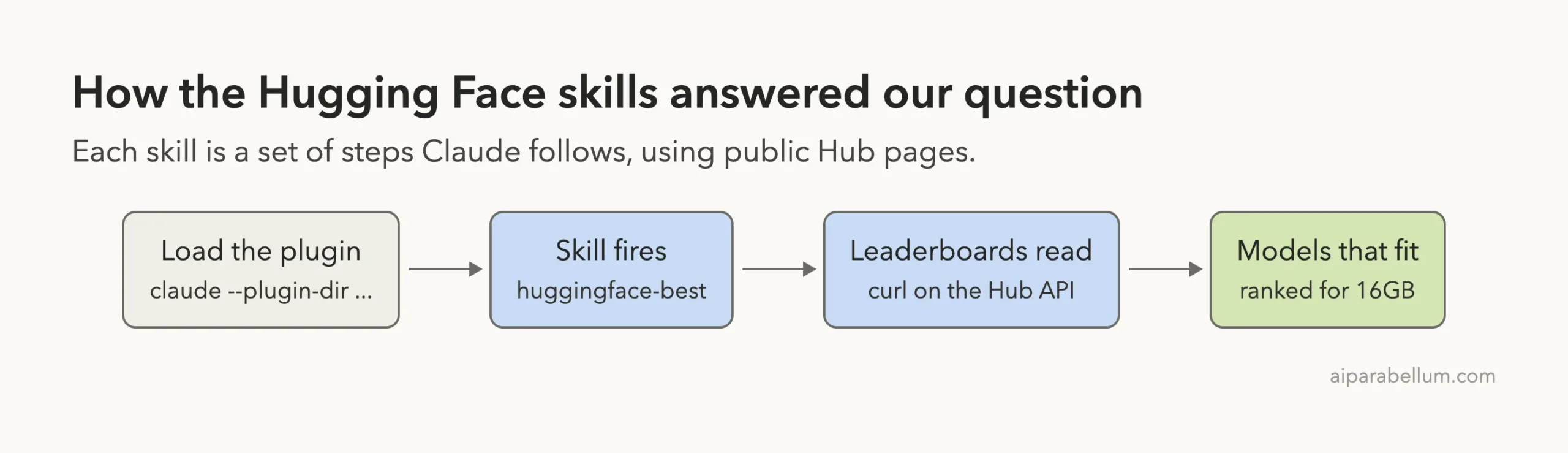
Based on what we saw, the three skills form a short chain.
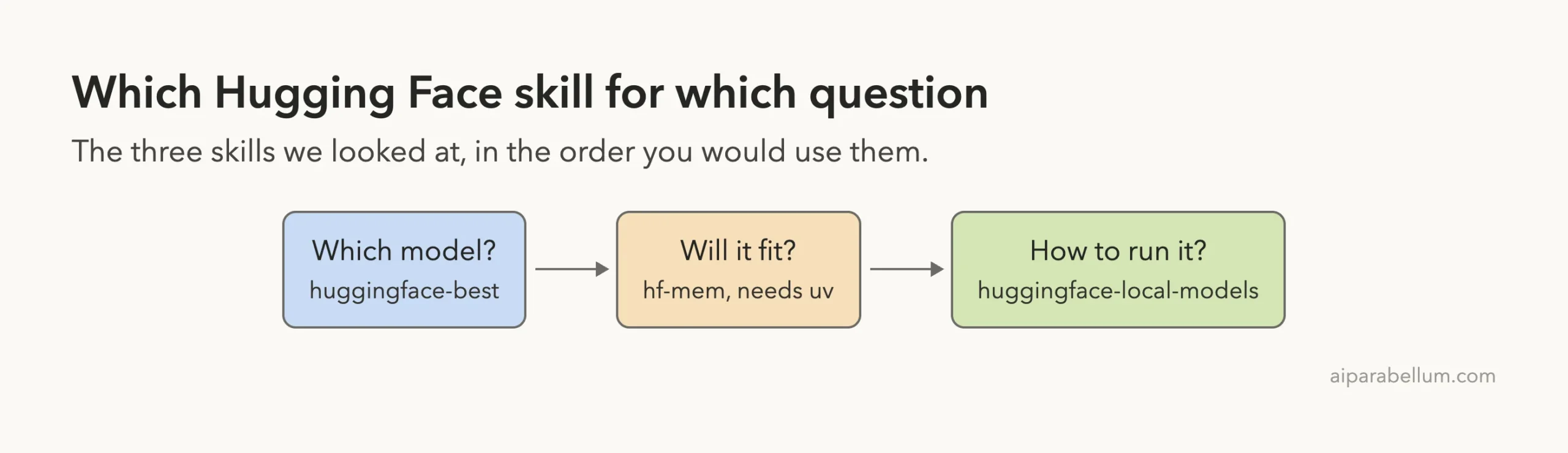
- You do not know which model to try: start with
huggingface-bestand give it your task and memory. - You have a candidate and want to know if it fits:
hf-memis built for that, if you haveuv. - You have a model and want it running locally:
huggingface-local-modelsfound the GGUF repo and built the command.
The other 21 skills cover training, datasets, Gradio apps, Spaces and AWS SageMaker deployment. We did not run them, so we cannot rate them.
Is it better than plain Claude Code?
We did not run a no-plugin control for this one, so we will not claim a winner. What we can say is what the skill changed in the session. It gave Claude a concrete plan: official benchmark datasets, the leaderboard API, and a fit rule for your memory.
The local models skill also pushed Claude toward the exact -hf repo:QUANT form and away from hand-typed file names. Plain Claude may know those tricks, but the skill puts them in reach every time.
A model list changes every week, so the useful part of this plugin is the method, not the names it returned today.
Try it yourself
You can repeat our test in a throwaway folder in about ten minutes. Start with a clean clone.
git clone https://github.com/huggingface/skills
mkdir demo && cd demo
claude --plugin-dir ../skills --setting-sources project
Then paste a prompt like this one, and swap in your own task and memory.
What are the best open models for summarizing PDFs that fit on a 24GB GPU? Use the Hugging Face skill, keep the answer short.When you get a pick, ask for the run step with a prompt like this one.
Use the local models skill: find the GGUF files for the top pick and give me the exact llama-server command. Do not run it.Read the command before you run it, and check the file size against your free disk space.
Common mistakes
- Expecting the README install to give you every skill. The marketplace command installs only
hf-cli. - Trusting one run. Our two runs of the same question differed in depth, so check the numbers.
- Comparing scores across different benchmarks. Claude warned us about this, and it matters.
- Picking the biggest quant that fits on paper. Leave room for the KV cache and your other apps.
- Running
hf-memwithoutuv. The skill needsuvxto start. - Forgetting the vision file. The
mmprojfile is not the main model.
Pro tips
- Give a task and a memory size in the first sentence. The skill uses both to filter.
- Ask for “Do not run it” when you want a command to review first.
- Use
/skillsto see the token cost before you keep 25 skills enabled for good. - Look for the exact quant on the model’s Hub page with
?local-app=llama.cpp, as the skill suggests. - Pick
Q5_K_MorQ6_Kfor code when memory allows, andQ4_K_Mas a safe default.
What we did not test
We did not run the model. Nothing was downloaded, and we did not start llama-server, so we have no speed or quality numbers.
We did not run hf-mem, hf-cli or any of the training and cloud skills. We never signed in to Hugging Face or used its hosted server.
Each skill ran once on one question, on one Mac. Different prompts or a different day’s leaderboards could give different picks.
Frequently Asked Questions
Do the Hugging Face skills need an account or token?
Not for what we ran. The benchmark list, the leaderboards and the file listings are public, and the skill’s token read simply came back empty. Gated models and private repos do need a token.
How do you install the Hugging Face skills for Claude Code?
The README gives /plugin marketplace add huggingface/skills and /plugin install hf-cli@huggingface/skills. For other skills it says to use hf skills add <skill-name>. For a trial, load a clone with --plugin-dir instead.
Can you run a model on a 16GB Mac with these skills?
The skills found a 9B model whose Q6_K file is 7.56 GB, which should fit. We did not run it, so we cannot confirm speed on a real machine.
What does the hf-mem skill do?
It estimates the memory a model needs, with an optional KV cache, without downloading the weights. It runs through uvx hf-mem, which we did not have.
Do the skills run scripts or hooks on your machine?
We found no hooks. Some skills ship scripts, such as the SageMaker ones, and the plugin config points to a hosted server that asks you to log in. We ran none of those, so read them before you do.
Conclusion
The Hugging Face skills for Claude Code are a free, useful add-on for anyone who picks and runs open models: in our test they turned one plain question into a ranked list and a ready-to-use llama-server command. Keep in mind that we ran only two of the 25 skills, never ran the model, and saw answer depth vary between runs. Try them in a throwaway session first, and for more add-ons worth a look, browse the directory linked above.