If you search for a Claude Code Hugging Face plugin, you will find a small group of AI and machine learning add-ons in Anthropic’s official marketplace. Hugging Face, NVIDIA, Together AI, DataRobot, Domino, Boltz, Output, AMD, Pydantic AI, Atomic Agents and Salesforce Agentforce all ship one.
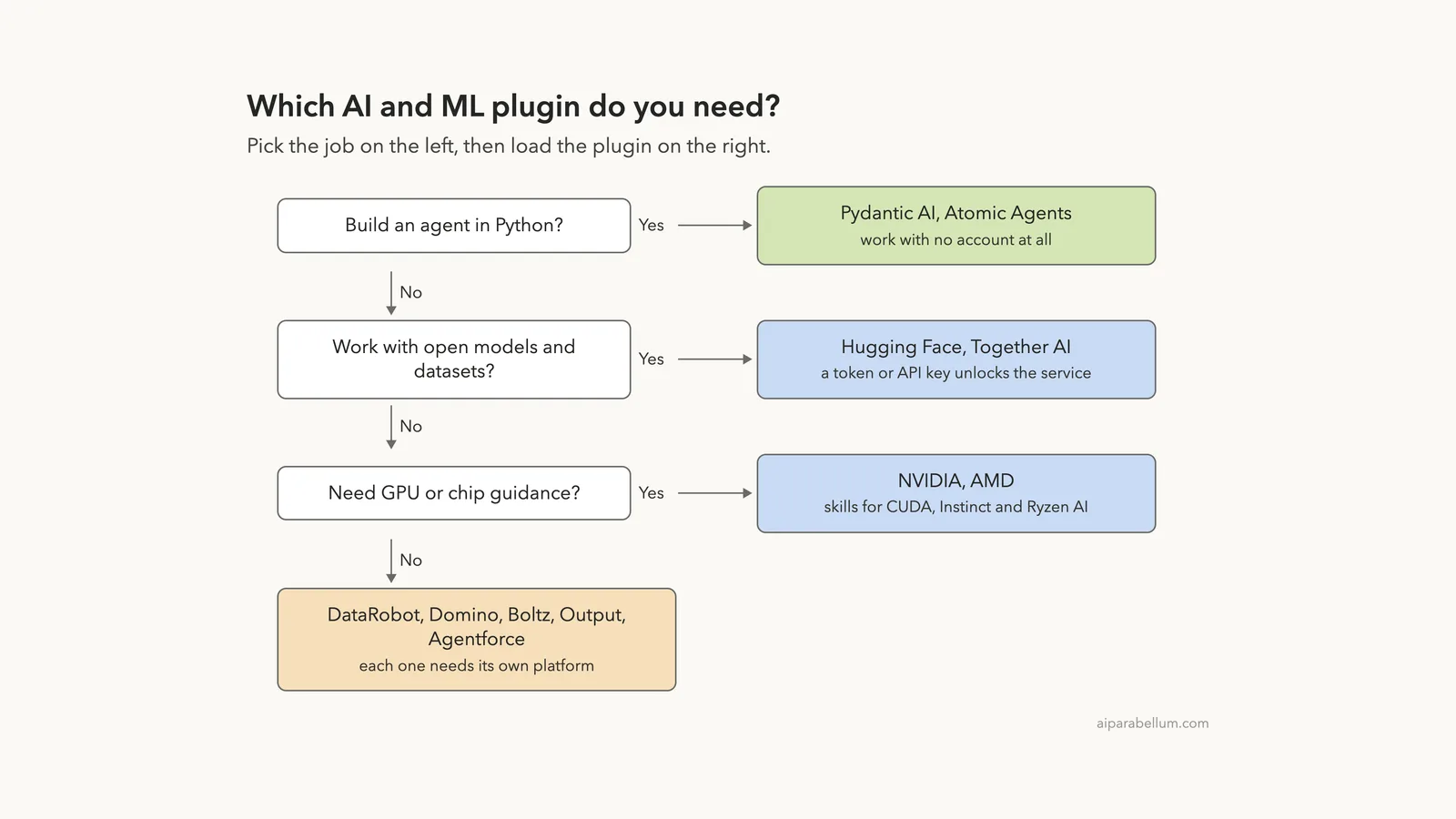
They sound similar, but they cover very different jobs. Some help you write Python agents on your own laptop, and some only make sense inside a company platform.
We loaded all eleven in one real Claude Code session, then used three of their skills for real. This guide shows what we ran, what needs an account, and which plugin fits which job.
This guide is part of our Claude Code tutorials. Find more add-ons in our Skills Directory.
Tested with Claude Code v2.1.319 on 2026-11-10 (macOS). We used the official marketplace at commit 0412be7 and cloned each plugin at the commit the marketplace pins: Hugging Face c3ff942 (v1.0.35), NVIDIA 029363a (v1.4.0), Together AI 644d382 (v1.0.0), DataRobot 53a4dac (v1.22.0), Domino 7949e3a (v2026.603.3), Boltz beafb3c (v0.1.1), Output 2032ff6 (v0.3.0), AMD 6916fb3, Pydantic AI 238d971 (v0.1.0), Atomic Agents 33d2ec9 (v2.2.0) and Agentforce ADLC 09bf153 (v0.12.0).
What We Ran and What Came From the Docs
Most of these plugins talk to an outside platform, so they need a token, a key or a company login. We never created accounts, signed in or entered a key. That makes this a roundup, not a full test of every feature.
Before loading anything, we cloned each plugin into a throwaway sandbox and read its manifest, its MCP settings and its hooks.
Only two plugins ship hooks. The Output hook only prints two of its own text files at session start. The Agentforce hooks run local Python checks, one before Bash commands and one after file edits, and they call the Salesforce sf command only if you have it installed.
Then we loaded all eleven with --plugin-dir, so your own ~/.claude folder stayed untouched.
One note: AMD ships a folder of skills with no plugin manifest of its own, so we wrapped that folder in a tiny manifest file inside the sandbox to load it. The install command from the marketplace does that work for you.
| Plugin | Maker | What it does | Account needed | We ran it |
|---|---|---|---|---|
| Hugging Face | Hugging Face | Hub, models, datasets, Spaces and training jobs through the hf CLI | Yes (token for most actions) | Skill used for real |
| NVIDIA | NVIDIA | Finds the right NVIDIA skill for CUDA, inference, robotics and more | No for the finder | Skill used for real |
| Together AI | Together AI | Chat, images, video, fine-tuning and GPU clusters on Together | Yes (API key) | Loaded, 14 skills in repo |
| DataRobot | DataRobot | Model training, deployment, monitoring and predictions | Yes (API token) | Loaded, 19 skills in repo |
| Domino | Domino Data Lab | Workspaces, jobs, model serving and experiment tracking | Yes (Domino host and key) | Loaded, 26 skills in repo |
| Boltz | Boltz | Protein structure, molecule screening and binder design | Yes (API key) | Loaded, 8 skills in repo |
| Output | Output.ai | Build and debug Output SDK workflows | Depends on your workflow | Loaded, 51 skills in repo |
| AMD | AMD | Serve LLMs on Instinct GPUs, local AI on Ryzen AI, trace analysis | No account; needs AMD hardware | Loaded, 8 skills |
| Pydantic AI | Pydantic | Write accurate Pydantic AI agents, migrate from other frameworks | No | Skill used for real |
| Atomic Agents | BrainBlend AI | Schemas, tools and agents with the Atomic Agents framework | No | Loaded, 7 skills in repo |
| Agentforce ADLC | Salesforce AI Research | Author, test and observe Agentforce agents | Yes (Salesforce org) | Loaded, 3 skills |
The install pattern is the same for all of them: /plugin install huggingface-skills@claude-plugins-official, and the same with nvidia-skills, togetherai-skills, datarobot-agent-skills, dominodatalab, boltz, outputai, amd-skills, pydantic-ai, atomic-agents and agentforce-adlc. We did not run these installs, because that would change a real setup.
Skills Run Locally, Platforms Need an Account
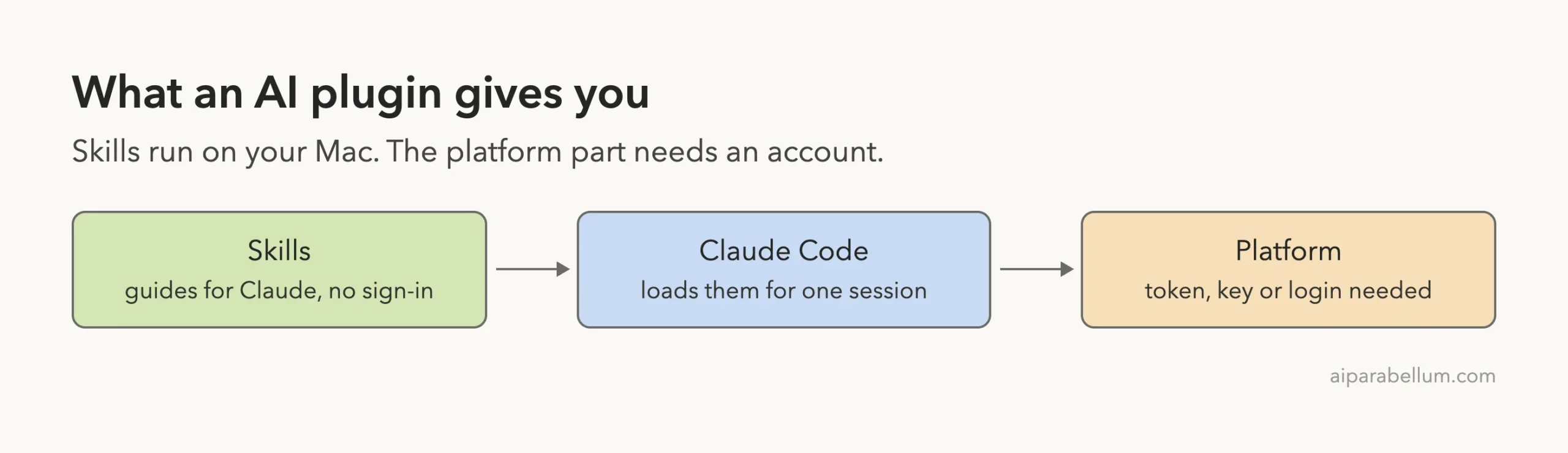
These plugins are mostly skills: plain instruction files that teach Claude how to do a job well. They live on your computer and need no sign-in. If you want the basics first, read our guide to Claude Code skills.
The platform behind the skill is a different story. A Hugging Face skill can tell Claude exactly how to run a training job, but the job itself runs on your Hugging Face account. The same is true for Together AI, DataRobot, Domino and Boltz.
Loading Eleven Claude Code Plugins Safely
You do not have to install a plugin to look at it. The --plugin-dir flag loads a plugin folder for one session only, and you can repeat it for several plugins.
claude --plugin-dir ./hf --plugin-dir ./nvidia-skills --plugin-dir ./pydantic-aiOur test used that flag eleven times, plus --setting-sources project, inside a demo folder.
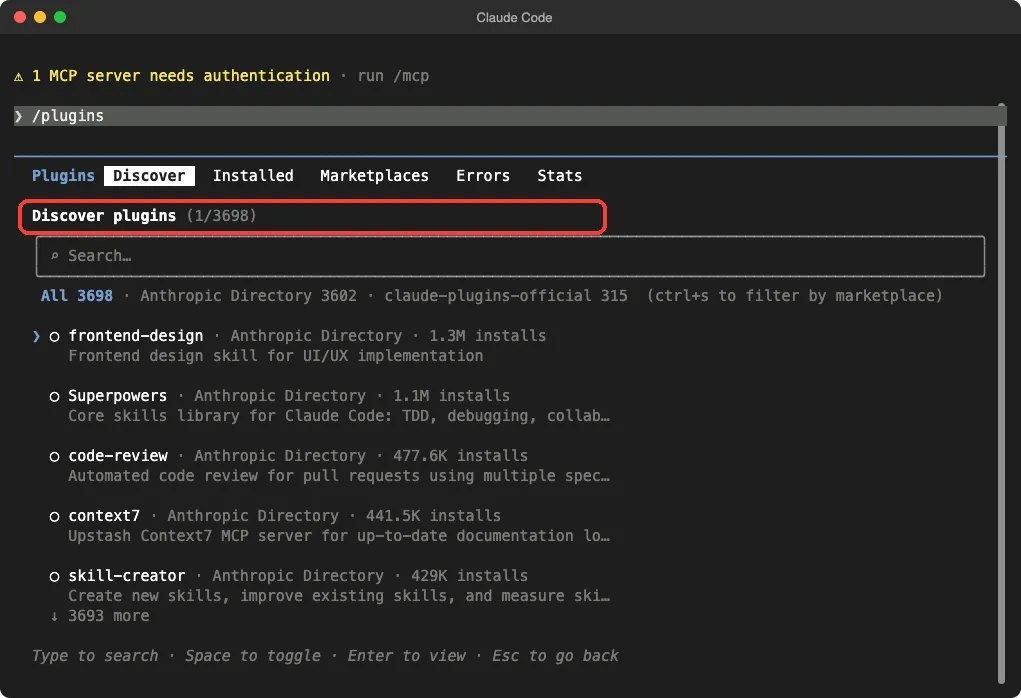
The /plugin command opens the directory where you can browse and install. In our run it listed 3,698 entries across the directory and the official marketplace. Our plugin guide explains the install side in detail.
/plugin screen is where you browse and install.Then /skills showed everything our plugins added. The count came to 168 skills, each marked as locked by its plugin, with a rough token cost next to it.
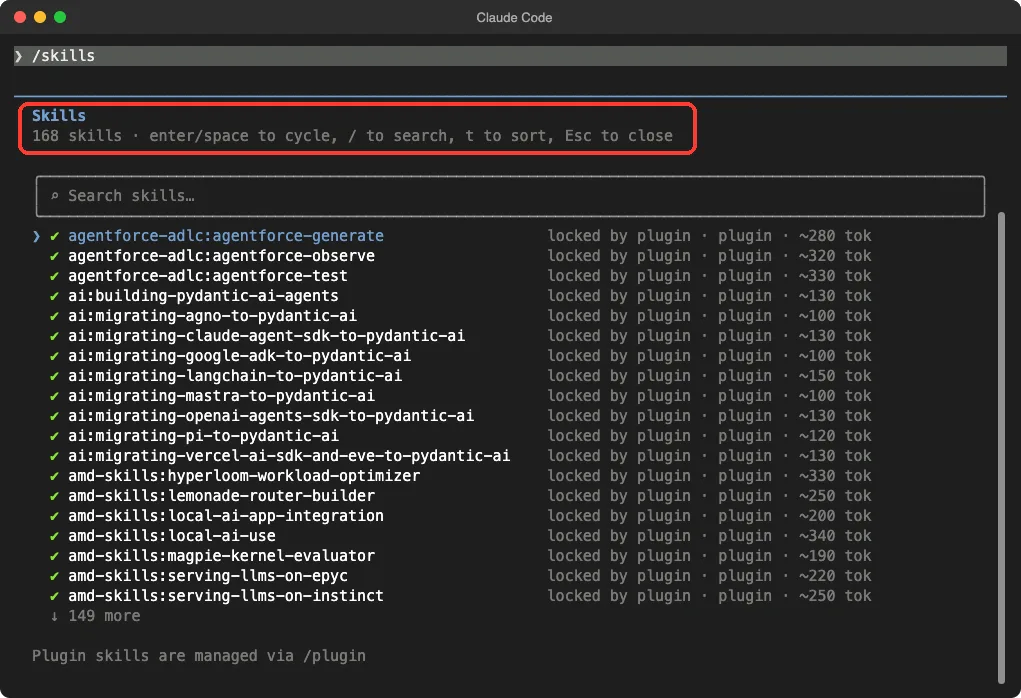
That token number matters.
Per the plugins docs, the name and description of each skill sit in Claude’s context. So a big plugin has a small running cost even when you never use it. Output alone brings 51 skills, and Domino brings 26.
Claude Code Hugging Face Plugin
The Hugging Face plugin is a set of 26 skills built around the
hfcommand line tool, plus a hosted server that needs your login.
The Hugging Face plugin comes from Hugging Face. Its manifest calls it core Hub operations through the hf CLI. The skill names show how wide it is: hf-cli, huggingface-datasets, huggingface-spaces, huggingface-llm-trainer, trl-training, huggingface-vision-trainer, transformers-js, huggingface-gradio, huggingface-trackio and several hf-cloud-sagemaker skills for AWS deployment planning.
We used the hf-cli skill for real. We asked for the command that downloads one model repo into a local folder, and told Claude not to run it.
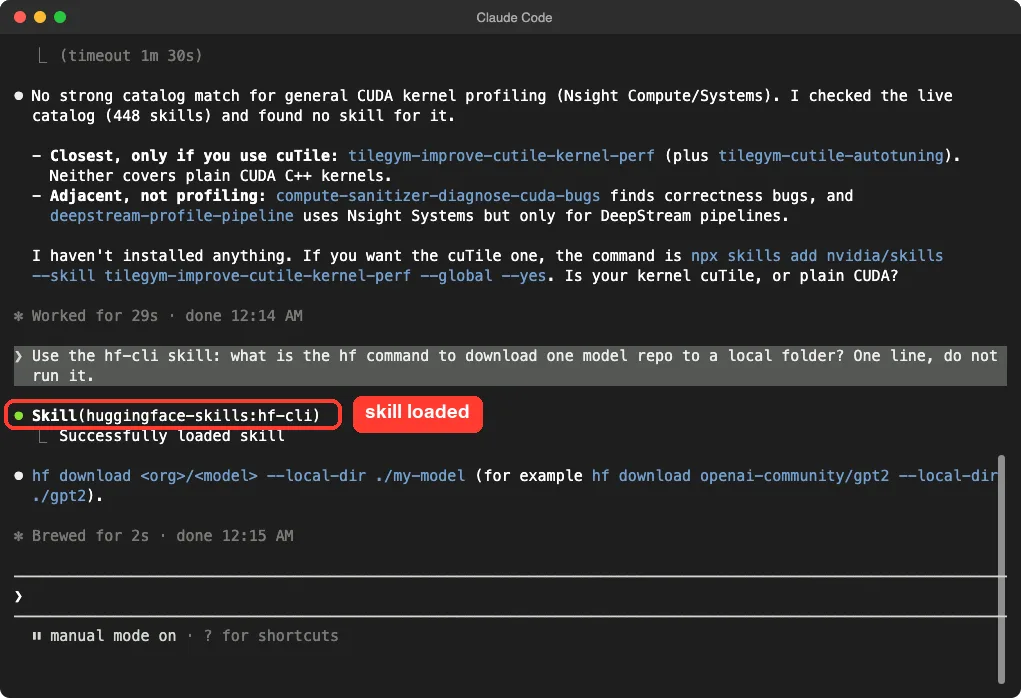
hf-cli skill loaded and gave the hf download command.The answer was hf download <org>/<model> --local-dir ./my-model. That is a small result, but it shows how skills work: Claude pulled the plugin’s guidance in only when the question needed it.
The plugin also points at a hosted server, huggingface.co/mcp. In /mcp it showed up as needing authentication, so we left it alone.
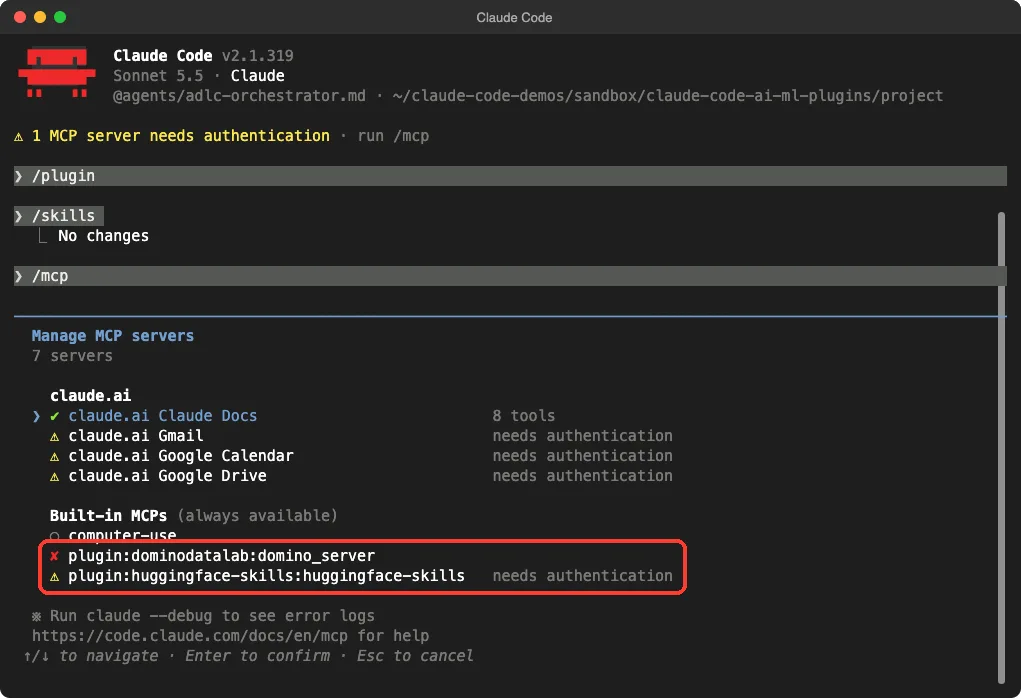
/mcp: Domino failed to start and Hugging Face needs a login.What we did not test: training a model, creating a Space or reading a private dataset.
Those need a Hugging Face token. The skills read it from the HF_TOKEN environment variable, according to their own files. If you are new to MCP, read our MCP guide first.
NVIDIA Plugin: A Finder, Not a Toolbox
The NVIDIA plugin is different from the others. It holds one skill, nvidia-skill-finder, and its job is to route you to the right NVIDIA skill from a live catalog. It triggers on NVIDIA products and terms such as CUDA, NIM, NeMo, Omniverse, TensorRT, DeepStream and Jetson.
We asked which NVIDIA skill fits profiling a slow CUDA kernel. Claude loaded the finder, queried the catalog with the npx skills command and reported 448 skills in the catalog. Its honest answer was that no skill covers plain CUDA kernel profiling.
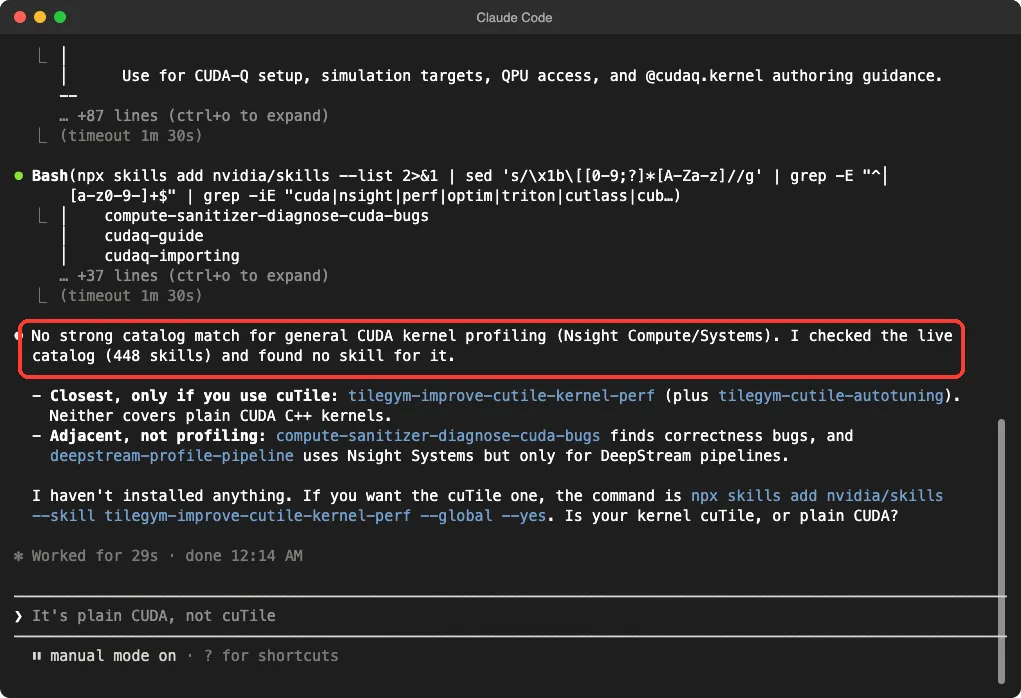
It suggested two near matches instead: a cuTile kernel-tuning skill, and a DeepStream pipeline profiling skill that is limited to DeepStream. It also said it had installed nothing and showed the install command for you to run yourself.
We like that, because a finder that admits a gap beats one that forces a bad match.
The catch is that it uses the network to read the catalog, so expect a short wait on the first question. We checked afterwards that nothing new had been added to our own skills folder.
Pydantic AI Plugin: Accurate Agent Code
The Pydantic AI plugin comes from Pydantic. Inside Claude Code its name shows as ai, so its skills appear as ai:building-pydantic-ai-agents and similar. It has nine skills: one for building agents, and eight migration guides for moving to Pydantic AI from LangChain, the OpenAI Agents SDK, Google ADK, the Claude Agent SDK, Mastra, Agno and others.
It needs no account, which makes it the best first plugin to try in this group. We asked for a minimal agent that returns a City model with a name and a country, in under twelve lines, with no files written.
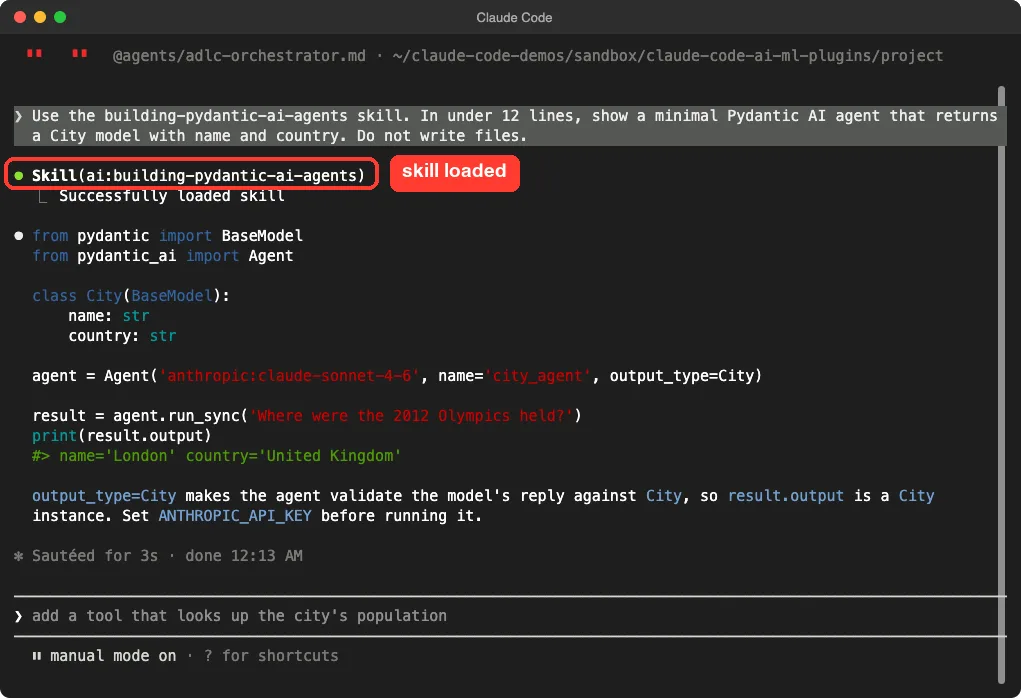
The code used output_type=City, so the agent checks the model’s reply against the City class. Claude also reminded us to set an API key before running it. We did not run the code, because that would call a paid model.
Atomic Agents and Output: Frameworks With Helpers
Atomic Agents is a Python framework, and its plugin adds seven skills such as new-app, create-atomic-agent, create-atomic-schema and create-atomic-tool. It also ships 22 agent files for planning and review. It needs no account of its own, though the agents you build will need a model key.
Output is a workflow framework from Output.ai. Its plugin adds 51 skills, five specialist agents and a session-start hook.
The skill names cover building, running, tracing and evaluating workflows, such as output-build-workflow and output-workflow-trace. We loaded it and read its files, but we did not build a workflow.
Platform Plugins: Together AI, DataRobot, Domino, Boltz
These four connect to a commercial platform. In each case the skills are the useful part you can read for free, and the platform is the part that needs a key.
- Together AI: 14 skills for chat completions, embeddings, images, video, audio, batch inference, fine-tuning, evaluations, sandboxes and GPU clusters. The repo’s own docs ask for a
TOGETHER_API_KEY. - DataRobot: 19 skills for setup, model training, deployment, predictions, monitoring and explainability. The docs ask for a
DATAROBOT_API_TOKENand an endpoint. - Domino: 26 skills and 4 commands for workspaces, jobs, apps, model endpoints and experiment tracking. It reads
DOMINO_API_KEYandDOMINO_HOST. - Boltz: 8 skills for protein structure and binding, molecule and protein screening, and binder design, using the
boltz-apiCLI and an API key.
One thing we saw for real: Domino’s server entry failed to start in our /mcp list. Its config points at a folder inside a Domino workspace, so it makes sense only there. That is not a bug in our test, but it is a good reminder to read a plugin’s setup notes before you install it on your own machine.
AMD and Agentforce: Hardware and CRM Specialists
AMD’s plugin bundles eight skills for people with AMD hardware. They cover serving LLMs with vLLM on Instinct GPUs or EPYC servers, local AI on Ryzen AI, kernel evaluation and trace analysis. No account is needed, but most of the work assumes the matching hardware.
Agentforce ADLC is for Salesforce users. It has three skills (agentforce-generate, agentforce-observe and agentforce-test) and five agent files, and it works on Agentforce .agent files. Its hooks check Bash commands and file edits locally, and its docs use the Salesforce sf org commands, so you need a Salesforce org for real use.
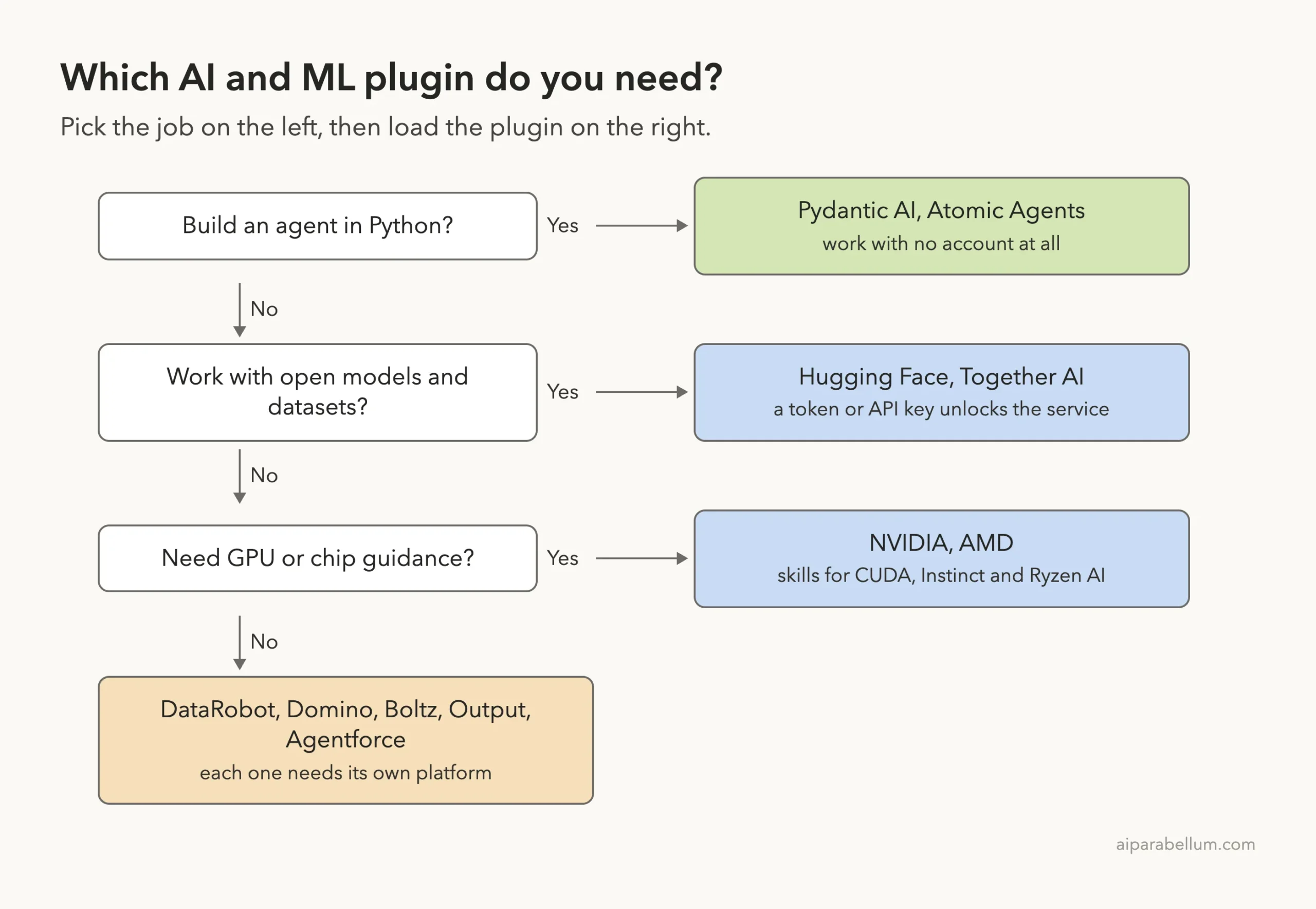
Which Claude Code Hugging Face Plugin Steps to Try First
Here is how we would start, based on what we saw.
- If you write Python agents, load
pydantic-aiand ask for a small typed agent. No account needed. - If you use open models, load
huggingface-skillsand ask abouthfcommands before you add a token. - If you work with NVIDIA hardware, load
nvidia-skillsand let the finder look for a skill before you search by hand. - If your company uses DataRobot, Domino or Salesforce, ask your admin which key to use before you install anything.
Try It Yourself
Here is a safe practice task. Clone one plugin into a throwaway folder, load it for one session and ask it a question that does not call any service.
git clone https://github.com/pydantic/skills.git
cd skills
claude --plugin-dir ./plugins/ai
Then paste this prompt:
Use the building-pydantic-ai-agents skill. In under 12 lines, show a minimal Pydantic AI agent that returns a City model with name and country. Do not write files.Common Mistakes
- Installing eleven plugins at once. Each skill adds a small running token cost, so install only what you use.
- Pasting an API key into the chat. Set it as an environment variable instead.
- Assuming a skill runs the platform. The skill only teaches Claude; the platform still needs your account.
- Skipping the hooks. Read a plugin’s
hooks.jsonbefore you trust it.
Pro Tips
- Use
--plugin-dirto test a plugin for one session before you install it. - Run
/mcpafter loading a plugin to see which servers need a login. - Run
/skillsand check the token numbers when a plugin is large. - Our LLM evals guide and data engineering guide cover the next steps after building a model.
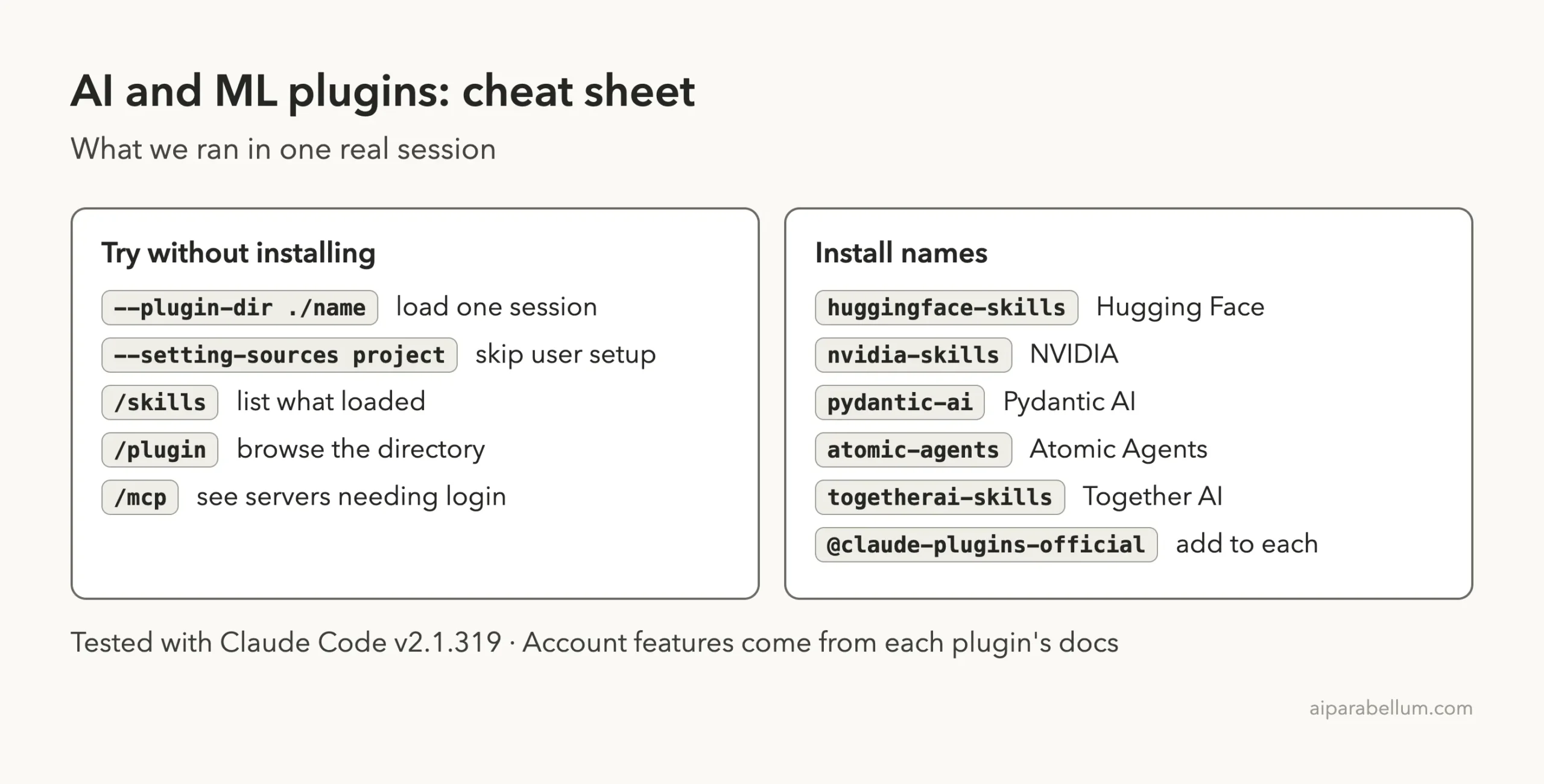
Cheat Sheet
Frequently Asked Questions
Which Claude Code plugin is best for Hugging Face?
The official huggingface-skills plugin. It has 26 skills built around the hf CLI, and its hosted server needs a Hugging Face login.
Do these plugins work without an account?
Pydantic AI, Atomic Agents, AMD and the NVIDIA finder need no account. The Hugging Face, Together AI, DataRobot, Domino, Boltz and Agentforce plugins need one for real work.
Will --plugin-dir change my setup?
No. It loads the plugin for that session only. Installing with /plugin install does add it to your setup.
Why did the NVIDIA finder say it found nothing?
In our test it checked a live catalog of 448 skills and found none for plain CUDA kernel profiling. It named close matches instead.
Where can I read more about Claude itself?
Our Claude AI page covers the models behind these tools.
Conclusion
Claude Code’s AI and ML plugins come in two kinds: skills that run on your Mac, and platforms that need your account. We loaded eleven plugins in one sandboxed session, saw 168 skills, and used the Hugging Face, NVIDIA and Pydantic AI skills for real. Everything that needed a sign-in stayed signed out, so training, deployment and screening features are described from each plugin’s own files. Start with a plugin that needs no account, read its hooks, and only then connect a platform.