If you are searching for a Claude Code Langfuse plugin, you will find two Langfuse entries in the official marketplace, plus MLflow, DeepEval, GrowthBook and Confidence. This guide explains what each one does, which parts we ran on a Mac, and which parts need your own account or server.
This guide is part of our Claude Code tutorials. Find more add-ons in our Skills Directory.
Tested with Claude Code v2.1.318 on 2026-11-08 (macOS).
We read every hook and connection file first. Then we loaded all six plugins into a throwaway sandbox, which added 36 skills, and asked four of those skills real questions about a tiny demo project. We never signed in anywhere, never typed a key and never sent a trace, so anything about live dashboards, scores or experiments comes from each plugin’s own files and README.
Quick Summary: Evals, Tracing and Experiment Plugins at a Glance
These plugins help you build, watch and improve apps that call a large language model. Some trace what happened, some score the answers, and some control who sees a new feature. None of them is magic, because each one connects to a service or server that you set up.
| Plugin | Maker | What it does | Account needed? | Install command |
|---|---|---|---|---|
| langfuse | Langfuse | 2 skills: trace, prompt and evaluation help for your own app | Yes, a Langfuse project (free cloud or self-hosted) | /plugin install langfuse@claude-plugins-official |
| langfuse-observability | Langfuse | A hook that sends your Claude Code sessions to Langfuse as traces | Yes, public and secret keys | /plugin install langfuse-observability@claude-plugins-official |
| mlflow | MLflow Team | 13 skills to trace, evaluate and debug AI agents | A running MLflow tracking server | /plugin install mlflow@claude-plugins-official |
| deepeval | Confident AI | 3 skills for pytest style evals, tracing and datasets | No for local runs; Yes for Confident AI reports | /plugin install deepeval@claude-plugins-official |
| growthbook | GrowthBook | 4 skills for feature flags, experiments and analytics | Yes, a GrowthBook API key | /plugin install growthbook@claude-plugins-official |
| confidence | Spotify Confidence | 14 skills plus two connections for flags, experiments and migrations | Yes, sign-in for the flags connection | /plugin install confidence@claude-plugins-official |
What Is a Claude Code Langfuse Plugin and Its Eval Cousins?
When your app calls a model, three questions come up quickly. What did the model actually see and say? Is the answer any good, and can I roll a change out to a few users first?
Tracing tools answer the first question, eval tools answer the second, and flag tools answer the third.
A plugin lets Claude Code help with those jobs while you edit the code. It can hold skills, hooks and connections to outside servers. Our guide to the MCP guide explains that connection layer, and our plugin install guide covers scopes and updates.
Anthropic’s docs on discovering plugins and on plugins describe how plugins bundle these pieces. The key point is that a plugin runs with your permissions, so you should read what it bundles before you trust it.
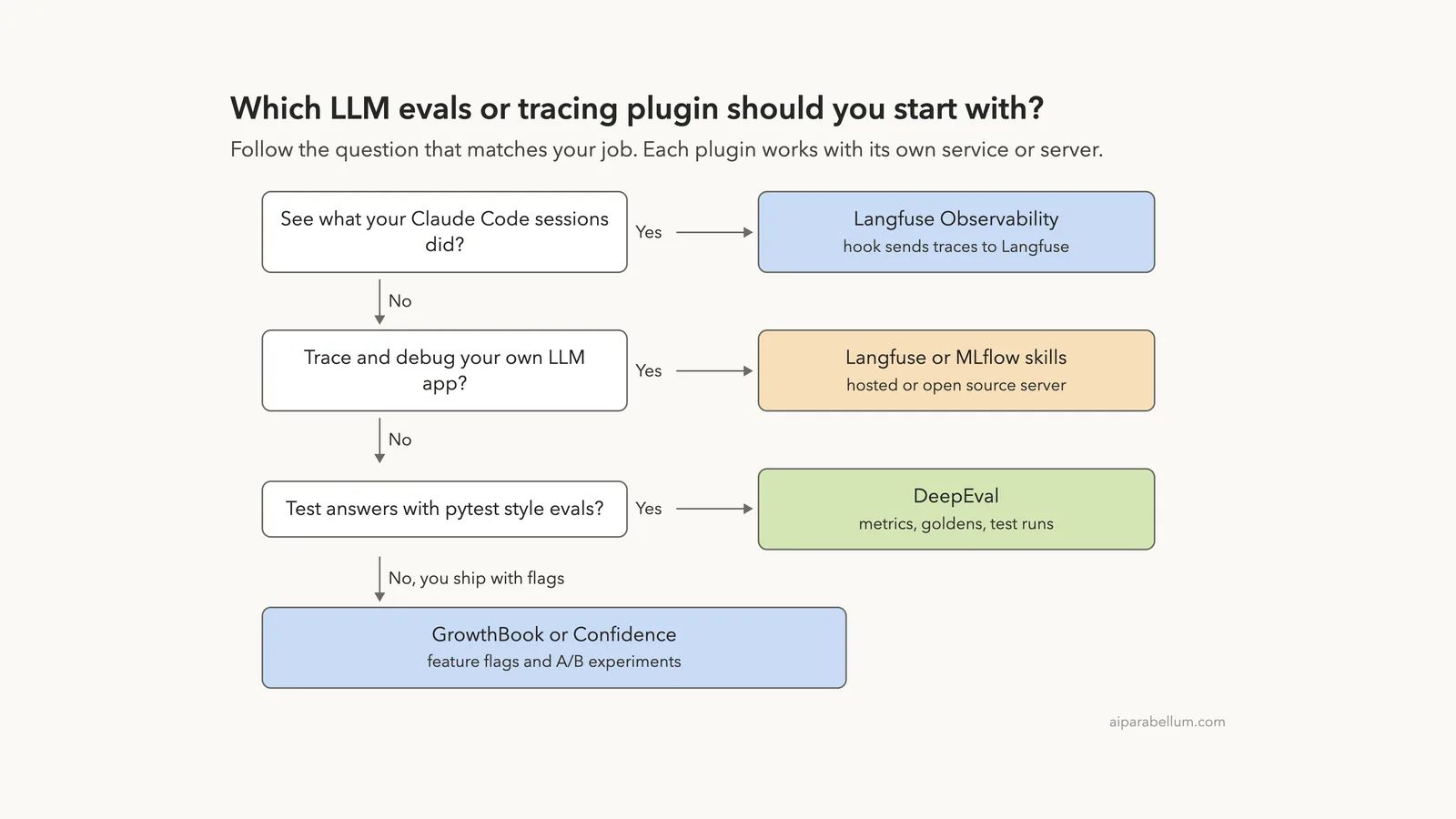
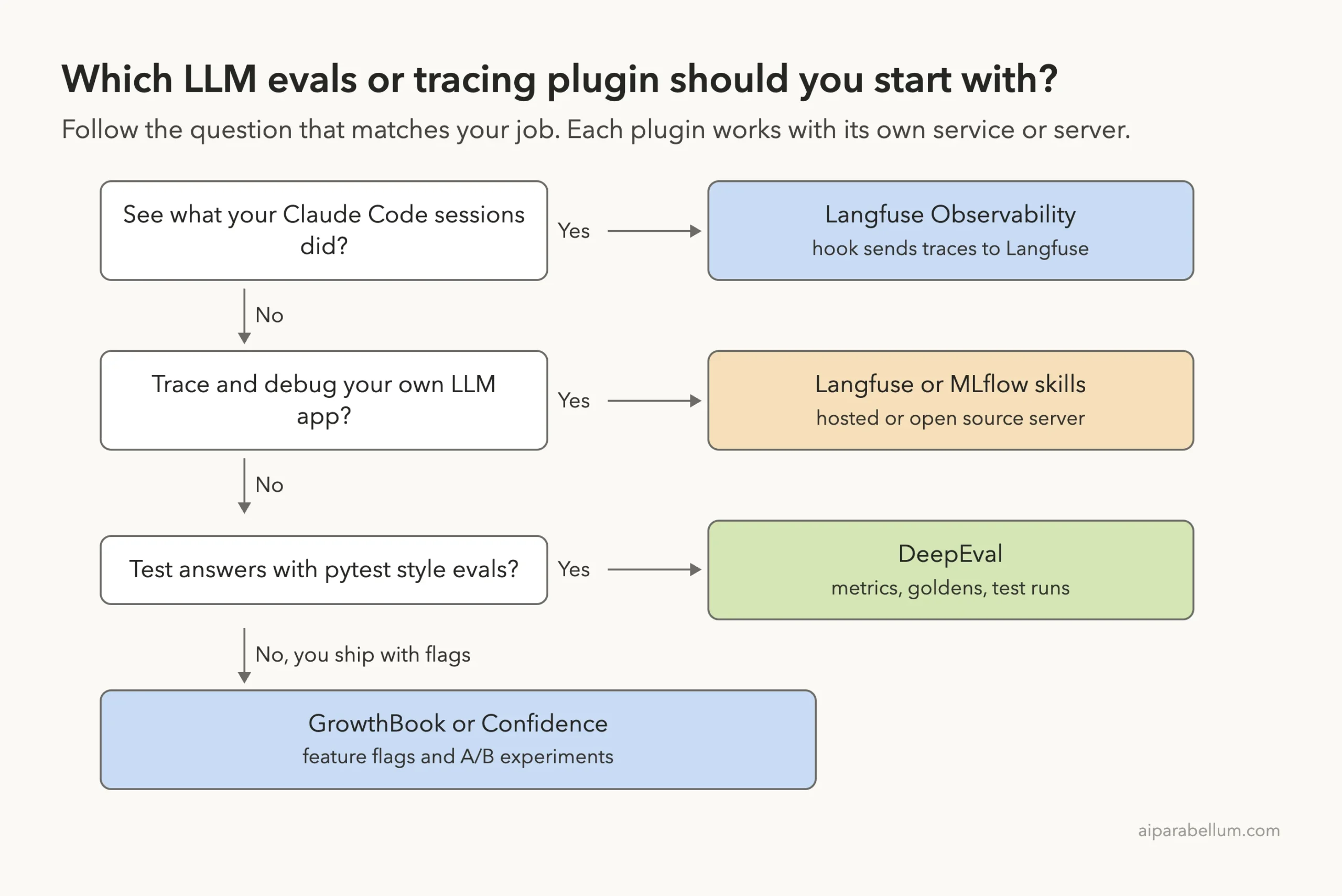
Which Plugin Fits Which Job?
Start from the job, not from the logo. If your team already runs one of these services, use that one and skip the rest.
How We Tested Without Touching Our Setup
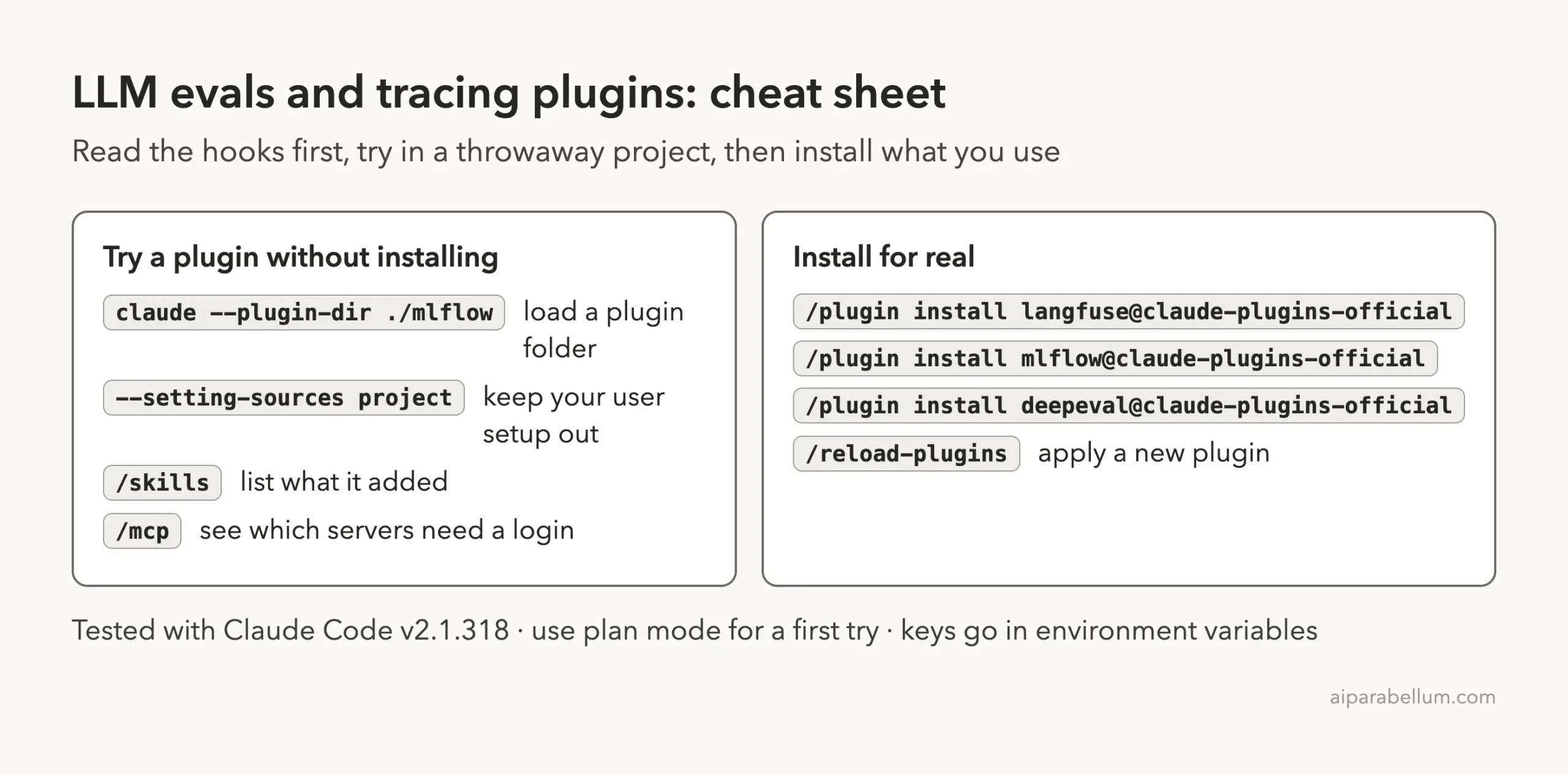
We cloned each plugin’s repository into a sandbox at the exact version the official marketplace points to. Then we started Claude Code in an empty demo project with one --plugin-dir flag per plugin plus --setting-sources project, so nothing from our own Claude setup mixed in. We never ran /plugin install, and we kept Claude in plan mode so it could read files but not change them.
The demo project has two tiny files. app.py is a bike shop support bot that asks Claude a question through the Anthropic Python library. flags.py has one function that returns a checkout button label.
| Plugin | Version we tested | Marketplace commit |
|---|---|---|
| langfuse | 1.10.0 | b86532b |
| langfuse-observability | 1.2.0 | b521100 |
| mlflow | 1.0.0 | 51a42ea |
| deepeval | 1.0.0 | da9b2c9 |
| growthbook | 2.0.0 | 7a84f33 |
| confidence | 0.9.0 | f416826 |
The Langfuse observability repository has moved on since the marketplace commit. Its page now shows a v1.2.2 release from about two weeks before our test, so the marketplace copy is a little behind. All six repositories were still active.
Installing takes seconds, but every plugin here is idle until you connect it to something real.
What We Read Before Running Anything
Hooks run commands on your computer, so we read them first. Here is what we found, plugin by plugin.
- Langfuse skills: no hooks and no connection file. The main skill is allowed to fetch pages from
langfuse.comand to run thelangfuse-clitool throughnpxfor read-style commands. - Langfuse Observability: two hooks, on
StopandSessionEnd. They run a Python script of about 3,500 lines that reads your session transcript and sends it to Langfuse when you give it keys. - MLflow: one
UserPromptSubmithook. It only scans your prompt for words such as “trace” or “evaluate” and prints a suggestion for the matching skill. It does not call any network. - DeepEval: no hooks, three skills.
- GrowthBook: no hooks. Every skill calls one small helper script,
gb-call, which readsGB_API_KEYfrom the environment or from~/.config/growthbook/.env. - Confidence: no hooks and two hosted connections at
mcp.confidence.dev, one for flags and one for docs.
The One Plugin You Should Read Twice
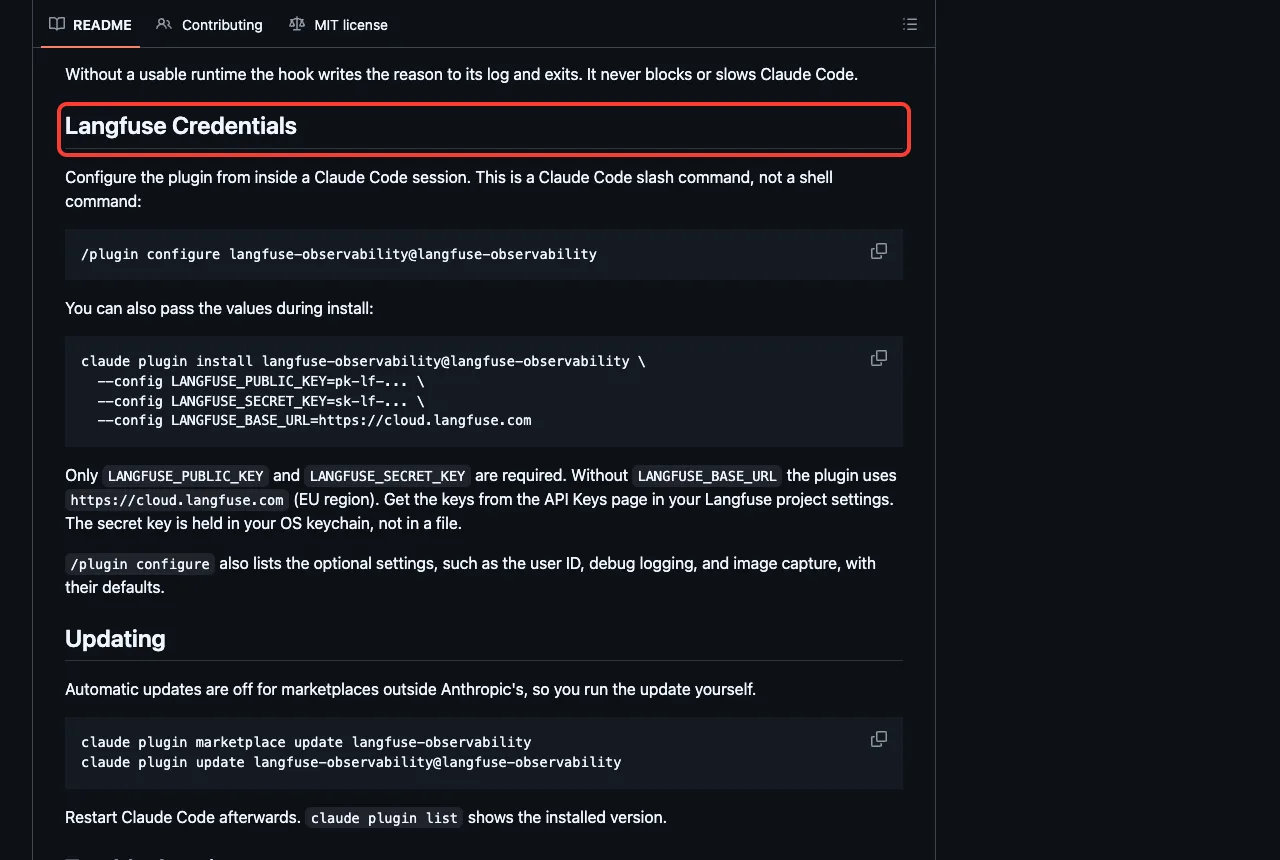
Langfuse Observability is different from the other five, because it watches Claude Code itself. Its README says it records your prompts, the model’s replies, tool calls, token use and cost, and even images from tool results by default.
Nothing is sent until you add a Langfuse public key and secret key. The README says the secret key is kept in your operating system keychain, and that a missing runtime makes the hook log a reason and exit without blocking Claude Code.
We saw that last part for real. On our Mac there was no uv tool and the Python had no Langfuse library, so the hook ran after each turn, wrote a one-line note that the import failed, and exited. Claude Code kept working normally.
If you turn it on, think about what a trace holds. Your prompts and file contents can end up in Langfuse, so decide first whether that is allowed for your project. The plugin has a setting to cap how many characters are captured and another to turn image capture off.
What We Ran and What Comes From the Docs
| Item | Status |
|---|---|
| Loading six plugins and listing 36 skills | We ran it |
| Seeing which connections need a login | We ran it |
| Langfuse skill on a demo support bot | We ran it, without a Langfuse account |
| MLflow tracing skill on the same bot | We ran it, without an MLflow server |
| DeepEval skill on the same bot | We ran it, without Confident AI |
| GrowthBook feature flag skill on a demo file | We ran it, without an API key |
| Langfuse Observability hook | It ran and exited cleanly without keys; no traces were sent |
| Confidence skills | Listed only, not asked a question |
| Real traces, scores, dashboards and experiment results | From each plugin’s README and files, not tested |
Loading Six Plugins in One Session
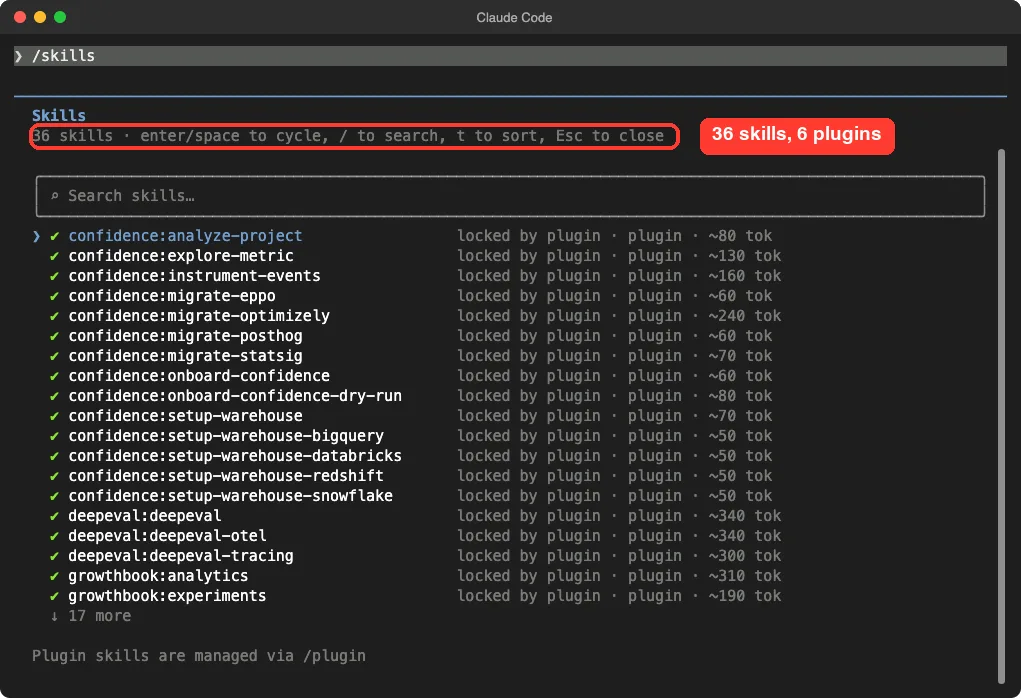
The /skills screen lists 36 skills. Confidence adds 14, MLflow 13, GrowthBook 4, DeepEval 3 and Langfuse 2. Each shows a rough size such as 80 or 340 tokens, which is what its name and description cost in Claude’s context.
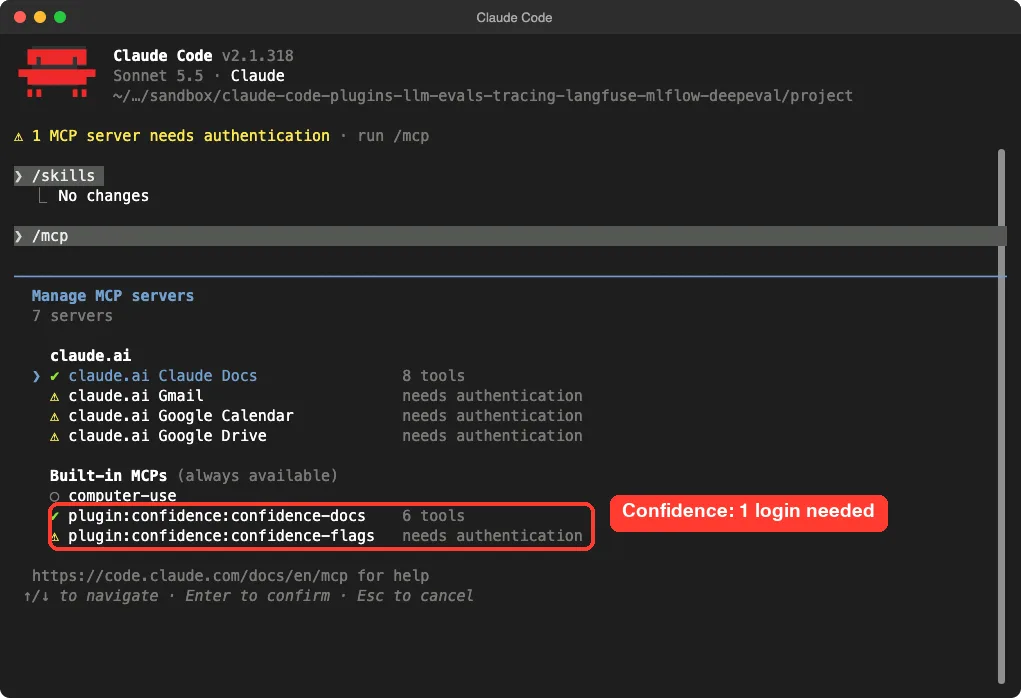
The /mcp screen showed the only two connections these plugins add. The Confidence docs connection loaded with six tools and needed no login. The Confidence flags connection showed “needs authentication”.
Claude Code Langfuse Skills: Trace Your Own App
The langfuse plugin has two skills, langfuse and migrate-to-langfuse. Its description says it covers tracing, prompt management, datasets, experiments and evaluation, and it can look things up in the Langfuse docs.
We asked the skill how to add Langfuse tracing to our support bot. Claude answered that it had read the current Langfuse docs for the Anthropic library. It suggested installing the langfuse package and an OpenTelemetry instrumentation package for Anthropic, wrapping the answer() function with an @observe decorator, and calling langfuse.flush() before the short script exits.
It also listed the setup we would need first: a public key, a secret key and a base URL from the Langfuse project settings, set in the shell or a .env file and never typed into the chat. It said the bot has no user or conversation IDs yet, so it would skip those for now.
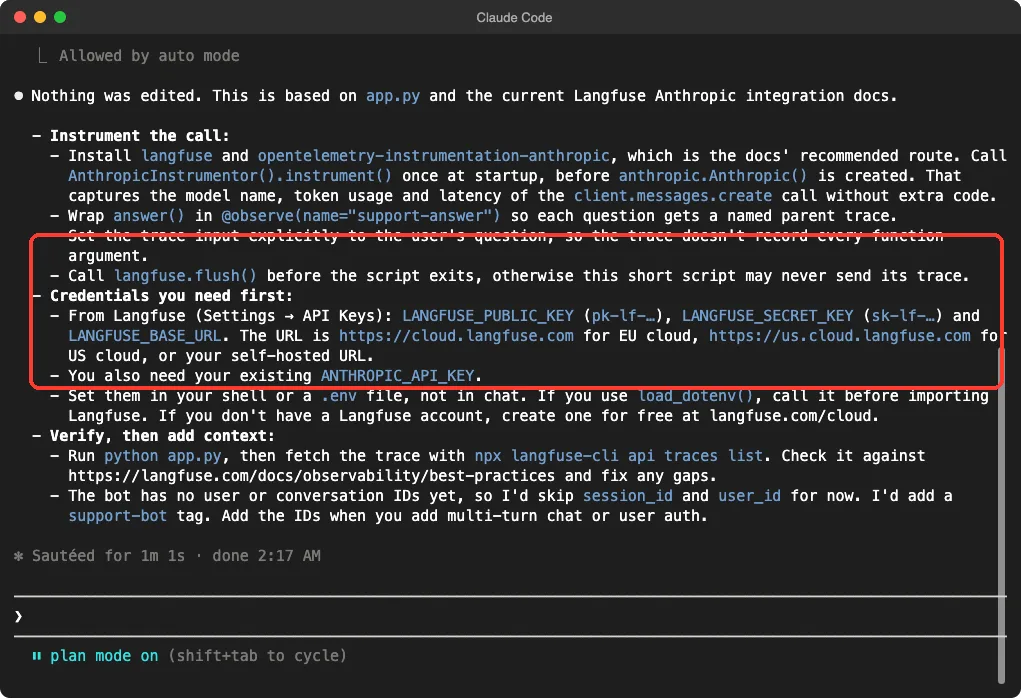
Claude changed nothing, because we were in plan mode. This is one demo, and we never ran the plan or created a Langfuse project. What we can say is that the skill pulled in live docs and did not pretend it had keys.
MLflow: Tracing, Scoring and Debugging Agents
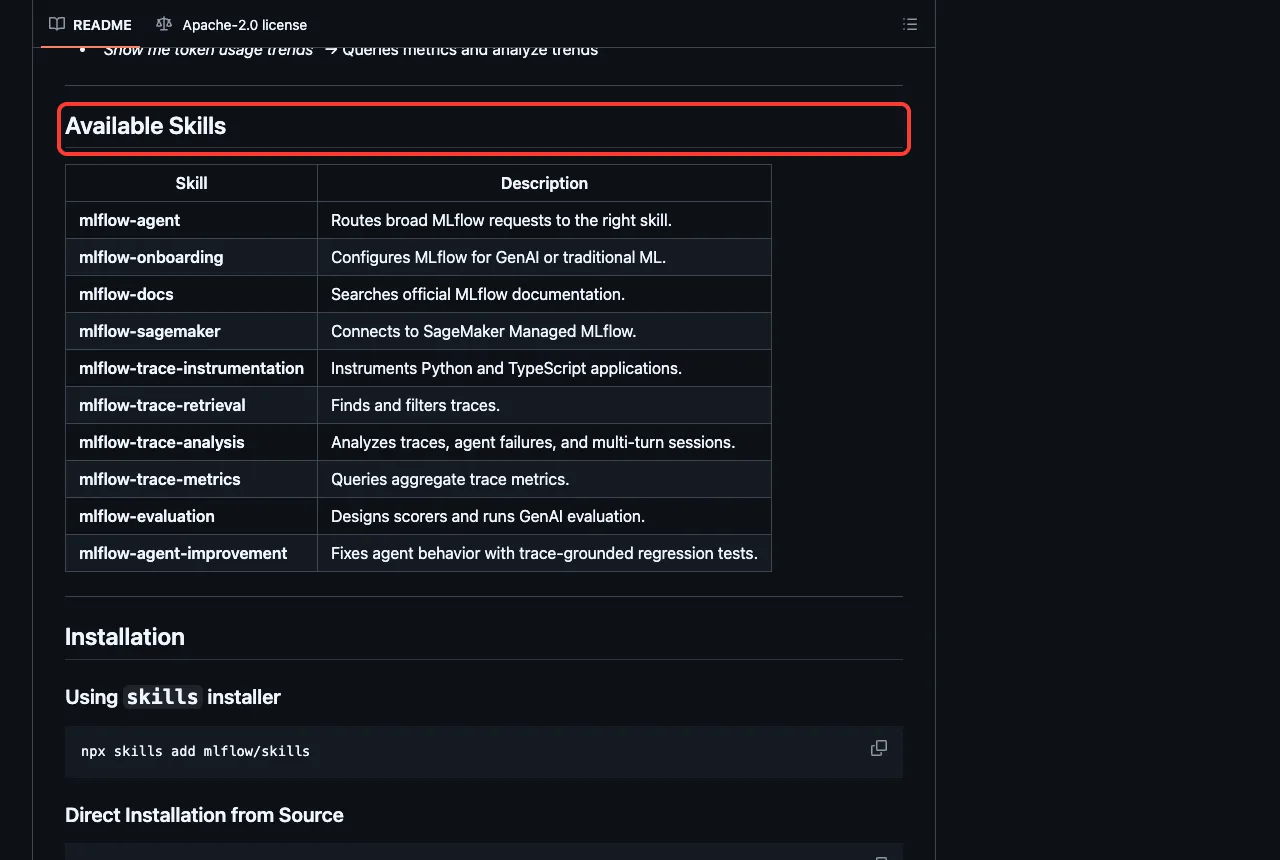
MLflow’s plugin has 13 skills, with names such as instrumenting-with-mlflow-tracing, agent-evaluation, build-a-scorer, analyze-mlflow-trace, debug-agent and querying-mlflow-metrics. Its README describes a loop: instrument, trace, evaluate, iterate and validate.
We asked the tracing skill what it would add to our bot. Claude loaded the skill and read two reference files.
It gave three parts. First, import mlflow, set the tracking address and an experiment name, and turn on Anthropic auto-logging before the client is created. Second, put one @mlflow.trace root span on answer() and add nothing else, since auto-logging already covers the model call.
Third, it said what must be running first: an MLflow tracking server such as mlflow server --port 5000, MLflow 3.8.0 or newer, and an Anthropic key for a single verification run.
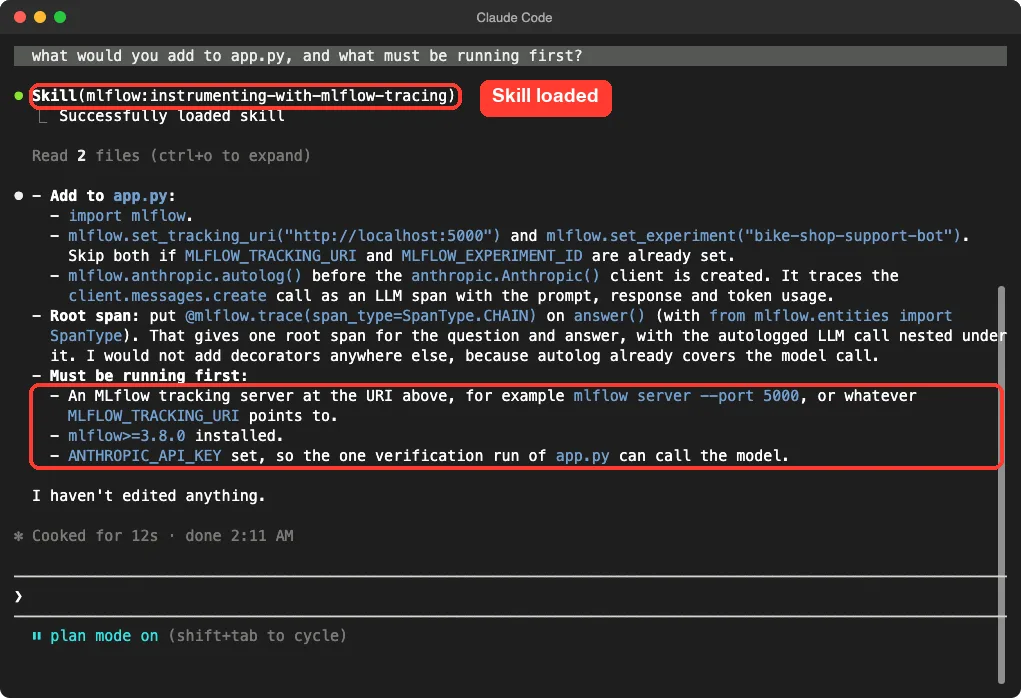
MLflow is open source, so you can run the server on your own machine without a vendor account. We did not start one, so we cannot say how smooth the later steps are.
DeepEval: Pytest Style Checks for Model Answers
DeepEval’s plugin has three skills: deepeval, deepeval-tracing and deepeval-otel. The README of the DeepEval repository says it works with Python 3.9 or newer and installs with pip install -U deepeval. It also recommends a free account on Confident AI for shareable reports, using deepeval login.
We asked the main skill what eval it would add for our support bot. Claude proposed a pytest file with an answer relevancy metric and a custom judge for “polite, on-topic, and no invented hours or policies”. It noted that the bot’s prompt holds no shop facts, so made-up answers are the main risk.
It would generate about 30 to 50 test cases with deepeval generate and run them with deepeval test run. On accounts, it said Confident AI is only needed for hosted reports, traces and online evals, and that local runs work without it. It also pointed out that the judge itself needs a model credential.
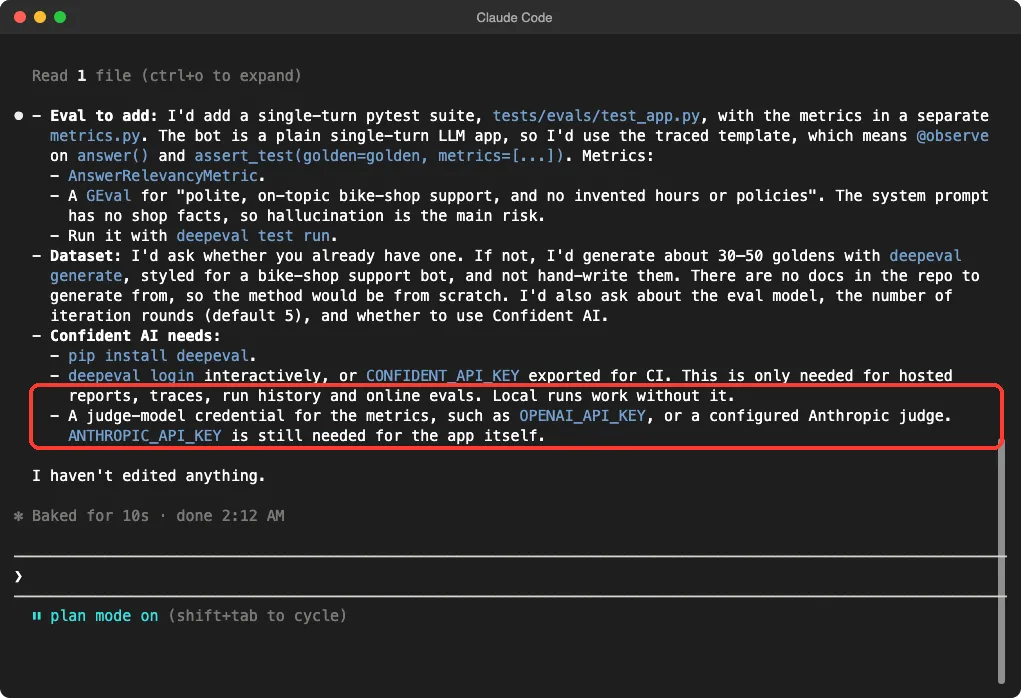
We did not install DeepEval or run any test, so the quality of its scores is untested here. Keep in mind that an eval judged by a model costs model calls every time you run it.
GrowthBook and Confidence: Flags and Experiments
These two are about shipping changes safely. A feature flag lets you turn a change on for a small share of users, and an experiment compares two versions.
GrowthBook
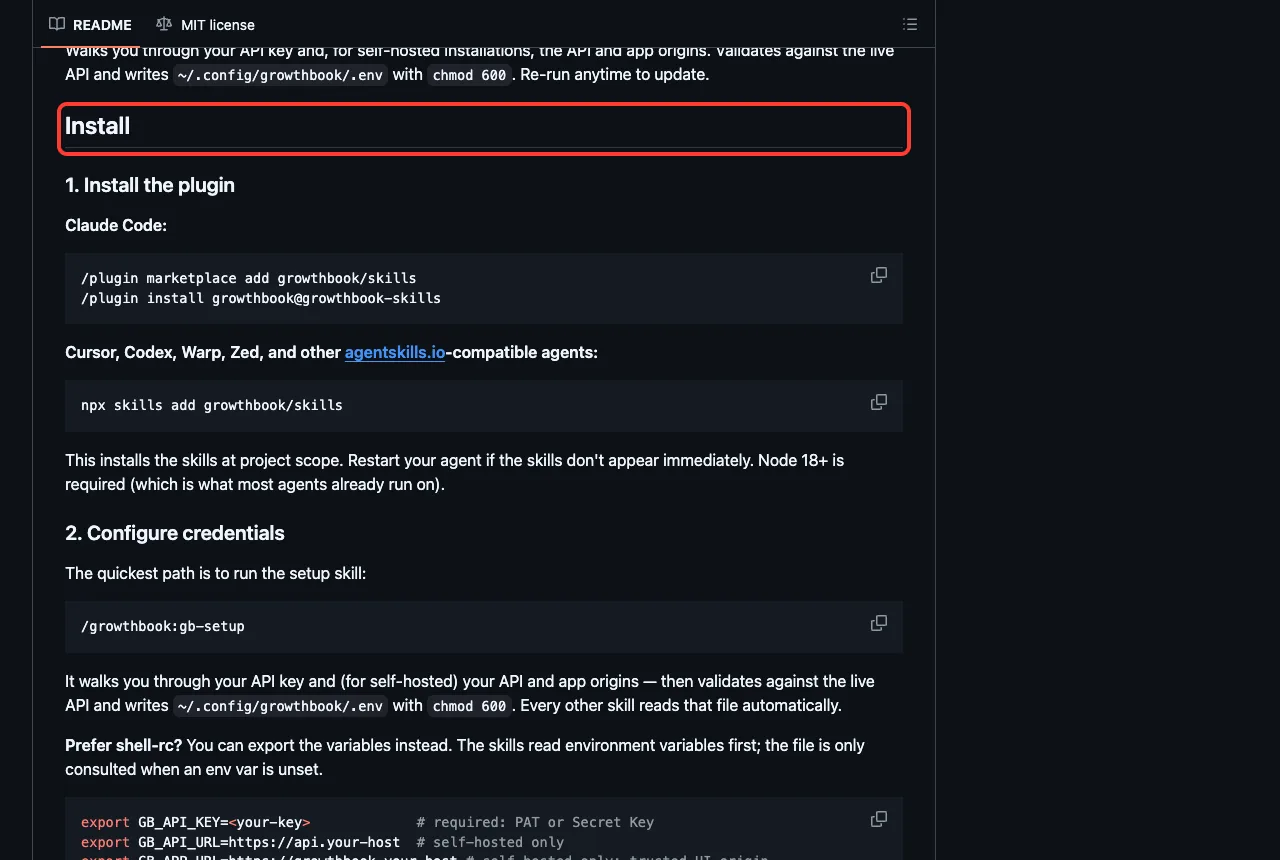
GrowthBook’s plugin has four skills: feature-flags, experiments, analytics and gb-setup. Its README shows the install steps and says the /growthbook:gb-setup skill walks you through the API key and saves it to a file with restricted permissions.
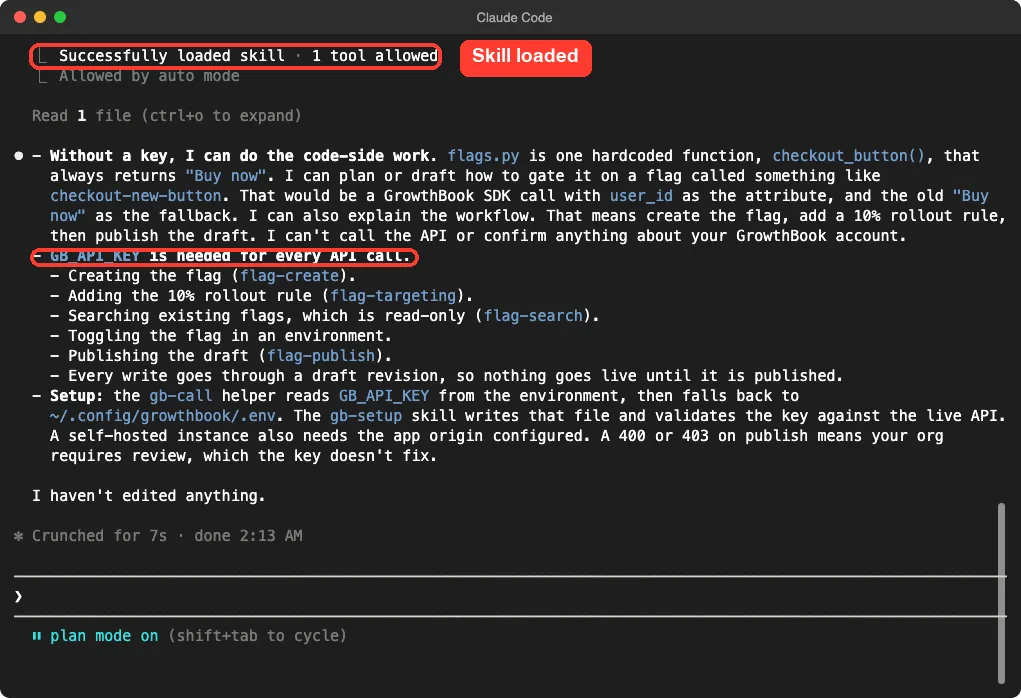
We pointed the feature flag skill at flags.py and asked what it could do with no key. Claude said it could plan the code side, such as gating the checkout button on a flag with the old label as the fallback, and explain the workflow of creating a flag, adding a 10 percent rollout and publishing the draft.
It said every actual API call needs GB_API_KEY, including creating the flag and adding the rule, and that writes go through a draft revision so nothing goes live until you publish it.
Confidence
Spotify’s Confidence plugin has 14 skills. They include analyze-project, explore-metric, instrument-events, four migration skills for Eppo, Optimizely, PostHog and Statsig, and several setup-warehouse skills for BigQuery, Databricks, Redshift and Snowflake.
We only listed these skills and checked the two connections. The docs connection worked without a login, and the flags connection needed one. We did not ask any Confidence skill a question, so we make no claim about how well they work.
Safety Notes Before You Install
Tracing and experiment tools touch real prompts, user data and production switches. A few habits help.
- Read the hooks. Langfuse Observability sends session content to a server once you add keys.
- Use a separate Langfuse or MLflow project for testing, so private prompts do not mix with real traces.
- Keep keys in environment variables, never in files that go into git.
- Use the smallest GrowthBook key you can, and try new flag skills in plan mode first.
- Remember that model-judged evals cost model calls.
Try It Yourself
Make an empty folder with a tiny file that calls a model, and load only the MLflow plugin from a cloned folder. Adjust the path to where you cloned it.
git clone https://github.com/mlflow/skills mlflow-skills
claude --permission-mode plan --setting-sources project --plugin-dir ./mlflow-skills
Then paste this prompt and compare the answer with the MLflow screenshot above.
Use the mlflow instrumenting-with-mlflow-tracing skill on app.py.
Do not edit anything. In 3 short bullets: what would you add to app.py,
and what must be running first?
Common Mistakes
- Installing a plugin and expecting data. Without a server or key, it only holds instructions.
- Turning on session tracing without deciding what may leave your computer.
- Loading all six plugins at once. Confidence alone adds 14 skill names to Claude’s context.
- Forgetting to restart Claude Code after setting an environment variable such as
GB_API_KEY. - Trusting an eval score before you read a few of the judged answers yourself.
Pro Tips
- Run
/mcpafter installing, because it shows which connections still need a login. - Start with one tool: Langfuse or MLflow for tracing, DeepEval for checks, GrowthBook or Confidence for flags.
- Pair tracing with error tracking. Our guide to error tracking plugins covers Sentry and PagerDuty, and our monitoring plugins guide covers Datadog and PostHog.
- Let Claude suggest add-ons for your project with the setup plugin.
Cheat Sheet
Frequently Asked Questions
Is there an official Claude Code Langfuse plugin?
Yes, two. The marketplace lists langfuse, which adds skills for your own app, and langfuse-observability, which sends your Claude Code sessions to Langfuse. Both need a Langfuse project to be useful.
Do I need to pay for Langfuse, MLflow or DeepEval?
We did not check any pricing. The Langfuse skill says you can create a free cloud account, the DeepEval README calls its Confident AI account free, and MLflow can run on your own machine. Check each vendor’s page for current limits.
Does the Langfuse observability plugin send my prompts away?
Its README says it records prompts, replies and tool calls, but only after you add keys. In our test with no keys, the hook exited without sending anything.
Can I use these plugins on Windows or Linux?
We tested on macOS. The Windows and Linux steps follow Anthropic’s official instructions, and these plugins are mostly plain files plus a web connection or a Python script.
Which one should I install first?
Pick the job you have today. If you want to see what your app does, start with Langfuse or MLflow. If you want to check answer quality, start with DeepEval.
Conclusion
The Claude Code Langfuse plugins and their MLflow, DeepEval, GrowthBook and Confidence neighbors bring tracing, evals and safe rollouts into your terminal, but each needs a server or login of your own. We loaded 36 skills, watched the Langfuse hook exit cleanly without keys, and saw four skills explain honestly what they could and could not reach. Pick one tool for the job you have, read its hooks first, try it in plan mode, and find more add-ons in our Claude guide and the Skills Directory.