The Microsoft Docs plugin for Claude Code lets Claude look things up in the official Microsoft Learn documentation while it works, instead of guessing from memory. We loaded it into a throwaway project, checked what it adds, and asked Claude a real Azure question about a tiny Python script. This guide shows what we saw, what the plugin costs, and who should install it, so you can decide if a microsoft docs mcp claude code setup is worth your time.
This guide is part of our Claude Code tutorials. Find more add-ons in our skills directory.
Tested with Claude Code v2.1.318 on November 8, 2026, with the microsoft-docs plugin version 0.3.1 (repository commit f0a9478, dated October 30, 2026).
Microsoft Docs Plugin: Quick Summary
| Question | Answer |
|---|---|
| What is it? | The microsoft-docs plugin: 3 skills plus a Microsoft Learn MCP server |
| Who makes it? | Microsoft, in the MicrosoftDocs/mcp repository |
| Install command | /plugin install microsoft-docs@claude-plugins-official |
| Does it cost money? | The README calls it free |
| Does it need an account? | No. We used it without signing in or adding a key |
| Our verdict | Worth installing if you write code for Azure, .NET or other Microsoft products |
What the Microsoft Docs Plugin Does
AI models learn from text that is months or years old. Microsoft products change often, so a model can suggest a method that was renamed or never existed. The plugin fixes this by giving Claude a way to read the current Microsoft Learn pages.
A plugin can add skills, agents, hooks and MCP servers to Claude Code. The official plugin docs explain each piece. This plugin uses two of them: skills and one MCP server.
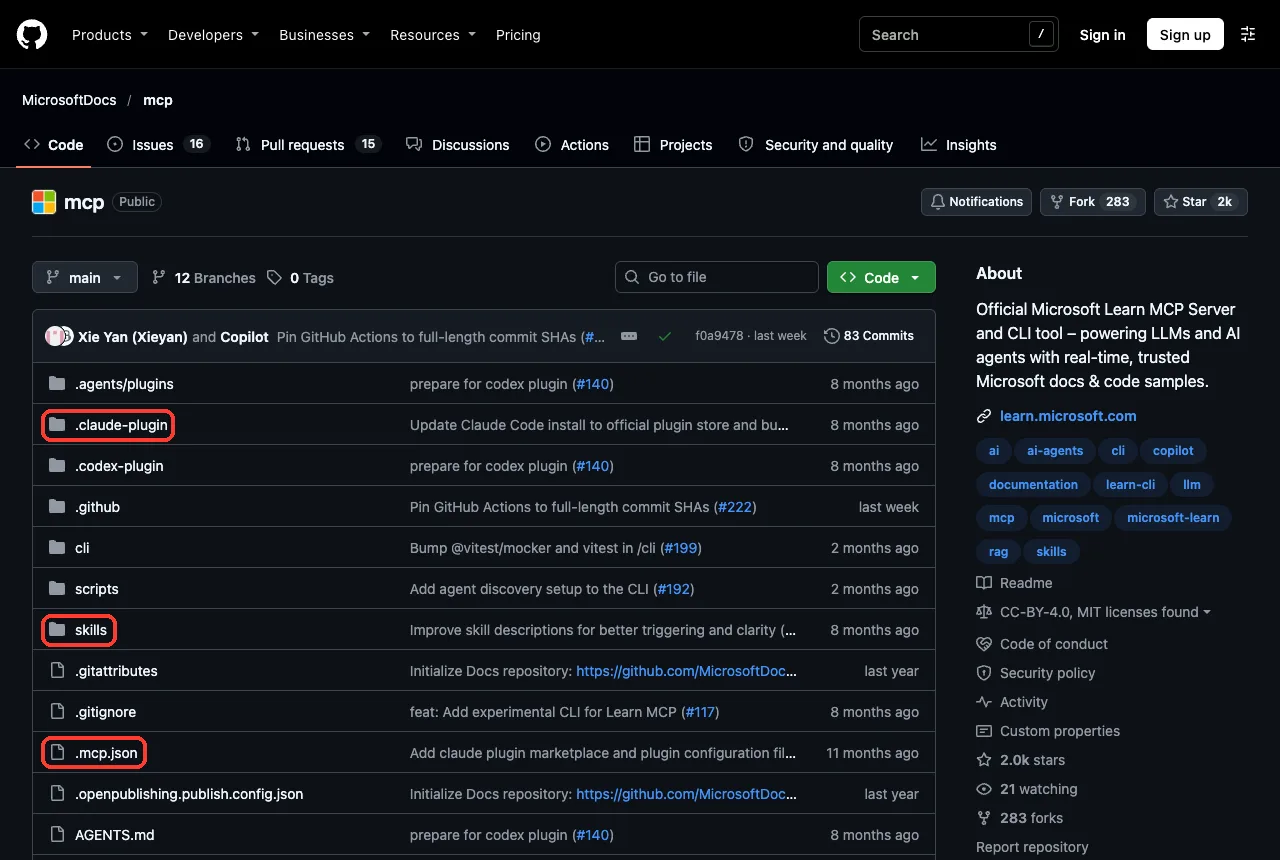
The MCP server is a remote one at https://learn.microsoft.com/api/mcp, set in the plugin’s .mcp.json file. It is the same service Microsoft offers to other editors and assistants. The plugin just wires it into Claude Code for you.
What Is Inside the Plugin
The plugin has no hooks and no scripts that run on your machine. We read the repository before loading it. It contains a plugin manifest, an .mcp.json file that points to the Microsoft server, and three skill folders.
| Part | What it does |
|---|---|
microsoft-docs skill | For concepts, tutorials, limits, quotas and best practices |
microsoft-code-reference skill | For API lookups, code samples and fixing SDK errors |
microsoft-skill-creator skill | Helps you build your own skill about a Microsoft technology |
microsoft-learn MCP server | Gives Claude the search, fetch and code sample tools |
The skill descriptions come from the repository’s own files. They tell Claude when to reach for the docs, even if you never say the word “docs”. If you want to understand how skills decide to load, read our guide on skill best practices.
How to Install Microsoft Docs MCP in Claude Code
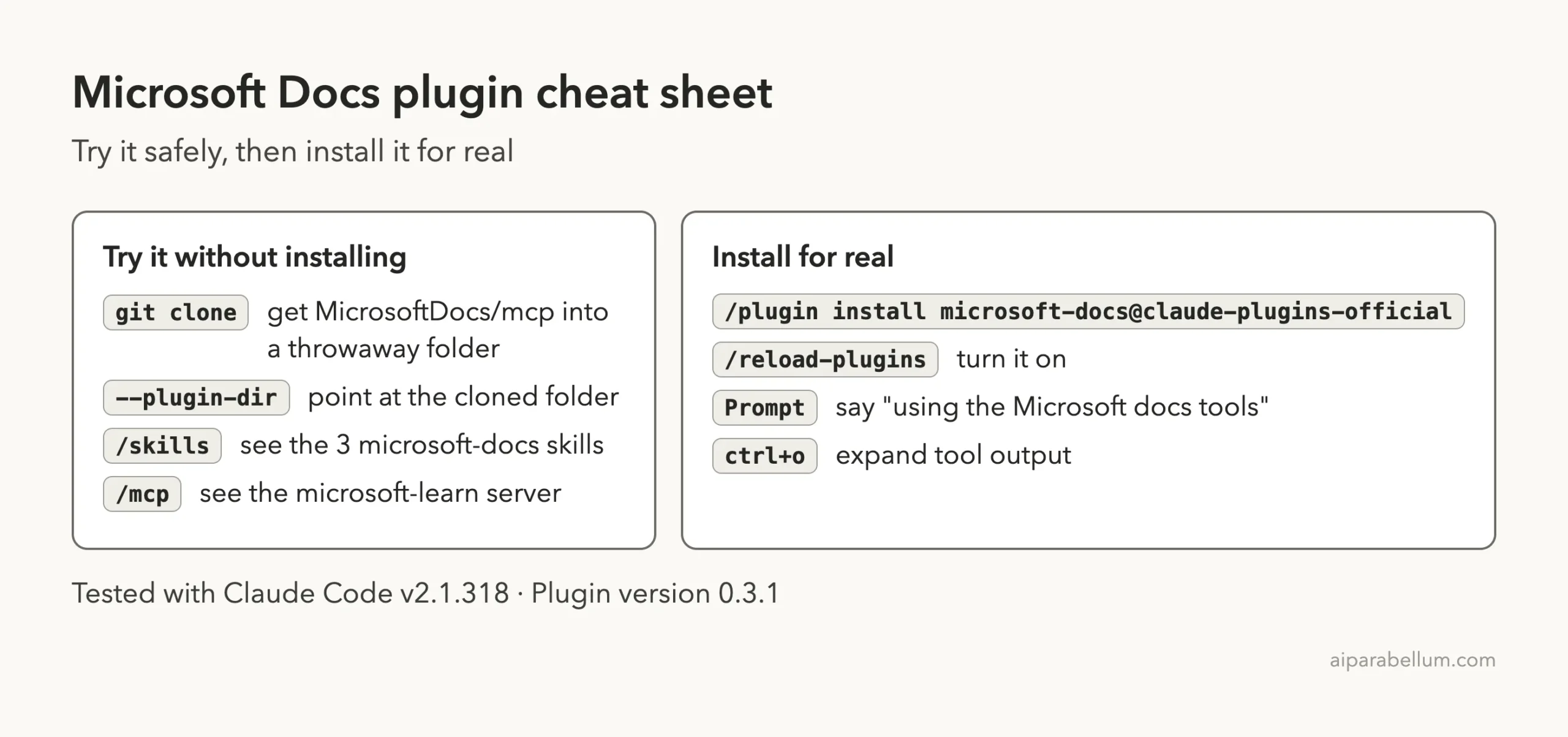
The normal install is one command inside Claude Code:
/plugin install microsoft-docs@claude-plugins-officialClaude Code then shows where the plugin goes. User scope turns it on in every project on your machine, and project scope shares it with everyone who works in the repository. If you are new to this, our plugins guide walks through scopes step by step.
After installing, run /reload-plugins if Claude Code asks for it. You can check the result with claude plugin list in your shell.
How We Tried It Without Installing
We did not want to change our normal setup for a test. So we cloned the repository into a throwaway folder and started Claude Code with the --plugin-dir flag pointing at it. We also used --setting-sources project so only the demo project’s settings loaded.
git clone --depth 1 https://github.com/MicrosoftDocs/mcp
claude --setting-sources project --plugin-dir ./mcp
This is a safe way to test any plugin. When you close the session, nothing stays behind in your user settings.
Checking the Microsoft Docs MCP Server in Claude Code
Our first check was the /skills command. It listed three skills, all marked as locked by the plugin, each costing roughly 150 to 160 tokens to keep in the list.
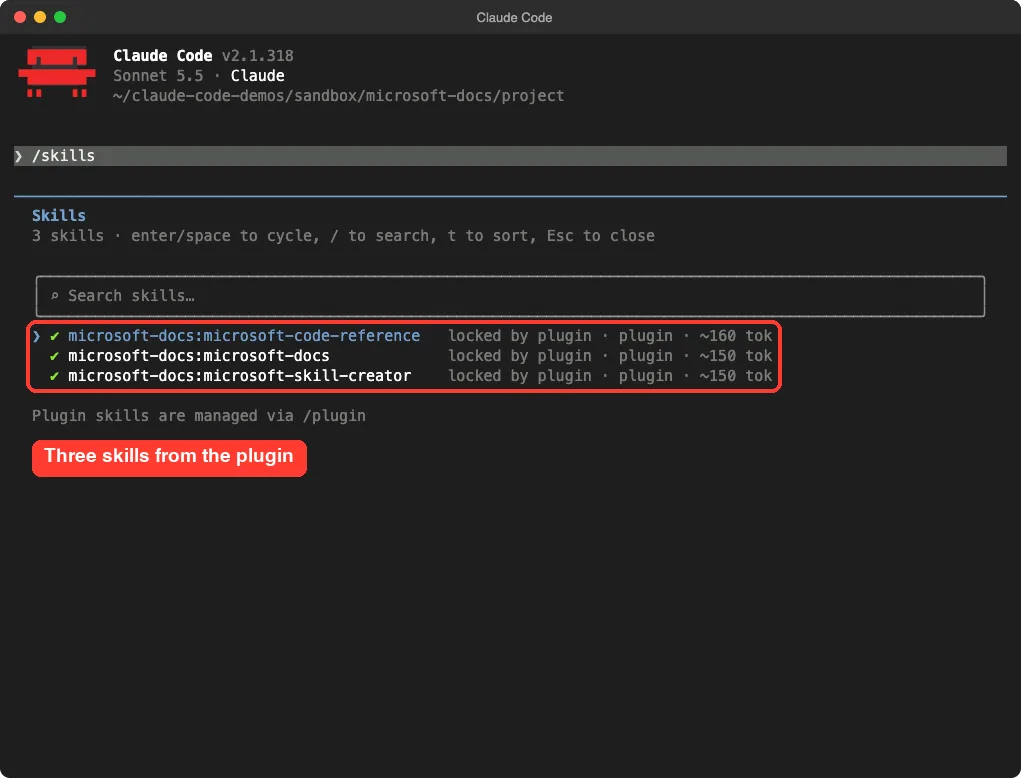
/skills screen shows the three plugin skills, each named with the microsoft-docs prefixNext we opened /mcp and selected the plugin’s server. It reported three tools: Microsoft Docs Search, Microsoft Code Sample Search and Microsoft Docs Fetch. All three were marked read-only, and the server did not ask us to sign in.
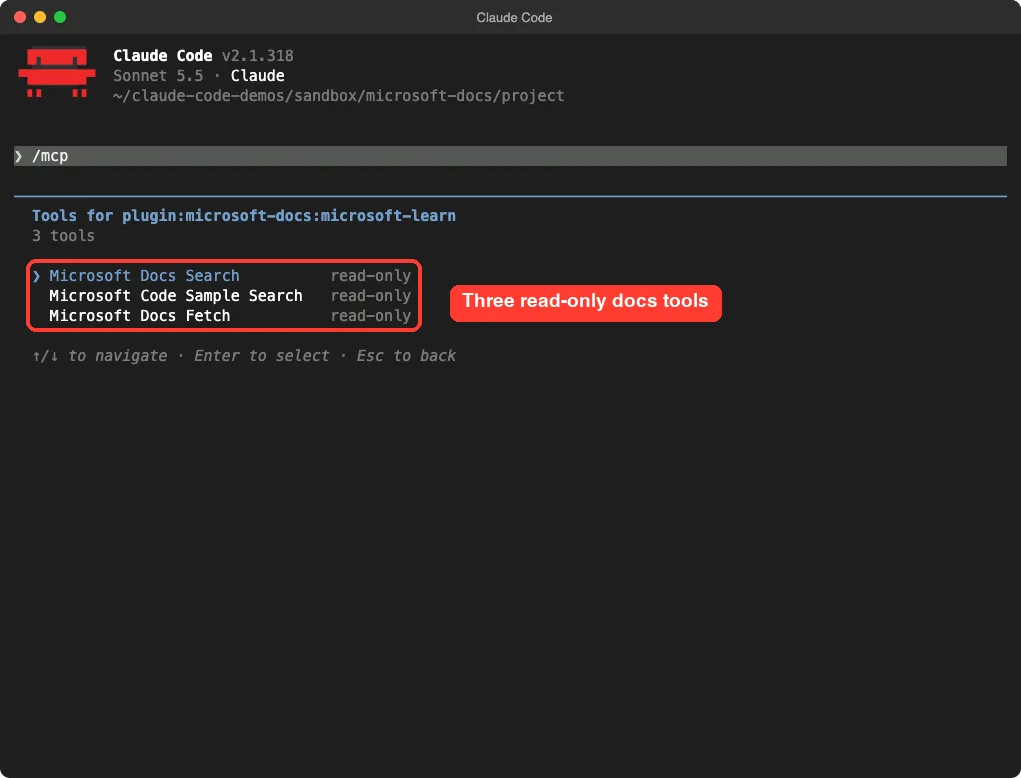
/mcp screen lists the search, code sample and fetch toolsRead-only matters. These tools only fetch public documentation, so they cannot change your files or your cloud account.
Our Real Test: Does upload_blob Need overwrite=True?
We made a tiny file called upload.py that uploads a CSV to Azure Blob Storage.
It calls container.upload_blob(name="daily.csv", data=data) with no overwrite argument. We never ran it. It only exists so Claude has something to check.
Then we asked this prompt:
Using the Microsoft docs tools, check upload.py against the official Azure Blob Storage Python docs. Does upload_blob need overwrite=True if daily.csv already exists? Answer in 4 lines, do not edit files.Claude read the file and then asked permission to call the Microsoft docs tool. The screen showed the exact search query it wanted to send, so you can see what leaves your machine before you approve.
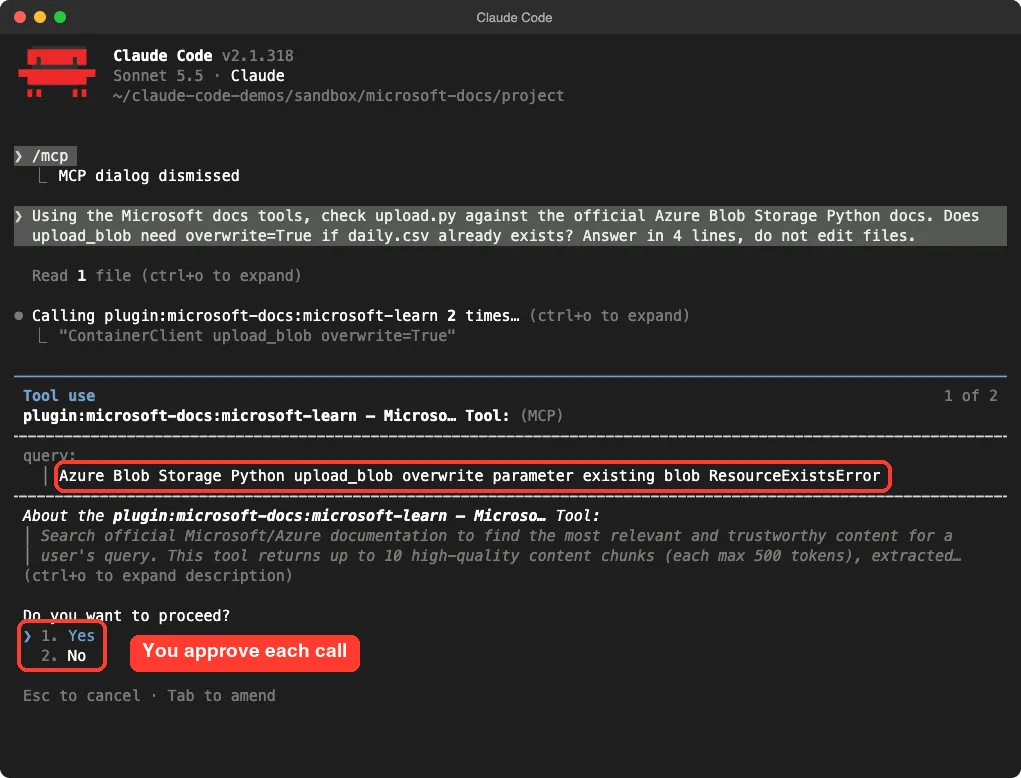
We approved, and Claude called the docs tool twice. Its answer was short and specific.
It said that line 8 of upload.py leaves overwrite at its default of False, so the call raises ResourceExistsError if the blob already exists. It pointed to the reference for ContainerClient.upload_blob and to Microsoft’s block blob upload example, and suggested adding overwrite=True.
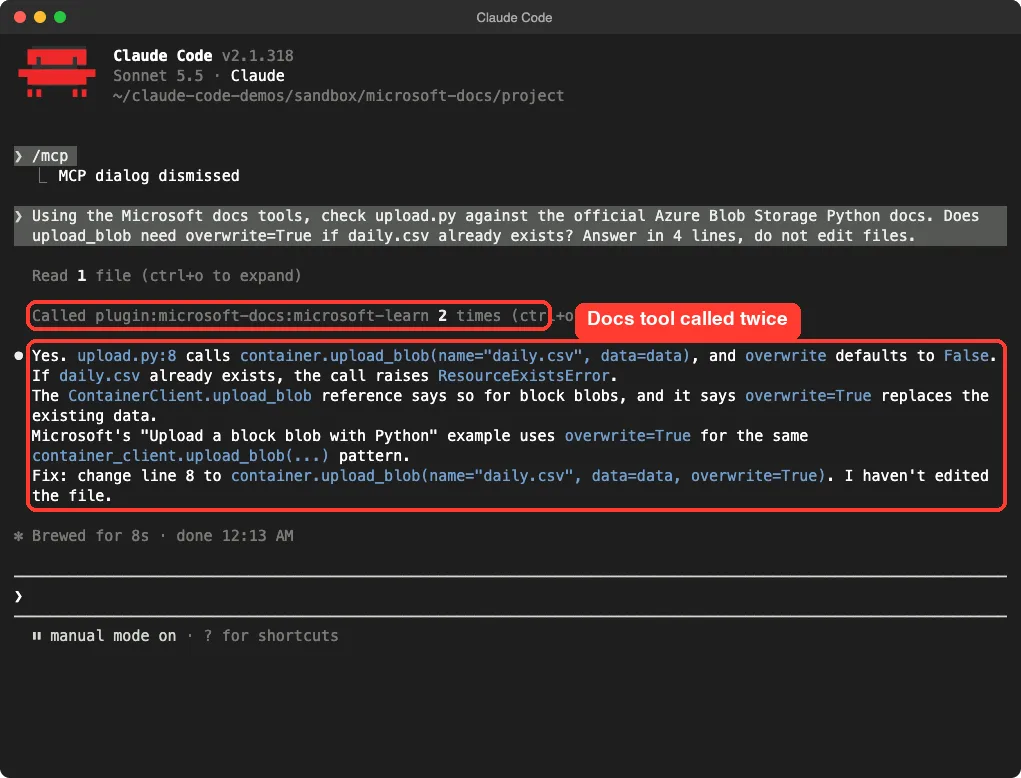
This is one small demo, not a benchmark. We cannot say how it performs on every Microsoft product. What we can say is that the full chain worked: skill, tool call, approval, and an answer that named the parameter and the error.
How the Pieces Fit Together
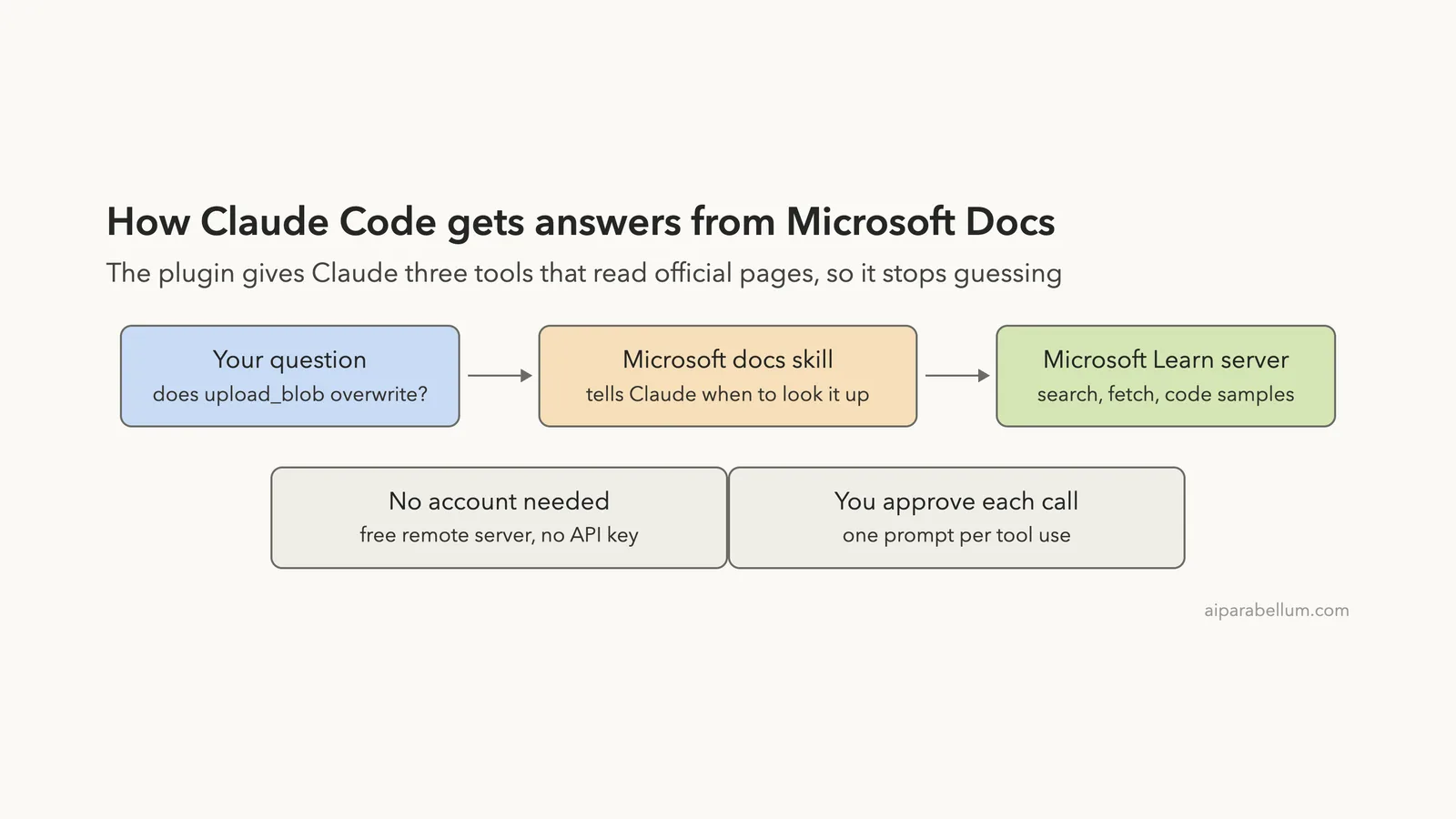
The diagram shows the path a question takes. You ask, the skill tells Claude that a docs lookup is the right move, and the Microsoft Learn server returns official pages and samples.
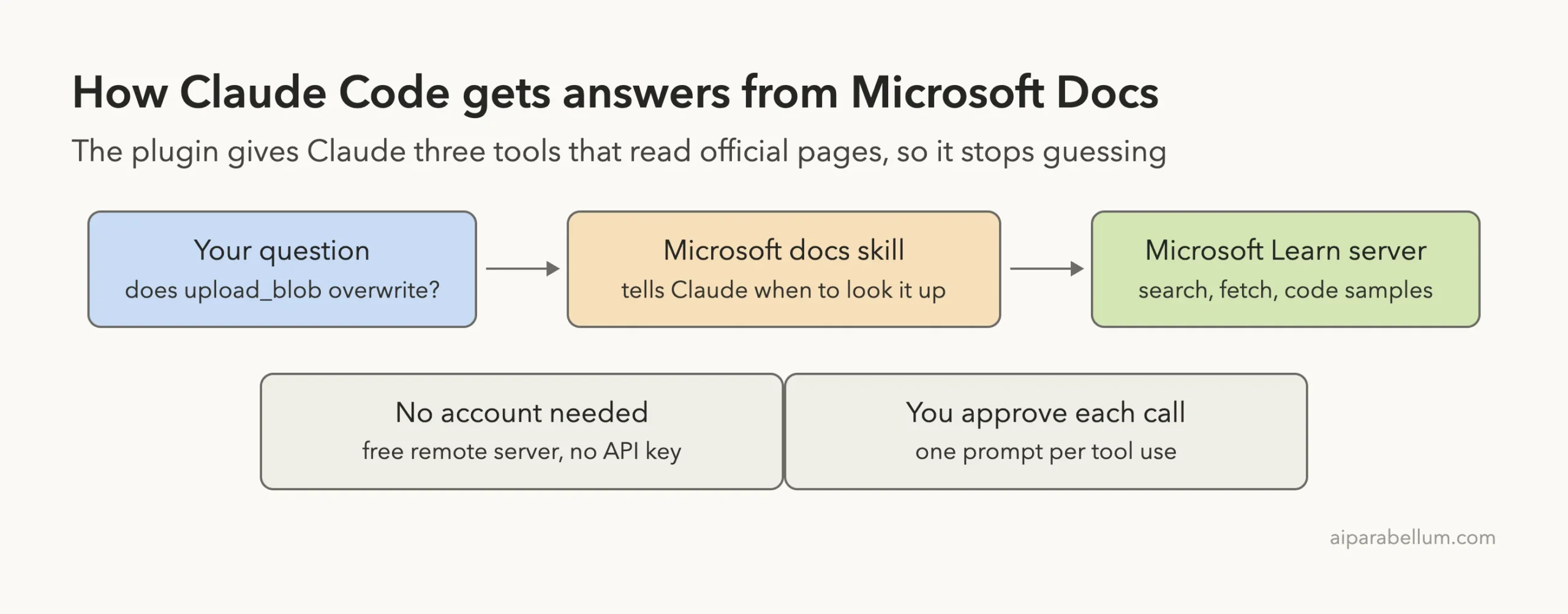
A docs plugin does not make Claude smarter. It lets Claude check its answer against the page Microsoft actually published.
Microsoft Docs MCP in Claude Code: Plugin or Manual Setup?
You can add the same Microsoft Learn server to Claude Code by hand, without the plugin. The plugin saves you from writing the server config yourself. It also adds the three skills, so Claude knows when to look things up and which tool to pick.
The README also says the same repository supports other tools, such as GitHub Copilot and Codex. So a team that mixes assistants can point everyone at one source of truth for Microsoft documentation.
| Option | What you get | Best for |
|---|---|---|
| Plugin install | Server config plus 3 skills in one command | Most Claude Code users |
--plugin-dir test | The same plugin for one session only | Trying it before you commit |
| Server only | The three tools, no skills | People who want full control of prompts |
Who Should Install the Microsoft Docs Plugin
Install it if you build on Azure, .NET, Microsoft 365, Windows or Power Platform. Those are the areas the skill descriptions name. It is especially handy when you work with a newer SDK, where a model’s memory is most likely to be stale.
Skip it if you never touch Microsoft products. It adds about 450 tokens of skill descriptions to your session, which is small but pointless if you will not use it. Also skip it when you work offline, because the tools call a remote server.
What We Did Not Test
We ran one prompt with the microsoft-docs and code reference tools. We did not run the microsoft-skill-creator skill, so we cannot judge how well it builds a custom skill. We also did not try the optional @microsoft/learn-cli command line tool, which the README describes as terminal access to the same tools.
The README also lists experimental options, such as a maxTokenBudget setting you can add to the endpoint URL to limit the size of search results. It says these features may change. We did not use them.
Try It Yourself
Pick a question from a project you know well. Make a small throwaway file that uses an Azure or .NET method, then ask Claude to check it. Here is a prompt you can copy:
Using the Microsoft docs tools, check this file against the official docs. List any method or parameter that is wrong or outdated, and cite the doc page for each. Do not edit files.Good practice ideas:
- Ask for the Azure CLI command to create a resource, then compare it with the docs page yourself.
- Ask whether a service limit or quota has changed.
- Ask Claude to find a runnable code sample for a task in your language.
Common Mistakes
- Skipping the approval screen. Read the query once. It shows what Claude sends.
- Asking vague questions. “How do I use Azure?” returns weak results. Name the service, the language and the exact call.
- Trusting the answer blindly. Open the cited page when the change matters, such as a production deploy.
- Installing it for non-Microsoft work. It only knows Microsoft Learn, so it will not help with other vendors’ docs.
- Forgetting scopes. Project scope shares the plugin with your team, but each person still installs it once on their own machine.
Pro Tips
- Say “using the Microsoft docs tools” in your prompt when you want to be sure Claude looks things up.
- Use
ctrl+oto expand tool output and see what the docs returned. - Try plugins with
--plugin-dirfirst. It keeps your real setup clean. - Pair it with a code review habit. Docs lookups reduce wrong method names, but they do not replace tests.
- Learn how plugins differ from other add-ons in our guide on skills versus plugins.
Microsoft Docs Plugin Cheat Sheet
Frequently Asked Questions
Is the Microsoft Docs plugin free?
The repository README describes the Learn MCP server as free, with no key needed. We used it without paying or signing in. Claude’s own usage still follows your Claude plan or API billing.
Do I need a Microsoft or Azure account?
No. We did not create or use any account. The docs it reads are public Microsoft Learn pages.
Is it safe to install?
We read the repository first. It has a manifest, a server address and three skill files, with no hooks.
The tools are read-only, and Claude asks before each call in the default permission mode. It does send your search query to Microsoft, so do not put secrets in it.
What is the difference between the plugin and the MCP server?
The MCP server provides the tools. The plugin bundles that server with three skills that tell Claude when and how to use it. You can read more about add-ons in our Claude Code skills guide.
How do I remove it?
If you used --plugin-dir, start Claude Code without the flag. If you installed it, open /plugin to manage or remove it.
Conclusion
The Microsoft Docs plugin gives Claude Code a free, read-only way to check official Microsoft documentation, and in our short test it found the right parameter and error for an Azure upload call. Install it if you write code for Azure, .NET or other Microsoft products, read the search query before you approve it, and open the cited page when a change matters. For more add-ons, browse the directory linked above and the Claude AI page. The plugin’s source is the MicrosoftDocs/mcp repository.