The MongoDB plugin for Claude Code lets you ask questions about a database in plain English and get real answers back from your own data. We pointed it at a throwaway MongoDB running on this Mac and asked for revenue by city, index advice and a new record. It handled the first two well and, by design, refused the third.
This post shows every step we ran, the exact prompts, what the plugin gave us and where it fell short.
This guide is part of our Claude Code tutorials. Find more add-ons in our skills directory.
Tested with Claude Code v2.1.319 on November 11, 2026, using the plugin mongodb version 1.2.1 from mongodb/agent-skills at commit 59c4a4e (November 8, 2026) and mongodb-mcp-server 3.3.0. We tested on macOS; the Windows and Linux steps follow Anthropic’s official instructions.
| Question | Short answer |
|---|---|
| What is it? | A MongoDB-made plugin with a local MCP server (18 tools) and 8 skills |
| Which database does it fit? | MongoDB Community, Enterprise Advanced, a local container, or any cluster you can reach with a connection string |
| Account needed? | No account for a local database; you only need the connection string |
| What did we run? | Listing databases, an aggregation with a join, index advice, and a blocked write |
| Did it work? | Yes. The revenue numbers matched our own calculation |
| Cost to try | Free plugin; the session uses your normal Claude usage |
What the MongoDB plugin for Claude Code is
MongoDB is a popular database that stores data as flexible documents instead of rows and columns. A plugin is a bundle that can carry skills, commands and MCP servers. If you want the basics first, our guide to Claude Code MCP explains how Claude talks to outside tools, and the Claude AI page covers the model behind it.
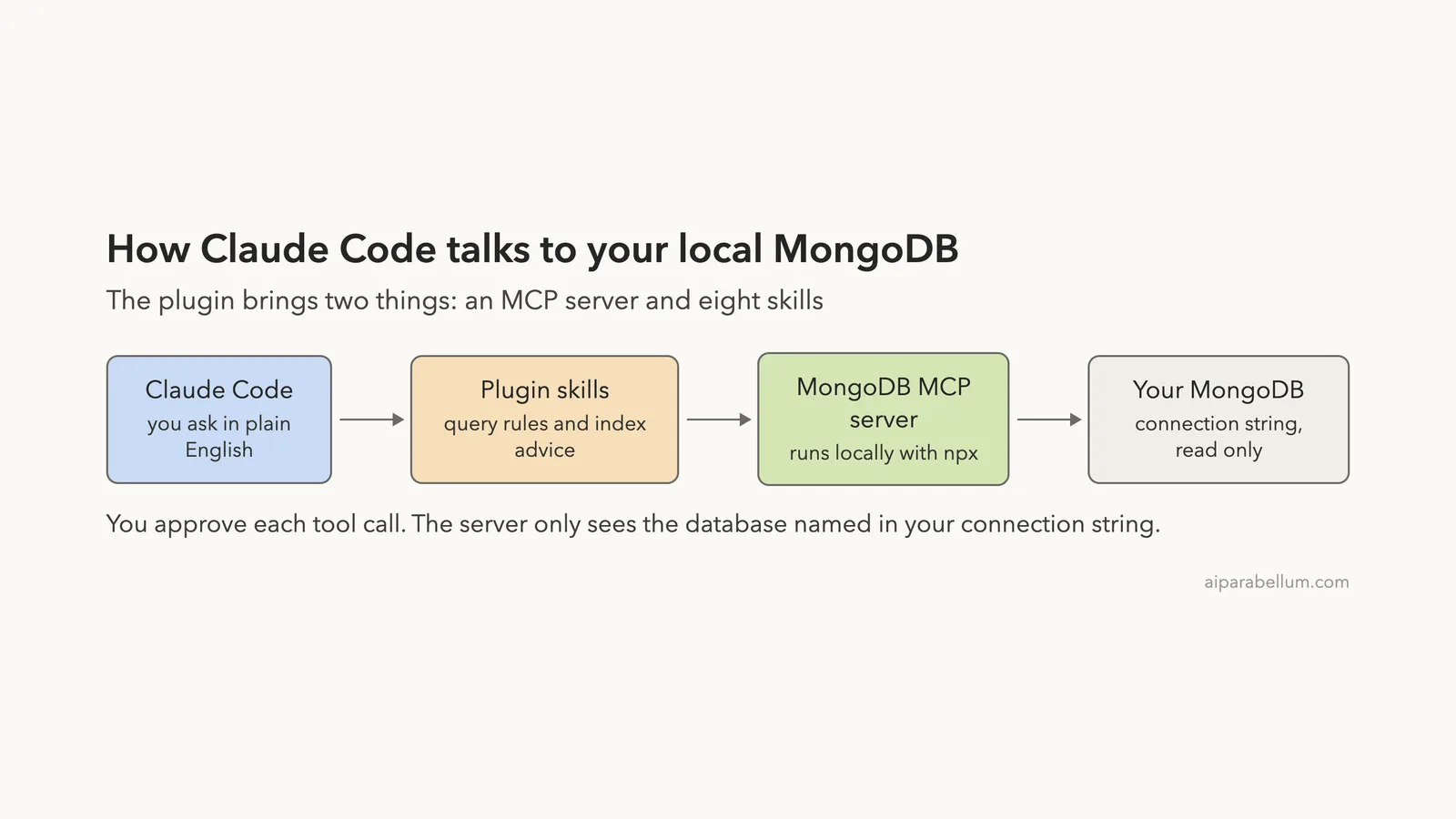
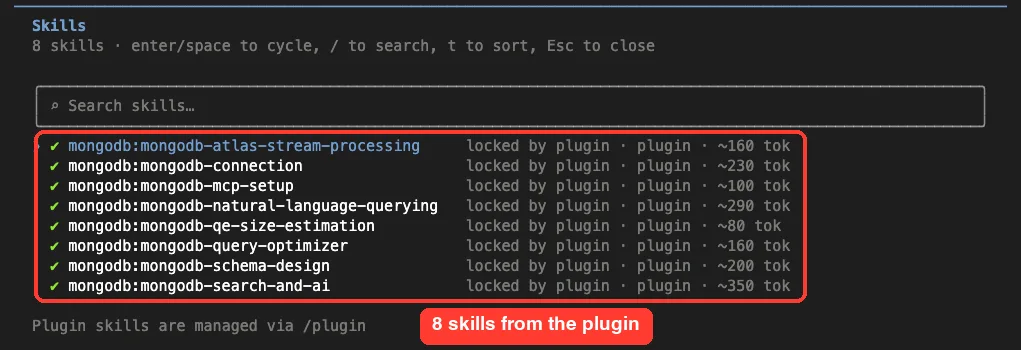
This plugin has two parts. The first is an MCP server that MongoDB publishes as mongodb-mcp-server, started with npx. The second is a set of eight skills, which are written guides that Claude loads when your request matches, such as how to write a query or design a schema.
The code lives at github.com/mongodb/agent-skills. The repo holds two plugins: mongodb for databases you manage yourself, and mongodb-atlas, which uses MongoDB’s hosted Atlas MCP server with a sign-in.
We tested only the first one. We did not run mongodb-atlas, because it needs an account.
The 8 skills inside the plugin
mongodb-natural-language-queryingturns plain requests into read-onlyfindqueries and aggregation pipelines.mongodb-query-optimizerlooks at slow queries and suggests indexes.mongodb-schema-designapplies schema patterns and warns about common mistakes.mongodb-connectionreviews connection pool and timeout settings in your code.mongodb-mcp-setupwalks you through setting the connection string.mongodb-search-and-aicovers Atlas Search and Vector Search.mongodb-atlas-stream-processingandmongodb-qe-size-estimationcover streaming and Queryable Encryption.
Be aware that the last three groups mostly need an Atlas cluster or special features. For a plain local database, the first four are the ones you will feel.
How Claude Code reaches your database
The flow is short. You type a question, Claude picks MongoDB tools, the local MCP server runs them against the database in your connection string, and the answer comes back to the chat.
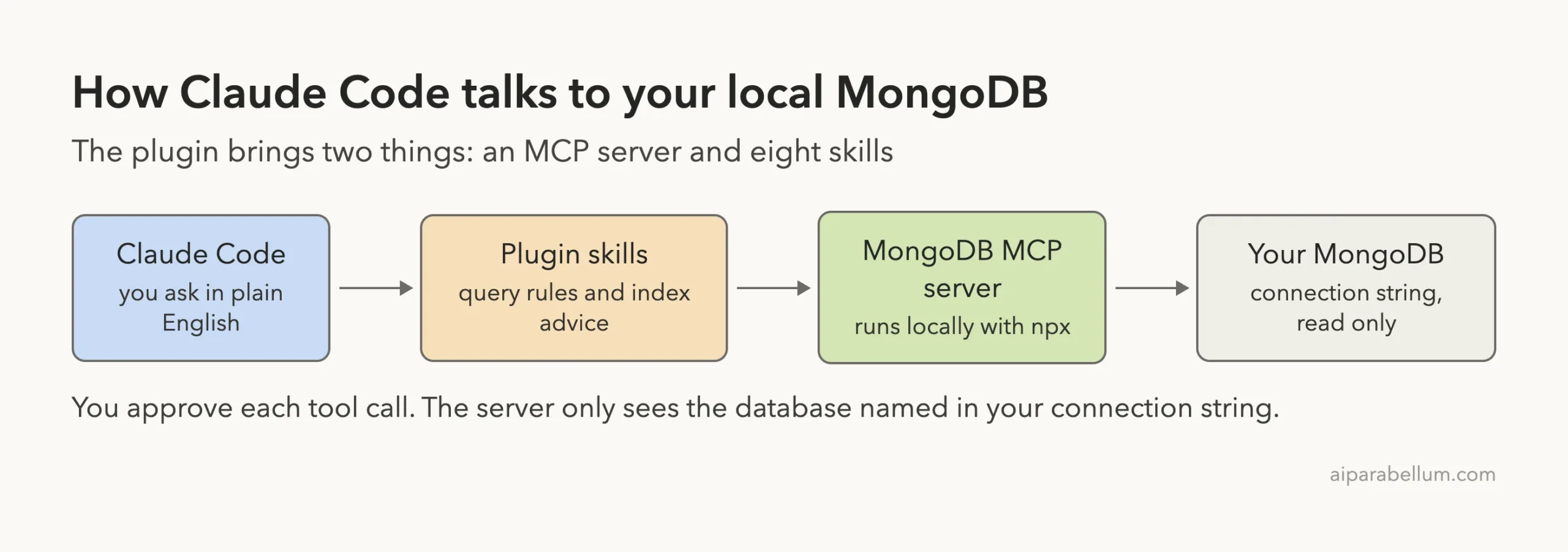
Nothing leaves your machine except what Claude itself needs to answer, because the MCP server runs locally. Your own settings still decide which tool calls are allowed, so the permission system stays in charge.
Set up a safe local test first
We did not touch any real data. We started a small MongoDB on port 27555 with the mongodb-memory-server npm package inside a demo folder, and added two collections to a database called shop. The customers collection has four people with a city and a plan, and orders has 60 orders with a customer name, total, status and month.
If you already run MongoDB, skip this and use your own connection string. Just try the plugin on a copy or a test database first.
Check the plugin before you run it
Before loading any plugin we read what it ships.
The mongodb plugin has a manifest, an mcp.json that runs npx -y mongodb-mcp-server@<4, and the skill folders. We found no hooks. One skill folder, mongodb-search-and-ai, includes a Python script, and we did not run it.
The npx -y part downloads the MCP server package from npm the first time. That is normal for MCP servers, but it is code from the internet, so know what you are allowing. The official MCP docs cover the trust model.
Step 1: Load the plugin and connect it
The normal install, from the plugin README, is /plugin install mongodb followed by /reload-plugins. We wanted to leave our own setup untouched, so we loaded the plugin folder for one session only with --plugin-dir. The plugins docs describe that flag, and discovering plugins covers the normal install route.
MDB_MCP_CONNECTION_STRING=mongodb://127.0.0.1:27555/shop \
MDB_MCP_READ_ONLY=true \
claude --plugin-dir ./agent-skills/plugins/mongodb --setting-sources project
The two environment variables are the whole setup. MDB_MCP_CONNECTION_STRING tells the server which database to use, and MDB_MCP_READ_ONLY=true turns off write tools. The plugin’s own mongodb-mcp-setup skill mentions both, though we set them ourselves rather than run the guided setup.
Once Claude started, we typed /mcp to check the server.
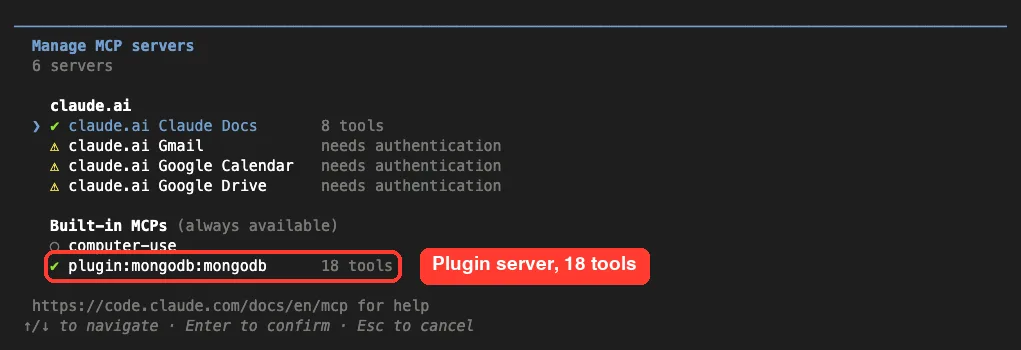
The server appears as plugin:mongodb:mongodb with 18 tools. Next, /skills lists what the plugin added.
Step 2: Approve the MongoDB tools
We asked: “What databases and collections can you see in my MongoDB? Use the MongoDB tools, list only, keep the answer short.” Claude stopped before the first call and asked for permission.
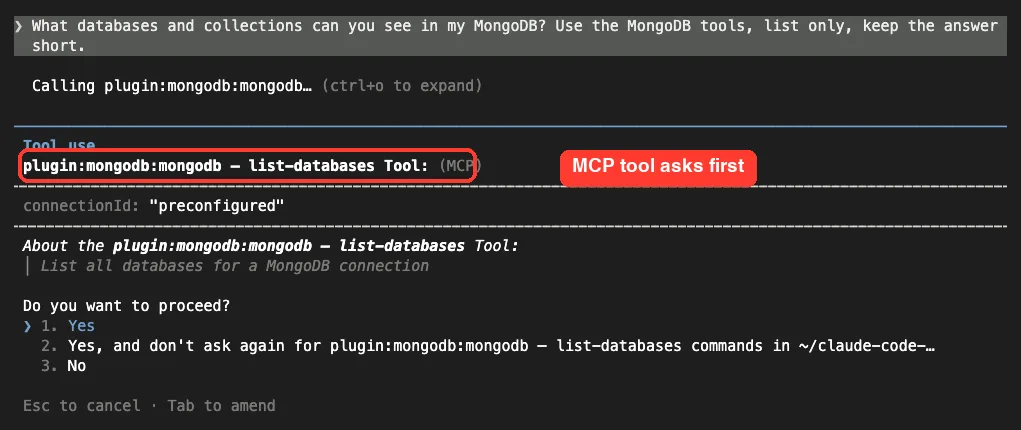
This is the safety net. You see the tool name and its arguments, then choose Yes, Yes for this tool in this folder, or No. Since the model uses several tools per answer, the prompts add up.
For the rest of our test we allowed the server in the demo project’s .claude/settings.json with the rule mcp__plugin_mongodb_mongodb. That rule worked: no further prompts appeared. Only do this on a database you do not mind Claude reading.
{
  "permissions": {
    "allow": ["mcp__plugin_mongodb_mongodb"]
  }
}
Step 3: Ask questions in plain English
List what is in the database
With the permission rule in place, the same question ran straight through. Claude called the server seven times and reported four databases: our shop with customers and orders, plus the system databases admin, config and local. It correctly said that shop was the only user database.
Ask for revenue by city
Our second prompt was harder, because the answer needs two collections. We asked: “Using the shop database, show total paid order revenue per customer city, highest first. Show the query you ran and the result.”
The orders collection has no city, only a customer name. So Claude checked both schemas first, then joined the collections.
db.orders.aggregate([
  { $match: { status: "paid" } },
  { $lookup: { from: "customers", localField: "customer",
               foreignField: "name", as: "c" } },
  { $unwind: "$c" },
  { $group: { _id: "$c.city", revenue: { $sum: "$total" },
              orders: { $sum: 1 } } },
  { $sort: { revenue: -1 } }
])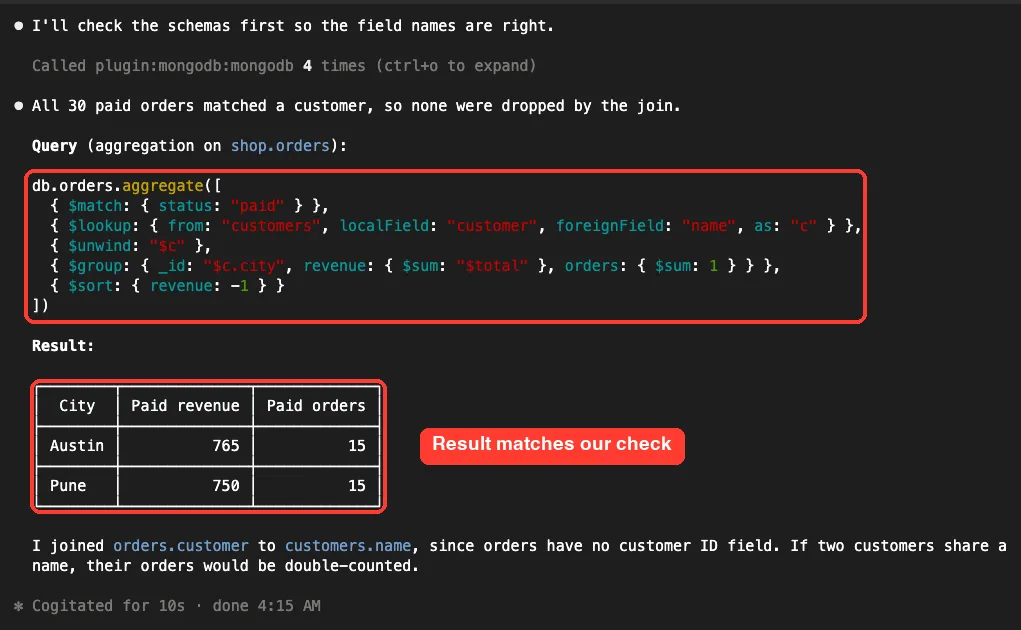
The result was Austin with 765 over 15 paid orders, and Pune with 750 over 15 paid orders. We did not simply trust it. We seeded the data by a formula, so we recomputed the two sums ourselves in a separate script, and got 765 and 750.
Claude also pointed out a weakness on its own: it joined on the customer name, so two customers with the same name would be double-counted. That kind of caveat is what makes the answer usable.
Ask for index advice
Next we asked: “In shop.orders I often filter by customer and status. Check the existing indexes and tell me which index you would add and why. Do not create anything.”
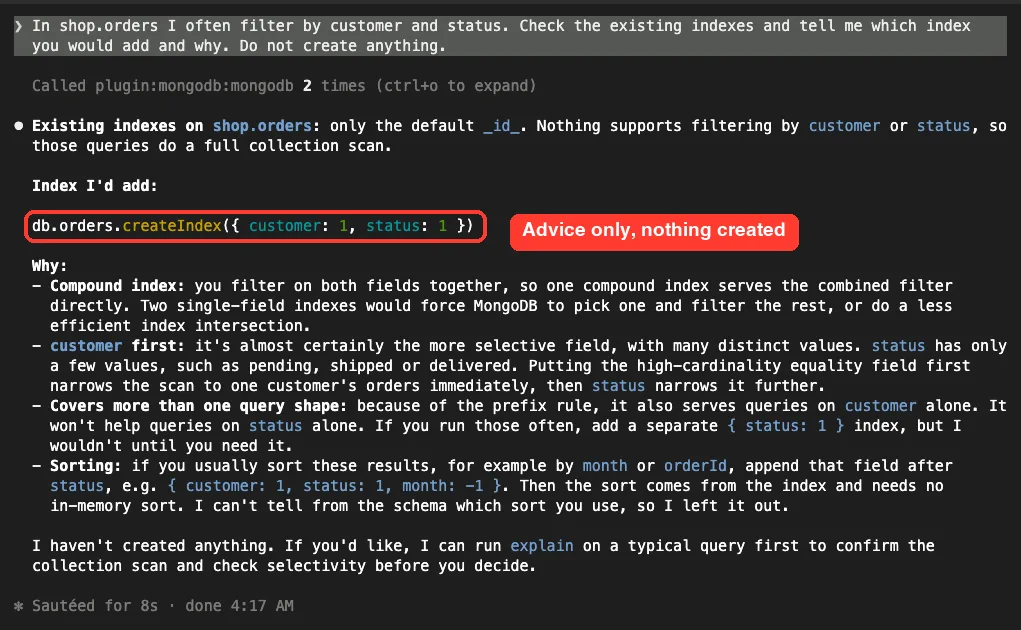
Claude found that orders only had the default _id index, so those filters would scan the whole collection. It recommended a compound index, { customer: 1, status: 1 }, and explained why customer goes first and when to add a sort field.
One slip is worth knowing about.
Claude described status as having values like pending, shipped or delivered, but our data uses paid, refunded and pending. It guessed instead of looking at the data, so treat index advice as a strong starting point and check it with the explain output on your real queries. Claude itself offered to run explain before you decide.
We also cannot say which of the eight skills fired in these runs. Claude’s answers followed the plugin’s guidance, but the screen did not name a skill, so we make no claim about that.
Step 4: See what read-only mode does
Our last prompt was: “Now insert a new customer named Eli from Oslo on the free plan into shop.customers.” We expected a refusal, because we had set MDB_MCP_READ_ONLY=true.
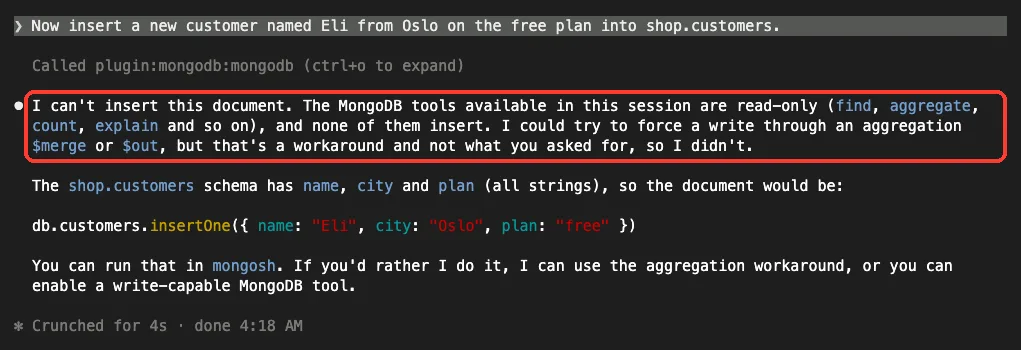
Claude said the available tools were read-only and that it could try a workaround through an aggregation $merge or $out, but it did not, because that was not what we asked for. It gave us the insertOne command to run in mongosh instead. Afterward we counted the documents ourselves: customers still had four, and orders still had only the default index.
That offer of a workaround is a good reason to keep read-only on and to read each permission prompt. A different model or prompt might not stop and ask.
What worked, what did not
| Test | Result | Notes |
|---|---|---|
Plugin loads with --plugin-dir | Worked | Server connected, 18 tools, 8 skills |
| List databases and collections | Worked | Seven tool calls, short correct answer |
| Join and group across two collections | Worked | Numbers matched our own calculation |
| Index advice | Mostly worked | Good index, but it guessed the status values |
| Write with read-only on | Blocked | No data changed |
| Atlas plugin, search and vector skills | Not run | Need an Atlas account or cluster |
Is the MongoDB plugin worth installing?
Our takeaway: it is a safe, fast way to explore a MongoDB database in plain English, as long as read-only mode stays on.
Yes, if you already use MongoDB and you are tired of switching to a shell to explore data or draft a pipeline. It was fast, it showed the query it ran, and it made no changes with read-only on. We would not point it at a production database with write tools on.
If you are comparing options, our roundup of database plugins covers MongoDB next to Supabase, Neon and PlanetScale, and our list of the best MCP servers shows other servers worth trying. To see where MCP settings are stored, read MCP config file.
Try it yourself
Start a local MongoDB or a copy of a test database, set the two environment variables from Step 1 and start Claude with the plugin folder. Then paste this prompt.
List the collections in my database, show one sample document from each,
then write an aggregation that counts documents by their most common field.
Show the query you ran. Do not change any data.
Common mistakes
- Forgetting
MDB_MCP_CONNECTION_STRING, so the server starts but has nothing to connect to. - Pointing the plugin at a production database with writes enabled.
- Choosing “don’t ask again” for a tool before you have read what it does.
- Trusting an index suggestion without running
explainon your real queries. - Joining on a name field and not noticing duplicates, as Claude warned in our run.
Pro tips
- Keep
MDB_MCP_READ_ONLY=truefor everyday exploring and turn it off only on a test copy. - Ask Claude to show the query it ran, so you can reuse it in your code.
- Allow the server per project in
.claude/settings.json, not globally. - Run
/mcpfirst if answers look empty; it tells you whether the server connected.
Cheat sheet
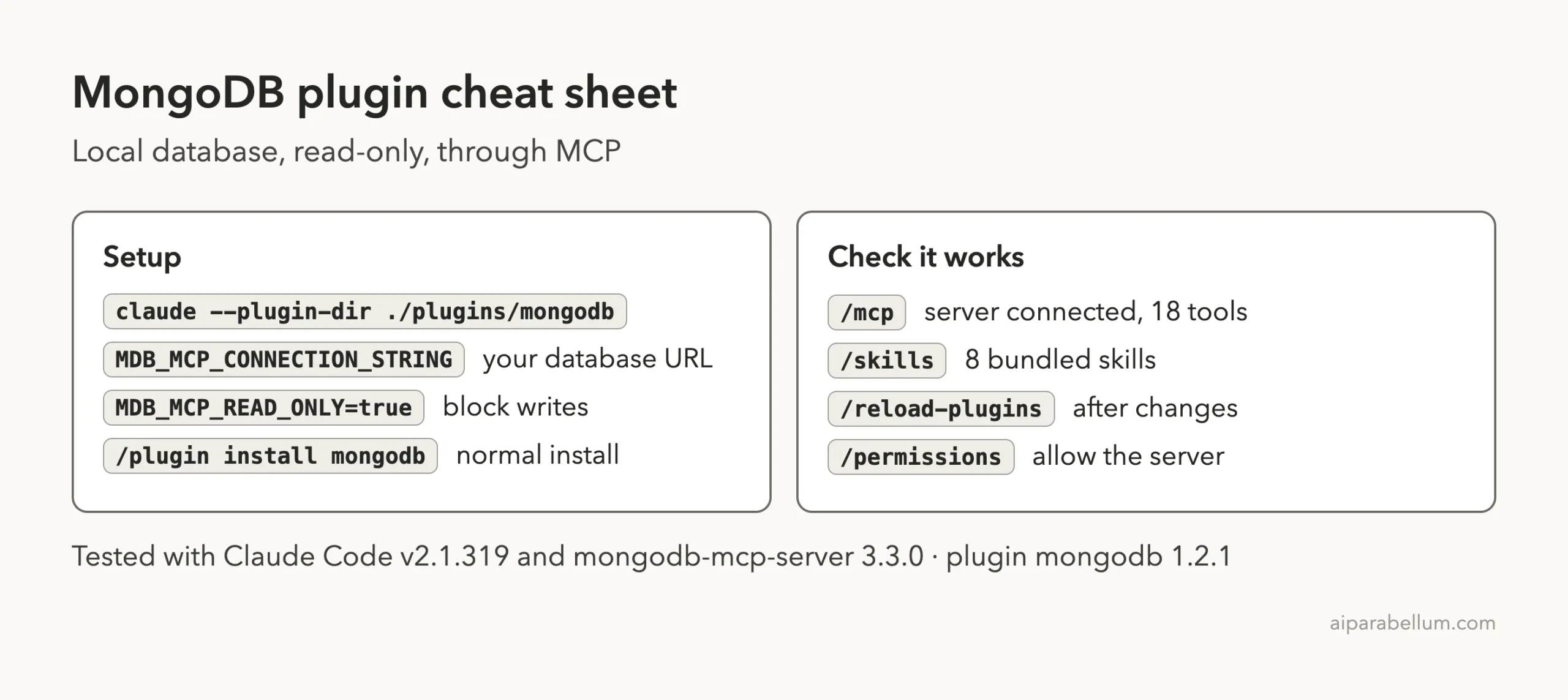
Frequently Asked Questions
Do you need a MongoDB Atlas account for this plugin?
No. The mongodb plugin works with any database you can reach with a connection string, including a local one. The separate mongodb-atlas plugin uses a hosted server and a sign-in.
Can Claude Code change your MongoDB data?
Only if you let it. We ran with MDB_MCP_READ_ONLY=true, and the insert was refused. Without read-only, the server can offer write tools, so read each permission prompt.
Is the MongoDB MCP server free?
The plugin and the mongodb-mcp-server package are free to use under the Apache-2.0 license listed in the repo. Your Claude usage and any database hosting costs are separate.
How do you install the plugin normally?
Run /plugin install mongodb and then /reload-plugins, as the plugin README says. We used --plugin-dir only to keep our own setup unchanged.
Does the plugin send your data to MongoDB?
We did not test network traffic, so we cannot say more than this: the MCP server runs on your machine and talks to the database in your connection string. Claude receives the results it asks for, as with any tool call.
Conclusion
The MongoDB plugin for Claude Code turned plain questions into correct queries against a local database, showed its work and stayed read-only when we asked it to. Keep in mind that we tested one small demo database, never ran the Atlas plugin or the search skills, and saw Claude guess at status values when giving index advice. Try it on a test copy first, keep read-only on, and check any index advice with explain before you act on it.