If you want Claude to help with your database, the Claude Code database plugin list is getting long, and the names do not tell you what each one does. This guide sorts the main options in plain English, shows how to install them, and tells you which to try first. We also loaded five of them in a safe sandbox and ran everything that works without a database account.
This guide is part of our Claude Code tutorials. Find more add-ons in our Skills Directory.
Tested with Claude Code v2.1.318 on November 6, 2026.
This is a roundup, so we need to be clear about what we ran and what we did not. We read the files of the GitHub repositories before loading anything: supabase-community/supabase-plugin (commit 016bf5b), neondatabase/agent-skills (commit 7c3c6cc), cockroachdb/claude-plugin (commit df34a85), ClickHouse/clickhouse-claude-code-plugin (commit 0b66d6d) and timescale/pg-aiguide (commit b628f3d). We loaded those five with --plugin-dir and project-only settings.
We never created a database account, never signed in and never installed anything into the normal Claude Code setup. Everything about the other plugins comes from their own README and files.
Quick Summary
| Question | Answer |
|---|---|
| What do these plugins do? | They give Claude database skills (written guides) and often an MCP server that connects to your database service |
| Where do I install them from? | Anthropic’s official marketplace, claude-plugins-official, for most of them |
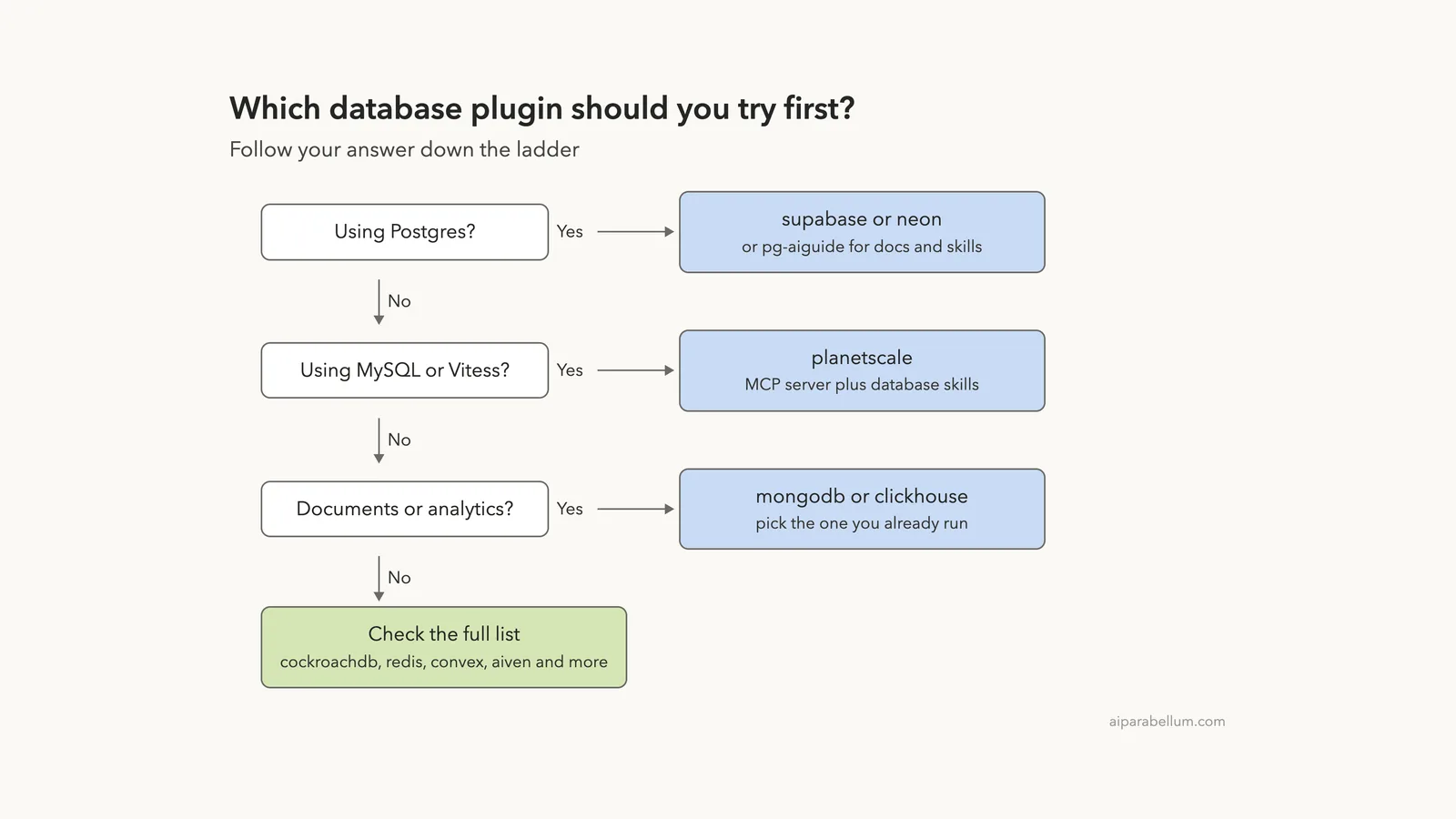
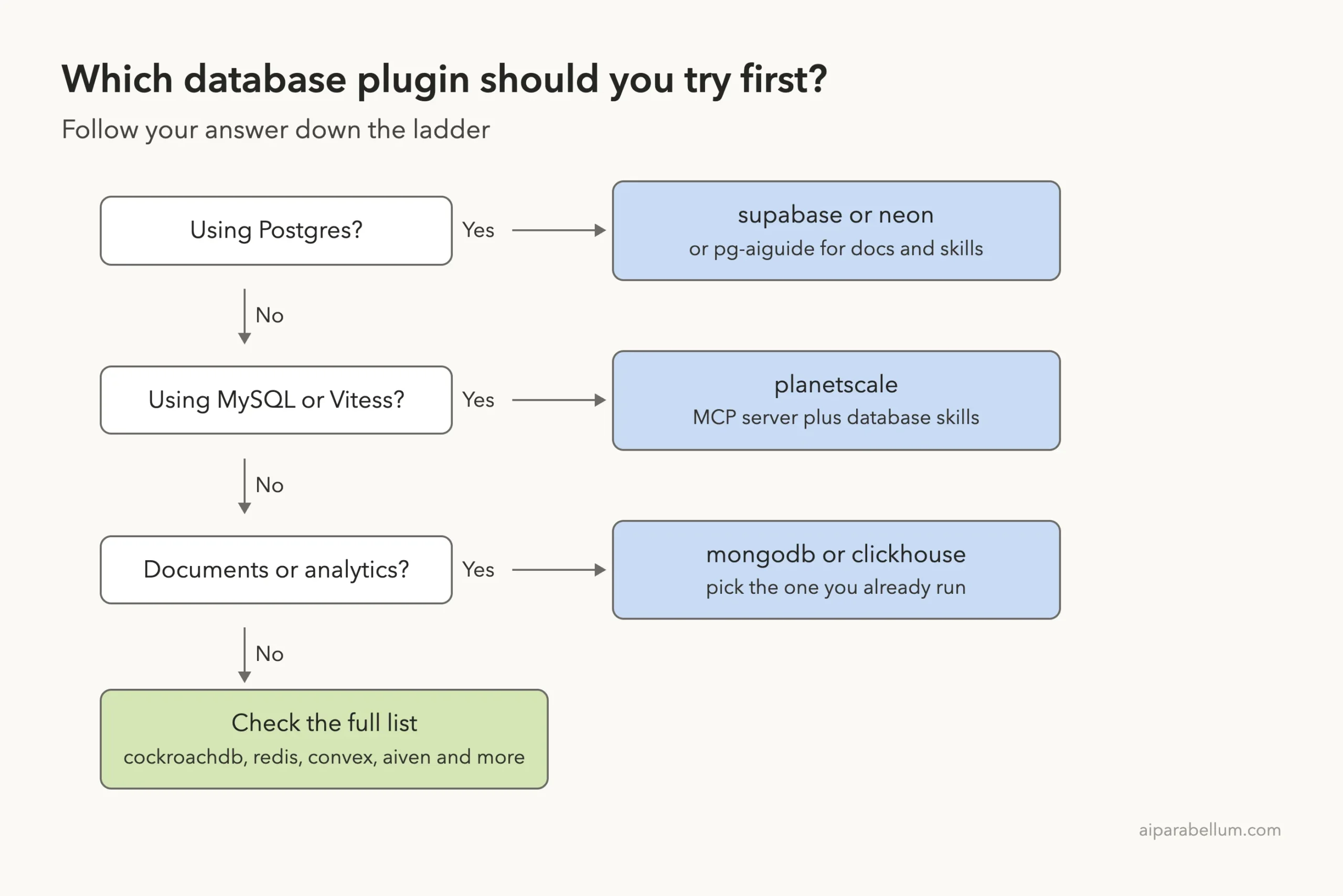
| Which should I try first? | Pick the one that matches the database you already use. For Postgres, start with supabase, neon or pg-aiguide |
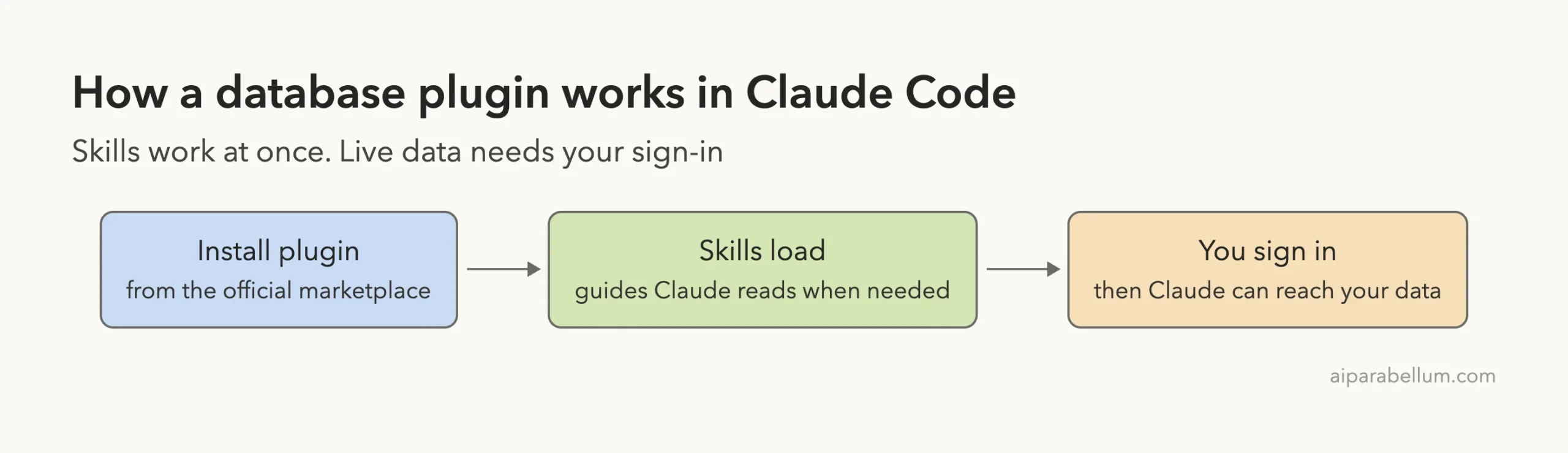
| Do I need an account? | The skills work without one. Anything that reads or changes your live data needs a sign-in to that service |
| What did we run? | Five plugins loaded, 56 skills listed, one skill used on a demo file, and one safety hook fired for real |
| What did we skip? | Convex and TDengine, because their files include usage reporting (details below), plus every sign-in step |
Start with the plugin for the database you already run, read its hooks and MCP file first, and use a test project.
What Is a Claude Code Database Plugin?
A plugin is a bundle that can hold skills, subagents, hooks and MCP servers, and Claude Code loads it as one unit. Our plugin install guide covers the basics, and the official plugins page lists what a plugin can contain.
Database plugins mostly work in two ways. First, they ship skills, which are short guides Claude reads when your request matches, such as how to design a table. Second, many start an MCP server so Claude can talk to the database service itself.
If MCP is new to you, read our MCP servers guide.
All the Database Plugins at a Glance
Here are the plugins this guide covers. The notes come from each plugin’s own files on the dates above, and the last column says exactly what we did with it.
| Plugin | Maker | What it does | Account needed | Install command | What we did |
|---|---|---|---|---|---|
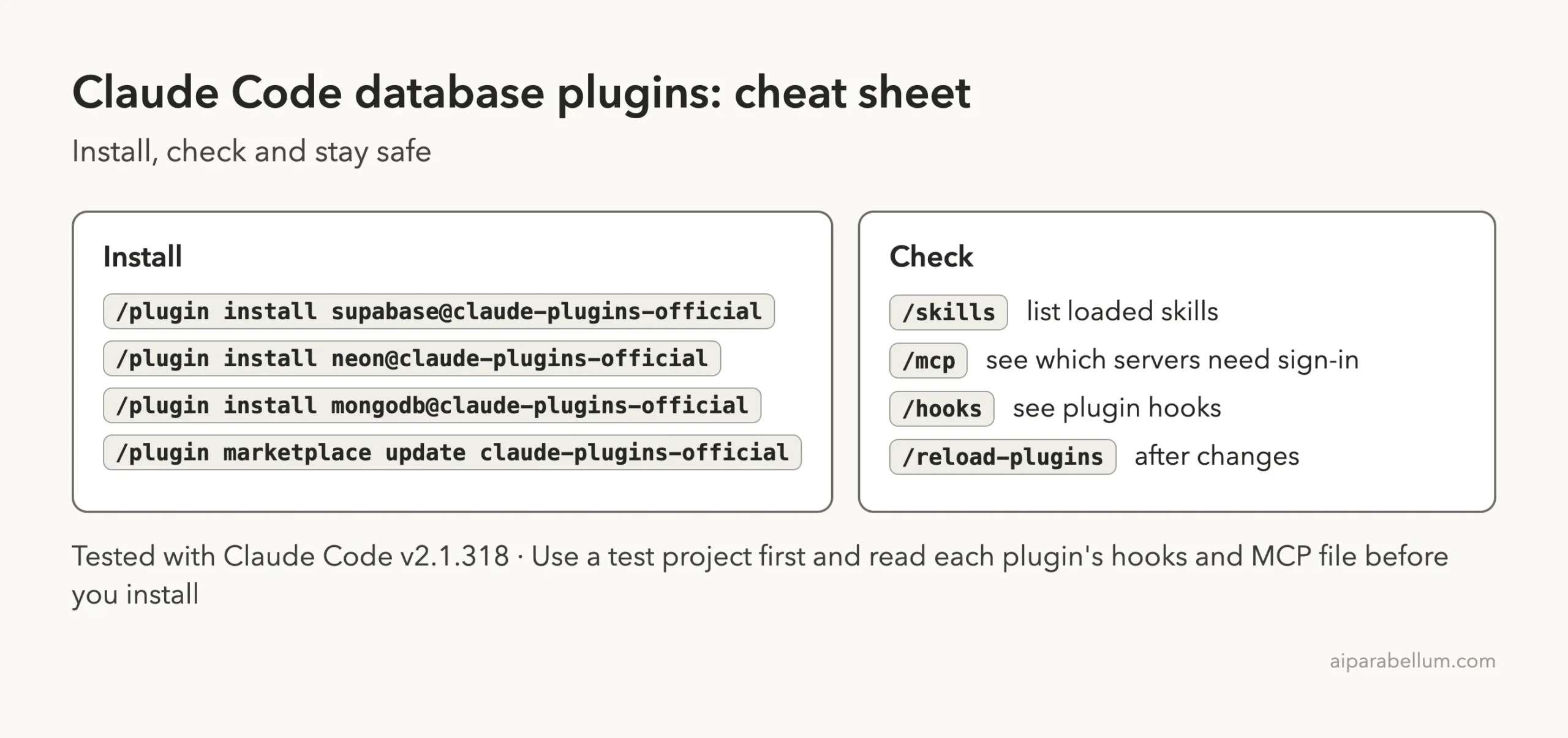
supabase | Supabase | MCP server for projects, SQL, auth and storage, plus 2 skills | Yes, browser sign-in | /plugin install supabase@claude-plugins-official | Loaded it |
neon | Neon | 7 skills plus the Neon MCP server | Yes | /plugin install neon@claude-plugins-official | Loaded it |
cockroachdb | Cockroach Labs | 34 skills, two MCP backends, three agents and two safety hooks | Cloud server yes, local toolbox needs a cluster | /plugin install cockroachdb@claude-plugins-official | Loaded it, used a skill, fired a hook |
clickhouse | ClickHouse | Best practice skills plus a read-only SQL MCP server | Yes, ClickHouse Cloud | /plugin install clickhouse@claude-plugins-official | Loaded it |
pg-aiguide | TigerData (Timescale) | 11 Postgres skills and a docs server | No, per its files | /plugin marketplace add timescale/pg-aiguide then /plugin install pg@aiguide | Loaded the skills |
planetscale | PlanetScale | MCP server plus 19 skill folders for Vitess and Postgres safety reviews | Yes, per its README | /plugin install planetscale@claude-plugins-official | Docs only |
mongodb | MongoDB | Local MongoDB MCP server plus skills, for your own deployment | A running MongoDB | /plugin install mongodb@claude-plugins-official | Docs only |
mongodb-atlas | MongoDB | Atlas MCP server over OAuth plus the same skills | Yes, Atlas | /plugin install mongodb-atlas@claude-plugins-official | Docs only |
redis-development | Redis | Redis best practice skills and a docs server | No, per its files | /plugin install redis-development@claude-plugins-official | Docs only |
aiven | Aiven | Deploy and manage Postgres, Kafka, OpenSearch and ClickHouse services | Yes | /plugin install aiven@claude-plugins-official | Docs only |
convex | Convex | About 20 skills, two subagents, hooks and an MCP server for backends | Not tested | /plugin install convex@claude-plugins-official | Read only, not loaded |
idmp-plugin | TAOS Data | Skills for the TDengine IDMP time-series platform | A TDengine IDMP system | /plugin install idmp-plugin@claude-plugins-official | Read only, not loaded |
vsql-extension-builder | VillageSQL | Builds a VillageSQL extension for MySQL in a seven-phase workflow | No, per its files | /plugin install vsql-extension-builder@claude-plugins-official | Docs only |
clickhouse-best-practices | ClickHouse Inc | 28 rules for schema design, queries and ingestion | No | /plugin install clickhouse-best-practices@claude-plugins-official | Docs only |
The skill counts are folders we counted in each repository. Account notes come from each plugin’s files, so check the current README before you rely on them.
How We Tested Without a Database Account
We made a throwaway project folder with one small file, schema.sql, holding two made-up shop tables. Then we started Claude Code with project-only settings and loaded five plugins from the cloned repositories.
Before loading anything we read each plugin’s hooks and MCP file. The five we loaded had nothing that looked unsafe: the hooks were small Python scripts that read local files and make no network calls, and the MCP servers were remote ones that wait for you to sign in.
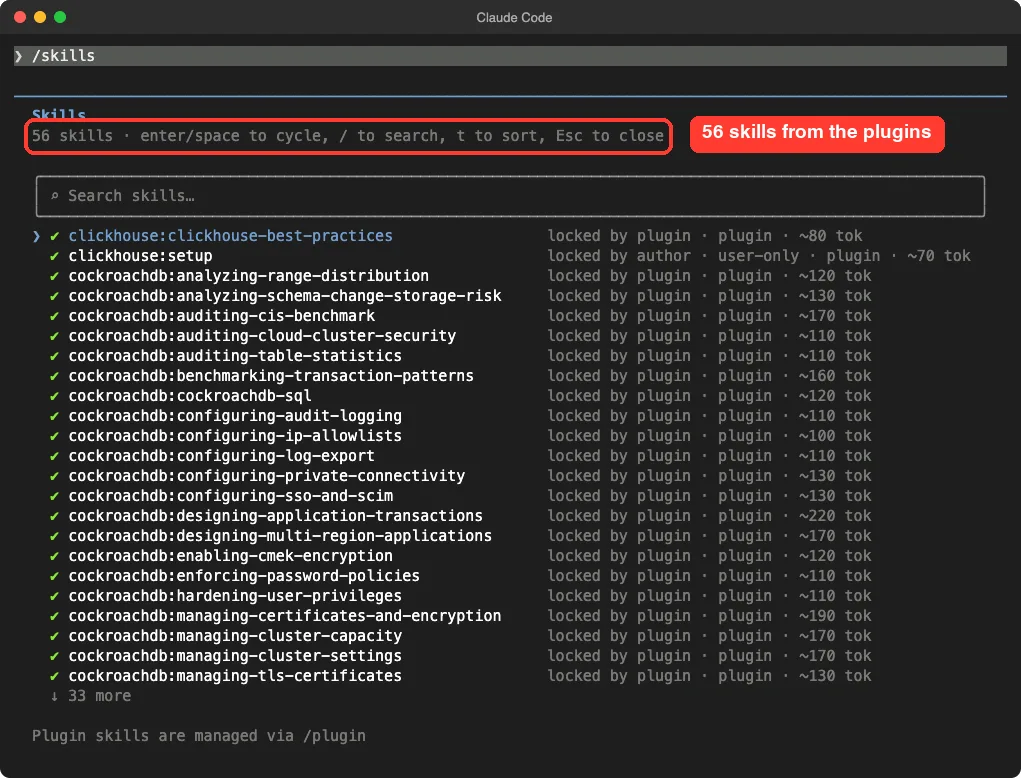
Skills: 56 loaded from the plugins
The /skills screen listed 56 skills. Every one is marked as locked by its plugin, and the screen shows a rough token cost for each. CockroachDB alone brings dozens, which shows why a big plugin can add a lot to what Claude knows about.
MCP servers: sign-in needed, as expected
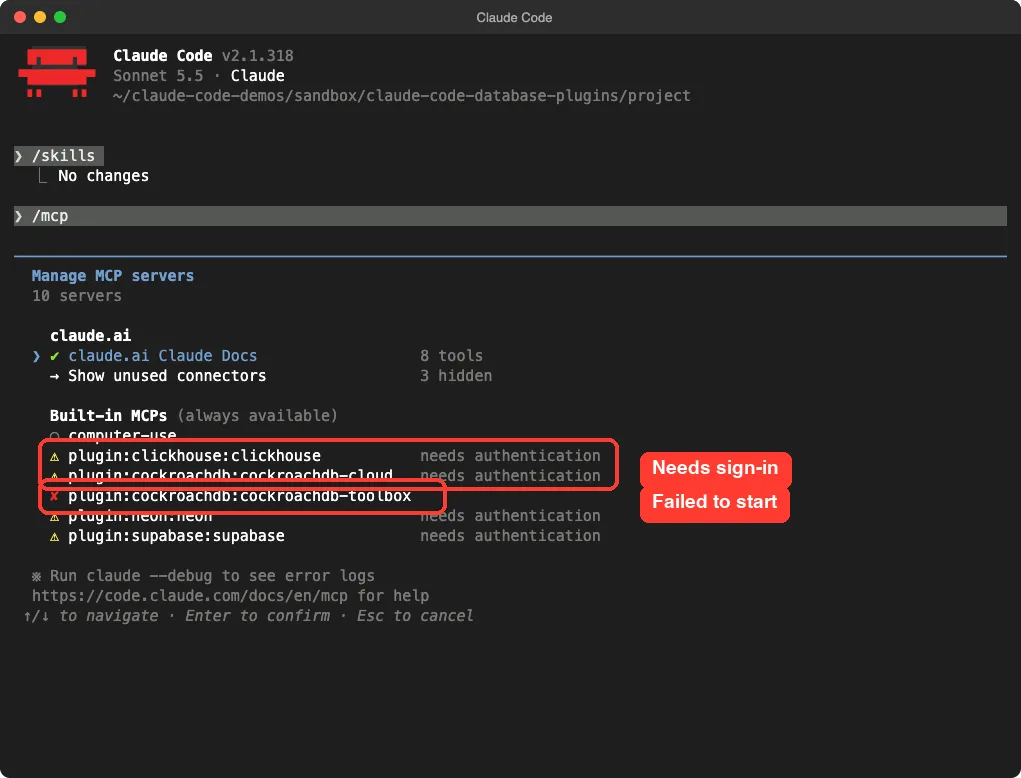
The /mcp screen showed the ClickHouse, Neon, Supabase and CockroachDB cloud servers as needing authentication. That is the right behavior, because Claude cannot see your data until you sign in. We did not sign in to any of them.
The local CockroachDB toolbox server showed as failed. It starts a program named toolbox that we did not install, and we did not check further. The pg-aiguide server did not appear in the list when we loaded its folder directly.
Hooks: only CockroachDB brings them
The /hooks screen showed two plugin hooks, both from CockroachDB. One runs before SQL is executed. The other runs after a file is written or edited.
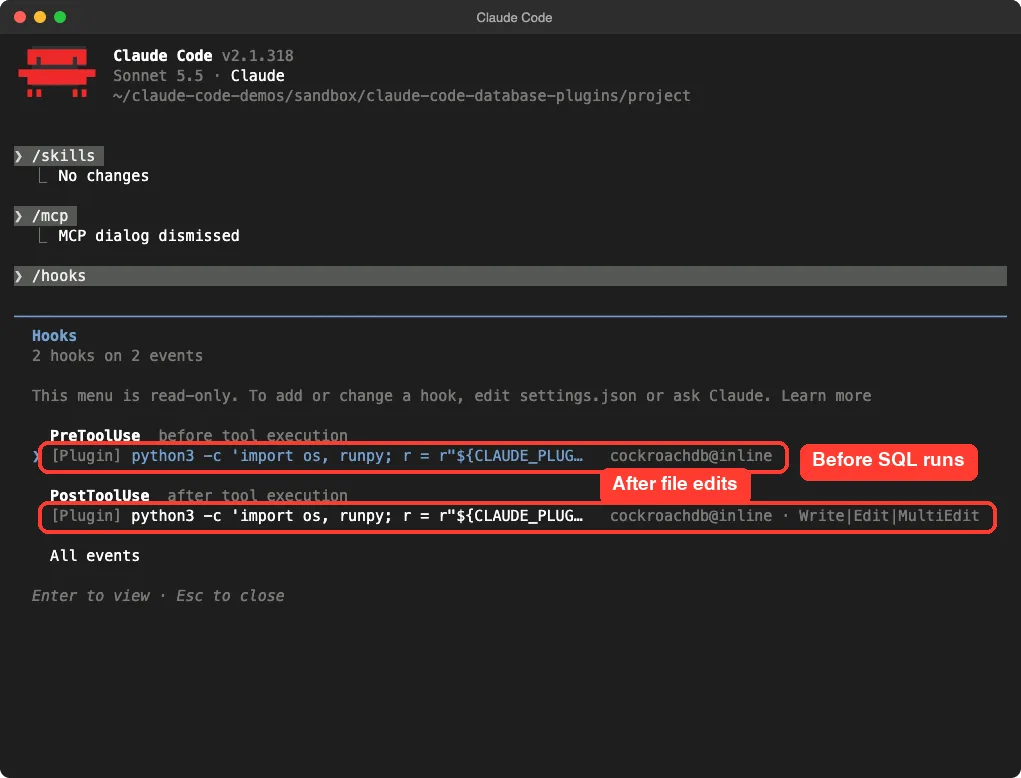
Our guide to Claude Code hooks explains how these work in general.
Real Test: A Plugin Skill Reviews a Schema
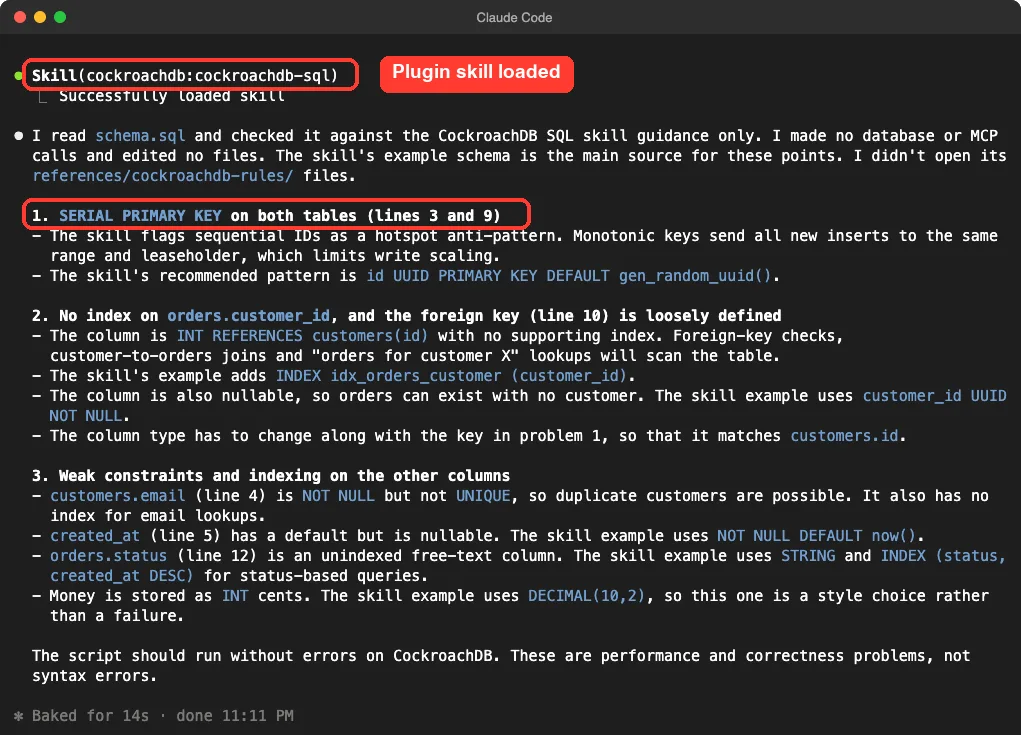
We asked Claude to read schema.sql and, using only the CockroachDB skill guidance, name the three biggest problems. We told it to make no database calls and not to edit files.
Read schema.sql and, using only the CockroachDB skill guidance with no database or MCP tool calls, list the 3 biggest problems if I run it on CockroachDB. Report only, do not edit files.Claude loaded the cockroachdb-sql skill and gave a clear, ranked answer. The first problem was SERIAL PRIMARY KEY on both tables, which the skill calls a hotspot pattern, with UUID and gen_random_uuid() as the fix. The second was a missing index on orders.customer_id, and the third was weak constraints on the other columns.
This is one demo, so do not read it as a benchmark. It does show the main value of these plugins: Claude follows the database maker’s own advice instead of generic SQL habits.
Real Test: A Safety Hook Fires
Next we asked Claude to create queries.sql with one line, SELECT * FROM orders;. The plugin’s after-edit hook scanned the new file and added a warning telling Claude to list columns explicitly.
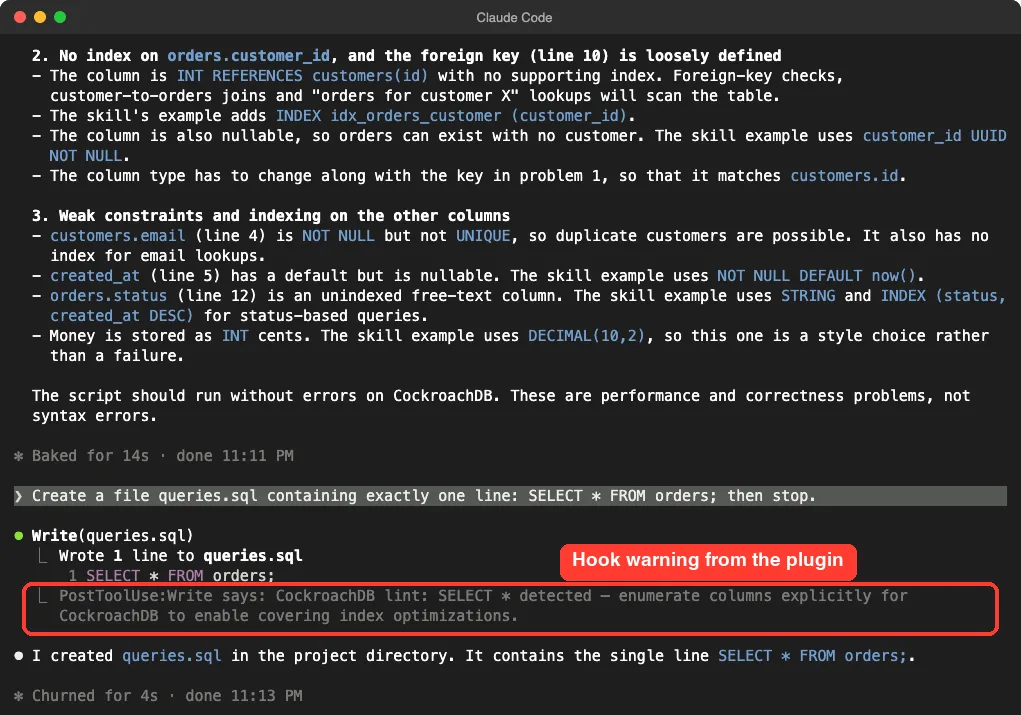
The before-SQL hook only applies to the CockroachDB execute tool, and that server failed to start, so Claude never ran it in our session. Instead we ran its script by hand on two made-up statements. A DROP DATABASE statement came back with a deny decision and a reason, and a SERIAL table returned a warning about write hotspots.
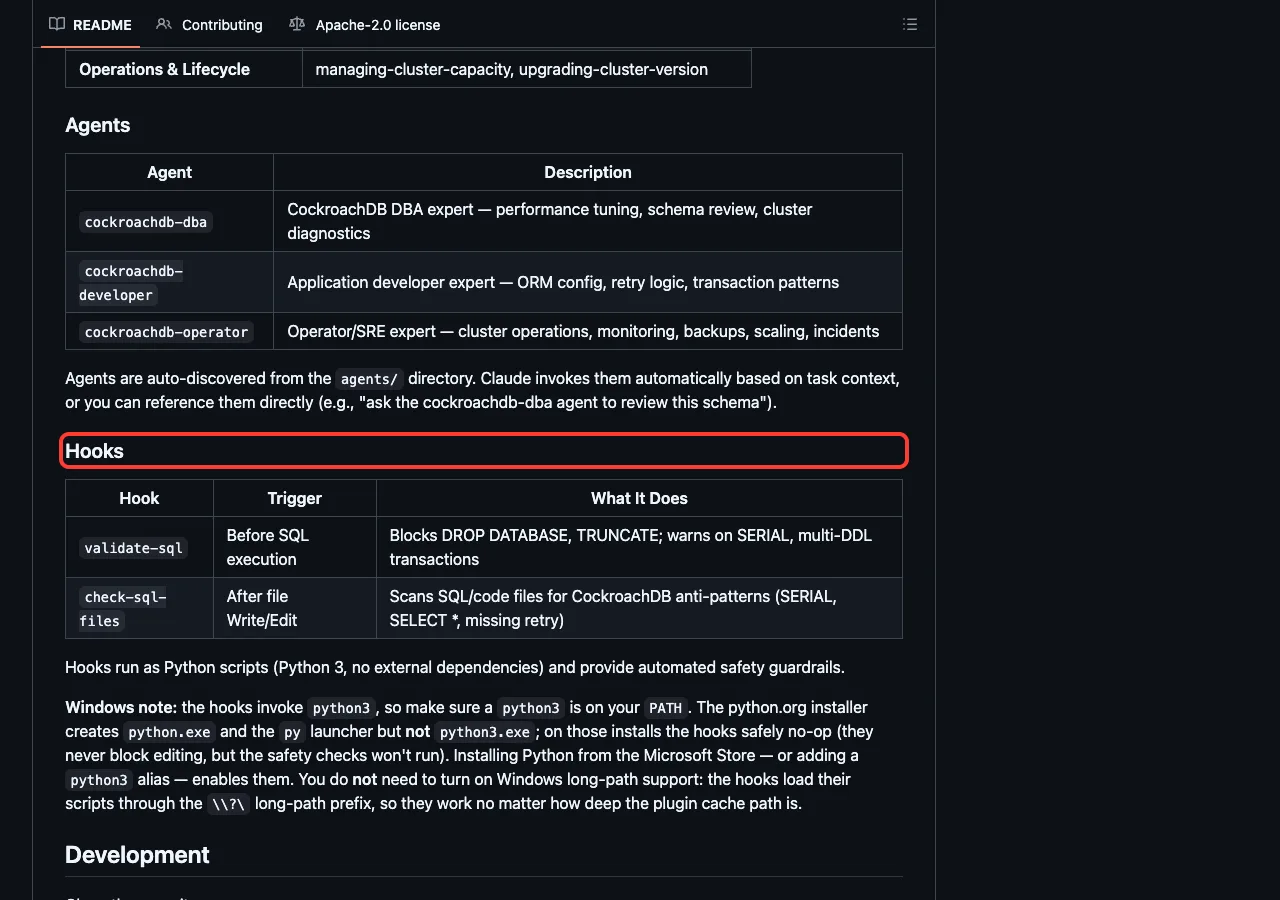
The README says the same: the hook blocks DROP DATABASE and TRUNCATE and warns on SERIAL and several schema changes in one transaction.
What Each Plugin Is Best For
Supabase and Neon for Postgres apps
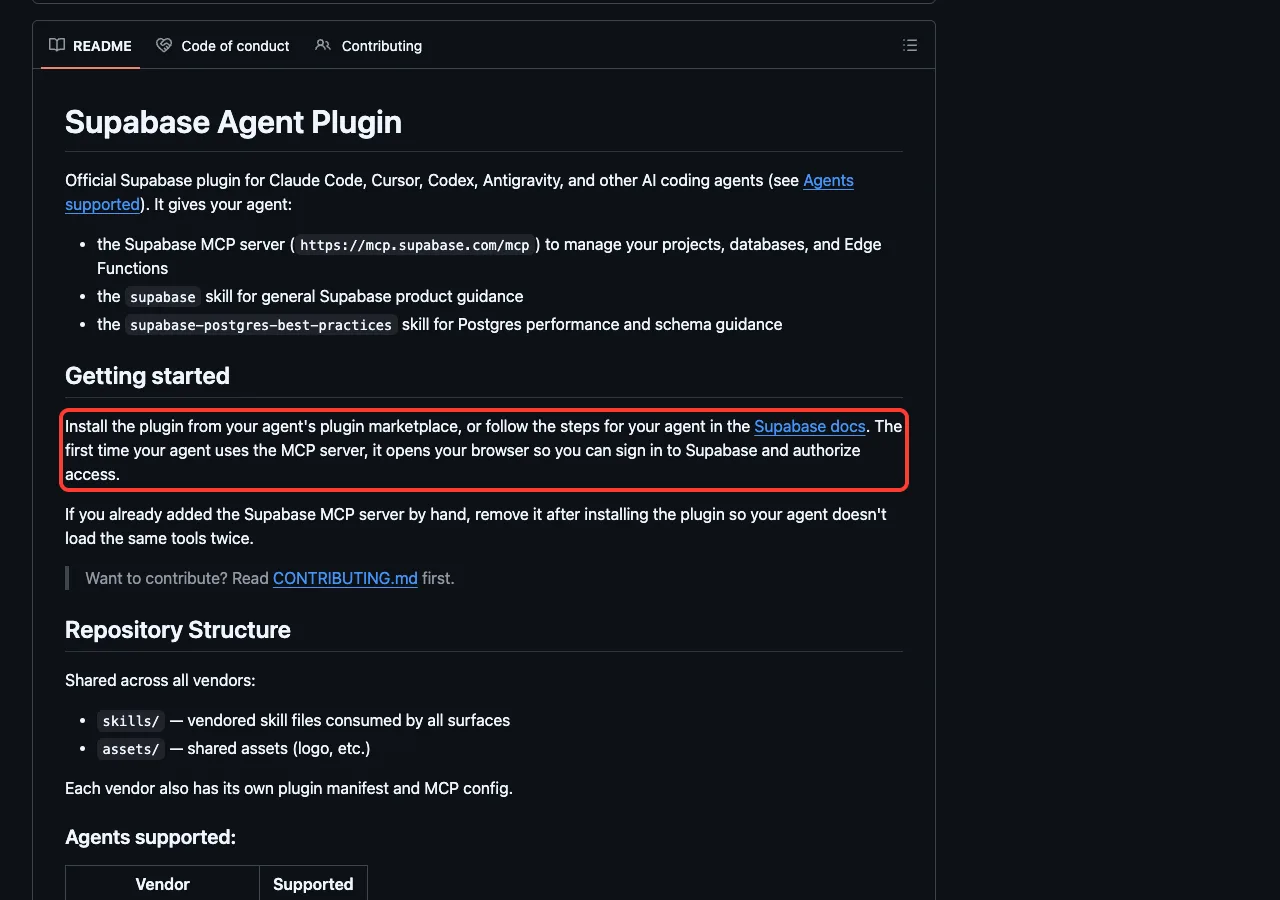
The Supabase plugin adds its MCP server for projects, databases and Edge Functions, plus a general skill and a Postgres best practices skill. Its README says that the first time Claude uses the server, it opens your browser so you can sign in and authorize access.
Neon takes a similar approach with seven skills and its MCP server. Pick between them by where your database already lives, not by the plugin.
pg-aiguide for any Postgres project
The pg-aiguide plugin from TigerData is the one to try if you want Postgres knowledge without tying yourself to a host. It has 11 skills, including table design, hybrid text search, pgvector search and TimescaleDB topics. Its README describes it as an MCP server and plugin for Postgres skills and documentation.
CockroachDB for the biggest toolkit
CockroachDB ships 34 skills grouped by job, three agents (DBA, developer and operator) and two hooks. It is the most complete plugin we loaded. It is also the one with the most surface area, so read the hooks first, as we did.
MongoDB, PlanetScale and ClickHouse
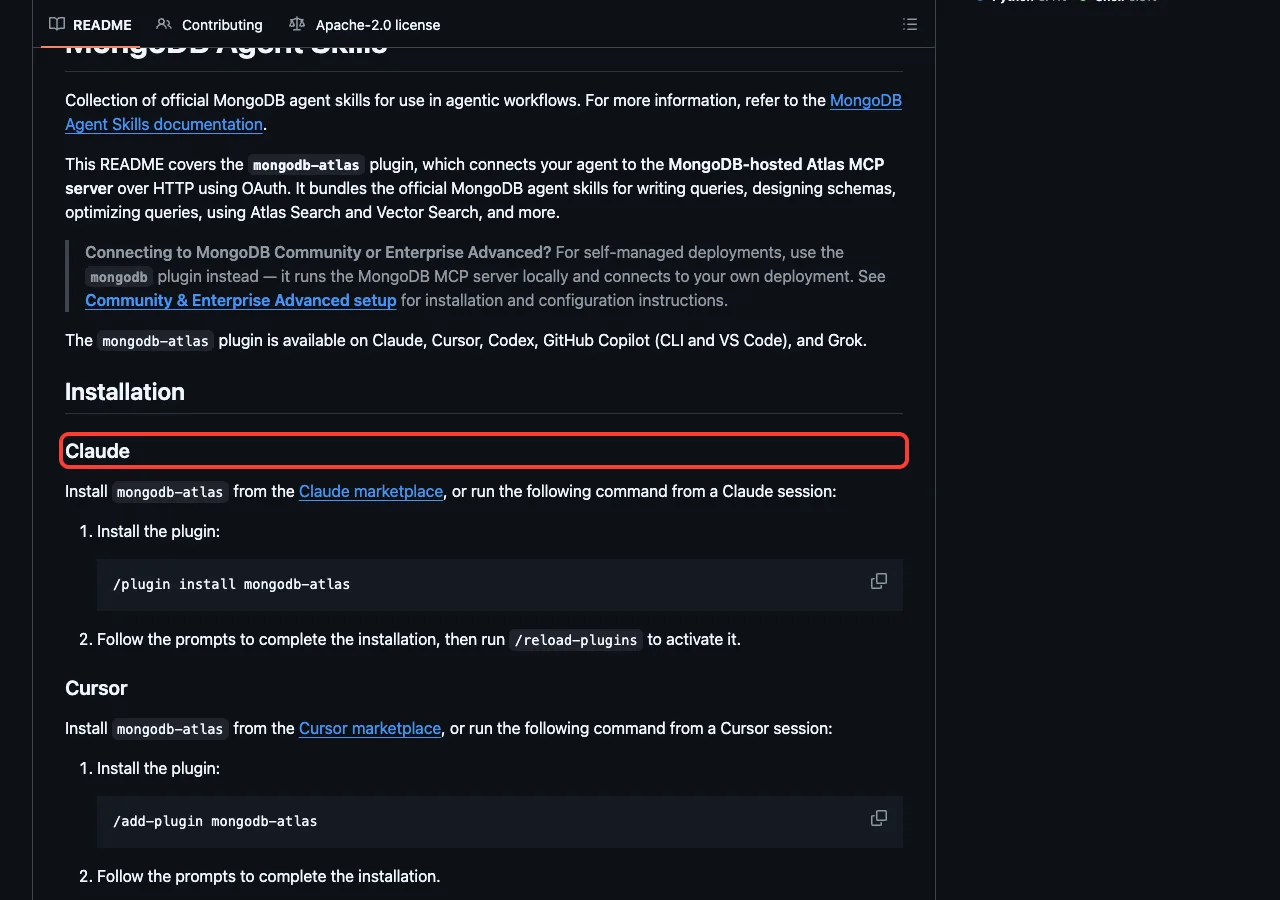
MongoDB splits into two plugins. Use mongodb for your own deployment, since it starts a local MCP server with npx. Use mongodb-atlas if you run Atlas, since it connects to MongoDB’s hosted server over OAuth.
PlanetScale pairs a hosted MCP server with skill folders for safety reviews and query insights, and its README lists a PlanetScale account as a prerequisite. ClickHouse connects to ClickHouse Cloud for read-only queries, and its skills cover schema design and ingestion.
Why We Skipped Convex and TDengine
We read the Convex plugin before loading it. Its hooks include an analytics script that sends events to PostHog, a check that fetches a version file, and an MCP server that runs through npx. None of that is hidden, but we did not want it running on our test machine.
The TDengine plugin repository includes a skill named skill-telemetry, which says it sends a usage event whenever a skill is activated. We skipped it for the same reason.
This is not a verdict on either plugin. If you use those databases, read what the files do and decide for yourself.
Safety Checklist Before You Install
- Open
hooks/hooks.jsonand read every command it runs. - Open the MCP file and note which servers it starts, and whether they run local programs or call remote URLs.
- Search the plugin for words like telemetry, analytics or fetch.
- Try it in a test project with project-only settings before you add it to your main setup.
- Give any sign-in the least access it offers, and prefer read-only access to live data.
For more tools that connect Claude to outside services, see our tested MCP servers roundup. We also covered another vendor family in our AWS plugins guide.
Try It Yourself
Practice on a made-up schema, never a real database. Make a folder with a small schema.sql, clone one plugin, and start Claude Code with --plugin-dir. Then use this prompt.
claude --setting-sources project --plugin-dir ./your-plugin-folder

Read schema.sql and, using only the plugin skill guidance with no database or MCP tool calls, list the 3 biggest problems. Report only, do not edit files.
If you want to build something that uses a database, our database REST API tutorial is a good next step.
Common Mistakes
- Installing several plugins for the same database. Pick one, since two can load the same tools twice.
- Pointing a live-data plugin at your production database on day one.
- Assuming the skills need an account. They do not, only the MCP servers do.
- Skipping the hooks. A hook runs code on your machine, so read it.
- Forgetting
/reload-pluginsafter you change a plugin.
Pro Tips
- Run
/skillsafter loading to see how many skills and tokens a plugin adds. - Run
/mcpto see which servers still need sign-in. - Run
/hooksto confirm which hooks are active. - Use the discover plugins page to check install scopes and update steps.
Cheat Sheet
Frequently Asked Questions
Is there an official Supabase plugin for Claude Code?
Yes. The Supabase plugin is on Anthropic’s official marketplace, and its README describes it as the official Supabase plugin for Claude Code and other coding agents.
Do I need a database account to use these plugins?
Not for the skills. The MCP servers need a sign-in before Claude can see your data, and we saw that in the /mcp screen.
Can a plugin delete my data?
An MCP server with write access could run changes if you allow them. That is why you should use read-only access where offered and test on a copy. CockroachDB adds a hook that blocks DROP DATABASE and TRUNCATE.
Which plugin is best for Postgres?
It depends on where your Postgres lives. Use Supabase or Neon if you host there, and try pg-aiguide if you want general Postgres guidance.
Do these plugins cost money?
The repositories we read are open source, so the plugins are free to install. The database services behind them have their own pricing, and skills also use some of your Claude Code usage.
Conclusion
The best Claude Code database plugin is the one made for the database you already run, and most of them follow the same pattern: skills that work at once and a server that needs your sign-in. In our sandbox, five plugins loaded 56 skills, four remote servers waited for authentication, one local server failed to start, a CockroachDB skill gave a sensible schema review, and a safety hook fired on a real file. We did not test any live data access, and Convex and TDengine were only read, so treat those parts as what their own files say.
Start with the plugin that matches your database, read its hooks first, and browse the Claude tool page and our other Claude Code tutorials for more add-ons.