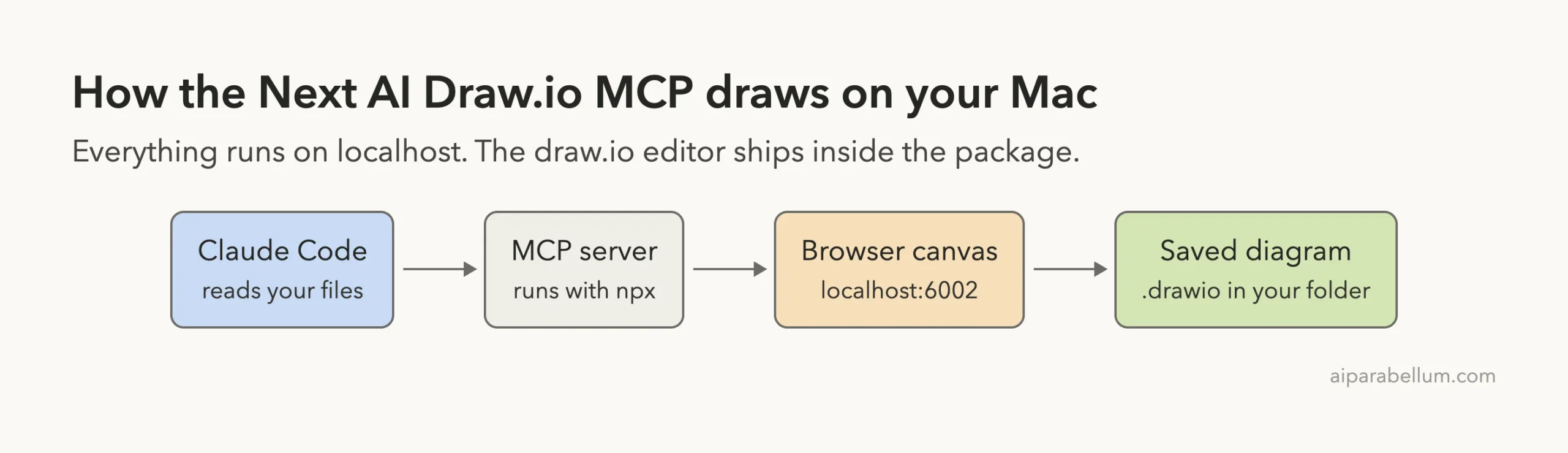
The Next AI Draw.io MCP is a draw.io server that lets Claude Code read your project files and draw a diagram on a live canvas in your browser. You watch the boxes and arrows appear, and you can ask for changes in plain English. This guide shows two real runs, the token cost, and the few things you should know before you add it.
This guide is part of our Claude Code tutorials. Find more servers in our MCP servers directory.
Tested with Claude Code v2.1.322 on November 12, 2026, using the @next-ai-drawio/mcp-server npm package pinned at version 0.4.13. The package lists github.com/DayuanJiang/next-ai-draw-io as its repository, and we cloned that repo at commit 04b1de9. That repo uses the Apache 2.0 license, was not archived, and had a push the day before our test.
The npm metadata showed no install scripts. We opened the published package and read its server code before running it.
We saw no calls to outside services in the server code, and the draw.io editor is bundled in the package. We did not read every line, so treat the pinned version number as the thing we checked.
The server is free, needs no account or key, and keeps everything on your Mac. The one surprise is where it saves diagrams by default, so we moved that folder into our demo project.
Quick Summary: What We Tested
| Question | Answer |
|---|---|
| What is it? | An MCP server that gives Claude Code 16 tools to draw draw.io diagrams on a live browser canvas |
| Does it need an account or key? | No. It starts with npx and the draw.io editor ships inside the package |
| Where does it run? | On your Mac. The preview is a local page on port 6002 by default |
| What did we run? | Adding the server, the tool list, one diagram drawn from five code files, one live edit, and a /context check |
| Context cost | About 7.3k tokens for the 16 tool definitions, plus 1.4k of server instructions that load at the start |
| Our verdict | Fast and accurate for a small project. The browser preview is what sets it apart |
One honest note. We ran each step once on a five-file demo app, so treat the results as one demo and not a benchmark.
What the Next AI Draw.io MCP Is and Why It Exists
MCP is the Model Context Protocol, a standard way to give Claude extra tools. If it is new to you, our MCP guide explains it from the start.
Next AI Draw.io is a web app that draws diagrams with AI. This MCP server brings its canvas to coding agents like Claude Code, Cursor and VS Code, per the README.
Why use it? Claude Code can already write a Mermaid block or a diagram file.
That gives you text that you must render somewhere else. Here Claude draws straight onto an editor you can see, click and change by hand.
There are other draw.io servers, and we covered the official one in our official draw.io test.
The README says the official server opens each diagram in a new tab and has no tool to read it back, while this one reads the canvas back, including your own edits. We only tested this server, so that comparison comes from the README. For a wider look at diagram helpers, see our diagram skills comparison.
How to Add the Next AI Draw.io MCP to Claude Code
We worked in a throwaway demo folder and used local scope, so the server exists only in that folder. We pinned the version, so a later release cannot change what runs. Your normal setup stays unchanged.
First we made a tiny demo store app with five small files in src/: a router, a login check, an orders file, a mailer and a JSON-file database. All the code was invented for this test.
Then we added the server with two environment variables.
claude mcp add --scope local drawio -e BROWSER=none -e DRAWIO_DATA_DIR=$PWD/.drawio-data -- npx -y @next-ai-drawio/[email protected]The part after -- is the command Claude Code runs to start the server. The README says the server opens a preview in your default browser on its own, and BROWSER=none turns that off. We did that so we could open the preview ourselves in a separate browser.
The second variable, DRAWIO_DATA_DIR, matters more.
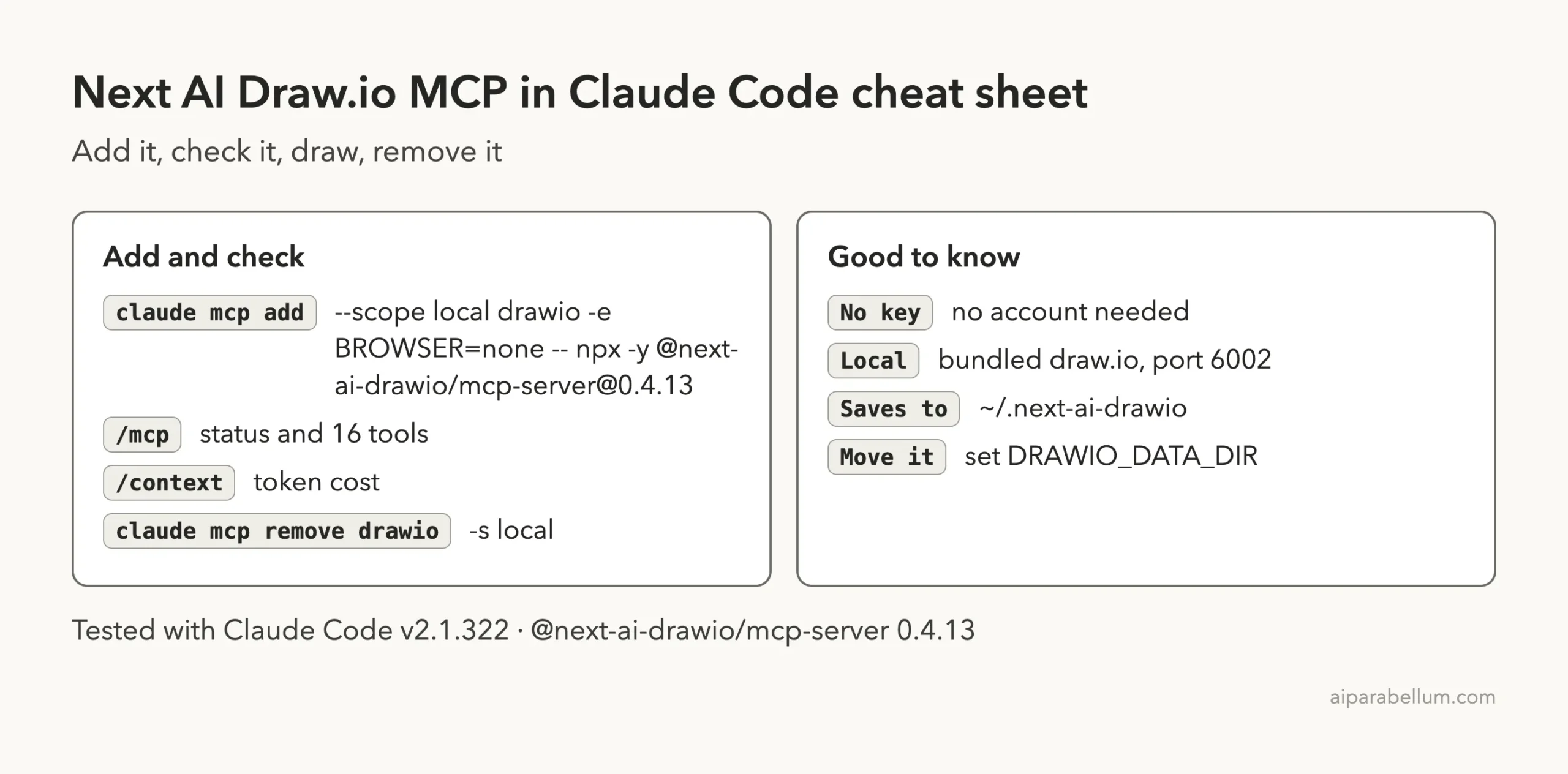
The README says every diagram is saved to ~/.next-ai-drawio/ by default, with its last 20 versions. We pointed it at the demo folder so nothing landed in the home folder. General steps for any server are in the MCP quickstart, and scopes are explained in the MCP docs.
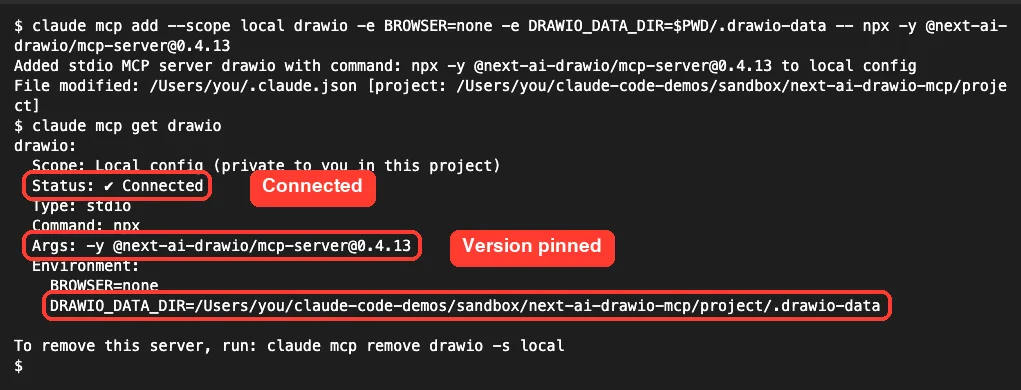
No sign-in prompt and no key. The claude mcp get drawio command shows the stored command, so you can double-check what will run.
The 16 Tools Claude Code Sees
We started claude in the folder and ran /mcp. The drawio entry showed as connected with 16 tools.

| Group | Tools from the list |
|---|---|
| Start and rules | start_session, get_drawing_guide, get_shape_library |
| Draw and change | create_new_diagram, edit_diagram, restore_version |
| Read back | get_diagram, get_selection, screenshot_diagram |
| Files | load_diagram, export_diagram, list_saved_diagrams |
| Pages | list_pages, add_page, rename_page, delete_page |
Claude Code marked seven of the tools as read-only, such as get_diagram and list_pages. The tools that draw, edit, load, export or delete were not marked. That means a normal session asks before it uses them.
What It Costs in Context
Every MCP server adds tool definitions to your session. We ran claude -p "/context" in the demo folder to see what this one added.
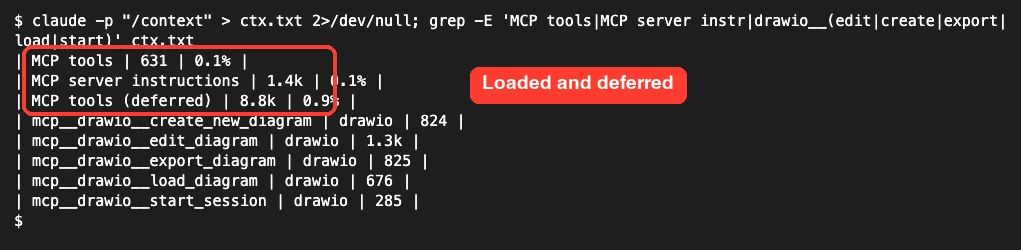
The listing gave each tool its own number, from 138 tokens for list_saved_diagrams to about 1.3k for edit_diagram. Adding all 16 gave about 7.3k tokens. The deferred line read 8.8k because it also counts a few tools from other connectors in our setup.
The loaded MCP tools line read 631 tokens, so Claude Code held most definitions back until needed. The server instructions line read 1.4k and was not deferred. We did not test how this changes in a client without deferred loading.
A fair caution: the 7.3k figure is our sum of rounded numbers. Measure it in your own session. Our context window guide explains what these numbers mean.
Test 1: Draw the Architecture of a Small App
We allowed only the drawio tools, the file reader and file search with --allowedTools mcp__drawio,Read,Glob. Then we gave one prompt.
Read every file in src/ and draw the architecture of this app with the drawio tool: show how a request flows through the files and what each one talks to. Reply in 3 short lines and show the preview URL on its own line.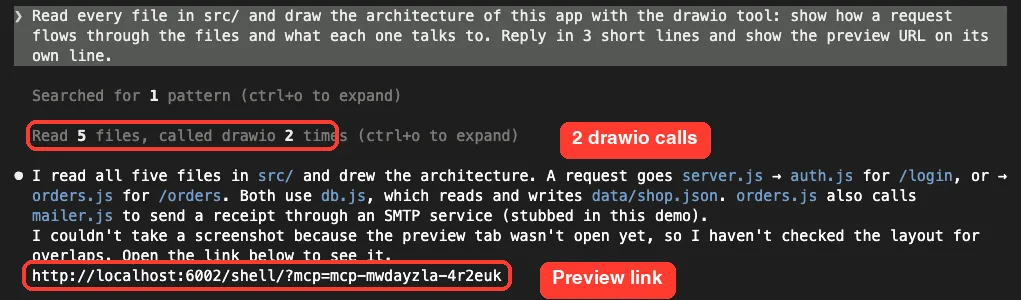
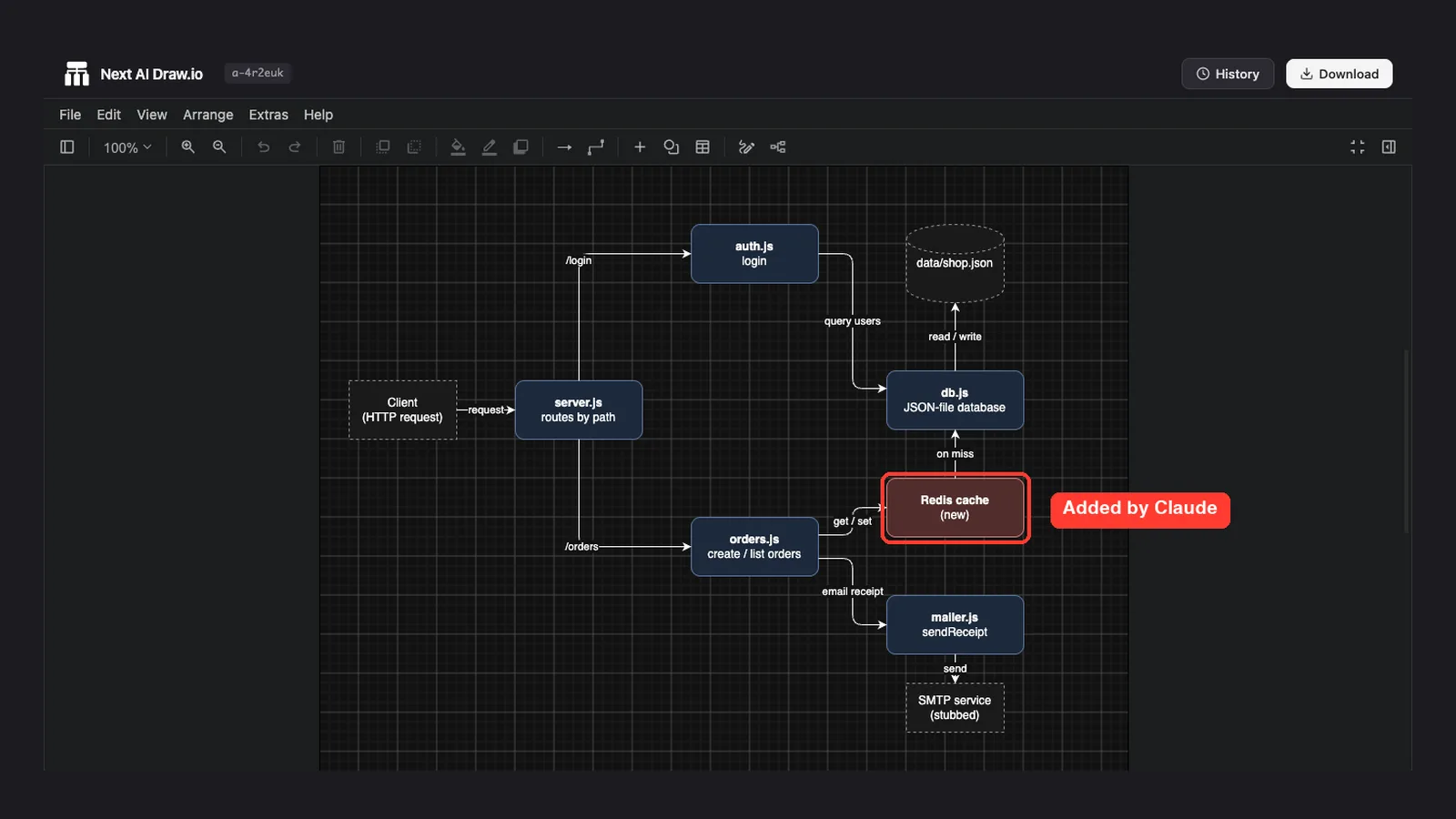
The timer in the full screenshot showed 20 seconds. The summary was correct: a request goes from server.js to auth.js for login or orders.js for orders, both use db.js, and orders.js also calls mailer.js.
We opened the link in a browser.
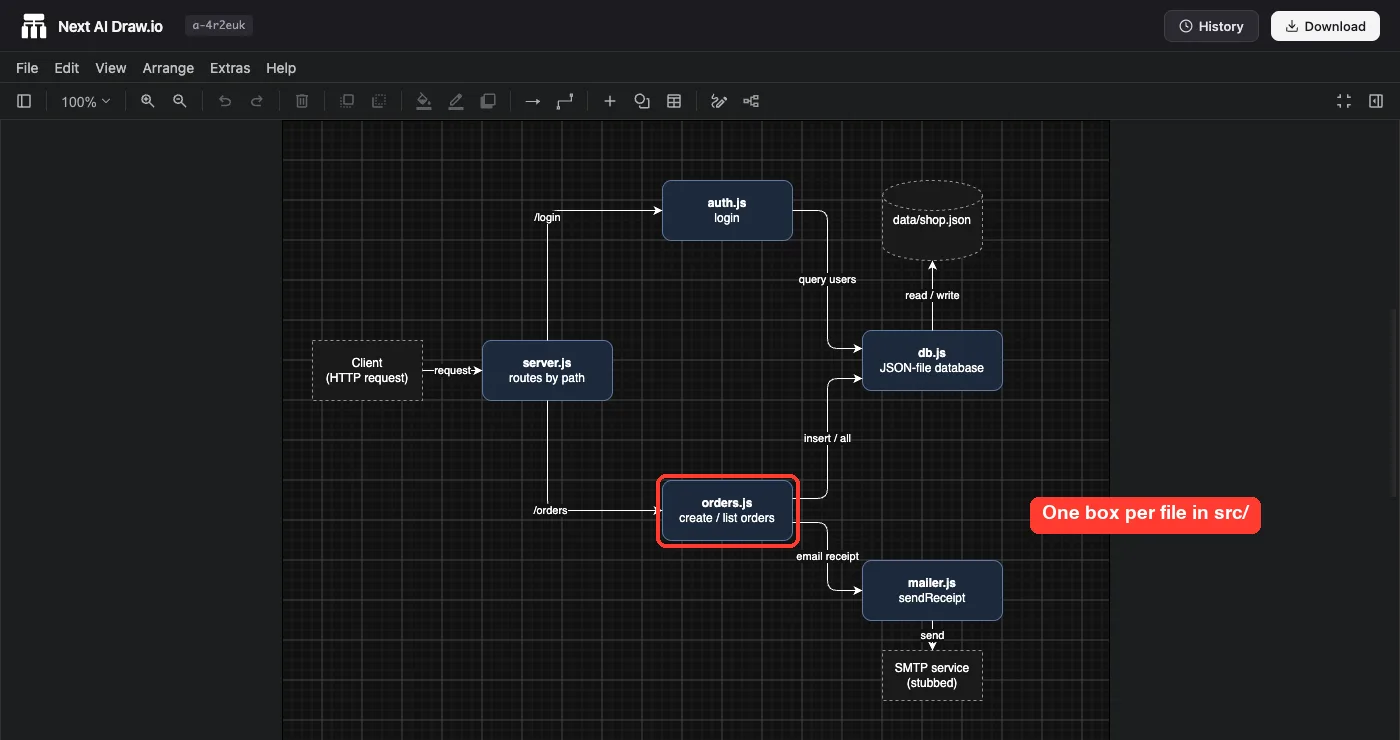
We checked the diagram against our code.
The router box points to login and orders. Login queries users in the database file.
Orders inserts and lists rows, then emails a receipt through the mailer, and the mailer ends at an SMTP box marked as stubbed. Every arrow matched a real call in our five files.
Claude also used dashed outlines for things outside the code, like the client and the data file. We never asked for that.
Test 2: Change the Diagram on the Live Canvas
With the session still running, we asked for one change in the same diagram.
Now add a Redis cache between the orders code and the database in the same diagram. Reply in 2 short lines.
That reply took 8 seconds. We liked that Claude called the box a proposed design and marked it as new, since our code has no Redis at all.
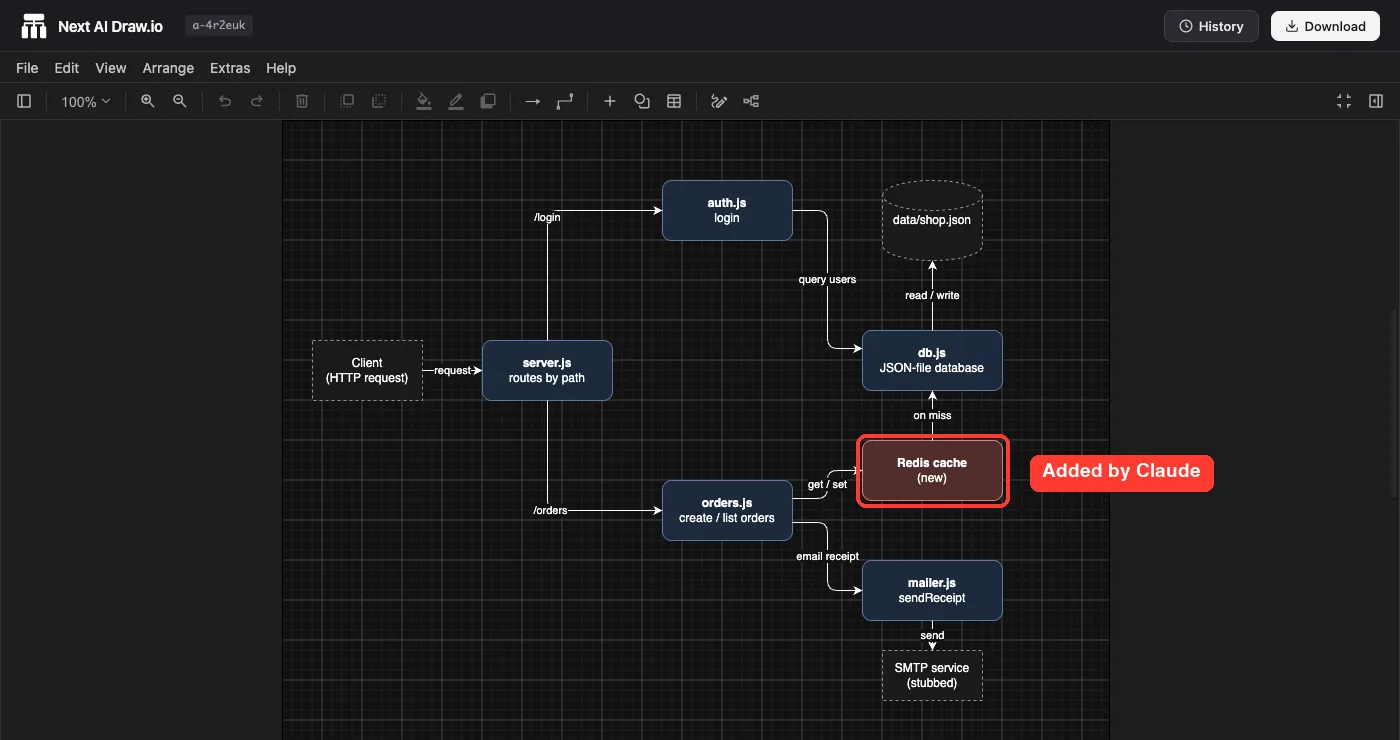
The rest of the diagram stayed where it was. Only one box and two arrows changed, which is the point of an edit tool that works on single cells and not a full redraw. We did not time or compare a redraw, so that is our reading of the tool list.
What the Server Saved on Disk
After the two runs our data folder held two files. One was a .drawio file of about 4 KB that opens in any draw.io editor. The other was a history file with two entries, one for each version.
Because we set DRAWIO_DATA_DIR, both files sat in our demo project. We also checked the home folder and found no .next-ai-drawio folder there. Without that variable, the README says diagrams go to ~/.next-ai-drawio/, with the newest 50 kept.
The README also says DRAWIO_DATA_DIR=off turns saving off. We did not try it.
Is the Next AI Draw.io MCP Safe to Add?
Ask what a server can do and where your data goes. This one runs locally through npx, serves a page on localhost and reads the files Claude Code passes to it.
Our read of the server code found the preview address built on localhost and an outside draw.io address used only when you set a custom base URL or when the bundled editor is missing. In our run the editor came from the package. We did not watch network traffic, so this rests on the code and on what we saw.
The bigger safety note is Claude Code itself. Reading files is allowed by the same permission system as any tool, so keep your allowed list narrow. We also used a pinned version and local scope, and removed the server when we finished.
What Did Not Go Perfectly
Claude tried to take a screenshot of the diagram to check for overlaps, as the README says the tools can do. Both times it reported that it could not, because the preview tab was not open or not responding.
That is the result of our setup.
We turned off the automatic browser with BROWSER=none, and our headless browser was only open for a short moment each time. In a normal setup the preview opens on its own, so the self-check may work. We did not test that path.
The layout still looked clean to us, with no overlapping boxes. But Claude could not confirm that itself in our run.
What We Could Not Test
- We saw Claude make three drawio calls in total, so most of the 16 tools were never used. We did not run
get_selection,restore_version,load_diagram, the page tools or the shape libraries. - We did not export a PNG or SVG, so we cannot say how the export looks.
- We did not edit the diagram by hand in the browser and then ask Claude to read it back.
- We did not test the one-click Ctrl+Z, the outlines on changed shapes or the version cards the README describes.
- We did not try the AWS or other icon libraries, a custom
instructions.md, or a remote preview. - We did not run it with the automatic browser opening or test the screenshot check in that mode.
Who Should Add the Next AI Draw.io MCP to Claude Code?
| Your situation | Our advice |
|---|---|
| You want an architecture picture of a small repo | Add it. Five files became a correct diagram in 20 seconds |
| You want to tweak the diagram with Claude in turns | Add it. A single edit changed one box and left the rest alone |
| You need diagrams inside a file in your repo only | Check the export tools first, since we did not test them |
| You worry about token use | It is deferred here, but check /context, and note the 1.4k of instructions |
| You never want files in your home folder | Set DRAWIO_DATA_DIR when you add it |
Common Mistakes
- Forgetting that diagrams save to
~/.next-ai-drawio/unless you setDRAWIO_DATA_DIR. - Adding the server at user scope for a quick test. Use
--scope localto keep it in one folder. - Leaving the version unpinned, so
npxcan pull a newer release later. - Putting
-eflags before the server name. The command wants the name first, then the flags, then--. - Turning off the auto-open and then wondering why the screenshot check fails.
- Forgetting to remove the server when the test is done.
Pro Tips
- Name the files or folder in your prompt so Claude reads the right code.
- Ask for one change at a time. Our single-edit prompt took 8 seconds.
- Run
/mcpto confirm the server is connected and see its tool count. - Allow only the tools you need with
--allowedTools. - Keep the preview link. It opens the same diagram while the session runs.
Try It Yourself
Run this in a throwaway folder with a few small code files. Remove the server when you are done.
claude mcp add --scope local drawio -e BROWSER=none -e DRAWIO_DATA_DIR=$PWD/.drawio-data -- npx -y @next-ai-drawio/[email protected]
claude
# inside Claude Code:
Read every file in src/ and draw the architecture of this app with the drawio tool. Reply in 3 short lines and show the preview URL on its own line.
# when finished:
claude mcp remove drawio -s local
Cheat Sheet
Frequently Asked Questions
Does the Next AI Draw.io MCP need an account or API key?
No. It runs through npx and the draw.io editor ships inside the package. We signed in to nothing.
Where are the diagrams saved?
By the README default, in ~/.next-ai-drawio/. We set DRAWIO_DATA_DIR to a folder in our demo project, and found two files there after our runs.
How much context does it use?
Adding the per-tool numbers from /context gave about 7.3k tokens for 16 tools. The server instructions added 1.4k, and the loaded MCP tools line read 631 tokens.
How is it different from the official draw.io server?
Per the README, this one shows a live canvas and reads it back, while the official one opens each diagram in a new tab. We tested only this server.
How do I remove it?
Run claude mcp remove drawio -s local from the folder where you added it.
Conclusion
The Next AI Draw.io MCP was easy to add, needed no account, and turned five code files into a correct architecture diagram in 20 seconds. A follow-up edit changed only one box and two arrows, and every arrow matched our code. The costs are about 7.3k tokens of tool definitions plus 1.4k of instructions, and a default save folder in your home directory that you can move. Add it for quick diagrams of small projects, and test the export and hand-edit features yourself before you rely on them.
Next, browse more tested add-ons in our skills directory, or read our Claude overview.