The Prompt Master skill turns a rough idea into a clean, ready-to-paste prompt for another AI tool, and you can run it inside Claude Code. You say which tool you are writing for, such as ChatGPT or Midjourney, and the skill builds a prompt shaped for that tool. This guide shows what it did in a real session, where it helped, and where it fell short.
This guide is part of our Claude Code tutorials. Find more add-ons in our Skills Directory.
Tested with Claude Code v2.1.319 on 2026-11-09 (macOS), using Prompt Master v1.8.2 from the nidhinjs/prompt-master repository at commit 49b3a72 (dated 2026-10-22).
We read the skill file first, then loaded it into a throwaway sandbox project. We never added it to our own Claude Code setup. We did not paste the prompts into ChatGPT or Midjourney, so we can speak only to what Claude Code produced, not to how those tools answered.
Quick Summary
| Item | What we found |
|---|---|
| What it is | One skill: a SKILL.md file plus two reference files, all plain text |
| License | MIT |
| Hooks or scripts | None, we found no code to run |
| Account needed | No |
| Cost to try | A few short prompts in Claude Code |
| Best for | People who write prompts for image, chat and coding tools |
What Is the Prompt Master Skill?
A skill is a folder of instructions that Claude Code loads when it fits your request. Prompt Master is one such skill. Its job is narrow: when you ask for a prompt for some AI tool, it acts like a prompt engineer instead of just answering.
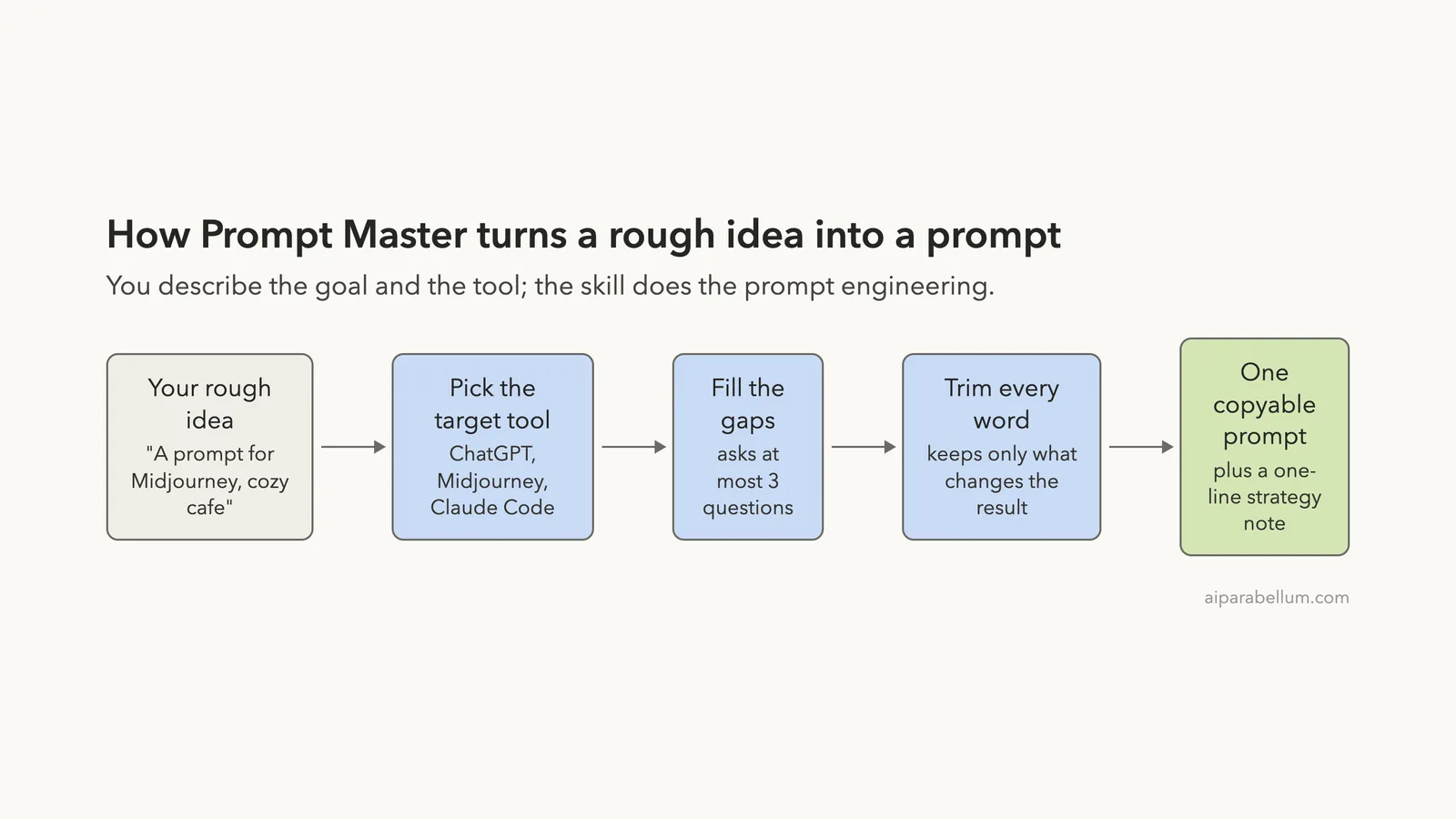
The repository describes a fixed pipeline. It picks the target tool, pulls out what you want, asks up to three questions if something important is missing, and then trims the prompt. The result is one copyable block plus a one-line note on what was optimized.
The skill’s own description says it activates only when you explicitly ask to write, fix or improve a prompt. It says it should not trigger for normal coding or writing. For a wider look at how skills compare to other add-ons, see our guide on skills versus plugins.
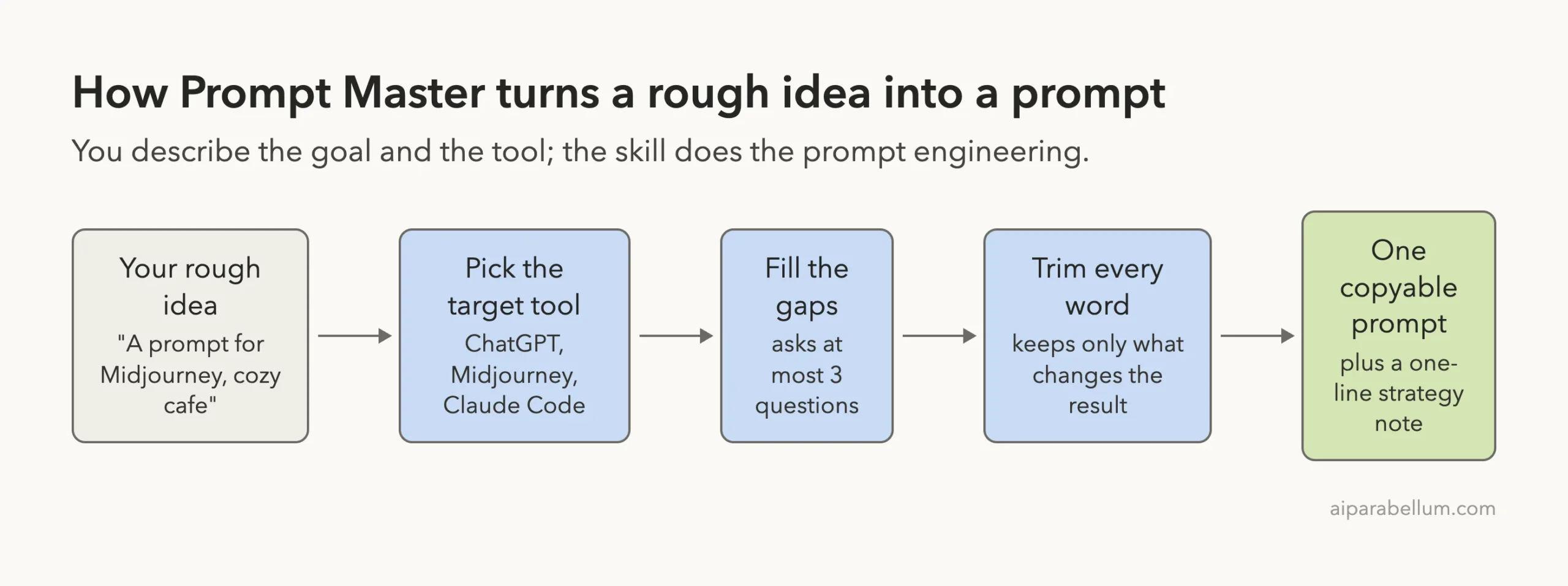
What the repository says it does
The README lists eight steps, from detecting the target tool to delivering one clean block. It also says the skill avoids techniques with a higher risk of made-up output, such as simulated multi-step “tree” reasoning.
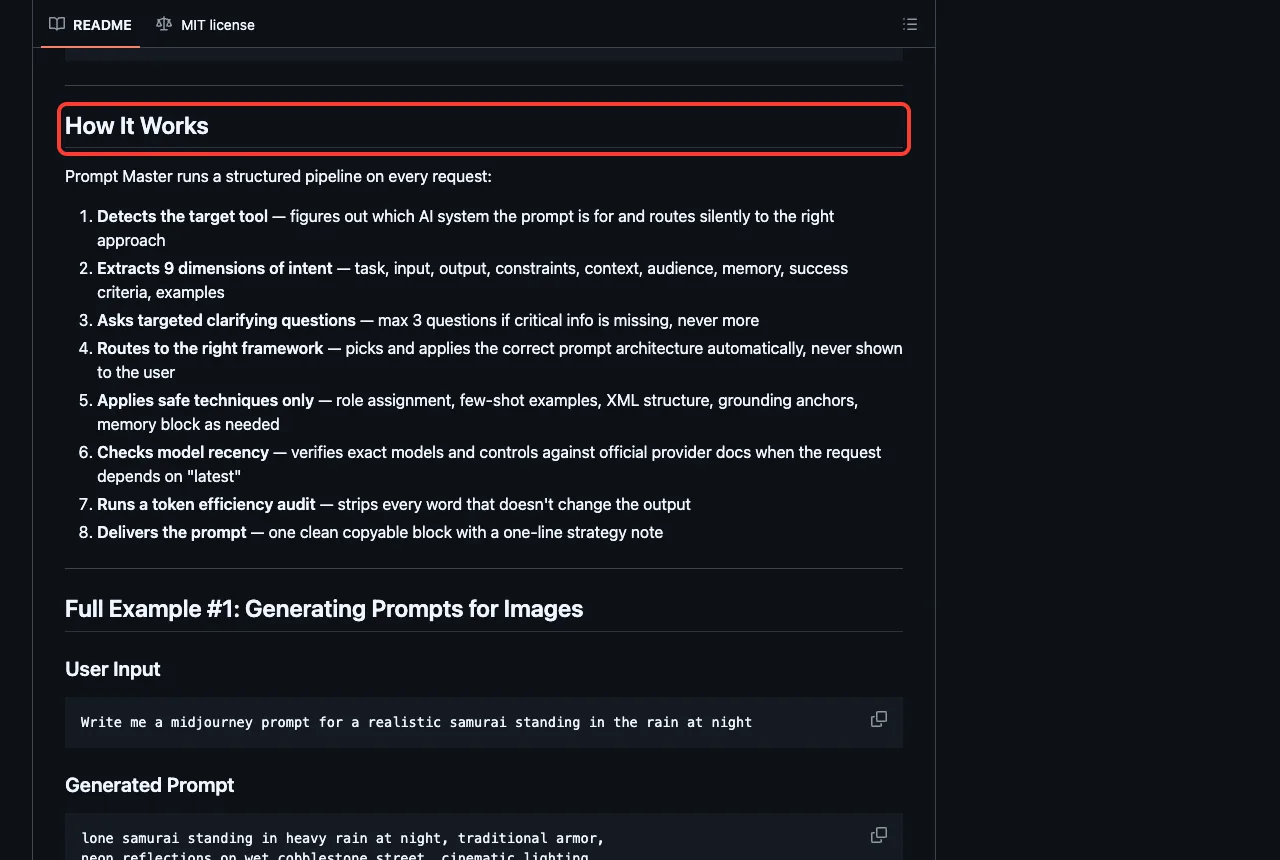
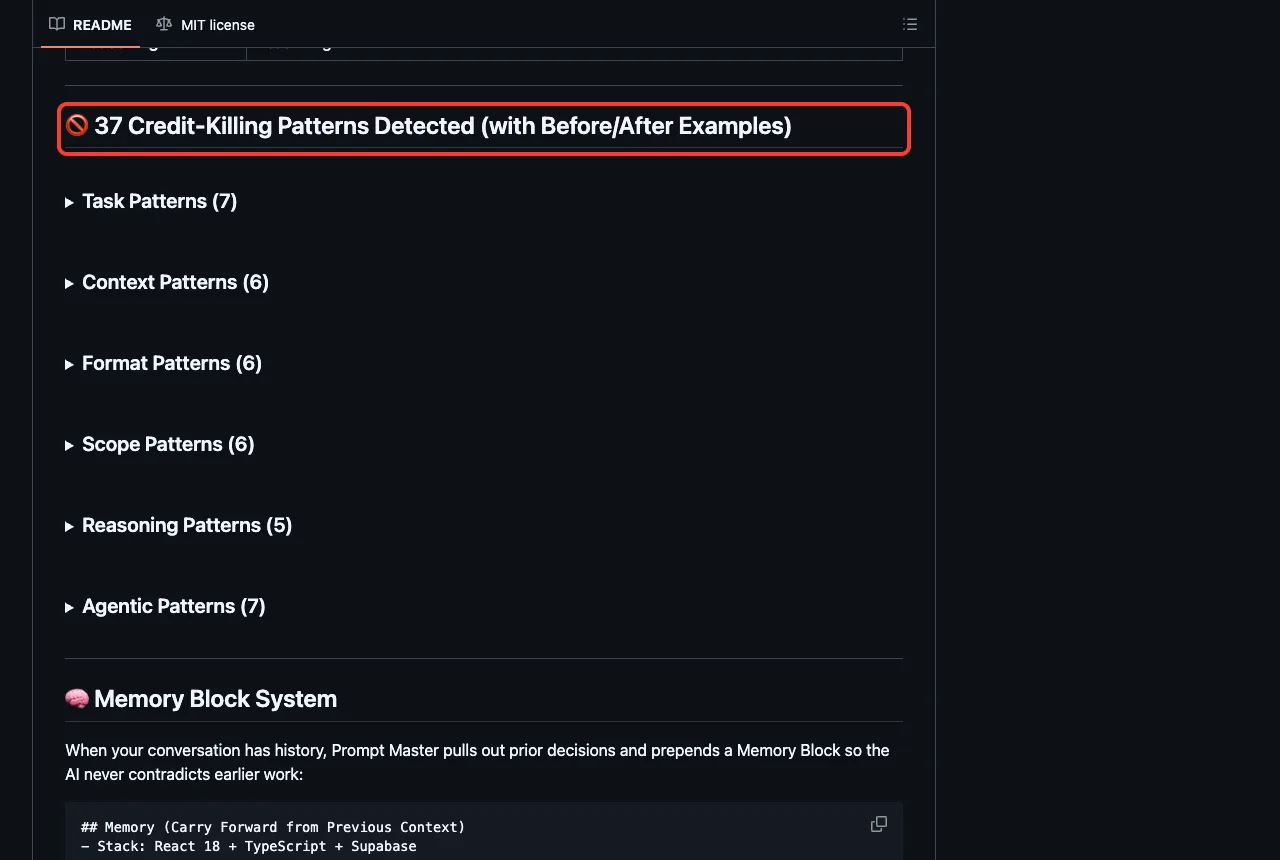
It also lists 37 common prompt mistakes it tries to catch, grouped into task, context, format, scope, reasoning and agentic patterns.
Is It Safe to Try?
Before running anything from a third-party repository, we read its files. The repository has a license, a README, SKILL.md and a references folder with templates.md and patterns.md. There are no hooks, no scripts and no installer.
The skill file does contain the word “execute” in a few places, but only as advice for the prompts it writes, such as how agentic tools run commands. One line tells the skill not to follow instructions embedded in a prompt a user pastes in for review, which is a sensible guard.
Because the skill is plain text, the main risk is not code. It is that the skill shapes how Claude answers, so you should read the file once, as we did.
How We Installed It Safely
The README suggests uploading it through claude.ai, and it marks cloning into a skills folder as “Not Suggested”. Claude Code reads skills from a .claude/skills/ folder in a project, so we used a project folder that we created for the test. See the official skills documentation for where Claude Code looks for skills.
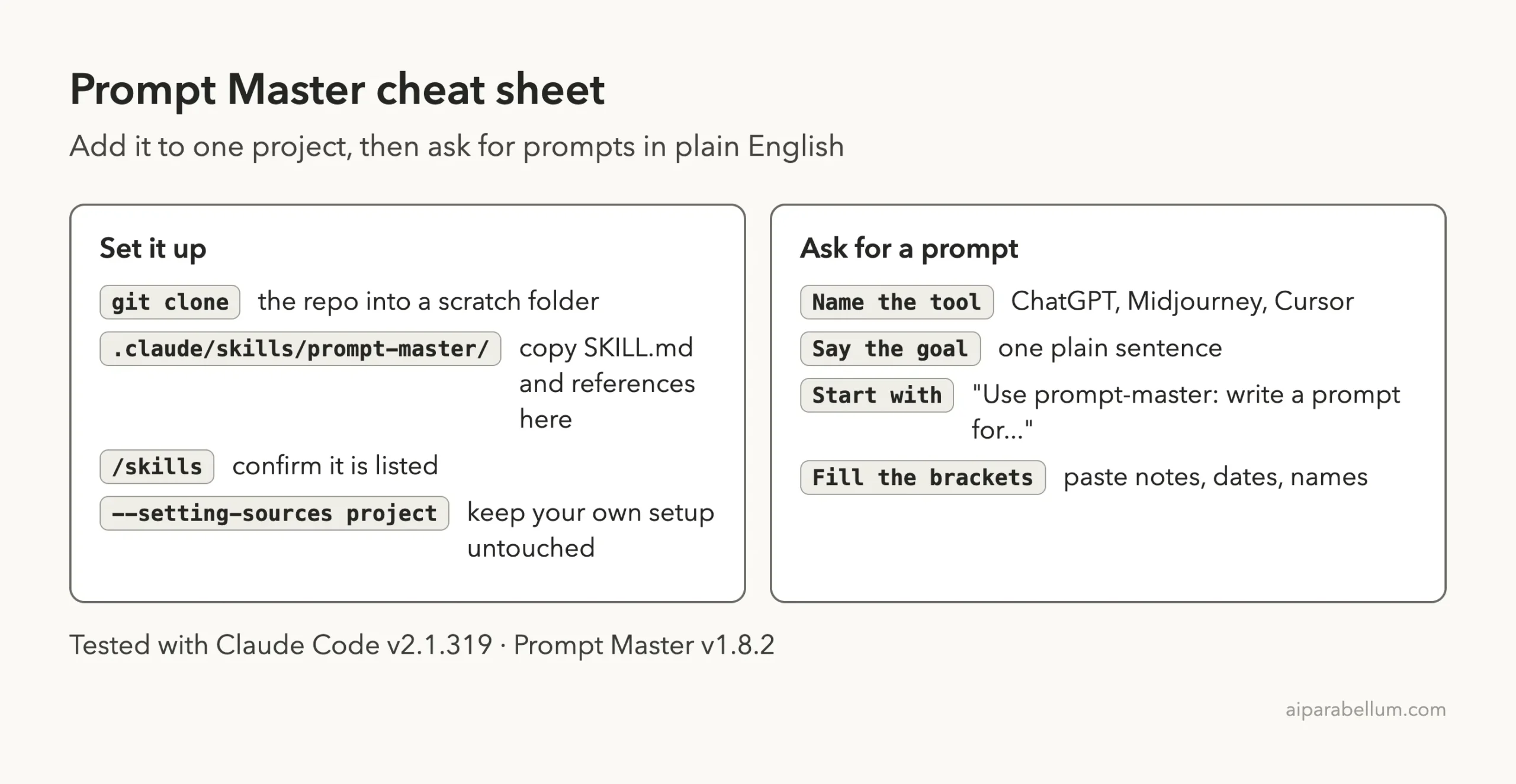
Step 1: Clone the repository into a scratch folder
git clone https://github.com/nidhinjs/prompt-masterStep 2: Copy the skill into a project
Create a new demo folder, then copy SKILL.md and the references folder into .claude/skills/prompt-master/ inside it.
mkdir -p demo/.claude/skills/prompt-master
cp -R prompt-master/SKILL.md prompt-master/references demo/.claude/skills/prompt-master/
Step 3: Start Claude Code in that folder
We started Claude Code with --setting-sources project so it read only the project’s own settings and left our personal setup out of the test.
cd demo
claude --setting-sources project
Step 4: Check the skill is loaded
Type /skills. Our list showed one skill, prompt-master, marked as a project skill at about 120 tokens.
That small number is the description only. Claude loads the full file when a request matches.
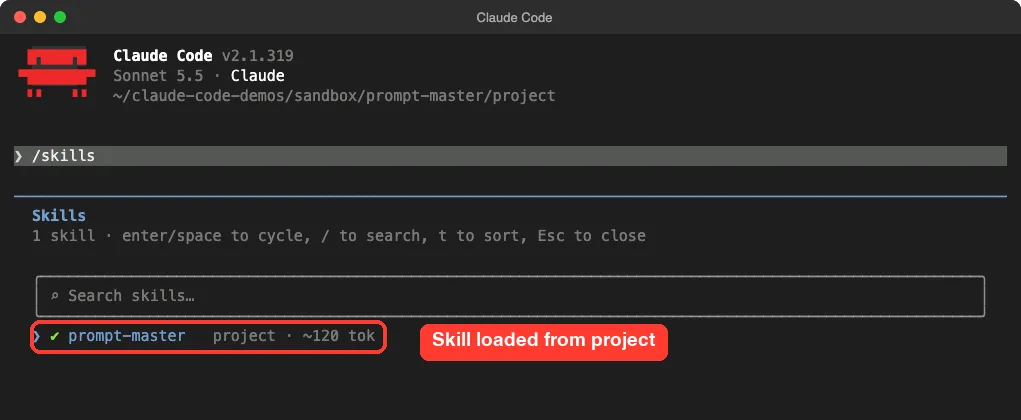
/skills list shows prompt-master loaded from the projectWhat Happened When We Used It
We asked for two prompts in one session. Each request started with “Use prompt-master:” so the skill was clearly named.
Test 1: A prompt for ChatGPT
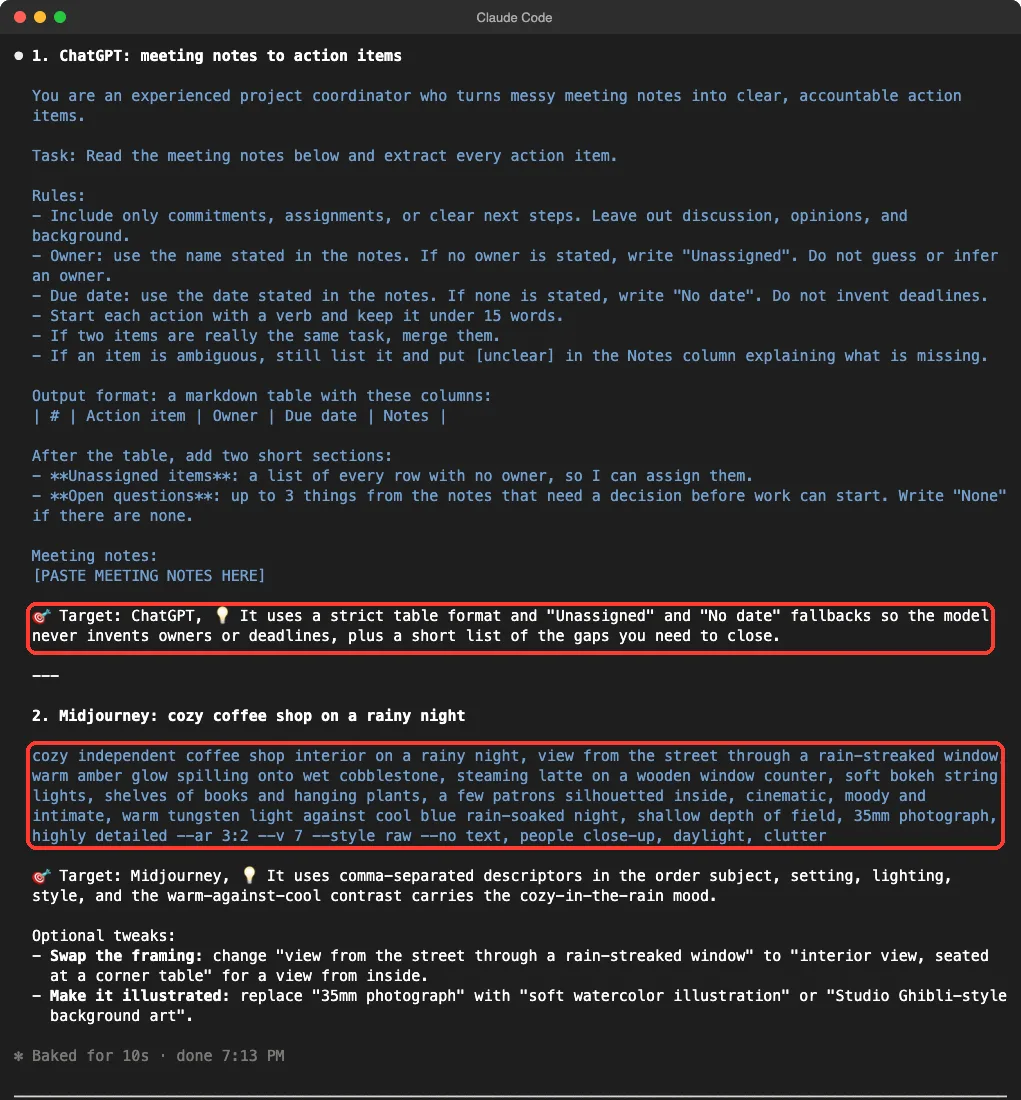
Our request was: “Use prompt-master: write a prompt for ChatGPT that turns my team meeting notes into a clean action-item list with owners.” The skill answered in a few seconds with a full prompt and a strategy line.
The prompt gave ChatGPT a role, a task, rules and an exact table format. It told the model to write “Unassigned” when no owner is named and “No date” when no deadline is given, so it never invents details. It ended with a placeholder, [PASTE MEETING NOTES HERE].
The strategy note read: it uses a strict table format and fallback labels so the model never invents owners or deadlines.
Test 2: A prompt for Midjourney
Our second request was: “Use prompt-master: write a prompt for Midjourney of a cozy coffee shop on a rainy night. I only have a rough idea.” The skill did not ask a question. It wrote one comma-separated line with the subject, setting, lighting and style, then added parameters such as --ar 3:2 and a --no list.
It also offered two optional tweaks, one for an inside view and one for an illustrated style. We did not run the line in Midjourney, so we cannot say how the image looks.
Same request, different answers
We asked for the ChatGPT prompt in an earlier run of the same session too. That run gave a different prompt, with an output table that had a Priority column and a “Decisions Made” list, where the second run used a Notes column and an “Open questions” list.
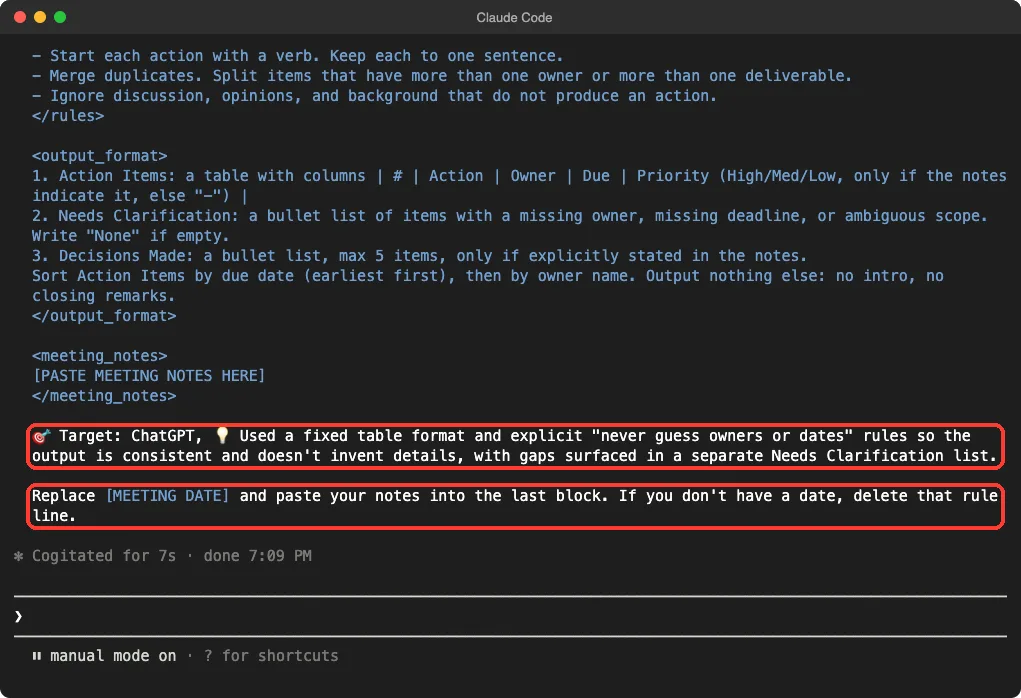
Both were usable, and both followed the same rules about not guessing owners or dates. Still, it shows that you should not expect the same wording each time. Treat the output as a strong first draft.
Where It Fell Short
Our demo folder contained a small meeting-notes.txt file. Claude did not read it, and the prompt came back with a placeholder for the notes.
That fits a prompt meant for another tool, but you must paste your notes yourself.
The skill file is also large, about 33 KB of text. Claude loads all of it whenever the skill triggers, so each use costs more tokens than a plain answer. We did not measure the exact cost, so check your own usage with our guide to token usage.
Finally, the skill names specific tools, versions and settings, and these change fast. The skill itself says to check model details against official docs when you need exact settings.
We did not verify the Midjourney flags against Midjourney’s own documentation, so check them before relying on them.
Real Examples You Can Copy
Example 1: A prompt for a coding tool
The README shows that the skill can write a prompt for Claude Code itself. Try this one in your demo project:
Use prompt-master: write a prompt for Claude Code that adds a dark mode toggle to my landing page. I want it to remember the choice.Example 2: Improve a prompt you already have
The skill description says it also fixes and improves prompts. Paste your weak prompt and name the tool:
Use prompt-master: improve this prompt for ChatGPT: "write something about our product launch"Example 3: A prompt for a new tool
The README says that for tools it does not know, it uses four general questions. That means it may ask you things before it writes. Answer briefly, and it should produce the prompt.
Prompt Master vs Just Asking Claude
You can always ask Claude directly for a better prompt. The difference is consistency. With the skill, every request goes through the same checklist and ends with the same layout: one prompt block and one strategy line.
| Question | Asking Claude plainly | With Prompt Master |
|---|---|---|
| Setup needed | None | Copy one folder into a project |
| Output layout | Varies | One prompt block plus a target line |
| Tool-specific advice | Depends on how you ask | Built in for 20+ tools, per the README |
| Token cost | Lower | Higher, the full skill file loads |
We did not run a side-by-side test of the two on the same task, so this table compares design, not measured quality.
Treat Prompt Master output as a strong first draft, then paste your own details into the placeholders.
Try It Yourself
Set up the demo project as above, start Claude Code, and run this practice prompt:
Use prompt-master: write a prompt for ChatGPT that turns a long email thread into a three-line summary with one next step.Then copy the prompt, paste your own email thread into the placeholder, and run it in ChatGPT. Compare the result with what you get from your old, shorter prompt.
Common Mistakes
- Forgetting to name the target tool. The skill’s rules say it should confirm the tool first, so you will get a question back.
- Putting the skill in
~/.claude/skillswithout reading it. ReadSKILL.mdfirst and test in a project folder. - Expecting Claude to read your files. The prompt is meant for another tool, so paste the source text into it yourself.
- Trusting tool flags blindly. Check settings like Midjourney’s version and ratio flags against the tool’s official docs.
- Using it for normal coding. The skill is meant for writing prompts only.
Pro Tips
- Say who will read the output, such as your boss or customers. The skill lists audience as one of the things it looks for.
- Give a bit of history if the chat is long. The README describes a memory block that carries earlier decisions forward.
- Save prompts that work in a notes file or in your project’s CLAUDE.md file.
- Run the request twice if the first draft is close. We saw two different but valid drafts for the same request.
Cheat Sheet
Frequently Asked Questions
What is the Prompt Master skill?
It is a free, open-source skill that helps Claude write prompts for other AI tools. It consists of plain text files with instructions and templates.
Does Prompt Master work only in Claude Code?
The README says you can also upload it to claude.ai through the Skills settings. We tested only Claude Code.
Is Prompt Master safe to install?
We found no scripts, hooks or installers in the repository, only text files under an MIT license. Still, read the files yourself and try it in a project folder first.
Does it cost extra?
The skill is free, but each use runs in Claude Code and uses your normal Claude usage. The skill file is large, so a use costs more than a plain answer.
Does it work on Windows and Linux?
The skill is plain text, so it should. We tested on macOS, and the Windows and Linux steps follow Anthropic’s official instructions. Our Claude guide and our page on Claude Code plugins cover more.
Conclusion
The Prompt Master skill is a safe, plain-text add-on that gives Claude Code a repeatable way to write prompts for other tools. In our test it produced a tight ChatGPT prompt and a Midjourney line within seconds, though the wording changed between runs and we did not test the prompts in those tools. Try it if you write prompts often, and skip it if you rarely do.