If you build apps with SAP’s Cloud Application Programming Model, the SAP CAP Claude Code setup promises to give Claude real answers about your project instead of guesses. The cds-mcp plugin adds two lookup tools: one searches your CDS model, the other searches the CAP documentation. We loaded it, asked Claude about a small bookshop service, had it write a handler, and ran the service to see if the result was real.
This guide is part of our Claude Code tutorials. Find more add-ons in our skills directory.
Tested with Claude Code v2.1.322 on November 11, 2026. We used the repo github.com/cap-js/mcp-server, package version 0.1.0 (commit 657bd80), with a demo project on @sap/cds 9.9.4.
Claude found our service through a tool, then wrote a handler that really ran.
Quick Summary: What We Tested
| Question | Answer |
|---|---|
| What is it? | An MCP server from SAP, packaged as the cds-mcp plugin, with two tools: search_model and search_docs |
| Does it need an account? | No. It runs locally through npx |
| What did we run? | Loading the plugin, a model question, a docs search, a handler written by Claude, and the running service |
| What did we not run? | Java projects, SAP BTP deployment, the reranking option and projects with many services |
| Our verdict | Worth installing if you write CAP apps. It is small, local and easy to check |
One honest note up front. Our demo is a tiny bookshop with two entities and one service. It shows how the tools behave, not how they cope with a large enterprise model.
What the CAP MCP Server Is and Why It Exists
SAP CAP is a framework for building business services. You describe data and services in CDS files, and the framework turns them into OData endpoints. Because CAP has its own vocabulary, a general AI model can easily invent a function or annotation that does not exist.
The MCP server tries to fix that. MCP is the Model Context Protocol, a standard way to give Claude extra tools. If it is new to you, our MCP guide explains it, and our plugins guide shows how plugins bundle such servers.
This plugin was only a short entry in our earlier SAP plugins roundup. This post is the hands-on test of that entry. It is built for Claude and other MCP clients alike.
| Tool | What it does | Where it looks |
|---|---|---|
search_model | Fuzzy search over the names in your compiled CDS model, including annotations and HTTP endpoints | Your project folder |
search_docs | Semantic search over preprocessed CAP documentation | Embeddings stored on your machine |
The README says the tools are meant for AI models and are not a stable API. Keep that in mind if you script against them.
SAP CAP Claude Code Setup: How We Loaded It Safely
We did not install anything into our normal Claude Code setup. We cloned the repo into a throwaway sandbox and read it first.
The repo has no hooks and no install scripts. The plugin’s .mcp.json starts one server with npx -y @cap-js/mcp-server. Its code makes web requests only to fetch the documentation embeddings from SAP’s CAP site and an embedding model from Hugging Face, and the published package matched the repo version.
The first search downloads a model of about 128 MB. It is stored under ~/.cds/models, a folder outside your Claude Code settings. After the first run you can set CDS_MCP_OFFLINE=true to skip update checks.
git clone --depth 1 https://github.com/cap-js/mcp-server
cd my-cap-project
claude --setting-sources project \
  --plugin-dir /path/to/mcp-server
For a permanent install, the plugin is listed in the official marketplace.
/plugin install cds-mcp@claude-plugins-officialThe plugin discovery docs explain marketplaces, and the plugins docs cover the --plugin-dir flag. If you prefer to register only the server, the README gives claude mcp add cds-mcp -- npx -y @cap-js/mcp-server, and the MCP docs describe that command.
Step 1: Build a Tiny CAP Project
We wrote the demo by hand so we knew exactly what was in it. It has one schema file, one service file and two small data files.
// db/schema.cds
namespace demo.bookshop;

entity Books {
  key ID   : Integer;
  title    : String(111);
  stock    : Integer;
  author   : Association to Authors;
}

entity Authors {
  key ID : Integer;
  name   : String(111);
  books  : Association to many Books on books.author = $self;
}

// srv/catalog-service.cds
using demo.bookshop as my from '../db/schema';

service CatalogService @(path: '/browse') {
  @readonly entity Books as projection on my.Books;
  @readonly entity Authors as projection on my.Authors;
}
The package.json lists only @sap/cds and @cap-js/sqlite, and the data files hold three books and two authors. Nothing here needs an SAP account.
Before involving Claude, we ran the server’s command line to see its raw output. npx -y @cap-js/mcp-server search_model . Books printed the compiled model for both demo.bookshop.Books and CatalogService.Books, with file and line numbers, and the endpoint browse/Books.
Step 2: Check That the SAP CAP Claude Code Plugin Loaded
We started Claude Code in the project with the plugin folder loaded and typed /mcp. The server plugin:cds-mcp:cds-mcp showed as connected with 2 tools.
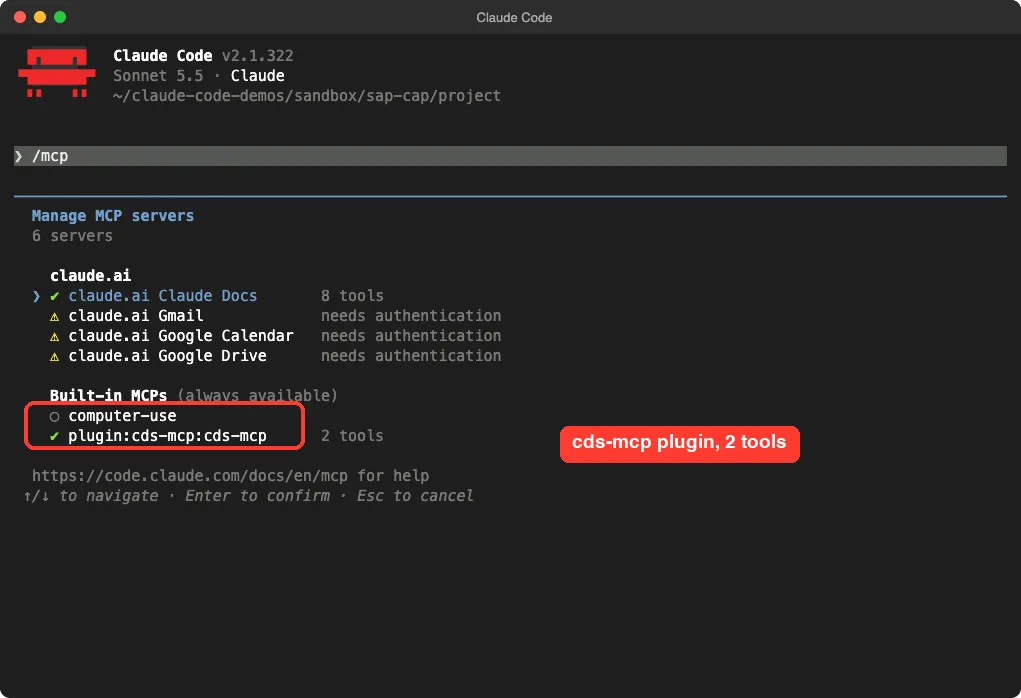
The other entries in the list are unrelated connectors from the Claude app. They have nothing to do with this plugin.
Step 3: Ask Claude About Your Model
Now the first real test. We asked Claude to use the tools instead of reading files, so we could see whether the lookup works.
Use the cds-mcp tools (not file reads) to tell me which CDS services and entities this project has and which HTTP path each service is served on. Keep the answer short.Claude called the plugin twice and answered right away. It named CatalogService, said it is served at /browse/ as OData and defined in srv/catalog-service.cds. It also listed the two served entities and the two underlying domain entities.
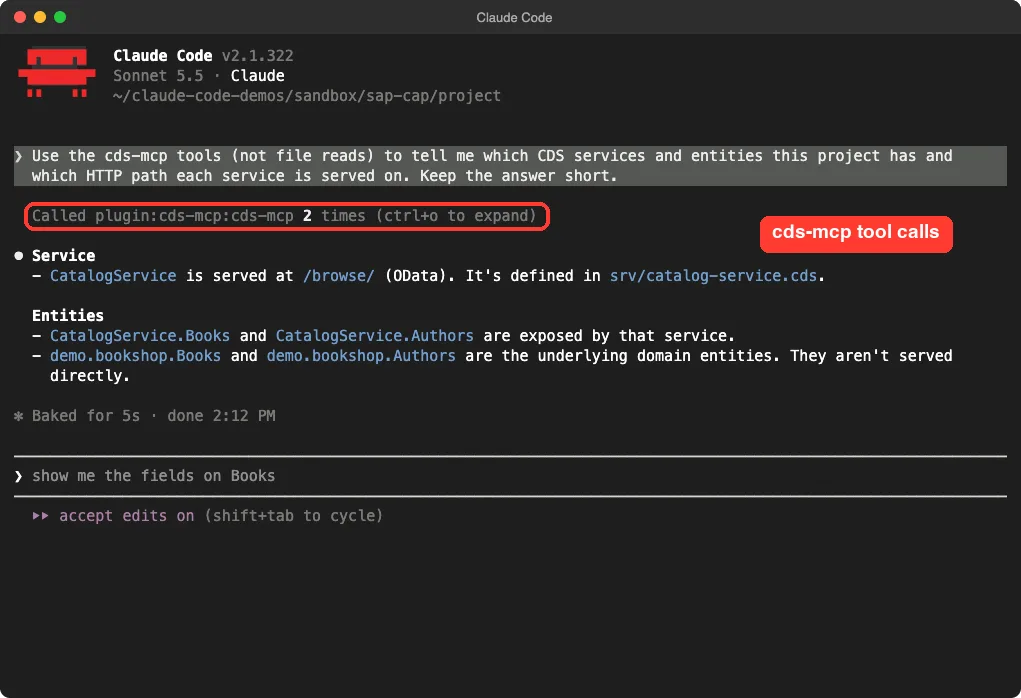
That matches our files exactly. The useful part is the path: a plain file search would have to work out that @(path: '/browse') decides the URL, while the model search returns the endpoint directly.
Step 4: Look Up the Docs for a Handler
Next we looked at what the docs tool returns. We ran the same search the plugin runs, from the command line, so you can see the raw result.
npx -y @cap-js/mcp-server search_docs "custom handler after READ" 1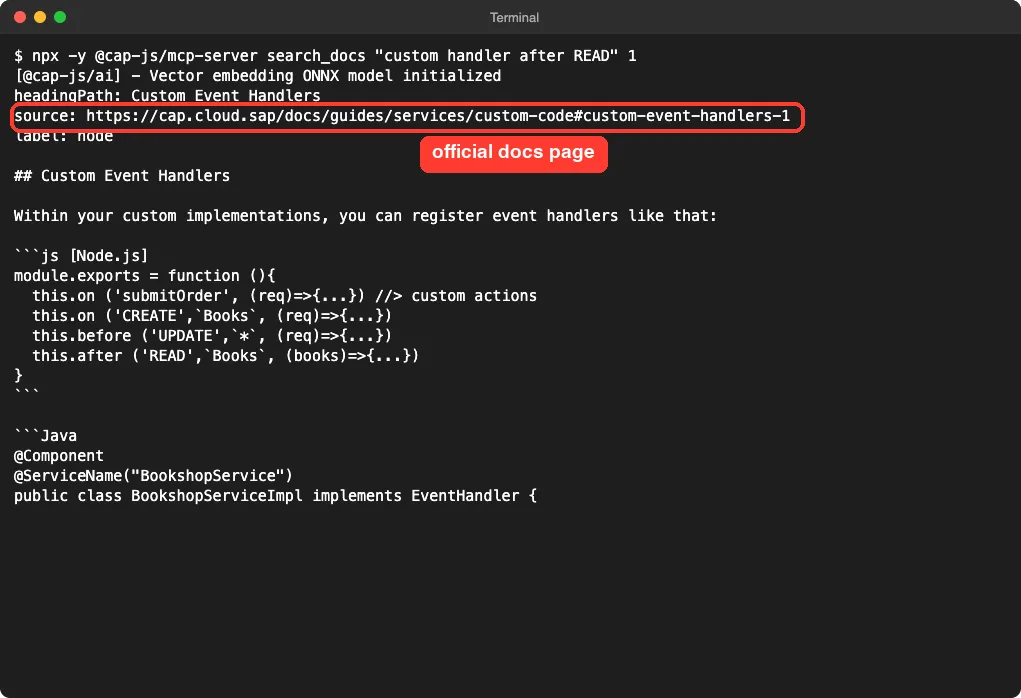
The result is a chunk of the CAP guide on custom event handlers, with the heading path and a source link. That makes it easy to check where an answer came from. The search is semantic, so we did not need the exact words from the guide.
The embeddings are filtered by the runtime it detects in your project. For a Node.js project, Java-only chunks are dropped. You can turn that off with CDS_MCP_GENERIC_EMBEDDINGS=true.
Step 5: Have Claude Write a Handler
We then asked Claude to use the docs and create one file. In the demo, a book with fewer than 10 copies should show a warning in its title.
Search the CAP docs with cds-mcp, then create srv/catalog-service.js for CatalogService with an after READ handler on Books that appends ' (low stock)' to the title when stock is below 10. Only create that one file. Do not run any shell commands.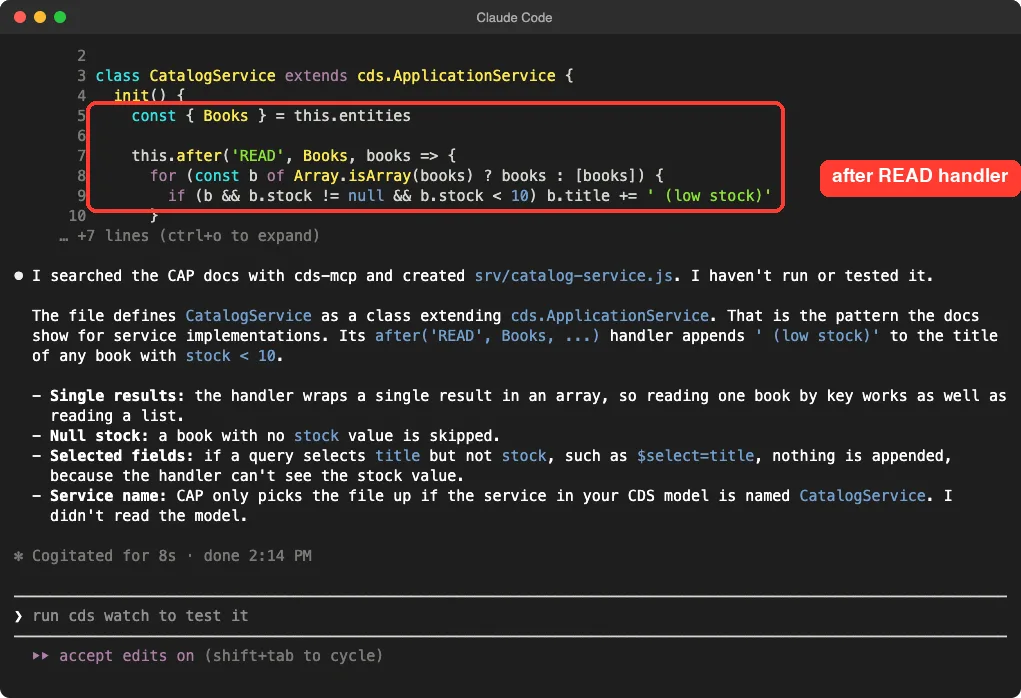
Here is the file it wrote.
const cds = require('@sap/cds')

class CatalogService extends cds.ApplicationService {
  init() {
    const { Books } = this.entities

    this.after('READ', Books, books => {
      for (const b of Array.isArray(books) ? books : [books]) {
        if (b && b.stock != null && b.stock < 10) b.title += ' (low stock)'
      }
    })

    return super.init()
  }
}

module.exports = CatalogService
The handler follows the this.after('READ', ...) pattern from the guide we saw in Step 4. Claude also said plainly that it had not run or tested the file, which is the right thing to say.
Its summary listed a few edge cases: a single result is wrapped into an array, a book without a stock value is skipped, and the service must be named CatalogService in the model. We confirmed the first two by reading the code. We did not test a query that selects only the title, so we make no claim about it.
Step 6: Run the Service and Check the Result
A written file proves nothing until it runs. We started the service ourselves with the cds-serve command from our local @sap/cds install and read the books from the OData endpoint.
node_modules/.bin/cds-serve --port 4056
curl -s localhost:4056/browse/Books | python3 -m json.tool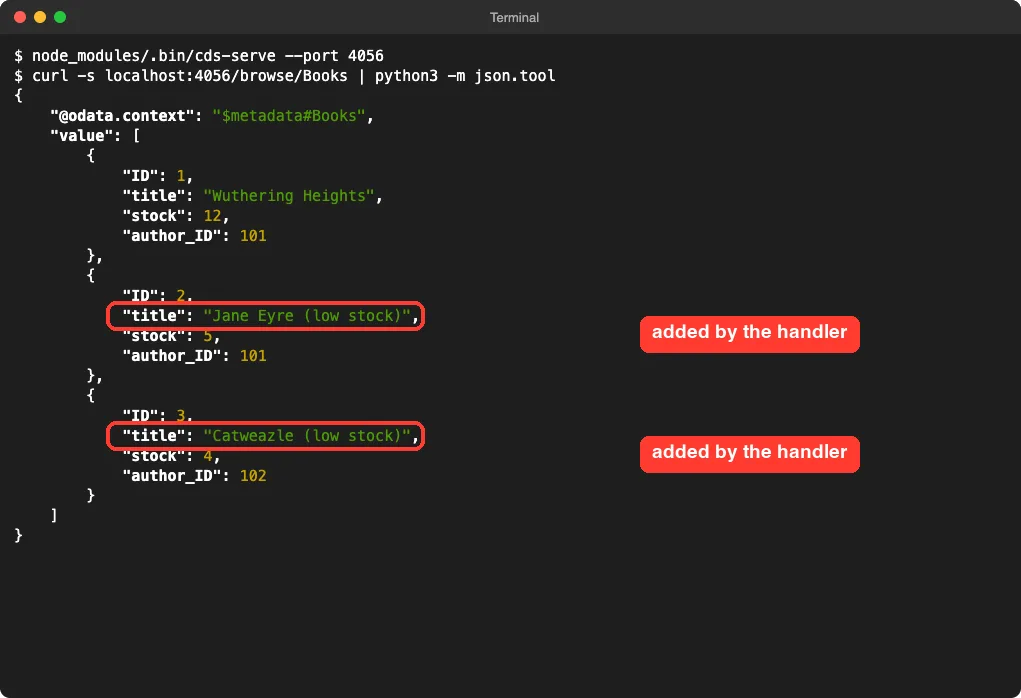
The result was correct. Wuthering Heights with 12 copies stayed as it was, while Jane Eyre (5) and Catweazle (4) got the suffix. The first-try handler worked with no edits from us.
How the Pieces Fit Together
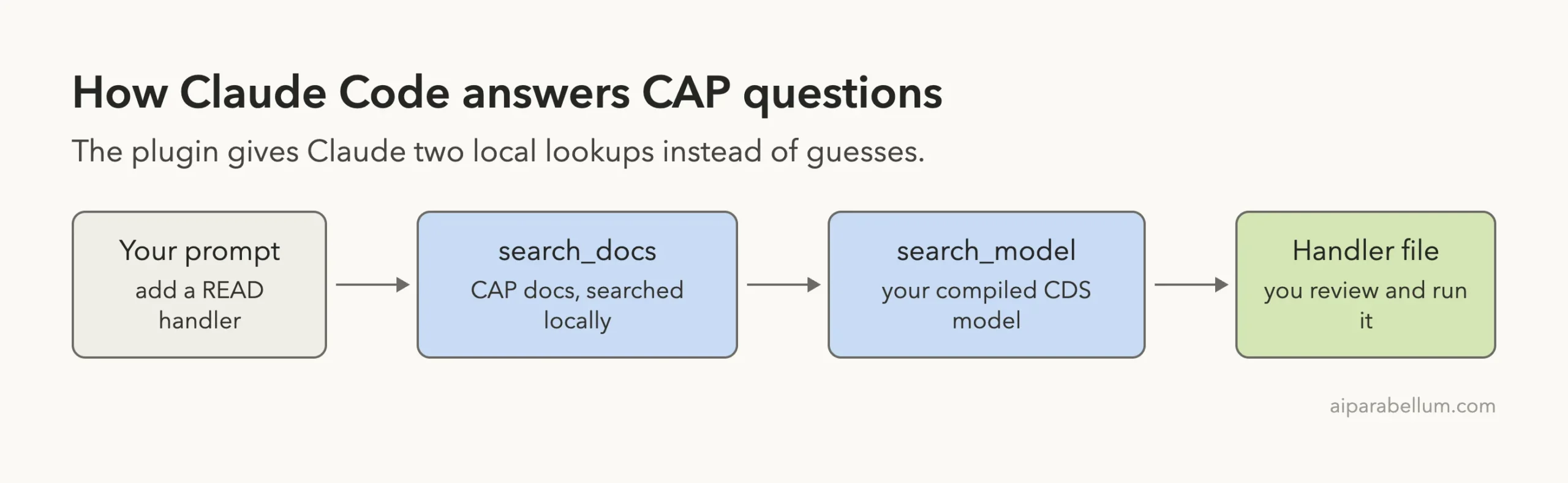
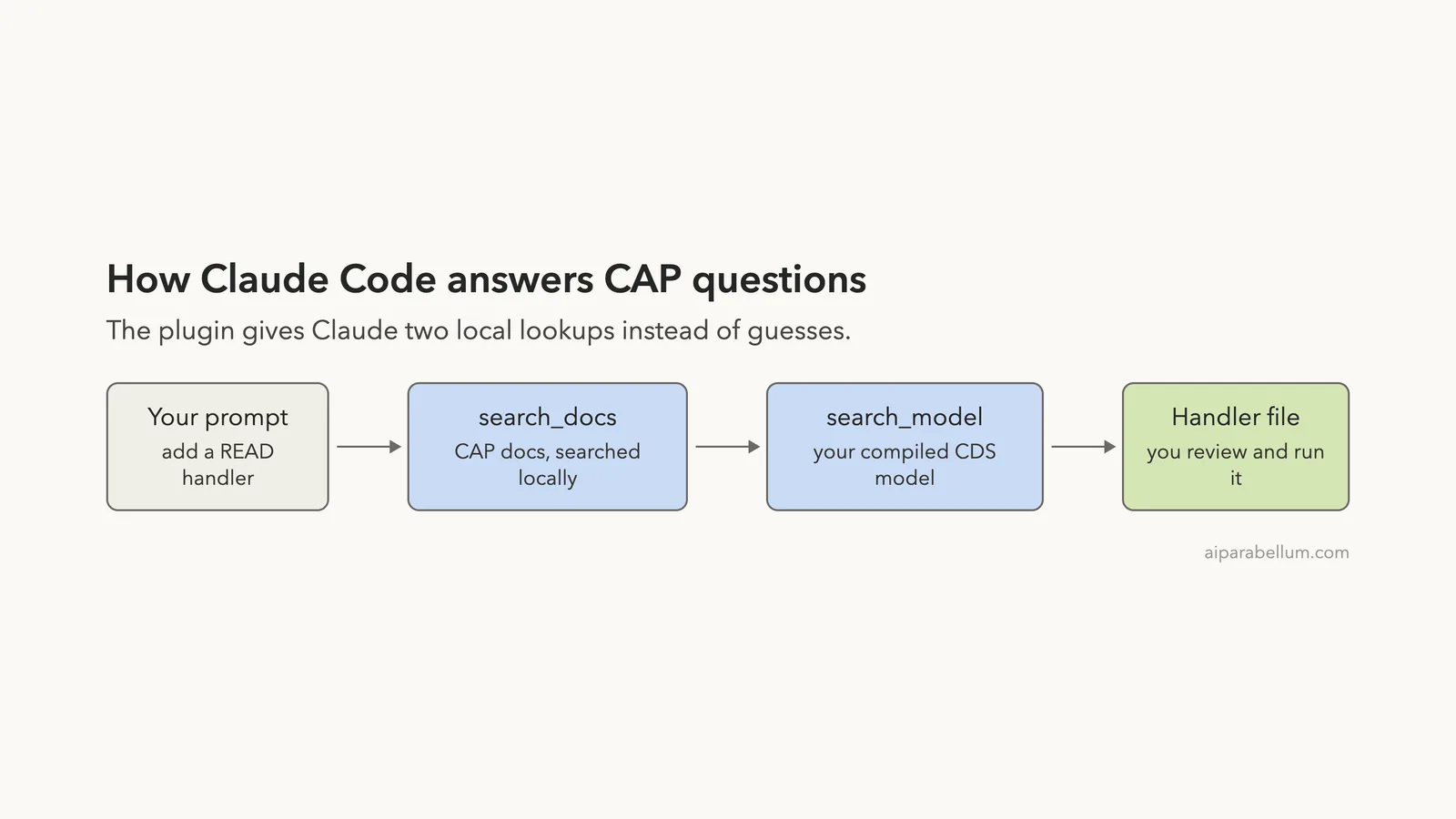
The order in the diagram is the order we asked for, not a fixed pipeline. Claude decides which tool to call. The README suggests adding rules to your AGENTS.md or project instructions that tell Claude to search the model first and check the docs before changing CDS files.
- You MUST search for CDS definitions, like entities, fields and services,
  with cds-mcp, only if it fails you MAY read *.cds files in the project.
- You MUST search for CAP docs with cds-mcp EVERY TIME you create or modify
  CDS models or use APIs or the cds CLI from CAP.
We did not add those rules in our test, since the explicit prompts were enough. In a real project they would make the behavior consistent, so you do not have to ask each time.
What Worked and What Did Not
| Worked well | Watch out for |
|---|---|
Loaded with --plugin-dir and showed as connected right away | The first search downloads about 128 MB and can take a while |
| The model search found the service, entities and path correctly | We tested a tiny model, not a big one |
| Docs results come with a source address you can check | The tools are not a stable API, per the README |
| The handler Claude wrote ran correctly on the first try | We ran only Node.js, not Java |
| No account and no hooks | The server starts through npx, so you need Node.js and a network on first use |
Who Should Use SAP CAP With Claude Code
If you write CAP services, this is an easy add-on. It costs a one-time download and gives Claude a way to look things up in your actual model and in the official docs. That should cut down on invented annotations.
If you only touch CAP once in a while, you may not need it. Claude can still read .cds files directly.
In our small project the benefit was a checkable source. A bigger model with many services is where a fuzzy model search should matter most, but we did not test that.
For other tested MCP setups, see our tested MCP servers.
Try It Yourself
Make a copy of a CAP project, start a git repository so you can undo changes, and load the plugin in a throwaway session. Then use this prompt:
Use cds-mcp to find the service that exposes my main entity and its HTTP path. Then search the CAP docs and show me how to add a before CREATE validation. Show me the code before you write any file.Read the code, check the docs source, and run the service before you trust the change.
Common Mistakes
- Expecting the first search to be instant. The model download happens once.
- Forgetting that the plugin does not write code. Claude does, so you still review every diff.
- Naming the service file wrongly. A CAP implementation file must sit next to the service it belongs to.
- Installing it for a Java project and turning off the runtime filter by accident.
- Treating a written handler as tested before you run the service.
Pro Tips
- Run
/mcpfirst to confirm the server is connected. - Set
CDS_MCP_OFFLINE=trueonce the model is cached, to skip update checks. - Add the README rules to your project instructions so Claude searches before it edits.
- Use
npx -y @cap-js/mcp-server search_docs "your question" 1to preview what Claude would see. - Name the tools in your prompt when you want to be sure Claude uses them.
Cheat Sheet
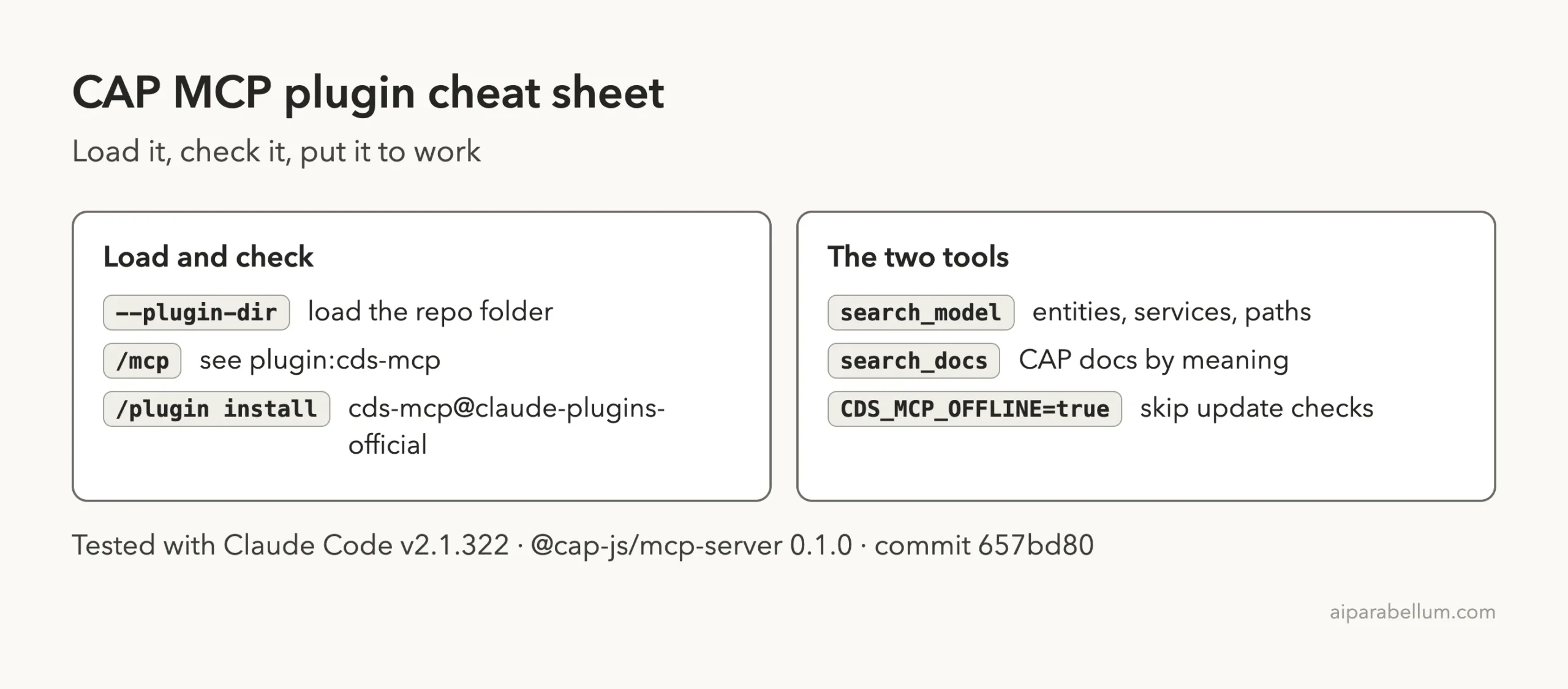
Frequently Asked Questions
Does the CAP MCP plugin need an SAP account?
No. It runs locally through npx. You only need Node.js and a CAP project.
How do I install it for good?
Use /plugin install cds-mcp@claude-plugins-official. For a one-session trial, load the cloned folder with --plugin-dir, or register only the server with claude mcp add.
Does it work offline?
After the first download, set CDS_MCP_OFFLINE=true to use the cached embeddings without checking for updates. The first run needs a network.
Does it work with CAP Java?
The docs search detects a Java or Node.js project and filters its results to match. We tested only Node.js, so we cannot speak to Java results.
Is it safe to load?
We read the repo first. It has no hooks, and it only starts one server and downloads documentation embeddings and a model. You should still read any plugin yourself before loading it.
Conclusion
The CAP MCP plugin gave Claude a reliable way to find our service, its path and the matching docs, and the handler it wrote ran correctly the first time. We tested a tiny Node.js project and did not try Java, deployment or a large model, so start with a small project on a clean git branch and check the docs source behind each answer.