If you write code that calls Claude, the Claude API skill can save you from a lot of stale advice. Model names, thinking settings and request shapes have changed several times, and a model working from memory often gets them wrong. This skill gives Claude Code a set of current reference guides to read before it touches your code, so it writes against today’s API instead of last year’s.
This guide is part of our Claude Code tutorials. Find more add-ons in our Skills Directory.
Tested with Claude Code v2.1.318 on November 8, 2026, using the claude-api skill from the anthropics/skills repository at commit 2c5958e.
Quick Summary
| Question | Short answer |
|---|---|
| What is it? | A skill made of Markdown guides about the Claude API, the SDKs, tool use, caching, models and migration |
| Who makes it? | Anthropic, in the anthropics/skills repository |
| Do you need an API key to try it? | No. We ran our whole test without making a single API call |
| What did we test? | Moving an old Python file to claude-sonnet-5-5 with /claude-api migrate |
| Cost of having it installed | About 360 tokens at rest, shown in /skills |
| Who should use it? | Anyone with code that imports anthropic or @anthropic-ai/sdk |
What the Claude API Skill Is and Why It Exists
A skill is a folder with a SKILL.md file and optional extra files. Claude Code reads the short description at the start and loads the rest only when the task calls for it. Our guide to Claude Code skills covers the basics.
The claude-api skill is a reference library about building with Claude. Its folder holds 91 Markdown guides, plus a few helper scripts used by its eval workflows. There are separate guides for Python, TypeScript, Go, Java, PHP, Ruby, C# and cURL, and shared guides on models, prompt caching, token counting, error codes, tool use and managed agents.
The problem it solves is drift. The skill’s own text warns that several common Claude API shapes changed in 2025 and 2026, and that a pattern you remember may be out of date. A skill that Claude reads at the start of each task is a cheap fix for that.
It is also bundled with Claude Code
Here is a detail worth knowing before you install anything. The official skills docs say a bundled /claude-api skill already ships with Claude Code. It loads Claude API and Managed Agents reference material for your project’s language, and Claude also activates it automatically when your code imports anthropic or @anthropic-ai/sdk.
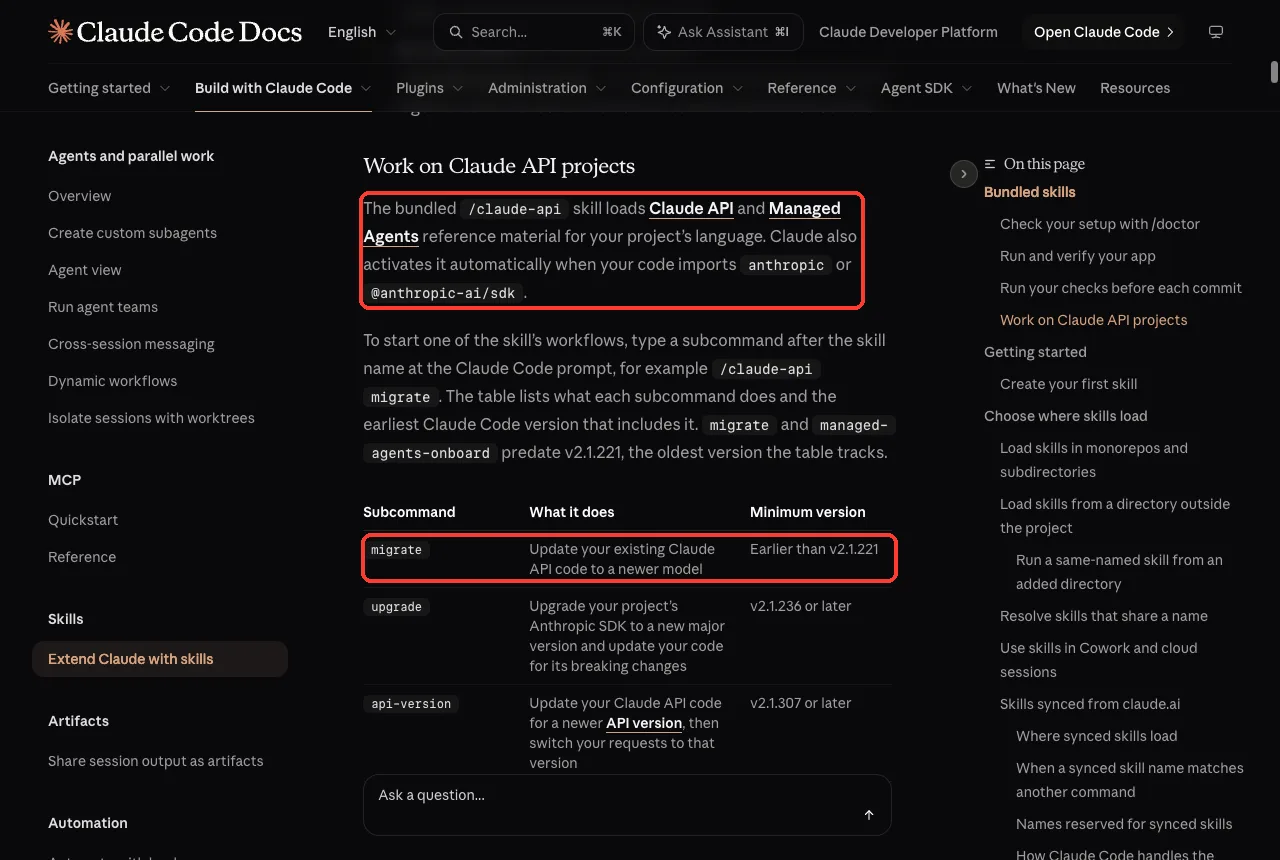
So you may not need to install it at all. For our test we used the copy from the anthropics/skills repository, because that is the one the series covers and it lets us show exactly which files Claude read. If you have a recent Claude Code, try typing /claude-api first.
How We Set It Up Safely
We never touched our real Claude Code setup. Instead, we cloned the repository into a throwaway sandbox folder and copied the skill into a small demo project. Before running anything, we checked what was inside.
- The skill has no hooks. It is Markdown guides plus four helper scripts for evals and a thinking-migration check.
- Nothing runs automatically. The scripts only run if a workflow tells Claude to use them.
- We started Claude Code with
--setting-sources project, so only the demo project’s own settings loaded.
The demo project holds one file, tickets.py. We wrote it ourselves to look like code that was written a while ago: it uses an old model name, an old thinking setting and an assistant prefill. Here is the starting file.
import anthropic

client = anthropic.Anthropic()


def classify_ticket(text):
    """Return a one-word category for a support ticket."""
    response = client.messages.create(
        model="claude-3-opus-20240229",
        max_tokens=1024,
        thinking={"type": "enabled", "budget_tokens": 2000},
        messages=[
            {"role": "user", "content": "Classify this ticket as billing, bug or other:\n" + text},
            {"role": "assistant", "content": "Category:"},
        ],
    )
    return response.content[0].text
Installing it the normal way
If you want the repository copy on your own machine, the directory lists these two commands inside Claude Code. We did not run them, because we kept everything in the sandbox.
/plugin marketplace add anthropics/skills
/plugin install claude-api@anthropic-agent-skills
You can also drop the skill folder into .claude/skills/ in a project, which is what we did. The official skills docs list the other places a skill can live, and the plugin discovery guide explains marketplaces.
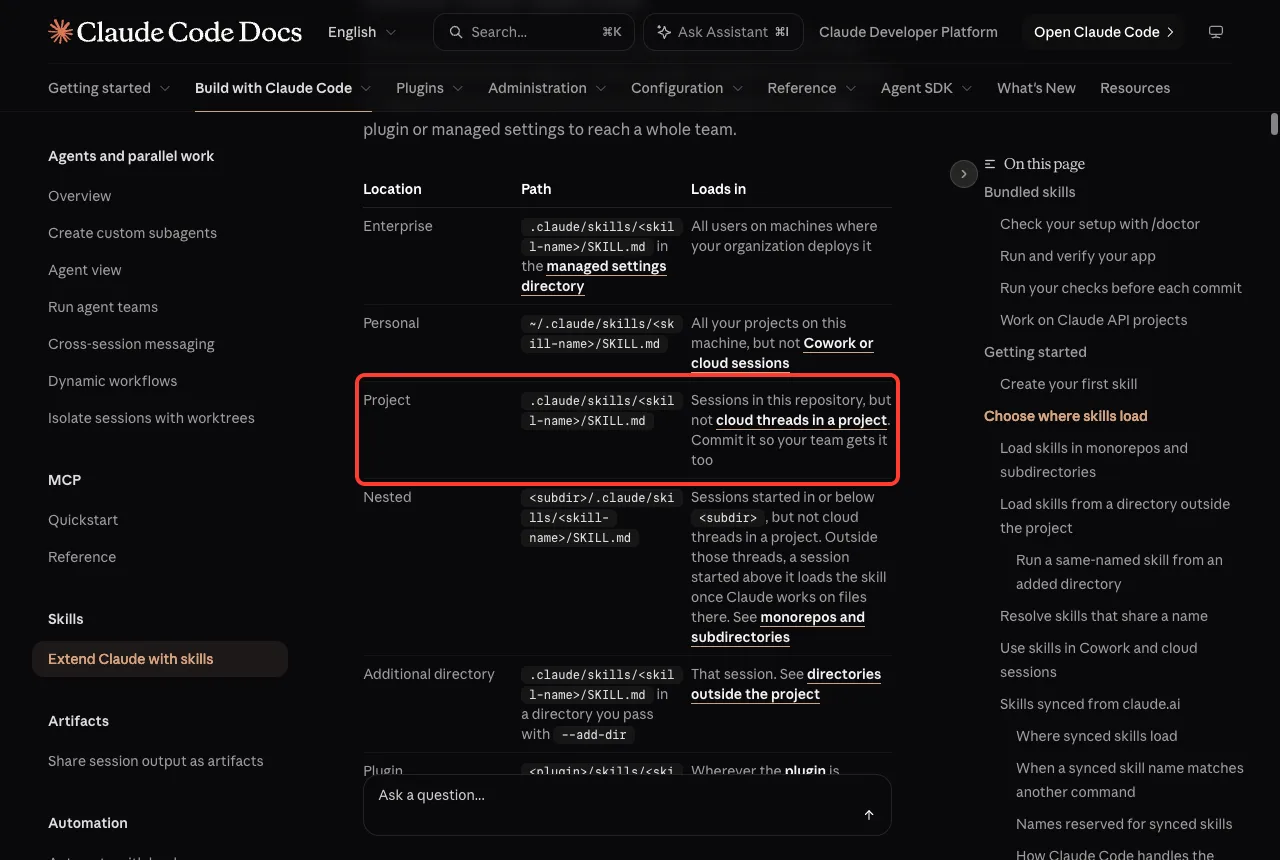
Step 1: Check That the Claude API Skill Loaded
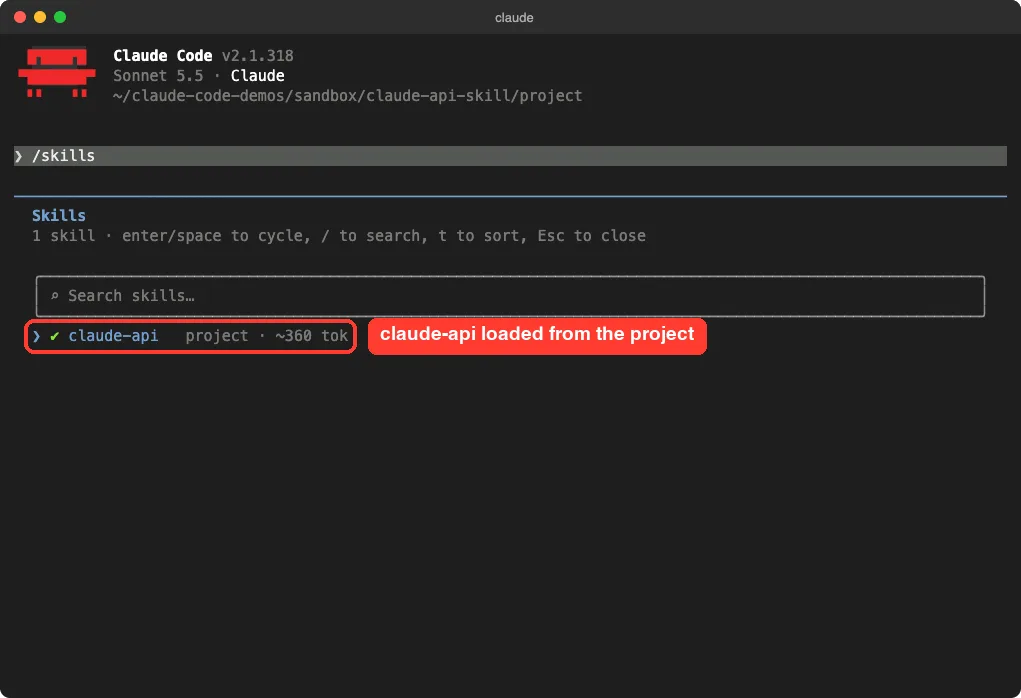
After trusting the folder, we typed /skills. The list showed claude-api as a project skill with about 360 tokens.
That small number is the cost of the description sitting in context. The big guides are not loaded until Claude needs them.
Step 2: Run the Migrate Subcommand
The skill adds subcommands that you type after its name. The docs table lists migrate, upgrade, api-version, prompt-audit, cost-optimize, build-eval, hillclimb and the Managed Agents ones. We picked migrate because it is the one most projects need first.
The skill’s own guide says that if you do not name a file, Claude should ask which files to change before editing. So we named the file and the target model in one line.
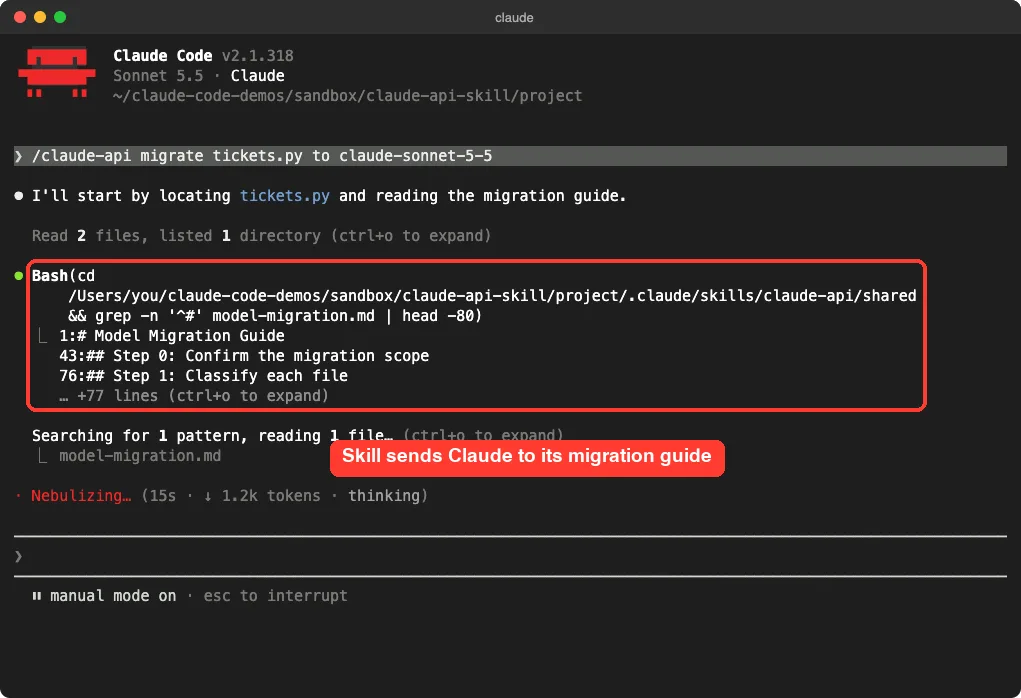
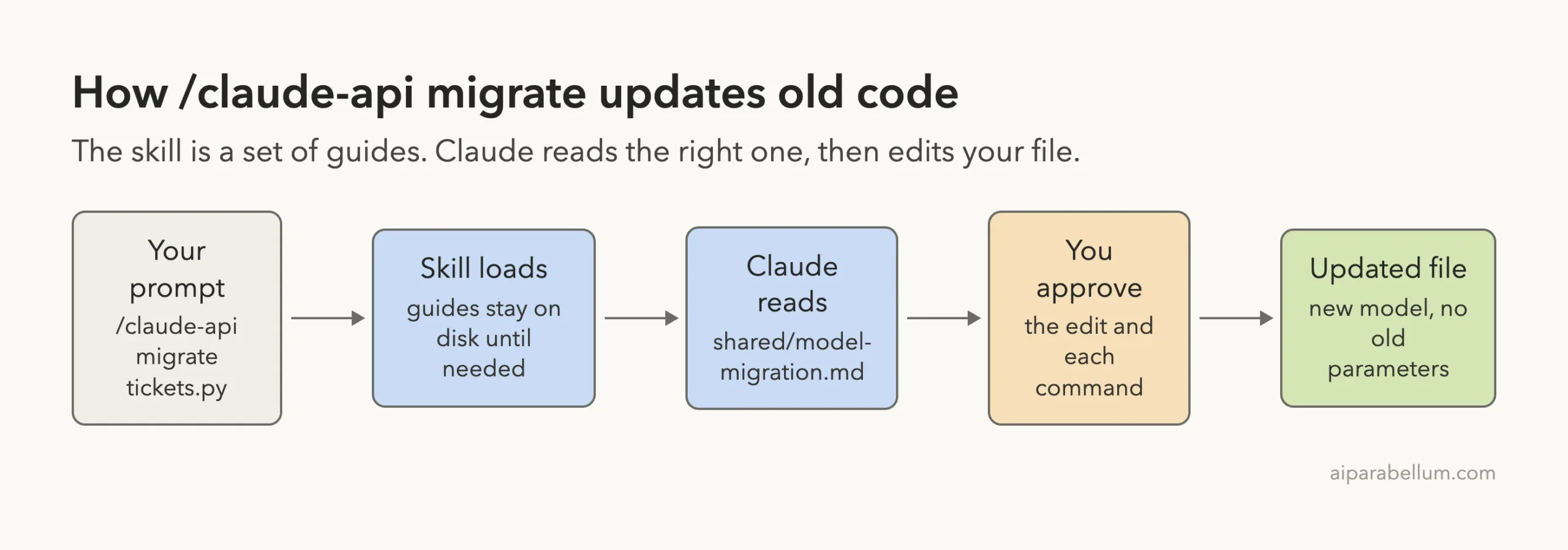
/claude-api migrate tickets.py to claude-sonnet-5-5Claude located tickets.py, then went straight to the skill’s guide. It searched shared/model-migration.md for its headings, which start with a step to confirm scope and a step to classify each file. That is the moment the skill earns its place: Claude is reading a current guide instead of guessing.
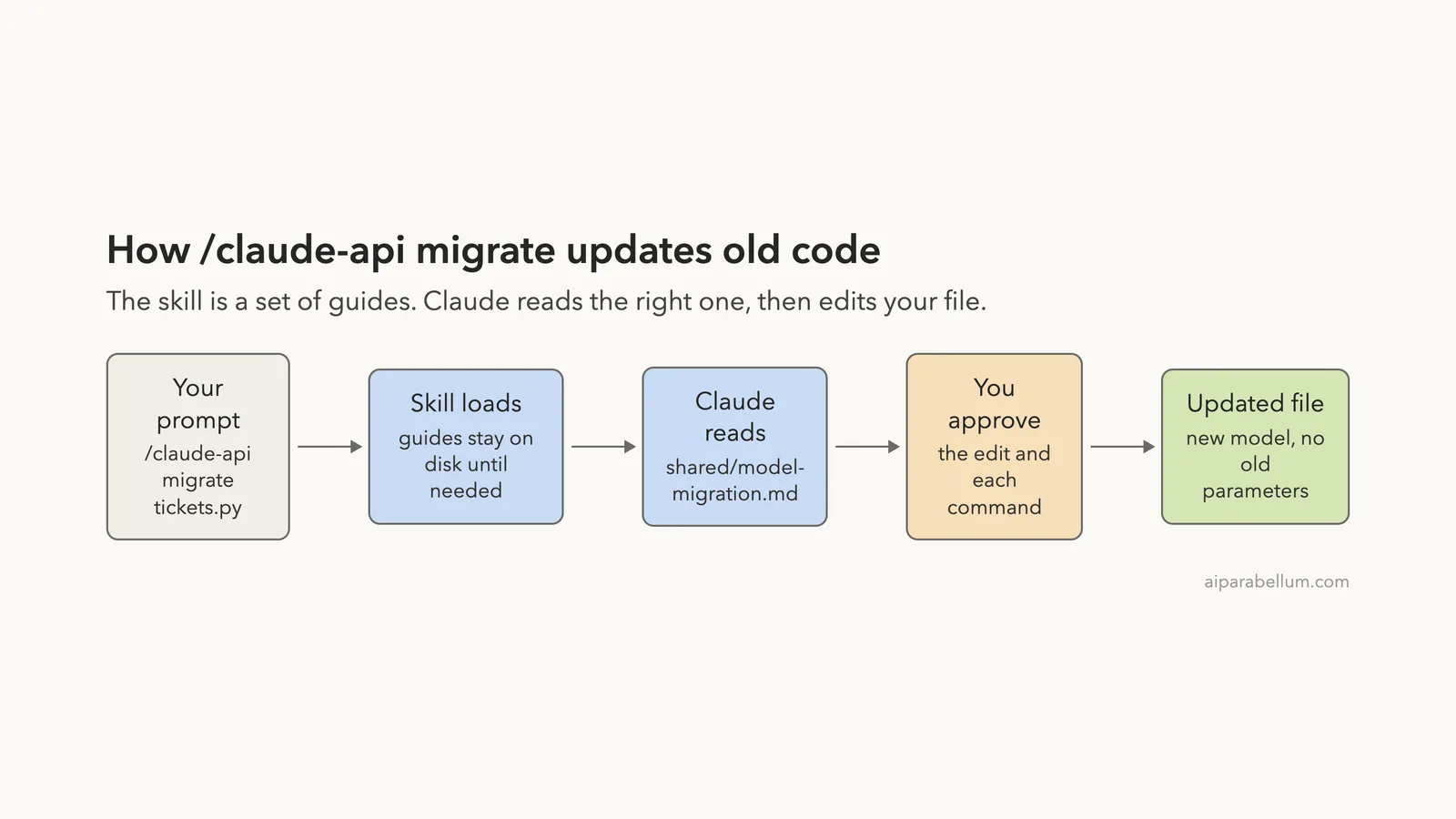
What happens behind the scenes
The diagram below shows the path from your prompt to the edited file. The skill itself does not change anything. It tells Claude which guide to read and what order to work in.
Step 3: Review the Changes Before You Approve
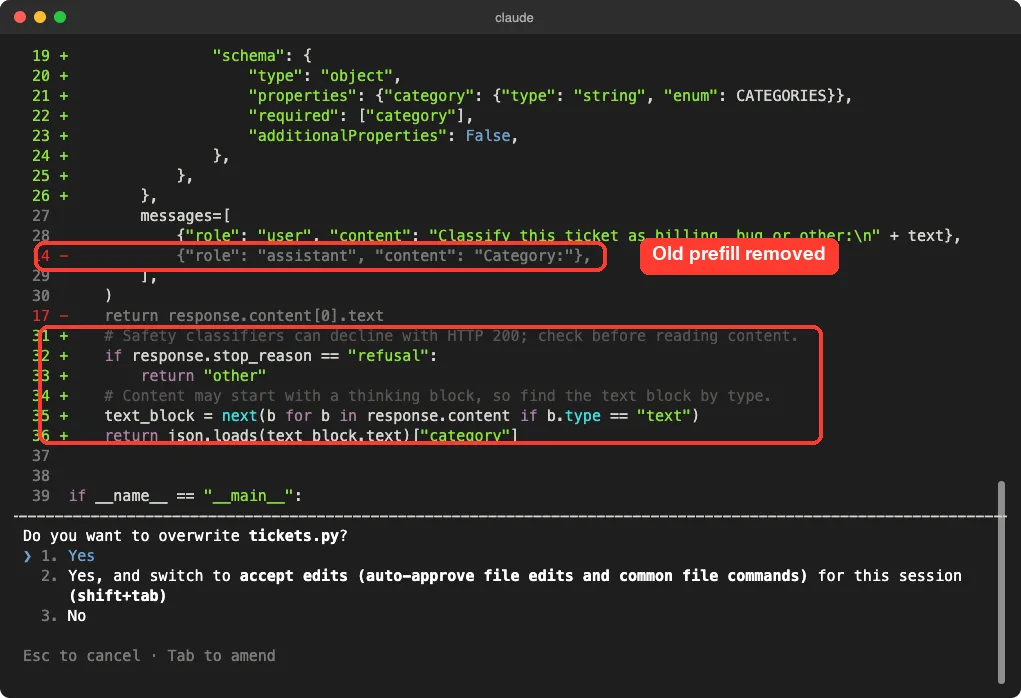
Claude asked for approval a few times. Two were shell commands: a check on the installed SDK version and a syntax check on the new file. The third was the file edit itself, shown as a diff.
Claude Code never changes a file in default mode until you say yes, and this run was no different.
In the diff you can see the old assistant prefill line removed in red. You can also see new lines that check stop_reason for a refusal and find the text block by type instead of reading content[0].
What Claude Changed in Our File
After the edit, Claude summarized the migration. Everything below comes from that summary and from the file on disk afterward.
| Area | Before | After |
|---|---|---|
| Model | claude-3-opus-20240229 | claude-sonnet-5-5 |
| Thinking | thinking={"type": "enabled", "budget_tokens": 2000} | Removed, with output_config={"effort": "low"} |
| Prefill | Assistant message Category: | Removed, replaced by a JSON schema in output_config.format |
| Reading the reply | response.content[0].text | Find the text block by type, then parse the JSON |
| Token limit | max_tokens=1024 | max_tokens=2048 |
| Refusals | Not handled | Returns other when stop_reason is refusal |
Claude explained the reasons in its own words. It said the old model was retired on Jan 5, 2026, and that the old thinking setting and the prefill both return errors on the new model. We checked that first claim against the skill’s guide, which lists claude-3-opus-20240229 with a Jan 5, 2026 retirement date.
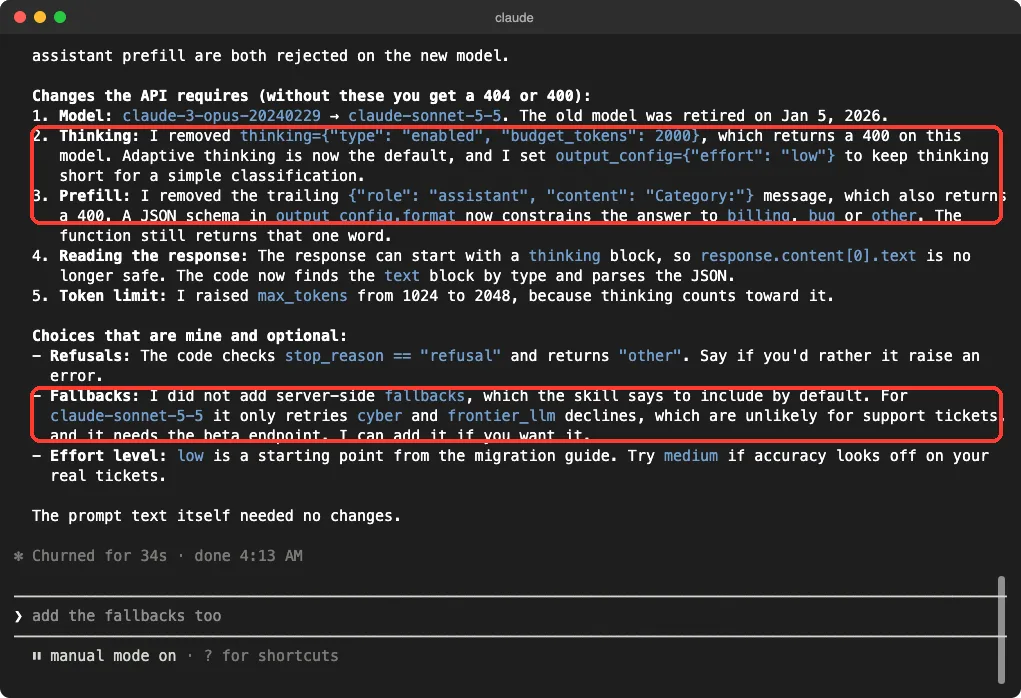
The part we liked most
Claude split its summary into two lists. One was changes the API requires, and the other was choices that were its own.
Under the second list it said it had not added server-side fallbacks, even though the skill suggests them by default. Its reason was that they need the beta endpoint and apply to rare cases. It also said to try a medium effort level if accuracy looks off on real tickets.
That honesty matters. A migration that quietly mixes required fixes with taste calls is hard to review. This one made the review easy.
Here Is the Migrated File
This is what tickets.py looked like at the end of the run. We did not call the API, so we cannot say how accurate the classifier is. What we did check is that Claude ran a syntax check on the file before finishing.
import json

import anthropic

client = anthropic.Anthropic()

CATEGORIES = ["billing", "bug", "other"]


def classify_ticket(text):
    """Return a one-word category for a support ticket."""
    response = client.messages.create(
        model="claude-sonnet-5-5",
        max_tokens=2048,
        output_config={
            "effort": "low",
            "format": {
                "type": "json_schema",
                "schema": {
                    "type": "object",
                    "properties": {"category": {"type": "string", "enum": CATEGORIES}},
                    "required": ["category"],
                    "additionalProperties": False,
                },
            },
        },
        messages=[
            {"role": "user", "content": "Classify this ticket as billing, bug or other:\n" + text},
        ],
    )
    if response.stop_reason == "refusal":
        return "other"
    text_block = next(b for b in response.content if b.type == "text")
    return json.loads(text_block.text)["category"]
Other Things the Skill Can Do
We only ran migrate. The rest of this section comes from the official docs table and from the skill’s own subcommand list, not from our testing.
upgrademoves your project to a new major version of the Anthropic SDK and fixes the breaking changes.api-versionupdates your code for a newer API version.prompt-auditflags instructions written for older models in prompts, skills and tool descriptions, and proposes fixes as a diff.cost-optimizeprofiles where your API spend goes and suggests savings such as prompt caching, batch processing and model choice.build-evalandhillclimbhelp you build a test set and then improve your app against it.managed-agents-onboardwalks you through creating a managed agent.
Be careful with the ones that measure things. The skill’s cost and eval guides say a run that exercises the model spends real money, and that Claude should get your approval first. Read the plan before you say yes.
Skill vs Plugin vs Agent SDK: Which One Do You Need?
| Tool | What it does | Use it when |
|---|---|---|
| claude-api skill | Gives Claude current reference guides for the API | You are writing or updating code that calls Claude |
| Agent SDK dev plugin | Scaffolds and checks an Agent SDK app | You are starting an agent project. See our SDK dev plugin |
| Claude Agent SDK | The library you build agents with | You want Claude Code’s agent loop inside your own app. See our Agent SDK guide |
Try It Yourself
Make a throwaway folder with one small file that calls an old model name. Do not use a real project. Start Claude Code in that folder, confirm the skill appears in /skills, then paste this prompt.
/claude-api migrate old_app.py to claude-sonnet-5-5Read the summary, then ask Claude one follow-up: which of its changes were required and which were optional. That single question teaches you how to review any migration.
Common Mistakes
- Skipping the file name. If you only say migrate, Claude asks which files to change before it edits anything, which is the safe behavior but slower.
- Approving every prompt without reading. The diff is the whole point, so read the removed and added lines.
- Assuming the skill tests your app. It updates code against its guides. It does not prove the new code gives good answers.
- Installing a second copy without checking. The docs say a bundled
/claude-apialready exists, so check what you have first. - Letting an eval or cost run start without a budget. Those spend real API money.
Pro Tips
- Run the migration on a branch so you can compare the diff in your editor too.
- Ask for the optional choices to be listed separately, as ours were.
- Run your own tests after the edit. A syntax check is not a behavior check.
- Keep your
CLAUDE.mdshort, since the skill already carries the API details. Our guide to the CLAUDE.md management plugin shows how to trim it. - For writing help in the same session, see our doc co-authoring skill.
Honest Verdict on the Claude API Skill
The skill did what it promised in our one test. It sent Claude to the right guide, the changes were sensible, and the summary was easy to review. We did not call the API, so we have no accuracy or cost numbers, and we only ran one subcommand on one small file.
Anyone who maintains code that calls Claude, especially older code, should try it. People who never write API code can skip it.
Since a bundled copy exists in recent Claude Code versions, the first step is simply typing /claude-api.
Then read the diff before you approve.
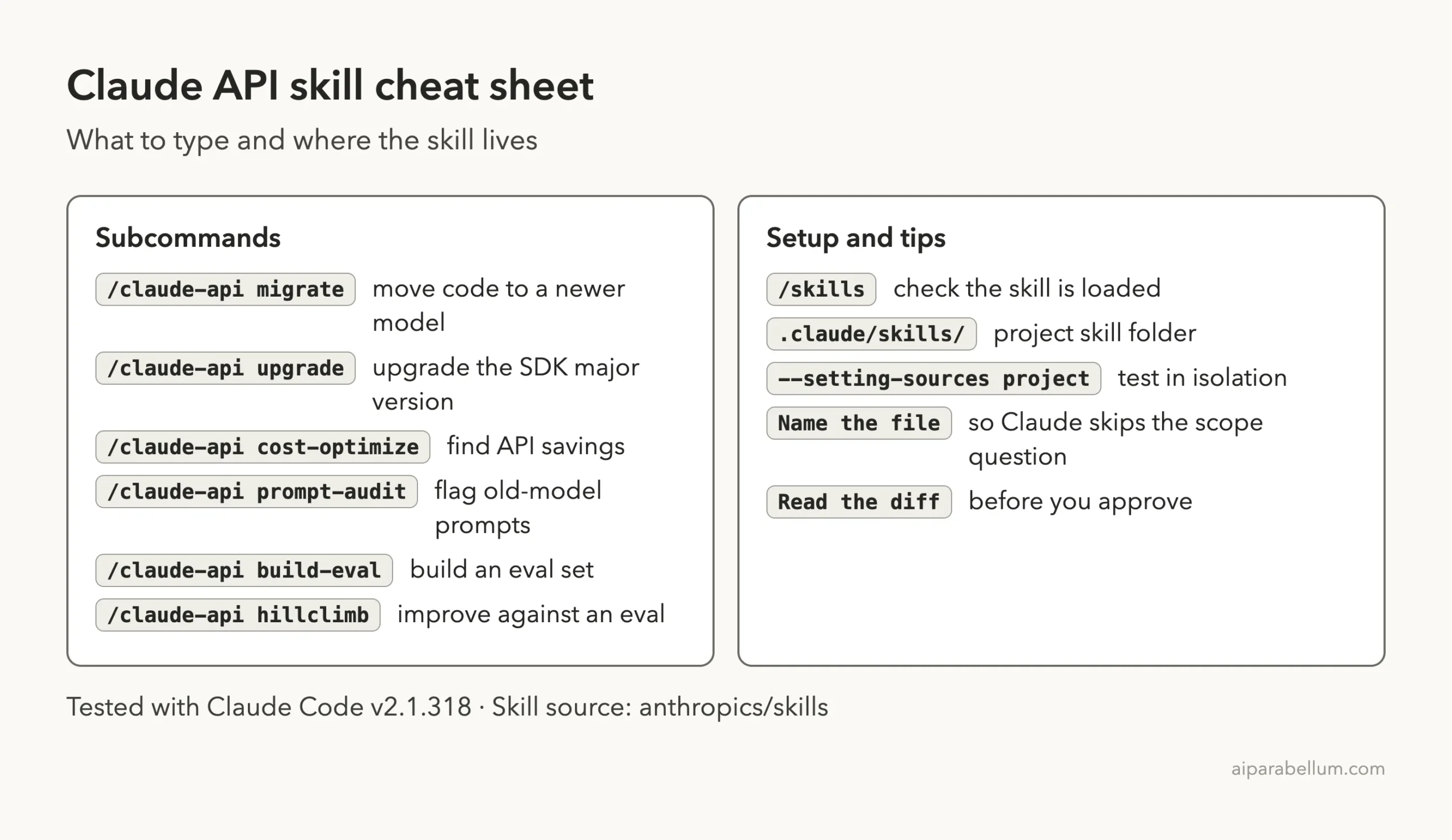
Cheat Sheet
Frequently Asked Questions
Is the Claude API skill free?
The skill itself is just files. Using Claude Code follows your normal plan or API billing. Our migrate test made no API calls from the demo code.
Do I need to install it if it is bundled?
Not necessarily. The docs say /claude-api is bundled and activates automatically when your code imports the Anthropic SDK. Install the repository copy only if you want that exact version or a project-local copy.
Does it work for languages other than Python?
The skill folder has guides for Python, TypeScript, Go, Java, PHP, Ruby, C# and cURL. We only tested Python.
Will it edit my files without asking?
In default permission mode, no. We approved a file edit and two commands one by one during our run.
Where can I read more about skills?
Start with the official skills docs linked above. For the model behind it all, see our Claude AI overview.
Conclusion
The Claude API skill gives Claude Code current reference material for the Anthropic SDK, and in our test it turned an out-of-date Python file into a working migration with a clear explanation. Check whether the bundled version is already in your session, run /claude-api migrate on a small file you can afford to change, and read the diff before approving. Do that once and you will know whether it earns a place in your workflow.