The claude md management plugin is an official add-on from Anthropic that checks your CLAUDE.md file against your real project and fixes what is out of date. It bundles one skill that audits and scores the file, and one command that saves what a work session taught you. We loaded it into a throwaway project with a deliberately stale CLAUDE.md and watched what it did.
This guide is part of our Claude Code tutorials. Find more add-ons in our Skills Directory.
Tested with Claude Code v2.1.318 on November 7, 2026, using the claude-md-management plugin version 1.0.0 from the official claude-plugins-official repository (commit 0412be7, November 6, 2026). Everything ran in a sandbox folder with --setting-sources project and the plugin loaded through --plugin-dir, so nothing was added to the global Claude Code setup.
Quick Summary
| Question | Answer |
|---|---|
| What is it? | An official plugin that audits, scores and updates your CLAUDE.md files |
| Who makes it? | Anthropic, in the official plugin marketplace |
| What does it add? | One skill (claude-md-improver) and one command (/revise-claude-md). No hooks, no servers |
| Install command | /plugin install claude-md-management@claude-plugins-official |
| Our test | A tiny Node project whose CLAUDE.md listed commands and files that do not exist |
| Result | The audit scored it 28 out of 100 (grade F), proposed a fixed file as a diff, and wrote it only after we said yes |
| Main catch | It reads your project, so keep an eye on what you approve, and the numbers vary from run to run |
What the Claude MD Management Plugin Is
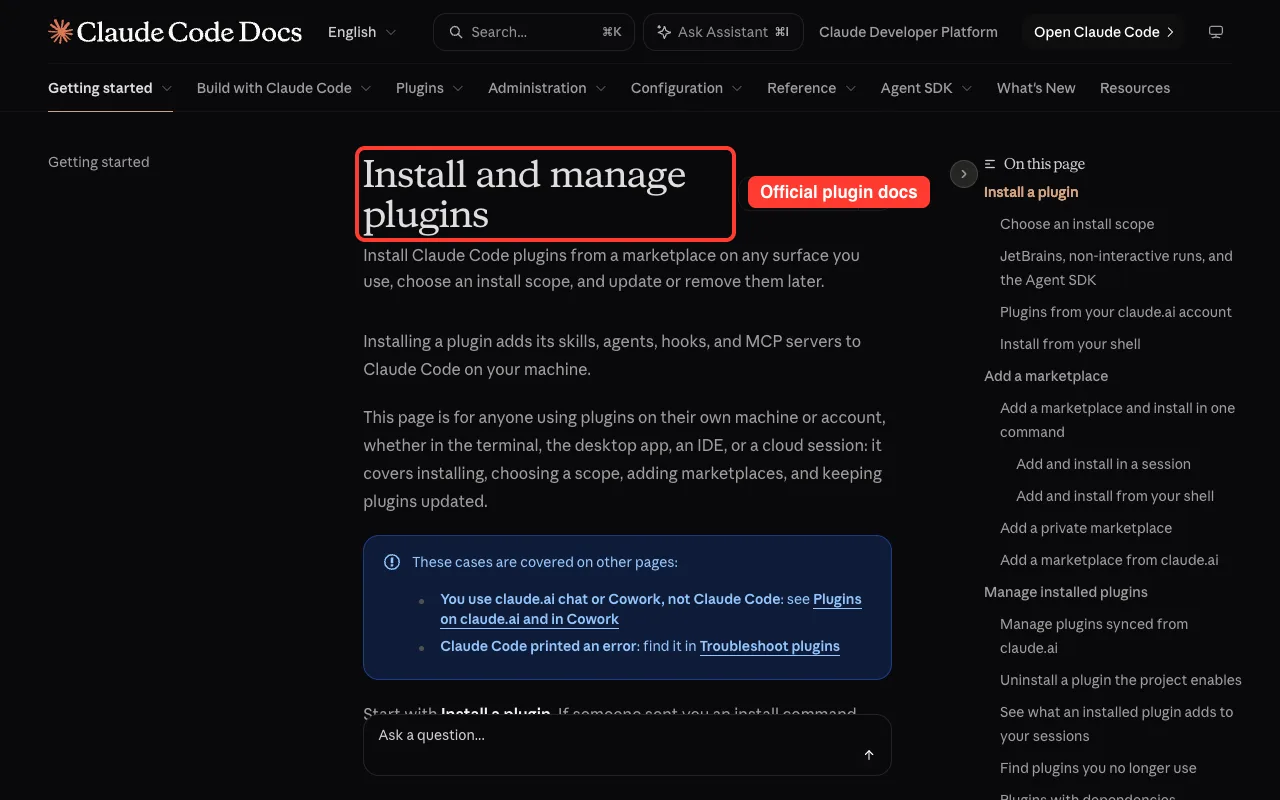
A plugin is a bundle of extras for Claude Code. It can hold skills, agents, hooks and tool servers. The official discover plugins page explains how they are found and installed, and our guide to Claude Code plugins covers the basics.
This plugin is about project memory. Claude Code reads your CLAUDE.md at the start of every session, so the file works like a short briefing. If you are new to it, start with our guide to the CLAUDE.md file.
The trouble is that a briefing goes stale. You rename a folder, swap a test tool or drop a script, and the file keeps describing the old project. Claude then runs commands that fail and looks in files that are gone.
The two tools inside
We read every file in the plugin before loading it. It has a manifest, a license, two example images, a README, one command file and one skill with three reference files. We found no hooks, no scripts and no network addresses in the instructions.
| Tool | Type | Use it when |
|---|---|---|
claude-md-improver | Skill | You want a periodic check that CLAUDE.md matches the code |
/revise-claude-md | Command | A session revealed context that was missing |
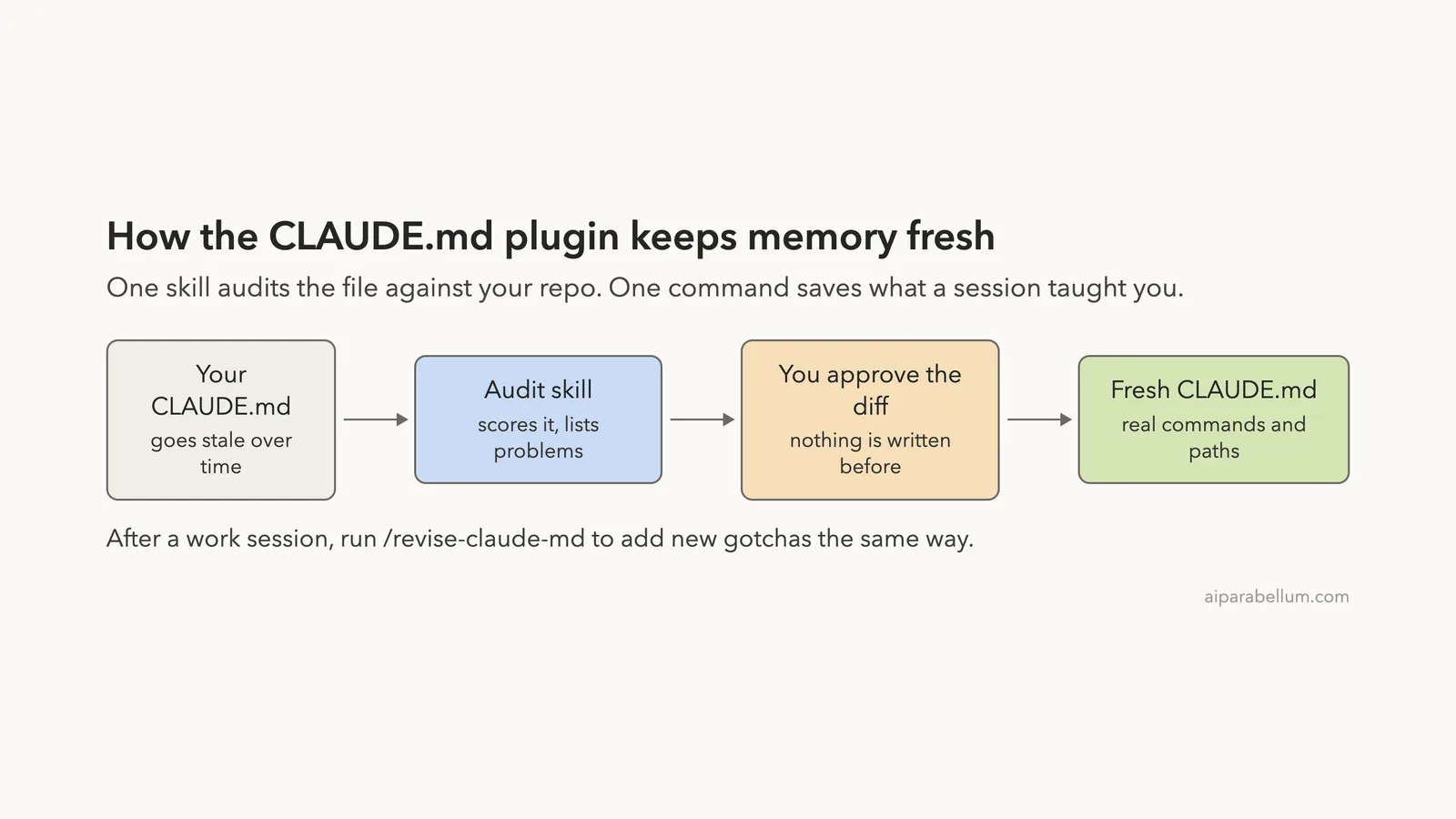
The skill finds your CLAUDE.md files, scores each one against a rubric, shows a report, and then proposes changes. The command looks back over the current session and proposes one-line additions.
Both are built to ask before they write. The skill file says to output the quality report before making any updates, and to ask for confirmation first.
How to Install It
On a normal setup you install it from the official marketplace inside a session. The docs say the official marketplace is on by default, so there is nothing to add first.
/plugin install claude-md-management@claude-plugins-official
/reload-plugins
The /plugin panel asks which scope you want: just you, everyone on the repository, or only you in this repository. If you are only trying it, pick the narrowest one.
You can check it with claude plugin list in your shell and switch it off later with claude plugin disable. Read the plugins documentation if you want the full list of options.
How we loaded it for the test
We did not install it at all. We cloned the official repository into a sandbox and loaded just the plugin folder for one session.
claude --permission-mode default \
  --setting-sources project \
  --plugin-dir ./claude-plugins-official/plugins/claude-md-management
That way our own setup stayed untouched. You do not need to do this, but it is a safe way to try any plugin before you commit to it.
The Stale CLAUDE.md We Tested
We wanted a project where the file is clearly wrong, so we built a tiny stock tracker by hand. It has a command line tool in src/cli.js, some logic in src/inventory.js, and three tests that use the built-in Node test runner. We committed it to git first.
Then we wrote a CLAUDE.md that describes a different project.
# Stock Tracker

A small stock tracking tool.

## Commands
- npm run serve  - start the dev server on port 3000
- npm run jest   - run the tests with Jest
- npm run build  - build the project

## Structure
- lib/stock.js - main logic
- lib/index.js - entry point

## Style
- Use semicolons
Here is what is wrong with it. The package.json only defines start, test and check. There is no server, no Jest and no lib folder.
This is a common situation. A file copied from another project, or written early and never touched again, drifts the same way.
Step 1: Run the Audit
The skill has no slash command. You ask for it in plain English, and Claude loads it because the skill description mentions checking, auditing or fixing CLAUDE.md files.
audit my CLAUDE.md files. Only look at files inside this folder, nothing outside it.We added the second sentence on purpose. In our first attempt we typed just audit my CLAUDE.md files, and Claude asked to run a command that also listed your global file at ~/.claude/CLAUDE.md. The skill is written to look at global defaults too, so say clearly if you want it to stay inside one project.
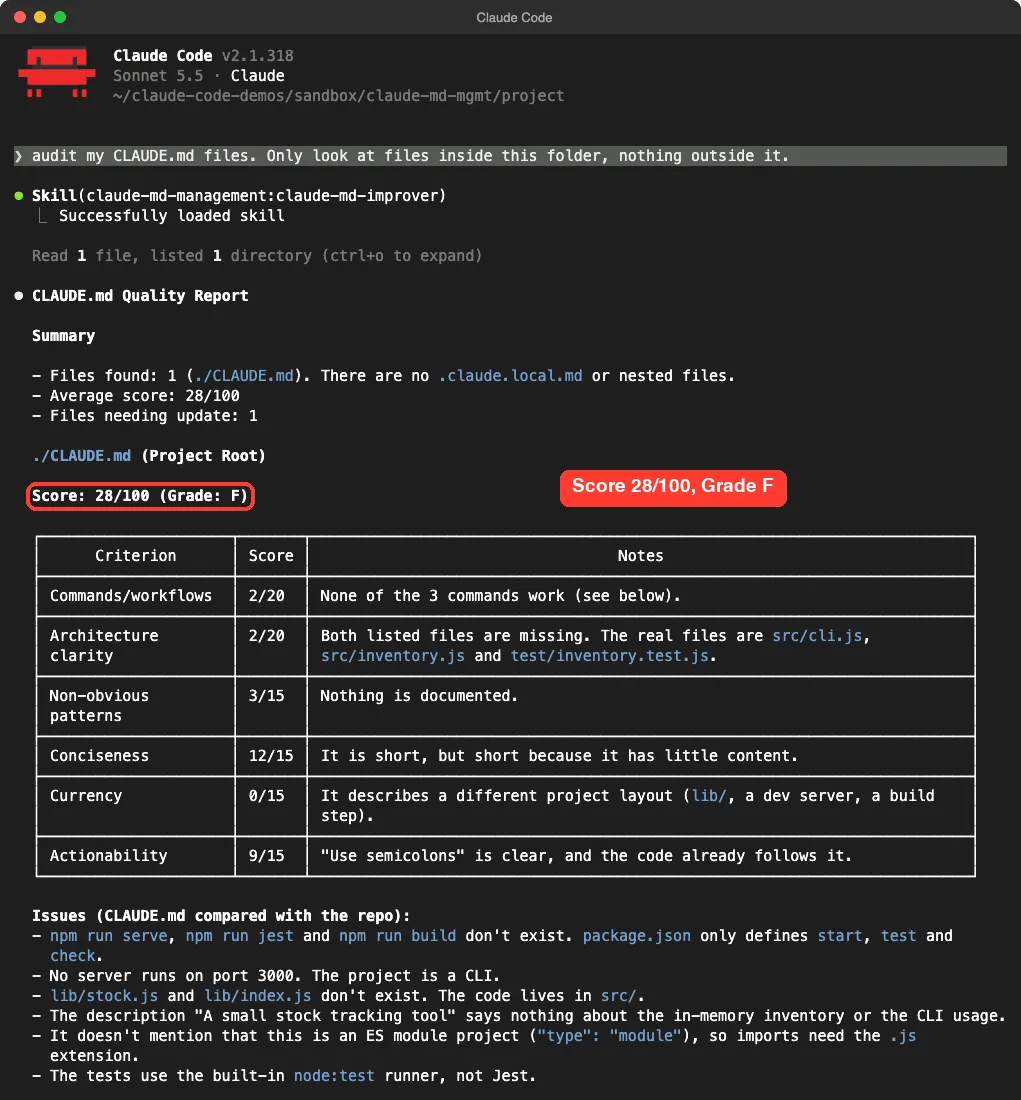
Claude loaded the skill, read the file and listed the folder. Then it printed the quality report.
How the score works
The skill rates each file on six criteria. Its own rubric gives them different weights, and the grades run from A for 90 or more down to F for under 30. Our file got these marks.
| Criterion | Our score | Why |
|---|---|---|
| Commands and workflows | 2 of 20 | None of the three commands work |
| Architecture clarity | 2 of 20 | Both listed files are missing |
| Non-obvious patterns | 3 of 15 | Nothing is documented |
| Conciseness | 12 of 15 | Short, but only because it says little |
| Currency | 0 of 15 | It describes a different project layout |
| Actionability | 9 of 15 | The semicolon rule is clear and the code follows it |
That adds up to 28 out of 100. We like that the report explains each number in plain words, because a bare score would not help you fix anything.
Below the table the report listed the problems it found by comparing the file with the repo. It spotted the three missing npm scripts, the missing port 3000 server, the missing lib files, and the fact that the tests use node:test rather than Jest. It also noticed the project uses ES modules, so imports need the .js extension.
Step 2: Read the Proposed Diff
After the report, Claude proposed a rewritten file as a diff. Red lines are removed and green lines are added. It also added a short Gotchas section from what it read in the code.
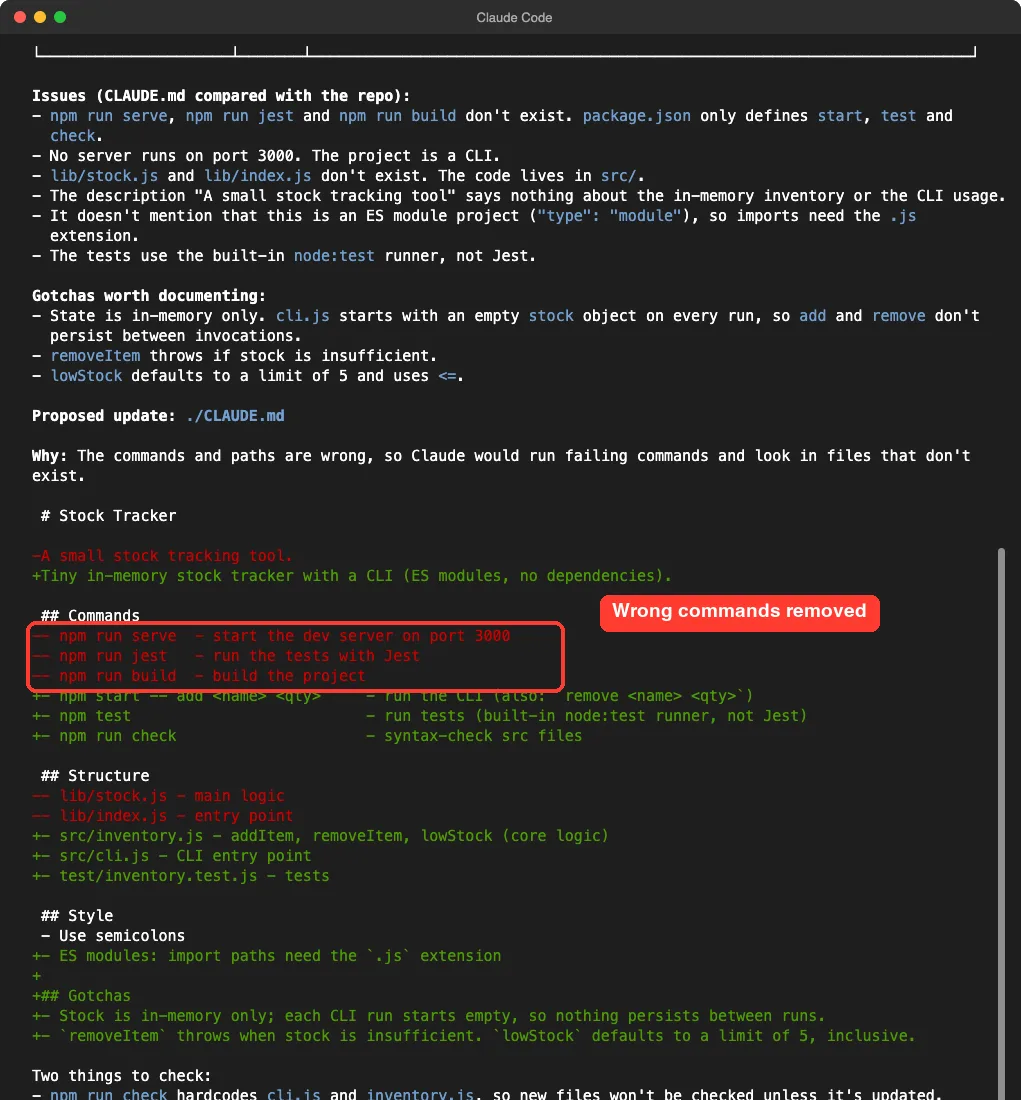
Notice that it said it had not changed anything yet and asked whether to apply the update. That matters for trust.
You can also read the full diff and push back. If a line is wrong, tell Claude to leave it out, and it will adjust the proposal.
Check the facts yourself
The Gotchas it proposed were all true for our code. The stock lives only in memory, so each run starts empty. The removeItem function throws when stock is low, and lowStock uses a limit of 5 that includes 5.
Even so, you should verify any claim before it goes into a file that every future session will trust. A wrong line in CLAUDE.md is worse than no line.
Step 3: Approve and Apply
We replied with yes, apply the update. Only then did Claude write the file. The permission mode was the default, and the plugin did not change that.
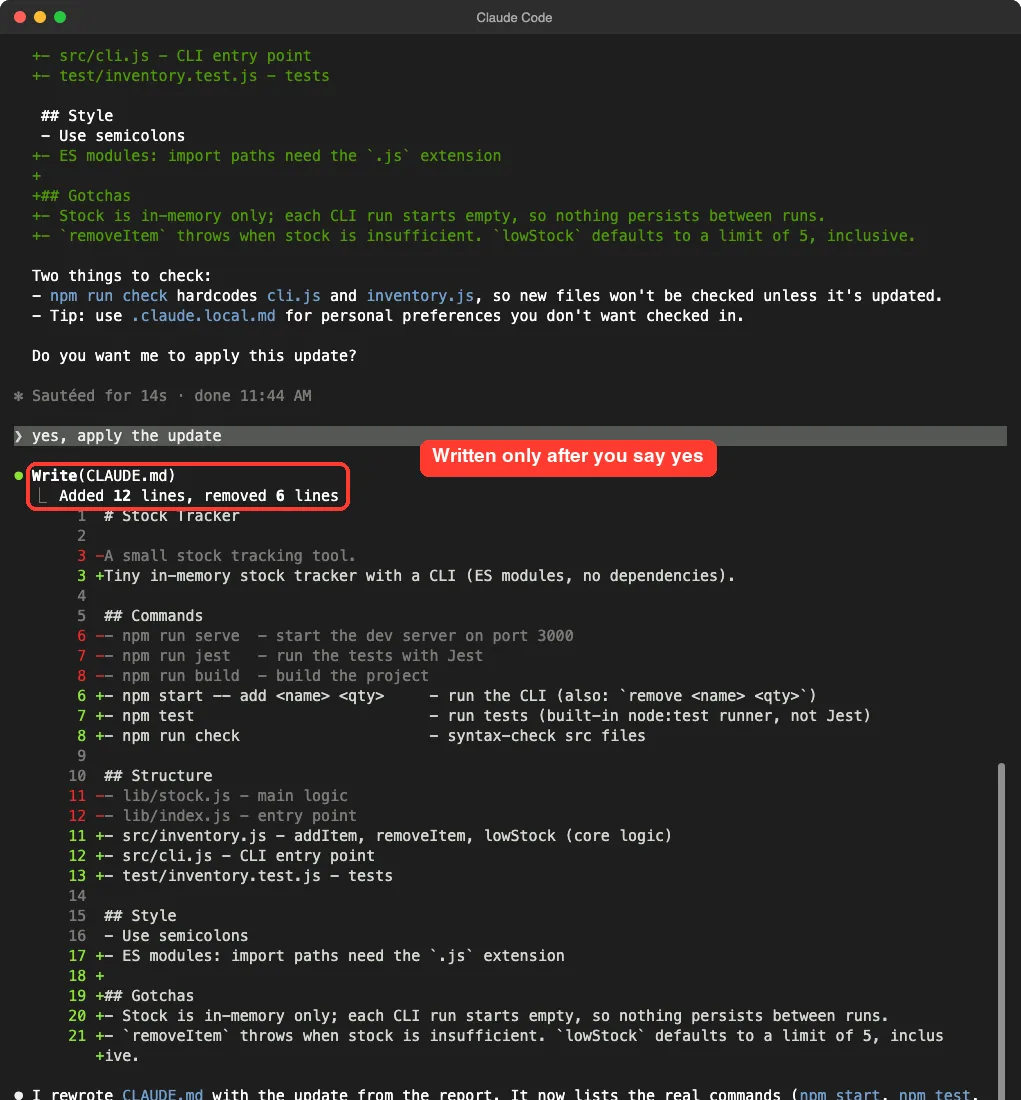
Afterwards we opened the file ourselves and checked it. It now lists npm start, npm test and npm run check, points to src/inventory.js and src/cli.js, and carries a short Gotchas section. Every command in it runs.
One small note from the report is worth repeating. It warned that npm run check hardcodes two file names, so a new file would not be checked until the script is updated. That is a useful catch that goes beyond CLAUDE.md itself.
Step 4: Capture Learnings With /revise-claude-md
The second tool works at the end of a session. In a fresh session we told Claude a fact: node --test test/ fails on this Node version, while plain node --test works. We asked it to run npm test to confirm, and all three tests passed.
Then we ran the command. In the session it showed up with the plugin name in front, as /claude-md-management:revise-claude-md. That is how Claude Code tells plugin commands apart from your own.
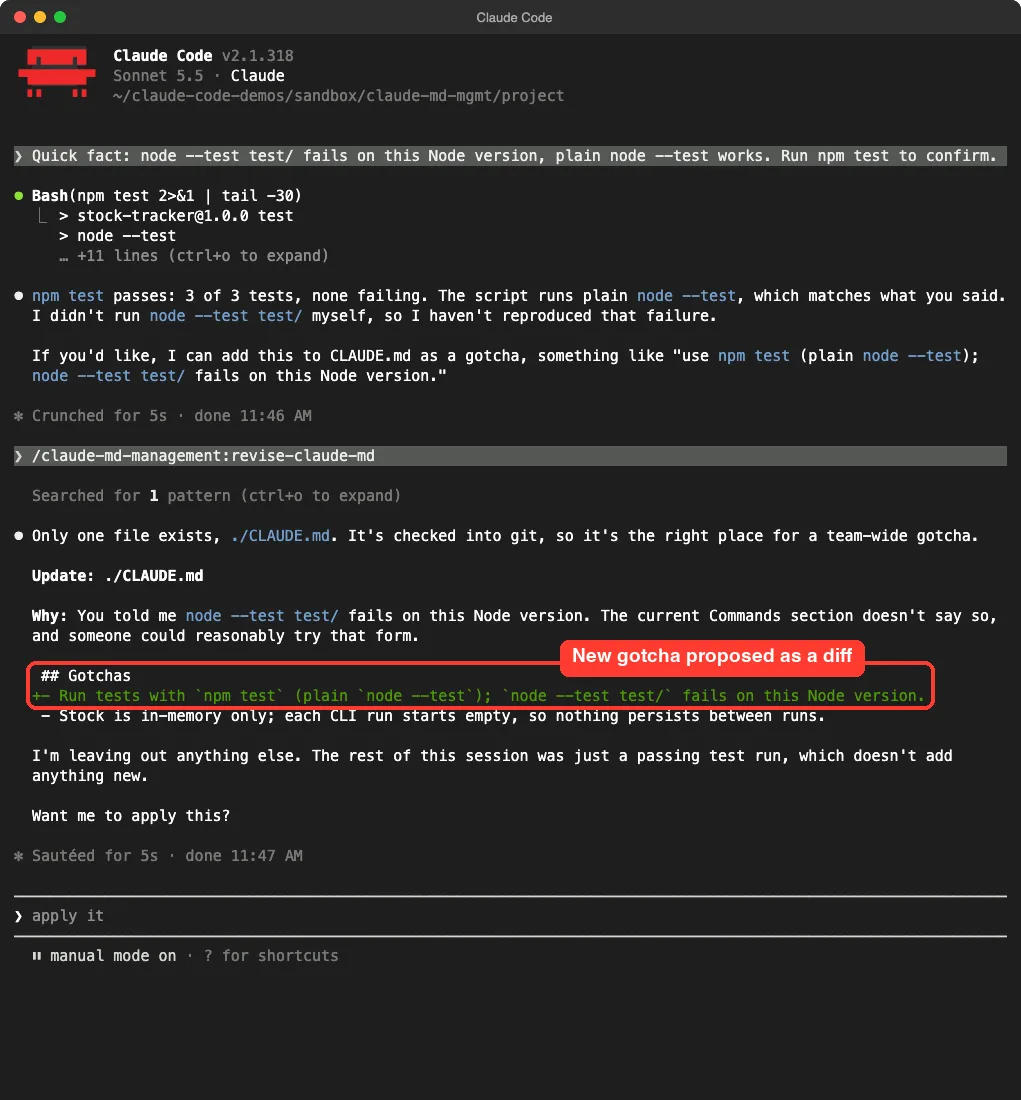
It picked the right file, explained why the line was worth adding, and proposed one new line under Gotchas. It also said it was leaving out the rest of the session because a passing test run added nothing new.
We did not apply this second change. The demo stops at the proposal, and we confirmed afterwards that the file was unchanged. The first change, from the audit, is the one we applied and checked.
Honest note on that session
Before the command ran, Claude said it had not reproduced the failing node --test test/ call itself. It had only confirmed that npm test passes. So the proposed gotcha repeats what we told it, not something it measured.
That is fine for a demo, but it shows the limit. The command records what the session said, so make sure the session said something true.
How the Whole Flow Fits Together
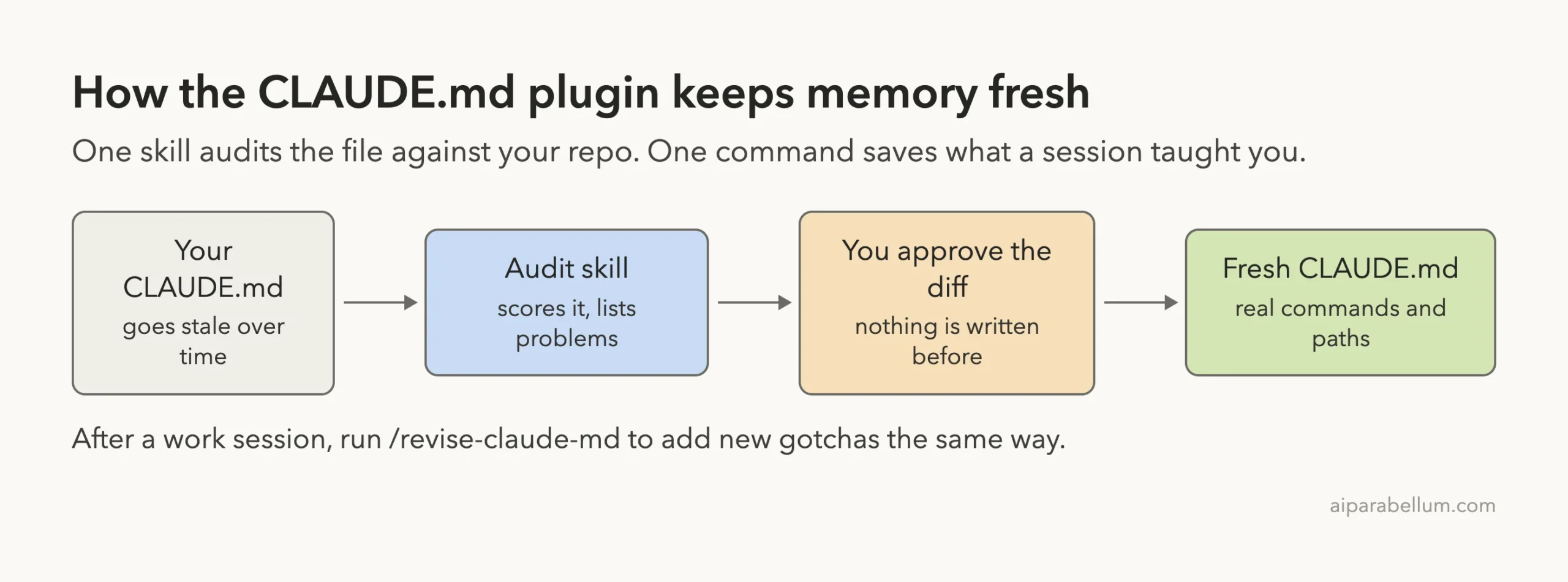
Think of the plugin as a careful editor for your project memory. It reads, compares, proposes and waits. You stay in charge of what is saved.
What It Costs and What It Adds
The official docs describe how skills work: Claude sees each skill name and description every turn, and the full text loads only when it is used. That costs a few tokens even when you never use the skill.
The plugin has no hooks and no servers, so it runs nothing in the background. It only does work when you ask for an audit or run the command. Our other guides on skills versus plugins and permission modes explain the trade-offs in more detail.
| Part | What it does | Cost to you |
|---|---|---|
| Skill name and description | Lets Claude know when to offer an audit | A small amount of context each turn |
| Skill and reference files | Loaded when the skill runs | Tokens only when used |
| Command file | Loaded when you run /revise-claude-md | Tokens only when used |
| Hooks and servers | None in this plugin | Nothing |
| File edits | Need your approval in default mode | A reply or a click |
What We Liked and What to Watch
We liked how concrete the audit was. It compared the file with the real package.json and folders instead of giving generic advice. We also liked that both tools propose a diff first.
There are a few things to watch.
- It can look outside your project. Our first run asked to list the global
CLAUDE.md, so limit the scope in your prompt. - Scores are a guide, not a law. They come from a language model following a rubric, so a second run can give a different number.
- It writes whole-file updates. Our apply step used a Write of the full file, so read the diff and check the result with git.
- It only knows what it can read. Facts that live in your head, such as how a deploy really works, will not appear unless you say them.
We tested one small project and two short sessions. We cannot say how it behaves in a large monorepo with many nested files.
Try It Yourself
Practice on a copy of a real project, or build a small demo like ours. Put it in a git repository first so you can undo anything.
- Create a folder with a few files and a
CLAUDE.mdthat you know is a little out of date. - Run
git initand commit. - Start Claude Code and load the plugin.
- Paste the prompt below and read the report.
- Check each line of the diff against your project, then approve it.
audit my CLAUDE.md files. Only look at files inside this folder, nothing outside it.After your next real work session, run /revise-claude-md and keep only the lines you would be happy to see in every future session. For ideas on what belongs there, see how to create project memory in Claude Code.
Common Mistakes
- Approving without reading. The diff takes a minute to read, and that minute is the safety net.
- Letting it grow too long. The plugin itself says a good file is short, with one line per idea, so cut anything obvious.
- Skipping git. You cannot compare before and after without a commit.
- Putting personal tastes in the shared file. The skill suggests
.claude.local.mdfor preferences you do not want to share, and you should add it to your.gitignore. - Recording guesses. If you have not checked a fact, do not let it into the file.
Pro Tips
- Run the audit after a big refactor, a tool change or a folder rename, because that is when files drift.
- Keep commands copy-paste ready. The rubric rewards commands that run and punishes vague ones.
- Ask for the report only. You can say “audit, but do not propose edits” if you just want the score.
- Pair it with a team habit: run the audit before each release, and commit the improved file.
A short CLAUDE.md that is true beats a long one that is out of date.
Who Should Install the Claude MD Management Plugin
Install it if you use Claude Code on the same project every week and your CLAUDE.md has not been touched in a while. It is also a good fit for teams, since a shared file that is wrong costs everyone time. You can read more about Claude on our tool page.
Skip it if your file is brand new or only a few lines long. In that case, typing a short request such as “check my CLAUDE.md against the repo” gets you most of the way there.
Honestly, the plugin is a packaged set of good instructions. It does not unlock a hidden power, but it saves you from rewriting those instructions each time.
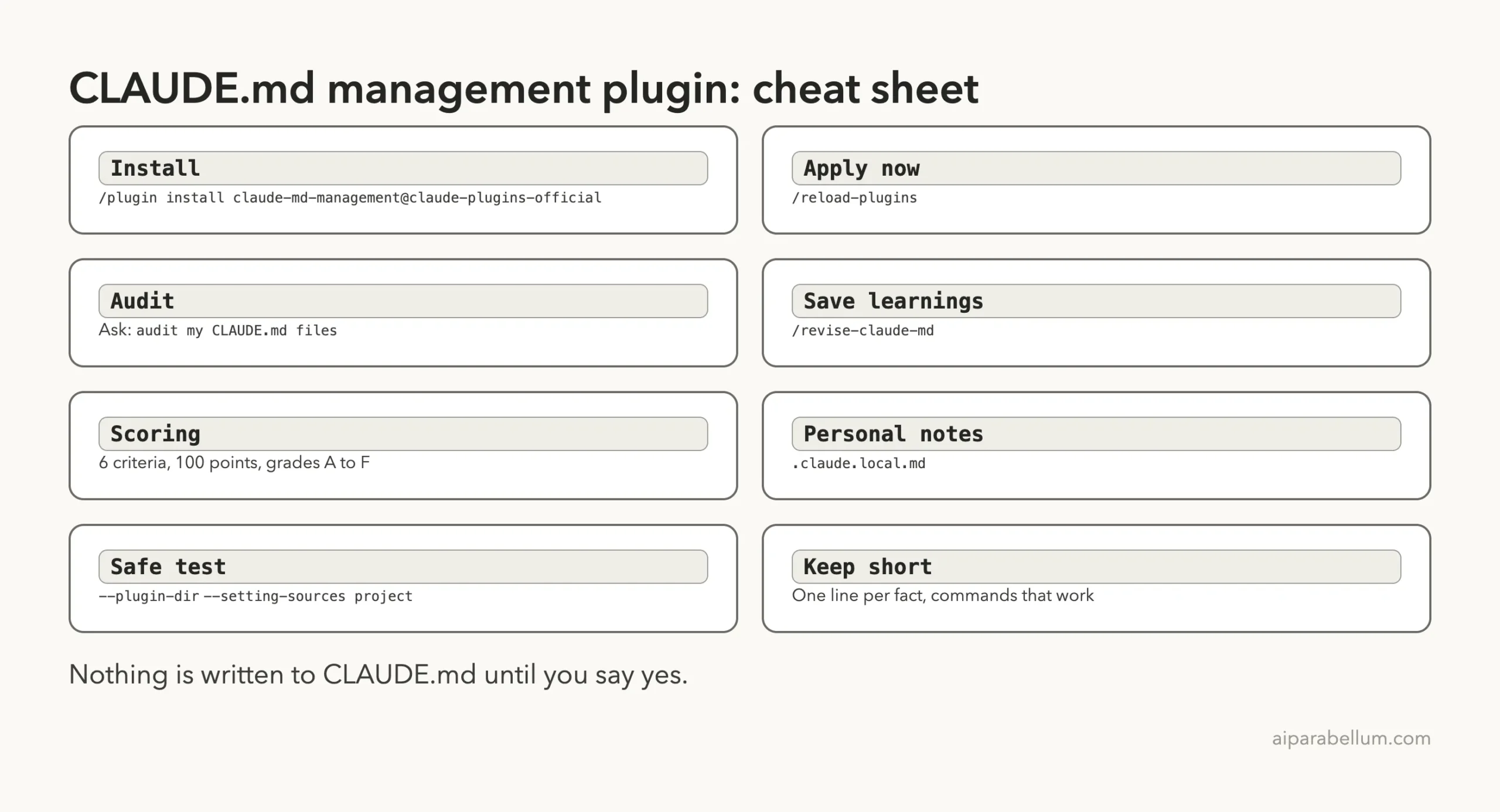
Cheat Sheet
Frequently Asked Questions
What does the claude md management plugin do?
It gives Claude Code a skill that audits and scores your CLAUDE.md files against the real project, and a command, /revise-claude-md, that captures learnings from the current session. Both propose a diff before changing anything.
Is the plugin made by Anthropic?
Yes. It sits in the official claude-plugins-official marketplace, and the plugin manifest lists Anthropic as the author.
Does it change my CLAUDE.md without asking?
In our test it did not. The audit showed a report and a diff and waited, and the file changed only after we replied yes. The revise command also asked first, and when we did not approve, the file stayed the same.
Will it read my global CLAUDE.md?
It can. The skill treats ~/.claude/CLAUDE.md as one of the file types to look for, and our first run asked to list it. Say “only look at files inside this folder” if you want to avoid that.
How do I turn it off?
Run claude plugin disable in your shell, or switch it off on the Installed tab in /plugin. You can also remove it completely with the uninstall option.
Conclusion
The claude md management plugin took a stale CLAUDE.md from a failing 28 out of 100 to a file whose commands and paths all match the project, and it only wrote the change after we approved the diff. It is a light, official add-on with no hooks and no background work. Install it if your project memory drifts, limit its scope in your prompt, verify every line before you say yes, and keep git close so you can always compare before and after.