If you are searching for a Claude Code finance plugin, the official marketplace already lists more than a dozen, from QuickBooks and Carta to BlackRock, Vanguard, LegalZoom and GovTribe. This guide explains what each one does, which parts we ran on a Mac, and which parts only work after you sign in to the maker’s own service.
This guide is part of our Claude Code tutorials. Find more add-ons in our Skills Directory.
Tested with Claude Code v2.1.319 on 2026-11-09 (macOS).
We read the hooks, scripts and connection files of every plugin first. Then we loaded thirteen of them, plus one community equity research command, into a throwaway sandbox, which added 120 skills. We never signed in to any vendor, never typed a key and never connected a real account, so anything about live books, portfolios, cap tables or client data comes from each plugin’s own files and README.
Quick Summary: Finance, Legal and Investing Plugins at a Glance
These plugins are not calculators. Each one is a bundle of instructions (skills) plus, in most cases, a web address that connects Claude to a company that already holds your data. Without that company’s account, the skills have nothing to read.
| Plugin | Maker | What it does | Account needed? | Install command |
|---|---|---|---|---|
| intuit-quickbooks | Intuit | Business health briefings, overdue invoice reminders, payroll help | Yes, QuickBooks connector | /plugin install intuit-quickbooks@claude-plugins-official |
| carta-cap-table | Carta | Cap tables, grants, SAFEs, 409A history, waterfall scenarios | Yes, Carta sign-in | /plugin install carta-cap-table@claude-plugins-official |
| carta-investors | Carta | Fund data, benchmarks, regulatory reports, AGM decks | Yes, Carta sign-in | /plugin install carta-investors@claude-plugins-official |
| wingspan | Wingspan | Contractor payments, what you owe, draft payables | Yes, OAuth sign-in | /plugin install wingspan@claude-plugins-official |
| pigment | Pigment | 37 skills for planning models, formulas and boards | Yes, your workspace MCP address | /plugin install pigment@claude-plugins-official |
| blackrock-advisor-center-plugin | BlackRock | Portfolio review, benchmarks, wealth projections for advisors | Yes, Advisor Center account | /plugin install blackrock-advisor-center-plugin@claude-plugins-official |
| vanguard-advisor-tools | Vanguard | Match model portfolios to a client need, one-page prep | Yes, advisor connector | /plugin install vanguard-advisor-tools@claude-plugins-official |
| zocks-advisor | Zocks | Seven client skills built on meeting notes | Yes, Zocks account | /plugin install zocks-advisor@claude-plugins-official |
| bigdata-com | Bigdata.com | 27 research skills: earnings, memos, sectors, IPOs | Yes, Bigdata sign-in | /plugin install bigdata-com@claude-plugins-official |
| linq-alpha | LinqAlpha | Picks the right data source for fundamentals and filings | Yes, LinqAlpha account | /plugin install linq-alpha@claude-plugins-official |
| chronograph-gp | Chronograph | Fund reviews, markups, TVPI breakdowns for GP teams | Yes, Chronograph account | /plugin install chronograph-gp@claude-plugins-official |
| chronograph-lp | Chronograph | Cashflow forecasts and commitment pacing for LP teams | Yes, Chronograph account | /plugin install chronograph-lp@claude-plugins-official |
| legalzoom | LegalZoom | AI contract review, plus a path to a LegalZoom attorney | Review: no. Attorney: yes | /plugin install legalzoom@claude-plugins-official |
| gc-ai | GC AI | Ask questions and run review playbooks on your own legal files | Yes, GC AI account | /plugin install gc-ai@claude-plugins-official |
| govtribe | GovTribe | Government contract research, bid decisions, proposals | Yes, GovTribe connector | /plugin install govtribe@claude-plugins-official |
| trading-ideas | quant-sentiment-ai (community) | One /trading-ideas:research command that writes an equity report from web searches | No, only web search | /plugin marketplace add quant-sentiment-ai/claude-equity-research then /plugin install trading-ideas@claude-equity-research-marketplace |
Nothing here is financial, tax or legal advice. These tools produce drafts and analysis that a qualified person should check.
What We Ran and What Comes From the Docs
| Item | Status |
|---|---|
| Reading hooks, scripts and connection files of all plugins | We did it |
| Loading 13 plugins plus the equity research command and listing 120 skills | We ran it |
| Seeing which connections fail or wait for a login | We ran it |
LegalZoom /review-contract on a made-up NDA | We ran it, no account needed |
| QuickBooks and Pigment skills with no connection | We ran them, and they explained what was missing |
| Carta plugins | Read only, not loaded |
| Real books, portfolios, cap tables, matters and contract bids | From each plugin’s README and files, not tested |
How We Kept Our Own Setup Safe
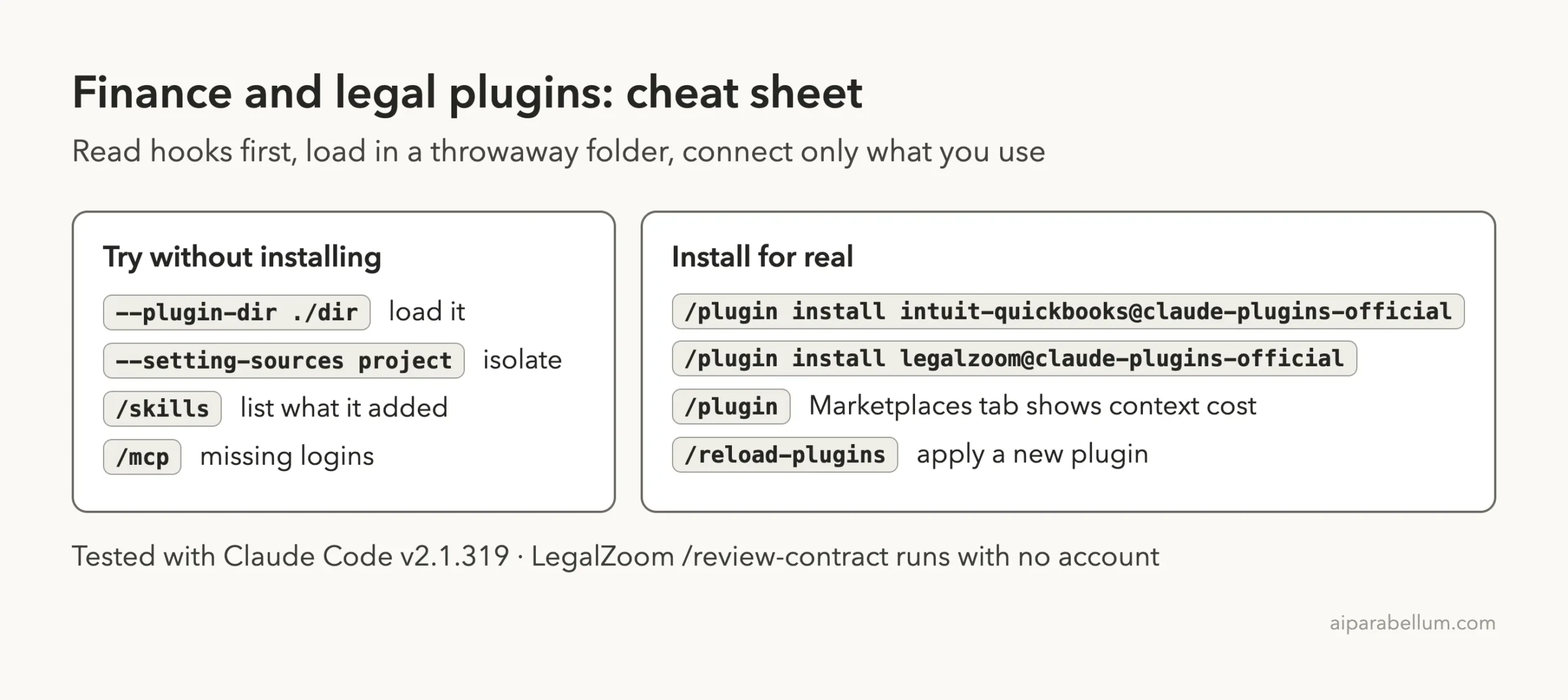
Finance plugins can touch money, so we were careful. We cloned the official marketplace and each plugin’s repository into a sandbox folder, pinned to the exact commit the marketplace lists, and loaded them with --plugin-dir and --setting-sources project. Nothing was installed into our own ~/.claude folder.
Apart from Carta, none of the plugins ship hooks. A few do ship small helper scripts, such as the calculation scripts inside the Bigdata plugin and the PDF script in the Vanguard plugin. A search for network or shell calls in those scripts found none, apart from a connection check script in GovTribe that we did not run.
What a Finance or Legal Plugin Really Is
A plugin from the plugin marketplace is a folder of skills, sometimes with commands, helper agents and a connection address. Anthropic’s plugins guide says the name and description of every skill sit in Claude’s context on each turn, even when you never use it. That is why a big bundle costs usage.
The /skills screen shows this clearly. After loading the fourteen folders, it listed 120 skills, each marked as locked by its plugin, with a rough size of 160 to 270 tokens for the Bigdata ones.
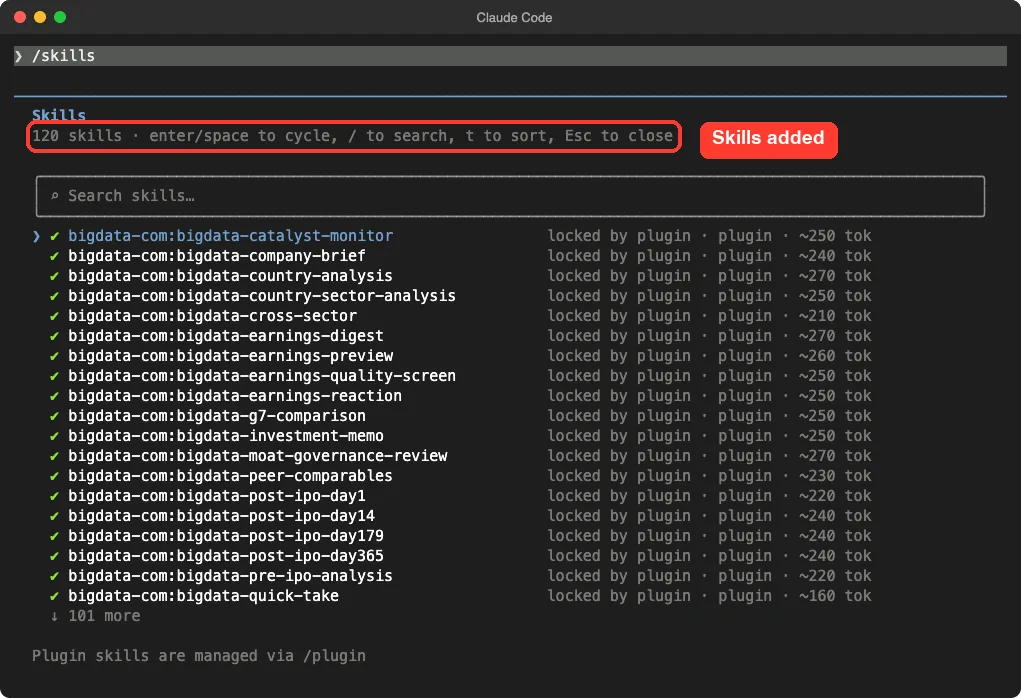
Pigment alone adds 37 skills and Bigdata adds 27. If you only need one job done, install the one plugin that does it.
Which Connections Need a Login
The /mcp screen tells you the truth about every plugin. Ten of our plugins define their own connection. Six showed “needs authentication” and four showed a red failure mark, which is expected, because we gave them nothing to connect to.
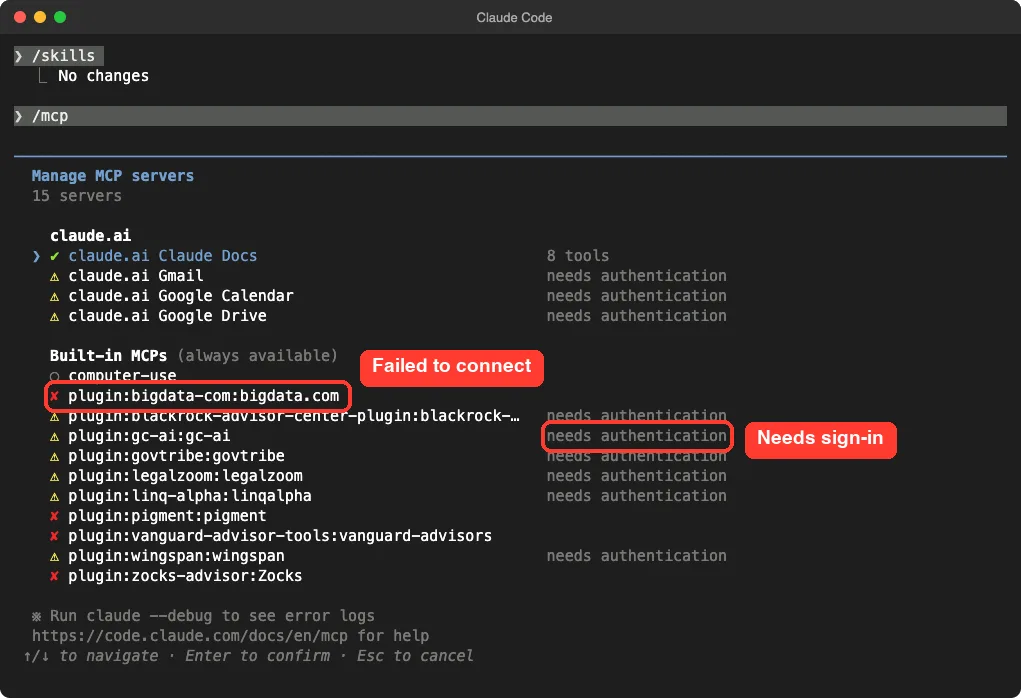
Two things stand out. The Pigment connection address contains a placeholder, {your-mcp-id}, which you replace with the address from your own Pigment workspace. QuickBooks and Chronograph define no connection of their own: they rely on a connector you add in your Claude account.
Plugins for Small Business and Startup Finance
QuickBooks: Health Checks, Invoices and Payroll
The QuickBooks plugin has ten skills. They cover a business health briefing, industry benchmarks, overdue invoice reminders, turning an email into an estimate or invoice, and payroll help such as onboarding an employee or changing base pay. Its description says pay changes happen with confirmation.
We asked the health check skill what it could do with no connection. It listed the inputs it needs (period, scope, accounting method), said none of the QuickBooks tools were loaded, pointed to its own setup skill and promised not to invent numbers. That is the behavior you want from a finance tool.
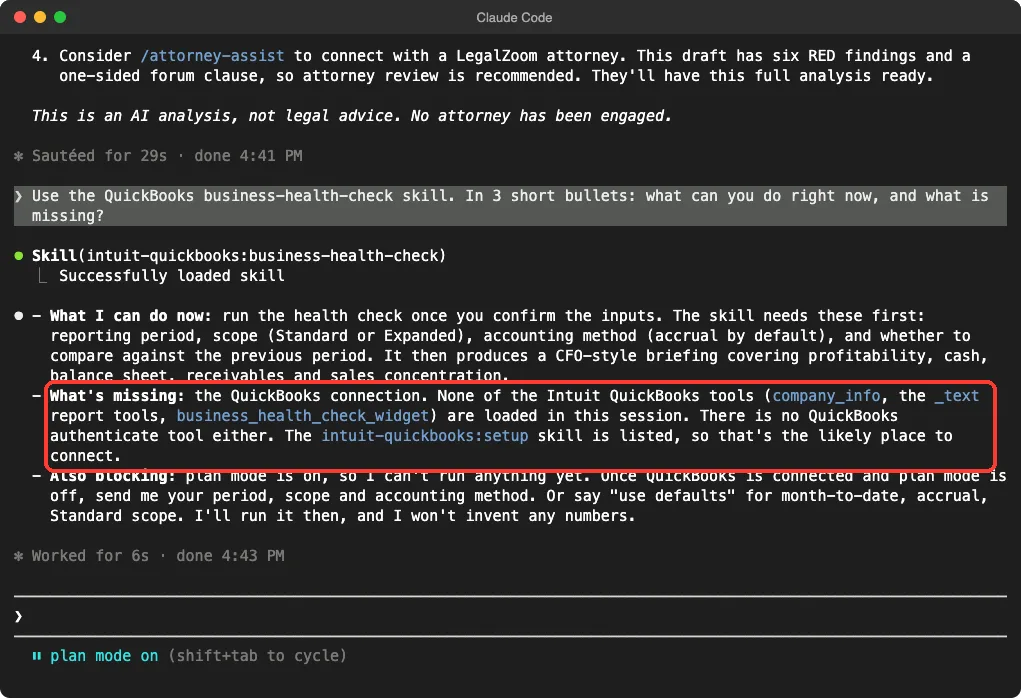
The setup file explains that you connect QuickBooks in your Claude account’s connector list first. It also warns that a QuickBooks server added by hand with claude mcp add will override the connector and fail to sign in.
Carta: Cap Tables and Fund Data
Carta ships two big plugins. The cap table plugin has 21 skill folders covering grants, vesting, SAFE and note conversion, issuing securities, 409A history, waterfall scenarios and compensation benchmarks. The investors plugin covers fund data, co-investor reports, tear sheets, consolidated financial reports and AGM decks.
We did not load either one. The reason is in the hooks section below.
Wingspan: Paying Contractors
The Wingspan plugin has eight skills for finding contractors, checking what you owe, listing who still owes a W-9, and onboarding people. Its payment skill creates draft payables only, and the description says nothing is paid. The connection uses OAuth, so you sign in on first use.
Pigment: Planning Models
Pigment is a planning tool, and its plugin is the most knowledge-heavy of the group. Its 37 skills teach Claude Pigment’s formula language, how to design boards, how to audit an application and how to fix slow models. Its README says you must first turn on MCP in your workspace under Settings, Integrations, MCP.
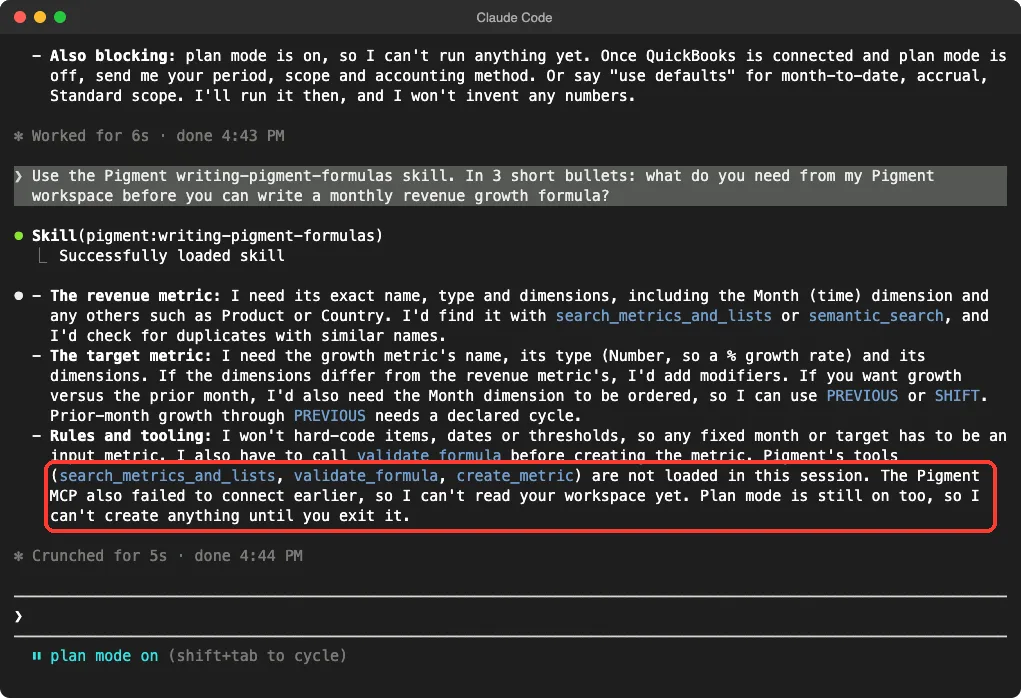
We asked the formula skill what it needs before writing a monthly revenue growth formula. It named the revenue metric, its dimensions and the time dimension, and said it would validate a formula before creating anything. It also noted that Pigment’s tools were not loaded because the connection had failed.
Plugins for Wealth and Advisor Teams
Three plugins are built for people who advise clients. They are the most tightly tied to their makers, so read their terms before you point real client data at them.
- BlackRock: six skills for Advisor Center, including portfolio review with snapshot, stress scenarios and opportunity checks, guided benchmark choice, portfolio building and wealth projections. It needs an Advisor Center account. The source repository is public.
- Vanguard: one skill,
model-prep, that matches a client need to Vanguard model portfolios and writes a one-page summary, with a small script that builds a PDF. Its own rules say it will not name a single best model or quote performance it does not have. - Zocks: seven skills built on advisor meeting notes, such as attrition risk, held-away asset radar, a household review pack and a tax opportunity scan. The repository is public, and the connection is a hosted address.
In our run the Vanguard and Zocks connections showed as failed and BlackRock showed as needing authentication. We did not go further, because that would need real accounts.
Plugins for Investing and Market Research
Bigdata.com and LinqAlpha
Bigdata.com brings 27 research skills, such as company briefs, earnings previews and digests, an earnings quality screen, peer comparables, country and sector analysis, and IPO checks at day 1, 14, 179 and 365. Several skills include small Python scripts for discounted cash flow and quality screens, which run on the data the connection returns.
LinqAlpha has three skills: setup, research and remove. The research skill chooses the right data source for fundamentals, estimates, transcripts and filings. Saving a default source is opt-in, and the /linq-alpha:remove command deletes it.
Chronograph for Private Capital
Chronograph splits into two plugins. The GP plugin has five skills for portfolio company one-pagers, fund quarterly review packs, markup and markdown briefs, TVPI attribution and budget versus actuals.
The LP plugin has four: cashflow forecasts, commitment pacing, look-through exposure scans and GP meeting prep. Both need a Chronograph account.
A Community Command: Equity Research
The equity research plugin is not from a financial company. It adds one command, /trading-ideas:research, which is limited to web search and web fetch and asks Claude to write a report with a buy, sell or hold rating and a price target.
We loaded it and read the command file, but we did not run it. A rating built from web searches is an opinion, not data, so treat any output as a starting point for your own research.
Legal and Government Contract Plugins
LegalZoom: Contract Review That Needs No Account
LegalZoom is the one plugin in this group we could test fully, because its /review-contract command is AI analysis only. Its file says it never calls LegalZoom’s servers and never pretends an attorney is involved. The separate attorney-assist skill is the part that connects to a real LegalZoom attorney.
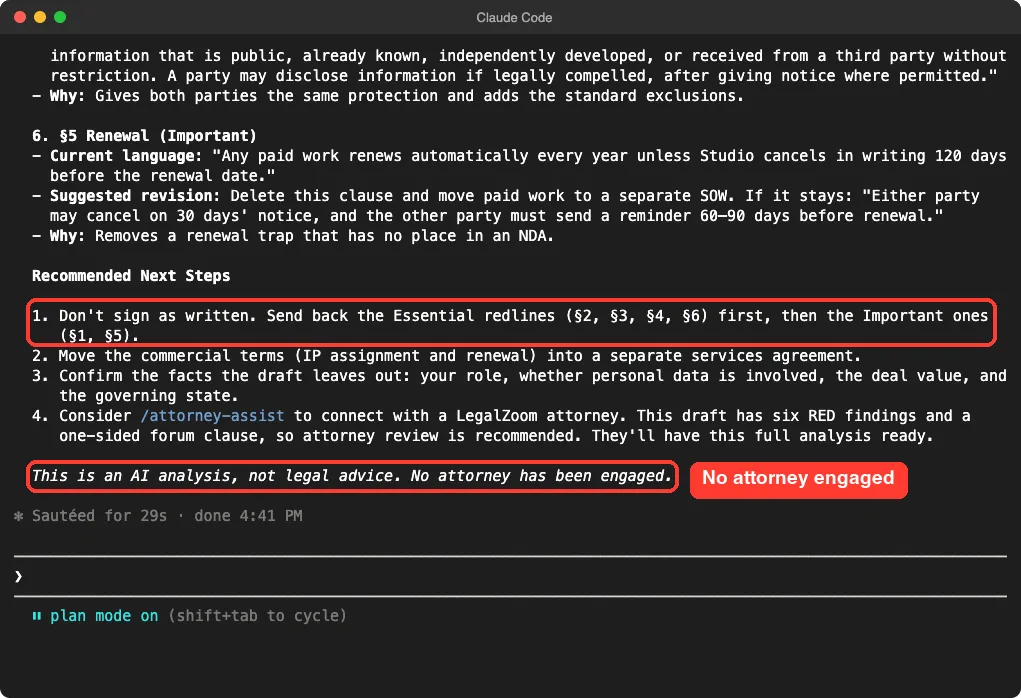
We wrote a short, made-up NDA with traps: a term that lasts forever, unlimited liability, an automatic yearly renewal and a court chosen by one side. The command finished in about 29 seconds and returned risk-ranked findings with the current wording, a suggested replacement and a reason for each clause.
It marked sections 2, 3, 4 and 6 as essential and sections 1 and 5 as important, then advised us not to sign as written. It ended with a clear line saying it was an AI analysis, not legal advice, and that no attorney had been engaged.
GC AI and GovTribe
GC AI has three skills: ask a question grounded in your own legal files, group documents into a matter, and review a document against a playbook. It needs a GC AI account, since the knowledge base is yours.
GovTribe has eight skills for government contracting. They cover market intelligence, capture and bid decisions, pricing data, proposal workflows and writing. The plugin also ships a setup guide and a validation script that we did not run.
The Carta Hooks: Read Them Twice
Every other plugin we checked had no hooks. Carta’s plugins are different. Their hooks run at session start, before and after Carta tool calls and when you submit a prompt, through a small shell script that starts a prebuilt program.
Carta’s own hook README lists what each hook does: inject an instruction to load skills, remember which skills were used, cache command lists and remember a company id. It also says one hook injects extra instrumentation fields into Carta tool calls. The repository publishes the source and a checksum list for the programs.
That may be completely fine for you. We simply chose not to run prebuilt programs in a test, so we cannot say how well the Carta plugins work. We only read the files.
Which Plugin Should You Start With?
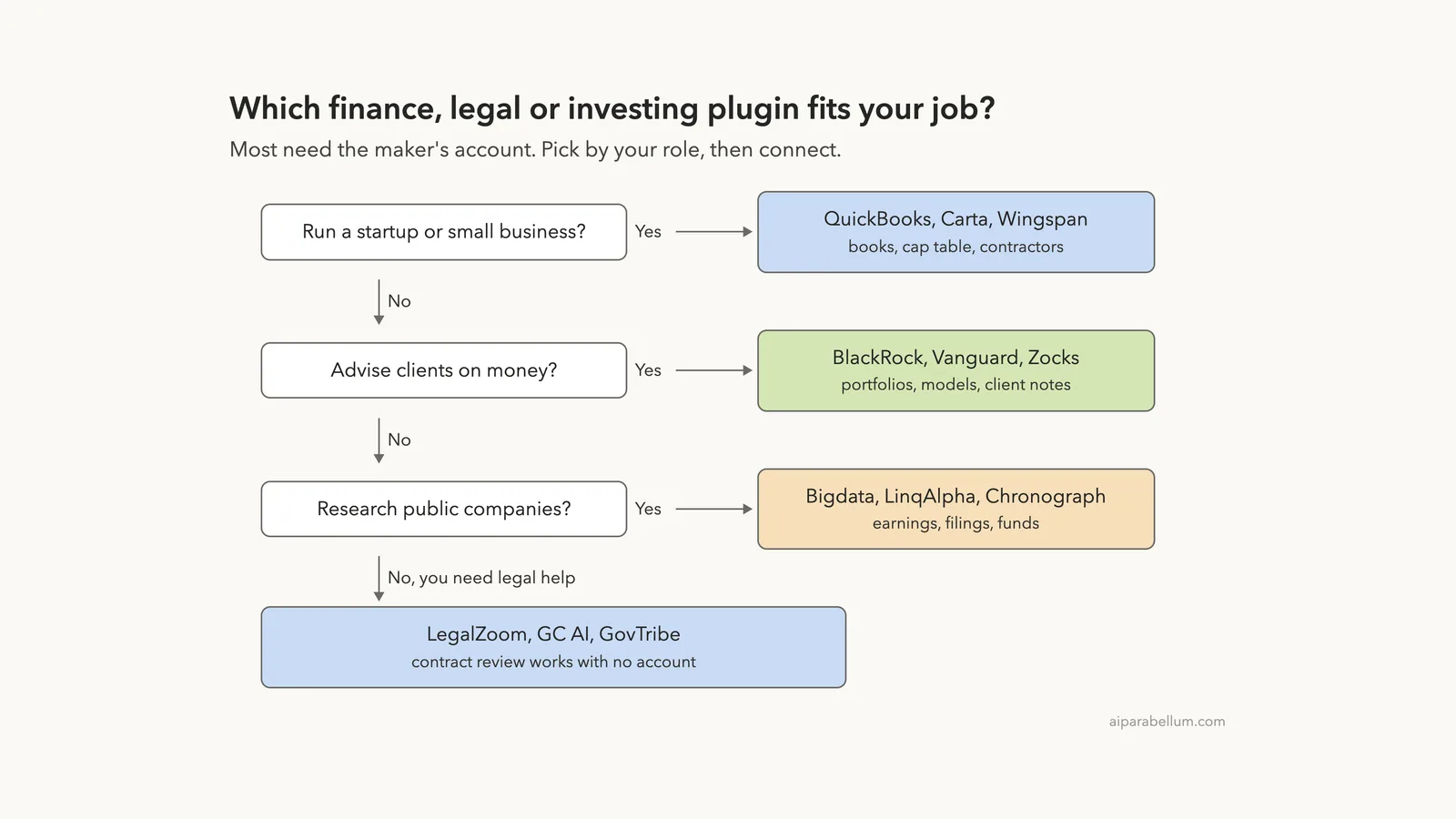
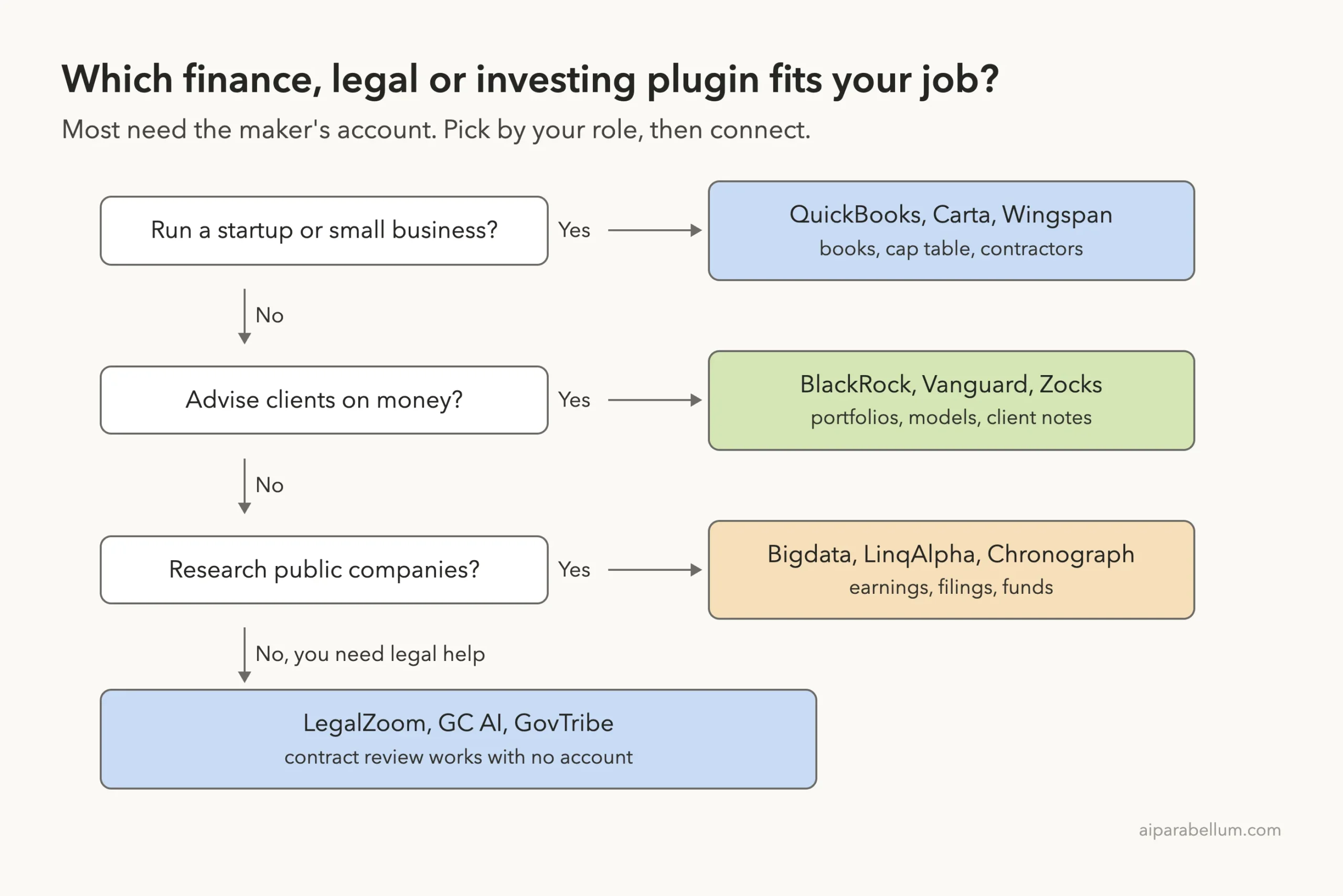
Start from your job, not from the logo. Connect one account, try one skill on non-sensitive data, then decide whether to add more.
Finance plugins are only as useful as the account behind them, so connect one, test on made-up data and keep a person in charge of every payment.
Try It Yourself
The safest first step is the LegalZoom review, because it needs no account. Make a short, made-up contract in a throwaway folder, load only that plugin and run the command. Do not paste a real client contract.
mkdir -p ~/claude-demos/legal && cd ~/claude-demos/legal
git clone --depth 1 https://github.com/anthropics/claude-plugins-official.git
# find the LegalZoom plugin folder named in the marketplace file, then:
claude --plugin-dir ./path/to/legalzoom --setting-sources project
Inside the session, run /review-contract demo-nda.txt and ask Claude to explain each red finding in plain English. Then run /mcp to see which connections would need a login.
Common Mistakes
- Installing a plugin and expecting numbers. Without the maker’s account, a finance skill can only ask questions.
- Loading everything at once. Pigment and Bigdata add dozens of skills that cost context on every turn.
- Adding a connector by hand. QuickBooks warns that a manual
claude mcp addserver overrides the claude.ai connector and fails to sign in. - Trusting a rating. The equity research command produces a web search opinion, not advice.
- Skipping the hooks. Always open
hooks/hooks.jsonbefore you install, as we did with Carta.
Pro Tips
- Use
/pluginand open the Marketplaces tab to see the context cost estimate before you install an official plugin. - Use the draft modes. Wingspan creates draft payables and the QuickBooks pay changes ask for confirmation, so keep those confirmations switched on.
- Keep client data out of tests. Use made-up files until you trust a plugin.
- Read the privacy details in our privacy guide before you connect real accounts.
- For related add-ons, see our guides to payments plugins, sales plugins and identity plugins.
Cheat Sheet
Frequently Asked Questions
Is there a Claude Code finance plugin that works without an account?
Only a few. In this group, LegalZoom’s contract review runs with no account, and the community equity research command needs only web search. Everything else connects to a service that holds your data.
Can a plugin move money or send invoices by itself?
Some can take actions. QuickBooks can send reminders and change pay, and Wingspan can create draft payables. Their descriptions mention confirmation or drafts, so review each step before you approve it.
Do these plugins give legal or financial advice?
No. LegalZoom’s review states it is an AI analysis and not legal advice. Treat every output as a draft for a qualified professional to check.
Why did some connections fail in your test?
We gave them no sign-in, no workspace address and no keys on purpose. Pigment, for example, needs your own MCP address in place of its placeholder.
How do I install one of these plugins for real?
Run the install command in the table, such as /plugin install intuit-quickbooks@claude-plugins-official, then /reload-plugins and /mcp to finish the sign-in. Anthropic’s discover plugins guide covers scopes and marketplaces.
Conclusion
The finance, legal and investing plugins are well-made instruction packs, but they are only as useful as the account behind them. We confirmed that fourteen plugin folders load cleanly, that the QuickBooks and Pigment skills refuse to guess without data, and that LegalZoom’s contract review gives a clear, risk-ranked result with no sign-in. Pick the one that matches your job, read its hooks, connect one account and keep humans in charge of every payment, contract and rating. Our Claude AI page covers the wider Claude family.