If you are searching for a Claude Code Auth0 plugin, you will find it in the official marketplace next to WorkOS, Duende, Vanta, two CrowdStrike plugins, CrowdSec and Zscaler. This guide explains what each one does, which parts we ran on a Mac, and which parts need your own account, tenant or login.
This guide is part of our Claude Code tutorials. Find more add-ons in our Skills Directory.
Tested with Claude Code v2.1.318 on 2026-11-08 (macOS).
We read every hook and connection file first. Then we loaded seven of the plugins into a throwaway sandbox, which added 44 skills, and asked four of those skills real questions about a tiny demo project. We never signed in anywhere, never typed a key and never touched a real tenant, so anything about live dashboards, policies or test results comes from each plugin’s own files and README.
Quick Summary: Identity, Compliance and Security Plugins at a Glance
These plugins help with three kinds of work: adding login to an app, proving your company follows security rules, and running security tools. Most of them are a bundle of instructions for Claude plus a link to a service you already pay for or run.
| Plugin | Maker | What it does | Account needed? | Install command |
|---|---|---|---|---|
| auth0 | Auth0 | 1 skill that adds login, MFA, roles and token checks to an app | Yes, an Auth0 tenant for the real setup | /plugin install auth0@claude-plugins-official |
| workos | WorkOS | 2 skills for AuthKit, SSO, Directory Sync, roles, Vault and audit logs | Yes, a WorkOS API key and client ID | /plugin install workos@claude-plugins-official |
| duende-skills | Duende Software | 24 skills and 2 agents for IdentityServer, OAuth, OIDC and ASP.NET Core | No account for the skills themselves | /plugin install duende-skills@claude-plugins-official |
| vanta and vanta-mcp-plugin | Vanta | 3 skills plus 3 regional connections to fix failing compliance tests | Yes, a Vanta Admin sign-in | /plugin install vanta@claude-plugins-official |
| crowdstrike-falcon-foundry | CrowdStrike | 12 skills for building apps on the Falcon platform, plus hooks | Yes, Falcon access and the Foundry CLI | /plugin install crowdstrike-falcon-foundry@claude-plugins-official |
| crowdstrike-falcon-fusion | CrowdStrike | 7 skills to write and import Fusion workflows | Yes, a CrowdStrike account with Workflow API scope | /plugin install crowdstrike-falcon-fusion@claude-plugins-official |
| crowdsec | CrowdSec | 2 skills to run and debug CrowdSec, and to use its cloud API | No for the engine skill; Yes, a premium API key for the cloud API skill | /plugin install crowdsec@claude-plugins-official |
| zscaler | Zscaler | A connection with 402 tools, 20 commands and 42 skill files for Zscaler products | Yes, Zscaler credentials | /plugin install zscaler@claude-plugins-official |
What Is a Claude Code Auth0 Plugin and Its Security Cousins?
A plugin is a folder that can hold skills, hooks, commands and connections to outside servers. A skill is a set of instructions Claude loads when your question matches it. A hook is a script that runs on its own at certain moments, so it deserves a careful read.
Our guide to the MCP guide explains the connection layer, and our plugin install guide covers scopes and updates.
Anthropic’s docs on discovering plugins, on plugins and on MCP servers describe how these pieces fit together. The key point is that a plugin runs with your permissions, so read what it bundles before you trust it.
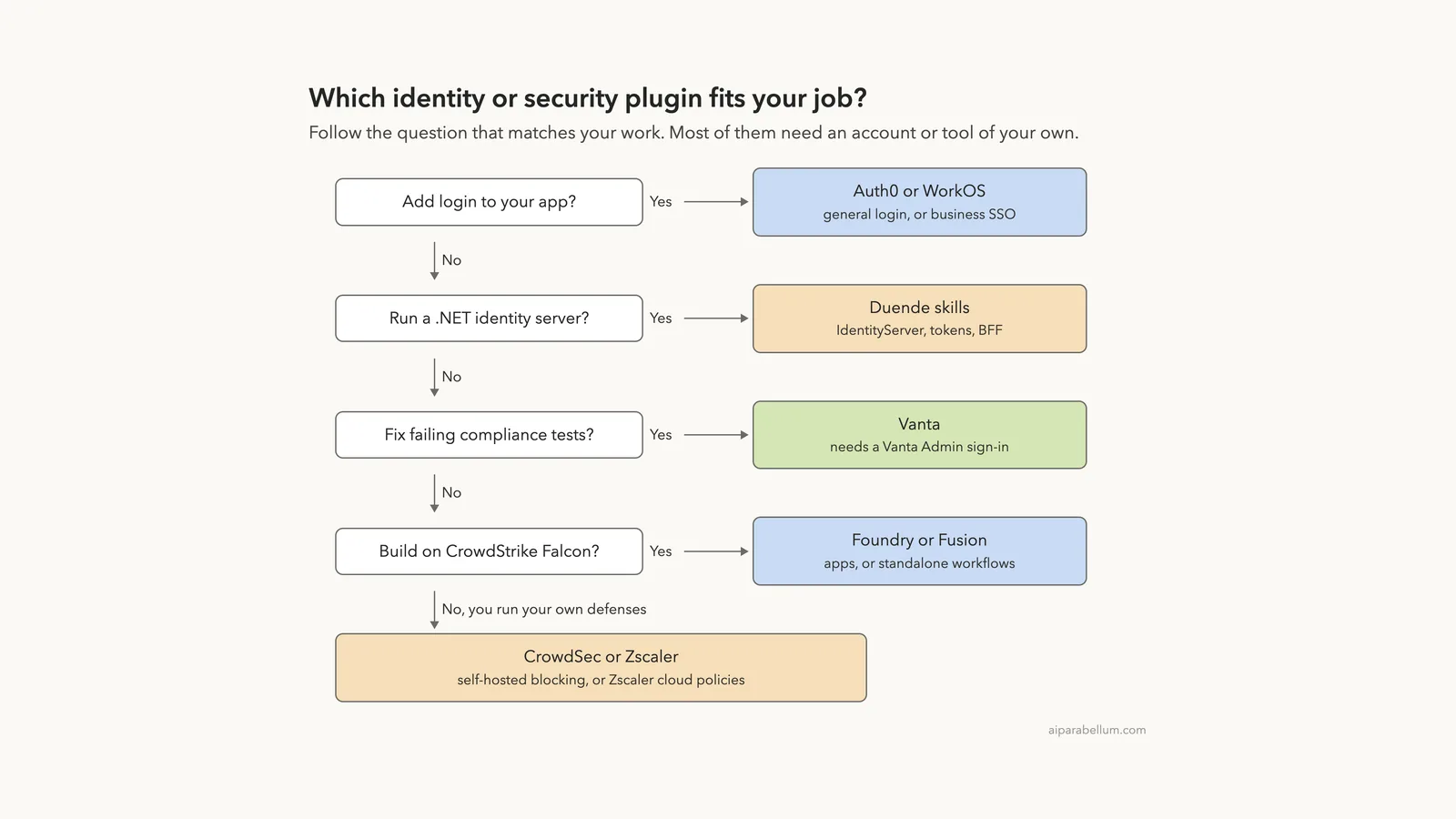
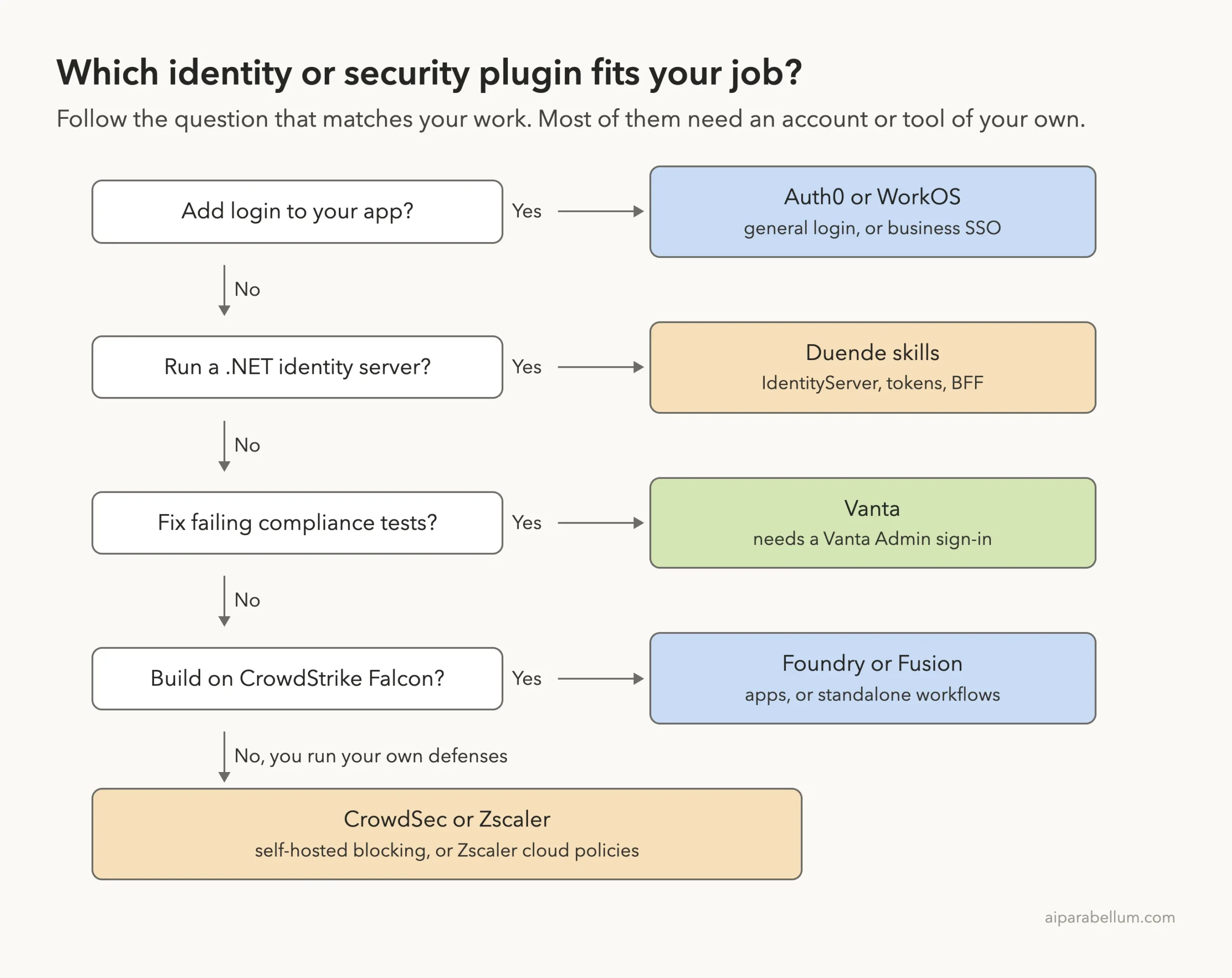
Which Plugin Fits Which Job?
Start from the job, not from the logo. If your team already uses one of these services, use that one and skip the rest.
How We Tested Without Touching Our Setup
We cloned each plugin’s repository at the exact commit the official marketplace points to. Then we started Claude Code in an empty demo project with one --plugin-dir flag per plugin plus --setting-sources project, so nothing from our own Claude setup mixed in. We never ran /plugin install, and we kept Claude in plan mode so it could read files but not change them.
The demo project has three tiny files. app.js is a bike shop admin site with a homemade login.
Program.cs is an orders API that only has cookie login. main.tf is a one-bucket Terraform file.
| Plugin | Version we tested | Marketplace commit | Commit date |
|---|---|---|---|
| auth0 | 2.6.0 | 7b3821d | 2026-10-15 |
| workos | 0.7.3 | e25141b | 2026-09-18 |
| duende-skills | 0.3.0 | fb32edc | 2026-09-08 |
| vanta | 1.0.0 | 345d86b | 2026-05-13 |
| crowdstrike-falcon-foundry | 1.6.0 | 61572f3 | 2026-10-01 |
| crowdstrike-falcon-fusion | 1.3.0 (read only, not loaded) | 38527dc | 2026-10-01 |
| crowdsec | 0.3.0 | 9bca8a7 | 2026-10-28 |
| zscaler | 0.15.4 | 6340cd2 | 2026-08-19 |
The Vanta commit is the oldest of the set, from May. That is not a problem by itself, because the plugin is a thin wrapper around Vanta’s hosted server, but it is worth knowing.
Installing takes seconds, but every plugin here is idle until you connect it to something real.
What We Read Before Running Anything
Hooks run commands on your computer, so we read them first. Here is what we found, plugin by plugin.
- Auth0: no hooks and no connection file. It has one skill with a large references folder, plus a few helper scripts.
- WorkOS: no hooks. A connection file points to
https://mcp.workos.com/mcp, but that server did not appear in our/mcplist. - Duende: no hooks and no connection file. It has 24 skills and 2 agents.
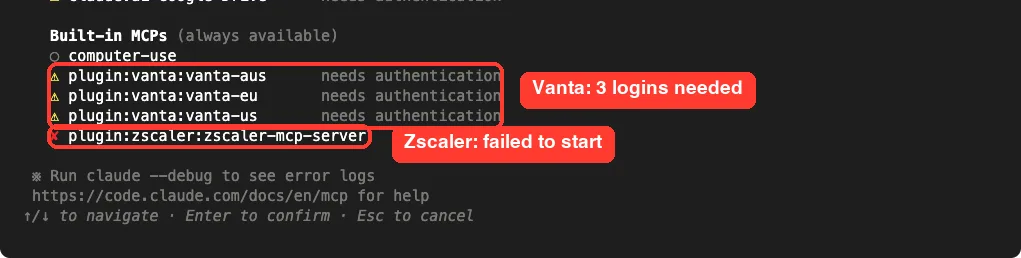
- Vanta: no hooks. The connection file lists three servers, for the US, EU and Australia.
- CrowdStrike Foundry: hooks on
SessionStart,UserPromptSubmitandPreToolUse. They check the Foundry CLI version, suggest the right skill and add advice when a Foundry command is missing a flag. The README calls the command guard advisory, and we saw nothing in the scripts that sends data out. - CrowdStrike Fusion: the same style of hooks, plus a
SessionStartscript that builds a Python environment in~/.cache/claude-code-fusion/venvand installs packages from the public PyPI index. - CrowdSec: no hooks. Its privacy file says the plugin collects no personal data and runs locally.
- Zscaler: no hooks. Its connection starts a Python tool through
uvxand reads a.envfile from the plugin folder.
The Plugin We Did Not Load
We left the Fusion plugin out of the live session. Its start-up script writes to a cache folder in your home directory and installs packages, and our rule is that a test must not change the computer’s normal setup.
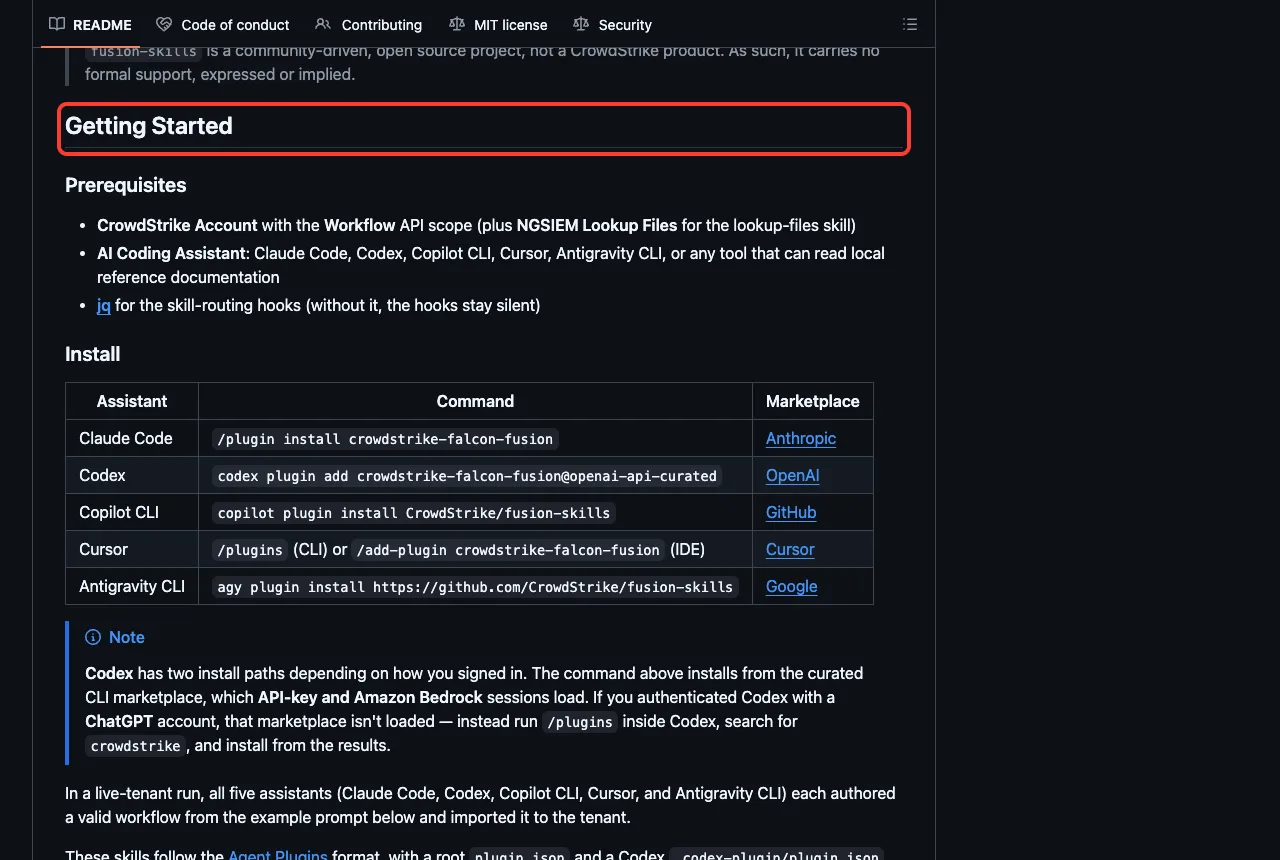
Its README says it is a community-driven open source project, not a CrowdStrike product, with no formal support. Its install table lists Claude Code, Codex, Copilot CLI, Cursor and Antigravity, and its prerequisites include a CrowdStrike account with the Workflow API scope and jq for the routing hooks.
What We Ran and What Comes From the Docs
| Item | Status |
|---|---|
| Loading seven plugins and listing 44 skills | We ran it |
| Seeing which connections need a login | We ran it |
| Auth0 skill on a demo login | We ran it, without an Auth0 tenant |
| WorkOS skill on the same app | We ran it, without a WorkOS key |
| Duende skill on a demo API | We ran it, without an identity server |
| CrowdSec and CrowdSec Service API skills | We ran them, without Docker or an API key |
| Vanta list tests command | We ran it; it asked for a region and stopped because we were not signed in |
| Foundry, Zscaler | Loaded only; no skill was asked a question |
| Fusion | Read only, not loaded |
| Real tenants, policies, test results and workflows | From each plugin’s README and files, not tested |
Loading Seven Plugins in One Session
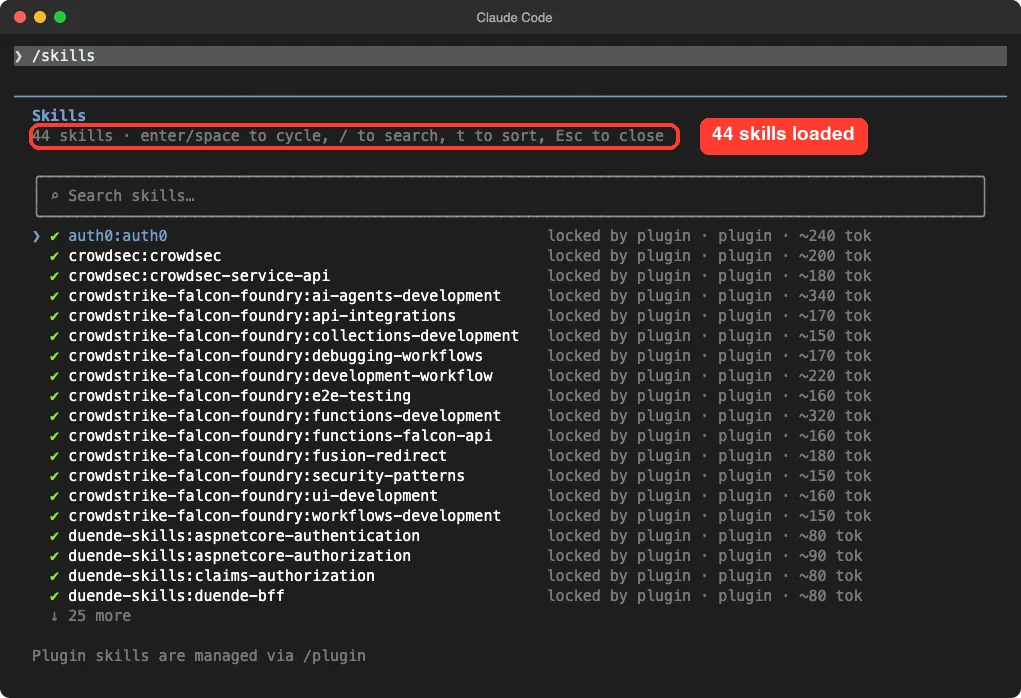
The /skills screen lists 44 skills. Duende adds 24, Foundry 12, Vanta 3, CrowdSec 2, WorkOS 2 and Auth0 1. Each shows a rough size such as 80 or 340 tokens, which is what its name and description cost in Claude’s context.
Zscaler added none that we could see. The total of 44 matches the other seven plugins exactly, and the Zscaler skill files sit in folders two levels deep, such as a product folder and then a task folder. We did not dig into why, so treat this as what we observed, not a verdict on the plugin.
The /mcp screen showed the connections these plugins add. All three Vanta servers said “needs authentication”.
The Zscaler server showed a red cross, which means it failed to start. That is expected on our Mac, because the uv tool it launches through uvx is not installed here.
Claude Code Auth0 Plugin: Replace a Homemade Login
The Auth0 plugin has one skill, named auth0. Its description says it detects your framework, feature and tooling, then loads the right reference guides for login, MFA, Organizations, custom domains, branding, token checks, migration and debugging.
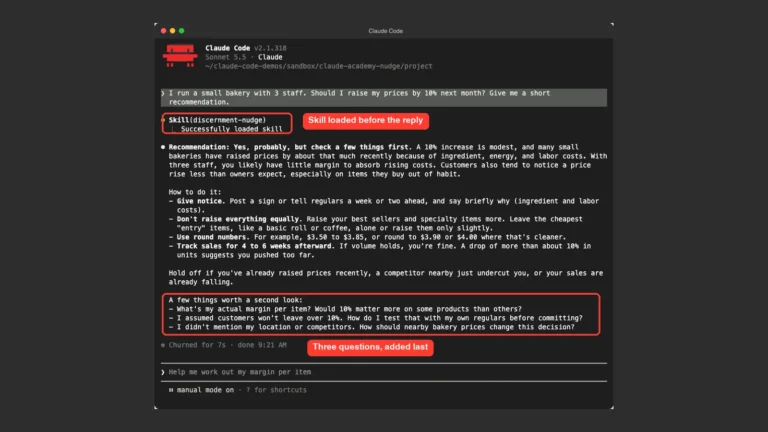
We asked it what is risky about the homemade login in app.js and what to use instead. Claude loaded the skill, read the file and found real problems.
The admin password is hard-coded in plain text, the session secret is a guessable word, and there is no lockout, no MFA and no cookie hardening. It also pointed out that one shared admin account makes it hard to pass a compliance review such as SOC 2.
Its fix was to use Auth0 through the express-openid-connect library. It said to delete the users array and the /login route, guard /admin with the library’s middleware, keep the secret and client ID in environment variables, and turn on MFA and brute-force protection in Auth0.
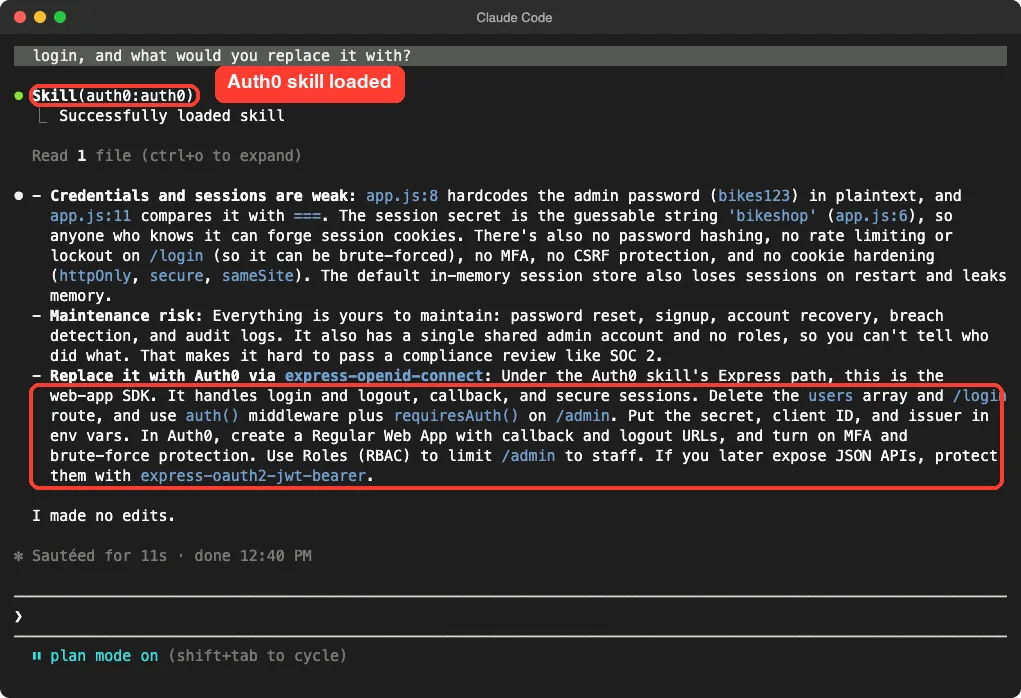
Claude changed nothing, because we were in plan mode. This is one demo, and we never created an Auth0 tenant, so we cannot say how smooth the later setup steps are.
WorkOS: SSO for Business Customers
WorkOS has two skills, workos and workos-widgets. The first one is a router.
Its own text says it is not the answer, and that Claude must read the matching reference file and fetch live docs before answering. It covers AuthKit, SSO, Directory Sync, roles, Vault, Audit Logs and migrations from other providers.
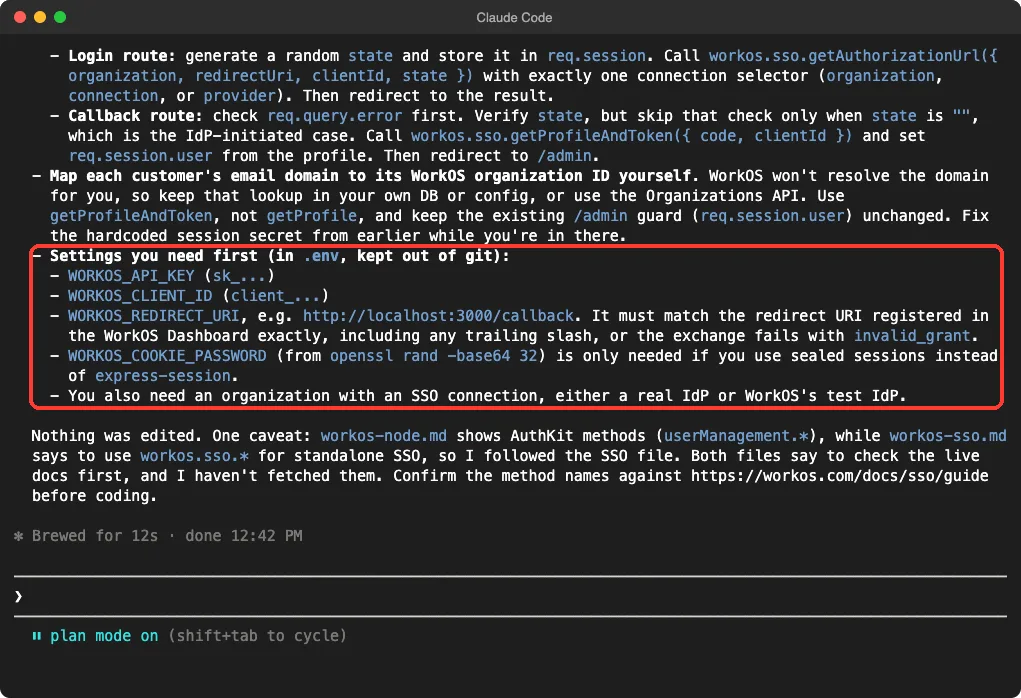
We asked how to add SSO to app.js and which settings we would need first. Claude described a login route that builds an authorization URL and a callback route that checks the state value and exchanges the code.
It listed four settings: WORKOS_API_KEY, WORKOS_CLIENT_ID, WORKOS_REDIRECT_URI and, only for sealed sessions, WORKOS_COOKIE_PASSWORD. It also said you need an organization with an SSO connection, either a real identity provider or WorkOS’s test one.
One detail made us trust the answer more. Claude noted that two reference files used different method names, said it followed the SSO file, and told us to confirm the names against the live docs before coding.
Duende: IdentityServer and Token Skills for .NET
Duende’s plugin is the biggest of the identity group, with 24 skills and 2 agents. The names cover ASP.NET Core authentication and authorization, the BFF pattern, key management, sessions, token security, SAML, and an upgrade from version 7 to 8.
We asked the identityserver-api-protection skill how to protect the /orders endpoint in Program.cs. Claude proposed replacing the cookie scheme with JWT bearer validation, setting the authority and audience, and limiting accepted tokens to the access token type. It also said /orders was open because the file has no authorization step, and suggested a policy that requires a scope.
The last bullet matters if you run your own server. It said to define an API resource and scope in IdentityServer and keep the audience and scope names identical, because a mismatch gives a bare 401 error.
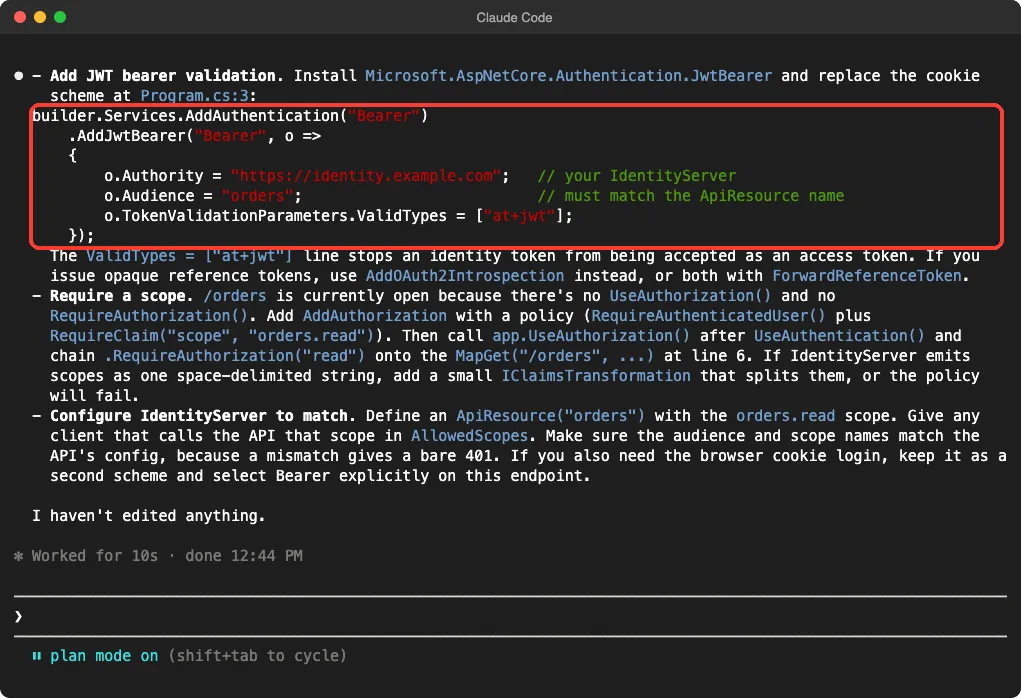
We did not build or run the API. The skill used a sample authority address, so every value there is a placeholder.
Vanta: Fix Compliance Tests From Your Repo
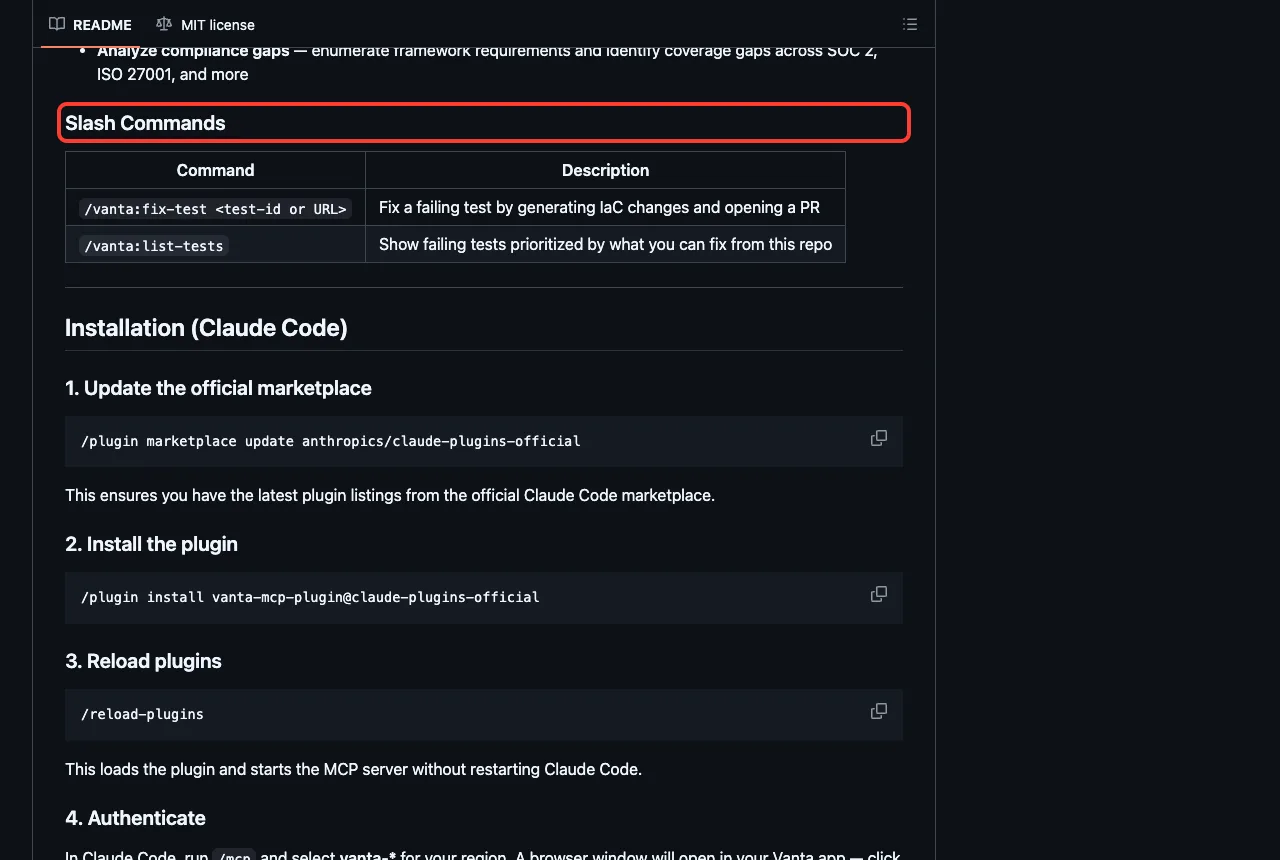
Vanta’s plugin is a wrapper around its hosted server. Its README says the server is in beta, that you must be a Vanta Admin, and that it can help with failing tests, controls, vendor risk, vulnerabilities and policies. It adds two commands: /vanta:fix-test and /vanta:list-tests.
The fix command asks Vanta for a test-specific remediation prompt, then scans your local files and generates changes, such as Terraform edits, and opens a pull request. We could not test that, because it needs your Vanta data.
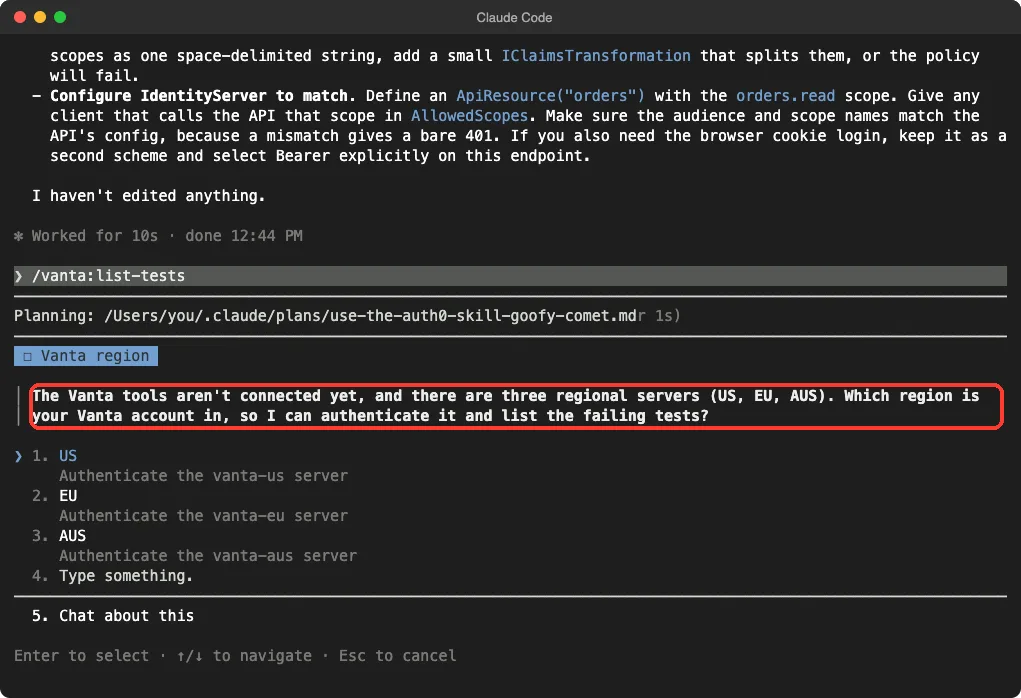
What we did run was /vanta:list-tests with no sign-in. Claude said the Vanta tools were not connected yet and asked which region our account was in, US, EU or Australia, so it could start the sign-in for that server. It did not invent a list of tests.
CrowdSec: Run the Engine and Use Its Cloud API
CrowdSec ships two skills. The crowdsec skill helps you install, configure, operate and debug the engine on a server, in Docker or in Kubernetes. The crowdsec-service-api skill drives the premium cloud API for blocklists, allowlists and firewall integrations.
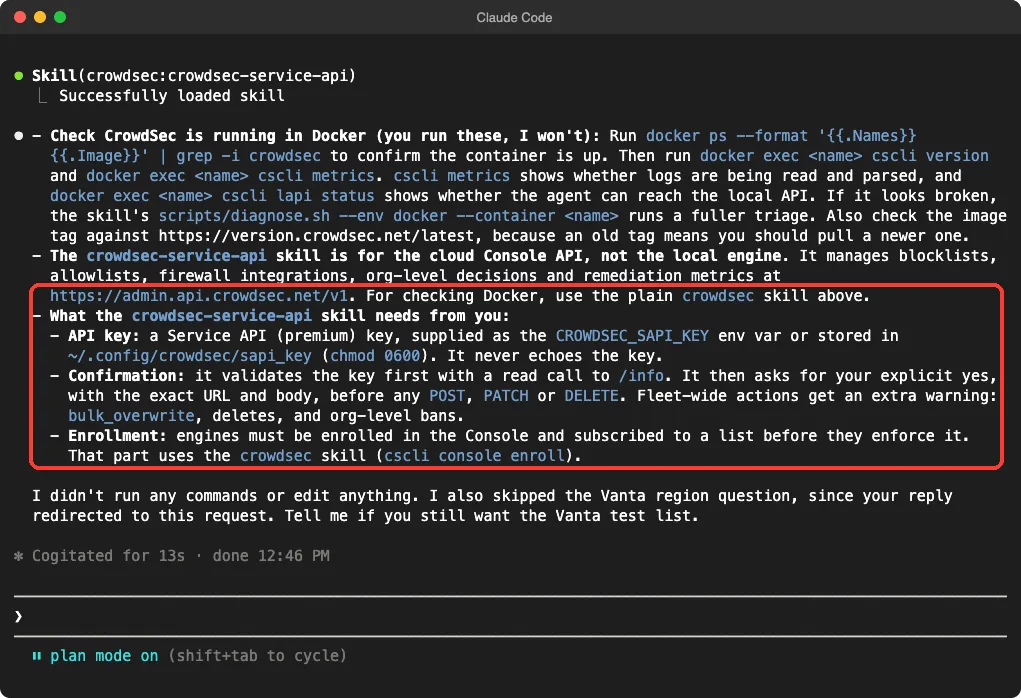
We asked how to check that CrowdSec runs in Docker, and what the Service API skill needs. Claude gave commands for us to run, such as listing containers and calling cscli inside the container, and said it would not run them itself. It also named a helper script, diagnose.sh, for a fuller check.
For the cloud skill, Claude said it needs a Service API key supplied as the CROWDSEC_SAPI_KEY variable or saved in a protected file. It said the skill checks the key with a read call first and asks for a clear yes before any write or delete, with extra warnings for fleet-wide changes.
We have no CrowdSec setup, so the commands themselves are untested here. Our guide to devcontainers is a good companion if you want Claude to work inside a box.
CrowdStrike Foundry and Zscaler: Loaded, Not Exercised
Foundry adds 12 skills for building Falcon apps: UI pages, functions, collections, workflows, API integrations, AI agents, end-to-end tests and debugging. Its README says you need the Foundry CLI, installed with a Homebrew command, and the plugin’s hooks nudge Claude to add the --no-prompt flag to Foundry commands. We loaded it and listed its skills but asked no question, because the Foundry CLI is not installed on our Mac.
Zscaler’s plugin points at a server that its README says exposes 402 tools across products such as private access, internet access and digital experience. The plugin also carries 20 commands, for example /zscaler:audit-ssl and /zscaler:investigate-incident. Because the server could not start, we did not try any of them.
The official repositories are foundry-skills, fusion-skills and zscaler-mcp-server. Read their READMEs before you give any of them real credentials.
Safety Notes Before You Install
These tools touch logins, compliance data and security policies. A few habits help.
- Use plan mode for the first try. Every answer above came without a single edit.
- Keep keys in environment variables, never in files that go into git.
- Treat code samples as drafts. The Duende answer used a placeholder authority, and the WorkOS skill itself told us to check names against live docs.
- Use a test tenant or sandbox account first, and the smallest key you can.
- Read start-up hooks, such as the Fusion script that builds a Python environment, before you load a plugin.
Our Claude Code security guide and our post on security fix guide show how Claude’s own checks fit with these add-ons.
Try It Yourself
Make an empty folder with a tiny file that has a homemade login, and load only the Auth0 plugin from a cloned folder. Adjust the path to where you cloned it.
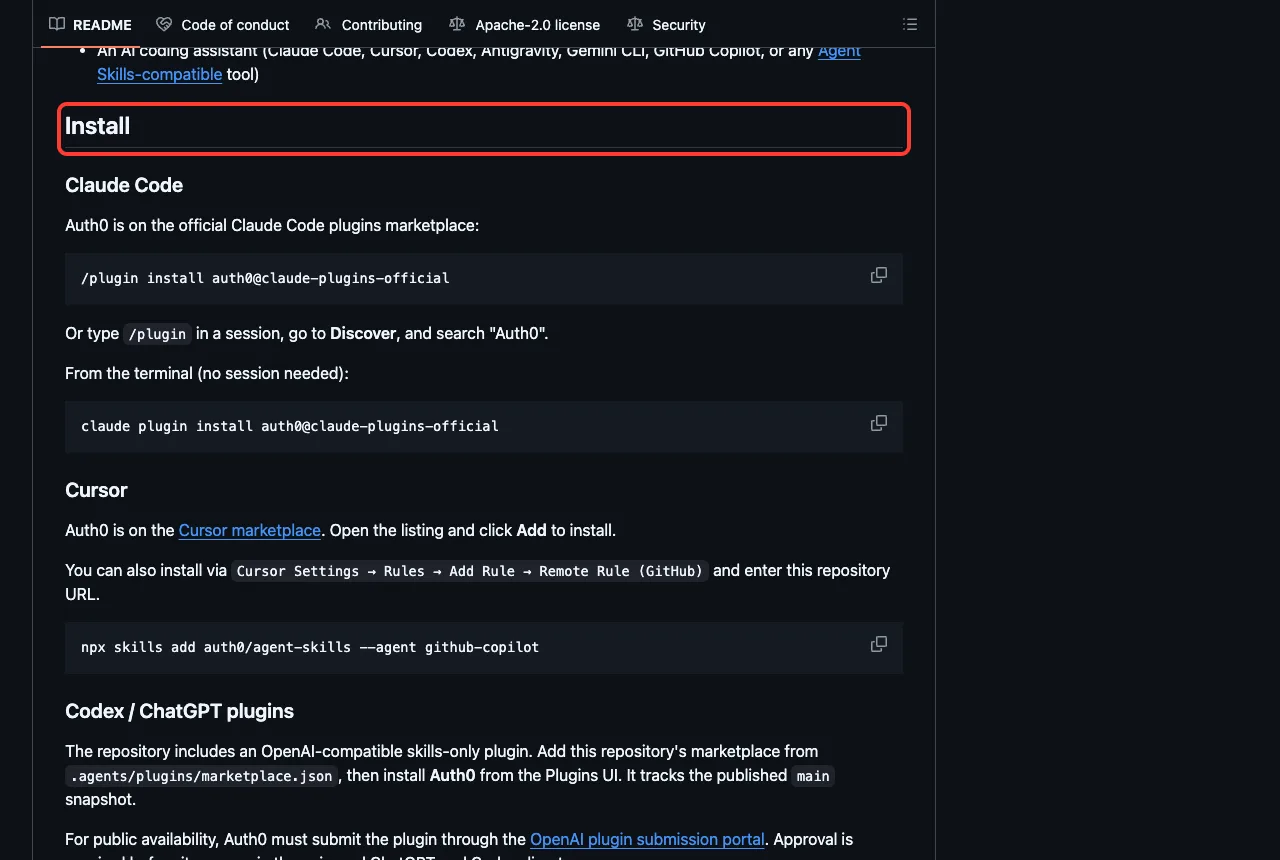
git clone https://github.com/auth0/agent-skills auth0-skills
claude --permission-mode plan --setting-sources project --plugin-dir ./auth0-skills/plugins/auth0
Then paste this prompt and compare the answer with the Auth0 screenshot above.
Use the auth0 skill on app.js. Do not edit anything.
In 3 short bullets: what is risky about this homemade login,
and what would you replace it with?
Common Mistakes
- Installing a plugin and expecting data. Without a tenant, key or sign-in, it only holds instructions.
- Loading all of them at once. Duende alone adds 24 skill names to Claude’s context.
- Pasting a real password or API key into the chat. Set it as an environment variable instead.
- Running a start-up hook you have not read, such as one that installs packages.
- Trusting a generated login or token setup without testing it against your own identity provider.
Pro Tips
- Run
/mcpafter installing, because it shows which connections still need a login or failed to start. - Run
/skillsto check that a plugin’s skills really loaded, as we did with Zscaler. - Pair these with scanners. Our guide to security scanner plugins covers StackHawk, SonarQube and JFrog.
- Let Claude suggest add-ons for your project with the setup plugin.
- For monitoring after launch, see our monitoring plugins guide.
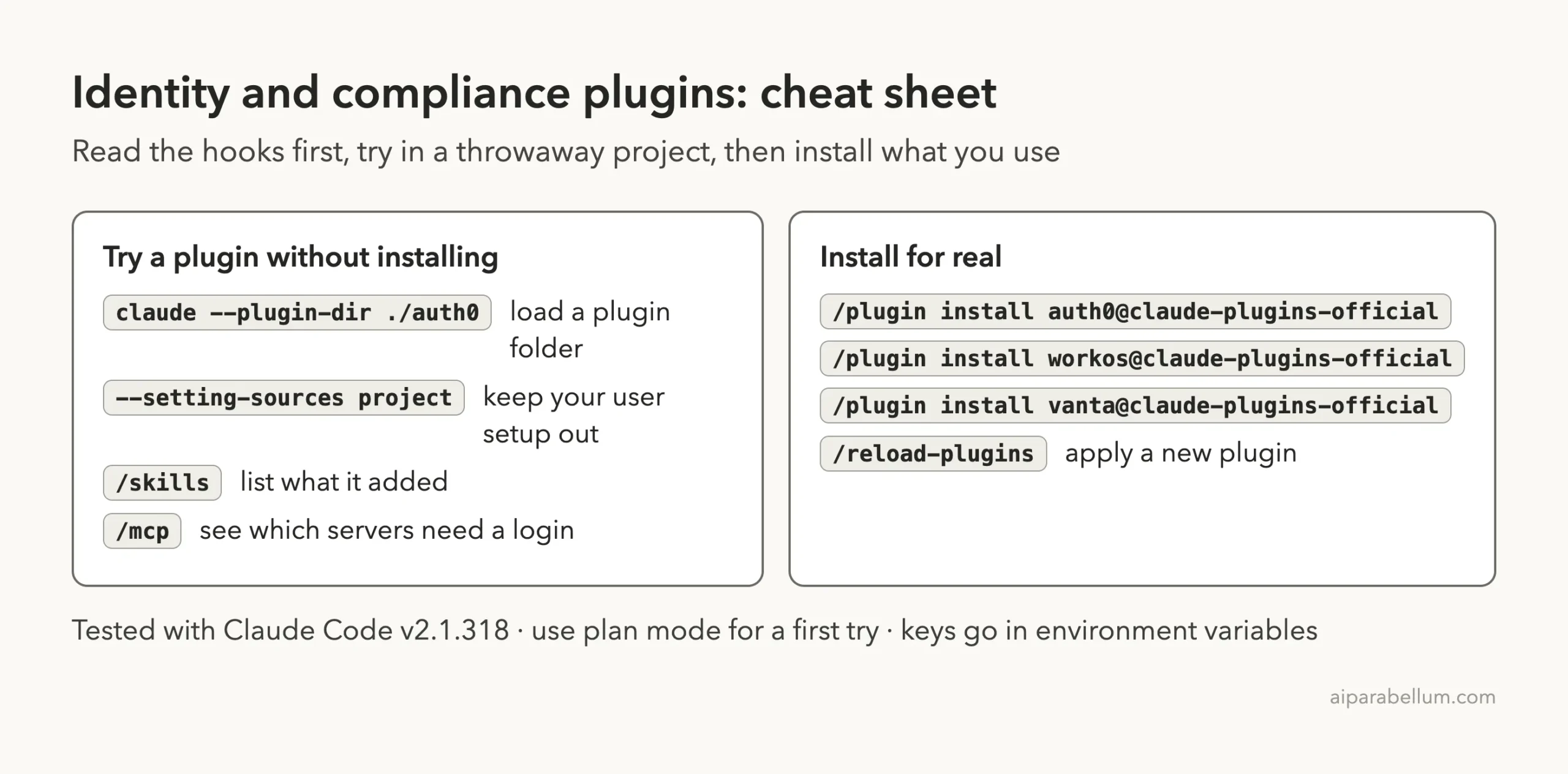
Cheat Sheet
Frequently Asked Questions
Is there an official Claude Code Auth0 plugin?
Yes. The marketplace lists auth0, and the Auth0 README gives /plugin install auth0@claude-plugins-official as the install command. It has one skill, and you need an Auth0 tenant to do the real setup.
Do I need to pay for Auth0, WorkOS, Vanta or Zscaler?
We did not check any pricing. All four need an account or credentials of your own to do real work, so check each vendor’s page for current plans.
Why do two Vanta plugins appear in the marketplace?
The marketplace lists vanta and vanta-mcp-plugin, and both point to the same repository and commit. We tested that one copy, and the README uses the second name in its install command.
Can I use these plugins on Windows or Linux?
We tested on macOS. The Windows and Linux steps follow Anthropic’s official instructions, and most of these plugins are plain files plus a web connection or a Python tool.
Which one should I install first?
Pick the job you have today. If you need login, start with Auth0, or WorkOS for business SSO. If you work on .NET identity servers, start with Duende.
Conclusion
The Claude Code Auth0 plugin and its WorkOS, Duende, Vanta, CrowdStrike, CrowdSec and Zscaler neighbors bring identity and security help into your terminal, but each needs an account, tenant or tool of your own. We loaded 44 skills, watched four skills give careful, honest answers in plan mode, and saw Vanta stop and ask for a sign-in instead of guessing. Pick one tool for the job you have, read its hooks first, try it in a test project, and find more add-ons in our Claude guide and the Skills Directory.