If you are looking for a Claude Code security scanner, the official marketplace now lists eight or nine of them, from StackHawk and SonarQube to JFrog, Sonatype, Aikido, NightVision, 42Crunch and Endor Labs. This guide explains what each one checks, which parts we ran on a Mac, and which parts need an account, a token or a running server that you provide.
This guide is part of our Claude Code tutorials. Find more add-ons in our Skills Directory.
Tested with Claude Code v2.1.318 on 2026-11-08 (macOS).
We read every hook and connection file first. Then we loaded six of the plugins into a throwaway sandbox and asked four of their skills real questions about a tiny, deliberately flawed demo app. We never created an account, never typed a key and never ran a scan, so anything about live findings, scores or dashboards comes from each plugin’s own files and README.
Quick Summary: Security Scanner Plugins at a Glance
These plugins teach Claude Code to run, read and act on the results of security tools. Some look at your source code, some attack a running app, and some check the packages you depend on. None of them works alone, because each one talks to a vendor service or a tool you set up.
| Plugin | Maker | What it checks | Account or setup needed? | Install command |
|---|---|---|---|---|
| sonarqube | Sonar | Code issues, secrets and quality gates (10 skills) | Yes: a SonarQube account, the sonar CLI and a container runtime | /plugin install sonarqube@claude-plugins-official |
| stackhawk-hawkscan | StackHawk | Live app scans (DAST) and fix tasks | Yes: a StackHawk API key and the hawk CLI or Docker | /plugin install stackhawk-hawkscan@claude-plugins-official |
| stackhawk-api | StackHawk | Reports on your findings and scan history | Yes: a StackHawk account and API key | /plugin install stackhawk-api@claude-plugins-official |
| nightvision | NightVision | Live DAST scans and API discovery (5 skills) | Yes: a NightVision token, a project and a running app | /plugin install nightvision@claude-plugins-official |
| 42crunch-api-security-testing | 42Crunch | OpenAPI audits and live API scans (5 skills) | Yes: a 42Crunch account; the 42c-ast binary downloads on first use | /plugin install 42crunch-api-security-testing@claude-plugins-official |
| sonatype-guide | Sonatype | Dependency CVEs and safer versions | Yes: a Sonatype Guide token | /plugin install sonatype-guide@claude-plugins-official |
| jfrog | JFrog Ltd. | Artifactory, package curation, security findings | Yes: a JFrog host URL and login | /plugin install jfrog@claude-plugins-official |
| aikido | Aikido Security | Code, secrets and infrastructure-as-code scanning | Yes: an Aikido account, set up through its guide | /plugin install aikido@claude-plugins-official |
| ai-plugins | Endor Labs | Supply chain risk and fixes | Yes: Endor Labs access; a setup skill guides you | /plugin install ai-plugins@claude-plugins-official |
What a Claude Code Security Scanner Plugin Actually Does
A scanner on its own finds problems. A plugin adds the missing glue, so Claude Code knows when to run the scan, how to read the answer and what to fix first.
Inside a plugin you can find skills (instructions), hooks (commands that run on events) and connections to outside servers. Our plugin install guide explains scopes and updates, and our MCP guide explains the connection layer. Anthropic’s docs on discovering plugins and building plugins cover the basics.
The important point is that a plugin runs with your permissions. Security plugins are especially worth reading before you trust them, because their whole job is to touch your code, your keys and your dependencies.
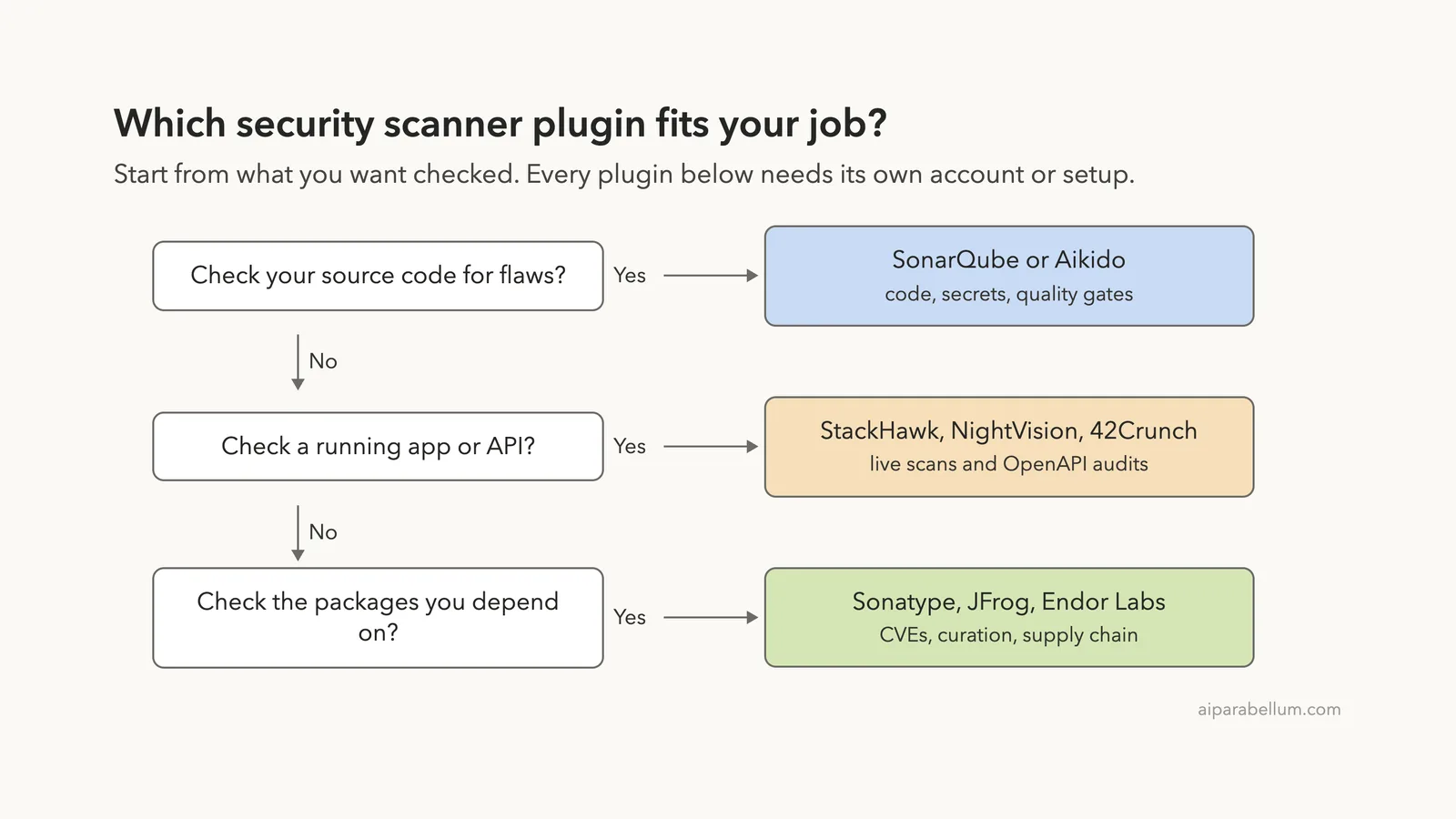
Which Scanner Plugin Fits Which Job?
Start from what you want checked, not from the logo. If your team already pays for one of these tools, use that one and skip the rest.
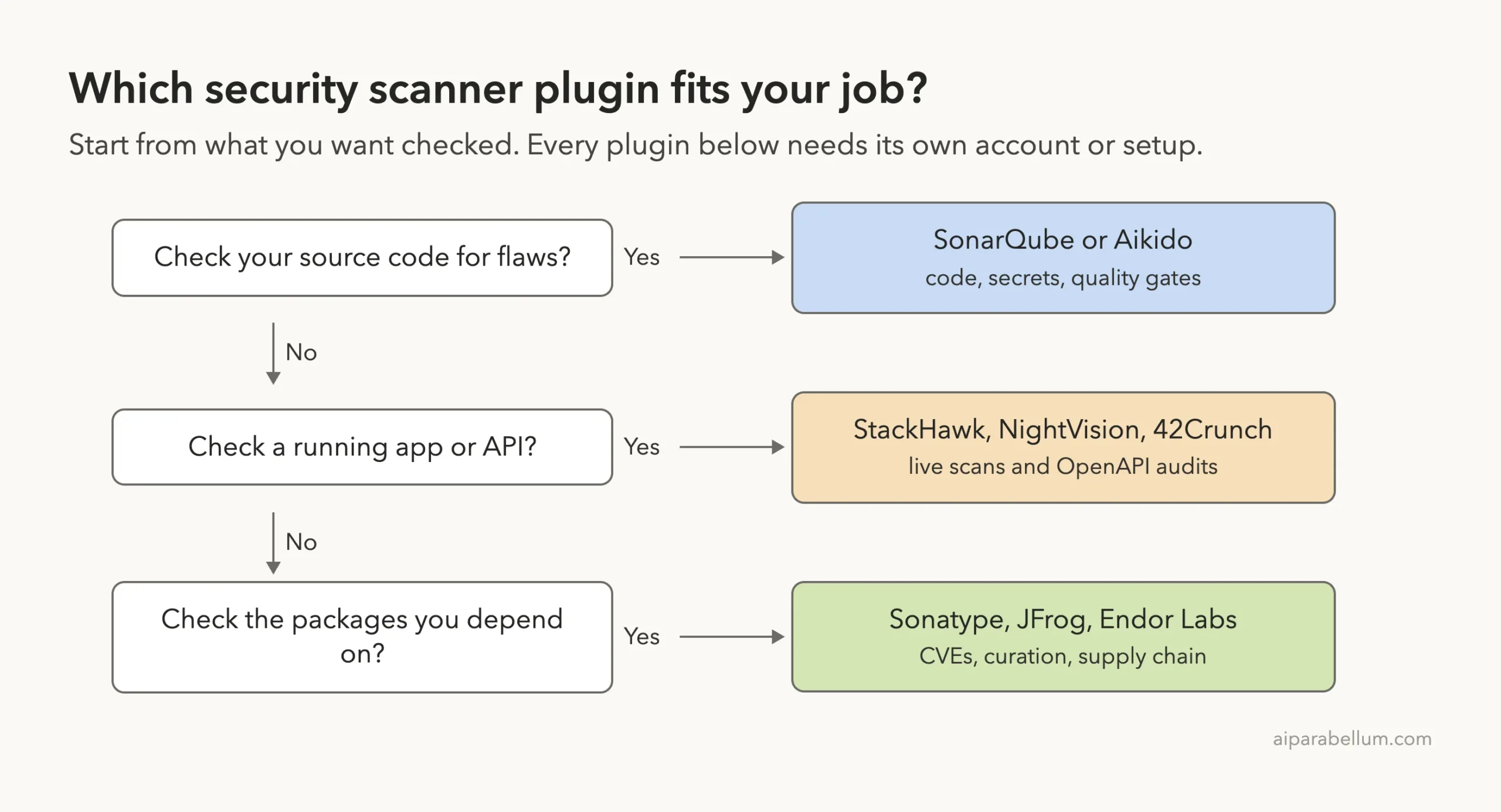
The three groups catch different problems. A code scanner can spot a risky database query in the source. A live scanner attacks the running app the way a real intruder would.
A dependency checker warns you about an old library with a known flaw.
How We Tested Without Touching Our Setup
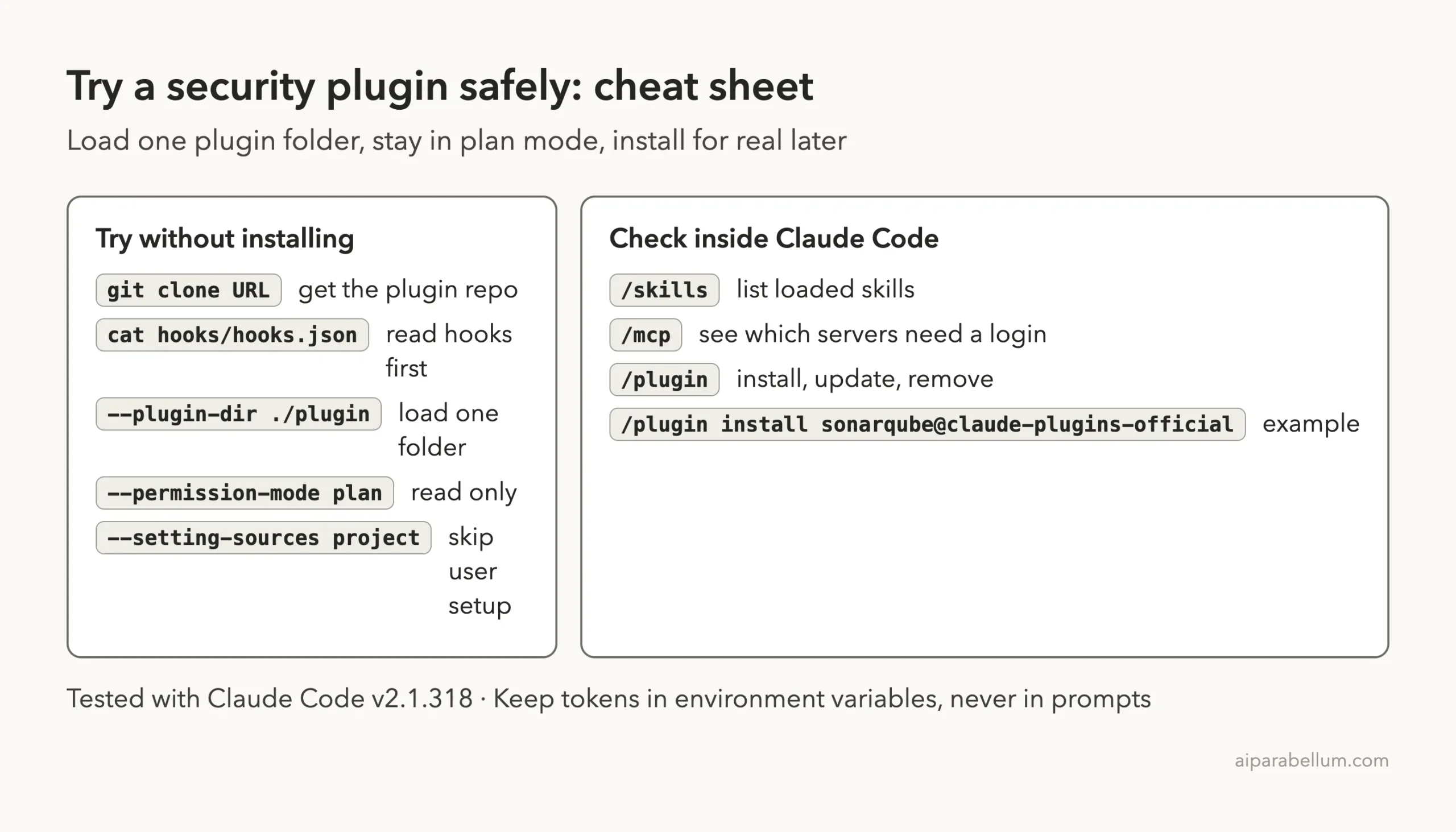
We cloned each plugin repository at the exact commit that the official marketplace points to. Then we started Claude Code in an empty demo folder with one --plugin-dir flag per plugin, plus --setting-sources project so nothing from our own Claude setup mixed in. We never ran /plugin install, and we kept Claude in plan mode so it could read files but not change them.
The demo project has three tiny files.
app.py is a bike shop Flask app with two routes. One builds its SQL query by gluing text together, and the other uses a safe, parameterized query. It also holds a fake API key.
requirements.txt pins three old libraries, and openapi.yaml describes only one of the two routes.
| Plugin | Version or commit we loaded | Last commit in the repo |
|---|---|---|
| sonarqube | 2.6.0, commit 5a9356d | 2026-11-05 |
| nightvision | 1.1.0, commit 957db6b | 2026-11-02 |
| 42crunch-api-security-testing | 1.5.5, commit faf5305 | 2026-11-03 |
| sonatype-guide | commit 1dae739 | 2026-04-02 |
| ai-plugins (Endor Labs) | 1.2.0, commit 2de0088 | 2026-11-04 |
| stackhawk-api | StackHawk agent-skills repo, commit 66cac9b | 2026-11-06 |
All of these repositories were still active, although the Sonatype plugin has not changed since April. The 42Crunch page on GitHub today lists a newer command name than the version we loaded, so command names may differ if you install the latest copy.
A security plugin is only as safe as its hooks, so read them before you load it.
What We Read Before Running Anything
Hooks run commands on your computer, so we read them first. Here is what we found.
- SonarQube: one
SessionStarthook that runs a small script. It only looks for thesonarcommand and a state file in~/.sonar, then prints a status message. - Endor Labs: four hooks that read your prompts and tool calls and add hints. They check for dependency installs and manifest edits, and they push Claude to use
endorctl agent api. - NightVision, 42Crunch and StackHawk API: skills only, with no hooks.
- Sonatype: one connection to
mcp.guide.sonatype.comthat sends a token from theSONATYPE_GUIDE_TOKENvariable.
We chose not to load three plugins, and the reasons are worth knowing if you plan to install them.
- JFrog: its hooks run
npxagainst JFrog’s own package registry on every skill or file read, and they rewrite the connection files of other installed plugins. That reaches beyond a throwaway sandbox. - Aikido: its connection starts by downloading and running an npm package with
npx. - StackHawk HawkScan: its session hook writes a small file into
~/.stackhawkin your home folder.
None of these is a red flag by itself, since they are what the vendors say these tools do. We simply could not run them without touching files outside the sandbox, so for those three we rely on the official READMEs.
What We Ran and What Comes From the Docs
| Item | Status |
|---|---|
| Loading six plugins and listing 23 skills | We ran it |
| Checking which connection fails to start | We ran it |
| NightVision skill on the demo app | We ran it, without an account or a scan |
42Crunch audit skill on openapi.yaml | We ran it, without the 42Crunch tool |
Sonatype skill on requirements.txt | We ran it, with no token set |
SonarQube skills on app.py | We ran it, without signing in |
| StackHawk API, Endor Labs | Loaded only, no question asked |
| JFrog, Aikido, StackHawk HawkScan | Not loaded; README only |
| Real findings, scores and dashboards | From each vendor’s files and README, not tested |
Loading Six Plugins in One Session
The /skills screen listed 23 skills. SonarQube adds 10, NightVision 5, 42Crunch 5, and the rest come from Endor Labs, Sonatype and StackHawk. Each shows a rough token size, such as 100 or 190, which is what its name and description cost in Claude’s context.
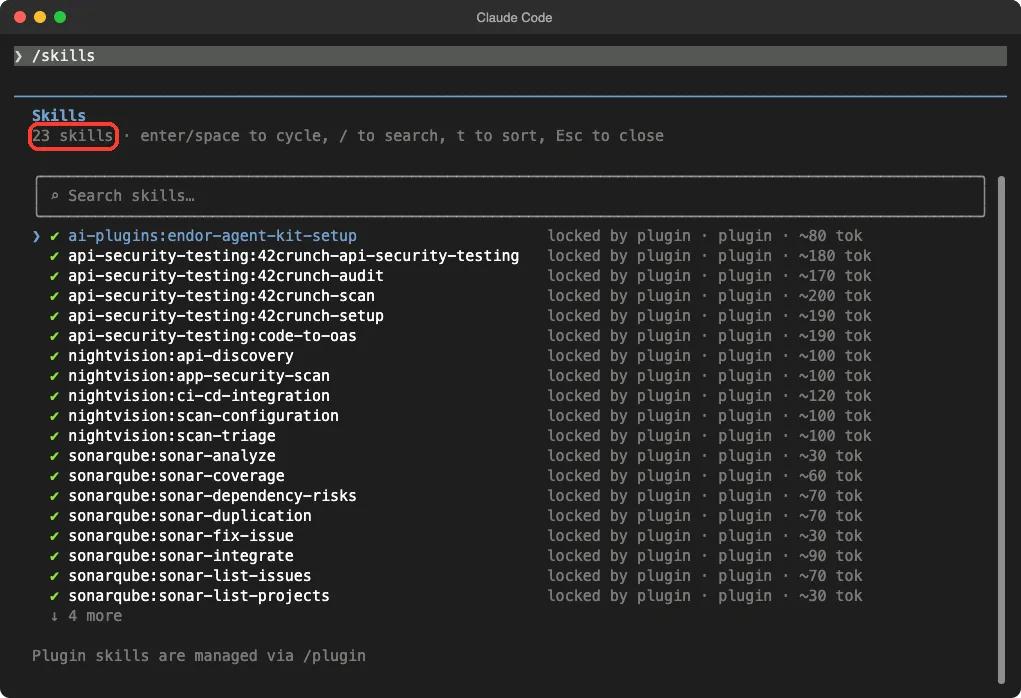
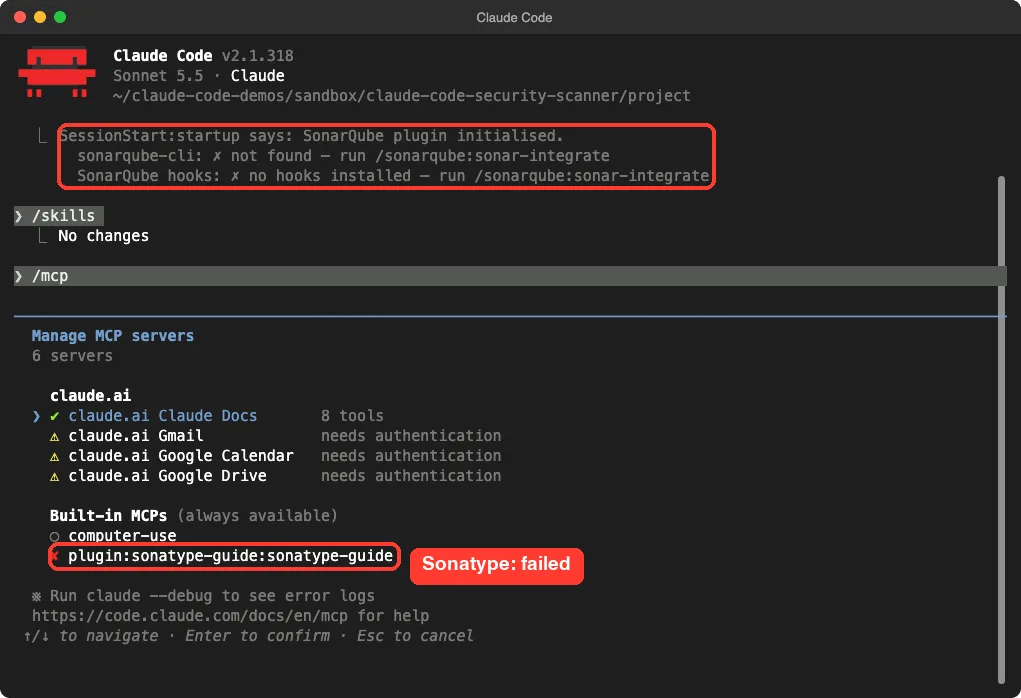
The startup message from the SonarQube hook also showed up. It said the sonarqube-cli was not found and that no SonarQube hooks were installed yet, and it pointed to /sonarqube:sonar-integrate as the next step.
The /mcp screen then showed one plugin connection with a red cross: sonatype-guide. The other plugins add no connections of their own. Gmail and Calendar entries in that list belong to our Claude account, not to these plugins.
NightVision: Attack the Running App
NightVision is a DAST tool, which means it tests an app while it runs. Its five skills are api-discovery, app-security-scan, ci-cd-integration, scan-configuration and scan-triage. The README says it can discover REST endpoints from supported source code and connect findings to source locations when it can.
We asked the scan skill what it would do with our demo project. Claude read two files and answered that it would scan the two routes, that the string-built query is an obvious SQL injection, and that the safe route should come back clean. It also said the old libraries are dependency issues rather than DAST issues, and that the hardcoded key is out of scope for this kind of scan.
The useful part was the setup list. It needs a NightVision token, a NightVision project, and the app running at a reachable URL such as http://localhost:5000. It also said that a scan with zero findings should count as a setup failure, not proof that the app is secure.
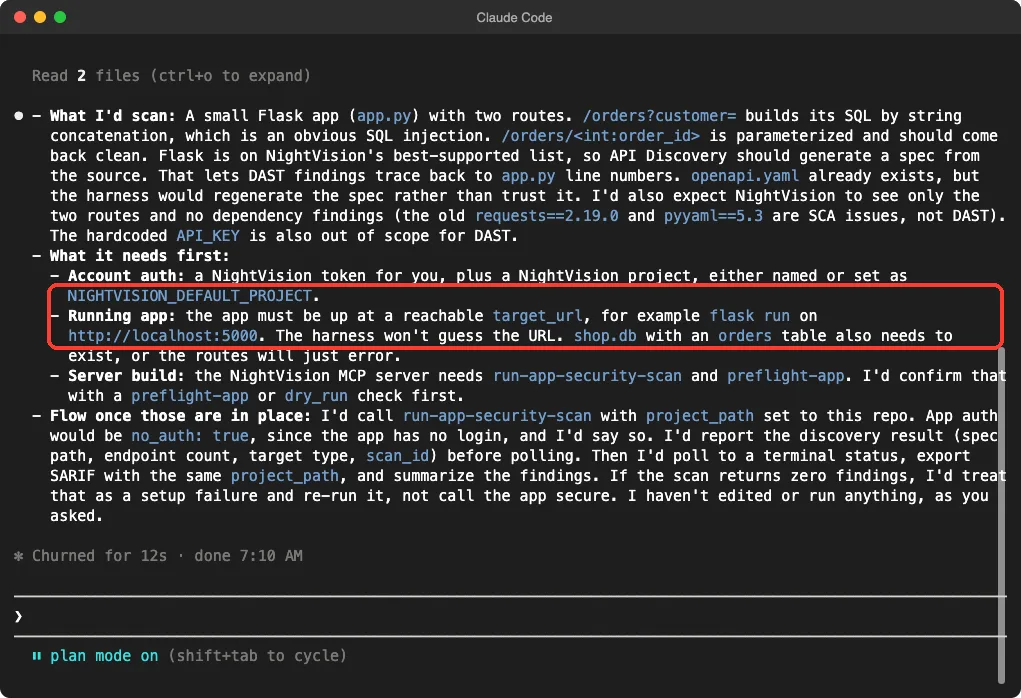
Claude changed nothing, because we were in plan mode. This is one demo, and we never ran a scan, so we cannot say how many findings NightVision would report.
42Crunch: Audit Your OpenAPI File
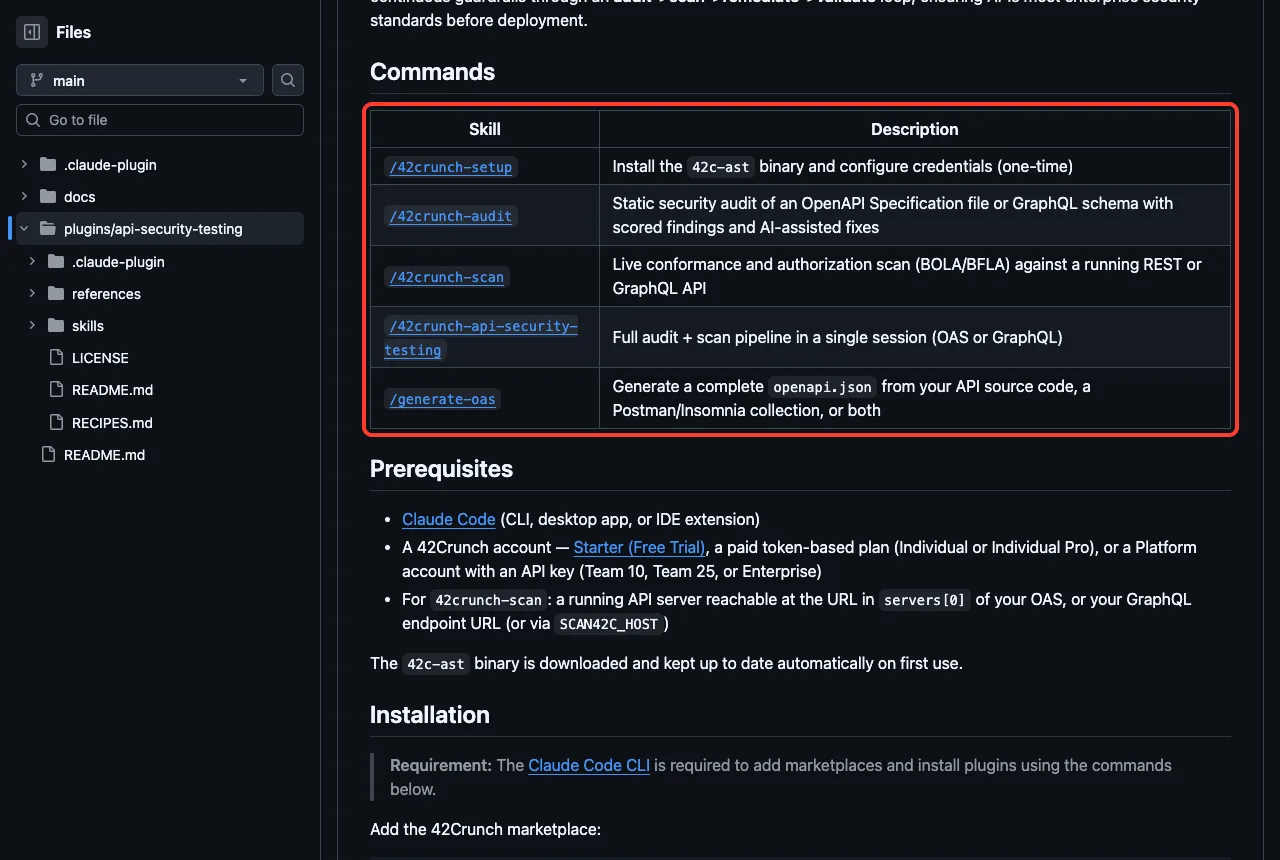
The 42Crunch plugin focuses on API security. Its skills are 42crunch-setup, 42crunch-audit, 42crunch-scan, 42crunch-api-security-testing and code-to-oas. The audit checks an OpenAPI file, and the scan tests a running API for broken object and function level authorization, known as BOLA and BFLA.
We asked the audit skill about our thin openapi.yaml. Claude loaded the skill and listed what it would expect to flag: no declared authentication, no limits on the order ID number, and a response with no schema.
The most useful catch was a mismatch. The spec leaves out the risky /orders?customer= route that exists in app.py, so an audit of the file alone would pass over the riskiest endpoint. Claude suggested regenerating the spec with code-to-oas first.
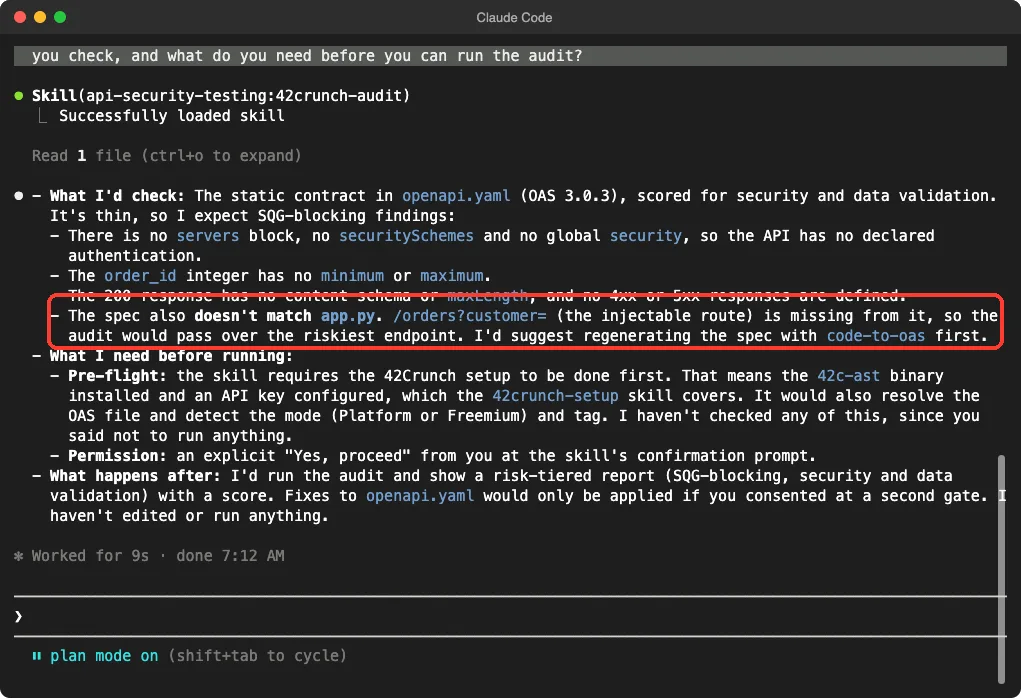
It also said the real audit needs the 42c-ast tool and an API key first, and that fixes are applied only after a second consent step. We did not run the audit, so the score and findings are expectations, not results.
Sonatype: Check Your Dependencies
Sonatype Guide looks at the packages you use. The README says Claude can check dependencies before you install or upgrade them, show CVEs with severity scores, and recommend safer versions. It needs a Sonatype Guide account and a token.
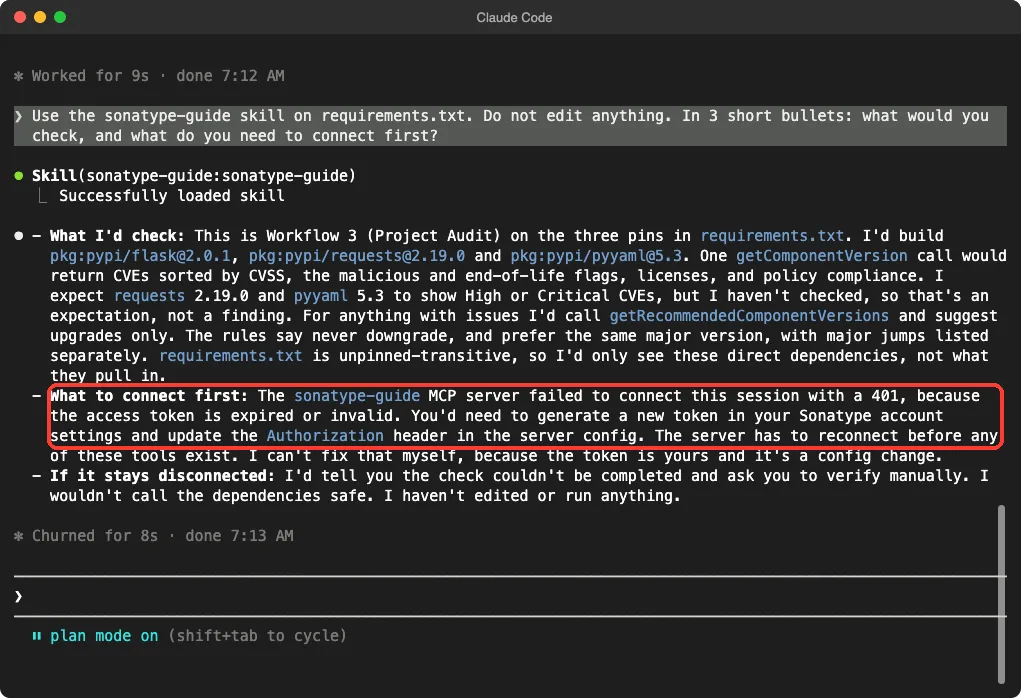
We asked the skill about our three pinned libraries. Claude described a project audit: it would build package identifiers for each pin, look up CVEs, malicious and end-of-life flags, and then suggest upgrades without ever downgrading. It said it expected the old requests and pyyaml pins to have serious CVEs, but it clearly labeled that as a guess, not a finding.
The honest part came next. The connection had failed with a 401 error, because we had set no token, and Claude said it would tell us the check could not be completed instead of calling the dependencies safe. That is exactly the behavior you want from a security helper.
SonarQube: Code Quality and Secrets in the Coding Loop
SonarQube has the biggest plugin here, with ten skills such as sonar-analyze, sonar-list-issues, sonar-fix-issue, sonar-quality-gate and sonar-dependency-risks. Its description mentions 7,500 or more issue types, secrets scanning and quality gates across more than 40 languages.
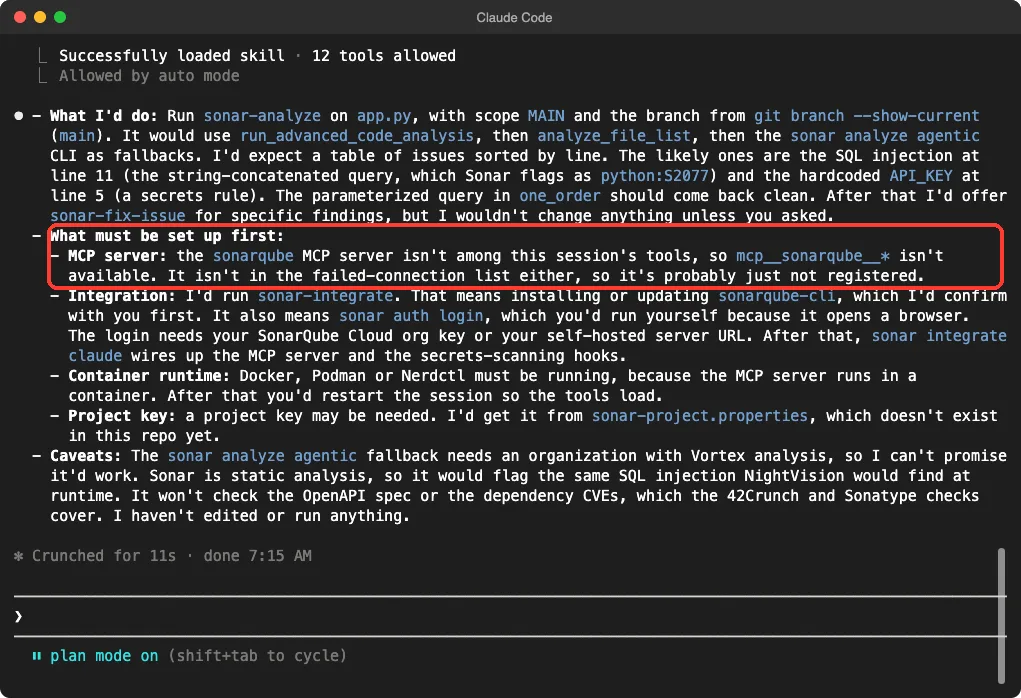
We asked Claude what it would do for app.py. It said it would run the analyze skill, expect the string-built query on line 11 and the hardcoded key on line 5 to show up, and offer the fix skill afterward. It labeled those as likely findings, not results.
The setup list was long and honest. SonarQube needs the sonarqube-cli, a login that opens a browser, a container runtime such as Docker, and a restart so the tools load. Claude also noted that SonarQube checks code, not the OpenAPI file or the dependency CVEs, which is why the other tools in this guide exist.
StackHawk, JFrog, Aikido and Endor Labs: What the Docs Say
For the rest we rely on each project’s own files, and we did not test these features.
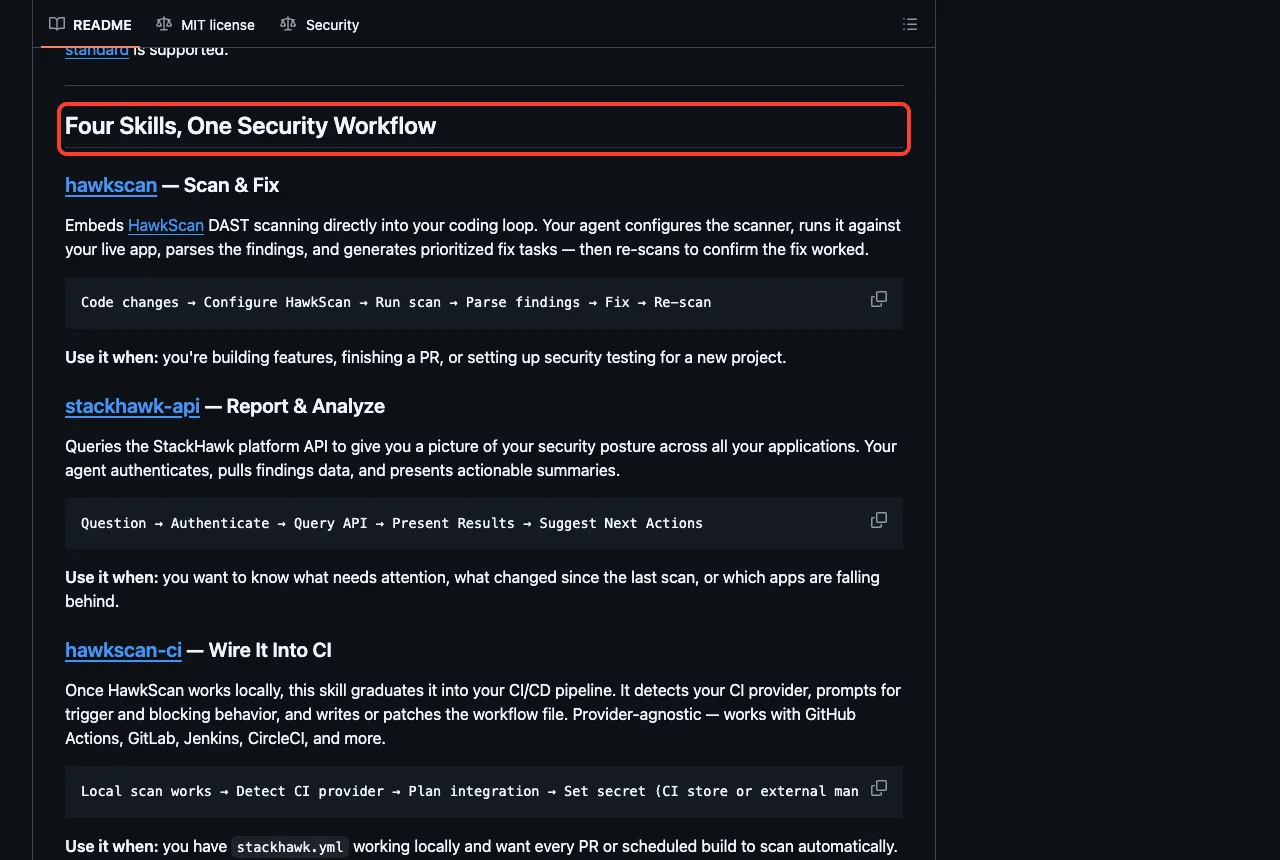
StackHawk offers four skills in its repository. HawkScan configures and runs live scans and then makes fix tasks, the API skill reports on your findings, one wires scans into CI, and one seeds test data. Its README lists a free 14-day trial and an API key from the StackHawk settings page.
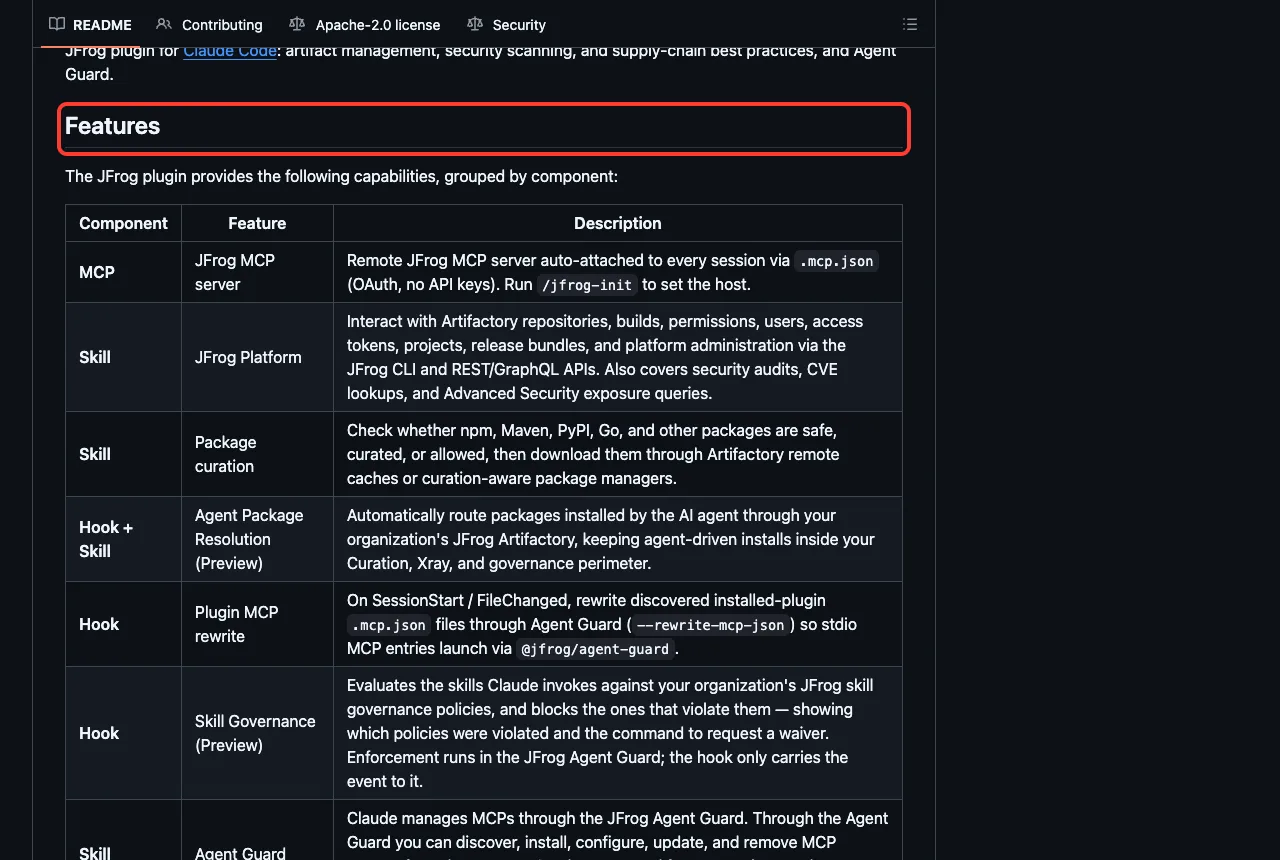
JFrog’s plugin is the broadest. Its README lists a remote connection, skills for Artifactory and package curation, and hooks that route package installs through Artifactory and check skills against your organization’s policies. It lists Node.js, the jf CLI and a JFrog host URL as prerequisites.
The Aikido plugin is short. Its README says it brings Aikido into Claude Code through the Aikido MCP server, to scan code you write or change for vulnerabilities and secrets, and it points to a setup guide on Aikido’s help site.
Endor Labs ships as the ai-plugins package. Its README describes a setup skill and workflow agents for supply chain risk, and it asks you to run the setup skill first. We loaded it and saw the one setup skill, but we did not run it.
Safety Notes Before You Install
These tools see your code and often your keys, so a few habits matter.
- Read the hooks. We found hooks that rewrite other plugins’ files, download packages or write to your home folder.
- Keep tokens in environment variables or the vendor’s login flow, never in a prompt or a committed file.
- Run a live scanner only against your own app or a test copy, never against a site you do not own.
- Try a new plugin in plan mode first, as we did.
- Treat a scan with zero findings as a question, not an answer.
Our guides to Claude Code Security and privacy and security explain Claude’s own protections, and our security plugin comparison covers two Anthropic-side options.
Try It Yourself
Make an empty folder with a tiny app that has one obvious flaw, then load only one plugin from a cloned folder. Adjust the path to where you cloned it.
git clone https://github.com/nvsecurity/nightvision-skills nightvision-skills
claude --permission-mode plan --setting-sources project --plugin-dir ./nightvision-skills
Then paste this prompt and compare the answer with the NightVision screenshot above.
Use the nightvision app-security-scan skill on this project.
Do not edit or run anything. In 3 short bullets: what would you
scan here, and what does NightVision need first?
For a practical walkthrough of fixing a flaw once a scanner finds it, read our security fix guide.
Common Mistakes
- Installing a scanner plugin and expecting findings. Without an account, token or server, it only holds instructions.
- Loading every security plugin at once. They overlap, and each adds skill names to Claude’s context.
- Auditing only an OpenAPI file that does not match the real code, as our demo showed.
- Pasting a token into the chat instead of setting an environment variable.
- Forgetting to restart Claude Code after setting a variable such as
SONATYPE_GUIDE_TOKEN.
Pro Tips
- Run
/mcpafter installing, because it shows which connection still needs a login. - Pair one code scanner, one live scanner and one dependency checker, and skip the rest.
- Ask Claude to explain a plugin’s hooks in plain English before you trust them.
- Use
/skillsto see how many tokens each plugin’s skills cost.
Cheat Sheet
Frequently Asked Questions
What is the best Claude Code security scanner?
It depends on what you want checked. SonarQube and Aikido look at source code, StackHawk, NightVision and 42Crunch test running apps and APIs, and Sonatype, JFrog and Endor Labs focus on dependencies. We did not run live scans, so we do not rank them.
Are these Claude Code security plugins free?
The plugins themselves install for free from the marketplace, but the services behind them have their own accounts. The StackHawk README lists a 14-day free trial, and 42Crunch lists a free trial. We did not check any other pricing, so see each vendor’s page.
Do these plugins send my code to another company?
Some connect to vendor servers once you sign in, such as Sonatype and JFrog. Read each plugin’s README and hooks first, and decide what your project allows. In our test with no accounts, we sent nothing to any vendor.
Can I use these on Windows or Linux?
We tested on macOS. The Windows and Linux steps follow Anthropic’s official instructions, and the JFrog README adds that Git Bash is needed on Windows for its hook.
Is a scan by Claude Code enough to call my app secure?
No. A clean scan only means the tool found nothing it knows how to look for. NightVision’s own skill treats zero findings as a possible setup failure, and that is a good rule for every tool.
Conclusion
A Claude Code security scanner plugin brings code checks, live scans and dependency warnings into your terminal, but each one needs an account, token or server of your own. We loaded 23 skills from six plugins, read the hooks of all nine, and watched four skills explain honestly what they could and could not do without a login. Pick one tool for the job you have, read its hooks first, try it in plan mode, and find more add-ons in our Claude guide and the Skills Directory. You can also read the NightVision skills repository yourself.